Hotbar shifts to the right when inventory is opened
When the inventory is opened, the hotbar shifts to the right. The hotbar is now offset and there is a huge gap under it after opening your inventory.
Linked Issues
is duplicated by4
relates to8
 MCPE-14144Some items in hotbar change size when opening or closing a GUIFixedMCPE-15674Placing items back in creative inventory makes you drop themFixedMCPE-17068Inventory button texture in hotbar isn't consistentFixedMCPE-17443Armor Bar and Other HUD GUI are placed incorrectly in survival/creative.FixedMCPE-17935Creative Inventory search field not in focusWorks As IntendedMCPE-19483Golden hearts and health are displacedDuplicateMCPE-24850You can not remove the Items placed in the off-hand using pocket UIFixedMCPE-25313The off-hand hotbar slot is missingDuplicate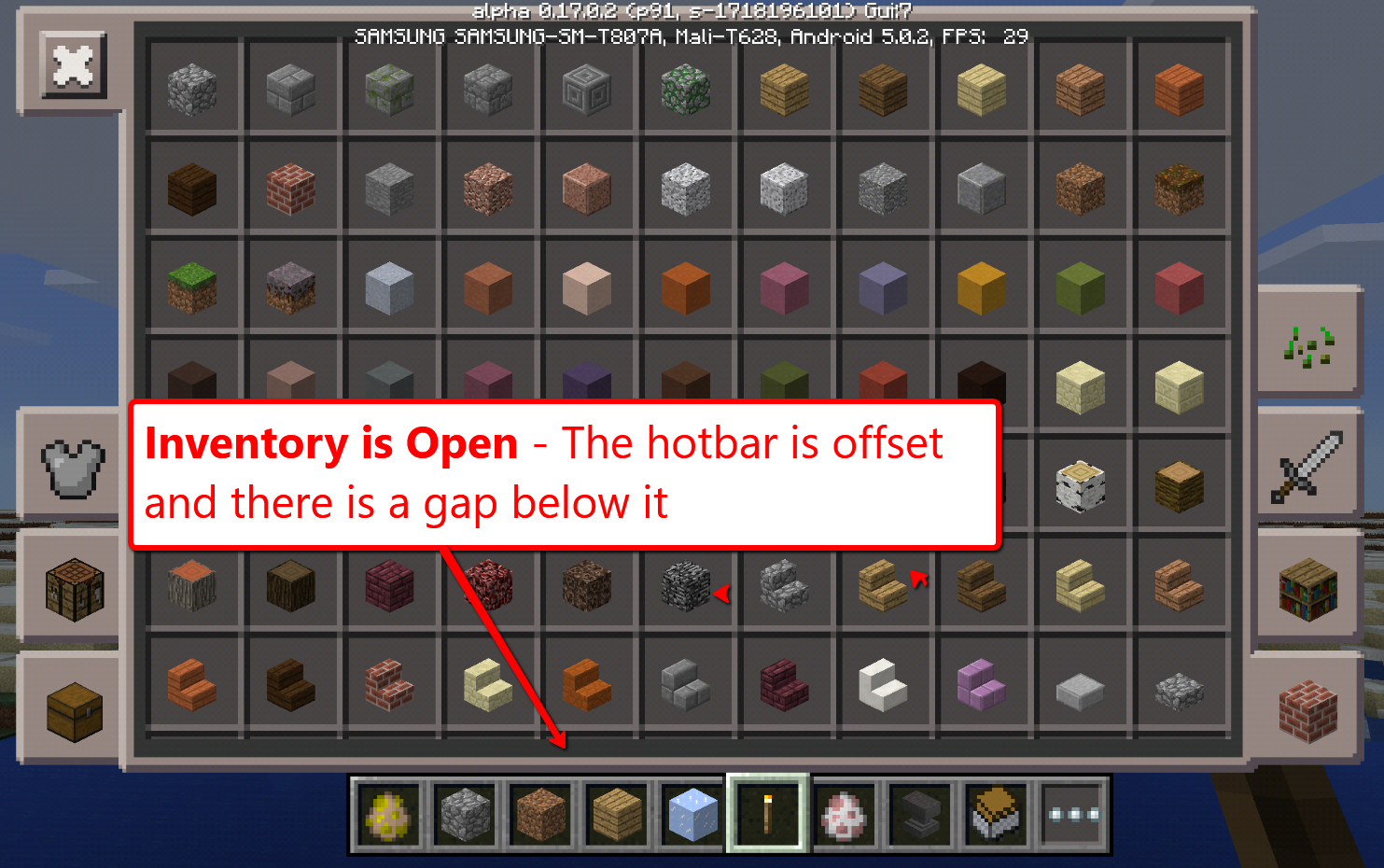


- Fixed
 8times9
- 10
- 8
- Confirmed
- 44858
- Tablet - iOS - iPad Mini
- GUI
0.14.2 - 1.1.4.51
0.14.2 0.14.3 0.15.0 Beta build 1 0.15.0 Beta build 3 0.15.0 0.15.1 Beta 1 0.15.90.8 0.16.0 0.16.1 0.17.0.1 0.17.0.2 0.16.2 1.0.0.0 1.0.0.2 1.0.0.7 1.0.0 1.0.1 1.0.2 1.0.3 1.0.4.0 1.0.4.11 1.0.6.0 1.0.5.54 1.1.0.0 1.1.0.1 1.0.6.52 1.1.0.4 1.1.0.5 1.0.7.0 1.1.0.8 1.1.0.9 1.1.0.55 1.1.1.1 1.1.1.51 1.1.2.50 1.1.3.1 1.1.4.51- 0.15.1 1.2.8.0
Created Issue:
Hotbar shifts to right by very little when inventory is opened
When the inventory is opened, the hotbar shifts to the right by a few pixels.

relates to
When the inventory is opened, the hotbar shifts to the right by a few pixels.
gatharian added:
This sometimes makes it hard to open the inventory when pressing the "..." inventory icon.
relates to
![[Mojang] MissMarzenia (Aleksandra Zajac)](../../../data/assets/gravatar/missmarzenia.png)
Hotbar shifts to rightby very littlewhen inventory is openedHotbar shifts to the right when inventory is opened
When the inventory is opened, the hotbar shifts to the right
by a few pixels.gatharian added:
This sometimes makes it hard to open the inventory when pressing the "..." inventory icon.When the inventory is opened, the hotbar shifts to the right. The hotbar is now offset and there is a huge gap under it.
When the inventory is opened, the hotbar shifts to the right. The hotbar is now offset and there is a huge gap under it when opening your inventory.
When the inventory is opened, the hotbar shifts to the right. The hotbar is now offset and there is a huge gap under it
whenopening your inventory.When the inventory is opened, the hotbar shifts to the right. The hotbar is now offset and there is a huge gap under it after opening your inventory.
relates to
![[Mojang] Adrian Östergård](../../../data/assets/gravatar/nighter.jpeg)
is duplicated by
duplicates
duplicates
is duplicated by
is duplicated by
relates to


relates to
relates to
![[Mojang] Mega_Spud (Jay Wells)](../../../data/avatars/users/92696.png)
is duplicated by
The inventory button dots texture is not consistent when inventory is open. See photos attached.
gatharian added:
Related issues MCPE-14279, MCPE-14144 and MCPE-14278
Thank you for your report!
However, this issue has been closed as a Duplicate of MCPE-14279.
Quick Links:
📓 Issue Guidelines – 💬 Community Support – 📧 Feedback – 📖 Game Wiki
Non-Primary Issue
Confirmed on Samsung Galaxy S6 (SM-G920W8), Android 5.1.1 and Apple iPad3 (MC705C/A) iOS 9.3.1 (13E238). Does not affect win10 devices where the hotbar disappears when in a GUI.
Affects 0.15 build 1
I am afraid we can not reproduce this bug in the recent version. Please update affected versions if this bug still occurs.
You are correct, this appears to have been fixed.
This doesn't affect Minecraft Windows 10 Edition BUT still affects MCPE 0.15.1 build 1
Still happens on v0.15.10, Apple iPad Mini 3rd Generation
Confirmed on v1.0.0, iPhone 5s, iOS 10
Hotbar shifts to the right when I opened my inventory.
Confirmed on v1.0.0, Windows 10 PC
Hotbar shifts upward slightly when you open your inventory if you play in Pocket mode.
Confirmed on 1.0.2 / iOS.
This issue is more problematic than it appears, because when you open your inventory the rightmost slot of the hotbar shifts to the place where the "..." button was previously there, i.e. where your finger is on. Most of the time the game thinks you pressed on the "..." button and touched the rightmost slot, and you end up changing an active slot unexpectedly.
Can confirm for 1.0.4.0. A really annoying bug! Mojang, pls.