Enderman sometimes stops being hostile even when we deal damage or look to him
Sometimes when enderman is hostile and is attacking us, randomly he stops being hostile and stops attacking.This happens when he teleports or when he is taking damage and sometimes you running from him some time he stops being hostile
Additional information provided by user-01fa9
Endermen in all dimensions regularly stop being hostile towards a player after being aggroed by the player. This can happen after a second or a few seconds. It should also be noted that this is related to endermen teleportation as it is when they teleport that they loose their aggression towards the player.
While most obvious in the nether (as you hit the endermen once and it is usually never seen again after it tps) it can be observed in other circonstances.
This makes collecting ender pearls especially tedious and painful as the endermen rarely remains aggored long enough at a player for the player to be able to kill it.
To reproduce
- Create a flat world in creative mode
- Give yourself netherite armour for protection, a stack of enchanted golden apples, and a stack of endermen spawn eggs.
- Make sure you are wearing the armour and then switch the gamemode to survival.
- Once in survival, eat an enchanted golden apple to not die from endermen attacks.
- Now, spawn one endermen on the ground using the endermen egg.
- Stare at the endermen to make it aggro towards you.
- Hit the endermen with your fist to keep it from hitting you.
- Continue to do this until the endermen teleports.
- Turn and look around to see where the endermen has teleported to.
- The endermen will either have unaggroed or if he is still aggro, repeat step 7 to 9 until he unaggroes from you. (This should not take long)
- Observe that the endermen has unaggroed from the player.
- Repeat process to see that it is not simply a one off occurrence.
- Note that the endermen can seemingly unaggro from the player at any distance.
Observed results:
The endermen often unaggroes from the player after teleporting. This can happen at any distance from the player.
*Expected result: *
The endermen should not unaggro from the player moments after having been aggroed by a player and as long as it has not despawned from being outside the simulation distance.
Linked Issues
is duplicated by12
 MCPE-41692the endermans do not attackDuplicateMCPE-67744the enderman stops chasing the player after he look at himDuplicateMCPE-102829Enderman BehaviorDuplicateMCPE-153108Endermen are too lenientDuplicateMCPE-154906Endermen not being aggressive and despawning immediatelyDuplicateMCPE-155709Aggravated enderman stop becoming aggravated when they can't attack the player that they are aggravated atDuplicateMCPE-156065Enderman stop being hostile randomlyDuplicateMCPE-156239Steroids enderman in bedrock DuplicateMCPE-156546Endermen sometimes forgot player to attack them. DuplicateMCPE-157037Enderman stop targeting you way too fast!DuplicateMCPE-157359Enderman glitchDuplicateMCPE-160831bugged endermans Duplicate
![[Mod] GoldenHelmet](../../../data/avatars/users/18951.svg)

- Fixed
 Lio
Lio- 37
- 15
- Confirmed
- 203044, 786670
- Multiple
- Android 6.0
- enderman
1.13.0.1 Beta - 1.19.20
1.13.0.1 Beta 1.12.0.14 Beta 1.19.0.35 Preview 1.18.33 Hotfix 1.18.32 1.18.30.29 Preview 1.18.30.28 Beta 1.18.30.27 Preview 1.18.30.26 Beta 1.18.30.23 Preview 1.18.30.22 Beta 1.18.20.30 Preview 1.18.20.28 Preview 1.18.20.29 Beta 1.18.20.27 Beta 1.18.20.25 Beta 1.18.20.24 Preview 1.18.20.23 Beta 1.18.20.22 Preview 1.18.20.21 Beta 1.18.10.22 Beta 1.18.10.21 Beta 1.18.10.20 Beta 1.18.0.27 Beta 1.18.0.24 Beta 1.18.0.23 Beta 1.18.0.22 Beta 1.16.100.60 Beta 1.16.100.52 Beta 1.16.100.51 Beta 1.16.100.50 Beta 1.16.20.54 Beta 1.16.20.53 Beta 1.16.20.52 Beta 1.16.20.50 Beta 1.16.0.68 Beta 1.16.0.67 Beta 1.16.0.66 Beta 1.14.0.6 Beta 1.14.0.4 Beta 1.14.0.3 Beta 1.14.0.2 Beta 1.14.0.1 Beta 1.13.0.18 Beta 1.13.0.17 Beta 1.13.0.16 Beta 1.13.0.15 Beta 1.13.0.13 Beta 1.13.0.9 Beta 1.13.0.6 Beta 1.13.0.5 Beta 1.12.0.13 Beta 1.12.0.12 Beta 1.12.0.11 Beta 1.12.0.10 Beta 1.12.0.9 Beta 1.6.0.5 1.6.0.6 1.6.0.8 Beta 1.6.0.30 Beta 1.7.0.2 Beta 1.7.0.9 Beta 1.9.0 1.10.0.4 Beta 1.12.0.3 Beta 1.12.0.4 Beta 1.12.0.6 Beta 1.11.1 1.11.2 1.13.0.4 Beta 1.13.0.2 Beta 1.14.30 Hotfix 1.16.0 1.16.20 1.16.40 Hotfix 1.17.40 1.18.0.25 Beta 1.17.41 Hotfix 1.18.0 1.18.1 Hotfix 1.18.2 Hotfix 1.18.10 1.18.30.21 Preview 1.18.30.20 Beta 1.18.12 Hotfix 1.18.30 1.18.31 1.19.0 1.19.20- 1.19.50.20 Preview 1.19.50
Created Issue:
Enderman sometimes stops being hostile even when we deals damage to him
- Sometimes when enderman is hostile and is attacking us, randomly he stops being hostile and stops attacking.This happens when he teleports or when he is taking damage and sometimes you running from him some time he stops being hostile
Device: LG K10
Enderman sometimes stops being hostile even when we deals damage or look to him

![[MCPE Mod] Auldrick](../../../data/avatars/users/10122.svg)
is duplicated by
![[Mojang] Mega_Spud (Jay Wells)](../../../data/avatars/users/92696.png)

![[Mod] Riley Park](../../../data/avatars/users/81743.png)
is duplicated by
relates to
is duplicated by
![[Bot] Arisa](../../../data/avatars/users/43007.png)
is duplicated by
- Sometimes when enderman is hostile and is attacking us, randomly he stops being hostile and stops attacking.This happens when he teleports or when he is taking damage and sometimes you running from him some time he stops being hostile
Device: LG K10
Sometimes when enderman is hostile and is attacking us, randomly he stops being hostile and stops attacking.This happens when he teleports or when he is taking damage and sometimes you running from him some time he stops being hostile
Additional information provided by user-01fa9
Endermen in all dimensions regularly stop being hostile towards a player after being aggroed by the player. This can happen after a second or a few seconds. It should also be noted that this is related to endermen teleportation as it is when they teleport that they loose their aggression towards the player.
While most obvious in the nether (as you hit the endermen once and it is usually never seen again after it tps) it can be observed in other circonstances.
This makes collecting ender pearls especially tedious and painful as the endermen rarely remains aggored long enough at a player for the player to be able to kill it.
To reproduce
- Create a flat world in creative mode
- Give yourself netherite armour for protection, a stack of enchanted golden apples, and a stack of endermen spawn eggs.
- Make sure you are wearing the armour and then switch the gamemode to survival.
- Once in survival, eat an enchanted golden apple to not die from endermen attacks.
- Now, spawn one endermen on the ground using the endermen egg.
- Stare at the endermen to make it aggro towards you.
- Hit the endermen with your fist to keep it from hitting you.
- Continue to do this until the endermen teleports.
- Turn and look around to see where the endermen has teleported to.
- The endermen will either have unaggroed or if he is still aggro, repeat step 7 to 9 until he unaggroes from you. (This should not take long)
- Observe that the endermen has unaggroed from the player.
- Repeat process to see that it is not simply a one off occurrence.
- Note that the endermen can seemingly unaggro from the player at any distance.
Observed results:
The endermen often unaggroes from the player after teleporting. This can happen at any distance from the player.*Expected result: *
The endermen should not unaggro from the player moments after having been aggroed by a player and as long as it has not despawned from being outside the simulation distance.
is duplicated by
![[Mod] markderickson](../../../data/avatars/users/18946.svg)
is duplicated by
relates to

is duplicated by
relates to
MCPE-35306 Enderman Lose Aggro.mcworld
is duplicated by
![[Mod] OcelotOnesie](../../../data/avatars/users/43220.png)
is duplicated by
is duplicated by
is duplicated by
relates to
is duplicated by
Enderman sometimes stops being hostile even when we dealsdamage or look to him
Thank you for your report!
However, this issue is a Duplicate of MCPE-35306.
If you have additional information, please add it to that report.
Please search before reporting, as it's likely that one exists already.
Quick Links:
📓 Issue Guidelines – 💬 Community Support – 📧 Customer Support – 📖 Game Wiki
Thank you for your report!
We're actually already tracking this issue under MCPE-35306 so I've requested this report be resolved and linked as a duplicate.
If you would like to add a vote and any extra information to the main ticket it would be appreciated.
If you haven't already, you might like to make use of the search feature to see if the issue has already been mentioned.
Quick Links:
📓 Issue Guidelines – 💬 Community Support – 📧 Customer Support – 📖 Game Wiki
I've been studying the .json files and documentation, as well as NBT data, and I think the problem with targeting ranges may be due to contradictions between minecraft:follow_range, attack_radius (within minecraft:behavior.ranged_attack), max_dist (within minecraft:behavior.nearest_attackable_target), and a lack of any specification for persist_time (also within minecraft:behavior.nearest_attackable_target).
Ghasts
follow_range = 64
attack_radius = 64
max_dist = 28
Comment: these values make it look like Ghasts are supposed to be able to follow and attack players from 64 blocks away, but that range is defeated by their inability to target beyond 28. Since the default persist_time is 0, even if they acquire targets within 28 blocks, they immediately drop those targets if they are > 28 blocks away.
In Java Edition ghasts target players at 64 blocks away, but only when they are also within 4 blocks vertical. That can be done in Bedrock Edition by using the following lines in "minecraft:behavior.nearest_attackable_target":
"max_dist": 64 (within the player filter)
"target_search_height": 4
See here for the Java code analysis.
Ravagers
follow_range = 64
max_dist = 16
These values make it look like Ravagers are supposed to follow targets up to 64 blocks away, but they can only select targets 16 blocks away. Like Ghasts, with no persist_time, they immediately drop targets beyond 16 blocks. However, Ravagers do have a max_dist of 64 under the hurt_by_target component, so they can target a player/mob that hurts their rider from that distance.
Java parity would be a max_dist = 32.
Zombies/Husks/Drowned/Zombified Piglins
<no follow_range specified>
max_dist = 35 (20 for drowned)
Zombie variants default to follow_range = 16, which defeats their targeting range. The reason some do pursue targets that are farther than 16 blocks away is that they can get a RandomSpawnBonus multiplier to the default range. Here is an example:
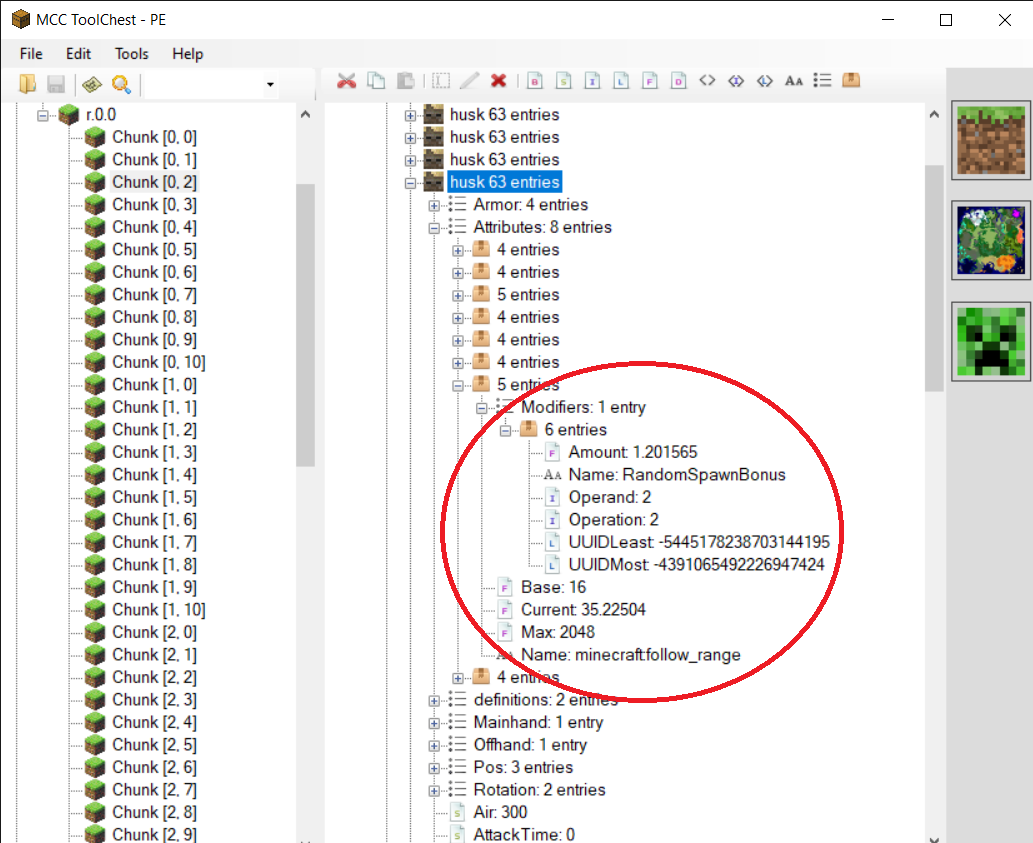
Husks also have a within_radius = 25 (in nearest_attackable_target). According to the updated documetation for 1.16, this is supposed to specify how far away a target can be followed if follow_range is not specified. I'm not sure how this is supposed to work; the way it reads to me is that in conjunction with the default persist_time = 0, within_radius would defeat any higher max_dist targeting range for melee attacks. In actual gameplay it seems to be defeated by the default follow_range.
Endermen
follow_range = 32
search_radius 64 (within minecraft:lookat, for aggro at players)
max_dist = 64 (for endermites)
Endermen agrro and target from 64 blocks, but this is defeated by their lower follow range. Related to MCPE-35306.
Blazes (MCPE-35647)
follow_range = 48
attack_radius = 16
max_dist = 48
Blazes should be able to target and attack from 48 blocks (see MC-51266 and MC-112013), but this is defeated by their attack radius. You can see them aggro when they target at > 16 blocks because they flame up and start to float but then quickly stop.
Thank you for your report!
We're tracking this issue in MCPE-35306 and MCPE-35307, so this ticket is being resolved and linked as a duplicate.
If you would like to add a vote and any extra information to the main ticket it would be appreciated.
If you haven't already, you might like to make use of the search feature to see if the issue has already been mentioned.
Quick Links:
📓 Issue Guidelines – 💬 Community Support – 📧 Mojang Support – ✍️ Feedback and Suggestions – 📖 Game Wiki
Thank you for your report!
We're tracking this issue in MCPE-35306, so this ticket is being resolved and linked as a duplicate.
If you would like to add a vote and any extra information to the main ticket it would be appreciated.
If you haven't already, you might like to make use of the search feature to see if the issue has already been mentioned.
Quick Links:
📓 Bug Tracker Guidelines – 💬 Community Support – 📧 Mojang Support
📓 Project Summary – ✍️ Feedback and Suggestions – 📖 Game Wiki
– I am a bot. This action was performed automatically! The ticket was resolved by one of our moderators, and I left this message to give more information to you.
Thank you for your report!
We're tracking this issue in MCPE-35306, so this ticket is being resolved and linked as a duplicate.
If you would like to add a vote and any extra information to the main ticket it would be appreciated.
If you haven't already, you might like to make use of the search feature to see if the issue has already been mentioned.
Quick Links:
📓 Bug Tracker Guidelines – 💬 Community Support – 📧 Mojang Support
📓 Project Summary – ✍️ Feedback and Suggestions – 📖 Game Wiki
– I am a bot. This action was performed automatically! The ticket was resolved by one of our moderators, and I left this message to give more information to you.
Thank you for your report!
We're tracking this issue in MCPE-35306, so this ticket is being resolved and linked as a duplicate.
If you would like to add a vote and any extra information to the main ticket it would be appreciated.
If you haven't already, you might like to make use of the search feature to see if the issue has already been mentioned.
Quick Links:
📓 Bug Tracker Guidelines – 💬 Community Support – 📧 Mojang Support
📓 Project Summary – ✍️ Feedback and Suggestions – 📖 Game Wiki
– I am a bot. This action was performed automatically! The ticket was resolved by one of our moderators, and I left this message to give more information to you.
Thank you for your report!
We're tracking this issue in MCPE-35306, so this ticket is being resolved and linked as a duplicate.
If you would like to add a vote and any extra information to the main ticket it would be appreciated.
If you haven't already, you might like to make use of the search feature to see if the issue has already been mentioned.
Quick Links:
📓 Bug Tracker Guidelines– 📧 Mojang Support
📓 Project Summary – ✍️ Feedback and Suggestions – 📖 Game Wiki
Thank you for your report!
We're tracking this issue in MCPE-35306, so this ticket is being resolved and linked as a duplicate.
If you would like to add a vote and any extra information to the main ticket it would be appreciated.
If you haven't already, you might like to make use of the search feature to see if the issue has already been mentioned.
Quick Links:
📓 Bug Tracker Guidelines – 💬 Community Support – 📧 Mojang Support
📓 Project Summary – ✍️ Feedback and Suggestions – 📖 Game Wiki
– I am a bot. This action was performed automatically! The ticket was resolved by one of our moderators, and I left this message to give more information to you.
Thank you for your report!
We're tracking this issue in MCPE-35306, so this ticket is being resolved and linked as a duplicate.
If you would like to add a vote and any extra information to the main ticket it would be appreciated.
If you haven't already, you might like to make use of the search feature to see if the issue has already been mentioned.
Quick Links:
📓 Bug Tracker Guidelines – 💬 Community Support – 📧 Mojang Support
📓 Project Summary – ✍️ Feedback and Suggestions – 📖 Game Wiki
Thank you for your report!
We're tracking this issue in MCPE-35306, so this ticket is being resolved and linked as a duplicate.
If you would like to add a vote and any extra information to the main ticket it would be appreciated.
If you haven't already, you might like to make use of the search feature to see if the issue has already been mentioned.
Quick Links:
📓 Bug Tracker Guidelines – 💬 Community Support – 📧 Mojang Support
📓 Project Summary – ✍️ Feedback and Suggestions – 📖 Game Wiki
– I am a bot. This action was performed automatically! The ticket was resolved by one of our moderators, and I left this message to give more information to you.
Thank you for your report!
We're tracking this issue in MCPE-35306, so this ticket is being resolved and linked as a duplicate.
If you would like to add a vote and any extra information to the main ticket it would be appreciated.
If you haven't already, you might like to make use of the search feature to see if the issue has already been mentioned.
Quick Links:
📓 Bug Tracker Guidelines – 💬 Community Support – 📧 Mojang Support
📓 Project Summary – ✍️ Feedback and Suggestions – 📖 Game Wiki
– I am a bot. This action was performed automatically! The ticket was resolved by one of our moderators, and I left this message to give more information to you.
Thank you for your report!
We're tracking this issue in MCPE-35306, so this ticket is being resolved and linked as a duplicate.
If you would like to add a vote and any extra information to the main ticket it would be appreciated.
If you haven't already, you might like to make use of the search feature to see if the issue has already been mentioned.
Quick Links:
📓 Bug Tracker Guidelines – 💬 Community Support – 📧 Mojang Support
📓 Project Summary – ✍️ Feedback and Suggestions – 📖 Game Wiki
– I am a bot. This action was performed automatically! The ticket was resolved by one of our moderators, and I left this message to give more information to you.

Not a duplicate, I think. The description of MCPE-35306 is different from this, and I can reproduce it in 1.19.51.
Endermans stop aggravating permanently while they can't attack player for a long time.
This ticket is copied from MCPE-155709, which is different from MCPE-35306 but closed incorrectly, and now the issue is still available.
How to Reproduce (the easiest way):
- change to creative mode.
- create a structure that can prevent enderman attack you and teleport to other place (like "experiment.png" in attachments).
- spawn an enderman.
- change to survival mode.
- stare at the enderman.
Result:
Decades of seconds later, The enderman stopped aggravating forever. No matter how you attack it, it will never attack you. ---- Unless you change your game mode or the world is reload.
What you describe has not been my experience, especially since MCPE-35306 was fixed. Could you provide or link to a video that shows the issue?
I think that is intended. Endermen will stop attacking the player after taking several hits or damage according to the wiki.
I think it would be hitbox or something problems
but however it wouldn't be work when idling when you not moving.
Affects 1.11.0.1 beta version
Affects 1.11.0.3 beta version
Affects 1.11.0.4 beta version
I have this issue. I will stare at an enderman and it will not attack
Agree with Jeffrey. When you get the first hit their is a small chance it will remain neutral btw. (I am not 100% sure this affects bedrock but it affects some version.)
This is due to the enderman’s follow_range bring too short: it’s 32 instead of 64–see MCPE-50207. If an enderman randomly teleports to a position where the player is no longer within its follow_range, it will stop targeting. This is especially likely to happen if the player is running from the enderman, as noted in the description.
Confirmed for 1.16.0
this happens especially when using a fire spect sword which causes them to teleport repeatedly and out of range
Affects 1.17.40.20
Please update description to the following if possible:
Description:
Endermen in all dimensions regularly stop being hostile towards a player after being aggroed by the player. This can happen after a second or a few seconds. It should also be noted that this is related to endermen teleportation as it is when they teleport that they loose their aggression towards the player.
While most obvious in the nether (as you hit the endermen once and it is usually never seen again after it tps) it can be observed in other circonstances.
This makes collecting ender pearls especially tedious and painful as the endermen rarely remains aggored long enough at a player for the player to be able to kill it.
To reproduce:
Note that the endermen can seemingly unaggro from the player at any distance.
Observed results:
The endermen often unaggroes from the player after teleporting. This can happen at any distance from the player.
Expected result:
The endermen should not unaggro from the player moments after having been aggroed by a player and as long as it has not despawned from being outside the simulation distance.
The reason that endermen "seemingly" unaggro at any distance is that they often teleport more than once in rapid succession.
As I stated in my older comment, the bug here is just that the enderman's follow_range is set to 32, when it should be 64. Whenever a mob's target is farther away than its follow_range, it stops following, i.e. it drops or "forgets" the target. Endermen losing aggro happens much more rapidly since 1.18 because its teleport range was doubled (
MCPE-152268).MCPE-35306 Enderman Lose Aggro.mcworld can be used to demonstrate that losing aggro is a simple matter of the enderman teleporting > 32 blocks from the player. It consists of a command block that gives the player an arrow on every tick that an enderman is within 32 blocks. A ring of redstone lights also stays lit as long as an enderman is within 32 blocks and goes out when there is no enderman within 32 blocks.
To use the test world:
Expected result:
The enderman maintains aggro.
Observed result:
The enderman loses aggro after a few seconds, and the moment it loses aggro coincides with the lights going out and the arrows stopping pulsing. (Note that the lights and arrows will resume if the enderman comes back in range.)
Here is an enderman file with this bug fixed and otherwise matching 1.18.10-1.18.33 vanilla. enderman aggro range fixed.json
So this bug can't be unsolved, right? I understand that enderman's follow-range was modified but then what can we do? just acept it?