having to restart minecraft to see how you look with a custom skin
In The 1.7.0.9 beta when you go to your skins and choose a custom skin or change you have to restart minecraft so reopen it to see how you look, this is atiny annoying since you have to reopen minecraft everytime you change your skin.
Linked Issues
is duplicated by81
 MCPE-34609Settings are not saved | Skin can only be changed after opening it several timesDuplicateMCPE-37473Can't change into custom skinsDuplicateMCPE-38256Unable to change to user skin after 1.7 updateDuplicateMCPE-38261Can't change skinDuplicateMCPE-38336Minecraft SkinDuplicateMCPE-38339Skin changeDuplicateMCPE-38344It won't let me use custom skins without continuously leaving the game and going back in.DuplicateMCPE-38348When changing custom skin it wont showDuplicateMCPE-38361Changing skin doesn't work unless I quit the game and open againDuplicateMCPE-38384Custom Skins not workDuplicateMCPE-38403Whenever I try to change my skin, it doesn’t work. I have to close the app and reopen it for the skin to show up as changed.DuplicateMCPE-38404Skin select from camera roll will not select chosen skin, but will only use the same oneDuplicateMCPE-38634Windows 10 version not properly updating skins unless re-launched.DuplicateMCPE-38644Skins not confirming.DuplicateMCPE-38646Unable to change skinDuplicateMCPE-38650Minecraft Skins not WorkingDuplicateMCPE-38735Skin changing problem.DuplicateMCPE-38779Crashing repeatedly after skin change DuplicateMCPE-38792Skin change effective after a restartDuplicateMCPE-38922Custom Skin BugDuplicateMCPE-38924Version 1.7. everytime I want to change custom skins to another one it doesn't change and sometimes turns black and my gameplay makes other skins look black like nullDuplicateMCPE-38957Can’t change the skin.DuplicateMCPE-38959Bug with skin changing.DuplicateMCPE-38981Custom Skins BugDuplicateMCPE-39015I am unable to change skins while playing MinecraftDuplicateMCPE-39027Minecraft hates me...DuplicateMCPE-39036Attempting to change default with custom skin requires restart of app to make it displayDuplicateMCPE-39047Can’t change skin in gameDuplicateMCPE-39184Cant change skinsDuplicateMCPE-39249Can't change custom skin unless closing out game and going back on (Using Windows 10)DuplicateMCPE-39255Custom Skin BugDuplicateMCPE-39256It wont let anyone change their skin on many devises:tablet,Phone,Computer etc...DuplicateMCPE-39268On mcpe version 1.7.0 when attempting to change skins whether in game ir out it will not show the new skin unless refreshing the appDuplicateMCPE-39298Skin not changing if using choose new skinDuplicateMCPE-39353My custom skins are not workingDuplicateMCPE-39408Broken SkinsDuplicateMCPE-39484A skin bug: You can't choose a new skin unless you reload.DuplicateMCPE-39506Skin ChangingDuplicateMCPE-39508Skin wont chage into a new skin when I select a different skin.DuplicateMCPE-39657Cannot change custom skins in-game.DuplicateMCPE-39677The custom skin doesn't change DuplicateMCPE-39788So basically when I want to change my skin it does not let me not even in game. For my skin to change I need to refresh my Minecraft over and over again.DuplicateMCPE-39846Custom skinsDuplicateMCPE-39868I don't know if this is really a bug but there's no button to load my own skinDuplicateMCPE-39897Skin Confirmation BugDuplicateMCPE-39955"Choose New Skin" only ends up showing the first ever chosen skinDuplicateMCPE-40028It won't let me change my skin without leaving and reopening the game.DuplicateMCPE-40034Cannot change skin without having to log outDuplicateMCPE-40089When attempting to change between custom skins, it won't change to the skin selected until Minecraft is closed and restarted.DuplicateMCPE-40155Not letting me change my skin DuplicateMCPE-40340I can't change my custom skins.DuplicateMCPE-40375changing custom skins does not workDuplicateMCPE-40390Custom Skin doesn't changeDuplicateMCPE-40493Custom skin switching bugDuplicateMCPE-40561Skins will not change in game.DuplicateMCPE-40564Custom skins not changing. DuplicateMCPE-40602Changing skins on Windows 10 1.8.1DuplicateMCPE-40622After the latest update when me and my friends would go to change the coustom skin, we would select the picture or file for ower skins and it would apply them but would not show a change in the texture unless e reload our minecraft.DuplicateMCPE-40647 Unchangeable Minecraft skinDuplicateMCPE-40687Can't change skins in game DuplicateMCPE-40703Have to restart minecraft for custom skin to changeDuplicateMCPE-40822I can not change skin anymoreDuplicateMCPE-40859Changing skins to any custom skin just gives you the last custom skin you usedDuplicateMCPE-40947Skin ErrorsDuplicateMCPE-41132My friends minecraft (iOS) on her Minecraft it won’t let her change her skin it is invisible and she has tried everything and needs to be able to apply her skin on Minecraft please helpDuplicateMCPE-41406Changing customized skins in PEDuplicateMCPE-41421Hi i have a problem with the custom skins will not let me confirm the skin if it changes but will not let me confirm when they fix this problem in bug fix updateDuplicateMCPE-41562Skin probelmDuplicateMCPE-41776auto changeDuplicateMCPE-41903Skin glitchDuplicateMCPE-42018Confirm Button Unclickable When Picking Skins from PhotosDuplicateMCPE-42687Bug report on Skin selection screen.DuplicateMCPE-42809Skin Selection.DuplicateMCPE-42897Problem with The Skin PickerDuplicateMCPE-43385My Minecarft skin page is not working and it wont let me use custom skins DuplicateMCPE-44563Game won’t let you confirm custom skins DuplicateMCPE-45464unable to select custom skin, says limited usageDuplicateMCPE-45616Can't change skin to a custom one, met with a gray "Confirm" buttonDuplicateMCPE-45847Can't Confirm Custom Skin ChangeDuplicateMCPE-46647cannot switch between custom made skins in gameDuplicateMCPE-48657Skin limited usage for a skin i madeDuplicate




Created Issue:
having to restart minecraft to see how you look with a skin
In The 1.7.0.9 beta when you go to your skins and choose a custom skin or change you have to restart minecraft so reopen it to see how you look, this is atiny annoying since you have to reopen minecraft everytime you change your skin.
![[Mod] Neko](../../../data/avatars/users/92901.png)
![[MCPE Mod] Celesian](../../../data/avatars/users/81635.png)
is duplicated by
![[Mojang] Mega_Spud (Jay Wells)](../../../data/avatars/users/92696.png)
relates to
is duplicated by
having to restart minecraft to see how you look with a custom skin
is duplicated by
is duplicated by
![[Mod] bemoty](../../../data/avatars/users/50554.png)
is duplicated by
is duplicated by
![[Mod] Asteraoth](../../../data/avatars/users/92886.png)
is duplicated by
is duplicated by
is duplicated by
is duplicated by
is duplicated by
is duplicated by
is duplicated by
is duplicated by
is duplicated by
is duplicated by
is duplicated by
is duplicated by

is duplicated by
is duplicated by
is duplicated by
is duplicated by
is duplicated by
is duplicated by
is duplicated by
is duplicated by
is duplicated by
![[MCPE Mod] Auldrick](../../../data/avatars/users/10122.svg)
is duplicated by
is duplicated by
is duplicated by
is duplicated by
is duplicated by
is duplicated by
is duplicated by
is duplicated by
is duplicated by
is duplicated by
is duplicated by
is duplicated by
is duplicated by
is duplicated by
is duplicated by
is duplicated by
is duplicated by
is duplicated by
is duplicated by
is duplicated by
relates to
is duplicated by
is duplicated by
is duplicated by
is duplicated by
is duplicated by
is duplicated by
is duplicated by
is duplicated by
is duplicated by
is duplicated by
Thank you for your report!
However, this issue has been closed as a Duplicate of MCPE-37926
It has been linked to this report. If you have additional information, please add it to that report.
Please search before reporting, as it's likely that one exists already.
Quick Links:
📓 Issue Guidelines – 💬 Community Support – 📧 Customer Support – 📖 Game Wiki
Thank you for your report!
However, this issue has been closed as a Duplicate of MCPE-37926
It has been linked to this report. If you have additional information, please add it to that report.
Please search before reporting, as it's likely that one exists already.
Quick Links:
📓 Issue Guidelines – 💬 Community Support – 📧 Customer Support – 📖 Game Wiki
Thank you for your report!
However, this issue has been closed as a Duplicate of MCPE-37926
It has been linked to this report. If you have additional information, please add it to that report.
Please search before reporting, as it's likely that one exists already.
Quick Links:
📓 Issue Guidelines – 💬 Community Support – 📧 Customer Support – 📖 Game Wiki
Thank you for your report!
However, this issue has been closed as a Duplicate of MCPE-37926
It has been linked to this report. If you have additional information, please add it to that report.
Please search before reporting, as it's likely that one exists already.
Quick Links:
📓 Issue Guidelines – 💬 Community Support – 📧 Customer Support – 📖 Game Wiki
Thank you for your report!
However, this issue has been closed as a Duplicate of MCPE-37926
It has been linked to this report. If you have additional information, please add it to that report.
Please search before reporting, as it's likely that one exists already.
Quick Links:
📓 Issue Guidelines – 💬 Community Support – 📧 Customer Support – 📖 Game Wiki
Thank you for your report!
However, this issue has been closed as a Duplicate of MCPE-37926
It has been linked to this report. If you have additional information, please add it to that report.
Please search before reporting, as it's likely that one exists already.
Quick Links:
📓 Issue Guidelines – 💬 Community Support – 📧 Customer Support – 📖 Game Wiki
Thank you for your report!
However, this issue has been closed as a Duplicate of MCPE-37926.
Please add a vote and any new information to the main ticket, which will be updated accordingly.
If you have not, you might like to make use of the search feature before making a new ticket, as it's likely that the issue has been reported already.
Quick Links:
📓 Issue Guidelines – 💬 Community Support – 📧 Feedback – 📖 Game Wiki
Thank you for your report!
However, this issue has been closed as a Duplicate of MCPE-37926.
Please add a vote and any new information to the main ticket, which will be updated accordingly.
If you have not, you might like to make use of the search feature before making a new ticket, as it's likely that the issue has been reported already.
Quick Links:
📓 Issue Guidelines – 💬 Community Support – 📧 Feedback – 📖 Game Wiki
Thank you for your report!
However, this issue has been closed as a Duplicate of MCPE-37926.
Please add a vote and any new information to the main ticket, which will be updated accordingly.
If you have not, you might like to make use of the search feature before making a new ticket, as it's likely that the issue has been reported already.
Quick Links:
📓 Issue Guidelines – 💬 Community Support – 📧 Feedback – 📖 Game Wiki
Thank you for your report!
However, this issue has been closed as a Duplicate of MCPE-37926.
Please add a vote and any new information to the main ticket, which will be updated accordingly.
Quick Links:
📓 Issue Guidelines – 💬 Community Support – 📧 Feedback – 📖 Game Wiki
Thank you for your report!
However, this issue has been closed as a Duplicate of MCPE-37926.
Please add a vote and any new information to the main ticket, which will be updated accordingly.
If you have not, you might like to make use of the search feature before making a new ticket, as it's likely that the issue has been reported already.
Quick Links:
📓 Issue Guidelines – 💬 Community Support – 📧 Feedback – 📖 Game Wiki

Thank you for your report!
However, this issue is a Duplicate of MCPE-37926.
If you have additional information, please add it to that report.
Please search before reporting, as it's likely that one exists already.
Quick Links:
📓 Issue Guidelines – 💬 Community Support – 📧 Customer Support – 📖 Game Wiki
Thank you for your report!
However, this issue is a Duplicate of MCPE-37926.
If you have additional information, please add it to that report.
Please search before reporting, as it's likely that one exists already.
Quick Links:
📓 Issue Guidelines – 💬 Community Support – ?☃DCE7 Customer Support – 📖 Game Wiki
Thank you for your report!
However, this issue has been closed as a Duplicate of MCPE-37926
It has been linked to this report. If you have additional information, please add it to that report.
Please search before reporting, as it's likely that one exists already.
Quick Links:
📓 Issue Guidelines – 💬 Community Support – 📧 Customer Support – 📖 Game Wiki
Thank you for your report!
However, this issue is a Duplicate of MCPE-37926.
If you have additional information, please add it to that report.
Please search before reporting, as it's likely that one exists already.
Quick Links:
📓 Issue Guidelines – 💬 Community Support – 📧 Customer Support – 📖 Game Wiki
Thank you for your report!
However, this issue is a Duplicate of MCPE-37926.
If you have additional information, please add it to that report.
Please search before reporting, as it's likely that one exists already.
Quick Links:
📓 Issue Guidelines – 💬 Community Support – 📧 Customer Support – 📖 Game Wiki
Thank you for your report!
However, this issue has been closed as a Duplicate of MCPE-37926 and MCPE-38112
It has been linked to this report. If you have additional information, please add it to that report.
Please search before reporting, as it's likely that one exists already.
Quick Links:
📓 Issue Guidelines – 💬 Community Support – 📧 Customer Support – 📖 Game Wiki
Thank you for your report!
However, this issue has been closed as a Duplicate of MCPE-37926
It has been linked to this report. If you have additional information, please add it to that report.
Please search before reporting, as it's likely that one exists already.
Quick Links:
📓 Issue Guidelines – 💬 Community Support – 📧 Customer Support – 📖 Game Wiki
Thank you for your report!
However, this issue has been closed as a Duplicate of MCPE-37926
It has been linked to this report. If you have additional information, please add it to that report.
Please search before reporting, as it's likely that one exists already.
Quick Links:
📓 Issue Guidelines – 💬 Community Support – 📧 Customer Support – 📖 Game Wiki
Thank you for your report!
However, this issue is Invalid.
Bug reports are only accepted in English, sorry.
This issue also duplicates MCPE-37926. If you have additional information, please add it to that report in English.
Quick Links:
📓 Issue Guidelines – 💬 Community Support – 📧 Customer Support – 📖 Game Wiki
Thank you for your report!
However, this issue has been closed as a Duplicate of MCPE-37926
It has been linked to this report. If you have additional information, please add it to that report.
Please search before reporting, as it's likely that one exists already.
Quick Links:
📓 Issue Guidelines – 💬 Community Support – 📧 Customer Support – 📖 Game Wiki
Thank you for your report!
However, this issue has been closed as a Duplicate of MCPE-37926
It has been linked to this report. If you have additional information, please add it to that report.
Please search before reporting, as it's likely that one exists already.
Quick Links:
📓 Issue Guidelines – 💬 Community Support – 📧 Customer Support – 📖 Game Wiki
Thank you for your report!
However, this issue is a {color:#FF5722}Duplicate{color} of MCPE-37926.
If you have additional information, please add it to that report.
Please search before reporting, as it's likely that one exists already.
Quick Links:
📓 Issue Guidelines – 💬 Community Support – 📧 Customer Support – 📖 Game Wiki
Does the correct skin show if you then restart the game? (If so it's likely the same issue as MCPE-37926)
Thank you for your report!
However, this issue is a Duplicate of MCPE-37926.
If you have additional information, please add it to that report.
Please search before reporting, as it's likely that one exists already.
Quick Links:
📓 Issue Guidelines – 💬 Community Support – 📧 Customer Support – 📖 Game Wiki
Thank you for your report!
However, this issue has been closed as a Duplicate of MCPE-37926.
Thanks for the information.
Please add a vote and any new information to the main ticket, which will be updated accordingly.
If you have not, you might like to make use of the search feature before making a new ticket, as it's likely that the issue has been reported already.
Quick Links:
📓 Issue Guidelines – 💬 Community Support – 📧 Feedback – 📖 Game Wiki
However this issue is a Duplicate of MCPE-37926
Thank you for your report!
However, this issue is a Duplicate of MCPE-37926.
If you have additional information, please add it to that report.
Please search before reporting, as it's likely that one exists already.
Quick Links:
📓 Issue Guidelines – 💬 Community Support – 📧 Customer Support – 📖 Game Wiki
Thank you for your report!
However, this issue is a Duplicate of MCPE-37926 / MCPE-38112.
If you have additional information, please add it to that report.
Please search before reporting, as it's likely that one exists already.
Quick Links:
📓 Issue Guidelines – 💬 Community Support – 📧 Customer Support – 📖 Game Wiki
Thank you for your report!
However, this issue has been closed as a Duplicate of MCPE-37926.
Please add a vote and any new information to the main ticket, which will be updated accordingly.
If you have not, you might like to make use of the search feature before making a new ticket, as it's likely that the issue has been reported already.
Quick Links:
📓 Issue Guidelines – 💬 Community Support – 📧 Feedback – 📖 Game Wiki

Auldrick you did not point out that some of these issues may have already been reported such as the skin bug, MCPE-37926. The sky bug and the saving bug are actually the same bug, reported as MCPE-31377 which has been fixed in the 1.9.0.0 beta (See my comment on that report to see what I mean).
Thank you for your report!
However, this issue is a Duplicate of MCPE-37926.
If you have additional information, please add it to that report.
Please search before reporting, as it's likely that one exists already.
Quick Links:
📓 Issue Guidelines – 💬 Community Support – 📧 Customer Support – 📖 Game Wiki
Thank you for your report!
However, this issue is a Duplicate of MCPE-37926.
If you have additional information, please add it to that report.
Please search before reporting, as it's likely that one exists already.
Quick Links:
📓 Issue Guidelines – 💬 Community Support – 📧 Customer Support – 📖 Game Wiki
Thank you for your report!
However, this issue is a Duplicate of MCPE-37926.
If you have additional information, please add it to that report.
Please search before reporting, as it's likely that one exists already.
Quick Links:
📓 Issue Guidelines – 💬 Community Support – 📧 Customer Support – 📖 Game Wiki
Thank you for your report!
However, this issue is a Duplicate of MCPE-37926.
If you have additional information, please add it to that report.
Please search before reporting, as it's likely that one exists already.
Quick Links:
📓 Issue Guidelines – 💬 Community Support – 📧 Customer Support – 📖 Game Wiki
Thank you for your report!
However, this issue is a Duplicate of MCPE-37926.
If you have additional information, please add it to that report.
Please search before reporting, as it's likely that one exists already.
Quick Links:
📓 Issue Guidelines – 💬 Community Support – 📧 Customer Support – 📖 Game Wiki
Thank you for your report!
However, this issue has been closed as a Duplicate of MCPE-37926.
Please add a vote and any new information to the main ticket, which will be updated accordingly.
If you have not, you might like to make use of the search feature before making a new ticket, as it's likely that the issue has been reported already.
Quick Links:
📓 Issue Guidelines – 💬 Community Support – 📧 Feedback – 📖 Game Wiki
Thank you for your report!
However, this issue is a Duplicate of MCPE-37926 / MCPE-36942.
If you have additional information, please add it to that report.
Please search before reporting, as it's likely that one exists already.
Quick Links:
📓 Issue Guidelines – 💬 Community Support – 📧 Customer Support – 📖 Game Wiki
Thank you for your report!
However, this issue is a Duplicate of MCPE-37926.
If you have additional information, please add it to that report.
Please search before reporting, as it's likely that one exists already.
Quick Links:
📓 Issue Guidelines – 💬 Community Support – 📧 Customer Support – 📖 Game Wiki
It appears this issue is caused by MCPE-37926, which has already been linked as related. Once MCPE-37926 is fixed, this will also be fixed
Thank you for your report!
However, this issue has been closed as a Duplicate of MCPE-37926.
Please add a vote and any new information to the main ticket, which will be updated accordingly.
If you have not, you might like to make use of the search feature before making a new ticket, as it's likely that the issue has been reported already.
Quick Links:
📓 Issue Guidelines – 💬 Community Support – 📧 Feedback – 📖 Game Wiki
Thank you for your report!
However, this issue is a Duplicate of MCPE-37926.
If you have additional information, please add it to that report.
Please search before reporting, as it's likely that one exists already.
Quick Links:
📓 Issue Guidelines – 💬 Community Support – 📧 Customer Support – 📖 Game Wiki
Duplicate of MCPE-37926
Thank you for your report!
However, this issue has been closed as a Duplicate of MCPE-37926
It has been linked to this report. If you have additional information, please add it to that report.
Please search before reporting, as it's likely that one exists already.
Quick Links:
📓 Issue Guidelines – 💬 Community Support – 📧 Customer Support – 📖 Game Wiki
Thank you for your report!
However, this issue is a Duplicate of MCPE-37926.
If you have additional information, please add it to that report.
Please search before reporting, as it's likely that one exists already.
Quick Links:
📓 Issue Guidelines – 💬 Community Support – 📧 Customer Support – 📖 Game Wiki
If it shows after restarting the game:
Please search your bug before reporting, as this appears to be a Duplicate of MCPE-37926
If it does not show after restarting the game:
Have you tried manually adding the skin to the game files and overwrite the existing skin?
Jason Andrew Baty: There are problems with custom skins in 1.8. If selecting a custom skin crashes your game, see MCPE-38112. If your skin doesn't change right away but changes the next time you start Minecraft, see MCPE-37926. There are also several other reports, so please do a search before creating a new report.
Glad to hear many of you have resolved the problem now! Thanks for your patience!
Thank you for your report!
However, this issue has been closed as a Duplicate of MCPE-37926
It has been linked to this report. If you have additional information, please add it to that report.
Please search before reporting, as it's likely that one exists already.
Quick Links:
📓 Issue Guidelines – 💬 Community Support – 📧 Customer Support – 📖 Game Wiki
Thank you for your report!
However, this issue is a Duplicate of MCPE-37926.
If you have additional information, please add it to that report.
Please search before reporting, as it's likely that one exists already.
Quick Links:
📓 Issue Guidelines – 💬 Community Support – 📧 Customer Support – 📖 Game Wiki
Thank you for your report!
However, this issue is a {color:#FF5722}Duplicate{color} of MCPE-37926.
If you have additional information, please add it to that report.
Please search before reporting, as it's likely that one exists already.
Quick Links:
📓 Issue Guidelines – 💬 Community Support – 📧 Customer Support – 📖 Game Wiki
Thank you for your report!
However, this issue has been closed as a Duplicate of MCPE-37926
It has been linked to this report. If you have additional information, please add it to that report.
Quick Links:
📓 Issue Guidelines – 💬 Community Support – 📧 Customer Support – 📖 Game Wiki
Thank you for your report!
However, this issue has been closed as a Duplicate of MCPE-37926.
Please add a vote and any new information to the main ticket, which will be updated accordingly.
If you have not, you might like to make use of the search feature before making a new ticket, as it's likely that the issue has been reported already.
Quick Links:
📓 Issue Guidelines – 💬 Community Support – 📧 Feedback – 📖 Game Wiki
Thank you for your report!
However, this issue has been closed as a Duplicate of MCPE-37926
It has been linked to this report. If you have additional information, please add it to that report.
Please search before reporting, as it's likely that one exists already.
Quick Links:
📓 Issue Guidelines – 💬 Community Support – 📧 Customer Support – 📖 Game Wiki
Thank you for your report!
However, this issue is a Duplicate of MCPE-37926.
If you have additional information, please add it to that report.
Please search before reporting, as it's likely that one exists already.
Quick Links:
📓 Issue Guidelines – 💬 Community Support – 📧 Customer Support – 📖 Game Wiki
Thank you for your report!
However, this issue has been closed as a Duplicate of MCPE-37926.
Please add a vote and any new information to the main ticket, which will be updated accordingly.
If you have not, you might like to make use of the search feature before making a new ticket, as it's likely that the issue has been reported already.
Quick Links:📓 Issue Guidelines – 💬 Mojang Support – 📧 Suggestions – 📖 Minecraft Wiki
Thank you for your report!
However, this issue is a Duplicate of MCPE-37926.
If you have additional information, please add it to that report.
Please search before reporting, as it's likely that one exists already.
Quick Links:
📓 Issue Guidelines – 💬 Community Support – 📧 Customer Support – 📖 Game Wiki
Thank you for your report!
However, this issue has been closed as a Duplicate of MCPE-37926.
Please add a vote and any new information to the main ticket, which will be updated accordingly.
If you have not, you might like to make use of the search feature before making a new ticket, as it's likely that the issue has been reported already.
Quick Links:📓 Issue Guidelines – 💬 Mojang Support – 📧 Suggestions – 📖 Minecraft Wiki
See MCPE-37926, try to restart the game or your device.
Thank you for your report!
However, this issue is a Duplicate of MCPE-37926.
If you have additional information, please add it to that report.
Please search before reporting, as it's likely that one exists already.
Quick Links:
📓 Issue Guidelines – 💬 Community Support – 📧 Customer Support – 📖 Game Wiki
Duplicate of MCPE-37926
Thank you for your report!
However, this issue has been closed as a Duplicate of MCPE-37926.
Please add a vote and any new information to the main ticket, which will be updated accordingly.
If you have not, you might like to make use of the search feature before making a new ticket, as it's likely that the issue has been reported already.
Quick Links:📓 Issue Guidelines – 💬 Mojang Support – 📧 Suggestions – 📖 Minecraft Wiki
Thank you for your report!
However, this issue has been closed as a Duplicate of MCPE-37926.
Please add a vote and any new information to the main ticket, which will be updated accordingly.
If you have not, you might like to make use of the search feature before making a new ticket, as it's likely that the issue has been reported already.
Quick Links:📓 Issue Guidelines – 💬 Mojang Support – 📧 Suggestions – 📖 Minecraft Wiki
Thank you for your report!
However, this issue is a Duplicate of MCPE-37926.
If you have additional information, please add it to that report.
Please search before reporting, as it's likely that one exists already.
Quick Links:
📓 Issue Guidelines – 💬 Community Support – 📧 Customer Support – 📖 Game Wiki
Duplicate of MCPE-37926.
Duplicate of MCPE-37926.
Thank you for your report!
However, this issue is a Duplicate of MCPE-37926.
If you have additional information, please add it to that report.
Please search before reporting, as it's likely that one exists already.
Quick Links:
📓 Issue Guidelines – 💬 Community Support – 📧 Customer Support – 📖 Game Wiki
Thank you for your report!
However, this issue is a Duplicate of MCPE-37926.
If you have additional information, please add it to that report.
Please search before reporting, as it's likely that one exists already.
Quick Links:
📓 Issue Guidelines – 💬 Community Support – 📧 Customer Support – 📖 Game Wiki
There aren't really enough details here to reproduce the issue you are describing - based on the comment above it sounds like ti could be the same issue as MCPE-37926.
If there is a different issue please fill out a new report using the following format, so we can understand what the issue is:
Steps to Reproduce:
1.
2.
3.Observed Results:
Expected Results:
If your ticket does not look like the example given here, then it's likely to be closed as incomplete.
Quick Links:
📓 Issue Guidelines – 💬 Mojang Support – 📧 Suggestions – 📖 Minecraft Wiki
Thank you for your report!
However, this issue has been closed as a Duplicate of MCPE-37926.
Please add a vote and any new information to the main ticket, which will be updated accordingly.
If you have not, you might like to make use of the search feature before making a new ticket, as it's likely that the issue has been reported already.
Quick Links:📓 Issue Guidelines – 💬 Mojang Support – 📧 Suggestions – 📖 Minecraft Wiki
Thank you for your report!
We're already tracking this issue at MCPE-37926, so we're resolving this as a duplicate and linking it to that report. If you have additional information, please add it to that report. You may also want to upvote and/or watch that report to show your interest.
If you didn't, please try to search before reporting a bug, as nearly half of all the reports we receive are duplicates.
The skin bug MCPE-37926 was introduced in 1.7 and I downloaded the game in that version. In 1.8 the crash on trying to use a custom skin for the first time was fixed, which allowed me to attempt to add a skin without a crash. The skin became corrupted and completely invisible, and now in 1.9 even though the bug is fixed my skin refuses to change no matter what.
Thank you for your report!
However, this issue is a Duplicate of MCPE-37926.
If you have additional information, please add it to that report.
Please search before reporting, as it's likely that one exists already.
Quick Links:
📓 Issue Guidelines – 💬 Community Support – 📧 Customer Support – 📖 Game Wiki
Thank you for your report!
However, this issue is a Duplicate of MCPE-37926.
If you have additional information, please add it to that report.
Please search before reporting, as it's likely that one exists already.
Quick Links:
📓 Issue Guidelines – 💬 Community Support – 📧 Customer Support – 📖 Game Wiki
Thank you for your report!
However, this issue is a Duplicate of MCPE-37926.
If you have additional information, please add it to that report.
Please search before reporting, as it's likely that one exists already.
Quick Links:
📓 Issue Guidelines – 💬 Community Support – 📧 Customer Support – 📖 Game Wiki
Thank you for your report!
We're actually already tracking this issue at MCPE-37926, so we will resolve and link this ticket as a duplicate.
If you would like to add a vote and any extra information to the main ticket it would be appreciated.
If you haven't already, you might like to make use of the search feature to see if the issue has already been mentioned.
Thank you for your report!
We're actually already tracking this issue at MCPE-37926, so we will resolve and link this ticket as a duplicate.
If you would like to add a vote and any extra information to the main ticket it would be appreciated.
If you haven't already, you might like to make use of the search feature to see if the issue has already been mentioned.
Thank you for your report!
We're actually already tracking this issue at MCPE-37926, so we will resolve and link this ticket as a duplicate.
If you would like to add a vote and any extra information to the main ticket it would be appreciated.
If you haven't already, you might like to make use of the search feature to see if the issue has already been mentioned.
Are you still experiencing this problem? If I'm not mistaken, it is not necessary to confirm after you have chosen a custom skin, it should be applied immediately after you choose the model.
There is another bug (MCPE-37926) that causes the skin to be unchanged until you exit the game and reload it. Does that describe what's happening to you?
Thank you for your report!
We're actually already tracking this issue at MCPE-37926, so we will resolve and link this ticket as a duplicate.
If you would like to add a vote and any extra information to the main ticket it would be appreciated.
As a workaround, you can reload the world or relaunch the game to apply the different custom skin.
Quick Links:
📓 Issue Guidelines – 💬 Mojang Support – 📧 Suggestions – 📖 Minecraft Wiki
Thank you for your report!
We're actually already tracking this issue at MCPE-37926, so we will resolve and link this ticket as a duplicate.
If you would like to add a vote and any extra information to the main ticket it would be appreciated.
As a workaround, you can reload the world or relaunch the game to apply the different custom skin.
Quick Links:
📓 Issue Guidelines – 💬 Mojang Support – 📧 Suggestions – 📖 Minecraft Wiki
Thank you for your report!
We're actually already tracking this issue at MCPE-37926, so we will resolve and link this ticket as a duplicate.
If you would like to add a vote and any extra information to the main ticket it would be appreciated.
As a workaround, you can reload the world or relaunch the game to apply the different custom skin.
Quick Links:
📓 Issue Guidelines – 💬 Mojang Support – 📧 Suggestions – 📖 Minecraft Wiki
Thank you for your report!
However, this issue has been closed as a Duplicate of MCPE-37926.
Please add a vote and any new information to the main ticket, which will be updated accordingly.
If you have not, you might like to make use of the search feature before making a new ticket, as it's likely that the issue has been reported already.
Quick Links:📓 Issue Guidelines – 💬 Mojang Support – 📧 Suggestions – 📖 Minecraft Wiki
Thank you for your report!
We're actually already tracking this issue at MCPE-37926, so we will resolve and link this ticket as a duplicate.
If you would like to add a vote and any extra information to the main ticket it would be appreciated.
As a workaround, you can reload the world or relaunch the game to apply the different custom skin.
Quick Links:
📓 Issue Guidelines – 💬 Mojang Support – 📧 Suggestions – 📖 Minecraft Wiki
Thank you for your report!
We're actually already tracking this issue at MCPE-37926, so we will resolve and link this ticket as a duplicate.
If you would like to add a vote and any extra information to the main ticket it would be appreciated.
As a workaround, you can reload the world or relaunch the game to apply the different custom skin.
Quick Links:
📓 Issue Guidelines – 💬 Mojang Support – 📧 Suggestions – 📖 Minecraft Wiki
Thank you for your report!
We're already tracking this issue at MCPE-37926, so we're resolving this as a duplicate and linking it to that report. If you have additional information, please add it to that report. You may also want to upvote and/or watch that report to show your interest.
If you didn't, please try to search before reporting a bug, as nearly half of all the reports we receive are duplicates.

Disclaimer: Not a duplicate of MCPE-37926 Neither a duplicate of the duplicates.
How to reproduce:
1-Change your skin to Steve/Alex
2-Change from steve to custom skin
3-Press Confirm
4-Check if your skin is applied, If so Rejoin.
5-Your skin is now a Steve/Alex. (Looks like it matters if you changed from STEVE or ALEX)
List of successful Reproducers:
Zohayr Ahmad

Thank you for your report!
We're actually already tracking this issue at MCPE-37926, so we will resolve and link this ticket as a duplicate.
If you would like to add a vote and any extra information to the main ticket it would be appreciated.
If you haven't already, you might like to make use of the search feature to see if the issue has already been mentioned.
This is not the same issue as MCPE-37926, that issue states "In The 1.7.0.9 beta when you go to your skins and choose a custom skin or change you have to restart minecraft so reopen it to see how you look, this is atiny annoying since you have to reopen minecraft everytime you change your skin."
This issue is not the same, at all. It is affecting me as well, since the 1.12 update. Please do not mark as resolved.

Hello,
I have the same problem since the last update (1.12), and the issue isn't resolved at all, here is the second topic that it is marked as resolved for the limited usage skin problem whereas it is not solved.
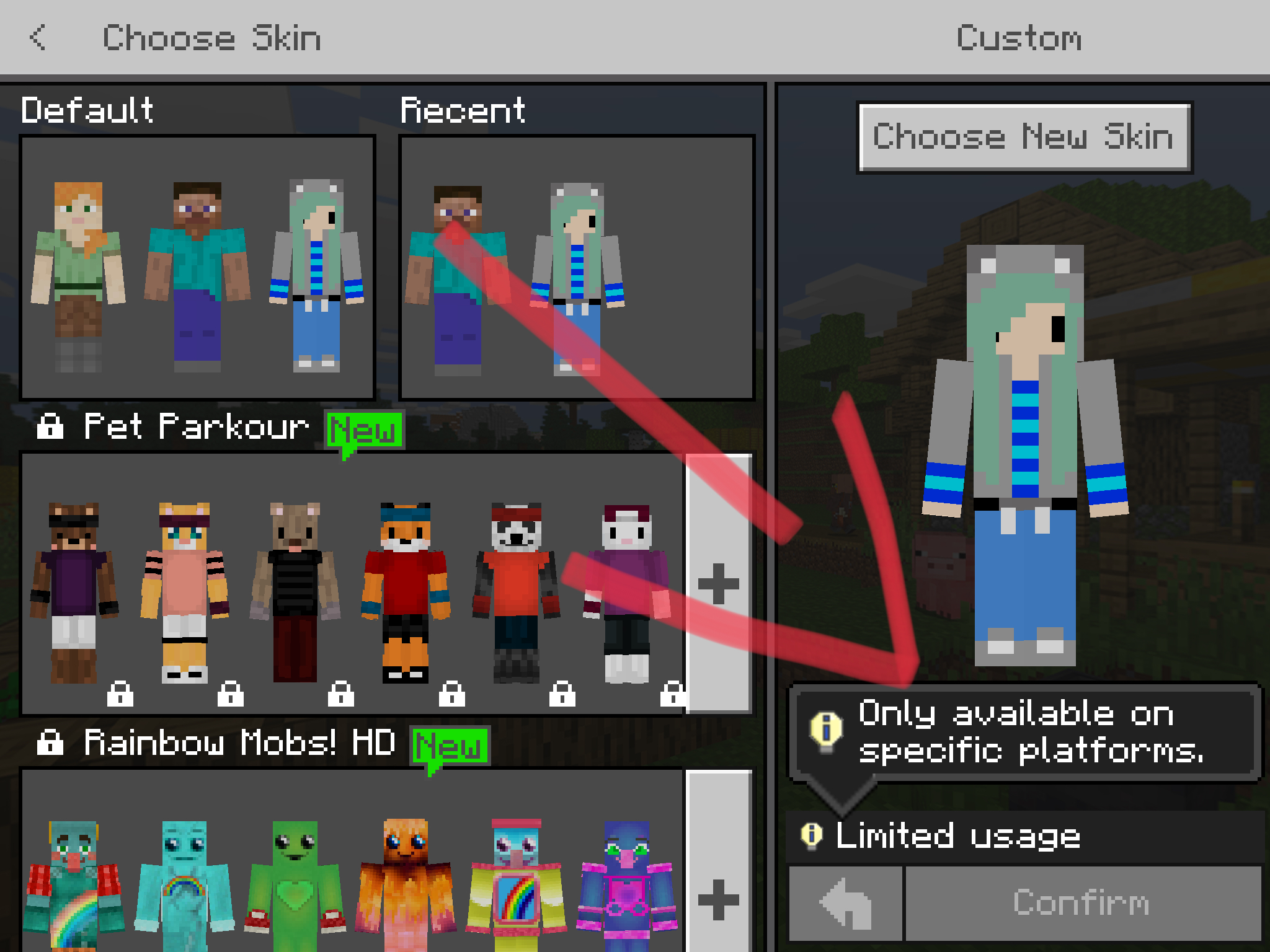
It is not the problem reported in MCPE-37926. Here we can change our skins. But it is marked as limited usage (before the update it wasn't) and as soon as we relaunch the game we got Steve's or Alex's skin.
Please consider this problem, have a good day
Hey, my problem is that I can't use a custom skin because I get a message saying "Limited usage" and "Only available on specific platforms". Every time I launch the game I have to re-select my skin. This started happening to me I believe since 1.12.0. I've also seen you guys mark all similiar reports as duplicate of MCPE-37926 which is marked as solved. Well, it's not. It's a different problem. Reinstalling/Reseting the game didn't work.
This still appears to be an issue for Android in the latest beta.
Yeah, this glitch is very annoying if you change your skins a lot like me.
Same here
This is an issue for 1,7 and the 1,8 beta and does effect win10.
Oh thank god I'm am not the only one
This has been happening to me too! I’m so glad me and my friends aren’t the only ones!
This is extremely annoying, especially when playing on a realm. Exiting and re-starting the app, and re-joining the realm is very frustrating just to change a skin setting. Hope more people vote for this bug and that fixing it is given a MUCH higher priority.
I am also having a problem in which if no custom skin has been uploaded to your game before then trying to add one will crash the game.
After doing this 2 times, my minecraft pretty much broke. I couldn’t get to the menu. Only to the Mojang and then Minecraft intro screen.
MCPE-38112I am very disappointed that this is not fixed yet I have been stuck with no skin for over a month.
same with bedrock edition
Yes, this is in fact a Bedrock Edition bug report.
Wow new Update but they dont change the Skin Bug. Its annyoing to wait that long.
Is anyone getting this issue in the 1.9 beta versions at all?
According to my friend's server's latest blog post this issue affects 1.9.0.3
What do you mean "resolved" will it be fixed in the next update or something or.... Wait probably... But the fact that this was reported in October of 2018 should probably say something...
This issue should be fixed in the 1.9 beta version. Non beta-players may continue to see the issue until 1.9 is fully released, so we will leave this ticket open as a point of reference until then.
In iOS 12, mcpe ver 1.8.1 it just solid refuses to change if you do not already have a custom skin on
This issue does not appear to be fixed in 1.9 on iOS. I am still unable to out on a custom skin.
I can agree the latest version is still broken
The Confirm Button is Unclickable when picking Skins from Photos,
But is clickable with Skin Packs. Will that be fixed anytime soon?
Repro steps in 1.9.0:
Results:
The skin cannot be changed to another custom skin, as the confirm button is greyed out, and other players cannot see the new skin. Restarting the game applies the new skin, though.
Workaround:
Change to a marketplace skin in between changing custom skins, this should allow the new custom skin to be applied immediately.
Can confirm this is not always the case actually
edit
I am having this problem as well.
P - That may not be a valid skin, or a different issue altogether.
Mega_Spud the issue P is having is likely a new issue but was caused by this one.
MCPE-42073I'm sill experiencing this issue in version 1.11.3
I'm having the same problem.. uh, here's a photo: ( it's in the attachments thing cuz I can't find a button in the comment )
Here It says the issue was resolved but I'm not able to use my skin anymore for the exact same "limited usage" as others.