 MCPE-55865
Hitbox of 3 walls too high
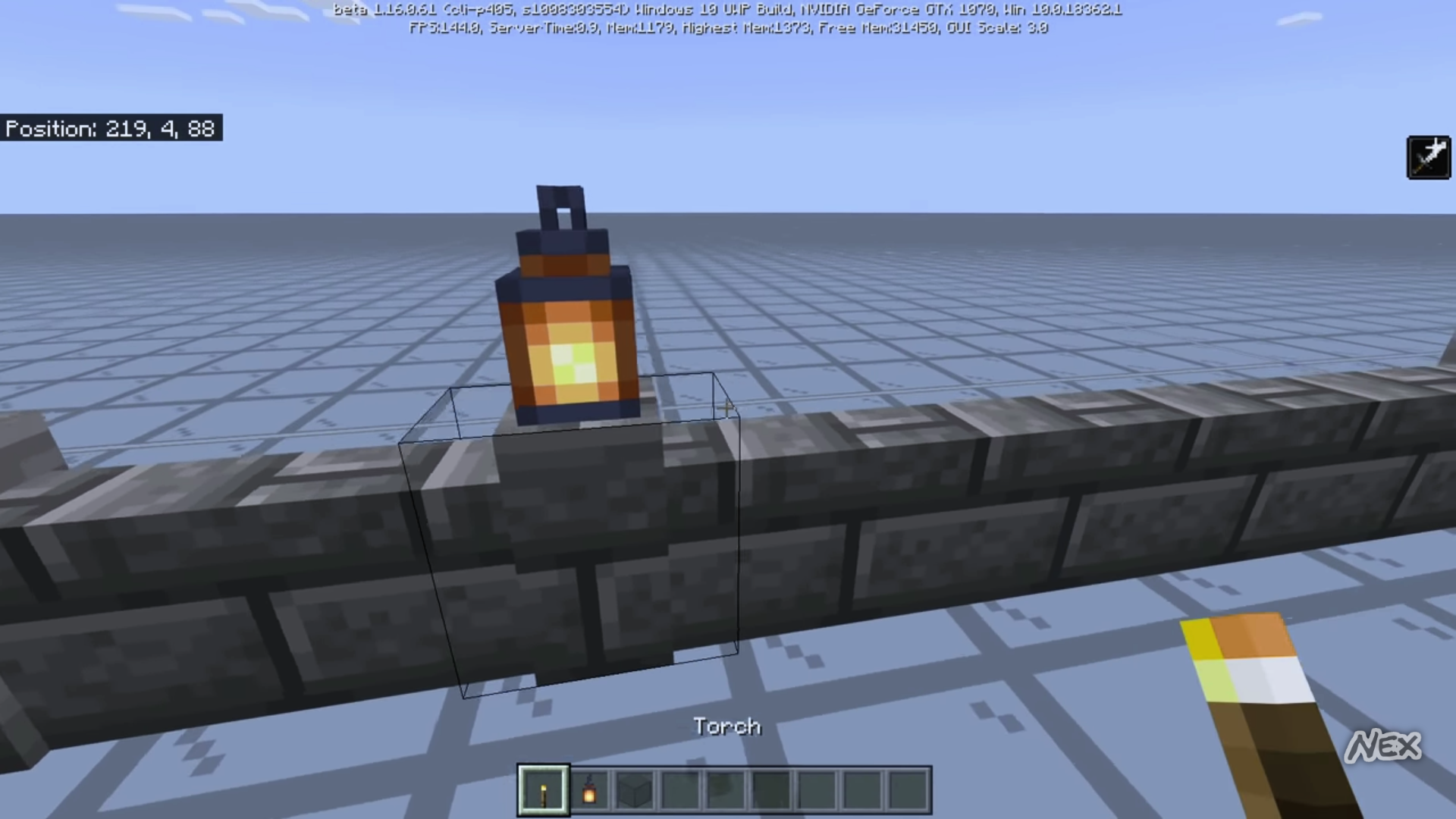
The hitbox of walls is too high. I don't mean the collision box. The collision box is 1.5 blocks high which is correct. But the hitbox which is the outline that you see when looking at it is too high when having 2 walls next it.
How to reproduce:
- place 3 walls next to each other.
- Look at the wall in the middle
You see that the outline is higher than the texture.
Linked Issues
is duplicated by1


- Fixed
![[Mod] EVGENSYPERPRO](../../../data/avatars/users/92853.png) [Mod] EVGENSYPERPRO
[Mod] EVGENSYPERPRO bugsbugsbugs
- 10
- 3
- Confirmed
- 292704
- Multiple
- hitbox wall
1.20.80.23 Preview - 1.21.10.23 Preview
1.20.80.23 Preview 1.17.30.22 Beta 1.17.11 Hotfix 1.16.220 1.16.0.61 Beta 1.15.0.53 Beta 1.14.20 Hotfix 1.14.1 Hotfix 1.13.0 1.14.0 1.14.30 Hotfix 1.14.60 Hotfix 1.16.0 1.16.1 1.16.20 1.16.40 Hotfix 1.16.100 1.16.200 1.16.201 Hotfix 1.16.210 1.16.221 Hotfix 1.20.60.25 Preview 1.20.60.24 Preview 1.20.70.21 Preview 1.20.51 Hotfix 1.20.60 1.20.80 1.20.81 Hotfix 1.21.10.23 Preview- 1.16.0
Created Issue:
Hitbox of walls to high
The hitbox of walls is too high. I don't mean the collision Box, I mean the outline that you See when looking at it.
How to reproduce:
- place 3 walls next to each other.
- Look at the wall in the middle
You see that the outline is higher than the texture.
Hitbox of walls too high
Still affects 1.14
The hitbox of walls is too high. I don't mean the collision Box, I mean the outline that you
See when looking at it.How to reproduce:
- place 3 walls next to each other.
- Look at the wall in the middle
You see that the outline is higher than the texture.
The hitbox of walls is too high. I don't mean the collision Box, I mean the outline that you see when looking at it.
How to reproduce:
- place 3 walls next to each other.
- Look at the wall in the middle
You see that the outline is higher than the texture.
The hitbox of walls is too high. I don't mean the collision
Box, I mean the outline that you see when looking at it.How to reproduce:
- place 3 walls next to each other.
- Look at the wall in the middle
You see that the outline is higher than the texture.
The hitbox of walls is too high. I don't mean the collision box. The collision box is 1.5 blocks high which is correct. But the hitbox which is the outline that you see when looking at it is too high when having 2 walls next it.
How to reproduce:
- place 3 walls next to each other.
- Look at the wall in the middle
You see that the outline is higher than the texture.
![[Mod] OcelotOnesie](../../../data/avatars/users/43220.png)
is duplicated by
![[Mojang] Mega_Spud (Jay Wells)](../../../data/avatars/users/92696.png)
Hitbox of wallstoo highHitbox of walls is incorrect
![[MCQA] v-weszaj](../../../data/avatars/users/18941.svg)
The hitbox of walls
is too high. I don't mean the collision box. The collision box is 1.5 blocks high whichis correct. But the hitbox which is the outline that you see when looking at it is too high when having 2 walls next it.How to reproduce:
place3walls next to each other.- Look at the wall in the middle
You see that the outline is higher than the texture.The hitbox of walls that made a pillar is too large, when it is connected to the side.
How to reproduce:
- Place 2 walls next to each other.
- Look at one of the walls.
You can interact with the wall when aiming next to the pillar.
Before 1.16 it also used to be too high when it doesn’t have a pillager, which is now fixed, but, when it has a pillager, it is still incorrect.
![[Bot] Arisa](../../../data/avatars/users/43007.png)
![[Helper] lillybeacon](../../../data/avatars/users/93893.png)
![[Mod] Umija5895M](../../../data/avatars/users/10122.svg)
The hitbox of walls that made a pillar is too large, when it is connected to the side.
How to reproduce:
- Place 2 walls next to each other.
- Look at one of the walls.
Before 1.16 it also used to be too high when it doesn’t have a pilla
ger, which is now fixed, but, when it has a pillager, it is still incorrect.
![[Mod] tryashtar](../../../data/avatars/users/41963.png)
Hitbox of walls is incorrectHitbox of wall with pillar is too large
The hitbox of walls that made a pillar is too large, when it is connected to the side.
How to reproduce:
- Place 2 walls next to each other.
- Look at one of the walls.
Before 1.16 it also used to be too high when it doesn’t have a pillar, which is now fixed, but, when it has a pillar, it is still incorrect.
The hitbox of walls that made a pillar is too large, when it is connected to the side.
How to reproduce:
- Place 2 walls next to each other.
- Place a torch or lantern on top of one of the walls to form a piller
- Look at the wall to see the hitbox
Observed Results
The hitbox is above the wall to the sides of the pillarExpected results
The hitbox will only be around the pillar and the visible top of the wallBefore 1.16 it also used to be too high when it doesn’t have a pillar, which is now fixed, but, when it has a pillar, it is still incorrect.
![[Mod] turbo](../../../data/avatars/users/92867.png)
The hitbox of walls
that made a pillar is too large, when it is connectedtothe side.How to reproduce:
Place2walls next to each other.Place a torch or lantern on top of one of the walls to form a piller- Look at the wall to see the hitbox
Observed Results
The hitbox is above the wall to the sides of the pillarExpected results
The hitbox will only be around the pillar and the visible top of the wall
Before 1.16 it also used to be too high when it doesn’t have a pillar, which is now fixed, but, when it has a pillar, it is still incorrect.The hitbox of walls is too high. I don't mean the collision box. The collision box is 1.5 blocks high which is correct. But the hitbox which is the outline that you see when looking at it is too high when having 2 walls next it.
How to reproduce:
- place 3 walls next to each other.
- Look at the wall in the middle
You see that the outline is higher than the texture.
Hitbox of wallwith pillar is toolargeHitbox of 3 walls too high
relates to
Thank you for your report!
We're already tracking this issue at MCPE-55865, so I will resolve and link this ticket as a duplicate.
If you would like to add a vote and any extra information to the main ticket it would be appreciated.
If you haven't already, you might like to make use of the search feature to see if the issue has already been mentioned.
Quick Links:
📓 Issue Guidelines – 💬 Community Support – 📧 Customer Support – 📖 Game Wiki
Some blocks don’t have the correct hitbox in bedrock edition. The following blocks are affected (list may be incomplete):
Anvils (MCPE-59921)
Beds (MCPE-60829)
Bells hanging on the ceilling or side of a block
Brewing stand (MCPE-59922)
Cauldren (hitbox doesn’t go inside it)
Composter (hitbox doesn’t go inside it)
Fences, Iron bars, walls and glass panes on a corner (MCPE-59920)
Grindstone
Hopper (MCPE-47541) Fixed in 1.16 beta
Lantern
Lectern (MCPE-47604)
Levers
Piston body (When it is extended) (MCPE-83258)
Redstone (MCPE-61245)
Sea pickle (MCPE-59925)
Sugar cane (MCPE-60827)
Walls (MCPE-55865)
This also relates to MCPE-59928, where the outline doesn’t match the hitbox on some blocks.
I saw on this video https://youtu.be/u6j45C8TNQE that it got fixed in one of the betas, but not fully. If the wall is not connected up, but connected to north and south or to west and east it is now correct, however if the wall is also connected up, the hitbox is incorrect as you can see in the video on minute 1:42.
Thank you for your report!
However, this issue has been temporarily closed as Awaiting Response
Is this still an issue in the latest version? If so, please add a comment or update the affected version field.
To make your bug report as effective as possible, please try and include the following steps to reproduce the problem:
If your ticket does not look like the example given here, then it's likely to be closed as incomplete.
This ticket will automatically reopen when you reply.
Quick Links:
📓 Issue Guidelines – 💬 Mojang Support – 📧 Suggestions – 📖 Minecraft Wiki
affects 1.17.30.22
Thank you for your report!
This issue has been resolved as Fixed.
The original bug report was regarding the height of the wall itself, and was changed afterwards to reflect the issue with the pillar section. Please report as a new bug so that it can be considered for a future fix.
Quick Links:
📓 Issue Guidelines – 💬 Mojang Support – 📧 Suggestions – 📖 Minecraft Wiki
Created MCPE-183604
The previous version of the report has been restored to avoid confusion.