 Nicolas
- simnico
- simnico
- Europe/Stockholm
- Yes
- No
 MC-14119
![[Mojang] Grum (Erik Broes)](../../../data/assets/gravatar/grum.png)
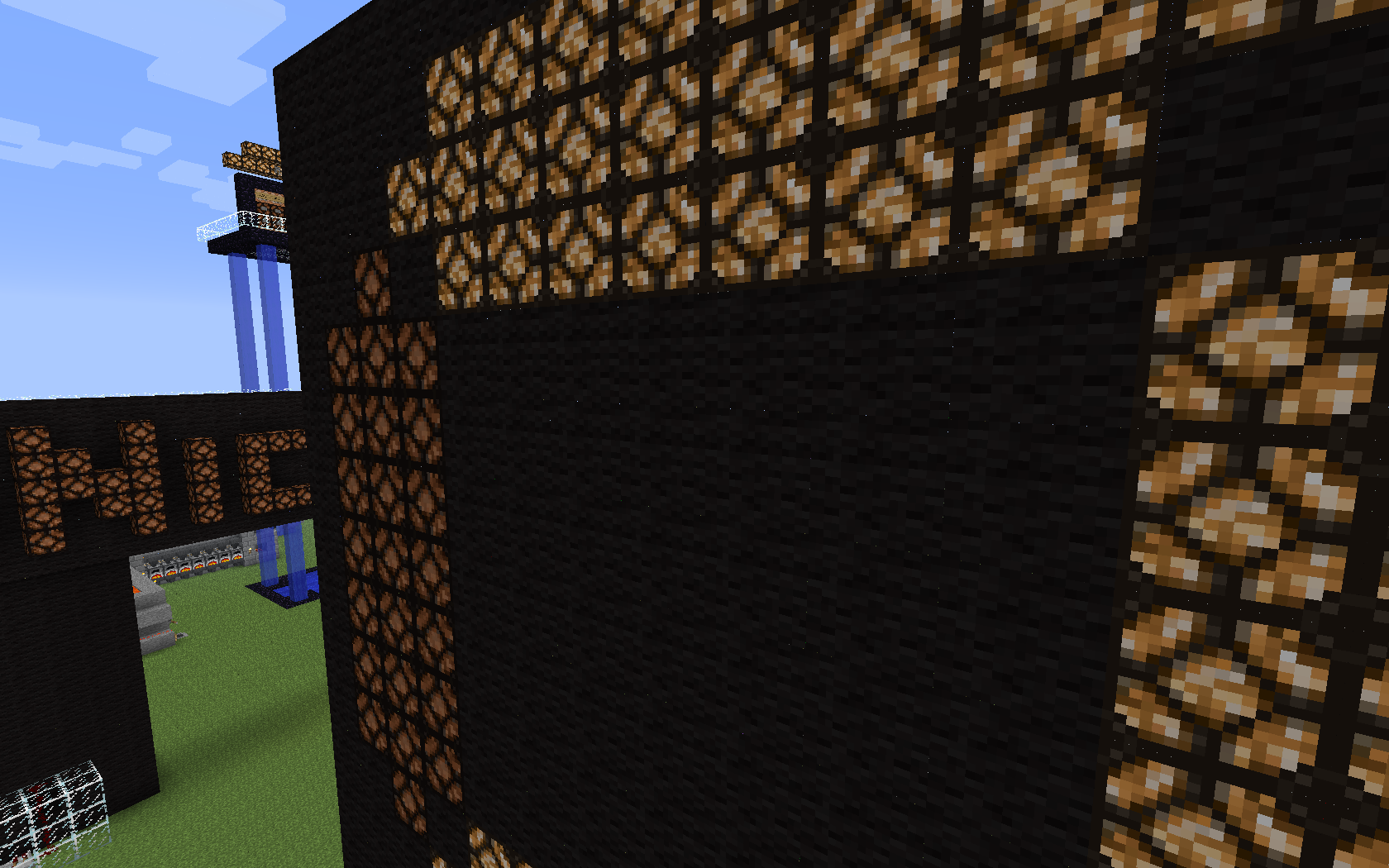

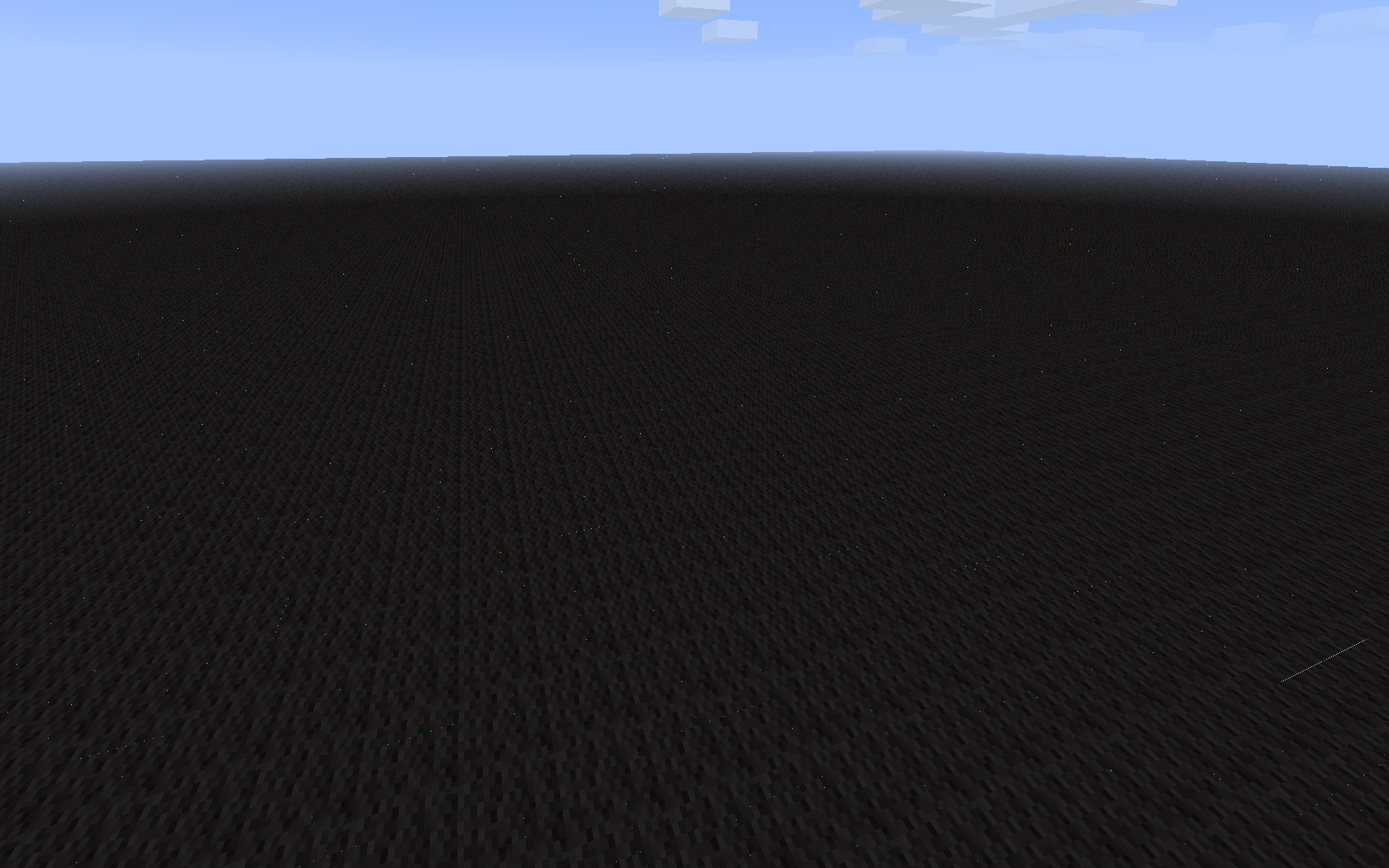


It seems it has been fixed for me too.
I still have a few distant dots on black wool superflat maps but this is nothing compared to the constellations I used to see.
In closed rooms it completely disappeared.Good job

Minecraft 13w16a recognizes my AZERTY keyboard as a QWERTY.
I only have the issue with this snapshot.
Minecraft 1.5.1 (which is in the same folder, launched by the classic launcher) isn't affected.Stangely, I did not encounter this bug when I had to install the snapshot in a clean new "minecraft" folder with the 0.1 Launcher - (because the game was not starting, this one has been fixed with version 0.2 of the launcher).
The choosen keyboard configuration in the settings of OS X doesn't have any effect on this bug.
Minecraft 13w16a recognizes my AZERTY keyboard as a QWERTY.
It works as expected in the chat window, but like a QWERTY keyboard when used to control the game (to move the player, etc.)I only have the issue with this snapshot.
Minecraft 1.5.1 (which is in the same folder, launched by the classic launcher) isn't affected.Stangely, I did not encounter this bug when I had to install the snapshot in a clean new "minecraft" folder with the 0.1 Launcher - (because the game was not starting, this one has been fixed with version 0.2 of the launcher).
The choosen keyboard configuration in the settings of OS X doesn't have any effect on this bug.
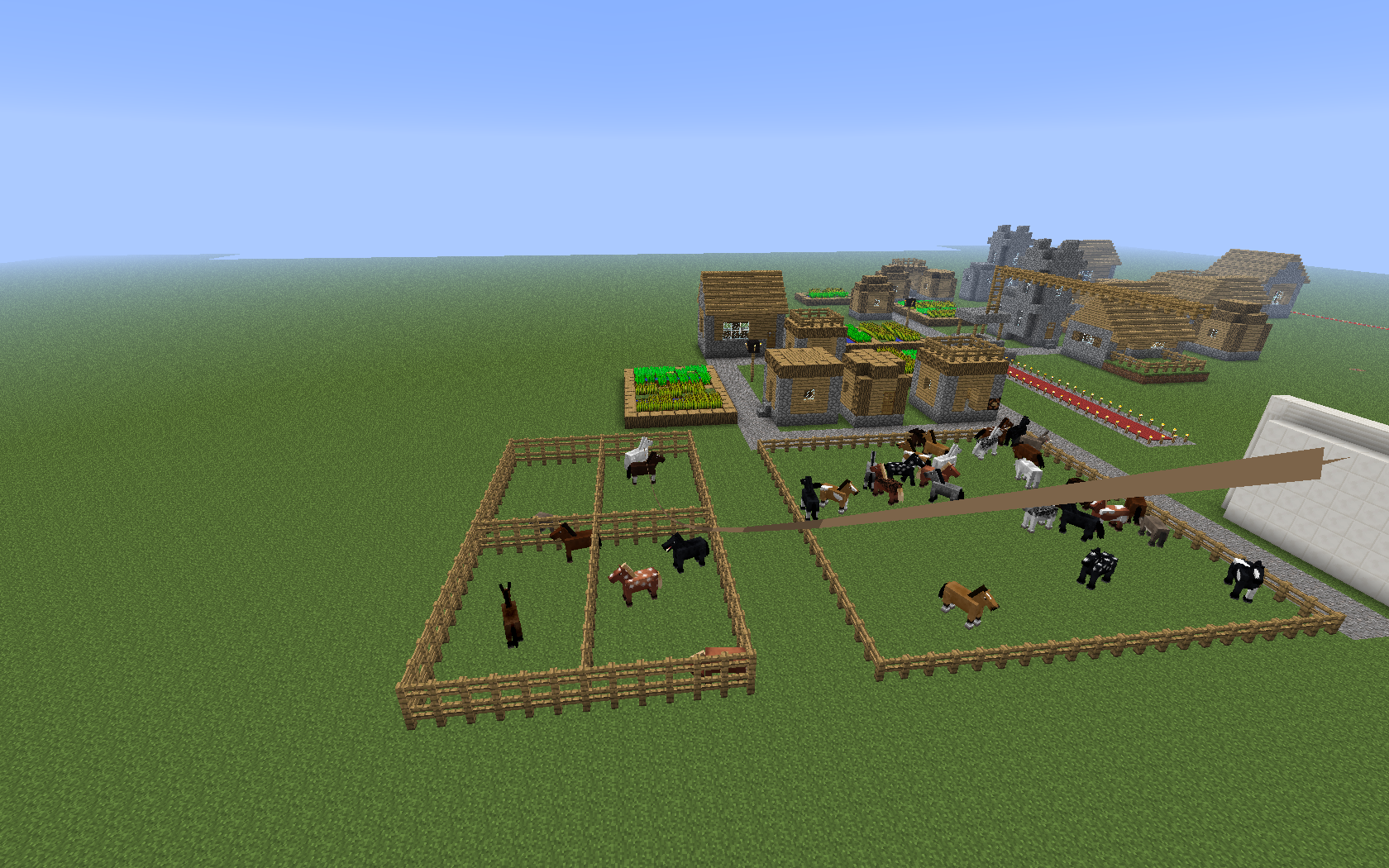
When I was testing the new rope/leash, it appeared like I was using one, but it was not having any effect on the horse (it was not pulled by the rope), and it did not break when far away from the mob.
When I tried to detach it, it actually attached it (behaved as intended).
I think it was showing but not technically attached to the horse.
[Sorry for possible English mistakes;)]When I was testing the new rope/leash, it appeared like I was using one, but it was not having any effect on the horse (it was not pulled by the rope), and it did not break when far away from the mob.
When I tried to detach it, it actually attached it (behaved as intended).
I think it was showing but not technically attached to the horse.(Sorry for possible English mistakes
)
I found a very strange bug that occurs when I launch Minecraft 1.5.1 or 1.5.2 from the new launcher (0.8.1) : in window mode, the "VSync" option is ignored (my fps are up to 120 while my screen works at 60Hz
even with VSync enabled), but in fullscreen mode VSync limits fps to 30 instead of 60 (so half of my screen frequency).I have this problem neither when I launch the game with the old launcher nor with the latest snapshots (13w16a to 13w21a).
I found a very strange bug that occurs when I launch Minecraft 1.5.1 or 1.5.2 from the new launcher (0.8.1) : in window mode, the "VSync" option is ignored (my fps are up to 120 even with VSync enabled, while my screen works at 60Hz), but in fullscreen mode VSync limits fps to 30 instead of 60 (so half of my screen frequency).
I have this problem neither when I launch the game with the old launcher nor with the latest snapshots (13w16a to 13w21a).
There is a lighting bug that affects buttons, trapdoors, pressure plates, snow (layer) and anvils at least in 14w10a.
When blocks are nearby, strange dark shadows are applied.
(Screenshots coming)
Button and trapdoor lighting bugLighting bug
There is a lighting bug that affects buttons, trapdoors, pressure plates, snow (layer), carpets and anvils at least in 14w10a.
When blocks are nearby, strange dark shadows are applied.
(Screenshots coming)
There is a lighting bug that affects buttons, trapdoors, pressure plates, snow (layer), carpets and anvils at least in 14w10a.
When blocks are nearby, strange dark shadows are applied.
(Screenshots coming)
Lighting bug affecting some transparent blocks
There is a lighting bug that affects buttons, trapdoors, pressure plates, snow (layer), carpets and anvils (at least) in 14w10a.
When blocks are nearby, strange dark shadows are applied.
There is a lighting bug that affects buttons, trapdoors, pressure plates, snow (layer), carpets and anvils (at least) in 14w10a.
When blocks are nearby, strange dark shadows are applied.
Here's a video showing the bug : http://youtu.be/LW22QyadqJg
There is a lighting bug that affects buttons, trapdoors, pressure plates, snow (layer), carpets
andanvils (at least) in 14w10a.When blocks are nearby, strange dark shadows are applied.
Here's a video showing the bug : http://youtu.be/LW22QyadqJg
There is a lighting bug that affects buttons, trapdoors, pressure plates, snow (layer), carpets, anvils and beds (at least) in 14w10a.
When blocks are nearby, strange dark shadows are applied.
Here's a video showing the bug : http://youtu.be/LW22QyadqJg
There is a lighting bug that affects buttons, trapdoors, pressure plates, snow (layer), carpets, anvils and beds (at least) in 14w10a. (seems fixed in 14w11a except for beds)
When blocks are nearby, strange dark shadows are applied.
Here's a video showing the bug : http://youtu.be/LW22QyadqJg
In 14w11a, affected blocks are (at least) closed "top" trapdoors, stained glass blocks, iron bars (bottom), beds.
There is a lighting bug that affects buttons, trapdoors, pressure plates, snow (layer), carpets, anvils and beds (at least) in 14w10a. (seems fixed in 14w11a except for beds)
When blocks are nearby, strange dark shadows are applied.
Here's a video showing the bug : http://youtu.be/LW22QyadqJg
In 14w11a, affected blocks are (at least) closed
"top" trapdoors, stained glass blocks, iron bars (bottom), beds.There is a lighting bug that affects buttons, trapdoors, pressure plates, snow (layer), carpets, anvils and beds (at least) in 14w10a. (seems fixed in 14w11a except for beds)
When blocks are nearby, strange dark shadows are applied.
Here's a video showing the bug : http://youtu.be/LW22QyadqJg
In 14w11a, affected blocks are (at least) closed trapdoors horizontally surrounded by opaque blocks, normal and stained glass blocks in a wall of opaque blocks, bottom of iron bars placed on the ground, beds.
There is a lighting bug that affects buttons, trapdoors, pressure plates, snow (layer), carpets, anvils and beds (at least) in 14w10a. (seems fixed in 14w11a except for beds)
When blocks are nearby, strange dark shadows are applied.
Here's a video showing the bug : http://youtu.be/LW22QyadqJg
In 14w11a, affected blocks are (at least) closed trapdoors horizontally surrounded by opaque blocks, normal and stained glass blocks in a wall of opaque blocks, bottom of iron bars placed on the ground, beds (not investigated).
There is a lighting bug that affects buttons, trapdoors, pressure plates, snow (layer), carpets, anvils and beds (at least) in 14w10a. (seems fixed in 14w11a except for beds)
When blocks are nearby, strange dark shadows are applied.
Here's a video showing the bug : http://youtu.be/LW22QyadqJg
In 14w11a, affected blocks are (at least) closed trapdoors horizontally surrounded by opaque blocks, normal and stained glass blocks in a wall of opaque blocks, bottom of iron bars placed on the ground, beds (not investigated), back side of torches placed on a wall.
There is a lighting bug that affects buttons, trapdoors, pressure plates, snow (layer), carpets, anvils and beds (at least) in 14w10a. (seems fixed in 14w11a except for beds)
When blocks are nearby, strange dark shadows are applied.
Here's a video showing the bug : http://youtu.be/LW22QyadqJg
In 14w11a, affected blocks are (at least) closed trapdoors horizontally surrounded by opaque blocks, normal and stained glass blocks in a wall of opaque blocks, bottom of iron bars placed on the ground, beds
(not investigated), back side of torches placed on a wall.
There is a lighting bug that affects buttons, trapdoors, pressure plates, snow (layer), carpets, anvils and beds (at least) in 14w10a. (seems fixed in 14w11a except for beds)
When blocks are nearby, strange dark shadows are applied.
Here's a video showing the bug : http://youtu.be/LW22QyadqJg
In 14w11a, affected blocks are (at least) closed trapdoors horizontally surrounded by opaque blocks, normal and stained glass blocks in a wall of opaque blocks, bottom of iron bars placed on the ground, beds, back side of torches placed on a wall.
Iron bars are fixed in 14w11b.
There is a lighting bug that affects buttons, trapdoors, pressure plates, snow (layer), carpets, anvils and beds (at least) in 14w10a. (seems fixed in 14w11a except for beds)
When blocks are nearby, strange dark shadows are applied.
Here's a video showing the bug :
http://youtu.be/LW22QyadqJgIn 14w11a, affected blocks are (at least) closed trapdoors horizontally surrounded by opaque blocks, normal and stained glass blocks in a wall of opaque blocks, bottom of iron bars placed on the ground, beds, back side of torches placed on a wall.
Iron bars are fixed in 14w11b.
There is a lighting bug that affects buttons, trapdoors, pressure plates, snow (layer), carpets, anvils and beds (at least) in 14w10a. (seems fixed in 14w11a except for beds)
Here's a video showing the bug : http://youtu.be/LW22QyadqJgWhen blocks are nearby, strange dark shadows are applied.
In 14w11a, affected blocks are (at least) closed trapdoors horizontally surrounded by opaque blocks, normal and stained glass blocks in a wall of opaque blocks, bottom of iron bars placed on the ground, beds, back side of torches placed on a wall.
Iron bars are fixed in 14w11b.
There is a lighting bug that affects buttons, trapdoors, pressure plates, snow (layer), carpets, anvils and beds (at least) in 14w10a. (seems fixed in 14w11a except for beds)
Here's a video showing the bug : http://youtu.be/LW22QyadqJgWhen blocks are nearby, strange dark shadows are applied.
In 14w11a, affected blocks are (at least) closed trapdoors horizontally surrounded by opaque blocks, normal and stained glass blocks in a wall of opaque blocks, bottom of iron bars placed on the ground, beds, back side of torches placed on a wall, End portal frame eyes.
Iron bars are fixed in 14w11b.
There is a lighting bug that affects buttons, trapdoors, pressure plates, snow (layer), carpets, anvils and beds (at least) in 14w10a. (seems fixed in 14w11a except for beds)
Here's a video showing the bug : http://youtu.be/LW22QyadqJgWhen blocks are nearby, strange dark shadows are applied.
In 14w11a, affected blocks are (at least) closed trapdoors horizontally surrounded by opaque blocks, normal and stained glass blocks in a wall of opaque blocks, bottom of iron bars placed on the ground, beds, back side of torches placed on a wall, End portal frame eyes, edges of snow layer.
Iron bars are fixed in 14w11b.
There is a lighting bug that affects buttons, trapdoors, pressure plates, snow (layer), carpets, anvils and beds (at least) in 14w10a. (seems fixed in 14w11a except for beds)
Here's a video showing the bug : http://youtu.be/LW22QyadqJgWhen blocks are nearby, strange dark shadows are applied.
In 14w11a, affected blocks are (at least) closed trapdoors and slabs horizontally surrounded by opaque blocks, normal and stained glass blocks in a wall of opaque blocks, bottom of iron bars placed on the ground, beds, back side of torches placed on a wall, End portal frame eyes, edges of snow layer and levers (arm).
Iron bars are fixed in 14w11b.
There is a lighting bug that affects buttons, trapdoors, pressure plates, snow (layer), carpets, anvils and beds (at least) in 14w10a. (seems fixed in 14w11a except for beds)
Here's a video showing the bug : http://youtu.be/LW22QyadqJgWhen blocks are nearby, strange dark shadows are applied.
In 14w11a, affected blocks are (at least) closed trapdoors and slabs horizontally surrounded by opaque blocks, normal and stained glass blocks in a wall of opaque blocks, bottom of iron bars placed on the ground, beds, back side of torches placed on a wall, End portal frame
eyes, edges of snow layer and levers (arm).Iron bars are fixed in 14w11b.
There is a lighting bug that affects buttons, trapdoors, pressure plates, snow (layer), carpets, anvils and beds (at least) in 14w10a. (seems fixed in 14w11a except for beds)
Here's a video showing the bug : http://youtu.be/LW22QyadqJgWhen blocks are nearby, strange dark shadows are applied.
In 14w11a, affected blocks are (at least) closed trapdoors and slabs horizontally surrounded by opaque blocks, normal and stained glass blocks in a wall of opaque blocks, bottom of iron bars placed on the ground, beds, back side of torches placed on a wall, End portal frame and eyes in them, edges of snow layer and levers (arm).
Iron bars are fixed in 14w11b.
There is a lighting bug that affects buttons, trapdoors, pressure plates, snow (layer), carpets, anvils and beds (at least) in 14w10a. (seems fixed in 14w11a except for beds)
Here's a video showing the bug : http://youtu.be/LW22QyadqJgWhen blocks are nearby, strange dark shadows are applied.
In 14w11a, affected blocks are (at least) closed trapdoors and slabs horizontally surrounded by opaque blocks, normal and stained glass blocks in a wall of opaque blocks, bottom of iron bars placed on the ground, beds, back side of torches placed on a wall, End portal frame
and eyes in them, edges of snow layer and levers (arm).Iron bars are fixed in 14w11b.
There is a lighting bug that affects buttons, trapdoors, pressure plates, snow (layer), carpets, anvils and beds (at least) in 14w10a. (seems fixed in 14w11a except for beds)
Here's a video showing the bug : http://youtu.be/LW22QyadqJgWhen blocks are nearby, strange dark shadows are applied.
In 14w11a, affected blocks are (at least) closed trapdoors and slabs horizontally surrounded by opaque blocks, normal and stained glass blocks in a wall of opaque blocks, bottom of iron bars placed on the ground, beds, back side of torches placed on a wall, End portal frame with/without eye, edges of snow layer and levers (arm).
Iron bars are fixed in 14w11b.
When I launch a world, at first memory usage is normal (18-25 %, 50~% allocated of 1011 MB).
If I exit the world and then go back, memory usage explodes, going to 80~% with 100% allocated.
When I try to exit a second time the game goes out of memory, freezes, and most of the time, crashes.This seems to happen only when exiting a specific save then going to any other save.
Usually I have more than enough RAM with this 1 GB. That never happened before this snapshot.
I joined a forced crash log I did with the memory up to about 80% and a copy of the game output after one of the crashes.
There’s also the faulty save folder.
When I launch a world, at first memory usage is normal (18-25 %, 50~% allocated of 1011 MB).
If I exit the world and then go back, memory usage explodes, going to 80~% with 100% allocated.
When I try to exit a second time the game goes out of memory, freezes, and most of the time, crashes.This seems to happen only when exiting a specific save then going to any other save.
Usually I have more than enough RAM with this 1 GB. That never happened before this snapshot.
I joined a forced crash log I did with the memory up to about 80% and a copy of the game output after one of the crashes.There’s also the faulty save folder.
When I launch a world, at first memory usage is normal (18-25 %, 50~% allocated of 1011 MB).
If I exit the world and then go back, memory usage explodes, going to 80~% with 100% allocated.
When I try to exit a second time the game goes out of memory, freezes, and most of the time, crashes.(This seems to happen only when exiting a specific save then going to any other save.)
EDIT : Also happens with other saves but less consistently.Usually I have more than enough RAM with this 1 GB. That never happened before this snapshot.
I joined a forced crash log I did with the memory up to about 80% and a copy of the game output after one of the crashes.
I also put a game save for which the bug happens every time I log out and back in.
Chunks appear loaded but player “sinking” like they aren'tChunks appear loaded but player “sinks” like they aren't
IMPORTANT : I only noticed this bug once and could not reproduce it.
When loading a save, chunks started to display normally but I slowly sank into them (solid blocks included) when I stopped flying. It was exactly like if I was in an unloaded part of the world but everything seemed to be loaded and w
eredisplaying correctly (I do not remember if entities including mobs were, though).Confirmed by someone on Twitter : https://twitter.com/AkterSnurra95/status/634805930052481024
IMPORTANT : I only noticed this bug once and could not reproduce it.
When loading a save, chunks started to display normally but I slowly sank into them (solid blocks included) when I stopped flying. It was exactly like if I was in an unloaded part of the world but everything seemed to be loaded and was displaying correctly (I do not remember if entities including mobs were, though).
Confirmed by someone on Twitter : https://twitter.com/AkterSnurra95/status/634805930052481024

Nicolas that's a feature request, as it's never been added
This bug has appeared with the 1.5 snapshots, on 13w10a too.
All blocs are impacted (even torches, hoppers, etc.)
I haven't had such a problem on 1.4.6 or on any previous version.
I'm running Minecraft on a mid-2011 15" MacBook Pro with OSX Mountain Lion ;
my GPU is an AMD Radeon HD 6750M.
[EDIT : I'm on Mountain Lion]
It seems it has been fixed for me too.
I still have a few distant dots on black wool superflat maps but this is nothing compared to the constellations I used to see.
In closed rooms it completely disappeared.
Good job
AGAIN, it has NOT been fixed in 1.5, the fix WILL COME IN A FUTURE UPDATE (probably 1.5.1 in a few days).
You can download the 13w11a snapshot to test the fix here :
http://mojang.com/2013/03/minecraft-snapshot-13w11a/
Please READ all the comments above BEFORE saying anything stupid.
Thanks.
@Alejandro
1) I did, I've been following the thread for several days.
2) 13w11a fixes "most of" the bug, as only some blocs are buggy now (flowing lava is a very special case).
I had dots everywhere before Dinnerbone's fix and now they are so scarce it is hardly noticeable, even near the horizon on black wool superflat worlds.
@Alejandro
We're mostly back to the pre-1.5 bug, which is pretty discreet...
The visual artefacts were huge in the 1.5 snapshots.
I didn't notice it in 1.4.X.
Call it a major bug if you want to, but I'll forget about it when 1.5.1 is released.
As said above, the bug is still occurring on the edges of chunks (which means that it has been divided by 16).
It seems that the lava bug is a real gap (we can see through it), it seems different from the 1-pixel wide dots/lines between ordinary blocs.
Confirmed, but only with horse armor.
If one of them wears an armor, breeding fails.
Two horses wearing saddles can breed.
Confirmed in creative.
Confirmed.
It seems that they have less than the 26 displayed hearts. I find strange that they could have so much health given that the best horses I got only had 15 hearts.
I have this bug with all snapshots since 13w16a, but it also occurs when I launch Minecraft 1.5.1/1.5.2 from the "new" launcher (0.8.1) in fullscreen. The keyboard works as expected in window mode.
It works perfectly fine in 1.5.1/1.5.2 when launched from the old launcher.
I can also confirm that the chat window isn't affected at all.
This strange behavior may indicate a problem with the (new) libraries that the new launcher uses... ?
(OS X 10.8.3 - French AZERTY keyboard)
I still find disturbing that it's considered "fixed".
Nearly every bug will eventually be fixed in a future version, though you don't mark them all as fixed, do you ?
Confirmed. This breaks the scoreboard logic of a mini game map I built.
It is not affected by Fancy/Fast but disappears when Smooth Lighting is turned off, except for the bug when a trapdoor has blocks in front of it.
Here's a video showing the bug : http://youtu.be/LW22QyadqJg
It's only partly fixed in 14w11a as it now affects closed trapdoors that are "in the ground" (i mean, break a block in a flat area and put a "top" trapdoor in the hole) and stained glass (some faces of the block appear too dark and desaturated) instead...
EDIT - Iron bars now affected too : https://bugs.mojang.com/browse/MC-51050
(Also bed lighting is still broken according to some sources)
Confirmed in 14w11b.
My TNT cannon randomly blows up when I use it with 6 TNT blocks (ignited with redstone during the same tick). Sometimes everything works fine, but sometimes the TNT just ignores the flowing water.
It did not happen with 1 or 2 TNT as far as I can tell.
I did not test 4 or 5.
EDIT : Further testing showed that the bug occurs with 3 TNT (11 explosions/30 tries), but is at least unlikely with 1 or 2 TNT (0/30 for both).
Fortunately I was in creative when I found this bug, I can't imagine my reaction if it destroyed half of a redstone device in survival...
Please fix this bug :'(
I also noticed a bug that may be related : when you light up TNT (either with flint and steel or redstone) it does not explode after the usual 4 seconds : it only disappears and the explosion occurs about 4 more seconds after the disappearance.
Interestingly enough, the explosion of a TNT block triggered by another explosion is unaffected.
EDIT : It's open as
MC-59904Interestingly enough, the explosion of a TNT block triggered by another explosion seems to be unaffected.
Maybe linked to
MC-9553Confirmed. Happens when passing the direction of the forward z axis.
Duplicate of
MC-83905.Confirmed. Happens when passing the direction of the forward z axis.
Duplicated by
MC-84596.Please put 15w31c in affected versions.
Confirmed. Happens for all the blocks using connecting models in some texture packs (very annoying for redstone wire).
In vanilla the effect is noticeable all along cobblestone walls, though most visible when connected to a block indeed.
Shouldn’t you be able to throw them with a right click ? I can’t, even in survival.
user-f2760 My mistake, I was convinced you could.
Save World and Cancel buttons have been switched. Hitting cancel saves the renamed world name but hitting save world cancels. Found out on Reddit and confirmed.
Still not fixed in 15w32c. Come on Mojang, it takes 5min to change the texture !
This is NOT a lack of memory problem. There’s a memory leak or something. How can you explain that I only use 18% of my memory on a save and then 80 to 90 % when going back from the menu ?
There’s obviously a bug and this had NEVER happened before this particular snapshot.
Actually I was wrong. It also happens with other saves
EDIT : It might be specific to Java 6... ? Have you tried to go in and out repeatedly ?
Thanks Christie N for confirming!
It seems the memory usage jumps by about 600 MB each time I exit a save and load it again, eventually running out of memory even with 4 GB XmX… Bad memory leak indeed. Good luck [Mojang] Grum (Erik Broes)! ^^
Memory seen increasing by steps each time I load a save.
Goes to the limit and crashes even with 4 GB XmX.
(See attached file)
No. The chunks appeared to be normal. There was no apparent glitch. I was only slowly sinking in the blocks, through the ground, just like when you’re in an unloaded part.
In my case I was not even in a hole : blocks below me as well as the whole chunk were displayed.
Ah ok, I see the rails above you now, my bad.
I found a drop in general performance in 15w42a compared to 15w41b, but it's more of a feeling than exact measurements. Maybe this is linked to this report ?