 williewillus
- williewillus
- williewillus
- America/Chicago
- Yes
- No
![[Mojang] slicedlime](../../../data/assets/gravatar/slicedlime.jpeg)
 MC-48577
![[Mod] Jiingy](../../../data/avatars/users/91802.png)
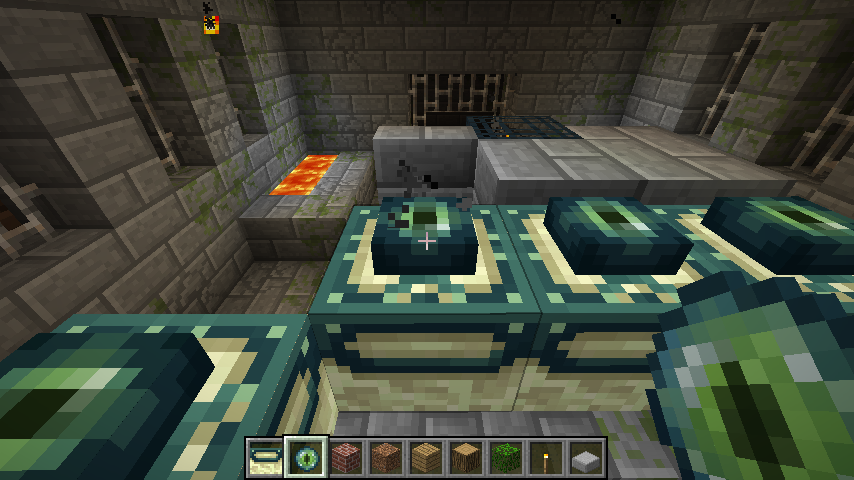
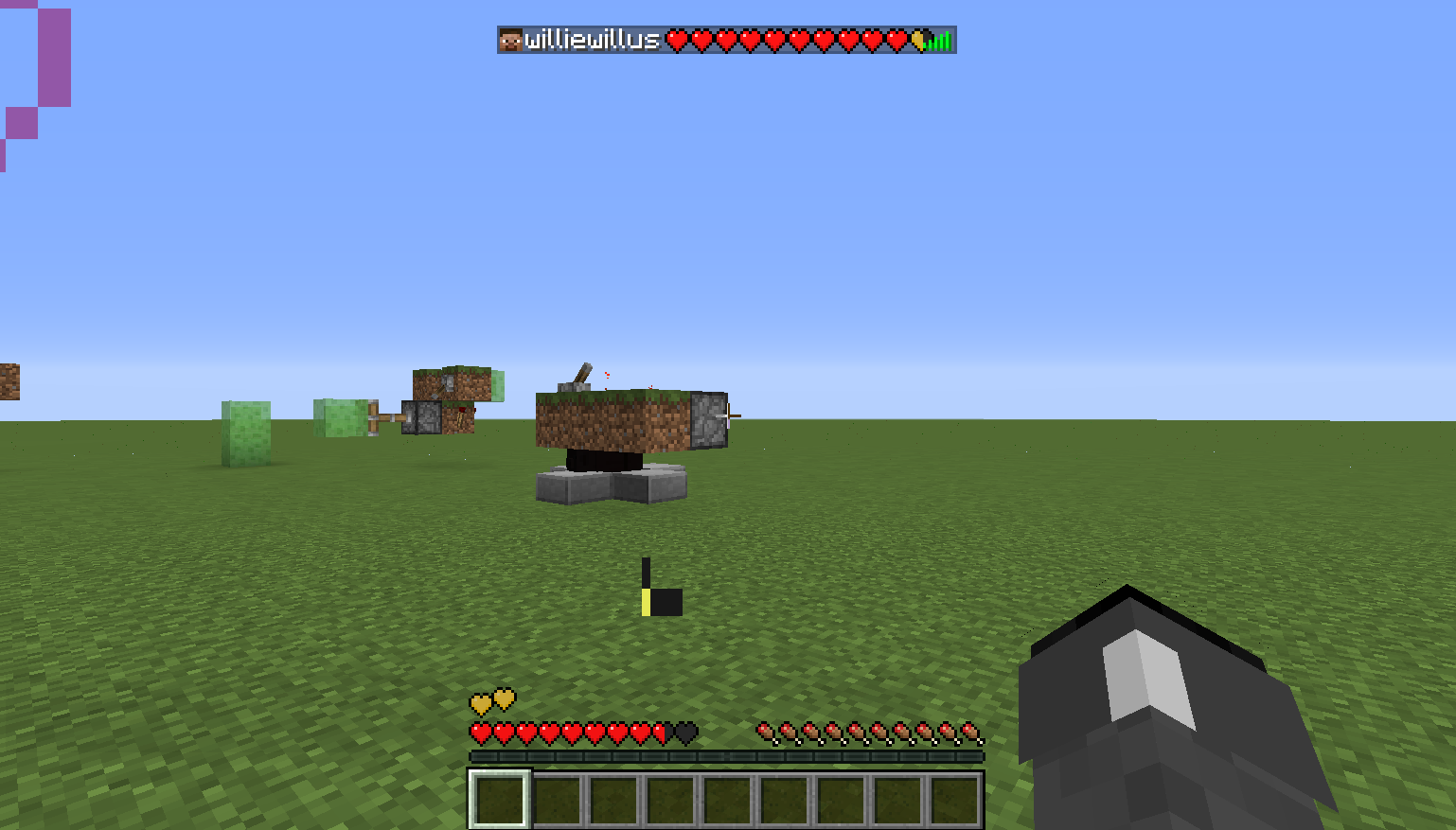
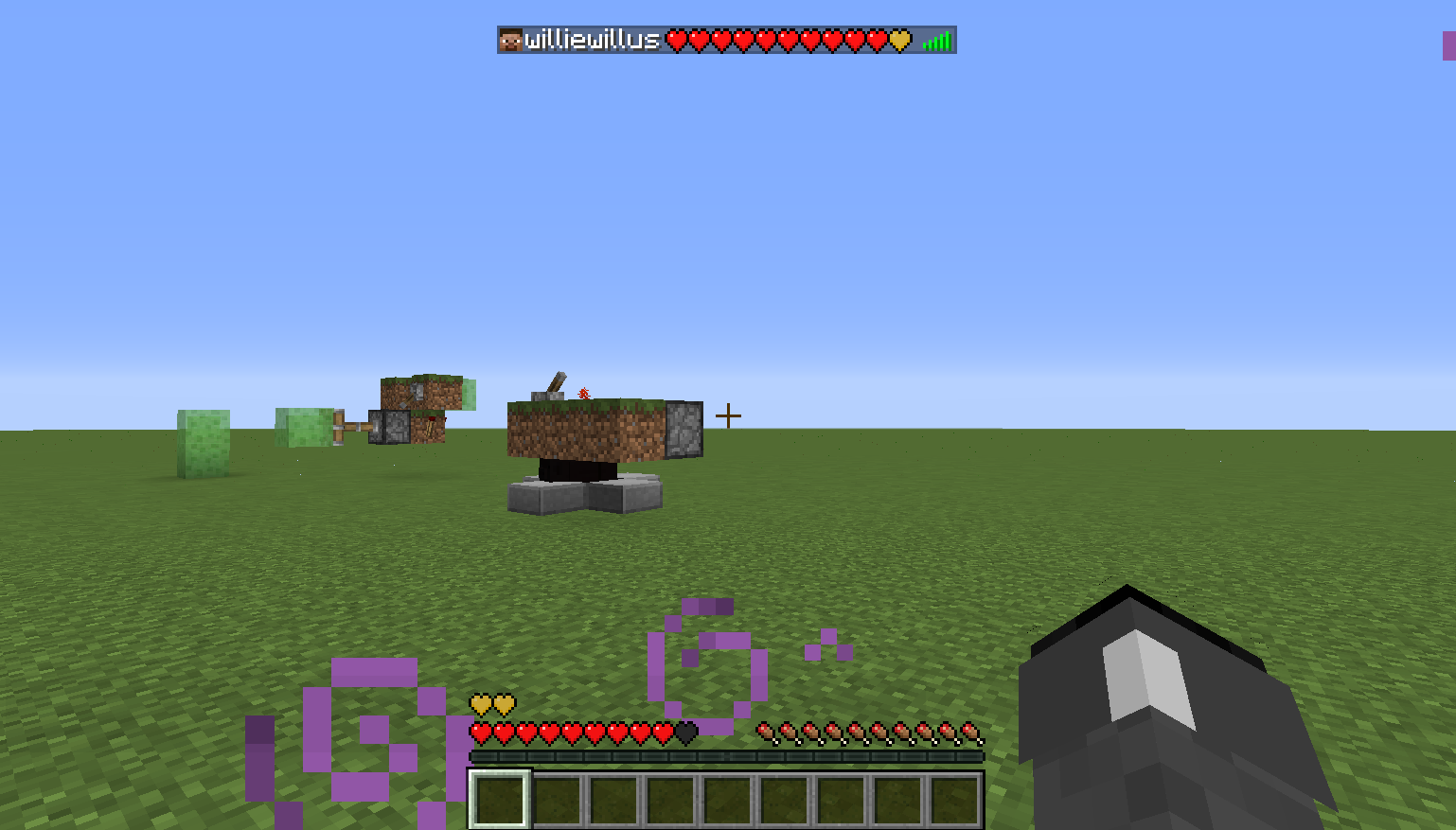
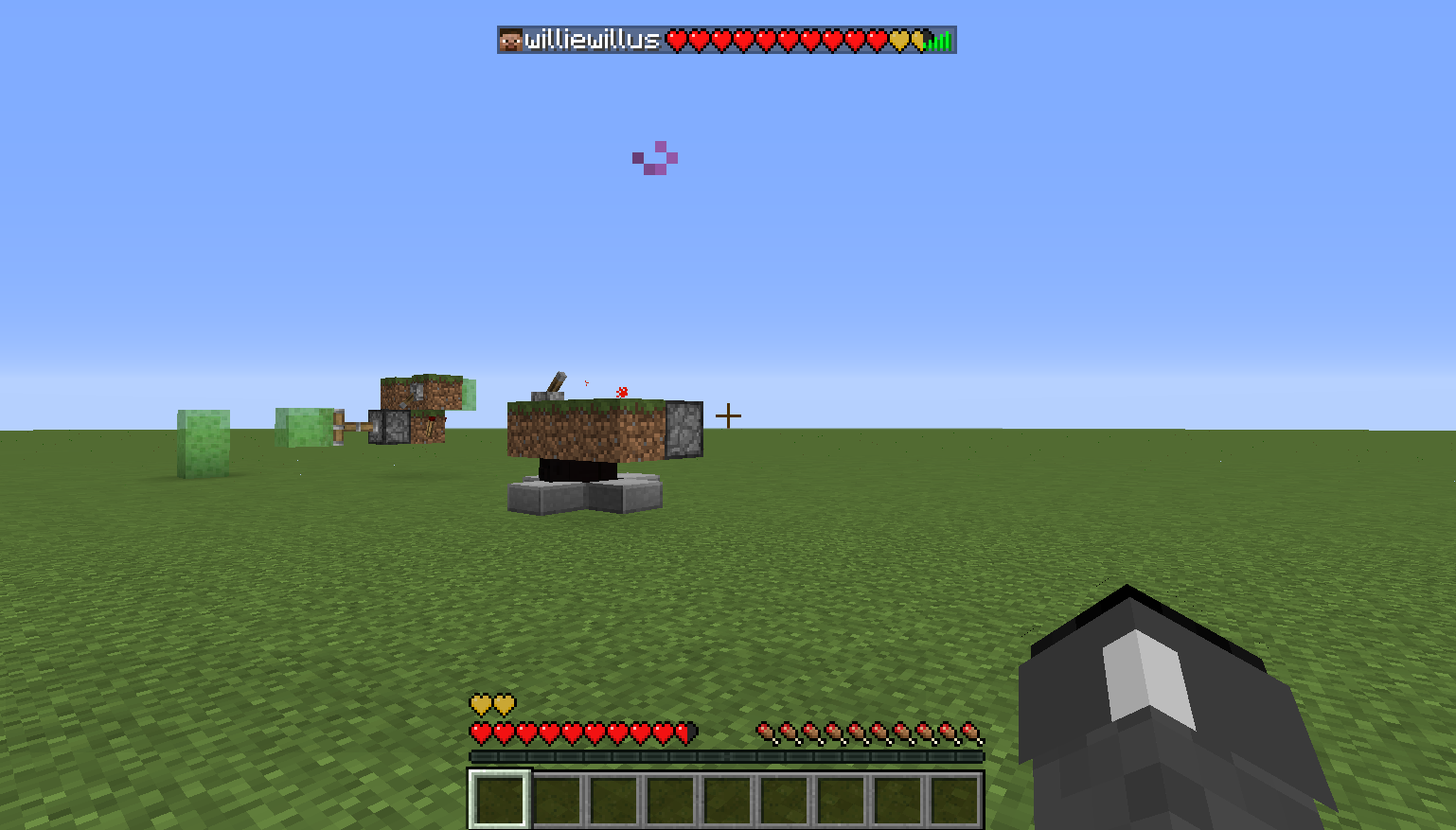

Put the summary of the bug you're having here
What I expected to happen was...:
Upon placing an eye of ender in a portal frame, the portal frame should emit smokeWhat actually happened was...:
In the latest version since the multiplayer restructuring (1.3-present), inserting an eye into a portal frame does not make it smoke.Steps to Reproduce:
1. Run current version of MC, create an end portal. Note how frame does not smoke when eyes are inserted.
2. Revert to 1.2.5 using MCNostalgia or MultiMC
3. create an end portal in single player. Note how frame does emit smoke when eyes are inserted.
Trivial error, but that's what the community is for, isn't it?What I expected to happen was...:
Upon placing an eye of ender in a portal frame, the portal frame should emit smokeWhat actually happened was...:
In the latest version since the multiplayer restructuring (1.3-present), inserting an eye into a portal frame does not make it smoke.Steps to Reproduce:
1. Run current version of MC, create an end portal. Note how frame does not smoke when eyes are inserted.
2. Revert to 1.2.5 using MCNostalgia or MultiMC
3. create an end portal in single player. Note how frame does emit smoke when eyes are inserted.
Trivial error, but that's what the community is for, isn't it?

What I expected to happen was...:
Upon placing an eye of ender in a portal frame, the portal frame should emit smokeWhat actually happened was...:
In the latest version since the multiplayer restructuring (1.3-present), inserting an eye into a portal frame does not make it smoke.Steps to Reproduce:
1. Run current version of MC, create an end portal. Note how frame does not smoke when eyes are inserted.
2. Revert to 1.2.5 using MCNostalgia or MultiMC
3. create an end portal in single player. Note how frame does emit smoke when eyes are inserted.
Trivial error, but that's what the community is for, isn't it?
Windows 8. Java 7 Update 1
7, 64-bitWindows 8. Java 7 Update 51, 64-bit
When taking damage in pre-1.3 MC, the viewpoint would wobble/tilt in both the left and right directions. Ever since 1.3 (and possibly in earlier multiplayer versions) the viewpoint only tilts to the right when taking damage.
To reproduce:
1. Open up vanilla 1.6.2 and start creative world
2. Pop down a cacti then switch to survival mode
3. Hug the cacti, notice how the viewpoint/terrain only tilts to the right when taking damage.4. Revert to pre-12w18a (1.2.5)
5. Find and hug a cacti.
6. Notice how the viewpoint tilts to the left occasionally as well, but this behavior is gone in 1.3+.When taking damage in pre-1.3 MC, the viewpoint would wobble/tilt in both the left and right directions. Ever since 1.3 (and possibly in earlier multiplayer versions) the viewpoint only tilts to the right when taking damage.
To reproduce:
1. Open up vanilla LATEST and start creative world
2. Pop down a cacti then switch to survival mode
3. Hug the cacti, notice how the viewpoint/terrain only tilts to the right when taking damage.4. Revert to pre-12w18a (1.2.5)
5. Find and hug a cacti.
6. Notice how the viewpoint tilts to the left occasionally as well, but this behavior is gone in 1.3+.Extra: Fight some mobs in 1.2.5, sometimes the viewport even dips downward when getting injured. This was a pretty cool addition to gameplay by telling you from which angle the attack came. Now it just does one thing. Badly.
When taking damage in pre-1.3 MC, the viewpoint would wobble/tilt in both the left and right directions. Ever since 1.3 (and possibly in earlier multiplayer versions) the viewpoint only tilts to the right when taking damage.
To reproduce:
1. Open up vanilla LATEST and start creative world
2. Pop down a cacti then switch to survival mode
3. Hug the cacti, notice how the viewpoint/terrain only tilts to the right when taking damage.4. Revert to pre-12w18a (1.2.5)
5. Find and hug a cacti.
6. Notice how the viewpoint tilts to the left occasionally as well, but this behavior is gone in 1.3+.
Extra: Fight some mobs in 1.2.5, sometimestheviewport even dips downward when getting injured. This was a pretty cool addition to gameplay by telling you from which angle the attack came. Now it just does one thing. Badly.When taking damage in pre-1.3 MC, the viewpoint would wobble/tilt in both the left and right directions. Ever since 1.3 (and possibly in earlier multiplayer versions) the viewpoint only tilts to the right when taking damage.
To reproduce:
1. Open up vanilla LATEST and start creative world
2. Pop down a cacti then switch to survival mode
3. Hug the cacti, notice how the viewpoint/terrain only tilts to the right when taking damage.4. Revert to pre-12w18a (1.2.5)
5. Find and hug a cacti. Or optionally set up dispensers to be shot into your sides and back.
6. Notice how the viewpoint tilts to the left occasionally as well, but this behavior is gone in 1.3+. If you did the extended dispenser setup, notice how if the arrow hits you from right you tilt different from if an arrow came from behind or in front of you.This "neat aesthetic" actually has actual value because it tells you at a glance from where an attack is originating.
Player viewpoint only tilts one way when taking damageDamage wobble no longer shows direction of incoming damage
When taking damage in pre-1.3 MC, the viewpoint would wobble/tilt in both the left and right directions. Ever since 1.3 (and possibly in earlier multiplayer versions) the viewpoint only tilts to the right when taking damage.
To reproduce:
1.Open up vanilla LATESTand start creative world
2.Pop down a cacti then switch to survival mode
3.Hug the cacti, notice how the viewpoint/terrain only tilts to the right when taking damage.4. Revert to pre-12w18a (1.2.5)
5. Find and hug a cacti. Or optionally set up dispensers to be shot into your sides and back.
6. Notice how the viewpoint tilts to the left occasionally as well, but this behavior is gone in 1.3+. If you did the extended dispenser setup, notice how if the arrow hits you from right you tilt different from if an arrow came from behind or in front of you.This "neat aesthetic" actually has actual value because it tells you at a glance from where an attack is originating.
In 1.2.5 SSP and before the little wobble to the whole viewport that occurs when you take damage used to indicate the direction the damage came from. As part of the 1.3 client/server merge, this behavior was lost.
Steps to view correct behavior:
1. Revert to 1.2.5 SSP and start a new creative world
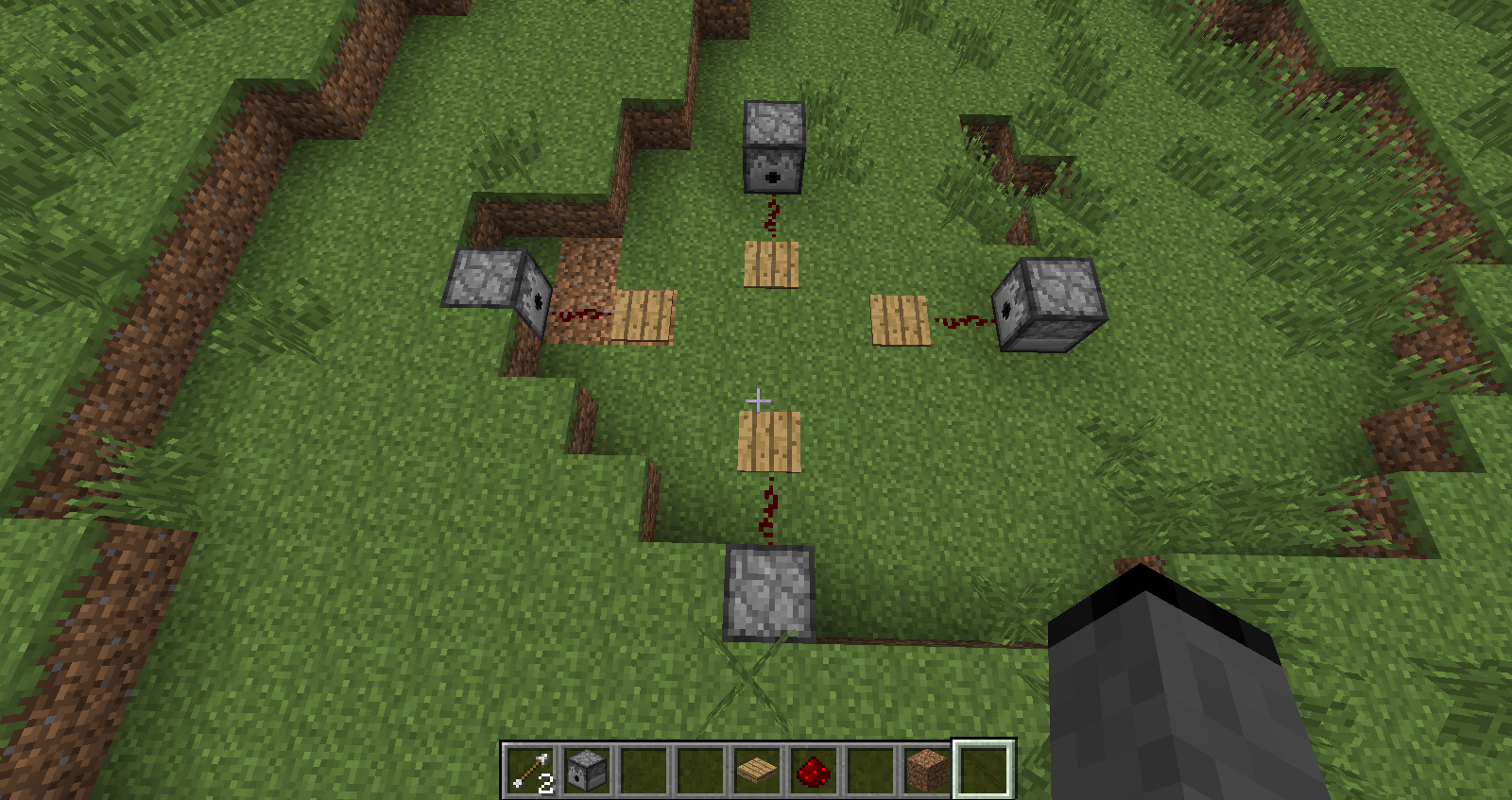
2. Build the contraption as shown in the image attachment below
3. Fill the dispensers with arrows.
4. Exit MC and use NBTExplorer to change the world to survival mode (alternatively play survival until you obtain those items or open a copy of a current world)
5. Facing forward, strafe left into the left pressure plate. Arrow will hit you and the viewport will tilt to the right, simulating the head whiplash.
6. Facing forward, strafe right into the right pressure plate. Arrow will hit you and the viewport will tilt to the left, simulating the head whiplash.
7. (Cool part) Facing forward, walk into the front pressure plate. Arrow will hit you and the viewport will tilt DOWN, simulating being hit in the top of the head by something
8. Facing forward, back into the rear pressure plate, Arrow will hit you and the viewport will tilt UP, simulating being hit in the back of the head and having forward whiplash.
9. This seemingly "cool aesthetic" actually has real gameplay value because it indicates to fighters where incoming damage is originating from.
10. Repeat all steps in 1.8.1-pre3 (no need to use NBT editors just open to lan with cheat mode to switch gamemode). Notice how the viewport will always tilt right no matter what.
In 1.2.5 SSP and before the little wobble to the whole viewport that occurs when you take damage used to indicate the direction the damage came from. As part of the 1.3 client/server merge, this behavior was lost.
Steps to view correct behavior:
1. Revert to 1.2.5 SSP and start a new creative world
2. Build the contraption as shown in the image attachment below
3. Fill the dispensers with arrows.
4. Exit MC and use NBTExplorer to change the world to survival mode (alternatively play survival until you obtain those items or open a copy of a current world)
5. Facing forward, strafe left into the left pressure plate. Arrow will hit you and the viewport will tilt to the right, simulating the head whiplash.
6. Facing forward, strafe right into the right pressure plate. Arrow will hit you and the viewport will tilt to the left, simulating the head whiplash.
7. (Cool part) Facing forward, walk into the front pressure plate. Arrow will hit you and the viewport will tilt DOWN, simulating being hit in the top of the head by something
8. Facing forward, back into the rear pressure plate, Arrow will hit you and the viewport will tilt UP, simulating being hit in the back of the head and having forward whiplash.
9. This seemingly "cool aesthetic" actually has real gameplay value because it indicates to fighters where incoming damage is originating from.
10. Repeat all steps in 1.8.1-pre3(no need to use NBT editors just open to lan with cheat mode to switch gamemode). Notice how the viewport will always tilt right no matter what.In 1.2.5 SSP and before the little wobble to the whole viewport that occurs when you take damage used to indicate the direction the damage came from. As part of the 1.3 client/server merge, this behavior was lost.
Steps to view correct behavior:
1. Revert to 1.2.5 SSP and start a new creative world
2. Build the contraption as shown in the image attachment below
3. Fill the dispensers with arrows.
4. Exit MC and use NBTExplorer to change the world to survival mode (alternatively play survival until you obtain those items or open a copy of a current world)
5. Facing forward, strafe left into the left pressure plate. Arrow will hit you and the viewport will tilt to the right, simulating the head whiplash.
6. Facing forward, strafe right into the right pressure plate. Arrow will hit you and the viewport will tilt to the left, simulating the head whiplash.
7. (Cool part) Facing forward, walk into the front pressure plate. Arrow will hit you and the viewport will tilt DOWN, simulating being hit in the top of the head by something
8. Facing forward, back into the rear pressure plate, Arrow will hit you and the viewport will tilt UP, simulating being hit in the back of the head and having forward whiplash.
9. This seemingly "cool aesthetic" actually has real gameplay value because it indicates to fighters where incoming damage is originating from.
10. Repeat all steps in 1.8.7 (no need to use NBT editors just open to lan with cheat mode to switch gamemode). Notice how the viewport will always tilt right no matter what.
In 1.2.5 SSP and before the little wobble to the whole viewport that occurs when you take damage used to indicate the direction the damage came from. As part of the 1.3 client/server merge, this behavior was lost.
Steps to view correct behavior:
1. Revert to 1.2.5 SSP and start a new creative world
2. Build the contraption as shown in the image attachment below
3. Fill the dispensers with arrows.
4. Exit MC and use NBTExplorer to change the world to survival mode (alternatively play survival until you obtain those items or open a copy of a current world)
5. Facing forward, strafe left into the left pressure plate. Arrow will hit you and the viewport will tilt to the right, simulating the head whiplash.
6. Facing forward, strafe right into the right pressure plate. Arrow will hit you and the viewport will tilt to the left, simulating the head whiplash.
7.(Cool part)Facing forward, walk into the front pressure plate. Arrow will hit you and the viewport will tilt DOWN, simulating being hit in the top of the head by something
8. Facing forward, back into the rear pressure plate, Arrow will hit you and the viewport will tilt UP, simulating being hit in the back of the head and having forward whiplash.
9. This seemingly "cool aesthetic" actually has real gameplay value because it indicates to fighters where incoming damage is originating from.
10. Repeat all steps in1.8.7(no need to use NBT editors just open to lan with cheat mode to switch gamemode). Notice how the viewport will always tilt right no matter what.In 1.2.5 SSP and before the little wobble to the whole viewport that occurs when you take damage used to indicate the direction the damage came from. As part of the 1.3 client/server merge, this behavior was lost.
Steps to view correct behavior:
1. Revert to 1.2.5 SSP and start a new creative world
2. Build the contraption as shown in the image attachment below
3. Fill the dispensers with arrows.
4. Exit MC and use NBTExplorer to change the world to survival mode (alternatively play survival until you obtain those items or open a copy of a current world)
5. Facing forward, strafe left into the left pressure plate. Arrow will hit you and the viewport will tilt to the right, simulating the head whiplash.
6. Facing forward, strafe right into the right pressure plate. Arrow will hit you and the viewport will tilt to the left, simulating the head whiplash.
7. Facing forward, walk into the front pressure plate. Arrow will hit you and the viewport will tilt DOWN, simulating being hit in the top of the head by something
8. Facing forward, back into the rear pressure plate, Arrow will hit you and the viewport will tilt UP, simulating being hit in the back of the head and having forward whiplash.
9. This seemingly "cool aesthetic" actually has real gameplay value because it indicates to fighters where incoming damage is originating from.
10. Repeat all steps in latest version (no need to use NBT editors just open to lan with cheat mode to switch gamemode). Notice how the viewport will always tilt right no matter what.
In 1.2.5 SSP and before the little wobble to the whole viewport that occurs when you take damage used to indicate the direction the damage came from. As part of the 1.3 client/server merge, this behavior was lost.Steps to view correct behavior:
1. Revert to 1.2.5 SSP and start a new creative world
2. Build the contraption as shown in the image attachment below
3. Fill the dispensers with arrows.
4. Exit MC and use NBTExplorer to change the world to survival mode (alternatively play survival until you obtain those items or open a copy of a current world)
5. Facing forward, strafe left into the left pressure plate. Arrow will hit you and the viewport will tilt to the right, simulating the head whiplash.
6. Facing forward, strafe right into the right pressure plate. Arrow will hit you and the viewport will tilt to the left, simulating the head whiplash.
7. Facing forward, walk into the front pressure plate. Arrow will hit you and the viewport will tilt DOWN, simulating being hit in the top of the head by something
8. Facing forward, back into the rear pressure plate, Arrow will hit you and the viewport will tilt UP, simulating being hit in the back of the head and having forward whiplash.
9. This seemingly "cool aesthetic" actually has real gameplay value because it indicates to fighters where incoming damage is originating from.
10. Repeat all steps in latest version (no need to use NBT editors just open to lan with cheat mode to switch gamemode). Notice how the viewport will always tilt right no matter what.TLDR CODE CAUSE (MCP Names): Entity.attackedAtYaw is not synced to the client, causing an animation present in the client to not be correctly rendered.
In 1.2.5 SSP and before the little wobble to the whole viewport that occurs when you take damage used to indicate the direction the damage came from. As part of the 1.3 client/server merge, this behavior was lost.
Steps to view correct behavior:
1. Revert to 1.2.5 SSP and start a new creative world
2. Build the contraption as shown in the image attachment below
3. Fill the dispensers with arrows.
4. Exit MC and use NBTExplorer to change the world to survival mode (alternatively play survival until you obtain those items or open a copy of a current world)
5. Facing forward, strafe left into the left pressure plate. Arrow will hit you and the viewport will tilt to the right, simulating the head whiplash.
6. Facing forward, strafe right into the right pressure plate. Arrow will hit you and the viewport will tilt to the left, simulating the head whiplash.
7. Facing forward, walk into the front pressure plate. Arrow will hit you and the viewport will tilt DOWN, simulating being hit in the top of the head by something
8. Facing forward, back into the rear pressure plate, Arrow will hit you and the viewport will tilt UP, simulating being hit in the back of the head and having forward whiplash.
9. This seemingly "cool aesthetic" actually has real gameplay value because it indicates to fighters where incoming damage is originating from.
10. Repeat all steps in latest version (no need to use NBT editors just open to lan with cheat mode to switch gamemode). Notice how the viewport will always tilt right no matter what.
TLDR CODE CAUSE (MCP Names): EntityLivingBase.attackedAtYaw is not synced to the client, causing an animation present in the client to not be correctly rendered.
In 1.2.5 SSP and before the little wobble to the whole viewport that occurs when you take damage used to indicate the direction the damage came from. As part of the 1.3 client/server merge, this behavior was lost.
Steps to view correct behavior:
- Revert to 1.2.5 SSP and start a new creative world
- Build the contraption as shown in the image attachment below
- Fill the dispensers with arrows.
- Exit MC and use NBTExplorer to change the world to survival mode (alternatively play survival until you obtain those items or open a copy of a current world)
- Facing forward, strafe left into the left pressure plate. Arrow will hit you and the viewport will tilt to the right, simulating the head whiplash.
- Facing forward, strafe right into the right pressure plate. Arrow will hit you and the viewport will tilt to the left, simulating the head whiplash.
- Facing forward, walk into the front pressure plate. Arrow will hit you and the viewport will tilt DOWN, simulating being hit in the top of the head by something
- Facing forward, back into the rear pressure plate, Arrow will hit you and the viewport will tilt UP, simulating being hit in the back of the head and having forward whiplash.
- This seemingly "cool aesthetic" actually has real gameplay value because it indicates to fighters where incoming damage is originating from.
- Repeat all steps in latest version (no need to use NBT editors just open to lan with cheat mode to switch gamemode). Notice how the viewport will always tilt right no matter what.
In past versions of the game since regeneration was implemented in Beta 1.8 the hearts flash briefly to notify the player that a half heart has been regenerated. As of 13w41a, however, healing does not have the flash effect (hearts simply refill without flashing), making it hard to tell at a glance whether you are regaining health or not.
Code cause (using MCP names for 1.7.10):
The gui renderer renders a blink around the hearts by setting the client player's hurtResistantTime to 20 for damage and 10 for healing (so the hearts blink twice and once, respectively)
The hurtResistantTime is set in EntityPlayerSP's setPlayerSPHealth method, which is called by a health update packet.
HOWEVER, The DataWatcher that actually holds the health is updated through a SEPARATE packet S1CEntityMetadata. This results in a pseudo-race condition between the two packet types where, by the time the GuiIngame gets the new health from the clientside DataWatcher, hurtresistanttime is already at 9 or 8 so the GuiIngame skips the blink.
Hearts do not blink when regenerating (Cause identified in code)
Can a dev explain why this was reclosed (after I requested a reopen) after the latest two snapshots obviously show that whatever hackjob fix they used doesn't work consistently?...
Found the error in code and reasoning behind why it worked in 1.2.5 but not after the multiplayer merge.
Mojangsters reading this: Using MCP names, go bug Searge.
In GuiInGame's func_110327_a, with signature (II)V, there is an if (var3) two lines after where the world is checked for hardcore.
That block is where the missing functionality is.
There are comparisons between var22*2+1 (the current heart to render) and var5 (the previous health value of the client side player entity) in order to determine what hearts to flash white. However, var5 is a completely client-sided variable left unused after the multiplayer merge. I tried fixing it on my own, but var5 is set to strange values that don't make sense, possibly indicating that the server is somehow overriding it. I'll continue trying to develop a soluition in the meantime, but that is where the error is.
The tab list has the VERY cool feature of showing everyone's hearts and whenever they take damage and regen.
However, it wrongly assumes that any health above 20 is absorption / gold and any health below 20 is not absorption.Reproduction:
0. (Turn natural regen off to see results better)
0.5. /scoreboard objectives add health health
0.75. /scoreboard objectives setdisplay list health
1. Injure yourself (/tp @p ~ ~7 ~). You should be around 8 hearts. The tab display shows 8 red hearts.
2. Eat a regular golden apple.
3. As you regen, compare health hud and tab list. The hudregenerates to 10 hearts and shows 2 absorption hearts.
The list INCORRECTLY jumps directly to 10 RED hearts and then shows 2 gold heartsgenerating.
It would be great (and advantageous in pvp games) if it was distinguished which hearts were absorption and which were not (especially since it can be confusing because absorption hearts cannot be regenned)The tab list has the VERY cool feature of showing everyone's hearts and whenever they take damage and regen.
However, it wrongly assumes that any health above 20 is absorption / gold and any health below 20 is not absorption.Reproduction:
0. (Turn natural regen off to see results better)
0.5. /scoreboard objectives add health health
0.75. /scoreboard objectives setdisplay list health
1. Injure yourself (/tp @p ~ ~7 ~). You should be around 8 hearts. The tab display shows 8 red hearts.
2. Eat a regular golden apple.
3. As you regen, compare health hud and tab list. The hud immediately shows 2 gold hearts and then refills the red hearts from 8 to 10.
The list INCORRECTLY jumps directly to 10 RED hearts and then shows 2 gold hearts filling.
It would be great (and advantageous in pvp games) if it was distinguished which hearts were absorption and which were not (especially since it can be confusing because absorption hearts cannot be regenned)
The tab list has the VERY cool feature of showing everyone's hearts and whenever they take damage and regen.
However, it wrongly assumes that any health above 20 is absorption / gold and any health below 20 is not absorption.Reproduction:
0. (Turn natural regen off to see results better)
0.5. /scoreboard objectives add health health
0.75. /scoreboard objectives setdisplay list health
1. Injure yourself (/tp @p ~ ~7 ~). You should be around 8 hearts. The tab display shows 8 red hearts.
2. Eat a regular golden apple.
3. As you regen, compare health hud and tab list. The hud immediately shows 2 gold hearts and then refills the red hearts from 8 to 10.
The listINCORRECTLYjumps directly to 10 RED hearts and then shows 2 gold hearts filling.
It would be great (and advantageous in pvp games) if it was distinguished which hearts were absorption and which were not (especially since it can be confusing because absorption hearts cannot be regenned)The tab list has the VERY cool feature of showing everyone's hearts and whenever they take damage and regen.
However, it wrongly assumes that any health above 20 is absorption / gold and any health below 20 is not absorption.Reproduction:
0. (Turn natural regen off to see results better)
0.5. /scoreboard objectives add health health
0.75. /scoreboard objectives setdisplay list health
1. Injure yourself (/tp @p ~ ~7 ~). You should be around 8 hearts. The tab display shows 8 red hearts.
2. Eat a regular golden apple.
3. As you regen, compare health hud and tab list. The hud immediately shows 2 gold hearts and then refills the red hearts from 8 to 10.
The list incorrectly jumps directly to 10 RED hearts and then shows 2 gold hearts filling.
It would be great (and advantageous in pvp games) if it was distinguished which hearts were absorption and which were not (especially since it can be confusing because absorption hearts cannot be regenned)
This is an elaborated ticket on
MC-26678(mods please close the other one)In 1.2.5 SSP and before the little wobble to the whole viewport that occurs when you take damage used to indicate the direction the damage came from. As part of the 1.3 client/server merge, this behavior was lost.
Steps to view correct behavior:
1. Revert to 1.2.5 SSP and start a new creative world
2. Build the contraption as shown in the image attachment below
3. Fill the dispensers with arrows.
4. Exit MC and use NBTExplorer to change the world to survival mode (alternatively play survival until you obtain those items or open a copy of a current world)
5. Facing forward, strafe left into the left pressure plate. Arrow will hit you and the viewport will tilt to the right, simulating the head whiplash.
6. Facing forward, strafe right into the right pressure plate. Arrow will hit you and the viewport will tilt to the left, simulating the head whiplash.
7. (Cool part) Facing forward, walk into the front pressure plate. Arrow will hit you and the viewport will tilt DOWN, simulating being hit in the top of the head by something
8. Facing forward, back into the rear pressure plate, Arrow will hit you and the viewport will tilt UP, simulating being hit in the back of the head and having forward whiplash.
9. This seemingly "cool aesthetic" actually has real gameplay value because it indicates to fighters where incoming damage is originating from.
10. Repeat all steps in 1.8.1-pre3 (no need to use NBT editors just open to lan with cheat mode to switch gamemode). Notice how the viewport will always tilt right no matter what.
Dropping a falling block entity with a lapis ore block inside yields a drop with the missing texture.
Reproduction:
{Block: minecraft:lapis_ore, Time: 2}
1. Position yourself above a half slab (or anything that causes sand to drop like a torch)
2.`/summon minecraft:falling_block ~ ~ ~
`
3. The entity will hit the block and drop a missing texture item
4. Note how it works for most other ores and blocks.Code Analysis:
In `EntityFallingBlock.func_70071_h_` (onUpdate), an `ItemStack` is constructed to drop. The `Block` of the falling tile is passed, with the meta being set via a call to `Block.func_180651_a`(damageDropped). In the case of Lapis Ore, the damageDropped call returns a meta value for use with the dye item, since lapis ore drops the dye item. However, here the meta value is paired with an unintended item, the actual block, instead of the dye item, thus resulting in this invalid drop.Dropping a falling block entity with a lapis ore block inside yields a drop with the missing texture.
Reproduction:
{Block: minecraft:lapis_ore, Time: 2}
1. Position yourself above a half slab (or anything that causes sand to drop like a torch)
2. {{/summon minecraft:falling_block ~ ~ ~}}
3. The entity will hit the block and drop a missing texture item
4. Note how it works for most other ores and blocks.Code Analysis:
In EntityFallingBlock.func_70071_h_ (onUpdate), an ItemStack is constructed to drop. The Block of the falling tile is passed, with the meta being set via a call to Block.func_180651_a (damageDropped). In the case of Lapis Ore, the damageDropped call returns a meta value for use with the dye item, since lapis ore drops the dye item. However, here the meta value is paired with an unintended item, the actual block, instead of the dye item, thus resulting in this invalid drop.
The bug
Dropping a falling block entity with a lapis ore block inside yields a drop with the missing texture.
Steps to reproduce
- Position yourself above a half slab (or anything that causes sand to drop like a torch)
- Use the following command
/summon minecraft:falling_block ~ ~ ~ {Block: minecraft:lapis_ore, Time: 2}- The entity will hit the block and drop a missing texture item
- Note how it works for most other ores and blocks
Code Analysis
In EntityFallingBlock.func_70071_h_ (onUpdate), an ItemStack is constructed to drop. The Block of the falling tile is passed, with the meta being set via a call to Block.func_180651_a (damageDropped). In the case of Lapis Ore, the damageDropped call returns a meta value for use with the dye item, since lapis ore drops the dye item. However, here the meta value is paired with an unintended item, the actual block, instead of the dye item, thus resulting in this invalid drop.
Dropping a falling block entity with a lapis ore block inside yields a drop with the missing texture.
Reproduction:
{Block: minecraft:lapis_ore, Time: 2}
1. Position yourself above a half slab (or anything that causes sand to drop like a torch)
2. {{/summon minecraft:falling_block ~ ~ ~}}
3. The entity will hit the block and drop a missing texture item
4. Note how it works for most other ores and blocks.Code Analysis (using MCP mappings for 1.11.0, though the names should be same for 1.11.2):
In EntityFallingBlock.func_70071_h_ (onUpdate), an ItemStack is constructed to drop. The Block of the falling tile is passed, with the meta being set via a call to Block.func_180651_a (damageDropped). In the case of Lapis Ore, the damageDropped call returns a meta value for use with the dye item, since lapis ore drops the dye item. However, here the meta value is paired with an unintended item, the actual block, instead of the dye item, thus resulting in this invalid drop.
Java 8 update 121 or latest 64 bit
Arch Linux 64 bit
williewillus: net/minecraft/entity/item/EntityBoat.java:
Clear method body of setIsBoatEmpty.
In setPositionAndRotation2, remove the addition of 5.
Contrary to what Tobias is saying, boats do not sync at all to clients that have entered them. At best the error remains small enough to have had no significant effect, yet.
williewillus: Up in the comments you can find a simple patch by me that keeps the client responsive to updates. It's so incredibly simple to make boats, well, work! A more comprehensive fix would be possible, but those few bytes are really all you need to make boats more than usable. Unfortunately such a patch needs to be remade for each version, which is why Mojang should fix it.
![[Helper] ZeNico13](../../../data/avatars/users/31913.png)
The bug
Projectiles hit the player, snowman and witch who threw them at certain angles or close to the entities.
The projectile would hit players, snowman and witch the head, causing unable to successfully emission.
• Notes:
- It can only be achieved in the face certain angle.
- Approaching entities comparatively easy to reproduce.
- This also happens in snowman.
- Also affect the ride a entity.
• Projectiles types:
- Snowballs
- Egg
- Ender Pearl
- Arrow (It will hurt the players themselves.)
- Splash Potions
- Lingering Potions
How to reproduce
This can be consistently reproduced by flying into the air in creative and then running these 2 commands (while not moving), and then shooting an egg:
/summon zombie ~ ~ ~-1 {NoAI:1b}
/tp @p ~ ~ ~ 102.0 68.5
The exact range of movement varies, but this is one consistent angle.
Examples
Here are a few examples in videos:
- Video 1 (Snowballs, egg and ender pearl): https://www.youtube.com/watch?v=q0DzNQxn-p0
- Video 2 (Splash potions and lingering potions): https://www.youtube.com/watch?v=hUaRVsjkCIA
- Video 3 (This also happens in snowman): https://www.youtube.com/watch?v=5Ug_jCZznUA
Code analysis
Code analysis by Marcono1234 can be found in this comment.
Note: williewillus pointed out that the thrower field has to be synchronized for the client to make sure the projectile behaves correctly client-side as well.
Tested 1.3.2, 1.4.7, and 1.5.2. Definitely happens much more often in 1.4 and 1.5 than in 1.3
This should be expected from snapshot to snapshot as Mojang tweaks the horse code. As long as the horses spawned in the current snapshot vary properly, it should be fine.
This replicates vanilla PC behavior.
Arrow projectile entities are immune to fire and burning.
Arrow item entities burn on contact to lava.
So when you throw stuff away, just toss it, save some durability and sanity
Pretty sure this is intended. All mounts transfer their fall damage to their riders (carts/boats/pigs/horses)
This is because the game now uses internal server, and it was default server behavior to grant full immunity to all players upon login for several seconds in an attempt to prevent camping.
Possible solution is to remove this invincibility, but only in singleplayer/InternalServer
Seems to be feature request/gameplay fix, not bug
Just tested in 1.6, splashing at eye level straight at a wall grants ~1:24, even worse than foot level.
I'm just saying that feet is the most convenient location to splash (no walls, can do it in, say, a 2x1 shaft) yet we don't receive the full buff.
Did some testing.
This bug has been in multiplayer ever since release 1.0 (it was fine in multiplayer beta 1.8)
With the conversion of singleplayer into multiplayer in 1.3 this bug was carried into singleplayer as well.
Still affects all current versions (13w38c and beyond)
Direct cause of
MC-12013Linux x64 OpenJDK/Oracle Java 7u51, same thing happens.
Only on dedicated servers, integrated server SP games do not crash.
Seems to be more than just the sound, the arrows precision itself is messed up. Possibly the client running the collision code on the arrow before the server does and the server adjusts? The difference can be seen from 1.6.4 by firing low power arrows into a block in front of you. In 1.6 the arrow hits and stays, while in 1.7+ the arrows usually fall off, stick to the ground, get stuck in the block, turn black, etc.
Possibly related to https://bugs.mojang.com/browse/MC-48577
Confirmed up to 14w18a
Confirmed all the way up to 14w18a
This is not WIA.
Grum's technical notes say that client now references by origin of entity now as of 14w06a.
https://s3.amazonaws.com/Minecraft.Download/blocknotes.txt
This is used to play the animation effect (entity is rendered flying from the ground to the entity picking it up's position). Position on the client used to be the eye level, but it was refactored in 14w06, so this animation now flies to a point much lower.
Looking at Mojang's post for 14w06a: https://mojang.com/2014/02/minecraft-snapshot-14w06a/
No mention whatsoever of this "intended change".
Besides it makes no aesthetic sense nor does it satisfy any need for change. Many times you can no longer tell what or if an item has been picked up because it goes under you, not into your chest.
Please reopen.
It's still there but plays super fast, so it's almost like there wasn't one at all.
The effects of this bug still apply too, further reducing awareness of whether an item was picked up or not.
This is one of the most core animations mc has had, hope Mojang doesn't botch this up too o.o
Update on bug hunting -
Turns out this problem can be solved by adding ONE LINE to the code.
Mojangsters: Using MCP names
In EntityClientPlayerMP 's attackEntityFrom() method.
Before the return false statement, insert this.prevHealth = getHealth() + par2;
this sets the correct clientsided prevHealth value so the gui can render the flashing hearts appropriately.
It is, I added it to my bugfix minimod and it worked.
Small oversight in cleaning up code from 1.6 probably.
Solution (MCP Names):
in NetClientPlayHandler's handleExpOrb or something similar, the coordinates of the xp orb are retrieved from the packet and used in the constructor of a new EntityXPOrb. However, those coordinates are still 32x the actual coordinates (to aid in network communication)
So simply divide each coordinate by 32.0D and the problem is fixed
Solution (MCP Names):
In EntityPlayer's attackEntityFrom() method, there exists a check that instantly returns false if the damage amount is 0. This prevents snowballs from knocking back players and needs to be removed to fix this bug.
Simple solution is to only damage tools on the serverside. This unfortunately gives the aesthetic glitch of not having the tool break apart animation.
@Gary Closse
Yes, this bug is present in the latest snapshot 14w25b
Notice that when you change the opacity slider, the grey background is faded as dictated by the setting, but the TEXT itself remains fully opaque.
Another test is to enter a chat message and let the chat window fade naturally. The background fades but the text does not fade with it and simply disappears.
Compare with 1.6.4 for proper function.
Added the code cause so hopefully Mojang will fix this!!
Confirmed all the way up to 14w29b
Confirmed for 14w29b, 1.7.10
@jonathan2520
What are the MCP names for the bytecode locations you're changing in 1.7.10 above?
Would like to incorporate it into my vanilla bugfixer Forge mod (I'll give credit!)
Bug still occurs intermittently in 14w31/32a, heart does not blink and simply refills
Other please test and confirm?
Whatever Mojang tried in 14w32a/b does not work fully.
Test case:
Setup cactus. Hug cactus and stay there.
Expected outcome: Only the lost half heart increments flash each time.
Real outcome: All hearts lost from the cactus hug flash.
If you hug the cactus for ~10 secs about 5 of the hearts will flash.
This is incorrect as it does not show that 0.5 heart of damage was taken each time.
Please check and reopen.
Devs: Look at how it worked in 1.2.5. Replicate that.
Now it blinks twice for each healing. sigh.
Guess that's for another report, I guess.
I disagree with removal of internal server (it has made modding SO MUCH EASIER) but agree that the current state of singleplayer is quite dismal. They need to go back to 1.2.5 and play it for a little and take note of how everything wasn't broken and then try to get that back in.
I agree that it's very beneficial, I'm just saying that more effort should've been put in to make the internal server experience match that of 1.2.5, because it's far from doing so.
Steps to reproduce (bug happens in 80% of test cases for me) :
1. Create superflat world.
2. Optionally create a holding chamber and put a hostile mob or two in there,
3. Toggle F3+B so you see entity hitboxes
4. Fill your hotbar with items and switch to survival
5. /kill yourself and respawn
6. Many of the items you dropped are now invisible, as are the mobs. The hitbox from f3+b is not present, suggesting that the server isn't even sending the entity to the client.
7. Reload world. Entities now visible again.
Seems to depend on where respawn point is, as whenever I change spawnpoint the problem goes away.
^ yes. In third person mode they fly to the eyes, but in first person they fly somewhere in between the feet and eyes. It's not as bad as it was before but still looks like we're absorbing blocks into our crotches or something, haha.
@Tobias
The thing is, really good horses travel in the overworld at or above the speed of boats, yet the lag is much less pronounced.
Boats are just screwed up and need to be rewritten.
Yup, I saw it! Incorporated it into an ASM bugfixer mod for MinecraftForge.
Sometimes during lag I rubber band severely, but at least now I know where the true location of the boat is.
Behavior seems to be inconsistent. Not all mobs are running. Test case: Spawn a bunch of creepers. Ignite one with flint and steel. About half run and the others stay.
Confirmed to 1.8-pre3. please fix!
Affects all versions up to and including release 1.8
Confirmed for release 1.8
Confirmed for 1.8 release
The knockback steadily decreases when the damage is small, but if the damage is absolutely 0, there is a hardcoded check to instantly stop further processing.
Confirmed for 1.8 release, will code dig later for the cause.
Not trying to argue, just curious where this design decision came from. Got a dev tweet I could see so I could attempt to contact that dev?
A "design decision" that bases itself on complete error (the scoreboard does NOT do it's intended purpose correctly - display the hearts and absorption hearts of other players correctly) is a strange one indeed.
Two solutions - make all the hearts red (don't distinguish absorption or regular), or correct it to work the right way.
^Yes, I first experienced this issue intermittently when dying and respawning....some of my items would be invisible but still collectible. F3+b shows no hitbox so my most logical guess is that the server is not sending the entity to the client to render.
Made worse in some situations.
Test case
1. create 1x 7 water stream
2. Toss some items in. Notice how they jitter and flail more than they did in 1.8 (about as badly or worse than 1.7)
3. Now replace floor of stream with ice or packed ice. Toss items again. They flail even worse.
Most prominently, when they reach the end of the water stream, they seem to teleport back one block and re-flow.
I just want unglitchy undesynced items like 1.2.5 ssp
No this isn't an "undocumented feature"
The bug is that the item is breaking visually when it's not supposed to.
The client should always reflect the server accurately so this is a bug.
This is only partially fixed in 14w34c+. It looks completely fine in third person view (items fly towards the player's hands / head area). In first person mode, however, the items still fly a little lower than they used to, now flying somewhere towards the waist/crotch area. Compare with 1.7.10 for proper behavior.
Nah,
MC-12013is safely and completely solved (I made a mod to fix it before Vanilla patched it so I know what that bug is)This bug is just an extension / special case of MC's entity syncing system being derpy in general (client and server still not matching some code, etc.). By extension this and the item drops appearing in wrong place bug and the boat desync bug are all the result of a derpy synchronizations system.
This is a very, very, very, VERY old bug. Like release 1.1 or before.
Snowball fights used to be a very common thing on multiplayer, eggs were added for the humor of throwing them at others.
What point are snowball fights when they just vanish on contact?
Nope, I very very distinctly remember having snowball fights on vanilla servers. The only reason Bukkit has it is because vanilla had it at some point and they forgot to remove it when vanilla did.
If I find a means to get old server jars, I'll try to prove it.
MCVC is down right now, and I don't currently have time to extensively test this (perhaps you can?)
I just remember that Notch added snowballs with the purpose of them being used for snowball fights, so it is illogical that they cannot be used for that purpose now.
It's unused for a reason.
It was two separate blocks in the 1.5 snapshots, but was changed to one block with multiple metadatas. The only reason this is still here is legacy/to not break the worlds of those who used the 1.5 snapshots. It is completely unneeded.
You do realize any kind of change like that would break worlds. And mojang strives to NEVER breaks worlds.
Although this is a good fix, there is probably a good reason why those values are int's. Floats and doubles take noticeably more network bandwidth to encode and transmit. Scale that up to 50 players at once and your network is struggling to keep up.
@Early Reflections abd other recent commenters:
This issue is only about entities being invisible clientside/not being sent to the client. In all cases they are still there serverside, can still attack you, be identified by testfor, etc.
No doubt your issue is also severe, but I think there's another ticket that better suits it (permanent disappearances)
Unless there's some weird case where it disappears both client and serverside, then reappears on login. Then that'd be really weird 0.o
Confirmed tup to 15w46a. Please fix.
Yup, still there. Please reopen
Devs, compare to 1.7.10 for proper behavior (actually probably 1.6, their behavior was already weird in 1.7)
Confirmed to latest snapshot (November 18).
This would really really be a good (re)addition to combat. Please fix it!
It's just syncing one more field back to the client.
Thanks
This was fixed a long time ago...
yup
MC-12013(caused directly by this issue) was fixed in 1.8.1Confirmed up to 16w32b
Cannot reproduce on 16w41a either
MC-87792is this problem, but this ticket is updated/valid for 1.11.2.I submitted a fix for this to Forge in the meantime https://github.com/MinecraftForge/MinecraftForge/commit/ba875418fd2cb23ad45c6f78e7ef1afb4d1e9ac5
That wouldn't work because the call to onImpact happens clientside. The problem is that thrower is not synced to the client so ignoreEntity is never set clientside. The ideal solution is to sync the thrower.
Confirmed for 1.12
hey guys
this is just a note that the original forge fix I made that was posted above is buggy, and I have made a more correct fix here: https://github.com/MinecraftForge/MinecraftForge/pull/4830.
Marcono's comment is correct but is not the best way to fix the issue, because the client player should lose all of its attributes when it's recreated due to a death. But the client doesn't know whether a given respawn packet is due to a teleportation or death.
The optimal fix is to resend all attribute modifiers after a non-death dimension change, which is what the new forge fix I've linked does.
Code cause: In ChunkRenderDispatcher (or the class that has a ThreadFactory making threads called "Chunk Batcher N"), the constructor only adds one buffer to the queue of available buffers, essentially forcing all chunk rebuilds to be serialized, run one by one.
So we get a glimpse of what it would be like if we went back to pre-1.8 non-multithreaded chunk batching
@Jay Eff, correct, chunks within a certain radius of the player (2-3 chunks, iirc) are always run on the main thread, and other chunks run off-thread.
Confirmed for 1.13.x and 1.14
This is definitely not a dupe. The opacity of the particles has nothing to do with the order in which they are rendered. Additionally, it's a relatively new problem while the linked ticket is years old.
To prove that this has nothing to do with "ordering", start a void superflat world, travel away from the stone platform, and setblock some stained glass. Break it. The particles are still opaque and ugly, even though there's nothing for it to be ordered with.
These were found by examination of the code. The bound checks are off-by-one (e.g. checking <= width instead of < width). It affects the game since at any time it can cause the JVM to crash completely without the usual exception and stacktrace (since it's a native crash not a Java crash). Not to mention it's highly unsafe and could be a security vulnerability if a read somehow extends past the NativeImage buffer and reads sensitive data next to it in the native heap.