 MC-142694
Scaling preview of cartography table is misleading
The bug
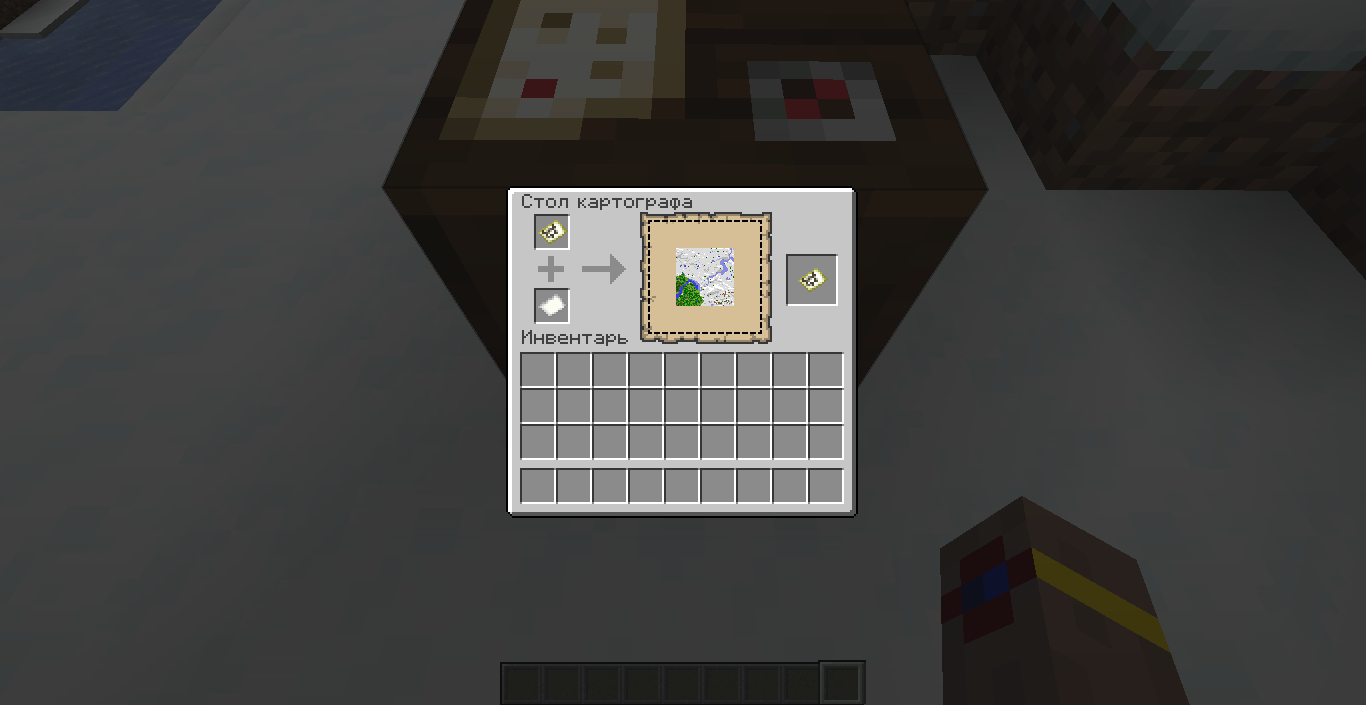
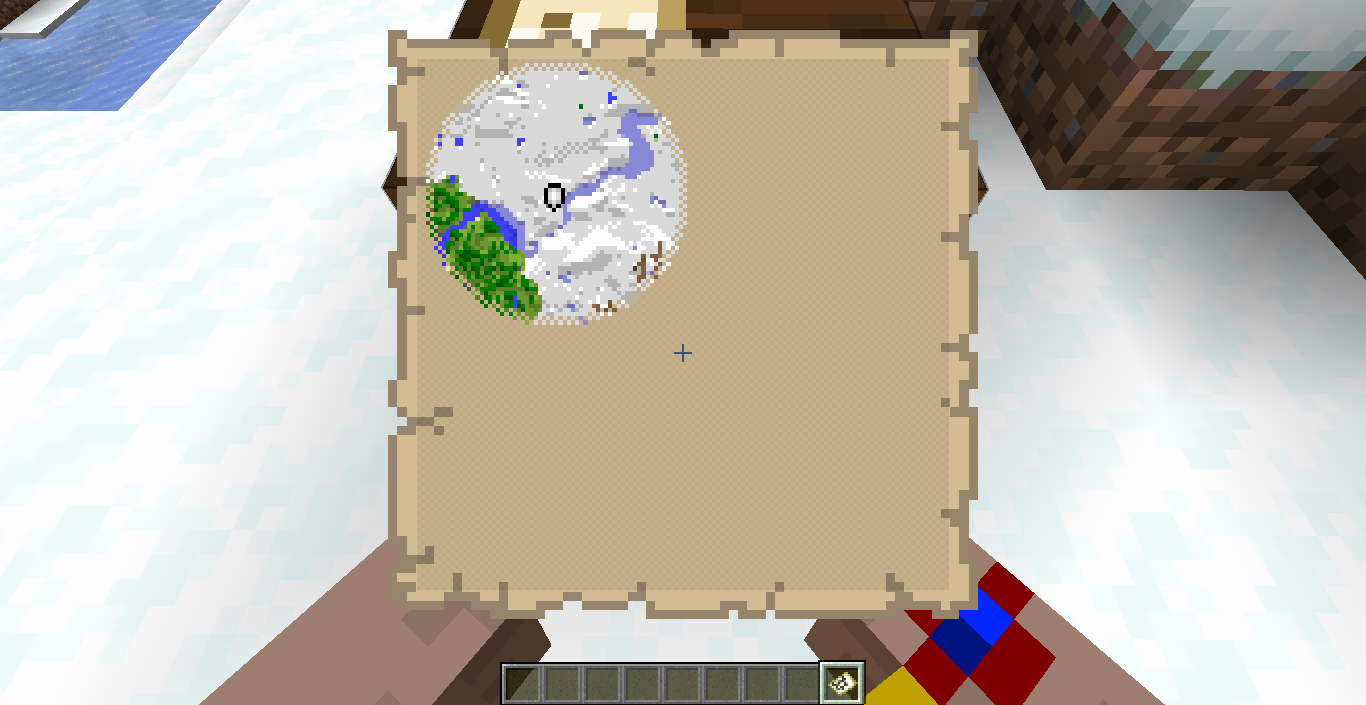
The scaling preview of the cartography table displays a scaled down version of the explored area of the current map. This is misleading since scaling does not retain the explored area, instead a blank map is created.
How to reproduce
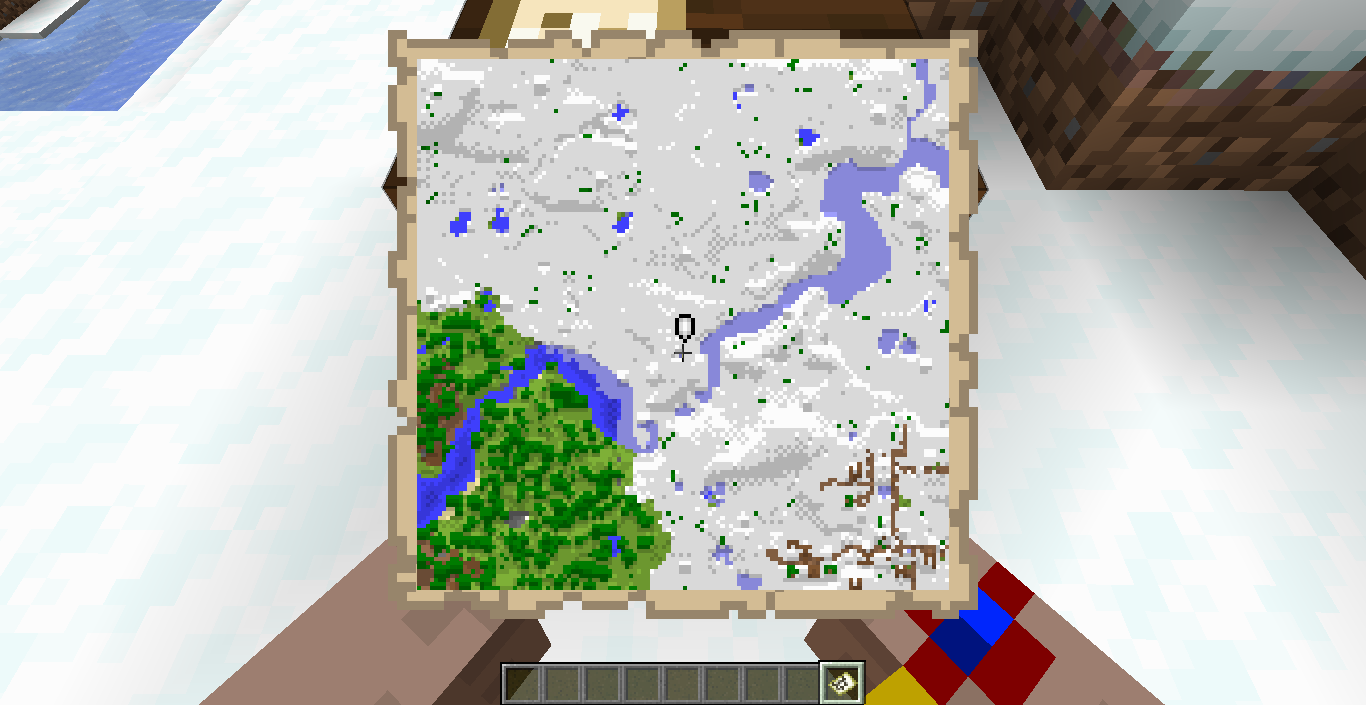
- Create a map scaled at 1:2 and move around
- Put the map in the cartography table and add paper
→ It looks like the result map will retain the explored area, but it does not
Linked Issues
is duplicated by4
- Unresolved
 Paul Rozhkov
 Marcono1234
- 26
- 15
- Confirmed
 Low
Low- Platform
- Maps UI
- cartography_table filled_map
19w03c - 1.19.4
19w03c 19w08b 19w09a 19w12b 19w13b 19w14a 19w14b 1.14-pre1 1.14-pre2 1.14-pre3 1.14-pre4 1.14-pre5 1.14 1.14.1-pre1 1.14.1-pre2 1.14.3 1.14.4-pre5 1.14.4-pre6 1.14.4-pre7 1.14.4 19w34a 19w35a 19w41a 19w42a 19w44a 19w45a 19w45b 19w46a 1.15-pre1 1.15-pre5 1.15.1 1.15.2-pre2 1.15.2 20w06a 20w07a 20w12a 20w13a 20w13b 20w14a 1.16-pre7 1.16-pre8 1.16-rc1 1.16 1.16.1 20w30a 1.16.4-pre1 1.16.5 21w05a 1.19.2 1.19.4
Created Issue:
Scaling preview of cartographer table is misleading
The bug
The scaling preview of the cartographer table displays a scaled down version of the explored area of the current map. This is misleading since scaling does not retain the explored area, instead a blank map is created.
How to reproduce
- Create a map scaled at 1:2 and move around creating a non circular explored area
- Put the map in the cartographer table and add paper
→
The bug
The scaling preview of the cartographer table displays a scaled down version of the explored area of the current map. This is misleading since scaling does not retain the explored area, instead a blank map is created.
This report might be invalid, the intention is not to have this preview removed, but possibly to have a better indication.
How to reproduce
- Create a map scaled at 1:2 and move around creating a non circular explored area
- Put the map in the cartographer table and add paper
→
Scaling preview of cartographertable is misleadingScaling preview of cartography table is misleading
The bug
The scaling preview of the cartograph
ertable displays a scaled down version of the explored area of the current map. This is misleading since scaling does not retain the explored area, instead a blank map is created.This report might be invalid, the intention is not to have this preview removed, but possibly to have a better indication.
How to reproduce
- Create a map scaled at 1:2 and move around
creating a non circular explored area- Put the map in the cartograph
ertable and add paper
→The bug
The scaling preview of the cartography table displays a scaled down version of the explored area of the current map. This is misleading since scaling does not retain the explored area, instead a blank map is created.
This report might be invalid, the intention is not to have this preview removed, but possibly to have a better indication.
How to reproduce
- Create a map scaled at 1:2 and move around
- Put the map in the cartography table and add paper
→
relates to

![[Mod] Neko](../../../data/avatars/users/92901.png)
is duplicated by
is duplicated by
![[Mojang] Adrian Östergård](../../../data/assets/gravatar/nighter.jpeg)
 rockenroll4life (Josh Letellier)
is duplicated by
is duplicated by
is duplicated by
![[Mojang] Nathan Adams](../../../data/assets/gravatar/dinnerbone.png) rockenroll4life (Josh Letellier)
rockenroll4life (Josh Letellier)![[Mod] Michael Wobst](../../../data/avatars/users/37868.png)
The bug
The scaling preview of the cartography table displays a scaled down version of the explored area of the current map. This is misleading since scaling does not retain the explored area, instead a blank map is created.
This report might be invalid, the intention is not to have this preview removed, but possibly to have a better indication.
How to reproduce
- Create a map scaled at 1:2 and move around
- Put the map in the cartography table and add paper
→

unconfirmed 1.14 pre relase 4
![[Mod] violine1101](../../../data/avatars/users/92858.png) Low
Low![[Mod] Chandler](../../../data/assets/gravatar/triwonder81.png)
![[Mod] tryashtar](../../../data/avatars/users/41963.png)
is duplicated by
![[Bot] Arisa](../../../data/avatars/users/43007.png)
![[Mod] markderickson](../../../data/avatars/users/18946.svg)
![[Mojang] slicedlime](../../../data/assets/gravatar/slicedlime.jpeg)

Duplicate of MC-142694.
Does MC-142694 describe your issue?
Thank you for your report!
We're tracking this issue in MC-142694, so this ticket is being resolved and linked as a duplicate.
If you would like to add a vote and any extra information to the main ticket it would be appreciated.
If you haven't already, you might like to make use of the search feature to see if the issue has already been mentioned.
Quick Links:
📓 Bug Tracker Guidelines – 💬 Community Support – 📧 Mojang Support
📓 Project Summary – ✍️ Feedback and Suggestions – 📖 Game Wiki
– I am a bot. This action was performed automatically! Please report any issues on Discord or Reddit
![[Helper] Lord_Quadrato](../../../data/avatars/users/26105.png)
Thank you for your report!
We're tracking this issue in MC-883, so this ticket is being resolved and linked as a duplicate.
That ticket has already been resolved as working as intended, which means this is not considered a bug and won't be fixed. Please do not leave a comment on the linked ticket.
Also, there is MC-142694 which describes the preview in the cartography table being wrong, you could vote and follow that.
If you haven't already, you might like to make use of the search feature to see if the issue has already been mentioned.
Quick Links:
📓 Bug Tracker Guidelines – 💬 Community Support – 📧 Mojang Support
📓 Project Summary – ✍️ Feedback and Suggestions – 📖 Game Wiki
and the current map may not be at the center of the new one.
(sorry for my bad English)
update the version
@Paul Rozhkov, if you can confirm a report for a version just comment with a message like
Also if you would like to keep the report up to date, you can become the reporter.
I want to become the reporter
confirmed for 1.14 pre-release