Chunks sometimes are dislocated / copied to another location
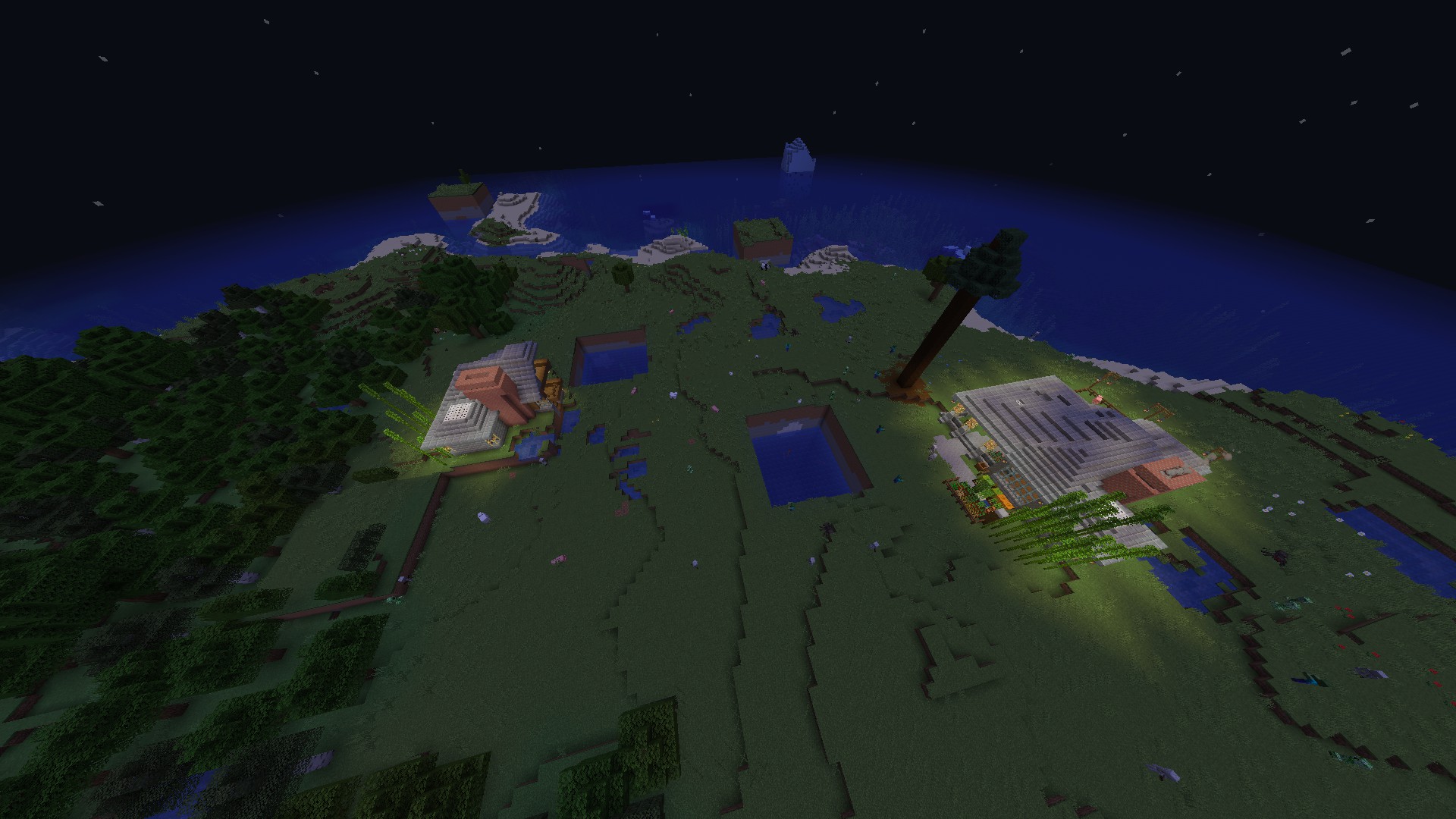
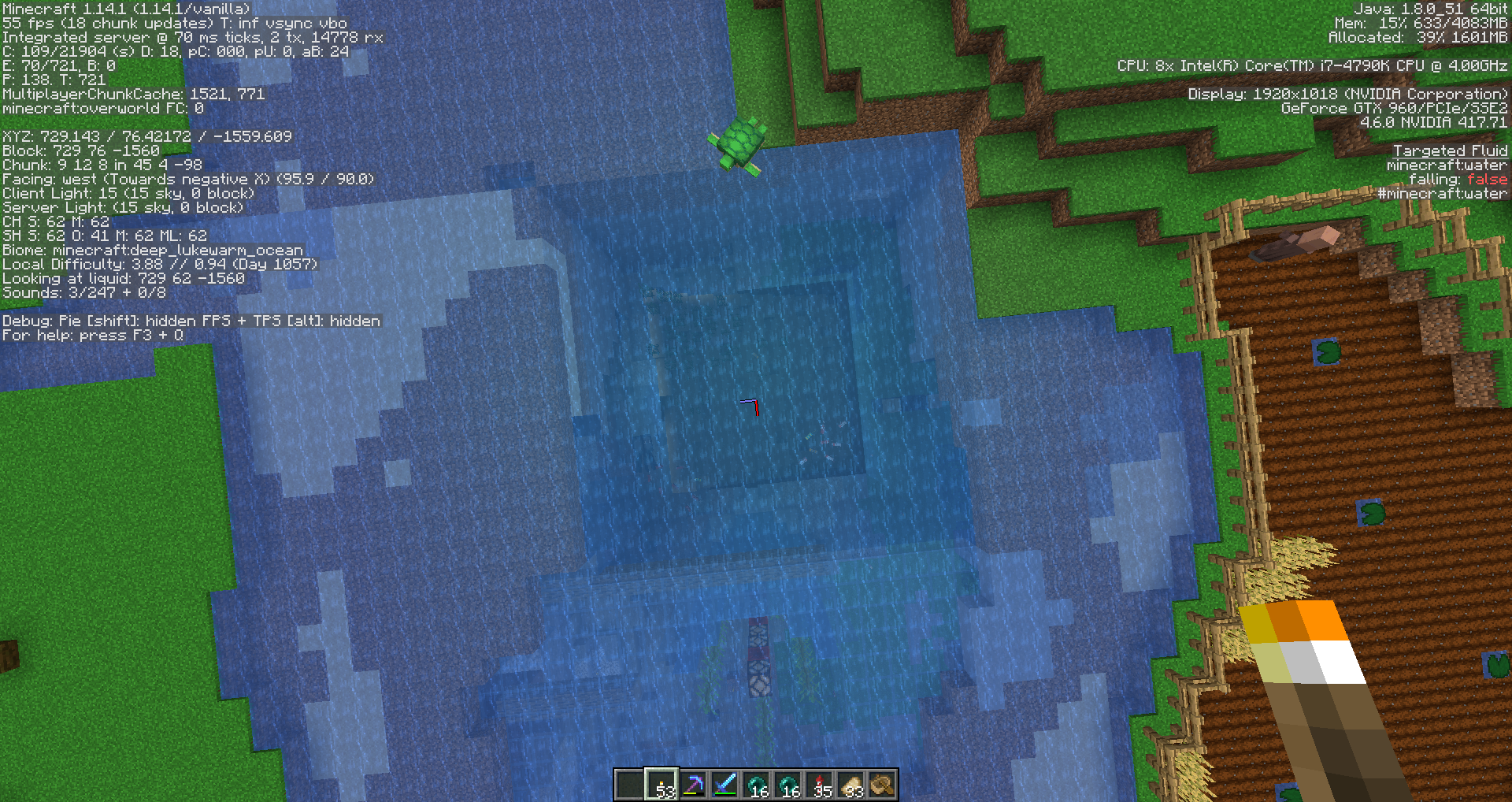
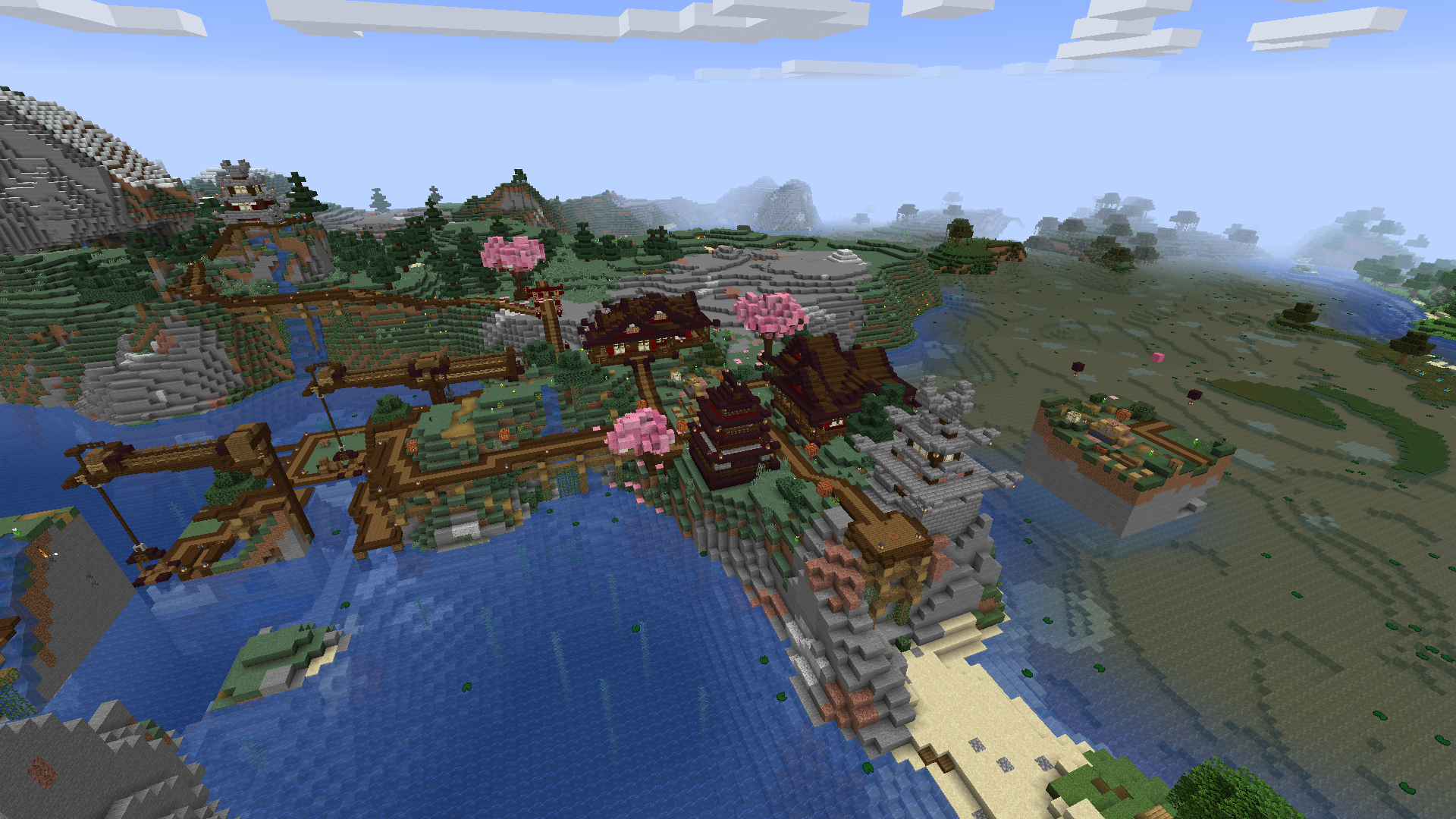
I have played in this single-player world a few times and every time i log into it, i copies and pastes a chunk somewhere else. the house on the left, i did not build. it is a copy of the one on the right. I don't have mods installed or anything. Anyone else having an issue with this? if so how do I fix it? or is it a bug with Minecraft that they will later patch?
Linked Issues
 Important
is duplicated by76
 MC-1498831.14 Chunks swapping with other chunksDuplicateMC-151409Chunk RelocationDuplicateMC-151639Previously generated chunk has either partially deleted or regenerated in 1.14DuplicateMC-152243Chunks movingDuplicateMC-152444Chunks are glitchingDuplicateMC-153197Chunks in server put randomly and weird loggingDuplicateMC-153384Broken biome chunk generationDuplicateMC-153954Chunck spawningDuplicateMC-153963chunk errors in preexisting areaDuplicateMC-154113Chunk Glitches When Loading The Same VersionDuplicateMC-154339House destroyed because a chunk regenerated itselfDuplicateMC-154879Chunks copied and placed incorrectlyDuplicateMC-155494Pre-existing Chunks Are Duplicated Onto Another LocationDuplicateMC-155570Creating a mountain of blocks that is not there beforeDuplicateMC-155729Terrain Appeared/Disappeared randomly in my worldDuplicateMC-155897Chunk MisplacmentDuplicateMC-156288My house disappearedDuplicateMC-156735Chunks errorDuplicateMC-156809Random chunks duplicating after leaving and rejoining world DuplicateMC-156818Chunks glitching out and replacing previous chunksDuplicateMC-156858In my vanilla minecraft world chunks of new generated land keep appearing, one two blocks away from my house. One in a village, it was a huge chunk of rock.DuplicateMC-156997Chunks disappear/get swapped or are reverted to their original stateDuplicateMC-157065So I entered into my minecraft world, and it looked like the ground has risen up, it cuts trees in half, destroys things I've built. It appears everywhere in my world! Pls help!DuplicateMC-157246Chunks MovingDuplicateMC-157638Chunks are being replaced by new chunks every time I log inDuplicateMC-157889Entire Chunk Disappeared After I Rejoined Single Player WorldDuplicateMC-157891Loaded up world, a chunk error and random deathsDuplicateMC-158211World Chunk Moved (Landslide)DuplicateMC-158218Sand spawning in my home.DuplicateMC-158329Random chunks being swapped after reloading worldDuplicateMC-158397random cutted lands apearing in minecraft word random places and destroying everythingDuplicateMC-158438chunk regeneratingDuplicateMC-158472The mountains began to grow out of the oceanDuplicateMC-158535an entire chunk of my build was teleported into an entirely different spot in the middle of the waterDuplicateMC-158537Re-Generated Previously-Loaded ChunkDuplicateMC-158587Random parts of buildings have disappeared and half my world is gone.DuplicateMC-158612Big chunks of the world is getting out of the ground to in the air and its destroying things DuplicateMC-158846suddently just spawns in huge blocks and i died becuace i spawned in it when i was in my houseDuplicateMC-1589291.14 Chunk ErrorsDuplicateMC-159100World being destroyed by the appearance of huge anormal blocksDuplicateMC-159288Chunk does not loadDuplicateMC-159292Chunk completely changed biome spontaneouslyDuplicateMC-159294Chunk Reset while AFK FishingDuplicateMC-159404Huge square of biome/house missing, replaced by different biomeDuplicateMC-159563a chunk got changed(including biome)DuplicateMC-159868Multiple chunk errors in the gameDuplicateMC-159912Random chunks in Void world dissappearingDuplicateMC-159951Chunk werden VertauschtDuplicateMC-160037Chunk loading errors (creates sinkholes and replaces chunks)DuplicateMC-160179I encountered a bug when I reset the Icon of a world that I created. A hill went missing but after looking around, to my surprise that the hill is now an island. It seem to have moved or transferred to a different coordinate. DuplicateMC-160212buildings dissipearsDuplicateMC-160216Blocks Randomly disappearing in chunksDuplicateMC-160453Part of my whole house reset even underground partDuplicateMC-160454The structures I made in the game are being deleted!DuplicateMC-160660chunks switching placesDuplicateMC-161208Chunks are rearrangedDuplicateMC-161431My Mansions is splitting up.DuplicateMC-161603Chunks Copied and Spawned inDuplicateMC-161711Two Towers Create After FreezeDuplicateMC-161938Nether Chunks aren't loading correctlyDuplicateMC-162751Chunk disappearedDuplicateMC-162801Random gespawnter Chunk´s über NachtDuplicateMC-162831Corrupted World/Disappearing worldDuplicateMC-163139I logged in and half of my house wasn't there, but water insteadDuplicateMC-163180Part of my world did not load correctly, deleted a lot I built.DuplicateMC-163395My chunks are getting swapped very frequently!DuplicateMC-164090Chunks reset randomly DuplicateMC-164279World doesn't generate correctly after the game crashes DuplicateMC-164406 chunks of land are loading in different places in the world.DuplicateMC-164423Chunks of the world reset and relocate elsewhere. DuplicateMC-164532My house was scattered across the map, chest were emptied and large chunks of mountains randomly spawned inDuplicateMC-164638Chunks swapping outDuplicateMC-166323Dorp mist verschillende huizenDuplicateMC-167169Random Chunks loading in the wrong locationsDuplicateMC-168200Villages are brakingDuplicate
 MCL-11857My house and all my builds are gone - except what I have on and in my inventoryDuplicate
Attachments12






 Very Important
Created Issue:
Chunk Glitches
I have played in this single-player world a few times and every time i log into it, i copies and pastes a chunk somewhere else. the house on the left, i did not build. it is a copy of the one on the right. I don't have mods installed or anything. Anyone else having an issue with this? if so how do I fix it? or is it a bug with Minecraft that they will later patch?
Attachments1
![[Mod] violine1101](../../../data/avatars/users/92858.png)
ChunkGlitchesChunks sometimes swap places
is duplicated by
relates to
relates to
is duplicated by
is duplicated by
is duplicated by
is duplicated by
is duplicated by
is duplicated by
is duplicated by
is duplicated by
![[Mojang] slicedlime](../../../data/assets/gravatar/slicedlime.jpeg)
is duplicated by
is duplicated by
![[Mod] Michael Wobst](../../../data/avatars/users/37868.png)
is duplicated by
r.-16.-1.mca
Also experienced this using --forceUpgrade from 1.13.2 to 1.14.3.

Chunks sometimesswap placesChunks sometimes are dislocated / copied to another location
is duplicated by
is duplicated by
![[Mojang] Adrian Östergård](../../../data/assets/gravatar/nighter.jpeg)
![[Mojang] Bartosz Bok](../../../data/avatars/users/10122.svg) [Mojang] Bartosz Bok
[Mojang] Bartosz Bokis duplicated by
is duplicated by
is duplicated by
is duplicated by
is duplicated by
relates to
is duplicated by
is duplicated by
![[Helper] Johnibur](../../../data/avatars/users/28381.png)
is duplicated by
is duplicated by
is duplicated by
is duplicated by
is duplicated by
is duplicated by
is duplicated by
is duplicated by
![[Mod] Asteraoth](../../../data/avatars/users/92886.png)
is duplicated by
is duplicated by
is duplicated by
is duplicated by
is duplicated by
is duplicated by
is duplicated by
is duplicated by
is duplicated by
is duplicated by
is duplicated by
is duplicated by
is duplicated by
is duplicated by
is duplicated by
is duplicated by
is duplicated by
relates to
is duplicated by
is duplicated by
is duplicated by
is duplicated by
is duplicated by
is duplicated by
is duplicated by
is duplicated by
is duplicated by
is duplicated by
is duplicated by
is duplicated by
is duplicated by
is duplicated by
is duplicated by
is duplicated by
is duplicated by
is duplicated by
is duplicated by
is duplicated by
is duplicated by
is duplicated by
relates to
is duplicated by
is duplicated by
![[Mod] Pokechu22](../../../data/avatars/users/92931.png)
is cloned by
Forward-resolving to MC-150202, that issue has more detail
Duplicate of MC-150202. Please add any additional information to that ticket.
Duplicate of MC-150202. Feel free to add more information to that ticket!
This issue is already known, see MC-150202. Feel free to add any details there if you think the report is missing something.
Duplicate of MC-150202
Duplicate of MC-150202.
If you could attach your game protocol from when this issue occurred to that ticket, that would be appreciated.
Duplicate of MC-150202
Duplicate of MC-150202
Duplicate of MC-150202
Ah, thanks. We already have another ticket about that: MC-150202. If you want to add any further information as a comment to that ticket, that would be appreciated.
Duplicate of MC-150202
Duplicate of MC-150202. Can you please attach the log file from when this happened to this ticket? You can find it in .minecraft/logs.
Thank you for your report!
We're actually already tracking this issue in MC-150202, so I resolved and linked this ticket as a duplicate.
If you would like to add a vote and any extra information to the main ticket it would be appreciated.
If you haven't already, you might like to make use of the search feature to see if the issue has already been mentioned.

Thank you for your report!
We're actually already tracking this issue in MC-150202, so I resolved and linked this ticket as a duplicate.
If you would like to add a vote and any extra information to the main ticket it would be appreciated.
If you haven't already, you might like to make use of the search feature to see if the issue has already been mentioned.
Thank you for your report!
We're actually already tracking this issue in MC-150202, so I resolved and linked this ticket as a duplicate.
If you would like to add a vote and any extra information to the main ticket it would be appreciated.
If you haven't already, you might like to make use of the search feature to see if the issue has already been mentioned.
Thank you for your report!
We're actually already tracking this issue in MC-150202, so I resolved and linked this ticket as a duplicate.
If you would like to add a vote and any extra information to the main ticket it would be appreciated.
If you haven't already, you might like to make use of the search feature to see if the issue has already been mentioned.
Thank you for your report!
We're actually already tracking this issue in MC-150202, so I resolved and linked this ticket as a duplicate.
If you would like to add a vote and any extra information to the main ticket it would be appreciated.
If you haven't already, you might like to make use of the search feature in the future to see if the issue has already been reported.
Does MC-150202 describe your issue?
If not, please attach the (zipped) world file. If the file size is too large, please upload it somewhere else and then link to it here.
Thank you for your report!
We're actually already tracking this issue in MC-150202, so I resolved and linked this ticket as a duplicate.
If you would like to add a vote and any extra information to the main ticket it would be appreciated.
If you haven't already, you might like to make use of the search feature in the future to see if the issue has already been reported.

Thank you for your report!
We're actually already tracking this issue in MC-150202, so I resolved and linked this ticket as a duplicate.
If you would like to add a vote and any extra information to the main ticket it would be appreciated.
If you haven't already, you might like to make use of the search feature in the future to see if the issue has already been reported.
Thank you for your report!
We're actually already tracking this issue in MC-150202, so I resolved and linked this ticket as a duplicate.
If you would like to add a vote and any extra information to the main ticket it would be appreciated.
If you haven't already, you might like to make use of the search feature in the future to see if the issue has already been reported.
Thank you for your report!
We're actually already tracking this issue in MC-150202, so I resolved and linked this ticket as a duplicate.
If you would like to add a vote and any extra information to the main ticket it would be appreciated.
If you haven't already, you might like to make use of the search feature in the future to see if the issue has already been reported.
Thank you for your report!
We're actually already tracking this issue in MC-150202, so I resolved and linked this ticket as a duplicate.
If you would like to add a vote and any extra information to the main ticket it would be appreciated.
If you haven't already, you might like to make use of the search feature in the future to see if the issue has already been reported.
Thank you for your report!
We're actually already tracking this issue in MC-150202, so I resolved and linked this ticket as a duplicate.
If you would like to add a vote and any extra information to the main ticket it would be appreciated.
You can find your backups by going into your .minecraft folder, and enter the backups folder. There, you'll find all backups taken by Minecraft. Just unzip the file and put the folder inside of it into your saves folder to restore a backup.
If you haven't already, you might like to make use of the search feature in the future to see if the issue has already been reported.
Thank you for your report!
We're actually already tracking this issue in MC-150202, so I resolved and linked this ticket as a duplicate.
If you would like to add a vote and any extra information to the main ticket it would be appreciated.
If you haven't already, you might like to make use of the search feature in the future to see if the issue has already been reported.
Does MC-150202 describe your issue?
Thank you for your report!
We're actually already tracking this issue in MC-150202, so I resolved and linked this ticket as a duplicate.
If you would like to add a vote and any extra information to the main ticket it would be appreciated.
If you haven't already, you might like to make use of the search feature in the future to see if the issue has already been reported.
Thank you for your report!
We're actually already tracking this issue in MC-150202, so I resolved and linked this ticket as a duplicate.
However, that ticket has already been resolved. Depending on the resolution, that can mean that it either will be fixed in the next version, or that it is not considered a bug and won't be fixed.
If you haven't already, you might like to make use of the search feature in the future to see if the issue has already been reported.
Does MC-150202 describe what you're experiencing?
Thank you for your report!
We're actually already tracking this issue in MC-150202, so I resolved and linked this ticket as a duplicate.
However, that ticket has already been resolved. Depending on the resolution, that can mean that it either will be fixed in the next version, or that it is not considered a bug and won't be fixed.
If you haven't already, you might like to make use of the search feature in the future to see if the issue has already been reported.
Thank you for your report!
We're actually already tracking this issue in MC-150202, so I resolved and linked this ticket as a duplicate.
However, that ticket has already been resolved. Depending on the resolution, that can mean that it either will be fixed in the next version, or that it is not considered a bug and won't be fixed.
If you haven't already, you might like to make use of the search feature in the future to see if the issue has already been reported.
Sorry about the bot, it just resolved the ticket according to the crash report you attached.
This is a known issue that will be fixed in the next update, see MC-150202.
Does MC-150202 describe your issue?
![[Mod] CubeTheThird](../../../data/assets/gravatar/cubethethird.jpeg)
Thank you for your report!
We're actually already tracking this issue in MC-150202, so I resolved and linked this ticket as a duplicate.
However, that ticket has already been resolved. Depending on the resolution, that can mean that it either will be fixed in the next version, or that it is not considered a bug and won't be fixed.
If you haven't already, you might like to make use of the search feature in the future to see if the issue has already been reported.
Thank you for your report!
We're actually already tracking this issue in MC-150202, so I resolved and linked this ticket as a duplicate.
However, that ticket has already been resolved. Depending on the resolution, that can mean that it either will be fixed in the next version, or that it is not considered a bug and won't be fixed.
If you haven't already, you might like to make use of the search feature in the future to see if the issue has already been reported.
Thank you for your report!
We're actually already tracking this issue in MC-150202, so I resolved and linked this ticket as a duplicate.
However, that ticket has already been resolved. Depending on the resolution, that can mean that it either will be fixed in the next version, or that it is not considered a bug and won't be fixed.
If you haven't already, you might like to make use of the search feature in the future to see if the issue has already been reported.
Thank you for your report!
We're actually already tracking this issue in MC-150202, so I resolved and linked this ticket as a duplicate.
However, that ticket has already been resolved. Depending on the resolution, that can mean that it either will be fixed in the next version, or that it is not considered a bug and won't be fixed.
If you haven't already, you might like to make use of the search feature in the future to see if the issue has already been reported.
Quick Links:
📓 Issue Guidelines – 💬 Community Support – 📧 Customer Support – 📖 Game Wiki
Thank you for your report!
We're actually already tracking this issue in MC-150202, so I resolved and linked this ticket as a duplicate.
However, that ticket has already been resolved. Depending on the resolution, that can mean that it either will be fixed in the next version, or that it is not considered a bug and won't be fixed.
If you haven't already, you might like to make use of the search feature in the future to see if the issue has already been reported.
Quick Links:
📓 Issue Guidelines – 💬 Community Support – 📧 Customer Support – 📖 Game Wiki
Thank you for your report!
We're actually already tracking this issue in MC-150202, so I resolved and linked this ticket as a duplicate.
However, that ticket has already been resolved. Depending on the resolution, that can mean that it either will be fixed in the next version, or that it is not considered a bug and won't be fixed.
If you haven't already, you might like to make use of the search feature in the future to see if the issue has already been reported.
Quick Links:
📓 Issue Guidelines – 💬 Community Support – 📧 Customer Support – 📖 Game Wiki
Thank you for your report!
We're actually already tracking this issue in MC-150202, so I resolved and linked this ticket as a duplicate.
If you would like to add a vote and any extra information to the main ticket it would be appreciated.
If you haven't already, you might like to make use of the search feature in the future to see if the issue has already been reported.
Quick Links:
📓 Issue Guidelines – 💬 Community Support – 📧 Customer Support – 📖 Game Wiki
Though I can't view your image, I assume you're experiencing MC-150202.
Thank you for your report!
We're actually already tracking this issue in MC-150202, so I resolved and linked this ticket as a duplicate.
However, that ticket has already been resolved. Depending on the resolution, that can mean that it either will be fixed in the next version, or that it is not considered a bug and won't be fixed.
If you haven't already, you might like to make use of the search feature in the future to see if the issue has already been reported.
Quick Links:
📓 Issue Guidelines – 💬 Community Support – 📧 Customer Support – 📖 Game Wiki
Thank you for your report!
We're actually already tracking this issue in MC-150202, so I resolved and linked this ticket as a duplicate.
However, that ticket has already been resolved. Depending on the resolution, that can mean that it either will be fixed in the next version, or that it is not considered a bug and won't be fixed.
If you haven't already, you might like to make use of the search feature in the future to see if the issue has already been reported.
Quick Links:
📓 Issue Guidelines – 💬 Community Support – 📧 Customer Support – 📖 Game Wiki
Thank you for your report!
We're actually already tracking this issue in MC-150202, so I resolved and linked this ticket as a duplicate.
However, that ticket has already been resolved. Depending on the resolution, that can mean that it either will be fixed in the next version, or that it is not considered a bug and won't be fixed.
If you haven't already, you might like to make use of the search feature in the future to see if the issue has already been reported.
Quick Links:
📓 Issue Guidelines – 💬 Community Support – 📧 Customer Support – 📖 Game Wiki
Thank you for your report!
We're actually already tracking this issue in MC-150202, so I resolved and linked this ticket as a duplicate.
However, that ticket has already been resolved as Fixed. The fix will arrive in the next version or is already included in the latest development version of the game.
If you haven't already, you might like to make use of the search feature in the future to see if the issue has already been reported.
Quick Links:
📓 Issue Guidelines – 💬 Community Support – 📧 Customer Support – 📖 Game Wiki
Thank you for your report!
We're actually already tracking this issue in MC-150202, so I resolved and linked this ticket as a duplicate.
However, that ticket has already been resolved as Fixed. The fix will arrive in the next version or is already included in the latest development version of the game.
If you haven't already, you might like to make use of the search feature in the future to see if the issue has already been reported.
Quick Links:
📓 Issue Guidelines – 💬 Community Support – 📧 Customer Support – 📖 Game Wiki
Thank you for your report!
We're actually already tracking this issue in MC-150202, so I resolved and linked this ticket as a duplicate.
However, that ticket has already been resolved as Fixed. The fix will arrive in the next version or is already included in the latest development version of the game.
If you haven't already, you might like to make use of the search feature in the future to see if the issue has already been reported.
Quick Links:
📓 Issue Guidelines – 💬 Community Support – 📧 Customer Support – 📖 Game Wiki
Thank you for your report!
We're actually already tracking this issue in MC-150202, so I resolved and linked this ticket as a duplicate.
If you would like to add a vote and any extra information to the main ticket it would be appreciated.
If you haven't already, you might like to make use of the search feature in the future to see if the issue has already been reported.
Quick Links:
📓 Issue Guidelines – 💬 Community Support – 📧 Customer Support – 📖 Game Wiki
Thank you for your report!
We're actually already tracking this issue in MC-150202, so I resolved and linked this ticket as a duplicate.
However, that ticket has already been resolved as Fixed. The fix will arrive in the next version or is already included in the latest development version of the game.
If you haven't already, you might like to make use of the search feature in the future to see if the issue has already been reported.
Quick Links:
📓 Issue Guidelines – 💬 Community Support – 📧 Customer Support – 📖 Game Wiki

If you have encountered this issue and your world is broken, you need to restore it from a backup, if you have one.
If you do not have a backup, you will need to repair the world manually. You can do that with mcaselector for example, a tool for managing and deleting chunks in a Minecraft world. It is also capable of swapping chunks, which you can use in order to fix worlds that have been corrupted by this bug. Please note that this tool is not supported by Mojang or the moderator team in any way.
We recommend making a backup of your world before trying to repair it manually, in case things go wrong even more.
The bug
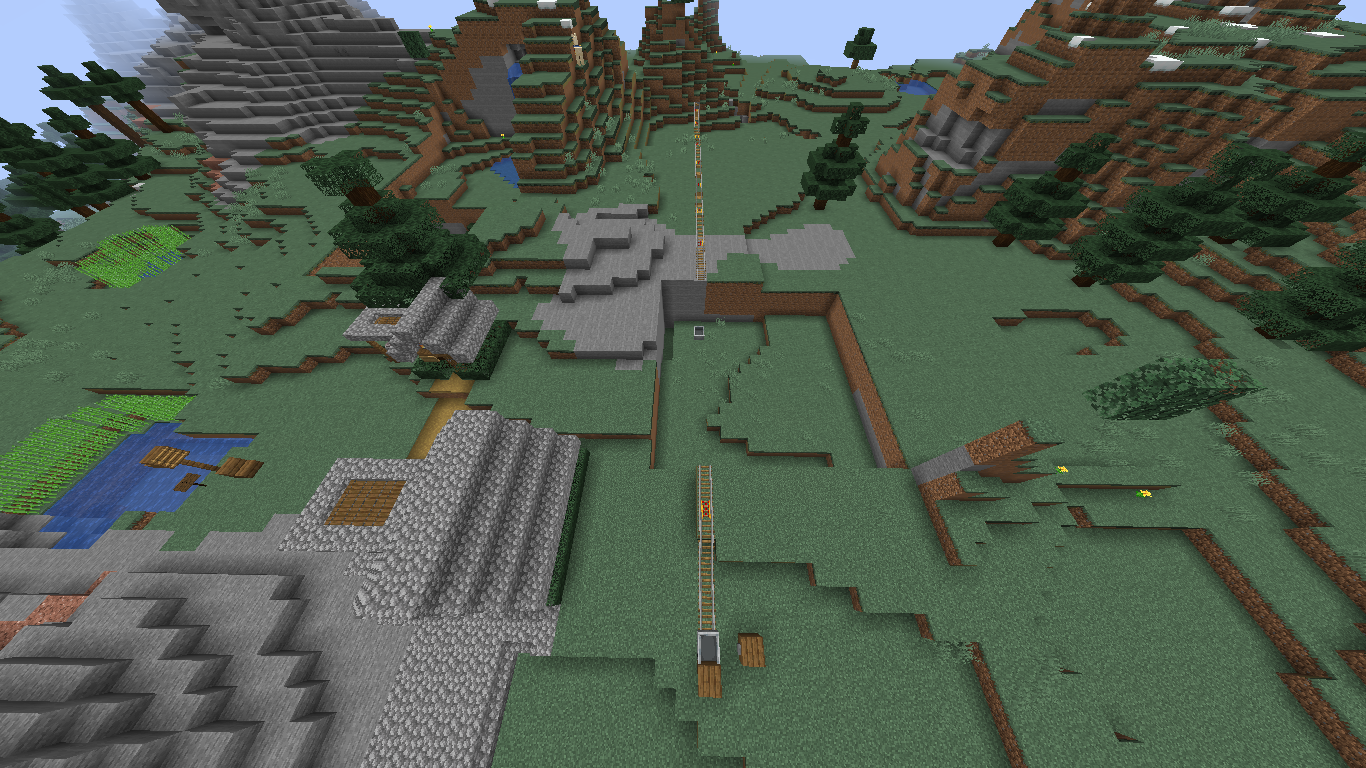
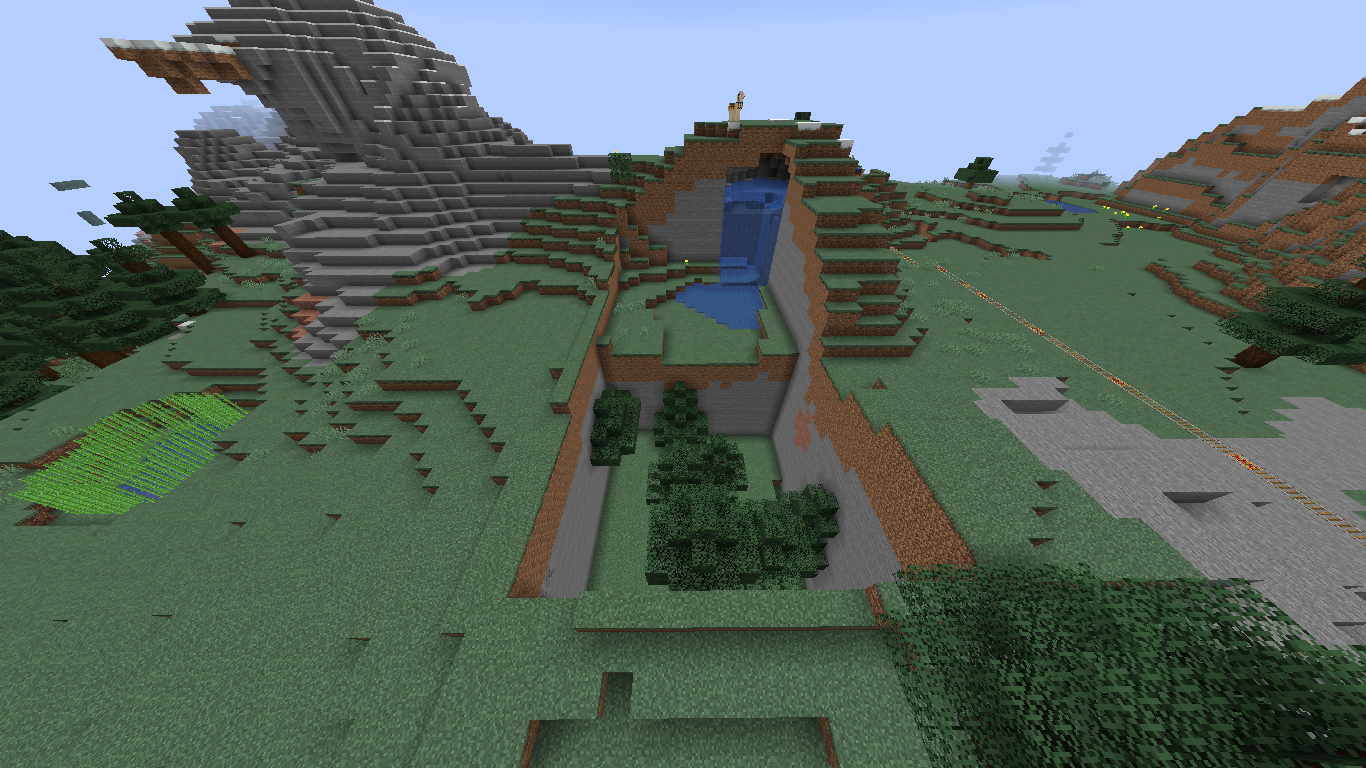
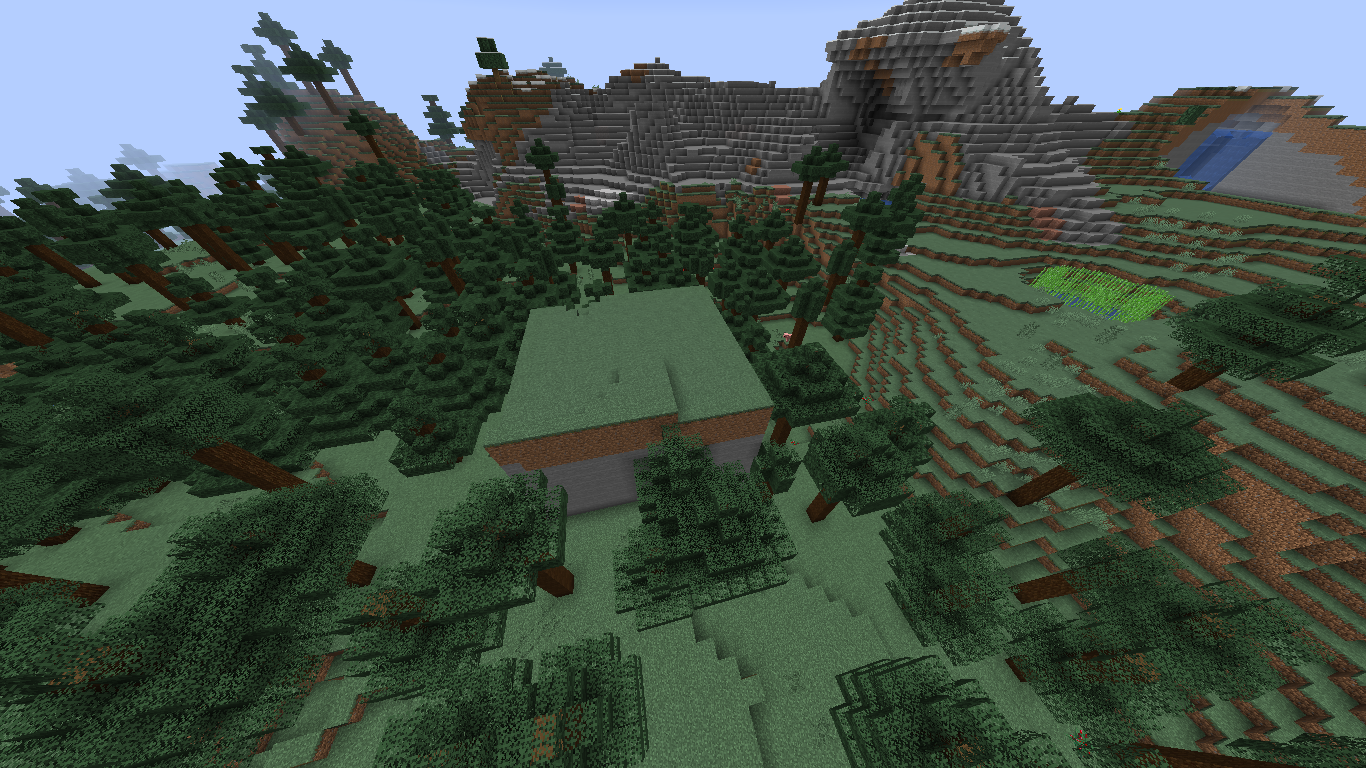
Despite MC-150202 being marked as fixed, sometimes chunks still seem to be corrupted in the 1.15 snapshots. More details can be found in the attachments, as well as in the duplicates of this ticket.
Original description
I don't know how this happened but when i joined my world all the chunks were jumbled up, thankfully i have a backup but still this shouldnt happen.
Thank you for your report!
We're actually already tracking this issue in MC-150202, so I resolved and linked this ticket as a duplicate.
However, that ticket has already been resolved as Fixed. The fix will arrive in the next version or is already included in the latest development version of the game.
If you haven't already, you might like to make use of the search feature in the future to see if the issue has already been reported.
Quick Links:
📓 Issue Guidelines – 💬 Community Support – 📧 Customer Support – 📖 Game Wiki
Thank you for your report!
We're actually already tracking this issue in MC-150202, so I resolved and linked this ticket as a duplicate.
However, that ticket has already been resolved as Fixed. The fix will arrive in the next version or is already included in the latest development version of the game.
If you haven't already, you might like to make use of the search feature in the future to see if the issue has already been reported.
Quick Links:
📓 Issue Guidelines – 💬 Community Support – 📧 Customer Support – 📖 Game Wiki
Thank you for your report!
We're actually already tracking this issue in MC-150202, so I resolved and linked this ticket as a duplicate.
However, that ticket has already been resolved as Fixed. The fix will arrive in the next version or is already included in the latest development version of the game.
If you haven't already, you might like to make use of the search feature in the future to see if the issue has already been reported.
Quick Links:
📓 Issue Guidelines – 💬 Community Support – 📧 Customer Support – 📖 Game Wiki
Thank you for your report!
We're actually already tracking this issue in MC-150202, so I resolved and linked this ticket as a duplicate.
However, that ticket has already been resolved as Fixed. The fix will arrive in the next version or is already included in the latest development version of the game.
If you haven't already, you might like to make use of the search feature in the future to see if the issue has already been reported.
Quick Links:
📓 Issue Guidelines – 💬 Community Support – 📧 Customer Support – 📖 Game Wiki
Thenk you for your report!
We're actually already tracking this issue in MC-150202, so I resolved and linked this ticket as a duplicate.
However, that ticket has already been resolved as Fixed. The fix will arrive in the next version or is already included in the latest development version of the game.
If you haven't already, you might like to make use of the search feature in the future to see if the issue has already been reported.
Quick Links:
📓 Issue Guidelines – 💬 Community Support – 📧 Customer Support – 📖 Game Wiki
Thenk you for your report!
We're actually already tracking this issue in MC-150202, so I resolved and linked this ticket as a duplicate.
If you would like to add a vote and any extra information to the main ticket it would be appreciated.
If you haven't already, you might like to make use of the search feature in the future to see if the issue has already been reported.
Quick Links:
📓 Issue Guidelines – 💬 Community Support – 📧 Customer Support – 📖 Game Wiki
Thank you for your report!
We're actually already tracking this issue in MC-150202, so I resolved and linked this ticket as a duplicate.
However, that ticket has already been resolved as Fixed. The fix will arrive in the next version or is already included in the latest development version of the game.
If you haven't already, you might like to make use of the search feature in the future to see if the issue has already been reported.
Quick Links:
📓 Issue Guidelines – 💬 Community Support – 📧 Customer Support – 📖 Game Wiki
Thank you for your report!
We're actually already tracking this issue in MC-150202, so I resolved and linked this ticket as a duplicate.
However, that ticket has already been resolved as Fixed. The fix will arrive in the next version or is already included in the latest development version of the game.
If you haven't already, you might like to make use of the search feature in the future to see if the issue has already been reported.
Quick Links:
📓 Issue Guidelines – 💬 Community Support – 📧 Customer Support – 📖 Game Wiki
Thank you for your report!
We're actually already tracking this issue in MC-150202, so I resolved and linked this ticket as a duplicate.
However, that ticket has already been resolved as Fixed. The fix will arrive in the next version or is already included in the latest development version of the game.
If you haven't already, you might like to make use of the search feature in the future to see if the issue has already been reported.
Quick Links:
📓 Issue Guidelines – 💬 Community Support – 📧 Customer Support – 📖 Game Wiki
Thank you for your report!
We're actually already tracking this issue in MC-150202, so I resolved and linked this ticket as a duplicate.
If you would like to add a vote and any extra information to the main ticket it would be appreciated.
If you haven't already, you might like to make use of the search feature in the future to see if the issue has already been reported.
Quick Links:
📓 Issue Guidelines – 💬 Community Support – 📧 Customer Support – 📖 Game Wiki
Thank you for your report!
We're actually already tracking this issue in MC-150202, so I resolved and linked this ticket as a duplicate.
However, that ticket has already been resolved as Fixed. The fix will arrive in the next version or is already included in the latest development version of the game.
If you haven't already, you might like to make use of the search feature in the future to see if the issue has already been reported.
Quick Links:
📓 Issue Guidelines – 💬 Community Support – 📧 Customer Support – 📖 Game Wiki
Thank you for your report!
We're actually already tracking this issue in MC-150202, so I resolved and linked this ticket as a duplicate.
However, that ticket has already been resolved as Fixed. The fix will arrive in the next version or is already included in the latest development version of the game.
If you haven't already, you might like to make use of the search feature in the future to see if the issue has already been reported.
Quick Links:
📓 Issue Guidelines – 💬 Community Support – 📧 Customer Support – 📖 Game Wiki
![[Mod] j_p_smith](../../../data/avatars/users/92851.png)
Duplicate of MC-150202.
Thank you for your report!
We're actually already tracking this issue in MC-150202, so I resolved and linked this ticket as a duplicate.
However, that ticket has already been resolved as Fixed. The fix will arrive in the next version or is already included in the latest development version of the game.
If you haven't already, you might like to make use of the search feature in the future to see if the issue has already been reported.
Quick Links:
📓 Issue Guidelines – 💬 Community Support – 📧 Customer Support – 📖 Game Wiki
I assume you converted your world from 1.13.2 to 1.14. If you have backed up your world before converting it to 1.14, can you attach the back up? If the file size is too large, please upload it somewhere else and then link to it here.
I have experienced the same issue. I had created a new world in 1.14 when it came out and beginning this week chunks have been switched around when I log back into the world. I'm too worried to go back into the world and making it worse. The problem hasn't fixed itself either and I don't know the cause.
Also, how much free storage space is left on your disk? This might be caused by not enough space on the disk to store the world properly (see
MC-74762)The same thing has been happening to me for almost a week. I have more than half of my space left on my disk and for the past two days the problem seemed to be fixed. But when I logged on today, it was twice as bad as usual, and it's the same world I created in 1.14. Should I delete things off my disk or is it a bug?
It was a brand new 1.14 world. plenty of space on the computer. it just kept getting worse every time i logged on. Haven't been on it in a while tho
Had the exact same thing in my world (originally 1.13). Plenty of room on the disk. I added my logs and screens.
+1. this also happened me yesterday while changed from Paper to another software. Chunks just moved somewhere on every world by loading another world. fix in 1.14.3 please
Well, logs please. So far we've been unable to reproduce this. Also, "Paper to another software" is very vague. And third-party software does not make debugging easier.
This is a backup of our region file which does reproducibly cause the chunks to re-locate. Sadly, this may be due to previous saving of the chunks and I am unable to provide the world as it is too large. I do however, have 570+ backups of the world so might be able to trace back if required.
-7750, -180 will bring you to the region file's location.
Note: The backup was taken a few hours before the issue occurred.
In the Minecraft logs you can see:
Chunk file at [X1, Z1] is in the wrong location; relocating. (Expected [X1, Z1], got [X2, Z2])
[^r.-16.-1.mca]
All chunks in that file were last saved in 1.13.2 (somewhere between 2019-04-25T11:42:38Z and 2019-04-26T05:52:47Z, might be actually interesting to see backup and maybe logs from that time), 15 of them already in wrong positions. Also, all of them are duplicates of some other position, there are no swaps.
I would guess it may be instance of
MC-74762, though that one seems to be more about problems caused by lack of space or write errors.Also experienced this using --forceUpgrade from 1.13.2 to 1.14.3.
Could you provide the world before and after the update, please, together with logs and what you did apart from upgrading with --forceUpgrade (if you did anything else before it happened)? This might be a good example to reproduce the issue which would help the devs lots, I guess...
I updated from 1.14.3 to 1.14.4 and this is happening to me as well
This or simila bug was hapening to me in all past versions when i quickly swich to another world especialy if i create new one.
i used low end computer at that time if that could help anyhow.
1.4 1.5.2 1.6 1.7.2 1.7.4 1.7.10 1.12.2
Bigest chance was when i make new world, after 10 seconds make new world. it copyed chunks from world 1 to world 2 at that time.
Could it be that the RegionFileCache is still valid and filled when switching worlds or reloading the same world in case of a slow computer or heavy lag? Maybe clearing the cache inside RegionFileCache.close() after closing all RegionFiles could help then?
This has been happening to me to, just had a survival world I spent days on totally destroyed. This really needs to fixed, it gets very frustrating the more it happens to me. I’ve had a total of 5 different worlds destroyed from this bug. So please fix this devs, i’ve been a long time playing and I kind of feeling like quitting the game because of how much time i’ve spent on my worlds just to have them destroyed. Fix your game. (This is happening on 1.14.4 I forgot to mention that)
Yup, just got this issue. Unfortunately I don't have a backup of the world that it happened in. This appeared in the log:
It should be noted that I used the NBT editor in order to change the biome of the chunk that was being copied, but that shouldn't have changed anything(?) Maybe using NBT editing I can find the cause of this. Will test further.
Would it be possible to add a short description when an issue is resolved, so we could know what caused it and maybe how to prevent it until the fix gets rolled out? Thank you!
Not really, as this seems to have been caused by a race condition in the code of the game, which is not something that you can work around.
But if we knew some more details, we could maybe avoid certain situations that are more likely to trigger it, e.g. if the race condition only happens on server shutdown or start, on dimension change etc., what log output to look out for if there is any and so on. Not just for this bug report, but in general. I don't know how many would be interested in such more detailed information and if you can provide it, and I know this is not the right place for a discussion about it, but it would be cool if that could be considered where appropriate. Thank you ^^
There is no general way to trigger that, and we had no luck in actually reproducing this, so everything we could do is just making that code saner. We changed a code to keep file consistent even in case of write failure. Such failure would leave warning log, so I guess you can look for that. I don't claim it's 100% fixed, but corruption should be rarer and easier to diagnose and recover.
That's good to know, thank you, also for taking the time to fix so many things for the next update!
I just started playing my new 1.14.4 world and I am having the same problem where the chunks are loading in different place I am running the latest version of java and have more than half of my computer storage free so if you have any suggestions on how I can resolve this problem can you please let me know this been happening for more than a month now and I have had to delete so many worlds.
This issue will be fixed in 1.15. If you have made backups of your world, you can restore your world using those. If you don't, unfortunately your world will be corrupted and cannot be restored to its original state.
If you encounter this issue in a 1.15 snapshot, please create a new ticket and include as much information (i.e., game logs from when this issue happened) as possible.
I also want to mention my achievements reset when i login to my world and that happened.
Just fyi we were experiencing this issue on our 1.14.4 servers in the past few weeks very often. I decided to look into what changed between 1.14.4 and 19w36a (as this is the first version with obfuscation mappings). I noticed that the RegionFile class has been completely rewritten. So I decided to implement the new RegionFile code into the 1.14.4 server. At first this seemed to have fixed the issue, but today the issue appeared again. And yes I am using a custom server software, but the issue is extremely likely to be the vanilla issue and if the code changes that were mentioned above are those in the RegionFile class, it seems like they did not fix the issue. I will look into what else changed and see if I can implement that too. I noticed that there were some changes in chunk de-/serialization too, but I think this is only due to the changes in the biome format.
You won't have to tell me that I would need to reproduce this on a proper 1.15 server for a proper bug report. However I won't be able to do so. Worlds get loaded thousands of times per day on our 1.14.4 server which makes it way more likely for the issue to occur. I just don't have a similar setup for 1.15 yet.
If you're able to reproduce this issue in 1.15 (or the 1.15 snapshots), please leave a comment in MC-161823.