Chunks Swapping
The bug
Under certain circumstances chunks can swap or reset.
As suggested by Heege McGee Minecraft should handle IOExceptions in a saner way and not just log them and carry on.
Known reasons
Full disk
It is confirmed that this bug happens when no free memory on the disk is left.
[16:40:12] [File IO Thread/ERROR]: Failed to save chunk
java.lang.NullPointerException: null
[16:40:12] [File IO Thread/INFO]: [STDERR]: java.io.IOException: Es steht nicht genug Speicherplatz auf dem Datenträger zur Verfügung
[16:40:12] [File IO Thread/INFO]: [STDERR]: 	at java.io.RandomAccessFile.writeBytes(Native Method)
[16:40:12] [File IO Thread/INFO]: [STDERR]: 	at java.io.RandomAccessFile.write(Unknown Source)
[16:40:12] [File IO Thread/INFO]: [STDERR]: 	at ayj.a(SourceFile:306)
[16:40:12] [File IO Thread/INFO]: [STDERR]: 	at ayj$a.close(SourceFile:244)
[16:40:12] [File IO Thread/INFO]: [STDERR]: 	at java.util.zip.DeflaterOutputStream.close(Unknown Source)
[16:40:12] [File IO Thread/INFO]: [STDERR]: 	at java.io.FilterOutputStream.close(Unknown Source)
[16:40:12] [File IO Thread/INFO]: [STDERR]: 	at java.io.FilterOutputStream.close(Unknown Source)
[16:40:12] [File IO Thread/INFO]: [STDERR]: 	at aye.b(SourceFile:160)
[16:40:12] [File IO Thread/INFO]: [STDERR]: 	at aye.a(SourceFile:145)
[16:40:12] [File IO Thread/INFO]: [STDERR]: 	at bgx.c(SourceFile:37)
[16:40:12] [File IO Thread/INFO]: [STDERR]: 	at bgx.run(SourceFile:30)
[16:40:12] [File IO Thread/INFO]: [STDERR]: 	at java.lang.Thread.run(Unknown Source)
"Es steht nicht genug Speicherplatz auf dem Datenträger zur Verfügung" (German) should be equivalent to the American English "There is not enough space on the disk".
This shows that the exception message is an OS error message and therefore OS dependent and translated. See also this stackoverflow question and this (currently unresolved) JDK bug report from 2001 requesting a separate exception for a full disk.
This stackoverflow question suggests that you might not even be able to directly detect a full disk, and calling getFD().sync() could decrease performance. However, it appears currently the call to FilterOutputStream#close causes the exception.
The question is if at that point the save files could have already been corrupted. Additionally a full disk can cause all kind of other problems, like for example the logger being unable to create log files.
How to reproduce
Windows
- Use for example this guide to create a VHD and create a volume with a size of 10MB
- Add a new profile using this volume as game directory
- Create a new default world with gamemode Creative and fly around
Linux
See this comment (not checked)
Malfunctioning disk (?)
Hard to reproduce and likely difficult to detect.
In case an IOException happens possibly log the error and try shutting down the server?
Linked Issues
 Important
is duplicated by67
 MC-75167Chunks are scrambled or replacedDuplicateMC-75509Swapping ChunksDuplicateMC-75613Chunks switching locationsDuplicateMC-81538Chunks load in the wrong place ruining a world. DuplicateMC-90475Minecraft chunks not generating properly in 15w41bDuplicateMC-90885The world is moving blocks in the ground and above ground to places they were not originally.DuplicateMC-92111Cunks dupeing and replaceing after a mount of minecraft daysDuplicateMC-93580Copying chunks after server crashesDuplicateMC-94120In my game, some Blocks (16x16 Block-squares, I'm not sure in wich height or depth) changed their place or disapeared.DuplicateMC-94259Chunks teleporting and changing places DuplicateMC-94291Chunk GlitchDuplicateMC-94814Log on into my world and my chunk was replaced by a different chunkDuplicateMC-97970Duplication of BuildDuplicateMC-98112Chunk load errorDuplicateMC-98809Chunks Spawning In Wrong LocationsDuplicateMC-99039Random chunks around my house have switched places with each otherDuplicateMC-99339Chunk out of nowhereDuplicateMC-99384Chunks Reset and Scrambled in minecraft 1.9DuplicateMC-99639Random chunk generation on crashDuplicateMC-100893Randomly in 1.9.2 I went into my world and noticed that some chunks had switched places with each other.DuplicateMC-100936A whole chunk of land from the bottom to top just magically moved DuplicateMC-102797equal parts of the world will put to a other placeDuplicateMC-104675Chunks keep swapping out with one anotherDuplicateMC-104825Random Mountain Spawning DuplicateMC-106785A chunk was randomly cloned to another areaDuplicateMC-111932Random pieces of land mutliply, appear and dissapear where they aren't supposed to ruining my builds.DuplicateMC-112544Singleplayer BugDuplicateMC-114537change in existing landscapeDuplicateMC-114555Zones changed into an other DuplicateMC-114788Incorrectly generated chunksDuplicateMC-114975Chunk Exchange ErrorDuplicateMC-115362Chunk Distortion ErrorDuplicateMC-115824Chunks duplicating nearbyDuplicateMC-116626Teleported partsDuplicateMC-1171471.11.2+ Chunks keep changing/replacing themselves with new onesDuplicateMC-118150Chunks getting replaced with other chunksDuplicateMC-118674Upon joining a previously made world, 16 x 16 sections of terrain generate in the wrong area.DuplicateMC-118760Several chunks are changed after upgrade to 12 on serverDuplicateMC-118869Weird Terrain Bug When Doing ThisDuplicateMC-119383Loading Block Chunks Issue DuplicateMC-119716chunks keeps moving DuplicateMC-120630Huge chunk border suddenly appeared today close to my newbie house.DuplicateMC-120634Chunk Displacement (1.12.1)DuplicateMC-121404Nether Portal Chunk Loading GlitchDuplicateMC-123160Wrong/Weird biome loadingDuplicateMC-124157A 16x16x16 chunk of blocks suddenly appeared ...DuplicateMC-124525Random Piece of Land TeleportingDuplicateMC-124534Moving ChunksDuplicateMC-125070chunk replacement DuplicateMC-125139Chunk ErrorDuplicateMC-127523Erronous ChunkDuplicateMC-131068Replacement of blocks when teleporting to already spawned placeDuplicateMC-132215Every time i log on to my survival map there is a random chunk that has spawned near my base in random spots. I've got rid of them but when I log out then log back in more chunks have randomly spawned back in.DuplicateMC-133740Chunks keep going missing and other junks spawning where they shouldn't be. DuplicateMC-1345031.13 Corrupted worldDuplicateMC-136844Chunks missingDuplicateMC-140810chunks switching placesDuplicateMC-141137part of my village duplicated it's self a little bit awayDuplicateMC-141851New Chunks replacing preloaded chunksDuplicateMC-142127chunk reload errorDuplicateMC-142218Chunk ErrorsDuplicateMC-143991Strange Chunk GenerationDuplicateMC-144998chunks replicating and loading in wronglyDuplicateMC-159208Chunks carved out and placed into random spots!DuplicateMC-159315Chunks generate in a non-threadsafe manner after special conditionsDuplicateMC-160969chunk moved placesDuplicate
 MCPE-19912Random chunk cloning and placement near spawn chunksDuplicate
relates to5
MC-87353java.util.zip.ZipException: Not in GZIP formatInvalidMC-4001Chunk reverts to an earlier stateAwaiting ResponseMC-91279Placed blocks randomly generating nearbyIncompleteMC-150202Chunks sometimes are dislocated / copied to another locationFixedMC-2548A chunk with previously generated data was cleared, all the blocks and data within vanishAwaiting Response



Created Issue:
Chunks Swapping
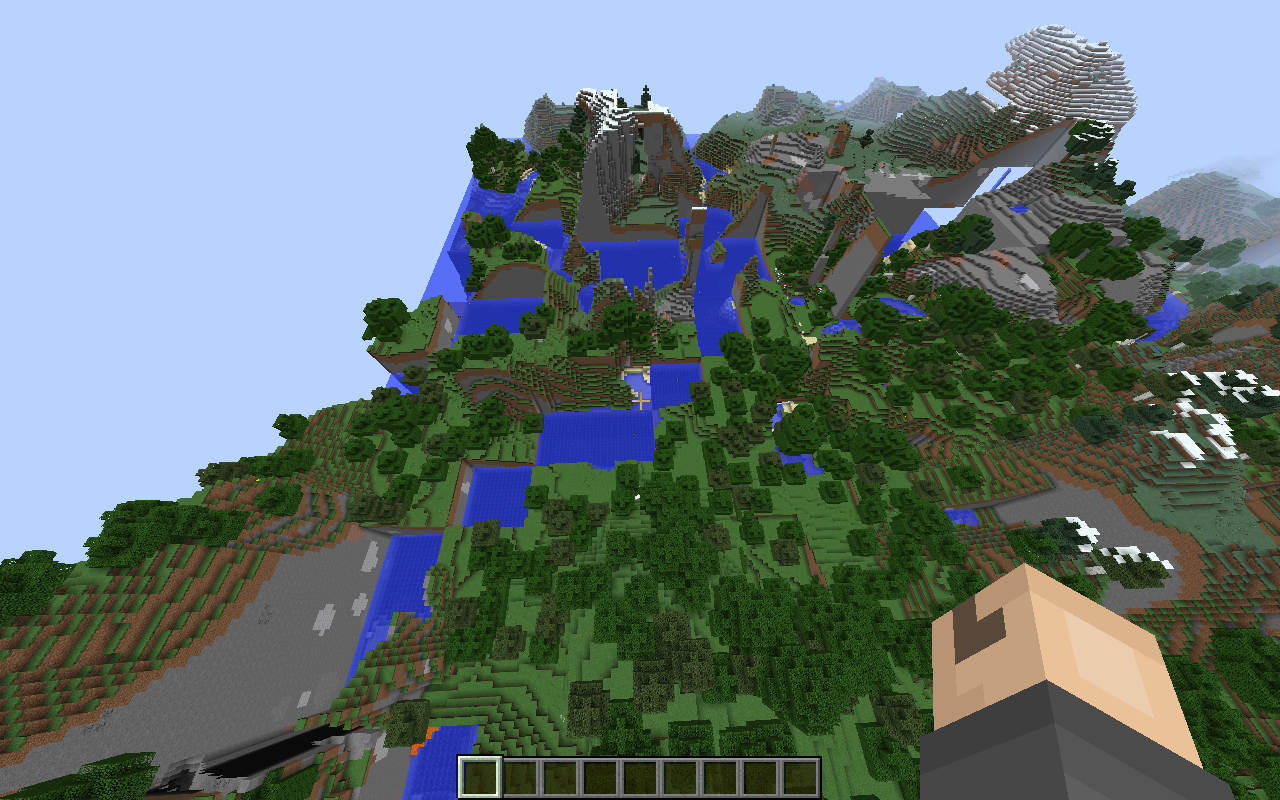
In my Minecraft single player world on amplified terrain, I had just finished a build and then closed my game for the night. When I logged back into the game the next day, many of the chunks had been swapped. Not only that, but it appeared that some of the build had never even existed, seeming as if the world pre-build had combined with the world post-build, and threw chunks of everything all over the map. I had never experienced a bug like this before, and I am wondering whether there is an internal backup somewhere, to fix my world, half of my main area has been absolutely wrecked.
Environment
Minecraft Amplified Survival World
Attachments2

is duplicated by
is duplicated by
relates to
is duplicated by
is duplicated by
relates to
is duplicated by
is duplicated by
is duplicated by
is duplicated by
is duplicated by
is duplicated by
is duplicated by

is duplicated by
is duplicated by
is duplicated by

is duplicated by
[11:58:53] [Server thread/INFO]: Starting integrated minecraft server version 1.9
[11:58:53] [Server thread/INFO]: Generating keypair
[11:58:53] [Server thread/INFO]: Preparing start region for level 0
[11:58:54] [Server thread/INFO]: Preparing spawn area: 66%
[11:58:55] [Server thread/INFO]: Changing view distance to 15, from 10
[11:58:55] [Server thread/INFO]: Sondre666GS[local:E:a323baab] logged in with entity id 3101477 at (1782.5997347220666, 63.0, -409.76220315725914)
[11:58:55] [Server thread/INFO]: Sondre666GS joined the game
[11:58:56] [Server thread/ERROR]: Chunk file at 112,-26 is in the wrong location; relocating. (Expected 112, -26, got 117, -30)
[11:58:56] [Server thread/WARN]: Wrong location! (117, -30) should be (112, -26), yw['Skeleton'/3101758, l='Homenkollen', x=1877,50, y=16,00, z=-464,50]
[11:58:56] [Server thread/WARN]: Wrong location! (117, -30) should be (112, -26), za['Zombie'/3101759, l='Homenkollen', x=1880,30, y=55,00, z=-472,93]
[11:58:56] [Server thread/WARN]: Wrong location! (117, -30) should be (112, -26), za['Zombie'/3101760, l='Homenkollen', x=1879,52, y=55,00, z=-475,22]
[11:58:56] [Server thread/WARN]: Wrong location! (117, -30) should be (112, -26), yi['Creeper'/3101761, l='Homenkollen', x=1886,50, y=55,00, z=-472,50]
[11:58:56] [Server thread/WARN]: Wrong location! (117, -30) should be (112, -26), we['Sheep'/3101762, l='Homenkollen', x=1880,48, y=69,00, z=-473,74]
[11:58:56] [Server thread/WARN]: Tried to add entity Skeleton but it was marked as removed already
[11:58:56] [Server thread/WARN]: Tried to add entity Zombie but it was marked as removed already
[11:58:56] [Server thread/WARN]: Tried to add entity Zombie but it was marked as removed already
[11:58:56] [Server thread/WARN]: Tried to add entity Creeper but it was marked as removed already
[11:58:56] [Server thread/WARN]: Tried to add entity Sheep but it was marked as removed already
[11:58:56] [Server thread/ERROR]: Chunk file at 114,-22 is in the wrong location; relocating. (Expected 114, -22, got 117, -23)
[11:58:56] [Server thread/WARN]: Wrong location! (117, -23) should be (114, -22), yi['Creeper'/3101780, l='Homenkollen', x=1885,50, y=26,00, z=-367,50]
[11:58:56] [Server thread/WARN]: Wrong location! (117, -23) should be (114, -22), za['Zombie'/3101781, l='Homenkollen', x=1885,50, y=26,00, z=-366,50]
[11:58:56] [Server thread/WARN]: Wrong location! (117, -23) should be (114, -22), za['Zombie'/3101782, l='Homenkollen', x=1883,50, y=26,00, z=-366,50]
[11:58:56] [Server thread/WARN]: Tried to add entity Creeper but it was marked as removed already
[11:58:56] [Server thread/WARN]: Tried to add entity Zombie but it was marked as removed already
[11:58:56] [Server thread/WARN]: Tried to add entity Zombie but it was marked as removed already
[11:58:56] [Server thread/ERROR]: Chunk file at 117,-30 is in the wrong location; relocating. (Expected 117, -30, got 109, -22)
[11:58:56] [Server thread/WARN]: Wrong location! (109, -22) should be (117, -30), we['Sheep'/3101815, l='Homenkollen', x=1750,34, y=76,00, z=-345,25]
[11:58:56] [Server thread/WARN]: Tried to add entity Sheep but it was marked as removed already
[11:58:57] [Server thread/WARN]: Can't keep up! Did the system time change, or is the server overloaded? Running 2103ms behind, skipping 42 tick(s)
[12:01:55] [Client thread/INFO]: [CHAT] Saved screenshot as 2016-03-22_12.01.55.png
[12:01:56] [Server thread/INFO]: Saving and pausing game...
[12:01:56] [Server thread/INFO]: Saving chunks for level 'Homenkollen'/Overworld
[12:01:56] [Server thread/INFO]: Saving chunks for level 'Homenkollen'/Nether
[12:01:56] [Server thread/INFO]: Saving chunks for level 'Homenkollen'/The End
[12:01:58] [Server thread/INFO]: Saving and pausing game...
[12:01:58] [Server thread/INFO]: Saving chunks for level 'Homenkollen'/Overworld
[12:01:58] [Server thread/INFO]: Saving chunks for level 'Homenkollen'/Nether
[12:01:58] [Server thread/INFO]: Saving chunks for level 'Homenkollen'/The End
[12:02:00] [Server thread/INFO]: Stopping server
[12:02:00] [Server thread/INFO]: Saving players
[12:02:00] [Server thread/INFO]: Saving worlds
[12:02:00] [Server thread/INFO]: Saving chunks for level 'Homenkollen'/Overworld
[12:02:00] [Server thread/INFO]: Saving chunks for level 'Homenkollen'/Nether
[12:02:00] [Server thread/INFO]: Saving chunks for level 'Homenkollen'/The End
[12:02:01] [Client thread/INFO]: Stopping!
[12:02:01] [Client thread/INFO]: SoundSystem shutting down...
[12:02:01] [Client thread/WARN]: Author: Paul Lamb, www.paulscode.com
Java HotSpot(TM) 64-Bit Server VM warning: Using incremental CMS is deprecated and will likely be removed in a future releaseA chunk appeared out of nowhere where my house was in my singleplayerworld. this is what i pulled out of game output.
is duplicated by
is duplicated by
is duplicated by
![[Mod] CubeTheThird](../../../data/assets/gravatar/cubethethird.jpeg)
is duplicated by
is duplicated by
![[Mod] Skylinerw](../../../data/assets/gravatar/skylinerw.png)
is duplicated by
![[Mod] Neko](../../../data/avatars/users/92901.png)
is duplicated by
is duplicated by

relates to
is duplicated by
is duplicated by
is duplicated by
is duplicated by
is duplicated by
is duplicated by
is duplicated by
![[MCPE Mod] Dr.Awesome4333](../../../data/assets/gravatar/drawesome4333.png)
is duplicated by
is duplicated by
is duplicated by
is duplicated by
![[Mod] Michael Wobst](../../../data/avatars/users/37868.png)
is duplicated by
is duplicated by
is duplicated by
is duplicated by
is duplicated by
is duplicated by
duplicates
is duplicated by
duplicates
is duplicated by
is duplicated by
is duplicated by
is duplicated by
is duplicated by
is duplicated by
is duplicated by
is duplicated by

In my Minecraft single player world on amplified terrain, I had just finished a build and then closed my game for the night. When I logged back into the game the next day, many of the chunks had beenswapped. Not only that, but it appeared that some of the build had never even existed, seeming as if the world pre-build had combinedwith the world post-build, and threw chunks of everything all over the map. I had never experienced a bug like this before, and I am wondering whether there is an internal backup somewhere, to fix my world, half of my main area has been absolutely wrecked.The bug
Under certain circumstances chunks can swap or reset.
Known reasons
Full disk
It is confirmed that this bug happens when no free memory on the disk is left.
1.12.2[16:40:12] [File IO Thread/ERROR]: Failed to save chunk java.lang.NullPointerException: null [16:40:12] [File IO Thread/INFO]: [STDERR]: java.io.IOException: Es steht nicht genug Speicherplatz auf dem Datenträger zur Verfügung [16:40:12] [File IO Thread/INFO]: [STDERR]: at java.io.RandomAccessFile.writeBytes(Native Method) [16:40:12] [File IO Thread/INFO]: [STDERR]: at java.io.RandomAccessFile.write(Unknown Source) [16:40:12] [File IO Thread/INFO]: [STDERR]: at ayj.a(SourceFile:306) [16:40:12] [File IO Thread/INFO]: [STDERR]: at ayj$a.close(SourceFile:244) [16:40:12] [File IO Thread/INFO]: [STDERR]: at java.util.zip.DeflaterOutputStream.close(Unknown Source) [16:40:12] [File IO Thread/INFO]: [STDERR]: at java.io.FilterOutputStream.close(Unknown Source) [16:40:12] [File IO Thread/INFO]: [STDERR]: at java.io.FilterOutputStream.close(Unknown Source) [16:40:12] [File IO Thread/INFO]: [STDERR]: at aye.b(SourceFile:160) [16:40:12] [File IO Thread/INFO]: [STDERR]: at aye.a(SourceFile:145) [16:40:12] [File IO Thread/INFO]: [STDERR]: at bgx.c(SourceFile:37) [16:40:12] [File IO Thread/INFO]: [STDERR]: at bgx.run(SourceFile:30) [16:40:12] [File IO Thread/INFO]: [STDERR]: at java.lang.Thread.run(Unknown Source)"Es steht nicht genug Speicherplatz auf dem Datenträger zur Verfügung" (German) should be equivalent to the American English "There is not enough space on the disk".
This shows that the exception message is an OS error message and therefore OS dependent and translated. See also this stackoverflow question and this (currently unresolved) JDK bug report from 2001 requesting a separate exception for a full disk.This stackoverflow question suggests that you might not even be able to directly detect a full disk, and calling getFD().sync() could decrease performance. However, it appears currently the call to FilterOutputStream#close causes the exception.
The question is if at that point the save files could have already been corrupted. Additionally a full disk can cause all kind of other problems, like for example the logger being unable to create log files.
How to reproduce
Windows
- Use for example this guide to create a VHD and create a volume with a size of 10MB
- Add a new profile using this volume as game directory
- Create a new default world with gamemode Creative and fly around
Linux
See this comment (not checked)
Malfunctioning disk (?)
Hard to reproduce and likely difficult to detect.
In case an IOException happens possibly log the error and try shutting down the server?
The bug
Under certain circumstances chunks can swap or reset.
As suggested by Heege McGee Minecraft should handle IOExceptions in a saner way and not just log them and carry on.
Known reasons
Full disk
It is confirmed that this bug happens when no free memory on the disk is left.
1.12.2[16:40:12] [File IO Thread/ERROR]: Failed to save chunk java.lang.NullPointerException: null [16:40:12] [File IO Thread/INFO]: [STDERR]: java.io.IOException: Es steht nicht genug Speicherplatz auf dem Datenträger zur Verfügung [16:40:12] [File IO Thread/INFO]: [STDERR]: at java.io.RandomAccessFile.writeBytes(Native Method) [16:40:12] [File IO Thread/INFO]: [STDERR]: at java.io.RandomAccessFile.write(Unknown Source) [16:40:12] [File IO Thread/INFO]: [STDERR]: at ayj.a(SourceFile:306) [16:40:12] [File IO Thread/INFO]: [STDERR]: at ayj$a.close(SourceFile:244) [16:40:12] [File IO Thread/INFO]: [STDERR]: at java.util.zip.DeflaterOutputStream.close(Unknown Source) [16:40:12] [File IO Thread/INFO]: [STDERR]: at java.io.FilterOutputStream.close(Unknown Source) [16:40:12] [File IO Thread/INFO]: [STDERR]: at java.io.FilterOutputStream.close(Unknown Source) [16:40:12] [File IO Thread/INFO]: [STDERR]: at aye.b(SourceFile:160) [16:40:12] [File IO Thread/INFO]: [STDERR]: at aye.a(SourceFile:145) [16:40:12] [File IO Thread/INFO]: [STDERR]: at bgx.c(SourceFile:37) [16:40:12] [File IO Thread/INFO]: [STDERR]: at bgx.run(SourceFile:30) [16:40:12] [File IO Thread/INFO]: [STDERR]: at java.lang.Thread.run(Unknown Source)"Es steht nicht genug Speicherplatz auf dem Datenträger zur Verfügung" (German) should be equivalent to the American English "There is not enough space on the disk".
This shows that the exception message is an OS error message and therefore OS dependent and translated. See also this stackoverflow question and this (currently unresolved) JDK bug report from 2001 requesting a separate exception for a full disk.This stackoverflow question suggests that you might not even be able to directly detect a full disk, and calling getFD().sync() could decrease performance. However, it appears currently the call to FilterOutputStream#close causes the exception.
The question is if at that point the save files could have already been corrupted. Additionally a full disk can cause all kind of other problems, like for example the logger being unable to create log files.
How to reproduce
Windows
- Use for example this guide to create a VHD and create a volume with a size of 10MB
- Add a new profile using this volume as game directory
- Create a new default world with gamemode Creative and fly around
Linux
See this comment (not checked)
Malfunctioning disk (?)
Hard to reproduce and likely difficult to detect.
In case an IOException happens possibly log the error and try shutting down the server?
is duplicated by
is duplicated by
is duplicated by
is duplicated by
is duplicated by
is duplicated by
is duplicated by
is duplicated by
is duplicated by
![[Mod] Pokechu22](../../../data/avatars/users/92931.png)
is duplicated by
is duplicated by
is duplicated by
is duplicated by
![[Mojang] Nathan Adams](../../../data/assets/gravatar/dinnerbone.png)
![[Mod] violine1101](../../../data/avatars/users/92858.png)
relates to
relates to
is duplicated by
![[Mojang] slicedlime](../../../data/assets/gravatar/slicedlime.jpeg)
is duplicated by
is duplicated by

2019-10-04_20.21.33.jpg
is cloned by
That's... not good. I assume you have no clue how this happened so it's going to be very difficult for the developers to fix this issue. You can probably fix it yourself by deleting both affected chunks using MCEdit (keep backups!).
Probably related to or duplicate of MC-74762.
One last question: Do you use OptiFine?
Sounds like MC-74762 then.
If the server shuts down forcefully you can't expect it to save worlds properly. Probably a duplicate of MC-74762.
Well this report is a duplicate of MC-74762. Your information has been linked to that report.
Dupe of MC-74762
Does MC-74762 describe your issue? If not, please attach screenshots.
Thank you for your report!
However, this issue has been closed as a Duplicate of MC-74762.
It has been linked to this report. If you have additional information, please add it to that report.
Please search before reporting, as it's likely that one exists already.
Quick Links:
📓 Issue Guidelines – 💬 Community Support – 📧 Customer Support – 📖 Game Wiki
Judging by the chunk debug, this is a Minecraft PC bug, not a Minecraft Pocket/windows 10 Edition issue. Which makes this a duplicate of MC-74762.
Duplicate of MC-74762. Please go and upvote that ticket instead.
Thank you for your report!
However, this issue has been closed as a Duplicate of MC-74762.
It has been linked to this report. If you have additional information, please add it to the duplicated report.
Please search before reporting, as it's likely that one exists already.
Quick Links:
📓 Issue Guidelines – 💬 Community Support – 📧 Customer Support – 📖 Game Wiki
Thank you for your report!
However, this issue is Invalid.
Your game, launcher or server is modified.
If you can reproduce the issue in a vanilla environment, please reply with a comment here.
- Any non-standard client/server/launcher build needs to be taken up with the appropriate team, not Mojang.
- Any plugin issues need to be addressed to the creator of the plugin or resource pack.
- If you have problems on large servers, such as The Hive and Hypixel, please contact them first as they run modified server software.
This issue appears to be a Duplicate of MC-74762; please search before reporting.
Quick Links:
📓 Issue Guidelines – 💬 Community Support – 📧 Customer Support – 📖 Game Wiki

Thank you for your report!
However, this issue is a Duplicate of MC-74762.
If you have additional information, please add it to that report.
Please search before reporting, as it's likely that one exists already.
Quick Links:
📓 Issue Guidelines – 💬 Community Support – 📧 Customer Support – 📖 Game Wiki
Also, how much free storage space is left on your disk? This might be caused by not enough space on the disk to store the world properly (see MC-74762)
All chunks in that file were last saved in 1.13.2 (somewhere between 2019-04-25T11:42:38Z and 2019-04-26T05:52:47Z, might be actually interesting to see backup and maybe logs from that time), 15 of them already in wrong positions. Also, all of them are duplicates of some other position, there are no swaps.
I would guess it may be instance of MC-74762, though that one seems to be more about problems caused by lack of space or write errors.
Duplicate of MC-74762.

Duplicate of MC-74762. This is expected to be fixed in 1.15
How much space do you have left on the drive that Minecraft is installed on? As this appears similar to MC-74762 but for the Bedrock project. Along with that, a world download would be very much appreciated.
Please force a crash by holding F3+C for 10 or more seconds and attach the report here.
Mindcrack had this issue a while ago
https://www.youtube.com/watch?v=ePlui8cooBw&list=UUFKDEp9si4RmHFWJW1vYsMA
Can you please provide the point of time when in the video this is visible?
The enviroment is supposed to contain pc details.
A chunk appeared out of nowhere where my house was in my singleplayerworld. this is what i pulled out of game output.
According to
MC-90885this seems to be somehow connected to specific worlds, so it might be of help if someone affected would upload his world. You could also start versioning your world with git whenever you exit a game for the developers to see what was going on before and after this occured.It has happen before, but it occurs when i travel via air (creative, elytra etc.). really annoying.
http://www.mediafire.com/download/tx9m99cnn6qskoe/Homenkollen.zip <- link to save file .zip
(latest java 64-bit)
Your Java version is out of date!
Please report if the issue persists with the latest Java version.
For technical support please use the Mojang Support Center.
— This action was performed automagically. If you believe this was done erroneously, please raise an issue.
I think there must be something wrong with your CPU or RAM as this doesn't ever happen to most people while it always happens to you.
Bachsau, I doubt its a CPU or RAM Issue. Because he can still play the game.
My guess would be check hard-drive space, I know that happens with low space.
Just went through cleaning up some file corruption related to this. I was able to identify damaged files using Fenixin's Minecraft-Region-Fixer.
In our case (1.9 multiplayer survival server), the logs showed FileIO errors about writing chunks, and it was immediately apparent that our backup script had filled the disk.
So the code was at least provided with an opportunity for error, when it's unable to push the chunk to disk. I think safe behavior for now would be to simply crash the server on write error, to prevent corruption.
Our files were so bad, a player was unable to login, and I couldn't locate the damaged files effectively without some help from google and third-party python scripts. I can certainly say my preference would have been to simply lose the changes since the first IO error, rather than troublesome restoration by hand with python or mcedit.
side note for anyone else cleaning up corruption: Minecraft-Region-Fixer is old, and a little obtuse, so it wasn't able to do a chunk based repair for me. Kept crashing on the replace_chunks activities. Nevertheless, the --log= option dumped out a complete listing of chunks and the region files they were in - i simply restored the 5 afflicted files by hand.
Linking game output from
MC-104675.Hey, Mojang! This seems very special. Don't you think it is definitely worth further investigation even if only a small number of players is affected?
I already tried what you suggested, Bot Arisa, but this hasn't done anything to fix the problem.
I see that you have my problem set as "resolved." It JUST happened to me again. All of my drivers and such are FULLY up to date. THIS is what I saw. This problem is NOT "resolved." I've done everything that i could find on the web but the situation hasn't changed. I can appreciate that you guys are busy people, but at least acknowledge the problem instead of pretending it's fixed because that will only result in an even more frustrated customers. I don't think anyone wants that. After all, all these people are telling you this because they love the game, as do I.
This bug report is not marked as resolved or fixed. Your report was resolved as a duplicate of this report. "Resolved" does not mean "fixed". You can see the resolution underneath the status.
This report:

Your duplicate report:

Look like some sort of file access problems. Check your access rights and filesystem.
But I still don't get why it continues to start when it can read neither level.dat nor level_dat.old. It definitely shouldn't!
If it helps, I can report a secondary nature to the bug I had not previously observed yet.
As I was playing around in a new world at some point I had noticed that some animals had been " copied" or randomly generated into the world from nothing I can really find. I had moved some cows and sheep to a new ranching area and for all I know , likewise with the map being regenerated, the same could've been applied to said animals regenerating to where the game "remembered" them being.
Although there is the possibility of these instances being unrelated in nature. Or not, I'm not too knowledgeable about coding and the like. It sounds like a good possibility though. And I must confess, I'm pretty confident about not seeing this reported by the others which makes me question if this is a unique feature to me or if this bug is not exactly the same as the others.
@C.J. Bennett: No, it doesn't help anyone if you grab some random bug report and talk about something completely different. Furthermore I can't find anything buggy in what you describe.
I was adding some possible insight to maybe help identify what's causing the problem.
And what am I looking for in file systems and access rights?
Also, how do I access it?
@C.J. Bennett: Right click your minecraft save folder, choose "properties", then "security" tab. Use Google and/or Wikipedia for further information on Windows access rights. However, this was an on-topic comment and might not effect your problem, which I think is not part of any bug at all.
If you think it is, please open another bug report! This one is about misplaced chunks, not about animals spawning in unexpected places.
Thank you. I tried looking at tutorials, but they didn't help me get there.
But if it isn't that then do you think it's a problem with my computer? Like a problem with it mixing data?
And you stated previously that someone should upload their world, if that offer still stands, I'm not sure how to, but I'm willing to find and submit my own. If it'll help that is.
I just had this occur in 16w40a. Screenshot is attached. When I created a new world with the same seed, the chunk swapping did not occur - I was unable to reproduce it.
Not sure if this helps, but with a server I was hosting on my computer, I forgot to properly halt the server before shutting down, and I came back to the chunks being swapped around, as you describe. Perhaps the issue is insufficient resources being dedicated to saving the chunks in the proper location? This is just a hypothesis, as I have very little knowledge of the inner workings of Java.
@ Jeffrey King
If you keep opening and closing the world, eventually the same thing will occur. Maybe not in the same way but a chunk WILL eventually swap or corrupt.
Pulled this one out of mine it was from 1.11.2 I was using OptiFine at the time does that effect the chunks?
same with me, i have posted this issue earlier named "Chunk Exchange Error"
Check out this video similar to the bug: https://youtu.be/n0kokAHe6cw?t=1m16s
Does anyone know if re-downloading the game helps?
I do have this issue right after creating a world. Displaced chunks everywhere....
The only help online for this bug is using MC edit to restore chunks. I would like to know if i could stop it from happening in the future, i tried a re-download and it didn't change anything.
The fix for this bug is for Minecraft to crash when it has errors writing chunks to disk. See my earlier comment (from 2016):
https://bugs.mojang.com/browse/MC-74762?focusedCommentId=301720&page=com.atlassian.jira.plugin.system.issuetabpanels%3Acomment-tabpanel#comment-301720
@Heege McGee, I am sorry that this is a little bit late, but could you please attach your log file, or the part which contains the "FileIO error"?
That server is long gone, friends. However, you can replicate the issue in the following way:
1. Get yourself a linux server
2. Get the minecraft server running, connect up, do some exploring
3. Back on the linux console via SSH, fill up the disk where the minecraft data is stored. The old "dd" utility can do this easily: dd if=/dev/zero of=/same/disk/with/minecraft/dummyfile.out bs=1024 count=100
4. Increase the count size, or make more dummy files, until the disk is full.
5. Now connect to minecraft and start exploring, or making changes to the chunks that have already been generated.
6. Check the server log file. You should see minecraft generating errors as it fails to write stuff to disk.
Seems like a reasonable time to crash to prevent writing incomplete chunk data to the disk.
I'm sorry if this was already explained and I'm just too dense to figure it out, but is there a known fix for this error so that it will stop occurring? I already repaired my worlds with mc edit, but i see no point in repairing them if it is going to happen again.
You can try to repair the damage with MCedit, but the reason it happened is likely either a) your hard drive is full b) your hard drive is about to malfunction / is malfunctioning. The root cause is that minecraft wasn't able to fully write a chunk to disk; there can be many reasons why this happens.
My only hope with updating this ticket is that Mojang will make Minecraft handle IO issues in a more intelligent way, instead of adding corruption to a save that could potentially be moved to another hard drive / server once root cause is addressed.
Thanks for the information, i guess I'll wait it out and hope for a bug fix.
I will assume that chunks get written in Anvil files like this:
1. Move the chunk to the first free space in the Anvil file that is large enough to hold it, or the end of the file if no such space exists.
2. Update the Anvil file header to point to the new location with the new size.
If either step fails with an I/O error, the chunk data is still in the old location and is not lost. Newly-generated chunks will be lost but these can be regenerated. The I/O exception can be handled at that point. In such circumstances, a shutdown can (and must) be performed to protect the integrity of the data. What must not happen is further I/O. This is apparently what's happening. Bad I/O handling and aggressive handling of free space in Anvil files is a bad combination and it is apparently causing misplaced chunks. It's better to shut the game down immediately, causing the player to lose a few minutes' work, than to corrupt the save file, causing them to lose a lot more. It is better to fail safely.
When the game shuts down in this way, the integrity of the save should be checked. Detecting whether this check is needed is easy. Have a flag in level.dat called "running" that is set to 1 when the game is being played and cleared to 0 when the save shuts down cleanly. If the game crashes, the running flag isn't 0 in the save and this can be used to determine whether the game exited cleanly. If the running flag is 1 on startup, an integrity check should be performed. Note that detecting this cannot be done by setting a "crashed" flag of some sort because the crash could be serious enough to stop all I/O or the O/S itself has crashed.
they still swap...
homie lizard, please confirm that you have reproduced this issue in snapshot 19w34a or later, for 1.15.
i already did actually
Please be specific. What version did you encounter this on and in which situation? Are you sure the bug occurred on the version you are claiming and wasn't already present in the world when opening it in the snapshot? Does it also occur in a new world?
It happened to me too. It was because blackout in my city and game probably didnt saved propertly. So just 2 chunks have switched (i hope). I just want to ask if it will occur again when i will pay attention to saving the world propertly.
Thanks for Help and sorry for my english (hope you will understand the text)
1.14.4 I have the same issue the chunks are swapping!!!!!
This issue will be fixed in the next version (1.15). If this issue is still happening to you in the 1.15 development versions, please create a new ticket with as many details as possible (in particular, game logs).
it seems as if bugs cant be avoided at this point. in my main world in 1.14.2, i have a lot of swapped chunks, reset stats and villagers that dont restock. most of my other worlds got deleted by an error and my old worlds got deleted from a non-related computer error. so now i beat the dragon 4 times, and 2 of the 4 are unplayable.
In my world all the chunks swapped around randomly this occurred after my launcher had a malfunction. And when I logged out and came back in the chunks had swapped around completely, I play on Minecraft 1.15.2 would like some guidance thank you
There's a new ticket for 1.15: MC-161823