 MC-18631
Some redstone components (block entities) do not update themselves when placed
Certain block entities, when newly placed next to a power source, won't activate until they receive a block update.
Steps To Reproduce:
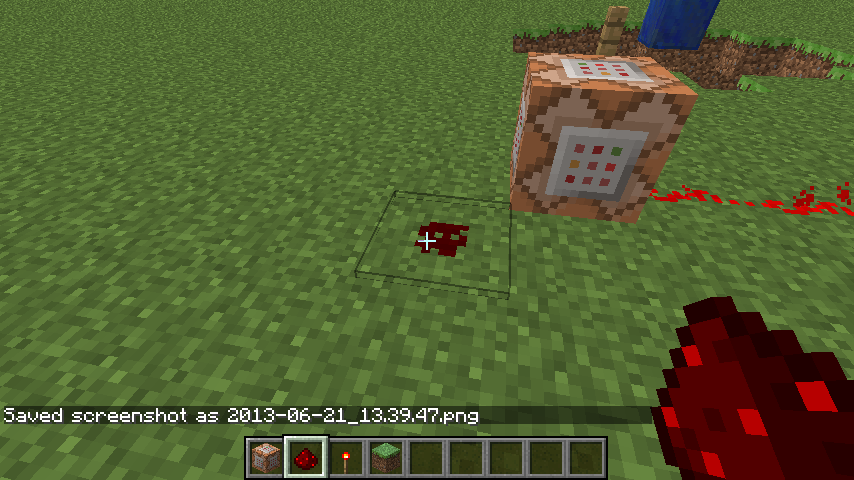
1. Place a command block to where it will be powered as soon as it is placed.
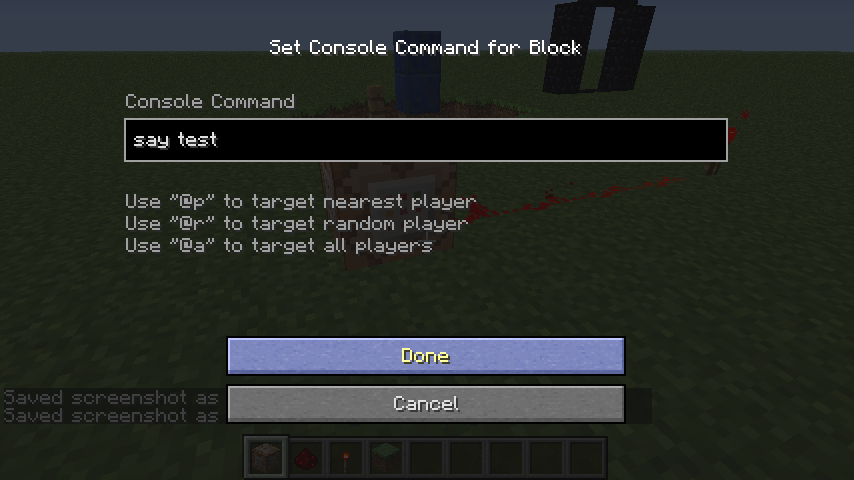
2. Type a command into the command block, e.g.: "say test".
> Notice the command block won't output "test" although it's powered.
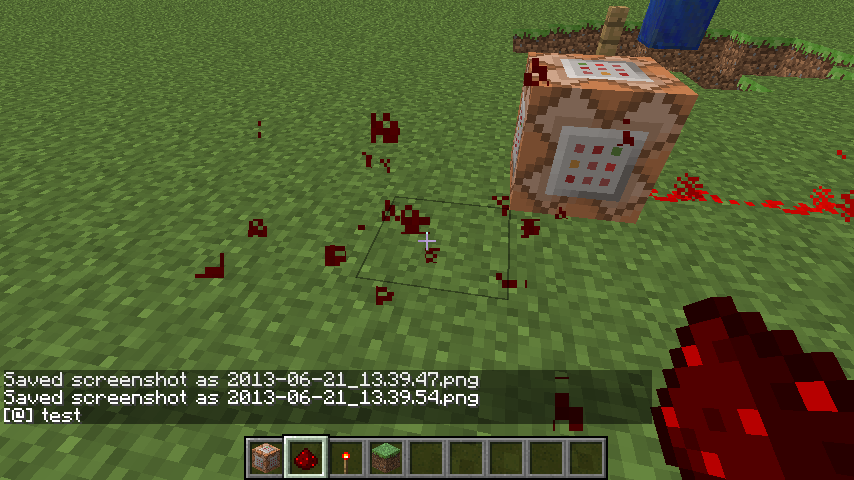
3. Cause a block update next to the command block.
> Notice the command block now outputs "test".
This also occurs with dispensers, droppers, and note blocks.
See also:
MC-51340, it also happens if you got certain block entities with NBT data (e.g. a command block with an inserted command) and place that manually next to a power source, as well as
MC-31100 if you setblock certain block entities with NBT data where they would get powered, as well as
MC-80901 as falling block.
Code analysis by Marcono1234 in this comment.
Linked Issues
 Low
Low




Created Issue:
New Command Blocks Trigger When Provided A Redstone Update
Newly placed command blocks being powered will activate when they receive a redstone update.
Steps To Reproduce:
1. Place a command block to where it will be powered as soon as it is placed.
2. Type a command into the command block.
3. Cause a redstone update near (next to, 2 blocks away, diagonally, ect.) the command block. (I placed and removed redstone, it only seems to update when i break the redstone not when i place it)Notes:
1. The original power source was never removed so it shouldn't activate.2. This may be intended but it doesn't seem like it should.

relates to
is duplicated by
is duplicated by
relates to
relates to
![[Mod] Torabi](../../../data/assets/gravatar/torabi.png)
New Command Blocks Trigger When Provided A Redstone UpdateSome redstone components do not update themselves when placed
relates to
is duplicated by
Some redstone components (BlockEntities) do not update themselves when placed
Newly placed command blocks being powered will activate when they receive a redstone update.
Steps To Reproduce:
1. Place a command block to where it will be powered as soon as it is placed.
2. Type a command into the command block.
3. Cause a redstone update near (next to, 2 blocks away, diagonally, ect.) the command block. (I placed and removed redstone, it only seems to update when i break the redstone not when i place it)Notes:
1. The original power source was never removed so it shouldn't activate.2. This may be intended but it doesn't seem like it should.
3. This bug also occurs with dispensers, droppers, and note blocks.
is duplicated by
relates to
Newly placed command blocks being powered will activate when they receive a redstone update.
Steps To Reproduce:
1. Place a command block to where it will be powered as soon as it is placed.
2. Type a command into the command block.
3. Cause a redstone update near (next to, 2 blocks away, diagonally, ect.) the command block. (I placed and removed redstone, it only seems to update when i break the redstone not when i place it)Notes:
1. The original power source was never removed so it shouldn't activate.2. This may be intended but it doesn't seem like it should.
3. This bug also occurs with dispensers, droppers, and note blocks.
Marcono1234 claims to have a fix in this comment.

Could you please include the comment?

is duplicated by
![[Mod] Michael Wobst](../../../data/avatars/users/37868.png)
![[Mod] tryashtar](../../../data/avatars/users/41963.png)
Some redstone components (BlockEntities) do not update themselves when placedSome redstone components (block entities) do not update themselves when placed
Newly placed command blocks being powered willactivatewhenthey receive aredstoneupdate.Steps To Reproduce:
1. Place a command block to where it will be powered as soon as it is placed.
2. Type a command into the command block.
3. Cause a redstone update near (next to, 2 blocks away, diagonally, ect.) the command block. (I placed and removed redstone, it only seems to update when i break the redstone not when i place it)Notes:
1.The original power source was never removed so it shouldn't activate.
2.Thismay be intended but it doesn't seem like it should.3. This bug also occurs with dispensers, droppers, and note blocks.
Marcono1234 claims to have a fix in this comment.
Certain block entities, when newly placed next to a power source, won't activate until they receive a block update.
Steps To Reproduce:
1. Place a command block to where it will be powered as soon as it is placed.
2. Type a command into the command block, e.g.: "say test".
> Notice the command block won't output "test" although it's powered.
3. Cause a block update next to the command block.
> Notice the command block now outputs "test".This also occurs with dispensers, droppers, and note blocks.
See also:
MC-51340, it also happens if you got certain block entities with NBT data (e.g. a command block with an inserted command) and place that manually next to a power source, as well as
MC-31100 if you setblock certain block entities with NBT data where they would get powered, as well as
MC-80901as falling block.
Code analysis by Marcono1234 in this comment.
duplicates
is duplicated by
relates to
If you setblock certain blocks where they would get powered (e.g. onto redstone torch or redstone block), e.g. with:
/setblock <x> <y> <z> command_block{Command:"say test"}
the command block does not say "test", unless it receives a block update.
This occurs also with e.g. dispensers, droppers, note blocks.
See also:
- MC-51340, it also happens if you got a block entity with NBT data (e.g. a command block with an inserted command) and make it fall, place it or clone it next to a power source, as well as
Code analysis by Marcono1234 in this comment on bugpost MC-18631.
Blocks that do not update when placed with setblock:
( Some of those would be useful for mapmakers to be left not updating, see Note below)
- doors
- dispensers
- droppers
- command blocks
- note blocks
- levers
- fence gates
- beds
- crops
- repeaters
- comparators
- mushrooms
- cake
- carpet
- dead bush
- flowers
- tall grass
- ferns
- flower pots
- pressure plates
- buttons
- hopper
- trapdoors
- ladders
- piston extension
- piston heads
- nether portals
- saplings
- snow layers
- banners
- signs
- sponges
- structure blocks
- tripwire
- tripwire hooks
- vines
- lily pads
- rails
- redstone lamps
- torches
- coral blocks
Blocks that do update:
- anvils
- sand
- cactus
- dragon eggs
- grass path
- gravel
- concrete powder
- farmland
- fire
- observers
- pistons
- redstone torches (lit state)
- redstone wire (power state and supporting block)
- stairs
- sugar cane
- TNT
In short:
- Everything that needs support to exist stays aside from redstone wire, cactus, sugar cane and fire.
- Gravity affected blocks fall.
- Powered/lit/etc state stays the same except for pistons, redstone torches, redstone wire and TNT
- sponges don't soak up water
Decorative things like flowers, dead_bush, fern, grass, portals (anything that would naturally require a supporting block) would be in my personal opinion better to be left not updating by usage of commands, so mapmakers can still use it as decorative means for their maps.
Furthermore, when using the /clone-command, the cloned blocks should probably be cloned as-is, so, if you clone blockstated blocks, they should be cloned as that very blockstated block. In order to toggle that, if desired, it could be considered to add another cloneMode for this (see opposing opinion in MC-190526, which was closed as duplicate of this bugpost). A fill-command with intentionally blockstated blocks should not lead to updated blocks as well (unless specified command-wise); the same should also go for e.g. a structure block, as well as worldgen structure.
TLDR: It seems it could be great for mapmakers to be able to toggle blockstate updates, if possible also per-block; this would open up the ability to use blocks such as for example the 159 currently unused (naturally not generated automatically) blockstates giant mushroom blocks as retextured blocks for individual resource packs easily, without the same type of mushroom blocks updating, if placed next to each other also manually and thus have to e.g. alternate the block types, which lowers and complicates the amount of usable blocks.
Probably related to MC-18631.
The bug
When certain block entities such as a dropper/dispenser or a command block that contain NBT data for items or a command is either placed manually on a power source or cloned on a power source it will receive power because a repeater gets power from the side of it but the dispenser will not place/drop anything and the command block will not run the command.
How to reproduce
- Place down a dispenser or dropper or command block
- Put items or a command into the block, depending what it is
- Control and middle-click the block to get the block with NBT data
- Place this on a power source such as a redstone torch or a redstone block
→ It should run the command or drop/place something but it does not
Note: this also affects note blocks, they won't play a note until they received a block update.
Test command for falling block, insert into a command block and trigger:
summon falling_block ~ ~2 ~ {
	BlockState:{Name:"minecraft:stone"},
	Time:1s,
	Passengers:
	[
		{
			id:"falling_block",
			BlockState:{Name:"minecraft:redstone_block"},
			Time:1s,
			Passengers:
			[
				{
					id:"falling_block",
					BlockState:{Name:"minecraft:command_block"},
					TileEntityData:{Command:"say Test"},
					Time:1s
				}
			]
		}
	]
}
Related issue
MC-31100 when using /setblock to place the block it does not update (and more)
Code analysis
Code analysis by Marcono1234 can be found in this comment on bug report MC-18631.
Sounds like MC-18631.
Yes, see MC-18631.
Confirmed for 1.12 pre-7.
Please consider what I wrote here.
I'm more than willing to take over all 4 bugposts or, preferrably, all of them bundled into the oldest one, if the OP regarding that type of problem (MC-18631) doesn't update it; I would also list all 4 test setups for bug reproduction into that one.
Please attach screenshots.
Confirmed. Attached screenshots.
Sorry for not adding screenshots, i wasn't sure of a good way of showing it in a screenshot.
Is this still a concern in the current Minecraft version? If so, please update the affected versions in order to best aid Mojang ensuring bugs are still valid in the latest releases/pre-releases.
Updated
Is this still a concern in the current Minecraft version 1.7.4 / Launcher version 1.3.8 or later? If so, please update the affected versions in order to best aid Mojang ensuring bugs are still valid in the latest releases/pre-releases.
Confirmed for 14w20b
Duplicated by:
MC-50612MC-50612duplicates the related ticket MC-31100Confirmed for 1.8-pre1.
Confirmed for
Could the title be updated to something more accurate, like "Some redstone components do not update themselves when placed"? This bug also occurs with dispensers, droppers, and note blocks.
Confirmed for:
Seems to be caused by wether the block is a TileEntity or not. Non-TileEntities like pistons, lamps... work. TileEntities like command blocks and dispensers don't
Relates to:
MC-80901Duplicated by:
MC-80901First of all this whole block placing updating blocks thing is really complicated and confusing with Minecraft. Because of that the provided fix might cause other problems but I hope I got that right and currently it does not cause other problems.
The method setBlockState(BlockPos p_177436_1_, IBlockState p_177436_2_) in the class /Client/src/net/minecraft/world/chunk/Chunk.java (MCP 1.8 names) which is called at some point after a block was placed or destroyed used to call only var15.updateContainingBlockInfo(); however I am unsure what this method actually does...
For TileEntities the onNeighborBlockChange(World worldIn, BlockPos pos, IBlockState state, Block neighborBlock) method must be called to update them. This method is called by the notifyBlockOfStateChange(BlockPos pos, final Block blockIn) method.
The reason why this did not affect basic redstone powered blocks is that they update themselves when the onBlockAdded(World worldIn, BlockPos pos, IBlockState state) is called (and this method is called).
Still in 1.9.4
Can confirm for 1.11
Confirmed for 1.12 pre-5.
But wouldn't it be advisable to resolve MC-31100, MC-51340 and
MC-80901as duplicate of this bugpost?Unless there's a reason to not bundle them together.
I got test setups for each one of them like the OP's provided test setup, but it's more or less the same.
Confirmed for 1.12 pre-7.
Confirmed for 1.12 release.
([Mod] Michael Wobst Thank you also here )
)
Ticket is yours now, Meri Diana
Merging with MC-51340 as it's the same cause.