 MC-189700
The Search Items tab of the creative inventory is always in focus and cannot be deselected
The text box in the creative mode "Search Items" tab cannot be deslected, making it always focussed for the player. This will put any key press the player enters into the search bar, disallowing the player to opt out of this behavior in any way by deselecting the search bar. This is also irregular behavior when compared to other search bars like the social interactions screen, and the crafting recipe book which both can be intentionally deselected by clicking on buttons, or items.
Steps to Reproduce:
- In creative, open your inventory
- Go to the "Search Items" tab
- Enter any text into the box
(Works as expected) - Left or right on one of the following:
- An empty slot
- A filled slot
- The outside of the GUI
Observed Behavior:
No matter what the player presses, their focus will always be kept on the search bar box. Because of this, any key presses which have functionality (like the number keys MC-189975, or F key for the off hand) will not function as expected.
Expected Result:
When the player clicks on something that isn't the search bar itself, the focus would be lost. The player would be able to choose when they want to enter text, instead of always being allowed/forced to.
Screenshots/Videos:

Notes:
Related to MC-189700
Linked Issues


![[Mod] Jiingy](../../../data/avatars/users/91802.png)
Created Issue:
Toolboxes in containers are always in focus
Opening the Search Items tab in Creative or an Anvil and pressing a numbered key always writes to the textbox instead of moving the item to the hotbar when not in focus.
What I expected to happend was....
After I open either GUI, pressing a number would move the item to the specified hotbar number and only after I click to focus the textbox am I able to type in the textbox
What actually happens is....
No matter where my mouse is in the GUI the textbox is always in focus and I can't move the item to the hotbar using numbered keys, or in the case of the Anvil moving it to the slot both moves the item and then adds to the name and cannot be placed back from the Anvil to the hotbar using numbered keys
Steps to reproduce:
- Enter a container that hat a textbox (ex: Anvil or Search Items in Creative Mode)
- Hover over an item to move to the hotbar
- Press any numbered key
- Notice that the item was not moved to the hotbar and the textbox was typed in instead
Note: This might be a consequence of the accidental item moving with numbered keys when typing in Item Search bugfix
Environment
Windows 10
Attachments2
Toolboxes in containers are always in focusTextboxes in containers are always in focus
Opening the Search Items tab in Creative or an Anvil and pressing a numbered key always writes to the textbox instead of moving the item to the hotbar when not in focus.
What I expected to happend was....
After I open either GUI, pressing a number would move the item to the specified hotbar number and only after I click to focus the textbox am I able to type in the textbox
What actually happens is....
No matter where my mouse is in the GUI the textbox is always in focus and I can't move the item to the hotbar using numbered keys, or in the case of the Anvil moving it to the slot both moves the item and then adds to the name and cannot be
placed back from the Anvil to the hotbar using numbered keysSteps to reproduce:
- Enter a container that hat a textbox (ex: Anvil or Search Items in Creative Mode)
- Hover over an item to move to the hotbar
- Press any numbered key
- Notice that the item was not moved to the hotbar and the textbox was typed in instead
Note: This might be a consequence of the accidental item moving with numbered keys when typing in Item Search bugfix
Opening the Search Items tab in Creative or an Anvil and pressing a numbered key always writes to the textbox instead of moving the item to the hotbar when not in focus.
What I expected to happend was....
After I open either GUI, pressing a number would move the item to the specified hotbar number and only after I click to focus the textbox am I able to type in the textbox
What actually happens is....
No matter where my mouse is in the GUI the textbox is always in focus and I can't move the item to the hotbar using numbered keys, or in the case of the Anvil moving it to the slot both moves the item and then adds to the name and cannot be moved back from the Anvil slot to the hotbar using numbered keys
Steps to reproduce:
- Enter a container that hat a textbox (ex: Anvil or Search Items in Creative Mode)
- Hover over an item to move to the hotbar
- Press any numbered key
- Notice that the item was not moved to the hotbar and the textbox was typed in instead
Note: This might be a consequence of the accidental item moving with numbered keys when typing in Item Search bugfix
Opening the Search Items tab in Creative or an Anvil and pressing a numbered key always writes to the textbox instead of moving the item to the hotbar when not in focus.
What I expected to happend was....
After I open either GUI, pressing a number would move the item to the specified hotbar number and only after I click to focus the textbox am I able to type in the textbox
What actually happens is....
No matter where my mouse is in the GUI the textbox is always in focus and I can't move the item to the hotbar using numbered keys, or in the case of the Anvil moving it to the slot both moves the item and then adds to the name and cannot be moved back from the Anvil slot to the hotbar using numbered keys
Steps to reproduce:
- Enter a container that hat a textbox (ex: Anvil or Search Items in Creative Mode)
- Hover over an item to move to the hotbar
- Press any numbered key
- Notice that the item was not moved to the hotbar and the textbox was typed in instead
Note: This might be a consequence of the accidental item moving with numbered keys when typing in Item Search bugfix
Opening the Search Items tab in Creative or an Anvil and pressing a numbered key always writes to the textbox instead of moving the item to the hotbar when not in focus.
What I expected to happend was....
After I open either GUI, pressing a number would move the item to the specified hotbar number and only after I click to focus the textbox am I able to type in the textbox
What actually happens is....
No matter where my mouse is in the GUI the textbox is always in focus and I can't move the item to the hotbar using numbered keys, or in the case of the Anvil moving it to the slot both moves the item and then adds to the name and cannot be moved back from the Anvil slot to the hotbar using numbered keys
Steps to reproduce:
- Enter a container that hat a textbox (ex: Anvil or Search Items in Creative Mode)
- Hover over an item to move to the hotbar
- Press any numbered key
- →
The item was not moved to the hotbar and the textbox was typed in instead
Note: This might be a consequence of the accidental item moving with numbered keys when typing in Item Search bugfix
![[Mod] violine1101](../../../data/avatars/users/92858.png)

![[Mod] tryashtar](../../../data/avatars/users/41963.png)
![[Mod] Michael Wobst](../../../data/avatars/users/37868.png)
Text boxes in containers are always in focus
![[Mod] turbo](../../../data/avatars/users/92867.png)
Text boxes in containers are always in focusThe Search Items tab of the creative inventory is always in focus and cannot be deselected
Opening the Search Items tab in Creative or an Anvil and pressing a numbered key always writes to the textbox instead of moving the item to the hotbar when not in focus.
What I expected to happend was....
After I open either GUI, pressing a number would move the item to the specified hotbar number and only after I click to focus the textbox am I able to type in the textbox
What actually happens is....
No matter where my mouse is in the GUI the textbox isalwaysinfocusand I can't move the item to the hotbar using numbered keys, or in the case of the Anvil moving it to the slot both moves the item and then adds to the name and cannot be moved back from the Anvil slot to the hotbar using numbered keysSteps to reproduce:
- Enter a container that hat a textbox (ex: Anvil or Search Items in Creative Mode)
- Hover over an item to move to the hotbar
- Press any numbered key
- →
Note: This might be a consequence of the accidental item moving with numbered keys when typing in
Item Search bugfixThe text box in the creative mode "Search Items" tab cannot be deslected, making it always focussed for the player. This will put any key press the player enters into the search bar, disallowing the player to opt out of this behavior in any way by deselecting the search bar. This is also irregular behavior when compared to other search bars like the social interactions screen, and the crafting recipe book which both can be intentionally deselected by clicking on buttons, or items.
Steps to Reproduce:
- In creative, open your inventory
- Go to the "Search Items" tab
- Enter any text into the box
(Works as expected)- Left or right on one of the following:
- An empty slot
- A filled slot
- The outside of the GUI
Observed Behavior:
No matter what the player presses, their focus will always be kept on the search bar box. Because of this, any key presses which have functionality (like the number keys MC-189975, or F key for the off hand) will not function as expected.
Expected Result:
When the player clicks on something that isn't the search bar itself, the focus would be lost. The player would be able to choose when they want to enter text, instead of always being allowed/forced to.
Screenshots/Videos:
Notes:
Related to MC-189700
The text box in the creative mode "Search Items" tab cannot be deslected, making it always focussed for the player. This will put any key press the player enters into the search bar, disallowing the player to opt out of this behavior in any way by deselecting the search bar. This is also irregular behavior when compared to other search bars like the social interactions screen, and the crafting recipe book which both can be intentionally deselected by clicking on buttons, or items.
Steps to Reproduce:
- In creative, open your inventory
- Go to the "Search Items" tab
- Enter any text into the box
(Works as expected) - Left or right on one of the following:
- An empty slot
- A filled slot
- The outside of the GUI
Observed Behavior:
No matter what the player presses, their focus will always be kept on the search bar box. Because of this, any key presses which have functionality (like the number keys MC-189975, or F key for the off hand) will not function as expected.
Expected Result:
When the player clicks on something that isn't the search bar itself, the focus would be lost. The player would be able to choose when they want to enter text, instead of always being allowed/forced to.
Screenshots/Videos:
Notes:
Related to MC-189700
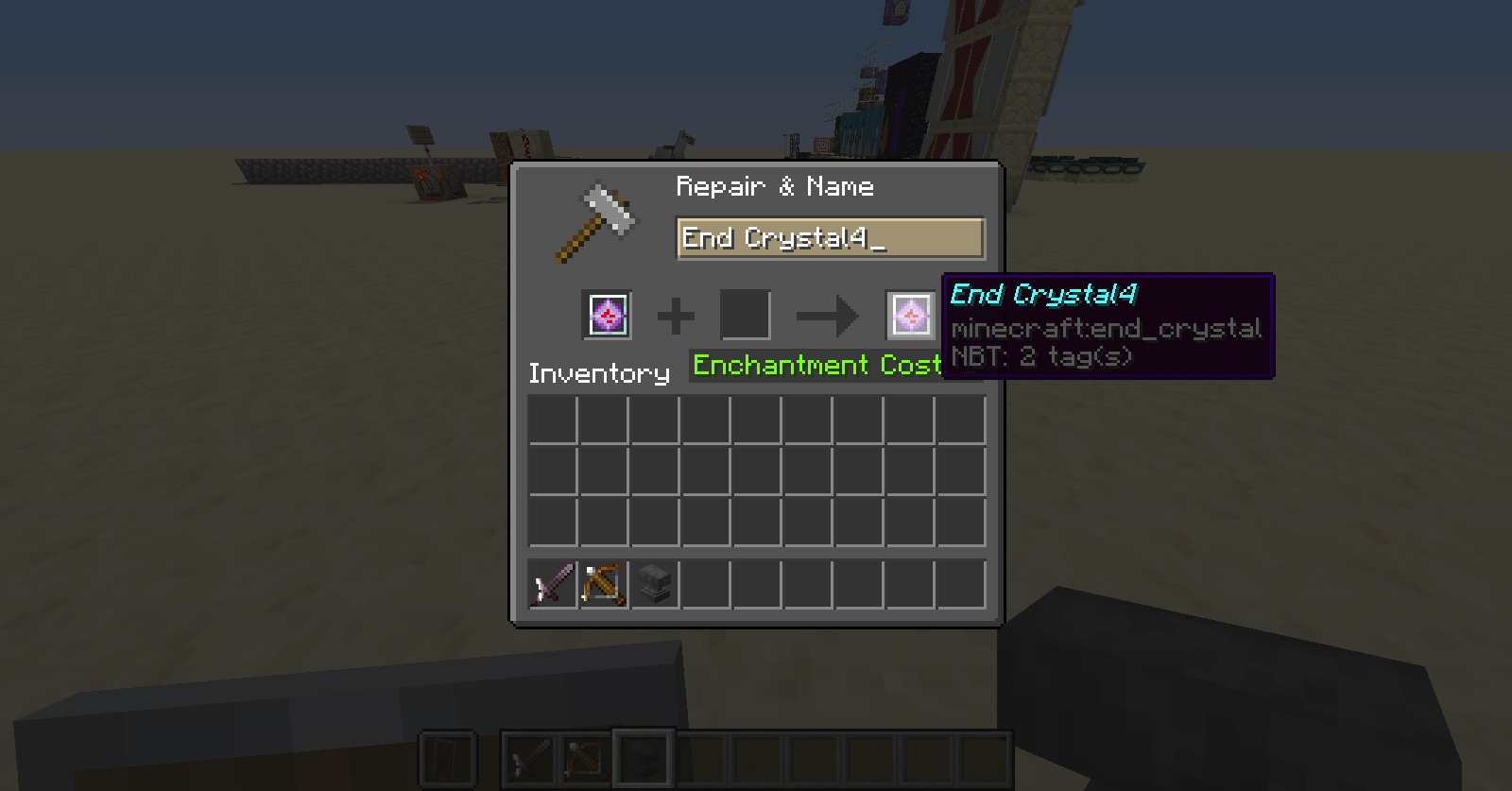
The text box in the anvil's GUI cannot be deslected, making it always focussed for the player. This will put any key press from the player into the text box, disallowing the player to opt out of this behavior in any way by deselecting the box. This is also irregular behavior when compared to other search bars like the social interactions screen, and the crafting recipe book which both can be intentionally deselected.
Steps to Reproduce:
- Place an anvil
- Open its GUI
- Enter any text into the box
- Left or right on one of the following:
- An empty slot
- A filled slot
- Any one of the three item slots of the anvil
- Outside the anvil's GUI
Observed Behavior:
No matter what the player presses, their focus will always be kept on the anvil's text box. Because of this, any key presses which have functionality (like the number keys MC-189975, or F key for the off hand)) will not function.
Expected Result:
When the player clicks on something that isn't the search bar itself, the focus would be lost. The player should be able to choose when they want to enter text, instead of always being allowed/forced to.
Screenshots/Videos:
Notes:

Would MC-189700 describe you're issue?
Can confirm in 20w51a.
Considering this report has an inactive owner and has not been maintained since 20w51a, I would like to request ownership of this issue.