Paintings & item frames can overlap / Z-fighting when overlapping
Mac osx 10.8 mountain lion, java 6.9
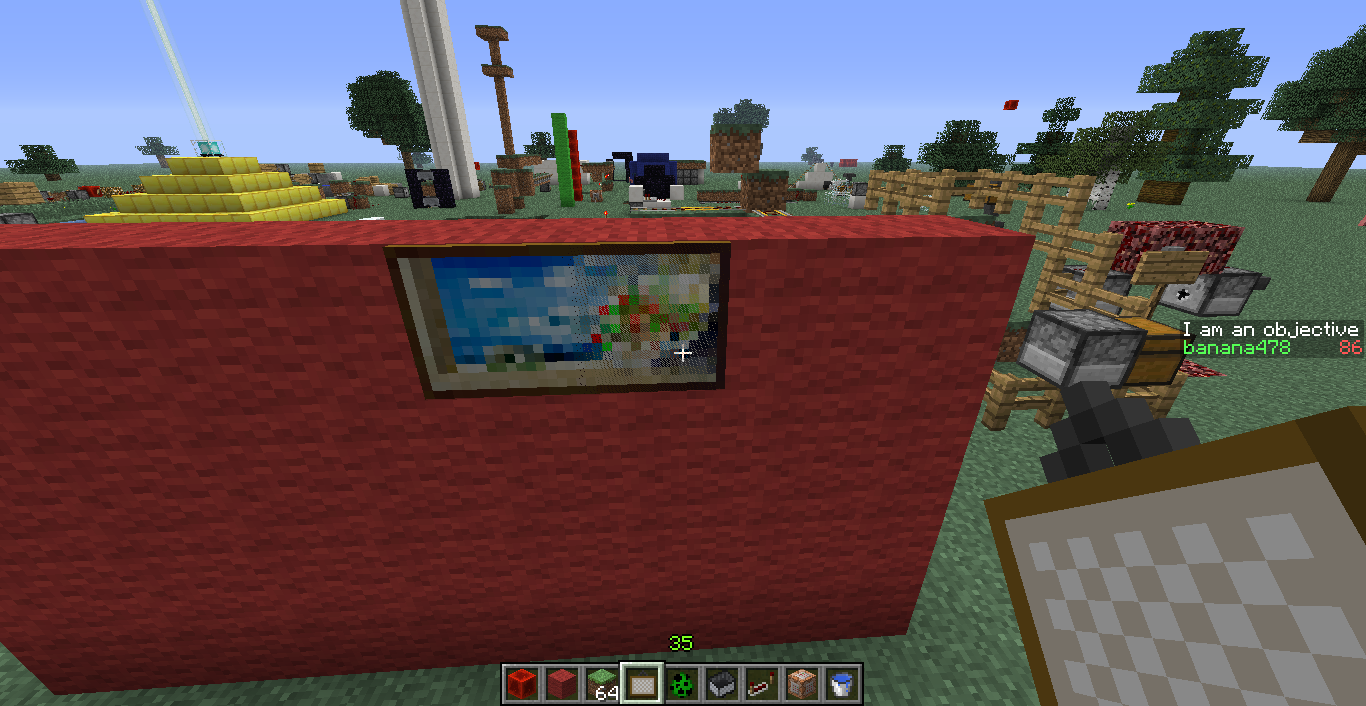
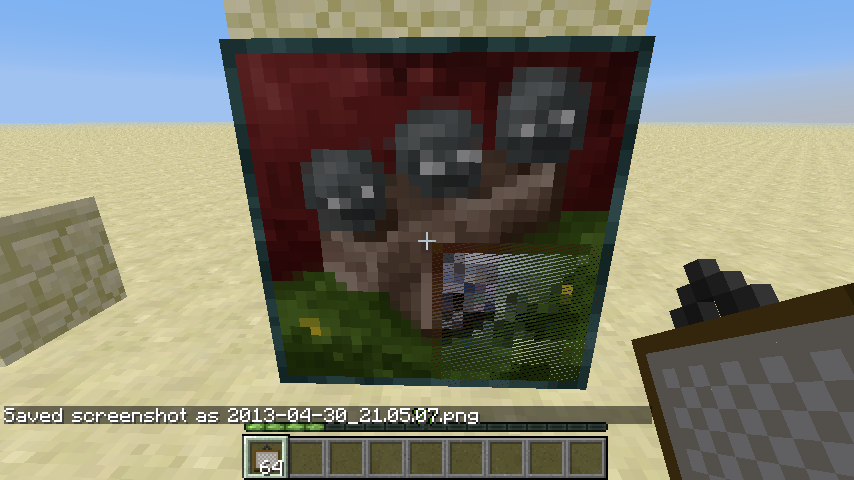
Places on a 4high by 9long wall, the wither painting overlapped when I placed Nother painting next to it, this time the huge pink lines painting (NES game?)
It created a graphical glitch where each was trying to be ontop so it was flickering each painting.
Linked Issues
is duplicated by38
 MC-6145Painting overlapDuplicateMC-6371When Placing a Painting Next to Another It will getting CollisionDuplicateMC-6415Paintings encroach the ones on the othersDuplicateMC-7612Painting bug!DuplicateMC-8367Two Crossing PaintingsDuplicateMC-8395Paintings placed inside each otherDuplicateMC-9314Painting bugDuplicateMC-10291Item frame in item frameDuplicateMC-11144Bug with paintingsDuplicateMC-12469Painting over paintingDuplicateMC-12504Paintings get overlappedDuplicateMC-12708Painting placement bugDuplicateMC-12926pictures overlap in mc 1.5.1DuplicateMC-13383Painting glitching outDuplicateMC-15575Inconsistent Drops When Punching Items in Item FramesDuplicateMC-15586Painting GlitchDuplicateMC-15686Overlaping PaintingsDuplicateMC-15848I've been making a custom map and I ended up having paintings on top of paintingsDuplicateMC-18721Morphed PaintingsDuplicateMC-24593Item Frame stackingDuplicateMC-26818Looks Like Enchanted But NotDuplicateMC-320002 Item Frames on one Block and Map in itDuplicateMC-44932Painting overlapDuplicateMC-53338Itemframe multiple enchanted itemsDuplicateMC-375The Paintings can overlap eachotherDuplicateMC-421images can overlap imagesDuplicateMC-1208Multiple Paintings In One PlaceDuplicateMC-1303Painting glitchDuplicateMC-2345You can place Paintings in the same Place as Item FramesDuplicateMC-3341Painting overlapping issueDuplicateMC-3483Item Frames can be stacked on a wallDuplicateMC-3487Multiple paintings on top of each other bugDuplicateMC-4626Overlapping Paintings.DuplicateMC-435A issue with paintings over lapping each otherDuplicateMC-717You can put a lot of item frames on one blockDuplicateMC-1131PaintingsDuplicateMC-1144There are pictures one above the otherDuplicateMC-1156Painting overlapping bugDuplicate


Created Issue:
Paintings overlap 1.4.2 pre release
Mac osx 10.8 mountain lion, java 6.9
Places on a 4high by 9long wall, the wither painting overlapped when I placed Nother painting next to it, this time the huge pink lines painting (NES game?)
It created a graphical glitch where each was trying to be ontop so it was flickering each painting.
Environment
Paintings overlap on a wall if no space to expand into.
Linked Issues
is duplicated by2
TRASH-7591

is duplicated by
is duplicated by
![[Mojang] Nathan Adams](../../../data/assets/gravatar/dinnerbone.png)
Paintingsoverlap 1.4.2 pre releasePaintings & item frames can overlap
is duplicated by
is duplicated by
is duplicated by
is duplicated by
is duplicated by
is duplicated by
is duplicated by


relates to
![[Mod] CubeTheThird](../../../data/assets/gravatar/cubethethird.jpeg)
is duplicated by

is duplicated by

is duplicated by
relates to
is duplicated by
is duplicated by
is duplicated by
is duplicated by

is duplicated by
is duplicated by
is duplicated by
is duplicated by
is duplicated by
is duplicated by
is duplicated by
is duplicated by
is duplicated by
Paintings & item frames can overlap / Z-fighting when overlapping
relates to
is duplicated by
is duplicated by
is duplicated by
relates to
is duplicated by
is duplicated by
is duplicated by
is duplicated by
is duplicated by
is duplicated by
is duplicated by
is duplicated by
![[Mod] Ezekiel (ezfe)](../../../data/assets/gravatar/ezekielelin.jpeg)

is duplicated by
is duplicated by
Paintings overlap on a wall if no space to expand into.
is duplicated by
is duplicated by
![[Mod] violine1101](../../../data/avatars/users/92858.png)
relates to
Suggest reopening as this doesn't appear to be a duplicate of MC-208
Unless of course it was related to MC-208, but it should then be marked as related to, not duplicated.
15th duplicate of MC-208 , please use the search function to see if your bug has already been submitted. Currently over 25% of tickets are being closed as duplicate.
cheers. Interesting to see that MC-208 is still listed as unconfirmed...from all the issue links it's quite clear that something is wrong.
Duplicate of MC-208 , please use the search function to see if your bug has already been submitted. Currently over 25% of tickets are being closed as duplicate.
Thank you Tails.
Duplicate of MC-208 , please use the search function to see if your bug has already been submitted. Currently over 40% of tickets are being closed as duplicate.
Duplicate of MC-208 , please use the search function to see if your bug has already been submitted. Currently over 40% of tickets are being closed as duplicate.
Duplicate of MC-208, please use the search function to see if your bug has already been submitted. Currently over 42% of tickets are being closed as duplicate.
Duplicate of: MC-208 - Please use the search function to see if your bug has already been submitted.
Currently over 45% of tickets are being closed as duplicate.
Duplicate of MC-208, please use the search function to see if your bug has already been submitted. Currently over 49% of tickets are being closed as duplicate.
23rd duplicate of MC-208, please use the search function to see if your bug has already been submitted. Currently over 49% of tickets are being closed as duplicate.
24th Duplicate of MC-208, please use the search function to see if your bug has already been submitted. Currently over 51% of tickets are being closed as duplicate.
25th Duplicate of MC-208, please use the search function to see if your bug has already been submitted. Currently over 52% of tickets are being closed as duplicate.
26th Duplicate of MC-208, please use the search function to see if your bug has already been submitted. Currently over 53% of tickets are being closed as duplicate.
26th Duplicate of MC-208, please use the search function to see if your bug has already been submitted. Currently over 54% of tickets are being closed as duplicate.
27th Duplicate of MC-208, please use the search function to see if your bug has already been submitted. Currently over 54% of tickets are being closed as duplicate.
Duplicate of MC-208, please use the search function to see if your bug has already been submitted. Currently over 54% of tickets are being closed as duplicate.
28th Duplicate of MC-208, please use the search function to see if your bug has already been submitted. Currently over 55% of tickets are being closed as duplicate.
29th Duplicate of MC-208, please use the search function to see if your bug has already been submitted. Currently over 55% of tickets are being closed as duplicate.
Duplicate of MC-208, please use the search function to see if your bug has already been submitted. Currently over 55% of tickets are being closed as duplicate.
33rd Duplicate of MC-208, please use the search function to see if your bug has already been submitted. Currently over 56% of tickets are being closed as duplicate.
35th Duplicate of MC-208, please use the search function to see if your bug has already been submitted. Currently over 56% of tickets are being closed as duplicate.
Duplicate of MC-208, please use the search function to see if your bug has already been submitted. Currently over 58% of tickets are being closed as duplicate.
Yeah, looks like your created a Duplicate of Unresolved
MC-208
If you have not, please use the search function in the future, to see if your bug has already been submitted. If you could not find the original report, please comment with the keywords you searched for.
39th Duplicate of MC-208 - If you have not, please use the search function in the future, to see if your bug has already been submitted. If you could not find the original report, please comment with the keywords you searched for.
WAI due to the fix of MC-208


Could you make a screenshot of it?
Note - there is a screenshot on
MC-375of overlapping paintings.The screenshot is in
MC-421, not 375.Yeah I couldn't get the glitch to happen again, I think I might of changed circumstances or something because I couldn't recreate it for a screenshot, but this is exactly what happened.. Thanks..
From Kurisu Brooks
------------------------
クリスブルックス
I'm getting this too, even in the 1.4.3 prerelease.
To reproduce:
1. Place a painting or item frame on a wall
2. Repeatedly place another painting to the left or to the left and below it until you get a 2x2 or larger painting.
3. The newer painting should overlap the older one.
Looking at the code in MCP, it's fairly easy to see what the problem is. Near the end of the method that sets up the painting entity's bounding box, a local variable is initialized that is then added to the edges of the bounding box. In versions previous to 1.4, this variable was -0.00625F. In 1.4, this value is -0.03125F. Restoring the old value seems to fix the painting behavior.
this also is in effect in 1.4.6
To reproduce:
1. Place a painting or item frame on a wall
2. Repeatedly place another painting to the left or to the left and below it until you get a 2x2 or larger painting.
3. The newer painting should overlap the older one.
Feature?
Confirmed for 1.5.1-pre
Confirmed.
Still happens in 13w17a
Still in 13w18c
Happens in 13w19a
Bug present in 13w19b. I wonder how I never noticed this before as it seems to be a long standing bug. Is it possible to check for an existing painting around the current block where one is to be attached to before selecting?
Confirmed for 13w48b
Whats wrong with this? Its a good thing cos you can make weird looking stuff and put item frames with them etc, if you dont like the paintings overlapping, then move them. Fixing this will get rid of so many possibilities. Like to make a sharp looking tv you can use a painting with carpet on it, but not any more cos the painting just pops off.