 Jonathan Haas
- jonathanhaas
- jonathanhaas
- Europe/Stockholm
- Yes
- No
 MC-2788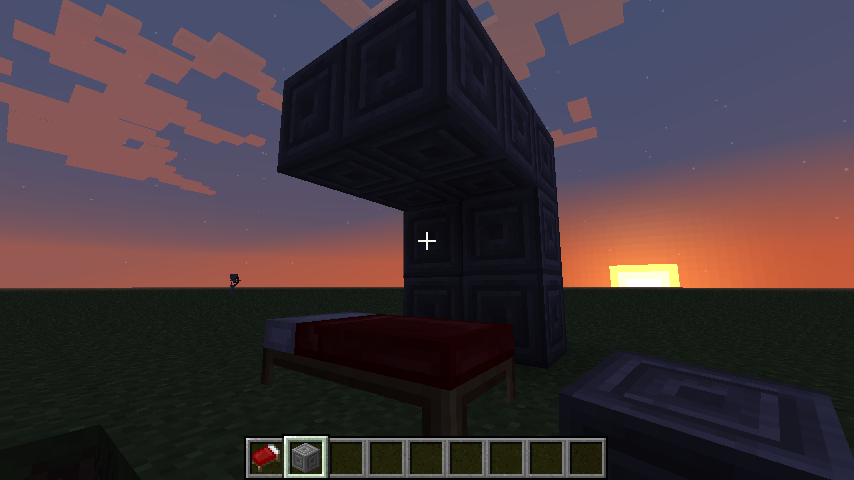













Trying to sleep in a bed often can cause the player to fall out of it when trying to sleep.
The fall direction depends on the layout of the ceiling. One example to reproduce the bug is attached here as a screenshot but there are a lot of different layouts that cause the problem.
See for example the dropper videos from yogscast, which have a lot of these glitches, for example here with extreme cases like sleeping in thin air or getting teleported to the void
the voidwhile sleeping: https://www.youtube.com/watch?list=ELX4TZvhYTYmc&v=YGoIyn7BjoQ&feature=player_detailpage#t=506s
the bug is probably causesby some part of the game code thinking the player is still standing and intersecting the ceiling so it tries to move it out there.Trying to sleep in a bed often can cause the player to fall out of it when trying to sleep.
The fall direction depends on the layout of the ceiling. One example to reproduce the bug is attached here as a screenshot but there are a lot of different layouts that cause the problem.
See for example the dropper videos from yogscast, which have a lot of these glitches, for example here with extreme cases like sleeping in thin air or getting teleported to the void while sleeping: https://www.youtube.com/watch?list=ELX4TZvhYTYmc&v=YGoIyn7BjoQ&feature=player_detailpage#t=506s
The bug is probably caused by some part of the game code thinking the player is still standing and intersecting the ceiling so it tries to move it out there.
Blocks above bad cause players to fall out of bedBlocks above bed cause players to fall out of bed
Trying to sleep in a bed often can cause the player to fall out of it
when trying to sleep.The fall direction depends on the layout of the ceiling. One example to reproduce the bug is attached here as a screenshot but there are a lot of different layouts that cause the problem.
See for example the dropper videos from
yogscast, which have a lot of these glitches, for example here with extreme cases like sleeping in thin air or getting teleported to the void while sleeping: https://www.youtube.com/watch?list=ELX4TZvhYTYmc&v=YGoIyn7BjoQ&feature=player_detailpage#t=506sThe bug is probably caused by some part of the game code thinking the player is still standing and intersecting the ceiling so it tries to move it out there.
Trying to sleep in a bed often can cause the player to fall out of it.
The fall direction depends on the layout of the ceiling. One example to reproduce the bug is attached here as a screenshot but there are a lot of different layouts that cause the problem.
See for example the dropper videos from Yogscast, which have a lot of these glitches, for example here with extreme cases like sleeping in thin air or getting teleported to the void while sleeping: https://www.youtube.com/watch?list=ELX4TZvhYTYmc&v=YGoIyn7BjoQ&feature=player_detailpage#t=506s
The bug is probably caused by some part of the game code thinking the player is still standing (on the bed) and intersecting the ceiling so it tries to move it out there.
Trying to sleep in a bed often can cause the player to fall out of it.
The fall direction depends on the layout of the ceiling. One example to reproduce the bug is attached here as a screenshot but there are a lot of different layouts that cause the problem.
See for example the dropper videos from Yogscast, which have a lot of these glitches, for example here with extreme cases like sleeping in thin air or getting teleported to the void while sleeping: https://www.youtube.com/watch?list=ELX4TZvhYTYmc&v=YGoIyn7BjoQ&feature=player_detailpage#t=506s
The bug is probably caused by some part of the game code thinking the player is still standing (on the bed) and intersecting the ceiling so it tries to move it out there.
Trying to sleep in a bed often can cause the player to fall out of it.
The fall direction depends on the layout of the ceiling. One example to reproduce the bug is attached here as a screenshot but there are a lot of different layouts that cause the problem.
The bug is probably caused by some part of the game code thinking the player is still standing (on the bed) and intersecting the ceiling so it tries to move it out there.
relates to
While a piston is retracting, there is a visual glitch, see attached screenshot.
Bug exists with normal pistons as well as sticky ones.
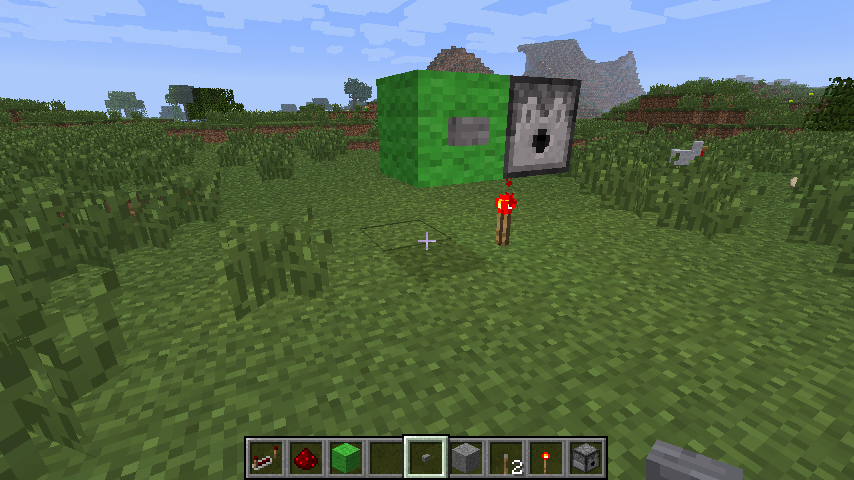
While a piston is retracting, there is a visual glitch, see attached screenshot. The wooden part which belongs on the end of the piston arm is painted on the piston base, too. On the screenshot, the green sticky blob should not be visible at all because it should be facing the stone block.
Bug exists with normal pistons as well as sticky ones.
While a piston is retracting, there is a visual glitch, see attached screenshot ("piston.png"). The wooden part which belongs on the end of the piston arm is painted on the piston base, too. On the screenshot, the green sticky blob should not be visible at all because it should be facing the stone block.
Bug exists with normal pistons as well as sticky ones.
See "expected.png" for how it should look like (screenshot made while piston was extending)
To reproduce in singleplayer:
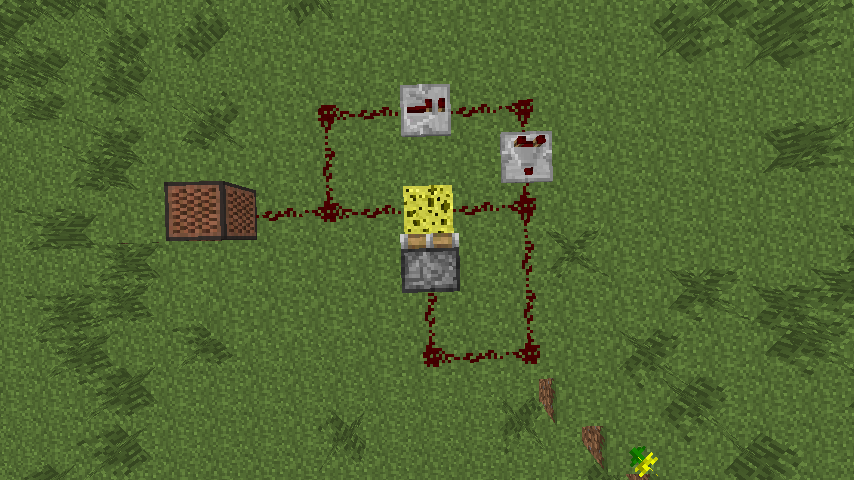
Build the attached design (first screenshot), flip the lever on. Note: The piston is a sticky one. The piston should extend and retract quickly.
To cause the bug, either
- die
- alt-tab out of minecraft for some time
- save, exit to menu and reload the save
Possible outcome:
- The piston stays extendended, the clock isn't working
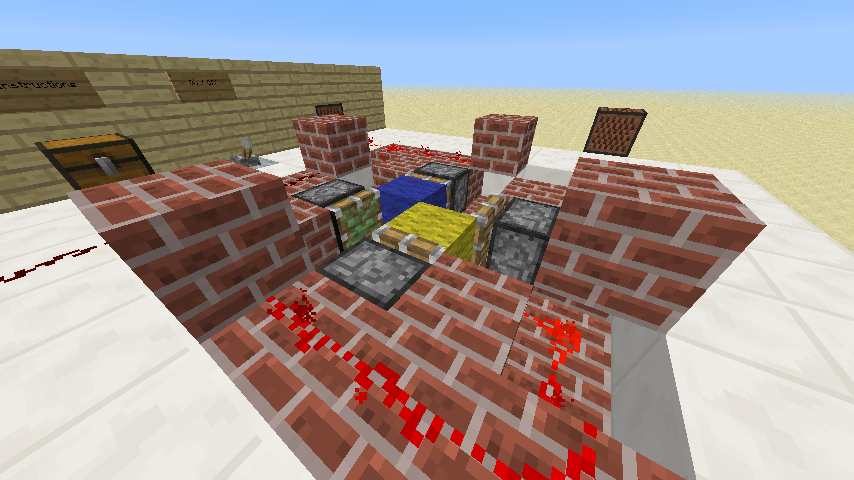
or- The piston is still pulsing, but the piston head and the pushed block is invisible (picture 2)
Expected outcome:
- Clock still running, piston/block still visible
Piston clock state not properly savedwhen exiting game/dying/etc.Clocked piston turns invisible when exiting game/dying/etc.
Clocked piston arm turns invisible when exiting game/dying/etc.
To reproduce in singleplayer:
Build the attached design (first screenshot), flip the lever on. Note: The piston is a sticky one. The piston should extend and retract quickly.
To cause the bug, either
- die
- alt-tab out of minecraft for some time
- save, exit to menu and reload the save
Possibleoutcome:
- The piston stays extendended, the clock isn't working
or- The piston is still pulsing, but the piston head and the pushed block is invisible (picture 2)
Expected outcome:
- Clock still running, piston/block still visible
To reproduce in singleplayer:
Build the attached design (first screenshot), flip the lever on. Note: The piston is a sticky one. The piston should extend and retract quickly.
To cause the bug, either
- die
- alt-tab out of minecraft for some time
- save, exit to menu and reload the save
Actual outcome:
- The piston is still pulsing, but the piston head and the pushed block is invisible (picture 2)
Expected outcome:
- Clock still running, piston/block still visible
To reproduce in singleplayer:
Build the attached design (first screenshot), flip the lever on. Note: The piston is a sticky one. The piston should extend and retract quickly.
To cause the bug, either
- die
- alt-tab out of minecraft for some time
- save, exit to menu and reload the save
Actual outcome:
- The piston is still pulsing, but the piston
headand the pushed block is invisible (picture 2)Expected outcome:
Clock still running, piston/blockstill visibleTo reproduce in singleplayer:
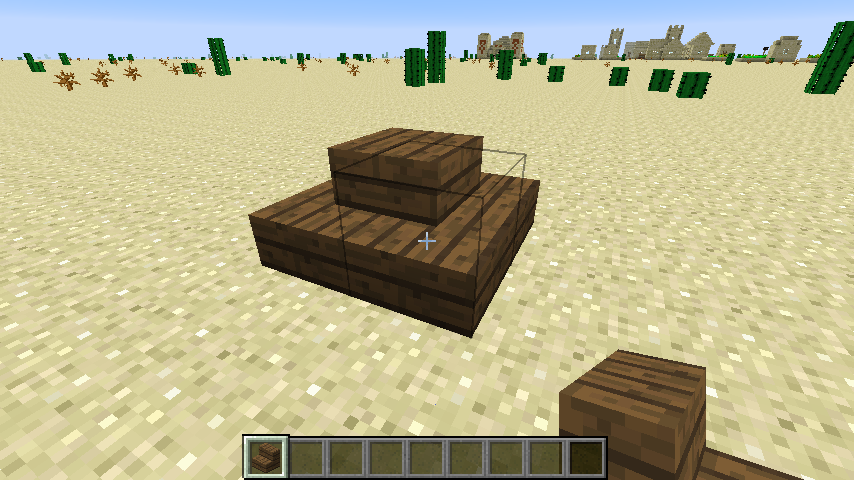
Build the attached design (first screenshot, or third screenshot for a design that doesn't depend on BUDs), flip the lever on. Note: The piston is a sticky one. The piston should extend and retract quickly.
To cause the bug, either
- die
- alt-tab out of minecraft for some time
- save, exit to menu and reload the save
Actual outcome:
- The piston is still pulsing, but the piston arm and the pushed block is invisible (picture 2)
Expected outcome:
- Piston arm still visible
To reproduce in singleplayer:
Build the attached design (first screenshot, or third screenshot for a design that doesn't depend on BUDs), flip the lever on. Note: The piston is a sticky one. The piston should extend and retract quickly.
To cause the bug, either
- die
- alt-tab out of minecraft for some time
- save, exit to menu and reload the save
- just wait, walk/or look around as it seems to happen randomly, too
Actual outcome:
- The piston is still pulsing, but the piston arm and the pushed block is invisible (picture 2)
Expected outcome:
- Piston arm still visible
It's fine in creative mode, the problem is just in survival mode.
This bug is a little bit hard to reproduce, but I now experienced it several times with different Minecraft versions, so I'm reporting it now.
Steps to reproduce:
- Find a place where a lot of sheep spawn at the same time. Ideally spawn near a plains biome
- Observe sheep
Actual results:
- The sheep spawn in groups of about 4 sheep every time. This is okay. But I've had it several times that all the sheep groups consists of the same sheeps (color, number of sheeps). Often all the sheep groups contain just all white color which isn't really obvious, but one time I had all the sheep groups (more than 6) contain one pink sheep and three brown sheep, which is really unusual and can't really be explained just by pure luck.
Expected result:
- Sheep should be randomized so you get different sheep per group per world.
TLDR: The code that generates groups of sheep (and possibly other mobs) doesn't seem to use the random pool properly so all the sheep groups are generated the same.
Had the issue back in 1.2.5, too, also in singleplayer, so there is no server or other people, who could be messing with the mobs.
Note: This bug probably applies only to mobs spawning at the same time or so, if you search long enough, you may/will find different sheep groups.
Sheep wool color doesn't generate/randomize properly
This bug is a little bit hard to reproduce, but I now experienced it severaltimeswith different Minecraft versions, so I'm reporting it now.Steps to reproduce:
- Find a place where a lot of sheep spawn at the same time. Ideally spawn near a plains biome
- Observe sheep
Actual results:
- The sheep spawn in groups of about 4 sheep every time. This is okay. But I've had it several times that all the sheep groups consists of the same sheeps (color, number of sheeps). Often all the sheep groups contain just all white color which isn't really obvious, but one time I had all the sheep groups (more than 6) contain one pink sheep and three brown sheep, which is really unusual and can't really be explained just by pure luck.
Expected result:
- Sheep should be randomized so you get different sheep per group per world.
TLDR: The code that generates groups of sheep (and possibly other mobs) doesn't seem to use the random pool properly so all the sheep groups are generated the same.
Had the issue back in 1.2.5, too, also in singleplayer, so there is no server or other people, who could be messing with the mobs.
Note: This bug probably applies only to mobs spawning at the same time or so, if you search long enough, you may/will find different sheep groups.
Sheep groups spawning at world generation or otherwise at the same time will spawn the same sheep colors.
Steps to reproduce:
- Find a place where a lot of sheep spawn at the same time. Ideally spawn near a plains biome
- Observe sheep
Actual results:
- The sheep spawn in groups of about 4 sheep every time. This is okay. But I've had it several times that all the sheep groups consists of the same sheeps (color, number of sheeps). Often all the sheep groups contain just all white color which isn't really obvious, but one time I had all the sheep groups (more than 6) contain one pink sheep and three brown sheep, which is really unusual and can't really be explained just by pure luck.
Expected result:
- Sheep should be randomized so you get different sheep per group per world.
TLDR: The code that generates groups of sheep (and possibly other mobs) doesn't seem to use the random pool properly so all the sheep groups are generated the same.
Had the issue back in 1.2.5, too, also in singleplayer, so there is no server or other people, who could be messing with the mobs.
Note: This bug probably applies only to mobs spawning at the same time or so, if you search long enough, you may/will find different sheep groups.
Sheep groups spawning at world generation or otherwise at the same time will spawn the same sheep colors.
Steps to reproduce:
- Find a
placewhere a lot of sheep spawn at the same time. Ideally spawn near a plains biome- Observe sheep
Actual results:
- The sheep spawn in groups of
about 4 sheep every time. This is okay. But I've had it several times that all the sheep groups consists of the same sheeps (color, number of sheeps). Often all the sheep groups contain just all white color which isn't really obvious, but one time I had all the sheep groups (more than 6) contain one pink sheep and three brownsheep,which is really unusual and can't really be explained just by pure luck.Expected result:
- Sheep should be randomized so you get different sheep per group per world.
TLDR:The code that generates groups of sheep (and possibly other mobs) doesn't seem to use the randompoolproperly so all the sheep groups are generated the same.
Had the issue back in 1.2.5, too, also in singleplayer, so there is no server or other people, who could be messing with the mobs.
Note: This bug probably applies only to mobs spawning at the same time orso,if you search long enough, you may/will find different sheep groups.Sheep groups spawning at world generation or otherwise at the same time will spawn the same sheep colors.
Steps to reproduce:
- Find a world where a lot of sheep spawn at the same time. Ideally spawn near a plains biome. Example seeds are "136" and "quarry" (default biomes)
- Observe sheep
Actual results:
- The sheep spawning in groups of 4 always spawn with the same color. In the "quarry" seed, sheep will always spawn as three white sheep and one brown sheep. In the "136" seed, sheep will always spawn as three white sheep and one dark grey sheep.
Expected result:
- Sheep should be randomized so you get different sheep per group per world.
The code that generates groups of sheep (and possibly other mobs) doesn't seem to use the random generator properly so all the sheep groups are generated the same.
Note: This bug probably applies only to mobs spawning at the same time or so, if you search long enough, you may/will find different sheep groups.
PS: Additionally, some seeds like "135" span huge amounts of pigs but no sheep, so it may be possible that the random generator fails to be random even earlier: At determining which mobs to spawn.
Sheep groups spawning at world generation or otherwise at the same time will spawn the same sheep colors.
Steps to reproduce:
- Find a world where a lot of sheep spawn at the same time. Ideally spawn near a plains biome. Example seeds are "136" and "quarry" (default biomes)
- Observe sheep
Actual results:
- The sheep spawning in groups of 4 always spawn with the same color. In the "quarry" seed, sheep will always spawn as three white sheep and one brown sheep. In the "136" seed, sheep will always spawn as three white sheep and one dark grey sheep.
Expected result:
- Sheep should be randomized so you get different sheep per group per world.
The code that generates groups of sheep (and possibly other mobs) doesn't seem to use the random generator properly so all the sheep groups are generated the same.
Note: This bug probably applies only to mobs spawning at the same time
or so, if you search long enough, you may/will find different sheep groups.PS: Additionally, some seeds like "135" span huge amounts of pigs but no sheep, so it may be possible that the random generator fails to be random even earlier: At determining which mobs to spawn.
Sheep groups spawning at world generation or otherwise at the same time will spawn the same sheep colors.
Steps to reproduce:
- Find a world where a lot of sheep spawn at the same time. Ideally spawn near a plains biome. Example seeds are "136" and "quarry" (default biomes)
- Observe sheep
Actual results:
- The sheep spawning in groups of 4 always spawn with the same color. In the "quarry" seed, sheep will always spawn as three white sheep and one brown sheep. In the "136" seed, sheep will always spawn as three white sheep and one dark grey sheep.
Expected result:
- Sheep should be randomized so you get different sheep per group per world.
The code that generates groups of sheep (and possibly other mobs) doesn't seem to use the random generator properly so all the sheep groups are generated the same. See comments for details and attachments for debug output.
Note: This bug probably applies only to mobs spawning while structures are generated at the same time, if you search long enough, you may/will find different sheep groups.
PS: Additionally, some seeds like "135" spawn huge amounts of pigs but no sheep, so it may be possible that the random generator fails to be random even earlier: At determining which mobs to spawn.
Sheep groups spawning at world generation or otherwise at the same time will spawn the same sheep colors.
Steps to reproduce:
- Find a world where a lot of sheep spawn at
the same time. Ideally spawn near a plains biome. Example seeds are "136" and "quarry" (default biomes)- Observe sheep
Actual results:
- The sheep spawning in groups of 4 always spawn with the same color. In the "quarry" seed, sheep will always spawn as three white sheep and one brown sheep. In the "136" seed, sheep will always spawn as three white sheep and one dark grey sheep.
Expected result:
- Sheep should be randomized so you get different sheep per group per world.
The code that generates groups of sheep (and possibly other mobs) doesn't seem to use the random generator properly so all the sheep groups are generated the same. See comments for details and attachments for debug output.
Note: This bug probably applies only to mobs spawning while structures are generated at the same time, if you search long enough, you may/will find different sheep groups.
PS: Additionally, some seeds like "135" spawn huge amounts of pigs but no sheep, so it may be possible that the random generator fails to be random even earlier: At determining which mobs to spawn.
Sheep groups spawning at world generation or otherwise when structures are generated at the same time will spawn the same sheep colors.
Steps to reproduce:
- Find a world where a lot of sheep spawn at world generation. Ideally spawn near a plains biome. Example seeds are "136" and "quarry" (default biomes)
- Observe sheep
Actual results:
- The sheep spawning in groups of 4 always spawn with the same color. In the "quarry" seed, sheep will always spawn as three white sheep and one brown sheep. In the "136" seed, sheep will always spawn as three white sheep and one dark grey sheep.
Expected result:
- Sheep should be randomized so you get different sheep per group per world.
The code that generates groups of sheep (and possibly other mobs) doesn't seem to use the random generator properly so all the sheep groups are generated the same. See comments for details and attachments for debug output.
Note: This bug probably applies only to mobs spawning while structures are generated at the same time, if you search long enough, you may/will find different sheep groups.
PS: Additionally, some seeds like "135" spawn huge amounts of pigs but no sheep, so it may be possible that the random generator fails to be random even earlier: At determining which mobs to spawn.
Sheep wool color doesn't generate/randomize properly; generating villages resets world RNG
But this doesn't work for swords and tools (at least for me).
The hitbox of a retracting piston is postitioned incorrectly. See attached screenshot.
Just look at the piston while it is retracting and aim at the back part so the hitbox is visible.
Ideally you connect it to a redstone clock or something similar so you don't have to flip lever.
Apart from the visually incorrect hitbox, I assume some bugs like falling through pistons while they are retracting are caused by this.
The hitbox of a retracting piston is postitioned incorrectly. See attached screenshot.
Just look at the piston while it is retracting and aim at the back part so the hitbox is visible.
Ideally you connect it to a redstone clock or something similar so you don't have to flip lever.
Apart from the visually incorrect hitbox, I assume some bugs like falling through pistons while they are retracting are caused by this.
The hitbox of a retracting piston is postitioned incorrectly. See attached screenshot.
Just look at the piston while it is retracting and aim at the back part so the hitbox is visible.
Ideally you connect it to a redstone clock or something similar so you don't have to flip levers.
Incorrect hitbox of retracting pistonRetracting piston shows ghost hitbox of technical block
Build the attached setup, place a redstone block (the new one) between the pistons and wait a bit, kill yourself (/kill), fly away etc. (see
MC-177)Actual outcome: Redstone block becomes invisible
Expected outcome: Redstone block stays visible.
Probably the same underlying issue as
MC-177, but this particular issue can not be replaced anymore because of changed piston behavior.Build the attached setup, place a redstone block (the new one) between the pistons and wait a bit, kill yourself (/kill), fly away etc. (see
MC-177)Actual outcome: Redstone block becomes invisible
Expected outcome: Redstone block stays visible.
Probably the same underlying issue as
MC-177, but this particular issue can not be reproduced anymore because of changed piston behavior.
Redstone block pushed by pistons turns invisible after some time
Redstone blockpushed by pistons turnsinvisible after some timeBlocks being constantly pushed by pistons turn invisible after some time
Build the attached setup, place a redstone block
(the new one)between the pistons and wait abit,kill yourself (/kill), fly awayetc. (seeMC-177)
Actualoutcome: Redstone blockbecomes invisible
Expected outcome: Redstone block stays visible.Probably the same underlying issue as
MC-177, but this particular issue can not be reproduced anymore because of changed piston behavior.Build the attached setup, place a redstone block between the pistons and wait a few seconds. Alternatively kill yourself (/kill), fly away and come back etc. (same steps as to reproduce
MC-177)Actual outcome: Redstone block turns invisible.
Expected outcome: Redstone block stays visible.
Bug also exists for other blocks if you power them
Probably the same underlying issue as
MC-177, but this particular issue can not be reproduced anymore because of changed piston behavior.
Redstoneis powered but doesn't look like it isRedstone dust apperance stays powered or onpowered when it's powered state is toggled fast
Redstone dust apperance stays powered oronpowered when it's powered state is toggled fastRedstone dust apperance stays powered or unpowered when it's powered state is toggled fast
2013-02-08_23.22.42.png
relates to
Mojang has stated that they changed it to work like portals in the Portal game. So your relative rotation and not the absolute rotation is preserved. For example if your overworld portal is facing north and your nether portal is facing east, going in the overworld portal facing north should probably change your rotation to east.
The photo is made while the piston is retracting so the not fully retracted arm is obviously not a bug. The issue is that the wodden part (in this case with the green blob as it's a sticky piston) is painted on the piston base, which is normally just stone. I will update the description.
Attached screenshot how it should look like (made with extending piston)
I can confirm this. This bug and many similar bugs could be easily fixed by making fall damage based on momentum/speed instead of the weird current system.
Can not reproduce by just sitting in a minecart and taking pictures. I guess you are getting random suffocation damage because of the low ceiling or the near wall. But I guess one block of air should be enough. Hmm.
Works for me
Already created a bug for this:
MC-136Piston bug is here:
MC-149I guess all these bugs are one bug and there just needs to be a better system for breaking multi-tile blocks.
And I don't think this is intended. While technically the wool (and spider/enderman eyes, etc.) are armor, they obviously belong the the mob's body and should be invisible, too.
Please wait until a mod/developer states that it's intended/not intended, because guessing is just not helping at all.
The screenshot is in
MC-421, not 375.Sounds like you are in adventure mode instead of survival mode.
I guess you accidently entered
/gamemode 2
instead of
/gamemode 0
Try
/gamemode s
or
/gamemode survival
which is easier to remember
Duplicate of
MC-86which is marked as fixedProbably duplicate of
MC-141No problem, can happen. I'm just adding this comment so the developers can mark the bugs as duplicate of each other, so they can be better tracked.
Duplicate of
MC-166which has been marked as fixed.Partially duplicate of
MC-61. Maybe turn this into a bug that shearing a mooshroom resets invisiblity and possible other effects too. (As internally the mooshroom gets deleted and a new cow spawns)Renaming blocks could be well used for some adventure maps. For example renaming levers/torches (which can be placed like blocks) to for example "magic key" to open a gate with them. Obviously this could be also used for full blocks like "Place that magic stone [=gold block] at a specific spot to complete the puzzle".
I agree that renaming block is survival is quite useless, but that's not a good reason to disable it. You can do other useless things like throwing your diamond pickaxe into lava and there is no need to prevent that.
OK, well, you could display a warning in the anvil gui that placing the block will make it lose it's enchantments. Or you could enable naming blocks and other items that could possibly easily lose the name only in creative mode.
But why would you want to name a block and then place it (apart from the obvious puzzle elements)? Even if it did retain the name, you wouldn't be able to see it when it's placed.
Duplicate of
MC-234Duplicate of
MC-234Possibly duplicate of
MC-234This is intended because otherwise you could mine iron ore, place it back down, mine it again, etc. to generate infinite XP
Duplicate of
MC-500Duplicate of
MC-56, please search before adding an issue.When a full block or a block like a half slab is next to another full block, the sides adjacent to the other block don't need to be rendered. These issues seem to appear because these optimizations are incorrectly applied to blocks that don't use a full block space.
I'm also seeing this. Steps to reproduce:
Create a new regular world, seed "plains", structures off.
Create a new superflat world, preset "2;7,59x1,3x3,2;4;biome_1,decoration", seed "plains", structures off.
Result:
Expected:
Roughly same amount of animals in both worlds
Had same issue using seed -2319318828234580951. After restaring minecraft und loading the affected world, I spawned under water, so maybe that related to the crash.
Is
MC-707the same bug? Sounds very similar.A seed where you spawn in the ocean: -2319318828234580951 (may also be affected by mc-707 so you may need to restart your game once)
Intended, see MC-209
In earlier versions they were entities too, and you could still break them like blocks. But if it's an intended change I'm okay with that.
Duplicate of
MC-548/MC-139Duplicate of
MC-38, please search before creating a bug report.intended.
Works for me. Tested an enchanted and an unenchanted pickaxe renamed to "Blödes Ding" and also tested something like "äöüßöäöüß" as a name.
This bug has been resolved as duplicate. If you think you need to attach images (I think the devs are well aware of the problem), please add them to the original entry
MC-61.Duplicate of
MC-136Michael, to me your new sounds are much less painful than the ingame ones. I really prefer them, although they have lost some of their bat-like feeling.
Edit: Although when directly comparing them to the 1.4.3 prerelease files, the only difference I hear is that your files are much more silent.
Seeds work, but Seed "0" ist just a placeholder for random seed. You should choose something else like "13", "42", or whatever to make it consistent.
If this is the intention, they should lower also the spawn rates of hostile mobs and bats in superflat worlds. While you can disable hostile mobs by switching to peaceful, bats currently are quite annoying if you only want to build, test redstone, whatever.
But since the new world options made superflat worlds quite useable for survival gameplay, they should switch back to normal mob spawning. This is especially true for adventure maps and so on, where normal spawn rates are desired but the map creator wants to start from a flat world.
Ideally they should make an option for that, I agree.
Well there is a tiny difference in brightness on these images. Just open them in different tabs in your browser and switch between them and you should see it.
I could reproduce the same thing with redstone dust, stone pressure plates, and so on. Might be either because of some rendering glitch with transparent blocks or because they are slightly darker than the background and the game applies some contrast/hdr filter to the rendered image.
Works fine for me in 1.4.3pre. Also singleplayer/multiplyer shouldn't really make a difference anymore as singleplayer is using a local sever, too. It may be lag-related, though.
After playing around with this a bit (turning smooth lighting off makes the problem more visible), it seems to me, that transparent blocks are picking their visual brightness from either the block above them or one of the 4 block beside them and they use the maximum brightness from these blocks.
I'm not really sure why they do that, but that's clearly the source of the problem. It could problaby fixed by just using the brightness of the block itself or if that's not possible for whatever reason, just substract 1 from the previously calculated maximum brightness to compensate for the added distance from the lighting source.
On a side note, this also explains why half slabs on the ceiling are often rendered too black. The algorithm doesn't take the brightness of the block below into account, so that should probably be fixed, too.
Related is
MC-2399where I have analysed the source of the problem. In short: Transparent blocks take their brightness from the block above or the 4 blocks beside them, but not from the block below them. They should take their brightness either from the block itself or at least from all 6 adjacent blocks.Just by looking at the piston while it is retracting and aiming at the back part so the hitbox is visible.
Ideally you connect it to a redstone clock or something similar so you don't have to flip levers or something.
Apart from the visually incorrect hitbox, I assume some bugs like falling through pistons while they are retracting are caused by this.
This bug has already been reported about a hundred times. Please search before posting.
As bookshelves are purely decorational, apart from the better item enchantment, which is probably supposed to be expensive, I don't see a balance issue here.
But I also wouldn't mind if the bookshelf recipe would produce for example two or four bookshelves instead of one.
Errors/Glitches are clearly bugs. Things like "I think bookshelves are too expensive (
MC-2417)" are neither errors nor glitches and are annoyances. Yes there are some things in between that are hard to define and yes, this bug tracker could use some more categories than "Minor Bug", but I guess this will be fixed in the future.Duplicate of
MC-149Works for me in 1.4.4. I renamed a whole stack of cactus blocks in creative mode at once (using different methods like shift-clicking or just taking them out) and throwning them on the ground makes them stack.
Obviously items with different names are not supposed to stack and they don't do.
Please provide better steps to reproduce.
And seeing through the sides of portal blocks has been fixed in 1.4.3 IIRC.
Seed -2319318828234580951 still spawns you under water in 1.4.4. I don't have other seeds to test spawning in the air or in blocks.
Duplicate of
MC-1162, should be fixed in the current version. EDIT: OrMC-166. Should be fixed, anyway.Yes, I know, but try to calculate the probablity of of 6 sheep groups with each 1 pink sheep and 3 brown sheep in it. (In plains biome)
I'm no expert in statistics, but the probablity for that is extremely low, around 1×10^-50, so I'm pretty sure this is an issue in the game. At least the devs should take a look at the code.
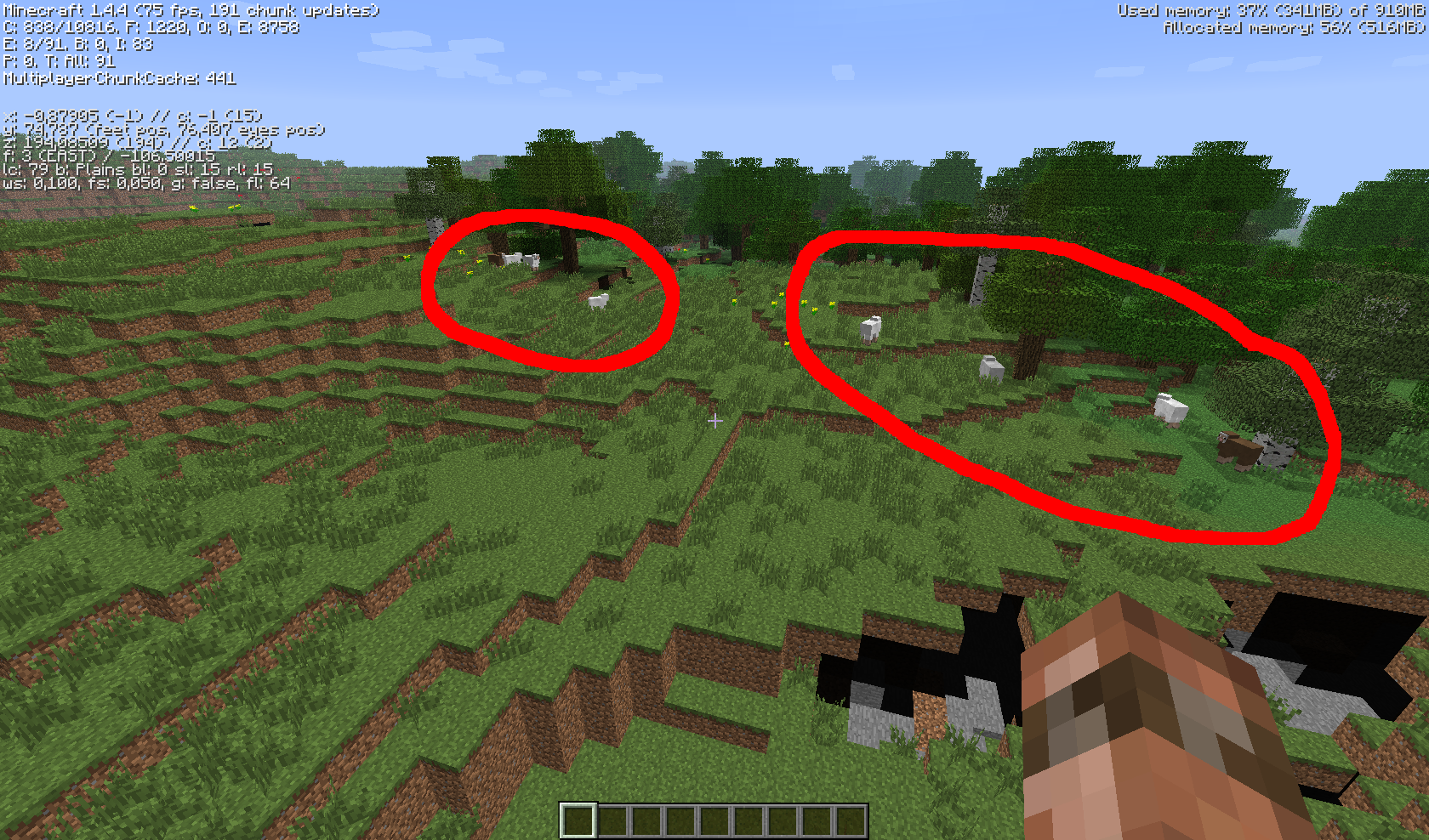
Just a quick example: generate a new world with seed "quarry" in creative mode. Go/Fly to the plains biome x=0, z=190, observe sheep groups. All groups consist of 1 brown sheep and 3 white ones. This is just a completely random seed I use and is not specially choosen to spawn exactly these sheep.
If I find a way/screenshot to reprocude the pink sheeps, I will post it here, but this should do for now.
@Kumasasa 1/6 obviously, but if you roll a 6 thousand times in a row, you might question if the dice is working correctly, although it could still be random of course. The probablillity for that is just incredibly low.
Martin: I'm not categorizing randomness as a bug, but I ended up having several completely improbable results, so I'm just asking if the random generator is working correctly. While it could be possible that these events were all random, the devs could and probably should just check the internal seeds of each sheep group generator and make sure that they are indeed random. If they are, I'm happy with it, but I strongly suspect a bug here.
No, all seeds do this, this is just a random example. Other seeds just spawn different sheep groups; there are seeds that spawn only white sheep and there is the other seed that spawns groups of one pink sheep and three brown sheep, although I don't know if I have the save file/seed still.
Some more screenshots of quarry seed with spawn groups highlighted
intended.
MC-627And seed -7189177987298617570 spawns you still inside a block.
This may be a bug, but it is currently well known behavior with an otherwise powered dispenser.
See here: http://www.youtube.com/watch?v=pvZp9_wrlkk
Still in 1.4.4pre and very annoying. Please fix before releasing an official version.
A setup like this will dispense 2 items on button click. If this is supposed to be the bug, it's a duplicate of
MC-846Duplicate of
MC-315, please search before creating an issue report.Can also be a dupe of
MC-2721The screenshot opens fine for me, it shows fern plants in a jungle biome. No idea what the issue is supposed to be though.
The only weird thing I see on the screenshot is the border of the grass blocks, which looks like stone or something, but that's probably just a texture pack and unrelated.
Duplicate of
MC-1847If you search now, people should at least find your bug, so it's not really needed to extend the tags of the original bug.
Perhaps this bug tracker needs better regression management (like a special key word, a special dependency or something). While bugs like this or
MC-2170are confirmed, it's not really obvious by looking at them that they regressed from an earlier version and are thus more important to fix (and possibly more easily fixable by reverting/improving the change that caused it).Also, Java doesn't really support unsigned ints well.
This is intended. You need a stone pickaxe or better to mine iron ore successful.
How did you get a stack of diamond swords? They should not stack by default.
You can also get a stack of swords by using
/give NAME 276 64
so I guess this bug should be reopened. Also, changing the anvil code to prevent stacked repairs or to calculate the correct cost should be quite trivial.
Squids should fall/sink down when they are above the water surface or even flying.
Yeah, I already wrote that ("Bug exists with normal pistons as well as sticky ones.").
Added affected versions.
Your descriptions are very unspecific. "It would screw up and not work" or "Put the texture in the pack".
Are you replacing files? Which? What exactly are you doing? What screws up and how?
Editing a texturepack on the fly is only supported when not using a zipped pack. So unzip it first before starting the game.
Note: survival gamemode is /gamemode 0
Fora simple player who doesn't know about entities and so on, the weird thing is that regular sand sits on torches but falling sand doesn't. So this behaves somewhat inconsistent.
Still, people are able to get stacks of items (either from ops or from any other way like server mods) and they do weird things with brewing stand and furnances. Either (non-OP) people should be prevented completely from getting stacks of unstackable items or anvils/brewing stands should be adjusted to not do silly things with these stacks.
Allowing people to get item stacks (using the /give command for example) and not react correctly to these stacks at different locations is obviously a bug.
I can confirm that it also seems to happen randomly when doing other stuff, but it may be somewhat awkward to reproduce this way. Dying or reloading the game seems to reproduce the issue in a reliable way.
Duplicate of
MC-916Please try to make one large edit instead of several small ones. By default, everyone who watches a bug gets a mail every time you change anything and I'm currently getting tons of mails from your bug report.
This can be turned off obviously, but I like to be informed about some bugs that potentially annoy me, like this one.
Another option would be to use BigInteger instead of int. But capping seems reasonable.
You installed the snapshot by replacing the minecraft.jar, right? Some people copy the content of the downloaded file into the old file and get weird crashes like these.
Also, please attach the crash report file from .minecraft\crash-reports and make sure you are using no mods.
The issue is still present in 1.4.6. Sheep spawning is unchanged.
The problem is not that sheeps spawn more in pink, grey and and brown colors, the issue is that all sheep groups spawn the same.
I decompiled minecraft using MCP and modified the function generating sheep color like this:
so it prints the generated "random" value to the console. As you can see by looking at the attached file, the values are not random at all and instead repeat every 4 values, so the color repeats for every 4 sheep generated.
MC-3066is a duplicate of this, to be exact, because this bug was created earlier (lower number).Duplicate of
MC-590This is causes by the same underlaying issue as
MC-92andMC-2399. See my comments there.I honestly think this should be fixed by making oak and jungle trees not grow next to each other, instead of the other way round. While it may be useful for some redstone powered tree factories it just looks weird and unnatural.
Please attach a crash log. This looks like a duplicate of
MC-2711though.This is caused by the same underlaying issue as
MC-92andMC-2399. See my comments there.Please attach a screenshot using planks. Otherwise it's hard to believe, because crafting tools seems to work for everyone else.
Seems to be related to
MC-1, although that is supposed to be fixed in 1.4.6This is likely a lwjgl issue.
Generally I would agree that it's not an issue. But there are some cases where sheep eating grass may be annoying:
Known behavior doesn't mean it's not a bug and the wiki is neither an official source for bugs nor for intended behaviors.
Actually, as I thought about it again, turning mob griefing off should prevent all mobs from changing the world/blocks at all. As far as I see, sheep are the only mobs who currently can damage the world with mod griefing off. So I think this is a valid bug.
Obviously there are way more important bugs out there so I don't mind if this stays closed for now.
@Chad: It probably needs to be a little more complicated (leaves and vines shouldn't probably hinder tree growth for example) but generally I completely agree.
This is sort of fixed in 13w01a as this type of 1.5 redstone tick clock stopped working.
Wow, I reported the same issue almost at the exact time:
MC-5774Please create one report per issue
Duplicate/related to
MC-3787. Experienced this issue myself several times with older versions.Feel free to copy them over
Also confirmed for the wither
The problem is filling the furnance with already smelted items (like iron ingots) and getting XP from them again.
How will that work as a repeater or comparator will always provide full redstone output? I haven't worked out a single layout where switching the torch on or off would change anything output-wise.
Duplicate of
MC-5729So toggling the torch only affects the output if another comparator points at the comparator? That doesn't seem to be very intuitive. Redstone stuff is complicated enough already. Why does the B signal need a comparator there? Why can't you just point redstone dust at it which has different signal strengths on it's own?
Duplicate of
MC-5737.Also fails to generate snow and villages properly.
Note that this bug existed much earlier, compare for example
MC-3787. But with the current snapshot it seems to be increasingly common.I /think/ you are not really breaking the block, instead it becomes invisible (
MC-5774).Duplicate of
MC-5748Also notice that this bug doesn't need a redstone block, on the attached screenshot the diamond block becomes invisible, too, after a few seconds.
Sticky pistons still leave blocks there if only activated for one tick but for some reason your circuit seems to fail to generate one tick pulses.
Try for example the attached circuit. It probably can be done a hundred times better but it seems to work.
My circuit is just a very rough example which I invented on the fly. And actually you can replace all repeaters just by wire to make it more compact (except the one on the left which would need a longer wire if you would want to replace it). And I'm sure there are moch more compact designs already out there which still work.
Edit: The red wool block at the back should toggle when you hit the button, if not you're doing something wrong. But I don't suggest using my design, it's probably really bad and bloated. I'm sure cubehamster or some redstone expert invented a very compact design that still works. The only thing I wanted to state is that sticky pistons still let the block go on one tick pulses so the issue must be somewhere else.
This has nothing to do with farlands and the world is also generating correctly. The problem seems to be that the server sends the generated world to the client at a state where the land has been generated but the decoration like trees, snow, ice, plants etc. are still missing.
Also, this bug already existed a long time, it has nothing to do with the addition of new blocks.
Here is a easy setup to test this. On the first screenshot, place a redstone block on the sponge and you get a stable clock. If you add a comparator like on the second picture, the clock stops working correctly and produces weird and inconsistent results.
Also, if you put the comparator before the repeater, it doesn't let through the short redstone pulses at all.
Also note that whey you are using comparators instead of repeaters, they seem to repeat only the visible redstone state. So if you replace the repeaters on the screenshot with comparators, the lamps will not light up as long as the wire looks unpowered. Even a repeater or something else behind the comparator will fail to receive any power at all.
Note that the summary isn't completely correct. If the light source is below the transparent block , the brightness of the transparent block is usually one light level below the light level it's supposed to be.
I added some screenshots to make this problem more visible. They are made with smooth lighting off in an enclosed cube of iron blocks.
This is not an exact dupe of
MC-5774as inMC-5774the block just becomes invisible (and becomes visible again when breaking the clock), but in this video it becomes completely nonexistent.Redstone not appearing to pulse is
MC-5778The weird thing is, he has cheats off according to the log file. I think you are unable to switch gamemodes with cheats off. So how did he manage to get in adventure mode if the mode was not changed by a game issue or an external tool?
@xfallxcuav: That is a different bug, possibly
MC-127. This bug is/was visual only. Confirmed fixed in 13w05b.This seems to be much worse with 13w05b as the block now seems to disappear split seconds after starting the clock.
As he said, this affects for example grass blocks. breaking grass blocks (from the top) or sprinting on them will yield dirt particles, not grass ones. Attached screenshots.
Are you sure you did this correctly? A coordinate like x=355,y=64,z=-180 will always be on the edge of a block. For example if you use F3 and stand in the middle of a block you will get a "something.5" x and z coordinate.
Thus bug is a duplicate of
MC-5774You should try a few different search queries before filing a bug. "redstone block disappearing" or "redstone block disappears" (with space between redstone and block) will find dozens of bugs most of which are already marked as duplicate of
MC-5774.Thanks for your fix, Markku. Makes sense to me. I hope the developers will include this in the main source.
Luisa, it has been fixed in a snapshot, the bug is still present in 1.4.7. So get a recent snapshot or wait until 1.5 if you are experiencing this bug.
Official name? Hitbox is explained here: http://en.wikipedia.org/wiki/Hitbox
Basically for Minecraft it's the shape that affects collision and it's also visible if you move the mouse on a block. However for some blocks the visible hitbox is different to the collision hitbox (compare for example fences).
Still reproducible using the 4-piston clock with non-sticky pistons
Bug seems to be sort of resolved with sticky pistons but still happens on normal ones.
If you build the 4-piston setup with sticky pistons it looks like the block is pushed through all 4 positions in one single tick, which is very weird. But at least it doesn't turn permanently invisible.
Behavior for non-sticky piston seems to be unchanged.
I searched the Internet for reports of such seeds and tried many, but none of these reported seeds and none of a dozen random ones I tried spawn you in the air in the latest snapshot (13w07a). This may be because of the changed world generation or because the spawn position is now possibly randomized (as you use a local server) or obviously because the bug has been fixed.
Spawning underwater (seed -2319318828234580951 for example) is still an issue, though, so we may want to transform this bus in a "spawn underwater" bug or close this one and file a new one for spawning underwater.
I filed
MC-10677for the new weird sticky piston behavior.Steve, you are complaining about
MC-846, not this bug.Yes, still in 1.5. Sorry for the crappy screenshot but it's really hard to film a cow from below.
Seems to be fixed in 1.5, can't reproduce anymore.
Seems to be fixed in 1.5, can't reproduce anymore. The pistons are now behaving properly and are moving slower. See also
MC-10677andMC-5774.Confirmed fixed for both the 2 and 4 piston setup in MC 1.5. The pistons are now behaving properly and are moving slower
Melih is sort of right... The game renders half-transparent stuff like water, ice and clouds with a separate shader (=on a separate layer) and at the end of the rendering it gets blend together. I wrote some shader stuff before myself and these sort of things are tricky to get right without affecting performance too much. In this case it looks like the z-buffer for particles and transparent stuff aren't compared properly when blending them together.
But Mojang already said, they want to rewrite the rendering code for the next release and so I guess this will be fixed soon.
A quick fix which should look better in most cases could be to render particles always in front of transparent stuff (= reverse the order of the "layers"), but as I haven't seen the source code I don't know how easy that would be.
Horses and other mobs trigger them but players don't.
Duplicate of
MC-13610Aristotle, this is not the right place to report new bugs. For example the pressure plate issue is already reported as
MC-13610.Related/Duplicate of
MC-13753. Basically all "recolorable" items seem to trigger this.No, this doesn't make sense. If Mojang wants players to be able to get item stacks using give (which is a regular ingame feature), these stacks should work properly for example with anvils or other ingame features. If Mojang doesn't want players to get stacks for unstackable items they should adjust the give command. Players would still be able to stack unstackable items using modded clients or external tools.
It may be intentional that mobs spawned with the hostile mob spawner do despawn and don't spawn in peaceful difficulty.
Still, ocelots are not hostile so it makes no sense for them to spawn using the hostile mob spawner. This makes it impossible to get cats on peaceful maps or on servers with hostile mobs disabled, which is just stupid. Please think about this again.
Related is
MC-2399, see my last comment thereThis has been intentionally filed as new bug, because
1) MC-1788 only handles peaceful mode and not the other aspects
2) The "Works As Intended" solution applies according to http://www.minecraftwiki.net/wiki/Issues/Weekly_12w04a#Bugs_7 only to the despawning behaviour and not to the whole package of unintended behaviour. Especially Jeb never stated that it's intended for ocelots not to be available in peaceful mode, probably because that would be just stupid. Otherwise please explain how it can be intended that peaceful mobs spawn using the hostile spawner. This is clearly a bug. Peaceful mobs should spawn using the peaceful spawner obviously.
Ok, first you quote is out of context. The bug entry is "Ocelots despawn." There is no evidence Jeb even realized that spawning ocelots using the hostile mob spawner causes them to not appear in peaceful mode.
Secondly, this entry is more than a year old. There have been huge changes in the Minecraft code relating to mob spawning, for example making peaceful mobs more persistent etc. A year ago, spawning ocelots using the hostile spawner didn't make much of a difference, but it now does.
At least this issue should be brought to Mojangs attention, and if they still believe it's intentionally this way, I'm fine with that, but I doubt it.
I hate to say this again and again, but the Minecraft Wiki is created by users, who are writing what the game does and not what the game is supposed to do.
So if it is written on the Minecraft Wiki it doesn't mean it's the indented behavior. Mojang AFAIK never said (for example in a changelog), that they disabled steering boats with the ASD keys on purpose.
Using boats anywhere except huge oceans is nearly impossible now, especially because they break easily if you touch anything, so that is clearly a bug.
Happens for me in usual swamp biomes as well, no need for a custom creative world to reproduce. Just go to a swamp biome, get in a boat and hit a few lily pads.
Still, because of
MC-2931and the low boat health (a damage bar would be really nice so the boats don't break that easily) boats are completely unusable currently unless you are crossing huge lakes/oceans. And even there hitting squids or lily pads can destroy your boat unexpectedly, too.No please don't. The previous behaviour was stupid, too, because you couldn't see where the front of the boat was, driving the boat in the direction you are looking makes sense now.
Just enable the ASD keys for better control and/or make the boats more durable.
No, just a fresh vanilla server.
Still reproducible in the latest version (1.6.2 prerelease). The seed is indeed very nice, one pink sheep in every group.
Still in 1.6.2
Still reproducible in latest snapshot. Example Seed: 12. Will only spawn groups of 3 white and one brown sheep.
I guess this is caused by generating the chunks at the same time as saving them.
The game generates flowers in clusters. As only the center/origin of the cluster needs to be in the correct biome, some flowers can generate in nearby biomes, like in this case. I agree, that this is probably intended and not a bug. I think it look nice and I don't see any harm here.
This problem seems to be quite common. Even if this is an AMD/ATI issue, maybe it deserves a workaround, like to force disabling anisotropic filtering for these cards.
Finn, ATI has been bought by AMD, all ATI GPUs are now AMD GPUs effectively. They have been just renamed. So you should try the beta driver above.
There is just one remaining problem: As shown in the duplicate
MC-35151existing Taiga biomes are snowy, but when upgrading to 1.7 they are updated to the snowless Taiga version, instead of the Cold Taiga. This will cause most of the snow in existing taiga Biomes to melt over time. It would be probably better to replace old Taiga Biomes with the new Cold Taiga when updating to 1.7, but I'm not sure how difficult that would be now.Thanks Dinnerbone!
It's fixed in the current snapshot. Now (newly generated) acacia and roofed forest trees have their own leaves, saplings and wood, so you can regrow them. The only trees you still aren't able to regrow are these large mega taiga spruce trees, but I guess this may be fixed soon, too.
Note that there are two different types of huge spruce trees, those in the
and those in the
I'm not sure how it could be done, but I think it would be great if you could regrow both types. I personally think the mega spruce taiga ones look much better.
They will fix it for the next version, be it 1.7.3 or 1.8. Just be patient, they will probably upload it once they're back from Minecon.
David, the minecraft wiki is not an official mojang site and is edited by random people. Dinnerbone personally said it will be fixed in 1.7.3. Who do you trust more?
Note that this bug only occurs when you exit a server you just created/started a few seconds ago with a fresh world. As I said, it's probably happening because the initial chunk generation is still happening while the server is already exiting.
I'm using
java version "1.7.0_25"
OpenJDK Runtime Environment (IcedTea 2.3.10) (7u25-2.3.10-1ubuntu0.12.04.2)
OpenJDK 64-Bit Server VM (build 23.7-b01, mixed mode)
Still in 1.7.4. Will test snapshot when I have time to update.
Yes, still in 14w08a.
Still reproducible in 14w08a using the seed Tails posted above.
I can still reproduce this in 14w08a
I can confirm it's fixes in 14w08a
This has to be expected, as the water in the rivers is placed at sea level. What's your proposed solution? Lower the terrain around rivers? Might look stupid...
Gary, that's possible, but I'm pretty sure there is no real need or reason to display the hitbox of an otherwise invisible technical box to the player. The engine is certainly capable of removing or changing the hitbox for certain blocks. So I still think this is b bug and should be fixed.
I can reproduce it.
screenshots of simplified version
Also, I noticed it's direction dependent. Make sure the hole is facing west or north, or it will work fine.
An easy way to reproduce this is to build tiny pyramids out of stair blocks and then surround them by solid blocks like in the screenshots I posted here.
Confirmed with placing a ladder on spruce wood or planks. Other wood types seem to be affected, too, but I didn't test them all.
---- Minecraft Crash Report ----
// I blame Dinnerbone.
Time: 09.07.14 23:54
Description: Unexpected error
java.lang.IllegalArgumentException: Cannot get property bck
{name=facing, clazz=class ei, values=[north, south, west, east]}as it does not exist!
at bbw.b(SourceFile:91)
at avi.a(SourceFile:47)
at avi.a(SourceFile:35)
at apm.a(SourceFile:2320)
at ait.a(SourceFile:106)
at cdt.a(SourceFile:295)
at bqi.ar(SourceFile:1325)
at bqi.q(SourceFile:1682)
at bqi.ap(SourceFile:863)
at bqi.a(SourceFile:303)
at net.minecraft.client.main.Main.main(SourceFile:120)
A detailed walkthrough of the error, its code path and all known details is as follows:
---------------------------------------------------------------------------------------
– Head –
Stacktrace:
at bbw.b(SourceFile:91)
at avi.a(SourceFile:47)
at avi.a(SourceFile:35)
at apm.a(SourceFile:2320)
at ait.a(SourceFile:106)
at cdt.a(SourceFile:295)
at bqi.ar(SourceFile:1325)
– Affected level –
Details:
Level name: MpServer
All players: 1 total; [chv['JonHa97'/390, l='MpServer', x=59,54, y=64,00, z=2254,25]]
Chunk stats: MultiplayerChunkCache: 623, 623
Level seed: 0
Level generator: ID 00 - default, ver 1. Features enabled: false
Level generator options:
Level spawn location: 59,00,63,00,2251,00 - World: (59,63,2251), Chunk: (at 11,3,11 in 3,140; contains blocks 48,0,2240 to 63,255,2255), Region: (0,4; contains chunks 0,128 to 31,159, blocks 0,0,2048 to 511,255,2559)
Level time: 18827 game time, 5019 day time
Level dimension: 0
Level storage version: 0x00000 - Unknown?
Level weather: Rain time: 0 (now: false), thunder time: 0 (now: false)
Level game mode: Game mode: spectator (ID 3). Hardcore: false. Cheats: false
Forced entities: 109 total; [abb['Bat'/9772, l='MpServer', x=69,28, y=52,08, z=2307,13], abb['Bat'/9768, l='MpServer', x=68,03, y=52,00, z=2306,16], aex['Skeleton'/44178, l='MpServer', x=23,50, y=12,00, z=2278,50], aex['Skeleton'/44177, l='MpServer', x=25,50, y=15,00, z=2284,09], adr['Creeper'/37405, l='MpServer', x=120,50, y=18,00, z=2310,50], abb['Bat'/30119, l='MpServer', x=114,44, y=59,38, z=2329,41], abb['Bat'/30823, l='MpServer', x=74,56, y=24,04, z=2325,97], abb['Bat'/30123, l='MpServer', x=105,41, y=56,47, z=2330,66], abb['Bat'/30828, l='MpServer', x=56,48, y=29,28, z=2321,76], afk['Zombie'/41341, l='MpServer', x=140,50, y=26,00, z=2328,50], abb['Bat'/2951, l='MpServer', x=4,28, y=52,53, z=2314,59], aff['Spider'/40935, l='MpServer', x=97,50, y=36,00, z=2302,50], adr['Creeper'/44474, l='MpServer', x=94,50, y=36,00, z=2306,50], adr['Creeper'/42054, l='MpServer', x=113,50, y=50,00, z=2327,50], acy['item.item.porkchopRaw'/71, l='MpServer', x=14,75, y=66,00, z=2198,06], adr['Creeper'/42051, l='MpServer', x=115,50, y=50,00, z=2327,50], abb['Bat'/25801, l='MpServer', x=40,19, y=13,91, z=2215,50], acy['item.item.arrow'/72, l='MpServer', x=14,03, y=64,00, z=2243,97], afk['Zombie'/43945, l='MpServer', x=123,06, y=40,00, z=2331,50], adr['Creeper'/43139, l='MpServer', x=125,50, y=41,00, z=2299,50], afk['Zombie'/45596, l='MpServer', x=103,50, y=40,00, z=2329,50], adr['Creeper'/26051, l='MpServer', x=49,50, y=29,00, z=2184,50], afk['Zombie'/45597, l='MpServer', x=100,94, y=41,00, z=2329,47], acy['item.item.porkchopRaw'/93, l='MpServer', x=29,91, y=65,00, z=2237,59], acy['item.item.porkchopRaw'/92, l='MpServer', x=25,13, y=65,00, z=2238,22], acy['item.item.porkchopRaw'/95, l='MpServer', x=26,16, y=64,00, z=2241,06], acy['item.item.porkchopRaw'/94, l='MpServer', x=25,19, y=64,00, z=2241,91], acy['item.item.porkchopRaw'/89, l='MpServer', x=16,16, y=66,00, z=2194,13], acy['item.item.porkchopRaw'/91, l='MpServer', x=22,38, y=65,00, z=2237,25], acy['item.item.porkchopRaw'/90, l='MpServer', x=17,56, y=66,00, z=2195,97], acy['item.item.dyePowder.black'/102, l='MpServer', x=19,47, y=47,00, z=2295,38], acy['item.item.dyePowder.black'/103, l='MpServer', x=26,19, y=47,00, z=2295,25], acy['item.item.dyePowder.black'/100, l='MpServer', x=26,44, y=54,00, z=2284,63], acy['item.item.dyePowder.black'/101, l='MpServer', x=27,31, y=47,00, z=2298,94], acy['item.item.sulphur'/98, l='MpServer', x=26,88, y=13,00, z=2275,81], abb['Bat'/34579, l='MpServer', x=25,72, y=14,63, z=2271,50], acy['item.item.bone'/99, l='MpServer', x=27,91, y=13,00, z=2273,09], abb['Bat'/34578, l='MpServer', x=20,66, y=16,78, z=2278,53], acy['item.item.sulphur'/96, l='MpServer', x=24,88, y=13,00, z=2270,31], acy['item.item.sulphur'/97, l='MpServer', x=30,63, y=13,00, z=2272,91], afk['Zombie'/48887, l='MpServer', x=127,50, y=25,00, z=2299,50], acy['item.item.dyePowder.black'/104, l='MpServer', x=23,44, y=51,00, z=2307,03], acy['item.item.dyePowder.black'/119, l='MpServer', x=32,53, y=48,00, z=2301,09], acy['item.item.sulphur'/118, l='MpServer', x=38,19, y=63,00, z=2264,25], abb['Bat'/34574, l='MpServer', x=21,34, y=14,97, z=2289,19], abb['Bat'/34572, l='MpServer', x=42,84, y=12,10, z=2279,59], acy['item.item.rottenFlesh'/120, l='MpServer', x=41,13, y=14,00, z=2316,56], aex['Skeleton'/45559, l='MpServer', x=138,50, y=38,00, z=2332,50], aex['Skeleton'/48897, l='MpServer', x=119,50, y=25,00, z=2292,50], abb['Bat'/34530, l='MpServer', x=121,69, y=58,53, z=2322,38], aff['Spider'/34793, l='MpServer', x=96,50, y=18,00, z=2283,50], aff['Spider'/34792, l='MpServer', x=100,50, y=18,00, z=2284,50], acy['item.item.porkchopRaw'/159, l='MpServer', x=73,22, y=69,00, z=2257,78], acy['item.item.porkchopRaw'/171, l='MpServer', x=83,69, y=74,00, z=2252,56], acy['item.item.sulphur'/175, l='MpServer', x=80,13, y=52,00, z=2283,31], acy['item.item.porkchopRaw'/174, l='MpServer', x=88,50, y=73,00, z=2256,91], acy['item.item.sulphur'/173, l='MpServer', x=84,88, y=69,00, z=2262,84], acy['item.item.porkchopRaw'/172, l='MpServer', x=80,78, y=72,00, z=2259,25], afk['Zombie'/52107, l='MpServer', x=123,78, y=26,00, z=2329,72], acy['item.item.leather'/163, l='MpServer', x=79,13, y=71,00, z=2306,72], afk['Zombie'/52106, l='MpServer', x=126,50, y=25,00, z=2331,50], acy['item.item.beefRaw'/162, l='MpServer', x=72,16, y=74,00, z=2305,44], acy['item.item.leather'/161, l='MpServer', x=72,88, y=74,00, z=2305,59], acy['item.item.porkchopRaw'/160, l='MpServer', x=74,88, y=69,00, z=2256,78], aex['Skeleton'/49459, l='MpServer', x=31,50, y=53,00, z=2329,50], acy['item.item.beefRaw'/164, l='MpServer', x=79,13, y=71,00, z=2306,53], adr['Creeper'/42410, l='MpServer', x=123,94, y=55,00, z=2314,47], acy['item.item.bone'/184, l='MpServer', x=87,19, y=76,00, z=2309,56], afk['Zombie'/31741, l='MpServer', x=138,50, y=36,00, z=2284,50], acy['item.item.beefRaw'/185, l='MpServer', x=80,31, y=68,00, z=2305,59], acy['item.item.sulphur'/190, l='MpServer', x=110,56, y=38,00, z=2300,28], abb['Bat'/52462, l='MpServer', x=81,46, y=52,65, z=2285,43], acy['item.item.sulphur'/191, l='MpServer', x=111,31, y=38,00, z=2298,13], abb['Bat'/52461, l='MpServer', x=84,24, y=53,91, z=2282,43], acy['item.item.sulphur'/178, l='MpServer', x=82,56, y=52,00, z=2288,66], acy['item.item.beefRaw'/179, l='MpServer', x=81,25, y=64,00, z=2302,91], acy['item.item.string'/176, l='MpServer', x=81,81, y=52,00, z=2285,72], aex['Skeleton'/49682, l='MpServer', x=86,50, y=25,00, z=2211,50], acy['item.item.sulphur'/177, l='MpServer', x=85,13, y=43,00, z=2300,00], chv['JonHa97'/390, l='MpServer', x=59,54, y=64,00, z=2254,25], acy['item.item.beefRaw'/182, l='MpServer', x=83,22, y=65,00, z=2303,47], acy['item.item.sulphur'/183, l='MpServer', x=93,84, y=43,00, z=2310,88], acy['item.item.leather'/180, l='MpServer', x=81,38, y=64,00, z=2302,44], acy['item.item.leather'/181, l='MpServer', x=83,13, y=65,00, z=2302,72], abb['Bat'/7505, l='MpServer', x=90,25, y=57,47, z=2295,72], adr['Creeper'/47065, l='MpServer', x=88,50, y=58,00, z=2300,50], acy['item.item.rottenFlesh'/204, l='MpServer', x=113,38, y=37,00, z=2302,13], adr['Creeper'/47067, l='MpServer', x=91,50, y=58,00, z=2301,50], acy['item.item.porkchopRaw'/203, l='MpServer', x=118,06, y=86,00, z=2283,28], acy['item.item.porkchopRaw'/202, l='MpServer', x=118,84, y=86,00, z=2283,44], acy['item.item.bone'/197, l='MpServer', x=111,00, y=90,00, z=2305,41], acy['item.item.arrow'/196, l='MpServer', x=109,88, y=90,00, z=2305,25], adr['Creeper'/33513, l='MpServer', x=30,50, y=17,00, z=2298,50], adc['container.minecart'/198, l='MpServer', x=109,50, y=37,06, z=2320,50], acy['item.item.arrow'/193, l='MpServer', x=99,31, y=32,00, z=2312,13], acy['item.item.sulphur'/192, l='MpServer', x=103,75, y=30,00, z=2316,13], acy['item.item.bone'/195, l='MpServer', x=99,94, y=32,00, z=2312,13], acy['item.item.bone'/194, l='MpServer', x=99,56, y=32,00, z=2312,94], acy['item.item.rottenFlesh'/208, l='MpServer', x=115,88, y=37,00, z=2307,28], abz['Squid'/1677, l='MpServer', x=11,34, y=58,25, z=2289,34], abz['Squid'/1676, l='MpServer', x=24,00, y=58,63, z=2293,63], aex['Skeleton'/33278, l='MpServer', x=31,50, y=13,00, z=2273,50], abz['Squid'/1678, l='MpServer', x=24,91, y=58,56, z=2292,44], abz['Squid'/1675, l='MpServer', x=15,72, y=58,88, z=2296,09], aff['Spider'/33275, l='MpServer', x=26,50, y=13,00, z=2272,50], aff['Spider'/31135, l='MpServer', x=1,50, y=53,00, z=2314,50], adr['Creeper'/47074, l='MpServer', x=92,50, y=58,00, z=2293,50], adr['Creeper'/47075, l='MpServer', x=94,50, y=58,00, z=2293,50], adr['Creeper'/38822, l='MpServer', x=123,50, y=48,00, z=2326,50]]
Retry entities: 0 total; []
Server brand: vanilla
Server type: Integrated singleplayer server
Stacktrace:
at cdu.a(SourceFile:308)
at bqi.b(SourceFile:2139)
at bqi.a(SourceFile:317)
at net.minecraft.client.main.Main.main(SourceFile:120)
– System Details –
Details:
Minecraft Version: 14w28a
Operating System: Windows 7 (amd64) version 6.1
Java Version: 1.7.0_25, Oracle Corporation
Java VM Version: Java HotSpot(TM) 64-Bit Server VM (mixed mode), Oracle Corporation
Memory: 248644072 bytes (237 MB) / 618659840 bytes (590 MB) up to 954466304 bytes (910 MB)
JVM Flags: 2 total; -XX:HeapDumpPath=MojangTricksIntelDriversForPerformance_javaw.exe_minecraft.exe.heapdump -Xmx1G
IntCache: cache: 0, tcache: 0, allocated: 12, tallocated: 94
Launched Version: 14w28a
LWJGL: 2.9.1
OpenGL: GeForce GTX 560 Ti/PCIe/SSE2 GL version 4.4.0, NVIDIA Corporation
GL Caps: Using GL 1.3 multitexturing.
Using GL 1.3 texture combiners.
Using framebuffer objects because OpenGL 3.0 is supported and separate blending is supported.
Shaders are available because OpenGL 2.1 is supported.
Is Modded: Probably not. Jar signature remains and client brand is untouched.
Type: Client (map_client.txt)
Resource Packs: []
Current Language: English (US)
Profiler Position: N/A (disabled)
Something like this happens if you erase the chunks on the right side (with Mcedit for example). The game regenerates trees and grass and so on starting from the middle of the new chunk, but things near the edge will be missing.
It's difficult to find good seeds to reproduce this, bit it seems to be still present in 1.8.1-pre3. Seed 8807133522892241494 at X=75, Z=320 seems to spawn purely white sheeps for example now.
Both, probably. But the main issue is that they don't spawn naturally in the jungle on peaceful difficulty. Which makes cats completely unavailable when playing on peaceful without cheats.
@Deano: This bug is bad, but it's not awful and it doesn't plague us for 4 years or something like that. There is a very simple workaround: Just don't reuse world names, if you create a new world, use a name you didn't used before (append a digit or whatever). Then you should be fine.
Try a more recent seed and try to find sheep groups that are near each other (ie generate at the same time). I'd try the seed and coordinates by Vitold but I'm curently away from home so I can't try reproducing this.