 MC-214641
Stained glass still uses the pre-1.12 color scheme
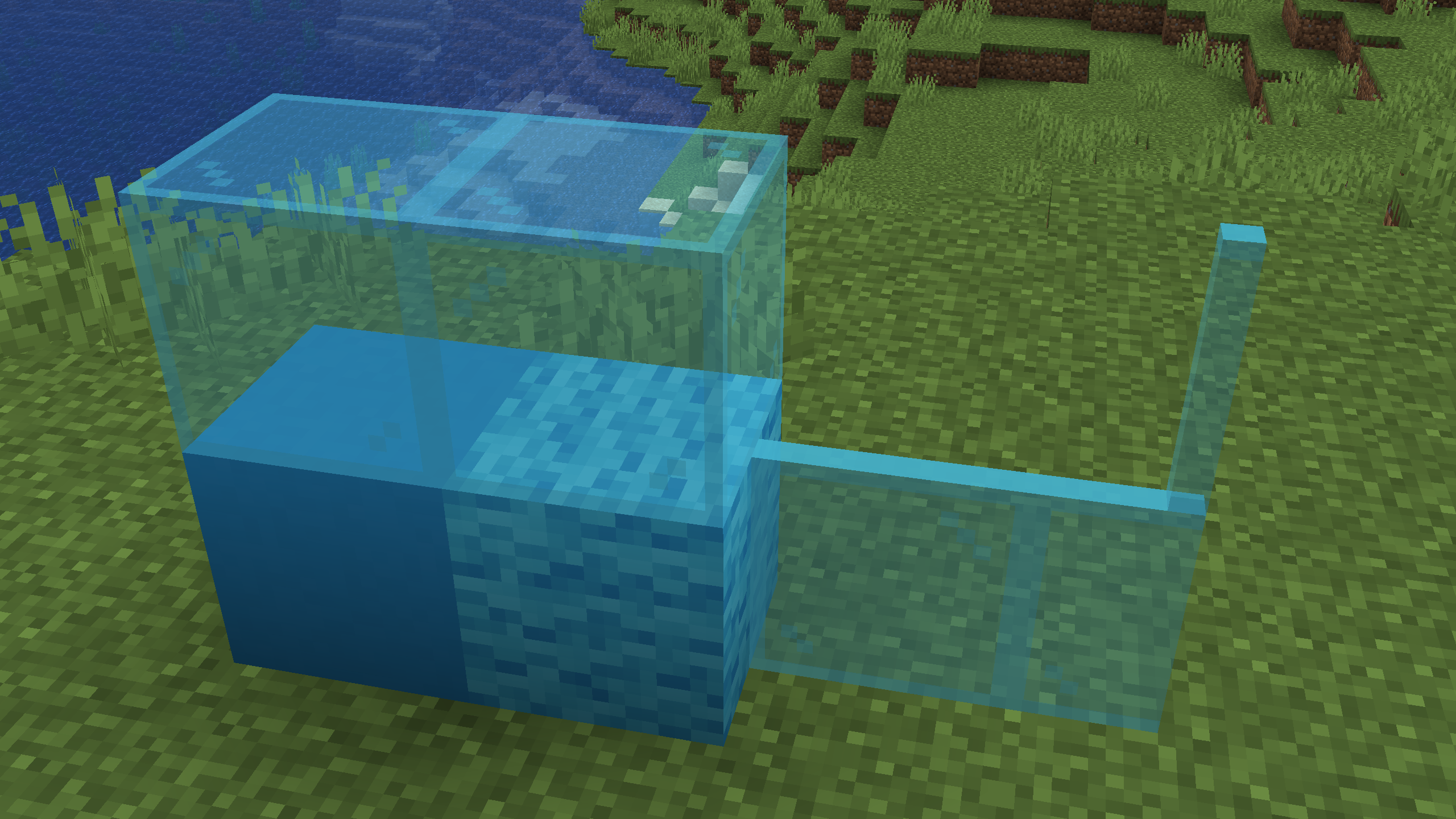
Attached are three screenshots taken in 1.11.2, 1.12.2 and 21w05b (first two are modded, but textures are unaffected - if unmodded screenshots are somehow absolutely neccessary let me know) with a comparison of light blue stained glass to light blue wool. Note how in the 1.11 screenshot the glass much more closely matches the wool, but was not changed in 1.12 unlike the wool resulting in this inconsistent coloration.
While light blue is the most obvious example, I'd recommend redoing all 16 colors to get rid of more subtle inconsistencies that exist for other colors.
Linked Issues
is duplicated by3
 Low
Low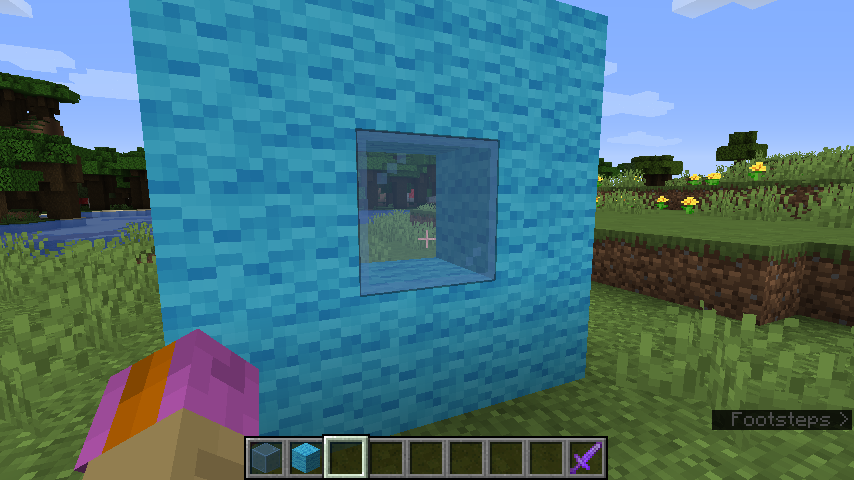


![[Mod] Jiingy](../../../data/avatars/users/91802.png)


![[Mod] Avoma](../../../data/avatars/users/86198.png)
Created Issue:
Stained glass still uses the pre-1.12 color scheme
Attached are three screenshots taken in 1.11.2, 1.12.2 and 21w05b (first two are modded, but textures are unaffected - if unmodded screenshots are somehow absolutely neccessary let me know) with a comparison of light blue stained glass to light blue wool. Note how in the 1.11 screenshot the glass much more closely matches the wool, but was not changed in 1.12 unlike the wool resulting in this inconsistent coloration.
Attachments3

This is a feature request, not a bug. You can request features here: Minecraft Suggestions Reddit or here: Minecraft Feedback Page.
![[Mod] Michael Wobst](../../../data/avatars/users/37868.png)
relates to
![[Mojang] Adrian Östergård](../../../data/assets/gravatar/nighter.jpeg)
![[Mod] Chandler](../../../data/assets/gravatar/triwonder81.png)
relates to
relates to
![[Bot] Arisa](../../../data/avatars/users/43007.png)
relates to
![[Mod] LateLag](../../../data/avatars/users/92884.png)
relates to
![[Mod] markderickson](../../../data/avatars/users/18946.svg)
![[Mod] ampolive](../../../data/avatars/users/18949.svg)
is duplicated by
is duplicated by
light_blue_stained_glass.png
Attached are three screenshots taken in 1.11.2, 1.12.2 and 21w05b (first two are modded, but textures are unaffected - if unmodded screenshots are somehow absolutely neccessary let me know) with a comparison of light blue stained glass to light blue wool. Note how in the 1.11 screenshot the glass much more closely matches the wool, but was not changed in 1.12 unlike the wool resulting in this inconsistent coloration.
While light blue is the most obvious example, I'd recommend redoing all 16 colors to get rid of more subtle inconsistencies that exist for other colors.
is duplicated by
![[Mojang] slicedlime](../../../data/assets/gravatar/slicedlime.jpeg)
![[Mod] turbo](../../../data/avatars/users/92867.png)
relates to
Closely relates to MC-161716, which likely has a similar root cause (colored stuff being excluded in early Texture Update revisions) and can be fixed alongside it. Possibly also related, if more tenuously, to MC-201246 and MC-216227.
The bug
Dyed terracotta still appears to be based on the pre-1.12 color scheme.
While terracotta is meant to have a more reddish tinge than other dyed blocks, it's clear to see that, even ignoring the tinge in question, the colors of terracotta are still considerably different from other dyed blocks.
How to reproduce
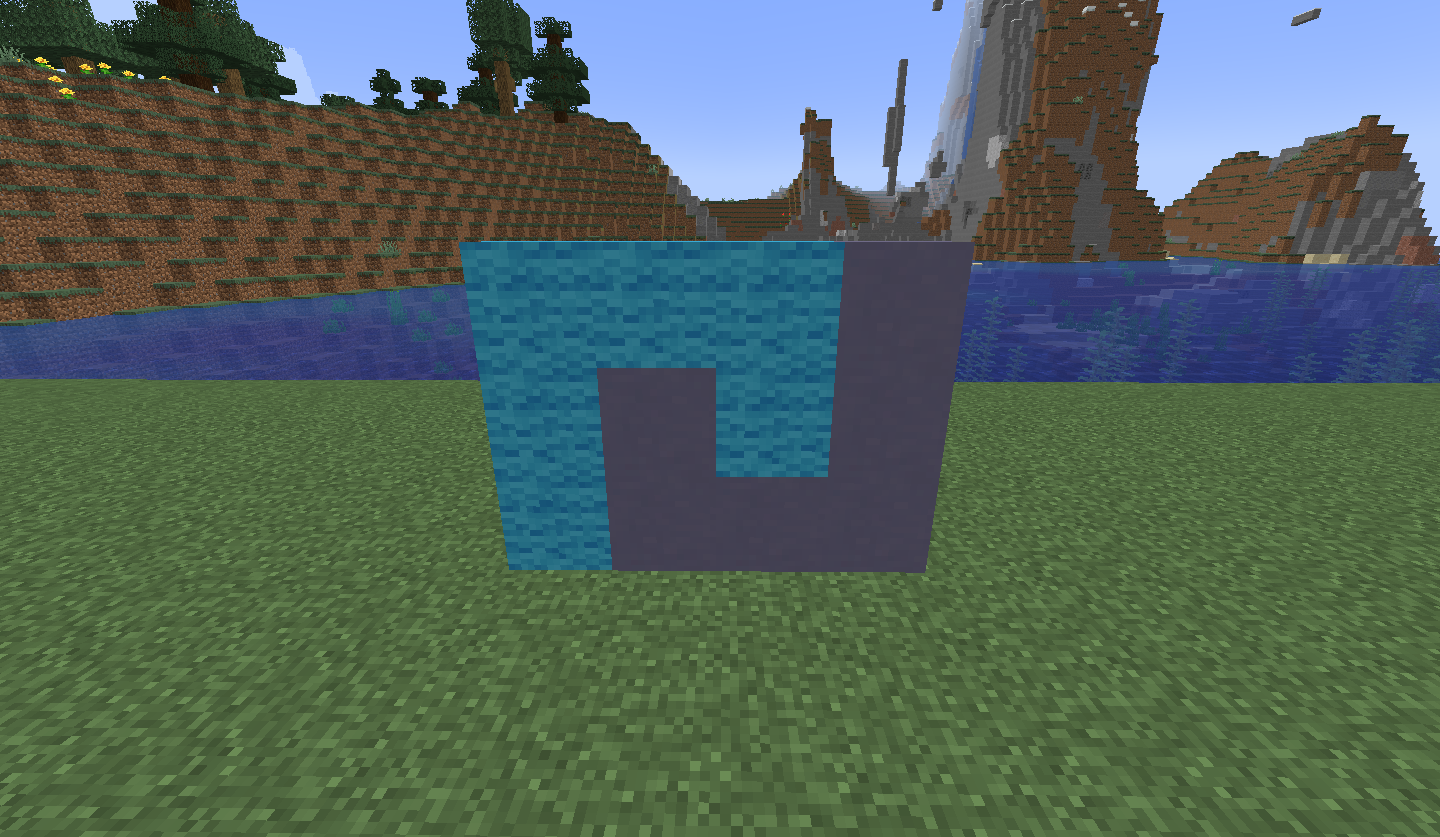
- Build the setup as shown in the attachment below in 1.11.2. setup.png

- Look at the setup you just built.
- Take note of how the colors of the two blocks are similar and have the same color scheme.
- Rebuild an identical setup in the current version of the game.
- Look at the setup you just built.
- →
 Notice how the colors of the two blocks are not similar, therefore indicating terracotta still uses the pre-1.12 color scheme.
Expected results
The expected behavior would be that terracotta would have a more consistent color scheme with other dyed blocks, while still maintaining a reddish tinge.
Actual results
Terracotta is still based on dye colors as they were prior to 1.12, making these textures outdated as a result (and as such sharing the incorrectly used old color scheme with MC-214641 and MC-214643).
How to fix
Terracotta blocks should be retextured as to use the newer color scheme, while still maintaining the faint redness of terracotta. MC-161716 could be fixed alongside this incredibly easily.
Thank you for your report!
We're tracking this issue in MC-214641, so this ticket is being resolved and linked as a duplicate.
If you would like to add a vote and any extra information to the main ticket it would be appreciated.
If you haven't already, you might like to make use of the search feature to see if the issue has already been mentioned.
Quick Links:
📓 Bug Tracker Guidelines – 💬 Community Support – 📧 Mojang Support
📓 Project Summary – ✍️ Feedback and Suggestions – 📖 Game Wiki

Duplicate of MC-214641.
Thank you for your report!
We're tracking this issue in MC-214641, so this ticket is being resolved and linked as a duplicate.
If you would like to add a vote and any extra information to the main ticket it would be appreciated.
If you haven't already, you might like to make use of the search feature to see if the issue has already been mentioned.
Quick Links:
📓 Bug Tracker Guidelines – 💬 Community Support – 📧 Mojang Support
📓 Project Summary – ✍️ Feedback and Suggestions – 📖 Game Wiki
– I am a bot. This action was performed automatically! The ticket was resolved by one of our moderators, and I left this message to give more information to you.
![[Mod] j_p_smith](../../../data/avatars/users/92851.png)
Thank you for your report!
We're actually already tracking this issue in MC-214641, so this ticket is being resolved and linked as a duplicate.
If you would like to add a vote or any additional information to the main ticket it would be appreciated.
Please be sure to use the search feature before creating a ticket to see if the issue has already been reported.
Quick Links:
📓 Bug Tracker Guidelines – 🛠 Community Support – 📧 Mojang Support – ✍️ Feedback and Suggestions – 💬 Mojira Discord
Can confirm
Can confirm in 21w06a.
Can confirm in 21w07a.
Can confirm in 21w08b.
Can confirm in 21w11a. Relates to MC-214643.
Can confirm in 21w13a.
Can confirm in 21w16a.
Can confirm in 1.17.
Can confirm in 1.17.1.
Can confirm in 21w39a.
Can confirm this in both 1.17.1 and 21w44a. Here's a side-by-side comparison of the stained glass color scheme before and after the texture update.
MC-214641 - Comparison.png
Can confirm for 1.18pre-6
Can confirm in 1.18.
Can confirm in 1.18.1
Can confirm in 1.18.2.
Can confirm in 1.19 and 22w24a.
Can confirm in 1.19.2.
In 1.20 Pre-Release 1.
Can confirm for 1.20.1
Also, change the title to include "Stained Glass Pane", I was searching for this issue using the terms "Stained Glass Pane", but couldn't find it.
Following the same palette and consistency of how the textures are made, this would be a possible fix:


In game:

Can confirm in 24w13a.