 MC-220195
Vertical lines appears in the sky when the player is stationary
The bug
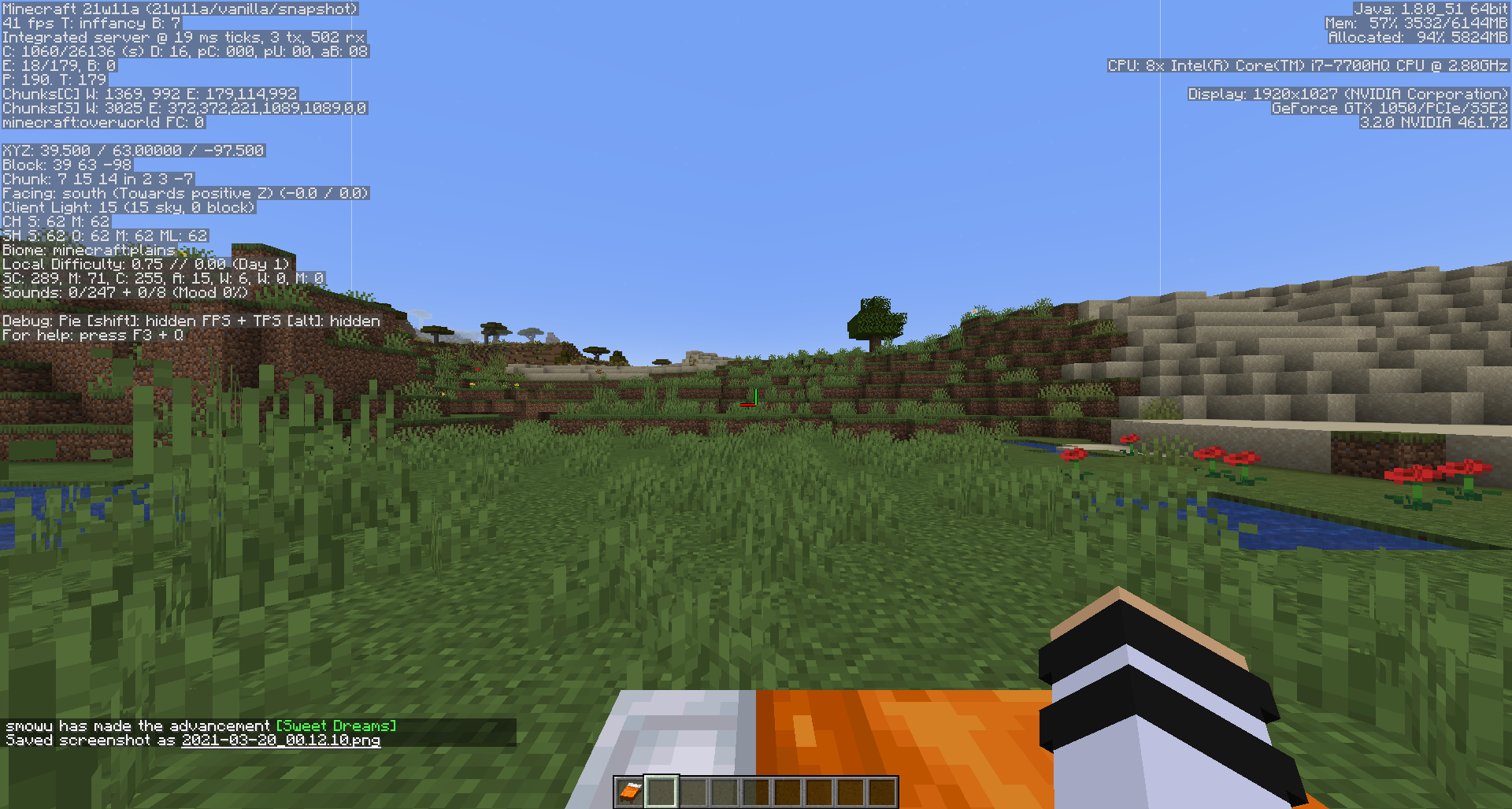
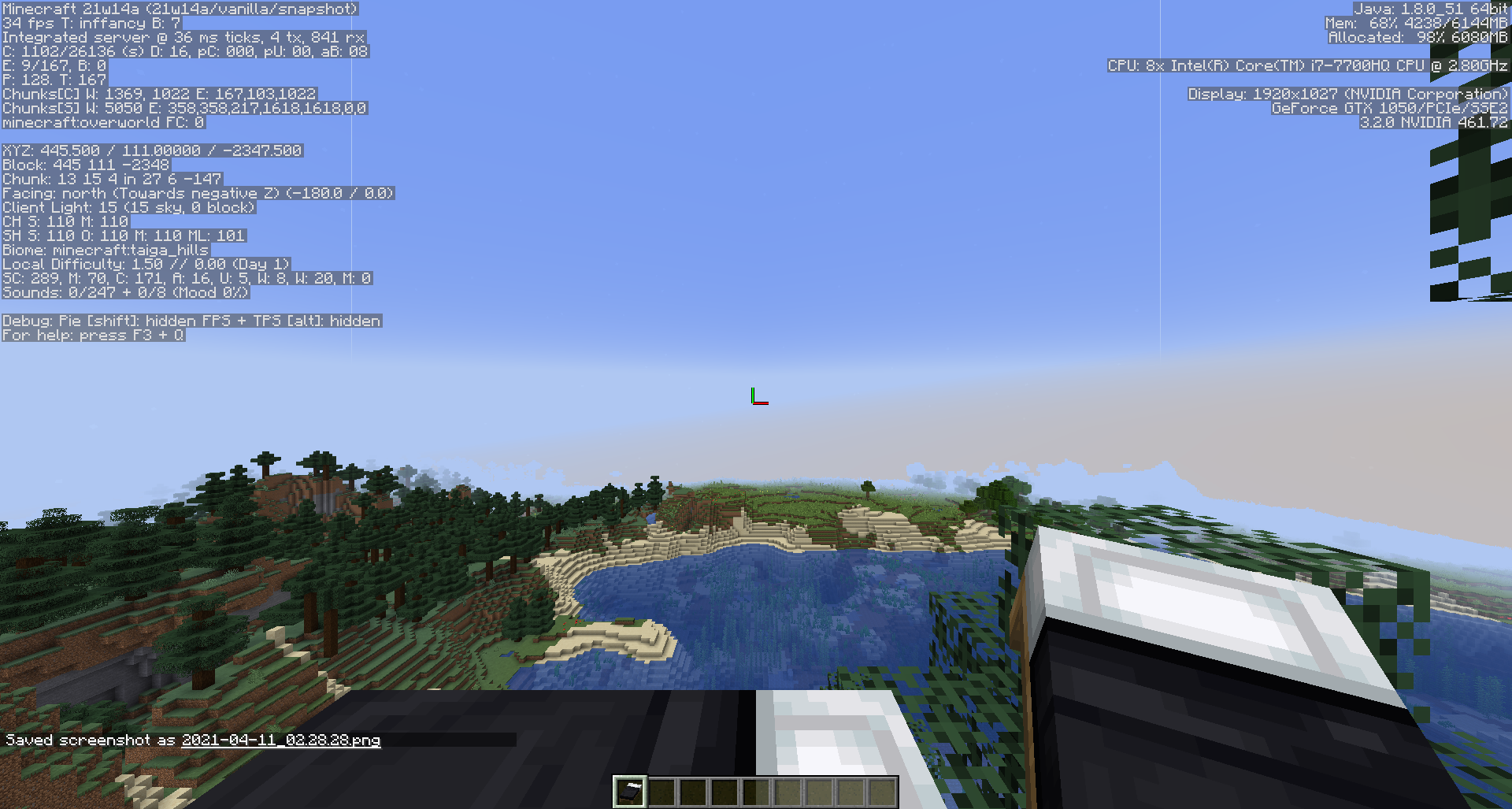
Vertical lines of a pixel thick appears on the sky when the player is stationary while looking at an axis. The lines instantly disappears when the player moved. Few example when the lines appear: After loading a new world, player starts sleeping, after sleeping completed or respawn.
How to reproduce:
- Load a new world
- Set field of vision (FOV) to 90
- Look at the sky
OR
- Right click on bed when it's possible to sleep
- While sleeping, look at the sky
- After sleeping is complete, set field of vision (FOV) to 90 and look at the sky
Linked Issues
Attachments11




- Unresolved
 Durrani Afiq
- 16
- 9
- Confirmed
 Normal
- Platform
- Rendering
21w11a - 1.20.1
21w11a 21w14a 21w20a 1.17 1.17.1-pre1 1.17.1-pre2 1.17.1-rc1 1.17.1 21w37a 21w38a 21w39a 21w40a 21w41a 21w42a 21w43a 21w44a 1.18-pre1 1.18-pre2 1.18-pre4 1.18-pre5 1.18-pre6 1.18-pre7 1.18-rc1 1.18-rc3 1.18-rc4 1.18 1.18.1-pre1 1.18.1 22w03a 22w05a 22w06a 22w07a 1.18.2-pre1 1.18.2-pre2 1.18.2 22w11a 22w12a 22w13a 22w14a 22w15a 22w16b 1.19.3 23w06a 23w07a 1.19.4-rc1 1.19.4-rc2 1.19.4-rc3 1.19.4 23w12a 23w14a 23w18a 1.20.1
Created Issue:
Vertical lines appears in the sky when the player is stationary
The bug
Vertical lines of a pixel thick appears on the sky when the player is stationary while looking at an axis. The lines instantly disappears when the player moved. Few example when the lines appear: After loading a new world, player starts sleeping, after sleeping completed or respawn.
How to reproduce:
- Load a new world
- Don't move
- Look at the sky
OR
- Right click on bed when it's possible to sleep
- While sleeping, look at the sky
- After sleeping is complete, don't move and look at the sky
Attachments4
![[Mod] Michael Wobst](../../../data/avatars/users/37868.png)
![[Bot] Arisa](../../../data/avatars/users/43007.png)
![[Mod] violine1101](../../../data/avatars/users/92858.png)

The bug
Vertical lines of a pixel thick appears on the sky when the player is stationary while looking at an axis. The lines instantly disappears when the player moved. Few example when the lines appear: After loading a new world, player starts sleeping, after sleeping completed or respawn.
How to reproduce:
- Load a new world
- Don't move
- Look at the sky
OR
- Right click on bed when it's possible to sleep
- While sleeping, look at the sky
- After sleeping is complete, don't move and look at the sky
The bug
Vertical lines of a pixel thick appears on the sky when the player is stationary while looking at an axis. The lines instantly disappears when the player moved. Few example when the lines appear: After loading a new world, player starts sleeping, after sleeping completed or respawn.
How to reproduce:
- Load a new world
- Set field of vision (FOV) to 90
- Look at the sky
OR
- Right click on bed when it's possible to sleep
- While sleeping, look at the sky
- After sleeping is complete, don't move and look at the sky
The bug
Vertical lines of a pixel thick appears on the sky when the player is stationary while looking at an axis. The lines instantly disappears when the player moved. Few example when the lines appear: After loading a new world, player starts sleeping, after sleeping completed or respawn.
How to reproduce:
- Load a new world
- Set field of vision (FOV) to 90
- Look at the sky
OR
- Right click on bed when it's possible to sleep
- While sleeping, look at the sky
- After sleeping is complete,
don't moveand look at the skyThe bug
Vertical lines of a pixel thick appears on the sky when the player is stationary while looking at an axis. The lines instantly disappears when the player moved. Few example when the lines appear: After loading a new world, player starts sleeping, after sleeping completed or respawn.
How to reproduce:
- Load a new world
- Set field of vision (FOV) to 90
- Look at the sky
OR
- Right click on bed when it's possible to sleep
- While sleeping, look at the sky
- After sleeping is complete, set field of vision (FOV) to 90 and look at the sky
![[Mojang] Adrian Östergård](../../../data/assets/gravatar/nighter.jpeg)
![[Mod] SPGoding](../../../data/avatars/users/44622.png)
![[Helper] Johnibur](../../../data/avatars/users/28381.png)
![[Mod] Anthony Cicinelli](../../../data/avatars/users/10122.svg)
 explorer_pu32pQvWMi.mp4
![[Mojang] slicedlime](../../../data/assets/gravatar/slicedlime.jpeg)

I guess I needed to do a more thorough search. But although it is a duplicate, I do have key information that could be added on to MC-220195.
![[Mod] Avoma](../../../data/avatars/users/86198.png)
Dylan Peterson, if you have key information to add regarding this issue, leave a comment on MC-220195. 
Thank you for your report!
We're tracking this issue in MC-220195, so this ticket is being resolved and linked as a duplicate.
If you would like to add a vote and any extra information to the main ticket it would be appreciated.
If you haven't already, you might like to make use of the search feature to see if the issue has already been mentioned.
Quick Links:
📓 Bug Tracker Guidelines – 💬 Community Support – 📧 Mojang Support
📓 Project Summary – ✍️ Feedback and Suggestions – 📖 Game Wiki
– I am a bot. This action was performed automatically! If you think it was incorrect, please notify us on Discord or Reddit
Cannot reproduce.
Please force a crash by pressing F3 + C for 10 seconds while in-game and attach the crash report (minecraft/crash-reports/crash-<DATE>-client.txt) here.
crash-2021-03-21_10.06.24-client.txt
I reset the ram allocation back to 2G from 6G just in case but it still occurs. Also attached a recording to show the issue.
Appears in 21w13a
Appears in 21w14a
I am unable to reproduce this issue in 21w20a.
It still appears in 21w20a for me.
This issue appears on a 90° field of vision only. No other FOV setting gets this to appear.
I was unable to reproduce in 1.16.5, so it may be a new issue.
Happens in 1.17-rc1 at 90* FOV when looking at an exact multiple of 90* (0,90,180,-90) sideways while facing forwars (/tp @p ~ ~ ~ 90 0, e.g.)
Can confirm for 1.17, seems to also appear on a multiple of 45 degree but might be unrelated.

I am still unable to reproduce this in 1.17; I think it only affects certain graphics cards.
Can confirm for 1.17.1 Prelease 1. I never found this bug when searching so I didn't realize I created a duplicate, here is the link for it does have detailed information
MC-229545. I also noticed the effects slowness, swiftness, and nausea cancel the bug from happening, as well as spectator mode. And falling or elytra will not cancel the bug, but moving and creative flying will. Also someone managed to produce this bug with 100 FOV instead of 90. Odd.Con confirm for 1.17.1 Pre-release 2.
I am unable to reproduce this myself, but other people can. Like Brevort said, I think this only affects certain graphics cards, or other specific graphical settings.
Can confirm for 1.17.1 Release Candidate 1.
Some new information, I just found that it is more likely to appear on horizontal resolution with even value x vertical resolution with odd value and vice versa. Doesn't seem to appear at all when both resolution value have the same odd or even number properties.
Example of resolution it may appear:
1920x1027 (Even x Odd)
1827x748 (Odd x Even)
But it sometimes doesn't appear on certain resolution even with any of both condition met.
FOV is still at 90° or 45°.
I had this happen to me in 23w18a on certain resolutions. FOV set to normal, VSYNC off (didn't seem to affect it), FPS unlimited (didn't seem to affect it)
white_lines_in_the_sky.mp4