Launcher floated out of desktop boundaries when taskbar is at the top
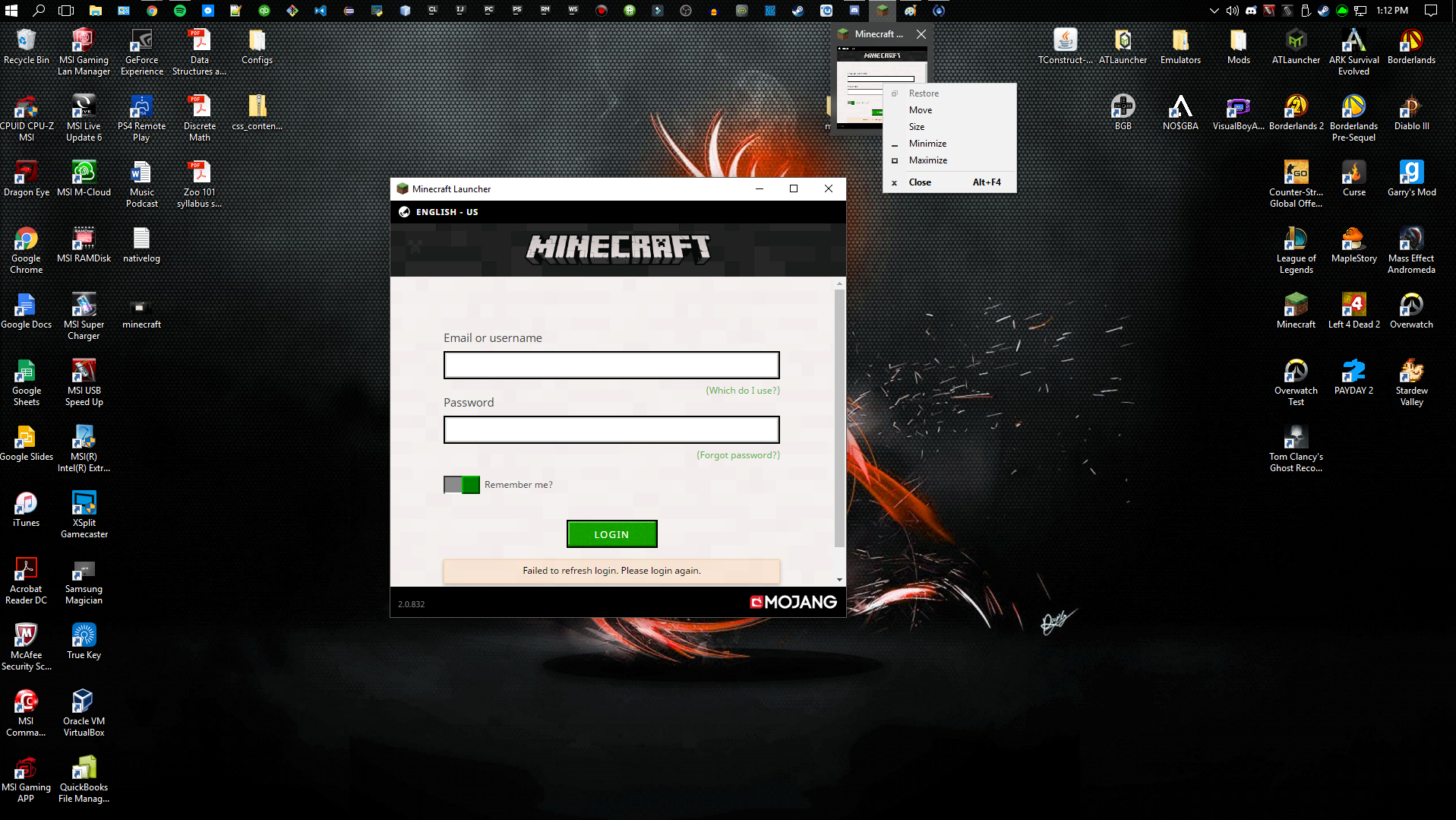
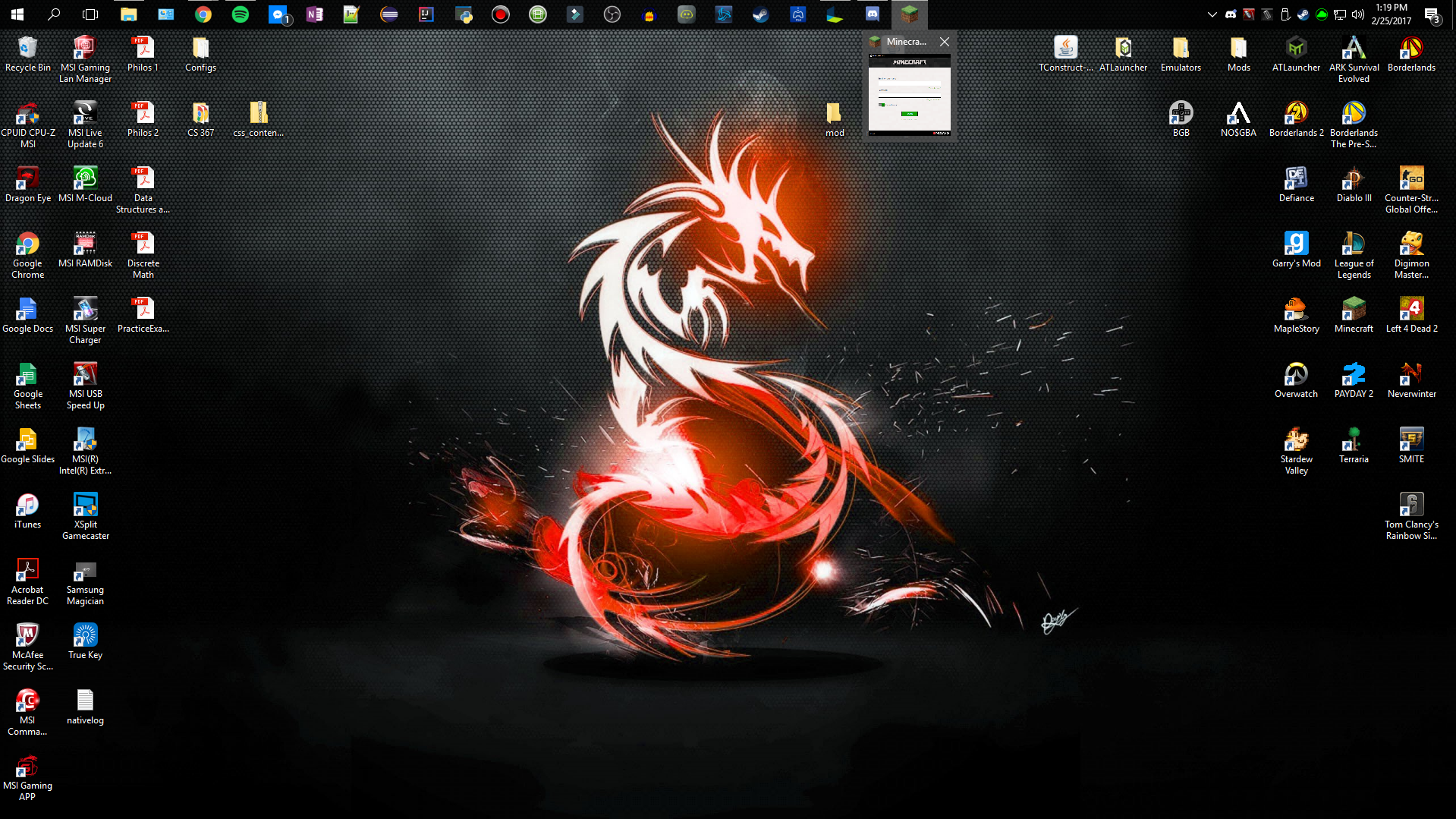
In the attachment, I'm hovering over the minecraft icon on my taskbar and it shows that it's open, but when I click on that window or hover it, it does not appear, it is floating above the taskbar now and I can't drag it back down.
What I expected to happen was...:
I double-click the minecraft desktop shortcut, and see the launcher and choose which version I want to play
What actually happened was...:
The launcher kept moving up slowly, and after a few times opening it, it is now out of my desktop boundary, I do not see the launcher anymore
Steps to Reproduce:
1. Double-click the minecraft shortcut
2. Launcher opens
3. After each open, it slowly moves up
Note: This only happens if Minecraft isn't currently running!
Environment
Windows 10
Linked Issues
is duplicated by56
 MC-119729My launcher is on my taskbar but it wont openDuplicateMC-120159launcher bug DuplicateMC-120733Launcher Drifts to the Left Upon Each Opening, Eventually Hides Off-screenDuplicateMC-123383launcher dont open affter isseu MCL-7027 only blanc screenDuplicateMC-144233MInecraft Lancher Opens But does not show up on desktopDuplicate
 MCL-6204Launcher moves a bit to the left every time I open itDuplicateMCL-6478Minecraft window in the taskbar.DuplicateMCL-6560Unable to launch Minecraft for Windows.DuplicateMCL-6585Minecraft Launcher is starting off screenDuplicateMCL-6598Minecraft launcher rises off the screenDuplicateMCL-6603My minecraft launcher will not display on the desktop.DuplicateMCL-6615My minecraft launcher opens but i can't see or use the window.DuplicateMCL-6890Minecraft Launcher window is not appearing on screenDuplicateMCL-6903Help, my Minecraft launcher is invisible!DuplicateMCL-7111I click Minecraft to open it launches but doesnt show on my screen but on it says it open on my taskbarDuplicateMCL-7159 Launcher launches missplaced when taskbar position is topDuplicateMCL-7239The minecraft launcher doesnt open and nativelog.txtDuplicateMCL-7322Launcher snaps to top of screen regardless of taskbar positionDuplicateMCL-7518Minecraft Launcher invisible.DuplicateMCL-7573Minecraft launcher off of screen (invisible) on startupDuplicateMCL-7629Minecraft Launcher isn't visibleDuplicateMCL-7679Minecraft is not launchingDuplicateMCL-7777When I open My minecraft Launcher Nothing appears (Its Invisible)DuplicateMCL-7781When My minecraft open it does not shows when I click on it,it just apears on the task barDuplicateMCL-7783Can't Open LauncherDuplicateMCL-7874Invisible Launcher?DuplicateMCL-8014When you try to launch the launcher it doesn't even start up!DuplicateMCL-8022My launcher is unable to boot and I can't find any situation or solutions relevant to this.DuplicateMCL-8031Launcher BugDuplicateMCL-8438When I open Minecraft Launcher, it does not open, so i click it on the task bar, then it comes from the top of my screen, fading/disappearing while moving to the bottom of my screen.DuplicateMCL-8518Each time it's opened it changes position on screen.DuplicateMCL-8598cannot see launcherDuplicateMCL-8612My launcher freezes on startup.DuplicateMCL-8655Launcher is invisible!DuplicateMCL-8721Launcher is not on screenDuplicateMCL-8921Minecraft Launcher GUI Isn't loadingDuplicateMCL-9000The launcher doesn't workDuplicateMCL-9016When I click Play on the launcher, the launcher disappears like its starting but then nothing happens.DuplicateMCL-9089Minecraft luncher shows its open but its notDuplicateMCL-9289Launcher IssueDuplicateMCL-9308minecraft launcher wont show up when i open itDuplicateMCL-9396Minecraft launcher appears invisible/ non existantDuplicateMCL-9431Minecraft Only Runs In The BackgroundDuplicateMCL-9446Nothing appearing after I click play.DuplicateMCL-9591Launcher won't startDuplicateMCL-9598Minecraft Launcher Floats out Of Screen BoundariesDuplicateMCL-9647Minecraft Launcher open in my taskbar, but when i click or hover over it, nothing pops upDuplicateMCL-9648launcher not showing on the screenDuplicateMCL-9657Invisible Minecraft Window/LauncherDuplicateMCL-9958minecraft launcher issueDuplicateMCL-9962Két Windows profilnál ablak ismeretlen helyen és méreten nyílik meg.DuplicateMCL-10215Minecraft launcher brokenDuplicateMCL-10369My Minecraft launcher doesn't launch.DuplicateMCL-10387The launcher moves up every time you open it.DuplicateMCL-10733Launcher moves up on screen every time I open itDuplicateMCL-11009The position of the launcher's window does not adapt itself, when task bar is not in the default positionDuplicate

Created Issue:
Launcher floated out of desktop boundaries
In the attachment, I'm hovering over the minecraft icon on my taskbar and it shows that it's open, but when I click on that window or hover it, it does not appear, it is floating above the taskbar now and I can't drag it back down.
What I expected to happen was...:
I double-click the minecraft desktop shortcut, and see the launcher and choose which version I want to playWhat actually happened was...:
The launcher kept moving up slowly, and after a few times opening it, it is now out of my desktop boundary, I do not see the launcher anymoreSteps to Reproduce:
1. Double-click the minecraft shortcut
2. Launcher opens
3. After each open, it slowly moves upEnvironment
Windows 10
Linked Issues
is duplicated by1
Attachments1
- Unresolved
- Open
- Minecraft - Public
- Unconfirmed
- 1.11.2
![[Mod] Michael Wobst](../../../data/avatars/users/37868.png) MC-114424 → MCL-6629
MC-114424 → MCL-6629
is duplicated by
relates to
![[Mod] Neko](../../../data/avatars/users/92901.png)
is duplicated by
is duplicated by
is duplicated by
is duplicated by
is duplicated by
is duplicated by
is duplicated by

is duplicated by
is duplicated by
is duplicated by
![[Mod] violine1101](../../../data/avatars/users/92858.png)
is duplicated by
minecraft issue.jpg
is duplicated by
![[Mod] bemoty](../../../data/avatars/users/50554.png)
is duplicated by
is duplicated by
relates to
is duplicated by
is duplicated by
is duplicated by
is duplicated by
is duplicated by
In the attachment, I'm hovering over the minecraft icon on my taskbar and it shows that it's open, but when I click on that window or hover it, it does not appear, it is floating above the taskbar now and I can't drag it back down.
What I expected to happen was...:
I double-click the minecraft desktop shortcut, and see the launcher and choose which version I want to playWhat actually happened was...:
The launcher kept moving up slowly, and after a few times opening it, it is now out of my desktop boundary, I do not see the launcher anymoreSteps to Reproduce:
1. Double-click the minecraft shortcut
2. Launcher opens
3. After each open, it slowly moves upNote: This only happens if Minecraft isn't currently running!
is duplicated by
is duplicated by
is duplicated by

relates to
is duplicated by
is duplicated by
is duplicated by
is duplicated by
is duplicated by
is duplicated by
is duplicated by
is duplicated by
is duplicated by
is duplicated by
is duplicated by
is duplicated by
is duplicated by
is duplicated by
is duplicated by
![[Mod] Pokechu22](../../../data/avatars/users/92931.png)
is duplicated by
is duplicated by
relates to
Launcher floated out of desktop boundaries when taskbar is at the top
is duplicated by
relates to
relates to
![[Mojang] slicedlime](../../../data/assets/gravatar/slicedlime.jpeg)
is duplicated by
is duplicated by
![[Mojang] Linus Cumselius](../../../data/avatars/users/18950.svg) [Mojang] Linus Cumselius
[Mojang] Linus CumseliusThank you for your report!
However, this issue is a Duplicate of MCL-6544 or MCL-6629.
It will be linked to this report. If you have additional information, please add it to that report.
Please search before reporting, as it's likely that one exists already.
Also some other applications have been doing the same thing.
That's an indicator that this is not a problem with the Minecraft Launcher, but rather with your computer setup.
Quick Links:
📓 Issue Guidelines – 💬 Community Support – 📧 Customer Support – 📖 Game Wiki
Duplicate of MCL-6629
 Please do not mark issues as private, unless your bug report is an exploit or contains information about your username or server.
Thank you for your report!
However, this issue is a Duplicate of MCL-6629.
It has been linked to this report. If you have additional information, please add it to that report.
Please search before reporting, as it's likely that one exists already.
Quick Links:
📓 Issue Guidelines – 💬 Community Support – 📧 Customer Support – 📖 Game Wiki
Thank you for your report!
However, this issue is a Duplicate of MCL-6629.
It has been linked to this report. If you have additional information, please add it to that report.
Please search before reporting, as it's likely that one exists already.
Quick Links:
📓 Issue Guidelines – 💬 Community Support – 📧 Customer Support – 📖 Game Wiki
Thank you for your report!
However, this issue is a Duplicate of MCL-6629.
It has been linked to this report. If you have additional information, please add it to that report.
Please search before reporting, as it's likely that one exists already.
Quick Links:
📓 Issue Guidelines – 💬 Community Support – 📧 Customer Support – 📖 Game Wiki
Caused by / relates to MCL-6629
Thank you for your report!
However, this issue is a Duplicate of MCL-6629.
If you have additional information, please add it to that report.
Please search before reporting, as it's likely that one exists already.
Quick Links:
📓 Issue Guidelines – 💬 Community Support – 📧 Customer Support – 📖 Game Wiki
See MCL-6629 , if the information there won't please use the Community Support link above.
If I understand correctly, the launcher opens but is not visible? Does MCL-6629 describe your issue?
Looks like MCL-6629.

Thank you for your report!
However, this issue is a Duplicate of MCL-6629.
If you have additional information, please add it to that report.
Please search before reporting, as it's likely that one exists already.
Quick Links:
📓 Issue Guidelines – 💬 Community Support – 📧 Customer Support – 📖 Game Wiki
Duplicate of MCL-6629. This usually happens when the window is off the screen (sometimes by having multiple monitors); this article may help.
Turns out this is actually MCL-6629.
Is this caused by
MCL-6544?As a temporary workaround I was able to right click the task bar and select show open windows, and then selecting it showed it on the screen properly. This is on windows 10 btw. Hope that helps!
Am on Windows 10 and can confirm the window keeps sliding upward.
Only occurs when you close the launcher / launch Minecraft and then open the launcher again. Window eventually appears offscreen.
I'm on Windows 10 and I'm having the same problem, and I can't find "show open windows" when I click the task bar. I had the same problem the last time I tried to play Minecraft which was a good few weeks ago.
So I temporarily solved it. So if you launch the game, hover over the icon in your taskbar and right-click the mini window that appears like I'm doing. I can't remember which option you choose, but one of the options will move the launcher back into your window boundaries. The problem is, the launcher will still move upward every time you launch the game, so just make sure you move the window back down every few launches. Hope this helps!
Issue present in latest launcher version 2.0.832.
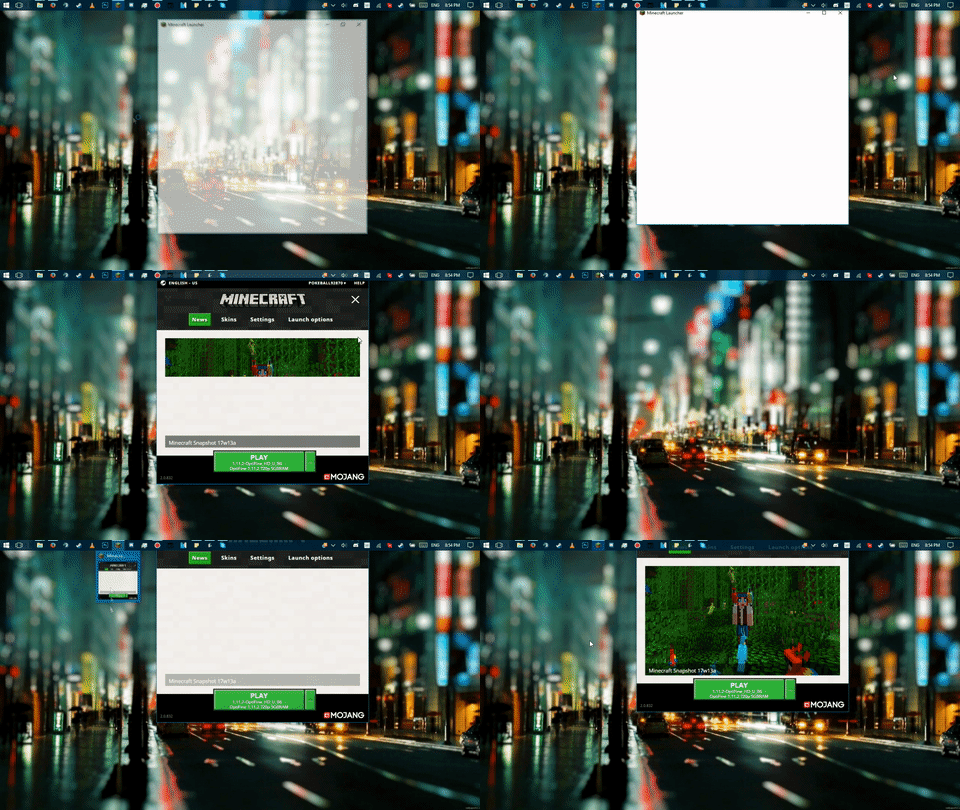
Here's a gif that pretty much visualizes (and hopefully gives enough evidence to confirm) the bug.
So, in order to get the window back, hold mouse on task bar icon of minecraft, when the preview appears, right click and choose maximize, you will then get the window - drag it back into the screen
I've been having this problem as well ever since that darn new launcher came out, however, my launcher would move left instead of upwards as Justin showed.
Andre van Zuydam solution worked for me:
"So, in order to get the window back, hold mouse on task bar icon of minecraft, when the preview appears, right click and choose maximize, you will then get the window - drag it back into the screen".
Can confirm for MCL 2.0.934 (Windows).
Can also confirm for MCL 2.0.934 (Windows). Issue has still not been fixed.
I keep getting a crash error when I try to start up Minecraft
[~Slinkcastle09@gmail.com] Please create a new bug report if you are experiencing an issue with Minecraft. For this particular one, see
MC-297.I am affected by this bug as well. The workaround (hover taskbar icon until preview appears, right click preview & maximize) works, but now I have to do it every time.
This issue happens on Windows when taskbar is in non-default location.
I do not know how launcher is implemented on Windows. If it is using java, I have no idea. If it is using Win32 API, then developers could look into monitor working area (GetMonitorInfo()).
So I found a method that works BUT
This only works when you had 3 screens and you have 2 now for a reason
So basically say minecraft was on the left screen but you now have middle and right screen only.
Go to settings > system > display and drag the right monitor to the left, click "Apply" and then voila, your minecraft window is here, simply drag the window back to the middle screen and revert your settings back to how they were
Still affected in launcher version 2.0.1003
i can't get the new update
how?
Still occurring in launcher v2.0.1049
I fixed it by hovering over the icon, then hovered over the little window over the taskbar, then right clicking on the windon, and press maximise.
I got a little workaround for this.
Press Windows + Left or Right arrow keys and bam, you can now access the launcher and exit it.
This seems to be due to the taskbar being on top. I have the same exact issue.
Footage of this happening to me as well: 9bNFQR4Skp.mp4
Actually, this happens when the taskbar is anywhere but at the bottom, if it's on the left or right the launcher opens a little to the right or left respectively each time.
NOT Resolved as of MCL v2.1.3674! That's outrageous! Mojang, PLEASE fix!
Posted 6/7/2019
This is still happening to me, my launcher never did this before the 2.1 update.