Mob spawners are broken. Mobs keep spawning with torches placed on spawner.
We are aware that this issue is still present in the 1.11.0 update, but we do have a fix currently in the 1.12 beta.
Workaround:
As a workaround, adding additional lighting to the area can prevent spawners from spawning mobs, but every area in the room will need to be lit to 11 or higher.

Mobs will continue to spawn from,a spawner when torches are placed. Causing terrible lag.Beta 1.11
Linked Issues
is duplicated by21
 MCPE-42499At least zombie spawner spawns mobs when it's lit.DuplicateMCPE-42765Spawner cant be deactivated with torchesDuplicateMCPE-42959Mob spawners spawn mobs near lightDuplicateMCPE-43980Mob cages ignore light levelsDuplicateMCPE-44124Mob Spawners don't stop spawning hostile mobs even if the room is already lit up with torches.DuplicateMCPE-44295When ever i find a mob spawner and i light the whole room up, they still spawn and prevent me from building an xp farm. Even other lighted areas still spawn mobs i dont know if this is how it is now or if its a bug.DuplicateMCPE-44352Basically, mobs spawn although there is a point of light.DuplicateMCPE-44619Dungeons are generating monsters even with lighting, LG K10 TV 2016DuplicateMCPE-45084Skeleton spawner still spawning even when litDuplicateMCPE-45124Mob spawners still spawn in full light levelsDuplicateMCPE-45146Can't turn Spawners OffDuplicateMCPE-45169Mob Spawner not deactivating survival amongst other thingsDuplicateMCPE-45282Light levels don't effect spawningDuplicateMCPE-45294Mobs Spawn at Spawner Regardless of LightingDuplicateMCPE-45310Mob spawners spawn monsters despite the light source.DuplicateMCPE-45335Dungeon spawners don’t stop spawningDuplicateMCPE-45348mob spawners[skeleton] spawns even tho i have placed torches all over the spawner block and room 1.14DuplicateMCPE-45397Monster Spawner Always RunningDuplicateMCPE-46115Skeleton can spawn on fences DuplicateMCPE-46300Zombies spawn in extremely well lit spawner roomDuplicateMCPE-46825Spawners not responding to light levels Duplicate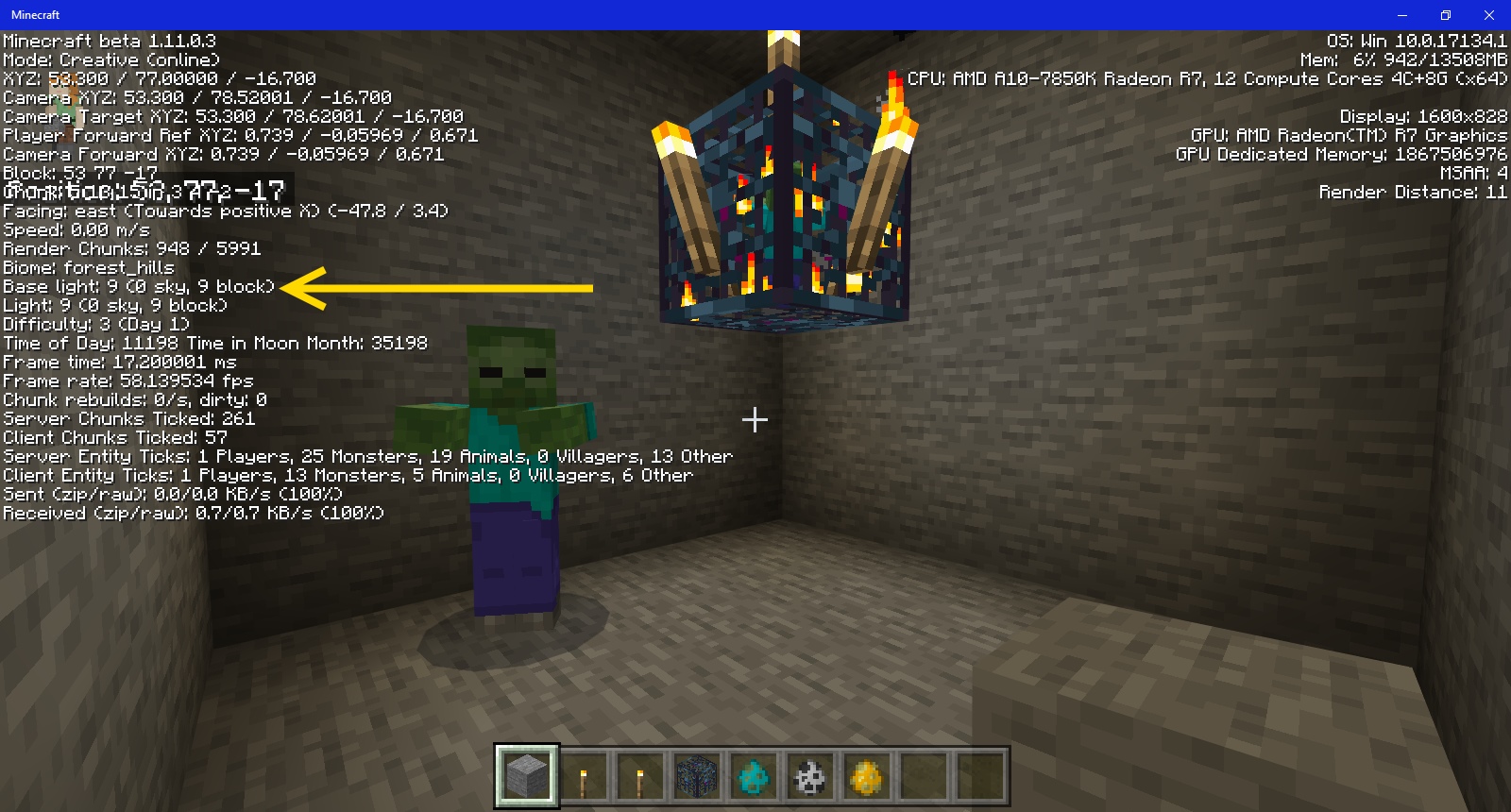
![[Mojang] Mega_Spud (Jay Wells)](../../../data/avatars/users/92696.png)


![[MCPE Mod] Auldrick](../../../data/avatars/users/10122.svg)
Created Issue:
Mob spawners are broken. Mobs keep spawning with torches placed on spawner.
Mobs will continue to spawn from,a spawner when torches are placed. Causing terrible lag.Beta 1.11

![[Mod] Neko](../../../data/avatars/users/92901.png)
is duplicated by
is duplicated by

clones
is duplicated by

is duplicated by
is duplicated by
![[Mod] Asteraoth](../../../data/avatars/users/92886.png)
is duplicated by
![[MCPE Mod] Celesian](../../../data/avatars/users/81635.png)
is duplicated by
Update on this issue:We are aware that this issue is still present in the 1.11.0 update, but we do have a fix currently in the 1.12 beta.
Workaround:
As a workaround, adding additional lighting to the area can prevent spawners from spawning mobs, but every area in the room will need to be lit to 11 or higher.
Mobs will continue to spawn from,a spawner when torches are placed. Causing terrible lag.Beta 1.11
is duplicated by
is duplicated by
is duplicated by
is duplicated by
is duplicated by
is duplicated by
is duplicated by
![[Mojang] Adrian Östergård](../../../data/assets/gravatar/nighter.jpeg)
Coastal Village Seed: -1813740965 (created v. 1.11.05 Beta) Survival Mode; Normal Difficulty; Infinite World Type. Example: Abandon Mineshaft Cave Spider Spawner x=1628 y=26 z=425
In Windows 10 Bedrock Beta 1.11.0.7, normal light levels don't stop cave spider spawners from creating cave spiders. The only way to stop the mobs from spawning is to destroy the spawner which is great for cave spiders in a mineshaft but not so good for a mob grinder.
Windows 10 Bedrock Beta 1.11.0.7 has a bug with light levels to stop mob spawners. The workaround is add lots torches around the spawner block, and the Zombie and Skeleton spawners will stop producing hostiles, see attached pictures above. Notice how many torches I used before the spawners stopped generating hostile mobs.
Please update this bug to include Windows 10 Beta v1.11.0.7. Thanks
In Windows 10 Bedrock Beta v. 1.11.0.7, once the dungeon mob spawner is stopped via multiple torches; hostile mobs start spawning outside the dungeon until you distribute a lot of torches on the walls. Something is broken with the light levels.
Cave spiders spawn in ridiculous numbers in the mineshafts which contributes to lag. The amount of light has no affect on spider spawn rates. You have to destroy the spawner and kill the residual cave spiders to reduce the lag.
Please update this bug to include Windows 10 Bedrock Beta v1.11.0.8. Thanks
If you stop the hostile spawner in the dungeon, then Minecraft Bedrock Beta v1.11.0.9 starts generating a large number hostiles near the dungeon. I stopped a skeleton dungeon spawner, and I had 20 - 30 skeletons appear near the dungeon. There were so many skeletons I thought there was another dungeon. You have to kill the extra skeletons and light the areas with a lot of torches to stop new ones from generating or restart the dungeon spawner, see above attachment screen shots. The good is I needed the arrows and bones
The bad is a large amount of lag :'(
@auldrick, In Survival Mode, the easiest and least expensive resource are torches. I have thoroughly tested this issue, and I found that placing a the minimum number of torches to stop the spawner in Minecraft Bedrock v. 1.11 (non-beta) is as shown in the above attached screen shots. Also, you have to place torches around the area outside the dungeon or hostile mobs will spawn in large numbers.
You are right, but so am I. Torches only emit a light level of 14, so they don't quite reach the perimeter and you need more torches farther away from the spawner. That's why I specified light level 15 blocks in my workaround comment above.
is duplicated by
![[Mod] OcelotOnesie](../../../data/avatars/users/43220.png)
is duplicated by
![[Mod] Urielsalis](../../../data/assets/gravatar/urielsalis.jpeg)
is duplicated by
Thank you for your report!
However, this issue is a Duplicate of MCPE-42427.
If you have additional information, please add it to that report.
Please search before reporting, as it's likely that one exists already.
Quick Links:
📓 Issue Guidelines – 💬 Community Support – 📧 Customer Support – 📖 Game Wiki
Thank you for your report!
We're actually already tracking this issue at MCPE-42427, so we will resolve and link this ticket as a duplicate.
If you would like to add a vote and any extra information to the main ticket it would be appreciated.
If you haven't already, you might like to make use of the search feature to see if the issue has already been mentioned.
Thank you for your report!
We're actually already tracking this issue at MCPE-42427, so we will resolve and link this ticket as a duplicate.
If you would like to add a vote and any extra information to the main ticket it would be appreciated.
If you haven't already, you might like to make use of the search feature to see if the issue has already been mentioned.
Thank you for your report!
We're actually already tracking this issue at MCPE-42427, so we will resolve and link this ticket as a duplicate.
If you would like to add a vote and any extra information to the main ticket it would be appreciated.
If you haven't already, you might like to make use of the search feature to see if the issue has already been mentioned.
Thank you for your report!
We're actually already tracking this issue at MCPE-42427, so we will resolve and link this ticket as a duplicate.
If you would like to add a vote and any extra information to the main ticket it would be appreciated.
If you haven't already, you might like to make use of the search feature, to see if the issue has already been mentioned.
Quick Links:
📓 Issue Guidelines – 💬 Community Support – 📧 Customer Support – 📖 Game Wiki
Thank you for your report!
We're actually already tracking this issue at MCPE-42427, so we will resolve and link this ticket as a duplicate.
If you would like to add a vote and any extra information to the main ticket it would be appreciated.
If you haven't already, you might like to make use of the search feature to see if the issue has already been mentioned.
Thank you for your report!
We're actually already tracking this issue at MCPE-42427, so we will resolve and link this ticket as a duplicate.
If you would like to add a vote and any extra information to the main ticket it would be appreciated.
If you haven't already, you might like to make use of the search feature to see if the issue has already been mentioned.
Thank you for your report!
However, this issue has been closed as a Duplicate of MCPE-42427.
Please add a vote and any new information to the main ticket, which will be updated accordingly.
If you have not, you might like to make use of the search feature before making a new ticket, as it's likely that the issue has been reported already.
Quick Links:📓 Issue Guidelines – 💬 Mojang Support – 📧 Suggestions – 📖 Minecraft Wiki
Thank you for your report!
We're actually already tracking this issue at MCPE-42427, so we will resolve and link this ticket as a duplicate.
If you would like to add a vote and any extra information to the main ticket it would be appreciated.
If you haven't already, you might like to make use of the search feature, to see if the issue has already been mentioned.
Quick Links:
📓 Issue Guidelines – 💬 Community Support – 📧 Customer Support – 📖 Game Wiki
Device: iPad mini 4 (Model FK9P2LL/A)
OS: 12.1.1
Minecraft version: Bedrock 1.11
World Seed: 1970374129
Mode: Survival, Normal
World Spawn: 233, 69, 12
Nether Portal – Overworld: 90, 63, 24, Nether: 4, 62, 1
Sheep Farm: 140, 64, 13 x 148, 64, 20
Horse Corral: 243, 70, -124 x 245, 70, -129
Broken Zombie Spawner: 237, 60, -123
Player-Created Village: 245, 70, -133 x 212, 70, -109
What happened: Almost all the sheep and the horse despawned.
Additionally, all the villagers that I had interacted with previous to this release retained their professions with their current level of training but then despawned after I'd attempted to use the new game mechanics to set up work stations for them, but I am assuming that is "intended" behavior for a player-created village or else a bug related to Villager mechanics.
I am not sure about when that happened relative to any trips to the nether, but I don't think that this was before I went. I had just updated to Bedrock 1.11 and was spending time trying to understand villager mechanics so wasn't going to the Nether. That said, the game crashes every time I background the game by closing the cover on my iPad. It took me a while to figure out but I suspect it is crashing in part due to the lag caused by MCPE-42427 (in hindsight, locating a village directly above a zombie spawner was perhaps not the best plan - oh well). Unfortunately, I did not make a copy of the world prior to updating (I have automatic updates turned on). I also have not had time to implement the suggested work-around so all the spawners are going crazy overtime. (This world has several deactivated spawners in it that are all located right around my farm and world spawn.)
Hope this helps.
Thank you for your report!
However, this issue has been closed as a Duplicate of MCPE-42427.
Please add a vote and any new information to the main ticket, which will be updated accordingly.
If you have not, you might like to make use of the search feature before making a new ticket, as it's likely that the issue has been reported already.
Quick Links:📓 Issue Guidelines – 💬 Mojang Support – 📧 Suggestions – 📖 Minecraft Wiki
Thank you for your report!
We're actually already tracking this issue at MCPE-42427, so we will resolve and link this ticket as a duplicate.
If you would like to add a vote and any extra information to the main ticket it would be appreciated.
If you haven't already, you might like to make use of the search feature, to see if the issue has already been mentioned.
Quick Links:
📓 Issue Guidelines – 💬 Community Support – 📧 Customer Support – 📖 Game Wiki
Thank you for your report!
However, this issue has been closed as a Duplicate of MCPE-42427.
Please add a vote and any new information to the main ticket, which will be updated accordingly.
If you have not, you might like to make use of the search feature before making a new ticket, as it's likely that the issue has been reported already.
Quick Links:📓 Issue Guidelines – 💬 Mojang Support – 📧 Suggestions – 📖 Minecraft Wiki
Nope a duplicate of MCPE-42427 known bug. You have to light the area to above 11 to get the spawner to stop.
Just discovered it is a known bug Therefore this is a duplicate of MCPE-42427 known bug. You have to light the area to above 11 to get the spawner to stop - evidently.
Thank you for your report!
However, this issue is a Duplicate of MCPE-42427.
That ticket has already been resolved as Fixed. The fix will arrive in the next version or is already included in the latest development version of the game, you can check the Fix Version/s field in that ticket to learn more.
If you haven't already, you might like to make use of the search feature to see if the issue has already been mentioned.
Quick Links:
📓 Issue Guidelines – 💬 Community Support – 📧 Customer Support – 📖 Game Wiki
Can you provide a screenshot or video of the set up please?
Example of the spawner being sufficiently lit with a single torch on the Java Edition:

can we at lest keep this on hard mode or at lest 13-15 light level keeps the from spawning but ya it's broke in 1.11.0.3
I tested for this issue for a while but this only happens when there is one torch on the top side of the spawner with a poorly lit area. If surrounded by torches and the area is lit up, the spawner is completely disabled.
I did a little more testing
torches gives off light level of 14
problem: the spawner spawns with light level of 12 and under [https://imgur.com/CvMx6Pr
normal condition: higher than 7 would not spawn mobs
p.s. i might ask to keep this kinda nice for hard mode
I noticed this same issue when I was playing yesterday. I am on XB1 Bedrock Beta, Experimental Mode, Survival. The spawner always stopped when I put a single torch on it so I could tweak my space to make a more efficient grinder, in the past. Yesterday, I figured I'd try to convert the space from a zombie spawner to a drowned one. Placed a torch on the cage and immediately got a zombie (I assumed I timed it just right with the spawn tick). Then I had two more show up. So, I placed torches all around and underneath the cage, as well as four more along the walls of the space (well past the necessary light level needed to stop spawning). I spent the next few hours getting beaten up by zombies while attempting to change out my grinder build. Nearly lost my sword and all my gear before I walked away and did some other stuff. What worries me is that this might be a bug that will affect another spawner that I have a torch on from WAY before now. Hopefully, this will be resolved for normal difficulty (at least), because it's super frustrating at times.
Oh, I'm a dummy. I was using Java edition because of Mega_Spud's screenshot. I'll test this out right now.
Confirmed to produce this bug.
That's different... Usually I hear about the spawners breaking and the devs claiming they can't just write a code to reset them. My spawners spawn a few mobs, then stop and the spinning mob inside vanishes
What do you mean Theresa Mackillop? Can you show us?
@Theresa Mackillop If you are talking about
MCPE-36611, that is a different issue.This issue is about mobs from the mob_spawner "block" spawning mobs in high light levels.
Please keep chat related to the reported bug.
Yes, that is the bug I was referring to. If someone would just FIX IT and the spawners they broke, I wouldn't have to keep bringing it up.
I'd never heard of a spawner still spawning when lit up, though
I understand your frustration, but KillerbeeNL is right. You must keep comment relevant to the post. Your comment won't help this bug or that one get fixed any faster. For now, let's all try to be useful.
I noticed that, too. At first I thought that I left the gate open and a zombie got loose, but it was closed and the mob spawned in a lit hallway next to where my spawn grinder is. If this isn't resolved, it's going to make things super difficult. On the upside, double piston extenders seem to work without issues in bedrock... So, maybe that's the trade off?
I found a torch pattern to stop them.... maybe a clue for a win 10 bedrock fix?
One torch on each side and top of the spawner, one torch on each wall directly across from the spawner, one torch on the floor directly under the wall torches, and one torch on the floor in each corner!
Had this problem in 1.11.0.7 (win 10, survival, normal difficulty, vanilla) with both cave spider and skeleton spawners. Also noticed a lot of cave spiders spawning outside of the spawner area, even in lit corridors. Some areas were more problematic than others, like a couple corners of the mineshaft spawning 9-10 spiders every few minutes.
I can confirm this too, i have a zombie spawner in my world and this needs to be fixed as it causes unbalance with regards to the difficulty in the game.
This bug is fixed in the latest beta version, and the fix will be included in a future update when that is ready for full release (no specific date can be given). We will leave this ticket open as a point of reference until the fix has been fully released.
Information to help you work around this bug in the meantime: You can disable the spawner by placing a block that emits light level 15 (glowstone, sea lantern, jack o'lantern, lantern, campfire, or powered redstone lamp), one on each of the 4 sides of the spawner. Additional light sources above, below, and elsewhere in the room are not necessary, nor do they prevent this bug.
Edit: Here's a picture of the minimum lighting that will stop the spawner. I built the room diamond shaped, but it will still work if your room is square because the spawner only spawns in the diamond shaped area anyway.

When trying to disable a captive mob spawner converted to a mob or XP farm, in survival mode you will likely have a large accumulation of the mobs to get through first. You should find it helpful to throw splash potions of healing II at them, and you get all that XP as a bonus!
How to enable such debug screen like the bedrock_lit_room.jpg as above?
You can't. That picture was added by Mega_Spud, who works for Mojang. The debug screen is only available in developer builds.
To add-on to the original issue, i have a mob spawner in a W10 Minecraft Realm, it worked perfectly fine until 1.14 came in, now it just wont work whether its lighten up or not
Marci: This project (MCPE) is for the Bedrock editions of the game. 1.14 is the Java version. Please report your issue in the MC project.
A hotfix was just released and the changelog lists this bug as fixed.
https://feedback.minecraft.net/hc/en-us/articles/360027682131-Minecraft-1-11-1-Bedrock-