 Logical_Cyclops
- Cyclops_Gamer
- cyclops_gamer
- America/Havana
- Yes
- No
 MC-90728
 Normal
 LowMC-101033


Correct Method for custom potions.mp4
NOTE: please do not assume this is a technical issue. As it is not, this happens to other players, you can even test it for your self. And I can
surely Affirm that this is a actual bug.Steps to Reproduce:
step 1: open up mc
step 2: load up a brand new world.
step 3: Then you will notice the bug.What I expect to happen was, for minecraft
to display like normal just like in the previous
snapshots.Results came to be that it shows these weird looking
gray dirt blocks and bunch of random colored lines.Other NOTES: Video demonstration is
in attachments. Please test it for yourself
and affirm this bug.NOTE: please do not assume this is a technical issue. As it is not, this happens to other players, you can even test it for your self. And I can
surely Affirm that this is a actual bug.Steps to Reproduce:
step 1: open up mc step 2: load up a brand new world. step 3: Then you will notice the bug.What I expect to happen was, for minecraft
to display like normal just like in the previous
snapshots.Results came to be that it shows these weird looking
gray dirt blocks and bunch of random colored lines.Other NOTES: Video demonstration is
in attachments. Please test it for yourself
and affirm this bug.
NOTE: please do not assume this is a technical issue. As it is not, this happens to other players, you can even test it for your self. And I can
surely Affirm that this is a actual bug.Steps to Reproduce:
step 1: open up mc step 2: load up a brand new world. step 3: Then you will notice the bug.What I expect to happen was, for minecraft
to display like normal just like in the previous
snapshots.Results came to be that it shows these weird looking
gray dirt blocks and bunch of random colored lines.Other NOTES: Video demonstration is
in attachments. Please test it for yourself
and affirm this bug.NOTE: please do not assume this is a technical issue. As it is not, this happens to other players, you can even test it for your self. And I can
surely Affirm that this is a actual bug.Steps to Reproduce:
step 1: open up mc step 2: load up a brand new world. step 3: Then you will notice the bug.What I expect to happen was, for minecraft
to display like normal just like in the previous
snapshots.Results came to be that it shows these weird looking
gray dirt blocks and bunch of random colored lines.Other NOTES: Video demonstration is
in attachments. Please test it for yourself
and affirm this bug.
If you cannot load the videos where it says "attachments"
then try on youtube:Video demonstration 1: https://www.youtube.com/watch?v=RIruQwMmDzs
Video demonstration 2: https://www.youtube.com/watch?v=ut1mKspZObo
Graphic's displaying strangely for intel graphics card users.
NOTE: please do not assume this is a technical issue. As it is not, this happens to other players
, you can even test it for your self. And I can
surely Affirm that this is a actual bug.Steps to Reproduce:
step 1: open up mc step 2: load up a brand new world. step 3: Then you will notice the bug.What I expect to happen was, for minecraft
to display like normal just like in the previous
snapshots.Results came to be that it shows these weird looking
gray dirt blocks and bunch of random colored lines.Other NOTES: Video demonstration is
in attachments. Please test it for yourself
and affirm this bug.
If you cannot load the videos where it says "attachments"
then try on youtube:Video demonstration 1: https://www.youtube.com/watch?v=RIruQwMmDzs
Video demonstration 2: https://www.youtube.com/watch?v=ut1mKspZOboNOTE: please do not assume this is a technical issue. As it is not, this happens to other players who use a intel graphics card. So if you use a intel graphics card, test it for your self and you will see what I mean by the graphics displaying strangly. If you don't get any
issues even though you use intel, then please tell me your specs. We need to Affirm that this is a actual bug and so who it effects and who it doesn't. So far, Nvida graphics card users are not affected. Only seems to be if not all but certain intel graphics card
users.Steps to Reproduce:
step 1: open up mc step 2: load up a brand new world. step 3: Then you will notice the bug.What I expect to happen was, for minecraft
to display like normal just like in the previous
snapshots.Results came to be that it shows these weird looking
gray dirt blocks and bunch of random colored lines.Other NOTES: Video demonstration is
in attachments. Please test it for yourself
and affirm this bug.
If you cannot load the videos where it says "attachments"
then try on youtube:Video demonstration 1: https://www.youtube.com/watch?v=RIruQwMmDzs
Video demonstration 2: https://www.youtube.com/watch?v=ut1mKspZObo
When you get killed by a ShulkerBullet that wasn't naturally spawned from a Shulker; the game outputs: "Logical_cyclops was slain by entity.ShulkerBullet.name."
obviously it doesn't output my username for everybody except for me of course, but it's a example of what the bug is doing.
How to reproduce:
1. Load 15w41b on any of your worlds.
2. use the following command multiple times
until you die:/summon ShulkerBullet ~ ~5 ~
and you should get a message saying that you were killed by entity.ShulkerBullet.name.
Which I expected for it to say: (Username) was slain by ShulkerBullet.
Video demonstration: https://youtu.be/-xJV1EbdrLk
The game saves your world every time you open a command block's GUI menu. Which I think it isn't intended for that to be happening. Assuming it's intended for the game to save when you open the pause menu, but saving when you open a command block's GUI is quite odd; leaving me to consider it being a bug.
NOTE: Before you read steps to reproduce,
make sure you have launcher set to
"Keep the launcher open" so you can see the
output of the game. If your confused with any of these
written steps; there will be a video for visual learners
below after steps to reproduce.Steps to reproduce:
1. get a command block by doing:
/give @p command_block
2. Open the command block.
3. (Assuming you have the launcher opened).
You should see the output that the game saved
your world name, the end, and the nether.
This might effect only single player since in multiplayer
you don't pause the game when opening a command block's
GUI.Need a easier want to understand this?
Luckily for you there is a video!:
https://www.youtube.com/watch?v=CibsIYxwNSwNOTE2: Before you make comments
or possibly say this is a duplicate, please consider
trying to confirm this bug and seeing the video.
Not just simply comment and move on.
The game saves your world every time you open a command block's GUI menu. Which I think it isn't intended for that to be happening. Assuming it's intended for the game to save when you open the pause menu, but saving when you open a command block's GUI is quite odd; leaving me to consider it being a bug.
NOTE: Before you read steps to reproduce,
make sure you have launcher set to
"Keep the launcher open" so you can see the
output of the game. If your confused with any of these
written steps; there will be a video for visual learners
below after steps to reproduce.Steps to reproduce:
1. get a command block by doing:
/give @p command_block
2. Open the command block.
3. (Assuming you have the launcher opened).
You should see the output that the game saved
your world name, the end, and the nether.
This might effect only single player since in multiplayer
you don't pause the game when opening a command block's
GUI.Need a easier want to understand this?
Luckily for you there is a video!:
https://www.youtube.com/watch?v=CibsIYxwNSwNOTE2: Before you make comments
or possibly say this is a duplicate, please consider
trying to confirm this bug and seeing the video.
Not just simply comment and move on.The game saves your world every time you open a command block's GUI menu. Which I think it isn't intended for that to be happening. Assuming it's intended for the game to save when you open the pause menu, but saving when you open a command block's GUI is quite odd; leaving me to consider it being a bug.
NOTE: Before you read steps to reproduce,
make sure you have launcher set to
"Keep the launcher open" so you can see the
output of the game. If your confused with any of these
written steps; there will be a video for visual learners
below after steps to reproduce.Steps to reproduce:
1. get a command block by doing:
/give @p command_block
2. Open the command block.
3. (Assuming you have the launcher opened).
You should see the output that the game saved
your world name, the end, and the nether.
This might effect only single player since in multiplayer
you don't pause the game when opening a command block's
GUI.Need a easier want to understand this?
Luckily for you there is a video!:
https://www.youtube.com/watch?v=CibsIYxwNSwNOTE2: Before you make comments
or possibly say this is a duplicate, please consider
trying to confirm this bug and seeing the video.
Not just simply comment and move on.
The game saves your world every time you open a command block's GUI menu. Which I think it isn't intended for that to be happening. Assuming it's intended for the game to save when you open the pause menu, but saving when you open a command block's GUI is quite odd; leaving me to consider it being a bug.
NOTE: Before you read steps to reproduce,
make sure you have launcher set to
"Keep the launcher open" so you can see the
output of the game. If your confused with any of these
written steps; there will be a video for visual learners
below after steps to reproduce.Steps to reproduce:
1. get a command block by doing:
/give @p command_block
2. Open the command block.
3. (Assuming you have the launcher opened).
You should see the output that the game saved
your world name, the end, and the nether.
This might effect only single player since in multiplayer
you don't pause the game when opening a command block's
GUI.Need a easier want to understand this?
Luckily for you there is a video!:
https://www.youtube.com/watch?v=CibsIYxwNSwNOTE2: Before you make comments
or possibly say this is a duplicate, please consider
trying to confirm this bug and seeing the video.
Not just simply comment and move on.
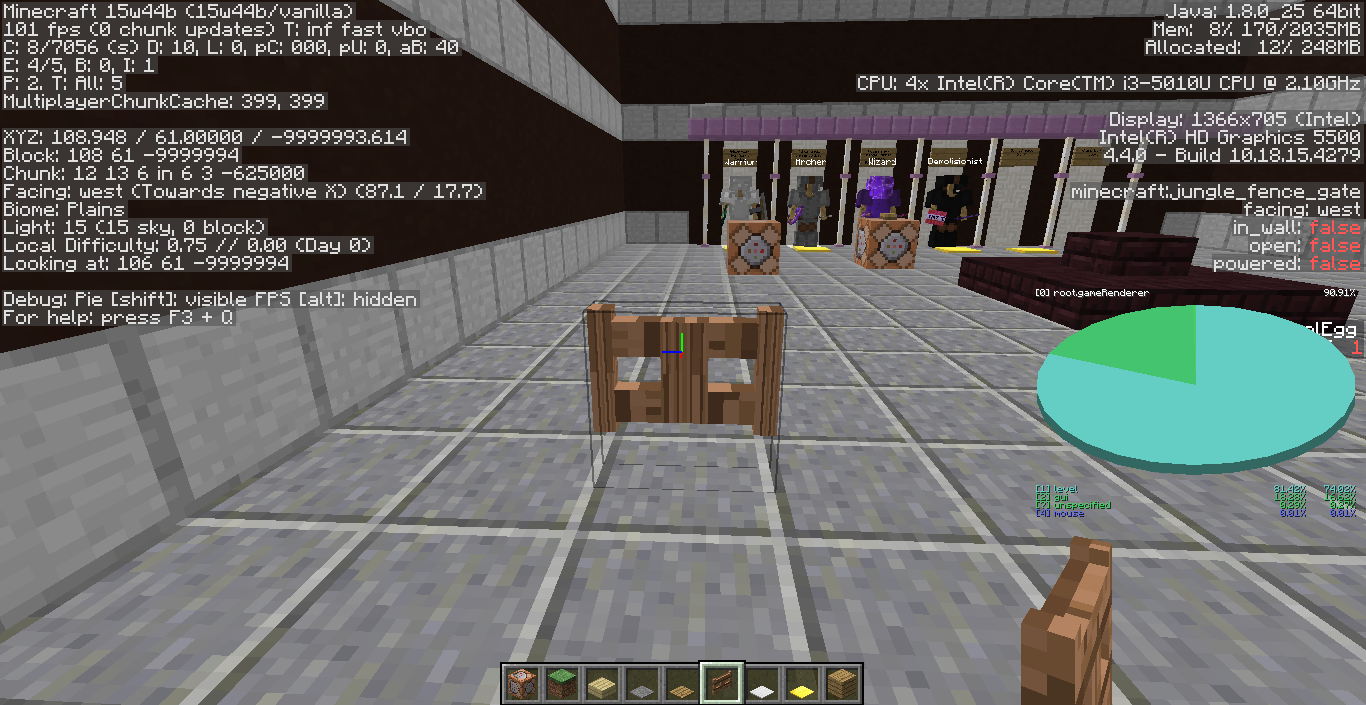
Fence gate has a abnormal texture when placed in the west or east direction.
Confirmed to effect 15w47a.
Splash and lingering potions splashadjacent it's corresponding effects adjacent to the block of where it lands.
Splash and lingering potions splash it's corresponding effects adjacent to the block of where it lands.
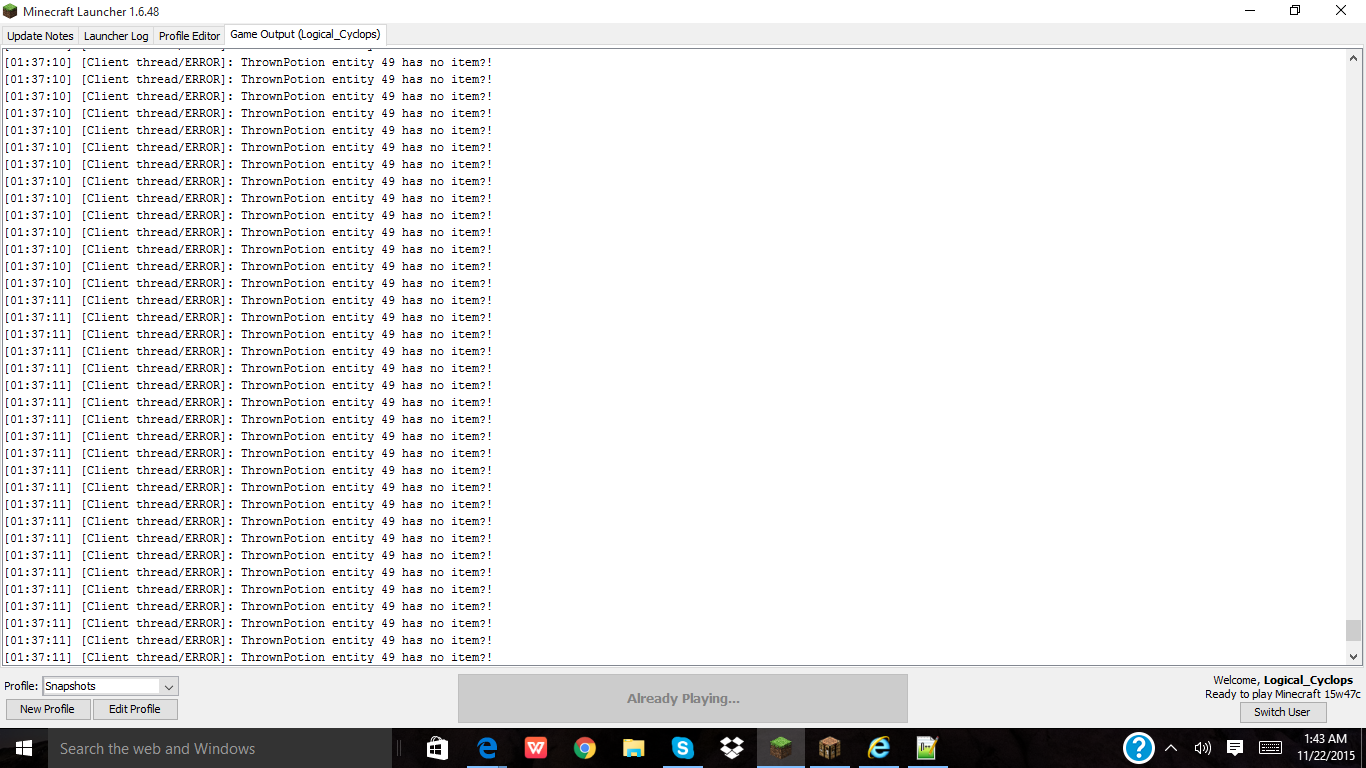
When you throw a potion it spams the following:
When you thrown a potion it spams the following on the console:
"Thrown potion entity # has no item?!"
a bunch of times until the potion entity has died.
I was on my friend's server, which he wanted me to make a custom potion for him that doesn't give him the effects, which also has the color of the harming potion. So I did the following command:
/give @p minecraft:splash_potion 1 0 {CustomPotionEffects:[
{Id:7,Amplifier:0,Duration:0}]}
which gives you a splash harming potion. So when I tested it out, for some reason, I still received the harming potion effect. Same thing happens with splash potion of healing.
I was on my friend's server, which he wanted me to make a custom potion for him that doesn't give him the effects, which also has the color of the harming potion. So I did the following command:
/give @p minecraft:splash_potion 1 0 {CustomPotionEffects:[
{Id:7,Amplifier:0,Duration:0}]}
which gives you a splash harming potion. So when I tested it out, for some reason, I still received the harming potion effect. Same thing happens with splash potion of healing.
I was on my friend's server, which he wanted me to make a custom potion for him that doesn't give him the effects, which also has the color of the harming potion. So I did the following command:
/give @p minecraft:splash_potion 1 0 {CustomPotionEffects:[{Id:7,Amplifier:0,Duration:0}]}which gives you a splash harming potion. So when I tested it out, for some reason, I still received the harming potion effect. Same thing happens with splash potion of healing.
I was on my friend's server, which he wanted me to make a custom potion for him that doesn't give him the effects, which also has the color of the harming potion. So I did the following command:
/give @p minecraft:splash_potion 1 0 {CustomPotionEffects:[{Id:7,Amplifier:0,Duration:0}]}which gives you a splash harming potion. So when I tested it out, for some reason, I still received the harming potion effect. Same thing happens with splash potion of healing.
I was on my friend's server, which he wanted me to make a custom potion for him that doesn't give him the effects, which also has the color of the harming potion. So I did the following command:
/give @p minecraft:splash_potion 1 0 {CustomPotionEffects:[{Id:7,Amplifier:0,Duration:0}]}which gives you a splash harming potion. So when I tested it out, for some reason, I still received the harming potion effect. Same thing happens with splash potion of healing.
Video link: https://youtu.be/TiY_0HK1I7Y
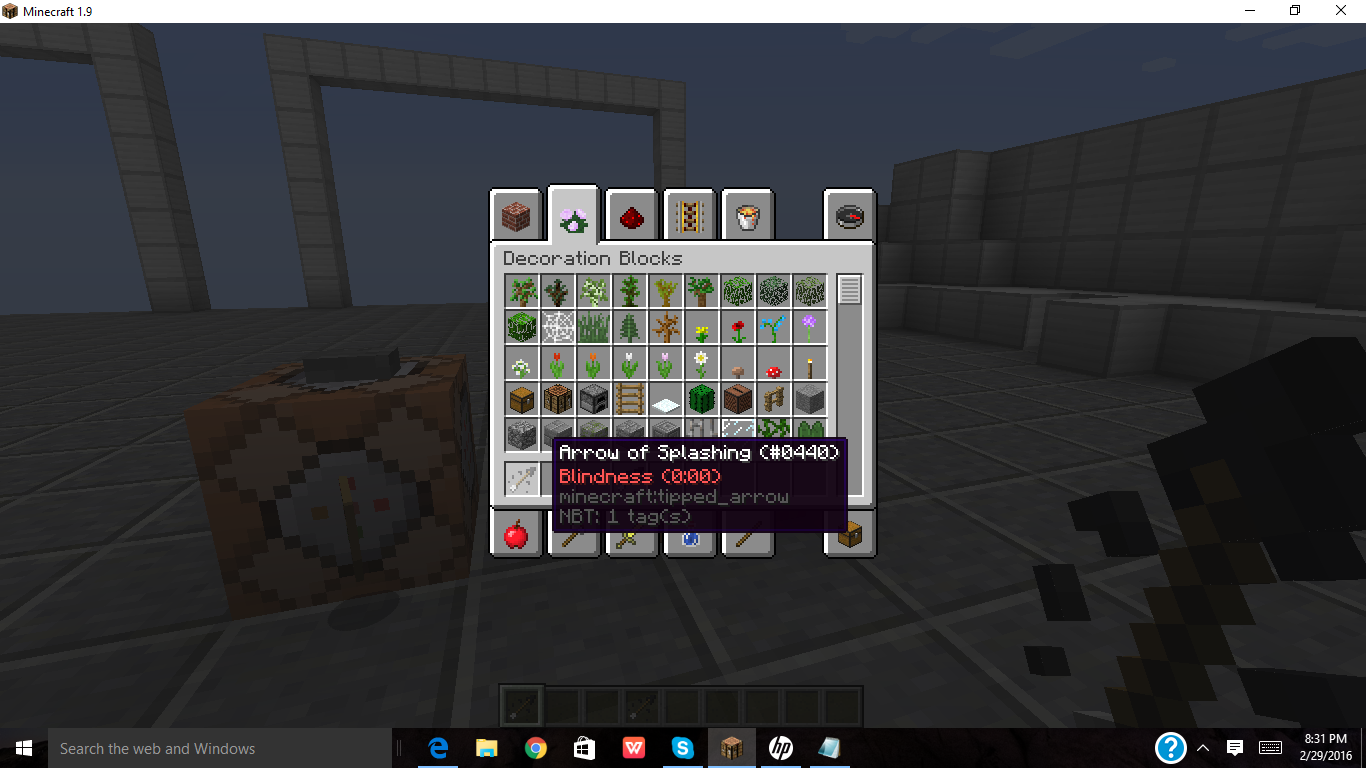
When you give a player a potion or tipped arrow with custom effects, it doesn't give the name of the effect. So doing:
/give @p minecraft:tipped_arrow 1 0 {CustomPotionEffects:[{Id:15,Amplifier:0,Duration:60}]}gives you a blindness potion, but it doesn't s
ayArrow of Blindness, it says Arrow of splashing, which is really weird. Same occurs with a potion, instead of it being Potion of Blindness, it's Splash Water bottle; not sure if I'm using an incorrect datatag or what.When you give a player a potion or tipped arrow with custom effects, it doesn't give the name of the effect. So doing:
/give @p minecraft:tipped_arrow 1 0 {CustomPotionEffects:[{Id:15,Amplifier:0,Duration:60}]}gives you a blindness potion, but it doesn't show Arrow of Blindness, it shows Arrow of splashing, which is really weird. Same occurs with a potion, instead of it being Potion of Blindness, it's Splash Water bottle; not sure if I'm using an incorrect datatag or what.
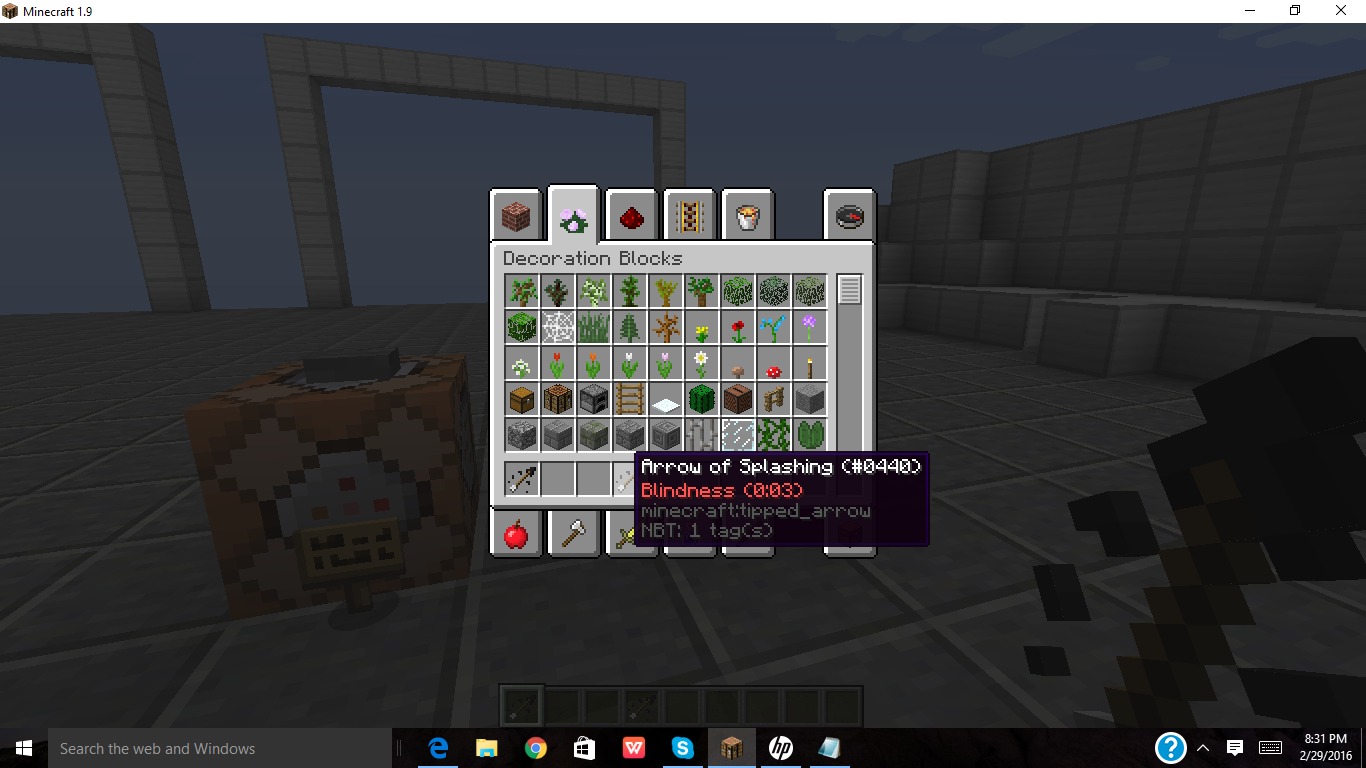
When you are giving a player a potion or tipped arrow with custom effects, it shows the duration incorrectly; for example, if we use this command:
/give @p minecraft:tipped_arrow 1 0 {CustomPotionEffects:[{Id:15,Amplifier:0,Duration:60}]}It doesn't show 3 seconds at all. However if you were to do
/give @p minecraft:tipped_arrow 1 0 {CustomPotionEffects:[{Id:15,Amplifier:0,Duration:600}]}It shows 3 seconds, which seems like it's off by 100 ticks.
Video: https://youtu.be/c7bxWXvj-1o
When you are giving a player a potion or tipped arrow with custom effects, it shows the duration incorrectly; for example, if we use this command:
/give @p minecraft:tipped_arrow 1 0 {CustomPotionEffects:[{Id:15,Amplifier:0,Duration:60}]}It doesn't show 3 seconds at all. However if you were to do
/give @p minecraft:tipped_arrow 1 0 {CustomPotionEffects:[{Id:15,Amplifier:0,Duration:600}]}It shows 3 seconds
Video: https://youtu.be/c7bxWXvj-1o
Killing someone with a fishingrod doesn't count as a kill.
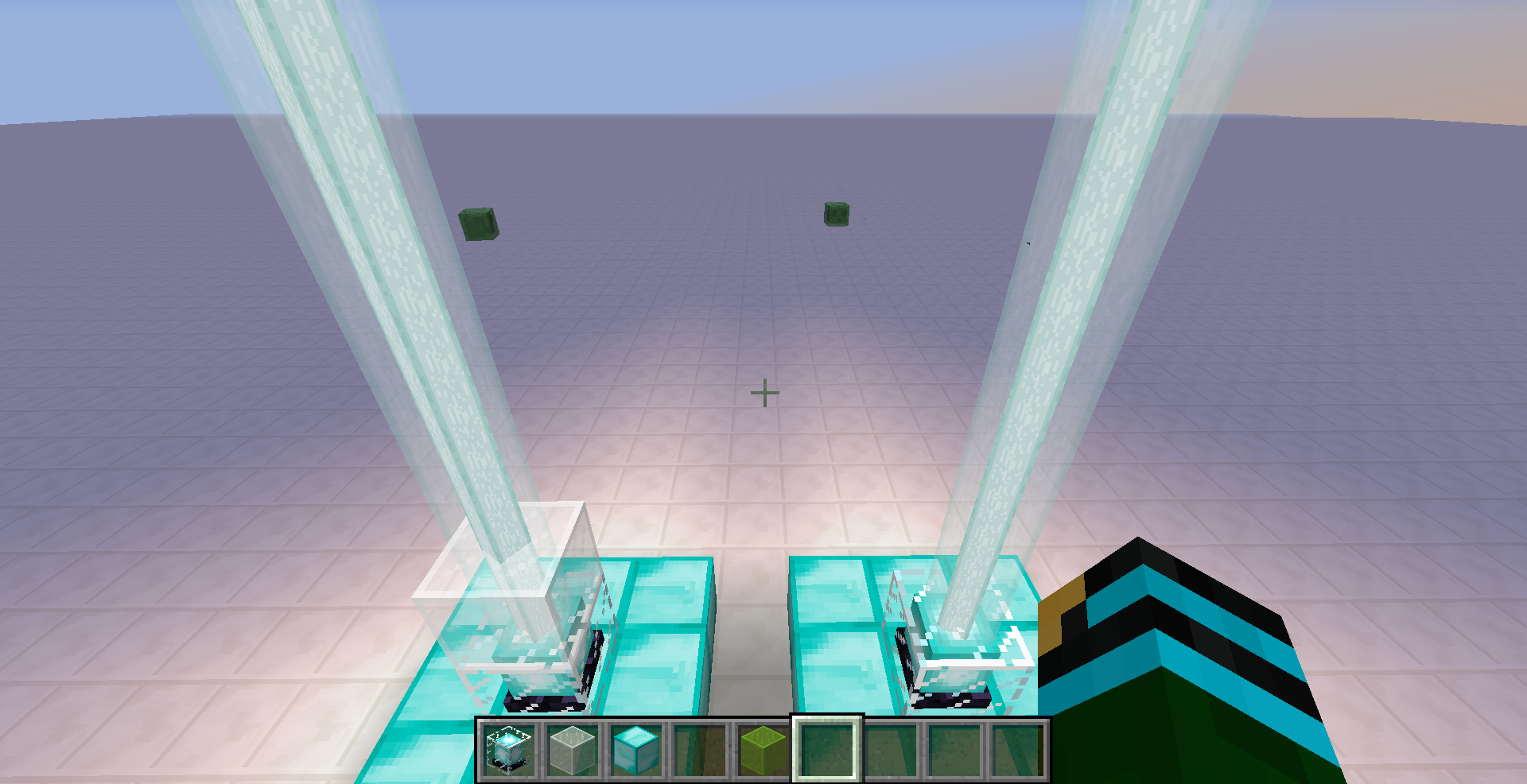
When there's white glass on top of a beacon, being either regular white glass or a white glass pane, it would not update the beacon's beam color to white.
So basically, if a player where to reel out their fishing rod bobber towards block(s) above them... the game would for some reason make the bobber be stuck at OnGround:0b for a long period of time; even if the bobber hits the Ground afterwards, The bobber would still be stuck at OnGround:0b until the game decides to detect it that it's on the Ground (which takes quite a while by the way)
Here's a YT proving that this bug exists: https://www.youtube.com/watch?v=nu-HD01nuEw&feature=youtu.be
So basically, if a player where to reel out their fishing rod bobber towards block(s) above them... the game would for some reason make the bobber be stuck at OnGround:0b for a long period of time; even if the bobber hits the Ground afterwards, The bobber would still be stuck at OnGround:0b until the game decides to detect it that it's on the Ground (which takes quite a while by the way)
Here's a
YTproving that this bug exists: https://www.youtube.com/watch?v=nu-HD01nuEw&feature=youtu.beSo basically, if a player where to reel out their fishing rod bobber towards block(s) above them... the game would for some reason make the bobber be stuck at OnGround:0b for a long period of time; even if the bobber hits the Ground afterwards, The bobber would still be stuck at OnGround:0b until the game decides to detect it that it's on the Ground (which takes quite a while by the way)
Here's a youtube video proving that this bug exists: https://www.youtube.com/watch?v=nu-HD01nuEw&feature=youtu.be
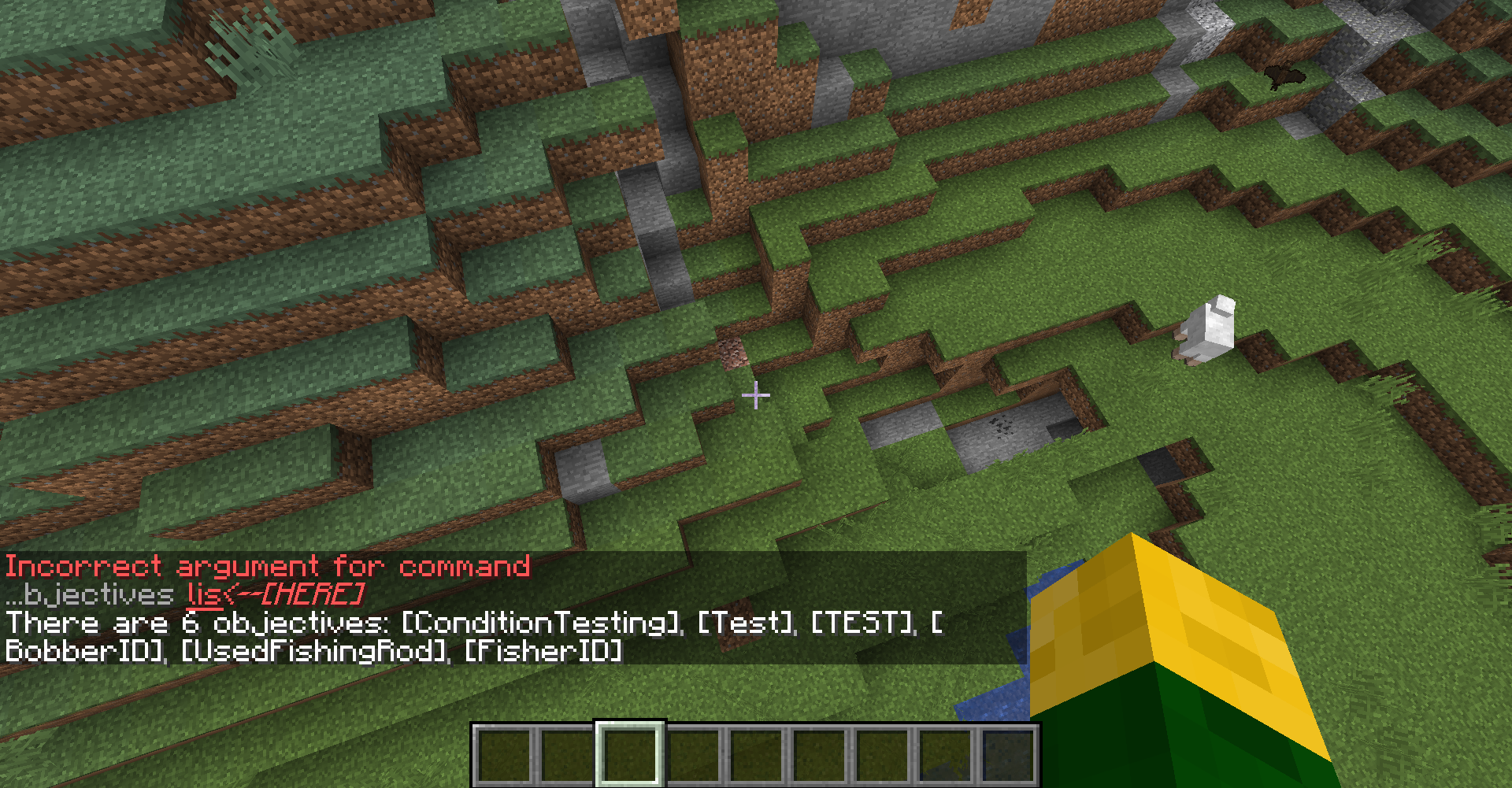
If you were to type: /scoreboard objectives list, it no longer seems to show the criteria types of scoreboard objectives respectively anymore. This wasn't the case before 1.13. the listed scoreboard objectives should show their criteria types when you hover your mouse over their name.
Can this bug get a confirmation status?
If you were to run this kind command for example: execute if entity @s[gamemode=survival] run say test
You will see that it absolutely does nothing, not even tell you a failure. I'm thinking that this bug existed ever since 1.13 due to the command system being rewritten. This most definitely is a bug because this would work in 1.12 but not work in 1.13+.If you were to run this kind command for example: execute if entity @s[gamemode=survival] run say test
this would work, but when you try to use @s with a selector argument to run a function, the function fails to run.
Like for example execute if entity @s[scores={Data=0} run function code:players/
You will see that it absolutely does nothing, not even tell you a failure. I'm thinking that this bug existed ever since 1.13 due to the command system being rewritten. This most definitely is a bug because this would work in 1.12 but not work in 1.13+.
![[Mod] Torabi](../../../data/assets/gravatar/torabi.png)
Logical_Cyclops, please stop inserting random line breaks in your comments. It bloats the page, and is awkward for others to read.

Logical_Cyclops: Always remember that you're testing snapshots. That's not a full featured bug free version, it's simply the compiled state of the head of the development branch - hence the name. In a snapshot everything can (and will) happen.
![[Mod] Skylinerw](../../../data/assets/gravatar/skylinerw.png)
@Logical_Cyclops, (most) commands are not processed until after a selector receives targets. @e[type=Item] grabs all items to process, and then /testfor cycles through each item. Along the way it found the potion item successfully, but the very last item it processed was dirt. The last output only shows the very last thing the command processed. If you run the command using the chat, you'll get the result of each item being processed one at a time.

Logical_Cyclops The pre-chunk-loading suggestion does not necessarily help for a couple reasons. First, in some cases it simply does not get rid of the issue (I tested it with the repro in MC-100911) . Second, in the case of those using an end_gateway for minigames/maps, kind of the whole point of using an end_gateway rather than e.g. a pressure pad on a command block is that it is a simple command-block-free way to allow players to teleport... so needing commands as a workaround kind of defeats the benefit of using that block. This is a broad-scope bug, and I appreciate people offering suggestions that may help in certain situations, but want to be clear that this is not a general workaround.

Changed reporter to Logical_Cyclops as Jesper Høxbro Bager is no longer active.
A good workaround is to give a player jump_boost while having the
levitation effect active until a fix is brought to it.
The same thing happened to me
as well. Hope the moderators confirm
that this is a bug.
Confirmed to still be in
15w36d.
darn... the bug is still in 15w38b.
If you are a mod please tell mojang
to run a bunch of tests before actually
release a "official bug fix" as they failed
to actually fix the bug. They can't just make
assumptions that the bug is fixed when it
works the first time or even correcting the
error but NOT TESTING IT. They should
do lots of testing before releasing bug
fixes, as it's annoying for them not to test
it well, before releasing and what happens?
it's still in the game. I'm not trying to be a hater
or anything as I know that fixing bugs isn't easy
but that doesn't give them a excuse to assume it works
when testing it the first time. or not testing it at all by
doing a possible fix.
Mojang if you are reading this, I apologize in advance if this
was offensive, just that at least make sure the bug is fully fixed,
and tested properly before you do a release.
@qmagnet, currently I'm working on a
a vanilla mini games server in the 1.9 snapshot. and certain
bugs can make testing my mini games difficult, which is where
my anger came from. But I admit, my comment was a bit harsh.
I have faith in the bug being fixed, and hope everyone's project
development can succeed further. Have a good day everyone!
This is actually a bug. It happens to
me too and the bot miss guided this
report as it was linked to a Out of memory
error not the actual bug it's self.
UPDATE: never mind, this isn't a
bug. Turns out, my render distance
was extreme which is why it seemed
like I had the same problem. Also the
cause of the respawn problem is getting
a fps lag spike. Make sure your fps is high enough.
Dude... First off, this a
bug report center not a place
to requests refunds. Please
go to Mojang support or
something as telling them this
here won't help Mojang find bugs.
Which your issue sounds more like
a technical problem then the game's
programming errors. also know as
bugs.
Confirmed to be in 15w39b.
I get the same issue as well.
I posted some video
evidence of the bug.
(See attachments).
Your doing it wrong.
the correct way
is this:
{CustomPotionEffects:[{Id:15,Amplifier:0,Duration:200}]}when you added Potion:"minecraft:invisibility" you told the
game to give you the potion with blindness AND invisibility
combined. Which If you want to have it blindness it's self,
just do
{CustomPotionEffects:[{Id:15,Amplifier:0,Duration:200}]}.This caused by it's rotation
being updated too fast.
which is why it seems like
it's rotation isn't visually
updated. Try to figure out a way to
do timed execution of the rotation
being updated. A Youtuber who I gotten most
of my command block knowledge
from explains how this is done:
Video 1: https://www.youtube.com/watch?v=ak5DYcoIC74
Follow video
to video 1: https://www.youtube.com/watch?v=hJAnCdS6cAg
How much ram your
mac has? if it has low amount
then that means Minecraft is not
getting enough allocated ram.
I'm not a tech guy but that could
be the reason. Also go to
Mojang support for technical
support, not the bug tracker.
It's simply impossible to
make it visually update
within the same tick because
it will happen too fast for your
eyes to see it. just have the
armorstand update it's rotation
one tick later. As even mojang can't
make the armorstand update it's rotation
within the same tick.
Confirmed to be in
15w39b.
A work around that I found
to this bug is just to give
the AreaEffectCloud a RedTeam
tag, so like this:
THEN Run the execute
by doing:
Ah I see, just didn't fully understand
the issue as it seemed
like you wanted it to visually
update properly. But I see
exactly what you mean. I'll do more
further tests and see if I can find a workaround
to the bug. But for now I guess we can
confirm that this is a bug in 15w39b.
Confirmed in 15w39c. I'm
getting nearly the exact same issue
as you are! Mods please confirm.
This is actually a bug.
Again man! Your doing it
wrong, haven't you tried
the correct method?
because remaking a issue
that has been already resolved
shows you clear haven't
Correct Way:
{CustomPotionEffects:[{Id:15,Amplifier:0,Duration:200}]}Please try it this time.
Don't assume this
isn't the right way as I tested
this. If you need me to show video
proof I can. Also I've been using
command blocks for months, so I
know my stuff, please believe me.
I've posted video proof
showing the correct way.
(see attachments).
If your complaining
about't being named
a water bottle than
just do:
/give @p minecraft:splash_potion 1 0 {CustomPotionEffects:[{Id:15,Amplifier:0,Duration:200}],display:{Name:"DesiredName"}}If you are just getting the water bottle it's
self than you are being very ignorant
or likely that you are not even following the
correct way. I'm trying to help you out
with this.
So your either saying that
your having an issue picking
the color. or when throwning
the potion it looks like a
water bottle?
I've found a way to specify the color
by doing this:
/give @p minecraft:splash_potion 1 0 {CustomPotionEffects:[{Id:14,Amplifier:0,Duration:0},{Id:15,Amplifier:0,Duration:200}],HideFlags:32}[Breaking it Down]:
the first custom effect
which will be the color, you
want to have the duration set
to 0 so you won't get invisibility.
Then the second one is your desired effects,
make sure to include hide flags
to hide the effects in the lore.
If you want it displayed then
I'm sorry but I couldn't figure
any other way besides this.
Though this can be a good
workaround
I hope this helps!
Well, then, looks like it's
a bug after all. Hopefully
mojang can fix it. For now
sam, you need to use a work around
method that redstonehelper
showed above.
I think this is intended? I mean sure it makes no sense why it would be but it just is, I could be wrong though.
Mind providing video evidence? as you clearly showed no steps in reproducing and I've tested it and it doesn't
seem to be happening to me.
Ok, then I will post them on
youtube then. But aren't you seeing
the graphical bug or no?
@CubeTheThird, try these video links
on youtube:
Video demonstration 1: https://www.youtube.com/watch?v=RIruQwMmDzs
VIdeo demonstration 2: https://www.youtube.com/watch?v=ut1mKspZObo
Usted hablas Español? puedo
Traducir el problema en ingles si
quieres
debug crash report has
been posted in attachments,
please notify me if it doesn't work
for you.
Could you please put that image on imagur and link it?
it's very huge to put on a comment and is very obnoxious.
I've updated my drivers and I'm
stilling getting the issue.
Current driver specs are:
Intel(R) HD Graphics 5500 4.40 - Build 10.18.15.4279
Old one was:
Intel(R) HD Graphics 5500
4.3.0 - Build 10.18.15.4248
If you need me to do another crash report then I
can, also I updated the drivers via Device Manager.
I tried to update them from intel's website but it gets
errors, however it worked when I used device manager
and clicked search online for drivers.
I've posted the New crash
report which is named: "New Crash Report as of September 27th, 2015.txt"
UPDATE: Found out that the graphical bug
only occurs when VBOs are turned off. But when turned on, the graphical bug disappears. This rarely happened to me in 1.8.8 even though VBOs was turned off. Please explain what VBOs stand for and what is this setting for and used.
Ok, Thank you for time and effort
helping me with this issue. You can move on
to other tickets now.
May you please stop over bumping the post? people will see yours soon, be patient please.
How is this a Duplicate? that post mentions ALL entity's having the wrong name, while
this only talks about one. This similar, not a dupe.
Alright, well in that case; I hope the bug gets fixed and a mod
put this ticket as resolved to be a dupe, and that the original bug
report will get noticed.
Mods, please investigate this issue.
Nah, not anymore. The chunks now
load properly.
Might do tests to see if this effects 15w45a.
Dupe.
MC-92559This bug is still existent in 15w46a, Please update the affected versions.
I get the "ThrownPotion entity # has no item?!" spam as well, which it's filling up my server logs very fast.
It's because entities don't run commands in unloaded chunks; this has nothing to do with the chain command block's functionality.
It's that you're teleporting the entity in a unloaded chunk. Now, it might seem like it works when you're near the command blocks and run the commands, which is because you loaded the entity for a few seconds or less allowing the commands to be executed. You'll need to load the chunk first before teleporting the entity to that location in order for it to work even though you're far from the command blocks.
Here's my workaround method to this bug
until it gets fixed:
1./scoreboard objectives add Jumping stat..jump (Yes it has two dots).
2. /scoreboard objectives add Sprinting stat.sprintOneCm
now R will be an abbreviation for
repeating command block command
and CCC would be
chain conditional command block command.
3. R: /execute @a[score_Jumping_min=1] ~ ~ ~ scoreboard players reset @a[score_flight_min=1]
CCC: /scoreboard players reset @a[score_Jumping_min=1] Jumping
4. R: /execute @a[score_Sprinting_min=1] ~ ~ ~ scoreboard players reset @a[score_flight_min=1]
CCC: /scoreboard players reset @a[score_Sprinting_min=1] Sprinting
flight would the objective that has the criteria type "stat.flyonecm".
With those written commands running from command blocks, that should be a good workaround to the bug
because since a player is making movements that for some reason on the
stat.flyOneCm addes up. The commands will be tracking for those specific player moments and
if a moment is made, it'll reset their flight score constantly until they are actually flying. So
you welcome people
awww man, how is this a duplicate?
I see it relating to it. Almost every bug
report I make ends up being a duplicate even
though I searched very well for any. Welp,
I hope this bug doesn't end up in the final release
of 1.9.
This bug is still existent in 15w46a, someone please update the effected
versions.
I just wonder how they manage to break
potions like this, but out of all things,
potions get broken? First it was all tipped
arrows turning black in one of the older
snapshots since they were probably adding
new stuff at the time. But potions? makes
no sense.
Confirmed that this still effects 15w47a.
This bug is still existent in 15w47a.
The bug is Still existent in 15w47b.
Bug is still present in 15w47b.
Bug is still existent in 15w47b.
The bug is still alive in 15w47c.
This bug affects 15w47c.
The Bug is still living in 15w47c.
Well, it still happens even though potions are fixed. Which is probably because thrown potions still look like a awkward potion.
This bug is still existent in 15w50a.
Oh never mind then. It did detect it; I guess the output didn't update or something. Thanks for helping me out with this.
UPDATE: the output turn out to be "[12:43:45] item.tile.dirt.default did not match the required data structure" which is ironic to me which normally in the output box it would output something like Potion found or something like that. I'll use the comparator method or do /blockdata ~ ~-1 ~ {} seeing if it has a SuccessCount:1, every time I'm seeing if a command executes successfully.
This bug is still existent in 15w51b, how is this still not fixed yet? It's been there ever since shields came out.
This bug still occurs in 16w02a.
This bug is still around in 16w04a.
Confirmed for 16w06a.
OH! I see now. I thought you meant teleporting the entity to a completely far away chunck. I'll have me and my friends vote on this bug.
Still in 1.9 pre release 4.
Ok, although I can just add the display name tag, I'd just seen it weird with not combined effects. Well, I'll let the moderators decide what to do with my report.
The duration in
/give @p minecraft:tipped_arrow 1 0 {CustomPotionEffects:[{Id:15,Amplifier:0,Duration:60}]}is 3 seconds.
and the duration in
/give @p minecraft:tipped_arrow 1 0 {CustomPotionEffects:[
{Id:15,Amplifier:0,Duration:600}]}
is 30 seconds.
To convert seconds to ticks, you would do 20 x number of seconds, and that will get you the conversion in ticks.
Converting ticks to second, you do the number of ticks divided by 20, giving you the conversion in seconds.
20 ticks = a second, Which is why this calculation method works.
Like when you look at the duration of a tipped arrow or potion with custom effects that's in one of your slots, it doesn't show the duration correctly. It appears off by 100 ticks but how off it is, is different depending on the potion/tipped arrow duration; which could be a calculation error. (Not the duration of the potion effect from the side of your inventory)
I almost can't believe this bug made it's way all the up to 1.9's full release; Can't the mods like change the priority of tickets for bugs that needs mojang's attention?
Duration:60 is 3 seconds, Duration: 600 ticks is 30 seconds. So if I applied the effect of Duration 60 on my self, I get blindness for 3 seconds, applying Duration:600 lasts 30 seconds, just as how I specified it to last. Answering the 100 ticks of question thing: Never mind about it being off by 100 ticks, From doing more experiments, it's off but like it's different for each duration number, It's kind of hard to explain this bug since it has weird behavior with showing the duration and knowing how many ticks off it is; but it's not calculating how many ticks are in a second correctly, which is probably why it shows the duration incorrectly.
Updated my previous comment, sorry I couldn't do it in time.
Effects all 1.9 pres, 1.9 snapshots, 1.9.1 pre 1, and 1.9.1 pre 2.
Do I need more evidence to confirm this bug? I see the confirmation status unconfirmed still.
Confirmed for 1.9.1 pre release 3
Make sure to include the 1.9.1 pre release versions as the effected versions if it occurs on one of the 1.9.1 pre releases. And dude, there are many bug tickets that mojang has to go through. So have patience and in time, it will get looked at by a mojangsta.
I've found a workaround to the bug incase if mojang can't fix it. The workaround is using lore:
/give @p tipped_arrow 1 0 {HideFlags:32,CustomPotionEffects:[{Id:#,Amplifier:#,Duration:#}],display:{Lore:["Blindness (#:#)"]}}replace # with a number, pretty self explanatory.
If it's just minigames/map/server, you can load the chunk before teleporting the player by using an end gateway. Dragnoz has a video about this which you can find here: https://www.youtube.com/watch?v=pyqzxn0e9Jw
I'm quite surprised that barely anyone has noticed that this is a bug; but it might be because not a lot of people have realized that the fishing rod got updated to yank people properly. It's super ironic to me that my ticket isn't marked as a duplicate, because I really did expected for there to be a already reported ticket that I probably couldn't find in the search engine, and I think I've might of found another bug with the fishing rod, which I'll need to do further testing before I can report it.
No, it's this one:
MC-101033That isn't a bug, there are a few possible reasons as to why that's happening: it's a hardware related issue, Possibly your trying to play on a corrupted a corrupted world, Playing a 1.8 world in 1.9; but to find out for sure what's happening, copy and past the crash report log into the description, the mods will then help you out from there.
Unable to reproduce the bug, I've tried it multiple times with different potion effects and it seems to clear it out perfectly fine. Are you playing 1.9 in a world that has been previously loaded in 1.8? or has it been corrupted before?
This happen to me before. It's not a bug; the cause of this is an outdated graphics driver, update your graphics driver and see if it resolves the problem. If it still doesn't work, go to options... then video settings... and then make sure Use VSync is turned on. If that STILL does not work, then you need to contact mojang support for assistance with that issue that's related to how your computer graphics driver works.
I've figured out how to do it now
This is still an issue in 1.12 because when I try muting the entity.lighting.impact sound, it doesn't get muted all the way. It would get muted at the very end of the sound being played. I can submit evidence to support confirmation of this bug, if needed.
I suggest for you to address this issue on https://help.mojang.com/, as this is not the place to ask for help for technical issues dealing with being able to run minecraft smoothly.
Would a moderator please update the affected versions of this bug report to minecraft 1.12?
And how come the effected versions of this bug report hasn't been updated to minecraft 1.12?
Funny how every single colored glass, except white glass... alters the color of the beacon's beam color. The white glass should be making the beam color pure white. Although I was struck with the mandela effecting believing that I remembered that white glass would make a beacon alter its color to white at first. As from doing some testing, it seems that it functioned in the aspect of where white glass would not alter a beacon's beaming color like that ever since in the update of which beacons were added. If you look closely at the beacon's beaming light, it's edges are colored with a slight shade of blue, yet white glass does not alter this!? how can this be intended? I would like a Mojangsta to see this and outright claim if this is intended or not, or if they simply won't do any changes.
Confirmed for Minecraft 1.12.2, and for 1.13 snapshot 17W43B.
Would a mod please confirm it? D:
Dinnerbone, can the prefix/suffix thing be a supported feature in /team option, rather then to do the old hacky solution of doing it through NBT editing? I liked how one could add prefixes/suffixes into teams before that became patched in 18w01a. Please give a response on this, I would greatly appreciate it if you do
My report isn't a report about something game breaking. The bot is incorrect on this one. Mods please correct this or do whatever that needs to be done in regards to my report that isn't what the bod did.
Nevermind you can close this issue
I'm guessing this'll probably get fixed in a bug fix update of 1.15; ever since 1.13+ fireballs have been a pain in the ass to work with. The good ol' /execute summon to create a fireball mechanic doesn't work anymore, and now not even summoned fireballs can be hit ;(.
Affects 1.15.1 pre-release.
Have been doing some experimentation with potions and stuff in 1.15.
Putting Potion:"minecraft:water" seems to make it display the duration more accurately, and I say more accurately b/c potions are one second off for the duration that they say they'd last for (This applies with vanilla potions as well, but this is an entirely different issue).
So doing:
_/give @p minecraft:tipped_arrow{Potion:"minecraft:water",CustomPotionEffects:[
{Id:15,Amplifier:0,Duration:60}]}_
Makes it accurately display the duration to be 3 seconds. B/c Duration is specified in ticks.
Every 20 ticks = 1 second. So if you want to convert 3 seconds into ticks you'd do 20 * 3 for e.g;
Same concept with splashed potions:
_/give @s minecraft:splash_potion{display:{Name:'
{"text":"Potion of Resistance","color":"gold","bold":"true","italic":"false"}'},Potion:"minecraft:water",CustomPotionEffects:[
{Id:11,Duration:200},
{Id:12,Duration:200}]_
But with lingering potions it's 8 seconds off...
_/give @s minecraft:lingering_potion{display:{Name:'
{"text":"Potion of Resistance","color":"gold","bold":"true","italic":"false"}'},Potion:"minecraft:water",CustomPotionEffects:[
{Id:11,Duration:200},
{Id:12,Duration:200}]_
It shows 2 seconds rather than 10, because 20 * 10 = 200. Where 200 ticks = 10 seconds. For those that disagree with this, the Duration is specified in ticks- if ** you look at how long the duration lasts when you apply the potion effect, you will see that it does give you the potion effect for 10 seconds (disregarding it being 1 second off technically due to some other bug). This is not specified in seconds at all. It's some sort of incorrect number conversion in minecraft's code when it comes to displaying the duration. Although, come to think of it, we can just use the Lore:[] datatag to workaround this until this gets fixed. Mojang would probably have little reason to fix this when we can use the aforementioned datatag to make it correctly show the duration anyway, for if Mojang's intent is to not bother with fixing this, I'd like for them to mark this as 'Works as intended' so that I can cease giving updates on an issue that seems to have a pretty reasonable workaround that pretty much defeats the purpose of fixing this.
Though I'm thinking an easy way for them to fix is this is that instead of making the duration specified in ticks, they should make it specified in seconds. B/c a potion's duration cannot seem to be made to work in ticks. Making it nonsensical for it to even allow duration specification in ticks in the first place. So they could remove "Duration" as a usable datatag for custom potions and instead rename it to EffectDuration or something similar that distinguishes it from Duration- as it is used in a lot of other things and entities where it'd sensically have a use for it to be acceptably specified in ticks, but with the case of something like potions where you functionally cannot specify duration in ticks, it should be replaced with a different datatag name that treats that value you put in it into seconds. From there it should become easier for Mojang to fix this issue, should they bother with fixing it, but again they ought to mark it as either 'works as intended' or 'Won't fix' or whatever else to indicate that this behavior is intentional and can be worked around by specifying the duration with the Lore:[] datatag. Anyway I digress, I'm kinda glad that things are easier to customize now in minecraft anyhow
Affects 1.15 and 1.15.1 pre-release 1.
This bug still occurs in 1.14, and 1.15, and 1.15.1. Mojang PLEASE fix this bug, it makes no sense for something like this to be postponed for so many versions. This hinders our ability to map make; we shouldn't have to be making workarounds to bugs that are supposed to get fixed within a reasonable time frame. Five years of not fixing this is unacceptable in my opinion. I'd like to see this get fixed in 1.16.