Custom lingering potions & tipped arrows show incorrect duration
The bug
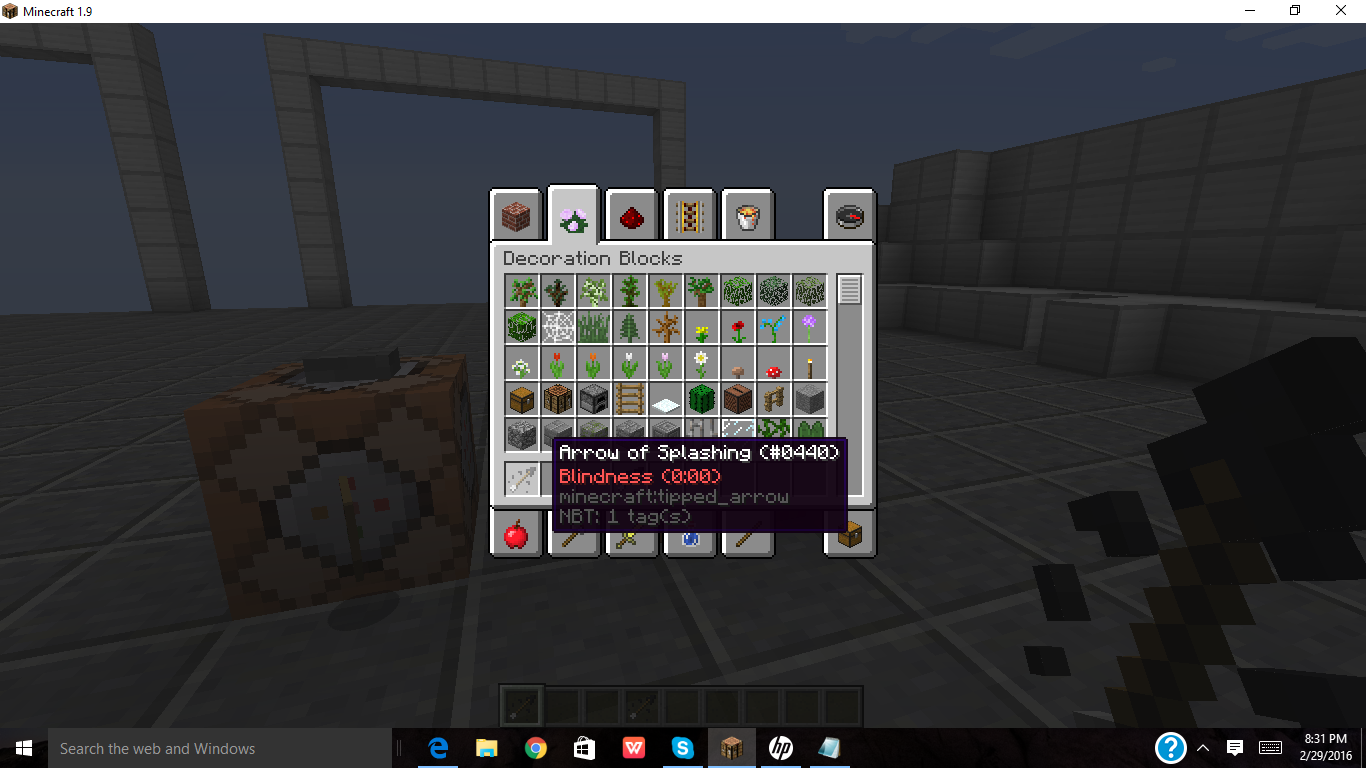
When you give a player a lingering potion or tipped arrow with custom effects, it shows the duration incorrectly; for example, if we use this command:
/give @p minecraft:tipped_arrow{custom_potion_effects:[{id:"minecraft:blindness",amplifier:0,duration:60}]}
It doesn't show 3 seconds at all. However if you were to do
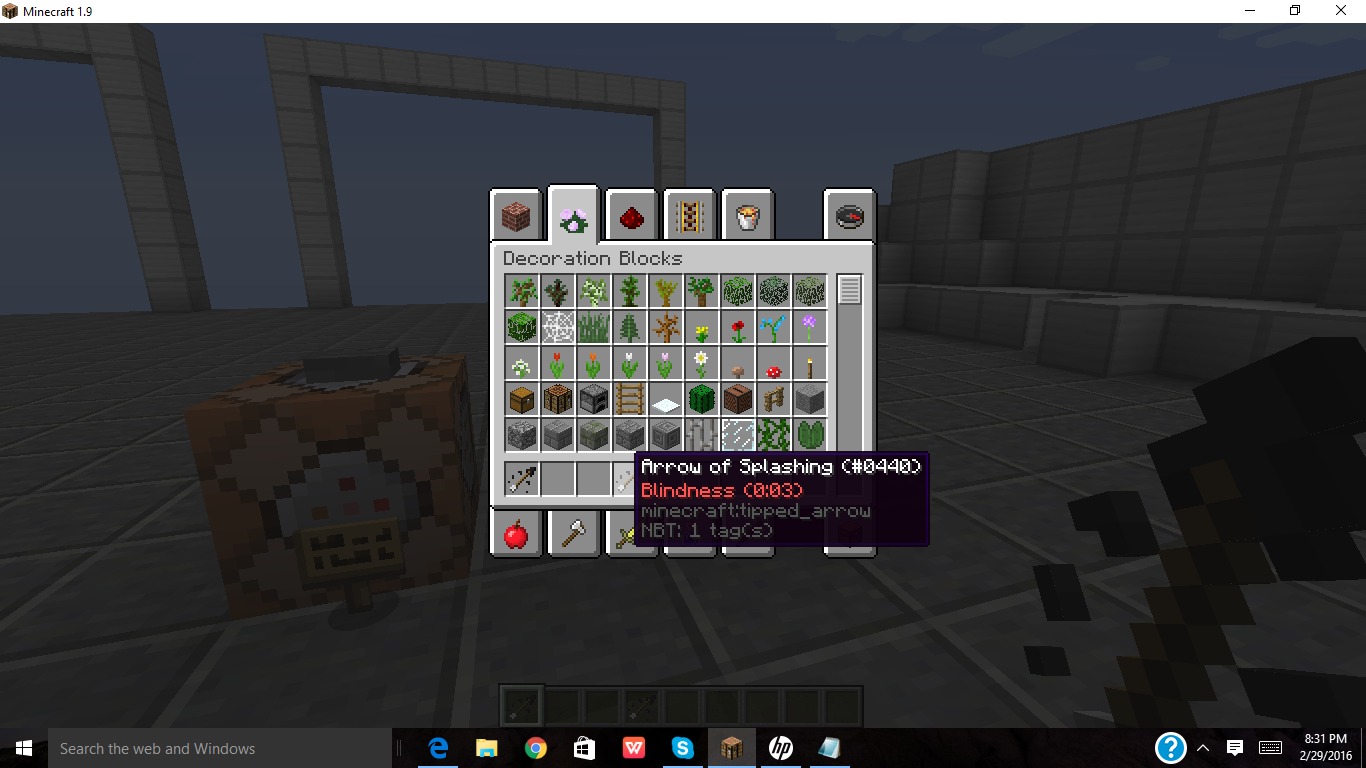
/give @p minecraft:tipped_arrow{custom_potion_effects:[{id:"minecraft:blindness",amplifier:0,duration:600}]}
It shows 3 seconds
Video: https://youtu.be/c7bxWXvj-1o
Code analysis
Code analysis by Marcono1234 can be found in this comment.
Linked Issues
is duplicated by12
 MC-96147Custom tipped arrows have their times wrongDuplicateMC-100024command created custom lingering potions and tipped arrows display wrong time in inventoryDuplicateMC-105910Custom tipped arrows do not correctly render effect durations in item tooltipDuplicateMC-121202afected arrow effects stay for more time then requriedDuplicateMC-158828Lingering Potions created with the CustomPotionEffects tag show incorrect effect time in tooltipDuplicateMC-158878Custom Lingering Potions and Tipped Arrows Last Longer Than They SayDuplicateMC-179211Custom lingering potions display the wrong durationDuplicateMC-193055Incorrect durations for custom lingering potionsDuplicateMC-250096Arrows with CustomPotionEffects do not reduce their durationDuplicateMC-259523Notation error on custom potion by commandDuplicateMC-268651The display duration of the tipped arrow is shorter than expectedDuplicateMC-274844The display of duration of custom tipped potions arrows is wrongDuplicate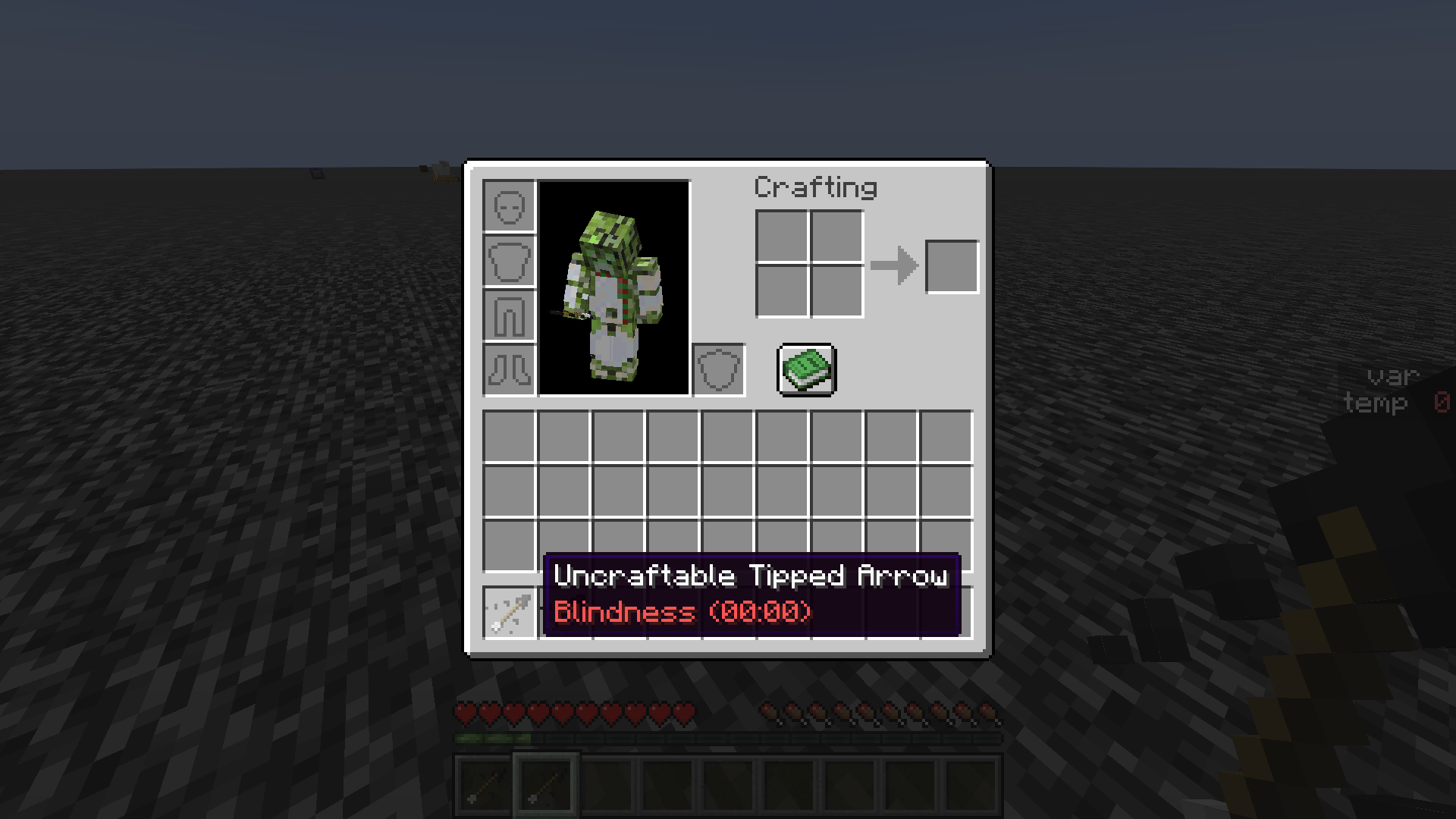

![[Mod] Avoma](../../../data/avatars/users/86198.png)
- Unresolved
 Logical_Cyclops
- 51
- 21
- Confirmed
 Normal
- Platform
- Commands
- CustomPotionEffects effect-duration item-description potion tipped_arrow tooltip
1.9-pre4 - 1.21
1.9-pre4 1.9 1.9.1-pre1 1.9.1-pre2 1.9.1-pre3 1.9.1 1.9.2 16w14a 1.10 1.10.2 16w32a 16w32b 16w33a 16w38a 1.11 1.11.2 1.12 17w31a 1.12.1 1.12.2 17w45b 17w46a 17w47a 17w49a 17w49b 17w50a 18w16a 1.13-pre2 1.13 18w32a 18w33a 1.13.1-pre1 1.13.1 1.13.2 19w03b 19w03c 1.14.4 19w44a 1.15 1.15.1-pre1 1.15.2 20w07a 20w16a 1.16.1 1.16.4-pre2 1.16.4 20w48a 21w03a 21w05b 21w06a 21w07a 21w11a 21w17a 1.17 1.17.1 1.18.2 22w14a 1.19.2 1.19.3 1.20.1 23w32a 1.20.4 1.21
Created Issue:
Custom potions & tipped arrows show incorrect duration.
When you are giving a player a potion or tipped arrow with custom effects, it shows the duration incorrectly; for example, if we use this command:
/give @p minecraft:tipped_arrow 1 0 {CustomPotionEffects:[{Id:15,Amplifier:0,Duration:60}]}It doesn't show 3 seconds at all. However if you were to do
/give @p minecraft:tipped_arrow 1 0 {CustomPotionEffects:[{Id:15,Amplifier:0,Duration:600}]}It shows 3 seconds, which seems like it's off by 100 ticks.
Video: https://youtu.be/c7bxWXvj-1o
![[Mod] redstonehelper](../../../data/avatars/users/10122.svg)
![[Bot] Arisa](../../../data/assets/gravatar/mustek2.png)
When you are giving a player a potion or tipped arrow with custom effects, it shows the duration incorrectly; for example, if we use this command:
/give @p minecraft:tipped_arrow 1 0 {CustomPotionEffects:[{Id:15,Amplifier:0,Duration:60}]}It doesn't show 3 seconds at all. However if you were to do
/give @p minecraft:tipped_arrow 1 0 {CustomPotionEffects:[{Id:15,Amplifier:0,Duration:600}]}It shows 3 seconds, which seems like it's off by 100 ticks.
Video: https://youtu.be/c7bxWXvj-1o
When you are giving a player a potion or tipped arrow with custom effects, it shows the duration incorrectly; for example, if we use this command:
/give @p minecraft:tipped_arrow 1 0 {CustomPotionEffects:[{Id:15,Amplifier:0,Duration:60}]}It doesn't show 3 seconds at all. However if you were to do
/give @p minecraft:tipped_arrow 1 0 {CustomPotionEffects:[{Id:15,Amplifier:0,Duration:600}]}It shows 3 seconds
Video: https://youtu.be/c7bxWXvj-1o
is duplicated by

is duplicated by
![[Mod] Neko](../../../data/avatars/users/92901.png)


When you are giving a player a potion or tipped arrow with custom effects, it shows the duration incorrectly; for example, if we use this command:
/give @p minecraft:tipped_arrow 1 0 {CustomPotionEffects:[{Id:15,Amplifier:0,Duration:60}]}It doesn't show 3 seconds at all. However if you were to do
/give @p minecraft:tipped_arrow 1 0 {CustomPotionEffects:[{Id:15,Amplifier:0,Duration:600}]}It shows 3 seconds
Video: https://youtu.be/c7bxWXvj-1o
Code analysis by Marcono1234 in this comment.
is duplicated by
![[Mod] Michael Wobst](../../../data/avatars/users/37868.png)
When you are giving a player a potion or tipped arrow with custom effects, it shows the duration incorrectly; for example, if we use this command:
/give @p minecraft:tipped_arrow 1 0 {CustomPotionEffects:[{Id:15,Amplifier:0,Duration:60}]}It doesn't show 3 seconds at all. However if you were to do
/give @p minecraft:tipped_arrow 1 0 {CustomPotionEffects:[{Id:15,Amplifier:0,Duration:600}]}It shows 3 seconds
Video: https://youtu.be/c7bxWXvj-1o
Code analysis by Marcono1234 can be found in this comment.

Custom potions & tipped arrows show incorrect duration.
is duplicated by

When you are giving a player a potion or tipped arrow with custom effects, it shows the duration incorrectly; for example, if we use this command:
/give @p minecraft:tipped_arrow1 0{CustomPotionEffects:[{Id:15,Amplifier:0,Duration:60}]}It doesn't show 3 seconds at all. However if you were to do
/give @p minecraft:tipped_arrow1 0{CustomPotionEffects:[{Id:15,Amplifier:0,Duration:600}]}It shows 3 seconds
Video: https://youtu.be/c7bxWXvj-1o
Code analysis by Marcono1234 can be found in this comment.
The bug
When you are giving a player a potion or tipped arrow with custom effects, it shows the duration incorrectly; for example, if we use this command:
/give @p minecraft:tipped_arrow{CustomPotionEffects:[{Id:15,Amplifier:0,Duration:60}]}It doesn't show 3 seconds at all. However if you were to do
/give @p minecraft:tipped_arrow{CustomPotionEffects:[{Id:15,Amplifier:0,Duration:600}]}It shows 3 seconds
Video: https://youtu.be/c7bxWXvj-1o
Code analysis
Code analysis by Marcono1234 can be found in this comment.

![[Mojang] Nathan Adams](../../../data/assets/gravatar/dinnerbone.png)
![[Mod] Asteraoth](../../../data/avatars/users/92886.png)

is duplicated by
![[Mod] tryashtar](../../../data/avatars/users/41963.png)
is duplicated by
![[Bot] Arisa](../../../data/avatars/users/43007.png)
is duplicated by
is duplicated by
![[Mod] SPGoding](../../../data/avatars/users/44622.png)
relates to
![[Mojang] Adrian Östergård](../../../data/assets/gravatar/nighter.jpeg)
![[Mod] Chandler](../../../data/assets/gravatar/triwonder81.png)
![[Mod] markderickson](../../../data/avatars/users/18946.svg)

is duplicated by
The bug
When you are giving a player a potion
or tipped arrow with custom effects, it shows the duration incorrectly; for example, if we use this command:/give @p minecraft:tipped_arrow{CustomPotionEffects:[{Id:15,Amplifier:0,Duration:60}]}It doesn't show 3 seconds at all. However if you were to do
/give @p minecraft:tipped_arrow{CustomPotionEffects:[{Id:15,Amplifier:0,Duration:600}]}It shows 3 seconds
Video: https://youtu.be/c7bxWXvj-1o
Code analysis
Code analysis by Marcono1234 can be found in this comment.
The bug
When you are giving a player a potion, splash potion, lingering potionor tipped arrow with custom effects, it shows the duration incorrectly; for example, if we use this command:
/give @p minecraft:tipped_arrow{CustomPotionEffects:[{Id:15,Amplifier:0,Duration:60}]}It doesn't show 3 seconds at all. However if you were to do
/give @p minecraft:tipped_arrow{CustomPotionEffects:[{Id:15,Amplifier:0,Duration:600}]}It shows 3 seconds
Video: https://youtu.be/c7bxWXvj-1o
Code analysis
Code analysis by Marcono1234 can be found in this comment.
The bug
When you are giving a player a potion, splash potion, lingering potion or tipped arrow with custom effects, it shows the duration incorrectly; for example, if we use this command:
/give @p minecraft:tipped_arrow{CustomPotionEffects:[{Id:15,Amplifier:0,Duration:60}]}It doesn't show 3 seconds at all. However if you were to do
/give @p minecraft:tipped_arrow{CustomPotionEffects:[{Id:15,Amplifier:0,Duration:600}]}It shows 3 seconds
Video: https://youtu.be/c7bxWXvj-1o
Code analysis
Code analysis by Marcono1234 can be found in this comment.
is duplicated by
![[Mod] j_p_smith](../../../data/avatars/users/92851.png)
The bug
When you
are givinga player apotion, splash potion,lingering potion or tipped arrow with custom effects, it shows the duration incorrectly; for example, if we use this command:/give @p minecraft:tipped_arrow{CustomPotionEffects:[{Id:15,Amplifier:0,Duration:60}]}It doesn't show 3 seconds at all. However if you were to do
/give @p minecraft:tipped_arrow{CustomPotionEffects:[{Id:15,Amplifier:0,Duration:600}]}It shows 3 seconds
Video: https://youtu.be/c7bxWXvj-1o
Code analysis
Code analysis by Marcono1234 can be found in this comment.
The bug
When you give a player a lingering potion or tipped arrow with custom effects, it shows the duration incorrectly; for example, if we use this command:
/give @p minecraft:tipped_arrow{custom_potion_effects:[{id:"minecraft:blindness",amplifier:0,duration:60}]}It doesn't show 3 seconds at all. However if you were to do
/give @p minecraft:tipped_arrow{custom_potion_effects:[{id:"minecraft:blindness",amplifier:0,duration:600}]}It shows 3 seconds
Video: https://youtu.be/c7bxWXvj-1o
Code analysis
Code analysis by Marcono1234 can be found in this comment.
Custom lingering potions & tipped arrows show incorrect duration
![[Mojang] slicedlime](../../../data/assets/gravatar/slicedlime.jpeg)
is duplicated by
![[Mod] Jarl-Penguin](../../../data/avatars/users/92849.png)
is duplicated by
![[Mod] Jiingy](../../../data/avatars/users/91802.png)
![[Mod] bemoty](../../../data/avatars/users/50554.png)
Duplicate of MC-98310
The bug
The tooltip of items which apply effects like tipped arrows or potions is supposed to not show the duration if it is less than or equal to 20. It does however not consider the duration factor which is for example for tipped arrows 1 / 8 resulting in the tooltip showing 0:00 as duration.
How to reproduce
This can currently easily be reproduced using MC-98310. Once that bug is fixed this bug cannot be seen without looking at or modifying the code.
- Use the following command
/give @p tipped_arrow{custom_potion_effects:[{id:speed,amplifier:0b,duration:20}]} - Hover over the item to see the tooltip
→ No duration is shown because it is not greater than 20 - Use the following command
/give @p tipped_arrow{custom_potion_effects:[{id:speed,amplifier:0b,duration:21}]} - Hover over the item to see the tooltip
→ It shows "0:00" as duration
Code analysis
Based on 1.12 decompiled using MCP 9.40 PRE 1
The method net.minecraft.potion.PotionUtils.addPotionTooltip(ItemStack, List<String>, float) does not take the durationFactor into account when testing if the duration is higher than 20. It should instead test for the following:
potioneffect.getDuration() * durationFactor > 20
![[Helper] pine1needle](../../../data/avatars/users/41329.png)
This is a duplicate of MC-98310.
Thank you for your report!
We're tracking this issue in MC-98310, so this ticket is being resolved and linked as a duplicate.
If you would like to add a vote and any extra information to the main ticket it would be appreciated.
If you haven't already, you might like to make use of the search feature to see if the issue has already been mentioned.
Quick Links:
📓 Issue Guidelines – 💬 Community Support – 📧 Customer Support – ✍️ Feedback and Suggestions – 📖 Game Wiki
– I am a bot. This action was performed automagically! Please report any issues in Discord or Reddit
Thank you for your report!
However, we are already tracking this issue, and this report is a Duplicate of MC-98310, which is a report that has not been resolved yet.
If you want, you can upvote the parent ticket, and enable watching to receive any updates about it - if you believe you have any information that may be important for this issue, please leave a comment on the parent. Please also use the search function in the future to prevent duplicate reports.
Quick Links:
📓 Issue Guidelines – 🛠 Community Support – 📧 Customer Support – ✍️ Feedback and Suggestions – 📖 Game Wiki
💬 Mojira Subreddit – 💬 Mojira Discord
Does MC-98310 describe your issue?
Thank you for your report!
We're tracking this issue in MC-98310, so this ticket is being resolved and linked as a duplicate.
If you would like to add a vote and any extra information to the main ticket it would be appreciated.
If you haven't already, you might like to make use of the search feature to see if the issue has already been mentioned.
Quick Links:
📓 Bug Tracker Guidelines – 💬 Community Support – 📧 Mojang Support
📓 Project Summary – ✍️ Feedback and Suggestions – 📖 Game Wiki
Duplicate of MC-98310.
Thank you for your report!
We're tracking this issue in MC-98310, so this ticket is being resolved and linked as a duplicate.
If you would like to add a vote and any extra information to the main ticket it would be appreciated.
If you haven't already, you might like to make use of the search feature to see if the issue has already been mentioned.
Quick Links:
📓 Bug Tracker Guidelines – 💬 Community Support – 📧 Mojang Support
📓 Project Summary – ✍️ Feedback and Suggestions – 📖 Game Wiki
– I am a bot. This action was performed automatically! The ticket was resolved by one of our moderators, and I left this message to give more information to you.
Thank you for your report!
We're actually already tracking this issue in MC-98310, so this ticket is being resolved and linked as a duplicate.
If you would like to add a vote or any additional information to the main ticket it would be appreciated.
Please be sure to use the search feature before creating a ticket to see if the issue has already been reported.
Quick Links:
📗 Tracker Guidelines | 🛠 Community Support | 📧 Mojang Support | 🔑 Account Support | ✍️ Feedback Discord
![[Mod] ManosSef](../../../data/avatars/users/61702.png)
Thank you for your report!
We're tracking this issue in MC-98310, so this ticket is being resolved and linked as a duplicate.
If you would like to add a vote and any extra information to the main ticket it would be appreciated.
If you haven't already, you might like to make use of the search feature to see if the issue has already been mentioned.
Quick Links:
📓 Bug Tracker Guidelines – 💬 Community Support – 📧 Mojang Support (Technical Issues) – 📧 Microsoft Support (Account Issues)
📓 Project Summary – ✍️ Feedback and Suggestions – 📖 Game Wiki
How long is the effect when you apply it to a mob/player?
The duration in
/give @p minecraft:tipped_arrow 1 0 {CustomPotionEffects:[{Id:15,Amplifier:0,Duration:60}]}is 3 seconds.
and the duration in
/give @p minecraft:tipped_arrow 1 0 {CustomPotionEffects:[
{Id:15,Amplifier:0,Duration:600}]}
is 30 seconds.
To convert seconds to ticks, you would do 20 x number of seconds, and that will get you the conversion in ticks.
Converting ticks to second, you do the number of ticks divided by 20, giving you the conversion in seconds.
20 ticks = a second, Which is why this calculation method works.
Like when you look at the duration of a tipped arrow or potion with custom effects that's in one of your slots, it doesn't show the duration correctly. It appears off by 100 ticks but how off it is, is different depending on the potion/tipped arrow duration; which could be a calculation error. (Not the duration of the potion effect from the side of your inventory)
Yes, I was asking for the actual duration the effect lasts when applied. What is off by 100 ticks from what? How many seconds do the Duration:60/Duration:600 effects actually last in-game?
Duration:60 is 3 seconds, Duration: 600 ticks is 30 seconds. So if I applied the effect of Duration 60 on my self, I get blindness for 3 seconds, applying Duration:600 lasts 30 seconds, just as how I specified it to last. Answering the 100 ticks of question thing: Never mind about it being off by 100 ticks, From doing more experiments, it's off but like it's different for each duration number, It's kind of hard to explain this bug since it has weird behavior with showing the duration and knowing how many ticks off it is; but it's not calculating how many ticks are in a second correctly, which is probably why it shows the duration incorrectly.
I still don't understand where the 100 ticks come in. 600 ticks is 20 seconds. You say the display is off by 100 ticks, so it should display 25s (500 ticks) or 35s (700 ticks).
Updated my previous comment, sorry I couldn't do it in time.
Do I need more evidence to confirm this bug? I see the confirmation status unconfirmed still.
The confirmation status will only be changed if you(the reporter) aren't the only one who can confirm, and sometimes we're too lazy/don't have time to test bugs
I can confirm. I used this command to give myself a tipped arrow that inflicts wither for 80 seconds:
/give @p minecraft:tipped_arrow 1 0 {display:{Name:Wither Arrow},CustomPotionEffects:[{Id:20,Amplifier:1,Duration:1600}]}But when you mouse over it in your inventory, it says it lasts for 10 seconds. Yet if you shoot yourself with the arrow (using a dispenser, or by shooting it up slightly then letting it land on you), the wither is still inflicted for the full 80 seconds as shown by the command.
Normal tipped arrows obtained from the creative inventory or through vanilla crafting have proper durations and last for the proper amount of time.
This bug might possibly be caused due to the fact that effects from vanilla tipped arrows last for 1/8th of the time of normal potions, so there is probably something wrong with the code.
I've found a workaround to the bug incase if mojang can't fix it. The workaround is using lore:
/give @p tipped_arrow 1 0 {HideFlags:32,CustomPotionEffects:[{Id:#,Amplifier:#,Duration:#}],display:{Lore:["Blindness (#:#)"]}}replace # with a number, pretty self explanatory.
Confirmed for 1.10.
Why is this bug still here? I'm pretty sure the bug is actually very easy to fix, just that the developers are unaware of it.
Can confirm for 16w32a.
Also affects 16w32b.
Duration still says "0:00" in 16w33a.
Please link to this comment in the description
The following is based on a decompiled version of Minecraft 1.10 using MCP 9.30.
This happens because the method net.minecraft.potion.PotionUtils.addPotionTooltip(ItemStack, List<String>, float) treats the Potion potion effect and the CustomPotionEffect potion effects the same way. Instead it should only calculate the duration based on the durationFactor for the Potion potion effect, whose duration is for tipped arrows 1/8 and for lingering potions 1/4.
Confirmed for 1.11.2
Can confirm for MC 1.12.1.
able to reproduce
Can confirm for 17w50a.
Bug present in 18w14b.
Confirmed for 18w16a. Similar effect happens for lingering potions, but not splash potions. Also, lingering potions seem to display twice the duration of tipped arrows.
Confirmed for 1.13 pre-1
Confirmed for 1.13 pre-2
Confirmed for 1.13 pre-3
Confirmed for 18w32a
Confirmed for 18w33a
Confirmed for 1.13.1-pre1
Confirmed for 1.13.1 also the commands should be update to:
/give @p minecraft:tipped_arrow{CustomPotionEffects:[{Id:15,Amplifier:0,Duration:60}]}and
/give @p minecraft:tipped_arrow{CustomPotionEffects:[{Id:15,Amplifier:0,Duration:600}]}Have been doing some experimentation with potions and stuff in 1.15.
Putting Potion:"minecraft:water" seems to make it display the duration more accurately, and I say more accurately b/c potions are one second off for the duration that they say they'd last for (This applies with vanilla potions as well, but this is an entirely different issue).
So doing:
_/give @p minecraft:tipped_arrow{Potion:"minecraft:water",CustomPotionEffects:[
{Id:15,Amplifier:0,Duration:60}]}_
Makes it accurately display the duration to be 3 seconds. B/c Duration is specified in ticks.
Every 20 ticks = 1 second. So if you want to convert 3 seconds into ticks you'd do 20 * 3 for e.g;
Same concept with splashed potions:
_/give @s minecraft:splash_potion{display:{Name:'
{"text":"Potion of Resistance","color":"gold","bold":"true","italic":"false"}'},Potion:"minecraft:water",CustomPotionEffects:[
{Id:11,Duration:200},
{Id:12,Duration:200}]_
But with lingering potions it's 8 seconds off...
_/give @s minecraft:lingering_potion{display:{Name:'
{"text":"Potion of Resistance","color":"gold","bold":"true","italic":"false"}'},Potion:"minecraft:water",CustomPotionEffects:[
{Id:11,Duration:200},
{Id:12,Duration:200}]_
It shows 2 seconds rather than 10, because 20 * 10 = 200. Where 200 ticks = 10 seconds. For those that disagree with this, the Duration is specified in ticks- if ** you look at how long the duration lasts when you apply the potion effect, you will see that it does give you the potion effect for 10 seconds (disregarding it being 1 second off technically due to some other bug). This is not specified in seconds at all. It's some sort of incorrect number conversion in minecraft's code when it comes to displaying the duration. Although, come to think of it, we can just use the Lore:[] datatag to workaround this until this gets fixed. Mojang would probably have little reason to fix this when we can use the aforementioned datatag to make it correctly show the duration anyway, for if Mojang's intent is to not bother with fixing this, I'd like for them to mark this as 'Works as intended' so that I can cease giving updates on an issue that seems to have a pretty reasonable workaround that pretty much defeats the purpose of fixing this.
Though I'm thinking an easy way for them to fix is this is that instead of making the duration specified in ticks, they should make it specified in seconds. B/c a potion's duration cannot seem to be made to work in ticks. Making it nonsensical for it to even allow duration specification in ticks in the first place. So they could remove "Duration" as a usable datatag for custom potions and instead rename it to EffectDuration or something similar that distinguishes it from Duration- as it is used in a lot of other things and entities where it'd sensically have a use for it to be acceptably specified in ticks, but with the case of something like potions where you functionally cannot specify duration in ticks, it should be replaced with a different datatag name that treats that value you put in it into seconds. From there it should become easier for Mojang to fix this issue, should they bother with fixing it, but again they ought to mark it as either 'works as intended' or 'Won't fix' or whatever else to indicate that this behavior is intentional and can be worked around by specifying the duration with the Lore:[] datatag. Anyway I digress, I'm kinda glad that things are easier to customize now in minecraft anyhow
Still happens in 20w27a
Can confirm still happens in 1.16.4.
It is wrong by a factor of 10; so 200 Duration will display as 0:01, but gives the effect for 10 seconds (0:10).
Can confirm in 20w48a.
Can confirm in 21w03a.
Can confirm in 21w05b.
Can confirm in 21w06a.
Can confirm in 21w07a.
Can confirm in 21w11a.
Can confirm in 21w17a.
Can confirm in 1.17.
Can confirm in 1.17.1.
Can confirm in 1.19.2.
Can confirm in 23w06a
Affects 23w31a and 1.20.1.
Can confirm in 1.20.4
Can confirm in 1.20.6 and 24w21b.
/give @p minecraft:tipped_arrow[minecraft:potion_contents= {custom_effects: [{id: "minecraft:blindness", amplifier: 0b, duration: 60}]}]/give @p minecraft:tipped_arrow[minecraft:potion_contents= {custom_effects: [{id: "minecraft:blindness", amplifier: 0b, duration: 600}]}]