 GreasyBat735419
- GreasyBat735419
- JIRAUSER785846
- Europe/London
- Yes
- No
 MCPE-183858MCPE-183859MCPE-183866MCPE-183901MCPE-183902MCPE-183904MCPE-185023MCPE-185024
 WEB-7373
![[Mojang] Web Team](../../../data/avatars/users/10122.svg) MCPE-185053MCPE-185056MCPE-185060MCPE-185141MCPE-185144
MCPE-185053MCPE-185056MCPE-185060MCPE-185141MCPE-185144









When drinking an Ominous Bottle, it should show the screen effect that happens when you use a Totem of Undying, but with the Bad Omen effect icon. Instead, it just creates the noise.
(unfinished)
When drinking an Ominous Bottle, it should show the screen effect that happens when you use a Totem of Undying, but with the Bad Omen effect icon. Instead, it just creates the noise.
Expected Result:
The Bad Omen icon appears over the screen after drinking an Ominous Bottle.
(unfinished)
When hovering over an item in the Recipe Book and then hovering over the Inventory, the crafting recipe still appears in the Crafting Table grid, which can get me confused with what I am crafting, as the cursor also always hovers over the recipe book when using a Crafting Table.
Steps to Reproduce:
1. Enter a Crafting Table
When hovering over an item in the Recipe Book and then hovering over the Inventory, the crafting recipe still appears in the Crafting Table grid, which can get me confused with what I am crafting, as the cursor also always hovers over the recipe book when using a Crafting Table.
Steps to Reproduce:
1. Enter a Crafting Table
When hovering over an item in the Recipe Book and then hovering over the Inventory, the crafting recipe still appears in the Crafting Table grid, which can get me confused with what I am crafting, as the cursor also always hovers over the recipe book when using a Crafting Table.
Steps to Reproduce:
- Enter a Crafting Table
- Move the cursor over the Inventory
- Observe that the recipe is still shown in the grid.
I originally thought that it would show if you press on the item in the recipe book, and if you just hovered over that item, it wouldn't show anything.
Delete buttonunder Marketplace files in Settings - Storage has 2 buttons either side of it that are uselessDelete button in Settings - Storage under Marketplace pack buttons have 2 squares either side of it that are useless
Achievement unlocking is delayed
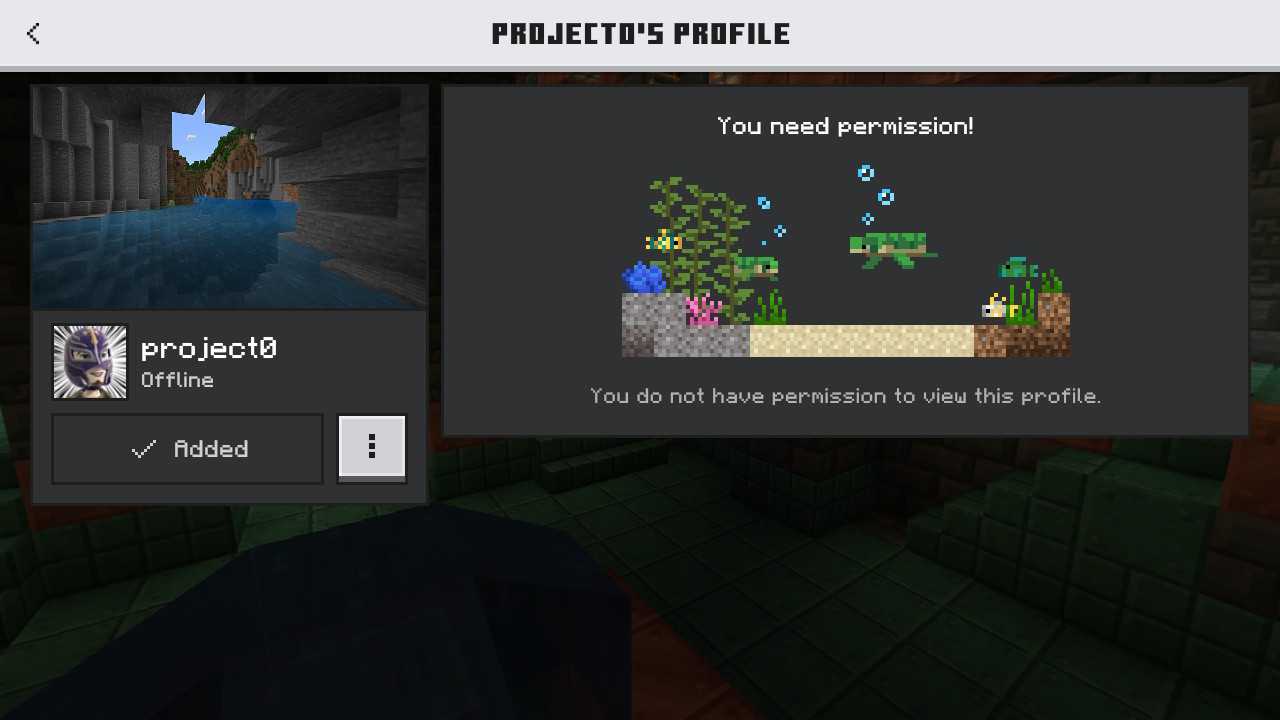
When clicking on friends in the friends tab to view their Player Profile, the screen says: "You do not have permission to view this profile."
This might be because of an Xbox Privacy Setting, but I'm reporting it just in case it is not intended.
Expected Result:
The Player Profile should load normally
.When clicking on friends in the friends tab to view their Player Profile, the screen says: "You do not have permission to view this profile."
This might be because of an Xbox Privacy Setting, but I'm reporting it just in case it is not intended.
Expected Result:
The Player Profile should load normally
Update: This only happens with other people's profiles, not your own profile.
When clicking on friends in the friends tab to view their Player Profile, the screen says: "You do not have permission to view this profile."
This might be because of an Xbox Privacy Setting, but I'm reporting it just in case it is not intended.
Expected Result:
The Player Profile should load normally
Update: This only happens with other people's profiles, not your own profile.
As @MaragiDev said, it means you can't find out other people's gamerscore, unlike before. Just add the new parts of the profile screen to the old one. (=stats)
I also own a Realm, and its just annoying that I can't look at people's profile that have (somehow secretley) joined my realm. So I can't work out their personality.
When clicking on friends in the friends tab to view their Player Profile, the screen says: "You do not have permission to view this profile."
This might be because of an Xbox Privacy Setting, but I'm reporting it just in case it is not intended.
Expected Result:
The Player Profile should load normally
Update:
This only happens with other people's profiles, not your ownprofile.As @MaragiDev said, it means you can't find out other people's gamerscore, unlike before. Just add the new parts of the profile screen to the old one. (=stats)
I also own a Realm, and its just annoying that I can't look at people's profile that have (somehow secretley) joined my realm. So I can't work out their personality.
When clicking on friends in the friends tab to view their Player Profile, the screen says: "You do not have permission to view this profile."
This might be because of an Xbox Privacy Setting, but I'm reporting it just in case it is not intended.
Expected Result:
The Player Profile should load normally
Update: Please can you reopen this issue as this issue isn't just about the Hardcore missing from the profile screen
When clicking on friends in the friends tab to view their Player Profile, the screen says: "You do not have permission to view this profile."
This might be because of an Xbox Privacy Setting, but I'm reporting it just in case it is not intended.
Expected Result:
The Player Profile should load normally
Update: Please can you reopen this issue as this issue isn't just about the
Hardcore missing from the profile screenWhen clicking on friends in the friends tab to view their Player Profile, the screen says: "You do not have permission to view this profile."
This might be because of an Xbox Privacy Setting, but I'm reporting it just in case it is not intended.
Expected Result:
The Player Profile should load normally
Update: Please can you reopen this issue as this issue isn't just about the Gamerscore missing from the profile screen
Please Reopen This. Its not just about the Gamerscore issue.
When clicking on friends in the friends tab to view their Player Profile, the screen says: "You do not have permission to view this profile."
This might be because of an Xbox Privacy Setting, but I'm reporting it just in case it is not intended.
Expected Result:
The Player Profile should load normally
Update: Please can you reopen this issue as this issue isn't just about the Gamerscore missing from the profile screen
WORKAROUND:
1. Go to xbox.com
2. Click on your avatars in the top right corner
3. Click Sign Out
(I'll finish the workaround later)
When clicking on friends in the friends tab to view their Player Profile, the screen says: "You do not have permission to view this profile."
This might be because of an Xbox Privacy Setting, but I'm reporting it just in case it is not intended.
Expected Result:
The Player Profile should load normally
Update: Please can you reopen this issue as this issue isn't just about the Gamerscore missing from the profile screen
WORKAROUND:
1. Go to xbox.com
2. Click on your avatars in the top right corner
3. Click Sign Out
(I'll finish the workaround later)When clicking on friends in the friends tab to view their Player Profile, the screen says: "You do not have permission to view this profile."
This might be because of an Xbox Privacy Setting, but I'm reporting it just in case it is not intended.
Expected Result:
The Player Profile should load normally
Update: Please can you reopen this issue as this issue isn't just about the Gamerscore missing from the profile screen
WORKAROUND:
1. Go to xbox.com
2. Click on your avatars in the top right corner
3. Click Sign Out
4. Go back to xbox.com
5. Sign in with a n Xbox family account owner
6. Close the tab
7. Reload this page
8. Click the link in @Jarl-Penguin 's first comment
9. Click on your username at the top
10. Change 'Whose profiles you can see on Xbox' to 'Everyone'.
Please don't make the workaround resolve this issue. Can you please change the Settings so by default it's set to 'Everyone'.
PLEASE REOPEN THIS! It's not just about the Gamerscore issue, it's about not being able to view people's profiles!

I tested it, it doesn't happen
Sorry, I forgot to test the issue in the latest version, it no longer happens, go ahead and Resolve it as Invalid.
If you leave game without closing it then entering it, you will be signed out of your NintendoAccountIf you leave game without closing it then entering it, you will be signed out of your NINTENDO Account
Does this issue happen still in 1.21.2?
Does this persist in 1.21.2?
When taking a Screenshot for Realm Stories, simulation and Render distance both decrease.
Notice in the video the fog goes out about 12 chunks from where it was during the screenshot.
Video: http://192.168.0.1/img/2024080716495000-11B64E28AD7A49CA9EC8AC007BE858C6.mp4
When going onto the Game Menu, clicking Settings, then exiting the Settings, the game resumes with no interaction at all.
Steps to Reproduce:
- Go onto a world
- Go to the Game Menu
- Click Settings
- Wait until the screen loads
- Go out of Settings
- Observe that the game resumes itself with no interaction
Observed Result:
The game resumes itself with no interaction at all
Expected Result:
The game doesn't resume instantly with no interaction. It should let you do other stuff on the Game Menu
Drop 2 blocks on the ground in the same place, and one of them rotates with the first one that was dropped. The second one dropped rotates around the first one.
Expected Result:
The items will merge together if they are both dropped onto the same block.
Drop 2 blocks on the ground in the same place, and one of them rotateswiththe first oneDrop 2 blocks on the ground in the same place, and one of them rotates around the first one
Drop 2 blocks on the ground in the same place, and one of them rotates
withthe first one that was dropped. The second one dropped rotates around the first one.Expected Result:
The items will merge together if they are both dropped onto the same block.
Drop 2 blocks on the ground in the same place, and one of them rotates around the first one that was dropped. The second one dropped rotates around the first one.
Expected Result:
The items will merge together if they are both dropped onto the same block.
Steps to Reproduce:
- Find a Trial Chamber
- You may find a blocked hallway
Expected Result:
It shouldn't be blocked and should lead to somwhere
Seed: 7306644533854031802
Coords: 70, -35, 201
Steps to Reproduce:
- Find a Trial Chamber
- You may find a blocked hallway
Expected Result:
It shouldn't be blocked and should lead to somwhere
Bedrock Edition affected info:
Seed: 7306644533854031802
Coords: 70, -35, 201
Steps to Reproduce:
- Find a Trial Chamber
- You may find a blocked hallway
Expected Result:
It shouldn't be blocked and should lead to somwhere
Bedrock Edition affected info:
Seed: 7306644533854031802
Coords: 70, -35, 201
preview affected info:
Seed: 7153671743751027767
Steps to Reproduce:
- Find a Trial Chamber
- You may find a blocked hallway
Expected Result:
It shouldn't be blocked and should lead to somwhere
Bedrock Edition affected info:
Seed: 7306644533854031802
Coords: 70, -35, 201
preview affected info:
Seed: 7153671743751027767
Steps to Reproduce:
- Find a Trial Chamber
- You may find a blocked hallway
Expected Result:
It shouldn't be blocked and should lead to somwhere
Bedrock Edition affected info:
Seed: 7306644533854031802
Coords: 70, -35, 201
Preview affected info:
Seed: 7153671743751027767
Coords: 202 -33 836
Please can someone try to reproduce this issue in Preview as I can't, because I play Minecraft on Nintendo Switch which doesn't have Preview.
Thanks @kelianor for testing on Preview
Deepslate blocks hallways in Trial Chambers in worlds created after 1.21
Steps to Reproduce:
- Find a Trial Chamber
- You may find a blocked hallway
Expected Result:
It shouldn't be blocked and should lead to somewhere
Bedrock Edition affected info:
Seed: 7306644533854031802
Coords: 70, -35, 201
Preview affected info:
Seed: 7153671743751027767
Coords: 202 -33 836
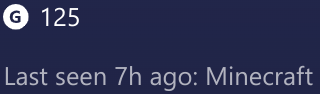
On Minecraft, it says my friends Gamerscore is 0/2930 in their profile.
On their profile at xbox.com, it says their Gamerscore is 125.
Steps to reproduce:
- Go to the Friends Tab
- Search [Friend's Gamertag]
- Go to xbox.com and click on your avatar in the top-right corner
- Click 'Xbox Profile'
- Click on your friends profile
Expected Result:
They are exactly the same
The Gamerscore is only from completing Minecraft Achievments!


Steps to Reproduce:
- Create a world with seed: 297
- Find the Bonus Chest
- Observe that the Bonus Chest generates without some of the torches
Expected Result:
Steps to Reproduce:
- Create a world with seed: 297
- Find the Bonus Chest
- Observe that the Bonus Chest generates without some of the torches
Expected Result:
It generates as shown in how_it_should_be.jpg
Steps to Reproduce:
- Create a world with seed: 297
- Find the Bonus Chest
- Observe that the Bonus Chest generates without some of the torches
Expected Result:
It generates as shown in how_it_should_be.jpg
Steps to Reproduce:
- Create a world with seed: 297
- Find the Bonus Chest
- Observe that the Bonus Chest generates without some of the torches
Expected Result:
It generates as shown in how_it_should_be.jpg
Steps to Reproduce:
- Create a world with seed: 297
- Find the Bonus Chest
- Observe that the Bonus Chest generates without some of the torches
Expected Result:
It generates as shown in how_it_should_be.jpg
Steps to Reproduce:
- Create a world with seed: 297
- Find the Bonus Chest
- Observe that the Bonus Chest generates without some of the torches
Expected Result:
It generates as shown in
how_it_should_be.jpgSteps to Reproduce:
- Create a world with seed: 297
- Find the Bonus Chest
- Observe that the Bonus Chest generates without some of the torches
Expected Result:
It generates as shown in ↘
When you press 'Respawn' on the 'You Died!' screen, the Game Menu button will appear instantly, and you click the Game Menu button instead. (touchscreen only)
I couldn't attach a video because it blocked me downloading it

When you press 'Respawn' on the 'You Died!' screen, the Game Menu button will appear instantly
, andyou click the Game Menu button instead. (touchscreen only)When you press 'Respawn' on the 'You Died!' screen, the Game Menu button will appear instantly after you press the 'Respawn' button, making you click the Game Menu button instead without realising. (touchscreen only)
2024081411072400-11B64E28AD7A49CA9EC8AC007BE858C6.jpg
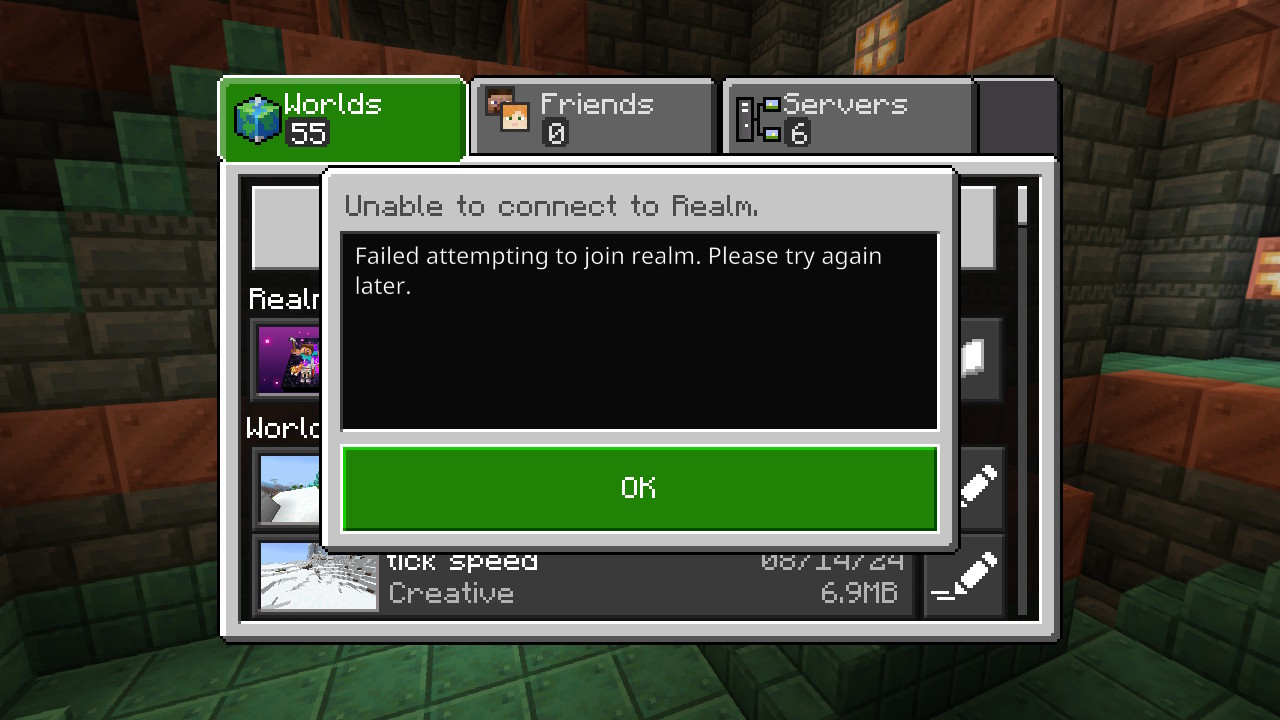

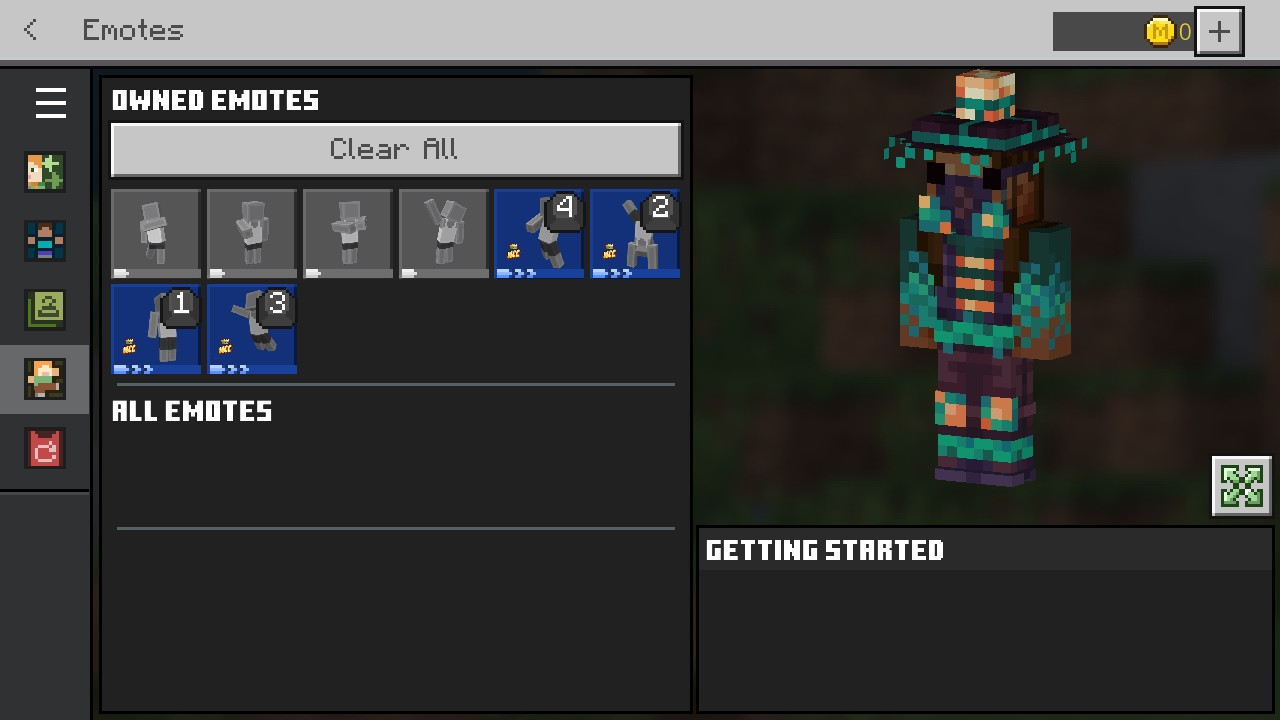
When changing Emotes in the Dressing Room, numbers appear as the keys to press when on Nintendo Switch.
Steps to Reproduce:
- Go onto a world
- Go to Game Menu
- Click Dressing Room
- On the sidebar, click Emotes
- Change 2 Emotes
Observed Result
After changing 2 emotes, numbers appear on the emotes as the buttons to press(Only possible to reproduce o
n Nintendo Switch)
When changing Emotes in the Dressing Room, numbers appear as the keys to press when on Nintendo Switch.
Steps to Reproduce:
- Go onto a world
- Go to Game Menu
- Click Dressing Room
- On the sidebar, click Emotes
- Change 2 Emotes
Observed Result
After changing 2 emotes, numbers appear on the emotes as the buttons to press(Only possible to reproduce o
When changing Emotes in the Dressing Room, numbers appear as the keys to press when on Nintendo Switch.
Steps to Reproduce:
- Go onto a world
- Go to Game Menu
- Click Dressing Room
- On the sidebar, click Emotes
- Change 2 Emotes
Observed Result
After changing 2 emotes, numbers appear on the emotes as the buttons to press.
Does this persist in 1.21.2?
On the World Selection Screen (as I call it), the Realm box appears blank (from what has happened, it only happens if you own a Realm)
Steps to Reproduce:
- Load Minecraft
- Click play
- Notice that the Realms box sometimes appears blank
Expected Result:
It loads fine.
Update: This happened before 1.21.20, so this should be reopened. Instead, the blank box replaces the 'Fetching Realms' loading screen.
Realmsbox appears blankRealms Box appears blank instead of saying 'Fetching Realms'
Does this persist in 1.21.2?
Realms Box on World Selection Screen appears blank instead of saying 'Fetching Realms'
Realms Box on World Selection Screen appears blank instead of saying 'Fetching Realms'Realms Box on World Selection Screen appears blank instead of showing 'Fetching Realms'
On the World Selection Screen (as I call it), the Realm box appears blank (from what has happened, it only happens if you own a Realm)
Steps to Reproduce:
- Load Minecraft
- Click play
- Notice that the Realms box sometimes appears blank
Expected Result:
It loads fine.
Update: This happened before 1.21.20, so this should be reopened. Instead, the blank box replaces the 'Fetching Realms' loading screen.
It still happens in 1.21.21.
On the World Selection Screen (as I call it), the Realm box appears blank (from what has happened, it only happens if you own a Realm)
Steps to Reproduce:
- Load Minecraft
- Click play
- Notice that the Realms box sometimes appears blank
Expected Result:
It loads fine.
Update: This happened before 1.21.20, so this should be reopened. Instead, the blank box replaces the 'Fetching Realms' loading screen.
It still happens in 1.21.21.
This shouldn't be marked as a Duplicate because it was affecting versions before 1.21.20. Now, the blank box just replaces the 'Fetching Realms' loading screen.
I REPORTED THIS ISSUE 7TH JULY 2024!
This has absolutely nothing to do with
MCPE-185254
On the World Selection Screen (as I call it), the Realm box appears blank (from what has happened, it only happens if you own a Realm)
Steps to Reproduce:
- Load Minecraft
- Click play
- Notice that the Realms box sometimes appears blank
Expected Result:
It loads fine.
Update: This happened before 1.21.20, so this should be reopened. Instead, the blank box replaces the 'Fetching Realms' loading screen.
It still happens in 1.21.21.
This shouldn't be marked as a Duplicate because it was affecting versions before 1.21.20. Now, the blank box just replaces the 'Fetching Realms' loading screen.
I REPORTED THIS ISSUE 7TH JULY 2024!
This has absolutely nothing to do withMCPE-185254On the World Selection Screen (as I call it), the Realm box appears blank (from what has happened, it only happens if you own a Realm)
Steps to Reproduce:
- Load Minecraft
- Click play
- Notice that the Realms box sometimes appears blank
Expected Result:
It loads fine.
Update: This happened before 1.21.20, so this shouldn't be resolved as a Duplicate of
MCPE-185254. Instead, the blank box replaces the 'Fetching Realms' loading screen.
On the World Selection Screen (as I call it), the Realm box appears blank (from what has happened, it only happens if you own a Realm)
Steps to Reproduce:
- Load Minecraft
- Click play
- Notice that the Realms box sometimes appears blank
Expected Result:
It loads fine.
Update: This happened before 1.21.20, so this shouldn't be resolved as a Duplicate of
MCPE-185254. Instead, the blank box replaces the 'Fetching Realms' loading screen.Sometimes, the blank box replaces half of the Fetching Realms screen.
Does this persist in 1.21.2?
Steps to Reproduce:
- Build this setup:
- Use a locator map
- Observe that they are the same colour on the map even though they are completely different blocks
Expected Result:
They each have their own colour.
Steps to Reproduce:
- Build the setup shown in setup.jpg
- Use a locator map
- Observe that they are the same colour on the map even though they are completely different blocks
Expected Result:
They each have their own colour.

Steps to Reproduce:
- Build the setup shown in setup.jpg
- Use a locator map
- Observe that they are the same colour on the map even though they are completely different blocks
Expected Result:
They each have their own colour.
Steps to Reproduce:
- Build the setup shown in setup.jpg
- Use a locator map
- Observe that they are the same colour on the map even though they are completely different blocks
Expected Result:
They each have their own colour.

Is this still an issue in the latest preview? (1.21.30.25)
Where does the button redirect you to?
Duplicate of
MCPE-85386
If replacing one add-on with another add-on, the game can crash in certain places in that world.
Steps to Reproduce:
- Get two add-ons
- Put one on a world
- Replace the current add-on with another add-on
- The game crashes in certain places
Expected Result:
The game runs fine, it doesn't crash every 5 minutes.
On Nintendo Switch, the issue is worst, the game just closes instead.
This issue is not caused by specific add-ons. Its also not a duplicate of MCPE-180342
If replacing one add-on with another add-on, the game can crash in certain places in that world.
Steps to Reproduce:
- Get two add-ons
- Put one on a world
- Replace the current add-on with another add-on
- The game crashes in certain places
Expected Result:
The game runs fine, it doesn't crash every 5 minutes.
- Note: On Nintendo Switch, the issue is worst, the game just closes instead. This issue is not caused by specific add-ons. It's also not a duplicate of MCPE-180342. The add-ons were from the Marketplace.
If replacing one add-on with another add-on, the game can crash in certain places in that world.
Steps to Reproduce:
- Get two add-ons
- Put one on a world
- Replace the current add-on with another add-on
- The game crashes in certain places
Expected Result:
The game runs fine, it doesn't crash every 5 minutes.
- Note: On Nintendo Switch, the issue is worst, the game just closes instead. This issue is not caused by specific add-ons. It's also not a duplicate of MCPE-180342. The add-ons were from the Marketplace.
If replacing one add-on with another add-on, the game can crash in certain places in that world.
Steps to Reproduce:
- Get two add-ons
- Put one on a world
- Replace the current add-on with another add-on
- The game crashes in certain places
Expected Result:
The game runs fine, it doesn't crash every 5 minutes.
Note: On Nintendo Switch, the issue is worst, the game just closes instead. This issue is not caused by specific add-ons. It's also not a duplicate of MCPE-180342. The add-ons were from the Marketplace.
If replacing one add-on with another add-on, the game can crash in certain places in that world.
Steps to Reproduce:
- Get two add-ons
- Put one on a world
- Replace the current add-on with another add-on
- The game crashes in certain places
Expected Result:
The game runs fine, it doesn't crash every 5 minutes.
Note: On Nintendo Switch, the issue is worst, the game just closes instead. This issue is not caused by specific add-ons. It's also not a duplicate of MCPE-180342. The add-ons were from the Marketplace.
If you would like to know the names of the addon replaced, it was the Magic Spells Add-on
If replacing one add-on with another add-on, the game can crash in certain places in that world.
Steps to Reproduce:
- Get two add-ons
- Put one on a world
- Replace the current add-on with another add-on
- The game crashes in certain places
Expected Result:
The game runs fine, it doesn't crash every 5 minutes.
Note: On Nintendo Switch, the issue is worst, the game just closes instead. This issue is not caused by specific add-ons. It's also not a duplicate of MCPE-180342. The add-ons were from the Marketplace.
If you would like to know the names of the addon replaced, it was the Magic Spells Add-on
Please fix this so I can add Tinkers Construct Lite to my Realm.
If replacing one add-on with another add-on, the game can crash in certain places in that world.
Steps to Reproduce:
- Get two add-ons
- Put one on a world
- Replace the current add-on with another add-on
- The game crashes in certain places
Expected Result:
The game runs fine, it doesn't crash every 5 minutes.
Note: On Nintendo Switch, the issue is worst, the game just closes instead. This issue is not caused by specific add-ons. It's also not a duplicate of MCPE-180342. The add-ons were from the Marketplace.
If you would like to know the name
sof the addon replaced, it was the Magic Spells Add-onPlease fix this so I can add Tinkers Construct Lite to my Realm.
Whenreplacing one add-on with another add-on, the gamecan crashsometimesWhen adding or removing any Resource Pack from a world, the game an crash to certain degrees depending on the pack added
Steps to reproduce:
Go into Minecraft dressing room
One of the skins may show 'reload' button that you cannot click, then when you scroll off it, it shows a loading icon that lasts forever. If you edit the dressing room, a classic skin will show.
Expected result:
button isn't there.
Steps to reproduce
Go into preview
Switch to new ui
Click some buttons on the ui
See how loud some are
Expected result
The buttons are all the same loudness
Steps to Reproduce
Go into preview
Switch to new ui
Click some buttons on the ui
See how loud some are
Expected result
The buttons are all the same loudness
Steps to Reproduce
Go onto Preview
Click 'Play Preview'
Notice that it crashes for a brief moment between screens
Expected Result:
doesn't crash
When playing silkscreen and second player looks up then down, the clouds for the first player disappearWhen playing splitscreen and second player looks up then down, the clouds for the first player disappear
![[Mod] Greymagic27](../../../data/avatars/users/92875.png)
GreasyBat735419 I thought so as well, and I did do that to start with, but MCPE-176952 has a fix version for the preview this is reported in, so it's most likely some parts that were missed or a new issue.
![[Mod] Jarl-Penguin](../../../data/avatars/users/92849.png)
GreasyBat735419: If they didn't kill all of the mobs the trial spawner wouldn't deactivate in the first place.
GreasyBat735419: Their previous report was resolved as Incomplete, so this does not count as a duplicate.
GreasyBat735419: No, it is not a duplicate. The issue you linked only covers the /locate command, not Explorer Maps.
GreasyBat735419: I'm not sure where you got the notion that they still end up at the World Selection Screen, there's no mention of that in this report.
We do not have enough information to find the cause of this issue.
Please record a video of this happening and attach it to this report.
In case the resulting video file is too large to be uploaded to the bug tracker directly, please upload it elsewhere (e.g. as unlisted video on YouTube) and link to it here.
This issue is being temporarily resolved as Awaiting Response. Once the requested information has been delivered, the report will be reopened automatically.
Quick Links:
📓 Bug Tracker Guidelines – 💬 Community Support – 📧 Mojang Support (Technical Issues) – 📧 Microsoft Support (Account Issues)
📓 Project Summary – ✍️ Feedback and Suggestions – 📖 Game Wiki
GreasyBat735419: Please do not use languages other than English on the bug tracker. You might want to read the Bug Tracker Guidelines.
GreasyBat735419: Please do not comment on issues unless you have additional information not already mentioned to add relating to reproducing a bug.

GreasyBat735419 The Seeds are in debug screen of preview, No need to ask for want to considering add
Here is a seed and locations found:
-2742265488410030732 1635.53 39.30 -2229.56

GreasyBat735419:
The preview isn't available on switch
I'm definitely using the Mojangles font as my default font.
Is there also a screen effect for Trial Omen?
Is the Bug Tracker able to accept bugs related with packs actually made by Minecraft from the Marketplace?
There is no bug with Minecarts with Furnace on MCPE, as they don't exist at all. There is no other Bedrock Edition project so this is not a bug at all. However Minecarts with Furnaces do exist on Java Edition.
Does the Bug still happen if you remove the texture pack?
There might have not been any bees in the hive at the time you broke it.
To scoop up an aquatic mob (e.g. Axolotl, Tadpoles, etc.), the aquatic mob needs to be in a water source block.
Only Pillagers can use the Illager banner.
If they are already holding a Crossbow, they can't pick up another.
This might be because a Villager was killed, and a new Villager spawned as a replacement.
I have experienced this issue, but the losing hunger side of the problem in Singleplayer.
I did experience a similar issue with Wardens despawning in Experimentals, so it might be linked to that.
This also happens to me on Nintendo Switch.
Does this persist in 1.21.2?
Does this persist in 1.21.2?
Does this persist in 1.21.2?
Does this persist in 1.21.2?
Does this persist in 1.21.2?
The but tracker can't accept issues in languages other than English unfortunately.
Does this happen on a non-Realms world?
Have you ever heard of the Stripelands on Bedrock? That's what causes this bug.
This might be because the Xbox has more powerful graphics and therefore, it has another graphics toggle.
Yes
This is normally to do with players using commands to change their skin in game of importing images to their skin in the dressing room.
The new cape is the MCC cape
also the site is for bug reports only, your second paragraph is feedback
Extra info: this only happens with other people's profiles, not your own profile.
You haven't actually described the bug, you've just put how to make a bubble elevator
Are you exiting the minigame after the cake baking section? For the ingredients to count, you need to complete the rest of the Grid Runners minigame. (the Grid Runners minigame is where you do the challenge)
For the ingredients to count, you need to be wearing the Purple Pandas beanie, which you can get by exiting the main lobby to Meltdown (don't enter the portal), turn right just as you go to the Meltdown part, go around the Ender Cup and to the shop on the left and interact with the villager at the shop. The beanie costs 250 MCC coins.
To place the ingredients in the challenge, interact with the cake whilst holding the ingredients, and make sure the cake isn't full of the ingredients you are placing.
Try going to Settings > Account > Sign out of Microsoft account, then log back in. Your progress will be saved (hopefully!).
Hope you can get it sorted.
One of my Minecraft friends experiences this issue on IOS.
Been an issue since 1.20.32
Can confirm for 1.20.70, 1.20.71, 1.20.72, 1.20.80, 1.20.81, 1.21.0, 1.21.1 and 1.21.2. Happens to me in the End dimension on Realms on Nintendo Switch and IOS
Happens to my friend on IOS.
Has happened to me on the free Farm Life map from the Marketplace on Nintendo Switch, but I'm not sure if it's to do with this bug, or just an error/crash.
Been an issue for my friend on IOS since 1.20.32 (first time we ever played on Multiplayer)
Can very occasionally happen on Realms on IOS.
Oak Slabs are part of the Wooden Slabs family.
Petrified Oak Slab breaking tool is a pickaxe.
OaI Slab breaking tool is an axe.
Not a bug, you're just using the wrong tool.
(I got this info from The Minecraft Wiki)
The full block you were breaking was an Oak Double Slab block. Does an Oak Planks block have the same breaking time as the Double Slab in your bug world?
Minecraft Wiki doesn't say breaking times for Wooden Double Slabs.
The only servers I know of that use your actual skin are Cubecraft and Enchanted Dragons. All others (to my knowledge) replace your skin with a different skin. To have your normal skin on the Hive, you'll need to purchase the Hive+ Rank, which costs just over 1000 minecoins. This happens across other devices.
Can confirm in all versions since 1.20.32.
I tried to reproduce this issue but the game just closes, basically what you said in the second paragraph.
One of my friends on IOS Minecraft said that it happened to them with only 6 add-ons, bugging a few blocks like mangrove propagules, leaves and fences.
They did this on a superflat world with these addons:
Another Furniture
More TNT!
ALL THE WOOL
Gravestones
(and the other 2 free Add-Ons excluding DRAGONFIRE Lite, 15 Year Party Supplies, Poisonous Potato, and LUSH Bath Bombs)
In the new images on these report, it also doesn't look as bad as it did before 1.21.
2024080618062200-11B64E28AD7A49CA9EC8AC007BE858C6.mp4
Tried reproducing issue on console (Nintendo Switch) with 15 add-ons with 'Remove Texture Limit' on and textures were fine.
When Realms Plus gets more add-ons I'll try reproducing it again.
30sec Video☝Plus one picture of world
I just added 2 Add-Ons to my Realm and Deactivated 2 Add-Ons as well (basically replacing them), I've tried to join my Realm twice now and the game just closes.
This happened on Nintendo Switch Realms with these add-ons:
ACTIVATED:
Furniture Add-on by xp games
MORPH Add-on (the one originally called Morph Gauntlet add-on)
DEACTIVATED:
Another Furniture by Starfish Studios
Mob Armor Add-on
I'll try removing Spark Portals and see what happens.
IT WORKED... ...only for about 15 seconds...
Then the game just closes itself.
Since I do use a Nintendo Switch to play Minecraft, this may be an issue with it not being able to handle all the Add-Ons
I did fly over an area which previously had blocks from the Another Furniture add-on, maybe it just didn't remove the add-on properly.
Sadly I don't own an Xbox or a PC, so I can't just move to on of them to sort of fix the issue.
Realm is working again (or is it)
For me, the game only logs me out of my Nintendo Account, sometimes my Microsoft Account.
See
MCPE-185023You need to deal 9 hearts of damage in ONE strike (e.g. by enchanting a sword, using a potion, etc.)
This isn't an issue with Minecraft, it's an issue with the Google Play Store
The issue is about me not being able to view their profiles, not them viewing mine.
This may relate to
MCPE-183898I've customised them, but It still highlights the wrong emote when emoting as you can see in the video
Did you test it on Preview??
Y'know there is a way to customise the controls? Just go to Settings > Controls > Customise Controls
Does this effect the latest preview?
I know you say that it affects all versions of Minecraft, but I'm just checking
The fog does come in, but that does hide some stuff in the image.
You need to include:
Description
Steps to Reproduce
Observed Result
Expected Result
This isn't a duplicate!!!!!!!
I've attached a photo, is that ok?
Switch doesn't have Java Edition.
It doesn't have Preview either.
Do you mean Hotfix?
Duplicate of another bug report.
Duplicate of
MCPE-176952Not exactly the same as this one, so no
Yes
But it's already Resolved, how can you track a Resolved issue?
This is more like a feature request than a bug.
if you would like this ingame, put a suggestion at feedback.minecraft.net
There is nothing beyond the deepslate, it's a hallway that goes into Deepslate and that's where it ends.
Duplicate of
MCPE-183864WORKAROUND:
1. Go to xbox.com
2. Click on your avatars in the top right corner
3. Click Sign Out
4. Go back to
MCPE-1838645. Sign in with an Xbox family account owner
6. Close xbox.com
{} tab7. Reload
MCPE-1838648. Click the link in @Jarl-Penguin 's first comment on
MCPE-183864Can't view Friends Player Profile9. Click on your username at the top
10. Change 'Whose profiles you can see on Xbox' to 'Everyone'.
Skin viewer being missing from the new profile screen is tracked at MCPE-184075
Do your friends player profiles work??
If you do bring the skin preview back, on touchscreen devices (Nintendo Switch, IOS, Android, ChromeOS), can you make the skin preview rotatable? (on the home screen, you are able to rotate the skin preview above the Dressing Room button)
The game probably hasn't logged in properly and therefore the button will be greyed out.
Are you using PS5? This is more likely a bug on PS5.
Also, your bug report says that your version is 1.21.3 (PlayStation), but your platform is Windows. Is your platform PlayStation, or Windows?
Are you using Add-Ons or a Texture Pack? I sort of feel like you haven't provided enough information about the issue.
In your inventory, you have a custom item. This must mean you have a Resource Pack/Add-on installed. Can you try reproducing this issue in a world without addons? If you cannot reproduce this in a non-modified world, it's probably an issue with the addon.
I think this is related with a bug where structures disappear when getting close to them, and (I think) is still a bug in the latest version. (I forgot the code label thingy for it😒)
I can't really make sense of what you are saying🙂
Can you also attatch a video of the bug?
You can only report bugs on the bug tracker if you are playing the current version of the game.
If you are using the PS5 Preview, always write 'PS5 Preview:' in the title of the report.
Basically the stone toggle should show 'Stones' instead of 'Stone'
THIS IS A WORLD CORRUPTION GLITCH
This happens sometimes if you've had your world for along time and unfortunately the bug tracker can't accept World Corruption glitches.
Remember: Make a copy of your world every so often
If you are using a Realm, you can revert to an older version of your world, fixing this.
Some villages are smaller than others, meaning that not all villages spawn Iron Golems anyway.
Duplicate of MCPE-181941
Do you mean you have to click down hard on the hotbar to select an item?
Duplicate of
MCPE-184850You need to click on Edit World (pencil icon next to world name), then click Resource Packs, and activate them from there. Downloading them to your device makes no difference.
Does this only happen on Realms?
This could be a bug with the Nintendo Switch itself. When did you last update your Switch?
This bug happened in a New world in 1.21
@kelanior the other report says that it was experienced in a world from 1.20.
@netguru2k
Did you do this on one world, or did you do test it on multiple worlds? After some of my testing, I found that this bug happens to different degrees across different worlds.
MY TESTING:
(Normal World - Some crashes. Realm - Quite a few crashes in certain places)
@samirueedi
Hotfix is a version that does not have a 0 at the end of it or it just fixes a few bugs.
Only profiles with a highlighted name can mark a report as a Duplicate.
The reason Duplicates aren't wanted because it makes it harder for Mojang to track issues.
I do not have enough information to reproduce this issue.
The following format is expected for all reports
Steps to Reproduce:
1.
2.
3.
Observed Result:
Expected Result:
Notes: (optional)
Attatchments: (optional, but should not replace the summary)
Is there a corridor coming out of the side without a Copper Bulb? This is probably the cause of it, as Trial Chambers don't have to be symmetrical
@samirueedi
Sorry for confusing you.
Yes, Minecrafts current version is a Hotfix. (Hotfix is the name for a bug fix version)
Did your friend accidentally change any of their Xbox Privacy Settings? You can find these by going to xbox.com and signing in with an Xbox Family Account owner (must be an adults account), or an Adult Xbox Account.
To get to the settings, click your avatar, and somewhere in the window opened will show 'Manage Privacy Settings'. Click on this for your privacy settings.
Note: Even though it says an Xbox Account, it doesn't matter about your platform at all.
Sorry if all of that is confusing, it's not my fault, it's just how Microsoft have done it.
[Tut mir leid, dass ich Sie verwirrt habe.
Ja, die aktuelle Version von Minecraft ist ein Hotfix. (Hotfix ist die Bezeichnung für eine Version mit Fehlerbehebungen)
Hat Ihr Freund versehentlich seine Xbox-Datenschutzeinstellungen geändert? Sie finden diese, indem Sie auf xbox.com gehen und sich mit einem Xbox-Familienkonto (muss ein Erwachsenenkonto sein) oder einem Xbox-Konto für Erwachsene anmelden.
Um zu den Einstellungen zu gelangen, klicken Sie auf Ihren Avatar und irgendwo im geöffneten Fenster wird „Datenschutzeinstellungen verwalten“ angezeigt. Klicken Sie darauf, um Ihre Datenschutzeinstellungen anzuzeigen.
Hinweis: Auch wenn dort ein Xbox-Konto steht, spielt es überhaupt keine Rolle, auf welcher Plattform Sie sich befinden.
Tut mir leid, wenn das alles verwirrend ist, es ist nicht meine Schuld, sondern einfach die Art, wie Microsoft es gemacht hat.]
ps I copied in my comment in German to save you translating it as from your attachments your language is German.
I do not have enough information to reproduce this issue.
The following format is expected for all reports
Steps to Reproduce:
1.
2.
3.
Observed Result:
Expected Result:
Notes: (optional)
Attatchments: (optional, but should not replace the summary)
FINALLY THIS IS BEING FIXED!
This is being fixed!!!!
Duplicate of another bug report
To play on multiplayer, even on PS, you need an Xbox Account, then click Sign In at the left of the Home Screen on Minecraft.
Version number is shown in the bottom right corner of the Home Screen of Minecraft. The latest version for PlayStation is 1.21.3 (PS4). (As of 13/08/24
For all PS5 Preview reports, always write '(PS5 Preview)' at the start of the Summary (title).
Child Xbox accounts have Privacy Settings which you can get to by going to xbox.com, clicking 'Sign In' in the top right corner, and signing in with an Xbox Family Accounts owner (always an adult account), click on your avatar, and clicking Xbox Profile, then clicking the cog icon in the top right corner, and clicking 'Manage Privacy Settings', and clicking your child's camera at the top. I'm not exactly sure what to click, but, based on your report, click the required opton onto Friends.
To then play in multiplayer, click on the Friends tab, and click 'Add Friend', search for your friends gamertag, and click the person icon to the right. Repeat this with the other account.
To then play splitscreen, connect 2 PlayStation controllers to the same console.
I'm having the same issue aswell, my connection is fine, but I can hardly play Minecraft now since I can't access Achievments, Marketplace, Realms, Realms Stories, and other things. I have had to wait 5 minutes for Realms to load.
This seems more of an issue on Nintendo Switch.
Yes
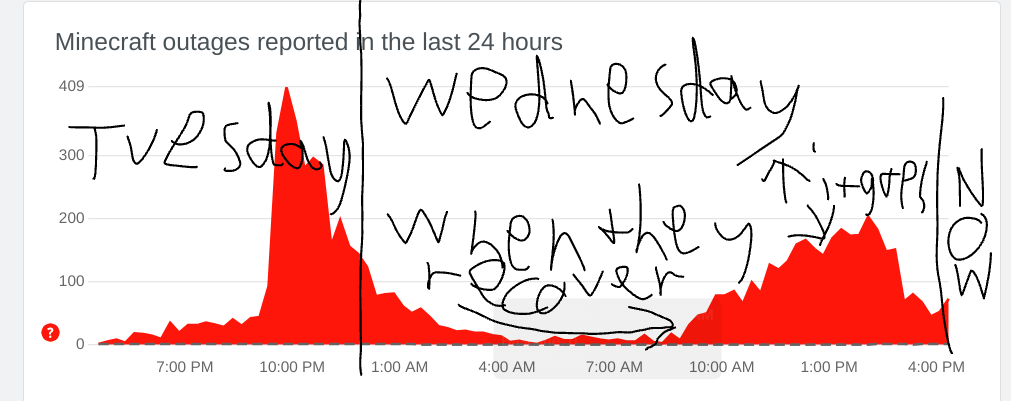
This also affects joining featured servers. Mojang, this should be your main priority today please.
Probably relates to
MCPE-185254Probably Relates to
MCPE-185254Probably Relates to
MCPE-185254Duplicate of
MCPE-185254Duplicate of
MCPE-185254Duplicate of
MCPE-185254Duplicate of
MCPE-185254Duplicate of
MCPE-185254Please attach a video of the issue.
A resolution is when an action has been taken by Mojang to either mark it as Fixed, Incomplete, Awating Response, Invalid, Works as Intended, Cannot Reproduce, or Duplicate. If it is Resolved, it doesn't always mean it is fixed.
@4bdullah_05
This happens on all platforms, not just mobile.
I can see my Realm after 5 minutes of waiting, I can definitely NOT manage it, and I can not play on it either. I have done several attempts, and the game always says, 'Unable to connect to Realm'. This is becoming a serious bug on Bedrock today, and needs to be fixed ASAP. I personally would suggest that you could release a Hotfix tomorrow asap to fix this bug. I also cannot access the Marketplace!
My Realm is now appearing but I doubt it will let me onto it. All I am now experiencing is long load times.
And here we go again. I actually have to click Manage Realm on the three slots screen.
Great. Now the new little button takes ages to load.
You say you've fixed it. Clearly it hasn't.
At least the loading screen for Servers actually loads.
And servers are working!! (realms aren't~)
WORKING SERVERS:
The Hive (Featured)
Enchanted Dragons (Featured)
NOT WORKING SERVERS:
Every single Realm in existence
Galaxite (Featured)
CubeCraft (Featured)
Lifeboat (Featured) (i clicked on Lifeboat and it placed me in CubeCraft!) (then the game just closed)
Please only submit one bug per report.
Ray Tracing is only available on certain platforms with MC Preview.
The Bug Tracker unfortunately cannot accept bugs related to Add-Ons.
Realms not working is tracked at
MCPE-185254Featured Servers cannot be joined via the Friends tab.
if you would like to play with your friend on a server, join the same server as they are on.
Relates to
MCPE-185254Can you change the image extension to .jpg ? My device couldn't load it.
Your not supposed to be able to join Servers from the Friends Tab.
But it's definitely a bug if you can't join your Friends World.
Have you been able to join your Friends World in the past?
When someone is playing Minecraft, they have to be on a World for them to be marked as Online.
I have seen a few duplicates of this bug across the Bug Tracker.
Probably Relates to
MCPE-185254I have been unable to reproduce this because of
MCPE-185254!!!Y'know Realms doesn't even work anyway in the new update! See
MCPE-185254Mojang are working to fix
MCPE-185254Try searching 'How to update Minecraft for windows ' in Google
Is this still an issue in 1.21.20?
Their Gamerscore is only from completing Minecraft Achievments. They do not play any other game with their Xbox account.
Please read @Jarl_Penguins comment and my first comment!
Duplicate of
MCPE-185254Duplicate of
MCPE-185254All players must be on the same network as you and must have a PlayStation account
Is this still an issue in the latest version? If so, please add it to 'Affected Versions'
Is this still an issue in the latest version? If so, please add it to 'Affected Versions'.
It may be difficult to test this bug in the latest version due to
MCPE-185254.Please only comment in English.
Also sixtenvertigus, that loading tip Works as Intended
Basically yesterday morning (BST), everything that required an account was down.
Now, it's just Realms that has the problem. Mojang are working as hard as they can to solve the problem, it's probably their main priority.
Attachment 22 from me is as of 4pm UK time 14/08/24 (date in UK format)
Duplicate of
MCPE-185254Duplicate of
MCPE-185254Duplicate of
MCPE-185254Please attach a screenshot. On Nintendo Switch, to take a Screenshot, click the square button with a circle in it at the bottom of the left joycon. Then click the home screen, and click album from the buttons at the bottom, and click on the screenshot you just did. Click A, and click 'Send to Smart Device, and scan the QR Codes.
Relates to
MCPE-185254Your character will change every time if you don't have a Microsoft Account.
DUPLICATE OF
MCPE-185254I'm sure that there was a New Hotfix released? There will definitely be another one soon due to
MCPE-185254You need to crouch to cancel the fall damage.
DUPLICATE OF
MCPE-185254DUPLICATE OF
MCPE-185254Duplicate of REALMS-11961
IOS. That's it
Duplicate of
MCPE-185254Finally my Realm is working!!!
That is just how the texture.pack does it, it's not a bug, but it could be a bug with the Texture Pack.
Are you on a Realm? You may have difficulty being on a Realm due to
MCPE-185254All this Hotfix does is improved reliability of Realms, but yes, I am also having trouble updating on Nintendo Switch.
Please change platforms to 'Multiple'
Are you updated? The latest client version is 1.21.21, released at around 11:00 BST
I can't download the Hotfix either. Mojang, what's the point of releasing an update no one can use?
Have you actually updated to 1.21.21? (as it is very difficult indeed😅)
Is this still an issue in the latest version?
The latest version of Nintendo Switch is 1.18.0. I actually meant 18.1.0
I do not have enough information to reproduce this issue.
The following format is expected for all reports
Steps to Reproduce:
1.
2.
3.
Observed Result:
Expected Result:
Notes: (optional)
Attatchments: (optional, but should not replace the summary)
I do not have enough information to reproduce this issue.
The following format is expected for all reports
Steps to Reproduce:
1.
2.
3.
Observed Result:
Expected Result:
Notes: (optional)
Attatchments: (optional, but should not replace the summary)
This is related with a Marketplace pack. Issues related with third-party Marketplace Packs are not accepted here.
DUPLICATE OF
MCPE-185254Do you mean the loading tip where it shows: The world of Minecraft is endlessly surprising... ...Garbled Characters ?
That is how it should be, so it's not a bug.
Duplicate of
MCPE-185254Your report doesn't contain enough information about your issue.
Oh, that's why I couldn't update!
Thanks @Hangekisobu
Why do Nintendo need to check it? It's just improving reliability for Realms!? So when are they releasing it?
Duplicate of
MCPE-185254So we update from the eshop..?
Please only put one bug on each report.
From my testing, you need to look out for Tuff Bricks on the side of the hole. It doesn't send you through the Chamber ceiling.
If that chunk where the Trial Chamber is was already generated before 1.21, the Chamber will not generate in that chunk.
I think this is now it's supposed to be.
I've just remembered, it's only supposed to contain 64 items in total of ANY item, so this is a bug.
Do you mean that the tabs are muddled up on the toolbar?
Please attach a screenshot showing the issue.
Basically only Realm Owners (like me) have this problem (I haven't been on Minecraft for last 6 days although, I don't know if it still occurs for me)
Does this only affect Realm Owners in a certain country/continent? My Realm was working a week ago. (Btw I'm in UK)
Please attach a video of the issue and update the description.
Please attach a video showing the issue.
Does this only happen on Realms? If so, please report it on the Realms project.
This may be an issue wit h the addon, please text in a non-modified world.
Duplicate of
MCPE-183157The game is asking you to click on the Stone in your hotbar, try clicking that.
This is because of the size of the item's icon.
Everything is working for me, but why abandon the issue whilst there's still players with this problem!? 😟
Is this still an issue in the latest version?
Are you definitely killing all the mobs?
Do you have any Resource Packs activated?
Do you have any Add-Ons applied to the world?
This isn't really a problem. All that happens is the screen turns black, but it still takes you to the World Selection screen, so why is it an issue?
And what do you expect to happen?
Duplicate of MCPE-182470
@Jarl-Penguin It happened to me.
Do you have any Resource Packs activated?
I know what the reporter means: from the image, they're showing that they can get over 64 items in total when the limit of items inside the Bundle is only 64 of any item.
All you need to do is just wait until a bit later and the problem may be fixed. For more info about the error codes go to the error code page at the Minecraft Help Center
A possible solution to see if the 2GB limit is imposed by Nintendo or Minecraft is to find another game that you can download packs in game for and see if it only allows you to take up 2GB of space. If it only allows 2GB of space then Nintendo have set the restriction. If you can go over 2GB then it's a bug within Minecraft.
I'd suggest if the restriction is done by Nintendo is to tell Nintendo about the issue and request removing the 2GB limit per game per profile.
You can find out your current version of Minecraft by looking at the bottom right corner of the Minecraft home screen.
Minecraft latest version is: v1.21.21
Please add a video of the issue
Relates to MCPE-185536
Please only comment in English.
Also, what do you mean by 'Redstone saw'?
Please also specify which Experiments are enabled.
Duplicate of MCPE-185947
@Jarl_Penguin
This shouldn't be marked as a Duplicate because it was affecting versions before 1.21.20. Now, the blank box just replaces the 'Fetching Realms' loading screen.
This has nothing to do with
MCPE-185254Your picture shows you in a server which sometimes get laggy at times. Please reproduce in a normal world.
Also make sure you're updated to the latest Android version.
If you want your but report to be noticed, create a new ticket about it.
Are you using Realms? If you are, report it on the Realms project.
Please also attach the seed and coords of where this happened.
Please don't complain about bugs that have been fixed on the Bug Tracker.
Don't duplicate your own bugs. It generates unnecessary tickets!
This was also NEVER a feature of Minecraft. Players were just using it for their convenience whilst it lasted.
According to the Minecraft Wiki, the only intended renewable way of obtaining sand is from a Wandering Trader
Sometimes I've experienced this a bit (just a few mobs over)
For me, the site directs me to the correct Wiki
@[MCPE Helper] Aspergerian
This is still an issue. When you type a symbol into a world name, it still converts to the Unicode font.
It's fixed for signs, but not any where else. (please reopen this)
Please attach a video of the bug.
To record a video on Nintendo Switch, press and hold the square button with a circle on the left joy-con, click Home, and click Album from the buttons at the bottom. Click on your video, click A, click Send to Smart Device, and scan the QR Codes on screen with your smart device. Then Left click on the video, click Save Video as, and then click End at the bottom of the screen of your Nintendo Switch. Then come back into this report, click Browse, and attach your video.
Do you mean the new sound are too quiet, or all of them are too quiet?
You can only report one issue per ticket
Try clicking the bell icon in the bottom left corner of the Home Screen of Minecraft.
Also check if you have the 660 Minecoins and the DLC by Pixelbiester in the Marketplace. (That's the compensation)
Are your joycons/Controller charged? They may have low battery.
It may have generated with Dripstone in another Snapshot, but then it may have changed. (I'll check if Bedrock has the dripstone)