 Hartspoon
- Hartspoon
- hartspoon
- Europe/London
- Yes
- No
 MC-47721




A thin border appears around the skin secondary layer's boxes, despite the fact that this layer is completely empty (filled with transparent pixel), except for the nose in the middle of that skin's face, which is on the secondary layer, but not even touching the edges of the "hat" box.
The border seems to blink and move, each pixel appearing and disappearing according to the position of each body parts relatively to the camera.
The border clearly appears on the bottom of the head, in the first image attached. It's seems to be yellow where the hat texture connects to the right arm texture, but black where the pixels are transparent.
I attached the skin file for clarity. It is indeed in the new skin format.
I noticed this with both OpenJDK and the official Oracle JRE, with those versions:
- OpenJDK Runtime Environment (IcedTea 2.4.4) (7u51-2.4.4-0ubuntu0.13.04.2)
- Java(TM) SE Runtime Environment (build 1.7.0_51-b13)
Linux (Ubuntu 13.04)
Java 7 (OpenJDK Runtime Environment (IcedTea 2.4.4)or Java(TM) SE Runtime Environment (build 1.7.0_51-b13))Linux (Ubuntu 13.04)
Java 7 (OpenJDK Runtime Environment (IcedTea 2.4.4) or Java(TM) SE Runtime Environment (build 1.7.0_51-b13))
Linux (Ubuntu 13.04)
Java 7 (OpenJDK Runtime Environment (IcedTea 2.4.4) (7u51-2.4.4-0ubuntu0.13.04.2) or Java(TM) SE Runtime Environment (build 1.7.0_51-b13))
I believe it works as intended too. The line is just drawn over the scene graph, it's not a 3D object.

Anon Ymus This is not a duplicate of MC-44521 as Hartspoon commented it. Simple way to reproduce the bug :
1. Create a random scoreboard objectives : /scoreboard objectives add random dummy - /scoreboard objectives setdisplay sidebar random
2. Setup a hopper clock runing on a commandblock with this command : /scoreboard players add @a random 1
3. You will see your score increasing
4. Kill you with the /kill command : your score doesn't increase anymore (the @a couldn't find you)

This is not a dupe. Every new line (created by a word wrap or manually, with the return key) is coloured with the last colour marker used in the page. You can try it directly in vanilla Minecraft and see it happening without any third party tool or command block involved.
Try pasting this in a Book and Quill, for exemple:
black §2green§r black
black §4red§r black
black black black
The words should be coloured according to their meaning, but they'll be coloured this way instead:
black green black
green red green
red red red
This bug is absolutely not resolved, nor a duplicate of
MC-31113.I encountered the same problem, and it seems that it comes from the target selectors (@a, @p and @r), and not the scoreboard.
"/testfor @a" will ignore dead players until they respawn, but if you try "/scoreboard players list <player>", the deathCount objectives will be correct, even before the respawn. It's also clearly visible if you display the score in the sidebar. So it seems that the problem truly comes from the selectors, not the scoreboard.
I would advise you to do some tests around those additional informations and then update this issue, as it would help resolving it.
(ps : Bonjour aypierre ! Bon mapmaking ^^)
By the way, I wonder if this modification hasn't been made on purpose, since ignoring dead players can make sense in some cases (see
MC-33778, which precisely asked for selectors to ignore dead players), but it completely breaks death detection as we know it, and there is no way to differentiate a death from a simple disconnection with the new behaviour.This "bug" has been fixed, and we can't detect the death of a player until he hits "respawn". Perfect. As said Jesper, the old behaviour might have seemed weird sometimes, but at least it was useful. Now, dead players and disconnected players are indistinguishable...
This bug has been marked as duplicate of
MC-44521, andMC-44521has been corrected in the last snapshot, but this bug hasn't, proving that this bug isn't a duplicate.Again, this bug concerns dead players who haven't respawned yet. Not player who died at some point before, as
MC-44521was about, but player who died and haven't clicked on the respawn button.So either this change in the selectors' behaviour is intended (despite not being mentioned in any changelog), and this bug should be marked as "Work as intended", or it isn't, and it should be reopened.
Without surprise, it affects 14w05b.
Yep, weird behaviours that could already have been avoided with the right arguments in the target selectors. Now, there's no choice, dead players are considered disconnected. Great.
And how can we be so sure that the previous "bug" wasn't the one working as intended?
Everything worked fine, everything was already possible, and the only ones complaining were a few people who couldn't bare the hassle of narrowing their player selection via the scoreboard. Well, now they might be super happy, because that's the only option left. It breaks every pvp map in existence? So what? Who plays pvp anyway?
Since Dinnerbone plays Ultra Hardcore Challenges too, I'm pretty sure he'll see the problem soon. aymeric pierre, try to contact Searge too (SeargeDP on twitter), he worked recently on target selectors so maybe he has something to say about it. I tried to reach them via twitter but without success, so I wish you good luck through irc.
But what if you want to detect players dying in a particular zone?
Before this bug, you just add to set a deathCount objective and do "@a[score_death=0]" and voilà, dead players wouldn't be counted.
But if the new behaviour have to exclude them by default, if that's going to be mojang position from now on, then I think a good solution would be something along what Aucordier Jason and aymeric pierre proposed: An additional argument. By default, dead players would be excluded, why not, but you would still have the option to include them back .
That's true. Good suggestion.
But I don't think setting boundaries to the selector to exclude dead players is a good solution anyway, as it is quite non-intuitive. An additional argument to explicitly include or exclude them, on the other hand, would be pretty clear. I know that this is still not the suggestion tracker, but hey, just sayin' (:
Thank you Searge !
No dude, it's the other way around. No radius selects everyone. @a = all players, @a[r=*] = alive players. ^^
This is indeed a duplicate of
MC-11801, but it should be noted that I'm affected by it since Minecraft 14w04a. It never occurred before.I'm affected by it since the new skin format, it never occurred before to me. Something changed and made it more widespread, apparently.
For spiders climbing on soulsand, they've always been able to do that. Always. Their so-called inability to do that is an urban legend.
I can confirm. It seems to only affects /testfor. And while "/testfor @a[score_dead_min=1]" does work as intended, "/testfor @a" or even "/testfor @a[score_dead_min=0]" do not.
It means that you can detect dead players, or alive players, but not both at the same time.
Ladislav Bielko is right.
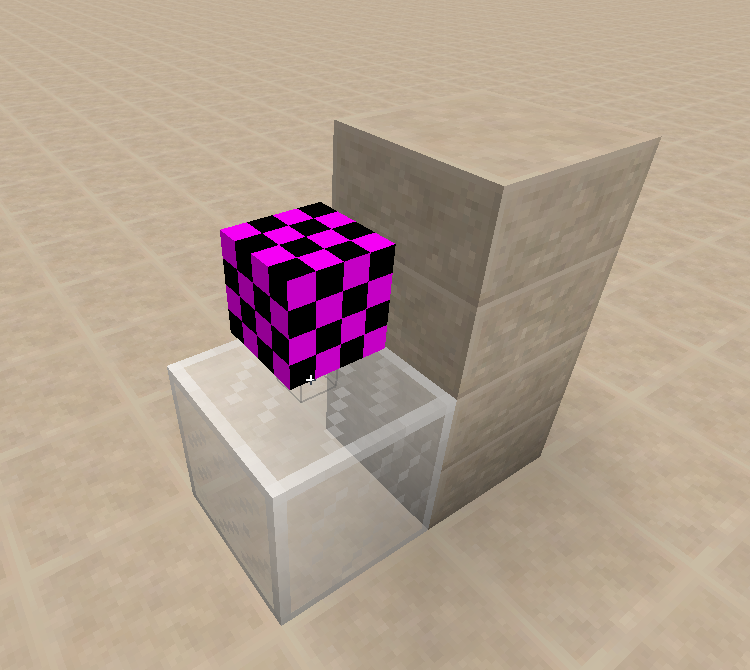
Actually, every time you try to place a torch or a redstone torch in a valid location, where there is a valid block face where the torch can be attached (top or side of a solid blocs), but while pointing at an invalid face instead (the bottom of a block or a transparent block), the torch will first try to attach itself to the invalid face, before being moved to a valid face. During the short time when the torch hasn't be moved, it appears as a small box with missing texture.
I attached two screenshots, the first one shows the torch being placed on the white stained glass, the second one shows the torch being moved to the sandstone block. Note the cursor pointing at the glass.
Shouldn't this issue be reopened since the fix doesn't properly work?
Or should we open a new issue since it's technically a different bug, despite the fact that it's kind of part of that one?
Still a concern in 14w06b.
And yes, as Anthony Spargo stated, the inconsistency is also chunk related, in addition to the other problems. And I've also seen working chunk suddenly not working.
Beacons don't need 14 blocks of air above them, nor to be less than 14 meters under the celling.
This is probably related: Creating a superflat world with a layer of torch will produce a infinity of little boxes missing their texture, with torches reappearing randomly every chunk update.
Also note that many of the villages' wooden doors had their texture missing, notably when placed east to a bugged torch, but also without any proximity to any torch. Quite weird.
Still a concern in 14w06b.
I have the 400 blocks under a 20*20 area covered with the /fill command completely lit with sunlight. Weirdly enough, it didn't prevent monsters from spawning beneath it. I guess the glitch is purely visual.
Not a bug, Work as Intended.
Picking blocks with the picking key alone isn't supposed to copy the NBT data.
On the other hand, CTRL+[PICK_KEY] should, and it doesn't work with skulls.
So there is indeed a bug, but with ctrl+pick, and since 14w07a only.
@Anon Ymus: Since you marked this issue as fixed, do you plan on reporting the bug I mentioned in my previous comment? Because there is truly a bug around skulls.
I can create a new issue, but I'd like to have your point of view on the matter.
Thank you!
I've found naturally generated blocks up to y=244 in amplified worlds.
The wiki's not an official source of knowledge about Minecraft to decide if a feature is intended or not. If bows affected hunger, the wiki would say "shooting an arrow with a bow affects hunger". It only describes the game as it is, not as it should be without any bug.
It seems pretty clear that shooting hundreds of arrow should, somehow, affects hunger. It may be related to
MC-31047. And it might as well be for the same reason that plowing dirt with a hoe doesn't affect hunger either.Err...
You can disable that shader by pressing F4.
I conducted some test in 14w07a. Ocelots seems to only spawn in worlds that you have quit and reopened at least once. Generating the jungle before or after quitting doesn't matter.
I conducted some other tests, and yes, I would consider it fixed.
Ocelots can't spawn at first because of the passive mob cap, which is instantly filled with other mobs. I've been able to make ocelots spawn by killing every pigs, sheep and cows with the /kill command, even before quitting or anything.
My previous observation was erroneous. It seems that by quitting and reopening, the cap isn't reach because of the small amount of chunk loaded at first, just after opening the world, allowing ocelots to spawn. But it had nothing to do with the action of quitting the world in itself. Other observations around quitting and reopening before visiting the jungle might have been pure coincidence and bad interpretation too.
Still a concern in 14w08a.
Still a concern in 14w08a.
Still affects 14w08a.
AMPLIFIED worlds do and always did generate every ore and cave. It's just that they're generated at the same levels in every world type, despite the increase in AMPLIFIED's generation height.
So coal ore doesn't appear above layer 128, iron ore doesn’t appear above layer 64, etc.
Maybe those heights should be scaled up as much as the generation height has been. Maybe the water level should be scaled up as well, but those are suggestions.
The fact is, every ore is generated, caves are generated too, and there's no bug.
Still a concern in 14w08a.
Fixed since 14w04a.
Still affects 14w08a.
Still affects 14w08a.
Duplicates
MC-49712.It seems to actually rotate the player's head around its body to match the position of the camera around the horse. So when you look to the left of the horse, your character looks to its left too, no matter the orientation of its body compared to the camera.
Note that this is only noticeable on non-saddled horses, as saddled ones will rotate to face where you look.
Seems to be fixed.
I just created the same superflat world in 14w08a, using this updated preset:
And found many lilypads.
Also affects snapshots up to 14w08a.
Still affects 14w08a.
Still affects 14w08a.
Fixed in 14w06a.
Still affects 14w08a.
Actually, dandelions aren't spawning at all in flower forests.
I don't know if it's a bug or intended, but it's still true in 14w08a, anyway.
Still affects 14w08a.
Still affects 14w08a.
The description also needs to be updated with the information provided by MiiNiPaa and Roy Fisher, as the problem is clearly related to fall distance building up constantly and not just leads breaking.
Fixed in 14w05a.
Still a concern in 14w08a.
I think it works as intended. Hoppers can pull item from the block above them, and push items into a container around them. But the hopper will explicitly point to the container it is connected to.
Minecarts with hopper, however, don't point to anything. Their inability to push items can be considered as intended, as we can't identify to what they are connected. Even the way they pull items is different, as the will suck them from everywhere around the minecart, and not only from above, as hoppers do.
This is what make me think that minecarts with hopper aren't necessarily meant to simply work as mobile hoppers. Similarly, a minecart with furnace is a locomotive, and not a moving furnace. I think they're meant to be item pickers. So they pick up items, but won't automatically distribute them.
Another reason why this behaviour is probably intended is that hoppers can push 2.5 items per seconds, but a minecart can go up to 8 meters per seconds. If we were to put many consecutive containers under the track, most of them it would pass over wouldn't get any items, and the distribution would be quite erratic. (Also note, on a related point, that a minecart with hopper can suck items around it way faster than a regular hopper, proving again that their behaviour is different in all aspects.)
It is still the way it works in 14w08a. But I strongly think it works as intended. Maybe we need the point of view of a mojangsta to clear this out.
Fixed in 14w06a.
Still a concern in 14w08a.
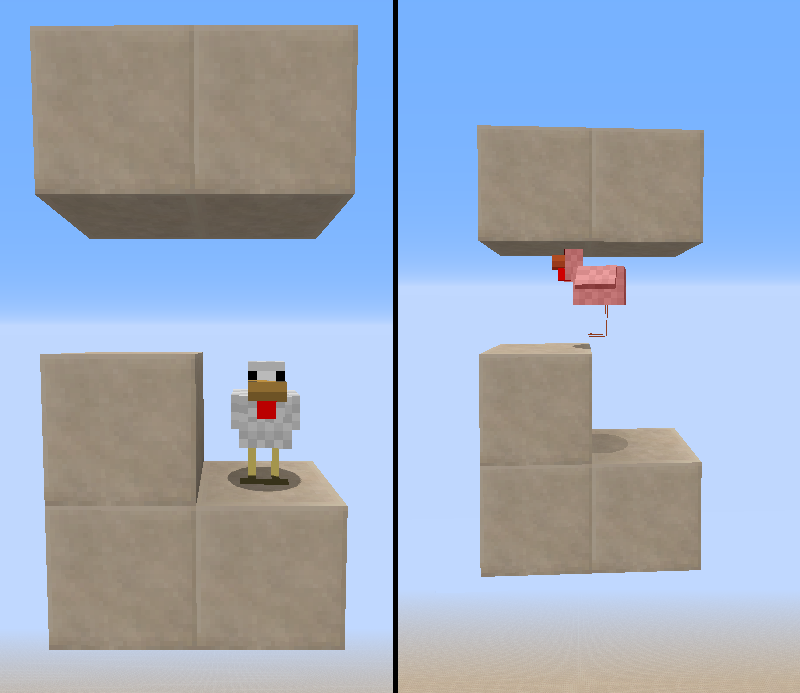
Still a concern in 14w08a. but the description is inexact. It happens when chickens are jumping to or in a block of air with a solid block above it, their heads then collide with the said block and make them suffocate.
It can easily be reproduced, and therefore confirmed, by making the chicken jump on a block, with a ceiling only 1 meter above it.
I attached an image to show how to reproduce it easily.
Note that this can also happen with a 2 meters high ceiling. The only condition is for the chicken to jump. On the attached image, you could remove the left part of the ceiling and still see the chicken suffocate.
It might be related to
MC-9568.The redstone signal in the example on the right do power a hopper. Your redstone dust power the block on which it's placed, which in return power the hopper next to it, blocking it. It does slow down the item, letting the time for the comparator to update its output. Output which isn't generated by an "indirect redstone signal", as you described, but by the comparator testing the content of the hopper, as expected.
Still a concern in 14w08a. Probably relates to MC-11193.
A hopper push and pull. They can only pull from containers above them.
A horizontal chain of hopper will carry item mush, mush slower than a vertical one, as the hoppers in it will only push items, but a hopper in a vertical one will both pull them from the container above and push them in the container they're connected to.
As to why items will not stay in the blocked hopper is because this blocked hopper will neither pull or push items, but other non blocked hoppers around it are still capable of pushing items into it or pulling them from it. You need to block two consecutive vertical hoppers if you want to stop that chain, preventing the first one from pushing items into the next one, and the next one from pulling them from the first one.
It totally makes sense once you've understood how hoppers work. This is a completely intended, normal and expectable behaviour.
Still a concern in 14w08a.
Still a concern in 14w08a.
Yooooo I said still a concern in 14w08a! And also, strong Work As Intended argumentation, as Minecarts with Hopper dispensing items in containers would be completely unreliable.
Still a concern in 14w08a.
Still a concern in 14w08a.
Still a concern in 14w08a.
Still a concern in 14w08a.
Still a concern in 14w08a.
Still a concern in 14w08a.
Still a concern in 14w08a.
Still a concern in 14w08a.
Still a concern in 14w08a.
Still a concern in 14w08a.
It's seems unlikely since you're feeding the system with hoppers, but are you sure you're not providing items to that "filter" hopper faster than 2.5 items per seconds?
Could you provide a world save with that system? I made many sorter and they all worked well without skipping items like that. I'd like to see it happen to understand where is the problem.
I believe it works as intended. Minecarts carrying empty containers have less inertia than a minecart carrying a player. Empty minecart are the exception, slowing down faster to prevent them from going wild and forcing players to run after them at the first occasion.
Still a concern in 14w08a.
Also note that the characters cited here correspond to only three keyboard layouts, from only three language, and only for the numeric keys of the keyboard. It can almost be anything depending on that layout, and there is at least a dozen of layouts for every language, and the player is actually free to bind keys which aren't even amongst the numeric ones.
To put it simply, the game needs to support any possible character, not only ASCII ones.
Still a concern in 14w08a. I am not, however, able to reproduce the behaviour described by Daniel Harris.
Still a concern in 14w08a. Also relates to
MC-3930.If birch and spruce leaves not being coloured by foliagecolor.png isn't a bug, how come leaves_birch.png and leaves_spruce.png aren't coloured in the first place?
It doesn't really make sense to use a greyscale image, allowing the game to recolour it dynamically, if the said colour is then hardcoded in the game.
This should be marked as unresolved and confirmed.
Still a concern in 14w08a.
Oh, you're right, the game doesn't actually bind char codes but key codes to the control, therefore not changing depending on your layout (which is also a problem, in my opinion. If I have a qwerty layout on my azerty keyboard, I expect the game, as any other software, to recognise the qwerty layout. But it's a problem that many game engines share so I'm pretty sure it's way harder to fix than it seems, and since Minecraft allows us to rebind the keys, it's not even needed. But I digress.) So, my bad, that's not a layout problem.
However, those layouts are based on real keyboard configurations, so it's pretty much the same. There has to be other keyboards than the three cited here.
I'm unable to reproduce this bug. Despite having tested every orientation (just in case) and in 14w06b as well.
I'd also like to add that the expected behaviour for the hopper below is to pull an item from the hopper above every 4 redstone tick, not always.
My guess is that you actually put a whole stack directly in the hopper above your filter. In consequences, the filter pull an item from that hopper every 0.4 second, and the said hopper push an item in the next hopper of the chain every 0.4 second too. Halving the number of items actually pulled by the filter. If this is what you did, then it's a perfectly normal behaviour. You can't put a whole stack directly in the hopper above your filter. You have to feed that hopper only one item at a time too.
If this is what you did: Work as Intended.
If not: Cannot reproduce, please provide a world save or a better explanation.
Still a concern in 14w08a. And it should clearly be marked as confirmed.
There is clearly a bug. I think there is a confusion in the term used in this thread, Lokallu talked about hopper #2 pulling while there is clearly nothing to pull from. But there is indeed a bug, and it is quite easy to reproduce:
It seems that when hopper #2 receives an item from a push by hopper #1, it become unable to push during the next tick, even if there are already items in it. If you put a stack of 64 items in the chest, you can see hopper #2 stocking the whole stack before starting to empty itself. I also noted that the bug is inconsistent. While happening most of the time, sometimes it doesn't. Put a new stack and it happens again.
I also tried to pass six stacks in this system. Once hopper #2 is filled, it isn't able to accept more items, and start pushing them. But not being full again, hopper #1 will push an item into it, preventing it from pushing again. So hopper #2 will basically alternate constantly between accepting and pushing an item, halving it's normal rate without any apparent reason.
Items will start to pile up in hopper #1 because hopper #2 clearly can't push them at a rate of 2.5 items per second. And once hopper #1 is empty, hopper #2 meets the normal rate again.
I just tested this in many versions from 1.6.2 to 14w08a, with 200 chickens in a 1x1 pit. Not even one chicken died when growing up. Can someone who noticed the bug before can test it on a recent snapshot?