 MC-3266
Your experience level overflows once it exceeds the integer limit
The bug
The XP level can overflow causing the experience bar to disappear.
How to reproduce
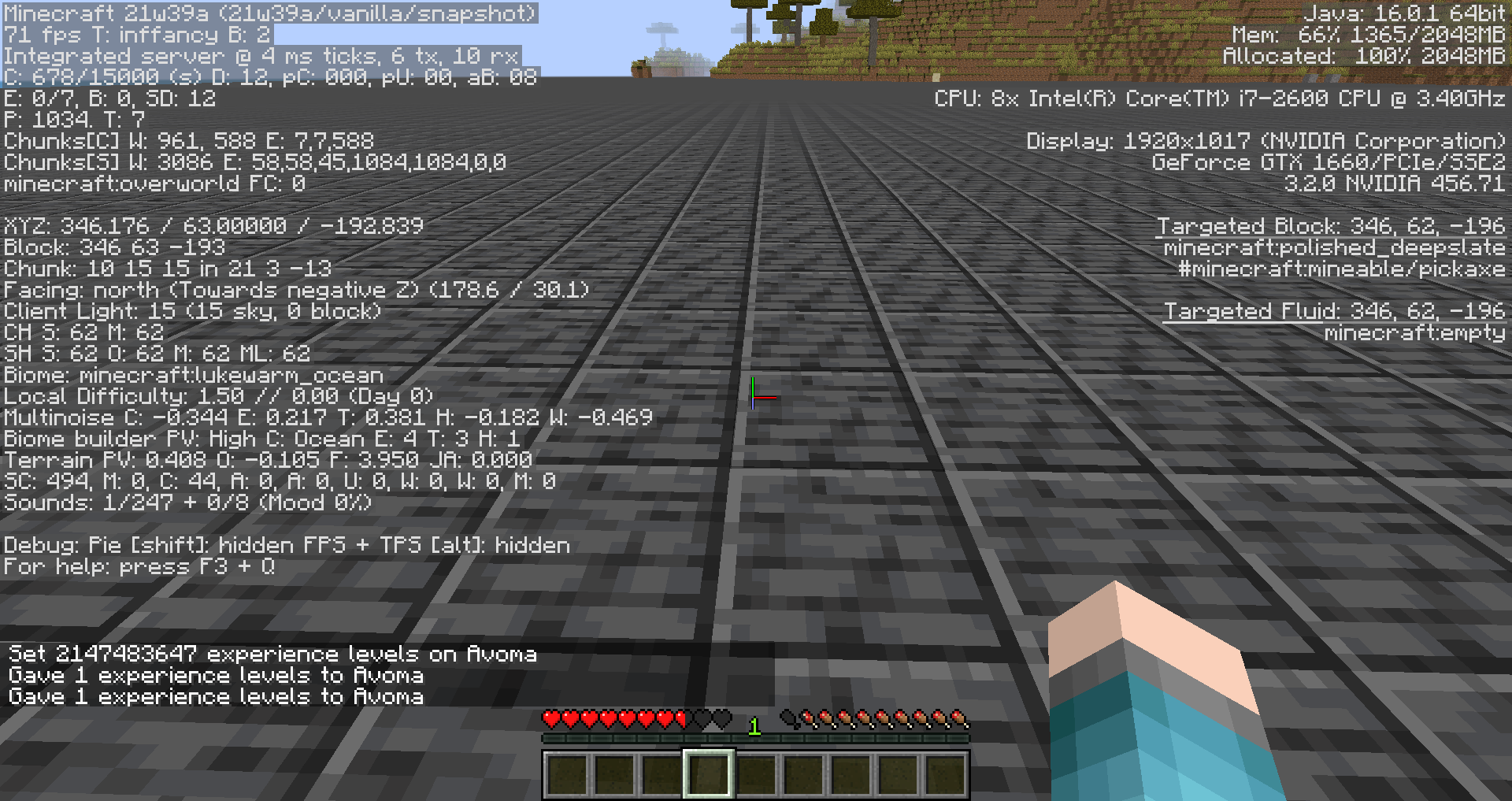
- Type /xp set @s 2147483647 levels. Now your level is 2147483647.
- Type /xp add @s 1 levels. XP disappears from display.
- Type /xp add @s 1 levels again. Now your level is 1.
So, maximum player's level is 2^31 - 1, after which the level overflows and is treated as 0. The possible solution (suggested by Mustek) is to cap maximum level.
Linked Issues
is duplicated by5
Attachments2
![[Mod] Avoma](../../../data/avatars/users/86198.png)
- Fixed
![[Helper] Lord_Quadrato](../../../data/avatars/users/26105.png) [Helper] Lord_Quadrato
[Helper] Lord_Quadrato Norrius
![[Mojang] etanaratsastaja](../../../data/avatars/users/10122.svg) [Mojang] etanaratsastaja
[Mojang] etanaratsastaja- 50
- 19
- Confirmed
 Low
Low- Platform
- Player
- experience overflow
1.4.4 - 1.21
1.4.4 1.4.5 1.4.6 1.4.7 13w02a 13w02b 13w03a 1.5.1 1.7.4 14w03b 1.8 1.8.1-pre3 1.8.4 1.8.7 1.8.9 16w05b 1.10.2 16w32a 16w32b 16w33a 16w35a 16w39b 16w39c 16w41a 16w43a 16w44a 1.11-pre1 1.11 1.11.1 1.11.2 17w06a 17w13a 17w13b 17w14a 17w15a 17w16a 17w17b 17w18a 17w18b 1.12-pre1 1.12-pre2 1.12-pre3 1.12-pre4 1.12-pre5 1.12-pre6 1.12-pre7 1.12 17w31a 1.12.1-pre1 1.12.1 1.12.2-pre1 1.12.2-pre2 1.12.2 17w43a 17w43b 17w45a 17w48a 17w50a 18w01a 18w03b 18w06a 18w09a 18w14b 18w16a 18w19b 18w20c 18w22c 1.13-pre1 1.13-pre2 1.13-pre3 1.13-pre4 1.13-pre5 1.13-pre6 1.13-pre7 1.13-pre8 1.13-pre9 1.13-pre10 1.13 18w30b 18w31a 18w32a 1.13.1-pre1 1.13.1-pre2 1.13.1 1.13.2-pre1 1.13.2-pre2 1.13.2 18w43a 18w43b 18w43c 18w44a 18w45a 18w48a 18w48b 18w49a 18w50a 19w02a 19w03a 19w03c 19w04b 19w07a 19w12b 19w13b 19w14a 1.14-pre2 1.14-pre3 1.14.3 1.14.4-pre5 1.14.4-pre6 1.14.4 19w39a 19w40a 1.15-pre6 1.15 1.15.1 1.15.1-pre1 1.15.2-pre2 1.15.2 20w11a 20w17a 20w20b 20w21a 20w22a 1.16-pre2 1.16.1 20w29a 20w30a 1.16.2-pre1 1.16.2-rc1 1.16.2 1.16.3 1.16.4 20w46a 20w48a 20w49a 20w51a 21w03a 1.16.5 21w05b 21w06a 21w07a 21w11a 21w13a 21w14a 21w15a 21w17a 21w18a 1.17 1.17.1 21w39a 1.18.1 1.18.2 1.19 1.19.2 1.19.3 1.19.4 23w14a 1.20-rc1 1.20 1.20.1 1.20.2 1.20.4 1.21- 24w33a
Created Issue:
Xp level overfloats
XP level can be overfloated easily. It's not a bug really, it's some Java mechanic. Steps to do this:
1. Start with zero level for clearence.
2. Type /xp 2147483646L. Now your level is 2147483646.
3. Type /xp 1L. XP disappears from display.
4. Type /xp 1L again. Now your level's 1.
So, maximum for player's level is 2^31-1, meaning first bit is unused. This looks like Minecraft uses unsigned integers for level. I suppose making uint instead of int will make limit 4294967295. Not really much more, but at least you can't overflow your level with one single command. You will need run THREE commands to do it.Environment
Ubuntu Linux 12.10 64-bit, OpenJDK 7
XP level can be overfloated easily. It's not a bug really, it's some Java mechanic (as far as i know, there is no overfloat in Python). Steps to do this:
1. Start with zero level for clearence.
2. Type /xp 2147483646L. Now your level is 2147483646.
3. Type /xp 1L. XP disappears from display.
4. Type /xp 1L again. Now your level's 1.
So, maximum for player's level is 2^31-1, meaning first bit is unused. This looks like Minecraft uses unsigned integers for level. I suppose making uint instead of int will make limit 4294967295. Not really much more, but at least you can't overflow your level with one single command. You will need run THREE commands to do it.
XP level can be overfloated easily. It's not a bug really, it's some Java mechanic
(as far as i know, there is no overfloat in Python). Steps to do this:
1. Start with zero level for clearence.
2. Type /xp 2147483646L. Now your level is 2147483646.
3. Type /xp 1L. XP disappears from display.
4. Type /xp 1L again. Now your level's 1.
So, maximum for player's level is 2^31-1, meaning first bit is unused. This looks like Minecraft uses unsigned integers for level. I suppose making uint instead of int will make limit 4294967295. Not really much more, but at least you can't overflow your level with one single command. You will need run THREE commands to do it.XP level can be overfloated easily. It's not a bug really, it's some Java mechanic related minor issue. Steps to do this:
1. Start with zero level for clearence.
2. Type /xp 2147483646L. Now your level is 2147483646.
3. Type /xp 1L. XP disappears from display.
4. Type /xp 1L again. Now your level's 1.
So, maximum for player's level is 2^31-1, meaning first bit is unused. This looks like Minecraft uses unsigned integers for level. I suppose making uint instead of int will make limit 4294967295. Not really much more, but at least you can't overflow your level with one single command. You will need run THREE commands to do it.
XP level can be overfloated easily. It's not a bug really, it's some Java mechanic related minor issue. Steps to do this:
1. Start with zero level for clearence.
2. Type /xp 2147483646L. Now your level is 2147483646.
3. Type /xp 1L. XP disappears from display.
4. Type /xp 1L again. Now your level's 1.
So, maximum for player's level is 2^31-1, meaning first bit is unused. This looks like Minecraft uses unsigned integers for level. I suppose making uint instead of int will make limit 4294967295. Not really much more, but at least you can't overflow your level with one single command. You will need run THREE commands to do it.XP level can be overfloated easily. It's not a bug really, it's some Java mechanic related minor issue. Steps to do this:
1. Start with zero level for clarity.
2. Type /xp 2147483646L. Now your level is 2147483646.
3. Type /xp 1L. XP disappears from display.
4. Type /xp 1L again. Now your level's 1.
So, maximum for player's level is 2^31-1, meaning first bit is unused. This looks like Minecraft uses unsigned integers for level. I suppose making uint instead of int will make limit 4294967295. Not really much more, but at least you can't overflow your level with one single command. You will need run THREE commands to do it.
XP level can be overfloated easily. It's not a bug really, it's some Java mechanic related minor issue. Steps to do this:
1. Start with zero level for clarity.
2.Type /xp 2147483646L. Now your level is 2147483646.
3. Type /xp1L. XP disappears from display.
4. Type /xp 1Lagain. Now your level's 1.
So, maximum for player's level is 2^31-1, meaning first bit is unused. This looks like Minecraft uses unsigned integers for level. I suppose making uint instead of int will make limit 4294967295. Not really much more, but at least you can't overflow your level with one single command. You will need run THREE commands to do it.XP level can be overfloated.
Steps to do this:
1. Start with zero level for clarity.
2. Type /xp 2147483647L. Now your level is 2147483647.
3. Type /xp 1L. XP disappears from display.
4. Type /xp 1L again. Now your level's 1.So, maximum player's level is 2^31-1, after that the level overfloats and becomes null. The possible solution (suggested by Mustek) is to cap maximum level.

is duplicated by

![[Mod] Ezekiel (ezfe)](../../../data/assets/gravatar/ezekielelin.jpeg)

relates to
is duplicated by
![[Mod] Torabi](../../../data/assets/gravatar/torabi.png)

![[Mod] Pokechu22](../../../data/avatars/users/92931.png)
XP level can be overfloated.
Steps to do this:
1. Start with zero level for clarity.2. Type /xp 2147483647L. Now your level is 2147483647.3. Type /xp 1L. XP disappears from display.4. Type /xp 1Lagain. Now your level's 1.So, maximum player's level is 2^31
-1, afterthatthe level overfloats andbecomes null. The possible solution (suggested by Mustek) is to cap maximum level.The XP level can overflow.
Steps to do this:
1. Start with zero levels for clarity.
2. Type /xp 2147483647L. Now your level is 2147483647.
3. Type /xp 1L. XP disappears from display.
4. Type /xp 1L again. Now your level is 1.So, maximum player's level is 2^31 - 1, after which the level overflows and is treated as 0. The possible solution (suggested by Mustek) is to cap maximum level.
Xplevel overfloatsXP level overflows
is duplicated by

![[Mod] Michael Wobst](../../../data/avatars/users/37868.png)
relates to
![[Mod] Neko](../../../data/avatars/users/92901.png)
The XP level can overflow.
Steps to do this:
1. Start with zero levels for clarity.
2. Type /xp 2147483647L. Now your level is 2147483647.
3. Type /xp 1L. XP disappears from display.
4. Type /xp 1L again. Now your level is 1.So, maximum player's level is 2^31 - 1, after which the level overflows and is treated as 0. The possible solution (suggested by Mustek) is to cap maximum level.
The XP level can overflow.
Steps to do this:
1. Start with zero levels for clarity.
2. Type /xp 2147483647L. Now your level is 2147483647.
3. Type /xp 1L. XP disappears from display.
4. Type /xp 1L again. Now your level is 1.So, maximum player's level is 2^31 - 1, after which the level overflows and is treated as 0. The possible solution (suggested by Mustek) is to cap maximum level.

is duplicated by
The XP level can overflow.
Steps to do this:
1. Start with zero levels for clarity.
2. Type /xp 2147483647L. Now your level is 2147483647.
3. Type /xp 1L. XP disappears from display.
4. Type /xp 1L again. Now your level is 1.So, maximum player's level is 2^31 - 1, after which the level overflows and is treated as 0. The possible solution (suggested by Mustek) is to cap maximum level.
The XP level can overflow.
Steps to do this:
- Type /xp set @s 2147483647 levels. Now your level is 2147483647.
- Type /xp add @s 1 levels. XP disappears from display.
- Type /xp add @s 1 levels again. Now your level is 1.
So, maximum player's level is 2^31 - 1, after which the level overflows and is treated as 0. The possible solution (suggested by Mustek) is to cap maximum level.
The XP level can overflow.
Steps to do this:
- Type /xp set @s 2147483647 levels. Now your level is 2147483647.
- Type /xp add @s 1 levels. XP disappears from display.
- Type /xp add @s 1 levels again. Now your level is 1.
So, maximum player's level is 2^31 - 1, after which the level overflows and is treated as 0. The possible solution (suggested by Mustek) is to cap maximum level.

Affects 1.13-pre1
Confirmed for 1.13-pre2
Confirmed for 18w22c
Confirmed for 18w20c
Confirmed for 1.13-pre3
Affects 1.13-pre4
Affects 1.13-pre5
The XP level can overflow.
Steps to do this:
- Type /xp set @s 2147483647 levels. Now your level is 2147483647.
- Type /xp add @s 1 levels. XP disappears from display.
- Type /xp add @s 1 levels again. Now your level is 1.
So, maximum player's level is 2^31 - 1, after which the level overflows and is treated as 0. The possible solution (suggested by Mustek) is to cap maximum level.
The bug
The XP level can overflow causing the experience bar to disappear.
How to reproduce
- Type /xp set @s 2147483647 levels. Now your level is 2147483647.
- Type /xp add @s 1 levels. XP disappears from display.
- Type /xp add @s 1 levels again. Now your level is 1.
So, maximum player's level is 2^31 - 1, after which the level overflows and is treated as 0. The possible solution (suggested by Mustek) is to cap maximum level.
Ubuntu Linux 12.10 64-bit, OpenJDK 7
![[Mod] Asteraoth](../../../data/avatars/users/92886.png)
![[Mojang] Nathan Adams](../../../data/assets/gravatar/dinnerbone.png)
![[Mod] Jarl-Penguin](../../../data/avatars/users/92849.png)
![[Mod] SPGoding](../../../data/avatars/users/44622.png)
![[Mod] Chandler](../../../data/assets/gravatar/triwonder81.png)

![[Helper] Jack McKalling](../../../data/avatars/users/92859.png)
![[Mojang] Adrian Östergård](../../../data/assets/gravatar/nighter.jpeg)
image-2020-11-18-10-57-02-781.png
![[Helper] Johnibur](../../../data/avatars/users/28381.png)
![[Mod] markderickson](../../../data/avatars/users/18946.svg)
![[Mod] ampolive](../../../data/avatars/users/18949.svg)
![[Mojang] slicedlime](../../../data/assets/gravatar/slicedlime.jpeg) [Mojang] etanaratsastaja
[Mojang] etanaratsastaja![[Bot] Piston](../../../data/avatars/users/31202.png)

This report is based on:
Relates to:
MC-80096(Map part)
What does "overflow" mean?
"Overflow" describes the event which occurs when a variable with a maximum value is set to a higher value. For example the maximum value of the data type short is 32767. Setting it to 32768 will result in an overflow which causes it to be -32768 (minimum value).
All these variables can overflow:
- scoreboard scores (int)
- statistics (int)
- xp bar (int)
- map ids (short)
See MC-3266
You reached a max for the numerical value that represents experience. This report is likely a "won't fix" or "works as intended" as this level of experience is nearly impossible in normal survival gameplay without exploits. It also prevents an overflow that could result in an issue related to MC-3266.
HubbiGamingTV Could you please not go through tons of tickets, making either obvious/redundant (MC-201, MC-1531, MC-3266, MC-1673, …) or incorrect (MC-180, MC-212, MC-2157, MC-2112, MC-2791, MC-1297, …) statements? I got lots of mails from your comments over night, followed by a bunch of mails of people correcting you. Please only contribute if you actually have new and relevant information, not baseless speculation. Also, if you want go through all currently open bugs, prepare some meals first, because you'll need a really long time for 8375 reports…
I think the solution here is not to make this an unsigned int, but to simply cap the max level so it doesn't happen.
Well, you're right, Mustek. Capping is much better way.
Also, Java doesn't really support unsigned ints well.
Another option would be to use BigInteger instead of int. But capping seems reasonable.
Is this still a concern in the current Minecraft version? If so, please update the affected versions in order to best aid Mojang ensuring bugs are still valid in the latest releases/pre-releases.
Is this still a concern in the latest Minecraft version 14w30c? If so, please update the affected versions in order to best aid Mojang ensuring bugs are still valid in the latest releases/pre-releases.
Confirmed for
MC-79954andMC-79944I guess you can create one general report for this as it seems to affect all variables
confirmed for 1.8.7
Confirmed for
FYI: the term is "overflow", not "overfloat".
Confirmed for 1.11-pre1.
Confirmed for 1.11.
Confirmed for 17w06a.
Confirmed for 17w15a.
Confirmed for 17w17b.
Confirmed for 1.12
Still present in 18w16a.
Might want to update the Steps to reproduce to 1.13-format, this renders the first point useless (as with the new command you can set the level)
Here's the updated version:
1.Type /xp set @s 2147483647 levels. Now your level is 2147483647.
2. Type /xp add @s 1 levels. XP disappears from display.
3. Type /xp add @s 1 levels again. Now your level is 1.
Thanks. I'd updated my setup in my world for this with the new commands, but never updated the ticket.
Happening in 1.15 and its snapshots. And in 1.15.1 Pre-Release 1.
You could turn the signed 32-bit integer into a signed 64-bit integer, but this requires 4 bytes more per player in the player data. Sure, this might be a bit small-minded, but is it really necessary to have such a high-level number? This is hardly playable in Survival? A solution would be a BigInt which is then saved as a string in the world file. Unfortunately Java does not support unsigned integer, so you would have to write a wrapper around the integer to only cut the negative range.
Java already has Math.addExact, which doesn't allow overflows. The fix is just to use that. Using a bigger number type would not fix the problem, just postpone it.
@Fabian Röling, Math.addExact throws an exception on overflow which would not be helpful here. Capping the value at the maximum positive value sounds reasonable especially since such high XP levels can likely not be obtained in Survival anyways.
In 1.16.1 and 20w29a.
@Marcono1234, In survival, the maximum level is much less than 2^31-1, as the amount of xp points (not levels) is capped at the 32-bit limit, restricting you to level 21863. Rays Works on youtube has demonstrated this in vanilla survival on the ProtoTech server, using a very powerful XP farm which he ran for multiple weeks.
Can confirm in 20w48a.
Can confirm in 20w51a.
Can confirm in 21w03a.
Can confirm in 21w05b.
Can confirm in 21w06a.
Can confirm in 21w07a. Video attached.
Can confirm in 21w11a.
Can confirm in 21w13a.
Can confirm in 21w14a.
Can confirm in 21w15a.
Can confirm in 21w17a.
Can confirm in 1.16.5 and 21w18a.
Can confirm in 1.17.1.
Can confirm in 21w39a.
Can confirm in 1.18.1.
Can confirm in 1.18.2.
Can confirm in 1.19.
this is because of the 32 signed bit integer limit (2,147,483,647) after this number the game automaticly resets your level to 1. this happends because of the way how the xp level is stored
HubbiGamingTV Could you please not go through tons of tickets, making either obvious/redundant (MC-201, MC-1531,
MC-3266,MC-1673, …) or incorrect (MC-180,MC-212, MC-2157, MC-2112, MC-2791,MC-1297, …) statements? I got lots of mails from your comments over night, followed by a bunch of mails of people correcting you. Please only contribute if you actually have new and relevant information, not baseless speculation. Also, if you want go through all currently open bugs, prepare some meals first, because you'll need a really long time for 8375 reports…Can confirm in 1.19.2.