 wan6845
- wan6845
- JIRAUSER524321
- America/Toronto
- Yes
- No
 WEB-2954
![[Mojang] Web Team](../../../data/avatars/users/10122.svg)
 MCPE-143822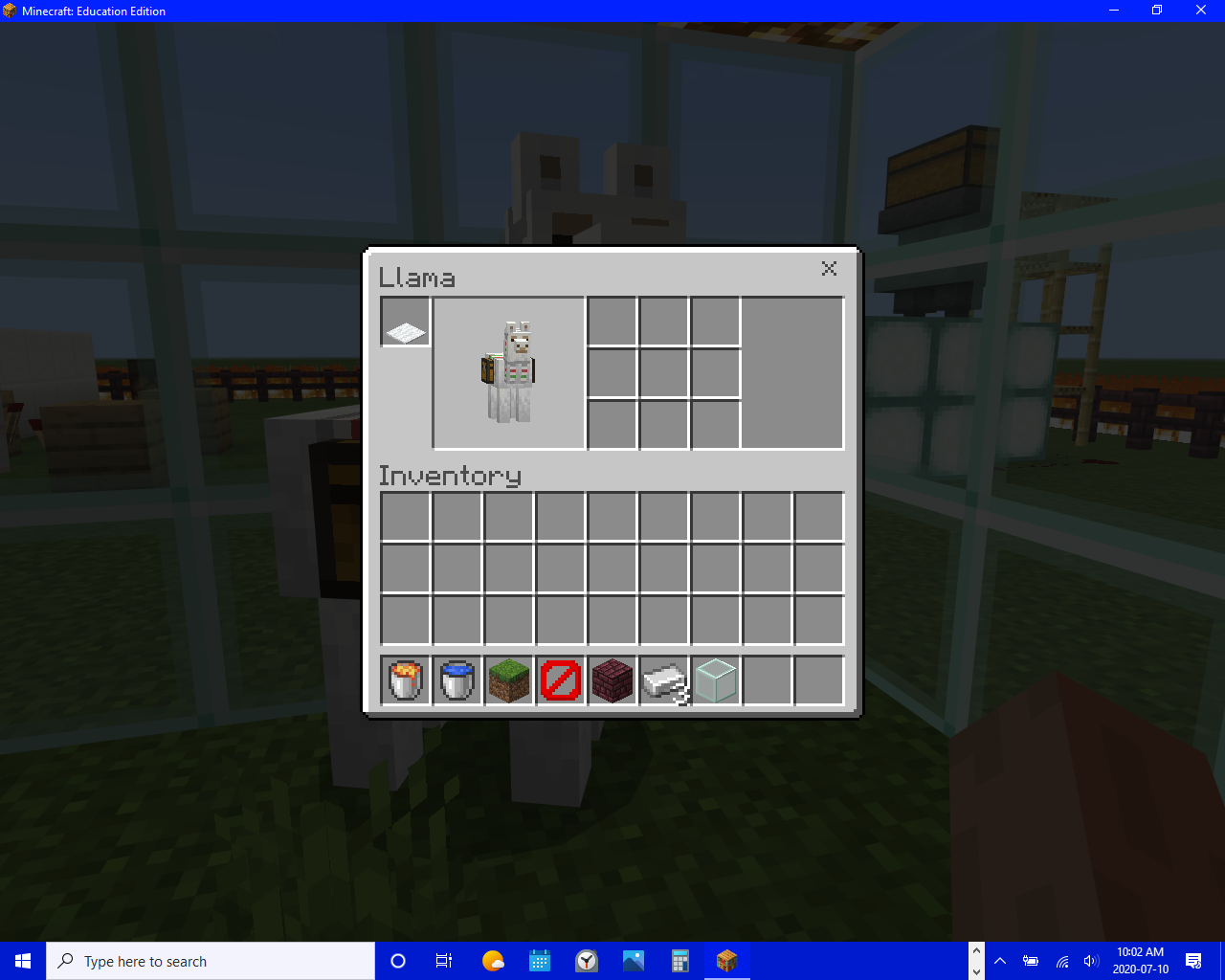











 MCL-20290


Dyed items get stained white when AFK too long
In education edition when you pause and minimize the game for long enough the carpets on my llamas get stained white. The affects versions is wrong; I'm in 1.12.60
In education edition when you pause and minimize the game for long enough the carpets on my llamas get stained white. The affects versions is wrong; I'm in 1.12.60

In education edition when you pause and minimize the game for long enough the carpets on my llamas get stained white. The affects versions is wrong; I'm in 1.12.60
In education edition when you pause and minimize the game for long enough the carpets on my llamas get stained white. The affects versions is wrong; I'm in 1.12.60.
Dyed items get stained white whenAFK too longDyed items get stained white when reopening the world
In education edition when you
pause andminimize the game for long enoughthe carpets on my llamas get stained white. The affects versions is wrong; I'm in 1.12.60.In education edition when you save and exit and reopen the carpets on my llamas get stained white. The affects versions is wrong; I'm in 1.12.60. The items don't lose their NBT, but reset the data value so it becomes 1, which is white.
In education edition when you save and exit and reopen the carpets on my llamas get stained white. The affects versions is wrong; I'm in 1.12.60. The items don't lose their NBT, but reset the data value so it becomes 1, which is white. I believe this bug is also in Minecraft bedrock.
Dyed itemsget stainedwhite when reopening the worldDyed items turn white when reopening the world
In education edition when you save and exit and reopen the carpets on my llamas get stained white. The affects versions is wrong; I'm in 1.12.60. The items don't lose their NBT, but
resetthe data value so it becomes 1, which is white. I believe this bug is also in Minecraft bedrock.In education edition when you save and exit and reopen the carpets on my llamas get stained white. The affects versions is wrong; I'm in 1.12.60. The items don't lose their NBT, but lose the data value so it becomes 1, which is white. I believe this bug is also in Minecraft bedrock.
In education edition when you save and exit and reopen the carpets on my llamas get stained white. The affects versions is wrong; I'm in 1.12.60. The items don't lose their NBT, but lose the data value so it becomes 1, which is white.
I believe this bug is also in Minecraft bedrock.
In minecraft 0.0.23a_01 remake when I turn on the music it doubles and I have to turn the music on and off to make it work again. This happens when playing in the world for an extended period of time. This happens immediately after placing gold blocks.
In minecraft 0.0.23a_01 remake when I turn on the music it doubles and I have to turn the music on and off to make it work again. This happens when playing in the world for an extended period of time. This happens immediately after placing gold blocks.When I turn on the music it doubles and I have to turn the music on and off to make it work again. This happens when playing in the world for an extended period of time. This happens immediately after placing gold blocks.
0.0.23a_01 (remake)
When I turn on the music it doubles and I have to turn the music on and off to make it work again. This happens when playing in the world for an extended period of time. This happens
immediately after placing gold blocks.0.0.23a_01 (remake)
When I turn on the music it doubles and I have to turn the music on and off to make it work again. This happens when playing in the world for an extended period of time. This happens shortly after placing gold blocks.
0.0.23a_01 (remake)
When I turn on the music it doubles and I have to turn the music on and off to make it work again. This happens when playing in the world for an extended period of time. This happens shortly after placing gold block
s.0.0.23a_01 (remake)
When I turn on the music it doubles and I have to turn the music on and off to make it work again. This happens when playing in the world for an extended period of time. This happens shortly after placing a gold block or multiple.
0.0.23a_01 (remake)
When I turn on the music it doubles and I have to turn the music on and off to make it work again. This happens when playing in the world for an extended period of time. This happens shortly after placing a gold block or multiple. It also applies to every block that isn't already in your hotbar
0.0.23a_01 (remake)
When I turn on the music it doubles and I have to turn the music on and off to make it work again. This happens when playing in the world for an extended period of time. This happens shortly after placing a gold block or multiple. It also applies to every block that isn't already in your hotbar.
0.0.23a_01 (remake)
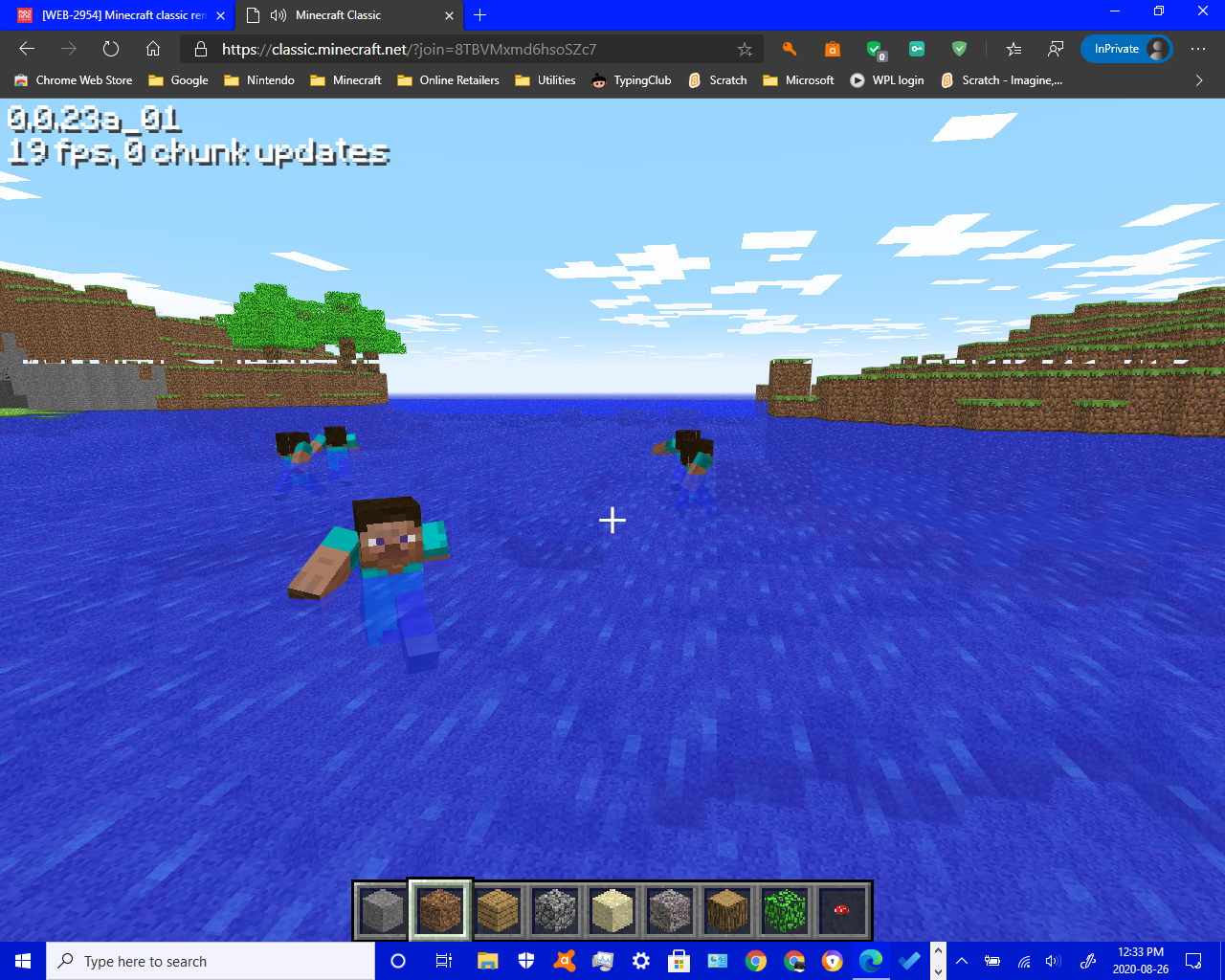
If you play in the world an extended amount of time, if you try to switch between the items in the hotbar it makes a huge lag spike and it shows 1 fps or 0 fps. This also happens when you try to switch to place mode.
0.0.23a_01 (remake)
If you play in the world an extended amount of time, if you try to switch between the items in the hotbar it makes a huge lag spike and it shows 1 fps or 0 fps. This also happens when you try to switch to place mode. In the image, it shows 4 fps.
0.0.23a_01 (remake)
If you play in the world an extended amount of time, if you try to switch between the items in the hotbar it makes a huge lag spike and it shows 1 fps or 0 fps. This also happens when you try to switch to place mode.
In the image, it shows 4 fps.0.0.23a_01 (remake)
If you play in the world an extended amount of time, if you try to switch between the items in the hotbar it makes a huge lag spike and it shows
1 fps or 0fps. This also happens when you try to switch to place mode.0.0.23a_01 (remake)
If you play in the world an extended amount of time, if you try to switch between the items in the hotbar it makes a huge lag spike and it shows low fps. This also happens when you try to switch to place mode.
0.0.23a_01 (remake)
If you press G, you'll spawn a human. It
has a glitched model though.0.0.23a_01
In minecraft education edition it is impossible to turn off v-sync. I can't find any settings.txt or something in the game files.
What I expected:
There is a settings.txt in the game files that I can use to turn off v-sync.What I saw:
There was no settings.txt unlike minecraft bedrock edition.
In minecraft education edition it is impossible to turn off v-sync. I can't find any settings.txt or something in the game files.
What I expected:
There is a settings.txt in the game files that I can use to turn off v-sync.What I saw:
There was no settings.txt unlike minecraft bedrock edition.Affects versions: 1.14.50, 1.14.70,
In minecraft education edition it is impossible to turn off v-sync. I can't find any settings.txt or something in the game files.
What I expected:
There is a settings.txt in the game files that I can use to turn off v-sync.What I saw:
There was no settings.txt unlike minecraft bedrock edition.Affects versions: 1.12.60, 1.14.50, 1.14.70,
In minecraft education edition it is impossible to turn off v-sync. I can't find any settings.txt or something in the game files.
What I expected:
There is a settings.txt in the game files that I can use to turn off v-sync.What I saw:
There was no settings.txt unlike minecraft bedrock edition.Affects versions: 1.12.60, 1.14.50, 1.14.70,
In minecraft education edition it is impossible to turn off v-sync. I can't find any settings.txt or something in the game files.
How to reproduce:
Go to the game files
Try to find the setttings.txtWhat I expected:
There is a settings.txt in the game files that I can use to turn off v-sync.What I saw:
There was no settings.txt unlike minecraft bedrock edition.Affects versions: 1.12.60, 1.14.50, 1.14.70,
THIS IS NOT A DUPLICATE, PLEASE READ THIS DESCRIPTION
Each time I try to log in, I enter my password to complete the sign in process, but it just does nothing. Even after "signing in" it doesn't show my profile and it only says feedback login so it results in an endless loop.Each time I try to log in, I enter my password to complete the sign in process, but it just does nothing. Even after "signing in" it doesn't show my profile and it only says feedback login so it results in an endless loop.
Each time I try to log in, I enter my password to complete the sign in process, but it just does nothing. Even after "signing in" it doesn't show my profile and it only says feedback login so it results in an endless loop. For me I tried signing in and it created a new account which is frustrating.
Each time I try to log in, I enter my password to complete the sign in process, but it just does nothing. Even after "signing in" it doesn't show my profile and it only says feedback login so it results in an endless loop. For me I tried signing in and it created a new account which is frustrating.
Be sure to check
WEB-4761, WEB4846, and WEB4761, since all of these are tied to this bug. This started happening and then those started happening.
Each time I try to log in, I enter my password to complete the sign in process, but it just does nothing. Even after "signing in" it doesn't show my profile and it only says feedback login so it results in an endless loop. For me I tried signing in and it created a new account which is frustrating.
Be sure to check
WEB-4761, WEB4846, and WEB4761, since all of these are tied to this bug. This started happening and then those started happening.Each time I try to log in, I enter my password to complete the sign in process, but it just does nothing. Even after "signing in" it doesn't show my profile and it only says feedback login so it results in an endless loop. For me I tried signing in and it created a new account which is frustrating.
Be sure to check
WEB-4761, WEB-4846, andWEB-4761, since all of these are tied to this bug. This started happening and then those started happening.
Each time I try to log in, I enter my password to complete the sign in process, but it just does nothing. Even after "signing in" it doesn't show my profile and it only says feedback login so it results in an endless loop. For me I tried signing in and it created a new account which is frustrating.
Be sure to check
WEB-4761,WEB-4846, andWEB-4761,sinceall ofthese are tied to this bug. This started happening and then those started happening.Each time I try to log in, I enter my password to complete the sign in process, but it just does nothing. Even after "signing in" it doesn't show my profile and it only says feedback login so it results in an endless loop. For me I tried signing in and it created a new account which is frustrating.
Be sure to check
WEB-4761and WEB-4846 since these are tied to this bug. This started happening and then those started happening.
Each time I try to log in, I enter my password to complete the sign in process, but it just does nothing. Even after "signing in" it doesn't show my profile and it only says feedback login so it results in an endless loop. For me I tried signing in and it created a new account which is frustrating.
Be sure to check
WEB-4761and WEB-4846 since these are tied to this bug. This started happening and then those started happening.WEB-1055happened before this.
Each time I try to log in, I enter my password to complete the sign in process, but it just does nothing. Even after "signing in" it doesn't show my profile and it only says feedback login so it results in an endless loop. For me I tried signing in and it created a new account which is frustrating.
Be sure to check
WEB-4761and WEB-4846 since these are tied to this bug. This started happening and then those started happening.WEB-1055happened before this.Each time I try to log in, I enter my password to complete the sign in process, but it just does nothing. Even after "signing in" it doesn't show my profile and it only says feedback login so it results in an endless loop. For me I tried signing in and it created a new account which is frustrating.
Be sure to check
WEB-4761and WEB-4846 since these are tied to this bug. This started happening and then those started happening.WEB-1055andWEB-4582happened before this.
Signinginto feedback site redirects to homepage without signing inAttempting to sign into the feedback site redirects to homepage without signing in
Each time I try to log in, I enter my password to complete the sign in process, but it just does nothing. Even after "signing in" it doesn't show my profile and it only says feedback login so it results in an endless loop. For me I tried signing in and it created a new account which is frustrating.
Be sure to check
WEB-4761and WEB-4846 since these are tied to this bug. This started happening and then those started happening.WEB-1055andWEB-4582happened before this. I createdWEB-4020before this but they said it's a duplicate, so I created this instead.
Each time I try to log in, I enter my password to complete the sign in process, but it just does nothing. Even after "signing in" it doesn't show my profile and it only says feedback login so it results in an endless loop.
For me I tried signing in and it created a new account which is frustrating.Be sure to check
WEB-4761and WEB-4846 since these are tied to this bug. This started happening and then those started happening.WEB-1055andWEB-4582happened before this. I createdWEB-4020before this but they said it's a duplicate, so I created this instead.
Each time I try to log in, I enter my password to complete the sign in process, but it just does nothing. Even after "signing in" it doesn't show my profile and it only says feedback login so it results in an endless loop.
Be sure to check
WEB-4761andWEB-4846 since these are tied to this bug. This started happening and then those started happening.WEB-1055andWEB-4582happened before this. I createdWEB-4020before this but they said it's a duplicate, so I created this instead.Each time I try to log in, I enter my password to complete the sign in process, but it just does nothing. Even after "signing in" it doesn't show my profile and it only says feedback login so it results in an endless loop.
Be sure to check
WEB-4761, WEB-4846 and WEB-1794 since these are tied to this bug. This started happening and then those started happening.WEB-1055andWEB-4582happened before this. I createdWEB-4020before this but they said it's a duplicate, so I created this instead.
Each time I try to log in, I enter my password to complete the sign in process, but it just does nothing. Even after "signing in" it doesn't show my profile and it only says feedback login so it results in an endless loop.
Be sure to check
WEB-4761, WEB-4846andWEB-1794 since these are tied to this bug. This started happening and then those started happening.WEB-1055andWEB-4582happened before this. I createdWEB-4020before this but they said it's a duplicate, so I created this instead.Each time I try to log in, I enter my password to complete the sign in process, but it just does nothing. Even after "signing in" it doesn't show my profile and it only says feedback login so it results in an endless loop.
Be sure to check
WEB-4761, WEB-4846, WEB-1794 andWEB-1087since these are tied to this bug. This started happening and then those started happening.WEB-1055andWEB-4582happened before this. I createdWEB-4020before this but they said it's a duplicate, so I created this instead.
Each time I try to log in, I enter my password to complete the sign in process, but it just does nothing. Even after "signing in" it doesn't show my profile and it only says feedback login so it results in an endless loop.
Be sure to check
WEB-4761, WEB-4846, WEB-1794 andWEB-1087since these are tied to this bug. This started happening and then those started happening.WEB-1055andWEB-4582happened before this. I createdWEB-4020before this but they said it's a duplicate, so I created this instead.Btw, please set the priority to high, this bug prevents me from posting feedback
Each time I try to log in, I enter my password to complete the sign in process, but it just does nothing. Even after "signing in" it doesn't show my profile and it only says feedback login so it results in an endless loop.
Be sure to check
WEB-4761, WEB-4846, WEB-1794 andWEB-1087since these are tied to this bug. This started happening and then those started happening.WEB-1055andWEB-4582happened before this. I createdWEB-4020before this but they said it's a duplicate, so I created this instead.Btw, please set the priority to
high, this bug prevents me from posting feedbackEach time I try to log in, I enter my password to complete the sign in process, but it just does nothing. Even after "signing in" it doesn't show my profile and it only says feedback login so it results in an endless loop.
Be sure to check
WEB-4761, WEB-4846, WEB-1794 andWEB-1087since these are tied to this bug. This started happening and then those started happening.WEB-1055andWEB-4582happened before this. I createdWEB-4020before this but they said it's a duplicate, so I created this instead.Btw, please set the priority to important/critical, this bug prevents me from posting feedback
Each time I try to log in, I enter my password to complete the sign in process, but it just does nothing. Even after "signing in" it doesn't show my profile and it only says feedback login so it results in an endless loop.
Be sure to check
WEB-4761, WEB-4846, WEB-1794 andWEB-1087since these are tied to this bug. This started happening and then those started happening.WEB-1055andWEB-4582happened before this. I createdWEB-4020before this but they said it's a duplicate, so I created this instead.Btw, please set the priority to important
/critical, this bug prevents me from posting feedback
Each time I try to log in, I enter my password to complete the sign in process, but it just does nothing. Even after "signing in" it doesn't show my profile and it only says feedback login so it results in an endless loop.
Be sure to check
WEB-4761, WEB-4846, WEB-1794 andWEB-1087since these are tied to this bug. This started happening and then those started happening.WEB-1055andWEB-4582happened before this. I createdWEB-4020before this but they said it's a duplicate, so I created this instead.Btw, please set the priority to important, this bug prevents me from posting feedback
Each time I try to log in, I enter my password to complete the sign in process, but it just does nothing. Even after "signing in" it doesn't show my profile and it only says feedback login so it results in an endless loop.
Be sure to check
WEB-4761, WEB-4846, WEB-1794 andWEB-1087since these are tied to this bug. This started happening and then those started happening.WEB-1055andWEB-4582happened before this. I createdWEB-4020before this but they said it's a duplicate, so I created this instead.Btw, please set the priority to important, this bug prevents people from logging in to the feedback site.
WEB-3300prevents you from resetting your password, but this bug prevents login entirely.
Each time I try to log in, I enter my password to complete the sign in process, but it just does nothing. Even after "signing in" it doesn't show my profile and it only says feedback login so it results in an endless loop.
Be sure to check
WEB-4761, WEB-4846, WEB-1794 andWEB-1087since these are tied to this bug. This started happening and then those started happening.WEB-1055andWEB-4582happened before this. I createdWEB-4020before this but they said it's a duplicate, so I created this instead.Btw, please set the priority to important, this bug prevents people from logging in to the feedback site.
WEB-3300prevents you from resetting your password, but this bug prevents login entirely.Each time I try to log in, I enter my password to complete the sign in process, but it just does nothing. Even after "signing in" it doesn't show my profile and it only says feedback login so it results in an endless loop.
Be sure to check
WEB-4761, WEB-4846, WEB-1794 andWEB-1087since these are tied to this bug. This started happening and then those started happening.WEB-1055andWEB-4582happened before this. I createdWEB-4020before this but they said it's a duplicate, so I created this instead.Update: When I try to login, it has error 401 in the console.
Each time I try to log in, I enter my password to complete the sign in process, but it just does nothing. Even after "signing in" it doesn't show my profile and it only says feedback login so it results in an endless loop.
Be sure to check
WEB-4761, WEB-4846, WEB-1794 andWEB-1087since these are tied to this bug. This started happening and then those started happening.WEB-1055andWEB-4582happened before this. I createdWEB-4020before this but they said it's a duplicate, so I created this instead.Update: When I try to login, it has error 401 in the console.
Each time I try to log in, I enter my password to complete the sign in process, but it just does nothing. Even after "signing in" it doesn't show my profile and it only says feedback login so it results in an endless loop.
Be sure to check
WEB-4761, WEB-4846, WEB-1794 andWEB-1087since these are possibly related to this bug. This started happening and then those started happening.WEB-1055andWEB-4582happened before this. I createdWEB-4020before this but they said it's a duplicate, so I created this instead.Update: When I try to login, it has error 401 in the console.
Each time I try to log in, I enter my password to complete the sign in process, but it just does nothing. Even after "signing in" it doesn't show my profile and it only says feedback login so it results in an endless loop.
Be sure to check
WEB-4761, WEB-4846, WEB-1794 andWEB-1087since these are possibly related to this bug. This started happening and then those started happening.WEB-1055andWEB-4582happened before this. I createdWEB-4020before this but they said it's a duplicate, so I created this instead.Update: When I try to login, it has error 401 in the console.
Each time I try to log in, I enter my password to complete the sign in process, but it just does nothing. Even after "signing in" it doesn't show my profile and it only says feedback login so it results in an endless loop.
Update: When I try to login, it has error 401 in the console.
Update 2:
Each time I try to log in, I enter my password to complete the sign in process, but it just does nothing. Even after "signing in" it doesn't show my profile and it only says feedback login so it results in an endless loop.
Update: When I try to login, it has error 401 in the console.
Update 2:
Each time I try to log in, I enter my password to complete the sign in process, but it just does nothing. Even after "signing in" it doesn't show my profile and it only says feedback login so it results in an endless loop.
Update: When I try to login, it has error 401 in the console.
Update 2: I'm experiencing WEB-6665 instead of this
In education edition 1.14.
50 the crossbow texture is glitched.
To reproduce:
1. Get a crossbow
2. Load and fire the crossbow
Expected Results: The crossbow texture won't show an arrow
What happened: The crossbow texture stayed the sameNote: The affects versions is wrong, the version is 1.14.
50In education edition 1.14.70 the crossbow texture is glitched.
To reproduce:
1. Get a crossbow
2. Load and fire the crossbow
Expected Results: The crossbow texture won't show an arrow
What happened: The crossbow texture stayed the sameNote: The affects versions is wrong, the version is 1.14.70
It's 2021 already and this is not fixed. Maybe they forgot this was an issue.
Comments and posts in the feedback site should display the username of who created the comment/post, but it simply displays "Registered User" instead.
What I expected:
The comment/post will display the username of who created the post.What I saw:
The comment/post displayed "Registered User" instead of displaying the username of whoever created the comment/post. Even myown username was replaced with "Registered User".Comments and posts in the feedback site should display the username of who created the comment/post, but it simply displays "Registered User" instead.
What I expected:
The comment/post will display the username of who created the post.What I saw:
The comment/post displayed "Registered User" instead of displaying the username of whoever created the comment/post. Even my own username was replaced with "Registered User".
When you splash a potion of harming on a armor stand, it "dies". Normally, attacking the armor stand would make it shake. If you attack quick enough it drops as an item. But throwing harming potions makes them "take damage" and "die".
Affects 1.14.70, not 1.17.10
Affects versions: Education edition 1.14.70
Even if the player is invisible, animals/villagers and other mobs will look at the player. When an invisible player touches a hostile mob, it starts to attack, but it pathfinds to the player perfectly, even while the player is sneaking. Hostile mobs don't pathfind invisible players with sound or anything, instead they just do it perfectly no matter what. (Unless the player runs away)
Affects versions: Education edition 1.14.70
Even if the player is invisible, animals/villagers and other mobs will look at the player. When an invisible player touches a hostile mob, it starts to attack, but it pathfinds to the player perfectly, even while the player is sneaking. Hostile mobs don't pathfind invisible players with sound or anything, instead they just do it perfectly no matter what.(Unless the player runs away) It even happens when you use commands so the potion particles are invisible.
Using /kick can kick yourself out of the world.
How to reproduce:
1. Make a world with cheats on
2. Type /kick (Your username)What I expected:
The command would say cannot find player (Your username).What I saw:
It kicked me out of my single player world.I tested this in education edition 1.14.70
.Using /kick can kick yourself out of the world.
How to reproduce:
1. Make a world with cheats on
2. Type /kick (Your username)What I expected:
The command would say cannot find player (Your username).What I saw:
It kicked me out of my single player world.I tested this in education edition 1.14.70, bedrock 1.17.11, 1.17.30, 1.17.32, and 1.17.34
Using /kick can kick yourself out of the world.
How to reproduce:
1. Make a world with cheats on
2. Type /kick (Your username)What I expected:
The command would say cannot find player (Your username).What I saw:
It kicked me out of my single player world.I tested this in education edition 1.14.70, bedrock 1.17.11, 1.17.30, 1.17.32, and 1.17.34
Also, please don't keep removing the labels
Using /kick can kick yourself out of the world.
How to reproduce:
1. Make a world with cheats on
2. Type /kick (Your username)What I expected:
The command would say cannot find player (Your username).What I saw:
It kicked me out of my single player world.I tested this in education edition 1.14.70, bedrock 1.17.11, 1.17.30, 1.17.32, and 1.17.34
Also, please don't keep removing the labelsUsing /kick can kick yourself out of the world.
How to reproduce:
1. Make a world with cheats on
2. Type /kick (Your username)What I expected:
The command would say cannot find player (Your username).What I saw:
It kicked me out of my single player world.I tested this in education edition 1.14.70, bedrock 1.17.11, 1.17.30, 1.17.32, and 1.17.34
To all moderators and helpers: Please don't keep removing the labels
Using /kick can kick yourself out of the world.
How to reproduce:
1. Make a world with cheats on
2. Type /kick (Your username)What I expected:
The command would say cannot find player (Your username).What I saw:
It kicked me out of my single player world.I tested this in education edition 1.14.70, bedrock 1.17.11, 1.17.30, 1.17.32, and 1.17.34
To all moderators and helpers: Please don't keep removing the labels
Using /kick can kick yourself out of the world.
To all moderators and helpers: Please don't remove the labels again
How to reproduce:
1. Make a world with cheats on
2. Type /kick (Your username)What I expected:
The command would say cannot find player (Your username).What I saw:
It kicked me out of my single player world.I tested this in education edition 1.14.70, bedrock 1.17.11, 1.17.30, 1.17.32, and 1.17.34
Using /kick can kick yourself out of the world.
To all moderators and helpers: Please don't remove the labels again
How to reproduce:
1. Make a world with cheats on
2. Type /kick (Your username)What I expected:
The command would say cannot find player (Your username).What I saw:
It kicked me out of my single player world.I tested this in education edition 1.14.70, bedrock 1.17.11, 1.17.30, 1.17.32, and 1.17.34
Using /kick can kick yourself out of the world.
To all moderators and helpers: Please don't remove the labels again
How to reproduce:
1. Make a world with cheats on
2. Type /kick (Your username)What I expected:
The command would say cannot find player (Your username).What I saw:
It kicked me out of my single player world.Notes:
Also affects education edition
It's impossible to sign in to Minecraft feedback and it just says Feedback login
Please check
WEB-4529instead.
Original Post: It's impossible to sign in to Minecraft feedback and it just says Feedback login
Breaking the top part of a door makes it drop in creative mode.
To reproduce:
Place down any door (Including Crimson and Warped)
Aim at the top part
Break itWhat I expected:
The door would break without dropping anything.What I saw:
The door broke and dropped itself.This didn't happen in education edition.
Breaking the top part of a door makes it drop in creative mode.
To reproduce:
Go in creative mode
Place down any door (Including Crimson and Warped)
Aim at the top part
Break itWhat I expected:
The door would break without dropping anything.What I saw:
The door broke and dropped itself.This didn't happen in education edition.
The goat model is wrong in experimental gameplay.
How to reproduce:
Make a new world with the caves and cliffs experimental toggle
Spawn a goat ❌What I expected:
The goat would be completely normalWhat I saw:
The goat had the creeper model instead
The goat model is wrong in experimental gameplay.
How to reproduce:
Make a new world with the caves and cliffs experimental toggle
Spawn/find a goat ❌What I expected:
The goat would be completely normalWhat I saw:
The goat had the creeper model instead
Betas aren't always stable, so you should try unenrolling from the beta.
Try deactivating resource packs in global resources/in the world, since one of them might be causing the issue.
In 1.17.34 the top is missing even without the experimental toggle
For me this only happens when I turn on experimental gameplay and that I'm above the clouds
Affects 1.17.40
Affects 1.17.30, 1.17.32, 1.17.34 and 1.17.40
Doesn't affect 1.17.41
Deeplsate doesn't generatea lotunder y=0Deeplsate doesn't seem generate under y=0
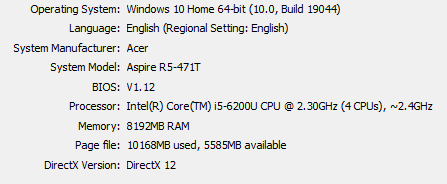
Setting the anti aliasing to 2 or above causes the fps to drop. When set to 1, everything is fine at 60fps, but setting it to 2 drops it to around 50. 3 causes it to drop to about 40. 4 causes 30 fps which isn't good since it's the default value. Anything above that causes it to drop to 30 and below. Texel anti aliasing causes it to worsen. 1 anti aliasing with no texel is 60 fps, but when turned on it goes as low as 55. I have 2.70 GHz on average and 8GB RAM btw
How to reproduce:
Set the anti aliasing to anything above 1
Turn on texel anti aliasing (Optional step)What I expected:
The fps would only drop by a few framesWhat I saw:
The fps dropped by nearly double digits, and drops even more on education editionThis affects 1.17.
11, 1.17.30, and education edition 1.14.70.Setting the anti aliasing to 2 or above causes the fps to drop. When set to 1, everything is fine at 60fps, but setting it to 2 drops it to around 50. 3 causes it to drop to about 40. 4 causes 30 fps which isn't good since it's the default value. Anything above that causes it to drop to 30 and below. Texel anti aliasing causes it to worsen. 1 anti aliasing with no texel is 60 fps, but when turned on it goes as low as 55. I have 2.70 GHz on average and 8GB RAM btw
How to reproduce:
Set the anti aliasing to anything above 1
Turn on texel anti aliasing (Optional step)What I expected:
The fps would only drop by a few framesWhat I saw:
The fps dropped by nearly double digits, and drops even more on education editionThis affects 1.17.30, 1.17.32, and education edition 1.14.70.
Setting the anti aliasing to 2 or above causes the fps to drop. When set to 1, everything is fine at 60fps, but setting it to 2 drops it to around 50. 3 causes it to drop to about 40. 4 causes 30 fps which isn't good since it's the default value. Anything above that causes it to drop to 30 and below. Texel anti aliasing causes it to worsen. 1 anti aliasing with no texel is 60 fps, but when turned on it goes as low as 55. I have 2.70 GHz on average and 8GB RAM btw
How to reproduce:
Set the anti aliasing to anything above 1
Turn on texel anti aliasing (Optional step)What I expected:
The fps would only drop by a few framesWhat I saw:
The fps dropped by nearly double digits, and drops even more on education editionThis affects 1.17.30, 1.17.32, 1.17.34, and education edition 1.14.70.
Setting the anti aliasing to 2 or above causes the fps to drop. When set to 1, everything is fine at 60fps, but setting it to 2 drops it to around 50. 3 causes it to drop to about 40. 4 causes 30 fps which isn't good since it's the default value. Anything above that causes it to drop to 30 and below. Texel anti aliasing causes it to worsen. 1 anti aliasing with no texel is 60 fps, but when turned on it goes as low as 55. I have 2.70 GHz on average and 8GB RAM btw
How to reproduce:
Set the anti aliasing to anything above 1
Turn on texel anti aliasing (Optional step)What I expected:
The fps would only drop by a few framesWhat I saw:
The fps dropped by nearly double digits, and drops even more on education editionThis affects 1.17.30, 1.17.32, 1.17.34, and education edition 1.14.70.
Setting the anti aliasing to 2 or above causes the fps to drop. When set to 1, everything is fine at 60fps, but setting it to 2 drops it to around 50. 3 causes it to drop to about 40. 4 causes 30 fps which isn't good since it's the default value. Anything above that causes it to drop to 30 and below. Texel anti aliasing causes it to worsen. 1 anti aliasing with no texel is 60 fps, but when turned on it goes as low as 55. I have 2.70 GHz on average and 8GB RAM btw
How to reproduce:
Set the anti aliasing to anything above 1
Turn on texel anti aliasing (Optional step)What I expected:
The fps would only drop by a few framesWhat I saw:
The fps dropped by nearly double digits, and drops even more on education editionNotes:
Affects education edition
system.png
Some mobs end up falling and stuff because of their AI. This includes mobs trying to walk on signs and open trapdoors, and stepping on pressure plates that cause the floor to give away. They also walk on drip
stoneand they sometimes stop, so they fall.How to reproduce:
Try anything I said aboveWhat I expected:
The mobs will avoid falling and stuffWhat I saw:
The scenarios I said above happen instead.Some mobs end up falling and stuff because of their AI. This includes mobs trying to walk on signs and open trapdoors, and stepping on pressure plates that cause the floor to give away. They also walk on dripleaf or whatever its called and they sometimes stop, so they fall.
How to reproduce:
Try anything I said aboveWhat I expected:
The mobs will avoid falling and stuffWhat I saw:
The scenarios I said above happen instead.
When I submit a request, they reply, but I can't view the answer. When I clicked it there was just a white page with some text reading "You are now talking with a minecraft gamer!". I disabled my ad blocker and I still can't see the answer.
How to reproduce:
Go to the minecraft help page
Send a request
"View" the answer ❌What I expected:
The request page would be normal, probably like one for education editionWhat I saw:
The page just had some text and nothing elseNotes:
I disabled my ad blocker and the issue persists.
When I submit a request, they reply, but I can't view the answer. When I clicked it there was just a white page with some text reading "You are now talking with a minecraft gamer!". I disabled my ad blocker and I still can't see the answer.
How to reproduce:
Go to the minecraft help page
Send a request
"View" the answer ❌What I expected:
The request page would be normal, probably looking like one for education editionWhat I saw:
The page just had some text and nothing elseNotes:
I disabled my ad blocker and the issue persists.
When I submit a request, they reply, but I can't view the answer. When I clicked it there was just a white page with some text reading "You are now talking with a minecraft gamer!". I disabled my ad blocker and I still can't see the answer.
How to reproduce:
Go to the minecraft help page
Send a request
"View" the answer ❌What I expected:
The request page would be normal, probably looking like one for education editionWhat I saw:
The page just had some text and nothing elseNotes:
I disabled my ad blocker and the issue persists. The priority should be critical, this is a terrible bug.
For me it doesn't affect 1.17.32
Chains don't connect to each other really well, they just float.
There areseveralways to reproduce this.How to reproduce:
1. Place a chain horizontally on a vertical chain
2. Place a lantern below a horizontal chain
3. Place a chain vertically on a horizontal chainWhat I expected:
The chains will connectWhat I saw:
The chains were floating in the airChains don't connect to each other really well, they just float.
There are 3 ways to reproduce this.How to reproduce:
1. Place a chain horizontally on a vertical chain
2. Place a lantern below a horizontal chain
3. Place a chain vertically on a horizontal chainWhat I expected:
The chains will connectWhat I saw:
The chains were floating in the air
Chains don't connect to each other really well, they just float.
There are 3 ways to reproduce this.How to reproduce:
1. Place a chain horizontally on a vertical chain
2. Place a lantern below a horizontal chain
3. Place a chain vertically on a horizontal chainWhat I expected:
The chains will connectWhat I saw:
The chains were floatingin the airChains don't connect to each other really well, they just float.
There are 3 ways to reproduce this.How to reproduce:
1. Place a chain horizontally on a vertical chain
2. Place a lantern below a horizontal chain
3. Place a chain vertically on a horizontal chainWhat I expected:
The chains will connect, like glass panesWhat I saw:
The chains were floating a couple of pixels away
Keeping the game minimized for too long crashes it
Notes: This is not a duplicate of
MCPE-143822. It also only happens in education edition if there are any resource packs in the storage since the edu team rigged it to crash when addons are put in "to keep the game stable"which isn't true. This happens in bedrock edition with or without addons.When you minimize the game for long enough, it crashes or causes issues when refocused. If minimized for even longer, it crashes without you refocusing it
How to reproduce:
Open the game
Minimize it for a long time
Refocus it and see what happensWhat I expected:
The game would be normalWhat I saw:
The game crashes or severely glitches out such as flashing between black and red and endlessly toggling between fullscreen, maximized, and windowed. In education edition, it crashes only.Notes: This is not a duplicate of
MCPE-143822. It also only happens in education edition if there are any resource packs in the storage since the edu team rigged it to crash when addons are put in "to keep the game stable". This happens in bedrock edition with or without addons.When you minimize the game for long enough, it crashes or causes issues when refocused. If minimized for even longer, it crashes without you refocusing it
How to reproduce:
Open the game
Minimize it for a long time
Refocus it and see what happensWhat I expected:
The game would be normalWhat I saw:
The game crashes or severely glitches out such as flashing between black and red and endlessly toggling between fullscreen, maximized, and windowed. In education edition, it crashes only.
Notes: This is not a duplicate of
MCPE-143822. It also only happens in education edition if there are any resource packs in the storage since the edu team rigged it to crash when addons are put in "to keep the game stable". This happens in bedrock edition with or without addons.When you minimize the game for long enough, it crashes or causes issues when refocused. If minimized for even longer, it crashes without you refocusing it
How to reproduce:
Open the game
Minimize it for a long time
Refocus it and see what happensWhat I expected:
The game would be normalWhat I saw:
The game crashes or severely glitches out such as flashing between black and red and endlessly toggling between fullscreen, maximized, and windowed. In education edition,it crashesonly.Notes: This is not a duplicate of
MCPE-143822. It also only happens in education edition if there are any resource packs in the storage since the edu team rigged it to crash when addons are put in "to keep the game stable". This happens in bedrock edition with or without addons.When you minimize the game for long enough, it crashes or causes issues when refocused. If minimized for even longer, it crashes without you refocusing it
How to reproduce:
Open the game
Minimize it for a long time
Refocus it and see what happensWhat I expected:
The game would be normalWhat I saw:
The game crashes or severely glitches out such as flashing between black and red and endlessly toggling between fullscreen, maximized, and windowed. In education edition, the only scenario is crashing.
Notes: This is not a duplicate of
MCPE-143822. It also only happens in education edition if there are any resource packs in the storage since the edu team rigged it to crash when addons are put in "to keep the game stable". This happens in bedrock edition with or without addons.When you minimize the game for long enough, it crashes or causes issues when refocused. If minimized for even longer, it crashes without you refocusing it
How to reproduce:
Open the game
Minimizeitforalongtime
Refocus it and see what happensWhat I expected:
The game would be normalWhat I saw:
The game crashes or severely glitches out such as flashing between black and red and endlessly toggling between fullscreen, maximized, and windowed. In education edition, the only scenario is crashing.Notes: This is not a duplicate of
MCPE-143822. It also only happens in education edition if there are any resource packs in the storage since the edu team rigged it to crash when addons are put in "to keep the game stable". This happens in bedrock edition with or without addons.When you minimize the game for long enough, it crashes or causes issues when refocused. If minimized for even longer, it crashes without you refocusing it
How to reproduce:
Open the game
Minimize overnight or longer
Refocus it and see what happensWhat I expected:
The game would be normalWhat I saw:
The game crashes or severely glitches out such as flashing between black and red and endlessly toggling between fullscreen, maximized, and windowed. In education edition, the only scenario is crashing.
Affects education edition ONLY
If you minimize the game for too long (e.g. overnight) the textures are missing except for entities, skins, hud, ui and gui.
This does not happen on bedrock edition.How to reproduce:
Minimize the game for a loooonnng time
Refocus the game and see what happensWhat I expected:
Everything will be normalWhat I saw:
The textures were missingAffects education edition
If you minimize the game for too long (e.g. overnight) the textures are missing except for entities, skins, hud, ui and gui.
How to reproduce:
Minimize the game for a loooonnng time
Refocus the game and see what happensWhat I expected:
Everything will be normalWhat I saw:
The textures were missingNotes:
This only affects bedrock edition if the game is minimized during a loading screen or whatever.
Affects education edition
If you minimize the game for too long (e.g. overnight) the textures are missing except for entities, skins, hud, ui and gui.
How to reproduce:
Minimize the game for a loooonnng time
Refocus the game and see what happensWhat I expected:
Everything will be normalWhat I saw:
The textures were missingNotes:
This only affects bedrock edition if the game is minimized during a loading screen or whatever time you shouldn't do it.
Affects education edition
If you minimize the game for too long (e.g. overnight) the textures are missing except for entities, skins, hud, ui and gui.
How to reproduce:
Minimize the game for a loooonnng time
Refocus the game and see what happensWhat I expected:
Everything will be normalWhat I saw:
The textures were missingNotes:
This only affects bedrock edition if the game is minimized during a loading screen or whatever time you shouldn't do it. In bedrock edition it only affects skins and profile pictures.
Affects education edition
If you minimize the game for too long (e.g. overnight) the textures are missing except for entities, skins, hud, ui and gui.
How to reproduce:
Minimize the game for a loooonnng time
Refocus the game and see what happensWhat I expected:
Everything will be normalWhat I saw:
The textures were missingNotes:
This only affects bedrock edition if the game is minimized during a loading screen or whatever time you shouldn't do it. In bedrock editionit onlyaffectsskins and profile pictures.Affects education edition
If you minimize the game for too long (e.g. overnight) the textures are missing except for entities, skins, hud, ui and gui.
How to reproduce:
Minimize the game for a loooonnng time
Refocus the game and see what happensWhat I expected:
Everything will be normalWhat I saw:
The textures were missingNotes:
This only affects bedrock edition if the game is minimized during a loading screen or whatever time you shouldn't do it. In bedrock edition the only textures missing are skins and profile pictures.
Affects education edition
If you minimize the game for too long (e.g. overnight) the textures are missing except for entities, skins, hud, ui and gui.
How to reproduce:
Minimize the game for a loooonnng time
Refocus the game and see what happensWhat I expected:
Everything will be normalWhat I saw:
The textures were missingNotes:
This only affects bedrock edition if the game is minimized during a loading screen or whatever time you shouldn't do it. In bedrock edition the only textures missing are skins and profile pictures. Or different case scenario,MCPE-143823happens instead.
@GoldenHelmet
Composters use the dirt sound and bone meal didn't have a sound back then
In the Minecraft addon page, there are vanilla resource and behaviour packs available for download. But the vanilla behaviour pack doesn't contain any of the block files.
How to reproduce:
Go to minecraft.net/addons
Download the vanilla behaviour pack (It's found when you scroll down a bit)
Look inside it and try to find any vanilla block files ❌What I expected:
There would be vanilla block files that I could modify to create an addonWhat I saw:
The block files are not there, only the entity files and otherrandomstuffIn the Minecraft addon page, there are vanilla resource and behaviour packs available for download. But the vanilla behaviour pack doesn't contain any of the block files.
How to reproduce:
Go to minecraft.net/addons
Download the vanilla behaviour pack (It's found when you scroll down a bit)
Look inside it and try to find any vanilla block files ❌What I expected:
There would be vanilla block files that I could modify to create an addonWhat I saw:
The block files are not there, only the entity files and other stuff
In the Minecraft addon page, there are vanilla resource and behaviour packs available for download. But the vanilla behaviour pack doesn't contain any of the block files.
How to reproduce:
Go to minecraft.net/addons
Download the vanilla behaviour pack (It's found when you scroll down a bit)
Look inside it and try to find any vanilla block files ❌What I expected:
There would be vanilla block files that I could modify to create an addonWhat I saw:
The block files are not there, only the entity files and other stuffNotes:
The priority should be set to important, I can't make changes to existing blocks like this.
In the Minecraft addon page, there are vanilla resource and behaviour packs available for download. But the vanilla behaviour pack doesn't contain any of the block files.How to reproduce:
Go to minecraft.net/addons
Download the vanilla behaviour pack (It's found when you scroll down a bit)
Look inside it and try to find any vanilla block files ❌What I expected:
There would be vanilla block files that I could modify to create an addonWhat I
saw:
Theblock files are not there, only the entity files and other stuff
Notes:
Thepriority should be set to important, I can't make changes to existing blocks like this.Oops this bug is invalid, I read somewhere that vanilla blocks cannot be overwritten.
Original bug:
In the Minecraft addon page, there are vanilla resource and behavior packs available for download. But the vanilla behavior pack doesn't contain any of the block files.
How to reproduce:
Go to minecraft.net/addons
Download the vanilla behavior pack (It's found when you scroll down a bit)
Look inside it and try to find any vanilla block files ❌What I expected:
There would be vanilla block files that I could modify to create an addonWhat I saw:
The block files are not there, only the entity files and other stuff
The anvil character limit is too short. The block "
Waxed weathered cut copper stairs" has the longest name. But it's impossible to input that many characters in an anvil.How to reproduce:
Get an anvil
Rename something to the maximum character limit
Compare it with "Waxed weathered cut copper stairs"What I expected:
The characters will be long enough to matchWhat I saw:
The characters are less long than "Waxed weathered cut copper stairs".The anvil character limit is too short. The block "Polished Cracked Blackstone Brick Stairs" has the longest name. But it's impossible to input that many characters in an anvil.
How to reproduce:
Get an anvil
Rename something to the maximum character limit
Compare it with "Polished Cracked Blackstone Brick Stairs"What I expected:
The characters will be long enough to matchWhat I saw:
The characters are less long than "Polished Cracked Blackstone Brick Stairs".
The anvil character limit is too short. The block "
Polished Cracked Blackstone BrickStairs" has the longest name. But it's impossible to input that many characters in an anvil.How to reproduce:
Get an anvil
Rename something to the maximum character limit
Compare it with "Polished Cracked Blackstone BrickStairs"What I expected:
The characters will be long enough to matchWhat I saw:
The characters are less long than "Polished Cracked Blackstone BrickStairs".The anvil character limit is too short. The block "Waxed Weathered Cut Copper Stairs" has the longest name. But it's impossible to input that many characters in an anvil.
How to reproduce:
Get an anvil
Rename something to the maximum character limit
Compare it with "Waxed Weathered Cut Copper Stairs"What I expected:
The characters will be long enough to match "Waxed Weathered Cut Copper Stairs"What I saw:
The characters are less long than "Waxed Weathered Cut Copper Stairs".
Minecraft bedrock logo is outdated on dashboard
Minecraft bedrock logois outdated on dashboardMinecraft bedrock logo on dashboard is outdated
The minecraft bedrock logo is outdated. It was changed in 1.17.30
andthe bug tracker didn't change.
How to reproduce:
Go to the dashboard (click the mojang studios logo to get there)
Look at the logo for minecraft bedrock
What I expected:
The logo for minecraft bedrock is up to date (Matching 1.17.30)
What I saw:
The logo was outdatedThe minecraft bedrock logo is outdated. It was changed in 1.17.30 but the bug tracker didn't change.
How to reproduce:
Go to the dashboard (click the mojang studios logo to get there)
Look at the logo for minecraft bedrock
What I expected:
The logo for minecraft bedrock is up to date (Matching 1.17.30)
What I saw:
The logo was outdated
The minecraft bedrock logo is outdated. It was changed in 1.17.30 but the bug tracker didn't change. It should look like the image I attached.
How to reproduce:
Go to the dashboard (click the mojang studios logo to get there)
Look at the logo for minecraft bedrock
What I expected:
The logo for minecraft bedrock is up to date (Matching 1.17.30)
What I saw:
The logo was outdated
The hotbar offset bug was recently fixed, but it came back in 1.17.40. This is not a clone, it is not resolved anymore.
How to reproduce:
Go to adventure/survival mode
Look at the hotbarWhat I expected:
The hotbar is normalWhat I saw:
The right side of thehotbar is off by a singlepixelThe hotbar offset bug was recently fixed, but it came back in 1.17.40. This is not a clone, it is not resolved anymore.
How to reproduce:
Go to adventure/survival mode
Look at the hotbarWhat I expected:
The hotbar is normalWhat I saw:
The right side of the xp bar, health, hunger, and armor bars are shorter by 1 pixel
The hotbar offset bug was recently fixed, but it came back in 1.17.40. This is not a clone, it is not resolved anymore.
How to reproduce:
Go to adventure/survival mode
Look at the hotbarWhat I expected:
The hotbar is normalWhat I saw:
The right side of the xp bar, health, hunger, and armor bars are shorter by 1 pixelNotes:
Before, the hotbar was offset. But now, the right side of all the bars are shorter by 1 pixel, making the hotbar longer.
Hotbar is still offsetSome bars on hotbar are too short
Since 1.17.32, the end sky doesn't display properly. NONE of the resource packs I'm using changes the end sky, so this is an in game bug.
How to reproduce:
Go to the end
Look at the sky with and without night visionWhat I expected:
The end sky will be black. It will also be grainy purple when night vision is used.What I saw:
The end sky was grainy white with and without night vision
End sky doesn't display properlyResource pack will not refresh
Since 1.17.32, the end sky doesn't display properly. NONE of the resource packs I'm using changes the end sky, so this is an in game bug.
How to reproduce:
Go to the end
Look at the sky with and without night visionWhat I expected:
The end sky will be black. It will also be grainy purple when night vision is used.What I saw:
The end sky was grainy white with and without night visionOne of my resource packs are breaking the end sky. I removed the files that change the end sky, but it didn't work. I moved it into development_resource_packs but that didn't work either.
Resource pack will not refreshMaking changes to biomes_client.json breaks the end sky
One of my resource packs are breaking the end sky. I removed the files that change the end sky, but it didn't work. I moved it into development_resource_packs but that didn't work either.
Making any changes to biomes_client.json breaks the end sky.
How to reproduce:
Use a resource pack that changes biomes_client.json
Go to the end
Look at the skyWhat I expected:
The end sky will render normalWhat I saw:
The end sky lost it's color map and is bright without night vision
Spamming ender pearls in the same location causes you to glitch through or into blocks.
How to reproduce:
1. Make a thin floor midair out of blocks
2. Jump off
3. Spam ender pearls into the floorWhat I expected:
The player will hit the bottom and fallWhat I saw:
I glitched through the floorNotes:
This doesn't happen with a single ender pearl, and making the floor thicker will cause you to glitch into it and suffocate.
Education edition items have the wrong category. This is not in parity with education edition, since they have categories but at the same time not registered to the creative inventory.
How to reproduce:
Create a compound
See it's categoryWhat I expected:
It would be in items or somethingWhat I saw:
It's category is "item.category.none", which isn't even translated.Notes:
There are more ways to reproduce this. Elements are not in the "construction" category.
Education edition items have the wrong category. This is not in parity with education edition, since they have categories but at the same time not registered to the creative inventory.
How to reproduce:
Create a compound
See it's categoryWhat I expected:
It would be in items or somethingWhat I saw:
It's category is "item.category.none", which isn't even translated.Notes:
There are more ways to reproduce this. Elements are not in the "construction" category.Education edition items have the wrong category. This is not in parity with education edition, since they have categories but at the same time not registered to the creative inventory.
How to reproduce:
Create a compound
See it's categoryWhat I expected:
It would be in items or somethingWhat I saw:
It's category is "craftingScreen.tab.none", which isn't even translated.Notes:
There are more ways to reproduce this. Elements are not in the "construction" category.
Education edition items have the wrong category. This is not in parity with education edition, since they have categories but at the same time not registered to the creative inventory.
How to reproduce:
Create a compound
See it's categoryWhat I expected:
It would be in items or somethingWhat I saw:
It's category is "craftingScreen.tab.none", which isn't even translated.Notes:
There are more ways to reproduce this. Elements are not in the "construction" category. This not a duplicate, but relates toMCPE-102444
Education edition items have the wrong category. This is not in parity with education edition, since they have categories but at the same time not registered to the creative inventory.
How to reproduce:
Create a compound
See it's categoryWhat I expected:
It would be in items or somethingWhat I saw:
It's category is "craftingScreen.tab.none", which isn't even translated.Notes:
There are more ways to reproduce this. Elements are not in the "construction" category.This not a duplicate, but relates toMCPE-102444
It is impossible to obtain chalkboards even with education edition enabled.
How to reproduce:
Create a world with education edition turned on
Try to find chalkboards in the creative mode inventory or in /setblock or /fillWhat I expected:
You can get chalkboards, like in education editionWhat I saw:
Chalkboards are unobtainable without nbt editors
According to the wiki it is supposed to be obtainable in bedrock edition.
Doesn't affect education edition and 1.17.30
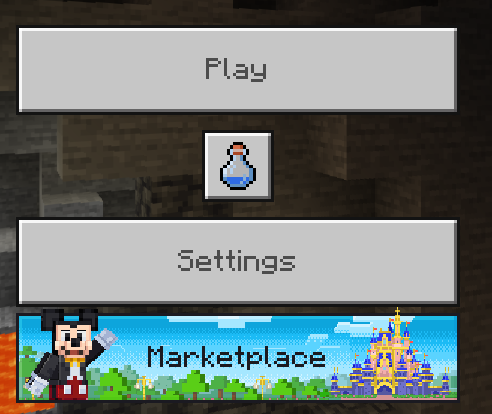
Minecraft's main menu looks very very weird. There are 2 achievement buttons and the marketplace button is on the bottom. I disabled every single resource pack and it didn't fix the issue.
The main menu doesn't have music anymore since 1.18. None of my resource packs change the main menu music, so it's a bug with the game.
How to reproduce:
Launch minecraft in 1.18
Listen for music on the main menuWhat I expected:
There would be music, including the new music in 1.18What I heard:
There is no music at all, just silence.Notes:
This only happens on the first launch of 1.18, relaunching the game fixes the bug permanently.
The main menu doesn't have music anymore since 1.18. None of my resource packs change the main menu music, so it's a bug with the game.
How to reproduce:
Launch minecraft in 1.18
Listen for music on the main menuWhat I expected:
There would be music, including the new music in 1.18What I heard:
There is no music at all, just silence.Notes:
This only happens on the first launch of 1.18, relaunching the game fixes the bug permanently.The main menu doesn't have music anymore since 1.18. None of my resource packs change the main menu music, so it's a bug with the game.
How to reproduce:
Launch minecraft in 1.18
Listen for music on the main menuWhat I expected:
There would be music, including the new music in 1.18What I heard:
There is no music at all, just silence.Notes:
This only happens on the first launch of 1.18, relaunching the game fixes the bug permanently.
The main menu doesn't have music anymore since 1.18. None of my resource packs change the main menu music, so it's a bug with the game.
How to reproduce:
Launch minecraft in 1.18
Listen for music on the main menuWhat I expected:
There would be music, including the new music in 1.18What I heard:
There is no music at all, just silence.Notes:
This only happens on the first launchof1.18, relaunching the game fixes the bug permanently.The main menu doesn't have music anymore since 1.18. None of my resource packs change the main menu music, so it's a bug with the game.
How to reproduce:
Launch minecraft in 1.18
Listen for music on the main menuWhat I expected:
There would be music, including the new music in 1.18What I heard:
There is no music at all, just silence.Notes:
This only happens on the first time you launch 1.18, relaunching the game fixes the bug permanently.
I don't want this to be added, its annoying just returning from a fight just to see an arrow on your face.
Why is this a won't fix
its so annoying
The allay, which hasn't even been added in beta or experimental gameplay is in /damage for some reason.
How to reproduce:
Create a world (Or a server, since I only tested this bug on BDS)
Enter /damage @e[type=allayExpected results:
There won't be anythingActual results:
There was the allayNotes:
If you do run the command it will fail as expected

The allay, which hasn't even been added in beta or experimental gameplay is in /damage for some reason.
How to reproduce:
Create a world (Or a server, since I only tested this bug on BDS)
Enter /damage @e[type=allayExpected results:
There won't be anythingActual results:
There was the allayNotes:
If you do run the command it will fail as expected
Minecraft bedrock and dungeons page transitions are not animated
Still affects 1.18.12
The bedrock server download site doesn't work. My antivirus marks it as a phishing site too.
Expected results:
The website will workObserved results:
It says the connection was reset.Notes:
Could potentially be a security issue.
The bedrock server download site doesn't work. My antivirus marks it as a phishing site too.
Expected results:
The website will workObserved results:
It says the connection was reset.Notes:
Could potentially be a security issue.The bedrock server download site doesn't work. My antivirus marks it as a phishing site too.
UPDATE: ALSO HAPPENS TO JAVA EDITION SITEExpected results:
The website will workObserved results:
It says the connection was reset.Notes:
Could potentially be a security issue.
Original description: I can't connect to my own server, it just crashes after a few seconds. This makes the server impossible to play on, this is a critical bug.
Server auth with rewind causes clients to crash.
Expected results:
Original description: I can't connect to my own server, it just crashes after a few seconds. This makes the server impossible to play on, this is a critical bug.
Server auth with rewind causes clients to crash.
Expected results:
Original description: I can't connect to my own server, it just crashes after a few seconds. This makes the server impossible to play on, this is a critical bug.
Server auth with rewind causes clients to crash.
Expected results:
Server auth with rewind will not make clients crash when moving in the server.Observed results:
It caused clients connecting to the server to crash
Minecraft crashes when connectingServer auth with rewind causes client crash
Original description: I can't connect to my own server, it just crashes after a few seconds. This makes the server impossible to play on, this is a critical bug.
Server auth with rewind causes clients to crash.
Expected results:
Server auth with rewind will not make clients crash when moving in the server.Observed results:
It caused clients connecting to the server to crashNotes:
As a workaround you can use client auth movement instead, since I experience no issues with it.
The new create world screen was made available in 1.18.30, but it got removed in 1.19
Expected results:
The UI would still be thereObserved results:
It reverted to the original UIOops this is a duplicate
Original Bug:The new create world screen was made available in 1.18.30, but it got removed in 1.19Expected results:
The UI would still be thereObserved results:
It reverted to the original UI
Holiday creator features just don't work, and the names are missing for some reason. The addon used to work fine in previous versions.The blocks are missing, and the names are missing for some reason. The addon used to work fine in previous versions.
What I expected:
The addon would work fine like it did in previous versionsWhat I saw:
The blocks were misssing, and item names are gone, they used to be here in older versions of the game.Notes:
I managed to reproduce this bug in a new world, so there was nothing wrong with the world i was using it in. I am not the creator, but I inspected the addon myself and couldn't find any issues with the code. I checked the content log and couldn't find anything. There were no errors or warnings in the pack description (Missing dependencies, etc.)
The blocks are missing, and the names are missing for some reason. The addon used to work fine in previous versions.
What I expected:
The addon would work fine like it did in previous versionsWhat I saw:
The blocks were misssing, and item names are gone, they used to be here in older versions of the game.Notes:
I managed to reproduce this bug in a new world, so there was nothing wrong with the world i was using it in. I am not the creator, but I inspected the addon myself and couldn't find any issues with the code. I checked the content log and couldn't find anything. There were no errors or warnings in the packdescription(Missing dependencies, etc.)The blocks are missing, and the names are missing for some reason. The addon used to work fine in previous versions.
What I expected:
The addon would work fine like it did in previous versionsWhat I saw:
The blocks were misssing, and item names are gone, they used to be here in older versions of the game.Notes:
I managed to reproduce this bug in a new world, so there was nothing wrong with the world i was using it in. I am not the creator, but I inspected the addon myself and couldn't find any issues with the code. I checked the content log and couldn't find anything. There were no errors or warnings in the packs (Missing dependencies, etc.)
wan6845: You are using comments in an unauthorized manner and commenting on a lot of closed tickets. This is not a discussion site or community support site. Comments are to be used to provide new information to the developers only. Also, be careful that you avoid making yourself sound like bug tracker staff.
This issue is not fixed. I pressed login and kept on attempting to login but it just stays still.
Report this in the bedrock codebase or the java thing. Don't report this on Mojang web services. This is a game bug, not website bug
This bug was discovered in Education edition 1.12.60, so please test it out in bedrock 1.16.21 and education edition 1.14.31.
If you place just one gold block it will start to double eventually. If you play in the world an extended period of time, it also happens.
Minecraft classic is recommended on powerful browsers. You may have a low end device.
Multiplayer is disabled temporarily due to performance issues, like 0 fps. Mojang is working on those.
Education edition 1.14.31 is released. This is resolved probably by the release of education edition on chromebooks.
The online version is supported. But multiplayer is temporarily disabled to fix performance issues
Multiplayer is disabled temporarily to fix performance issues. It's not invite. Anyone can enter the exact link and join, but only if Mojang enables it soon . . .
Multiplayer is disabled temporarily.
https://twitter.com/MojangStatus/status/1126070107279695873
I thought this was a feature.
It's just google chrome's faulty security scans. It's not actually unsafe.
I am not sure if the bug is still there in the latest version since I don't have the game anymore. This bug was tested before the buzzy bees update was released for Education edition.
Edit: This bug is gone, I tested it because I have the game again
This is not fixed, I was spamming the login button and it just won't work. It just goes through the entire login process and then it just says feedback login.
Edit: Oops I didn't realize I was spamming
This bug is also in education edition 1.14.50
No, it's a bit different.
This bug is carried over to education edition
Check
MCPE-127250This happens in education edition but only when you minimize the game
I tried signing in again, but it created a new account. I guess this issue is 50% fixed.
Same, before this the feedback site kept on redirecting to the home page. After that was "fixed", this started happening. I didn't make a lot of posts, but long-time feedback site users are not in luck. For the redirecting thing, check
WEB-4529.This happens in education edition 1.14.70
Happens in education edition 1.14.70
I changed the description. Also, the bug is still in the latest version of education edition.(1.14.70)
Mobs also pathfind perfectly when you attack them even when you use the command to hide the particles
Shortly after this happened WEB-4846 started to happen
This happens in education edition 1.14.70
This happened shortly after
WEB-4529, and WEB-4846 happened after this.Affects 1.17.11
It didn't happen in education edition
This should be fixed, or there could be a gamerule called "attachedtiledrops".
Edit:Oops sorry for putting feedback in the bug tracker
Reply from [Mod] GoldenHelmet: that's exactly what the Tile Drops settings is. I believe the gamerule is dotiledrops.
This also happens in creative mode due to
MCPE-104226Maybe your other items got burned in fire or something.
Maybe you're unlucky or something. Mob drops are random I think.
Oops turns out it's a problem with a resource pack not the game itself
You can resolve this as an invalid or something
This happens in education edition, chalkboards are tile entities, so the command doesn't work, so might as well move it to the /setblock and /fill command for it to have a purpose.
This happens in education edition and bedrock edition 1.17.11
Affects education edition
I think this is intended, since most mobs like iron golems attack one opponent at a time
This didn't happen in education edition
Didn't affect education edition
Try deactivating stuff in global resources, since a resource pack might be hiding the button.
His world might have cheats on, maybe your friend was trolling you.
It's your hands that move, not the screen. You can turn it off with the view bobbing setting.
Edit: I mean your in-game hands, not irl
Affects education edition
Try restarting your console
Maybe the world file got corrupted.
Experimental gameplay isn't guaranteed to be stable, and mods can cause instability on low end devices.
Try cleaning the usb port your keyboard is connected to.
For me, every cave I find is flooded, unless I don't turn on the experimental toggle.
Try reconnecting your controller
Maybe you have a really low end device or you set the randomtickspeed too high.
Bedrock edition doesn't have underwater ambience
Mobs only spawn if they aren't too far and not too close.
Didn't affect education edition
Affects education edition and 1.17.30
Unfortunately, there is no way to use global resources while the "Must Accept Resource Packs" is toggled on. You'll have to apply the resource pack to the world itself.
Affects education edition
For me the dolphins don't come up for air even though I made the enclosing really big. They also just crash into walls and spin around in seagrass. Other fish also spin around in seagrass and kelp.
Did you use any resource packs/mods
This is because of
WEB-4529I thinkThis issue is in the wrong project
Affects bedrock edition
I did search before creating this, and found nothing.
Affects eduation edition 1.14.50 and 1.14.70
Doesn't affect bedrock edition 1.17.30 and 1.17.32
maybe your device is too weak
duplicate of
WEB-4529Unplug your keyboard and blow dust out of the port
Then plug your keyboard back in
It only shows when they are playing on a world with multiplayer enabled
For me this only happens sometimes when I minimize the game, and it only turns skins pink. Profile pictures turn into pink and black.
It wont happen unless the difficulty is set to hard
This issue exists because there is a bug that has been fixed, which is where the fire overlay appears 3D at high fovs
this doesn't happen anymore
well in bedrock edition
This happened to me on 1.17.34
This is an extremely urgent bug, I can't sign in, I can't change skins, nothing. This needs to be fixed. Until it is fixed, I can't play at all.
There needs to be a 1.17.35 to fix this
I agree
It is unplayable
Theres more to this bug than meets the eye
I can't sign in, but the first time I opened the game I wasn't signed in and it wasn't glitchy either
All my characters got deleted
I've also reported this issue to microsoft
When I click sign in it asks me if it wants to save my purchases on my microsoft account then I click save to microsoft account
then it says error code terracotta
The servers are also down in canada
https://downdetector.ca/status/minecraft/
Its a weekday
how in the world are the servers down
The xbox live servers are also down
https://downdetector.ca/status/xbox-live/
The affects versions is missing 1.17.34
The xbox live servers are starting to restore
but minecraft's servers aren't
Minecraft's servers are not restoring
theyre going down even more
everyone just close the game and let the servers go normal
52% of the server outage reports are sign in issues (This bug)
Don't uninstall and reinstall the game
just close the game and wait for the servers to go normal
the minecraft servers are restoring
downdetector.ca/status/minecraft/
Yay it worked
thank you mojang
error code terracotta means the server is down i guess
Doesn't affect 1.17.34
Affects 1.17.34
Try deactivating resource packs
Doesn't affect 1.17.34, it has the dirt sound
Besides I think this bug is intentional
Make sure you're signed in to your xbox live account, or create one
Oops i duplicated this bug
The shield also has no animation when blocking explosions, and for me explosions don't inflict knockback when blocked
Doesn't affect 1.17.34
It's fixed
The reason i made this bug is because idk if its a bug that shaders aren't supported or if its intentional.
Yes, the bug is still in 1.14.70
This didn't happen to me, instead
WEB-4529doesThis happens even when signed out
Affects education edition 1.14.70
I think this is intentional
This is not fixed, affects 1.17.34
Affects 1.17.30, 1.17.32, 1.17.34 and 1.17.40
In very old browsers such as internet explorer, the sign in button doesn't work at all.
I attached it
How to reproduce:
Load a world with education edition turned on
Get 2 Hydrogen and 1 Oxygen
Combine them in the compound creator
Btw, this bug is fixed already
Isn't this a clone of
MCPE-142234oh
thanks
This was fixed in 1.17.41 according to the changelog
The minecraft java logo isn't messy and pixelated like it actually is
In 1.16 you can use netherite blocks, they're like obsidian except pushable by pistons
Affects 1.17.40 and 1.17.41
@ThrustersX
bruh the latest education edition version is 1.14.70
apart from betas
This bug is for education edition, not bedrock. However education edition bugs are reported in mcpe instead of other projects
Affects bedrock edition
I still get emails from the site, but I just can't sign in.
Element blocks don't have the "Construction" category which is not in parity with education edition.
This affects every pack that has player.json
For me the classic skins are not affected
it doesnt happen to me anymore
In sounds.json it doesn't contain anything for snowballs, and not in sound_definitions.json either. When you go in the sounds folder, none of the sounds are for snowballs or just throwing things in general.
Affects 1.18
i cant use the feedback site because of
WEB-4529Yes, I waited and waited and there was just silence, so I relaunched the game.
It was working fine the first few days but this bug suddenly happened. I painstakingly reinstalled it (It says failed to install so I have to clear cache and do all that stuff just to get the install button back), reset the app, nothing works. This bug is worse than
WEB-4529.Affects 1.18
why
its still an issue in the latest version
its still an issue in the latest version
its still an issue in the latest version
its still an issue in the latest version
the bug no longer happens now
i fixed it, and it already follows the example
its still an issue in the latest version
its still an issue in the latest version
it no longer affects the latest version, feel free to close this as resolved
Workaround: use your router ipv4 address and port
experimental gameplay is not supported on bds
experimental gameplay is not compatible with bds
bds doesnt support education edition features currently
this is also a bug with worlds, the global resource packs are disabled instead of being below the world resource packs
also please re-add the addons page
experimental gameplay is not supported on bds yet
The 1.18.11 version of bds doesn't have updated release notes, so I had to figure out the allowlist change myself to update my server.
Affects 1.18.10
Affects 1.18.10
it doesnt happen since 1.18.1
its only happening on dedicated server, and the host device (mine) is a pc and the other 2 players were on pc and mobile. But i dont think the bug is platform specific.
never mind, the bug doesnt happen anymore in the latest version
still reproduceable in 1.18.12
Yes, it's still an issue in the latest version.
Yes, it still affects the latest version
No, cpu and ram is fine.
Never mind, the site started working for me now.
@BedwokServer
Its probably because of server lag.
For me it takes a minute to load for the first launch. I moved all my resource packs to the regular folder rather than the development folders, which decreased the loading time from a minute to 30 seconds. The loading times are probably because I have a lot of resource packs.