 MC-117815
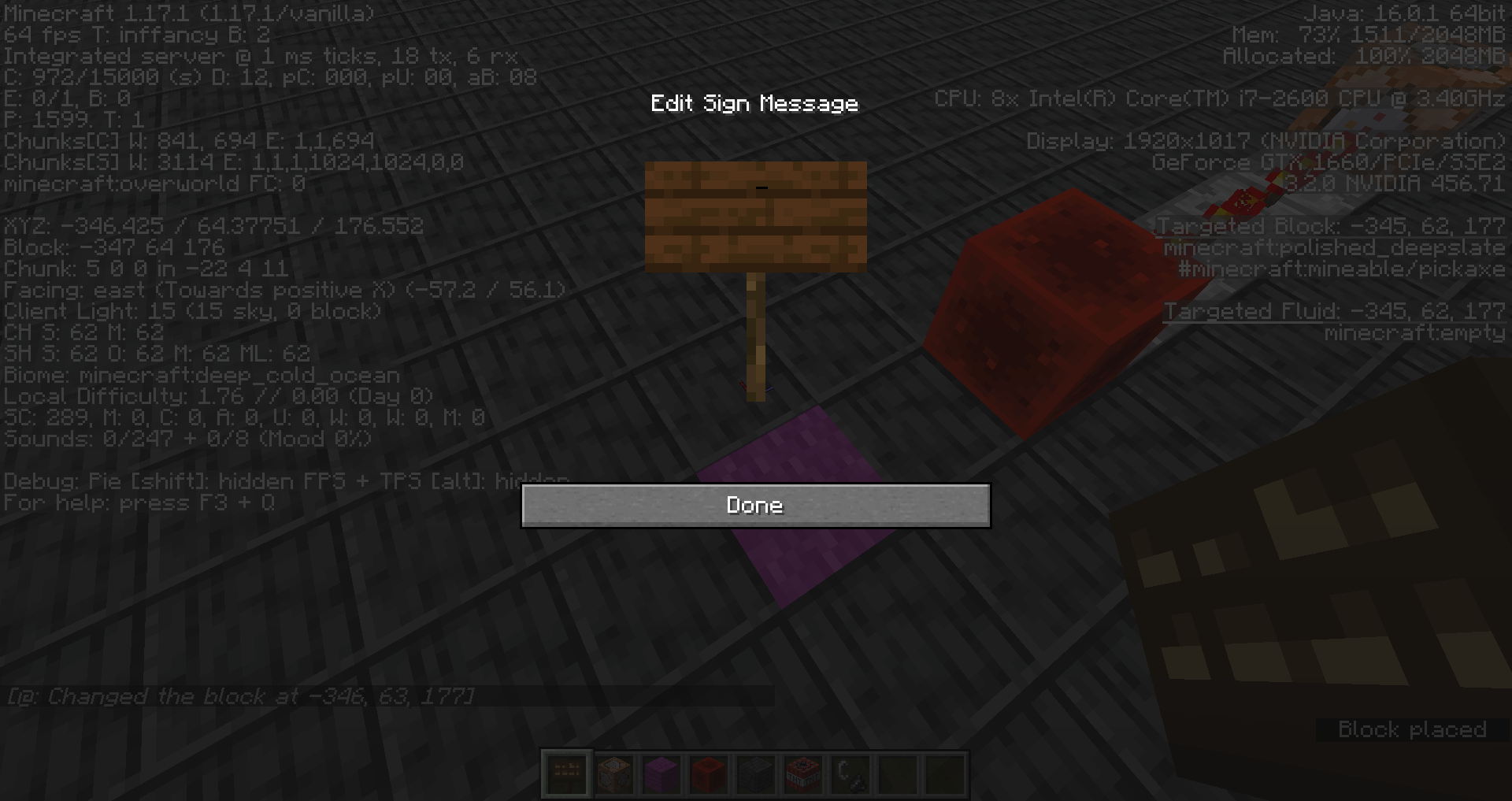
The sign GUI remains open when the said sign is destroyed
The bug
The interface of a sign remains open when the sign is destroyed. Expected would be that the interface is closed, similar to how an inventory or the crafting table GUI closes when the respective block is broken.
How to reproduce
- Place a stone pressure plate with a repeater behind set to the maximum delay
- Place a command block with the following command behind the repeater
/setblock ~ ~1 ~ air
- Open the world to LAN to make sure placing the sign do not pause the game
- Step on the pressure plate and quickly place a sign on the command block
Linked Issues
is duplicated by3
Attachments2
![[Mod] Avoma](../../../data/avatars/users/86198.png)
- Fixed
 Connor Steppie
 Marcono1234
- 16
- 7
- Confirmed
 Normal
- UI
- GUI interface sign
1.11.2 - 23w14a
1.11.2 1.12-pre5 1.12.1 1.13.1 1.13.2 19w03c 19w04b 1.14-pre2 1.14-pre3 1.14.4 1.15.1 1.15.2-pre1 1.15.2-pre2 20w06a 20w07a 20w08a 20w09a 20w10a 20w11a 20w12a 20w17a 20w21a 1.16-pre2 1.16-pre3 20w28a 20w29a 20w30a 1.16.2-pre1 1.16.4 20w48a 20w51a 21w03a 21w06a 21w20a 1.17-pre1 1.17-rc1 1.17 1.17.1 1.18.1 23w14a- 1.20-pre2
Created Issue:
Sign interface remains open when sign is destroyed
The bug
The interface of a sign remains open when the sign is destroyed. Expected would be that the interface is closed, similar to how an inventory or the crafting table GUI closes when the respective block is broken.
How to reproduce
- Place a stone pressure plate with a repeater behind set to the maximum delay
- Place a command block with the following command behind the repeater
/setblock ~ ~1 ~ air- Open the world to LAN to make sure placing the sign do not pause the game
- Step on the pressure plate and quickly place a sign on the command block
![[Mod] Neko](../../../data/avatars/users/92901.png)
![[Mod] Pokechu22](../../../data/avatars/users/92931.png)
![[Helper] Lord_Quadrato](../../../data/avatars/users/26105.png)
![[Mojang] Nathan Adams](../../../data/assets/gravatar/dinnerbone.png)
![[Helper] Johnibur](../../../data/avatars/users/28381.png)
![[Mod] tryashtar](../../../data/avatars/users/41963.png)
is duplicated by

![[Mod] Michael Wobst](../../../data/avatars/users/37868.png)
![[Mod] violine1101](../../../data/avatars/users/92858.png)
is duplicated by
![[Bot] Arisa](../../../data/avatars/users/43007.png)
![[Mod] Chandler](../../../data/assets/gravatar/triwonder81.png)
is duplicated by
![[Mojang] Adrian Östergård](../../../data/assets/gravatar/nighter.jpeg)
Sign interfaceremains open when sign is destroyedThe sign GUI remains open when the said sign is destroyed
Duplicate of MC-117815.
Thank you for your report!
We're tracking this issue in MC-117815, so this ticket is being resolved and linked as a duplicate.
If you would like to add a vote and any extra information to the main ticket it would be appreciated.
If you haven't already, you might like to make use of the search feature to see if the issue has already been mentioned.
Quick Links:
📓 Bug Tracker Guidelines – 💬 Community Support – 📧 Mojang Support
📓 Project Summary – ✍️ Feedback and Suggestions – 📖 Game Wiki
Hi, this is a duplicate of MC-117815. 
Thank you for your report!
We're tracking this issue in MC-117815, so this ticket is being resolved and linked as a duplicate.
If you would like to add a vote and any extra information to the main ticket it would be appreciated.
If you haven't already, you might like to make use of the search feature to see if the issue has already been mentioned.
Quick Links:
📓 Bug Tracker Guidelines – 💬 Community Support – 📧 Mojang Support
📓 Project Summary – ✍️ Feedback and Suggestions – 📖 Game Wiki
– I am a bot. This action was performed automatically! The ticket was resolved by one of our moderators, and I left this message to give more information to you.
Can confirm for MC 1.12.1.
still in 1.14.4
Can I request ownership of this ticket?
@[~Awesoman3000], you are now the reporter.
Can confirm in 20w48a.
Can confirm in 20w51a.
Can confirm in 21w06a.
Can confirm in 1.16.5
Can confirm in 1.18.1.
Can confirm in 23w14a. It is easier to reproduce now because editing signs don't pause the game.
This issue was present in 1.20 Pre-release 1, but no longer occurs in versions above or equal to 1.20 Pre-release 2. This issue was fixed in 1.20 Pre-release 2.