Debug worlds are shown as being created in the incorrect game mode
The bug
When normally creating a debug world, the player is put in spectator mode: they can look, but can't touch. In the 1.17 snapshots, this is still the case.
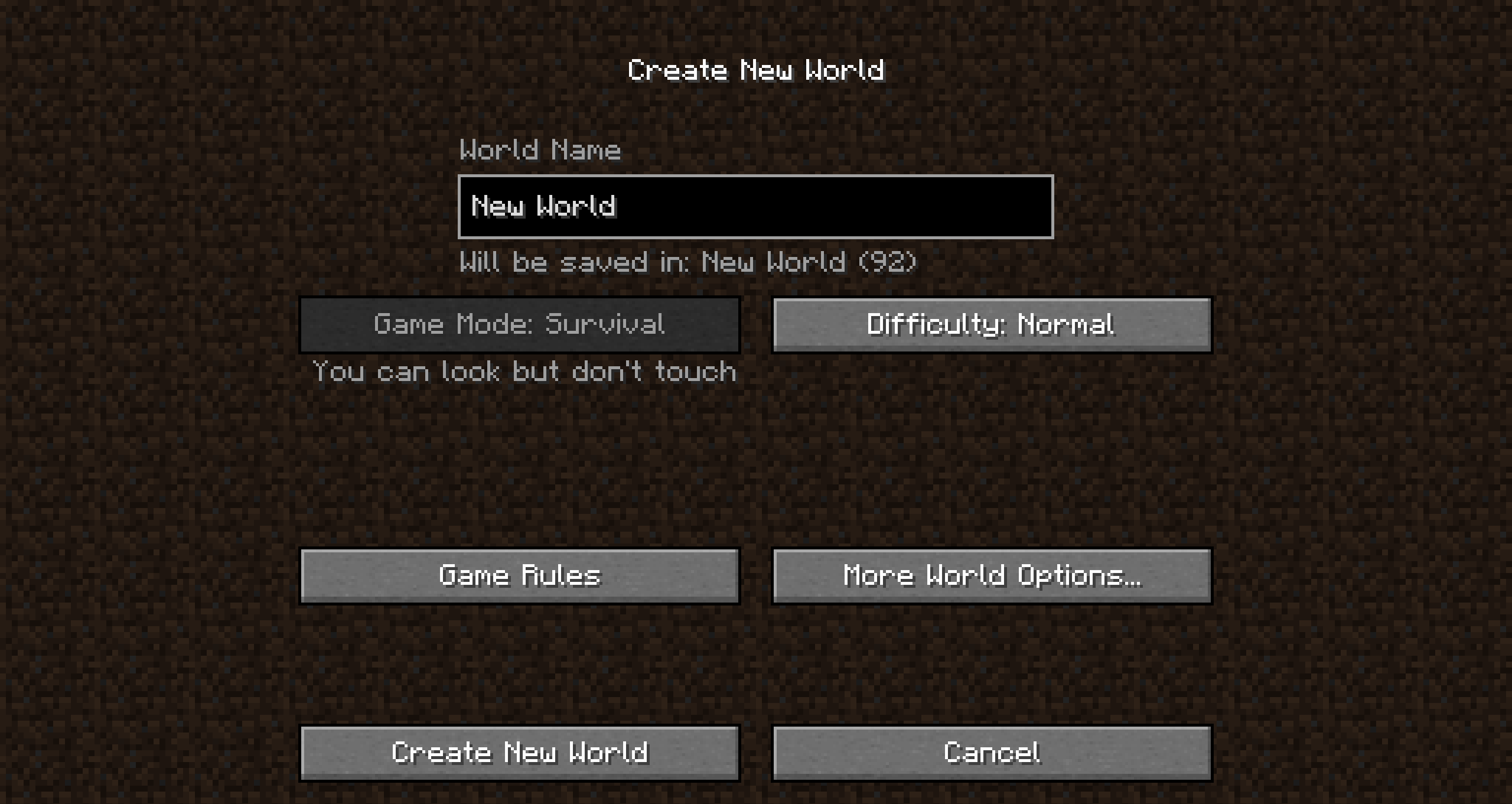
However, now, the game mode for a debug world is not shown as "Spectator" on the world creation screen. In previous versions, this was correctly shown as "Spectator".
When generating the world, as said above, the player is put into spectator mode correctly.
This issue relates to MC-205076, but I am reporting it separately, as spectator mode is not part of the order described in MC-205076. Additionally, the text shown on the world creation screen is different than the actual behaviour, which is not the case in MC-205076.
How to reproduce
- Open Minecraft -> Singleplayer -> Create New World -> More World Options...
- Hold down the alt key (option) while toggling the World Type button, until you reach Debug Mode
- Click Done
 The Game Mode is shown incorrectly
 - Click Create New World
 Your Game Mode is Spectator, as intended
Additional information
A screenshot demonstrating this issue has been attached, taken in snapshot 20w51a:

Linked Issues
is duplicated by4
 MC-212786Gamemode isn't correct in Debug ModeDuplicateMC-218041When the selected world type is debug mode, the game mode button in the create world screen displays the same as before debug mode was selectedDuplicateMC-220851Debug mode GlitchDuplicateMC-250072Create World menu shows incorrect gamemodeDuplicate
![[Mod] ManosSef](../../../data/avatars/users/61702.png)
![[Mod] markderickson](../../../data/avatars/users/18946.svg)
 Low
LowCreated Issue:
Debug worlds are shown as being created in survival mode, unlike the actual behaviour
The bug
When normally creating a debug world, the player is put in spectator mode: they can look, but can't touch. In the 1.17 snapshots, this is still the case.
However, now, the game mode for a debug world is shown as Survival on the world creation screen. When generating the world, as said above, the player is put into spectator mode correctly.
This issue relates to
MC-205076, but I am reporting it separately, as spectator mode is not part of the order described inMC-205076. Additionally, the text shown on the world creation screen is different than the actual behaviour, which is not the case inMC-205076.How to reproduce
- Open Minecraft -> Singleplayer -> Create New World -> More World Options...
- Hold down the alt key (option) while toggling the World Type button, until you reach Debug Mode
- Click Done
- Click Create New World
Additional information
A screenshot demonstrating this issue has been attached, taken in snapshot 20w51a:
Attachments1
Debug worlds are shown as being created in survival mode,unlike the actual behaviourDebug worlds are shown as being created in survival mode, despite the world being created in spectator mode
The bug
When normally creating a debug world, the player is put in spectator mode: they can look, but can't touch. In the 1.17 snapshots, this is still the case.
However, now, the game mode for a debug world is shown as Survival on the world creation screen. When generating the world, as said above, the player is put into spectator mode correctly.
This issue relates to
MC-205076, but I am reporting it separately, as spectator mode is not part of the order described inMC-205076. Additionally, the text shown on the world creation screen is different than the actual behaviour, which is not the case inMC-205076.How to reproduce
- Open Minecraft -> Singleplayer -> Create New World -> More World Options...
- Hold down the alt key (option) while toggling the World Type button, until you reach Debug Mode
- Click Done
- Click Create New World
Additional information
A screenshot demonstrating this issue has been attached, taken in snapshot 20w51a:
![[Mod] tryashtar](../../../data/avatars/users/41963.png)
The bug
When normally creating a debug world, the player is put in spectator mode: they can look, but can't touch. In the 1.17 snapshots, this is still the case.
However, now, the game mode for a debug world is shown as Survival on the world creation screen.
When generating the world, as said above, the player is put into spectator mode correctly.This issue relates to
MC-205076, but I am reporting it separately, as spectator mode is not part of the order described inMC-205076. Additionally, the text shown on the world creation screen is different than the actual behaviour, which is not the case inMC-205076.How to reproduce
- Open Minecraft -> Singleplayer -> Create New World -> More World Options...
- Hold down the alt key (option) while toggling the World Type button, until you reach Debug Mode
- Click Done
- Click Create New World
Additional information
A screenshot demonstrating this issue has been attached, taken in snapshot 20w51a:
The bug
When normally creating a debug world, the player is put in spectator mode: they can look, but can't touch. In the 1.17 snapshots, this is still the case.
However, now, the game mode for a debug world is shown as "Survival" on the world creation screen. In previous versions, this was correctly shown as "Spectator".
When generating the world, as said above, the player is put into spectator mode correctly.
This issue relates to
MC-205076, but I am reporting it separately, as spectator mode is not part of the order described inMC-205076. Additionally, the text shown on the world creation screen is different than the actual behaviour, which is not the case inMC-205076.How to reproduce
- Open Minecraft -> Singleplayer -> Create New World -> More World Options...
- Hold down the alt key (option) while toggling the World Type button, until you reach Debug Mode
- Click Done
- Click Create New World
Additional information
A screenshot demonstrating this issue has been attached, taken in snapshot 20w51a:
![[Mod] SPGoding](../../../data/avatars/users/44622.png)
relates to
![[Mojang] slicedlime](../../../data/assets/gravatar/slicedlime.jpeg)
is duplicated by
Debug worlds are shown as being created insurvivalmode, despite the world being created in spectator modeDebug worlds are shown as being created in the incorrect game mode, despite the world being created in spectator mode
The bug
When normally creating a debug world, the player is put in spectator mode: they can look, but can't touch. In the 1.17 snapshots, this is still the case.
However, now, the game mode for a debug world is shown as "S
urvival" on the world creation screen. In previous versions, this was correctly shown as "Spectator".When generating the world, as said above, the player is put into spectator mode correctly.
This issue relates to
MC-205076, but I am reporting it separately, as spectator mode is not part of the order described inMC-205076. Additionally, the text shown on the world creation screen is different than the actual behaviour, which is not the case inMC-205076.How to reproduce
- Open Minecraft -> Singleplayer -> Create New World -> More World Options...
- Hold down the alt key (option) while toggling the World Type button, until you reach Debug Mode
- Click Done
as Survival, even though this should be Spectator- Click Create New World
Additional information
A screenshot demonstrating this issue has been attached, taken in snapshot 20w51a:
The bug
When normally creating a debug world, the player is put in spectator mode: they can look, but can't touch. In the 1.17 snapshots, this is still the case.
However, now, the game mode for a debug world is not shown as "Spectator" on the world creation screen. In previous versions, this was correctly shown as "Spectator".
When generating the world, as said above, the player is put into spectator mode correctly.
This issue relates to
MC-205076, but I am reporting it separately, as spectator mode is not part of the order described inMC-205076. Additionally, the text shown on the world creation screen is different than the actual behaviour, which is not the case inMC-205076.How to reproduce
- Open Minecraft -> Singleplayer -> Create New World -> More World Options...
- Hold down the alt key (option) while toggling the World Type button, until you reach Debug Mode
- Click Done
- Click Create New World
Additional information
A screenshot demonstrating this issue has been attached, taken in snapshot 20w51a:
![[Mod] Chandler](../../../data/assets/gravatar/triwonder81.png)
Debug worlds are shown as being created in the incorrect game mode, despite the world being created in spectator mode
is duplicated by
![[Mod] Anthony Cicinelli](../../../data/avatars/users/10122.svg)
![[Mod] Michael Wobst](../../../data/avatars/users/37868.png)
is duplicated by
![[Bot] Arisa](../../../data/avatars/users/43007.png)
![[Mod] Asteraoth](../../../data/avatars/users/92886.png)
Does MC-211194 happen to describe the first issue you're experiencing?
When creating a new world with the debug world generation settings exported, the debug world generates fine. However, the world creation menu is messed up from this. (world gen settings attached)
1. The World Type is not set to Debug and extra settings temporarily remain
Immediately after importing the debug settings, the More World Options menu remains the same and the extra settings are not removed, as well as the world type staying the same.

Upon clicking "Done" and going back to the More World Options menu, the extra settings disappear, however the world type remains at whatever it was before

2. The game mode is incorrect
Despite the world generating in spectator at this point, the gamemode that was chosen before the settings import is listed. This does not duplicate MC-211194 as it happens under different circumstances.
Hello! Does MC-211194 describe your issue?
Thank you for your report!
We're tracking this issue in MC-211194, so this ticket is being resolved and linked as a duplicate.
If you would like to add a vote and any extra information to the main ticket it would be appreciated.
If you haven't already, you might like to make use of the search feature to see if the issue has already been mentioned.
Quick Links:
📓 Bug Tracker Guidelines – 💬 Community Support – 📧 Mojang Support
📓 Project Summary – ✍️ Feedback and Suggestions – 📖 Game Wiki
– I am a bot. This action was performed automatically! Please report any issues on Discord or Reddit

Thank you for your report!
We're tracking this issue in MC-211194, so this ticket is being resolved and linked as a duplicate.
If you would like to add a vote and any extra information to the main ticket it would be appreciated.
If you haven't already, you might like to make use of the search feature to see if the issue has already been mentioned.
Quick Links:
📓 Bug Tracker Guidelines – 💬 Community Support – 📧 Mojang Support
📓 Project Summary – ✍️ Feedback and Suggestions – 📖 Game Wiki
Can confirm. I just assumed it was intentional, but, now, I don't know why it would be.
This used to say "Spectator" in previous versions.
The game mode is the same as when you first came onto the world creation screen and selected the game mode. Not always Survival.
The issue fixes itself when toggling fullscreen. But it occurs again after you change the world type to something else. Screenshot attached.
Can confirm in 1.19.3
Seems fixed in 23w05a.
I can confirm that this is fixed in 23w05a.