 Ismael Rosillo
- ISRosillo14
- isrosillo14
- Europe/Madrid
- Yes
- No
 MCL-11030
![[Mojang] slicedlime](../../../data/assets/gravatar/slicedlime.jpeg)
![[Mojang] Panda](../../../data/avatars/users/41658.png)
![[Mojang] MNilsson](../../../data/avatars/users/18951.svg)
 Low
Low Normal
![[Mojang] Gegy](../../../data/avatars/users/10122.svg)
 MC-261992
![[Mojang] Maxime Lebrot](../../../data/avatars/users/18941.svg)
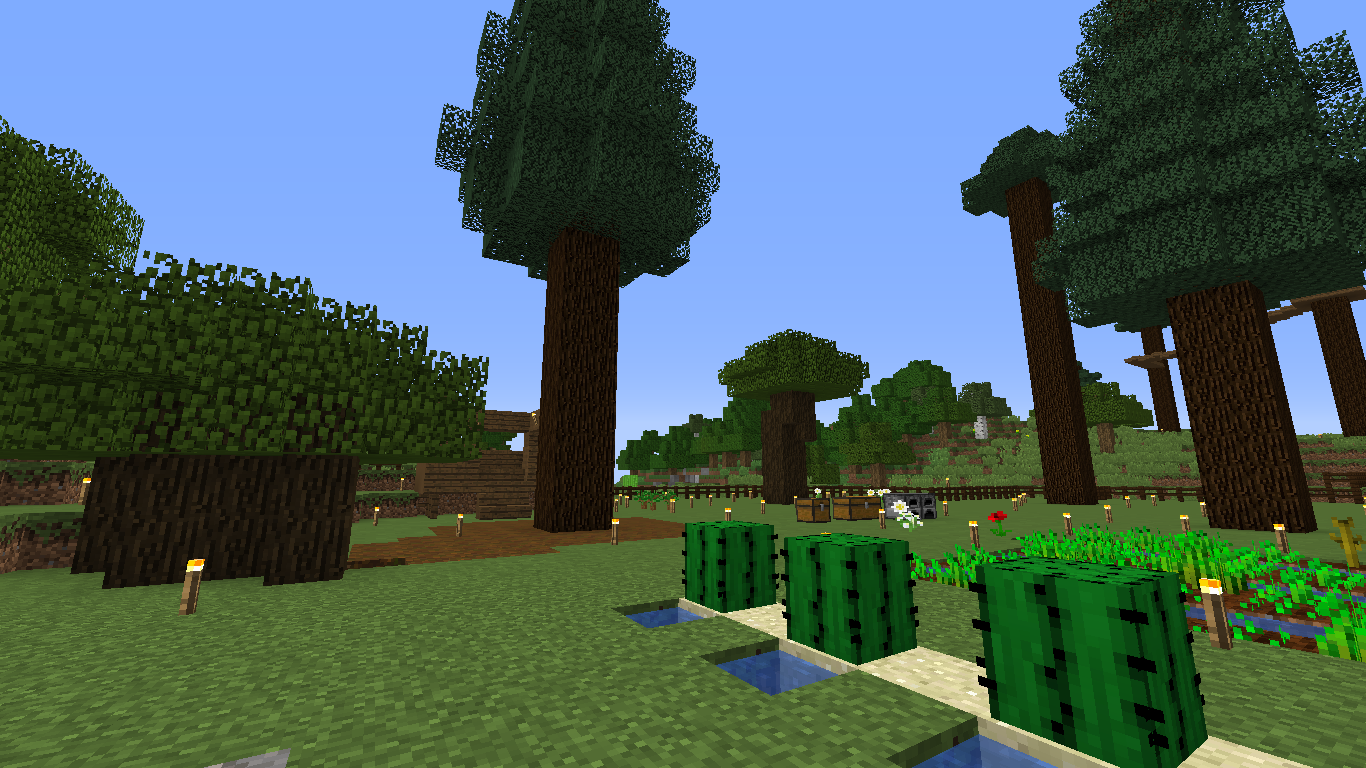










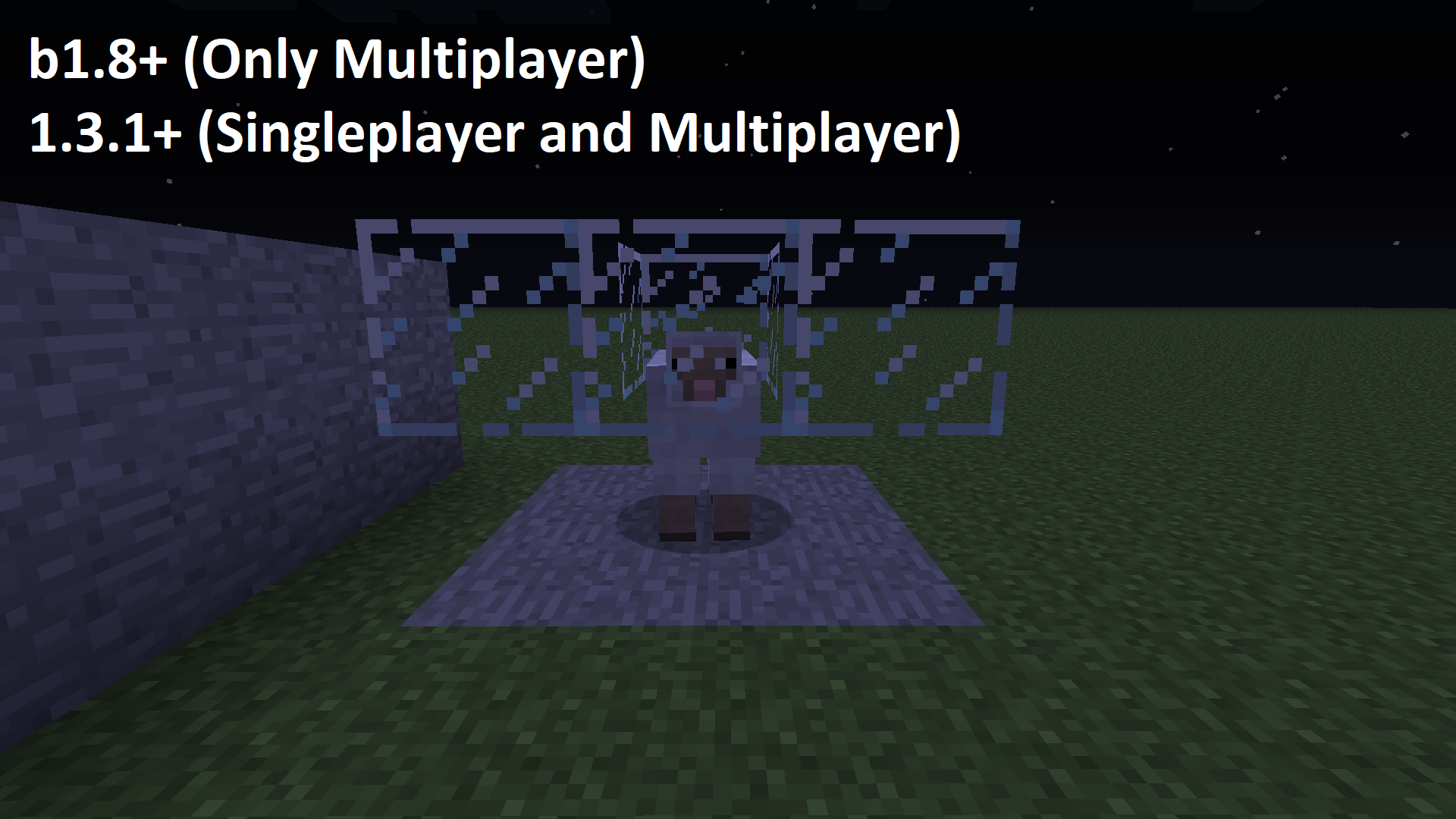






Visual Description: When a
4x4spruce saplings grow on my Wood farm, the normal Grass Block on the ground turns into a Dirt Podzol.Big Spruce Tree generates dirt podzol (when grow from spruce saplings) I think this is a bug because this don't happen in 1.12.
Visual Description: When a 2x2 spruce saplings grow on my Wood farm, the normal Grass Block on the ground turns into a Dirt Podzol.
Big Spruce Tree generates dirt podzol (when grow from spruce saplings) I think this is a bug because this don't happen in 1.12.
Big Spruce Tree generatesdirtpodzol (when sprucesaplingsgrow)Big Spruce Tree generates Dirt Podzol (from Spruce Saplings)
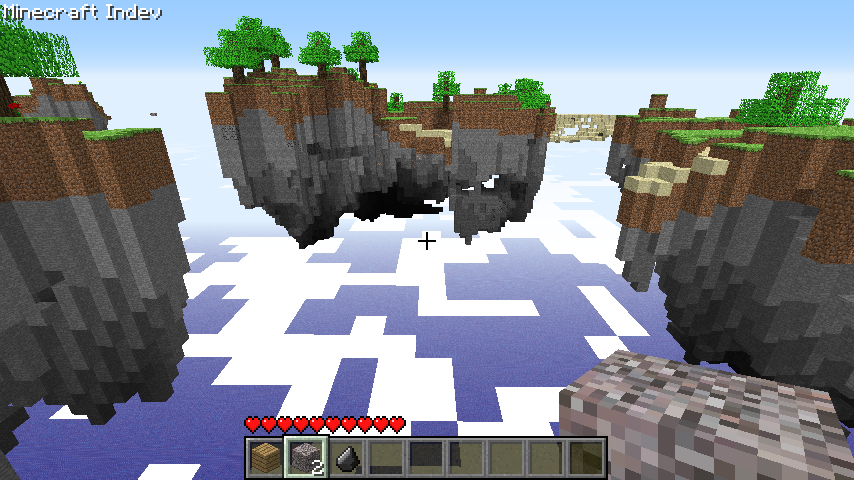
I've played minecraft indev not many time ago, but when the laucher got updated in this June, worlds doesn't load or generate. (I'm not sure if this is a launcher error, but since it got updated, this bug happens).
The Indev version is the last. I downloaded it from Internet, but from official sources.
Please, fix it.
I've played minecraft indev not many time ago, but when the laucher got updated
inthis June, worlds doesn't load or generate. (I'm not sure if this is a launcher error, but since it got updated, this bug happens).
The Indev version is the last. I downloaded it from Internet, but from official sources.
Please, fix it.
Indev:level does notgeneratesIndev: Levels does not work
I'
veplayed minecraftindevnot many time ago, butwhenthe laucher got updated thisJune, worlds doesn'tloadorgenerate. (I'm not sure if this is a launchererror, but since it got updated, this bug happens).
The Indev version is the last. I downloaded it from Internet, but from official sources.
Please, fix it.I'm playing Minecraft Indev sometimes, but since the laucher got updated at June 2019, levels/worlds refuse to load and generate and the game may crash or go back to the title menu. (Not sure if this is a launcher bug, but since it got updated, this bug happens).
The Indev version is the last. I downloaded it from Internet, but from official sources.
I know these versions are very old and they may not be supported
I
'mplayingMinecraft Indev sometimes, but since the laucher got updated at June 2019, levels/worlds refuse to loadandgenerate and the gamemaycrash or go back to the title menu. (Not sure if thisis a launcher bug, but sinceit got updated, this bug happens).
TheIndev version isthe last. I downloaded it from Internet, but from official sources.
I know these versions are very old and they may not be supportedI used to play Minecraft Indev sometimes, but since the laucher got updated at June 2019, levels (worlds) refuse to load or generate, and the game crashes or go back to the title menu. (Not sure if this was a launcher bug, but this happens since they got an update).
Though Indev versions are not in the laucher, they were original versions since I got them from the archive.
Indev: Levelsdoes not workMinecraft Indev levels refuse to load
2019-09-19_16.54.51.png
I'm not sure if this bug works as intended or not.
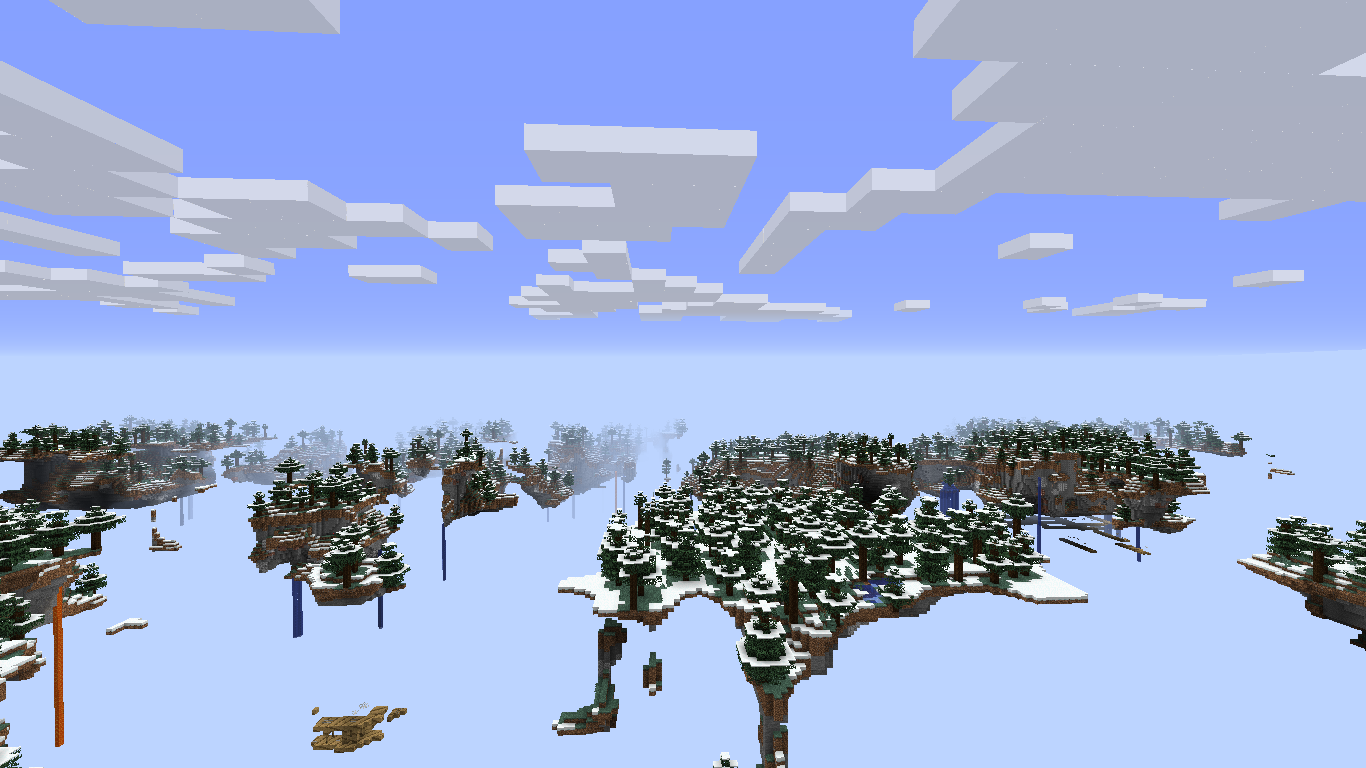
In the history of minecraft, there have been different generators of "floating" or "sky" worlds at different times, well, concretely two (the third one is the actual).
The first was meant for world customization and the second for a new dimension.
No long time ago I discovered that both of them shared a feature: the clouds are under islands. Personally, I think it fits very well with the "sky" theme.
Later, I discovered something else: the class net.minecraft.world.level.dimension.end.TheEndDimension has a method (getCloudHeight) wich says that in this dimension, if clouds were enabled, they would render under the islands (Y 8).
This method is a remainder of the code of the unused "Sky Dimension".
This method also appears on its abstract class net.minecraft.world.level.dimension.Dimension, but it says the clouds are in Y 128, so I think this method is still used by the rendering system.
Today I looked if this method stills on the code using the obfuscation maps, and yes, it's still there.
The actual Floating Islands world type is based in the chunk generator of The End (because it was called "End" before 18w19a), wich it haves this hidden feature.
I believe that minecraft team forgot to add this when they were working on the actual Floating Islands world type.
I'm really not sure if you will take it as a suggestion or a bug. I think it's a bug, but i'm not sure.
So I made a quickusefulfix (because it's easy to):
- Please don't misundertand me, I only want to help fix it as soon as possible
//The method I writted below is exactly how it looks following the obfuscation mappings of 1.15 (https://launcher.mojang.com/v1/objects/b52d82f713bfa18764b35f26d8fff5dc3d9476cd/client.txt)
//So you will only need to go to "net.minecraft.world.level.dimension.NormalDimension" and paste this method
public final float getCloudHeight()
{
if (this.level.getLevelData().getGeneratorType() == net.minecraft.world.level.LevelType.BUFFET)
{
if (this.level.getLevelData().getGeneratorOptions().getCompound("chunk_generator").getString("type").equals("minecraft:floating_islands"))
Unknown macro: { return 8.0F; }}
return 128.0F;
}I'm not sure if this bug works as intended or not.
In the history of minecraft, there have been different generators of "floating" or "sky" worlds at different times, well, concretely two (the third one is the actual).
The first was meant for world customization and the second for a new dimension.
No long time ago I discovered that both of them shared a feature: the clouds are under islands. Personally, I think it fits very well with the "sky" theme.
Later, I discovered something else: the class net.minecraft.world.level.dimension.end.TheEndDimension has a method (getCloudHeight) wich says that in this dimension, if clouds were enabled, they would render under the islands (Y 8).
This method is a remainder of the code of the unused "Sky Dimension".
This method also appears on its abstract class net.minecraft.world.level.dimension.Dimension, but it says the clouds are in Y 128, so I think this method is still used by the rendering system.
Today I looked if this method stills on the code using the obfuscation maps, and yes, it's still there.
The actual Floating Islands world type is based in the chunk generator of The End (because it was called "End" before 18w19a), wich it haves this hidden feature.
I believe that minecraft team forgot to add this when they were working on the actual Floating Islands world type.
I'm really not sure if you will take it as a suggestion or a bug. I think it's a bug, but i'm not sure.
So I made a quick fix (because it's easy to):
- Please don't misundertand me, I only want to help fix it as soon as possible
Note: This method makes the clouds render under islands ONLY in Floating Islands world type.
//The method I writted below is exactly how it would look ifs following the obfuscation mappings of 1.15 (https://launcher.mojang.com/v1/objects/b52d82f713bfa18764b35f26d8fff5dc3d9476cd/client.txt)
//So you will only need to go to "net.minecraft.world.level.dimension.NormalDimension" and paste this method
public final float getCloudHeight()
{
if (this.level.getLevelData().getGeneratorType() == net.minecraft.world.level.LevelType.BUFFET)
Unknown macro: { if (this.level.getLevelData().getGeneratorOptions().getCompound("chunk_generator").getString("type").equals("minecraft}}
return 128.0F;
}
I'm not sure if this bug works as intended or not.
In the history of minecraft, there have been different generators of "floating" or "sky" worlds at different times, well, concretely two (the third one is the actual).
The first was meant for world customization and the second for a new dimension.
No long time ago I discovered that both of them shared a feature: the clouds are under islands. Personally, I think it fits very well with the "sky" theme.
Later, I discovered something else: the class net.minecraft.world.level.dimension.end.TheEndDimension has a method (getCloudHeight) wich says that in this dimension, if clouds were enabled, they would render under the islands (Y 8).
This method is a remainder of the code of the unused "Sky Dimension".
This method also appears on its abstract class net.minecraft.world.level.dimension.Dimension, but it says the clouds are in Y 128, so I think this method is still used by the rendering system.
Today I looked if this method stills on the code using the obfuscation maps, and yes, it's still there.
The actual Floating Islands world type is based in the chunk generator of The End (because it was called "End" before 18w19a), wich it haves this hidden feature.
I believe that minecraft team forgot to add this when they were working on the actual Floating Islands world type.
I'm really not sure if you will take it as a suggestion or a bug. I think it's a bug, but i'm not sure.
So I made a quick fix (because it's easy to):
- Please don't misundertand me, I only want to help fix it as soon as possible
Note: This method makes the clouds render under islands ONLY in Floating Islands world type.
//The method I writted below is exactly how it would look ifs following the obfuscation mappings of 1.15 (https://launcher.mojang.com/v1/objects/b52d82f713bfa18764b35f26d8fff5dc3d9476cd/client.txt)
//So you will only need to go to "net.minecraft.world.level.dimension.NormalDimension" and paste this method
public final float getCloudHeight()
{
if (this.level.getLevelData().getGeneratorType() == net.minecraft.world.level.LevelType.BUFFET)
Unknown macro: { if (this.level.getLevelData().getGeneratorOptions().getCompound("chunk_generator").getString("type").equals("minecraft}}
return 128.0F;
}I'm not sure if this bug works as intended or not.
In the history of minecraft, there have been different generators of "floating" or "sky" worlds at different times, well, concretely two (the third one is the actual).
The first was meant for world customization and the second for a new dimension.
No long time ago I discovered that both of them shared a feature: the clouds are under islands. Personally, I think it fits very well with the "sky" theme.
Later, I discovered something else: the class net.minecraft.world.level.dimension.end.TheEndDimension has a method (getCloudHeight) wich says that in this dimension, if clouds were enabled, they would render under the islands (Y 8).
This method is a remainder of the code of the unused "Sky Dimension".
This method also appears on its abstract class net.minecraft.world.level.dimension.Dimension, but it says the clouds are in Y 128, so I think this method is still used by the rendering system.
Today I looked if this method stills on the code using the obfuscation maps, and yes, it's still there.
The actual Floating Islands world type is based in the chunk generator of The End (because it was called "End" before 18w19a), wich it haves this hidden feature.
I believe that minecraft team forgot to add this when they were working on the actual Floating Islands world type.
I'm really not sure if you will take it as a suggestion or a bug. I think it's a bug, but i'm not sure.
So I made a quick fix (because it's easy to):
- Please don't misundertand me, I only want to help fix it as soon as possible
Note: This method makes the clouds render under islands ONLY in Floating Islands world type.
//The method I writted below is exactly how it would look ifs following the obfuscation mappings of 1.15 (https://launcher.mojang.com/v1/objects/b52d82f713bfa18764b35f26d8fff5dc3d9476cd/client.txt)
//So you will only need to go to "net.minecraft.world.level.dimension.NormalDimension" and paste this method
public final float getCloudHeight()
{
    if (this.level.getLevelData().getGeneratorType() == net.minecraft.world.level.LevelType.BUFFET)
    {
        if (this.level.getLevelData().getGeneratorOptions().getCompound("chunk_generator").getString("type").equals("minecraft:floating_islands"))
        {
            return 8.0F;
        }
    }

return 128.0F;
}
I'm not sure if this bug works as intended or not.
In the history of minecraft, there have been different generators of "floating" or "sky" worlds at different times, well, concretely two (the third one is the actual).
The first was meant for world customization and the second for a new dimension.
No long time ago I discovered that both of them shared a feature: the clouds are under islands. Personally, I think it fits very well with the "sky" theme.
Later, I discovered something else: the class net.minecraft.world.level.dimension.end.TheEndDimension has a method (getCloudHeight) wich says that in this dimension, if clouds were enabled, they would render under the islands (Y 8).
This method is a remainder of the code of the unused "Sky Dimension".
This method also appears on its abstract class net.minecraft.world.level.dimension.Dimension, but it says the clouds are in Y 128, so I think this method is still used by the rendering system.
Today I looked if this method stills on the code using the obfuscation maps, and yes, it's still there.
The actual Floating Islands world type is based in the chunk generator of The End (because it was called "End" before 18w19a), wich it haves this hidden feature.
I believe that minecraft team forgot to add this when they were working on the actual Floating Islands world type.
I'm really not sure if you will take it as a suggestion or a bug. I think it's a bug, but i'm not sure.
So I made a quick fix (because it's easy to):
- Please don't misundertand me, I only want to help fix it as soon as possible
Note: This method makes the clouds render under islands ONLY in Floating Islands world type.
//The method I writted below is exactly how it would look ifs following the obfuscation mappings of
1.15(https://launcher.mojang.com/v1/objects/b52d82f713bfa18764b35f26d8fff5dc3d9476cd/client.txt)//So you will only need to go to "net.minecraft.
world.level.dimension.NormalDimension" and paste this methodpublic final float getCloudHeight() { if (this.level.getLevelData().getGeneratorType() == net.minecraft.world.level.LevelType.BUFFET) { if (this.level.getLevelData().getGeneratorOptions().getCompound("chunk_generator").getString("type").equals("minecraft:floating_islands")) { return 8.0F; } } return 128.0F; }
I'm not sure if this bug works as intended or not.
In the history of minecraft, there have been different generators of "floating" or "sky" worlds at different times, well, concretely two (the third one is the actual).
The first was meant for world customization and the second for a new dimension.
No long time ago I discovered that both of them shared a feature: the clouds are under islands. Personally, I think it fits very well with the "sky" theme.
Later, I discovered something else: the class net.minecraft.world.level.dimension.end.TheEndDimension has a method (getCloudHeight) wich says that in this dimension, if clouds were enabled, they would render under the islands (Y 8).
This method is a remainder of the code of the unused "Sky Dimension".
This method also appears on its abstract class net.minecraft.world.level.dimension.Dimension, but it says the clouds are in Y 128, so I think this method is still used by the rendering system.
Today I looked if this method stills on the code using the obfuscation maps, and yes, it's still there.
The actual Floating Islands world type is based in the chunk generator of The End (because it was called "End" before 18w19a), wich it haves this hidden feature.
I believe that minecraft team forgot to add this when they were working on the actual Floating Islands world type.
I'm really not sure if you will take it as a suggestion or a bug. I think it's a bug, but i'm not sure.
Note: This method makes the clouds render under islands ONLY in Floating Islands world type.
//The method I writted below is exactly how it would look ifs following the obfuscation mappings of 20w21a (https://launcher.mojang.com/v1/objects/a41221343ccf3bd58dec5b5fc091ce98b27003cb/client.txt)
//So you will only need to go to "net.minecraft.clien.renderer.DimensionSpecialEffects." and paste this method
public final float getCloudHeight()
{
    if (this.level.getLevelData().getGeneratorType() == net.minecraft.world.level.LevelType.BUFFET)
    {
        if (this.level.getLevelData().getGeneratorOptions().getCompound("chunk_generator").getString("type").equals("minecraft:floating_islands"))
        {
            return 8.0F;
        }
    }

return 128.0F;
}
"Noise-Based" Biome Generator has code implying that can be usetfor the "Buffet" mode"Noise-Based" Biome Generator has code implying that can be used for the "Buffet" mode
Affects 20w06a, 20w07a, 20w08a, 20w09a, 20w10a, 20w11a, 20w12a, 20w13a, 20w13b and 20w1
4a.Actually there are different biome generators available in worlds through NBT editing the generator options, such as Vanilla Layered (assigned as the string "vanilla_layered" in the code), Checkerboard (assigned as the string "checkerboard" in the code), Fixed (string "fixed" in the code). These biome generators can be selected, but there's also a Multi Noise (known as "multi_noise" in the code).
The fix I made by myself is located at net.minecraft.world.level.levelgen.ChunkGeneratorProvider.java, line 74~
As of 20w14a:
private static LongFunction<BiomeSource> createBuffetBiomeSource(final DynamicLike<?> dynamicLike) { final BiomeSourceType<?, ?> bpe2 = ChunkGeneratorProvider.<BiomeSourceType<?, ?>>getRegistryValue(dynamicLike.get("type"), Registry.BIOME_SOURCE_TYPE, BiomeSourceType.FIXED); final DynamicLike<?> dynamicLike2 = dynamicLike.get("options"); final Stream<Biome> stream2 = dynamicLike2.get("biomes").asStreamOpt().<Stream<Biome>>map(stream -> stream.map(dynamic -> ChunkGeneratorProvider.<Biome>getRegistryValue(dynamic, Registry.BIOME, Biomes.OCEAN))).orElseGet(Stream::empty); if (BiomeSourceType.CHECKERBOARD == bpe2) { final int integer2 = dynamicLike2.get("size").asInt(2); final Biome[] arr6 = stream2.<Biome>toArray(Biome[]::new); final Biome[] arr7 = (arr6.length > 0) ? arr6 : new Biome[] { Biomes.OCEAN }; final CheckerboardBiomeSourceSettings bpk5; return (LongFunction<BiomeSource>)(long3 -> { bpk5 = BiomeSourceType.CHECKERBOARD.createSettings(long3).setAllowedBiomes(arr7).setSize(integer2); return BiomeSourceType.CHECKERBOARD.create(bpk5); }); } if (BiomeSourceType.VANILLA_LAYERED == bpe2) { final OverworldBiomeSourceSettings brj3; return (LongFunction<BiomeSource>)(long1 -> { brj3 = BiomeSourceType.VANILLA_LAYERED.createSettings(long1); return BiomeSourceType.VANILLA_LAYERED.create(brj3); }); } final Biome boz5 = stream2.findFirst().orElse(Biomes.OCEAN); final FixedBiomeSourceSettings bqd4; return (LongFunction<BiomeSource>)(long2 -> { bqd4 = BiomeSourceType.FIXED.createSettings(long2).setBiome(boz5); return BiomeSourceType.FIXED.create(bqd4); }); }The possible fix I wrote by myself:
private static LongFunction<BiomeSource> createBuffetBiomeSource(final DynamicLike<?> dynamicLike) { final BiomeSourceType<?, ?> bpe2 = ChunkGeneratorProvider.<BiomeSourceType<?, ?>>getRegistryValue(dynamicLike.get("type"), Registry.BIOME_SOURCE_TYPE, BiomeSourceType.FIXED); final DynamicLike<?> dynamicLike2 = dynamicLike.get("options"); final Stream<Biome> stream2 = dynamicLike2.get("biomes").asStreamOpt().<Stream<Biome>>map(stream -> stream.map(dynamic -> ChunkGeneratorProvider.<Biome>getRegistryValue(dynamic, Registry.BIOME, Biomes.OCEAN))).orElseGet(Stream::empty); if (BiomeSourceType.CHECKERBOARD == bpe2) { final int integer2 = dynamicLike2.get("size").asInt(2); final Biome[] arr6 = stream2.<Biome>toArray(Biome[]::new); final Biome[] arr7 = (arr6.length > 0) ? arr6 : new Biome[] { Biomes.OCEAN }; final CheckerboardBiomeSourceSettings bpk5; return (LongFunction<BiomeSource>)(long3 -> { bpk5 = BiomeSourceType.CHECKERBOARD.createSettings(long3).setAllowedBiomes(arr7).setSize(integer2); return BiomeSourceType.CHECKERBOARD.create(bpk5); }); } if (BiomeSourceType.VANILLA_LAYERED == bpe2) { final OverworldBiomeSourceSettings brj3; return (LongFunction<BiomeSource>)(long1 -> { brj3 = BiomeSourceType.VANILLA_LAYERED.createSettings(long1); return BiomeSourceType.VANILLA_LAYERED.create(brj3); }); } /* START CHANGES */ if (BiomeSourceType.MULTI_NOISE == bpe2) {; final Biome[] arr6 = stream2.<Biome>toArray(Biome[]::new); final Biome[] arr7 = (arr6.length > 0) ? arr6 : new Biome[] { Biomes.OCEAN }; final MultiNoiseBiomeSourceSettings multiNoiseSettings; return (LongFunction<BiomeSource>)(long3 -> { multiNoiseSettings = BiomeSourceType.MULTI_NOISE.createSettings(long3).setBiomes(arr7); return BiomeSourceType.MULTI_NOISE.create(multiNoiseSettings); }); } /* END CHANGES */ final Biome boz5 = stream2.findFirst().orElse(Biomes.OCEAN); final FixedBiomeSourceSettings bqd4; return (LongFunction<BiomeSource>)(long2 -> { bqd4 = BiomeSourceType.FIXED.createSettings(long2).setBiome(boz5); return BiomeSourceType.FIXED.create(bqd4); }); }Note:
Also add
Everyting you need to do is to copy-paste the code to the minecraft's source code.
Affects 20w06a, 20w07a, 20w08a, 20w09a, 20w10a, 20w11a, 20w12a, 20w13a, 20w13b, 20w14a and 20w15a.
Actually there are different biome generators available in worlds through NBT editing the generator options, such as Vanilla Layered (assigned as the string "vanilla_layered" in the code), Checkerboard (assigned as the string "checkerboard" in the code), Fixed (string "fixed" in the code). These biome generators can be selected, but there's also a Multi Noise (known as "multi_noise" in the code).
The fix I made by myself is located at net.minecraft.world.level.levelgen.ChunkGeneratorProvider.java, line 74~
As of 20w14a:
private static LongFunction<BiomeSource> createBuffetBiomeSource(final DynamicLike<?> dynamicLike) { final BiomeSourceType<?, ?> bpe2 = ChunkGeneratorProvider.<BiomeSourceType<?, ?>>getRegistryValue(dynamicLike.get("type"), Registry.BIOME_SOURCE_TYPE, BiomeSourceType.FIXED); final DynamicLike<?> dynamicLike2 = dynamicLike.get("options"); final Stream<Biome> stream2 = dynamicLike2.get("biomes").asStreamOpt().<Stream<Biome>>map(stream -> stream.map(dynamic -> ChunkGeneratorProvider.<Biome>getRegistryValue(dynamic, Registry.BIOME, Biomes.OCEAN))).orElseGet(Stream::empty); if (BiomeSourceType.CHECKERBOARD == bpe2) { final int integer2 = dynamicLike2.get("size").asInt(2); final Biome[] arr6 = stream2.<Biome>toArray(Biome[]::new); final Biome[] arr7 = (arr6.length > 0) ? arr6 : new Biome[] { Biomes.OCEAN }; final CheckerboardBiomeSourceSettings bpk5; return (LongFunction<BiomeSource>)(long3 -> { bpk5 = BiomeSourceType.CHECKERBOARD.createSettings(long3).setAllowedBiomes(arr7).setSize(integer2); return BiomeSourceType.CHECKERBOARD.create(bpk5); }); } if (BiomeSourceType.VANILLA_LAYERED == bpe2) { final OverworldBiomeSourceSettings brj3; return (LongFunction<BiomeSource>)(long1 -> { brj3 = BiomeSourceType.VANILLA_LAYERED.createSettings(long1); return BiomeSourceType.VANILLA_LAYERED.create(brj3); }); } final Biome boz5 = stream2.findFirst().orElse(Biomes.OCEAN); final FixedBiomeSourceSettings bqd4; return (LongFunction<BiomeSource>)(long2 -> { bqd4 = BiomeSourceType.FIXED.createSettings(long2).setBiome(boz5); return BiomeSourceType.FIXED.create(bqd4); }); }The possible fix I wrote by myself:
private static LongFunction<BiomeSource> createBuffetBiomeSource(final DynamicLike<?> dynamicLike) { final BiomeSourceType<?, ?> bpe2 = ChunkGeneratorProvider.<BiomeSourceType<?, ?>>getRegistryValue(dynamicLike.get("type"), Registry.BIOME_SOURCE_TYPE, BiomeSourceType.FIXED); final DynamicLike<?> dynamicLike2 = dynamicLike.get("options"); final Stream<Biome> stream2 = dynamicLike2.get("biomes").asStreamOpt().<Stream<Biome>>map(stream -> stream.map(dynamic -> ChunkGeneratorProvider.<Biome>getRegistryValue(dynamic, Registry.BIOME, Biomes.OCEAN))).orElseGet(Stream::empty); if (BiomeSourceType.CHECKERBOARD == bpe2) { final int integer2 = dynamicLike2.get("size").asInt(2); final Biome[] arr6 = stream2.<Biome>toArray(Biome[]::new); final Biome[] arr7 = (arr6.length > 0) ? arr6 : new Biome[] { Biomes.OCEAN }; final CheckerboardBiomeSourceSettings bpk5; return (LongFunction<BiomeSource>)(long3 -> { bpk5 = BiomeSourceType.CHECKERBOARD.createSettings(long3).setAllowedBiomes(arr7).setSize(integer2); return BiomeSourceType.CHECKERBOARD.create(bpk5); }); } if (BiomeSourceType.VANILLA_LAYERED == bpe2) { final OverworldBiomeSourceSettings brj3; return (LongFunction<BiomeSource>)(long1 -> { brj3 = BiomeSourceType.VANILLA_LAYERED.createSettings(long1); return BiomeSourceType.VANILLA_LAYERED.create(brj3); }); } /* START CHANGES */ if (BiomeSourceType.MULTI_NOISE == bpe2) {; final Biome[] arr6 = stream2.<Biome>toArray(Biome[]::new); final Biome[] arr7 = (arr6.length > 0) ? arr6 : new Biome[] { Biomes.OCEAN }; final MultiNoiseBiomeSourceSettings multiNoiseSettings; return (LongFunction<BiomeSource>)(long3 -> { multiNoiseSettings = BiomeSourceType.MULTI_NOISE.createSettings(long3).setBiomes(arr7); return BiomeSourceType.MULTI_NOISE.create(multiNoiseSettings); }); } /* END CHANGES */ final Biome boz5 = stream2.findFirst().orElse(Biomes.OCEAN); final FixedBiomeSourceSettings bqd4; return (LongFunction<BiomeSource>)(long2 -> { bqd4 = BiomeSourceType.FIXED.createSettings(long2).setBiome(boz5); return BiomeSourceType.FIXED.create(bqd4); }); }Note:
Also add
import net.minecraft.world.level.biome.MultiNoiseBiomeSourceSettings;Everyting you need to do is to copy-paste the code to the minecraft's source code.
This happens since 1.13.
When going to Pause Menu->Statistics->Items, when I click at one of the sprites it does not change its look to its "pressed" state.
Code analysis:
This bug is caused by net.minecraft.client.MouseHandler.isLeftPressed() returning always false (even if the left mouse button is pressed) while on the statistics screen. This method is called just before rendering the sprites, and because of said method returning false it sets net.minecraft.client.gui.screens.achievement.StatsScreen.ItemStatisticsList.headerPressed to -1.
How to fix (it worked on my modified client):
Just copy the code from below to net.minecraft.client.gui.screens.achievement.StatsScreen.ItemStatisticsList and remove the conditional "if (!this.minecraft.mouseHandler.isLeftPressed())" and its content from net.minecraft.client.gui.screens.achievement.StatsScreen.ItemStatisticsList.renderHeader().
public boolean mouseReleased(double mouseX, double mouseY, int clickedMouseButton)
 {
  if (clickedMouseButton == 0 && this.itemStatsList != null)
  {
   this.itemStatsList.headerPressed = -1;
  }
  return super.mouseReleased(mouseX, mouseY, clickedMouseButton);
 }
This happens since 1.13.
When going to Pause Menu->Statistics->Items, when I click at one of the sprites it does not change its look to its "pressed" state.
Code analysis:
This bug is caused by net.minecraft.client.MouseHandler.isLeftPressed() returning always false (even if the left mouse button is pressed) while on the statistics screen. This method is called just before rendering the sprites, and because of said method returning false it sets net.minecraft.client.gui.screens.achievement.StatsScreen.ItemStatisticsList.headerPressed to -1.
How to fix (it worked on my modified client):
Just copy the code from below to net.minecraft.client.gui.screens.achievement.StatsScreen.ItemStatisticsList and remove the conditional "if (!this.minecraft.mouseHandler.isLeftPressed())" and its content from net.minecraft.client.gui.screens.achievement.StatsScreen.ItemStatisticsList.renderHeader().
public boolean mouseReleased(double mouseX, double mouseY, int clickedMouseButton)
 {
  if (clickedMouseButton == 0 && this.itemStatsList != null)
  {
   this.itemStatsList.headerPressed = -1;
  }
  return super.mouseReleased(mouseX, mouseY, clickedMouseButton);
 }
The bug
Since 1.13, when opening Pause Menu->Statistics->Items, when you click at one of the header sprites, it does not change its look to its "pressed" state.
How to reproduce
- Open the statistics screen.
- Open items and click an item in the header to change the ordering
→The sprite doesn't look pressed
Code analysis:
This is caused because the mouse handler has a cached check (see: net.minecraft.client.MouseHandler.java, field isLeftPressed) that is set to false when a screen says that a component is clicked (if mouseClicked/mouseReleased returns true at method onPress). When the statistics' screen 'list header' is clicked mouseClicked always returns true (see: net.minecraft.gui.components.AbstractSelectionList.java, method mouseClicked) causes the MouseHandler's _isLeftPressed not setting to true under this condition (it also affects other checks such as isMiddlePressed and isRightPressed, but they don't seem to be used on any part of the client code). Another problem is that for those cached checks to be updated there must be no screen opened or for it having the passEvents field set to true, wich in fact makes isLeftPressed never changing its value to true when clicking the statistic sprite.
When rendering these sprites (see: StatsScreen.ItemStatisticsList, method renderHeader), the code checks if MouseHandler.isLeftPressed is true to render the pressed sprite, which in fact is always false, and thus the 'pressed' sprite is never rendered.
Possible fixes:
Fixing MouseHandler's isLeftPressed check
As said in the code analysis, the isLeftPressed check can't be set to true due to the mouseClicked/mouseReleased check and the screen passEvents.
Changing the isLeftPressed, isMiddlePressed, and isRightPressed checks so they won't be affected by these conditions would fix the bug without causing side effects, because they aren't still used at special cases where the screen is closed or they pass events.Removing isLeftPressed check from StatsScreen and using mouseReleased instead
The Statistics screen uses an internal check of wich
Just copy the code from below to net.minecraft.client.gui.screens.achievement.StatsScreen.ItemStatisticsList and remove the conditional "if (!this.minecraft.mouseHandler.isLeftPressed())" and its content from net.minecraft.client.gui.screens.achievement.StatsScreen.ItemStatisticsList.renderHeader().
public boolean mouseReleased(double mouseX, double mouseY, int clickedMouseButton)
 {
  if (clickedMouseButton == 0 && this.itemStatsList != null)
  {
   this.itemStatsList.headerPressed = -1;
  }
  return super.mouseReleased(mouseX, mouseY, clickedMouseButton);
 }
The bug
Since 1.13, when opening Pause Menu->Statistics->Items, when you click at one of the header sprites, it does not change its look to its "pressed" state.
How to reproduce
- Open the statistics screen.
- Open items and click an item in the header to change the ordering
→
Code analysis:
This is caused because the mouse handler has a cached check (see: net.minecraft.client.MouseHandler.java, field isLeftPressed) that is set to false when a screen says that a component is clicked (if mouseClicked/mouseReleased returns true at method onPress). When the statistics' screen 'list header' is clicked mouseClicked always returns true (see: net.minecraft.gui.components.AbstractSelectionList.java, method mouseClicked) causes the MouseHandler's _isLeftPressed not setting to true under this condition (it also affects other checks such as isMiddlePressed and isRightPressed, but they don't seem to be used on any part of the client code). Another problem is that for those cached checks to be updated there must be no screen opened or for it having the passEvents field set to true, wich in fact makes isLeftPressed never changing its value to true when clicking the statistic sprite.
When rendering these sprites (see: StatsScreen.ItemStatisticsList, method renderHeader), the code checks if MouseHandler.isLeftPressed is true to render the pressed sprite, which in fact is always false, and thus the 'pressed' sprite is never rendered.
Possible fixes:
Fixing MouseHandler's isLeftPressed check
As said in the code analysis, the isLeftPressed check can't be set to true due to the mouseClicked/mouseReleased check and the screen passEvents.
Changing the isLeftPressed, isMiddlePressed, and isRightPressed checks so they won't be affected by these conditions would fix the bug without causing side effects, because they aren't still used at special cases where the screen is closed or they pass events.Removing isLeftPressed check from StatsScreen and using mouseReleased instead
The Statistics screen uses an internal check of wich
Just copy the code from below to net.minecraft.client.gui.screens.achievement.StatsScreen.ItemStatisticsList and remove the conditional "if (!this.minecraft.mouseHandler.isLeftPressed())" and its content from net.minecraft.client.gui.screens.achievement.StatsScreen.ItemStatisticsList.renderHeader().
public boolean mouseReleased(double mouseX, double mouseY, int clickedMouseButton){ if (clickedMouseButton == 0 && this.itemStatsList != null){ this.itemStatsList.headerPressed = -1; } return super.mouseReleased(mouseX, mouseY, clickedMouseButton); }
The bug
Since 1.13, when opening Pause Menu->Statistics->Items, when you click at one of the header sprites, it does not change its look to its "pressed" state.
How to reproduce
- Open the statistics screen.
- Open items and click an item in the header to change the ordering
→
Code analysis:
This is caused because the mouse handler has a cached check (see: net.minecraft.client.MouseHandler.java, field isLeftPressed) that is set to false when a screen says that a component is clicked (if mouseClicked/mouseReleased returns true at method onPress). When the statistics' screen 'list header' is clicked mouseClicked always returns true (see: net.minecraft.gui.components.AbstractSelectionList.java, method mouseClicked) causes the MouseHandler's _isLeftPressed not setting to true under this condition (it also affects other checks such as isMiddlePressed and isRightPressed, but they don't seem to be used on any part of the client code). Another problem is that for those cached checks to be updated there must be no screen opened or for it having the passEvents field set to true, wich in fact makes isLeftPressed never changing its value to true when clicking the statistic sprite.
When rendering these sprites (see: StatsScreen.ItemStatisticsList, method renderHeader), the code checks if MouseHandler.isLeftPressed is true to render the pressed sprite, which in fact is always false, and thus the 'pressed' sprite is never rendered.Possible fixes:
Fixing MouseHandler's isLeftPressed check
As said in the code analysis, the isLeftPressed check can't be set to true due to the mouseClicked/mouseReleased check and the screen passEvents.
Changing the isLeftPressed, isMiddlePressed, and isRightPressed checks so they won't be affected by these conditions would fix the bug without causing side effects, because they aren't still used at special cases where the screen is closed or they pass events.Removing isLeftPressed check from StatsScreen and using mouseReleased instead
The Statistics screen uses an internal check of wich header sprite is pressed (see: StatsScreen.ItemStatisticsList, field headerPressed), that is set to -1 at the renderHeader method due to the disfuncional isLeftPressed check. If removing this check, the header press state won't be set to false in any way. To fix this, we must add a different check. At StatScreen, we add an overriding mouseReleased method, to check if the left button is stopping being pressed, if true, the headerPressed int field would set to -1. You can see an example here:_
@Override
public boolean mouseReleased(double mouseX, double mouseY, int clickedButton) {
  if (clickedButton == 0 && this.itemStatsList != null) {
   this.itemStatsList.headerPressed = -1;
  }
  return super.mouseReleased(mouseX, mouseY, clickedMouseButton);
 }
Code analysis:
Since the minecraft team is adding support for changing the world height there are more methods calling for the minimum (and maximum) world height. At net.minecraft.world.entity.Entity.resetPos(), a 'for' is
calling if a number is lower and higher than the minimum world height, that number increases:
protected void resetPos() { if (this.level == null) { return; } for (double y = this.getY(); y > (double)this.level.getMinBuildHeight() && y < (double)this.level.getMinBuildHeight(); y += 1.0) { this.setPos(this.getX(), y, this.getZ()); if (this.level.noCollision(this)) { break; } } this.setDeltaMovement(Vec3.ZERO); this.xRot = 0.0f; }>This causes client-side bugs at the player's Y when logging in or respawning.
The solution is easy, just change the 'less than' conditional to 'y < (double)this.level.getMaxBuildHeight()'
After fixing, it would look like this:
     protected void resetPos() {
        if (this.level == null) {
            return;
        }
        for (double y = this.getY(); y > (double)this.level.getMinBuildHeight() && y < (double)this.level.getMaxBuildHeight(); y += 1.0) {
            this.setPos(this.getX(), y, this.getZ());
            if (this.level.noCollision(this)) {
                break;
            }
        }
        this.setDeltaMovement(Vec3.ZERO);
        this.xRot = 0.0f;
    }
Code analysis:
Since the minecraft team is adding support for changing the world height there are more methods calling for the minimum (and maximum) world height. At net.minecraft.world.entity.Entity.resetPos(), a 'for' is asking if a number 'y' is lower and higher than the minimum world height, that number increases:
protected void resetPos() { if (this.level == null) { return; } for (double y = this.getY(); y > (double)this.level.getMinBuildHeight() && y < (double)this.level.getMinBuildHeight(); y += 1.0) { this.setPos(this.getX(), y, this.getZ()); if (this.level.noCollision(this)) { break; } } this.setDeltaMovement(Vec3.ZERO); this.xRot = 0.0f; }>This causes client-side bugs at the player's Y when logging in or respawning.
The solution is easy, just change the 'less than' conditional to 'y < (double)this.level.getMaxBuildHeight()'
After fixing, it would look like this:
     protected void resetPos() {
        if (this.level == null) {
            return;
        }
        for (double y = this.getY(); y > (double)this.level.getMinBuildHeight() && y < (double)this.level.getMaxBuildHeight(); y += 1.0) {
            this.setPos(this.getX(), y, this.getZ());
            if (this.level.noCollision(this)) {
                break;
            }
        }
        this.setDeltaMovement(Vec3.ZERO);
        this.xRot = 0.0f;
    }
Code analysis:
Since the minecraft team is adding support for changing the world height there are more methods calling for the minimum (and maximum) world height. At net.minecraft.world.entity.Entity.resetPos(), a 'for' is asking if a number 'y' is lower and higher than the minimum world height, that number increases:
protected void resetPos() { if (this.level == null) { return; } for (double y = this.getY(); y > (double)this.level.getMinBuildHeight() && y < (double)this.level.getMinBuildHeight(); y += 1.0) { this.setPos(this.getX(), y, this.getZ()); if (this.level.noCollision(this)) { break; } } this.setDeltaMovement(Vec3.ZERO); this.xRot = 0.0f; }>This causes client-side bugs at the player's Y when logging in or respawning.
The solution is easy, just change the 'less than' conditional to 'y < (double)this.level.getMaxBuildHeight()'
After fixing, it would look like this:
     protected void resetPos() {
        if (this.level == null) {
            return;
        }
        for (double y = this.getY(); y > (double)this.level.getMinBuildHeight() && y < (double)this.level.getMaxBuildHeight(); y += 1.0) {
            this.setPos(this.getX(), y, this.getZ());
            if (this.level.noCollision(this)) {
                break;
            }
        }
        this.setDeltaMovement(Vec3.ZERO);
        this.xRot = 0.0f;
    }
Code analysis:
Since the minecraft team is adding support for changing the world height there are more methods calling for the minimum (and maximum) world height. At net.minecraft.world.entity.Entity.resetPos(), a 'for' is asking if a number 'y' is lower and higher than the minimum world height, that number increases:
protected void resetPos() { if (this.level == null) { return; } for (double y = this.getY(); y > (double)this.level.getMinBuildHeight() && y < (double)this.level.getMinBuildHeight(); y += 1.0) { this.setPos(this.getX(), y, this.getZ()); if (this.level.noCollision(this)) { break; } } this.setDeltaMovement(Vec3.ZERO); this.xRot = 0.0f; }>This causes client-side bugs at the player's Y when logging in or respawning.
The solution is easy, just change the 'less than' conditional to 'y < (double)this.level.getMaxBuildHeight()'
After fixing, it would look like this:
     protected void resetPos() {
        if (this.level == null) {
            return;
        }
        for (double y = this.getY(); y > (double)this.level.getMinBuildHeight() && y < (double)this.level.getMaxBuildHeight(); y += 1.0) {
            this.setPos(this.getX(), y, this.getZ());
            if (this.level.noCollision(this)) {
                break;
            }
        }
        this.setDeltaMovement(Vec3.ZERO);
        this.xRot = 0.0f;
    }
The render of the world border follows the player's Y, looking a bit strange.
This may be a side effect from the fix of
MC-198864.A comparison between 20w46a and 20w48a can be seen below.
- Some Generated Pointed Dripstone have the tip_merge block state even if not connected to another pointed dripstone.
- Some Generated Pointed Dripstone don't have the tip_merge block state when attachable
How to reproduce
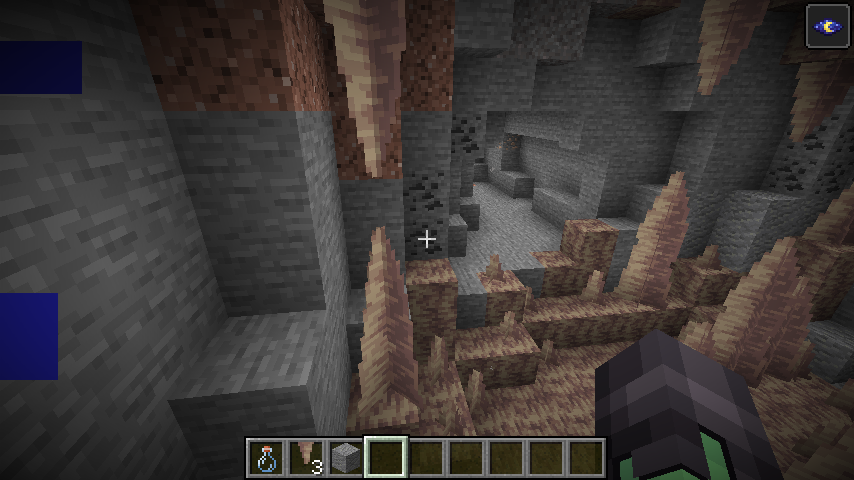
Sometime generated Pointed Dripstone have the tip_merge block state even if not connected to another pointed dripstone. Also sometimes generated Pointed Dripstone doesn't have the tip_merge block state when it should.
This may be intentional.
How to reproduce
**1- Create a world with 'single biome' world type and biome set to Dripstone Caves
2- Enter a cave and search for pointed dripstone
3- (This doesn't always happen) You will see that some pointed dripstone has the tip_merge set when shouldn't.
Generated Pointed Dripstone's tip_merge block stateissometimesincorrectGenerated Pointed Dripstone's tip_merge block state sometimes set to false
Sometime
generated Pointed Dripstone have the tip_merge block state even if not connected to another pointed dripstone. Also sometimes generated Pointed Dripstone doesn't have the tip_merge block state when it should.This may be intentional.
How to reproduce
**1- Create a world with 'single biome' world type and biome set to Dripstone Caves2- Enter a cave and search for pointed dripstone
3- (This doesn't always happen) You will see that some pointed dripstone has the tip_merge set when shouldn't.
Sometimes generated Pointed Dripstone doesn't have the tip_merge block state when it should.
This may be intentional.
How to reproduce
1- Create a world with 'single biome' world type and biome set to Dripstone Caves
2- Enter a cave and search for pointed dripstone
3- (This doesn't always happen) You will see that some pointed dripstone has the tip_merge set to false when it shouldn't.
Sometimes generated Pointed Dripstone doesn't have the tip_merge block state when it should.
This may be intentional.
How to reproduce
1- Create a world with 'single biome' world type and biome set to Dripstone Caves
2- Enter a cave and search for pointed dripstone
3- (This doesn't always happen) You will see that some pointed dripstone has the tip_merge set to false when it shouldn't.
This is not a duplicate of
MC-207254:The
MC-207254bug is does completely the opposite of this bug, because this
Generated Pointed Dripstone'stip_merge block state sometimes set to falseGenerated Pointed Dripstone's is not merged when it should
Sometimes generated Pointed Dripstone doesn't have the tip_merge block state when it should.
This may be intentional.
How to reproduce
1- Create a world with 'single biome' world type and biome set to Dripstone Caves
2- Enter a cave and search for pointed dripstone
3- (This doesn't always happen) You will see that some pointed dripstone has the tip_merge set to false when it shouldn't.
This is not a duplicate of
MC-207254:
TheMC-207254bug is does completely the opposite of this bug, because thisSometimes generated Pointed Dripstone doesn't have the tip_merge block state when it should.
This may be intentional.
How to reproduce
1- Create a world with 'single biome' world type and biome set to Dripstone Caves
2- Enter a cave and search for pointed dripstone
3- (This doesn't always happen) You will see that some pointed dripstone has the tip_merge set to false when it shouldn't.
This is not a duplicate of
MC-207254:As
MC-207254is about pointed dripstone merging when it shouldn't, this is about pointed dripstone not merging when it should.
Generated Pointed Dripstone'sisnot merged whenit shouldGenerated Pointed Dripstones are not merged when they should
Sometimes generated Pointed Dripstone doesn't have the tip_merge block state when it should.
This may be intentional.
How to reproduce
1- Create a world with 'single biome' world type and biome set to Dripstone Caves
2- Enter a cave and search for pointed dripstone
3- (This doesn't always happen) You will see that some pointed dripstone has th
e tip_mergeset tofalsewhen it shouldn't.
This is not a duplicate of
MC-207254:As
MC-207254is about pointed dripstone merging when it shouldn't, this is about pointed dripstone not merging when it should.Sometimes generated Pointed Dripstone doesn't have the 'thickness=tip_merge' block state set when it should.
This may be intentional.
How to reproduce
1- Create a world with 'single biome' world type and biome set to Dripstone Caves
2- Enter a cave and search for pointed dripstone
3- (This doesn't always happen) You will see that some pointed dripstone has 'thickness' set to 'tip' when it should be 'tip_merge'.
This is not a duplicate of
MC-207254:As
MC-207254is about pointed dripstone merging when it shouldn't, this is about pointed dripstone not merging when it should.
Since 1.13.
Entities such as paintings, boats, primed tnt, falling blocks doesn't appear on the debug screen when pointed at. This does not affect armor stands or mobs.
How to reproduce:
1- Place, for example, a boat.
2- Open the F3 debug screen and point at it
-
Code Analysis
This is caused by code at net.minecraft.client.renderer.GameRenderer.pick(float) which says that only if the 'picked' entity is an instance of net.minecraft.world.entity.LivingEntity will be assigned to the field crosshairPickEntity of net.minecraft.client.Minecraft
->This also causes that
namedentities will not show their name tag when hovered.
Note: I also analyzed why items, fishing bobbers, snowballs, eggs and arrows don't appear after fixing, and I've seen that entities which are not 'pickable' (the ones I said) don't appear, but that is intentional and is said as a predicate at the ProjectileUtil.getEntityHitResult() call.
Since 1.13.
Entities such as paintings, boats, primed tnt, falling blocks doesn't appear on the debug screen when pointed at. This does not affect armor stands or mobs.
How to reproduce:
1- Place, for example, a boat.
2- Open the F3 debug screen and point at it
-
Code Analysis
This is caused by code at net.minecraft.client.renderer.GameRenderer.pick(float) which says that only if the 'picked' entity is an instance of net.minecraft.world.entity.LivingEntity will be assigned to the field crosshairPickEntity of net.minecraft.client.Minecraft
->This also causes that these entities, if named, will not show their name tag when hovered.
Note: I also analyzed why items, fishing bobbers, snowballs, eggs and arrows don't appear after fixing, and I've seen that entities which are not 'pickable' (the ones I said) don't appear, but that is intentional and is said as a predicate at the ProjectileUtil.getEntityHitResult() call.
The bug
Entities such as paintings, boats, primed tnt, falling blocks doesn't appear on the debug screen when pointed at. This does not affect armor stands or mobs.
How to reproduce
- Place, for example, a boat.
- Open the F3 debug screen and point at it
→Code analysis
This is caused by code at net.minecraft.client.renderer.GameRenderer.pick which says that "only if the 'picked' entity is an instance of net.minecraft.world.entity.LivingEntity" will be assigned to the field crosshairPickEntity of net.minecraft.client.Minecraft.
This also causes that these entities, if named, will not show their name tag when hovered.
Note: I also analyzed why items, fishing bobbers, snowballs, eggs and arrows don't appear after fixing, and I've seen that entities which are not 'pickable' (the ones I said) don't appear, but that is intentional and is said as a predicate at the ProjectileUtil.getEntityHitResult call.
The bug
Entities such as
paintings, boats, primed tnt, falling blocks, all projectiles except fireball (normal variant), dropped items, experience orbs, etc., don't appear on the debug screen when pointed at. This does not affect armor stands or mobs.How to reproduce
Place, for example, a boat. Drop an item to the ground.- Open the F3 debug screen and point at it
→Code analysis
This is caused by code at net.minecraft.client.renderer.GameRenderer.pick which says that "only if the 'picked' entity is an instance of net.minecraft.world.entity.LivingEntity" will be assigned to the field crosshairPickEntity of net.minecraft.client.Minecraft.
This also causes that these entities, if named, will not show their name tag when hovered.
Note: I also analyzed why items, fishing bobbers, snowballs, eggs and arrows don't appear after fixing, and I've seen that entities which are not 'pickable' (the ones I said) don't appear, but that is intentional and is said as a predicate at the ProjectileUtil.getEntityHitResult call.
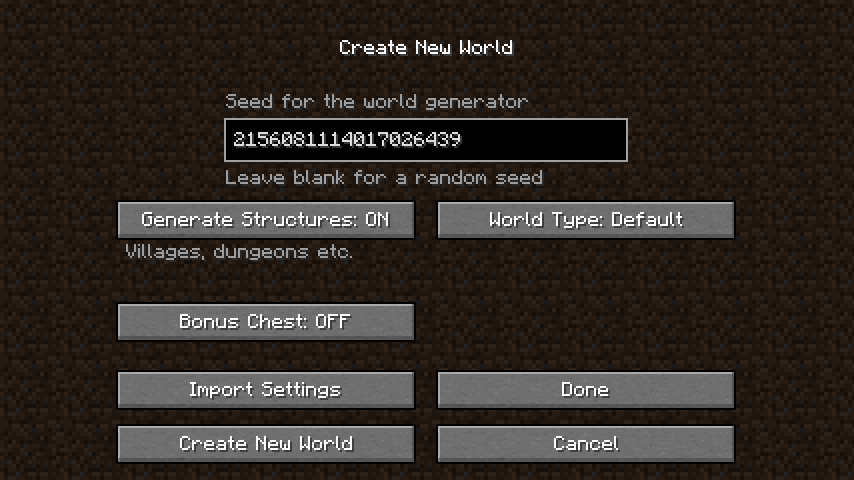
Incoherency: A random seed is already generated on "Create New World" screen despite the "Leave blank for a random seed" label.
What I expected was the seed's textbox field to be empty, or the "Leave blank for a random seed" label to be changed into "Leave blank for a new random seed" (on recreating a world) when creating a new world or something similar.
For what I can guess, this was due to a side effect from
MC-191790, that made text the field boxes for seeds available when re-creating a world.
- Maybe this was a misunderstanding because of me, if that is the case, I apology for wasting your time.
- Still, I have to remove the characters inside the text box to write a custom seed, if this argument is valid but this report isn't, I will change the bug title into "A random generated seed appears when creating a world instead of appearing blank"
How to reproduce
- Open "Create New World" from the level select menu.
- Go to "More World Options"
→
This bug isn't a duplicate of
MC-90838or MC-237679, but relates to MC-236497.For helpers and mods
I wasn't able to find another bug in the tracker matchingthedescription of this, so I will report this bug, but if it duplicates an existing bug, I apology and please tell me what it is because this report provides very useful information about what causes this issue, and how to fix it.Summary
Normally, when the player moves the cursor in third person view, it's model head rotates smoothly (with a slight delay from the camera). However, this doesn't happen while the player is on a vehicle.
This bug is caused by two different mistakes in the code of the game. The first one affects all vehicles and it's just from client-side and the second only affects boats.Code analysis (using the official mappings and code from 1.19.2)
In "net.minecraft.client.player.LocalPlayer", the method "getViewYRot(float)" that overrides LivingEntity's, it returns the player's current Y rotation (not the head Y rotation) only when the player is not a passenger. This causes that when "net.minecraft.client.Camera" calls this method when the player is a passenger, the camera uses the head rotation, always rendering the head directly and being unable to see the it's sides.
@Override
public float getViewYRot(float partialTick) {
  return this.isPassenger() ? super.getViewYRot(partialTick) : this.getYRot();
}
This can be easily fixed by changing LocalPlayer's "getViewYRot" method to always return the Y rotation "getYRot()", regadless of if the player is a passenger or not. (just like "getViewXRot(float)"):
@Override
public float getViewYRot(float partialTick) {
  return this.getYRot();
}By fixing what's described above, the head will now move smoothly (with the "delay") when the player is riding any vehicle whitout (most likely) any side effects on gameplay. But this will not fix this issue for boats.
This bug also happens when riding a boat (if just this is fixed and not the above, this will not work):In "net.minecraft.world.entity.vehicle.Boat", at the method "clampRotation(Entity)" which prevents the player from moving his head too away from it's front, when setting the player's Head Y rotation using "setYHeadRot(float)", it just copies the Main Y rotation of the player that was adjusted, removing the delay (or smoothness) of the head movement at third person view.
{ psngr.setYBodyRot(this.getYRot()); float wrappedYrot = Mth.wrapDegrees(psngr.getYRot() - this.getYRot()); float clampedYrot = Mth.clamp(wrappedYrot, -105.0F, 105.0F); psngr.yRotO += clampedYrot - wrappedYrot; psngr.setYRot(psngr.getYRot() + clampedYrot - wrappedYrot); psngr.setYHeadRot(psngr.getYRot()); }
protected void clampRotation(Entity psngr)This can be fixed by using it's own clamp calculation rather than using the main Y rotation's, as shown in this example:
protected void clampRotation(Entity psngr) {
psngr.setYBodyRot(this.getYRot());
float wrappedYrot = Mth.wrapDegrees(psngr.getYRot() - this.getYRot());
float clampedYrot = Mth.clamp(wrappedYrot, -105.0F, 105.0F);
psngr.yRotO += clampedYrot - wrappedYrot;
psngr.setYRot(psngr.getYRot() + clampedYrot - wrappedYrot);
float wrappedYheadrot = Mth.wrapDegrees(psngr.getYHeadRot() - this.getYRot());
float clampedYheadrot = Mth.clamp(wrappedYheadrot, -105.0F, 105.0F);
psngr.setYHeadRot(psngr.getYHeadRot() + clampedYheadrot - wrappedYheadrot);
}This bug isn't a duplicate of
MC-90838or MC-237679, but relates to MC-236497 and MC-108765.For helpers and moderators
I wasn't able to find another bug in the tracker matching the description of this, so I will report this bug, but if it duplicates an existing bug, I apology and please tell me what it is because this report provides very useful information about what causes this issue, and how to fix it.
The Bug
Normally, when the player moves the cursor in third person view, it's model head rotates smoothly (with a slight delay from the camera). However, this doesn't happen while the player is on a vehicle.
This bug is caused by two different mistakes in the code of the game. The first one affects all vehicles and it's just from client-side and the second only affects boats.How to reproduce
- Enter third person view.
- Move the camera left and right
→Your head moves smoothly
- Place a minecart or any other rideable entity and enter it
→Code analysis (using the official mappings and code from 1.19.2)
In "net.minecraft.client.player.LocalPlayer", the method "getViewYRot(float)" that overrides LivingEntity's, it returns the player's current Y rotation (not the head Y rotation) only when the player is not a passenger. This causes that when "net.minecraft.client.Camera" calls this method when the player is a passenger, the camera uses the head rotation, always rendering the head directly and being unable to see the it's sides.
@Override public float getViewYRot(float partialTick) { return this.isPassenger() ? super.getViewYRot(partialTick) : this.getYRot(); }This can be easily fixed by changing LocalPlayer's "getViewYRot" method to always return the Y rotation "getYRot()", regadless of if the player is a passenger or not. (just like "getViewXRot(float)"):
@Override public float getViewYRot(float partialTick) { return this.getYRot(); }By fixing what's described above, the head will now move smoothly (with the "delay") when the player is riding any vehicle whitout (most likely) any side effects on gameplay. But this will not fix this issue for boats.
This bug also happens when riding a boat (if just this is fixed and not the above, this will not work):In "net.minecraft.world.entity.vehicle.Boat", at the method "clampRotation(Entity)" which prevents the player from moving his head too away from it's front, when setting the player's Head Y rotation using "setYHeadRot(float)", it just copies the Main Y rotation of the player that was adjusted, removing the delay (or smoothness) of the head movement at third person view.
protected void clampRotation(Entity psngr) { psngr.setYBodyRot(this.getYRot()); float wrappedYrot = Mth.wrapDegrees(psngr.getYRot() - this.getYRot()); float clampedYrot = Mth.clamp(wrappedYrot, -105.0F, 105.0F); psngr.yRotO += clampedYrot - wrappedYrot; psngr.setYRot(psngr.getYRot() + clampedYrot - wrappedYrot); psngr.setYHeadRot(psngr.getYRot); }This can be fixed by using it's own clamp calculation rather than using the main Y rotation's, as shown in this example:
protected void clampRotation(Entity psngr) {
  psngr.setYBodyRot(this.getYRot());
  float wrappedYrot = Mth.wrapDegrees(psngr.getYRot() - this.getYRot());
  float clampedYrot = Mth.clamp(wrappedYrot, -105.0F, 105.0F);
  psngr.yRotO += clampedYrot - wrappedYrot;
  psngr.setYRot(psngr.getYRot() + clampedYrot - wrappedYrot);
  float wrappedYheadrot = Mth.wrapDegrees(psngr.getYHeadRot() - this.getYRot());
  float clampedYheadrot = Mth.clamp(wrappedYheadrot, -105.0F, 105.0F);
  psngr.setYHeadRot(psngr.getYHeadRot() + clampedYheadrot - wrappedYheadrot);
}
This bug isn't a duplicate of
MC-90838or MC-237679, but relates to MC-236497andMC-108765.For helpers and moderators
I wasn't able to find another bug in the tracker matching the description of this, so I will report this bug, but if it duplicates an existing bug, I apology and please tell me what it is because this report provides very useful information about what causes this issue, and how to fix it.
The Bug
Normally, when the player moves the cursor in third person view, it's model head rotates smoothly (with a slight delay from the camera). However, this doesn't happen while the player is on a vehicle.
This bug is caused by two different mistakes in the code of the game. The first one affects all vehicles and it's just from client-side and the second only affects boats.How to reproduce
- Enter third person view.
- Move the camera left and right
→- Place a minecart or any other rideable entity and enter it
→Code analysis (using the official mappings and code from 1.19.2)
In "net.minecraft.client.player.LocalPlayer", the method "getViewYRot(float)" that overrides LivingEntity's, it returns the player's current Y rotation (not the head Y rotation) only when the player is not a passenger. This causes that when "net.minecraft.client.Camera" calls this method when the player is a passenger, the camera uses the head rotation, always rendering the head directly and being unable to see the it's sides.
@Override public float getViewYRot(float partialTick) { return this.isPassenger() ? super.getViewYRot(partialTick) : this.getYRot(); }This can be easily fixed by changing LocalPlayer's "getViewYRot" method to always return the Y rotation "getYRot()", regadless of if the player is a passenger or not. (just like "getViewXRot(float)"):
@Override public float getViewYRot(float partialTick) { return this.getYRot(); }By fixing what's described above, the head will now move smoothly (with the "delay") when the player is riding any vehicle whitout (most likely) any side effects on gameplay. But this will not fix this issue for boats.
This bug also happens when riding a boat (if just this is fixed and not the above, this will not work):In "net.minecraft.world.entity.vehicle.Boat", at the method "clampRotation(Entity)" which prevents the player from moving his head too away from it's front, when setting the player's Head Y rotation using "setYHeadRot(float)", it just copies the Main Y rotation of the player that was adjusted, removing the delay (or smoothness) of the head movement at third person view.
protected void clampRotation(Entity psngr) { psngr.setYBodyRot(this.getYRot()); float wrappedYrot = Mth.wrapDegrees(psngr.getYRot() - this.getYRot()); float clampedYrot = Mth.clamp(wrappedYrot, -105.0F, 105.0F); psngr.yRotO += clampedYrot - wrappedYrot; psngr.setYRot(psngr.getYRot() + clampedYrot - wrappedYrot); psngr.setYHeadRot(psngr.getYRot); }This can be fixed by using it's own clamp calculation rather than using the main Y rotation's, as shown in this example:
protected void clampRotation(Entity psngr) { psngr.setYBodyRot(this.getYRot()); float wrappedYrot = Mth.wrapDegrees(psngr.getYRot() - this.getYRot()); float clampedYrot = Mth.clamp(wrappedYrot, -105.0F, 105.0F); psngr.yRotO += clampedYrot - wrappedYrot; psngr.setYRot(psngr.getYRot() + clampedYrot - wrappedYrot); float wrappedYheadrot = Mth.wrapDegrees(psngr.getYHeadRot() - this.getYRot()); float clampedYheadrot = Mth.clamp(wrappedYheadrot, -105.0F, 105.0F); psngr.setYHeadRot(psngr.getYHeadRot() + clampedYheadrot - wrappedYheadrot); }This bug isn't a duplicate of
MC-90838or MC-237679, but relates to MC-236497, MC-108765 andMC-122211.For helpers and moderators
I wasn't able to find another bug in the tracker matching the description of this, so I will report this bug, but if it duplicates an existing bug, I apology and please tell me what it is because this report provides very useful information about what causes this issue, and how to fix it.
The Bug
Normally, when the player moves the cursor in third person view, it's model head rotates smoothly (with a slight delay from the camera). However, this doesn't happen while the player is on a vehicle.
This bug is caused by two different mistakes in the code of the game. The first one affects all vehicles and it's just from client-side and the second only affects boats.How to reproduce
- Enter third person view.
- Move the camera left and right
→- Place a minecart or any other rideable entity and enter it
→Code analysis (using the official mappings and code from 1.19.2, with my own variable names)
In "net.minecraft.client.player.LocalPlayer", the method "getViewYRot(float)" that overrides LivingEntity's, it returns the player's current Y rotation (not the head Y rotation) only when the player is not a passenger. This causes that when "net.minecraft.client.Camera" calls this method when the player is a passenger, the camera uses the head rotation, always rendering the head directly and being unable to see the it's sides.
@Override public float getViewYRot(float partialTick) { return this.isPassenger() ? super.getViewYRot(partialTick) : this.getYRot(); }This can be easily fixed by changing LocalPlayer's "getViewYRot" method to always return the Y rotation "getYRot()", regadless of if the player is a passenger or not. (just like "getViewXRot(float)"):
@Override public float getViewYRot(float partialTick) { return this.getYRot(); }By fixing what's described above, the head will now move smoothly (with the "delay") when the player is riding any vehicle whitout (most likely) any side effects on gameplay. But this will not fix this issue for boats.
This bug also happens when riding a boat (if just this is fixed and not the above, this will not work):In "net.minecraft.world.entity.vehicle.Boat", at the method "clampRotation(Entity)" which prevents the player from moving his head too away from it's front, when setting the player's Head Y rotation using "setYHeadRot(float)", it just copies the Main Y rotation of the player that was adjusted, removing the delay (or smoothness) of the head movement at third person view.
protected void clampRotation(Entity psngr) { psngr.setYBodyRot(this.getYRot()); float wrappedYrot = Mth.wrapDegrees(psngr.getYRot() - this.getYRot()); float clampedYrot = Mth.clamp(wrappedYrot, -105.0F, 105.0F); psngr.yRotO += clampedYrot - wrappedYrot; psngr.setYRot(psngr.getYRot() + clampedYrot - wrappedYrot); psngr.setYHeadRot(psngr.getYRot); }This can be fixed by using it's own clamp calculation rather than using the main Y rotation's, as shown in this example:
protected void clampRotation(Entity psngr) { psngr.setYBodyRot(this.getYRot()); float wrappedYrot = Mth.wrapDegrees(psngr.getYRot() - this.getYRot()); float clampedYrot = Mth.clamp(wrappedYrot, -105.0F, 105.0F); psngr.yRotO += clampedYrot - wrappedYrot; psngr.setYRot(psngr.getYRot() + clampedYrot - wrappedYrot); float wrappedYheadrot = Mth.wrapDegrees(psngr.getYHeadRot() - this.getYRot()); float clampedYheadrot = Mth.clamp(wrappedYheadrot, -105.0F, 105.0F); psngr.setYHeadRot(psngr.getYHeadRot() + clampedYheadrot - wrappedYheadrot); }Deeper investigation (what caused this bug, very important)
This bug happens since snapshot 17w48a, when
MC-122211(the camera jitters when turning a boat while riding it) was fixed by changing the LocalPlayer's "getViewYRot" method to return the Head rotation instead of the Main rotation if the player is a passenger. However, this was a lazy fix (or may be because the summary of that bug report was wrong and mojang misunderstood it) because that bug actually caused the boat to stutter, not the camera, and resulted in this new bug.
MC-122211should've been fixed by modifying the "yRotO" value of the boat to be consistent with the "yRot" when "deltaRotatation" field value changes it in the "controlBoat()" method, as you can see in this example:(at net.minecraft.world.entity.vehicle.Boat) private void controlBoat() { if (this.isVehicle()) { float f = 0.0F; if (this.inputLeft) { --this.deltaRotation; } if (this.inputRight) { ++this.deltaRotation; } if (this.inputRight != this.inputLeft && !this.inputUp && !this.inputDown) { f += 0.005F; } this.yRotO += this.deltaRotation;//ADD THIS this.setYRot(this.getYRot() + this.deltaRotation); if (this.inputUp) { f += 0.04F; } if (this.inputDown) { f -= 0.005F; } this.setDeltaMovement(this.getDeltaMovement().add((double)(Mth.sin(-this.getYRot() * ((float)Math.PI / 180F)) * f), 0.0D, (double)(Mth.cos(this.getYRot() * ((float)Math.PI / 180F)) * f))); this.setPaddleState(this.inputRight && !this.inputLeft || this.inputUp, this.inputLeft && !this.inputRight || this.inputUp); } }This is very important to do because if you just do the two fixes from the code analysis and ignore this, the boat will stutter when it turns, reviving
MC-122211.
This is not a feature request. Let me explain; in versions prior to Indev, (specifically Classic Survival Test), entities used to tilt in the direction of the killing blow. After this version, Notch removed lot of the animation code because MD3 pre-generated models. Afterwards, after bringing back the old mob models, this feature was missing. Also after the fix of
MC-26678, this will create an inconsistency.
Chest model and texture in Boats with Chests have the 'bottom' and 'lid' parts separated, despite not being meant to be animated
Open video settings
The Bug:
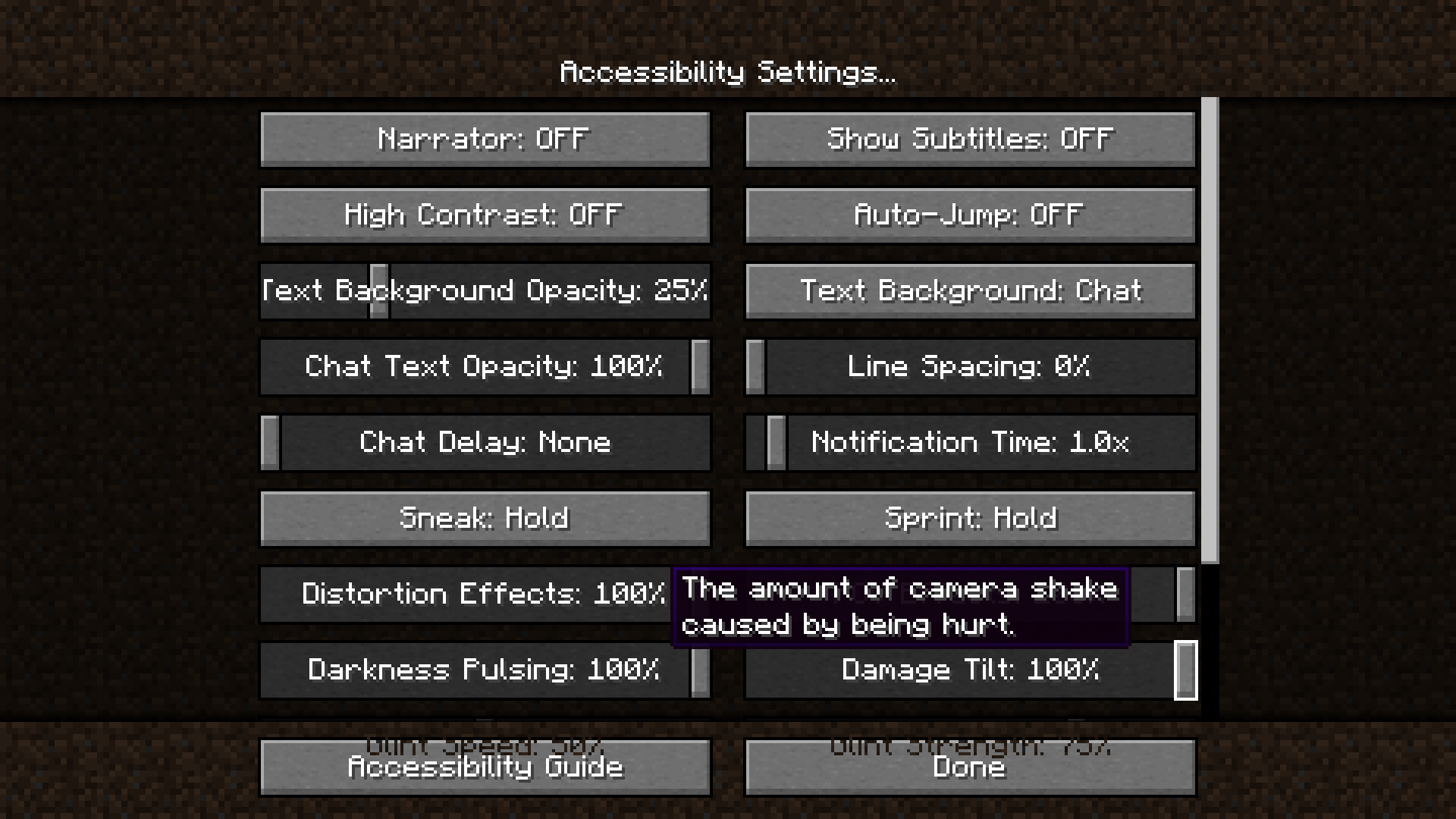
Texts from buttons at scrollable menus can overlap the texts from buttons outside the list.
Steps to Reproduce:
- Open the "Video Settings", "Accessibility Settings" or the "Chat Settings" menu.
- Move the buttons list a bit below.
- Observe how text from list buttons overlap the other buttons outside.
![[Mod] Avoma](../../../data/avatars/users/86198.png)
The bug
Powered rails do not update when additional power sources are added or removed.
How to reproduce
- Build the setup as shown in the attachment below (setup.png
 )
) - Place a redstone block on top of the diamond block
- Take note of how many powered rails are activated
- Place a redstone block on top of the emerald block
- Once again, take note of how many powered rails are activated
- Take note as to whether or not powered rails update when additional power sources are added or removed
→ Powered rails do not update when additional power sources are added or removed
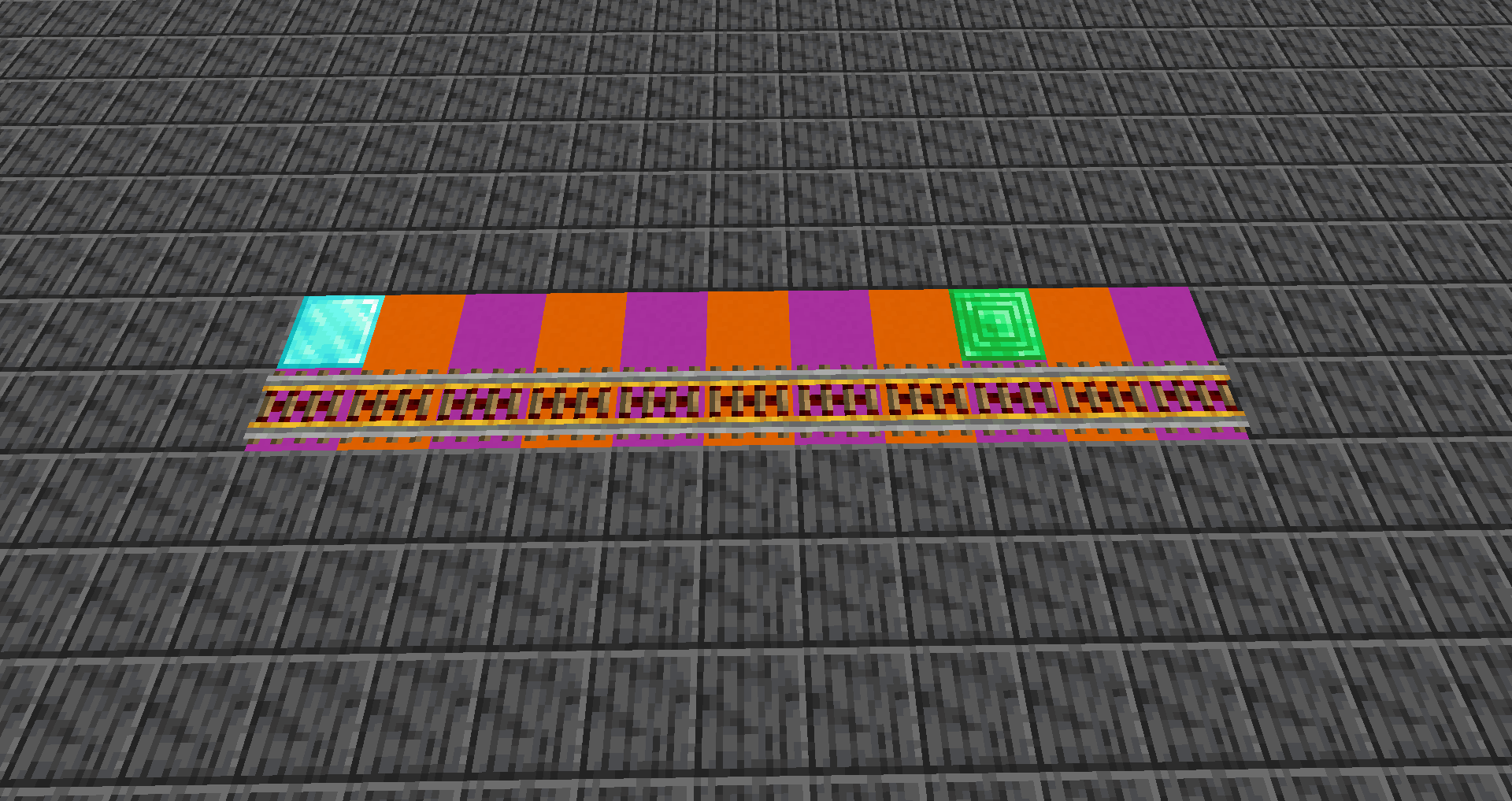
Expected behavior
Powered rails would update when additional power sources are added or removed.
Code analysis
Code analysis by Ismael Rosillo can be found in this comment.
![[Mod] Sonicwave](../../../data/avatars/users/94627.png)
The Bug
When you cause a dragon egg to teleport (such as by clicking on it), the teleportation particles point in a random direction and not to the actual location of the dragon egg.
Steps to Reproduce
- Give yourself a dragon egg and place it down.
/give @s minecraft:dragon_egg
- Interact with the dragon egg, (right-click by default) to make it teleport.
- Take note of the particles produced upon doing this and what direction they're pointing in.
- Locate where the dragon egg is and check whether the particles pointed in the correct direction.
Observed Behavior
Particles produced from a dragon egg upon interacting with it don't point in the direction of where the egg was teleported to.
Expected Behavior
Particles produced from a dragon egg upon interacting with it would point in the direction of where the egg was teleported to.
Code Analysis
Code analysis by Marcono1234 can be found in this comment, and code analysis by Ismael Rosillo can be found in this comment.
The Bug:
Pay close attention to the block inside as it gets bigger, it appears to get bigger in a corner direction instead of centered on the block.
Steps to Reproduce:
- Switch into creative mode, place down an activator rail and ensure that it's powered.
- Place a TNT minecart on the activator rail and watch how the TNT swells from above.
- Take note as to whether or not TNT in TNT minecarts swells in offset directions.
Observed Behavior:
TNT in TNT minecarts swells in offset directions.
Expected Behavior:
TNT in TNT minecarts would not swell in offset directions. Instead, it should swell according to the center of the block and not the corner.
Code Analysis:
Code analysis by Ismael Rosillo can be found in this comment.

@Ismael Rosillo, you are correct, downgrading is not supported so this is likely actually a valid report. However, this report here has been resolved for a long time. Could you please create a new one and refer to this one?
The Bug
the new goat horns don't make any sound at all.
Affected Sounds
- minecraft:entity.goat.screaming.horn_break
- minecraft:item.goat_horn.play
Code Analysis
Code analysis by Ismael Rosillo can be found in this comment.

Ismael Rosillo Yeah correct, but it may duplicate MC-122731. Because if you watch the video attached to the report, you will realize that its the same bug this report describes, but you are indeed correct, MC-122731 does mainly focus on camera jittering/stuttering so it could just relate to MC-122731.
This also happens without the night vision effect, but is less notable.
This does not happens in Superflat worlds.
"Fixed" at 20w21a, as new world generation settings have been added, including the minecraft:multi_noise biome generator.
It is caused by the world generator choosing, (sorry but I had to explain it in spanish because I don't speak english well):
Cuando elijes un generador de mundos, las opciones "Floating Islands" y "Caves" están usando los ajustes del "minecraft:end" y "minecraft:nether", respectivamente, cuando en realidad deberían usar el "minecraft:floating_islands" y "minecraft:caves". En resumen, esto sucede porque a los desarrolladores se les ha olvidado ponerlo así al separar el "Floating Islands" y el "Caves" del "Buffet". Es un error común.
Fix at: net.minecraft.client.gui.screens.worldselection.WorldPreset, method fromBuffetSettings(WorldGenSettings, WorldPreset, Biome) and static {}
It is caused by the world generator choosing, (sorry if there are gramar mistakes, but I don't speak english well):
When you choose a world generator, the options "Floating Islands" and "Caves" are using "minecraft:end" and "minecraft:nether" noise settings presets respectively, instead of using"minecraft:floating_islands" and "minecraft:caves". In other words; "Floating Islands" is using "minecraft:end" noise settings instead of "minecraft:floating_islands". This also happens whit the "Caves" world type, but with the "minecraft:nether" noise settings.
Here the fix I made:
At: net.minecraft.client.gui.screens.worldselection.WorldPreset, method fromBuffetSettings(WorldGenSettings, WorldPreset, Biome) and static {}
I'm making a mod of beta 1.7.3 (MCP) and when I was adding the GUI code from 1.16, I noticed the existence of this bug. Well, that's not important. The important part is that I found the way to fix it and I decided to share it (the code):
1- Add a boolean to net.minecraft.client.gui.components.AbstractSliderButton, in my case:
"private boolean wasClicked = false;"
2- Then go to the method "void onClick(double, double)" and write "this.wasClicked = true;" in the last line of the method.
3- Remove all the operations of the method "void onRelease(double, double)" and add this:
if (this.wasClicked)
{
super.playDownSound(Minecraft.getInstance().getSoundManager());
this.wasClicked = false;
}
The icons are uncentered because they are in a 25x25 slot, and the icon starts rendering at position x5 y5, but it should start at position x4.5 y4.5.
This has two possible solutions:
1- Make the slot one pixel bigger or smaller.
2- I don't know how to explain it, I don't speak english and I don't use translators, but I can say it's related to net.minecraft.client.renderer.entity.ItemRenderer, floats and integers, and RenderSystem.translatef((float)integer2, (float)integer3, 100.0f + this.blitOffset);
This may be intentional, as maps were added far after the old grass color phased out. The feature may be intentionally 'Bedrock Exclusive'.
Can confirm, this option is also unused in the code and cannot be changed in-game.
Should reopen, as Mojang does not support older versions.
Not fixed in 21w05a
Seems to be fixed in 21w11a
At first didn't work, but I kept trying with other proxy hosts and found out that betacraft.uk (".pl" doesn't works anymore) is the current working proxy.
I'm still a little worried because they may keep changing their address, then it can stop working at any time, so I would have to search for the new address and change JVM argument manually.
Yesterday I was doing some tests with the end portal shaders and also noticed this bug. This seems to be caused by the shaders of end portals/gateways not involving fog. (I don't have much knowledge about shaders so it's hard to explain to me). Then I added fog from another shader and the fog now (partially) works. I will attach the resource pack for informational purposes
Some helpful info about this bug for the Statistics tooltips:
This is caused because the statistics screen uses it's own method (see: StatsScreen.ItemStatisticsList, method renderMousehoverTooltip) for rendering tooltips. This method hasn't been updated, even tough it uses the same paramethers as Screen's renderTooltip (the one with the current design). This can be resolved by removing the old method and using the new one instead.
Separately, this bug also causes items at the statistics screens to not have the colored font used for Rarity. This needs to be fixed using a different way, such as converting the Item instance into an ItemStack instance and using the renderTooltip method for ItemStacks (not Component)
Can confirm in 1.19.3.
Can confirm in 1.19.3
After further testing, this bug seems to happen since 1.13 snapshot 17w48a.
Can confirm in 1.19.3
After investigting a bit on the code, I noticed that the sound "minecraft:item.goat_horn.play" is not used in any part of the game other than the sound registry (e.j; making it playable only using /playsound), as goat horns use individual sounds for every variant. It is very likely that this sound event was accidentally left in the process of adding goat horns.
However, "minecraft:entity.goat.screaming.horn_break" is used in the game when a screaming goat's horn breaks when ramming. Since this sound is missing, nothing can be heard (also there aren't subtitles) when this happens.
Even thought this ticket reports that two sounds are missing, each one is caused by different errors. The first one ("minecraft:item.goat_horn.play") could be fixed by just removing the unused sound from the code, and the second one ("minecraft:entity.goat.screaming.horn_break") by adding horn break sounds for screaming goats or making them use the sound of normal goats in the sounds.json file instead.
Can confirm in 1.19.3
It would be of great help if you could attach this code analysis as it provides useful information for fixing this bug:
This bug happens because the Block rendered inside scales its model at ignition in the wrong order. At "TntMinecartRenderer.java" method "renderMinecartContents()" the renderer gets the fuse of the Tnt inside the minecart to scale the block, but the problem is that in the super class "MinecartRenderer.java", after scaling the block to 75% of its size but before calling "renderMinecartContents" it translates (moves) the render pose, causing "TntMinecartRenderer" to scale the already translated pose, making the swelling block look offset.
The way I propose to fix this would be by creating a new method (I called it "scaleMinecartContents") in "MinecartRenderer" that scales the minecart contents that will be rendered so "TntMinecartRenderer" could be able to scale it on the proper order, similarly to "scale(MinecartTNT, PoseStack, float)" in class "LivingEntityRenderer.java". Here is the example:
I don't understand why this isn't a bug, it is reminds me of
MC-205629and that one was considered a bug. I think I will prepare a better explanation demonstating what Dhranios said.This issue happens because wolves change their attribute base values when being tamed rather than using Attribute Modifiers (like shulkers when closing; baby zombies;...). Changing wolves to use them would fix this issue.
Can confirm in 1.19.3 and latest snapshot 23w04a; Relates to
MC-71977(and vice versa) as they are caused by the same mistake on the game's code. This is present in the game since 1.8 snapshot 14w26aSeems fixed in 23w05a.
Can confirm in 1.19.3 and latest snapshot 23w05a. Personally, but enough important to note, I think that this can be used as an exploit to see if there's any monster when in a dark cave or during night.
(rant alert) Moesh I'm NOT asking for the outdated feature to be added back, I'm just indicating that said old feature was not removed properly and it is causing performance issues. The magma block is literally checking if there's water AT the same block the magma block is IN! This is nonsense.
Please read the full report and not just the title, please reconsider reopening. I think I will ask Avoma to create a new ticket with better and appropiate title and descriptions.
Unable to reproduce in 1.19.4 Pre-release 2. Seems fixed.
Can confirm in 1.19.4 and 23w12a.
Can confirm in 1.19.4 and 23w12a.
Hey Avoma! Though this is not a code analysis, it is a possible fix for this bug, I hope this will help Mojang fix it.
Cause
Powered rails try to check and update when a neighbour change happens, that is okay. The problem is that if you set a redstone power source next to an already powered "on" rail, neighbors will not update because there are no block state changes (powered=true is equal to powered=true). A possible way to fix this is by making the powered block state depend on a power number state, so every time a redstone signal changes every rail will update neighbour rails up until they're far enough from source.
Workaround
A few months ago I was messing with PoweredRailBlock.java to make curved powered rails, and I noticed how unsafe are methods findPoweredRailSignal(Level,BlockPos,BlockState,boolean,int) and isSameRailWithPower(Level,BlockPos,boolean,int,RailShape).
Basically what I did was remove the proximity variable (the int param of this method that increases every time it checks a further rail) and make powered rails use a new "power" block state that goes from 0 to 9 (0 equals to unpowered, 9 is fully powered). Then, changed findPoweredRailSignal again to only check directly connected powered rails (and not all 8) and isSameRailWithPower to only check the given's rail "power" state (previously it did check if that rail had a redstone source or else check for a further away neighbour block). Also, the two methods mentioned above will now return power state (int) instead of powered state (boolean).
In other words, the new behaviour will make findPoweredRailSignal and isSameRailWithPower get their direct adjacent's power. End result of these two methods:
Now, we are missing something: method updateState(BlockState,Level,BlockPos,Block). This is the only method that uses findPoweredRailSignal, and is the one that sets the rail's power value when it detects a neighbor change. We will update it in order to set the proper "power" block state, by getting instead the adjacent connected powered rails highest signal, and decrease it by 1 (so power will be lesser the further the rail is full from source rail):
After this workaround, the bug seemed fixed.
Problems:
This comment is an extensive bug (and code) analysis of the fifth oldest persisting issue, along with a working and fully tested workaround (fix), so this comment will be split in different categories.
What @Connor Steppie Meant with
MC-217613Then, we have
MC-217613which indeed is (and it's not) a duplicate of this, depending on the point of view; Connor Steppie means thatMC-217613is the bug that refers to the lack of a slow-to-stop animation for the portal (it happened for the first time in 12w18a), whileMC-180refers to the visual "re-trigger" of the portal (it happenned for the first time in 12w34a). It's like these two bugs have been "stacked" or that they are "sister bugs", because they represent a very similar issue.Code Analysis
Here, a bit of history of the code that worked, using Mojang's mapping names for this analysis:
MC-217613.Note in the code that method this.minecraft.changeDimension(newDimension) was also removed from Minecraft.java and also it was forgotten to be re-added for the client listener, causing MC-12789.
Workaround and Fix
After the client-server singleplayer split up, the game switched to fully use the network system, and the source code described in history would not be able to just be copied and pasted, however, it's still useful for reference.
A possible way to fix this is to let the client know when a dimension change was caused by a nether portal to set the proper animation.
But first, we are going to head to LocalPlayer.java and add a new method (named justPostalTraveled() in this example), that will prevent the player to enter to the in-portal state, and set the Animation/Portal Effect at 100%. This will make the player think it's just exiting a portal and will decrease the Animation/Portal Effect at every aiStep()->handleNetherPortalClient() (This would also fix
MC-193749). Now there's a problem with the animation effect: the animation starts before the Downloading Terrain screen is gone, causing the animation to be gone at the time or shortly after the game is rendering the world. To fix this, we are gonna make handleNetherPortalClient() know when it should progress the animation using a check. The end result is shown here in the code:In other hand, we need to use this new method somewhere, and returning to the second paragraph, we'll make the client know when the player used a portal. I added a condition at the packet ClientboundRespawnPacket.java and I called it boolean fromPortal. It will also be read and written to the packet.
The change is quite obvious so I will not show the end result for that. Instead we are going to make this fix fully efective. At the ClientPacketListener.java at method handleRespawn(), after the player is being initialized and "adjusted", let's check whether if the player came from a portal (using the previously added fromPortal field) to call for justPortalTraveled():
The fromPortal field should be true only when we are sure that the player is naturally changing from dimensions, like in ServerPlayer.changeDimension(ServerLevel), which is triggered only when the player is joing to change dimensions throught portals.
However, this fix didn't always work; in certain cases that i couldn't determine, the glitched animation played intead. That left me confused for a while until I found an alternative to this fix.
The new fix comes from the same concept of letting the player know whether or not the dimension travel was a because of a portal, but splitting ClientboundRespawnPacket.java's dimension change function into ClientboundDimensionTravelPacket.java. This new packet didn't create a new player instance and will reuse the previous one. I'm sure of something; that the previous fix did not work because the player could have lost some data. This new fix has worked at the 100% of tests. This is the new dimension travel packet handler:
Well I hope my fix is clear to understand, if not, or if there are any questions, feel free to ask It's time to get this fixed
Actually not a duplicated bug, since this involves smithing tables and they are not even mentioned in the whole bug report of
MC-116465, and also got to mention that the bug you are talking about requires an extensive change of files. Instead, and quoting @slicedlime's comment "Many of these issues would force resource packs to update if they were fixed. We'll likely revamp the UI at some point in the future, at which point these issues will be addressed." the new smithing table and the whole content of 1.20 is still subject to change (as mentioned in multiple changelogs). And, the killing blow is, that bug report mentions small offsets that aren't enough visible unless you stare at them and measure every pixel of these GUIs, while this, is an inconsistency bug with other GUIs and even the smithing table itself from previous versions.Can confirm in 23w17a. It would be a please that the code analysis became added to the bug description.
In my previous code analysis in
MC-180I stated that simply fixing it by letting the client know that a portal was used through ClientboundRespawnPacket.java, the fix would not always work. As I said before, this is probably caused by some data loss from the local player, because when you travel between dimensions, this player instance is completely deleted and then the game creates a new one. In the proposed fix I took out the dimension change handle from the Client Respawn Packet and I've put it into a new packet that doesn't delete/re-create the player instance on handle. The result was successful and the bug never happened again.Video attached. Can confirm in 1.19.4 and 1.20 Pre-release 4.
This issue is happening to me now. It's important to note that this didn't happen before (and I didn't change computer or anything). After enabling output log, it seems like it's a NullPointerException problem when loading resouces. I will try to reinstall the launcher, if the problem persists, I will create a new ticket for the launcher project or try to reopen this.
After reinstalling the launcher, the issue still persisted. But after reinstalling graphic drivers and restarting the computer everything works fine. I hope this helps if this happened to somebody else.
Can confirm in 1.20
Relates to
MC-210108.@Dhranios That's exactly what I said on the bug description, after Beta 1.8 mob models worked different, and all other textures were rotated according to this change except for angry wolf texture.
Can confirm for 1.20.2. Cannot reproduce with hoppers as of 1.20.2 Pre-release 1, however, it can still be reproduced with sugar cane, cactus and sapling with the following steps:
@slicedlime Still an issue in 1.20.2. However, it only affects the inner sprite now. A new video reproducing this behaviour has been attached.
Surprisingly enough, after testing this in various versions I can confirm this issue is present since Minecraft 1.9, it's just that this bug wasn't reported back then.
Update: This bug is a side effect from fixing
MC-50559, so they are related.Update 2: A way to fix this bug would be to revert the other fix, as it is the easiest way considering this bug is more critical than
MC-50559. After doing lots of tests, there is also a way to fix both bugs but it's more complicated.Update 3: Also can confirm in 1.20.2.
This is probably caused by the render text shaders, which detect if the alpha (transparency) value is lower than 0.1 to discard the render, causing all text with alpha between 0.0 and 0.09 to not display. This can be easily fixed by removing that check from those shader files.
As of 23w41a, seems fixed for paintings, falling blocks, all boats, all minecarts, primed tnt and leash knot. However, it still affects other entities, such as projectiles (except normal fireball) and dropped items/xp.
Strangely, it does not affect ghast fireballs (but does affect small fireballs and dragon fireballs)
Quick note; this effect was only visible when "View Bobbing" option was set to ON.
@ampolive Yes / May I move the attached videos to the other report after you close this as duplicate?
@Dhranios @Connor Steppie The fix you are suggesting (the one that would also fix MC-142156) cannot be applied without rewritting the whole rendering system, as there is currently no way of detecting pixels with alpha=0 while appliying another texture (literally you would need to add a way to insert two or more textures to the shader files, and then compare the alpha value between every one. There are also more ways of detecting 0 alpha pixels, but they are not perfomance-friendly)
It would be better to merge overlapping layers when building models on resource reload (so just one layer of the destroy texture is rendered) and cache them as baked faces at BakedModel.java on separate fields, and use them only when textures like "enchant_glint" and "destroy_progress" are being used. I made some tests yesterday and both MC-166101 and MC-265667 (this issue) seem to be fixed.
Interestingly enough, this issue was also present in Beta 1.5, but then got fixed in Beta 1.6
Should this be marked as "Fixed" due to the new bat model? (which doesn't contain any z-fighting issue)
This issue also affects particle "minecraft:vibration", because it uses the same animation method as blocks. Video attached reproducing this issue in latest snapshot (23w44a).
The main reason (I think) Dinnerbone marked this issue as WAI is because the fix applied for
MC-116696directly contradicts the fix this bug needs, inside the code. What it's happening here is that the advancements screen is a menu that also pauses the game, so if this bug got fixed the easiest way (just readding the "if not paused" check to the TextureManager.tick() call on Minecraft.tick()),MC-116696would reappear because AdvancementsScreen is a "pausing screen".Yeah, you would say that by simply adding a "is advancements screen", the two bugs would get fixed, but no, instead, textures would get animated when you have the advancements screen open. Making the advancements screen a non-pausing screen wouldn't be a good option either, because that wouldn't make much sense since this is very often opened from the pause menu. Also I forgot to mention that
MC-116696also affected the statistics screen.I think the best way of solving this problem is by fixing this the way I described before (that "easy" way) and marking
MC-116696as WAI, which makes a lot more sense since the advancements & statistics screens are considered to be pause screens, (and this bug has been re-opened, which inherently means that things aren't supposed to move in pause).Can I request the ownership for this issue? Of course if user33 agrees first...
Can confirm in 1.20.3 Pre-release 2.
Can confirm in 1.20.2 and 1.20.3 Pre-release 2. Regarding the proposed fix by ~marcono1234, there's a problem which makes it unviable, as it creates way too many single particles, and each one is sent by the server to every player (client) near the egg, which definitely would lag the server.
So the rest of this comment will adress an alternate fix, which has been already tested on my modified client and seems to work fine without creating lag. Here it is:
The concept of this fix is to basically let server tell the client that it has to create various teleport particles from one position to another. For this we are going to take advantage of the LevelEvent feature, which consists of sending packet ClientBoundLevelEventPacket from server to client (so now we are reducing from hundreds of packets to a single one), but since not everything is perfect, I had to modify level event's integer "data" parameter to use a long number, since we want to store the destination position on the packet witout altering this feature's behaviour (this is why I'm not suggesting to add another BlockPos parameter to the packet, because otherwise it would break this feature for any other part of the game using it and would add more weight), so now we can use the got destination position's BlockPos.asLong() directly at BlockDragonEgg.teleport(BlockState, Level, BlockPos) and through "LevelEvent" the client will handle the teleport particles correctly at LevelRenderer.levelEvent(int, BlockPos, int).
Code attachment depicting the classes I changed (excluding all LevelEvent methods' changes to "data" parameter, from integer numbers to long ones). From decompiled minecraft 1.19.3 by MCP Reborn using official mapping and my own parameter names.
Also, in these examples I assigned "1999" as the id of this level event type I added (also present in net.minecraft.level.block.LevelEvent.DRAGON_EGG_TELEPORT).
In short, instead of creating the particles by the server like Marcono said, we are making the client create them to reduce packet usage, while also fixing this bug.
Introduced in 1.9 snapshot 15w44b, relates to
MC-91715. Also can confirm in 1.20.4.Can confirm in 1.20.4.
Can confirm in 23w51b.
Can confirm in 23w51b.
As of 20w05a the issue seems fixed. Probably related to the fix of
MC-225170.Can confirm in 24w05a.
Can confirm in 24w09a. I forgot to mention that the good way of fixing this, is by somehow pausing animations from the singleplayer world and continue ticking animations for the screen only.
Can confirm in 24w10a.
@EliteTracker This bug doesn't have anything to do with camera stuttering, that's only mentioned in the history of a related boat bug which indirectly affected this.
@BugTracker But that's just pure coincidental, for example, the video from the report of
MC-180also shows the bug ofMC-193749(and it's not considered a duplicate)This has been "fixed" in 24w18a.
Fixing this caused MC-277218.