Player keeps rolling unintentionally
When I’m playing on Xbox offline; my character keeps rollin unintentionally. I’m not even pressing RB to roll
Linked Issues
is duplicated by31
 MCD-1041Mid game bugDuplicateMCD-1174Auto rollingDuplicateMCD-1299Auto RollDuplicateMCD-1359Player continuously dashesDuplicateMCD-1374Every time the roll ability loads I automatically roll to the left.DuplicateMCD-1396Infinite DodgeDuplicateMCD-1398Character randomly rolls without input to do soDuplicateMCD-1498Roll keeps repeating.DuplicateMCD-1502Infinite Roll Bug.DuplicateMCD-1759Dash Button StuckDuplicateMCD-1792My character wont stop rolling even if i change the keybinds.DuplicateMCD-1855My character won't stop rollingDuplicateMCD-1872Auto Roll Has Gotten WorseDuplicateMCD-1967rolling 24/7DuplicateMCD-2102Roll control not working and rolls automatically DuplicateMCD-2303Weird behavior of character when in local coop xbox oneDuplicateMCD-2312My character automatically rolls on handheld modeDuplicateMCD-2438Cant stop rollingDuplicateMCD-2557Charachters sometimes rolling on their own on PC co-opDuplicateMCD-3023I can't stop rollingDuplicateMCD-3469Can’t stop rolling DuplicateMCD-3508keep rolling without touching controllerDuplicateMCD-3746Roll bugDuplicateMCD-3747Roll bugDuplicateMCD-3938Roll bugDuplicateMCD-4266Personagem fica rolando automaticamenteDuplicateMCD-4288My character continues to roll/dodge. I changed the key bindings to try and correct. Issue makes the game unplayable DuplicateMCD-4992Auto rolling in Minecraft Dungeons DuplicateMCD-5674bug with the rotation DuplicateMCD-5947Character keeps rollingDuplicateMCD-6016rolling when I ShootingDuplicate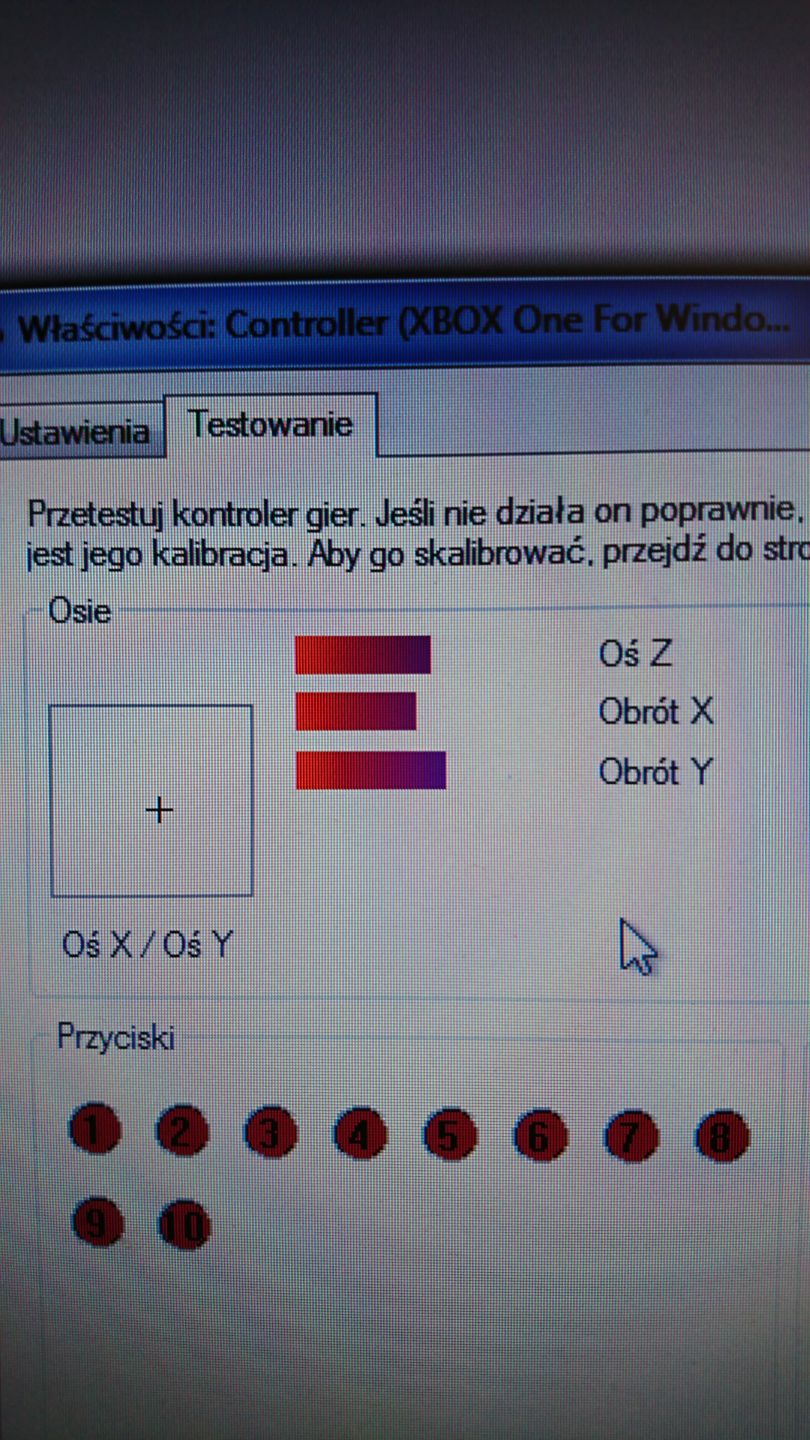


Created Issue:
Broken rollin mechanic
When I’m playing on Xbox offline; my character keeps rollin unintentionally. I’m not even pressing enough to roll
When I’m playing on Xbox offline; my character keeps rollin unintentionally. I’m not even pressing
enoughto rollWhen I’m playing on Xbox offline; my character keeps rollin unintentionally. I’m not even pressing RB to roll
![[Mod] violine1101](../../../data/avatars/users/92858.png)
Broken rollin mechanicPlayer keeps rolling unintentionally
is duplicated by
is duplicated by
MCD-1291

![[MCPE Mod] Celesian](../../../data/avatars/users/81635.png)
is duplicated by

is duplicated by
is duplicated by

is duplicated by

is duplicated by

is duplicated by
is duplicated by
is duplicated by
![[Mod] OcelotOnesie](../../../data/avatars/users/43220.png)
is duplicated by
is duplicated by
YouCut_20200603_223844419.mp4
is duplicated by
is duplicated by
![[Bot] Arisa](../../../data/avatars/users/43007.png)
is duplicated by
is duplicated by
is duplicated by
is duplicated by
![[Mod] SPGoding](../../../data/avatars/users/44622.png)
is duplicated by
is duplicated by
![[Mod] Raybeano99](../../../data/avatars/users/55518.png)
is duplicated by
is duplicated by
is duplicated by
is duplicated by
![[Mojang] Big Beak](../../../data/avatars/users/88062.png)
Thank you for your report!
We're tracking this issue in MCD-1100, so this ticket is being resolved and linked as a duplicate.
If you would like to add a vote and any extra information to the main ticket it would be appreciated.
If you haven't already, you might like to make use of the search feature to see if the issue has already been mentioned.
Quick Links:
📓 Issue Guidelines – 💬 Community Support – 📧 Customer Support – ✍️ Feedback and Suggestions – 📖 Game Wiki – 📖 FAQs
Thank you for your report!
We're tracking this issue in MCD-1100, so this ticket is being resolved and linked as a duplicate.
If you would like to add a vote and any extra information to the main ticket it would be appreciated.
If you haven't already, you might like to make use of the search feature to see if the issue has already been mentioned.
Quick Links:
📓 Issue Guidelines – 💬 Community Support – 📧 Customer Support – ✍️ Feedback and Suggestions – 📖 Game Wiki – 📖 FAQs
Thank you for your report!
We're tracking this issue in MCD-1100, so this ticket is being resolved and linked as a duplicate.
If you would like to add a vote and any extra information to the main ticket it would be appreciated.
If you haven't already, you might like to make use of the search feature to see if the issue has already been mentioned.
Quick Links:
📓 Issue Guidelines – 💬 Community Support – 📧 Customer Support – ✍️ Feedback and Suggestions – 📖 Game Wiki – 📖 FAQs
Thank you for your report!
We're tracking this issue in MCD-1100, so this ticket is being resolved and linked as a duplicate.
If you would like to add a vote and any extra information to the main ticket it would be appreciated.
If you haven't already, you might like to make use of the search feature to see if the issue has already been mentioned.
Quick Links:
📓 Issue Guidelines – 💬 Community Support – 📧 Customer Support – ✍️ Feedback and Suggestions – 📖 Game Wiki – 📖 FAQs
Thank you for your report!
We're tracking this issue in MCD-1100, so this ticket is being resolved and linked as a duplicate.
If you would like to add a vote and any extra information to the main ticket it would be appreciated.
If you haven't already, you might like to make use of the search feature to see if the issue has already been mentioned.
Quick Links:
📓 Issue Guidelines – 💬 Community Support – 📧 Customer Support – ✍️ Feedback and Suggestions – 📖 Game Wiki – 📖 FAQs
Thank you for your report!
We're tracking this issue in MCD-1100, so this ticket is being resolved and linked as a duplicate.
If you would like to add a vote and any extra information to the main ticket it would be appreciated.
If you haven't already, you might like to make use of the search feature to see if the issue has already been mentioned.
Quick Links:
📓 Issue Guidelines – 💬 Community Support – 📧 Customer Support – ✍️ Feedback and Suggestions – 📖 Game Wiki – 📖 FAQs
Thank you for your report!
We're tracking this issue in MCD-1100, so this ticket is being resolved and linked as a duplicate.
If you would like to add a vote and any extra information to the main ticket it would be appreciated.
If you haven't already, you might like to make use of the search feature to see if the issue has already been mentioned.
Quick Links:
📓 Issue Guidelines – 💬 Community Support – 📧 Customer Support – ✍️ Feedback and Suggestions – 📖 Game Wiki – 📖 FAQs
Thank you for your report!
We're tracking this issue in MCD-1100, so this ticket is being resolved and linked as a duplicate.
If you would like to add a vote and any extra information to the main ticket it would be appreciated.
If you haven't already, you might like to make use of the search feature to see if the issue has already been mentioned.
Quick Links:
📓 Issue Guidelines – 💬 Community Support – 📧 Customer Support – ✍️ Feedback and Suggestions – 📖 Game Wiki – 📖 FAQs
Thank you for your report!
We're tracking this issue in MCD-1100, so this ticket is being resolved and linked as a duplicate.
If you would like to add a vote and any extra information to the main ticket it would be appreciated.
If you haven't already, you might like to make use of the search feature to see if the issue has already been mentioned.
Quick Links:
📓 Issue Guidelines – 💬 Community Support – 📧 Customer Support – ✍️ Feedback and Suggestions – 📖 Game Wiki – 📖 FAQs
Thank you for your report!
We're tracking this issue in MCD-1100, so this ticket is being resolved and linked as a duplicate.
If you would like to add a vote and any extra information to the main ticket it would be appreciated.
If you haven't already, you might like to make use of the search feature to see if the issue has already been mentioned.
Quick Links:
📓 Issue Guidelines – 💬 Community Support – 📧 Customer Support – ✍️ Feedback and Suggestions – 📖 Game Wiki – 📖 FAQs
Thank you for your report!
We're tracking this issue in MCD-1100, so this ticket is being resolved and linked as a duplicate.
If you would like to add a vote and any extra information to the main ticket it would be appreciated.
If you haven't already, you might like to make use of the search feature to see if the issue has already been mentioned.
Quick Links:
📓 Issue Guidelines – 💬 Community Support – 📧 Customer Support – ✍️ Feedback and Suggestions – 📖 Game Wiki – 📖 FAQs
Thank you for your report!
We're tracking this issue in MCD-1100, so this ticket is being resolved and linked as a duplicate.
If you would like to add a vote and any extra information to the main ticket it would be appreciated.
If you haven't already, you might like to make use of the search feature to see if the issue has already been mentioned.
Quick Links:
📓 Issue Guidelines – 💬 Community Support – 📧 Customer Support – ✍️ Feedback and Suggestions – 📖 Game Wiki – 📖 FAQs
Thank you for your report!
We're tracking this issue in MCD-1100, so this ticket is being resolved and linked as a duplicate.
If you would like to add a vote and any extra information to the main ticket it would be appreciated.
If you haven't already, you might like to make use of the search feature to see if the issue has already been mentioned.
Quick Links:
📓 Issue Guidelines – 💬 Community Support – 📧 Customer Support – ✍️ Feedback and Suggestions – 📖 Game Wiki – 📖 FAQs
Thank you for your report!
We're tracking this issue in MCD-1100, so this ticket is being resolved and linked as a duplicate.
If you would like to add a vote and any extra information to the main ticket it would be appreciated.
If you haven't already, you might like to make use of the search feature to see if the issue has already been mentioned.
Quick Links:
📓 Issue Guidelines – 💬 Community Support – 📧 Customer Support – ✍️ Feedback and Suggestions – 📖 Game Wiki – 📖 FAQs
Thank you for your report!
We're tracking this issue in MCD-1100, so this ticket is being resolved and linked as a duplicate.
If you would like to add a vote and any extra information to the main ticket it would be appreciated.
If you haven't already, you might like to make use of the search feature to see if the issue has already been mentioned.
Quick Links:
📓 Issue Guidelines – 💬 Community Support – 📧 Customer Support – ✍️ Feedback and Suggestions – 📖 Game Wiki – 📖 FAQs
Thank you for your report!
We're tracking this issue in MCD-1100, so this ticket is being resolved and linked as a duplicate.
If you would like to add a vote and any extra information to the main ticket it would be appreciated.
If you haven't already, you might like to make use of the search feature to see if the issue has already been mentioned.
Quick Links:
📓 Issue Guidelines – 💬 Community Support – 📧 Customer Support – ✍️ Feedback and Suggestions – 📖 Game Wiki – 📖 FAQs
– I am a bot. This action was performed automagically! Please report any issues in Discord or Reddit
Thank you for your report!
We're tracking this issue in MCD-1100, so this ticket is being resolved and linked as a duplicate.
If you would like to add a vote and any extra information to the main ticket it would be appreciated.
If you haven't already, you might like to make use of the search feature to see if the issue has already been mentioned.
Quick Links:
📓 Issue Guidelines – 💬 Community Support – 📧 Customer Support – ✍️ Feedback and Suggestions – 📖 Game Wiki – 📖 FAQs
– I am a bot. This action was performed automagically! Please report any issues in Discord or Reddit
Thank you for your report!
We're tracking this issue in MCD-1100, so this ticket is being resolved and linked as a duplicate.
If you would like to add a vote and any extra information to the main ticket it would be appreciated.
If you haven't already, you might like to make use of the search feature to see if the issue has already been mentioned.
Quick Links:
📓 Issue Guidelines – 💬 Community Support – 📧 Customer Support – ✍️ Feedback and Suggestions – 📖 Game Wiki – 📖 FAQs
Thank you for your report!
We're tracking this issue in MCD-1100, so this ticket is being resolved and linked as a duplicate.
If you would like to add a vote and any extra information to the main ticket it would be appreciated.
If you haven't already, you might like to make use of the search feature to see if the issue has already been mentioned.
Quick Links:
📓 Issue Guidelines – 💬 Community Support – 📧 Customer Support – ✍️ Feedback and Suggestions – 📖 Game Wiki – 📖 FAQs
Thank you for your report!
We're actually already tracking this issue at MCD-1100, so I will resolve and link this ticket as a duplicate.
If you would like to add a vote and any extra information to the main ticket it would be appreciated.
If you haven't already, you might like to make use of the search feature to see if the issue has already been mentioned.
Quick Links:
📓 Issue Guidelines – 💬 Community Support – 📧 Customer Support – ✍️ Feedback and Suggestions – 📖 Game Wiki

Duplicates MCD-1100
Thank you for your report!
We're tracking this issue in MCD-1100, so this ticket is being resolved and linked as a duplicate.
If you would like to add a vote and any extra information to the main ticket it would be appreciated.
If you haven't already, you might like to make use of the search feature to see if the issue has already been mentioned.
Quick Links:
📓 Issue Guidelines – 💬 Community Support – 📧 Customer Support – ✍️ Feedback and Suggestions – 📖 Game Wiki – 📖 FAQs
– I am a bot. This action was performed automagically! Please report any issues in Discord or Reddit

Thank you for your report!
We're tracking this issue in MCD-1100, so this ticket is being resolved and linked as a duplicate.
If you would like to add a vote and any extra information to the main ticket it would be appreciated.
If you haven't already, you might like to make use of the search feature to see if the issue has already been mentioned.
Quick Links:
📓 Issue Guidelines – 💬 Community Support – 📧 Customer Support – ✍️ Feedback and Suggestions – 📖 Game Wiki – 📖 FAQs
Thank you for your report!
We're tracking this issue in MCD-1100, so this ticket is being resolved and linked as a duplicate.
If you would like to add a vote and any extra information to the main ticket it would be appreciated.
If you haven't already, you might like to make use of the search feature to see if the issue has already been mentioned.
Quick Links:
📓 Issue Guidelines – 💬 Community Support – 📧 Customer Support – ✍️ Feedback and Suggestions – 📖 Game Wiki – 📖 FAQs
– I am a bot. This action was performed automagically! Please report any issues in Discord or Reddit
Thank you for your report!
We're tracking this issue in MCD-1100, so this ticket is being resolved and linked as a duplicate.
If you would like to add a vote and any extra information to the main ticket it would be appreciated.
If you haven't already, you might like to make use of the search feature to see if the issue has already been mentioned.
Quick Links:
📓 Issue Guidelines – 💬 Community Support – 📧 Customer Support – ✍️ Feedback and Suggestions – 📖 Game Wiki – 📖 FAQs
– I am a bot. This action was performed automagically! Please report any issues in Discord or Reddit
Thank you for your report!
We're tracking this issue in MCD-1100, so this ticket is being resolved and linked as a duplicate.
If you would like to add a vote and any extra information to the main ticket it would be appreciated.
If you haven't already, you might like to make use of the search feature to see if the issue has already been mentioned.
Quick Links:
📓 Issue Guidelines – 💬 Community Support – 📧 Customer Support – ✍️ Feedback and Suggestions – 📖 Game Wiki – 📖 FAQs
Thank you for your report!
We're tracking this issue in MCD-1100, so this ticket is being resolved and linked as a duplicate.
If you would like to add a vote and any extra information to the main ticket it would be appreciated.
If you haven't already, you might like to make use of the search feature to see if the issue has already been mentioned.
Quick Links:
📓 Issue Guidelines – 💬 Community Support – 📧 Mojang Support – ✍️ Feedback and Suggestions – 📖 Game Wiki – 📖 FAQs
Thank you for taking the time to construct a report.
This ticket Duplicates an existing main ticket that we are tracking at: MCD-1100
This ticket will be resolved as a duplicate and linked onto the main ticket.
Commenting there with any extra new information and voting for the main ticket would be greatly appreciated.
If you haven't already, you might be interested in the search feature to discover if the issue has already been reported before.
Here are some helpful quick links:
Issue Guidelines
Community Support
Mojang Support
Feedback and Suggestions
Game Wiki
Thank you for your report!
However, this issue has been temporarily closed as Awaiting Response.
Does MCD-1100 describe your issue?
This ticket will automatically reopen when you reply.
Thank you for your report!
We're tracking this issue in MCD-1100, so this ticket is being resolved and linked as a duplicate.
If you would like to add a vote and any extra information to the main ticket, it would be appreciated.
If you haven't already, you might like to make use of the search feature to see if the issue has already been mentioned.
Quick Links:
📓 Bug Tracker Guidelines – 💬 Minecraft Discord – 📧 Mojang Support
📓 Project Summary – ✍️ Feedback and Suggestions – 📖 Game Wiki – 📖 FAQs
Thank you for your report!
We're tracking this issue in MCD-1100, so this ticket is being resolved and linked as a duplicate.
If you would like to add a vote and any extra information to the main ticket, it would be appreciated.
If you haven't already, you might like to make use of the search feature to see if the issue has already been mentioned.
Quick Links:
📓 Bug Tracker Guidelines – 💬 Minecraft Discord – 📧 Mojang Support
📓 Project Summary – ✍️ Feedback and Suggestions – 📖 Game Wiki – 📖 FAQs
Thank you for your report!
We're tracking this issue in MCD-1100, so this ticket is being resolved and linked as a duplicate.
If you would like to add a vote and any extra information to the main ticket, it would be appreciated.
If you haven't already, you might like to make use of the search feature to see if the issue has already been mentioned.
Quick Links:
📓 Bug Tracker Guidelines – 💬 Minecraft Discord – 📧 Mojang Support
📓 Project Summary – ✍️ Feedback and Suggestions – 📖 Game Wiki – 📖 FAQs
Could the issue be that you are pressing the right stick?
I am having the same issue too it seems to just start at random then it keeps forcing you to roll in one direction even if you’re heading the opposite way.
Is there any difference if you change the Dead Zone for the Right Stick?
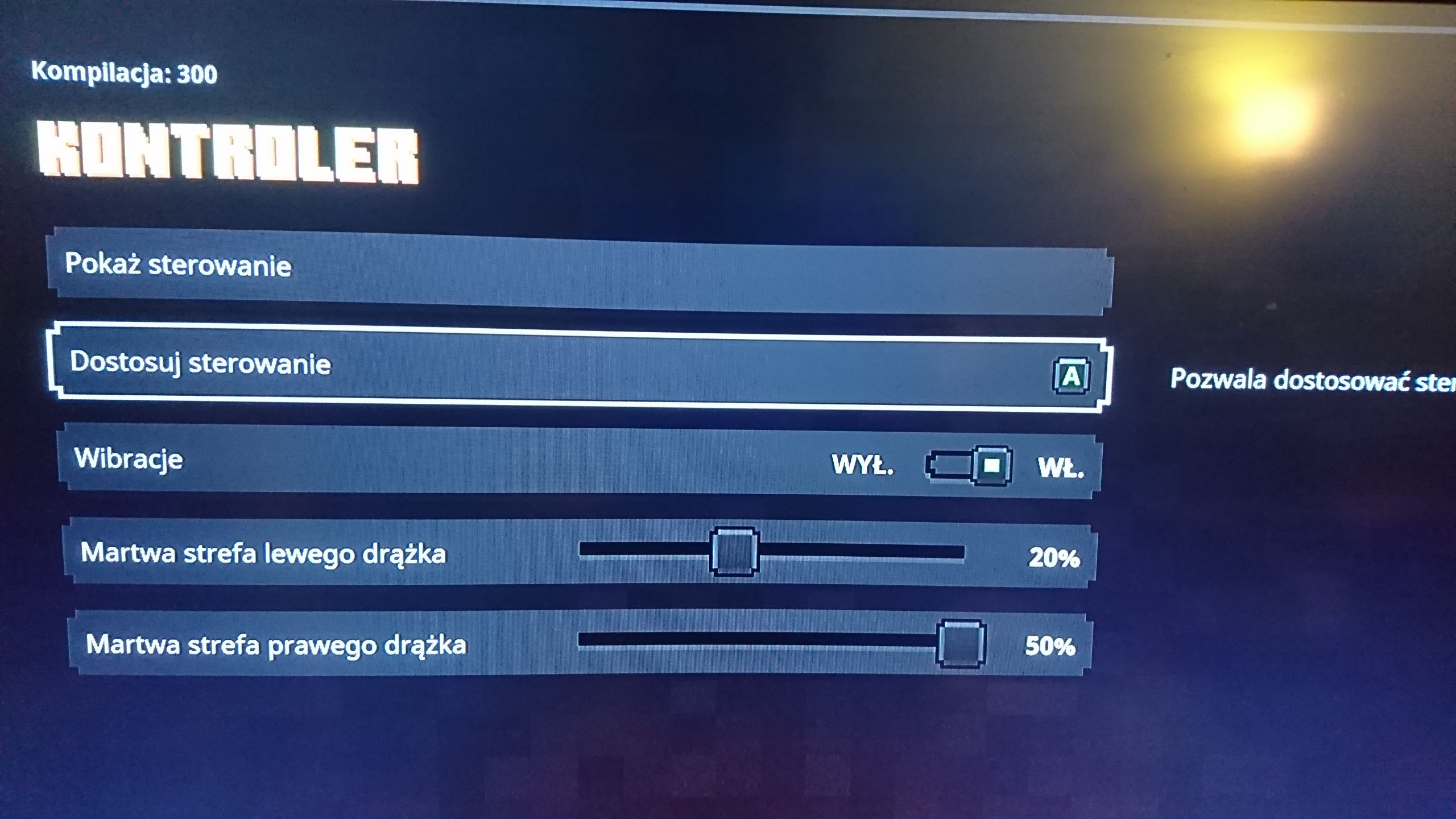
In Settings (in-game): Select Controller -> Dead Zone Right Stick -> Move to 50% -> Press X (apply)
I also have this bug, I have tried restarting my controller, restarting my xbox, deleting and reinstalling the game, mapping roll to another button (it simply decides the new button is stuck), switching between online and solo modes, and using another controller altogether. None of these has had any effect.
I had this problem, and the dead zone adjustment referenced above fixed it.
This has happened to me too I even assigned no button to roll but it still rolls
Had same Issue, found out that it is caused by Controller deadzone below 15%. It could be a bug in game, because it only applies to right stick deadzone and low deadzone works find on other games. Using Xbox Elite Controller Gen1.
The dead-zone "fix" doesn't work at all for me I don't understand why this is happening, I admit that my controller has a little drift in the right stick, it shouldn't make the game unplayable but it does.
Just a kind reminder - remember that this is a bug tracker and not a forum for discussion or feedback. Please keep any comments limited to NEW, relevant information about the bug only, and add a vote if you would like to show your interest in this issue. Off-topic comments and chatter may be hidden to avoid clutter, enabling us to focus on the information relevant to the bug.
For further discussion and community feedback please visit one of the following links:
Quick Links:
📓 Issue Guidelines – 💬 Mojang Support – 📧 Suggestions – 📖 Minecraft Wiki
For those affected, could you confirm whether you have remapped any of your controls, and whether this could be what's causing the issue?
I remapped the control for the rolling feature, it still automatically rolls, so I changed it back to the RB button (I remapped it to the X button)
I am also seeing this problem frequently on my PC using an Xbox 360 controller. I know it's not technically supported hardware, but it works, most of the time.
I did not re-map my controls. Once this did start to trigger I tried re-mapping to correct it and it still does it.
It used to do it 20 minutes into playing it. Now it starts doing it the second I move my character.
I play on Windows 10 with an Xbox controller.
I play on the Switch and have been having this problem. I have tried remapping the controls, adjusting the dead-zones on both sticks, and using different controller types. It seems to be triggered after rolling on purpose for me, so it usually doesn't happen if I just don't roll. Though I think it may be happening without the initial purposeful roll sometimes.
I have the same issue on Xbox One. Without pressing any buttons my character will roll and won't stop sometimes no matter what I do. Sometimes pausing for a brief period of time will stop it, sometimes I have to reboot my controller. Tonight it got so bad I had to reboot the game all together.
I am using the original elite Xbox controller. I played around with mapping the buttons in the menu settings but went back to default, otherwise I didn't do anything else to mess with the button scheme.
Really the only effective way to stop the continuous rolling is for me to press the back button on my Xbox controller. This opens the Friends menu. I wait until the roll completes its cool down and then return back to the game. I'm sure this would work the same as the pause button. It's so annoying and only prevents this for a few minutes.
The rolling occurs without any user inputs. I have even unmapped the roll button and the problem still occurs. If you roll off of a cliff, you're toast.
Can confirm the Back Button/Friends List will stop the issue for 5-10mins. This Bug also prevents the affected player from reviving Co-Op partners, making Death inevitable....
This is also happening for me, too. We are in the Creeper Woods, about 20 into the game. I'm playing with a XBox One X controller (as player 1), and my son is playing on an XBox 360 controller (as plyaer 2), Windows 10 version of the game, we're playing Co-Op on the same screen. He is rolling uncontrollably, and I am fine.
We also tried remapping keys on his controller to map roll to left thumpad, but he continued to roll constantly. Note that we always roll towards the bottom left of the screen, not any other direction. While roll is on cooldown,, we can still continue to move, attack and play normally.
Can provide further debug logs if needed (and directed where they are).
Hello everybody! I have an update. My research confirmed that my xbox controller might be damaged physically, or electronically. On the picture below, there is a middle bar (Obrót X) indicating the position of, you guessed it, right analog stick! This bar should stay roughly in the middle (ending in purple color, not red, nor blue), and definitely not drift to the left by itself.
In my case, this bar can sometimes go like 80% to the left, but even smaller movements can probably trigger auto roll in game. What I did, was to set the right stick's dead zone to 50% (currently max, and no option to change or disable this in customise keys menu - see below). Doing this, auto roll gets minimized, as gamepad must virtually "move" the right stick at least 50% from middle position to the left to trigger it.
My conclusions for now: The game needs an option to disable directional roll, and players experiencing mentioned problems should get their gamepads checked for faulty potentiometers/sensors/microchips, as this behaviour is not limited to this game. In my case, in Forza Horizon 4, at the very moment when "faulty" gamepad is turned on, the ingame camera instantly turns to the left.
Hope this helps a lot for both gamers and developers.
Wojciech
I think the best resolution for this is to add a option to disable the direcional roll.
Just got the game on Nintendo switch, character rolls non stop,
Resinstalled , nothing works.
Unable to play game, and no refunds, am stuck.
I hope this helps guys, but I ran into this problem when I got the game too. What I did was hold down my right stick and kept holding it down, if you're playing with someone wait until the teleport option shows up then you can let it go and press b then move around a bit and if your player doesn't roll you should be good for the rest of the dungeon. But if you're solo just wait like 20 seconds then let go and walk around and if you keep rolling just keep trying to hold down the right stick for longer.
Nintendo Switch influenced as well,
Resolution of removing the control is not working, and even when all control is are offline or turned off, the system still repetitively continues. All revolutions have been tested, but have unfortunately failed.
This actually still happens when you unbind the roll command. So it is genuenly difficult to play when you randomly roll around and fall off a cliff or straight into a bunch of creepers or a hoard of ennemies. This being said its not impossible just downright annoying
Nintendo Switch influence as well.
We bought this game today and it's unplayable :(Thank you for fixing these issue quickly !!!
Have the issue also on player 2 on my Xbox One X where the RB keeps activating without using any buttons. Very annoying to play, surprised this issue is not yet resolved! Is there already a target date set when this will be fixed?
UPDATE: suddenly the issue seems to be solved when the next level started?!?UPDATE:
It seems the workaround mentioned above by @[Mod] KillerbeeNL solved it:
In Settings (in-game): Select Controller -> Dead Zone Right Stick -> Move to 50% -> Press X (apply)
Strange it is only required for one controller...
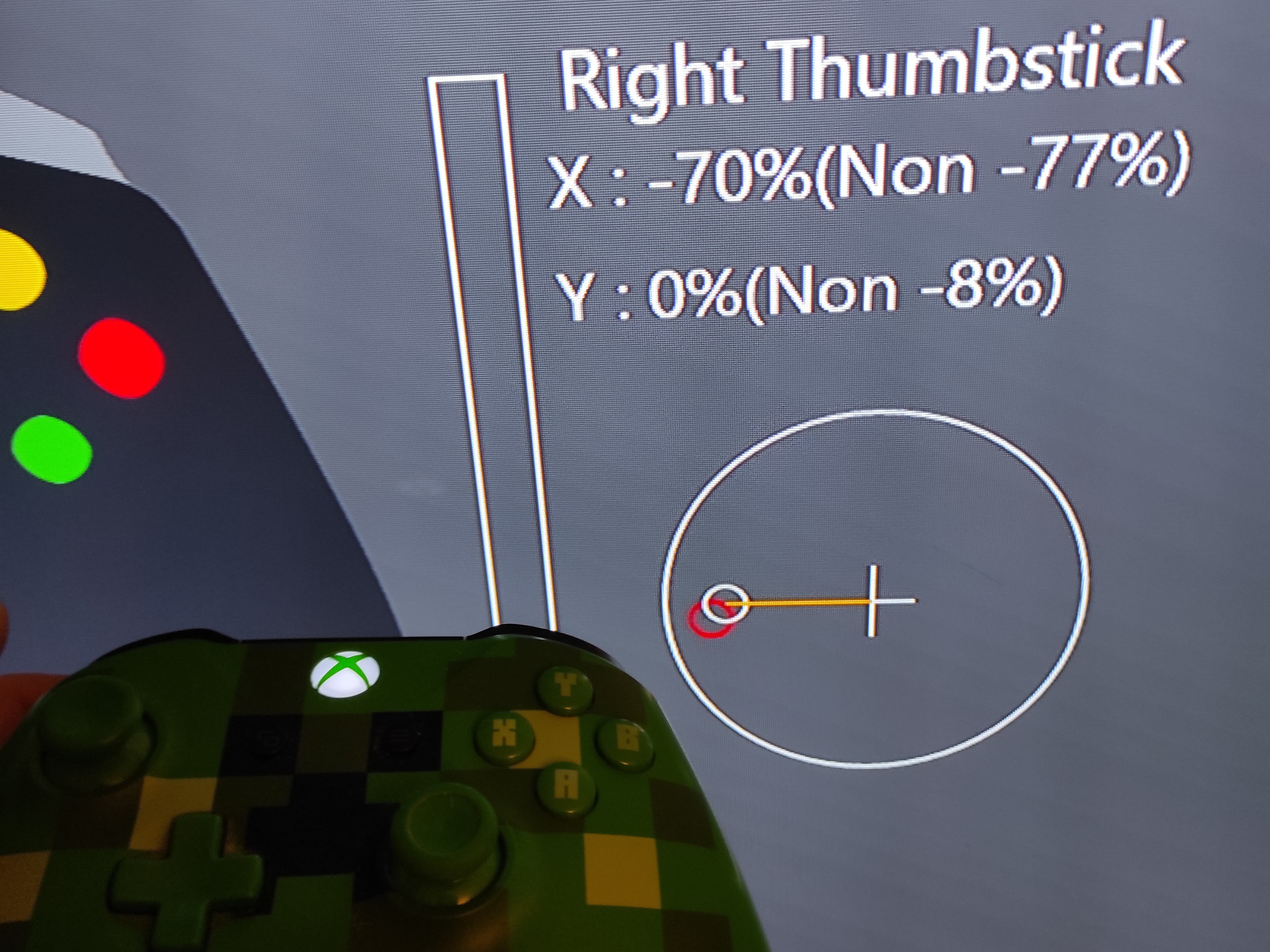
Hello! It turns out that my controllers right thumbstick started to fail. I have confirmed that by using an app called "game controller tester" found in xbox's Store.

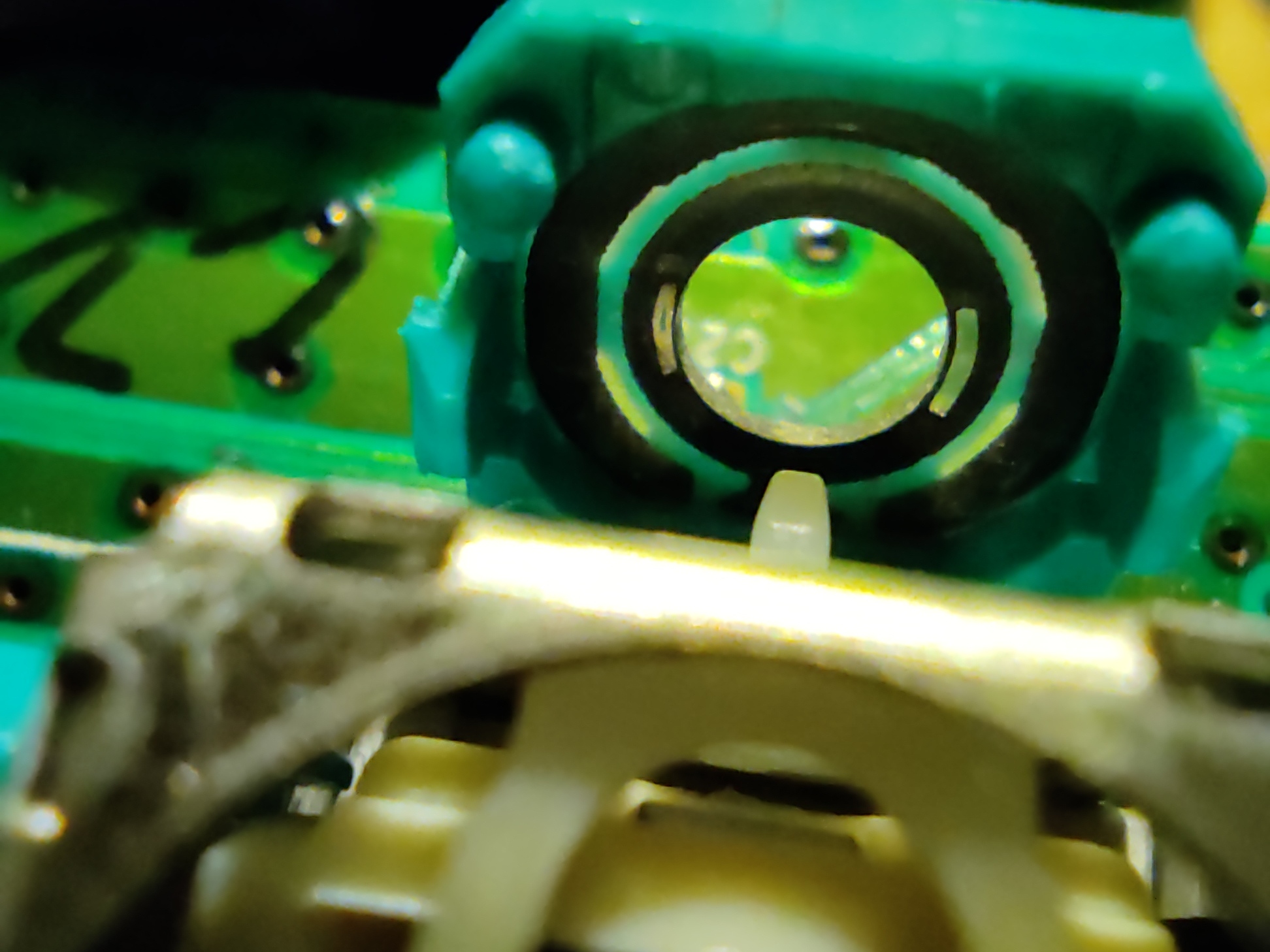
After ensuring that my warranty is already gone, i have opened my controller and found worn carbon track inside the thumbstick's potentiometer as pictured below.
Many people on the internet have the same issue, and there are plenty of video's on YouTube to repair it. I have ordered a replacement thumbstick on the internet and when it arrived i have used just the potentiometer, because three pins to desolder is better than fourteen (If you'd want to do it completely). After repairing is done i just changed back the ingame dead zone setting to 20%.
There is nothing wrong with the game, just your thumbsticks start to fail. If your devices still have warranty, just send them back for service. Otherwise, you are on your own, and you will probably save some money. Thanks and goodbye!
I remapped my control and still having the same issue 🥴
I have the same issue on PC, and almost always with the second player (this is local co-op mode). It is not a controller issue. It happens with multiple controllers (two different model 8bitdo controllers, SN30 Pro+ and SN30 Pro SN, and an Xbox 360 controller (via xbox 360 controller pc receiver)). Raising the deadzone on the right stick to the maximum does not solve this issue.
I agree the easiest solution is probably to add the feature to remove right stick rolling.
Have the same bug,.. rigth now, roll never ends... auto roll
As of today's Cloudy Climb 1.12.0.0 update, max dead zone can now be set to 100%. Has anyone having the issue tried with increasing thumbstick dead zone on this update?