Launcher incorrectly reports that WebGL is not supported
When I try to go to the skins tab in my launcher, it sais that my device(Lenovo Laptop) does not support WebGL. I searched it and clicked on get.webgl.org, which sais my Laptop supports WebGL. Does anyone know how can I fix it? I restarted my launcher and it's still broken.
This happened while I was duplicating my skins to put them in order.

Linked Issues
is duplicated by13
 MC-183331My Minecraft Skins tab is showing an unexpected error? (WebGL)DuplicateMC-229723i reinstalled minecraft launcher and now it says i dont support WebGL please help meDuplicate
 MCL-13524Can't access Skins tab because "WebGL support needed"DuplicateMCL-14413I cant change my skinDuplicateMCL-14419minecraft glfw error 65542DuplicateMCL-15847Skin tab doesn't work in a computerDuplicateMCL-16631Tab skins WebGL not supportedDuplicateMCL-16850WebGL problem with skins on LauncherDuplicateMCL-17335Basicly my skins in the minecraft launcher are not there, it says something about webgl that is not supported but it isDuplicateMCL-18721Cant Use Skins For False Error Saying Your PC Does'nt Support WebGL Which It DoesDuplicateMCL-19423Skin tab broken after account migration.DuplicateMCL-21949Your Device does not Support WebGLDuplicateMCL-24825Launcher says WebGL is not supported in my device but my device supports itDuplicate
Attachments10








Created Issue:
Launcher skin tab
When I try to go to the skins tab in my launcher, it sais that my device(Lenovo Laptop) does not support WebGL. I searched it and clicked on get.webgl.org, which sais my Laptop supports WebGL. Does anyone know how can I fix it? I restarted my launcher and it's still broken.
This happened while I was duplicating my skins to put them in order.
Environment
Windows 10
Attachments1
- Unresolved
- Open
- Unconfirmed
- Launcher Core
- minecraft-launcher
- 2.1.11312
![[Mod] violine1101](../../../data/avatars/users/92858.png)
Launcherskin tabLauncher incorrectly reports that WebGL is not supported
![[Mod] bemoty](../../../data/avatars/users/50554.png)
When I try to go to the skins tab in my launcher, it sais that my device(Lenovo Laptop) does not support WebGL. I searched it and clicked on get.webgl.org, which sais my Laptop supports WebGL. Does anyone know how can I fix it? I restarted my launcher and it's still broken.
This happened while I was duplicating my skins to put them in order.
When I try to go to the skins tab in my launcher, it sais that my device(Lenovo Laptop) does not support WebGL. I searched it and clicked on get.webgl.org, which sais my Laptop supports WebGL. Does anyone know how can I fix it? I restarted my launcher and it's still broken.
This happened while I was duplicating my skins to put them in order.

![[Mod] Greymagic27](../../../data/avatars/users/92875.png)
is duplicated by
is duplicated by
Screenshot_20200511-153429_Minecraft.jpg
relates to
is duplicated by
relates to
![[Bot] Arisa](../../../data/avatars/users/43007.png)


is duplicated by
![[Helper] lillybeacon](../../../data/avatars/users/93893.png)
Windows 10
is duplicated by

I had the same issue. I was able to solve this today, by unplugging thinkpad port replicator and connecting monitor directly to PC
is duplicated by
I've tried updating my graphic card already and it didn't work, can anyone help me?
is duplicated by
is duplicated by
![[Mod] Asteraoth](../../../data/avatars/users/92886.png)
is duplicated by
![[Mod] OcelotOnesie](../../../data/avatars/users/43220.png)
is duplicated by
is duplicated by
is duplicated by
is cloned by
is duplicated by
is cloned by
Thank you for your report!
We're actually already tracking this issue in MCL-13138, so I've resolved and linked this ticket as a duplicate.
If you would like to add a vote and any extra information to the main ticket it would be appreciated.
If you haven't already, you might like to make use of the search feature to see if the issue has already been mentioned.
Quick Links:
📓 Issue Guidelines – 💬 Community Support – 📧 Customer Support – 📖 Game Wiki
Duplicate of MCL-13138
Thank you for your report!
We're tracking this issue in MCL-13138, so this ticket is being resolved and linked as a duplicate.
If you would like to add a vote and any extra information to the main ticket it would be appreciated.
If you haven't already, you might like to make use of the search feature to see if the issue has already been mentioned.
Quick Links:
📓 Issue Guidelines – 💬 Community Support – 📧 Customer Support – ✍️ Feedback and Suggestions – 📖 Game Wiki
– I am a bot. This action was performed automagically! Please report any issues in Discord or Reddit

Thank you for your report!
We're tracking this issue in MCL-13138, so this ticket is being resolved and linked as a duplicate.
If you would like to add a vote and any extra information to the main ticket it would be appreciated.
If you haven't already, you might like to make use of the search feature to see if the issue has already been mentioned.
Quick Links:
📓 Issue Guidelines – 💬 Community Support – 📧 Customer Support – ✍️ Feedback and Suggestions – 📖 Game Wiki
Thank you for your report!
We're tracking this issue in MCL-13138, so this ticket is being resolved and linked as a duplicate.
If you would like to add a vote and any extra information to the main ticket it would be appreciated.
If you haven't already, you might like to make use of the search feature to see if the issue has already been mentioned.
Quick Links:
📓 Bug Tracker Guidelines – 💬 Community Support – 📧 Mojang Support
📓 Project Summary – ✍️ Feedback and Suggestions – 📖 Game Wiki

![[Mod] markderickson](../../../data/avatars/users/18946.svg)
Hello, does MCL-13138 describe this issue?
Ideapad 330S
i5-8250U
AMD Radeon™ 535
Ram 8 GB
Driver is latest version
MCL-13138 Launcher incorrectly reports that WebGL is not supported - Jira (mojang.com) it doesn't work AMD settings don't have a Shader Cache option
Thank you for your report!
We're tracking this issue in MCL-13138, so this ticket is being resolved and linked as a duplicate.
If you would like to add a vote and any extra information to the main ticket it would be appreciated.
If you haven't already, you might like to make use of the search feature to see if the issue has already been mentioned.
Quick Links:
📓 Bug Tracker Guidelines – 💬 Community Support – 📧 Mojang Support
📓 Project Summary – ✍️ Feedback and Suggestions – 📖 Game Wiki
Thank you for your report!
We're tracking this issue in MCL-13138, so this ticket is being resolved and linked as a duplicate.
If you would like to add a vote and any extra information to the main ticket it would be appreciated.
If you haven't already, you might like to make use of the search feature to see if the issue has already been mentioned.
Quick Links:
📓 Bug Tracker Guidelines – 💬 Community Support – 📧 Mojang Support
📓 Project Summary – ✍️ Feedback and Suggestions – 📖 Game Wiki
Thank you for your report!
We're tracking this issue in MCL-13138, so this ticket is being resolved and linked as a duplicate.
If you would like to add a vote and any extra information to the main ticket it would be appreciated.
If you haven't already, you might like to make use of the search feature to see if the issue has already been mentioned.
Quick Links:
📓 Bug Tracker Guidelines – 💬 Community Support – 📧 Mojang Support
📓 Project Summary – ✍️ Feedback and Suggestions – 📖 Game Wiki
![[Mod] Avoma](../../../data/avatars/users/86198.png)
Duplicate of MCL-13138.
Thank you for your report!
We're tracking this issue in MCL-13138, so this ticket is being resolved and linked as a duplicate.
If you would like to add a vote and any extra information to the main ticket it would be appreciated.
If you haven't already, you might like to make use of the search feature to see if the issue has already been mentioned.
Quick Links:
📓 Bug Tracker Guidelines – 💬 Community Support – 📧 Mojang Support
📓 Project Summary – ✍️ Feedback and Suggestions – 📖 Game Wiki
– I am a bot. This action was performed automatically! If you think it was incorrect, please notify us on Discord or Reddit
Duplicate of MCL-13138.
Thank you for your report!
We're tracking this issue in MCL-13138, so this ticket is being resolved and linked as a duplicate.
If you would like to add a vote and any extra information to the main ticket it would be appreciated.
If you haven't already, you might like to make use of the search feature to see if the issue has already been mentioned.
Quick Links:
📓 Bug Tracker Guidelines – 💬 Community Support – 📧 Mojang Support
📓 Project Summary – ✍️ Feedback and Suggestions – 📖 Game Wiki
– I am a bot. This action was performed automatically! The ticket was resolved by one of our moderators, and I left this message to give more information to you.
Duplicate of MCL-13138.
Thank you for your report!
We're tracking this issue in MCL-13138, so this ticket is being resolved and linked as a duplicate.
If you would like to add a vote and any extra information to the main ticket it would be appreciated.
If you haven't already, you might like to make use of the search feature to see if the issue has already been mentioned.
Quick Links:
📓 Bug Tracker Guidelines – 💬 Community Support – 📧 Mojang Support
📓 Project Summary – ✍️ Feedback and Suggestions – 📖 Game Wiki
– I am a bot. This action was performed automatically! The ticket was resolved by one of our moderators, and I left this message to give more information to you.
Thank you for your report!
We're tracking this issue in MCL-13138, so this ticket is being resolved and linked as a duplicate.
If you would like to add a vote and any extra information to the main ticket it would be appreciated.
If you haven't already, you might like to make use of the search feature to see if the issue has already been mentioned.
Quick Links:
📓 Bug Tracker Guidelines – 💬 Community Support – 📧 Mojang Support
📓 Project Summary – ✍️ Feedback and Suggestions – 📖 Game Wiki
– I am a bot. This action was performed automatically! The ticket was resolved by one of our moderators, and I left this message to give more information to you.
I have the exact same problem.
Same here
i solved it by updating my graphic drivers
Hey, Isaac!
Can you please tell me how to do that, because I'm not good at computer stuff and I would appreciate the help!
I have the same issue on Ubunutu and I do have WebGL as well but it says I dont please help me what do i do
This issue may be related to out of date drivers. See if Community Support can help at all:
Quick Links:
📓 Issue Guidelines – 💬 Community Support – 📧 Customer Support – 📖 Game Wiki
I have the same issue, both on Xubuntu 19.10 and Manjaro.
Same issue on Ubuntu 18.04
Same issue on osx 10.14, webgl works fine in a browser but fails in Minecraft.
Also having the same issue on the Linux port of the launcher.
(I realize this ticket is for the Windows environment, but enough Linux users have responded to it, didn't think it was worth opening a new one. I can go ahead and do that if a moderator would prefer that.)
Environment:
When the launcher is run from a terminal, the following errors are observed where the launcher is expecting to find SwiftShader - yet this directory does not exist within the launcher's tar ball.
Outside of this, OpenGLES does work on the system:

Looking for a Workaround:
I've managed to partially get it working by building swiftshader from it's sources (master branch) and linking the swiftshader/build/Linux directory to /opt/minecraft-launcher/swiftshader. So you can at least see the Steve and Alex skins, but the current skin, as well as the editor do not load in.
At this point, the following can be observed in the terminal:
Not sure if it's a basic incompatibility, or if the swiftshader sub-directory should expect more than just libEGL.so and libGLESv2.so. Here's the directory permissions in case they can be of use:
Using official linux launcher on Ubuntu 20.04. I was able to work around the issue by linking my Google Chrome swiftshader directory into my minecraft launcher directory:
same issue on Pop_OS! 20.04 LTS
I fixed this same issue by unchecking "Use Beta Version of Launcher"
OpenSUSE Tumbleweed here. EZ solution : get the precompiled binaries from here, rename them to libEGL.so and libGLESv2.so, and put them in a folder named "swiftshader" in the launcher's directory.
Thanks, MinePro120, for the working solution! Now I can access my skins again.
Could it be that they simply forgot to add the "swiftshader" folder in the launcher's directory? The fix seems pretty easy and straightforward, since the launcher searches for the 2 files in that folder. If we run the launcher from a terminal and head to the "Skins" section the outcome would be :
How do i open the launchers directory?
Where is the swiftshaders directory? I don't spot anything similar, and I looked in individual folders.
I was talking about GNU/Linux, not Windows. Never had this issue on Windows. Anyways, my solution was to create the swiftshader folder where the launcher (not .minecraft) is located and paste the binaries from the link I provided above. But the issue could be very different on Windows. Run the launcher from the cmd prompt for some output.
i happened in minecraft launcher i am go to WebGL Your Browser supported WebGL
Or WebGL Are joking with you https://github.com/corashina/WebGL-Minecraft Or Texture For Your MC
Sorry https://get.webgl.org
We've recently made some changes to the Skins page. Is this still an issue in the latest version of Minecraft Launcher?
v2.1.17417, latest I could find from minecraft.net right now, still an issue.
A few months ago I used the workaround of downloading the precompiled swiftshaders and putting them in the launcher folder to have the Skins page working, and it did, the only thing that wasn't working was adding skins to the library and setting the skin from the launcher. I have updated the launcher to version 2.1.17417 the library works too, I'm going to ask my friend (who didn't download swiftshaders manually) to see if it's fixed for her, too.
I can also confirm that v2.1.17417 doesn't correctly recognize WebGL on a GNU/Linux machine.
i hope this problem can be fixed as fast as possible, ive asked 1 of the servers i play on and i still didnt get any responses. im waiting
Had the same issue using an AMD Graphics Card on Windows 10 here.
Reinstall didn't work. But the following did
The Skins Tab is now working for me. Hope this helps.
The workaround proposed by @Mikal Houston worked for me, using the swiftshader directory from the chromium browser. On kUbuntu 20.04:
Can confirm this exists on Windows too. Details below:
OS: Windows 10 Pro 20H2 (build 19042.610)
Launcher version: 2.1.17784
This never worked since first install of Minecraft Java launcher since 2 months.
get.webgl.org says WEBGL is supported on all my browsers - Chrome, Firefox and Edge.
Edit: My issue is on an Intel processor, unlike AMD like others. It's an Intel i5-5200U.
The issue persists with Minecraft version 1.16.4 .
Putting it out there that this exists on Arch Linux as well. Funny enough, it seems to be a bug with AMD rather than a bug with Linux, as people have pointed out that it exists on Windows too, and that the solution there is to change the AMD Catalyst shader from Optimized to On.
Specs:
OS: Arch Linux (bleeding edge distro, no "older version" support)
CPU: AMD Ryzen 5 2600
GPU: AMD Radeon RX 580
WebGL website says that it is working but the launcher does not think that way
I've tried updating my graphic card already and it didn't work, can anyone help me?
Have this problem as well recently
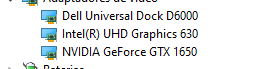
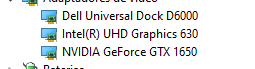
I finally managed to get it working, Turns out I bought a dell universall docker and it has its own graphics card, so all I have to do is open minecraft while my notebook is open. Yeah... It's weird and I have no real explanation aside from the different graphics card thing
Oh, nevermind. As soon as I restarted it stopped working again... Does anybody know what's happening?
I had the same issue on my PC- I use Lenovo port replicator on daily basis and it was causing an issue. When monitors are connected directly to my PC, launcher works as intended.
Yeah, I noticed that too ^ It works for me whenever I disable the Dock driver, but it's still very inconvenient and annoying...
Managed to get it working again, (I'm almost positive this fix works for dock users, I'm on a Dell Laptop)
What I had to do was open minecraft while my notebook monitor was open, and it had to be the main monitor
An attachment with a disallowed file extension has been removed from this ticket.
Executable files and documents are not allowed as attachments.
Please attach crash reports, log files and screenshots as they are instead of pasting them into a document.
– I am a bot. This action was performed automatically! Please report any issues on Discord or Reddit
Bruno I have the same problem on my dell Can u help me im a kid btw
Bruno Tried Your fix for my dell it waorks Thanks
Same (Linux debian 10 on a HP xw8400 workstation, webgl5 installed)
Also having this issue!