 MCLG-34
The game does not display correctly at resolutions higher than 1080p
The game does not display at 1440p but at a lower resolution in full screen, even when 2560 x 1440 is selected in the settings menu. This makes the game look blurry.
Linked Issues
is duplicated by3
 MCD-160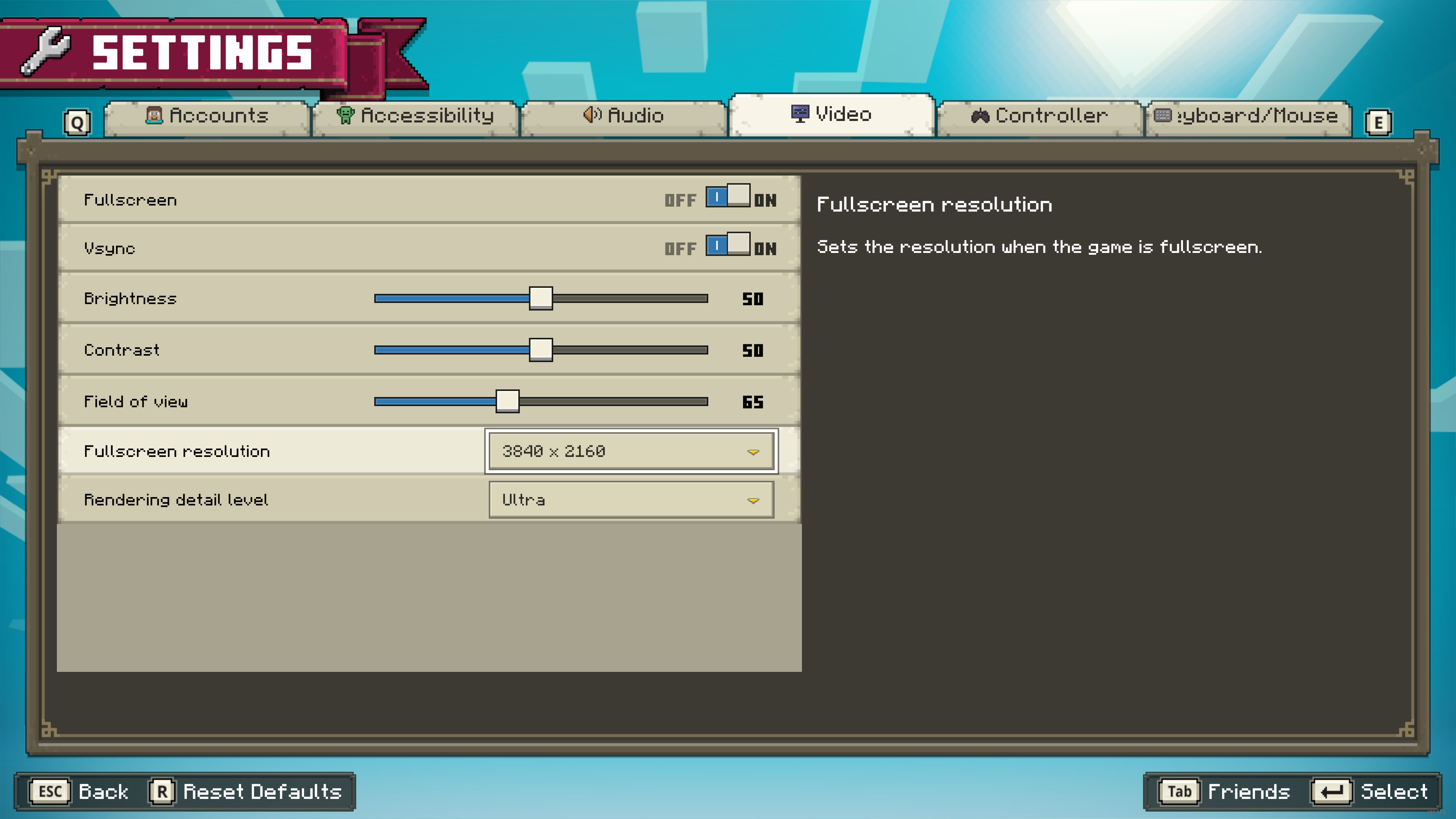


Created Issue:
The game does not display at 2560 x 1440 resolution
The game does not display at 1440p but at a lower resolution in full screen. This makes the game look blurry.
The game does not display at 1440p but at a lower resolution in full screen. This makes the game look blurry.
The game does not display at 1440p but at a lower resolution in full screen, even when 2560 x 1440 is selected in the settings menu. This makes the game look blurry.
![[Mod] Greymagic27](../../../data/avatars/users/92875.png)
relates to
is duplicated by
![[Bot] Arisa](../../../data/avatars/users/43007.png)
The game does not display at2560 x 1440 resolutionThe game does not display at resolutions higher than 1080p
The game does not display correctly at resolutions higher than 1080p
is duplicated by
relates to
relates to
relates to
![[Mod] turbo](../../../data/avatars/users/92867.png)
is duplicated by
![[MCQA] Kinga Izdebska](../../../data/avatars/users/18949.svg)
![[Mojang] Big Beak](../../../data/avatars/users/88062.png)
Thank you for your report!
We're tracking this issue in MCLG-34, so this ticket is being resolved and linked as a duplicate.
If you would like to add a vote and any extra information to the main ticket it would be appreciated.
If you haven't already, you might like to make use of the search feature to see if the issue has already been mentioned.
Quick Links:
📓 Bug Tracker Guidelines – 💬 Community Support – 📧 Mojang Support
📓 Project Summary – ✍️ Feedback and Suggestions – 📖 Game Wiki – 📖 FAQs

Thank you for your report!
We're tracking this issue in MCLG-34, so this ticket is being resolved and linked as a duplicate.
If you would like to add a vote and any extra information to the main ticket it would be appreciated.
If you haven't already, you might like to make use of the search feature to see if the issue has already been mentioned.
Quick Links:
📓 Bug Tracker Guidelines – 💬 Community Support – 📧 Mojang Support
📓 Project Summary – ✍️ Feedback and Suggestions – 📖 Game Wiki – 📖 FAQs
UPDATE: the issue "MCLG-34" is not related to this problem, because i tried to follow the steps to resolve the issue and the game still loading with those visual error. I'm using a 1080p resolution.
![[Mod] EVGENSYPERPRO](../../../data/avatars/users/92853.png)
Thank you for your report!
We're tracking this issue in MCLG-34, so this ticket is being resolved and linked as a duplicate.
If you would like to add a vote and any extra information to the main ticket it would be appreciated.
If you haven't already, you might like to make use of the search feature to see if the issue has already been mentioned.
Quick Links:
📓 Bug Tracker Guidelines – 💬 Community Support – 📧 Mojang Support
📓 Project Summary – ✍️ Feedback and Suggestions – 📖 Game Wiki – 📖 FAQs
If your Windows display "scale and layout" settings are greater than 100%, the game will not run at the correct resolution.
The fullscreen resolution setting also seems to do nothing for me.
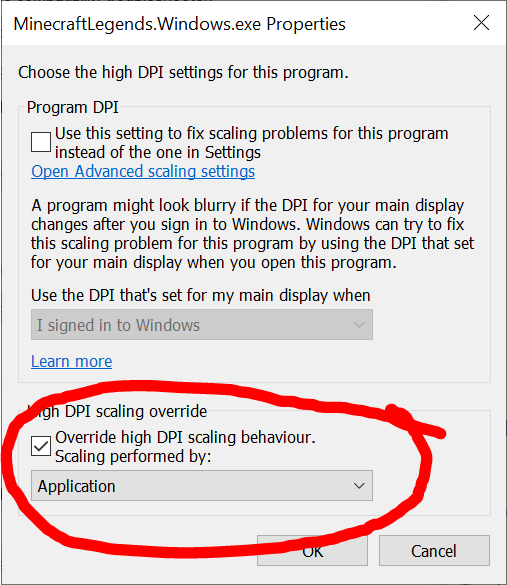
To fix this, right click the game's exe file and open the properties, then go to the compatibility tab and "Change high DPI settings". Then tick the override box at the bottom and set it to "Application". Now the game won't be blurry!


Thanks it works!
This is not working for Windows Store version of the game.
Windows Store version ignore that setting since Windows does not allow modify scaling mode for Store App.
Need an official fix for this.
I can say this does not effect everyone. I also purchased the Windows version of the game and have had no issues running it at 1080p. It could be a driver related issue. I am running an AMD graphics card and processor as well, but I do know graphics programs from AMD and Nvidia both have independent graphics settings per game if desired.
@mikeztm For the Store version, you can try changing your global scaling in your Windows settings -> System -> Display to temporarily work around the issue and play the game. Using above 100% scaling with a resolution over 1080p seems to be the cause of the issue from testing in community support.
@whomsky Yes that's how I currently play the game but this need a fix as soon as possible. The text on desktop are really small after setting DPI to 100% and it's super hard to set it back after play.
This is very easy to reproduce. Although there is a workaround, I believe this has been closed incorrectly as these steps should not be required and are not required for other games like Minecraft Bedrock and Minecraft Dungeons.
Steps to reproduce:
1. Open the Windows Settings app and click System
2. In the Display tab, find the "Scale and Layout" section and change the percentage value to one that is higher than 100%. (350% used in this example)
3. Open Minecraft Legends and set the resolution to your screen's resolution. (3840x2160 used in this example)
Expected result:

The game should run at 4K resolution. (Screenshot taken at 100% display scale)
Observed result:

The game is extremely blurry and is definitely not displaying at the selected resolution. (Screenshot taken at 350% display scale)
Resolved with the new November update.