![[Helper] Whomsky](../../../data/avatars/users/90300.png) [Helper] Whomsky
[Helper] Whomsky
- Whomsky
- whomsky
- Europe/Berlin
- Yes
- No
 MC-163599
 MCL-12453
 WEB-1903
![[Mojang] Web Team](../../../data/avatars/users/10122.svg)
 MCD-2
MCD-2 MCLG-11


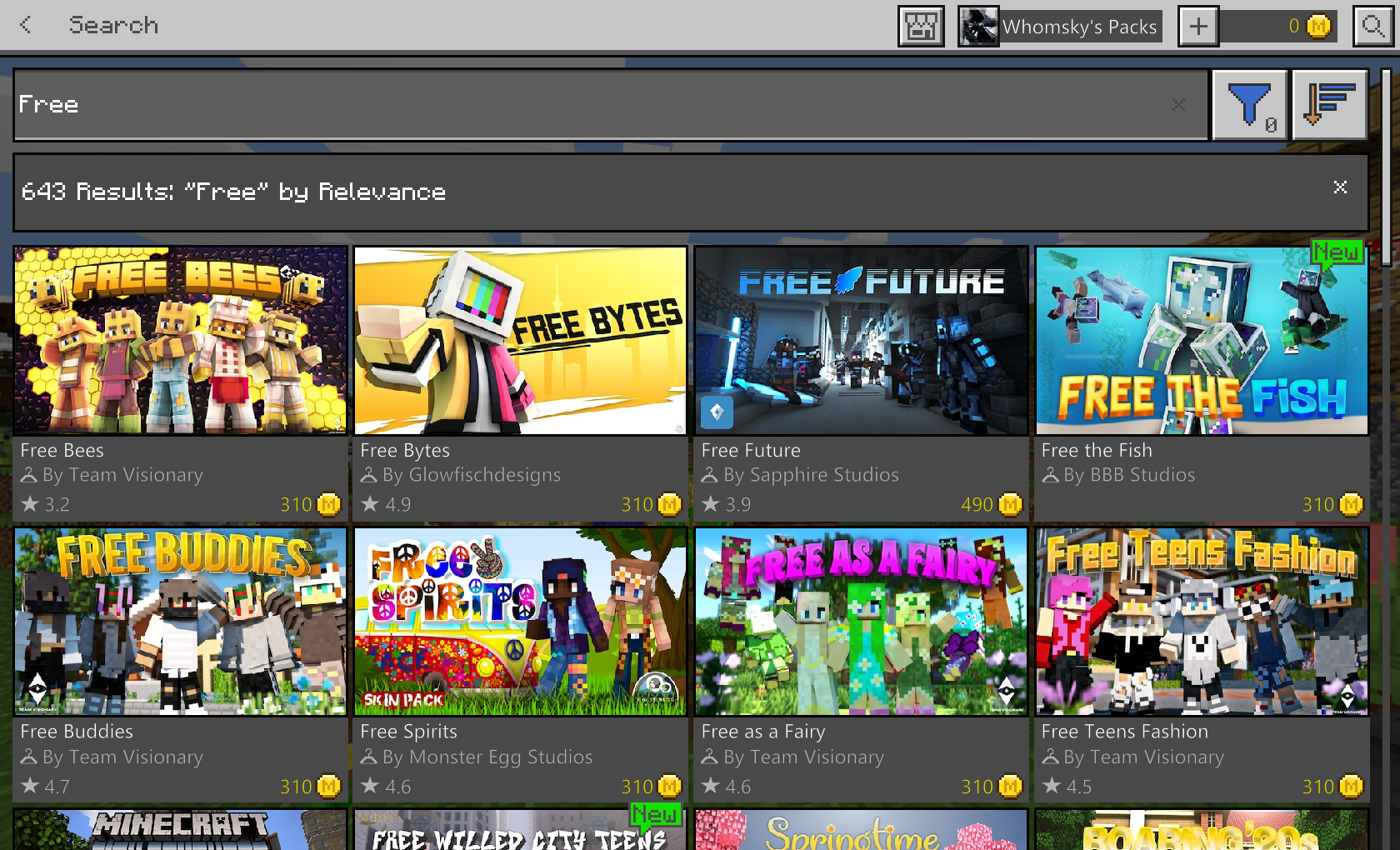
 MCPE-54455







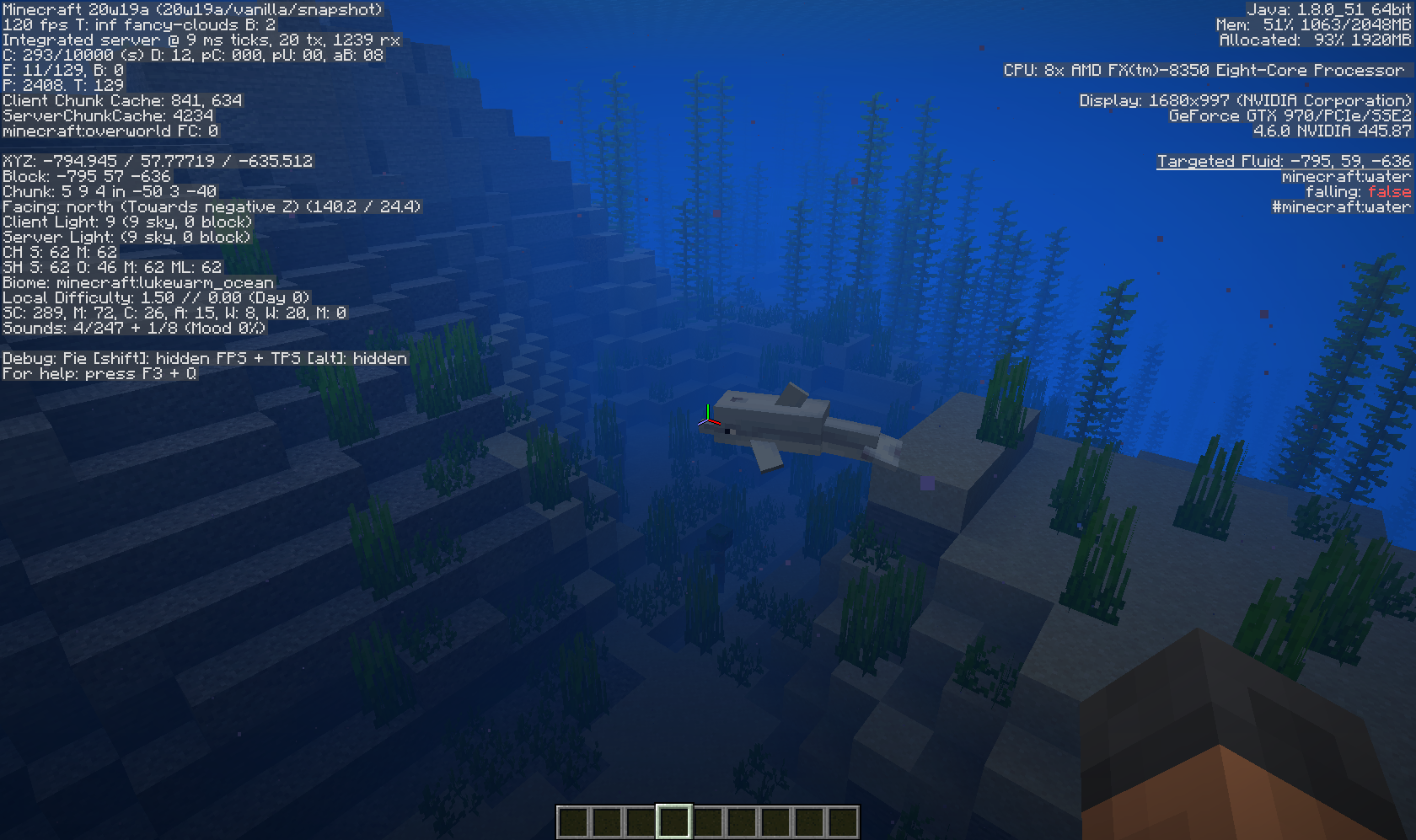





What used to tell you your GPU Vendor, GPU and Open GL version now just shows "GLU.getVendor"; "GLU.getRenderer" and "GLU.getOpenGLVersion" respectively
I was not able to find a existing bug report on this, as I wasnt really sure what to search for - Everything I searched for did not yield any helpful results.
FX 8350, GTX 970, 12GB RAM | Windows 10 1903 18362.356
F3 does not show GPU Vendor, GPU and OpenGL version properly
What used to tell you your GPU Vendor, GPU and Open GL version now just shows "GLU.getVendor"; "GLU.getRenderer" and "GLU.getOpenGLVersion" respectively
Steps to reproduce:
-Open Minecraft Java 19w41a
-Join a world
-Press F3
-Take a look at the top right of your screen where the resolution is displayed
I was not able to find a existing bug report on this, as I wasnt really sure what to search for - Everything I searched for did not yield any helpful results.
What used to tell you your GPU Vendor, GPU and Open GL version now just shows "GLU.getVendor"; "GLU.getRenderer" and "GLU.getOpenGLVersion" respectively
Steps to reproduce:
-Open Minecraft Java 19w41a
-Join a world
-Press F3
-Take a look at the top right of your screen where the resolution is displayed
I was not able to find a existing bug report on this, as I wasnt really sure what to search for - Everything I searched for did not yield any helpful results.
What used to tell you your GPU Vendor, GPU and Open GL version now just shows "GLU.getVendor"; "GLU.getRenderer" and "GLU.getOpenGLVersion" respectively
---
Steps to reproduce:-Open Minecraft Java 19w41a
-Join a world
-Press F3
-Take a look at the top right of your screen where the resolution is displayed
---I was not able to find a existing bug report on this, as I wasnt really sure what to search for - Everything I searched for did not yield any helpful results.
Greetings,
Whomsky
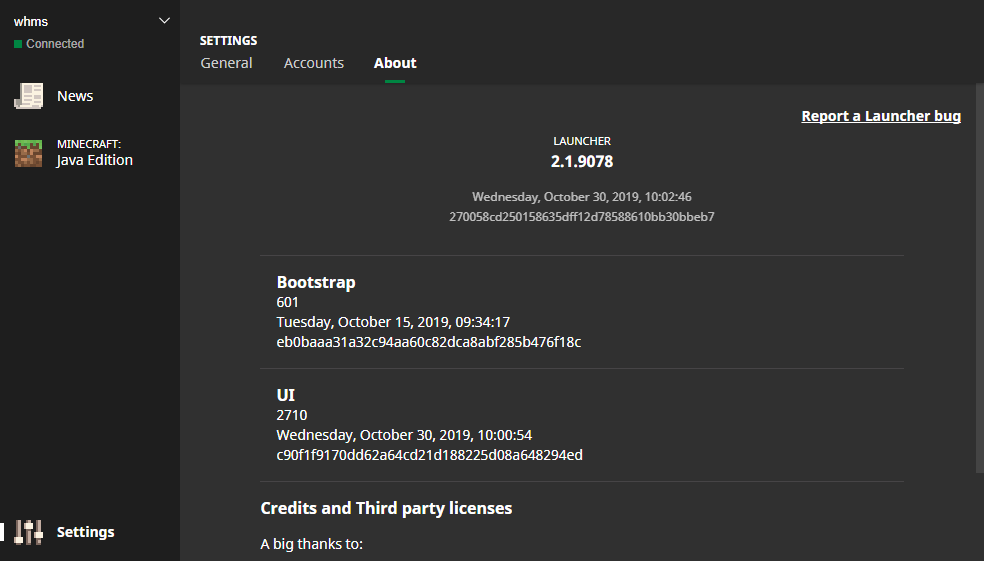
As seen in the attachment there are a few pixels that have not been covered by the bottom bar in the Launcher. Im not sure why the Launcher version is marked as unreleased and not as beta.
I couldnt find a similar issue using the (not so great) search function.
As seen in the attachment there are a few pixels that have not been covered by the bottom bar in the Launcher. Im not sure why the Launcher version is marked as unreleased and not as beta, Im on Launcher version 2.1.9078.
I couldnt find a similar issue using the (not so great) search function.
Missions dont update after completing amissionMissions dont update after completing a level
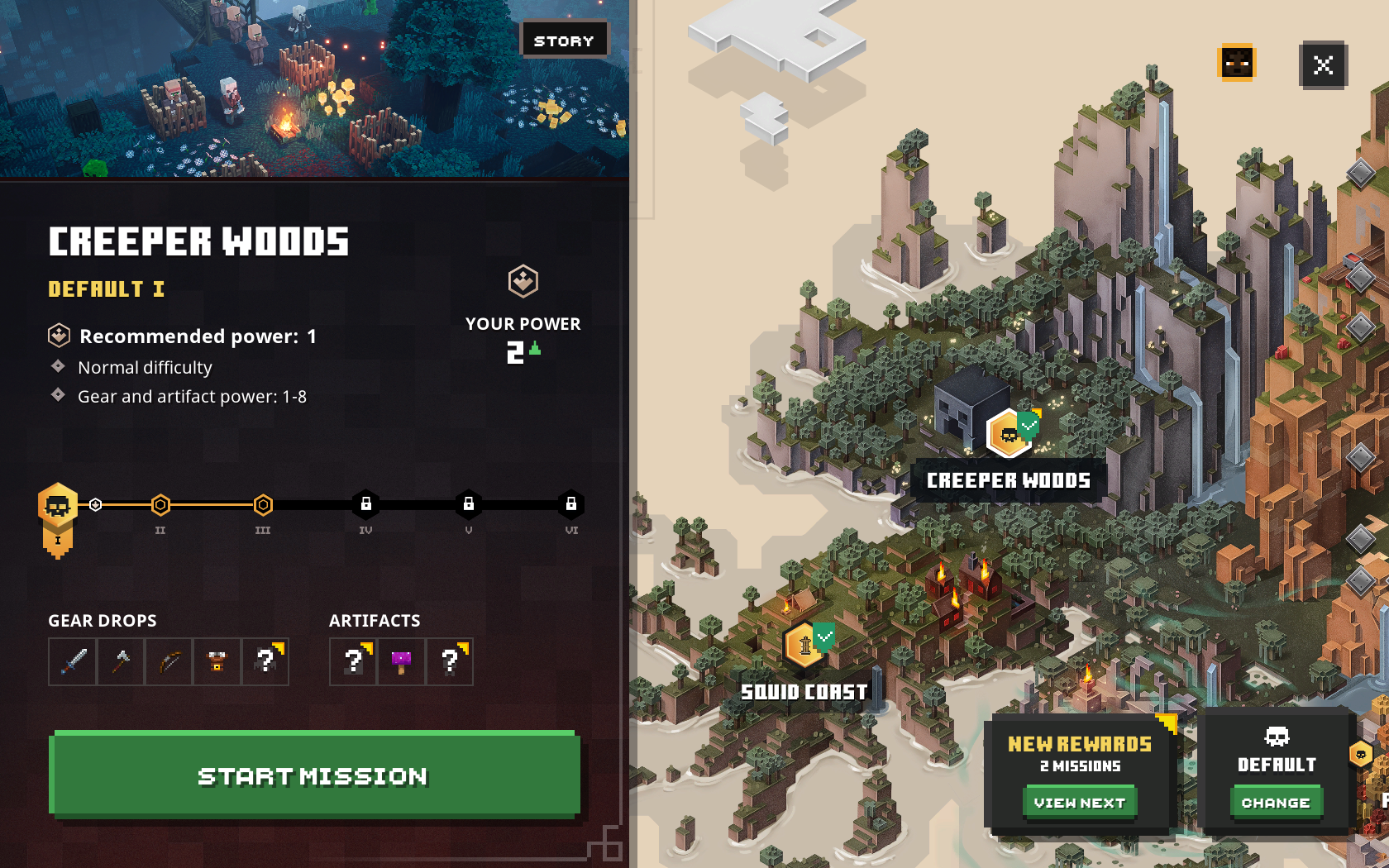
The game thinks you haven't completed Creeper Woods and Pumpkin Pastures on Difficulty 1/Default although you already have.
The game thinks you haven't completed Creeper Woods and Pumpkin Pastures on Difficulty 1/Default although you already have.When you click the "View Next" button on the bottom right, the game thinks you haven't completed Creeper Woods and Pumpkin Pastures on Difficulty 1/Default although you already have.
When you click the "View Next" button on the bottom right, the game thinks you haven't completed Creeper Woods and Pumpkin Pastures on Difficulty 1/Default although you already have.
Steps to reproduce:
1) Start a mission
2) Complete the missionObserved result:
The enemies spawn outside (under) the playable areaExpected result:
The enemies should be within players reach
When you click the "View Next" button on the bottom right, the game thinks you haven't completed Creeper Woods and Pumpkin Pastures on Difficulty 1/Default although you already have.
Steps to reproduce:
1) Start a mission
2) Complete the missionObserved result:
Theenemies spawn outside (under) the playable areaExpected result:
Theenemies should be within players reachWhen you click the "View Next" button on the bottom right, the game thinks you haven't completed Creeper Woods and Pumpkin Pastures on Difficulty 1/Default although you already have.
Steps to reproduce:
1) Start a mission
2) Complete the missionObserved result:
The mission will still show as active.Expected result:
The mission should be marked as completed and should not be shown as a available mission
If you have a Diamond Sword equipped, there's a fishing rod in your hands as well.
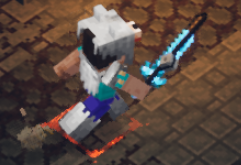
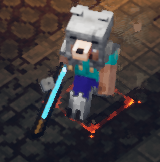
Visual bug when using Diamond Sword(Mixed with fishing rod)Equipping a Diamond Sword also makes you equip a Fishing rod
If you have a Diamond Sword equipped, there's a fishing rod in your hands as well.
If you have a Diamond Sword equipped, there's a fishing rod in your hands as well.
EDIT: This doesn't always happen. Seems to be somewhat random
If you have a Diamond Sword equipped, there's a fishing rod in your hands as well.
EDIT: This doesn't always happen. Seems to be somewhat random
Steps to reproduce:
1) Equip a Diamond Sword
2) Use your rod abilityObserved result:
The rod will sometimes be stuck in the players hand alongside the sword, glitching both textures outExpected result:
The rod should not stay in the players hand
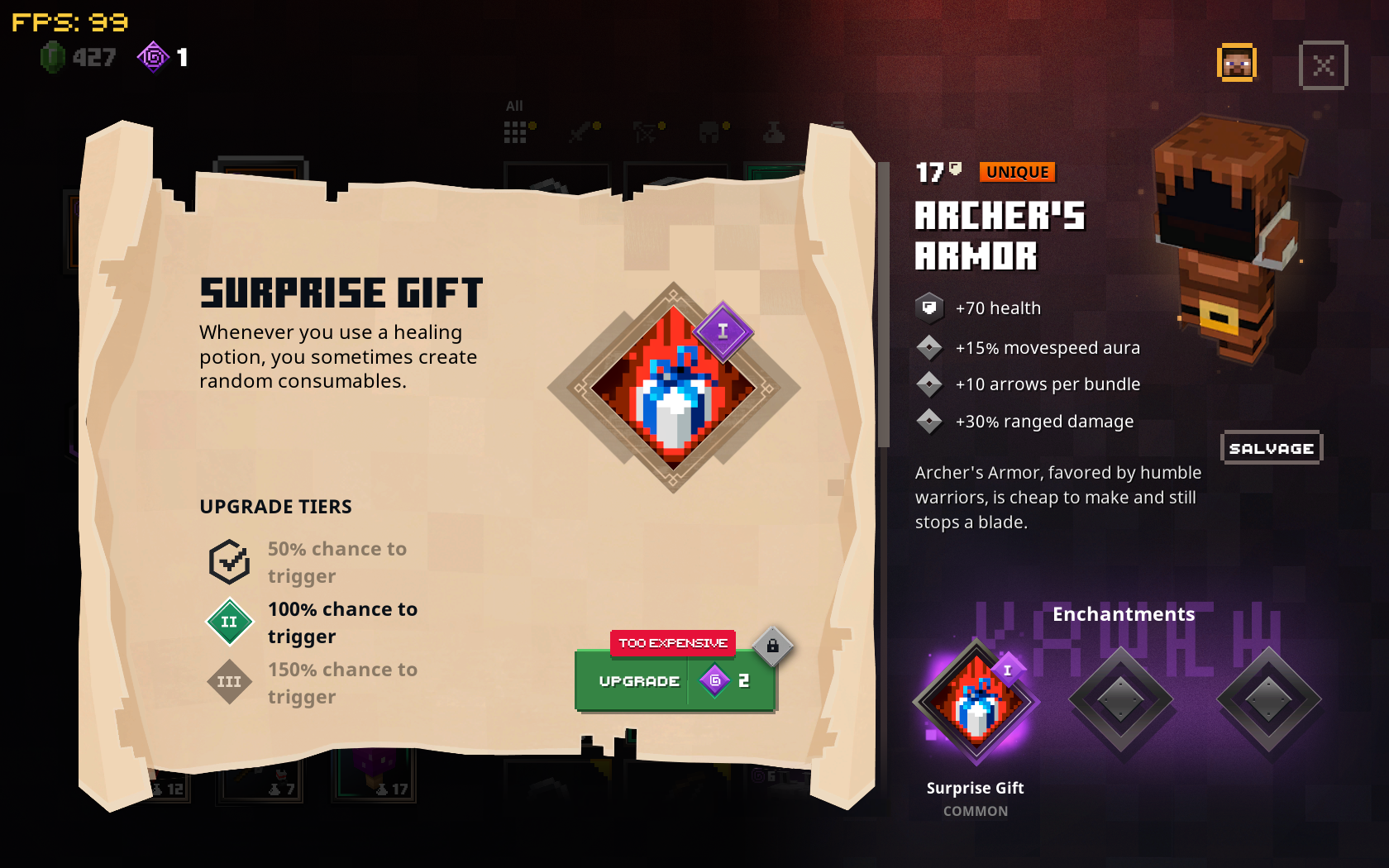
image-2020-03-27-09-57-03-102.png

Steps to reproduce:
1) Have a item that has the "Surprise Gift" enchant available
2) Click on it to see more infoObserved result:
Tier 3 has a 150% chance to trigger. How is there a chance that is over 100%, if 100% is "always trigger"?Expected result:
Should not be above 100% probability or specifically described if 150% has any bonuses (More items?)
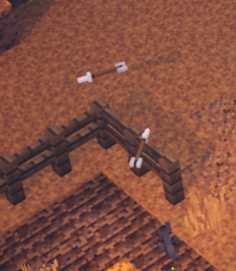
The hitbox of fences seems to be too high, I dont think arrows should get stuck mid-air like this. You can shoot over walls (cobblestone walls) just fine, however.

The hitbox of fences seems to be too high, I dont think arrows should get stuck mid-air like this
.
You can shoot over walls just fine, however.
The hitbox of fences seems to be too high, I dont think arrows should get stuck mid-air like this
.You can shoot over walls just fine, however.
The hitbox of fences seems to be too high, I dont think arrows should get stuck mid-air like this
You can shoot over walls just fine, however.
The hitbox of fences seems to be too high, I dont think arrows should get stuck mid-air like this
You can shoot over walls just fine, however.
The hitbox of fences seems to be too high, I dont think arrows should get stuck mid-air like this
You can shoot over walls just fine, however.
The hitbox of fences seems to be too high, I dont think arrows should get stuck mid-air like this
You can shoot over walls just fine, however.
The hitbox of fences seems to be too high, I dont think arrows should get stuck mid-air like this
You can shoot over walls just fine, however.
The hitbox of fences seems to be too high, I dont think arrows should get stuck mid-air like this
You can shoot over walls just fine, however.
The hitbox of fences seems to be too high, I dont think arrows should get stuck mid-air like this
You can shoot over walls just fine, however.
Steps to reproduce:
1) Equip a bow and have arrows in your inventory
2) Aim and shoot at a fence and a wall (seperately)Observed result:
The arrows will get stuck on the fence, floating in mid-air, but they will fly over the wall just fineExpected result:
The arrows should be going over or hitting the fence (visually)
Passive mobs such as sheep are affected by the "Weakening" enchantment. The description of the enchantment states "[...]of all nearby enemies[...]", so this should not be the case.
How to reproduce:
1) Enchant a weapon with weakness
2) Attack a mob with the weapon while a passive mob is nearbyResult: The passive mob will have the cloud of the weakening effect floating above their head
Passive mobs such as sheep are affected by the "Weakening" enchantment. The description of the enchantment states "[...]of all nearby enemies[...]", so this should not be the case.
How to reproduce:
1) Enchant a weapon with weakness
2) Attack a mob with the weapon while a passive mob is nearbyResult: The passive mob will have the cloud of the weakening effect floating above their head
After dying to an enchanted creeper and respawning, 2 mobs spawned underground, far out of reach for the player.
Steps to reproduce:
1) Start a mission (Pumpkin Pastures in this case)
2) Die (to a enchanted creeper in this case) and respawnObserved result:
The enemies spawn outside (under) the playable areaExpected result:
The enemies should be within players reach
The player model goes invisible mid-air if you roll off cliffs in the camp: https://streamable.com/bwzzg
Steps to reproduce:
1) Go to the camp
2) Roll off the edge of the playable areaObserved result:
The player should be visible while falling down until respawnedExpected result:
The player goes invisible after a short while of falling
Clicking on
" Visit our help article Minecraft Realms for mobile devices, Xbox consoles, Gear VR and Minecraft for Windows 10 " results in the page reloading. I cant seem to find a article that helps with Realms for Bedrock in-depth either.https://help.minecraft.net/hc/en-us/articles/360034674032-Minecraft-Realms
Clicking on " Visit our help article Minecraft Realms for mobile devices, Xbox consoles, Gear VR and Minecraft for Windows 10 " results in the page reloading. I cant seem to find a article that helps with Realms for Bedrock in-depth either.
Realms help articleredirects to itself for bedrock help, creating an endless loop"Minecraft Realms" help article - Endless loop
https://help.minecraft.net/hc/en-us/articles/360034674032-Minecraft-Realms
Clicking on "Visit our help article Minecraft Realms for mobile devices, Xbox consoles, Gear VR and Minecraft for Windows 10" results in the page re
loading. I cant seem to finda article that helps with Realms for Bedrock in-deptheither.https://help.minecraft.net/hc/en-us/articles/360034674032-Minecraft-Realms
Clicking on "Visit our help article Minecraft Realms for mobile devices, Xbox consoles, Gear VR and Minecraft for Windows 10" results in the page refreshing. I can't seem to find the matching article for those issues either.
Thank you for your report!
However, this issue is Invalid.Bug reports are only accepted in English, sorry.
Feel free to create a new report if you can speak English.Quick Links:
📓 Issue Guidelines – 💬 Community Support – 📧 Customer Support – 📖 Game Wiki
The price chart on https://help.minecraft.net/hc/en-us/articles/360034753992-Different-Minecraft-Editions is squished into a very tiny space, making it very hard to read. This does not seem to be a resolution issue as I can't seem to change the way it looks by changing window size or resolution
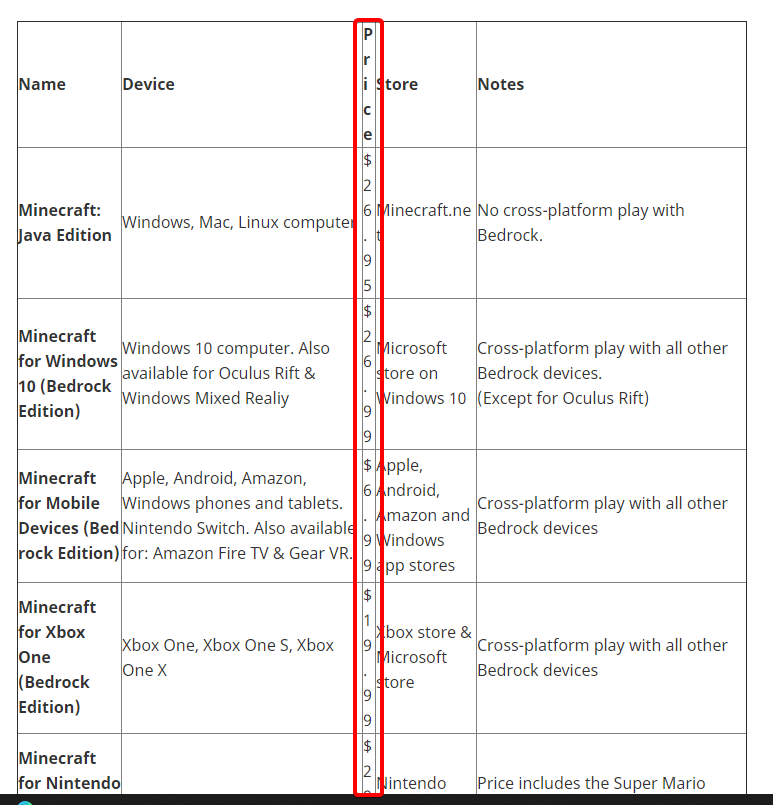
The price chart on https://help.minecraft.net/hc/en-us/articles/360034753992-Different-Minecraft-Editions is squished into a very tiny space, making it very hard to read. This does not seem to be a resolution issue as I can't seem to change the way it looks by changing window size or resolution
I'm afraid there's nothing we can do if you don't have a backup of your world. I'd suggest saving your world every few hours when playing long sessions.
Thank you for your report!
However, this issue is Invalid.This is related to the Minecraft: Java Edition project.
Please don't forget to search for an existing issue matching yours in the appropriate project before raising a new one.
Quick Links:
📓 Issue Guidelines – 💬 Community Support – 📧 Customer Support – ✍️ Feedback and Suggestions – 📖 Game Wiki
Moderator Note
- This issue is most commonly caused by a broken installation of Avast! free edition Anti-virus software. A reinstallation of Avast! and a reboot usually fixes it.
- McAfee anti-virus software (and derivatives) are also know to cause this issue, and currently the only known solution is to uninstall this software to correct the problem.
- Also Outpost security may cause that issue.
- This error also occurs when Java tries to open a socket on the IPv6 stack, but could't get a connection to the outside world. Try forcing the use of the IPv4 stack by adding -Djava.net.preferIPv4Stack=true to the JVM Arguments in your launch profile. To see this option Advanced Settings in your Launch Options menu needs to be on.
Please visitthe#minecrafthelp channelfor further support.
This is an automatically generated report based from the following crash: http://hopper.minecraft.net/crashes/minecraft/MCX-294053/
Crash:
java.lang.IllegalStateException: failed to create a child event loop at io.netty.util.concurrent.MultithreadEventExecutorGroup.<init>(MultithreadEventExecutorGroup.java:61) at io.netty.channel.MultithreadEventLoopGroup.<init>(MultithreadEventLoopGroup.java:49) at io.netty.channel.nio.NioEventLoopGroup.<init>(NioEventLoopGroup.java:61) at io.netty.channel.nio.NioEventLoopGroup.<init>(NioEventLoopGroup.java:52) at mo.<init>(SourceFile:36) at net.minecraft.server.MinecraftServer.<init>(SourceFile:114) at brh.<init>(SourceFile:38) at ays.a(SourceFile:1585) at bbs.e(SourceFile:162) at bbt.a(SourceFile:214) at bam.a(SourceFile:186) at bbs.a(SourceFile:187)The following is the first clean report made public about this crash:
---- Minecraft Crash Report ---- // Don't do that. Time: 10.10.13 17:10 Description: Rendering screen java.lang.IllegalStateException: failed to create a child event loop at io.netty.util.concurrent.MultithreadEventExecutorGroup.<init>(MultithreadEventExecutorGroup.java:61) at io.netty.channel.MultithreadEventLoopGroup.<init>(MultithreadEventLoopGroup.java:49) at io.netty.channel.nio.NioEventLoopGroup.<init>(NioEventLoopGroup.java:61) at io.netty.channel.nio.NioEventLoopGroup.<init>(NioEventLoopGroup.java:52) at mo.<init>(SourceFile:36) at net.minecraft.server.MinecraftServer.<init>(SourceFile:114) at brh.<init>(SourceFile:38) at ays.a(SourceFile:1585) at bbs.e(SourceFile:162) at bbt.a(SourceFile:214) at bam.a(SourceFile:186) at bbs.a(SourceFile:187) at bkv.b(SourceFile:851) at ays.ab(SourceFile:783) at ays.e(SourceFile:706) at net.minecraft.client.main.Main.main(SourceFile:103) Caused by: io.netty.channel.ChannelException: failed to open a new selector at io.netty.channel.nio.NioEventLoop.openSelector(NioEventLoop.java:128) at io.netty.channel.nio.NioEventLoop.<init>(NioEventLoop.java:120) at io.netty.channel.nio.NioEventLoopGroup.newChild(NioEventLoopGroup.java:87) at io.netty.util.concurrent.MultithreadEventExecutorGroup.<init>(MultithreadEventExecutorGroup.java:57) ... 15 more Caused by: java.io.IOException: Unable to establish loopback connection at sun.nio.ch.PipeImpl$Initializer.run(Unknown Source) at java.security.AccessController.doPrivileged(Native Method) at sun.nio.ch.PipeImpl.<init>(Unknown Source) at sun.nio.ch.SelectorProviderImpl.openPipe(Unknown Source) at java.nio.channels.Pipe.open(Unknown Source) at sun.nio.ch.WindowsSelectorImpl.<init>(Unknown Source) at sun.nio.ch.WindowsSelectorProvider.openSelector(Unknown Source) at io.netty.channel.nio.NioEventLoop.openSelector(NioEventLoop.java:126) ... 18 more Caused by: java.net.ConnectException: Connection refused: connect at sun.nio.ch.Net.connect(Native Method) at sun.nio.ch.SocketChannelImpl.connect(Unknown Source) at java.nio.channels.SocketChannel.open(Unknown Source) ... 26 more A detailed walkthrough of the error, its code path and all known details is as follows: --------------------------------------------------------------------------------------- -- Head -- Stacktrace: at io.netty.util.concurrent.MultithreadEventExecutorGroup.<init>(MultithreadEventExecutorGroup.java:61) at io.netty.channel.MultithreadEventLoopGroup.<init>(MultithreadEventLoopGroup.java:49) at io.netty.channel.nio.NioEventLoopGroup.<init>(NioEventLoopGroup.java:61) at io.netty.channel.nio.NioEventLoopGroup.<init>(NioEventLoopGroup.java:52) at mo.<init>(SourceFile:36) at net.minecraft.server.MinecraftServer.<init>(SourceFile:114) at brh.<init>(SourceFile:38) at ays.a(SourceFile:1585) at bbs.e(SourceFile:162) at bbt.a(SourceFile:214) at bam.a(SourceFile:186) at bbs.a(SourceFile:187) -- Screen render details -- Details: Screen name: bry Mouse location: Scaled: (203, 62). Absolute: (406, 355) Screen size: Scaled: (427, 240). Absolute: (854, 480). Scale factor of 2 Stacktrace: at bkv.b(SourceFile:851) at ays.ab(SourceFile:783) at ays.e(SourceFile:706) at net.minecraft.client.main.Main.main(SourceFile:103) -- System Details -- Details: Minecraft Version: 13w41a Operating System: Windows Vista (amd64) version 6.1 Java Version: 1.6.0_13, Sun Microsystems Inc. Java VM Version: Java HotSpot(TM) 64-Bit Server VM (mixed mode), Sun Microsystems Inc. Memory: 132615600 bytes (126 MB) / 170655744 bytes (162 MB) up to 954466304 bytes (910 MB) JVM Flags: 2 total; -XX:HeapDumpPath=MojangTricksIntelDriversForPerformance_javaw.exe_minecraft.exe.heapdump -Xmx1G AABB Pool Size: 0 (0 bytes; 0 MB) allocated, 0 (0 bytes; 0 MB) used IntCache: cache: 0, tcache: 0, allocated: 0, tallocated: 0 Launched Version: 13w41a LWJGL: 2.9.0 OpenGL: GeForce GT 220/PCIe/SSE2 GL version 3.3.0, NVIDIA Corporation Is Modded: Probably not. Jar signature remains and client brand is untouched. Type: Client (map_client.txt) Resource Packs: [faithful32pack.zip] Current Language: English (US) Profiler Position: N/A (disabled) Vec3 Pool Size: ~~ERROR~~ NullPointerException: nullYou can see this full report at http://hopper.minecraft.net/crashes/minecraft/MCX-294053/16540251/
Moderator Note
- This issue is most commonly caused by a broken installation of Avast! free edition Anti-virus software. A reinstallation of Avast! and a reboot usually fixes it.
- McAfee anti-virus software (and derivatives) are also know to cause this issue, and currently the only known solution is to uninstall this software to correct the problem.
- Also Outpost security may cause that issue.
- This error also occurs when Java tries to open a socket on the IPv6 stack, but could't get a connection to the outside world. Try forcing the use of the IPv4 stack by adding -Djava.net.preferIPv4Stack=true to the JVM Arguments in your launch profile. To see this option Advanced Settings in your Launch Options menu needs to be on.
Please visit Community Support for further support.
This is an automatically generated report based from the following crash: http://hopper.minecraft.net/crashes/minecraft/MCX-294053/
Crash:
java.lang.IllegalStateException: failed to create a child event loop at io.netty.util.concurrent.MultithreadEventExecutorGroup.<init>(MultithreadEventExecutorGroup.java:61) at io.netty.channel.MultithreadEventLoopGroup.<init>(MultithreadEventLoopGroup.java:49) at io.netty.channel.nio.NioEventLoopGroup.<init>(NioEventLoopGroup.java:61) at io.netty.channel.nio.NioEventLoopGroup.<init>(NioEventLoopGroup.java:52) at mo.<init>(SourceFile:36) at net.minecraft.server.MinecraftServer.<init>(SourceFile:114) at brh.<init>(SourceFile:38) at ays.a(SourceFile:1585) at bbs.e(SourceFile:162) at bbt.a(SourceFile:214) at bam.a(SourceFile:186) at bbs.a(SourceFile:187)The following is the first clean report made public about this crash:
---- Minecraft Crash Report ---- // Don't do that. Time: 10.10.13 17:10 Description: Rendering screen java.lang.IllegalStateException: failed to create a child event loop at io.netty.util.concurrent.MultithreadEventExecutorGroup.<init>(MultithreadEventExecutorGroup.java:61) at io.netty.channel.MultithreadEventLoopGroup.<init>(MultithreadEventLoopGroup.java:49) at io.netty.channel.nio.NioEventLoopGroup.<init>(NioEventLoopGroup.java:61) at io.netty.channel.nio.NioEventLoopGroup.<init>(NioEventLoopGroup.java:52) at mo.<init>(SourceFile:36) at net.minecraft.server.MinecraftServer.<init>(SourceFile:114) at brh.<init>(SourceFile:38) at ays.a(SourceFile:1585) at bbs.e(SourceFile:162) at bbt.a(SourceFile:214) at bam.a(SourceFile:186) at bbs.a(SourceFile:187) at bkv.b(SourceFile:851) at ays.ab(SourceFile:783) at ays.e(SourceFile:706) at net.minecraft.client.main.Main.main(SourceFile:103) Caused by: io.netty.channel.ChannelException: failed to open a new selector at io.netty.channel.nio.NioEventLoop.openSelector(NioEventLoop.java:128) at io.netty.channel.nio.NioEventLoop.<init>(NioEventLoop.java:120) at io.netty.channel.nio.NioEventLoopGroup.newChild(NioEventLoopGroup.java:87) at io.netty.util.concurrent.MultithreadEventExecutorGroup.<init>(MultithreadEventExecutorGroup.java:57) ... 15 more Caused by: java.io.IOException: Unable to establish loopback connection at sun.nio.ch.PipeImpl$Initializer.run(Unknown Source) at java.security.AccessController.doPrivileged(Native Method) at sun.nio.ch.PipeImpl.<init>(Unknown Source) at sun.nio.ch.SelectorProviderImpl.openPipe(Unknown Source) at java.nio.channels.Pipe.open(Unknown Source) at sun.nio.ch.WindowsSelectorImpl.<init>(Unknown Source) at sun.nio.ch.WindowsSelectorProvider.openSelector(Unknown Source) at io.netty.channel.nio.NioEventLoop.openSelector(NioEventLoop.java:126) ... 18 more Caused by: java.net.ConnectException: Connection refused: connect at sun.nio.ch.Net.connect(Native Method) at sun.nio.ch.SocketChannelImpl.connect(Unknown Source) at java.nio.channels.SocketChannel.open(Unknown Source) ... 26 more A detailed walkthrough of the error, its code path and all known details is as follows: --------------------------------------------------------------------------------------- -- Head -- Stacktrace: at io.netty.util.concurrent.MultithreadEventExecutorGroup.<init>(MultithreadEventExecutorGroup.java:61) at io.netty.channel.MultithreadEventLoopGroup.<init>(MultithreadEventLoopGroup.java:49) at io.netty.channel.nio.NioEventLoopGroup.<init>(NioEventLoopGroup.java:61) at io.netty.channel.nio.NioEventLoopGroup.<init>(NioEventLoopGroup.java:52) at mo.<init>(SourceFile:36) at net.minecraft.server.MinecraftServer.<init>(SourceFile:114) at brh.<init>(SourceFile:38) at ays.a(SourceFile:1585) at bbs.e(SourceFile:162) at bbt.a(SourceFile:214) at bam.a(SourceFile:186) at bbs.a(SourceFile:187) -- Screen render details -- Details: Screen name: bry Mouse location: Scaled: (203, 62). Absolute: (406, 355) Screen size: Scaled: (427, 240). Absolute: (854, 480). Scale factor of 2 Stacktrace: at bkv.b(SourceFile:851) at ays.ab(SourceFile:783) at ays.e(SourceFile:706) at net.minecraft.client.main.Main.main(SourceFile:103) -- System Details -- Details: Minecraft Version: 13w41a Operating System: Windows Vista (amd64) version 6.1 Java Version: 1.6.0_13, Sun Microsystems Inc. Java VM Version: Java HotSpot(TM) 64-Bit Server VM (mixed mode), Sun Microsystems Inc. Memory: 132615600 bytes (126 MB) / 170655744 bytes (162 MB) up to 954466304 bytes (910 MB) JVM Flags: 2 total; -XX:HeapDumpPath=MojangTricksIntelDriversForPerformance_javaw.exe_minecraft.exe.heapdump -Xmx1G AABB Pool Size: 0 (0 bytes; 0 MB) allocated, 0 (0 bytes; 0 MB) used IntCache: cache: 0, tcache: 0, allocated: 0, tallocated: 0 Launched Version: 13w41a LWJGL: 2.9.0 OpenGL: GeForce GT 220/PCIe/SSE2 GL version 3.3.0, NVIDIA Corporation Is Modded: Probably not. Jar signature remains and client brand is untouched. Type: Client (map_client.txt) Resource Packs: [faithful32pack.zip] Current Language: English (US) Profiler Position: N/A (disabled) Vec3 Pool Size: ~~ERROR~~ NullPointerException: nullYou can see this full report at http://hopper.minecraft.net/crashes/minecraft/MCX-294053/16540251/
Using Paysafecard or Ayden as a payment method results in error messageUsing Paysafecard or Adyen as a payment method results in error message
But the left button is still on the left side of the mouse and vice versa, right?
Thank you for your report!
However, this issue is Incomplete.Your report does not contain enough information. As such, we're unable to understand or reproduce the problem.
You are welcome to create a new ticket about your issue with more detailed information. In case of a game crash, be sure to attach the crash report from minecraft/crash-reports/crash-<DATE>-client.txt.
However, please review the Issue Guidelines before writing a new bug report.Quick Links:
📓 Issue Guidelines – 💬 Community Support – 📧 Customer Support – ✍️ Feedback and Suggestions – 📖 Game Wiki
Thank you for your report!
However, this issue is Invalid.This is a technical support issue; this site is for bug reports only. We do not have the resources to provide you with technical support.
Please contact the Community Support.Quick Links:
📓 Issue Guidelines – 💬 Community Support – 📧 Customer Support – ✍️ Feedback and Suggestions – 📖 Game Wiki
The icons for the stores Media Markt and Saturn are missing/not working on https://www.minecraft.net/en-us/redeem if visited from Germany.

The icons for the stores Media Markt and Saturn are missing/not working on https://www.minecraft.net/en-us/redeem if visited from Germany.
The icons for the stores Media Markt and Saturn are missing/not working on https://www.minecraft.net/en-us/redeem if visited from Germany.
The icons for the stores Media Markt and Saturn are missing/not working on https://www.minecraft.net/
en-us/redeem if visited from Germany.
https://help.minecraft.net/requests/ redirects to the feedback page if you do not include "/hc/
en-us". I'm unsure if this is something that can be fixed, or if this is even a bug.https://help.minecraft.net/requests/ redirects to the feedback page if you do not include "/hc/". I'm unsure if this is something that can be fixed, or if this is even a bug, but perhaps it should redirect to the main help page instead?
https://help.minecraft.net/requests/
redirects to the feedback page if you do not include "/hc/".I'm unsure if this is something that can be fixed, or if this is even a bug, but perhaps it should redirect to the main help page instead?https://help.minecraft.net/requests/new redirects to the feedback page if you do not include "/hc/". This doesn't happen with other links, like https://help.minecraft.net/test/test/ . I'm unsure if this is something that can be fixed, or if this is even a bug, but perhaps it should redirect to the main help page instead?
screenshot-1.png
Mod NoticeThis issue seems to be caused by incompatible software, removing it fixes the issue.
If you have this issue, please check whether you have installed any incompatible software installed on your computer. If there is, uninstall it. If there isn't, please contact 💬 Community Support. Please don't post comments here, this is not a support forum.
For Windows 10:
- Open or Click Windows Menu.
- Choose the Settings menu to display all contents.
- Select and click on System.
- Under Windows menu, please click on Apps and features.
- Select the incompatible software from the list.
- Click on Uninstall button to remove it.
For Windows 8 and 8.1 Users
- Click on bottom left corner of the screen.
- Click on Control Panel.
- Click Uninstall a Program.
- Select the incompatible software from the list and click Uninstall button.
For Windows 7, Windows Vista or Windows XP
- Click on Start menu, then Control Panel.
- Double-click Add or Remove Programs.
- In the ‘Currently Installed Programs’ window, select the incompatible software and then click Change/Remove.
After the uninstall, restart your PC for the changes to apply.
Example of issue: http://paste.ubuntu.com/23950125/
xml seems to be client-1.7.xmlHJT reports: http://paste.ubuntu.com/23950156/ http://paste.ubuntu.com/23950162/
Seems like each player is getting a different message, got 8 people right now with the same one in IRC.Restarting the launcher sometimes gives a different file.
Mod NoticeThis issue seems to be caused by incompatible software, removing it fixes the issue.
For Windows
10:
- Open or Click Windows Menu.
- Choose the Settings menu to display all contents.
- Select and click on System.
- Under Windows menu, please click on Apps and features.
- Select the incompatible software from the list.
- Click on Uninstall button to remove it.
For Windows 8 and 8.1 Users
- Click on bottom left corner of the screen.
- Click on Control Panel.
- Click Uninstall a Program.
- Select the incompatible software from the list and click Uninstall button.
For Windows 7, Windows Vista or Windows XP
- Click on Start menu, then Control Panel.
- Double-click Add or Remove Programs.
- In the ‘Currently Installed Programs’ window, select the incompatible software and then click Change/Remove.
After the uninstall, restart your PC for the changes to apply.
Example of issue: http://paste.ubuntu.com/23950125/
xml seems to be client-1.7.xmlHJT reports: http://paste.ubuntu.com/23950156/ http://paste.ubuntu.com/23950162/
Seems like each player is getting a different message, got 8 people right now with the same one in IRC.Restarting the launcher sometimes gives a different file.
Mod NoticeThis issue seems to be caused by incompatible software, removing it fixes the issue.
For Windows:
- Open the Start menu (Windows button)
- Type 'Control Panel' and open the first result
- Click on 'Uninstall a program' right under Programs
- Right-click the incompatible program and choose 'Uninstall', then follow the on-screen instructions.
After the uninstall, restart your PC for the changes to apply.
Example of issue: http://paste.ubuntu.com/23950125/
xml seems to be client-1.7.xmlHJT reports: http://paste.ubuntu.com/23950156/ http://paste.ubuntu.com/23950162/
Seems like each player is getting a different message, got 8 people right now with the same one in IRC.Restarting the launcher sometimes gives a different file.
First, close the game and launcher. Then go to your .minecraft folder, delete launcher_msa_credentials(.json) and try to start the launcher again.
I just bought and downloaded minecraft and i've tried everything in my power to fix this, but when i open minecraft launcher it will not go off of a grey screen. no button or login options at all
Potential WorkaroundFirst, close the game and launcher. Then go to your .minecraft folder, delete launcher_msa_credentials(.json) and try to start the launcher again.
I just bought and downloaded minecraft and i've tried everything in my power to fix this, but when i open minecraft launcher it will not go off of a grey screen. no button or login options at all
Potential WorkaroundFirst, close the game and launcher. Then go to your .minecraft folder, delete launcher_msa_credentials(.json) and try to start the launcher again.
I just bought and downloaded minecraft and i've tried everything in my power to fix this, but when i open minecraft launcher it will not go off of a grey screen. no button or login options at all
Potential WorkaroundFirst make sure the launcher and game are closed, then go to your Minecraft folder and delete msa_launcher_credentials(.json)
- Mac Users: Press ⇧ Shift + ⌘ Command + G on your keyboard, type ~/Library/Application Support/minecraft and click Go.
- Windows Users: Press Windows + R on your keyboard, type %appdata%/.minecraft and click OK.
I just bought and downloaded minecraft and i've tried everything in my power to fix this, but when i open minecraft launcher it will not go off of a grey screen. no button or login options at all
Potential WorkaroundFirst make sure the launcher and game are closed, then go to your Minecraft folder and delete msa_launcher_credentials(.json)
MacUsers: Press⇧ Shift + ⌘ Command + Gon your keyboard, type~/Library/Application Support/minecraft and clickGo.WindowsUsers: PressWindows + Ron your keyboard, type%appdata%/.minecraft and clickOK.I just bought and downloaded minecraft and i've tried everything in my power to fix this, but when i open minecraft launcher it will not go off of a grey screen. no button or login options at all
Potential WorkaroundFirst make sure the launcher and game are closed, then go to your Minecraft folder and delete msa_launcher_credentials(.json)
- Windows Users: Press Windows + R on your keyboard, type %appdata%/.minecraft and click OK.
- Mac Users: Press ⇧ Shift + ⌘ Command + G on your keyboard, type ~/Library/Application Support/minecraft and click Go.
I just bought and downloaded minecraft and i've tried everything in my power to fix this, but when i open minecraft launcher it will not go off of a grey screen. no button or login options at all
Potential WorkaroundFirst make sure the launcher and game are closed, then go to your Minecraft folder and delete msa_launcher_credentials(.json), then try starting the Minecraft Launcher again.
- Windows Users: Press Windows + R on your keyboard, type %appdata%/.minecraft and click OK.
- Mac Users: Press ⇧ Shift + ⌘ Command + G on your keyboard, type ~/Library/Application Support/minecraft and click Go.
I just bought and downloaded minecraft and i've tried everything in my power to fix this, but when i open minecraft launcher it will not go off of a grey screen. no button or login options at all
Potential WorkaroundFirst make sure the launcher and game are closed, then go to your Minecraft folder and delete msa_launcher_credentials(.json)
, thentry starting the Minecraft Launcher again.
- Windows Users: Press Windows + R on your keyboard, type %appdata%/.minecraft and click OK.
- Mac Users: Press ⇧ Shift + ⌘ Command + G on your keyboard, type ~/Library/Application Support/minecraft and click Go.
I just bought and downloaded minecraft and i've tried everything in my power to fix this, but when i open minecraft launcher it will not go off of a grey screen. no button or login options at all
Potential WorkaroundFirst make sure the launcher and game are closed, then go to your Minecraft folder and delete msa_launcher_credentials(.json) and try starting the Minecraft Launcher again.
- Windows Users: Press Windows + R on your keyboard, type %appdata%/.minecraft and click OK.
- Mac Users: Press ⇧ Shift + ⌘ Command + G on your keyboard, type ~/Library/Application Support/minecraft and click Go.
I just bought and downloaded minecraft and i've tried everything in my power to fix this, but when i open minecraft launcher it will not go off of a grey screen. no button or login options at all
Thank you for your report!
However, this issue is Invalid.Your game, launcher or server is modified.
If you can reproduce the issue in a vanilla environment, please recreate the issue.
- Any non-standard client/server/launcher build needs to be taken up with the appropriate team, not Mojang.
- Any plugin issues need to be addressed to the creator of the plugin or resource pack.
- If you have problems on large servers, such as The Hive and Hypixel, please contact them first as they run modified server software.
Quick Links:
📓 Bug Tracker Guidelines – 💬 Community Support – 📧 Mojang Support
📓 Project Summary – ✍️ Feedback and Suggestions – 📖 Game Wiki
https://minecraft.net/de-de/login - The security questions and the Verify identity button are not translated.
Private because I'm not sure if I should share the 3 questions I chose.
For 1.10+ UsersIf you are experiencing this issue after upgrading to 1.10, but did not for older versions of the game, the following instructions may solve the issue:
- Increase allocated RAM from 1GB to 2GB (only applicable to 64 bit users)
- In the Edit Profile menu in the Launcher, check the JVM Arguments box, and change the -Xmx1G argument to -Xmx2G
- Change Video Settings in-game (Options -> Video Settings)
- Enable VSync
- Disable VBOs
If all of these did not correct the issue, follow the remainder of the instructions on this page, or seek assistance from the Mojang Support Center.Mod NoticeThese crashes are caused by faulty display drivers which are provided by Intel or your OEM. Your best bet is to either upgrade to the latest, or if that caused it, downgrade to a version which does not cause these crashes.
This issue has also been known to occur when conflicting with other software, such as custom Windows themes, game or screen recording software (regardless if running), and Evolve.
If the crash only occurs when opening a world, it may be caused by the VBOs video setting, when used with certain intel drivers. Disabling this setting, or updating the drivers may correct the issue. You can also attempt toggling the VSync option.
Some users have reported increasing the maximum memory for the game to correct this issue. In the launcher, click Edit Profile, and check the JVM Arguments box. For 64 bit users, change the -Xmx1G argument to -Xmx2G to allocate 2GB of memory.
Information on how to update your graphics drivers can be found HERE.
The downloads for appropiate drivers can be found on THIS page. Make sure to uninstall your previous drivers, a guide for this can be found HERE.
If you require further help, try one of the community options on the Mojang Support Center.Full List of error codes, plus download location of updated driver (if available, uninstall of previous drivers required):
FWIW, this is probably a duplicate of
MC-24247but there was insufficient information for me to say this for sure. I cannot find any other duplicates.I can successfully launch Minecraft, but after a random amount of time (less than 5 minutes), the video driver crashes with the message "Display driver stopped responding and has recovered".
I can force the issue with a very arbitrary key sequence: while playing in-game, press ALT+TAB to return to the Windows desktop. Expected result: Minecraft should revert to the menu as if we had pressed Escape, and I should be task-switched to whereever I ALT+TAB'd to. I should be able to ALT+TAB back to minecraft, select "back to game", and continue playing.
Using the Profiles feature of the Launcher, the video driver crashes on Minecraft 1.6.4 and Minecraft 1.6.2 – **but does not crash on 1.5.2 nor 1.5.1. I did not try earlier versions**. It also DOES NOT crash on snapshot 13w38c .
I have recorded my trials & tribulations here:
http://www.minecraftforum.net/topic/1963062-weird-minecraft-issue/I am logging this issue with Mojang because something must have changed between 1.5.2 and 1.6.2 to trigger this issue ('trigger', not 'cause') ... and perhaps the re-write for 1.7 has fixed it. Don't know. You're smarter than I am.
Let me know what other information I can provide. My kids love Minecraft, and their old Windows 7 laptop bit the dust, hence buying the new one, which they still can't play...
Thanks, Ted.

If you visit https://www.minecraft.net/
en-us/marketplace while the language on minecraft.net is set to German the "QUESTIONS? CHECK OUT OUR FAQ" button will redirect to https://www.minecraft.net/de-de/marketplace/faq, which is a 404 dead link.I am not sure if this is something that can be fixed, but the link should probably go directly to the help article instead of a redirect through https://www.minecraft.net/marketplace/faq to avoid such issues.
Servers not loading in 1.17 (Solved|Firewallwas blocking online access)Servers not loading / Connection Reset Error in 1.17 (Caused by Firewall/AV)
Mod NoteSome things you could try to troubleshoot:
- Make sure the new OpenJDK16 is allowed through the Windows Firewall.
- Press the Windows Key and type "firewall."
- Click on "Allow an app through Windows Firewall."
- In the new window, press "O" on your keyboard and look for "OpenJDK Platform Binary."
- If you find it, make sure both the checkbox on the left, as well as both checkboxes on the right, are checked. Then click OK and try Minecraft again.
- If you do not find that entry, click Change Settings, then click Allow another app...
- Click Browse, then navigate to:
C:\Program Files (x86)\Minecraft\runtime\java-runtime-alpha\windows-x64\java-runtime-alpha\bin\javaw.exeand click Open, then Add.
- Click OK and try Minecraft again.
- Try disabling all VPNs, Hamachi, Antiviruses, and firewalls (especially third-party firewalls)
- Try on another connection, such as mobile data via wireless hotspot or USB tethering.
- Try creating a new profile in the launcher (Installations -> New), setting it to 1.17 (not latest release), and trying that new profile.
- Try the following on Windows:
- Press the Windows Key, then type cmd.
- Under 'Command Prompt,' click Run as administrator
- Type netsh winsock reset and press Enter.
- Type netsh int ip reset and press Enter.
- Type ipconfig /release and press Enter.
- Type ipconfig /renew and press Enter.
- Type ipconfig /flushdns and press Enter.
If none of this helps, please contact Community Support for further assistance.
FIXED THE ISSUE.
Firewall was blocking online access for 1.17 and I told it to stop.I usually play on 1.8 or 1.16 and they work fine, but in 1.17 I'm unable to join any servers. I'm a member on an SMP server which just updated to 1.17, but I'm unable to join, which sucks.
All the servers on the list are Pinging, and trying to load realms gives me this error message:An error occurred (500):
Could not connect to Realms: Connect timed outTL;DR
every other version:
full list of working servers (joinable and all)
1.17:
full list of "Pinging..." servers (not so joinable - they just keep loading)
Worth mentioning that this was also happening with the pre-releases.
Mod NoteSome things you could try to troubleshoot if your servers aren't loading or you get a "Internal Exception: java.net.SocketException: Connection Reset" Error since 1.17:
- Make sure the new OpenJDK16 is allowed through the Windows Firewall.
- Press the Windows Key and type "firewall."
- Click on "Allow an app through Windows Firewall."
- In the new window, press "O" on your keyboard and look for "OpenJDK Platform Binary."
- If you find it, make sure both the checkbox on the left, as well as both checkboxes on the right, are checked. Then click OK and try Minecraft again.
- If you do not find that entry, click Change Settings, then click Allow another app...
- Click Browse, then navigate to:
C:\Program Files (x86)\Minecraft\runtime\java-runtime-alpha\windows-x64\java-runtime-alpha\bin\javaw.exeand click Open, then Add.
- Click OK and try Minecraft again.
- Try disabling all VPNs, Hamachi, Antiviruses, and firewalls (especially third-party firewalls)
- Try on another connection, such as mobile data via wireless hotspot or USB tethering.
- Try creating a new profile in the launcher (Installations -> New), setting it to 1.17 (not latest release), and trying that new profile.
- Try the following on Windows:
- Press the Windows Key, then type cmd.
- Under 'Command Prompt,' click Run as administrator
- Type netsh winsock reset and press Enter.
- Type netsh int ip reset and press Enter.
- Type ipconfig /release and press Enter.
- Type ipconfig /renew and press Enter.
- Type ipconfig /flushdns and press Enter.
If none of this helps, please contact Community Support for further assistance.
FIXED THE ISSUE.
Firewall was blocking online access for 1.17 and I told it to stop.I usually play on 1.8 or 1.16 and they work fine, but in 1.17 I'm unable to join any servers. I'm a member on an SMP server which just updated to 1.17, but I'm unable to join, which sucks.
All the servers on the list are Pinging, and trying to load realms gives me this error message:An error occurred (500):
Could not connect to Realms: Connect timed outTL;DR
every other version:
full list of working servers (joinable and all)
1.17:
full list of "Pinging..." servers (not so joinable - they just keep loading)
Worth mentioning that this was also happening with the pre-releases.
Mod NoteSome things you could try to troubleshoot if your servers aren't loading or if you get a "Internal Exception: java.net.SocketException: Connection Reset" Error since 1.17:
- Make sure the new OpenJDK16 is allowed through the Windows Firewall.
- Press the Windows Key and type "firewall."
- Click on "Allow an app through Windows Firewall."
- In the new window, press "O" on your keyboard and look for "OpenJDK Platform Binary."
- If you find it, make sure both the checkbox on the left, as well as both checkboxes on the right, are checked. Then click OK and try Minecraft again.
- If you do not find that entry, click Change Settings, then click Allow another app...
- Click Browse, then navigate to:
C:\Program Files (x86)\Minecraft\runtime\java-runtime-alpha\windows-x64\java-runtime-alpha\bin\javaw.exeand click Open, then Add.
- Click OK and try Minecraft again.
- Try disabling all VPNs, Hamachi, Antiviruses, and firewalls (especially third-party firewalls)
- Try on another connection, such as mobile data via wireless hotspot or USB tethering.
- Try creating a new profile in the launcher (Installations -> New), setting it to 1.17 (not latest release), and trying that new profile.
- Try the following on Windows:
- Press the Windows Key, then type cmd.
- Under 'Command Prompt,' click Run as administrator
- Type netsh winsock reset and press Enter.
- Type netsh int ip reset and press Enter.
- Type ipconfig /release and press Enter.
- Type ipconfig /renew and press Enter.
- Type ipconfig /flushdns and press Enter.
If none of this helps, please contact Community Support for further assistance.
FIXED THE ISSUE.
Firewall was blocking online access for 1.17 and I told it to stop.I usually play on 1.8 or 1.16 and they work fine, but in 1.17 I'm unable to join any servers. I'm a member on an SMP server which just updated to 1.17, but I'm unable to join, which sucks.
All the servers on the list are Pinging, and trying to load realms gives me this error message:An error occurred (500):
Could not connect to Realms: Connect timed outTL;DR
every other version:
full list of working servers (joinable and all)
1.17:
full list of "Pinging..." servers (not so joinable - they just keep loading)
Worth mentioning that this was also happening with the pre-releases.
When signing in with usual details,creates awholenew profileand preventing you from getting back to your original feedback profile.Feedback site creates a new profile upon login, instead of using existing one
'Versions'checkboxes doesnot apply to version selection menu
"Versions" checkboxes do not apply to version selection menu
Snapshots are shown in the "
create new installation"/"edit installation" page, even if they are disabled in the Installations page.
If I remember correctly, this was not the case in the past.Snapshots and Modded versions are shown in the "Create new installation"/"Edit installation" page, even if they are disabled in the Installations page.
If I remember correctly, this was not the case in the past.
The comma after 'Capes' in the following bullet point of the Commercial Usage Guidelines is misplaced:
- sell cosmetic entitlements, except for "Capes," which we define as anything that attempts to visually emulate the feature of a Minecraft player Cape.
The comma should be behind the quotation mark instead.
Put the summary of the bug you're having here
What I expected to happen was...:
The game would save all of my progress that I worked on previously before I rejoined
What actually happened was...:
Nothing I had done for hours had saved and I had to redo everythingSteps to Reproduce:
1. Work on Realms
2. Leave the entire game
3. Join back4. Nothing is saved
Put the summary of the bug you're having here
What I expected to happen was...:
The game would save all of my progress that I worked on previously before I rejoined
What actually happened was...:
Nothing I had done for hours had saved and I had to redo everythingSteps to Reproduce:
1. Work on Realms
2. Leave the entire game
3. Join back4. Nothing is saved
NoteMojang is aware and working on it. See https://twitter.com/MojangStatus/status/1536212024891523073
Put the summary of the bug you're having here
What I expected to happen was...:
The game would save all of my progress that I worked on previously before I rejoined
What actually happened was...:
Nothing I had done for hours had saved and I had to redo everythingSteps to Reproduce:
1. Work on Realms
2. Leave the entire game
3. Join back4. Nothing is saved
Note
Mojang is aware and working on it. See https://twitter.com/MojangStatus/status/1536212024891523073Put the summary of the bug you're having here
What I expected to happen was...:
The game would save all of my progress that I worked on previously before I rejoined
What actually happened was...:
Nothing I had done for hours had saved and I had to redo everythingSteps to Reproduce:
1. Work on Realms
2. Leave the entire game
3. Join back4. Nothing is saved
NoteThis issue was caused by services being offline. These services have now been restored. See https://twitter.com/MojangStatus/status/1536212024891523073 & https://twitter.com/MojangStatus/status/1537168739262681088
Put the summary of the bug you're having here
What I expected to happen was...:
The game would save all of my progress that I worked on previously before I rejoined
What actually happened was...:
Nothing I had done for hours had saved and I had to redo everythingSteps to Reproduce:
1. Work on Realms
2. Leave the entire game
3. Join back4. Nothing is saved
The option to switch teams is missing from the screen where you invite friends before matchmaking.
Steps to Reproduce:
1. Choose the Versus mode from the main menu
2. Select "Host Game", then "Public"
3. Invite your friend(s), then try to pick/switch teams.Observed Results:
The option is missing.It is only visible when hosting a private matchExpected Results:
As indicated by the text on the right, you are supposed to be able to pick teams before queuing.Screenshots/Videos attached:
Notes:
The option shows up when hosting private matches:
The option to switch teams is missing from the screen where you invite friends before matchmaking.
NoteAn upcoming update (no release date yet) will have the ability to invite friends before finding other players in matchmaking.
Source: This message by Gartzke in the Minecraft Legends Discord
Steps to Reproduce:
1. Choose the Versus mode from the main menu
2. Select "Host Game", then "Public"
3. Invite your friend(s), then try to pick/switch teams.Observed Results:
The option is missing.Expected Results:
As indicated by the text on the right, you are supposed to be able to pick teams before queuing.Screenshots/Videos attached:
Notes:
The option shows up when hosting private matches:
The option to switch teams is missing from the screen where you invite friends before matchmaking.
NoteAn upcoming update (no release date yet) will have the ability to invite friends before finding other players in matchmaking.
Source: This message by Gartzke in the Minecraft Legends Discord
Steps to Reproduce:
1. Choose the Versus mode from the main menu
2. Select "Host Game", then "Public"
3. Invite your friend(s), then try to pick/switch teams.Observed Results:
The option is missing.Expected Results:
As indicated by the text on the right, you are supposed to be able to pick teams before queuing.Screenshots/Videos attached:
Notes:
The option shows up when hosting private matches:
NoteAn upcoming update (no release date yet) will have the ability to invite friends before finding other players in matchmaking.
Source: This message by Gartzke in the Minecraft Legends Discord
The option to switch teams is missing from the screen where you invite friends before matchmaking.
Steps to Reproduce:
1. Choose the Versus mode from the main menu
2. Select "Host Game", then "Public"
3. Invite your friend(s), then try to pick/switch teams.Observed Results:
The option is missing.Expected Results:
As indicated by the text on the right, you are supposed to be able to pick teams before queuing.Screenshots/Videos attached:
Notes:
The option shows up when hosting private matches:
"Switch Teams" option is missing when hosting public versus matchesPublic versus matches: "Switch Teams" missing / Not in the same team with friends
NoteAn upcoming update (no release date yet) will have the ability to invite friends before finding other players in matchmaking.
Source: This message by Gartzke in the Minecraft Legends Discord
The option to switch teams is missing from the screen where you invite friends before matchmaking.
Steps to Reproduce:
1. Choose the Versus mode from the main menu
2. Select "Host Game", then "Public"
3. Invite your friend(s), then try to pick/switch teams.Observed Results:
The option is missing.Expected Results:
As indicated by the text on the right, you are supposed to be able to pick teams before queuing.Screenshots/Videos attached:
Notes:
The option shows up when hosting private matches:
NoteAn upcoming update (no release date yet) will have the ability to invite friends before finding other players in matchmaking.
Source: This message by Gartzke in the Minecraft Legends Discord
The option to switch teams is missing from the screen where you invite friends before matchmaking. When inviting friends, you get put into opposite teams.
Steps to Reproduce:
1. Choose the Versus mode from the main menu
2. Select "Host Game", then "Public"
3. Invite your friend(s)
4. Try to pick/switch teams.Observed Results:
You are put into opposite teams, so you can't team up. The "Switch teams" option mentioned in the text on the right is also missing.Expected Results:
As indicated by the text on the right, you are supposed to be able to pick teams before queuing.Screenshots/Videos attached:
Notes:
The Switch teams option shows up when hosting private matches:
NoteAn upcoming update (no release date yet) will have the ability to invite friends before finding other players in matchmaking.
Source: This message by Gartzke in the Minecraft Legends Discord
The option to switch teams is missing from the screen where you invite friends before matchmaking. When inviting friends, you get put into opposite teams.
Steps to Reproduce:
1. Choose the Versus mode from the main menu
2. Select "Host Game", then "Public"
3. Invite your friend(s)
4. Try to pick/switch teams.Observed Results:
You are put into opposite teams, so you can't team up. The "Switch teams" option mentioned in the text on the right isalsomissing.Expected Results:
As indicated by the text on the right, you are supposed to be able to pick teams before queuing.Screenshots/Videos attached:
Notes:
The Switch teams option shows up when hosting private matches:
NoteAn upcoming update (no release date yet) will have the ability to invite friends before finding other players in matchmaking.
Source: This message by Gartzke in theMinecraft Legends DiscordThe option to switch teams is missing from the screen where you invite friends before matchmaking. When inviting friends, you get put into opposite teams.
Steps to Reproduce:
1. Choose the Versus mode from the main menu
2. Select "Host Game", then "Public"
3. Invite your friend(s)
4. Try to pick/switch teams.Observed Results:
You are put into opposite teams, so you can't team up. The "Switch teams" option mentioned in the text on the right is missing.Expected Results:
As indicated by the text on the right, you are supposed to be able to pick teams before queuing.Screenshots/Videos attached:
Notes:
The Switch teams option shows up when hosting private matches:
Note??An update is in the works to allow friends to join the same team before finding other players in PvP matchma??king.
Source: https://twitter.com/legends_game/status/1648759503607717896The option to switch teams is missing from the screen where you invite friends before matchmaking. When inviting friends, you get put into opposite teams.
Steps to Reproduce:
1. Choose the Versus mode from the main menu
2. Select "Host Game", then "Public"
3. Invite your friend(s)
4. Try to pick/switch teams.Observed Results:
You are put into opposite teams, so you can't team up. The "Switch teams" option mentioned in the text on the right is missing.Expected Results:
As indicated by the text on the right, you are supposed to be able to pick teams before queuing.Screenshots/Videos attached:
Notes:
The Switch teams option shows up when hosting private matches:
Note
??An update is in the works to allow friends to join the same team before finding other players in PvP matchma??king.
Source: https://twitter.com/legends_game/status/1648759503607717896The option to switch teams is missing from the screen where you invite friends before matchmaking. When inviting friends, you get put into opposite teams.
Steps to Reproduce:
1. Choose the Versus mode from the main menu
2. Select "Host Game", then "Public"
3. Invite your friend(s)
4. Try to pick/switch teams.Observed Results:
You are put into opposite teams, so you can't team up. The "Switch teams" option mentioned in the text on the right is missing.Expected Results:
As indicated by the text on the right, you are supposed to be able to pick teams before queuing.Screenshots/Videos attached:
Notes:
The Switch teams option shows up when hosting private matches:
NoteAn update is in the works to allow friends to join the same team before finding other players in PvP matchma
??king.
Source: https://twitter.com/legends_game/status/1648759503607717896The option to switch teams is missing from the screen where you invite friends before matchmaking. When inviting friends, you get put into opposite teams.
Steps to Reproduce:
1. Choose the Versus mode from the main menu
2. Select "Host Game", then "Public"
3. Invite your friend(s)
4. Try to pick/switch teams.Observed Results:
You are put into opposite teams, so you can't team up. The "Switch teams" option mentioned in the text on the right is missing.Expected Results:
As indicated by the text on the right, you are supposed to be able to pick teams before queuing.Screenshots/Videos attached:
Notes:
The Switch teams option shows up when hosting private matches:
Note"An update is in the works to allow friends to join the same team before finding other players in PvP matchmaking."
Source: https://twitter.com/legends_game/status/1648759503607717896The option to switch teams is missing from the screen where you invite friends before matchmaking. When inviting friends, you get put into opposite teams.
Steps to Reproduce:
1. Choose the Versus mode from the main menu
2. Select "Host Game", then "Public"
3. Invite your friend(s)
4. Try to pick/switch teams.Observed Results:
You are put into opposite teams, so you can't team up. The "Switch teams" option mentioned in the text on the right is missing.Expected Results:
As indicated by the text on the right, you are supposed to be able to pick teams before queuing.Screenshots/Videos attached:
Notes:
The Switch teams option shows up when hosting private matches:
![[Mod] violine1101](../../../data/avatars/users/92858.png)
Please do not report the same issue multiple times.
As [Helper] Whomsky said, please contact community support.
Quick Links:
📓 Issue Guidelines – 💬 Community Support – 📧 Customer Support – ✍️ Feedback and Suggestions – 📖 Game Wiki

Please tell what happens when you do what [Helper] Whomsky asked
Same problem seems to be happening on Windows 10 and Android, but only one way around (Windows 10 -> Android), it works vice versa.
Steps to reproduce:
Please do not double post. You already posted this issue.
MC-159227Another possible workaround is using the alternative Launcher, https://launcher.mojang.com/download/Minecraft.exe
People on Mac and Linux seem to have no fix as of yet, as the packages do not seem to be reverted.
As stated in the ticket, I didnt find anything - Thanks for redirecting, though
Still happening in 19w41a
Im not entirely sure what your issue is, but Minecraft Bedrock is tied to your Microsoft Account, not your Mojang Account.
Also a double post,
WEB-1508As seen by https://help.mojang.com/customer/en/portal/articles/872983-minecon-capes adding capes from previous years MINECON's to accounts is no longer supported.
This is not a bug, this is a technical issue.
Please visit one of the support resources, for example the discord, to receive help with your issue.
This is a REALMS issue, not a WEB issue.
This is a technical support issue; this site is for bug reports only. For technical support please use the Mojang Support Center.
You can download the Launcher through https://www.minecraft.net/en-us/download/ and play the demo without buying the game.
You'll need to own Minecraft: Java Edition to play the full version. If you haven't bought it already go here and buy it quick!
refers to the full version, aka not the demo.
Confirmed. If you need to contact customer support, you can do so here
If you mean that the login button stays gray on minecraft.net try logging in using a different device, such as a phone.
If you can login on a different device your issue is a technical support issue; this site is for bug reports only. For technical support please use the Mojang Support Center.
Try changing your name on https://account.mojang.com
Your guardians will only have to confirm their consent once in form of a 10 cent charge.
More info and other options to confirm consent can be found here
Works fine for me. You can get Minecraft for your distribution from here
Might be caused by cookies in your browser. Make sure the same thing happens in a clean browser/device
If you have to change your language you can do so at the bottom of the page

Leave a comment under your existing post instead of creating a new issue, please
This is a technical support issue; this site is for bug reports only. For technical support please use the Mojang Support Center.
You can change your language by clicking on the globe at the bottom of the page.

Try changing your name on https://account.mojang.com instead.
Workaround: Use https://account.mojang.com to change your username
Try changing your name on https://account.mojang.com instead.
Are you sure that they're not just there because you own them?
Unless the issue was fixed from your bug report until now, they're not in the marketplace.
Duplicate of
MCL-12451Bitte reporte bugs auf Englisch
Please submit bugs on english
Thank you for your report, however this site only accept bug reports in English.
Make sure you have set up your Xbox account on account.xbox.com
Possible fix: Change the language of the page using the Globe button at the bottom
Edit: The portuguese and spanish versions especially seem to have a lot of issues

Drowning in lava was not intended. Now fixed in 1.16.0.51 Beta
Yes, Alex is supposed to have a 3 Pixel (Slim) Arm and Steve is supposed to have a 4 Pixel (Classic)
Seems like Vsync to me. Make sure you dont have Vsync or similar stuff enabled ingame and in your graphics driver (Nvidia) control panel
You can get to it - Use your roll or directional roll to jump over there
Same issue here. Seems to freeze every now and again (Like 30 something minutes)
AMD FX 8350, 12GB RAM (1333MHz), Nvidia GTX 970
Minecraft Dungeons is not available on Linux.
Its not officially supported, so of course there are gonna be issues. Linux does not have the Xbox App, therefore it cant log you in to Xbox.
I assume you've checked your temperatures and loads? Do other games work fine on high settings? (They should on that computer)
Added steps to reproduce to the post
Probably relates to
MCD-14- Seems to be a weird collison/hitbox issue with these wallsI assume you're using an unofficial emulator? If so, thats the cause of the issue
Yea, shouldnt be as intensive as ARK. Might be a memory leak, try monitoring your available Memory/RAM in task manager while playing
You can sign up for the Minecraft: Dungeons beta at https://dungeons.minecraft.net/en-US/SignUp/
Could you attach a screenshot or video of this issue?
We do not have enough information to find the cause of this issue.
Please attach the crash report found in minecraft/crash-reports/crash-<DATE>-client.txt here.
If you cannot find a crash report, please attach the full launcher log found in minecraft/launcher_log.txt.
This issue has been temporarily closed as Awaiting Response. Once the requested information has been delivered, the report will be reopened automatically.
Quick Links:
📓 Issue Guidelines – 💬 Community Support – 📧 Customer Support – 📖 Game Wiki
Thank you for your report!
However, this issue is Invalid.
This is a technical support issue; this site is for bug reports only. Force closing the process can make the game fail to save - This is not recommended and might corrupt your world. We do not have the resources to provide you with technical support.
Please contact the Community Support.
Quick Links:
📓 Issue Guidelines – 💬 Community Support – 📧 Customer Support – 📖 Game Wiki
Please add information about your issue and your DxDiag file as a comment to
MCD-137so all needed information can be found in one placeThank you for your report!
We're actually already tracking this issue in
MC-176989, so I've resolved and linked this ticket as a duplicate.If you would like to add a vote and any extra information to the main ticket it would be appreciated.
If you haven't already, you might like to make use of the search feature to see if the issue has already been mentioned.
Quick Links:
📓 Issue Guidelines – 💬 Community Support – 📧 Customer Support – 📖 Game Wiki
Thank you for your report!
However, this issue is Incomplete.
Your report does not contain enough information. As such, we're unable to understand or reproduce the problem.
Please review the guidelines linked below before making further reports.
In case of a game crash, be sure to attach the crashlog from minecraft/crash-reports/crash-<DATE>-client.txt.
Quick Links:
📓 Issue Guidelines – 💬 Community Support – 📧 Customer Support – 📖 Game Wiki
Thank you for your report!
However, this issue is Invalid.
This is a technical support issue; this site is for bug reports only. We do not have the resources to provide you with technical support.
Please contact the Community Support.
Quick Links:
📓 Issue Guidelines – 💬 Community Support – 📧 Customer Support – 📖 Game Wiki
Thank you for your report!
However, this issue is Invalid.
This is a technical support issue; this site is for bug reports only. We do not have the resources to provide you with technical support.
Please contact the Community Support.
Quick Links:
📓 Issue Guidelines – 💬 Community Support – 📧 Customer Support – 📖 Game Wiki
We do not have enough information to find the cause of this issue.
Please attach the crash report found in minecraft/crash-reports/crash-<DATE>-client.txt here.
If you cannot find a crash report, please attach the full launcher log found in minecraft/launcher_log.txt.
This issue has been temporarily closed as Awaiting Response. Once the requested information has been delivered, the report will be reopened automatically.
Quick Links:
📓 Issue Guidelines – 💬 Community Support – 📧 Customer Support – 📖 Game Wiki
Thank you for your report!
However, this issue is Invalid.
This is a technical support issue; this site is for bug reports only. We do not have the resources to provide you with technical support.
Please contact the Community Support.
Quick Links:
📓 Issue Guidelines – 💬 Community Support – 📧 Customer Support – 📖 Game Wiki
First, redownload the game from https://minecraft.net/download.
Then, make sure compatibility mode is turned off. Right-click the Minecraft Launcher shortcut -> Properties -> Compatibility -> Uncheck "Run this program in compatibility mode for:"
Thank you for your report!
However, this issue is Invalid.
This is a technical support issue; this site is for bug reports only. We do not have the resources to provide you with technical support.
Please contact the Community Support.
Quick Links:
📓 Issue Guidelines – 💬 Community Support – 📧 Customer Support – 📖 Game Wiki
I dont think this can be fixed without completely changing how blocks work, which probably wont happen
Mojang accounts are only used for the Java Edition of the game (Windows/Mac/Linux). Bedrock, which Playstation 4 is also running, uses Microsoft accounts. The purchase of the game should be stored in your Playstation Network accounts purchase history.
The name used ingame on Bedrock is your Xbox Gamertag which you can change at https://account.xbox.com/Settings
The name used in the Legacy "Playstation 4 Edition" is your Playstation Network Username.
Thank you for your report!
We're actually already tracking this issue in *https://bugs.mojang.com/browse/MC-176032*, so I've resolved and linked this ticket as a duplicate.
If you would like to add a vote and any extra information to the main ticket it would be appreciated.
If you haven't already, you might like to make use of the search feature to see if the issue has already been mentioned.
Quick Links:
📓 Issue Guidelines – 💬 Community Support – 📧 Customer Support – 📖 Game Wiki
Thank you for your report!
However, this issue is Invalid.
This is related to a different project. Use one of the links below to go to the correct project.
– Minecraft: Java Edition — Windows, Mac, and Linux
– Minecraft Launcher — Bugs about the Minecraft Launcher specifically
– Minecraft: Bedrock Edition — Gear VR, iOS, Android, Windows 10 (from the Windows store), Xbox One, Windows 10 Mobile, Fire TV, Nintendo Switch, and PS4
– Minecraft Earth — AR Compatible Devices
– Minecraft Dungeons — Action-adventure title set in the Minecraft universe
Quick Links:
📓 Issue Guidelines – 💬 Community Support – 📧 Customer Support – 📖 Game Wiki
Thank you for your report!
However, this issue is Invalid.
This is a technical support issue; this site is for bug reports only. We do not have the resources to provide you with technical support.
Please contact the Community Support.
Quick Links:
📓 Issue Guidelines – 💬 Community Support – 📧 Customer Support – 📖 Game Wiki
Thank you for your report!
We're actually already tracking this issue in
MCPE-67169, so I've resolved and linked this ticket as a duplicate.If you would like to add a vote and any extra information to the main ticket it would be appreciated.
If you haven't already, you might like to make use of the search feature to see if the issue has already been mentioned.
Quick Links:
📓 Issue Guidelines – 💬 Community Support – 📧 Customer Support – 📖 Game Wiki
Thank you for your report!
However, this issue is Invalid.
This is related to a different project. Use one of the links below to go to the correct project.
– Minecraft: Java Edition — Windows, Mac, and Linux
– Minecraft Launcher — Bugs about the Minecraft Launcher specifically
– Minecraft: Bedrock Edition — Gear VR, iOS, Android, Windows 10 (from the Windows store), Xbox One, Windows 10 Mobile, Fire TV, Nintendo Switch, and PS4
– Minecraft Earth — AR Compatible Devices
– Minecraft Dungeons — Action-adventure title set in the Minecraft universe
Please don't forget to search for an existing issue matching yours in the appropriate project before raising a new one.
Quick Links:
📓 Issue Guidelines – 💬 Community Support – 📧 Customer Support – ✍️ Feedback and Suggestions – 📖 Game Wiki
Thank you for your report!
However, this issue is Invalid.
You have posted a feature request or a suggestion. This site is for bug reports only.
For suggestions, please visit Minecraft Suggestions on Reddit or visit the Feedback website.
Quick Links:
📓 Issue Guidelines – 💬 Community Support – 📧 Customer Support – ✍️ Feedback and Suggestions – 📖 Game Wiki
Thank you for your report!
Crashes such as these are now logged automatically, this will therefore be investigated further by the development team internally.
Quick Links:
📓 Issue Guidelines – 💬 Community Support – 📧 Customer Support – ✍️ Feedback and Suggestions – 📖 Game Wiki
Thank you for your report!
However, this issue is Incomplete.
Your report does not contain enough information. As such, we're unable to understand or reproduce the problem.
Please review the guidelines linked below before making further reports.
Quick Links:
📓 Issue Guidelines – 💬 Community Support – 📧 Customer Support – ✍️ Feedback and Suggestions – 📖 Game Wiki
Thank you for your report!
We're actually already tracking this issue in
MCPE-67169, so I've resolved and linked this ticket as a duplicate.If you would like to add a vote and any extra information to the main ticket it would be appreciated.
If you haven't already, you might like to make use of the search feature to see if the issue has already been mentioned.
Quick Links:
📓 Issue Guidelines – 💬 Community Support – 📧 Customer Support – ✍️ Feedback and Suggestions – 📖 Game Wiki
Does
MC-163575orMC-179845describe your problem?Thank you for your report!
However, this issue is Invalid.
This is a technical support issue; this site is for bug reports only. We do not have the resources to provide you with technical support.
Please contact the Community Support.
Quick Links:
📓 Issue Guidelines – 💬 Community Support – 📧 Customer Support – ✍️ Feedback and Suggestions – 📖 Game Wiki
Thank you for your report!
We're actually already tracking your issue with rain coming through blocks in
MC-179845, so I've resolved and linked this ticket as a duplicate.That ticket has already been resolved as Fixed. The fix will arrive in the next version or is already included in the latest development version of the game, you can check the Fix Version/s field in that ticket to learn more.
Also: please put only one bug report in each ticket. It is very difficult to keep track of bugs when they are not in their own tickets, and it is easier for you to make multiple tickets than for the mods to separate them.
Quick Links:
📓 Issue Guidelines – 💬 Community Support – 📧 Customer Support – ✍️ Feedback and Suggestions – 📖 Game Wiki
Thank you for your report!
We're actually already tracking this issue in
MC-179845, so I've resolved and linked this ticket as a duplicate.That ticket has already been resolved as Fixed. The fix will arrive in the next version or is already included in the latest development version of the game, you can check the Fix Version/s field in that ticket to learn more.
If you haven't already, you might like to make use of the search feature to see if the issue has already been mentioned.
Quick Links:
📓 Issue Guidelines – 💬 Community Support – 📧 Customer Support – ✍️ Feedback and Suggestions – 📖 Game Wiki
Thank you for your report!
We're actually already tracking this issue in
MC-179845, so I've resolved and linked this ticket as a duplicate.That ticket has already been resolved as Fixed. The fix will arrive in the next version or is already included in the latest development version of the game, you can check the Fix Version/s field in that ticket to learn more.
If you haven't already, you might like to make use of the search feature to see if the issue has already been mentioned.
Quick Links:
📓 Issue Guidelines – 💬 Community Support – 📧 Customer Support – ✍️ Feedback and Suggestions – 📖 Game Wiki
Thank you for your report!
We're actually already tracking this issue in
MC-180436, so I've resolved and linked this ticket as a duplicate.If you would like to add a vote and any extra information to the main ticket it would be appreciated.
If you haven't already, you might like to make use of the search feature to see if the issue has already been mentioned.
Quick Links:
📓 Issue Guidelines – 💬 Community Support – 📧 Customer Support – ✍️ Feedback and Suggestions – 📖 Game Wiki
Thank you for your report!
We're actually already tracking this issue in
MC-180436, so I've resolved and linked this ticket as a duplicate.If you would like to add a vote and any extra information to the main ticket it would be appreciated.
If you haven't already, you might like to make use of the search feature to see if the issue has already been mentioned.
Quick Links:
📓 Issue Guidelines – 💬 Community Support – 📧 Customer Support – ✍️ Feedback and Suggestions – 📖 Game Wiki
Thank you for your report!
We're actually already tracking this issue in
MC-180436, so I've resolved and linked this ticket as a duplicate.If you would like to add a vote and any extra information to the main ticket it would be appreciated.
If you haven't already, you might like to make use of the search feature to see if the issue has already been mentioned.
Quick Links:
📓 Issue Guidelines – 💬 Community Support – 📧 Customer Support – ✍️ Feedback and Suggestions – 📖 Game Wiki
Thank you for your report!
We're actually already tracking this issue in
MCPE-67169, so I've resolved and linked this ticket as a duplicate.If you would like to add a vote and any extra information to the main ticket it would be appreciated.
If you haven't already, you might like to make use of the search feature to see if the issue has already been mentioned.
Quick Links:
📓 Issue Guidelines – 💬 Community Support – 📧 Customer Support – ✍️ Feedback and Suggestions – 📖 Game Wiki
Could you please rephrase your problem and attach a screenshot of what you mean?
Dolphins are not supposed to follow the player.
Thank you for your report!
We're actually already tracking this issue in
MCPE-67169, so I've resolved and linked this ticket as a duplicate.If you would like to add a vote and any extra information to the main ticket it would be appreciated.
If you haven't already, you might like to make use of the search feature to see if the issue has already been mentioned.
Quick Links:
📓 Issue Guidelines – 💬 Community Support – 📧 Customer Support – ✍️ Feedback and Suggestions – 📖 Game Wiki
Thank you for your report!
We're tracking this issue as
MCPE-54629, so this ticket is being resolved and linked as a duplicate.If you would like to add a vote and any extra information to the main ticket it would be appreciated.
If you haven't already, you might like to make use of the search feature to see if the issue has already been reported.
Quick Links:
📓 Issue Guidelines – 💬 Community Support – 📧 Customer Support – ✍️ Feedback and Suggestions – 📖 Game Wiki
Thank you for your report!
We're tracking this issue as
MCPE-68978, so this ticket is being resolved and linked as a duplicate.If you would like to add a vote and any extra information to the main ticket it would be appreciated.
If you haven't already, you might like to make use of the search feature to see if the issue has already been reported.
Quick Links:
📓 Issue Guidelines – 💬 Community Support – 📧 Customer Support – ✍️ Feedback and Suggestions – 📖 Game Wiki
Someone took the name. You were either too early or NameMC didn't update quick enough - https://namemc.com/profile/Veggies.3
Thank you for your report!
However, this issue is Invalid.
This is a technical support issue; this site is for bug reports only. We do not have the resources to provide you with technical support.
Please contact the Community Support.
Quick Links:
📓 Issue Guidelines – 💬 Community Support – 📧 Customer Support – ✍️ Feedback and Suggestions – 📖 Game Wiki
Try leaving the beta program through the Xbox insider hub as described in this article.
Thank you for your report!
However, this issue is Invalid.
This is related to a different project. Use one of the links below to go to the correct project.
– Minecraft: Java Edition — Windows, Mac, and Linux
– Minecraft Launcher — Bugs about the Minecraft Launcher specifically
– Minecraft: Bedrock Edition — Gear VR, iOS, Android, Windows 10 (from the Windows store), Xbox One, Windows 10 Mobile, Fire TV, Nintendo Switch, and PS4
– Minecraft Earth — AR Compatible Devices
– Minecraft Dungeons — Action-adventure title set in the Minecraft universe
Please don't forget to search for an existing issue matching yours in the appropriate project before raising a new one.
Quick Links:
📓 Issue Guidelines – 💬 Community Support – 📧 Customer Support – ✍️ Feedback and Suggestions – 📖 BDS Wiki – 📖 FAQs
The stripes in the plank texture cause aliasing at low resolutions. This could only be fixed by increasing either your resolution or your GUI scale.
What is your FOV set to in the attached screenshot?
Thank you for your report!
However, this issue is Invalid.
You have posted a feature request or a suggestion. This site is for bug reports only.
For suggestions, please visit Minecraft Suggestions on Reddit or visit the Feedback website.
Quick Links:
📓 Issue Guidelines – 💬 Community Support – 📧 Customer Support – ✍️ Feedback and Suggestions – 📖 Game Wiki
Thank you for your report!
We're tracking this issue as
MC-163575, so this ticket is being resolved and linked as a duplicate.If you would like to add a vote and any extra information to the main ticket it would be appreciated.
If you haven't already, you might like to make use of the search feature to see if the issue has already been reported.
Quick Links:
📓 Issue Guidelines – 💬 Community Support – 📧 Customer Support – ✍️ Feedback and Suggestions – 📖 Game Wiki
Cannot confirm, I'm still able to find dolphins in 20w19a

Thank you for your report!
We're tracking this issue as
MC-179845, so this ticket is being resolved and linked as a duplicate.If you would like to add a vote and any extra information to the main ticket it would be appreciated.
If you haven't already, you might like to make use of the search feature to see if the issue has already been reported.
Quick Links:
📓 Issue Guidelines – 💬 Community Support – 📧 Customer Support – ✍️ Feedback and Suggestions – 📖 Game Wiki
Thank you for your report!
However, this issue is Invalid.
This is a technical support issue; this site is for bug reports only. We do not have the resources to provide you with technical support.
Please contact the Community Support.
Quick Links:
📓 Issue Guidelines – 💬 Community Support – 📧 Customer Support – ✍️ Feedback and Suggestions – 📖 Game Wiki
Thank you for your report!
We're tracking this issue as
MC-179845, so this ticket is being resolved and linked as a duplicate.If you would like to add a vote and any extra information to the main ticket it would be appreciated.
If you haven't already, you might like to make use of the search feature to see if the issue has already been reported.
Quick Links:
📓 Issue Guidelines – 💬 Community Support – 📧 Customer Support – ✍️ Feedback and Suggestions – 📖 Game Wiki
Thank you for your report!
However, this issue is Invalid.
We only accept bug reports in english. However, this is a technical support issue; this site is for bug reports only. We do not have the resources to provide you with technical support.
Please contact the Community Support.
Quick Links:
📓 Issue Guidelines – 💬 Community Support – 📧 Customer Support – ✍️ Feedback and Suggestions – 📖 Game Wiki
You can click on "More options" when editing a installation, if that's what you're looking for.
Are you talking about naturally generated beds in villages? Does this only happen when using BDS, or also in Singleplayer worlds or Realms?
Are you sure that this is related to the Bedrock Dedicated Server software? If yes, could you attach a screenshot and steps to reproduce?
Enchanted fishing rods are rare, this is most likely not a bug. If you are sure that it is a bug, does it only happen using BDS, or also in Realms and Singleplayer?
Thank you for your report!
However, this issue is Invalid.
You have posted a feature request or a suggestion. This site is for bug reports only.
For suggestions, please visit Minecraft Suggestions on Reddit or visit the Feedback website.
Quick Links:
📓 Issue Guidelines – 💬 Community Support – 📧 Customer Support – ✍️ Feedback and Suggestions – 📖 BDS Wiki – 📖 FAQs
You can change your Xbox Gamertag using the following guide: https://support-origin.xbox.com/ms-MY/my-account/manage-gamertag-and-profile/change-xbox-live-gamertag
-
@Partyk Maruszak This is most likely because of Xbox Lives new Gamertag system, they gave everyone a free name change at release.
Some names are blocked, this is not a bug.
Could you attach a screenshot of the issue?
Thank you for your report!
However, this issue is Invalid.
Your game, launcher or server is modified.
If you can reproduce the issue in a vanilla environment, please recreate the issue.
Quick Links:
📓 Issue Guidelines – 💬 Community Support – 📧 Customer Support – ✍️ Feedback and Suggestions – 📖 Game Wiki
Thank you for your report!
However, this issue is Invalid.
This is a technical support issue; this site is for bug reports only. We do not have the resources to provide you with technical support.
Please contact the Community Support.
Quick Links:
📓 Issue Guidelines – 💬 Community Support – 📧 Customer Support – ✍️ Feedback and Suggestions – 📖 Game Wiki
Thank you for your report!
However, this issue is Invalid.
This is a technical support issue; this site is for bug reports only. We do not have the resources to provide you with technical support.
Please contact the Community Support.
Quick Links:
📓 Issue Guidelines – 💬 Community Support – 📧 Customer Support – ✍️ Feedback and Suggestions – 📖 Game Wiki
Thank you for your report!
However, this issue is Invalid.
This is a technical support issue; this site is for bug reports only. We do not have the resources to provide you with technical support.
Please contact the Community Support.
Quick Links:
📓 Issue Guidelines – 💬 Community Support – 📧 Customer Support – ✍️ Feedback and Suggestions – 📖 Game Wiki
Thank you for your report!
However, this issue is Invalid.
You have posted a feature request or a suggestion. This site is for bug reports only.
For suggestions, please visit Minecraft Suggestions on Reddit or visit the Feedback website.
Quick Links:
📓 Issue Guidelines – 💬 Community Support – 📧 Customer Support – ✍️ Feedback and Suggestions – 📖 Game Wiki
Thank you for your report!
However, this issue is Invalid.
This is a technical support issue; this site is for bug reports only. We do not have the resources to provide you with technical support.
Please contact the Community Support.
Quick Links:
📓 Issue Guidelines – 💬 Community Support – 📧 Customer Support – ✍️ Feedback and Suggestions – 📖 Game Wiki
Thank you for your report!
However, this issue is Invalid.
This is a technical support issue; this site is for bug reports only. We do not have the resources to provide you with technical support.
Please contact the Community Support.
Quick Links:
📓 Issue Guidelines – 💬 Community Support – 📧 Customer Support – ✍️ Feedback and Suggestions – 📖 Game Wiki
Thank you for your report!
However, this issue is Invalid.
This is a technical support issue; this site is for bug reports only. We do not have the resources to provide you with technical support.
Please contact the Community Support.
Quick Links:
📓 Issue Guidelines – 💬 Community Support – 📧 Customer Support – ✍️ Feedback and Suggestions – 📖 Game Wiki
I don't have the issue. Are you able to reproduce the issue using a different computer or keyboard?
Thank you for your report!
However, this issue is Invalid.
This is a technical support issue; this site is for bug reports only. We do not have the resources to provide you with technical support.
Please contact the Community Support.
Quick Links:
📓 Issue Guidelines – 💬 Community Support – 📧 Customer Support – ✍️ Feedback and Suggestions – 📖 Game Wiki
Thank you for your report!
However, this issue is Invalid.
This is a technical support issue; this site is for bug reports only. We do not have the resources to provide you with technical support.
Please contact the Community Support.
Quick Links:
📓 Issue Guidelines – 💬 Community Support – 📧 Customer Support – ✍️ Feedback and Suggestions – 📖 Game Wiki
This happens over 50% of the games I start
Are you referring to other games, or 50% of the time you start Minecraft?
Have you tried clicking next to the magnifying glass?
Have you tried pressing F11 (or FN+F11) to exit full screen, or toggling OFF the "Full screen" option in the video settings?
This is not a bug.
Make sure you've checked at least one of the "Versions" options at the top right of the "Installations" tab. (Releases /Snapshots / Historical)
We only accept bug reports in english. This is also the wrong project, please submit bugs that you're experiencing on Xbox One over at the Bedrock codebase project: https://bugs.mojang.com/projects/MCPE/issues/
We only accept bug reports in english.
However, seeing as this is a payment issue you will have to contact customer support.
See
MC-101579- Follow the instructions in the "Moderator Note" for further help with your issueHello Ákos,
Please note: This website is for bug reports only, we cannot help with account issues. You will have to wait for a response from Minecraft, refer to https://help.minecraft.net/hc/en-us/articles/360042503912-We-re-experiencing-very-heavy-contact-volume-right-now for official information.
Hello Ákos,
Please note: This website is for bug reports only, we cannot help with account issues. You will have to wait for a response from Minecraft, refer to https://help.minecraft.net/hc/en-us/articles/360042503912-We-re-experiencing-very-heavy-contact-volume-right-now for official information.
Did you restart your game after uploading your skin?
I cannot seem to reproduce your issue. Make sure the trees have enough room and light to grow. If you are sure that they have enough room and light, please record a video or take a screenshot and attach it to your report
Doesn't seem to happen to me
Can confirm
Try resetting your password.
If you still have issues with logging in after resetting your password, please contact the Community Support.
Thank you for your report!
However, this issue is Invalid.
This is a technical support issue; this site is for bug reports only. We do not have the resources to provide you with technical support.
Please contact the Community Support.
Quick Links:
📓 Issue Guidelines – 💬 Community Support – 📧 Customer Support – ✍️ Feedback and Suggestions – 📖 Game Wiki
Thank you for your report!
However, this issue is Incomplete.
Your report does not contain enough information. As such, we're unable to understand or reproduce the problem.
Please review the guidelines linked below before making further reports.
Quick Links:
📓 Issue Guidelines – 💬 Community Support – 📧 Customer Support – ✍️ Feedback and Suggestions – 📖 BDS Wiki – 📖 FAQs
Thank you for your report!
However, this issue is Invalid.
This is a technical support issue; this site is for bug reports only. We do not have the resources to provide you with technical support.
Please contact the Community Support.
Quick Links:
📓 Issue Guidelines – 💬 Community Support – 📧 Customer Support – ✍️ Feedback and Suggestions – 📖 Game Wiki
If you changed your games directory you will have to look for the screenshots in the new directory you specified. Changing Minecraft/Mojang accounts should not change the location of screenshots.
If you don't know how to access your .minecraft folder, visit the "Resourcepacks" menu in-game and click "Open resourcepack folder", then go back one folder to .minecraft and look for a "screenshots" folder.
I don't see how this is a bug. While games load your computer uses a lot of resources, which can resort in a bit of lag, I personally don't have the issue, but I had it on my old, less powerful, computer. You're also using a outdated version of the launcher, make sure to turn off the "Compatibility mode" in Minecrafts properties.
If you think that someone hacked your account please read https://help.minecraft.net/hc/en-us/articles/360034754632-My-account-was-stolen-
This website is for bug reports, not for account issues.
Thank you for your report!
We're tracking this issue in
WEB-2181, so this ticket is being resolved and linked as a duplicate.If you would like to add a vote and any extra information to the main ticket it would be appreciated.
If you haven't already, you might like to make use of the search feature to see if the issue has already been mentioned.
Quick Links:
📓 Issue Guidelines – 💬 Community Support – 📧 Customer Support – ✍️ Feedback and Suggestions – 📖 Game Wiki
It seems like they're slowly changing logos everywhere. I don't think this is a bug, but rather work in progress - We'll see, I guess
Thank you for your report!
However, this issue is Invalid.
This is a technical support issue; this site is for bug reports only. We do not have the resources to provide you with technical support.
Please contact the Community Support.
Quick Links:
📓 Issue Guidelines – 💬 Community Support – 📧 Customer Support – ✍️ Feedback and Suggestions – 📖 Game Wiki
I cannot reproduce this, they spawn just fine for me.
Keep in mind: Endermites have a relatively low chance of spawning, so it might take more than 30 teleports to spawn one. Also: They are hostile mobs, therefore they do not spawn on peaceful difficulty. So make sure you have set your difficulty to Easy or higher.
Thank you for your report!
However, this issue is Invalid.
This is a technical support issue; this site is for bug reports only. We do not have the resources to provide you with technical support.
Please contact the Community Support.
Quick Links:
📓 Issue Guidelines – 💬 Community Support – 📧 Customer Support – ✍️ Feedback and Suggestions – 📖 Game Wiki
Can you try using incognito/private mode in your browser and login, or even using a different device to login? It should ask you for security questions there if they're working correctly.
If not, you might want to try changing them again or contacting customer support if in doubt.
You have to log out and back in to the launcher for your username to update
Thank you for your report!
However, this issue is Invalid.
This is related to a different project. Use one of the links below to go to the correct project.
– Minecraft: Java Edition — Windows, Mac, and Linux
– Minecraft Launcher — Bugs about the Minecraft Launcher specifically
– Minecraft: Bedrock Edition — Gear VR, iOS, Android, Windows 10 (from the Windows store), Xbox One, Windows 10 Mobile, Fire TV, Nintendo Switch, and PS4
– Minecraft Earth — AR Compatible Devices
– Minecraft Dungeons — Action-adventure title set in the Minecraft universe
Please don't forget to search for an existing issue matching yours in the appropriate project before raising a new one.
Quick Links:
📓 Issue Guidelines – 💬 Community Support – 📧 Customer Support – ✍️ Feedback and Suggestions – 📖 Game Wiki
Thank you for your report!
However, this issue is Invalid.
This is a technical support issue; this site is for bug reports only. We do not have the resources to provide you with technical support.
Please contact the Community Support.
Quick Links:
📓 Issue Guidelines – 💬 Community Support – 📧 Customer Support – ✍️ Feedback and Suggestions – 📖 Game Wiki
Please upvote https://feedback.minecraft.net/hc/en-us/community/posts/360067536331-TV-display-area-settings regarding your issue.
Manage your Microsoft Account Xbox Live safety and privacy settings to access Minecraft Dungeons online multiplayer features:
https://help.minecraft.net/hc/en-us/articles/360042649591
Make sure you have all of the options below set to allow
• Chat and invites: Others can communicate with voice, text, or invites
• Realms: You can create and join clubs
• Online multiplayer: You can join multiplayer games
• Friends: Add friends
Please don't create a seperate issue. I've commented on your original ticket on what to do.
Thank you for your report!
We're tracking this issue in
MCD-1230, so this ticket is being resolved and linked as a duplicate.If you would like to add a vote and any extra information to the main ticket it would be appreciated.
If you haven't already, you might like to make use of the search feature to see if the issue has already been mentioned.
Quick Links:
📓 Issue Guidelines – 💬 Community Support – 📧 Customer Support – ✍️ Feedback and Suggestions – 📖 Game Wiki – 📖 FAQs
Sorry - We are not able to help with billing or account issues here, please contact the seller of your code about the issue you're facing.
Best of luck!
This is most likely caused by your Xbox Live privacy settings.
https://account.xbox.com/en-us/Settings?rtc=1&wa=wsignin1.0&activetab=main:privilegetab
Make sure you have all of the options below set to allow
• Chat and invites: Others can communicate with voice, text, or invites
• Realms: You can create and join clubs
• Online multiplayer: You can join multiplayer games
• Friends: Add friends
Your video doesn't seem to be attached properly, please try re-uploading it.
This is a known issue that is being worked on. See: https://twitter.com/MojangStatus/status/1266211734936858625
This is also the wrong project.
This is a known issue that is being worked on. See: https://twitter.com/MojangStatus/status/1266211734936858625
This is also the wrong project.
Thank you for your report!
However, this issue is Invalid.
This is a technical support issue; this site is for bug reports only. We do not have the resources to provide you with technical support.
Please contact the Community Support.
Quick Links:
📓 Issue Guidelines – 💬 Community Support – 📧 Customer Support – ✍️ Feedback and Suggestions – 📖 Game Wiki
This is most likely not an issue with Minecraft, this is a issue with your device. The keyboard issue is known as "Ghosting"
Thank you for your report!
We're tracking this issue in
MC-186080, so this ticket is being resolved and linked as a duplicate.If you would like to add a vote and any extra information to the main ticket it would be appreciated.
If you haven't already, you might like to make use of the search feature to see if the issue has already been mentioned.
Quick Links:
📓 Issue Guidelines – 💬 Community Support – 📧 Customer Support – ✍️ Feedback and Suggestions – 📖 Game Wiki
Thank you for your report!
We're tracking this issue in
MC-186085, so this ticket is being resolved and linked as a duplicate.If you would like to add a vote and any extra information to the main ticket it would be appreciated.
If you haven't already, you might like to make use of the search feature to see if the issue has already been mentioned.
Quick Links:
📓 Issue Guidelines – 💬 Community Support – 📧 Customer Support – ✍️ Feedback and Suggestions – 📖 Game Wiki
Thank you for your report!
However, this issue is Invalid.
This is a technical support issue; this site is for bug reports only. We do not have the resources to provide you with technical support.
Please contact the Community Support.
Quick Links:
📓 Issue Guidelines – 💬 Community Support – 📧 Customer Support – ✍️ Feedback and Suggestions – 📖 Game Wiki
Are you able to reproduce this issue in 1.15.2 or 20w22a?
Thank you for your report!
We're tracking this issue in
MC-186085, so this ticket is being resolved and linked as a duplicate.If you would like to add a vote and any extra information to the main ticket it would be appreciated.
If you haven't already, you might like to make use of the search feature to see if the issue has already been mentioned.
Quick Links:
📓 Issue Guidelines – 💬 Community Support – 📧 Customer Support – ✍️ Feedback and Suggestions – 📖 Game Wiki
So is this fixed in the latest snapshot? If you are able to reproduce this, please edit your report to add steps to reproduce and possibly a screenshot or video.
https://help.minecraft.net/hc/en-us/articles/360039268071-Writing-Helpful-Bug-Reports-for-Minecraft-
What you're hearing is most likely just ambience sound.
This is also the wrong project, Xbox One please visit the Bedrock project.
Thank you for your report!
However, this issue is Invalid.
This is a technical support issue; this site is for bug reports only. We do not have the resources to provide you with technical support.
Please contact the Community Support.
Quick Links:
📓 Issue Guidelines – 💬 Community Support – 📧 Customer Support – ✍️ Feedback and Suggestions – 📖 Game Wiki
Thank you for your report!
However, this issue is Invalid.
This is a technical support issue; this site is for bug reports only. We do not have the resources to provide you with technical support.
Please contact the Community Support.
Quick Links:
📓 Issue Guidelines – 💬 Community Support – 📧 Customer Support – ✍️ Feedback and Suggestions – 📖 Game Wiki
Thank you for your report!
However, this issue is Invalid.
This is related to a different project. Use one of the links below to go to the correct project.
– Minecraft: Java Edition — Windows, Mac, and Linux
– Minecraft Launcher — Bugs about the Minecraft Launcher specifically
– Minecraft: Bedrock Edition — Gear VR, iOS, Android, Windows 10 (from the Windows store), Xbox One, Windows 10 Mobile, Fire TV, Nintendo Switch, and PS4
– Minecraft Earth — AR Compatible Devices
– Minecraft Dungeons — Action-adventure title set in the Minecraft universe
Please don't forget to search for an existing issue matching yours in the appropriate project before raising a new one.
Quick Links:
📓 Issue Guidelines – 💬 Community Support – 📧 Customer Support – ✍️ Feedback and Suggestions – 📖 Game Wiki
Thank you for your report!
However, this issue is Invalid.
This is a technical support issue; this site is for bug reports only. We do not have the resources to provide you with technical support.
Please contact the Community Support.
Quick Links:
📓 Issue Guidelines – 💬 Community Support – 📧 Customer Support – ✍️ Feedback and Suggestions – 📖 Game Wiki
Player skins are stored on Minecrafts skin servers and have to be loaded from there. This has been like this for as long as I can remember, I don't think that this is a bug.
"pack.openFolder" seems to be a global string in Crowdin for both the resource packs and data pack buttons. This is, for example, correctly translated in German, but not in Japanese.
I've submitted a corrected translation on Crowdin, you can upvote my change request or create your own request at https://crowdin.com/translate/minecraft/9435/enus-ja#q=open+pack+folder
Judging by
MCL-14184this seems to be working as intended.Thank you for your report!
However, this issue is Invalid.
This is a technical support issue; this site is for bug reports only. We do not have the resources to provide you with technical support.
Please contact the Community Support.
Quick Links:
📓 Issue Guidelines – 💬 Community Support – 📧 Customer Support – ✍️ Feedback and Suggestions – 📖 Game Wiki
Thank you for your report!
However, this issue is Invalid.
This is an account issue. We do not have the tools to help you on this tracker.
Please contact the Customer Support.
Quick Links:
📓 Issue Guidelines – 💬 Community Support – 📧 Customer Support – ✍️ Feedback and Suggestions – 📖 Game Wiki
This is a duplicate of
MC-188987Thank you for your report!
However, this issue is Invalid.
This is a technical support issue; this site is for bug reports only. We do not have the resources to provide you with technical support.
Please contact the Community Support.
Quick Links:
📓 Issue Guidelines – 💬 Community Support – 📧 Customer Support – ✍️ Feedback and Suggestions – 📖 Game Wiki
Thank you for your report!
We're tracking this issue in
MC-170842, so this ticket is being resolved and linked as a duplicate.That ticket has already been resolved as Fixed. The fix will arrive in the next version or is already included in the latest development version of the game, you can check the Fix Version/s field in that ticket to learn more.
If you haven't already, you might like to make use of the search feature to see if the issue has already been mentioned.
Quick Links:
📓 Issue Guidelines – 💬 Community Support – 📧 Customer Support – ✍️ Feedback and Suggestions – 📖 Game Wiki
You had until April 20th 2020 to redeem your Windows 10 Edition code. Unfortunately, you are too late.
Thank you for your report!
However, this issue is Invalid.
This is related to a different project. Use one of the links below to go to the correct project.
– Minecraft: Java Edition — Windows, Mac, and Linux
– Minecraft Launcher — Bugs about the Minecraft Launcher specifically
– Minecraft: Bedrock Edition — Gear VR, iOS, Android, Windows 10 (from the Windows store), Xbox One, Windows 10 Mobile, Fire TV, Nintendo Switch, and PS4
– Minecraft Earth — AR Compatible Devices
– Minecraft Dungeons — Action-adventure title set in the Minecraft universe
Please don't forget to search for an existing issue matching yours in the appropriate project before raising a new one.
Quick Links:
📓 Issue Guidelines – 💬 Community Support – 📧 Customer Support – ✍️ Feedback and Suggestions – 📖 Game Wiki
That's the old launcher. Turn off compatability mode to revert to the new one. If you need further help with your Launcher, please visit Community Support.
Visit https://help.minecraft.net/hc/en-us/articles/360029642712-I-can-t-make-a-purchase to troubleshoot your issue.
If that article does not help you in solving your issue please contact Customer Support.
Thank you for your report!
However, this issue is Invalid.
This is related to a different project. Use one of the links below to go to the correct project.
– Minecraft: Java Edition — Windows, Mac, and Linux
– Minecraft Launcher — Bugs about the Minecraft Launcher specifically
– Minecraft: Bedrock Edition — Gear VR, iOS, Android, Windows 10 (from the Windows store), Xbox One, Windows 10 Mobile, Fire TV, Nintendo Switch, and PS4
– Minecraft Earth — AR Compatible Devices
– Minecraft Dungeons — Action-adventure title set in the Minecraft universe
Please don't forget to search for an existing issue matching yours in the appropriate project before raising a new one.
Quick Links:
📓 Issue Guidelines – 💬 Community Support – 📧 Customer Support – ✍️ Feedback and Suggestions – 📖 Game Wiki
I am not able to reproduce this using my GTX 970. Have you tried updating/reinstalling your GPU drivers?
Thank you for your report!
However, this issue is Invalid.
This is an account issue. We do not have the tools to help you on this tracker.
Please contact the Customer Support.
Quick Links:
📓 Issue Guidelines – 💬 Community Support – 📧 Customer Support – ✍️ Feedback and Suggestions – 📖 Game Wiki
Duplicate of
MC-191138Thank you for your report!
However, this issue is Invalid.
This is a technical support issue; this site is for bug reports only. We do not have the resources to provide you with technical support.
Please contact the Community Support.
Quick Links:
📓 Issue Guidelines – 💬 Community Support – 📧 Customer Support – ✍️ Feedback and Suggestions – 📖 Game Wiki
Can you please attach a screenshot of your issue?
Do your FPS go back up once you focus the game again, or do they stay that low?
This bug tracker is for vanilla Minecraft, not for Forge.
Thank you for your report!
However, this issue is Invalid.
You have posted a feature request or a suggestion. This site is for bug reports only.
For suggestions, please visit Minecraft Suggestions on Reddit or visit the Feedback website.
Quick Links:
📓 Issue Guidelines – 💬 Community Support – 📧 Customer Support – ✍️ Feedback and Suggestions – 📖 Game Wiki
Thank you for your report!
However, this issue is Invalid.
This is a technical support issue; this site is for bug reports only. We do not have the resources to provide you with technical support.
Please contact the Community Support.
Quick Links:
📓 Issue Guidelines – 💬 Community Support – 📧 Customer Support – ✍️ Feedback and Suggestions – 📖 Game Wiki
Thank you for your report!
However, this issue is Invalid.
This is a technical support issue; this site is for bug reports only. We do not have the resources to provide you with technical support.
Please contact the Community Support.
Quick Links:
📓 Issue Guidelines – 💬 Community Support – 📧 Customer Support – ✍️ Feedback and Suggestions – 📖 Game Wiki
Thank you for your report!
We're tracking this issue in
MCPE-58897, so this ticket is being resolved and linked as a duplicate.If you would like to add a vote and any extra information to the main ticket it would be appreciated.
If you haven't already, you might like to make use of the search feature to see if the issue has already been mentioned.
Quick Links:
📓 Issue Guidelines – 💬 Community Support – 📧 Customer Support – ✍️ Feedback and Suggestions – 📖 Game Wiki
Please contact the server staff (Forum, Discord, etc.) to get help with your issue.
Please attach a screenshot and make sure to remove any resourcepacks or mods.
Thank you for your report!
However, this issue is Invalid.
This is a technical support issue; this site is for bug reports only. We do not have the resources to provide you with technical support.
Please contact the Community Support.
Quick Links:
📓 Issue Guidelines – 💬 Community Support – 📧 Customer Support – ✍️ Feedback and Suggestions – 📖 Game Wiki
Thank you for your report!
However, this issue is Invalid.
This is a technical support issue; this site is for bug reports only. We do not have the resources to provide you with technical support.
Please contact the Community Support.
Quick Links:
📓 Issue Guidelines – 💬 Community Support – 📧 Customer Support – ✍️ Feedback and Suggestions – 📖 Game Wiki
Thank you for your report!
However, this issue is Invalid.
This is a technical support issue; this site is for bug reports only. We do not have the resources to provide you with technical support.
Please contact the Community Support.
Quick Links:
📓 Issue Guidelines – 💬 Community Support – 📧 Customer Support – ✍️ Feedback and Suggestions – 📖 Game Wiki
Thank you for your report!
However, this issue is Invalid.
This is a technical support issue; this site is for bug reports only. We do not have the resources to provide you with technical support.
Please contact the Community Support.
Quick Links:
📓 Issue Guidelines – 💬 Community Support – 📧 Customer Support – ✍️ Feedback and Suggestions – 📖 Game Wiki
We do not have enough information to find the cause of this issue.
Please attach the crash report found in minecraft/crash-reports/crash-<DATE>-client.txt here.
If you cannot find a crash report, please attach the full launcher log found in minecraft/launcher_log.txt.
This issue has been temporarily closed as Awaiting Response. Once the requested information has been delivered, the report will be reopened automatically.
Quick Links:
📓 Issue Guidelines – 💬 Community Support – 📧 Customer Support – ✍️ Feedback and Suggestions – 📖 Game Wiki
Thank you for your report!
However, this issue is Invalid.
This is a technical support issue; this site is for bug reports only. We do not have the resources to provide you with technical support.
Please contact the Community Support.
Quick Links:
📓 Issue Guidelines – 💬 Community Support – 📧 Customer Support – ✍️ Feedback and Suggestions – 📖 Game Wiki
You have to relog so your name updates correctly.
Open the Launcher, click on the arrow next to your username, click "Log out". Then just login again and your issue should be fixed.
Are you able to connect to other servers?
This is the wrong project, for bugs with Minecraft: Java Edition please use the MC project
Furthermore, I am unable to reproduce this issue in 1.16.1 - If you are able to reproduce your issue without Forge or any other mods, please search for your issue in the MC project and create a new issue in the MC project if there is no existing one.
Please use the MCPE project to submit bugs for Minecraft (Bedrock)
Furthermore, your issue sounds like
MCPE-84790to me, please check if it's the same issue. If it isn't, please search for your issue and create a new issue within the MCPE project if there is no existing report about your issue.What error do you get and what payment method are you using?