View is cropped with higher aspect ratio screens
Steps to Reproduce:
[Step 1] Set resolution to any resolution with a ratio wider than 16:9, e.g 3440x1440, 3840 x1080, etc.
Observed Results:
21:9 gameplay is a cropped view of 16:9, resulting in very reduced visibility when fighting/moving North/South.
Expected Results:
As lots of Minecraft Dungeons involves moving North, ultrawide displays should have the same vertical FoV as 16:9.
Screenshots/Videos:
Attached
Notes:
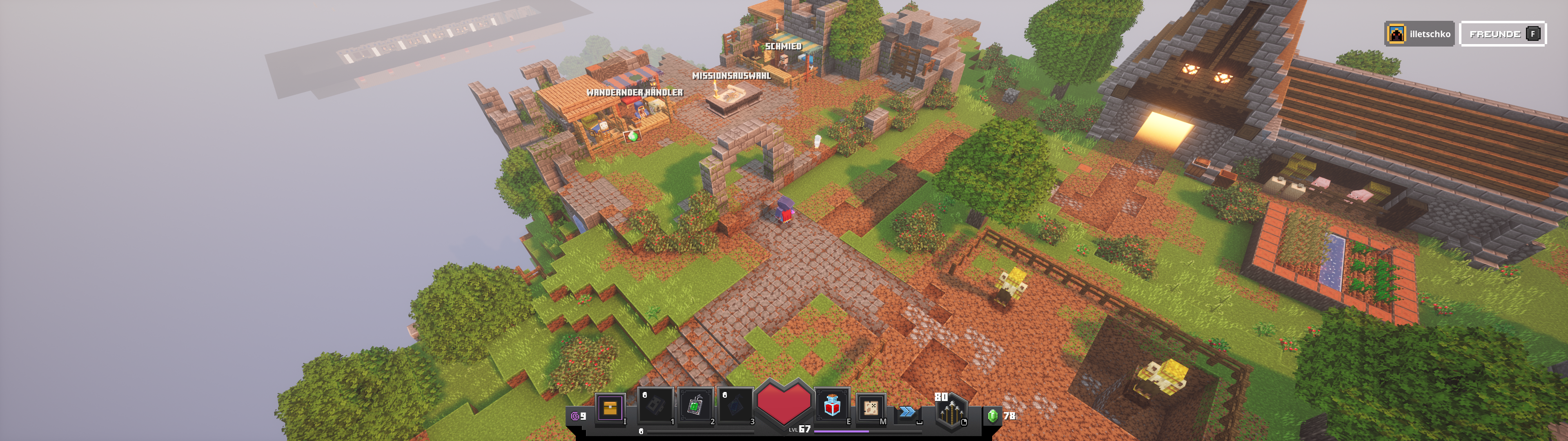
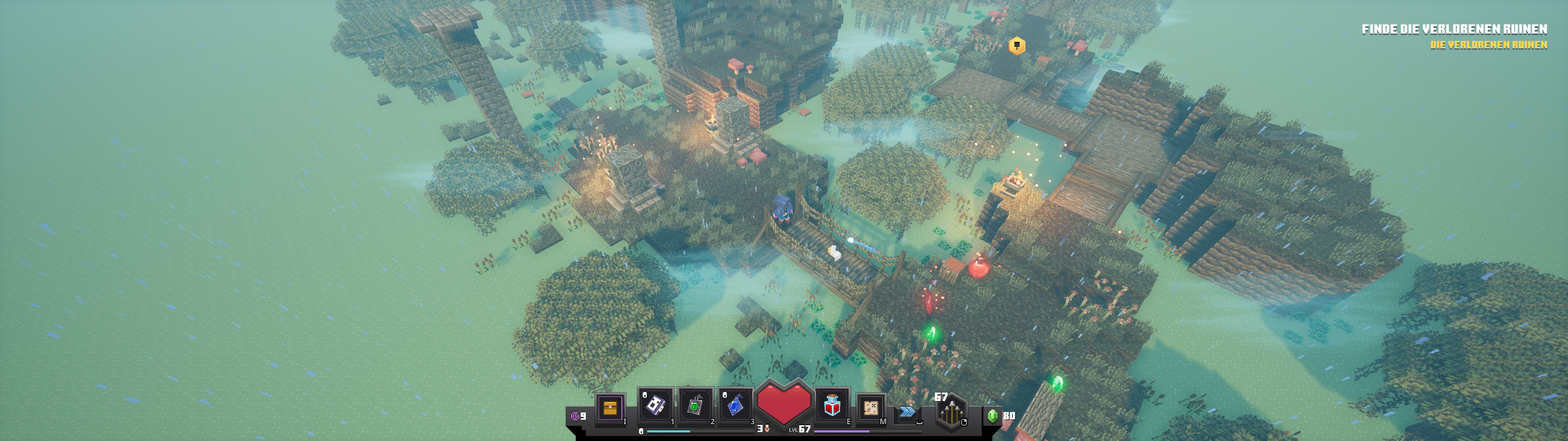
In 'Wide.png` make note of details on the edges of the screen, such as the scarecrow to the East and the tent to the North, then compare it to 'Ultrawide.png'. 'horriblebug.png' by Tony and '3840x1080.PNG' by Rene Illetschko both show how this is amplified at higher resolutions.
Linked Issues
is duplicated by11
 MCD-1048Ultrawide support?DuplicateMCD-1122Ultra Widescreen field of view way to small.DuplicateMCD-1190Zoom Error with 32:9DuplicateMCD-1315Ultra-wide resolutions zoomed in too farDuplicateMCD-1735Ultrawide aspect ratios not supportedDuplicateMCD-2364FOV is wrong on 5120*1440DuplicateMCD-3796Game Doesn't Respond to Aspect Ratios CorrectlyDuplicateMCD-3990Resolution issue/Display PS4DuplicateMCD-5156Windows Xbox StoreDuplicateMCD-6604Ultrawide Support buggedDuplicateMCD-7308Handle wide-screen resolutionsDuplicate
 MCLG-34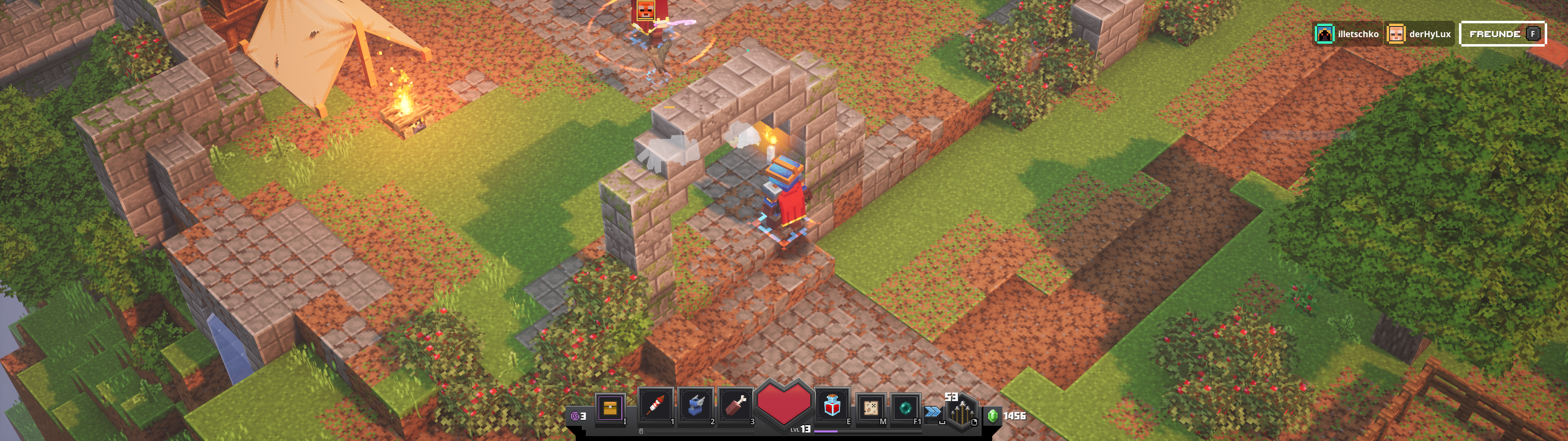



Created Issue:
View is cropped with higher aspect ratio screens
Instead of keeping the same zoom level, 21:9 gameplay is just a cropped view of 16:9, resulting in very reduced visibility when fighting / moving North / South.
Attachments2
- Unresolved
- Open
- Unconfirmed
- Windows 10
- Version #19304

Please fix this Mojang. This game would look wonderful in 21:9. Please don't break the user experience in this way


![[Mojang] Mega_Spud (Jay Wells)](../../../data/avatars/users/92696.png)
![[Mod] violine1101](../../../data/avatars/users/92858.png)
is duplicated by
![[Bot] Arisa](../../../data/avatars/users/43007.png)
is duplicated by
is duplicated by
![[MCPE Mod] Celesian](../../../data/avatars/users/81635.png)
is duplicated by
3840x1080-1.PNG
is duplicated by
is duplicated by
is duplicated by
![[Mod] LateLag](../../../data/avatars/users/92884.png)
relates to
An easy fix would be to scale the zoom by the vertical pixel count instead of horizontal. The game really isn't playable on wider than 16:9 aspect ratios right now. To the comment about co-op, having an option to split the screen side to side would help.
is duplicated by
Instead of keeping the same zoom level, 21:9 gameplay is just a cropped view of 16:9, resulting in very reduced visibility when fighting / moving North / South.
Steps to Reproduce:
[Step 1] Set resolution to ultrawide 3840 x1080 "need an ultrawide monitor"
Observed Results:
The screen at the top and bottom are cropped and its impossible to see anything ahead or behind you because its too zoomed in.
Expected Results:
Would like to be able to see mobs that are in front of me, adding a FOV slider would likely help and scaling the screen correctly for the resolution
Screenshots/Videos

Original Description:
Instead of keeping the same zoom level, 21:9 gameplay is just a cropped view of 16:9, resulting in very reduced visibility when fighting / moving North / South.
Steps to Reproduce:
[Step 1] Set resolution to
ultrawide 3840 x1080 "need an ultrawide monitor"Observed Results:
The screen at the top and bottom are cropped and its impossible to see anything ahead or behind you because its too zoomed in.Expected Results:
Would like to be able to see mobs that are in front of me, adding a FOV slider would likely help and scaling the screen correctly for the resolutionScreenshots/Videos
Original Description:
Instead of keeping the same zoom level, 21:9 gameplay is just a cropped view of 16:9, resulting in very reduced visibility when fighting / moving North / South.Steps to Reproduce:
[Step 1] Set resolution to any resolution with a ratio wider than 16:9, e.g 3440x1440, 3840 x1080, etc.
Observed Results:
21:9 gameplay is a cropped view of 16:9, resulting in very reduced visibility when fighting/moving North/South.
Expected Results:
As lots of Minecraft Dungeons involves moving North, ultrawide displays should have the same vertical FoV as 16:9.
Steps to Reproduce:
[Step 1] Set resolution to any resolution with a ratio wider than 16:9, e.g 3440x1440, 3840 x1080, etc.
Observed Results:
21:9 gameplay is a cropped view of 16:9, resulting in very reduced visibility when fighting/moving North/South.
Expected Results:
As lots of Minecraft Dungeons involves moving North, ultrawide displays should have the same vertical FoV as 16:9.
Screenshots/Videos:
Attached
Steps to Reproduce:
[Step 1] Set resolution to any resolution with a ratio wider than 16:9, e.g 3440x1440, 3840 x1080, etc.
Observed Results:
21:9 gameplay is a cropped view of 16:9, resulting in very reduced visibility when fighting/moving North/South.
Expected Results:
As lots of Minecraft Dungeons involves moving North, ultrawide displays should have the same vertical FoV as 16:9.
Screenshots/Videos:
Attached
Steps to Reproduce:
[Step 1] Set resolution to any resolution with a ratio wider than 16:9, e.g 3440x1440, 3840 x1080, etc.
Observed Results:
21:9 gameplay is a cropped view of 16:9, resulting in very reduced visibility when fighting/moving North/South.
Expected Results:
As lots of Minecraft Dungeons involves moving North, ultrawide displays should have the same vertical FoV as 16:9.
Screenshots/Videos:
Attached
Notes:
In 'Wide.png` make note of details on the edges of the screen, such as the scarecrow to the East and the tent to the North, then compare it to 'Ultrawide.png'. 'horriblebug.png' by Tony and '3840x1080.PNG' by Rene Illetschko both show how this is amplified at higher resolutions.
is duplicated by
is duplicated by
![[Mod] Greymagic27](../../../data/avatars/users/92875.png)
relates to
relates to
Thank you for your report!
We're tracking this issue in MCD-160, so this ticket is being resolved and linked as a duplicate.
If you would like to add a vote and any extra information to the main ticket it would be appreciated.
If you haven't already, you might like to make use of the search feature to see if the issue has already been mentioned.
Quick Links:
📓 Issue Guidelines – 💬 Community Support – 📧 Customer Support – ✍️ Feedback and Suggestions – 📖 Game Wiki – 📖 FAQs
Thank you for your report!
We're tracking this issue in MCD-160, so this ticket is being resolved and linked as a duplicate.
If you would like to add a vote and any extra information to the main ticket it would be appreciated.
If you haven't already, you might like to make use of the search feature in the future to see if the issue has already been reported.
Quick Links:
📓 Issue Guidelines – 💬 Community Support – 📧 Customer Support – ✍️ Feedback and Suggestions – 📖 Game Wiki – 📖 FAQs
Thank you for your report!
We're tracking this issue in MCD-160, so this ticket is being resolved and linked as a duplicate.
If you would like to add a vote and any extra information to the main ticket it would be appreciated.
If you haven't already, you might like to make use of the search feature in the future to see if the issue has already been reported.
Quick Links:
📓 Issue Guidelines – 💬 Community Support – 📧 Customer Support – ✍️ Feedback and Suggestions – 📖 Game Wiki – 📖 FAQs
same as MCD-160
sry
Thank you for your report!
We're tracking this issue in MCD-160, so this ticket is being resolved and linked as a duplicate.
If you would like to add a vote and any extra information to the main ticket it would be appreciated.
If you haven't already, you might like to make use of the search feature to see if the issue has already been mentioned.
Quick Links:
📓 Issue Guidelines – 💬 Community Support – 📧 Customer Support – ✍️ Feedback and Suggestions – 📖 Game Wiki – 📖 FAQs
Thank you for your report!
We're tracking this issue in MCD-160, so this ticket is being resolved and linked as a duplicate.
If you would like to add a vote and any extra information to the main ticket it would be appreciated.
If you haven't already, you might like to make use of the search feature in the future to see if the issue has already been reported.
Quick Links:
📓 Issue Guidelines – 💬 Community Support – 📧 Customer Support – ✍️ Feedback and Suggestions – 📖 Game Wiki – 📖 FAQs

Thank you for your report!
We're tracking this issue in MCD-160, so this ticket is being resolved and linked as a duplicate.
If you would like to add a vote and any extra information to the main ticket it would be appreciated.
If you haven't already, you might like to make use of the search feature to see if the issue has already been mentioned.
Quick Links:
📓 Issue Guidelines – 💬 Community Support – 📧 Customer Support – ✍️ Feedback and Suggestions – 📖 Game Wiki – 📖 FAQs
Thank you for your report!
We're tracking this issue in MCD-160, so this ticket is being resolved and linked as a duplicate.
If you would like to add a vote and any extra information to the main ticket it would be appreciated.
If you haven't already, you might like to make use of the search feature to see if the issue has already been mentioned.
Quick Links:
📓 Issue Guidelines – 💬 Community Support – 📧 Customer Support – ✍️ Feedback and Suggestions – 📖 Game Wiki – 📖 FAQs
Thank you very much for the screenshot showcasing the issue.
We're tracking this issue in MCD-160, so this ticket is being resolved and linked as a duplicate.
If you would like to add a vote and any extra information to the main ticket it would be appreciated.
If you haven't already, you might like to make use of the search feature to see if the issue has already been mentioned.
Quick Links:
📓 Bug Tracker Guidelines – 💬 Minecraft Discord – 📧 Mojang Support
📓 Project Summary – ✍️ Feedback and Suggestions – 📖 Game Wiki – 📖 FAQs
Thank you for your report!
We're tracking this issue as MCD-160, so this ticket is being resolved and linked as a duplicate.
That ticket has already been resolved as Won't Fix, which means this is considered a bug but won't be fixed. The description of that ticket or the comments might explain the rationale. Please do not leave a comment on the linked ticket.
If you haven't already, you might like to make use of the search feature to see if the issue has already been mentioned.
Quick Links:
📓 Bug Tracker Guidelines – 💬 Community Support – 📧 Mojang Support
📓 Project Summary – ✍️ Feedback and Suggestions – 📖 Game Wiki – 📖 FAQs
– I am a bot. This action was performed automatically! The ticket was resolved by one of our moderators, and I left this message to give more information to you.
Thank you for your report!
We're tracking this issue in MCD-160, so this ticket is being resolved and linked as a duplicate.
If you would like to add a vote and any extra information to the main ticket, it would be appreciated.
If you haven't already, you might like to make use of the search feature to see if the issue has already been mentioned.
Quick Links:
📓 Issue Guidelines – 💬 Mojang Support – 📓 Project Summary – 📧 Suggestions – 📖 Minecraft Wiki
Relates to MCD-160???
Please fix this Mojang. Minecraft Dungoens would look wonderful in 21:9. Please don't break the user experience in such a way. That would be very disappointing.
I agree! Could really use a fix 32:9 is unplayable.
3440x1440 here, Please fix this! I have to play windowed mode in the meantime.
32:9 1440p could use some love
Yes, all the above! In 32:9, in my case, 5120x1440 its cropped very badly. My daughter's machine has a 2560x1080 (21:9) which doesn't look terrible, but definitely not ideal.
This is a common issue for 21:9 and 32:9 resolution displays with the default scaling Unreal Engine 4 uses, and has been for years. Its really a shame new games using Unreal Engine are still encountering this issue. The issue occurs because the default scaling for UE4 is Vert- which ends up locking the y axis. As such it zooms the screen for any resolution wider that 16:9 instead of scaling it appropriately. Ideally scaling should be Hor+ instead so that resolutions wider than 16:9 scale properly, or better yet let the user select between Vert- and Hor+ scaling as needed for their specific display setup.
In games where the FOV is adjustable you can partially work around this, but it doesn't appear that FOV adjustments are available for MCD. Due to this issue and not having FOV adjustments I find the game to be unplayable at my native 32:9 ( 3840x1080) resolution. Mainly because ranged mobs will spawn on ledges that make it impossible to shoot them with a ranged weapon due to the zoom/scaling at this resolution, and since they are on elevated terrain you can't melee them either. 21:9 appears to at least be playable, but is still less then ideal. If we could get proper scaling for 21:9 and 32:9 resolutions it would be appreciated.
2560x1080 here. Same issue as the higher (and more common) 21:9 resolution of 3440x1440.
So after some digging I was able to work around this issue with the following steps:
1. Exit the game
2. Navigate to C:\Users\<UserName>\AppData\Local\Dungeons\Saved\Config\WindowsNoEditor
3. Open Engine.ini in your preferred text editor
4. Add the following to the bottom of the file:
[/script/engine.localplayer]
AspectRatioAxisConstraint=AspectRatio_MaintainYFOV
5. Save and close the file
6. Start the game
Kevin, your solution only works until you start a mission. Then the HOR FOV is restored to default and the game is cropped at the top and bottom (aka zoomed in).
Kevin, THANK you !
works for me !
you have done it in 2 Days and Mojang is in there for Months...
Ya, unfortunately. It works for menu's and initially in camp, but once you launch a mission it seems to revert the scaling. Not sure why since the setting isn't removed from the config file.
We need to also be cognizant of the fact that it may not be just a simple ratio hor / vert fix. There could easily be other concerns... they could have AI disabled when its "off screen" or graphics elements not streamed in until the last second. Zooming out further may cause some of those things to show; which would be bad and would need to be addressed as well. Hopefully there's enough wiggle room that the camera can be pulled back without any problems.
Kevin/Eric works for me in Game too !
Ugh, I'd try it, but I can't find the freakin files, because it's a Microsoft Store game.
C:\Users{UserName}\AppData\Local\Dungeons\Saved\Config\WindowsNoEditor
I hit a dead-end at Local.... there is no Dungeons folder.
Hmm is it because i have the windows 7 Version ( play on win10... but didnt like the Microsoft Sore)
Eric, you'll need to look in C:\Users
{UserName}\AppData\Local*Packages*\. Maybe navigate there in Explorer and search for Engine.ini
[
https://www.reddit.com/r/widescreengamingforum/]
found a fix for this in widescreengamingforum subreddit while it's officially fixed.
This is just extremely disappointing from Mojang, I see this case was opened in early April, and it still hasn't been resolved. They are now selling the game without any information about unsupported resolutions, had I known I would not have bought it.
And as I can see they haven't made any kind of comment about it in this case even thou they are closing other cases about the same issue and pointing us to this case, saying they are tracking the issue here.
This is just really really bad. I will try out the "tool" from the Reddit widescreen forum, it just shouldn't be necessary to deal with this kind of issue in a new 2020 game. Also one have to accept the risk of tools like that actually having Trojans, antivirus software certainly doesn't like them.
Voted for this! I play in a coop with my daughter and playing with more than 1 with the screen in this zoon doesn't work.
Has anyone heard anything from Mojang about this issue? I can see they have confirmed this case, but nothing has been fixed yet. It seems like Mojang has dropped the ball here....
Thank you for your report!
However, this issue has been temporarily closed as Awaiting Response
Is this still an issue in the latest version? If it is, please try and include steps to reproduce the issue of possible:
If your ticket does not look like the example given here, then it's likely to be closed as incomplete.
This ticket will automatically reopen when you reply.
Quick Links:
📓 Issue Guidelines – 💬 Mojang Support – 📧 Suggestions – 📖 Minecraft Wiki
Hello,
I have been waiting to play Minecraft Dungeons on my ultrawide since release, I tried re downloading it today and I am outraged this issue is still not fixed, I don't understand why its so hard to understand what the problem is, you cant see nothing in front or behind you because its cropped.
See the image below, there is nothing to reproduce its a simple fix add in a fov slider and fix the in front and behind space because its literally unplayable on super ultra wides.
Please look into this issue as its been reported since the release day and for a Microsoft company its ridiculous its still not resolved.
Your Microsoft if you don't have an ultrawide monitor buy one and test it
Edit Find format below that is posted above from Mojang.
Steps to Reproduce:
[Step 1] Set resolution to ultrawide 3840 x1080 "need an ultrawide monitor"
Observed Results:
The screen at the top and bottom are cropped and its impossible to see anything ahead or behind you because its too zoomed in.
Expected Results:
Would like to be able to see mobs that are in front of me, adding a FOV slider would likely help and scaling the screen correctly for the resolution
Screenshots/Videos
Today I bought the Win10 version due to terrible framerates on the Switch version - and I can confirm that it crops top and bottom on ultrawide (3440x1440) instead of widening sideways (side by side comparison in the same online game as the Switch).
Clearly just a config error, would appreciate a fix.
...Two versions of the same game on 2 different platforms and neither are in good visual order - I'm not going to play the lottery this week!
Thank you for your report!
However, this issue has been closed as Won't Fix.
If you'd like to post a suggestion or give further feedback, please visit the Minecraft Feedback Site or choose a link below.
Quick Links:
📓 Issue Guidelines – 💬 Mojang Support – 📧 Suggestions – 📖 Minecraft Wiki
Could we at least please get a reason?
This is absurd, there is no good reason why you won't fix this. So those of us that have an ultrawide aspect ratio will have to constantly patch our executable to be able to play the game properly.
why would you not add in an option to enable ultra wide support?? Every other game has this, the game runs perfect with the mod that enables this, I really don’t understand why this is not possible, this issue has been open since launch and now your telling us this is not possible? Please talk to your managers and bring this issue to attention.
I'll give you the reason.... there's a mod hack available to fix it, so they are too lazy to actually do the work and make it official. It's fine though, I stopped playing this game a long time ago; and now I know they really don't care. A very large number of people use ultra-wide monitors now, and if they can't understand that and realize it, then they are will have a doomed product.
The issue is now reopened and will be looked into.
That's awesome! Thank you so much!
Any news on the widescreens or tips how should you play on 3840x1600 screen without game being windowed?
2 years and counting. Is it the lack of development incentive or the lack of consideration for a niche audience?
Please consider supporting other aspect ratios. 16:9 is not the only aspect ratio people play games on.
Just posting to show my support for fixing this issue, I'm glad it was re-opened but this really needs to be addressed, even if it's unofficially via a config that won't get overwritten on next launch. I play with my kids, I have an ultrawide and they have 16:9 monitors, and I can only see half what they see, with the top and bottom being cut off. Please give this ticket some attention.
Just popping in to say it's very unfortunate that a 2 trillion dollar company, and a very talented sub division, can't make a game that scales with modern resolutions. Hopefully you find it in your hearts at some point to spend the 3 minutes officially fixing this issue.
This aspect ratio works fine for both Minecraft Windows Edition and Minecraft Legends. Maybe one of the dev team on those projects could help the devs on this team write a config for ultrawide?
This month, the Steam Hardware survey has 1.5% of all monitors as ultrawide; and I read that Dungeons has surpassed 12 Million players, so a potential 180,000 people could be affected by this.
since someone you most likely know (Kevin) made a fix, is it possible for you to release the fix for anyone with the issue to use it?
Bump