Mushroom blocks
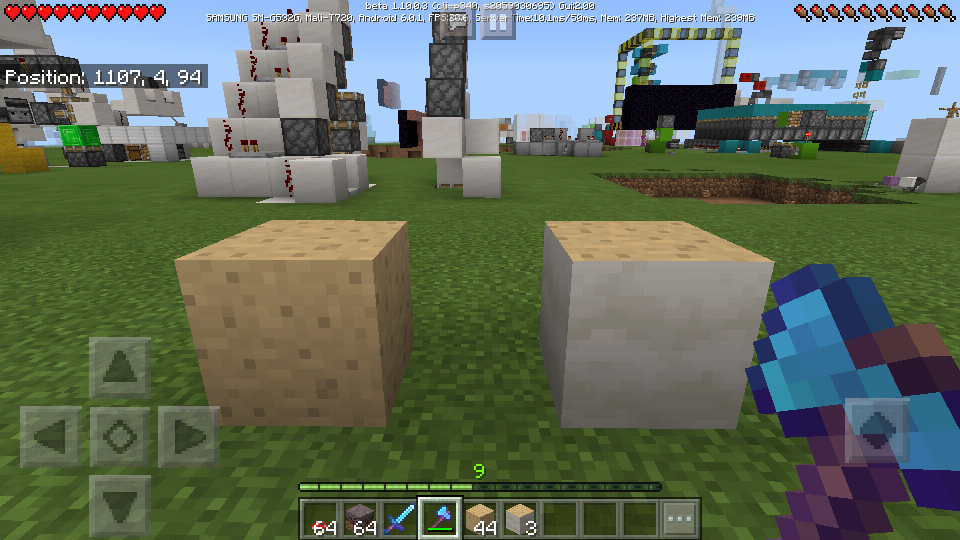
When a mushroom block is mined with any tool with silk touch, the texture on the block is retained instead of having the same texture on all sides.
How to Reproduce:
-grow a giant mushroom (red or brown)
-mine it with any tool with silk touch (axe is recommended)
I'm not sure if this is intended in the new update or I missed anything in a previous changelog. But this makes building with mushrooms very difficult because of the different patterns on the blocks.
Linked Issues
is duplicated by15
 MCPE-34288Mining gaint mushroom blocks gives you different kinds of it instead of 1 full redDuplicateMCPE-36561Silk Touched Mushroom BlockDuplicateMCPE-39819Unable to obtain red and brown mushroom blocks using silk touch DuplicateMCPE-43572Big mushrooms do drop with pores on all sides.DuplicateMCPE-50562using silk touch on a mushroom wields the wrong blockDuplicateMCPE-52090Mushroom block glitchDuplicateMCPE-52912Unable to collect Red and Brown Mushroom Blocks (1.12 / 2019)DuplicateMCPE-55020Red Mushroom cap block not dropping using silk touchDuplicateMCPE-56806another bug report as wellDuplicateMCPE-58440Brown and red mushroom block are bugedDuplicateMCPE-62846Mushroom block bugDuplicateMCPE-64571Big Mushroom silk touch bug multiplatformDuplicateMCPE-67336Red mushroom blocks aren't the correct texture DuplicateMCPE-67350Red Mushroom Blocks UnattainableDuplicateMCPE-82655Cant silk touch mine mushroom blocksDuplicate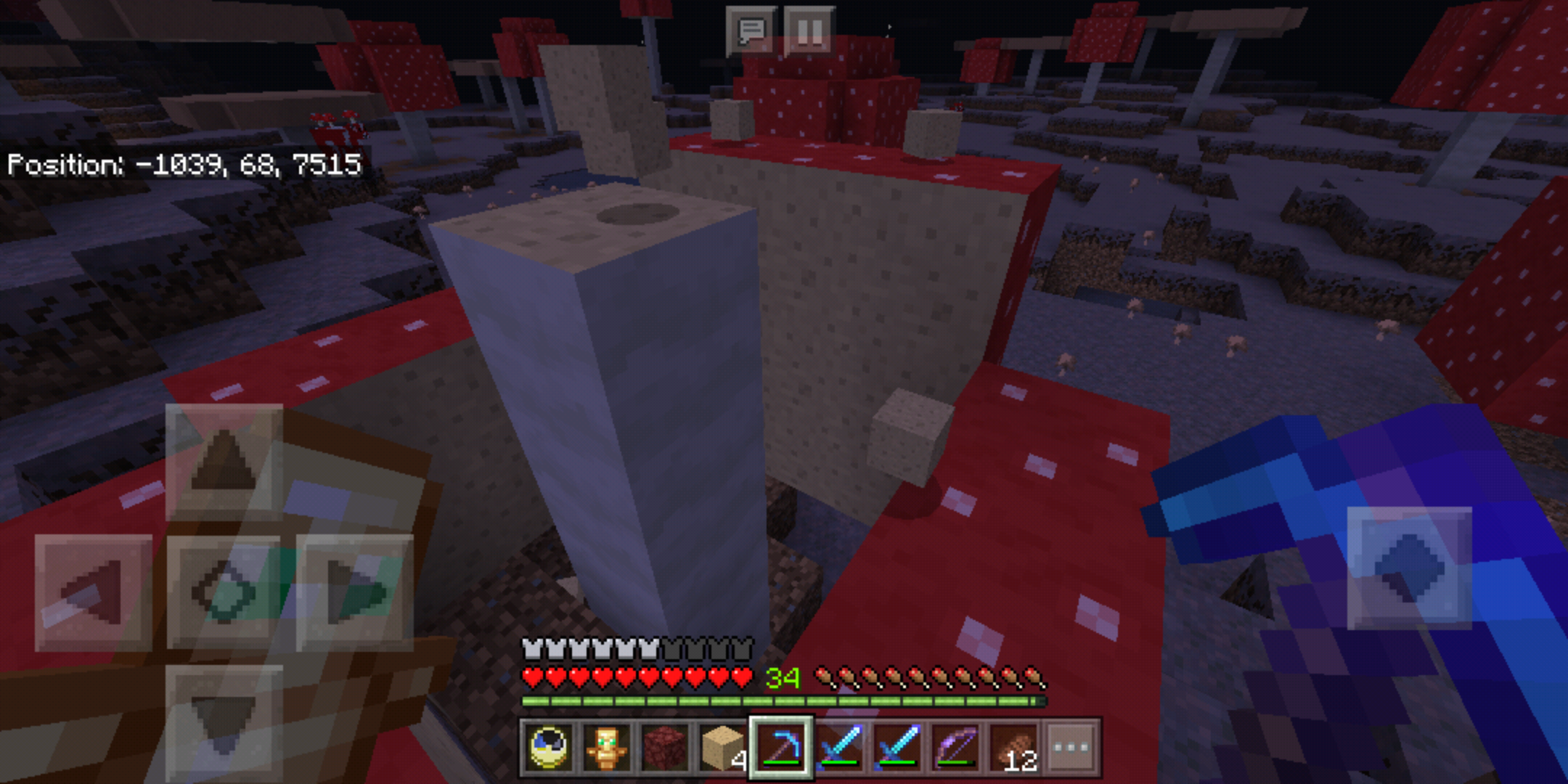

- Fixed
 Jeffrey
- 76
- 19
- Confirmed
- 124523
- Windows
1.16.0.55 Beta - 1.14.60 Hotfix
1.16.0.55 Beta 1.16.0.53 Beta 1.16.0.51 Beta 1.15.0.56 Beta 1.15.0.55 Beta 1.15.0.51 Beta 1.14.20 Hotfix 1.13.3 1.13.1 1.14.1 Hotfix 1.14.0.2 Beta 1.4.1 (Nintendo Switch) 1.5.0.7 1.5.0.10 1.6.0.1 1.4.2.0 1.6.0.5 1.6.0.6 1.5.2.1 1.6.0.8 Beta 1.6.0.30 Beta 1.7.0.2 Beta 1.7.0.9 Beta 1.6.1 1.8.0 1.10.0.3 Beta 1.10.0.4 Beta 1.11.0.1 Beta 1.11.0.3 Beta 1.11.4 1.14.1.2 Beta 1.14.0 1.14.30 Hotfix 1.14.60 Hotfix- 1.16.0.57 Beta 1.16.0
Created Issue:
Mushroom blocks
When a mushroom block is mined with any tool with silk touch, the texture on the block is retained instead of having the same texture on all sides.
How to Reproduce:
-grow a giant mushroom (red or brown)
-mine it with any tool with silk touch (axe is recommended)
I'm not sure if this is intended in the new update or I missed anything in a previous changelog. But this makes building with mushrooms very difficult because of the different patterns on the blocks.
![[Mojang] Mega_Spud (Jay Wells)](../../../data/avatars/users/92696.png)
is duplicated by
relates to

is duplicated by
![[MCPE Mod] Auldrick](../../../data/avatars/users/10122.svg)
![[Mod] tryashtar](../../../data/avatars/users/41963.png)
is duplicated by
is duplicated by
![[Mojang] Nathan Adams](../../../data/assets/gravatar/dinnerbone.png)
Still affects 1.7.0
This needs to be fixed.
Affects Windows 10, Minecraft Bedrock 1.9.0.
is duplicated by
![[Mod] Asteraoth](../../../data/avatars/users/92886.png)
is duplicated by
duplicates
Thank you for your report!
We're already tracking this issue atMCPE-52912, so I will resolve and link this ticket as a duplicate.If you would like to add a vote and any extra information to the main ticket it would be appreciated.
If you haven't already, you might like to make use of the search feature to see if the issue has already been mentioned.
Quick Links:
📓 Issue Guidelines – 💬 Community Support – 📧 Customer Support – 📖 Game Wiki
is duplicated by
duplicates
![[Mod] OcelotOnesie](../../../data/avatars/users/43220.png)
![[MCPE Mod] Celesian](../../../data/avatars/users/81635.png)
is duplicated by
is duplicated by
is duplicated by
is duplicated by
is duplicated by
Can confirm on retail version 1.14.3, and the 1.16.0.51 beta. This bug should be elevated to a higher priority due to the very long life span of this bug, and the fact that this bug limits so many builds, and creative ideas the community may have. Unfortunately this bug limits creativity and affects the entire Minecraft building community, thus should be given a higher priority.
is duplicated by
is duplicated by
![[Bot] Arisa](../../../data/avatars/users/43007.png)
is duplicated by
Thank you for your report!
However, this issue has been closed as a Duplicate of MCPE-34114.
Please add a vote and any new information to the main ticket, which will be updated accordingly.
If you have not, you might like to make use of the search feature before making a new ticket, as it's likely that the issue has been reported already.
Quick Links:
📓 Issue Guidelines – 💬 Community Support – 📧 Feedback – 📖 Game Wiki
Thank you for your report!
However, this issue is a Duplicate of MCPE-34114.
If you have additional information, please add it to that report.
No dates can be provided. Please add your vote to the parent ticket.
Quick Links:
📓 Issue Guidelines – 💬 Community Support – 📧 Customer Support – 📖 Game Wiki

More or less this bug: MCPE-34114
Thank you for your report!
We're actually already tracking this issue at MCPE-34114, so we will resolve and link this ticket as a duplicate.
If you would like to add a vote and any extra information to the main ticket it would be appreciated.
If you haven't already, you might like to make use of the search feature to see if the issue has already been mentioned.
Thank you for your report!
We're actually already tracking this issue at MCPE-34114, so we will resolve and link this ticket as a duplicate.
If you would like to add a vote and any extra information to the main ticket it would be appreciated.
Quick Links:
📓 Issue Guidelines – 💬 Mojang Support – 📧 Suggestions – 📖 Minecraft Wiki
Duplicate of MCPE-34114.
Duplicate of MCPE-34114.
Thank you for your report!
We're already tracking this issue at MCPE-34114, so I will resolve and link this ticket as a duplicate.
If you would like to add a vote and any extra information to the main ticket it would be appreciated.
If you haven't already, you might like to make use of the search feature to see if the issue has already been mentioned.
Quick Links:
📓 Issue Guidelines – 💬 Community Support – 📧 Customer Support – 📖 Game Wiki
Thank you for your report!
We're already tracking this issue at MCPE-34114, so I will resolve and link this ticket as a duplicate.
If you would like to add a vote and any extra information to the main ticket it would be appreciated.
If you haven't already, you might like to make use of the search feature to see if the issue has already been mentioned.
Quick Links:
📓 Issue Guidelines – 💬 Community Support – 📧 Customer Support – 📖 Game Wiki
Thank you for your report!
We're already tracking this issue at MCPE-34114, so I will resolve and link this ticket as a duplicate.
If you would like to add a vote and any extra information to the main ticket it would be appreciated. If you haven't already, you might like to make use of the search feature to see if the issue has already been mentioned.
Quick Links: 📓 Issue Guidelines – 💬 Community Support – 📧 Customer Support – 📖 Game Wiki
Thank you for your report!
However, this issue is a Duplicate of MCPE-34114.
If you would like to add a vote and any extra information to the main ticket it would be appreciated.
If you haven't already, you might like to make use of the search feature to see if the issue has already been mentioned.
Quick Links:
📓 Issue Guidelines – 💬 Community Support – 📧 Customer Support – 📖 Game Wiki
Thank you for your report!
However, this issue is a Duplicate of MCPE-34114.
If you would like to add a vote and any extra information to the main ticket it would be appreciated.
If you haven't already, you might like to make use of the search feature to see if the issue has already been mentioned.
Quick Links:
📓 Issue Guidelines – 💬 Community Support – 📧 Customer Support – 📖 Game Wiki
Thank you for your report!
We're actually already tracking this issue at MCPE-34114, so I resolved and linked this ticket as a duplicate.
If you would like to add a vote and any extra information to the main ticket it would be appreciated.
If you haven't already, you might like to make use of the search feature to see if the issue has already been mentioned.
Quick Links:
📓 Issue Guidelines – 💬 Community Support – 📧 Customer Support – 📖 Game Wiki

Thank you for your report!
We're actually already tracking this issue under MCPE-34114 so I've requested this report be resolved and linked as a duplicate.
If you would like to add a vote and any extra information to the main ticket it would be appreciated.
If you haven't already, you might like to make use of the search feature to see if the issue has already been mentioned.
Quick Links:
📓 Issue Guidelines – 💬 Community Support – 📧 Customer Support – 📖 Game Wiki
Thank you for your report!
We're actually already tracking this issue under MCPE-34114 so I've requested this report be resolved and linked as a duplicate.
If you would like to add a vote and any extra information to the main ticket it would be appreciated.
If you haven't already, you might like to make use of the search feature to see if the issue has already been mentioned.
Quick Links:
📓 Issue Guidelines – 💬 Community Support – 📧 Customer Support – 📖 Game Wiki
Thank you for your report!
We're actually already tracking this issue at MCPE-34114, so I will resolve and link this ticket as a duplicate.
If you haven't already, you might like to make use of the search feature to see if the issue has already been mentioned.
Quick Links:
📓 Issue Guidelines – 💬 Community Support – 📧 Customer Support – ✍️ Feedback and Suggestions – 📖 Game Wiki
Still affects 1.6.0.1
Still affects 1.6.0.5
Still affects 1.6.0.6
Still in the latest beta. However, the issue seems to have changed. Instead of having different texture orientations, the mushroom blocks are now the same apart from the stem blocks. But the block type is incorrect
Having all different orientations of the mushroom block be a different type was a hug pain. It takes up most of your inventory to silk touch a giant brown mushroom. If a player wants to have the "sponge" texture of the inner mushroom, they should have to surround it with mushroom blocks and then carve away the outer blocks. The blocks that are silk touched should be with the mushroom exterior texture on 5 sides and all stack together as before. The new bug of having only the "sponge" texture is almost worse. At least they stack! (note brown are separate from red, even though they look the same.)
The stem texture is also incorrect. In java they all have the white exterior unlike in bedrock edition where they are similar to logs. I believe this is also the case with brown mushroom blocks (Note that red mushrooms were used in the photo of my earlier comment)
Testing it in 1.10.0.4 Beta, I find that both red and brown stems produce a stem block with white sides and pores on top and bottom, but caps produce blocks with pores on all sides, and the red and brown pore blocks will not stack with each other.
Affects 1.11.0.1 beta version
Affects 1.11.0.3 beta version
Affects 1.11.4 (Windows 10)
Confirming Red mushrooms can not be silk touched to get red mushroom block
Confirmed cannot get red mushroom block with silk touch on 1.11.4. Are their plans to fix this as it's been an issue for a year? Thanks!
It's actually always been this way in the Bedrock version. We've reported it to the developers, but the bug tracker staff doesn't get status updates so I can't tell you about any plans or schedule to fix it. For that, you need to contact a Community Manager, which you can do on the Minecraft Discord or via their Twitter accounts. (We sometimes have trouble with the Discord moderators sending people back here for status updates. If they do that, explain that we don't get updates and ask them to refer you to a Community Manager. Alternatively, you could look for a CM to be on Discord at the time and ask them directly.)
Confirming that on realms LG Q6 bedrock 1.12 on android 8.1 not obtaining red giant mushroom blocks anymore. However, the stem blocks can be obtained when mined, just the rest of the expected red mushroom blocks fall as plain mushroom blocks. (image added)
Auldrick, your comment is totally unhelpful as I dk how to find CM in discord.
My issue is when I mine with silk touch, the red mushroom block only breaks as the inside tan sponge material. I received the stem and the beige sponge blocks from a giant red mushroom when I mined it with silk touch on Nintendo switch and iOS.
I'm playing on Xbox One (1.12). I also have experienced this issue. Using silk touch of any kind on the brown or red mushroom yields the 'interior' block.
I've tried to connect with people through discord with no avail.
I've contacted @Celesion on Discord. I've created a ticket report.
Re-opening because I accidentally linked a duplicate in the wrong direction and closed the wrong ticket.
As of 1.12.1, mining a huge mushroom results in the following drops:
Dropping a brown_mushroom_block when mining a red stem block might have been intentional, because otherwise the identical-appearing drops would not stack together in inventory, which players might find confusing. However, it has the consequence that if you mine an entire huge red mushroom with a Silk Touch tool, then later mine the dropped blocks with a non-Silk Touch tool, they will drop both red and brown mushrooms, which players might find even more confusing since the same thing doesn't happen if you mine a huge brown mushroom.
Sooo, are you are saying that bedrock edition we are unable to obtain the red cap blocks in survival? I just spent quite some time in creative designing a build, and discovered that the red mushroom block cannot be mined or crafted. I mined with silk touch and only received the stem blocks and the bland interior of the red mushroom.
Yes, that's correct, you cannot obtain either the red or the brown cap block in survival in Bedrock. Instead of the cap, you get blocks with pores on all faces, the blocks you're calling "bland interior". And by the way, the stem blocks you got are different from the ones you would have gotten in Java. They have pore textures on the top and bottom, whereas Java gives you the stem texture on all faces.
Incidentally, none of the blocks used to build either kind of huge mushroom are dropped when you mine it, so if you accidentally break a block in a huge mushroom it's impossible to repair it.
That’s a real disappointment. Is a resolution being worked on? Kind of hindrance on gameplay.
For Bedrock, the bug tracker is only a way to submit verified bug reports to Mojang. We don't get progress updates, so I'm not able to answer your question.
This bug does have a fairly high number of upvotes, which helps. But on the other hand, mushroom blocks have had these issues since the early Pocket Edition days, and there haven't really been any reports of serious gameplay issues because of them. In fact, I have to say I don't understand why you say it's a hindrance to gameplay. You don't need to build giant mushrooms in survival to accomplish any of the game's objectives, and if you're building in creative mode the blocks you need are available by using the /give command with the data values shown on the Mushroom Block page of the wiki. For example, to get red cap blocks you would use the command
Well is it not a hindrance in the creative aspect of minecraft, I mean if someone has per say a 100% survival world they can't express their skill
of building custom biomes
Use pistons to push the colored parts around that's what I do.
Ok, so you're saying you don't have complete artistic freedom to obtain and place blocks with an arbitrary arrangement of textures on their faces in a 100% survival world. That's true, but it's not unique to mushroom blocks. You can't obtain and place a lit furnace or a damaged anvil, for instance, and there isn't always a way to get that ability by manipulating the blocks. These special textures just aren't available in Survival.
But that's by design, and it's the same in Java Edition. So what you're looking for is a new ability not currently in the game. That's a feature request, not a bug. It belongs on the Feedback site.
Except that in Java, mushroom blocks drop as having the mushroom texture (for example, the red with dots) on all six sides. From there, you can place mushroom blocks next to them, and when you remove those blocks, the side that touched turns into the "spongey" interior appearance.
Meanwhile, mushroom blocks in Bedrock have that spongey texture on all sides.
I know Minecraft is moving towards feature parity, so I don't know whether this qualifies as a bug or a feature request, but either way it's something that seems to be different for no good reason.
Lyarrah: Fair point. I've never played Java and wasn't aware the cap blocks would change when you placed and re-mined them. Given this info, I'd judge that this probably qualifies as a parity issue. I'll try to make sure the extra information gets communicated to the developers (eventually; the PS4 integration is keeping all of us pretty busy right now).
BTW, these were some of the earliest blocks in Pocket Edition. At the time, parity was a goal but I think Mojang thought of it as a far distant goal and was less concerned with making PE a perfect clone than with getting a playable version of it, so it looks to me like they kind of took a shortcut with these blocks. And until this ticket, nobody was really making an issue of the difference.
It's definitely a parity issue, but there were some technical issues in the past that kept it from being ported to Bedrock. Need to revisit if those are still true.
As far as technical issues, it is likely because the block drops itself with data value 0. This happens to be the mushroom with pores on all sides.
Java Edition uses a block state for each of the 6 faces. Since block states are not stored when in item form, the "pores on all sides" appears when placing rather than when mining.
Bedrock is supposed to receive a flattening, which will include changes to many IDs, as well as block states. It should fix this bug automatically.
Each mushroom block in Java has 64 states (each face can show either the red/brown/stem texture or the pores texture, so that's 2^6 possible combinations), while Bedrock is AFAIK still limited to 16 states. Stem blocks are also different, as in Bedrock they are variants of red/brown mushroom block, while in Java they have their own ID and are the same for both red and brown mushrooms. The placement differences can only be fixed if/when Bedrock finally recives the flattening.
In the meanwhile, mushroom block drops could be changed to the 6-sided cap variants (data value 14) instead of the pore variant (data value 0). Stem variants already drop themselves, so that's fine.
Affects 1.16.0.53.
Affects 1.16.0.55.
Mining red mushrooms with silk touch & I cant get the red colored blocks..ugh. it just drops a block of plain ugly color, like brown. Please fix. I want to build with the red blicks.
1.16.0.57 mining placed mushroom stems with silk touch drops brown mushrooms. this bug is not fully fixed!
1.16.0.59 mushroom spore blocks (from creative) drop brown mushrooms when mined. MCPE-71123