/locate does not always locate the nearest structure
Reproduction steps
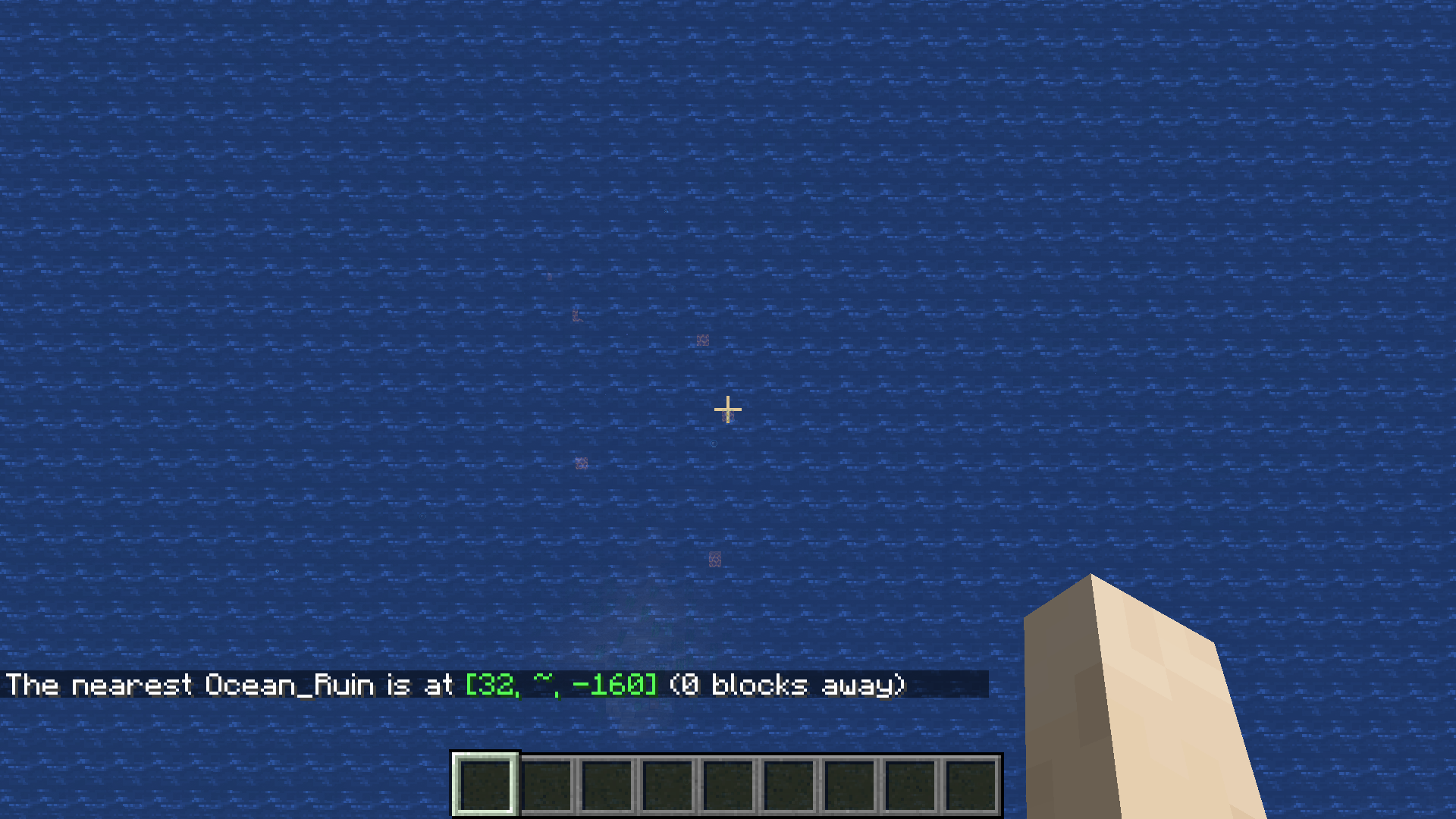
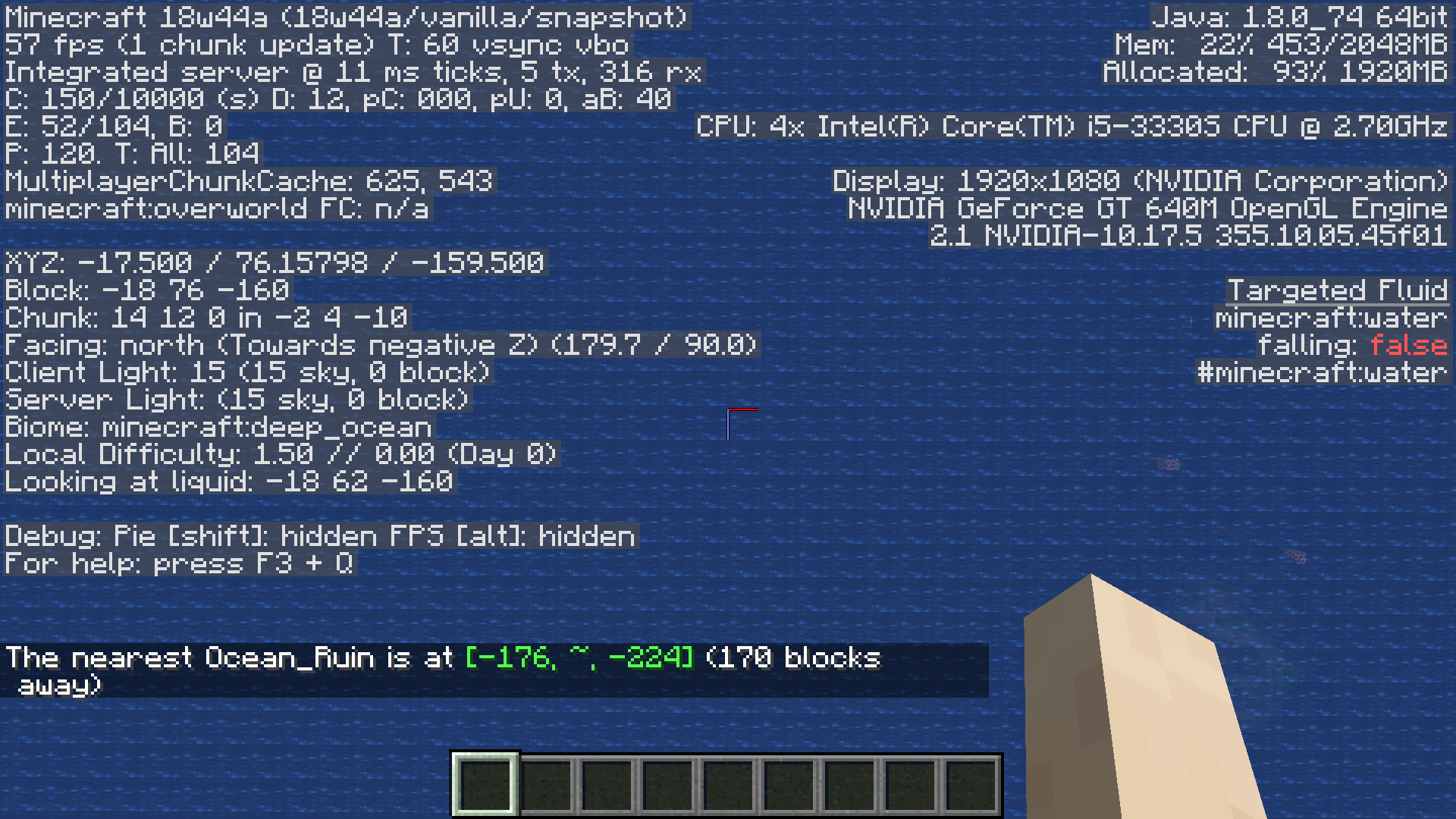
To reproduce, use the seed -5957804310435822198 and use the locate command and teleport to the first ocean ruin at 32 ~ -160. When you teleport to -18 ~ -160, the locate command will locate a different ocean ruin even though the first structure you located is nearest to you.
Cause
See this comment
Linked Issues
is duplicated by16
 MC-134607eyes of ender + locate commandDuplicateMC-140299New_Village coords are incorrectDuplicateMC-148345/locate incorrectly identifies closest structureDuplicateMC-150434Locate command is broken in 1.14 . . .DuplicateMC-178971/locate is listing structures that are further away than the actual nearest oneDuplicateMC-185152/Locate not detecting some structuresDuplicateMC-200649/Locate command is wrongDuplicateMC-215825Command /locate show not nearest structureDuplicateMC-228460Locate command doesn't always locate the nearest villageDuplicateMC-229271the /locate command does not return the closest structureDuplicateMC-238080/Locate Bastion_Remnant only searches in the player's quadrantDuplicateMC-239836Locate Command Giving Location for Non-Closest StructuresDuplicateMC-245939Locate doesn't find nearest structureDuplicateMC-248797/locate giving different results depending on the quadrant you are standing inDuplicateMC-265124/locate changes location when i move one blockDuplicateMC-271211/locate does not always return the nearest structureDuplicate
relates to4
MC-178842/locate leads to non-existent Ruined Portals in OverworldAwaiting Response MCPE-45526/locate command doesn't locate nearest structureFixedMCPE-128391/locate still doesn't always locate the nearest structureConfirmedMC-108801/locate command returns offset or incorrect mineshaft locationsCannot Reproduce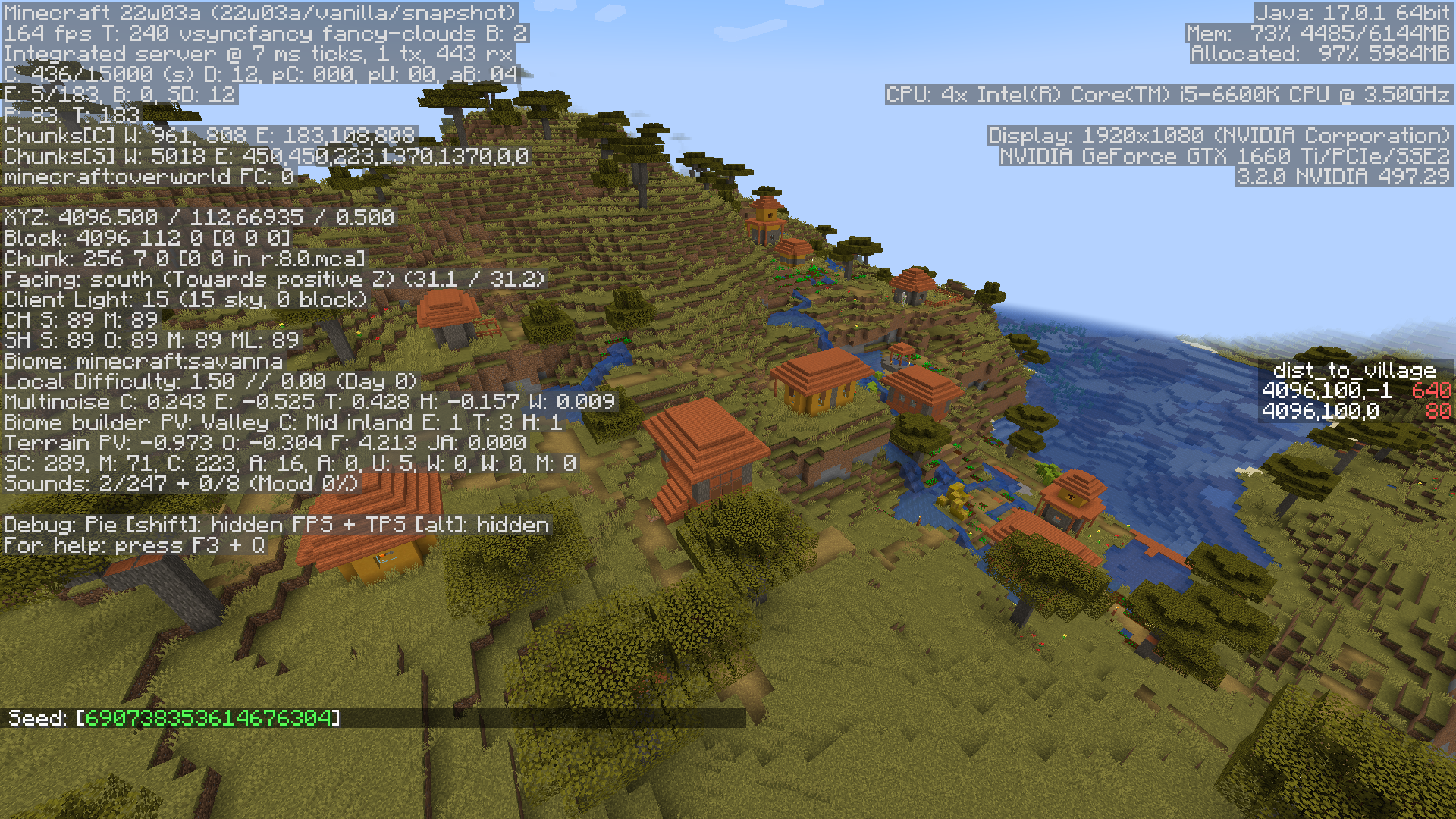
![[Helper] clam lol](../../../data/avatars/users/92852.png)
- Unresolved
![[Helper] gaspoweredpick](../../../data/avatars/users/80904.png) [Helper] gaspoweredpick
[Helper] gaspoweredpick- 51
- 26
- Confirmed
 Normal
- Platform
- Commands
1.13.2 - 1.21.3
1.13.2 18w43c 18w44a 18w45a 18w47b 18w48a 19w14a 1.14.4 1.15-pre6 1.15.2 20w16a 20w17a 20w19a 20w21a 20w22a 1.16-pre2 1.16-rc1 1.16 1.16.1 20w29a 1.16.2 1.16.3 1.16.4-rc1 1.16.4 20w46a 20w49a 1.16.5 21w11a 21w15a 21w19a 1.17 1.17.1-rc1 1.17.1 21w39a 21w42a 1.18 1.18.1 22w03a 1.18.2-pre1 1.18.2-pre3 1.18.2 22w11a 22w12a 22w13a 22w14a 22w16b 22w17a 22w18a 22w19a 1.19-pre1 1.19-pre2 1.19-pre4 1.19-pre5 1.19 22w24a 1.19.1-pre1 1.19.1 1.19.2 1.19.3 23w03a 23w04a 23w05a 23w06a 23w07a 1.19.4-pre1 1.19.4-pre2 1.19.4-rc2 1.19.4 23w12a 23w18a 1.20-pre1 1.20-rc1 1.20 1.20.1 23w31a 23w32a 23w33a 23w35a 1.20.2-rc1 1.20.2-rc2 1.20.4 24w04a 1.20.5 1.20.6 24w21a 24w21b 1.21 24w38a 1.21.3
Created Issue:
Locate command locks onto one structure instead of locating the nearest structure
To reproduce, locate any structure using the /locate command, then teleport at least 100,000 blocks away (enough distance that would make the locate command find a new structure in 1.13.2). Use the locate command again, and notice that it will only locate the first structure it found instead of locating the nearest structure.
Attachments1

To reproduce,
locate any structure usingthe/locate command, thenteleportat least 100,000 blocks away (enough distance that would make the locate command find a new structure in 1.13.2). Use the locate command again, and notice that it will only locate the first structure it found instead of locating the nearest structure.To reproduce, use the seed -5957804310435822198 and use the locate command and teleport to the first ocean ruin at 32 ~ -160. When you teleport to -18 ~ -160, the locate command will locate a different ocean ruin even though the first structure you located is nearest to you.
Locatecommand locks onto one structure instead oflocatingthe nearest structure/locate does not always locate the nearest structure
![[Bot] Arisa](../../../data/assets/gravatar/mustek2.png)

![[Mod] Neko](../../../data/avatars/users/92901.png)
is duplicated by
![[Mojang] Nathan Adams](../../../data/assets/gravatar/dinnerbone.png)
![[Mod] Michael Wobst](../../../data/avatars/users/37868.png)
is duplicated by
![[Mod] violine1101](../../../data/avatars/users/92858.png)
relates to
is duplicated by
is duplicated by
relates to
Reproduction steps
To reproduce, use the seed -5957804310435822198 and use the locate command and teleport to the first ocean ruin at 32 ~ -160. When you teleport to -18 ~ -160, the locate command will locate a different ocean ruin even though the first structure you located is nearest to you.
Cause
See this comment
![[Helper] Johnibur](../../../data/avatars/users/28381.png)
is duplicated by
is duplicated by
![[Bot] Arisa](../../../data/avatars/users/43007.png)
relates to
![[Mod] tryashtar](../../../data/avatars/users/41963.png)
is duplicated by
![[Mojang] Adrian Östergård](../../../data/assets/gravatar/nighter.jpeg)

![[Mod] Chandler](../../../data/assets/gravatar/triwonder81.png)
is duplicated by
![[MCQA] v-weszaj](../../../data/avatars/users/18941.svg)
relates to
is duplicated by
is duplicated by
is duplicated by
is duplicated by
is duplicated by
![[Mod] markderickson](../../../data/avatars/users/18946.svg)
is duplicated by
![[Mod] ampolive](../../../data/avatars/users/18949.svg)
![[Mod] EVGENSYPERPRO](../../../data/avatars/users/92853.png)
![[Mod] turbo](../../../data/avatars/users/92867.png)
![[Mod] Avoma](../../../data/avatars/users/86198.png)
![[Mojang] slicedlime](../../../data/assets/gravatar/slicedlime.jpeg)
is duplicated by
![[Mod] Greymagic27](../../../data/avatars/users/92875.png)
is duplicated by

The /locate command doesn't actually locate the nearest object to you.
Example 1: nearest stronghold not found
Steps to reproduce:
- Use the seed picker to generate "Coastal Village" in creative mode. You will spawn at 960,4.
- From that location, the /locate stronghold command says the nearest stronghold is at 578,882 – about 950 blocks directly south-southwest.
- However, there is another stronghold at 1460,546 – only 740 blocks southeast.
Update 3 May 2019: Additional steps:
- Teleport to the nearer stronghold at 1460,546, or near to it.
- /locate stronghold
- The /locate command still returns the stronghold at 578,882, even though you're right on top of a different one.
The stronghold found by /locate is clearly farther away. It doesn't matter if you're directly on top of the one "invisible" to /locate, or if you move a short distance away from that spot.
Example 2: nearest monument not found
Steps to reproduce:
- Use the seed picker to generate "Ocean Monument Ahead" in creative mode.
- From the spawn point, the /locate monument command shows the nearest monument at -456,152 – over 850 blocks away
- Teleport to the actual nearest monument, or near to it, at 280,120
- Try /locate monument again. Even if you are directly over the monument at 280,120 (or near that spot), /locate still says the nearest one is at -456,152.
- There's another nearby ocean monument directly north of the one you're on top of, at 312,-249. This one also isn't found. The /locate command still favors the far one, even though two other monuments are closer to you.
Is the command using taxicab distance rather than Euclidean distance? If so, that seems odd, because the whole point of /locate is to find the nearest structures. (Struck out, verified Euclidean distance is used, but /locate is failing to find a nearer structure even when I'm right over it; see comment below.)
This is possibly related to MC-138887 reported for Java Edition.
The more general version of this bug would be MC-138887, which is still reproducible as of 2 days ago. The same bug exists in Bedrock, documented at MCPE-45526, in which /locate fails to locate the nearest stronghold or monument.

I believe I may have discovered the reason (or something to the effect thereof) for the problem.
Albeit with my limited understanding of the development behind this, it counts as a guess 
Seed: 356317745171599556
Using screenshot 4..... /execute in minecraft:overworld run tp @s -637.60 88.53 1010.16 494.55 81.45
If I stay in the chunk boundary .... and use "/locate Ruined_Portal" .... it will direct me to the very edge of the chunk in front of me (2 blocks away).
... No portal – /fill excavation of individual blocks confirming that.
(Screenshot 5... /execute in minecraft:overworld run tp @s -642.56 88.53 1005.17 495.45 86.70 — 4 blocks straight line diagonally from screenshot 4)
However, into the next chunk adjacent .... screenshot 5... and run the "/locate Ruined_Portal" command again.... notice the different result.... Different coordinates... and "668 blocks away".
My guess is... if there is no portal in the current Anvil region (see link below for region description - kudos to bdm68's great description on 20th April).... then it navigates you to the closest edge of the current region — to bring you closer to closest ruined portal belonging to another region.
I strongly believe this is related: MC-138887
Thank you for your report!
We're actually already tracking this issue in MC-138887, so I resolved and linked this ticket as a duplicate.
If you would like to add a vote and any extra information to the main ticket it would be appreciated.
If you haven't already, you might like to make use of the search feature in the future to see if the issue has already been reported.
Quick Links:
📓 Issue Guidelines – 💬 Community Support – 📧 Customer Support – ✍️ Feedback and Suggestions – 📖 Game Wiki
Thank you for your report!
We're tracking this issue in MC-138887, so this ticket is being resolved and linked as a duplicate.
If you would like to add a vote and any extra information to the main ticket it would be appreciated.
If you haven't already, you might like to make use of the search feature to see if the issue has already been mentioned.
Quick Links:
📓 Issue Guidelines – 💬 Community Support – 📧 Customer Support – ✍️ Feedback and Suggestions – 📖 Game Wiki
– I am a bot. This action was performed automagically! Please report any issues in Discord or Reddit
Duplicate of MC-138887
Thank you for your report!
We're tracking this issue in MC-138887, so this ticket is being resolved and linked as a duplicate.
If you would like to add a vote and any extra information to the main ticket it would be appreciated.
If you haven't already, you might like to make use of the search feature to see if the issue has already been mentioned.
Quick Links:
📓 Bug Tracker Guidelines – 💬 Community Support – 📧 Mojang Support
📓 Project Summary – ✍️ Feedback and Suggestions – 📖 Game Wiki
Duplicate of MC-138887.
Thank you for your report!
We're tracking this issue in MC-138887, so this ticket is being resolved and linked as a duplicate.
If you would like to add a vote and any extra information to the main ticket it would be appreciated.
If you haven't already, you might like to make use of the search feature to see if the issue has already been mentioned.
Quick Links:
📓 Bug Tracker Guidelines – 💬 Community Support – 📧 Mojang Support
📓 Project Summary – ✍️ Feedback and Suggestions – 📖 Game Wiki
Thank you for your report!
We're tracking this issue in MC-138887, so this ticket is being resolved and linked as a duplicate.
If you would like to add a vote and any extra information to the main ticket it would be appreciated.
If you haven't already, you might like to make use of the search feature to see if the issue has already been mentioned.
Quick Links:
📓 Bug Tracker Guidelines – 💬 Community Support – 📧 Mojang Support
📓 Project Summary – ✍️ Feedback and Suggestions – 📖 Game Wiki
![[Mod] Anthony Cicinelli](../../../data/avatars/users/10122.svg)
Thank you for your report!
We're tracking this issue in MC-138887, so this ticket is being resolved and linked as a duplicate.
If you would like to add a vote and any extra information to the main ticket it would be appreciated.
If you haven't already, you might like to make use of the search feature to see if the issue has already been mentioned.
Quick Links:
📓 Bug Tracker Guidelines – 💬 Community Support – 📧 Mojang Support
📓 Project Summary – ✍️ Feedback and Suggestions – 📖 Game Wiki
![[Mod] j_p_smith](../../../data/avatars/users/92851.png)
Thank you for your report!
We're actually already tracking this issue in MC-138887, so this ticket is being resolved and linked as a duplicate.
If you would like to add a vote and any additional information to the main ticket it would be appreciated.
Please be sure to use the search feature before creating a ticket to see if the issue has already been reported.
Quick Links:
📓 Issue Guidelines – 🛠 Community Support – 📧 Mojang Support – ✍️ Feedback and Suggestions – 💬 Mojira Discord
Seems similar to MC-138887, but with /locatebiome instead of /locate.
Thank you for your report!
We're tracking this issue in MC-138887, so this ticket is being resolved and linked as a duplicate.
If you would like to add a vote and any extra information to the main ticket it would be appreciated.
If you haven't already, you might like to make use of the search feature to see if the issue has already been mentioned.
Quick Links:
📓 Bug Tracker Guidelines – 💬 Community Support – 📧 Mojang Support
📓 Project Summary – ✍️ Feedback and Suggestions – 📖 Game Wiki

Duplicates MC-138887
No need for this to be reopened or to create a new ticket the issue you are describing is MC-138887
MC-138887 doesn't directly talks about anvil regions or quadrants but the comments do. So, I agree that this could be marked as the duplicate of that.
Also, I thought this was only a result of 1.18.2 Pre-1 as I couldn't reproduce it in one world in 22w07a. But with the same seeds I was able to reproduce it in earlier versions as well, so I apologize for that confusion.
Thank you for your report!
We're tracking this issue in MC-138887, so this ticket is being resolved and linked as a duplicate.
If you would like to add a vote and any extra information to the main ticket it would be appreciated.
If you haven't already, you might like to make use of the search feature to see if the issue has already been mentioned.
Quick Links:
📓 Bug Tracker Guidelines – 💬 Community Support – 📧 Mojang Support
📓 Project Summary – ✍️ Feedback and Suggestions – 📖 Game Wiki
– I am a bot. This action was performed automatically! The ticket was resolved by one of our moderators, and I left this message to give more information to you.
Affects 1.19-pre1. (Also Mojang if you're revisiting the /locate implementation maybe take a look at MC-138887?)
Thank you for your report!
We're actually already tracking this issue in MC-138887, so this ticket is being resolved and linked as a duplicate.
If you would like to add a vote or any additional information to the main ticket it would be appreciated.
Please be sure to use the search feature before creating a ticket to see if the issue has already been reported.
Quick Links:
📓 Bug Tracker Guidelines – 🛠 Community Support – 📧 Mojang Support – ✍️ Feedback and Suggestions – 💬 Mojira Discord
Here's the situation as of 24w04a, as far as I can tell.
In the past, extended server freezes (often leading to crashes on dedicated servers) could be caused by locating certain types of structures, most notably buried treasures (MC-249136), or by trying to locate a structure which does not exist nearby/in the current dimension. Both of these issues have now been fixed, so any lag from running the locate command will rarely last more than a few seconds- still significant enough to interfere with mining and combat, but not even close to triggering the watchdog on dedicated servers. As to whether optimizations to the core locate algorithm could further reduce the server hang time, I suspect* that some improvements could be made but that bringing the runtime below 0.05s (1 tick) 100% of the time is unrealistic. This being the case, unless Mojang has some other threshold of when server hangs form /locate constitute a bug, they should either:
- Resolve this as Won't Fix, since the most egregious cases have been dealt with and no further improvements can be made without substantial changes; or,
- Leave this open pending a rewrite of the command system which allows expensive commands like /locate to run on a separate thread and return their results/success at a later time or not at all. Of the existing commands, /locate is probably the only one that would use this functionality.
Personally I would recommend the latter. The locate algorithm is most often used in creative worlds and when generating structure maps, so the result and success values aren't really essential. I did once make an algorithm for a data pack which used the result value as part of a ray marching algorithm to locate and teleport the player to the nearest structure (the structure in question being an entry/exit portal in a custom dimension), and there are probably other niche applications for this value, but in the grand scheme of things safeguarding server performance is more important.
----------------------------------
*To my knowledge no one has analyzed the locate algorithm in detail and suggested efficiency improvements, but the existence of MC-138887 proves that it isn't perfect as is.
This is a duplicate of MC-138887 and can be marked as such.
Playing on a windows computer, version 1.20.5 with experimental features enabled.
Using the /locate command to find structures does not always reveal the nearest one (see images below). In multiple instances, moving only one block (or less) will cause the command to find a structure that is hundreds of blocks further away.
Steps to replicate: Repeatedly use /locate while moving around. At some point, the distance to the nearest structure may jump up/down, indicating that a structure other than the nearest one is being returned (for example, in the third set of images, the player should only be 469+1=470 blocks away from the nearest ruined portal, not 1520).
Expected behavior: Using the /locate command would return the nearest structure.
Seed: 898702134

Thank you for your report!
We're tracking this issue in MC-138887, so this ticket is being resolved and linked as a duplicate.
If you would like to add a vote and any extra information to the main ticket it would be appreciated.
If you haven't already, you might like to make use of the search feature to see if the issue has already been mentioned.
Quick Links:
📓 Bug Tracker Guidelines – 💬 Community Support – 📧 Mojang Support (Technical Issues) – 📧 Microsoft Support (Account Issues)
📓 Project Summary – ✍️ Feedback and Suggestions – 📖 Game Wiki
– I am a bot. This action was performed automatically! The ticket was resolved by one of our moderators, and I left this message to give more information to you.
This is a feature request and not a bug.
That said, I too once found myself wanting to teleport to the nearest structure of a given type using commands. I made an algorithm which was kind of like ray marching to update the execution position to the structure's x and z then teleported the player to that location, just below the bedrock, with levitation. A tick (or several later), I detected the structure's y position and teleported the player to the appropriate location. It usually worked quite well, but when MC-138887 occurred during the ray marching I just had to print a message saying "sorry, we can't teleport you from your current location."
The addition of macros in recent versions means getting the x/z with a single locate probably is possible now, if you run the command from a command block and parse the output line. I'm actually working on this right now, just for fun, and will let you know if I can get it working successfully.
Does it happens in other worlds? Have you tried other villages(maybe the one where you are its not a valid village for some reason)
Loaded up a new world to try to reproduce the glitch, and I realized my steps to reproduce were not reliable. I did reproduce this bug using 2 valid ocean ruin structures that could be detected by commands, and I did /locate in various places and confirmed that /locate does not always locate the nearest structure unlike in 1.13.2. I edited this report accordingly, redid my steps to reproduce, and tested them, so now they should be completely reliable.
I reported the same bug
MCPE-45526for Bedrock Edition (and that bug has been confirmed). I found examples of /locate failing to find the nearest structure (a stronghold and two monuments) even when I was right on top of it. This bug isn't just in Java Edition.Here's my steps of reproduction:
1. Use seed -5541185355023925660 and go to exactly
/tp -5831 66 -4607. You might find yourself inside a tree.
2. /locate Desert_Pyramid, it's 241m away.
3. Go 1m north. You should pass through a chunk border doing this.
4. /locate Desert_Pyramid, it's 1060m away!
The locate command doesn't locate the nearest structure because the locate command works on Anvil regions and it stops searching when a structure is found. The Anvil file format saves worlds in region files containing 512×512 blocks. The region is used as a base for generating structures, for example, there can be no more than one village per region, one temple, one ocean monument, one ruined nether portal, one desert well, one witch hut, etc. Other structures have different rules: they could be more common (shipwrecks and ocean ruins can occur multiple times per chunk) or rarer (woodland mansions).
The effect of regions can be seen when steps to reproduce posted by @Paint are analysed. The coordinates given are -5831 66 -4607. Mod 512, x and z are: 313, 1. When the player moves 1m north, the player is crossing a chunk boundary that is also on a region boundary. When crossing a region boundary in this way, the locate command would search a different region for the requested structure, but it searches only one region.
The effect of regions can be seen clearly when looking for ruined Nether portals in the 20w16a snapshot. These occur once per region in the Overworld, in most or all biomes. If one occurs near the edge of a region, crossing a region can cause a nearby ruined portal to be ignored while a farther one is found instead.
If greater accuracy is required, the locate command should be modified so it searches additional neighbouring regions as well as the current region. It should search an additional region on both sides. The command already searches multiple regions, such as when suitable locations for that structure are not nearby. It should add one extra search region on both sides even if the structure is found. This won't guarantee the closest structure will always be found (eg: the nearest edge of villages), but it will prevent obviously wrong results such as the one that Paint demonstrated.
@bdm68 – that's a good explanation, but it doesn't explain how you can be practically right on top of a structure that locate still doesn't find. Multiple examples are cited in
MCPE-45526– granted, that's Bedrock not Java, but the issues do seem related.So A. Matulich... perhaps to add to bdm68's explanation, I do believe it answers why you can be "practically on top of a structure" and locate tells you another structure is closer (assuming bdm68's explanation of this bug is accurate).
Basically... structures generate from a "starting point", a specific coordinate that is almost always on 1 of the outermost edges of the structure, even some blocks away from the actual object because it generates blocks/air/water surrounding the structure - thus, the "starting point" is basically never in the centre of the structure itself.
Thus, if you are in the centre of the structure , yet the generation "starting point" is outside of your current chunk.... your chunk (the centre of the structure) may easily be in a different Anvil region.... therefore being in a different anvil region, your /locate command will draw you away from the nearby structure because it finds another of the same structure in it's own anvil region instead of the one a few blocks away.
I really hope that helps I'm trying to explain something that I think a picture would do better to explain
@Kris – in the examples I cited in
MCPE-45526it doesn't matter where you are around the structure: on top, nearby, just off any outermost boundary in any direction.... locate doesn't find it. That may be a different problem than described in this ticket (this ticket is Java, that one is Bedrock). But I am skeptical that the "anvil region" explanation applies there.Thanks for the feedback @Matulich. Unfortunately I don't have bedrock so can't test that :/ But using this ticket and the seed in the description, I am able to reproduce the issue described by Anvil region ...
I.E.
Using the description seed (-5957804310435822198).
Newly created map in 20w19a.
Spawn in chunk coordinate X:0 Z:-5.
Moving Southbound and running the "/locate Monument" in each chunk - I get "The nearest Monument is at [304, ~, -336] ([NUMBER] blocks away)" stop at chunk X:0 Z:-1 (assuming this is a region boundary)
Exactly SAME happens moving EAST - where I tested chunks X:-3 .... to X:10 ..... (but stayed in Z:-1 and lower... -2, -3, etc) ....... Nearest Monument [304, ~, -336].
However.... the moment you cross the Z:-1 chunk, moving into Z:0 and higher (1, 2, etc)..... (Assumed I'm moving into the next region)
The nearest Monument is at [128, ~,48]. This promotes the Anvil Region description, in that if you're in the wrong region, then you get directed to the closest structure in the respective region, instead of the adjacent region, which could provided a much closer structure.
Although only "related" and not the same problem exactly .... this ticket
MC-178842shows the way crossing a chunk boundary can show a completely different "closest structure" ... from 2 blocks away ... to 668 blocks away...(see screenshots 4 and 5 of that ticket).I of course cannot speak for Bedrock, but am only able to safely reproduce this issue in Java Edition, I believe the mechanics might differ between minecraft versions – so it's reasonable to say the issues could be completely different, or simply present differently altogether. I can only speculate
Having said all that, the "Anvil Region" description provided by @bdm68 fits very well – but I don't know the inner workings of the code myself, so I simply agree with the description of the problem because it fits the issue and makes the most sense to me. If it doesn't fit in the case of Bedrock, then an alternate reason for the problem should be sought I think I might arrange to get bedrock and do some testing to help there
Still present in 20w21a
Still present in 20w22a...
Very interesting test with slightly more info – I just discovered what I think is the corner between 4 "anvil regions"...
Same seed: -5957804310435822198
4 Adjacent chunks..... using "/locate monument"
Chunk coords: 0, 0
The nearest monument is at [128, ~, 48] (136 blocks away)
Notice location..... X and Z positive - monument is South East
Chunk coords: -1, 0
The nearest monument is at [-256, ~, 192] (319 blocks away)
Notice location..... X negative... Z positive - monument is South West
Chunk coords: -1, -1
The nearest monument is at [-416, ~, -288] (504 blocks away)
Notice location..... X and Z negative - monument is North West
Chunk coords: 0, -1
The nearest monument is at [304, ~, -336] (452 blocks away)
Notice location..... X positive... Z negative - monument is North East
Very interesting.
Anyway, still present
Still present in 1.16 Pre-release 8.
@Kris – there may be hope. I confirmed it got fixed in 1.16 in
MCPE-45526in the Bedrock version of this ticket. So a fix is possible – although that may simply mean that Bedrock uses a different mechanism than anvil regions for locating things.Thanks Matulich!
Also confirming this issue is still present in 1.16.1 and 20w29a
Still present in 1.16.2
Present as of 21w42a
This seems to have gotten worse in Java 1.18 (released).
Affects 22w03a.
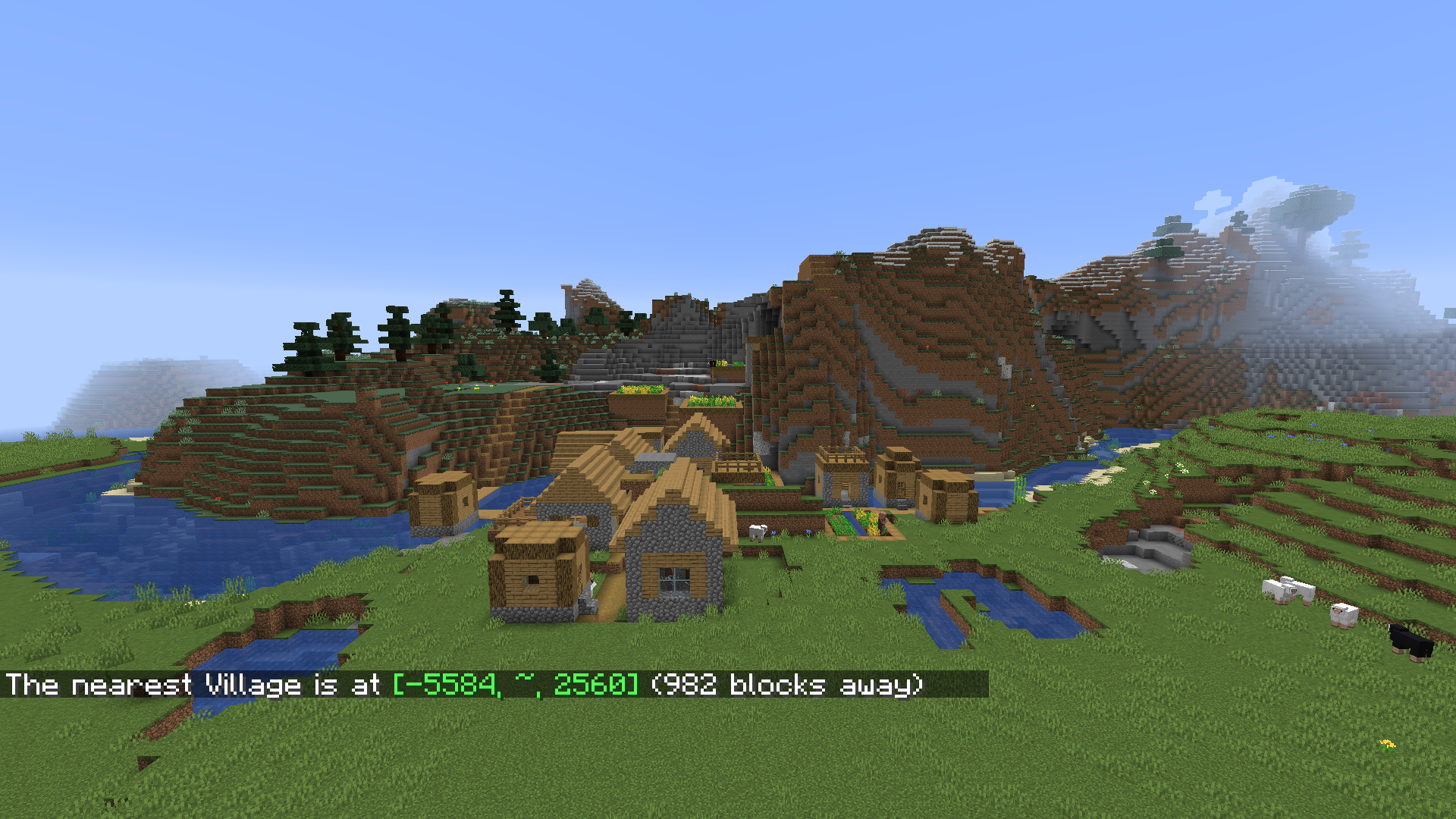
Observe the differing results of /locate village when the command is run from positive/negative z. (Interestingly, crossing x=4096 doesn't seem to affect the results.)
Affects 1.18.2-pre1. The bug no longer occurs at the seed/coords from my previous comment so use this instead:
Observe the differing results when the command is run on either side of x=51200. (This time, crossing z=-8192 does affect things slightly when x>51200.)
Affects 1.18.2-pre3.
Affects 1.18.2.
Affects 22w11a.
Affects 22w12a (edit: and 22w13a, 22w14a and 22w16b).
[Helper] clam lol I think it would be better to comment affected versions in separate comments, as that is easier to see.
[Mod] ampolive well I was trying to avoid shoving my repro seed/coords into the "View X older comments" button but not that you've gone and done it for me I guess I'll resume making separate comments 🙃. (Honestly I can usually reproduce it fairly quickly by just teleporting myself along an axis so it was more for others' sake.)
Affects 22w17a.
Affects 22w18a.
Affects 22w19a. /locate biome is very slightly affected, but not nearly as significantly as /locate structure. /locate poi is unaffected.
Affects 1.19-pre1.
I recently noticed this bug myself in Minecraft 1.19. There were two woodland mansions close to spawn on my world, which I found both via the /locate command. With the second mansion I located with the command, I noticed that according to my coordinates, the first one I located was actually slightly less far away from my position than the second one I located, which was really confusing.
Can confirm in 1.20.5. Also duplicated by
MC-271211.