 Dl
Dl
- Chixvv
- chixvv
- Europe/Stockholm
- Yes
- No
 MC-152724
 MCPE-137195
 Low
Low Normal


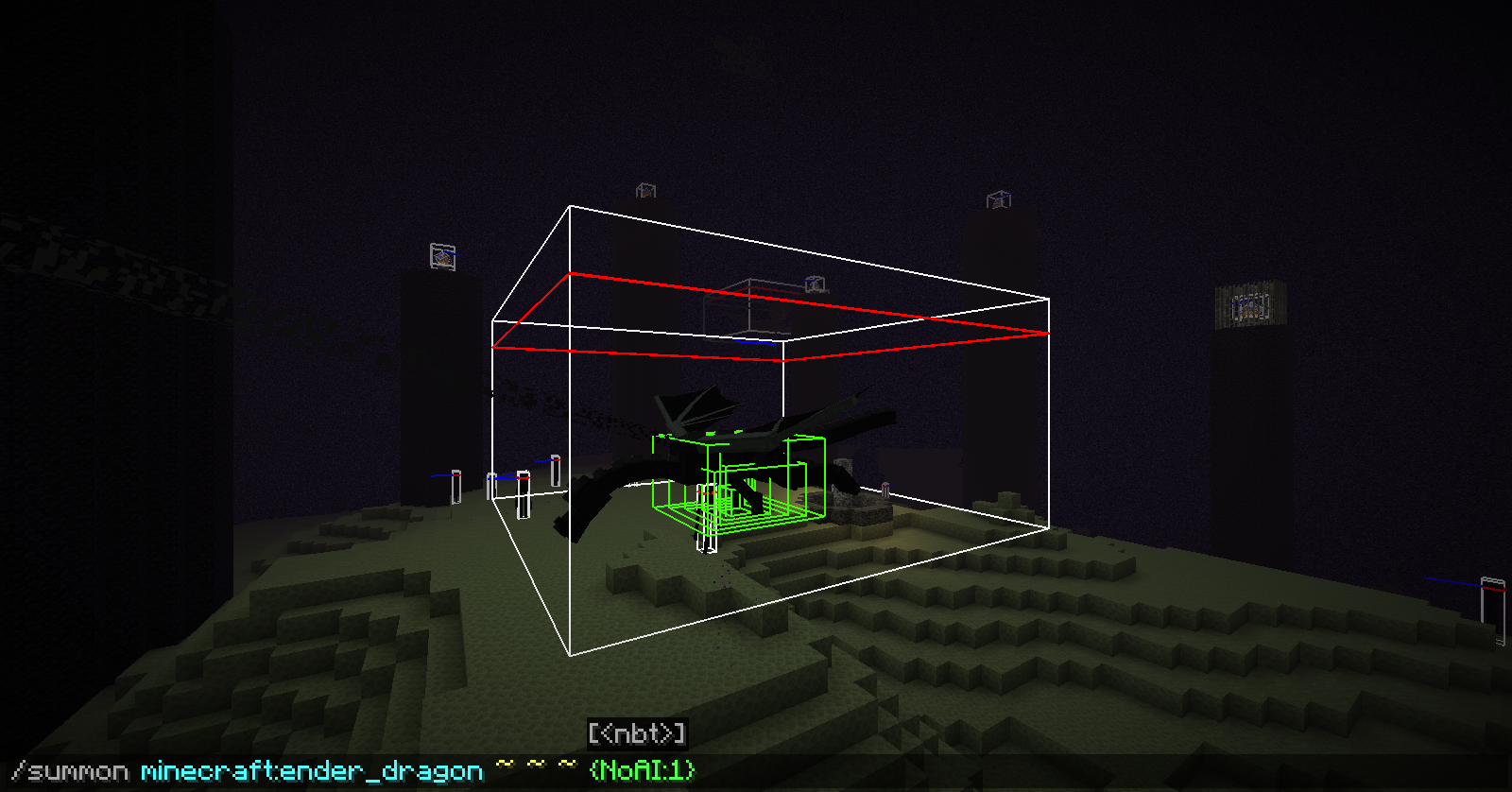
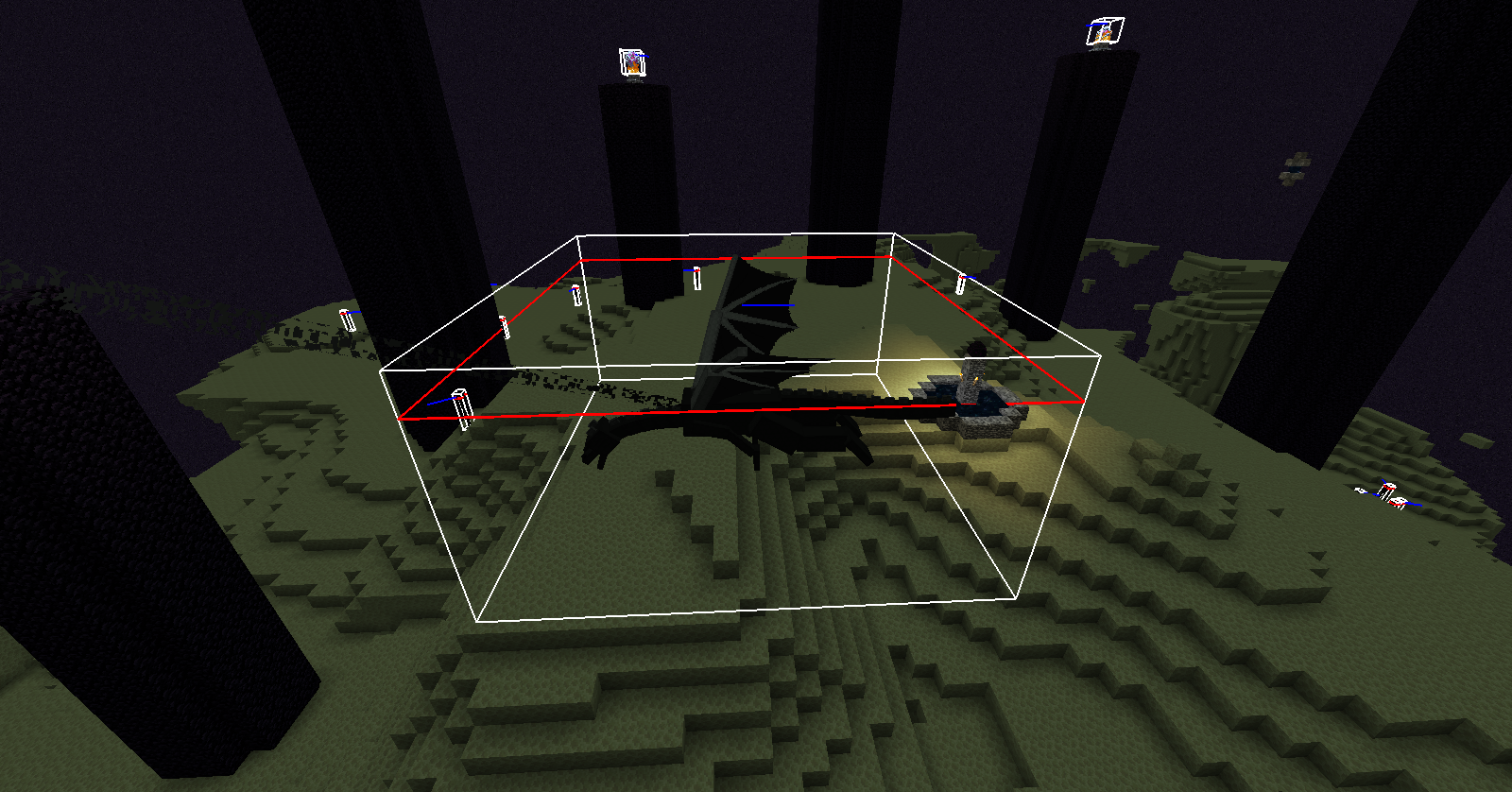


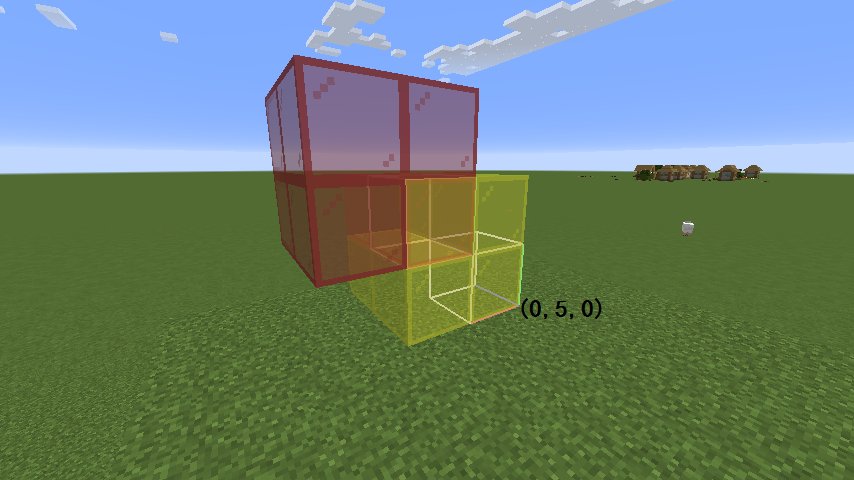

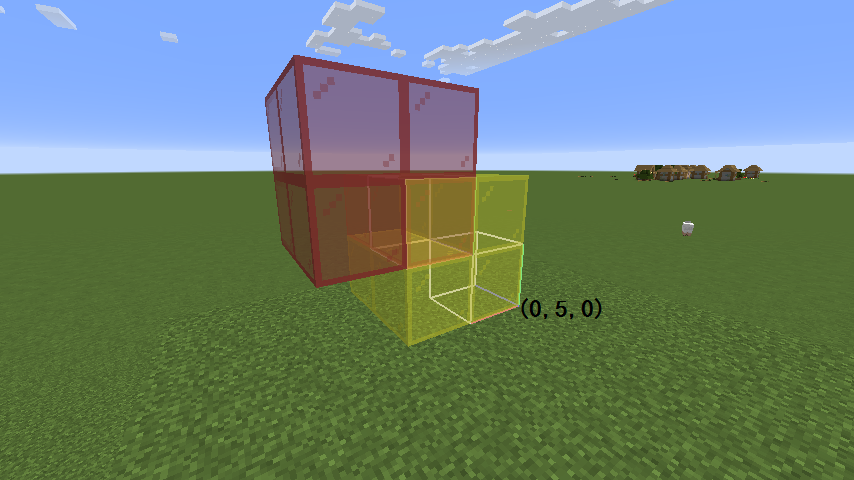


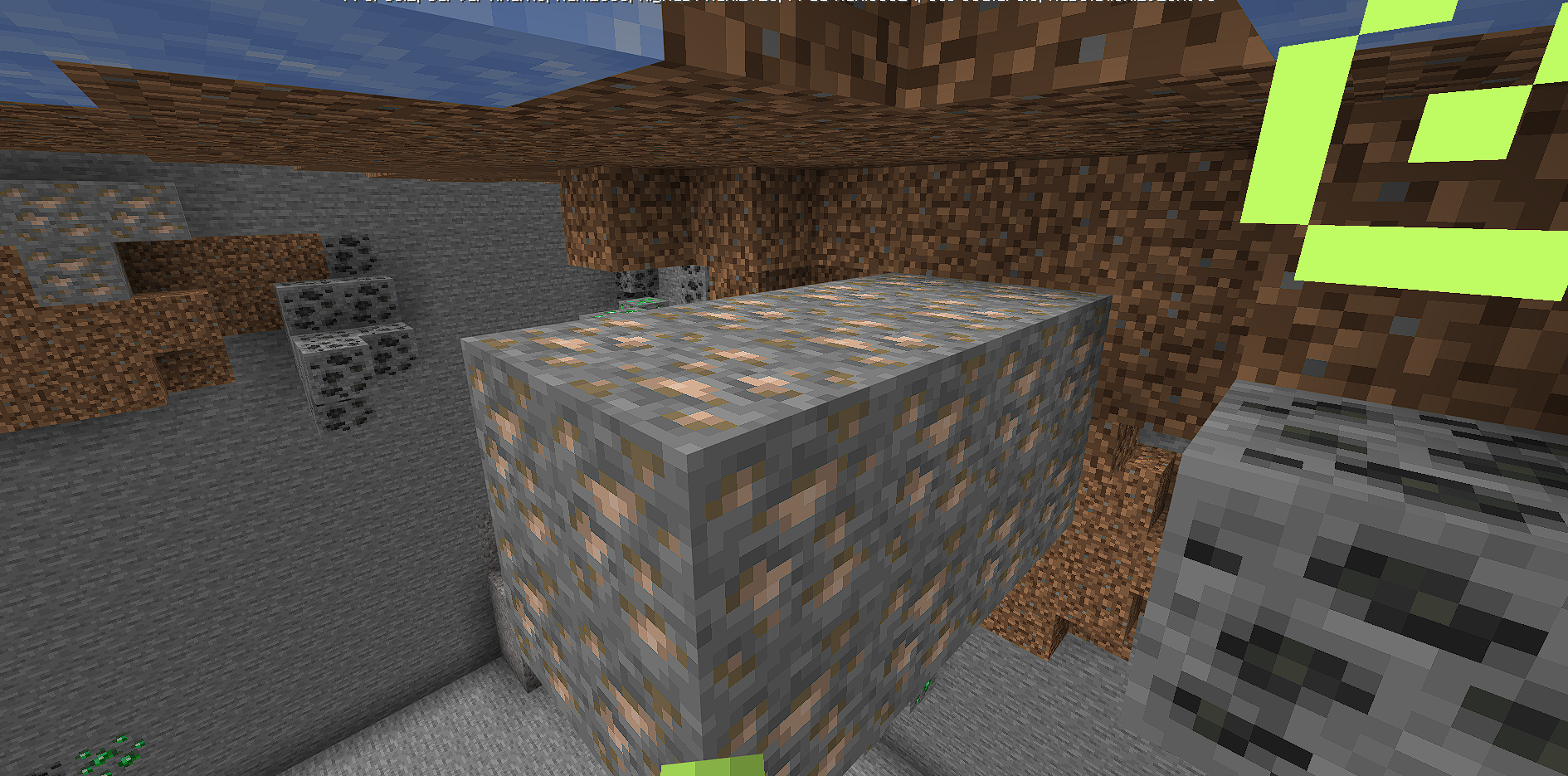
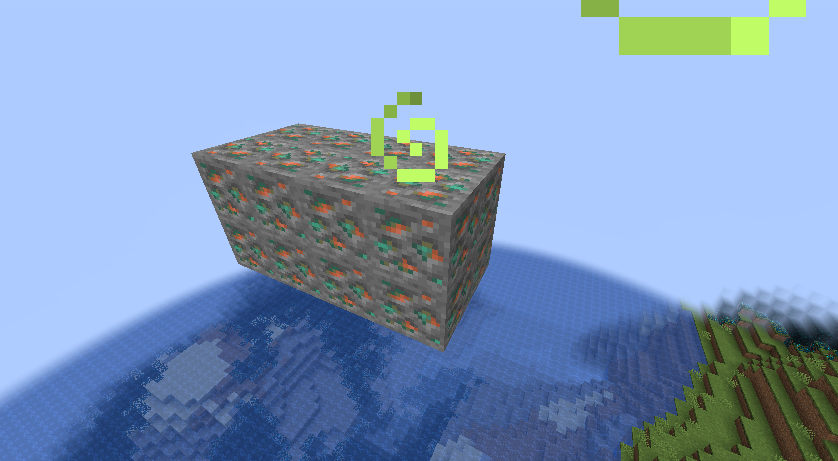




After pressing F3 + B, green hitbox of ender dragon floats high in the sky
/clone overlapping detected in odd ways/clone overlapping detected in an odd way
argument type “minecraft:component” for commnds allows all data types in JSON, including number, boolean, etc.
for example,
/title @s title 1 /title @s title true /bossbar add id 0.555 /tellraw @s falsethese commands works in java edition since 1.13. And they don't make sense. It should only allow string, array, and object.
argument type “minecraft:component” for commnds allows all data types in JSON, including number, boolean, etc.
for example,
/title @s title 1 /title @s title true /bossbar add id 0.555 /tellraw @s falsethese commands works in java edition since 1.13. And they don't make sense. It should only allow string, array, and object.
when day night cycle is false, daylight sensor updates in a strange way.
Execute command /time set 1, then the daylight sensor never updates, even if you put or destroy some opaque blocks above it. unless you click it to invert it.
Execute command /time set 20, then the daylight sensor updates all the time.
As long as the time is a multiple of 20, then daylight sensor updates
all the time. Otherwise, it never updates.
In
javaedition, daylight detector updates every 20 gametick, But in thebedrockedition, it depends on daytime, instead of gametime, which doesn't make any sense.
when day night cycle is false, daylight sensor updates in a strange way.
How to reproduce:
- run /gamerule dodaylightcycle false
- run /time set 22000
- place a daylight sensor and some redstone wire connecting with it. The signal is 0.
- execute command /time set 1001, then the daylight sensor never updates, unless you click it to invert it.
- execute command /time set 20, then the daylight sensor updates every gametick.
As long as the time is a multiple of 20, then daylight sensor updates every gametick. Otherwise, it never updates.
In Java Edition, daylight detector updates every 20 gametick, But in the Bedrock Edition, it depends on daytime, instead of gametime, which doesn't make any sense.
The command block does not output some execution resultsNo message in chat when some commands execute in command block
The command block does not output some execution results
For example, use a command block to execute
/time query gametimeor/ data get entity @pThere are no results in the player's chat bar, the results only can be viewed in the command block.
There is no such problem in 1.12, starting from 1.13
The command block does not output some execution results into chat bar.
For example, use a command block to execute
/time query gametime or / data get entity @pThere are no results in the player's chat bar, the results only can be viewed in the command block.
There is no such problem in 1.12, starting from 1.13.
One effect is that we cannot use the command block to test the timing of the Redstone component operation
The command block does not output some execution results into chat bar.
For example, use a command block to execute
/time query gametime or / data get entity @pThere are no results in the player's chat bar, the results only can be viewed in the command block.
There is no such problem in 1.12, starting from 1.13.
One effect is that we cannot use the command block to test the timing of
the Redstone component operationThe command block does not output some execution results into chat bar.
For example, use a command block to execute
/time query gametime or / data get entity @pThere are no results in the player's chat bar, the results only can be viewed in the command block.
There is no such problem in 1.12, starting from 1.13.
One effect is that we cannot use the command block to test the timing of redstone circuit, because the message of time query doesn't display in chat
Here's two different syntaxes for tp or teleport:
teleport <destination: target> [checkForBlocks: Boolean] teleport <victim: target> <destination: target> [checkForBlocks: Boolean]
however, if I type the following command, guess which one will
itbe resolved into
tp @s true
Unexpectedly, it is resolved as the second syntax, and "true" is regarded as a player's name.
and of course, "true" can indeed be a player name.
So the two syntaxes conflict.
Please remove the second argument in the first syntax.
Here's two different syntaxes for tp or teleport:
teleport <destination: target> [checkForBlocks: Boolean] teleport <victim: target> <destination: target> [checkForBlocks: Boolean]
however, if I type the following command, guess which one it will be resolved into
tp @s true
Unexpectedly, it is resolved as the second syntax, and "true" is regarded as a player's name.
and of course, "true" can indeed be a player name.
So the two syntaxes conflict.
Please remove the second argument in the first syntax.
Here's two different syntaxes for tp or teleport:
teleport <destination: target> [checkForBlocks: Boolean] teleport <victim: target> <destination: target> [checkForBlocks: Boolean]
however, if I type the following command, guess which one it will be resolved into
tp @s true
Unexpectedly, it is resolved as the second syntax, and "true" is regarded as a player's name.
and of course, "true" can indeed be a player name
.
So the two syntaxes conflict.
Please remove the second argument in the first syntax.
Here's two different syntaxes for tp or teleport:
teleport <destination: target> [checkForBlocks: Boolean] teleport <victim: target> <destination: target> [checkForBlocks: Boolean]
however, if I type the following command, guess which one it will be resolved into
tp @s true
Unexpectedly, it is resolved as the second syntax, and "true" is regarded as a player's name.
and of course, "true" can indeed be a player name under particular conditions
So the two syntaxes conflict.
Please remove the second argument in the first syntax.
Here
'stwo different syntaxes for tp or teleport:
teleport <destination: target> [checkForBlocks: Boolean] teleport <victim: target> <destination: target> [checkForBlocks: Boolean]
however, if I type the following command, guess which one it will be resolved into
tp @
strue
Unexpectedly, it is resolved as the second syntax, and "true" is regarded as a player's name.
and of course, "true" can indeed be a player name under particular conditions
So the two syntaxes conflict.
Please remove the second argument in the first syntax.
Here are two different syntaxes for tp or teleport:
teleport <destination: target> [checkForBlocks: Boolean] teleport <victim: target> <destination: target> [checkForBlocks: Boolean]
however, if I type the following command, guess which one it will be resolved into
/tp @a true
Unexpectedly, it is resolved as the second syntax, and "true" is regarded as a player's name.
and of course, "true" can indeed be a player name under particular conditions
So the two syntaxes conflict.
Please remove the second argument in the first syntax.
Here are two different syntaxes for tp or teleport:
teleport <destination: target> [checkForBlocks: Boolean] teleport <victim: target> <destination: target> [checkForBlocks: Boolean]
however, if I type the following command, guess which one it will be resolved into
/tp @
atrue
Unexpectedly, it is resolved as the second syntax, and "true" is regarded as a player's name.
and of course, "true" can indeed be a player name under particular conditions
So the two syntaxes conflict.
Please remove the second argument in the first syntax.
Here are two different syntaxes for tp or teleport:
teleport <destination: target> [checkForBlocks: Boolean] teleport <victim: target> <destination: target> [checkForBlocks: Boolean]
however, if I type the following command, guess which one it will be resolved into
/tp @s true
Unexpectedly, it is resolved as the second syntax, and "true" is regarded as a player's name.
and of course, "true" can indeed be a player name under particular conditions
So the two syntaxes conflict.
Please remove the second argument in the first syntax.
when day night cycle is false, daylight sensor updates in a strange way.
Execute command /time set 1, then the daylight sensor never updates
, even if you putor destroy some opaque blocks above it. unless you click it to invert it.Execute command /time set 20, then the daylight sensor updates every game tick.
As long as the time is a multiple of 20, the daylight sensor updates every gametick. Otherwise, it never updates.
In java edition, daylight detector updates every 20 gametick, But in the bedrock edition, it depends on daytime, instead of gametime, which doesn't make any sense.
when day night cycle is false, daylight sensor updates in a strange way.
Execute command /time set 1, then the daylight sensor never updates its signal, even if the light turns darker or brighter (e.g. putting or destroying some opaque blocks above it). unless you click it to invert it.
Execute command /time set 20, then the daylight sensor updates its signal every game tick.
As long as the time is a multiple of 20, the daylight sensor updates every gametick. Otherwise, it never updates.
In java edition, daylight detector updates every 20 gametick, But in the bedrock edition, it depends on daytime, instead of gametime, which doesn't make any sense.
The bug
Bonemeal cannot be used on stems with age 7.
Based on the game code (20w07a, Mojang names)
this might be a bug:
There is a piece of code in the function StemBlock.performBonemeal() specifies that when using bonemeal on stem with age 7 it will call the tick() function to try to grow a melon. However, the function isValidBonemealTarget() states that bone meal cannot be used when age is 7. They contradict each other, and I don't think the latter makes sense.The bug
Bonemeal cannot be used on stems with age 7.
This doesn't happen before 1.13.
Based on the game code (20w07a, Mojang names) :
There is a piece of code in the function StemBlock.performBonemeal() specifies that when using bonemeal on stem with age 7 it will call the tick() function to try to grow a melon. However, the function isValidBonemealTarget() states that bone meal cannot be used when age is 7. They contradict each other, and I don't think the latter makes sense.
For my computer, LAN world also doesn't work at all in 1.17.1, but not in 1.16.5
搜狗截图20210722235948.png
I can confirm that it is the same as MC-69865.
They reproduce in the same way:
- unfocused and left click
- hold on your mouse and focus the block
- release mouse
this report is invalid because the preview datapack isn't supported now
do you want to mean that the frame is brighter when in a brighter environment and darker in a darker environment?
If so, it has nothing to do with time. Instead, it's brightness depends on the brightness of its environment.
If not, provide some screenshots about it please.
[Mod] ampoliveobvious not. This is about water and observer, because it works well without water surrounding it.
i think it is an issue that the fly machine in water break down when reloading the game.
If using some blocks to separate the observer from water, the machine will works properly.
duplicate ofMC-187664. however it has not been fixed, but the bot tagged it with "Resolved"
it's not only a client rendering bug. Break the block after the water disappears, then a non-flowing water is created. See
MCPE-136537
relates to
MCPE-136537
/clone makes theblockbackground layer the same as foreground at client side/clone makes the background water layer the same as foreground layer at client side
block item's data values aren't supported by newly added hasitem target selector, which means we can't target green wool, stone solely
and it can't target concrete powder at all. [hasutem=
{item=concretepowder}
] doesn't work
How to reproduce 1:
*hold a green wool
*run command /testfor @s[hasitem={item=wool,data=15}]
*you can target yourself
Expected:
*you can't target yourself because green wool's data value isn't 15
How to reproduce 2:
*hold a concrete powder
*run command /testfor @s[hasitem={item=concretepowder}]
*you can't target yourselfExpected:
*you can target yourself because you have a concrete powderblock item's data values aren't supported by newly added hasitem target selector, which means we can't target green wool, stone solely
and it can't target concrete powder at all. [hasutem=
{item=concretepowder}
] doesn't work
How to reproduce 1:
* hold a green wool
* run command /testfor @s[hasitem={item=wool,data=15}]
* you can target yourself
Expected:
* you can't target yourself because green wool's data value isn't 15
How to reproduce 2:
* hold a concrete powder
* run command /testfor @s[hasitem={item=concretepowder}]
- you can't target yourself
Expected:
- you can target yourself because you have a concrete powder
block item's data values aren't supported by newly added hasitem target selector, which means we can't target green wool, stone solely
and it can't target concrete powder at all. [hasutem=
{item=concretepowder}
] doesn't work
How to reproduce 1:
* hold a green wool
* run command/testfor @s[hasitem={item=wool,data=15}]
* you can target yourself
Expected:
* you can't target yourself because green wool's data value isn't 15
How to reproduce 2:
* hold a concrete powder
* run command/testfor @s[hasitem={item=concretepowder}]
- you can't target yourself
Expected:
- you can target yourself because you have a concrete powder
block item's data values aren't supported by newly added hasitem target selector, which means we can't target green wool, stone solely
and it can't target concrete powder at all. [ hasutem=
{item=concretepowder} ] doesn't work
How to reproduce 1:
* hold a green wool
* run command/testfor @s[hasitem={item=wool,data=15}]
* you can target yourself
Expected:
* you can't target yourself because green wool's data value isn't 15
How to reproduce 2:
* hold a concrete powder
* run command
/testfor @s[hasitem={item=concretepowder}]
- you can't target yourself
Expected:
- you can target yourself because you have a concrete powder
block item's data values aren't supported by newly added hasitem target selector, which means we can't target green wool, stone solely
and it can't target concrete powder at all. [ hasutem=
{item=concretepowder} ] doesn't work
How to reproduce 1:
* hold a green wool
* run command/testfor @s[hasitem={item=wool,data=15} ]
* you can target yourself
Expected:
* you can't target yourself because green wool's data value isn't 15
How to reproduce 2:
* hold a concrete powder
* run command
/testfor @s[hasitem={item=concretepowder}]
- you can't target yourself
Expected:
- you can target yourself because you have a concrete powder
block item's data values aren't supported by newly added hasitem target selector, which means we can't target green wool, stone solely
and it can't target concrete powder at all. [ hasutem=
{item=concretepowder} ] doesn't work
How to reproduce 1:
* hold a green wool
* run command/testfor @s[hasitem={item=wool,data=15} ]
* you can target yourself
Expected:
* you can't target yourself because green wool's data value isn't 15
How to reproduce 2:
* hold a concrete powder
* run command
/testfor @s[ hasitem={item=concretepowder}]
- you can't target yourself
Expected:
- you can target yourself because you have a concrete powder
block item's data values aren't supported by newly added hasitem target selector, which means we can't target green wool, stone solely
and it can't target concrete powder at all. [ hasutem=
{item=concretepowder} ] doesn't work
How to reproduce 1:
* hold a green wool
* run command/testfor @s[hasitem={item=wool,data=15} ]
* you can target yourself
Expected:
* you can't target yourself because green wool's data value isn't 15
How to reproduce 2:
* hold a concrete powder
* run command
/testfor @s[hasitem={item=concretepowder}]
- you can't target yourself
Expected:
- you can target yourself because you have a concrete powder
block item's data values aren't supported by newly added hasitem target selector, which means we can't target green wool, stone solely
and it can't target concrete powder at all. [ hasutem=
{item=concretepowder} ] doesn't work
How to reproduce 1:
* hold a green wool
* run command/testfor @s[hasitem={item=wool,data=15} ]
* you can target yourself
Expected:
* you can't target yourself because green wool's data value isn't 15
How to reproduce 2:
* hold a concrete powder
* run command
/testfor @s[hasitem={item=concretepowder}]
- you can't target yourself
Expected:
- you can target yourself because you have a concrete powder
block item's data values aren't supported by newly added hasitem target selector, which means we can't target green wool, stone solely
and it can't target concrete powder at all. [ hasutem={item=concretepowder} ] doesn't work
How to reproduce 1:
- hold a green wool
- run command
/testfor @s[hasitem={item=wool,data=15} ]
- you can target yourself
Expected:
- you can't target yourself because green wool's data value isn't 15
How to reproduce 2:
- hold a concrete powder
- run command
/testfor @s[ hasitem={item=concretepowder}]
- you can't target yourself
Expected:
- you can target yourself because you have a concrete powder
block item's data values aren't supported by newly added hasitem target selector, which means we can't target green wool, stone solely
and it can't target concrete powder at all. [ hasutem={item=concretepowder} ] doesn't work
How to reproduce 1:
- hold a green wool
- run command
/testfor @s[hasitem={item=wool,data=15} ]
- you can target yourself
Expected:
- you can't target yourself because green wool's data value isn't 15
How to reproduce
2:
- hold a
concrete powder- run command
/testfor @s[hasitem={item=concretepowder}]
- you can
'ttarget yourselfExpected:
- you can target yourself because
you have a concrete powderblock item's data values aren't supported by newly added hasitem target selector, which means we can't target green wool, stone solely
How to reproduce:
- hold a green wool
- run command
/testfor @s[hasitem={item=wool,data=15} ]
- you can target yourself
Expected:
- you can't target yourself because green wool's data value isn't 15
Newly added hasitem target selector does't process data values in some conditions.
Using [hasitem=
{item=potion}] can only target water bottle, instead of targeting all potions. And commands like /me @s[hasitem={item=potion}] directly crash the game
{item=potion}]
How to reproduce 1:
*hold a potion item (not a water bottle)
*run command /testfor @s[hasitem=
*you can't find yourself
Expected:
*you can target yourself because you have a potion.
How to reproduce 2:
*hold a potion item (not a water bottle)
*run command /me [hasitem={item=potion}]
*Game crashesExpected:
*you can target yourself because you have a potion.block item's data values aren't supported, which means we can't target green wool, stone solely
Newly added hasitem target selector does't process data values in some conditions.
Using [hasitem=\{item=potion}] can only target water bottle, instead of targeting all potions. And commands like /me @s[hasitem=\{item=potion}] directly crash the game
How to reproduce 1:
- hold a potion item (not a water bottle)
- run command /testfor @s[hasitem=\{item=potion}]
- you can't find yourself
Expected:
- you can target yourself because you have a potion.
How to reproduce 2:
- hold a potion item (not a water bottle)
- run command /me [hasitem=\{item=potion}]
- Game crashes
Expected:
- you can target yourself because you have a potion.
block item's data values aren't supported, which means we can't target green wool, stone solely
Newly added hasitem target selector does't process data values in some conditions.
Using [hasitem=\{item=potion}] can only target water bottle, instead of targeting all potions. And commands like /me @s[hasitem=\{item=potion}] directly crash the game
How to reproduce 1:
- hold a potion item (not a water bottle)
- run command /testfor @s[hasitem=\{item=potion}]
- you can't find yourself
Expected:
- you can target yourself because you have a potion.
How to reproduce 2:
- hold a potion item (not a water bottle)
- run command /me [hasitem=\{item=potion}]
- Game crashes
Expected:
- you can target yourself because you have a potion.
block item's data values aren't supported, which means we can't target green wool, stone solely
Newly added hasitem target selector does't process data values in some conditions.
Using [hasitem=\{item=potion}] can only target water bottle, instead of targeting all potions. And commands like /me @s[hasitem=\{item=potion}] directly crash the game
How to reproduce 1:
- hold a potion item (not a water bottle)
- run command /testfor @s[hasitem=\{item=potion}]
- you can't find yourself
Expected:
- you can target yourself because you have a potion.
How to reproduce 2:
- hold a potion item (not a water bottle)
run command /me [hasitem=\{item=potion}]- Game crashes
Expected:
- you can target yourself because you have a potion.
block item's data values aren't supported, which means we can't target green wool, stone solely
Newly added hasitem target selector does't process data values in some conditions.
Using [hasitem=
{item=potion}] can only target water bottle, instead of targeting all potions. And commands like /me @s[hasitem={item=potion}] directly crash the game
How to reproduce 1:
- hold a potion item (not a water bottle)
- run command /testfor @s[hasitem= {item=potion}]
* you can't find yourself
Expected:
* you can target yourself because you have a potion.
How to reproduce 2:
* hold a potion item (not a water bottle)
* run command /me [hasitem={item=potion}]
- Game crashes
Expected:
- you can target yourself because you have a potion.
block item's data values aren't supported, which means we can't target green wool, stone solely
Newly added hasitem target selector does't process data values in some conditions.
Using [hasitem=
{item=potion}] can only target water bottle, instead of targeting all potions. And commands like /me @s[hasitem={item=potion}] directly crash the game
How to reproduce 1:
- hold a potion item (not a water bottle)
- run command /testfor @s[hasitem= {item=potion}]
* you can't find yourself
Expected:
* you can target yourself because you have a potion.
How to reproduce 2:
* hold a potion item (not a water bottle)
* run command /me [hasitem={item=potion}]
- Game crashes
Expected:
- you can target yourself because you have a potion.
block item's data values aren't supported, which means we can't target green wool, stone solely
Newly added hasitem target selector does't process data values in some conditions.
Using [hasitem=\{item=potion}] can only target water bottle, instead of targeting all potions. And commands like /me @s[hasitem=\{item=potion}] directly crash the game
How to reproduce 1:
- hold a potion item (not a water bottle)
- run command /testfor @s[hasitem= \{item=potion}]
- you can't find yourself
Expected:
- you can target yourself because you have a potion.
How to reproduce 2:
- hold a potion item (not a water bottle)
- run command /me [hasitem=\{item=potion}]
- Game crashes
Expected:
- you can target yourself because you have a potion.
block item's data values aren't supported, which means we can't target green wool, stone solely
Newly added hasitem target selector does't process data values in some conditions.
Using [hasitem=\{item=potion}] can only target water bottle, instead of targeting all potions. And commands like /me @s[hasitem=\{item=potion}] directly crash the game
How to reproduce 1:
- hold a potion item (not a water bottle)
- run command /testfor @s[hasitem=
\{item=potion}]- you can't find yourself
Expected:
- you can target yourself because you have a potion.
How to reproduce 2:
- hold a potion item (not a water bottle)
- run command /me [hasitem=\{item=potion}]
- Game crashes
Expected:
- you can target yourself because you have a potion.
block item's data values aren't supported, which means we can't target green wool, stone solely
With the brigadier having been used since 1.13, the way to handle the fail of a command changed. To make a command failed, a "com.mojang.brigadier.exceptions.CommandSyntaxException" should be thrown in order to notify the brigadier.
However, in /debug, and /forceload, under some certain conditions, no expception is thrown when the command fails, instead, they merely send a red message to executor.
As a result, when executing in a command block or by an /execute command, they're considered to be successful even if they should be failed.
For example:in a world that there's no force loaded chunk.
/scoreboard objectives add success dummy
/scoreboard objectives setdisplay sidebar success
/execute store success score @s success run forceload query
Although a red message is displayed, the score become 1.
With the brigadier having been used since 1.13, the way to handle the fail of a command changed. To make a command failed, a "com.mojang.brigadier.exceptions.CommandSyntaxException" should be thrown in order to notify the brigadier.
However, in /debug, and /forceload, under some certain conditions, no expception is thrown when the command fails, instead, they merely send a red message to executor.
As a result, when executing in a command block or by an /execute command, they're considered to be successful even if they should be failed.
related to MC-
For example:
in a world that there's no force loaded chunk.
/scoreboard objectives add success dummy
/scoreboard objectives setdisplay sidebar success
/execute store success score @s success run forceload query
Although a red message is displayed, the score become 1.
With the brigadier having been used since 1.13, the way to handle the fail of a command changed. To make a command failed, a "com.mojang.brigadier.exceptions.CommandSyntaxException" should be thrown in order to notify the brigadier.
However, in /debug, and /forceload, under some certain conditions, no expception is thrown when the command fails, instead, they merely send a red message to executor.
As a result, when executing in a command block or by an /execute command, they're considered to be successful even if they should be failed.
related to MC-
For example:
in a world that there's no force loaded chunk.
/scoreboard objectives add success dummy
/scoreboard objectives setdisplay sidebar success
/execute store success score @s success run forceload query
Although a red message is displayed, the score become 1.
With the brigadier having been used since 1.13, the way to handle the fail of a command changed. To make a command failed, a "com.mojang.brigadier.exceptions.CommandSyntaxException" should be thrown in order to notify the brigadier.
However, in /debug, and /forceload, under some certain conditions, no expception is thrown when the command fails, instead, they merely send a red message to executor.
As a result, when executing in a command block or by an /execute command, they're considered to be successful even if they should be failed.
related to
MC-136904
For example:
in a world that there's no force loaded chunk.
/scoreboard objectives add success dummy
/scoreboard objectives setdisplay sidebar success
/execute store success score @s success run forceload query
Although a red message is displayed, the score become 1.
With the brigadier having been used since 1.13, the way to handle the fail of a command changed. To make a command failed, a "com.mojang.brigadier.exceptions.CommandSyntaxException" should be thrown in order to notify the brigadier.
However, in /debug, and /forceload, under some certain conditions, no expception is thrown when the command fails, instead, they merely send a red message to executor.
As a result, when executing in a command block or by an /execute command, they're considered to be successful even if they should be failed.
related to
MC-136904
For example:
in a world that there's no force loaded chunk.
/scoreboard objectives add success dummy
/scoreboard objectives setdisplay sidebar success
/execute store success score @s success run forceload query
Although a red message is displayed, the score become 1.
With the brigadier having been used since 1.13, the way to handle the fail of a command changed. To make a command failed, a "com.mojang.brigadier.exceptions.CommandSyntaxException" should be thrown in order to notify the brigadier.
However, in /debug, and /forceload, under some certain conditions, no expception is thrown when the command fails, instead, they merely send a red message to executor.
As a result, when executing in a command block or by an /execute command, they're considered to be successful even if they should be failed.
related to
MC-136904
For example:
in a world that there's no force loaded chunk.
/scoreboard objectives add success dummy
/scoreboard objectives setdisplay sidebar success
/execute store success score @s success run forceload query
Although a red message is displayed, the score become 1.
Expected behavior:
it should be failed, and the score become 0
@Dhranios
Just as the comment in
MC-136904, it is also because of the brigadier error.In fact, both the two bugs are because an Unexcepted CommandRuntimeException is thrown on failure
We can modify each dimension or add new dimension with dimension file or world preset file in data pack. However, if we set the generator of overworld to minecraft:debug, all other dimensions (the nether, the end, and custo
nnew dimensions) become wrong. Both the dimension itself and the debug block grid generate in the same dimension.It is related to
MC-131911, which has been closed because interacting with debug mode is unsupported. However, this issue is not about the debug mode. Setting the overworld's generator to minecraft:debug with data pack just breaks all other dimensions.With the attached data pack, it's easy to reproduce:
1. import the data pack when creating new world.
2. Run /execute in the_nether run tp ~ ~ ~
3. You can find the debug block grid, and striders below them. These striders are walking on the lava, which is not rendered. In fact, the nether is generated normally, but it is just not sent to the clinet.Since the data pack
onlymodifies the overworld, other dimensions should generate normally. They DO generate normally, but are invisible in the client. Only the debug block grid which shouldn't appear in the dimension can be seen.Expected behaviors:
Other dimensions should not be affect by the generator of overworld.The attached picture shows that the biomes and strikers are spawned in the nether.
We can modify each dimension or add new dimension with dimension file or world preset file in data pack. However, if we set the generator of the overworld to minecraft:debug, all other dimensions (the nether, the end, and custom new dimensions) become wrong. Both the dimension itself and the debug block grid generate in the same dimension.
It is related to
MC-131911, which has been closed because interacting with debug mode is unsupported. However, this issue is not about the debug mode. Setting the overworld's generator to minecraft:debug with data pack just breaks all other dimensions.With the attached data pack, it's easy to reproduce:
1. import the data pack when creating new world.
2. Run /execute in the_nether run tp ~ ~ ~
3. You can find the debug block grid, and striders below them. These striders are walking on the lava, which is not rendered. In fact, the nether is generated normally, but it is just not sent to the client.Since the data pack modifies only the overworld, other dimensions should generate normally. They DO generate normally, but are invisible in the client. Only the debug block grid which shouldn't appear in the dimension can be seen.
Expected behaviors:
Other dimensions should not be affect by the generator of overworld.The attached picture shows that the biomes and strikers are spawned in the nether.
In frozen biomes, it looks like it's raining in some places and snowing in other places. But where it looks like it's raining, there are some glitches.
- Looks like it's raining
- Cauldrons catch snow
- No particles when hit block.
- No snow layer and ice generating when ticking chunks
- Farmland cannot get water
- Riptide trident doesn't work
- Zombies still burn in the daytime
- and so on
The reason is because the snowy (Biome.Precipitation.SNOW in the code) biomes can't rain (Level.isRainingAt in the code), but the frozen (Biome.TemperatureModifier.FROZEN) biomes are warm enough to rain at random places.
How to reproduce:
- Create a new flat world with preset string:
minecraft:bedrock,5*minecraft:stone,100*minecraft:dirt;minecraft:frozen_ocean
- Run /weather rain
- Find a places where it's raining rather than snowing
Attachments:
In frozen biomes, it looks like it's raining in some places and snowing in other places. But where it looks like it's raining, there are some glitches.
- Looks like it's raining
- Cauldrons catch snow
- No particles when hit block.
- No snow layer and ice generating when ticking chunks
- Farmland cannot get water
- Riptide trident doesn't work
- Zombies still burn in the daytime
- and so on
The reason is because the snowy (Biome.Precipitation.SNOW in the code) biomes can't rain (Level.isRainingAt in the code), but the frozen (Biome.TemperatureModifier.FROZEN) biomes are warm enough to rain at random places.
How to reproduce:
- Create a new flat world with preset string:
minecraft:bedrock,5*minecraft:stone,100*minecraft:dirt;minecraft:frozen_ocean
- Run /weather rain
- Find a places where it's raining rather than snowing
Attachments:
In frozen biomes, it looks like it's raining in some places and snowing in other places. But where it looks like it's raining, there are some glitches.
- Looks like it's raining
- Cauldrons catch snow
- No particles when hit block.
- No snow layer and ice generating when ticking chunks
- Farmland cannot get water
- Riptide trident doesn't work
- Zombies still burn in the daytime
- and so on
The reason is because the snowy (Biome.Precipitation.SNOW in the code) biomes can't rain (Level.isRainingAt in the code), but the frozen (Biome.TemperatureModifier.FROZEN) biomes are warm enough to rain at random places.
How to reproduce:
- Create a new flat world with preset string:
minecraft:bedrock,5*minecraft:stone,100*minecraft:dirt;minecraft:frozen_ocean
- Run /weather rain
- Find a places where it's raining rather than snowing
Attachments:
In frozen biomes, it looks like it's raining in some places and snowing in other places. But where it looks like it's raining, there are some glitches.
- Looks like it's raining
- Cauldrons catch snow
- No particles when hit block.
- No snow layer and ice generating when ticking chunks
- Farmland cannot get water
- Riptide trident doesn't work
- Zombies still burn in the daytime
- and so on
The reason is because the snowy (Biome.Precipitation.SNOW in the code) biomes can't rain (Level.isRainingAt in the code), but the frozen (Biome.TemperatureModifier.FROZEN) biomes are warm enough to rain at random places.
How to reproduce:
- Create a new flat world with preset string:
minecraft:bedrock,5*minecraft:stone,100*minecraft:dirt;minecraft:frozen_ocean
- Run /weather rain
- Find a places where it's raining rather than snowing
Attachments:
In frozen biomes, it looks like it's raining in some places and snowing in other places. But where it looks like it's raining, there are some glitches.
- Looks like it's raining
- Cauldrons catch snow
- No particles when hit block.
- No snow layer and ice generating when ticking chunks
- Farmland cannot get water
- Riptide trident doesn't work
- Zombies still burn in the daytime
- and so on
The reason is because the snowy (Biome.Precipitation.SNOW in the code) biomes can't rain (Level.isRainingAt in the code), but the frozen (Biome.TemperatureModifier.FROZEN) biomes are warm enough to rain at random places.
How to reproduce:
- Create a new flat world with preset string:
minecraft:bedrock,5*minecraft:stone;minecraft:frozen_ocean
- Run /weather rain
- Find a places where it's raining rather than snowing
Attachments:

In frozen biomes, it looks like it's raining in some places and snowing in other places. But where it looks like it's raining, there are some glitches.
- Looks like it's raining
- Cauldrons catch snow
- No particles when hit block.
- No snow layer and ice generating when ticking chunks
- Farmland cannot get water
- Riptide trident doesn't work
- Zombies still burn in the daytime
- and so on
The reason is because the snowy (Biome.Precipitation.SNOW in the code) biomes can't rain (Level.isRainingAt in the code), but the frozen (Biome.TemperatureModifier.FROZEN) biomes are warm enough to rain at random places.
How to reproduce:
- Create a new flat world with preset string:
minecraft:bedrock,5*minecraft:stone;minecraft:frozen_ocean
- Run /weather rain
- Find a places where it's raining rather than snowing
Attachments:
I don't think splitting it into 8 or more issues would be very unfriendly to developers.
And I do think its a single bug. How to split this?
The bug
The command syntax help does not recognize invalid structures, but does recognize invalid biomes.
How to reproduce
Type the following command:
/locate biome invalid→
invalid biome turns red.
Type the following command:
/locate structure invalid→
It's really confusing why they behave differently
Similar issue:
The bug
The command syntax help does not recognize invalid structures, but does recognize invalid biomes.
How to reproduce
Type the following command:
/locate biome invalid→ invalid biome turns red.
Type the following command:
/locate structure invalid→
It's really confusing why they behave differently
Similar issue:
The bug
Structure template pool minecraft:empty (or custom structure template pool with no elements) is valid in /place jigsaw, but returns an unhandled exception.
How to reproduce
- run
/place jigsaw empty a 1h3. Expected behavior:
Return successful message for template pools that have no element.
The bug
Structure template pool minecraft:empty (or custom structure template pool with no elements) is valid in /place jigsaw, but returns an unhandled exception.
How to reproduce
- run
/place jigsaw empty a 1
h3.Expected behavior:
Return successful message for template pools that have no element.
The bug
Structure template pool minecraft:empty (or custom structure template pool with no elements) is valid in /place jigsaw, but returns an unhandled exception.
How to reproduce
- run
/place jigsaw empty a 1Expected behavior
Return successful message for template pools that have no element.
The bug
Structure template pool minecraft:empty (or custom structure template pool with no elements) is valid in /place jigsaw, but returns an unhandled exception.
How to reproduce
- run
/place jigsaw empty a 1
Expected behavior
Return successful message for template pools that have no element.
The bug
/place command sometimes doesn't check whether the position is reasonable, thus sometimes crashes game.
How to reproduce:
- create a new world
- run /execute positioned 1000000 1000000 1000000 run place feature minecraft:acacia
returns That position is not loaded
- run /execute positioned 1000000 1000000 1000000 run place template minecraft:ancient_city/city_center/walls/left
- run /execute positioned 40000000 0 0 run place structure minecraft:mansion (must be mansion and out of world)
- run /execute positioned 40000000 0 0 run place jigsaw minecraft:ancient_city/walls minecraft:connect_wall 1
The bug
/place command sometimes doesn't check whether the position is reasonable, thus sometimes crashes game.
How to reproduce:
- create a new world
- run /execute positioned 1000000 1000000 1000000 run place feature minecraft:acacia
- run /execute positioned 1000000 1000000 1000000 run place template minecraft:ancient_city/city_center/walls/left
- run /execute positioned 40000000 0 0 run place structure minecraft:mansion (must be mansion and out of world)
- run /execute positioned 40000000 0 0 run place jigsaw minecraft:ancient_city/walls minecraft:connect_wall 1
The bug
/place command sometimes doesn't check whether the position is reasonable, thus sometimes crashes game.
How to reproduce:
- create a new world
- run /execute positioned 1000000 1000000 1000000 run place feature minecraft:acacia
- run /execute positioned 1000000 1000000 1000000 run place template minecraft:ancient_city/city_center/walls/left
- run /execute positioned 40000000 0 0 run place structure minecraft:mansion (must be mansion and out of world)
- run /execute positioned 40000000 0 0 run place jigsaw minecraft:ancient_city/walls minecraft:connect_wall 1
The bug
/place command sometimes doesn't check whether the position is reasonable, thus sometimes crashes game.
How to reproduce:
- create a new world
- run /execute positioned 1000000 1000000 1000000 run place feature minecraft:acacia
- run /execute positioned 1000000 1000000 1000000 run place template minecraft:ancient_city/city_center/walls/left
- run /execute positioned 40000000 0 0 run place structure minecraft:mansion (must be mansion and out of world)
- run /execute positioned 40000000 0 0 run place jigsaw minecraft:ancient_city/walls minecraft:connect_wall 1
The bug
/place command sometimes doesn't check whether the position is reasonable, thus sometimes crashes game.
How to reproduce:
- create a new world
- run /execute positioned 1000000 1000000 1000000 run place feature minecraft:acacia
- run /execute positioned 1000000 1000000 1000000 run place template minecraft:ancient_city/city_center/walls/left
- run /execute positioned 40000000 0 0 run place structure minecraft:mansion (must be mansion and out of world)
- run /execute positioned 40000000 0 0 run place jigsaw minecraft:ancient_city/walls minecraft:connect_wall 1
Game crashes because /place sometimes does not check weather position is loaded and out of worldGame crashes because /place sometimes does not check whether position is loaded and out of world
The bug
/place command sometimes doesn't check whether the position is reasonable, thus sometimes crashes game.
How to reproduce:
- create a new world
- run /execute positioned 1000000 1000000 1000000 run place feature minecraft:acacia
- run /execute positioned 1000000 1000000 1000000 run place template minecraft:ancient_city/city_center/walls/left
- run /execute positioned 40000000 0 0 run place structure minecraft:mansion (must be mansion and out of world)
- run /execute positioned 40000000 0 0 run place jigsaw minecraft:ancient_city/walls minecraft:connect_wall 1
The bug
/place command sometimes doesn't check whether the position is reasonable, thus sometimes crashes game.
How to reproduce:
- create a new world
- then
- run /execute positioned 1000000 1000000 1000000 run place feature minecraft:acacia
- run /execute positioned 1000000 1000000 1000000 run place template minecraft:ancient_city/city_center/walls/left
- run /execute positioned 40000000 0 0 run place structure minecraft:mansion (must be mansion and out of world)
- run /execute positioned 40000000 0 0 run place jigsaw minecraft:ancient_city/walls minecraft:connect_wall 1
The bug
/place command sometimes doesn't check whether the position is reasonable, thus sometimes crashes game.
How to reproduce:
- create a new world
- then
- run /execute positioned 1000000 1000000 1000000 run place feature minecraft:acacia
- run /execute positioned 1000000 1000000 1000000 run place template minecraft:ancient_city/city_center/walls/left
- run /execute positioned 40000000 0 0 run place structure minecraft:mansion (must be mansion and out of world)
- run /execute positioned 40000000 0 0 run place jigsaw minecraft:ancient_city/walls minecraft:connect_wall 1
The bug
/place command sometimes doesn't check whether the position is reasonable, thus sometimes crashes game.
How to reproduce:
- create a new world
- then
- run /execute positioned 1000000 1000000 1000000 run place feature minecraft:acacia
- run /execute positioned 1000000 1000000 1000000 run place template minecraft:ancient_city/city_center/walls/left
- run /execute positioned 40000000 0 0 run place structure minecraft:mansion (must be mansion and out of world)
- run /execute positioned 1000000 1000000 1000000 run place jigsaw minecraft:ancient_city/walls minecraft:connect_wall 1
- run /execute positioned 40000000 0 0 run place jigsaw minecraft:ancient_city/walls minecraft:connect_wall 1
The bug
/place command sometimes doesn't check whether the position is reasonable, thus sometimes crashes game.
How to reproduce:
- create a new world
- then
- run /execute positioned 1000000 1000000 1000000 run place feature minecraft:acacia
- run /execute positioned 1000000 1000000 1000000 run place template minecraft:ancient_city/city_center/walls/left
- run /execute positioned 40000000 0 0 run place structure minecraft:mansion (must be mansion and out of world)
- run /execute positioned 1000000 1000000 1000000 run place jigsaw minecraft:ancient_city/walls minecraft:connect_wall 1
- run /execute positioned 40000000 0 0 run place jigsaw minecraft:ancient_city/walls minecraft:connect_wall 1
See also
The bug
/place command sometimes doesn't check whether the position is reasonable, thus sometimes crashes game.
How to reproduce:
- create a new
world- then
- run /execute positioned 1000000 1000000 1000000 run place feature minecraft:acacia
- run /execute positioned 1000000 1000000 1000000 run place template minecraft:ancient_city/city_center/walls/left
- run /execute positioned 40000000 0 0 run place structure minecraft:mansion (must be mansion and out of world)
- run /execute positioned 1000000 1000000 1000000 run place jigsaw minecraft:ancient_city/walls minecraft:connect_wall 1
- run /execute positioned 40000000 0 0 run place jigsaw minecraft:ancient_city/walls minecraft:connect_wall 1
See also
The bug
/place command sometimes doesn't check whether the position is reasonable, thus sometimes crashes game.
How to reproduce:
- create a new default world (not a super-flat world)
- then
- run /execute positioned 1000000 1000000 1000000 run place feature minecraft:acacia
- run /execute positioned 1000000 1000000 1000000 run place template minecraft:ancient_city/city_center/walls/left
- run /execute positioned 40000000 0 0 run place structure minecraft:mansion (must be mansion and out of world)
- run /execute positioned 1000000 1000000 1000000 run place jigsaw minecraft:ancient_city/walls minecraft:connect_wall 1
- run /execute positioned 40000000 0 0 run place jigsaw minecraft:ancient_city/walls minecraft:connect_wall 1
See also
The bug
/place command sometimes doesn't check whether the position is reasonable, thus sometimes crashes game.
How to reproduce:
- create a new default world (not a super-flat world)
- then
- run /execute positioned 1000000 1000000 1000000 run place feature minecraft:acacia
- run /execute positioned 1000000 1000000 1000000 run place template minecraft:ancient_city/city_center/walls/left
- run /execute positioned 40000000 0 0 run place structure minecraft:mansion (must be mansion and out of world)
- run /execute positioned 1000000 1000000 1000000 run place jigsaw minecraft:ancient_city/walls minecraft:connect_wall 1
- run /execute positioned 40000000 0 0 run place jigsaw minecraft:ancient_city/walls minecraft:connect_wall 1
See also
The bug
/place command sometimes doesn't check whether the position is reasonable, thus sometimes crashes game.
How to reproduce:
- create a new default world (not a super-flat world)
- then
- run /execute positioned 1000000 1000000 1000000 run place feature minecraft:acacia
- run /execute positioned 1000000 1000000 1000000 run place template minecraft:ancient_city/city_center/walls/left
- run /execute positioned 40000000 0 0 run place structure minecraft:mansion (must be mansion and out of world)
- run /execute positioned 1000000 1000000 1000000 run place jigsaw minecraft:ancient_city/walls minecraft:connect_wall 1
- run /execute positioned 40000000 0 0 run place jigsaw minecraft:ancient_city/walls minecraft:connect_wall 1
See also
The bug
Cannot get suggestions of /tag ... remove with /execute run command.How to reproduce:
- run command
- /tag @s add A
- type in chat bar:
- /tag @s remove
- then type a space
- type in chat bar:
- /execute run tag @s remove
- then type a space
- See logs
- There's an java.lang.IllegalArgumentException error
Log:
latest.log
The bug
Cannot get suggestions of /tag ... remove with /execute run command.
How to reproduce:
- run command
- /tag @s add A
- type in chat bar:
- /tag @s remove
- then type a space
- type in chat bar:
- /execute run tag @s remove
- then type a space
- See logs
- There's an java.lang.IllegalArgumentException error
Log:
Adjust the
soundto 0% in the option, and the sound is not completely inaudible.The bug
In Music & Sounds in Options, there's another 0% before "off", which is counterintuitive.
Also, when it shows 0%, the music sound can still be heard, although with a low volume.
Expected bahavior:
There's no 0% before "off". Instead, it shoud be from 1% to 100%
Adjust the volumn to 0% in the option, and the sound is not completely inaudible.
The bug
In Music & Sounds in Options, there's another 0% before "off", which is counterintuitive.
Also, when it shows 0%, the music sound can still be heard, although with a low volume.
Expected bahavior:
There's no 0% before "off". Instead, it shoud be from 1% to 100%
Adjust the volumn to 0% in
theoption,andthe sound is not completely inaudible.The bug
In Music & Sounds in Options, there's another 0% before "off", which is counterintuitive.
Also, when it shows 0%, the music sound can still be heard, although with a low volume.
Expected bahavior:
There's no 0% before "off". Instead, it shoud be from 1% to 100%
Adjusting the volumn to 0% in options, the sound is not completely inaudible.
The bug
In Music & Sounds in Options, there's another 0% before "off", which is counterintuitive.
Also, when it shows 0%, the music sound can still be heard, although with a low volume.
Expected bahavior:
There's no 0% before "off". Instead, it shoud be from 1% to 100%
Adjusting the volum
nto 0% in options, the sound is not completely inaudible.The bug
In Music & Sounds in Options, there's another 0% before "off", which is counterintuitive.
Also, when it shows 0%, the music sound can still be heard, although with a low volume.
Expected bahavior:
There's no 0% before "off". Instead, it shoud be from 1% to 100%
Adjusting the volume to 0% in options, the sound is not completely inaudible.
The bug
In Music & Sounds in Options, there's another 0% before "off", which is counterintuitive.
Also, when it shows 0%, the music sound can still be heard, although with a low volume.
Expected bahavior:
There's no 0% before "off". Instead, it shoud be from 1% to 100%
In the update log, it said item_display defaults to "none". However, In the game, its default value is "fixed" instead of none. Not sure if this is intended.
How to reproduce:
- summon an Item Display: /summon item_display
- view its data: /data get entity @e[limit=1,type=item_display] item_display
In the update log (https://www.minecraft.net/en-us/article/minecraft-snapshot-23w06a), it said item_display defaults to "none". However, In the game, its default value is "fixed" instead of none. Not sure if this is intended.
How to reproduce:
- summon an Item Display: /summon item_display
- view its data: /data get entity @e[limit=1,type=item_display] item_display
In the update log (https://www.minecraft.net/en-us/article/minecraft-snapshot-23w06a), it said item_display defaults to "none". However, In the game, its default value is "fixed" instead of none. Not sure if this is intended.
How to reproduce:
- summon an Item Display: /summon item_display
- view its data: /data get entity @e[limit=1,type=item_display] item_display
Note:
The "fixed" and "none" seem reversed, as described inMC-260175
In the update log (https://www.minecraft.net/en-us/article/minecraft-snapshot-23w06a), it said item_display defaults to "none". However, In the game, its default value is "fixed" instead of none. Not sure if this is intended.
How to reproduce:
- summon an Item Display: /summon item_display
- view its data: /data get entity @e[limit=1,type=item_display] item_display
Note:
The transformations of "fixed" and "none" seem reversed, as described inMC-260175
In the update log (https://www.minecraft.net/en-us/article/minecraft-snapshot-23w06a), it said item_display defaults to "none". However, In the game, its default value is "fixed" instead of none. Not sure if this is intended.
How to reproduce:
- summon an Item Display: /summon item_display
- view its data: /data get entity @e[limit=1,type=item_display] item_display
Note:
The transformations of "fixed" and "none" seem reversed, as described inMC-260175In the update log (https://www.minecraft.net/en-us/article/minecraft-snapshot-23w06a), it said item_display defaults to "none". However, In the game, its default value is "fixed" instead of none. Not sure if this is intended.
How to reproduce:
- summon an Item Display: /summon item_display
- view its data: /data get entity @e[limit=1,type=item_display] item_display
Note:
The transformations of "fixed" and "none" seem reversed, as described inBut I can't reproduce it.MC-260175.
In the update log (https://www.minecraft.net/en-us/article/minecraft-snapshot-23w06a), it said
- Stack can be changed with commands by setting slot inventory.0
However, it cannot be changed by setting slot "inventory.0", instead, it can be changed
.by setting "hotbar.0".This may be due to forgetting to map 0 to the slot index as what https://minecraft.fandom.com/wiki/Slot shows.
How to reproduce:
- summon an Item Display and set inventory.0:
- /execute summon item_display run item replace entity @s inventory.0 with dirt
- summon an Item Display and set hotbar.0:
- /execute summon item_display run item replace entity @s hotbar.0 with dirt
- The item is changed.
In the update log (https://www.minecraft.net/en-us/article/minecraft-snapshot-23w06a), it said
- Stack can be changed with commands by setting slot inventory.0
However, it cannot be changed by setting slot "inventory.0", instead, it can be changed by setting "hotbar.0".
This may be due to forgetting to map 0 to the slot index as what https://minecraft.fandom.com/wiki/Slot shows.
How to reproduce:
- summon an Item Display and set inventory.0:
- /execute summon item_display run item replace entity @s inventory.0 with dirt
- summon an Item Display and set hotbar.0:
- /execute summon item_display run item replace entity @s hotbar.0 with dirt
- The item is changed.
In the update log (https://www.minecraft.net/en-us/article/minecraft-snapshot-23w06a), it said
- Stack can be changed with commands by setting slot inventory.0
However, it cannot be changed by setting slot "inventory.0", instead, it can be changed by setting "hotbar.0".
This may be due to forgetting to map 0 to the slot index as what https://minecraft.fandom.com/wiki/Slot shows.
How to reproduce:
- summon an Item Display and set inventory.0:
- /execute summon item_display run item replace entity @s inventory.0 with dirt
changed.
- summon an Item Display and set hotbar.0:
- /execute summon item_display run item replace entity @s hotbar.0 with dirt
- The item is
changed.In the update log (https://www.minecraft.net/en-us/article/minecraft-snapshot-23w06a), it said
- Stack can be changed with commands by setting slot inventory.0
However, it cannot be changed by setting slot "inventory.0", instead, it can be changed by setting "hotbar.0".
This may be due to forgetting to map 0 to the slot index as what https://minecraft.fandom.com/wiki/Slot shows.
How to reproduce:
- summon an Item Display and set inventory.0:
- /execute summon item_display run item replace entity @s inventory.0 with dirt
- summon an Item Display and set hotbar.0:
- /execute summon item_display run item replace entity @s hotbar.0 with dirt
- The item is dirt.
In the update log (https://www.minecraft.net/en-us/article/minecraft-snapshot-23w06a), it said
- Stack can be changed with commands by setting slot inventory.0
However, it cannot be changed by setting slot "inventory.0", instead, it can be changed by setting "hotbar.0".
This may be due to forgetting to map inventory.0 to the slot index as what https://minecraft.fandom.com/wiki/Slot shows.
How to reproduce:
- summon an Item Display and set inventory.0:
- /execute summon item_display run item replace entity @s inventory.0 with dirt
- summon an Item Display and set hotbar.0:
- /execute summon item_display run item replace entity @s hotbar.0 with dirt
- The item is dirt.
/damage returns a fail message andsuccessvalue when successfully damaging target
The bug:
Interpolation animation of Display entities is non-deterministic for map and pack creator. That is, the creator cannot guarantee that players will see the animation they want players to see. For example,
- Players who enter the server at different times may see different animations
- Players who move back and forth may see weird animations
- Players who exit and re-enter the level may see wrong animations
How to reproduce:
For convenience, I'll give a way that can be reproduced in the single-player world:
- Summon a biiig Text Display with nbt:
- Change the size and start interpolation:
/data merge entity @e[type=minecraft:text_display,limit=1] {transformation:{scale:[10.0,10.0,10.0]},interpolation_start:-1,interpolation_duration:1000}
- Notice the text is scaling. When scaling, exit the world and re-enter it.
,smaller.Analyse:
The "previous" data of the entity is saved only on the client, which means that the server has no control over the data. This is a nightmare for content creators, as they have absolutely no guarantee that players will see the correct animation.
The bug:
Interpolation animation of Display entities is non-deterministic for map and pack creator. That is, the creator cannot guarantee that players will see the animation they want players to see. For example,
- Players who enter the server at different times may see different animations
- Players who move back and forth may see weird animations
- Players who exit and re-enter the level may see wrong animations
How to reproduce:
For convenience, I'll give a way that can be reproduced in the single-player world:
- Summon a biiig Text Display with nbt:
- Change the size and start interpolation:
/data merge entity @e[type=minecraft:text_display,limit=1] {transformation:{scale:[10.0,10.0,10.0]},interpolation_start:-1,interpolation_duration:1000}
- Notice the text is scaling. When scaling, exit the world and re-enter it.
Analyse:
The "previous" data of the entity is saved only on the client, which means that the server has no control over the data. This is a nightmare for content creators, as they have absolutely no guarantee that players will see the correct animation.
The bug:
Interpolation animation of Display entities is non-deterministic for map and pack creator. That is,
thecreator cannot guarantee that players will see the animation they want players to see. For example,
- Players who enter the server at different times may see different animations
- Players who move back and forth may see weird animations
- Players who exit and re-enter the level may see wrong animations
How to reproduce:
For convenience, I'll give a way that can be reproduced in the single-player world:
- Summon a biiig Text Display with nbt:
- Change the size and start interpolation:
/data merge entity @e[type=minecraft:text_display,limit=1] {transformation:{scale:[10.0,10.0,10.0]},interpolation_start:-1,interpolation_duration:1000}
- Notice the text is scaling. When scaling, exit the world and re-enter it.
Analyse:
The "previous" data of the entity is saved only on the client, which means that the server has no control over the data. This is a nightmare for content creators, as they have absolutely no guarantee that players will see the correct animation.
The bug:
Interpolation animation of Display entities is non-deterministic for map and pack creators. That is, creators cannot guarantee that players will see the animation they want players to see. For example,
- Players who enter the server at different times may see different animations
- Players who move back and forth may see weird animations
- Players who exit and re-enter the level may see wrong animations
How to reproduce:
For convenience, I'll give a way that can be reproduced in the single-player world:
- Summon a biiig Text Display with nbt:
- Change the size and start interpolation:
/data merge entity @e[type=minecraft:text_display,limit=1] {transformation:{scale:[10.0,10.0,10.0]},interpolation_start:-1,interpolation_duration:1000}
- Notice the text is scaling. When scaling, exit the world and re-enter it.
Analyse:
The "previous" data of the entity is saved only on the client, which means that the server has no control over the data. This is a nightmare for content creators, as they have absolutely no guarantee that players will see the correct animation.
The bug:
Interpolation animation of Display entities is non-deterministic for map and pack creators. That is, creators cannot guarantee that players will see the animation they want players to see. For example,
- Players who enter the server at different times may see different animations
- Players who move back and forth may see weird animations
- Players who exit and re-enter the level may see wrong animations
How to reproduce:
For convenience, I'll give a way that can be reproduced in the single-player world:
- Summon a biiig Text Display with nbt:
- Change the size and start interpolation:
/data merge entity @e[type=minecraft:text_display,limit=1] {transformation:{scale:[10.0,10.0,10.0]},interpolation_start:-1,interpolation_duration:1000}
- Notice the text is scaling. When scaling, exit the world and re-enter it.
Analyse:
The "previous" data of the entity is saved only on the client, which means that the server has no control over the data. This is a nightmare for content creators, as they have absolutely no guarantee that players will see the correct animation.
The bug:
Interpolation animation of Display entities is non-deterministic for map and pack creators. That is, creators cannot guarantee that players will see the animation they want players to see. For example,
- Players who enter the server at different times may see different animations
- Players who move back and forth may see weird animations
- Players who exit and re-enter the level may see wrong animations
How to reproduce:
{{
Note
The following way to reproduce is currently blocked byMC-260208. {panel}}}For convenience, I'll give a way that can be reproduced in the single-player world:
- Summon a biiig Text Display with nbt:
- Change the size and start interpolation:
/data merge entity @e[type=minecraft:text_display,limit=1] {transformation:{scale:[10.0,10.0,10.0]},interpolation_start:-1,interpolation_duration:1000}
- Notice the text is scaling. When scaling, exit the world and re-enter it.
Analyse:
The "previous" data of the entity is saved only on the client, which means that the server has no control over the data. This is a nightmare for content creators, as they have absolutely no guarantee that players will see the correct animation.
The bug:
Interpolation animation of Display entities is non-deterministic for map and pack creators. That is, creators cannot guarantee that players will see the animation they want players to see. For example,
- Players who enter the server at different times may see different animations
- Players who move back and forth may see weird animations
- Players who exit and re-enter the level may see wrong animations
How to reproduce:
{{
Note
The following way to reproduce is currently blocked byMC-260208. {panel}}}For convenience, I'll give a way that can be reproduced in the single-player world:
- Summon a biiig Text Display with nbt:
- Change the size and start interpolation:
/data merge entity @e[type=minecraft:text_display,limit=1] {transformation:{scale:[10.0,10.0,10.0]},interpolation_start:-1,interpolation_duration:1000}
- Notice the text is scaling. When scaling, exit the world and re-enter it.
Analyse:
The "previous" data of the entity is saved only on the client, which means that the server has no control over the data. This is a nightmare for content creators, as they have absolutely no guarantee that players will see the correct animation.
The bug:
Interpolation animation of Display entities is non-deterministic for map and pack creators. That is, creators cannot guarantee that players will see the animation they want players to see. For example,
- Players who enter the server at different times may see different animations
- Players who move back and forth may see weird animations
- Players who exit and re-enter the level may see wrong animations
How to reproduce:
Note
The following way to reproduce is currently blocked byMC-260208. {panel}}}For convenience, I'll give a way that can be reproduced in the single-player world:
- Summon a biiig Text Display with nbt:
- Change the size and start interpolation:
/data merge entity @e[type=minecraft:text_display,limit=1] {transformation:{scale:[10.0,10.0,10.0]},interpolation_start:-1,interpolation_duration:1000}
- Notice the text is scaling. When scaling, exit the world and re-enter it.
Analyse:
The "previous" data of the entity is saved only on the client, which means that the server has no control over the data. This is a nightmare for content creators, as they have absolutely no guarantee that players will see the correct animation.
The bug:
Interpolation animation of Display entities is non-deterministic for map and pack creators. That is, creators cannot guarantee that players will see the animation they want players to see. For example,
- Players who enter
theserver at different times may see different animations- Players who move back and forth may see weird animations
- Players who exit and re-enter the level may see wrong animations
How to reproduce:
NoteThe following way to reproduce is currently blocked by
MC-260208.For convenience, I'll give a way that can be reproduced in the single-player world:
- Summon a
biiigText Display with nbt:
9.0,9.0,9.0]}}
- Change the size and start interpolation:
/data merge entity @e[type=minecraft:text_display,limit=1] {transformation:{scale:[10.0,10.0,10.0]},interpolation_start:-1,interpolation_duration:1000}
- Notice the text is scaling. When scaling, exit the world and re-enter it.
is completely wrong: text and background become transparent and the size is very small.Analyse:
The "previous" data of the entity is saved only on the client, which means that the server has no control over the data. This is a nightmare for content creators, as they have absolutely no guarantee that players will see the correct animation.
The bug:
Interpolation animation of Display entities is non-deterministic for map and pack creators. That is, creators cannot guarantee that players will see the animation they want players to see. For example,
- Players who enter a server at different times may see different animations
- Players who move back and forth (which makes chunks unloaded and loaded) may see weird animations
- Players who exit and re-enter the level may see wrong animations
How to reproduce:
For convenience, I'll give a way that can be reproduced in the single-player world:
- Summon a small Text Display with nbt:
- Change the size and start interpolation:
/data merge entity @e[type=minecraft:text_display,limit=1] {transformation:{scale:[10.0,10.0,10.0]},start_interpolation:-1,interpolation_duration:1000}
- Notice the text is scaling. When scaling, exit the world and re-enter it.
Analyse:
The "previous" data of the entity is saved only on the client, which means that the server has no control over the data. This is a nightmare for content creators, as they have absolutely no guarantee that players will see the correct animation.
The bug:
Interpolation animation of Display entities is non-deterministic for map and pack creators. That is, creators cannot guarantee that players will see the animation they want players to see. For example,
- Players who enter a server at different times may see different animations
- Players who move back and forth (which makes chunks unloaded and loaded) may see weird animations
- Players who exit and re-enter the level may see wrong animations
How to reproduce:
For convenience, I'll give a way that can be reproduced in the single-player world:
- Summon a small Text Display with nbt:
,background:4294901760L,billboard:"center",transformation:{scale:[3.0,3.0,3.0]}}
- Change the size and start interpolation:
/data merge entity @e[type=minecraft:text_display,limit=1] {transformation:{scale:[10.0,10.0,10.0]},start_interpolation:-1,interpolation_duration:1000}
- Notice the text is scaling. When scaling, exit the world and re-enter it.
Analyse:
The "previous" data of the entity is saved only on the client, which means that the server has no control over the data. This is a nightmare for content creators, as they have absolutely no guarantee that players will see the correct animation.
The bug:
Interpolation animation of Display entities is non-deterministic for map and pack creators. That is, creators cannot guarantee that players will see the animation they want players to see. For example,
- Players who enter a server at different times may see different animations
- Players who move back and forth (which makes chunks unloaded and loaded) may see weird animations
- Players who exit and re-enter the level may see wrong animations
How to reproduce:
For convenience, I'll give a way that can be reproduced in the single-player world:
- Summon a small Text Display with nbt:
- Change the size and start interpolation:
/data merge entity @e[type=minecraft:text_display,limit=1] {background:4294901760L,transformation:{scale:[10.0,10.0,10.0]},start_interpolation:0,interpolation_duration:1000}
- Notice the text is scaling. When scaling, exit the world and re-enter it.
Analyse:
The "previous" data of the entity is saved only on the client, which means that the server has no control over the data. This is a nightmare for content creators, as they have absolutely no guarantee that players will see the correct animation.
Can confirm. The spawn egg spawns falling diamond block as specified, but falling sand is applied on the spawner.
This is related to
MCPE-167167.
Partially fixed in 23w03a. Now they seem to be able to travel through end portal and end gateway
MC-260857has been fixed, but another similar bug is still there.Display entities that are summoned with custom transformation without interpolation_duration and start_interpolation to immediately set the initial transformation will interpolate from the default transformation instead once the next transformation with interpolation is applied.
To Reproduce
/data merge entity @e[type=minecraft:block_display,limit=1] {transformation:{scale:[10.0,10.0,10.0]},start_interpolation:0,interpolation_duration:1000}- Notice the
display resets to the default transformation before performing the new transformation interpolation
MC-260857has been fixed, but another similar bug is still there.Display entities that are summoned with custom transformation without interpolation_duration and start_interpolation to immediately set the initial transformation will interpolate from the default transformation instead once the next transformation with interpolation is applied.
To Reproduce
/data merge entity @e[type=minecraft:block_display,limit=1] {transformation:{scale:[10.0,10.0,10.0]},start_interpolation:0,interpolation_duration:1000}- Notice there's a chance that the display entity resets to the default transformation before performing the new transformation interpolation
MC-260857has been fixed, but another similar bug is still there.Display entities that are summoned with custom transformation
without interpolation_duration and start_interpolation to immediately set the initial transformationwill interpolate from the default transformation instead once the next transformation with interpolation is applied.To Reproduce
/data merge entity @e[type=minecraft:block_display,limit=1] {transformation:{scale:[10.0,10.0,10.0]},start_interpolation:0,interpolation_duration:1000}- Notice there's a chance that the display entity resets to the default transformation before performing the new transformation interpolation
Not sure if this is the cause of
MC-260885.Display entity's previous state for interpolation doesn't change at most of the time when it should change. I don't know how it works at all: the animation always plays in an unexpected way.
To reproduce:
- /execute positioned ^ ^ ^4 run summon block_display
/data merge entity @e[type=minecraft:block_display,limit=1] {transformation:{scale:[10.0,10.0,10.0]},start_interpolation:0,interpolation_duration:1000}- waiting for some seconds, notice that the stone is becoming big.
- Re-run the second command to reset it
- Re-run the third command to restart the animation
Display entity's previous state for interpolation doesn't change at most of the time when it should change. I don't know how it works at all: the animation always plays in an unexpected way.
Not sure if this is the cause of
MC-260885.To reproduce:
- /execute positioned ^ ^ ^4 run summon block_display
/data merge entity @e[type=minecraft:block_display,limit=1] {transformation:{scale:[10.0,10.0,10.0]},start_interpolation:0,interpolation_duration:1000}- waiting for some seconds, notice that the stone is becoming big.
- Re-run the second command to reset it
- Re-run the third command to restart the animation
Display entity's previous state for interpolation doesn't change at most of the time when it should change. I don't know how it works at all: the animation always plays in an unexpected way.
Not sure if this is the cause of
MC-260885.To reproduce:
- /execute positioned ^ ^ ^4 run summon block_display
/data merge entity @e[type=minecraft:block_display,limit=1] {transformation:{scale:[10.0,10.0,10.0]},start_interpolation:0,interpolation_duration:1000}- waiting for some seconds, notice that the stone is becoming big.
- Re-run the second command to reset it
- Re-run the third command to restart
theanimationDisplay entity's previous state for interpolation doesn't change at most of the time when it should change. I don't know how it works at all: the animation always plays in an unexpected way.
Not sure if this is the cause of
MC-260885.To reproduce:
- /execute positioned ^ ^ ^4 run summon block_display
/data merge entity @e[type=minecraft:block_display,limit=1] {transformation:{scale:[10.0,10.0,10.0]},start_interpolation:0,interpolation_duration:1000}- waiting for some seconds, notice that the stone is becoming big.
- Re-run the second command to reset it to 3x5x2
- Re-run the third command to restart a new animation
Display entity's previous state for interpolation doesn't change at most of the time when it should change. I don't know how it works at all: the animation always plays in an unexpected way.Not sure if this is the cause of
MC-260885.To reproduce:
- /execute positioned ^ ^ ^4 run summon block_display
/data merge entity @e[type=minecraft:block_display,limit=1] {transformation:{scale:[10.0,10.0,10.0]},start_interpolation:0,interpolation_duration:1000}- waiting for some seconds, notice that the stone is becoming big.
- Re-run the second command to reset it to 3x5x2
- Re-run the third command to restart a new animation
Since 1.19.4-rc1, display entity's previous state for interpolation doesn't change at most of the time when it should change. I don't know how it works at all: the animation always plays in an unexpected way.
Not sure if this is the cause of
MC-260885.To reproduce:
- /execute positioned ^ ^ ^4 run summon block_display
/data merge entity @e[type=minecraft:block_display,limit=1] {transformation:{scale:[10.0,10.0,10.0]},start_interpolation:0,interpolation_duration:1000}- waiting for some seconds, notice that the stone is becoming big.
- Re-run the second command to reset it to 3x5x2
- Re-run the third command to restart a new animation
Since 1.19.4-rc1, display entity's previous state for interpolation doesn't change
atmost of the time when it should change. I don't know how it works at all: the animation always plays in an unexpected way.Not sure if this is the cause of
MC-260885.To reproduce:
- /execute positioned ^ ^ ^4 run summon block_display
/data merge entity @e[type=minecraft:block_display,limit=1] {transformation:{scale:[10.0,10.0,10.0]},start_interpolation:0,interpolation_duration:1000}- waiting for some seconds, notice that the stone is becoming big.
- Re-run the second command to reset it to 3x5x2
- Re-run the third command to restart a new animation
Since 1.19.4-rc1, display entity's previous state for interpolation doesn't change most of the time when it should change. I don't know how it works at all: the animation always plays in an unexpected way.
Not sure if this is the cause of
MC-260885.To reproduce:
- /execute positioned ^ ^ ^4 run summon block_display
/data merge entity @e[type=minecraft:block_display,limit=1] {transformation:{scale:[10.0,10.0,10.0]},start_interpolation:0,interpolation_duration:1000}- waiting for some seconds, notice that the stone is becoming big.
- Re-run the second command to reset it to 3x5x2
- Re-run the third command to restart a new animation
Since 1.19.4-rc1, display entity's previous state for interpolation doesn't change most of the time when it should change. I don't know how it works at all: the animation always plays in an unexpected way.
Not sure if this is the cause of
MC-260885.To reproduce:
- /execute positioned ^ ^ ^4 run summon block_display
/data merge entity @e[type=minecraft:block_display,limit=1] {transformation:{scale:[10.0,10.0,10.0]},start_interpolation:0,interpolation_duration:1000}- waiting for some seconds, notice that the stone is becoming big.
- Re-run the second command to reset it to 3x5x2
- Re-run the third command to restart a new animation
Since 1.19.4-rc1, display entity's previous state for interpolation doesn't change most of the time when it should change. I don't know how it works at all: the animation always plays in an unexpected way.
Not sure if this is the cause of
MC-260874andMC-260885.To reproduce:
- /execute positioned ^ ^ ^4 run summon block_display
/data merge entity @e[type=minecraft:block_display,limit=1] {transformation:{scale:[10.0,10.0,10.0]},start_interpolation:0,interpolation_duration:1000}- waiting for some seconds, notice that the stone is becoming big.
- Re-run the second command to reset it to 3x5x2
- Re-run the third command to restart a new animation
Since 1.19.4-rc1, display entity's previous state for interpolation doesn't change most of the time when it should change. I don't know how it works at all: the animation always plays in an unexpected way.
Not sure if this is the cause of
MC-260874andMC-260885.To reproduce:
- /execute positioned ^ ^ ^4 run summon block_display
/data merge entity @e[type=minecraft:block_display,limit=1] {transformation:{scale:[10.0,10.0,10.0]},start_interpolation:0,interpolation_duration:1000}- waiting for
someseconds, notice that the stone is becoming big.- Re-run the second command to reset it to 3x5x2
- Re-run the third command to restart a new animation
Since 1.19.4-rc1, display entity's previous state for interpolation doesn't change most of the time when it should change. I don't know how it works at all: the animation always plays in an unexpected way.
Not sure if this is the cause of
MC-260874andMC-260885.To reproduce:
- /execute positioned ^ ^ ^4 run summon block_display
/data merge entity @e[type=minecraft:block_display,limit=1] {transformation:{scale:[10.0,10.0,10.0]},start_interpolation:0,interpolation_duration:1000}- waiting for 5 seconds, notice that the stone is becoming big.
- Re-run the second command to reset it to 3x5x2
- Re-run the third command to restart a new animation
Display entity's previous state of interpolation works so wiredDisplay entity's previous state of interpolation works so weird
Since 1.19.4-rc1, display entity's previous state for interpolation doesn't change most of the time when it should change. I don't know how it works at all: the animation always plays in an unexpected way.
Not sure if this is the
cause ofMC-260874andMC-260885.To reproduce:
- /execute positioned ^ ^ ^4 run summon block_display
/data merge entity @e[type=minecraft:block_display,limit=1] {transformation:{scale:[10.0,10.0,10.0]},start_interpolation:0,interpolation_duration:1000}- waiting for 5 seconds, notice that the stone is becoming big.
- Re-run the second command to reset it to 3x5x2
- Re-run the third command to restart a new animation
Since 1.19.4-rc1, display entity's previous state for interpolation doesn't change most of the time when it should change. I don't know how it works at all: the animation always plays in an unexpected way.
Not sure if this is the same issue with
MC-260874andMC-260885.To reproduce:
- /execute positioned ^ ^ ^4 run summon block_display
/data merge entity @e[type=minecraft:block_display,limit=1] {transformation:{scale:[10.0,10.0,10.0]},start_interpolation:0,interpolation_duration:1000}- waiting for 5 seconds, notice that the stone is becoming big.
- Re-run the second command to reset it to 3x5x2
- Re-run the third command to restart a new animation
Your three-party launcher still doesn't support quickplay. It always adds
--quickPlayPath ${quickPlayPath} --quickPlaySingleplayer ${quickPlaySingleplayer} --quickPlayMultiplayer ${quickPlayMultiplayer} --quickPlayRealms ${quickPlayRealms}at the end of the command line. In fact these four arguments shouldn't be added if you're not using quickplay
Full-width punctuations are stretched in the new unicode font, which is unreasonable and makes them sometimes difficult to read.
This issue blocks MC-241824
For example:
In 23w16a, correct full-width punctuations:
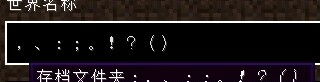

In 23w17a, incorrect full-width punctuations:
Full-width punctuations are stretched in the new unicode font, which is unreasonable and makes them sometimes difficult to read.
This issue blocks MC-241824
For example:
In 23w16a, correct full-width punctuations:
In 23w17a, incorrect full-width punctuations:

Full-width punctuations are stretched in the new unicode font, which is unreasonable and makes them sometimes difficult to read.
This issue blocks MC-241824
For example:
In 23w16a, correct full-width punctuations:
In 23w17a, incorrect full-width punctuations:
Full-width punctuations are stretched in the new unicode font, which is unreasonable and makes them sometimes difficult to read.
This issue blocks MC-241824
For example:
In 23w16a, correct full-width punctuations:
In 23w17a, incorrect full-width punctuations:
Full-width punctuations are stretched in the new unicode font, which is unreasonable and makes them sometimes difficult to read.
This issue blocks MC-241824
For example:
In 23w16a, correct full-width punctuations:
In 23w17a, incorrect full-width punctuations:
Full-width punctuations are stretched in the new uni
codefont, which is unreasonable and makes them sometimes difficult to read.This issue blocks MC-241824
For example:
In 23w16a, correct full-width punctuations:
In 23w17a, incorrect full-width punctuations:
Full-width punctuations are stretched in the new unifont, which is unreasonable and makes them sometimes difficult to read.
This issue blocks MC-241824
For example:
In 23w16a, correct full-width punctuations:
In 23w17a, incorrect full-width punctuations:
Full-width punctuations are stretched and not correctly positioned in the new unifont, which is unreasonable and makes them sometimes difficult to read.
This issue blocks MC-241824
For example:
In 23w16a, correct full-width punctuations:
In 23w17a, incorrect full-width punctuations:
Full-width punctuations are stretched and not correctly positioned in the new unifont, which is unreasonable and makes them sometimes difficult to read.
This issue blocks MC-241824
For example:
In 23w16a, correct full-width punctuations:
In 23w17a, incorrect full-width punctuations:
Full-width punctuations are stretched and not correctly positioned in the new unifont, which is unreasonable and makes them sometimes difficult to read.
This issue blocks MC-241824
For example:
In 23w16a, correct full-width punctuations:
In 23w17a, incorrect full-width punctuations:
Full-width punctuations are stretched and not correctly positioned in the new unifont, which is unreasonable and makes them sometimes difficult to read.
This issue blocks MC-241824
For example:
In 23w16a, correct full-width punctuations:
In 23w17a, incorrect full-width punctuations:
Full-width punctuations are stretched and not correctly positioned in the new unifont, which is unreasonable and makes them sometimes difficult to read.
This issue blocks MC-241824
For example:
In 23w16a, correct full-width punctuations:

In 23w17a, incorrect full-width punctuations:
Full-width punctuations are stretched and not correctly positioned in the new unifont, which is unreasonable and makes them sometimes difficult to read.
This issue blocks MC-241824
For example:
In 23w16a, correct full-width punctuations:
In 23w17a, incorrect full-width punctuations:

Full-width punctuations are stretched and not correctly positioned in the new unifont, which is unreasonable and makes them sometimes difficult to read.
This issue blocks MC-241824
For example:
In 23w16a, correct full-width punctuations:
In 23w17a, incorrect full-width punctuations:
Full-width punctuations, numbers and letters are stretched and not correctly positioned in the new unifont, which is unreasonable and makes them sometimes difficult to read.
This issue blocks MC-241824
Affected characters (not all):
、。〈〉《》
!"#$%&'()*+,-./:;<=>?@[\]^_`{|}~¢£¬¦¥
0123456789ABCDEFGHIJKLMNOPQRSTUVWXYZabcdefghijklmnopqrstuvwxyzFor example:
In 23w16a, correct full-width punctuations:
In 23w17a, incorrect full-width punctuations:
The generation of lush caves and dripstone caves isPOORLYdefinedThe generation of lush caves and dripstone caves is poorly defined
This maybe looks like multiple bugs, but it is caused by one mistake, so I report it as one ticket.
What happened?
As we know, the 3D biome generation is controlled by six noise values from density functions. In a six-dimensional space, some intervals are defined. If the value point falls in a certain interval, the corresponding biome will be generated. If not, it searches the nearest interval.
This is reasonable, unless there are two intervals that overlap — The game is difficult to decide which to generate.
However, in vanilla, the intervals for lush caves and dripstone caves do overlap. Here are these definations in json file:{ "biome": "minecraft:dripstone_caves", "parameters": { "temperature": [-1, 1], "humidity": [-1, 1], "continentalness": [0.8, 1], "erosion": [-1, 1], "weirdness": [-1, 1], "depth": [0.2, 0.9], "offset": 0 } }, { "biome": "minecraft:lush_caves", "parameters": { "temperature": [-1, 1], "humidity": [0.7, 1], "continentalness": [-1, 1], "erosion": [-1, 1], "weirdness": [-1, 1], "depth": [0.2, 0.9], "offset": 0 } }It is clear that the overlapping region is when continentalness is 0.8~1 and humidity is 0.7~1. As this picture shows:
What are the effects of this?
- For value points falling into the overlapping region, the biome generation is an undefined behavior. Sometimes lush caves and sometimes dripstone caves are generated. Two sides of a chunk border may have different biomes. If there is no other place can generate dripstone caves in a chunk except places whose values fall into the overlapping region, lush caves are always generated
, which leads to that lush caves are more common than dripstone caves in a world.- "/locate biome" doesn't work correct for places whose values fall into the overlapping region.
- Potential issues about different biome generation with the same world seed
- Potential parity issues with bedrock edition
Example for reproducing:
Biome generation bug:
Example 1
Seed: 514
Coords: /tp 1557970 25 -24433412
- Press F3+G to enable chunk border displaying; Press F3 to enable debug screen
- At (1557970,25,-24433412) and (1557971,25,-24433412), which are in two biome cells on different sides of the border
- Found that they have different biomes, though both these values fall into the overlapping region.
Example 2
Seed: 514
Coords: /tp -18198579 19 -17221302
- Around (-18198579,19,-17221302)
- Found that in the canyon, a chunk of dripstone caves is surrounded by two chunks of lush caves, though in the canyon all these values fall into the overlapping region.
/locate biome bug:
- Stay at -18198579,19,-17221302, and do not move
- Run "/locate biome dripstone_caves"
- Run "/locate biome dripstone_caves" again
- Run "/locate biome dripstone_caves" again
- Run "/locate biome lush_caves"
- Run "/locate biome lush_caves" again
- Run "/locate biome dripstone_caves"
- Run "/locate biome lush_caves"
- Found that if the same command is executed twice in succession, the result always becomes the execution position. If not executed twice in a row, the result is never the execution location
This maybe looks like multiple bugs, but it is caused by one mistake, so I report it as one ticket.
What happened?
As we know, the 3D biome generation is controlled by six noise values from density functions. In a six-dimensional space, some intervals are defined. If the value point falls in a certain interval, the corresponding biome will be generated. If not, it searches the nearest interval.
This is reasonable, unless there are two intervals that overlap — The game is difficult to decide which to generate.
However, in vanilla, the intervals for lush caves and dripstone caves do overlap. Here are these definations in json file:{ "biome": "minecraft:dripstone_caves", "parameters": { "temperature": [-1, 1], "humidity": [-1, 1], "continentalness": [0.8, 1], "erosion": [-1, 1], "weirdness": [-1, 1], "depth": [0.2, 0.9], "offset": 0 } }, { "biome": "minecraft:lush_caves", "parameters": { "temperature": [-1, 1], "humidity": [0.7, 1], "continentalness": [-1, 1], "erosion": [-1, 1], "weirdness": [-1, 1], "depth": [0.2, 0.9], "offset": 0 } }It is clear that the overlapping region is when continentalness is 0.8~1 and humidity is 0.7~1. As this picture shows:
What are the effects of this?
- For value points falling into the overlapping region, the biome generation is an undefined behavior. Sometimes lush caves and sometimes dripstone caves are generated. Two sides of a chunk border may have different biomes. If there is no other place can generate dripstone caves in a chunk except places whose values fall into the overlapping region, lush caves are always generated.
- "/locate biome" doesn't work correct for places whose values fall into the overlapping region.
- Potential issues about different biome generation with the same world seed
- Potential parity issues with bedrock edition
Example for reproducing:
Biome generation bug:
Example 1
Seed: 514
Coords: /tp 1557970 25 -24433412
- Press F3+G to enable chunk border displaying; Press F3 to enable debug screen
- At (1557970,25,-24433412) and (1557971,25,-24433412), which are in two biome cells on different sides of the border
- Found that they have different biomes, though both these values fall into the overlapping region.
Example 2
Seed: 514
Coords: /tp -18198579 19 -17221302
- Around (-18198579,19,-17221302)
- Found that in the canyon, a chunk of dripstone caves is surrounded by two chunks of lush caves, though in the canyon all these values fall into the overlapping region.
/locate biome bug:
- Stay at -18198579,19,-17221302, and do not move
- Run "/locate biome dripstone_caves"
- Run "/locate biome dripstone_caves" again
- Run "/locate biome dripstone_caves" again
- Run "/locate biome lush_caves"
- Run "/locate biome lush_caves" again
- Run "/locate biome dripstone_caves"
- Run "/locate biome lush_caves"
- Found that if the same command is executed twice in succession, the result always becomes the execution position. If not executed twice in a row, the result is never the execution location
This maybe looks like multiple bugs, but it is caused by one mistake, so I report it as one ticket.
What happened?
As we know, the 3D biome generation is controlled by six noise values from density functions. In a six-dimensional space, some intervals are defined. If the value point falls in a certain interval, the corresponding biome will be generated. If not, it searches the nearest interval.
This is reasonable, unless there are two intervals that overlap — The game is difficult to decide which to generate.
However, in vanilla, the intervals for lush caves and dripstone caves do overlap. Here are these definations in json file:{ "biome": "minecraft:dripstone_caves", "parameters": { "temperature": [-1, 1], "humidity": [-1, 1], "continentalness": [0.8, 1], "erosion": [-1, 1], "weirdness": [-1, 1], "depth": [0.2, 0.9], "offset": 0 } }, { "biome": "minecraft:lush_caves", "parameters": { "temperature": [-1, 1], "humidity": [0.7, 1], "continentalness": [-1, 1], "erosion": [-1, 1], "weirdness": [-1, 1], "depth": [0.2, 0.9], "offset": 0 } }It is clear that the overlapping region is when continentalness is 0.8~1 and humidity is 0.7~1. As this picture shows:
What are the effects of this?
- For value points falling into the overlapping region, the biome generation is an undefined behavior. Sometimes lush caves and sometimes dripstone caves are generated. Two sides of a chunk border may have different biomes. If there is no other place can generate dripstone caves in a chunk except places whose values fall into the overlapping region, lush caves are always generated.
- "/locate biome" doesn't work correct for places whose values fall into the overlapping region.
- Potential issues about different biome generation with the same world seed
- Potential parity issues with bedrock edition
Example for reproducing:
Biome generation bug:
Example 1
Seed: 514
Coords: /tp 1557970 25 -24433412
- Press F3+G to enable chunk border displaying; Press F3 to enable debug screen
- At (1557970,25,-24433412) and (1557971,25,-24433412), which are in two biome cells on different sides of the border
- Found that they have different biomes, though both these values fall into the overlapping region.
Example 2
Seed: 514
Coords: /tp -18198579 19 -17221302
- Around (-18198579,19,-17221302)
- Found that in the canyon, a chunk of dripstone caves is surrounded by two chunks of lush caves, though in the canyon all these values fall into the overlapping region.
/locate biome bug:
- Stay at -18198579,19,-17221302, and do not move
- Run "/locate biome dripstone_caves"
- Run "/locate biome dripstone_caves" again
- Run "/locate biome dripstone_caves" again
- Run "/locate biome lush_caves"
- Run "/locate biome lush_caves" again
- Run "/locate biome dripstone_caves"
- Run "/locate biome lush_caves"
- Found that if the same command is executed twice in succession, the result always becomes the execution position. If not executed twice in a row, the result is never the execution location

This maybe looks like multiple bugs, but it is caused by one mistake, so I report it as one ticket.
What happened?
As we know, the 3D biome generation is controlled by six noise values from density functions. In a six-dimensional space, some intervals are defined. If the value point falls in a certain interval, the corresponding biome will be generated. If not, it searches the nearest interval.
This is reasonable, unless there are two intervals that overlap — The game is difficult to decide which to generate.
However, in vanilla, the intervals for lush caves and dripstone caves do overlap. Here are these definations in json file:{ "biome": "minecraft:dripstone_caves", "parameters": { "temperature": [-1, 1], "humidity": [-1, 1], "continentalness": [0.8, 1], "erosion": [-1, 1], "weirdness": [-1, 1], "depth": [0.2, 0.9], "offset": 0 } }, { "biome": "minecraft:lush_caves", "parameters": { "temperature": [-1, 1], "humidity": [0.7, 1], "continentalness": [-1, 1], "erosion": [-1, 1], "weirdness": [-1, 1], "depth": [0.2, 0.9], "offset": 0 } }It is clear that the overlapping region is when continentalness is 0.8~1 and humidity is 0.7~1. As this picture shows:
What are the effects of this?
- For value points falling into the overlapping region, the biome generation is an undefined behavior. Sometimes lush caves and sometimes dripstone caves are generated. Two sides of a chunk border may have different biomes. If there is no other place can generate dripstone caves in a chunk except places whose values fall into the overlapping region, lush caves are always generated.
- "/locate biome" doesn't work correct for places whose values fall into the overlapping region.
- Potential issues about different biome generation with the same world seed
- Potential parity issues with bedrock edition
Example for reproducing:
Biome generation bug:
Example 1
Seed: 514
Coords: /tp 1557970 25 -24433412
- Press F3+G to enable chunk border displaying; Press F3 to enable debug screen
- At (1557970,25,-24433412) and (1557971,25,-24433412), which are in two biome cells on different sides of the border
- Found that they have different biomes, though both these values fall into the overlapping region.
Example 2
Seed: 514
Coords: /tp -18198579 19 -17221302
- Around (-18198579,19,-17221302)
- Found that in the canyon, a chunk of dripstone caves is surrounded by two chunks of lush caves, though in the canyon all these values fall into the overlapping region.
/locate biome bug:
- Stay at -18198579,19,-17221302, and do not move
- Run "/locate biome dripstone_caves"
- Run "/locate biome dripstone_caves" again
- Run "/locate biome dripstone_caves" again
- Run "/locate biome lush_caves"
- Run "/locate biome lush_caves" again
- Run "/locate biome dripstone_caves"
- Run "/locate biome lush_caves"
- Found that if the same command is executed twice in succession, the result always becomes the execution position. If not executed twice in a row, the result is never the execution location
This maybe looks like multiple bugs, but it is caused by one mistake, so I report it as one ticket.
What happened?
As we know, the 3D biome generation is controlled by six noise values from density functions. In a six-dimensional space, some intervals are defined. If the value point falls in a certain interval, the corresponding biome will be generated. If not, it searches the nearest interval.
This is reasonable, unless there are two intervals that overlap — The game is difficult to decide which to generate.
However, in vanilla, the intervals for lush caves and dripstone caves do overlap. Here are these definations in json file:{ "biome": "minecraft:dripstone_caves", "parameters": { "temperature": [-1, 1], "humidity": [-1, 1], "continentalness": [0.8, 1], "erosion": [-1, 1], "weirdness": [-1, 1], "depth": [0.2, 0.9], "offset": 0 } }, { "biome": "minecraft:lush_caves", "parameters": { "temperature": [-1, 1], "humidity": [0.7, 1], "continentalness": [-1, 1], "erosion": [-1, 1], "weirdness": [-1, 1], "depth": [0.2, 0.9], "offset": 0 } }It is clear that the overlapping region is when continentalness is 0.8~1 and humidity is 0.7~1. As this picture shows:
What are the effects of this?
- For value points falling into the overlapping region, the biome generation is an undefined behavior. Sometimes lush caves and sometimes dripstone caves are generated. Two sides of a chunk border may have different biomes. If there is no other place can generate dripstone caves in a chunk except places whose values fall into the overlapping region, lush caves are always generated.
- "/locate biome" doesn't work correct for places whose values fall into the overlapping region.
- Potential issues about different biome generation with the same world seed
- Potential parity issues with bedrock edition
Example for reproducing:
Biome generation bug:
Example 1
Seed: 514
Coords: /tp 1557970 25 -24433412
- Press F3+G to enable chunk border displaying; Press F3 to enable debug screen
- At (1557970,25,-24433412) and (1557971,25,-24433412), which are in two biome cells on different sides of the border
- Found that they have different biomes, though both these values fall into the overlapping region.
Example 2
Seed: 514
Coords: /tp -18198579 19 -17221302
- Around (-18198579,19,-17221302)
- Found that in the canyon, a chunk of dripstone caves is surrounded by two chunks of lush caves, though in the canyon all these values fall into the overlapping region.
/locate biome bug:
- Stay at -18198579,19,-17221302, and do not move
- Run "/locate biome dripstone_caves"
- Run "/locate biome dripstone_caves" again
- Run "/locate biome dripstone_caves" again
- Run "/locate biome lush_caves"
- Run "/locate biome lush_caves" again
- Run "/locate biome dripstone_caves"
- Run "/locate biome lush_caves"
- Found that if the same command is executed twice in succession, the result always becomes the execution position. If not executed twice in a row, the result is never the execution location
This maybe looks like multiple bugs, but it is caused by one mistake, so I report it as one ticket.
What happened?
As we know, the 3D biome generation is controlled by six noise values from density functions. In a six-dimensional space, some intervals are defined. If the value point falls in a certain interval, the corresponding biome will be generated. If not, it searches the nearest interval.
This is reasonable, unless there are two intervals that overlap — The game is difficult to decide which to generate.
However, in vanilla, the intervals for lush caves and dripstone caves do overlap. Here are these definations in json file:{ "biome": "minecraft:dripstone_caves", "parameters": { "temperature": [-1, 1], "humidity": [-1, 1], "continentalness": [0.8, 1], "erosion": [-1, 1], "weirdness": [-1, 1], "depth": [0.2, 0.9], "offset": 0 } }, { "biome": "minecraft:lush_caves", "parameters": { "temperature": [-1, 1], "humidity": [0.7, 1], "continentalness": [-1, 1], "erosion": [-1, 1], "weirdness": [-1, 1], "depth": [0.2, 0.9], "offset": 0 } }It is clear that the overlapping region is when continentalness is 0.8~1 and humidity is 0.7~1. As this picture shows:
What are the effects of this?
- For value points falling into the overlapping region, the biome generation is an undefined behavior. Sometimes lush caves and sometimes dripstone caves are generated. Two sides of a chunk border may have different biomes. If there is no other place can generate dripstone caves in a chunk except places whose values fall into the overlapping region, lush caves are always generated.
- "/locate biome" doesn't work correct for places whose values fall into the overlapping region.
- Potential issues about different biome generation with the same world seed
- Potential parity issues with bedrock edition
Example for reproducing:
Biome generation bug:
Example 1
Seed: 514
Coords: /tp 1557970 25 -24433412
- Press F3+G to enable chunk border displaying; Press F3 to enable debug screen
- At (15579
70,25,-24433412) and (1557971,25,-24433412), which are in two biome cells on different sides of the border- Found that the
yhave different biomes, though both these values fall into the overlapping region.Example 2
Seed: 514
Coords: /tp -18198579 19 -17221302
- Around (-18198579,19,-17221302)
- Found that in the canyon, a chunk of dripstone caves is surrounded by two chunks of lush caves, though in the canyon all these values fall into the overlapping region.
/locate biome bug:
- Stay at -18198579,19,-17221302, and do not move
- Run "/locate biome dripstone_caves"
- Run "/locate biome dripstone_caves" again
- Run "/locate biome dripstone_caves" again
- Run "/locate biome lush_caves"
- Run "/locate biome lush_caves" again
- Run "/locate biome dripstone_caves"
- Run "/locate biome lush_caves"
- Found that if the same command is executed twice in succession, the result always becomes the execution position. If not executed twice in a row, the result is never the execution location
This maybe looks like multiple bugs, but it is caused by one mistake, so I report it as one ticket.
What happened?
As we know, the 3D biome generation is controlled by six noise values from density functions. In a six-dimensional space, some intervals are defined. If the value point falls in a certain interval, the corresponding biome will be generated. If not, it searches the nearest interval.
This is reasonable, unless there are two intervals that overlap — The game is difficult to decide which to generate.
However, in vanilla, the intervals for lush caves and dripstone caves do overlap. Here are these definations in json file:{ "biome": "minecraft:dripstone_caves", "parameters": { "temperature": [-1, 1], "humidity": [-1, 1], "continentalness": [0.8, 1], "erosion": [-1, 1], "weirdness": [-1, 1], "depth": [0.2, 0.9], "offset": 0 } }, { "biome": "minecraft:lush_caves", "parameters": { "temperature": [-1, 1], "humidity": [0.7, 1], "continentalness": [-1, 1], "erosion": [-1, 1], "weirdness": [-1, 1], "depth": [0.2, 0.9], "offset": 0 } }It is clear that the overlapping region is when continentalness is 0.8~1 and humidity is 0.7~1. As this picture shows:
What are the effects of this?
- For value points falling into the overlapping region, the biome generation is an undefined behavior. Sometimes lush caves and sometimes dripstone caves are generated. Two sides of a chunk border may have different biomes. If there is no other place can generate dripstone caves in a chunk except places whose values fall into the overlapping region, lush caves are always generated.
- "/locate biome" doesn't work correct for places whose values fall into the overlapping region.
- Potential issues about different biome generation with the same world seed
- Potential parity issues with bedrock edition
Example for reproducing:
Biome generation bug:
Example 1
Seed: 514
Coords: /tp 1557950 25 -24433376
- Press F3+G to enable chunk border displaying; Press F3 to enable debug screen
- At (1557950,25,-24433376) and (1557950,25,-24433375), which are in two biome cells on different sides of the border
- Found that the to biome cells have different biomes, though both these values fall into the overlapping region.
Example 2
Seed: 514
Coords: /tp -18198579 19 -17221302
- Around (-18198579,19,-17221302)
- Found that in the canyon, a chunk of dripstone caves is surrounded by two chunks of lush caves, though in the canyon all these values fall into the overlapping region.
/locate biome bug:
- Stay at -18198579,19,-17221302, and do not move
- Run "/locate biome dripstone_caves"
- Run "/locate biome dripstone_caves" again
- Run "/locate biome dripstone_caves" again
- Run "/locate biome lush_caves"
- Run "/locate biome lush_caves" again
- Run "/locate biome dripstone_caves"
- Run "/locate biome lush_caves"
- Found that if the same command is executed twice in succession, the result always becomes the execution position. If not executed twice in a row, the result is never the execution location
This maybe looks like multiple bugs, but it is caused by one mistake, so I report it as one ticket.
What happened?
As we know, the 3D biome generation is controlled by six noise values from density functions. In a six-dimensional space, some intervals are defined. If the value point falls in a certain interval, the corresponding biome will be generated. If not, it searches the nearest interval.
This is reasonable, unless there are two intervals that overlap — The game is difficult to decide which to generate.
However, in vanilla, the intervals for lush caves and dripstone caves do overlap. Here are these definations in json file:{ "biome": "minecraft:dripstone_caves", "parameters": { "temperature": [-1, 1], "humidity": [-1, 1], "continentalness": [0.8, 1], "erosion": [-1, 1], "weirdness": [-1, 1], "depth": [0.2, 0.9], "offset": 0 } }, { "biome": "minecraft:lush_caves", "parameters": { "temperature": [-1, 1], "humidity": [0.7, 1], "continentalness": [-1, 1], "erosion": [-1, 1], "weirdness": [-1, 1], "depth": [0.2, 0.9], "offset": 0 } }It is clear that the overlapping region is when continentalness is 0.8~1 and humidity is 0.7~1. As this picture shows:
What are the effects of this?
- For value points falling into the overlapping region, the biome generation is an undefined behavior. Sometimes lush caves and sometimes dripstone caves are generated. Two sides of a chunk border may have different biomes. If there is no other place can generate dripstone caves in a chunk except places whose values fall into the overlapping region, lush caves are always generated.
- "/locate biome" doesn't work correct for places whose values fall into the overlapping region.
- Potential issues about different biome generation with the same world seed
- Potential parity issues with bedrock edition
Example for reproducing:
Biome generation bug:
Example 1
Seed: 514
Coords: /tp 1557950 25 -24433376
- Press F3+G to enable chunk border displaying; Press F3 to enable debug screen
- At (1557950,25,-24433376) and (1557950,25,-24433375), which are in two biome cells on different sides of the border
- Found that the to biome cells have different biomes, though both these values fall into the overlapping region.
Example 2
Seed: 514
Coords: /tp -18198579 19 -17221302
- Around (-18198579,19,-17221302)
- Found that in the canyon, a chunk of dripstone caves is surrounded by two chunks of lush caves, though in the canyon all these
valuesfall into the overlapping region.
/locate biome bug:
- Stay at -18198579,19,-17221302, and do not move
- Run "/locate biome dripstone_caves"
- Run "/locate biome dripstone_caves" again
- Run "/locate biome dripstone_caves" again
- Run "/locate biome lush_caves"
- Run "/locate biome lush_caves" again
- Run "/locate biome dripstone_caves"
- Run "/locate biome lush_caves"
- Found that if the same command is executed twice in succession, the result always becomes the execution position. If not executed twice in a row, the result is never the execution location
This maybe looks like multiple bugs, but it is caused by one mistake, so I report it as one ticket.
What happened?
As we know, the 3D biome generation is controlled by six noise values from density functions. In a six-dimensional space, some intervals are defined. If the value point falls in a certain interval, the corresponding biome will be generated. If not, it searches the nearest interval.
This is reasonable, unless there are two intervals that overlap — The game is difficult to decide which to generate.
However, in vanilla, the intervals for lush caves and dripstone caves do overlap. Here are these definations in json file:{ "biome": "minecraft:dripstone_caves", "parameters": { "temperature": [-1, 1], "humidity": [-1, 1], "continentalness": [0.8, 1], "erosion": [-1, 1], "weirdness": [-1, 1], "depth": [0.2, 0.9], "offset": 0 } }, { "biome": "minecraft:lush_caves", "parameters": { "temperature": [-1, 1], "humidity": [0.7, 1], "continentalness": [-1, 1], "erosion": [-1, 1], "weirdness": [-1, 1], "depth": [0.2, 0.9], "offset": 0 } }It is clear that the overlapping region is when continentalness is 0.8~1 and humidity is 0.7~1. As this picture shows:
What are the effects of this?
- For value points falling into the overlapping region, the biome generation is an undefined behavior. Sometimes lush caves and sometimes dripstone caves are generated. Two sides of a chunk border may have different biomes. If there is no other place can generate dripstone caves in a chunk except places whose values fall into the overlapping region, lush caves are always generated.
- "/locate biome" doesn't work correct for places whose values fall into the overlapping region.
- Potential issues about different biome generation with the same world seed
- Potential parity issues with bedrock edition
Example for reproducing:
Biome generation bug:
Example 1
Seed: 514
Coords: /tp 1557950 25 -24433376
- Press F3+G to enable chunk border displaying; Press F3 to enable debug screen
- At (1557950,25,-24433376) and (1557950,25,-24433375), which are in two biome cells on different sides of the border
- Found that the to biome cells have different biomes, though both these values fall into the overlapping region.
Example 2
Seed: 514
Coords: /tp -18198579 19 -17221302
- Around (-18198579,19,-17221302)
- Found that in the canyon, a chunk of dripstone caves is surrounded by two chunks of lush caves, though in the canyon, values of all these three fall into the overlapping region.
/locate biome bug:
- Stay at -18198579,19,-17221302, and do not move
- Run "/locate biome dripstone_caves"
- Run "/locate biome dripstone_caves" again
- Run "/locate biome dripstone_caves" again
- Run "/locate biome lush_caves"
- Run "/locate biome lush_caves" again
- Run "/locate biome dripstone_caves"
- Run "/locate biome lush_caves"
- Found that if the same command is executed twice in succession, the result always becomes the execution position. If not executed twice in a row, the result is never the execution location
This maybe looks like multiple bugs, but it is caused by one mistake, so I report it as one ticket.
What happened?
As we know, the 3D biome generation is controlled by six noise values from density functions. In a six-dimensional space, some intervals are defined. If the value point falls in a certain interval, the corresponding biome will be generated. If not, it searches the nearest interval.
This is reasonable, unless there are two intervals that overlap — The game is difficult to decide which to generate.
However, in vanilla, the intervals for lush caves and dripstone caves do overlap. Here are these definations in json file:{ "biome": "minecraft:dripstone_caves", "parameters": { "temperature": [-1, 1], "humidity": [-1, 1], "continentalness": [0.8, 1], "erosion": [-1, 1], "weirdness": [-1, 1], "depth": [0.2, 0.9], "offset": 0 } }, { "biome": "minecraft:lush_caves", "parameters": { "temperature": [-1, 1], "humidity": [0.7, 1], "continentalness": [-1, 1], "erosion": [-1, 1], "weirdness": [-1, 1], "depth": [0.2, 0.9], "offset": 0 } }It is clear that the overlapping region is when continentalness is 0.8~1 and humidity is 0.7~1. As this picture shows:
What are the effects of this?
- For value points falling into the overlapping region, the biome generation is an undefined behavior. Sometimes lush caves and sometimes dripstone caves are generated. Two sides of a chunk border may have different biomes. If there is no other place can generate dripstone caves in a chunk except places whose values fall into the overlapping region, lush caves are always generated.
- "/locate biome" doesn't work correct for places whose values fall into the overlapping region.
- Potential issues about different biome generation with the same world seed
- Potential parity issues with bedrock edition
Example for reproducing:
Biome generation bug:
Example 1
Seed: 514
Coords: /tp 1557950 25 -24433376
- Press F3+G to enable chunk border displaying; Press F3 to enable debug screen
- At (1557950,25,-24433376) and (1557950,25,-24433375), which are in two biome cells on different sides of the border
- Found that the to biome cells have different biomes, though both these values fall into the overlapping region.
Example 2
Seed: 514
Coords: /tp -18198579 19 -17221302
- Around (-18198579,19,-17221302)
- Found that in the canyon, a chunk of dripstone caves is surrounded by two chunks of lush caves, though in the canyon, values of all these three fall into the overlapping region.
/locate biome bug:
- Stay at -18198579,19,-17221302, and do not move
- Run "/locate biome dripstone_caves"
- Run "/locate biome dripstone_caves" again
- Run "/locate biome dripstone_caves" again
- Run "/locate biome lush_caves"
- Run "/locate biome lush_caves" again
- Run "/locate biome dripstone_caves"
- Run "/locate biome lush_caves"
- Found that if the same command is executed twice in succession, the result always becomes the execution position. If not executed twice in a row, the result is never the execution location
This maybe looks like multiple bugs, but it is caused by one mistake, so I report it as one ticket.
What happened?
As we know, the 3D biome generation is controlled by six noise values from density functions. In a six-dimensional space, some intervals are defined. If the value point falls in a certain interval, the corresponding biome will be generated. If not, it searches the nearest interval.
This is reasonable, unless there are two intervals that overlap — The game is difficult to decide which to generate.
However, in vanilla, the intervals for lush caves and dripstone caves do overlap. Here are these definations in json file:{ "biome": "minecraft:dripstone_caves", "parameters": { "temperature": [-1, 1], "humidity": [-1, 1], "continentalness": [0.8, 1], "erosion": [-1, 1], "weirdness": [-1, 1], "depth": [0.2, 0.9], "offset": 0 } }, { "biome": "minecraft:lush_caves", "parameters": { "temperature": [-1, 1], "humidity": [0.7, 1], "continentalness": [-1, 1], "erosion": [-1, 1], "weirdness": [-1, 1], "depth": [0.2, 0.9], "offset": 0 } }It is clear that the overlapping region is when continentalness is 0.8~1 and humidity is 0.7~1. As this picture shows:
What are the effects of this?
- For value points falling into the overlapping region, the biome generation is an undefined behavior. Sometimes lush caves and sometimes dripstone caves are generated. Two sides of a chunk border may have different biomes. If there is no other place can generate dripstone caves in a chunk except places whose values fall into the overlapping region, lush caves are always generated.
- "/locate biome" doesn't work correct for places whose values fall into the overlapping region.
- Potential issues about different biome generation with the same world seed
- Potential parity issues with bedrock edition
Example for reproducing:
Biome generation bug:
Example 1
Seed: 514
Coords: /tp 1557950 25 -24433376
- Press F3+G to enable chunk border displaying; Press F3 to enable debug screen
- At (1557950,25,-24433376) and (1557950,25,-24433375), which are in two biome cells on different sides of the border
- Found that the to biome cells have different biomes, though both these values fall into the overlapping region.
Example 2
Seed: 514
Coords: /tp -18198579 19 -17221302
- Around (-18198579,19,-17221302)
- Found that in the canyon, a chunk of dripstone caves is surrounded by two chunks of lush caves, though in the canyon, values of all these three fall into the overlapping region.
/locate biome bug:
- Stay at -18198579,19,-17221302, and do not move
- Run "/locate biome dripstone_caves"
- Run "/locate biome dripstone_caves" again
- Run "/locate biome dripstone_caves" again
- Run "/locate biome lush_caves"
- Run "/locate biome lush_caves" again
- Run "/locate biome dripstone_caves"
- Run "/locate biome lush_caves"
- Found that if the same command is executed twice in succession, the result always becomes the execution position. If not executed twice in a row, the result is never the execution location
This maybe looks like multiple bugs, but it is caused by one mistake, so I report it as one ticket.
What happened?
As we know, the 3D biome generation is controlled by six noise values from density functions. In a six-dimensional space, some intervals are defined. If the value point falls in a certain interval, the corresponding biome will be generated. If not, it searches the nearest interval.
This is reasonable, unless there are two intervals that overlap — The game is difficult to decide which to generate.
However, in vanilla, the intervals for lush caves and dripstone caves do overlap. Here are these definations in json file:{ "biome": "minecraft:dripstone_caves", "parameters": { "temperature": [-1, 1], "humidity": [-1, 1], "continentalness": [0.8, 1], "erosion": [-1, 1], "weirdness": [-1, 1], "depth": [0.2, 0.9], "offset": 0 } }, { "biome": "minecraft:lush_caves", "parameters": { "temperature": [-1, 1], "humidity": [0.7, 1], "continentalness": [-1, 1], "erosion": [-1, 1], "weirdness": [-1, 1], "depth": [0.2, 0.9], "offset": 0 } }It is clear that the overlapping region is when continentalness is 0.8~1 and humidity is 0.7~1. As this picture shows:
What are the effects of this?
- For value points falling into the overlapping region, the biome generation is an undefined behavior. Sometimes lush caves and sometimes dripstone caves are generated. Two sides of a chunk border may have different biomes. If there is no other place can generate dripstone caves in a chunk except places whose values fall into the overlapping region, lush caves are always generated.
- "/locate biome" doesn't work correct for places whose values fall into the overlapping region.
- Potential issues about different biome generation with the same world seed
- Potential parity issues with bedrock edition
Example for reproducing:
Biome generation bug:
Example 1
Seed: 514
Coords: /tp 1557950 25 -24433376
- Press F3+G to enable chunk border displaying; Press F3 to enable debug screen
- At (1557950,25,-24433376) and (1557950,25,-24433375), which are in two biome cells on different sides of the border
- Found that the to biome cells have different biomes, though both these values fall into the overlapping region.
Example 2
Seed: 514
Coords: /tp -18198579 19 -17221302
- Around (-18198579,19,-17221302)
- Found that in the canyon, a chunk of dripstone caves is surrounded by two chunks of lush caves, though in the canyon, values of all these three fall into the overlapping region.
/locate biome bug:
- Stay at -18198579,19,-17221302, and do not move
- Run "/locate biome dripstone_caves"
- Run "/locate biome dripstone_caves" again
- Run "/locate biome dripstone_caves" again
- Run "/locate biome lush_caves"
- Run "/locate biome lush_caves" again
- Run "/locate biome dripstone_caves"
- Run "/locate biome lush_caves"
- Found that if the same command is executed twice in succession, the result always becomes the execution position. If not executed twice in a row, the result is never the execution
location
This maybe looks like multiple bugs, but it is caused by one mistake, so I report it as one ticket.
What happened?
As we know, the 3D biome generation is controlled by six noise values from density functions. In a six-dimensional space, some intervals are defined. If the value point falls in a certain interval, the corresponding biome will be generated. If not, it searches the nearest interval.
This is reasonable, unless there are two intervals that overlap — The game is difficult to decide which to generate.
However, in vanilla, the intervals for lush caves and dripstone caves do overlap. Here are these definations in json file:{ "biome": "minecraft:dripstone_caves", "parameters": { "temperature": [-1, 1], "humidity": [-1, 1], "continentalness": [0.8, 1], "erosion": [-1, 1], "weirdness": [-1, 1], "depth": [0.2, 0.9], "offset": 0 } }, { "biome": "minecraft:lush_caves", "parameters": { "temperature": [-1, 1], "humidity": [0.7, 1], "continentalness": [-1, 1], "erosion": [-1, 1], "weirdness": [-1, 1], "depth": [0.2, 0.9], "offset": 0 } }It is clear that the overlapping region is when continentalness is 0.8~1 and humidity is 0.7~1. As this picture shows:
What are the effects of this?
- For value points falling into the overlapping region, the biome generation is an undefined behavior. Sometimes lush caves and sometimes dripstone caves are generated. Two sides of a chunk border may have different biomes. If there is no other place can generate dripstone caves in a chunk except places whose values fall into the overlapping region, lush caves are always generated.
- "/locate biome" doesn't work correct for places whose values fall into the overlapping region.
- Potential issues about different biome generation with the same world seed
- Potential parity issues with bedrock edition
Example for reproducing:
Biome generation bug:
Example 1
Seed: 514
Coords: /tp 1557950 25 -24433376
- Press F3+G to enable chunk border displaying; Press F3 to enable debug screen
- At (1557950,25,-24433376) and (1557950,25,-24433375), which are in two biome cells on different sides of the border
- Found that the to biome cells have different biomes, though both these values fall into the overlapping region.
Example 2
Seed: 514
Coords: /tp -18198579 19 -17221302
- Around (-18198579,19,-17221302)
- Found that in the canyon, a chunk of dripstone caves is surrounded by two chunks of lush caves, though in the canyon, values of all these three fall into the overlapping region.
/locate biome bug:
- Stay at -18198579,19,-17221302, and do not move
- Run "/locate biome dripstone_caves"
- Run "/locate biome dripstone_caves" again
- Run "/locate biome dripstone_caves" again
- Run "/locate biome lush_caves"
- Run "/locate biome lush_caves" again
- Run "/locate biome dripstone_caves"
- Run "/locate biome lush_caves"
- Found that if the same command is executed twice in succession, the result always becomes the execution position. If not executed twice in a row, the result is never the execution position
This maybe looks like multiple bugs, but it is caused by one mistake, so I report it as one ticket.
What happened?
As we know, the 3D biome generation is controlled by six noise values from density functions. In a six-dimensional space, some intervals are defined. If the value point falls in a certain interval, the corresponding biome will be generated. If not, it searches the nearest interval.
This is reasonable, unless there are two intervals that overlap — The game is difficult to decide which to generate.
However, in vanilla, the intervals for lush caves and dripstone caves do overlap. Here are thesedefinations in json file:{ "biome": "minecraft:dripstone_caves", "parameters": { "temperature": [-1, 1], "humidity": [-1, 1], "continentalness": [0.8, 1], "erosion": [-1, 1], "weirdness": [-1, 1], "depth": [0.2, 0.9], "offset": 0 } }, { "biome": "minecraft:lush_caves", "parameters": { "temperature": [-1, 1], "humidity": [0.7, 1], "continentalness": [-1, 1], "erosion": [-1, 1], "weirdness": [-1, 1], "depth": [0.2, 0.9], "offset": 0 } }It is clear that the overlapping region is when continentalness is 0.8~1 and humidity is 0.7~1. As this picture shows:
What are the effects of this?
- For value points falling into the overlapping region, the biome generation is an undefined behavior. Sometimes lush caves and sometimes dripstone caves are generated. Two sides of a chunk border may have different biomes. If there is no other place can generate dripstone caves in a chunk except places whose values fall into the overlapping region, lush caves are always generated.
- "/locate biome" doesn't work correct for places whose values fall into the overlapping region.
- Potential issues about different biome generation with the same world seed
- Potential parity issues with bedrock edition
Example for reproducing:
Biome generation bug:
Example 1
Seed: 514
Coords: /tp 1557950 25 -24433376
- Press F3+G to enable chunk border displaying; Press F3 to enable debug screen
- At (1557950,25,-24433376) and (1557950,25,-24433375), which are in two biome cells on different sides of the border
- Found that the to biome cells have different biomes, though both these values fall into the overlapping region.
Example 2
Seed: 514
Coords: /tp -18198579 19 -17221302
- Around (-18198579,19,-17221302)
- Found that in the canyon, a chunk of dripstone caves is surrounded by two chunks of lush caves, though in the canyon, values of all these three fall into the overlapping region.
/locate biome bug:
- Stay at -18198579,19,-17221302, and do not move
- Run "/locate biome dripstone_caves"
- Run "/locate biome dripstone_caves" again
- Run "/locate biome dripstone_caves" again
- Run "/locate biome lush_caves"
- Run "/locate biome lush_caves" again
- Run "/locate biome dripstone_caves"
- Run "/locate biome lush_caves"
- Found that if the same command is executed twice in succession, the result always becomes the execution position. If not executed twice in a row, the result is never the execution position
This maybe looks like multiple bugs, but it is caused by one mistake, so I report it as one ticket.
What happened?
As we know, the 3D biome generation is controlled by six noise values from density functions. In a six-dimensional space, some intervals are defined. If the value point falls in a certain interval, the corresponding biome will be generated. If not, it searches the nearest interval.
This is reasonable, unless there are two intervals that overlap — The game is difficult to decide which to generate.
However, in vanilla, the intervals for lush caves and dripstone caves do overlap. Here are their definations in the json format:{ "biome": "minecraft:dripstone_caves", "parameters": { "temperature": [-1, 1], "humidity": [-1, 1], "continentalness": [0.8, 1], "erosion": [-1, 1], "weirdness": [-1, 1], "depth": [0.2, 0.9], "offset": 0 } }, { "biome": "minecraft:lush_caves", "parameters": { "temperature": [-1, 1], "humidity": [0.7, 1], "continentalness": [-1, 1], "erosion": [-1, 1], "weirdness": [-1, 1], "depth": [0.2, 0.9], "offset": 0 } }It is clear that the overlapping region is when continentalness is 0.8~1 and humidity is 0.7~1. As this picture shows:
What are the effects of this?
- For value points falling into the overlapping region, the biome generation is an undefined behavior. Sometimes lush caves and sometimes dripstone caves are generated. Two sides of a chunk border may have different biomes. If there is no other place can generate dripstone caves in a chunk except places whose values fall into the overlapping region, lush caves are always generated.
- "/locate biome" doesn't work correct for places whose values fall into the overlapping region.
- Potential issues about different biome generation with the same world seed
- Potential parity issues with bedrock edition
Example for reproducing:
Biome generation bug:
Example 1
Seed: 514
Coords: /tp 1557950 25 -24433376
- Press F3+G to enable chunk border displaying; Press F3 to enable debug screen
- At (1557950,25,-24433376) and (1557950,25,-24433375), which are in two biome cells on different sides of the border
- Found that the to biome cells have different biomes, though both these values fall into the overlapping region.
Example 2
Seed: 514
Coords: /tp -18198579 19 -17221302
- Around (-18198579,19,-17221302)
- Found that in the canyon, a chunk of dripstone caves is surrounded by two chunks of lush caves, though in the canyon, values of all these three fall into the overlapping region.
/locate biome bug:
- Stay at -18198579,19,-17221302, and do not move
- Run "/locate biome dripstone_caves"
- Run "/locate biome dripstone_caves" again
- Run "/locate biome dripstone_caves" again
- Run "/locate biome lush_caves"
- Run "/locate biome lush_caves" again
- Run "/locate biome dripstone_caves"
- Run "/locate biome lush_caves"
- Found that if the same command is executed twice in succession, the result always becomes the execution position. If not executed twice in a row, the result is never the execution position
This maybe looks like multiple bugs, but it is caused by one mistake, so I report it as one ticket.
What happened?
As we know, the 3D biome generation is controlled by six noise values from density functions. In a six-dimensional space, some intervals are defined. If the value point falls in a certain interval, the corresponding biome will be generated. If not, it searches the nearest interval.
This is reasonable, unless there are two intervals that overlap — The game is difficult to decide which to generate.
However, in vanilla, the intervals for lush caves and dripstone caves do overlap. Here are their definations in the json format:{ "biome": "minecraft:dripstone_caves", "parameters": { "temperature": [-1, 1], "humidity": [-1, 1], "continentalness": [0.8, 1], "erosion": [-1, 1], "weirdness": [-1, 1], "depth": [0.2, 0.9], "offset": 0 } }, { "biome": "minecraft:lush_caves", "parameters": { "temperature": [-1, 1], "humidity": [0.7, 1], "continentalness": [-1, 1], "erosion": [-1, 1], "weirdness": [-1, 1], "depth": [0.2, 0.9], "offset": 0 } }It is clear that the overlapping region is when continentalness is 0.8~1 and humidity is 0.7~1. As this picture shows:
What are the effects of this?
- For value points falling into the overlapping region, the biome generation is an undefined behavior. Sometimes lush caves and sometimes dripstone caves are generated. Two sides of a chunk border may have different biomes.
If there is no other place can generate dripstone caves in a chunk except places whose values fall into the overlapping region, lush caves are always generated.- "/locate biome" doesn't work correct for places whose values fall into the overlapping region.
- Potential issues about different biome generation with the same world seed
- Potential parity issues with bedrock edition
Example for reproducing:
Biome generation bug:
Example 1
Seed: 514
Coords: /tp 1557950 25 -24433376
- Press F3+G to enable chunk border displaying; Press F3 to enable debug screen
- At (1557950,25,-24433376) and (1557950,25,-24433375), which are in two biome cells on different sides of the border
- Found that the to biome cells have different biomes, though both these values fall into the overlapping region.
Example 2
Seed: 514
Coords: /tp -18198579 19 -17221302
- Around (-18198579,19,-17221302)
- Found that in the canyon, a chunk of dripstone caves is surrounded by two chunks of lush caves, though in the canyon, values of all these three fall into the overlapping region.
/locate biome bug:
- Stay at -18198579,19,-17221302, and do not move
- Run "/locate biome dripstone_caves"
- Run "/locate biome dripstone_caves" again
- Run "/locate biome dripstone_caves" again
- Run "/locate biome lush_caves"
- Run "/locate biome lush_caves" again
- Run "/locate biome dripstone_caves"
- Run "/locate biome lush_caves"
- Found that if the same command is executed twice in succession, the result always becomes the execution position. If not executed twice in a row, the result is never the execution position
This maybe looks like multiple bugs, but it is caused by one mistake, so I report it as one ticket.
What happened?
As we know, the 3D biome generation is controlled by six noise values from density functions. In a six-dimensional space, some intervals are defined. If the value point falls in a certain interval, the corresponding biome will be generated. If not, it searches the nearest interval.
This is reasonable, unless there are two intervals that overlap — The game is difficult to decide which to generate.
However, in vanilla, the intervals for lush caves and dripstone caves do overlap. Here are their definations in the json format:{ "biome": "minecraft:dripstone_caves", "parameters": { "temperature": [-1, 1], "humidity": [-1, 1], "continentalness": [0.8, 1], "erosion": [-1, 1], "weirdness": [-1, 1], "depth": [0.2, 0.9], "offset": 0 } }, { "biome": "minecraft:lush_caves", "parameters": { "temperature": [-1, 1], "humidity": [0.7, 1], "continentalness": [-1, 1], "erosion": [-1, 1], "weirdness": [-1, 1], "depth": [0.2, 0.9], "offset": 0 } }It is clear that the overlapping region is when continentalness is 0.8~1 and humidity is 0.7~1. As this picture shows:
What are the effects of this?
- For value points falling into the overlapping region, the biome generation is an undefined behavior. Sometimes lush caves and sometimes dripstone caves are generated. Two sides of a chunk border may have different biomes.
- "/locate biome" doesn't work correct for places whose values fall into the overlapping region.
- Potential issues about different biome generation with the same world seed
- Potential parity issues with
bedrockeditionExample for reproducing:
Biome generation bug:
Example 1
Seed: 514
Coords: /tp 1557950 25 -24433376
- Press F3+G to enable chunk border displaying; Press F3 to enable debug screen
- At (1557950,25,-24433376) and (1557950,25,-24433375), which are in two biome cells on different sides of the border
- Found that the to biome cells have different biomes, though both these values fall into the overlapping region.
Example 2
Seed: 514
Coords: /tp -18198579 19 -17221302
- Around (-18198579,19,-17221302)
- Found that in the canyon, a chunk of dripstone caves is surrounded by two chunks of lush caves, though in the canyon, values of all these three fall into the overlapping region.
/locate biome bug:
- Stay at -18198579,19,-17221302, and do not move
- Run "/locate biome dripstone_caves"
- Run "/locate biome dripstone_caves" again
- Run "/locate biome dripstone_caves" again
- Run "/locate biome lush_caves"
- Run "/locate biome lush_caves" again
- Run "/locate biome dripstone_caves"
- Run "/locate biome lush_caves"
- Found that if the same command is executed twice in succession, the result always becomes the execution position. If not executed twice in a row, the result is never the execution position
This maybe looks like multiple bugs, but it is caused by one mistake, so I report it as one ticket.
What happened?
As we know, the 3D biome generation is controlled by six noise values from density functions. In a six-dimensional space, some intervals are defined. If the value point falls in a certain interval, the corresponding biome will be generated. If not, it searches the nearest interval.
This is reasonable, unless there are two intervals that overlap — The game is difficult to decide which to generate.
However, in vanilla, the intervals for lush caves and dripstone caves do overlap. Here are their definations in the json format:{ "biome": "minecraft:dripstone_caves", "parameters": { "temperature": [-1, 1], "humidity": [-1, 1], "continentalness": [0.8, 1], "erosion": [-1, 1], "weirdness": [-1, 1], "depth": [0.2, 0.9], "offset": 0 } }, { "biome": "minecraft:lush_caves", "parameters": { "temperature": [-1, 1], "humidity": [0.7, 1], "continentalness": [-1, 1], "erosion": [-1, 1], "weirdness": [-1, 1], "depth": [0.2, 0.9], "offset": 0 } }It is clear that the overlapping region is when continentalness is 0.8~1 and humidity is 0.7~1. As this picture shows:
What are the effects of this?
- For value points falling into the overlapping region, the biome generation is an undefined behavior. Sometimes lush caves and sometimes dripstone caves are generated. Two sides of a chunk border may have different biomes.
- "/locate biome" doesn't work correct for places whose values fall into the overlapping region.
- Potential issues about different biome generations with the same world seed
- Potential parity issues with Bedrock Edition
Example for reproducing:
Biome generation bug:
Example 1
Seed: 514
Coords: /tp 1557950 25 -24433376
- Press F3+G to enable chunk border displaying; Press F3 to enable debug screen
- At (1557950,25,-24433376) and (1557950,25,-24433375), which are in two biome cells on different sides of the border
- Found that the to biome cells have different biomes, though both these values fall into the overlapping region.
Example 2
Seed: 514
Coords: /tp -18198579 19 -17221302
- Around (-18198579,19,-17221302)
- Found that in the canyon, a chunk of dripstone caves is surrounded by two chunks of lush caves, though in the canyon, values of all these three fall into the overlapping region.
/locate biome bug:
- Stay at -18198579,19,-17221302, and do not move
- Run "/locate biome dripstone_caves"
- Run "/locate biome dripstone_caves" again
- Run "/locate biome dripstone_caves" again
- Run "/locate biome lush_caves"
- Run "/locate biome lush_caves" again
- Run "/locate biome dripstone_caves"
- Run "/locate biome lush_caves"
- Found that if the same command is executed twice in succession, the result always becomes the execution position. If not executed twice in a row, the result is never the execution position
This maybe looks like multiple bugs, but it is caused by one mistake, so I report it as one ticket.
What happened?
As we know, the 3D biome generation is controlled by six noise values from density functions. In a six-dimensional space, some intervals are defined. If the value point falls in a certain interval, the corresponding biome will be generated. If not, it searches the nearest interval.
This is reasonable, unless there are two intervals that overlap — The game is difficult to decide which to generate.
However, in vanilla, the intervals for lush caves and dripstone caves do overlap. Here are their definations in the json format:{ "biome": "minecraft:dripstone_caves", "parameters": { "temperature": [-1, 1], "humidity": [-1, 1], "continentalness": [0.8, 1], "erosion": [-1, 1], "weirdness": [-1, 1], "depth": [0.2, 0.9], "offset": 0 } }, { "biome": "minecraft:lush_caves", "parameters": { "temperature": [-1, 1], "humidity": [0.7, 1], "continentalness": [-1, 1], "erosion": [-1, 1], "weirdness": [-1, 1], "depth": [0.2, 0.9], "offset": 0 } }It is clear that the overlapping region is when continentalness is 0.8~1 and humidity is 0.7~1. As this picture shows:
What are the effects of this?
- For value points falling into the overlapping region, the biome generation is an undefined behavior. Sometimes lush caves and sometimes dripstone caves are generated. Two sides of a chunk border may have different biomes.
- "/locate biome" doesn't work correct for places whose values fall into the overlapping region.
- Potential issues about different biome generations with the same world seed
- Potential parity issues with Bedrock Edition
Example for reproducing:
Biome generation bug:
Example 1
Seed: 514
Coords: /tp 1557950 25 -24433376
- Press F3+G to enable chunk border displaying; Press F3 to enable debug screen
- At (1557950,25,-24433376) and (1557950,25,-24433375), which are in two biome cells on different sides of the border
- Found that the to biome cells have different biomes, though both these values fall into the overlapping region.
Example 2
Seed: 514
Coords: /tp -18198579 19 -17221302
- Around (-18198579,19,-17221302)
- Found that in
thecanyon, a chunk of dripstone caves is surrounded by two chunks of lush caves, though in the canyon, values of all these three fall into the overlapping region.
/locate biome bug:
- Stay at -18198579,19,-17221302, and do not move
- Run "/locate biome dripstone_caves"
- Run "/locate biome dripstone_caves" again
- Run "/locate biome dripstone_caves" again
- Run "/locate biome lush_caves"
- Run "/locate biome lush_caves" again
- Run "/locate biome dripstone_caves"
- Run "/locate biome lush_caves"
- Found that if the same command is executed twice in succession, the result always becomes the execution position. If not executed twice in a row, the result is never the execution position
This maybe looks like multiple bugs, but it is caused by one mistake, so I report it as one ticket.
What happened?
As we know, the 3D biome generation is controlled by six noise values from density functions. In a six-dimensional space, some intervals are defined. If the value point falls in a certain interval, the corresponding biome will be generated. If not, it searches the nearest interval.
This is reasonable, unless there are two intervals that overlap — The game is difficult to decide which to generate.
However, in vanilla, the intervals for lush caves and dripstone caves do overlap. Here are their definations in the json format:{ "biome": "minecraft:dripstone_caves", "parameters": { "temperature": [-1, 1], "humidity": [-1, 1], "continentalness": [0.8, 1], "erosion": [-1, 1], "weirdness": [-1, 1], "depth": [0.2, 0.9], "offset": 0 } }, { "biome": "minecraft:lush_caves", "parameters": { "temperature": [-1, 1], "humidity": [0.7, 1], "continentalness": [-1, 1], "erosion": [-1, 1], "weirdness": [-1, 1], "depth": [0.2, 0.9], "offset": 0 } }It is clear that the overlapping region is when continentalness is 0.8~1 and humidity is 0.7~1. As this picture shows:
What are the effects of this?
- For value points falling into the overlapping region, the biome generation is an undefined behavior. Sometimes lush caves and sometimes dripstone caves are generated. Two sides of a chunk border may have different biomes.
- "/locate biome" doesn't work correct for places whose values fall into the overlapping region.
- Potential issues about different biome generations with the same world seed
- Potential parity issues with Bedrock Edition
Example for reproducing:
Biome generation bug:
Example 1
Seed: 514
Coords: /tp 1557950 25 -24433376
- Press F3+G to enable chunk border displaying; Press F3 to enable debug screen
- At (1557950,25,-24433376) and (1557950,25,-24433375), which are in two biome cells on different sides of the border
- Found that the two biome cells have different biomes, though both these values fall into the overlapping region.
Example 2
Seed: 514
Coords: /tp -18198579 19 -17221302
- Around (-18198579,19,-17221302)
- Found that in a canyon, a chunk of dripstone caves is surrounded by two chunks of lush caves, though in the canyon, values of all these three fall into the overlapping region.
/locate biome bug:
- Stay at -18198579,19,-17221302, and do not move
- Run "/locate biome dripstone_caves"
- Run "/locate biome dripstone_caves" again
- Run "/locate biome dripstone_caves" again
- Run "/locate biome lush_caves"
- Run "/locate biome lush_caves" again
- Run "/locate biome dripstone_caves"
- Run "/locate biome lush_caves"
- Found that if the same command is executed twice in succession, the result always becomes the execution position. If not executed twice in a row, the result is never the execution position
This maybe looks like multiple bugs, but it is caused by one mistake, so I report it as one ticket.
What happened?
As we know, the 3D biome generation is controlled by six noise values from density functions. In a six-dimensional space, some intervals are defined. If the value point falls in a certain interval, the corresponding biome will be generated. If not, it searches the nearest interval.
This is reasonable, unless there are two intervals that overlap — The game is difficult to decide which to generate.
However, in vanilla, the intervals for lush caves and dripstone caves do overlap. Here are their definations in the json format:{ "biome": "minecraft:dripstone_caves", "parameters": { "temperature": [-1, 1], "humidity": [-1, 1], "continentalness": [0.8, 1], "erosion": [-1, 1], "weirdness": [-1, 1], "depth": [0.2, 0.9], "offset": 0 } }, { "biome": "minecraft:lush_caves", "parameters": { "temperature": [-1, 1], "humidity": [0.7, 1], "continentalness": [-1, 1], "erosion": [-1, 1], "weirdness": [-1, 1], "depth": [0.2, 0.9], "offset": 0 } }It is clear that the overlapping region is when continentalness is 0.8~1 and humidity is 0.7~1. As this picture shows:
What are the effects of this?
- For value points falling into the overlapping region, the biome generation is an undefined behavior. Sometimes lush caves and sometimes dripstone caves are generated. Two sides of a chunk border may have different biomes.
- "/locate biome" doesn't work correct for places whose values fall into the overlapping region.
- Potential issues about different biome generations with the same world seed
- Potential parity issues with Bedrock Edition
Example for reproducing:
Biome generation bug:
Example 1
Seed: 514
Coords: /tp 1557950 25 -24433376
- Press F3+G to enable chunk border displaying; Press F3 to enable debug screen
- At (1557950,25,-24433376) and (1557950,25,-24433375), which are in two biome cells on different sides of the border
- Found that the two biome cells have different biomes, though both these values fall into the overlapping region.
Example 2
Seed: 514
Coords: /tp -18198579 19 -17221302
- Around (-18198579,19,-17221302)
- Found that in a canyon, a chunk of dripstone caves is surrounded by two chunks of lush caves, though in the canyon, values of all these three fall into the overlapping region.
/locate biome bug:
- Stay at -18198579,19,-17221302, and do not move
- Run "/locate biome dripstone_caves"
- Run "/locate biome dripstone_caves" again
- Run "/locate biome dripstone_caves" again
- Run "/locate biome lush_caves"
- Run "/locate biome lush_caves" again
- Run "/locate biome dripstone_caves"
- Run "/locate biome lush_caves"
- Found that
ifthesame command is executedtwice in succession, the result always becomes the execution position. If not executed twice in a row, the result is never the execution position
This maybe looks like multiple bugs, but it is caused by one mistake, so I report it as one ticket.
What happened?
As we know, the 3D biome generation is controlled by six noise values from density functions. In a six-dimensional space, some intervals are defined. If the value point falls in a certain interval, the corresponding biome will be generated. If not, it searches the nearest interval.
This is reasonable, unless there are two intervals that overlap — The game is difficult to decide which to generate.
However, in vanilla, the intervals for lush caves and dripstone caves do overlap. Here are their definations in the json format:{ "biome": "minecraft:dripstone_caves", "parameters": { "temperature": [-1, 1], "humidity": [-1, 1], "continentalness": [0.8, 1], "erosion": [-1, 1], "weirdness": [-1, 1], "depth": [0.2, 0.9], "offset": 0 } }, { "biome": "minecraft:lush_caves", "parameters": { "temperature": [-1, 1], "humidity": [0.7, 1], "continentalness": [-1, 1], "erosion": [-1, 1], "weirdness": [-1, 1], "depth": [0.2, 0.9], "offset": 0 } }It is clear that the overlapping region is when continentalness is 0.8~1 and humidity is 0.7~1. As this picture shows:
What are the effects of this?
- For value points falling into the overlapping region, the biome generation is an undefined behavior. Sometimes lush caves and sometimes dripstone caves are generated. Two sides of a chunk border may have different biomes.
- "/locate biome" doesn't work correct for places whose values fall into the overlapping region.
- Potential issues about different biome generations with the same world seed
- Potential parity issues with Bedrock Edition
Example for reproducing:
Biome generation bug:
Example 1
Seed: 514
Coords: /tp 1557950 25 -24433376
- Press F3+G to enable chunk border displaying; Press F3 to enable debug screen
- At (1557950,25,-24433376) and (1557950,25,-24433375), which are in two biome cells on different sides of the border
- Found that the two biome cells have different biomes, though both these values fall into the overlapping region.
Example 2
Seed: 514
Coords: /tp -18198579 19 -17221302
- Around (-18198579,19,-17221302)
- Found that in a canyon, a chunk of dripstone caves is surrounded by two chunks of lush caves, though in the canyon, values of all these three fall into the overlapping region.
/locate biome bug:
- Stay at -18198579,19,-17221302, and do not move
- Run "/locate biome dripstone_caves"
- Run "/locate biome dripstone_caves" again
- Run "/locate biome dripstone_caves" again
- Run "/locate biome lush_caves"
- Run "/locate biome lush_caves" again
- Run "/locate biome dripstone_caves"
- Run "/locate biome lush_caves"
- Found that the /locate biome works incorrectly in the overlapping region
This maybe looks like multiple bugs, but it is caused by one mistake, so I report it as one ticket.
What happened?
As we know, the 3D biome generation is controlled by six noise values from density functions. In a six-dimensional space, some intervals are defined. If the value point falls in a certain interval, the corresponding biome will be generated. If not, it searches the nearest interval.
This is reasonable, unless there are two intervals that overlap — The game
isdifficult to decide which to generate.
However, in vanilla, the intervals for lush caves and dripstone caves do overlap. Here are their definations in the json format:{ "biome": "minecraft:dripstone_caves", "parameters": { "temperature": [-1, 1], "humidity": [-1, 1], "continentalness": [0.8, 1], "erosion": [-1, 1], "weirdness": [-1, 1], "depth": [0.2, 0.9], "offset": 0 } }, { "biome": "minecraft:lush_caves", "parameters": { "temperature": [-1, 1], "humidity": [0.7, 1], "continentalness": [-1, 1], "erosion": [-1, 1], "weirdness": [-1, 1], "depth": [0.2, 0.9], "offset": 0 } }It is clear that the overlapping region is when continentalness is 0.8~1 and humidity is 0.7~1. As this picture shows:
What are the effects of this?
- For value points falling into the overlapping region, the biome generation is an undefined behavior. Sometimes lush caves and sometimes dripstone caves are generated. Two sides of a chunk border may have different biomes.
- "/locate biome" doesn't work correct for places whose values fall into the overlapping region.
- Potential issues about different biome generations with the same world seed
- Potential parity issues with Bedrock Edition
Example for reproducing:
Biome generation bug:
Example 1
Seed: 514
Coords: /tp 1557950 25 -24433376
- Press F3+G to enable chunk border displaying; Press F3 to enable debug screen
- At (1557950,25,-24433376) and (1557950,25,-24433375), which are in two biome cells on different sides of the border
- Found that the two biome cells have different biomes, though both these values fall into the overlapping region.
Example 2
Seed: 514
Coords: /tp -18198579 19 -17221302
- Around (-18198579,19,-17221302)
- Found that in a canyon, a chunk of dripstone caves is surrounded by two chunks of lush caves, though in the canyon, values of all these three fall into the overlapping region.
/locate biome bug:
- Stay at -18198579,19,-17221302, and do not move
- Run "/locate biome dripstone_caves"
- Run "/locate biome dripstone_caves" again
- Run "/locate biome dripstone_caves" again
- Run "/locate biome lush_caves"
- Run "/locate biome lush_caves" again
- Run "/locate biome dripstone_caves"
- Run "/locate biome lush_caves"
- Found that the /locate biome works incorrectly in the overlapping region
This maybe looks like multiple bugs, but it is caused by one mistake, so I report it as one ticket.
What happened?
As we know, the 3D biome generation is controlled by six noise values from density functions. In a six-dimensional space, some intervals are defined. If the value point falls in a certain interval, the corresponding biome will be generated. If not, it searches the nearest interval.
This is reasonable, unless there are two intervals that overlap — The game will be difficult to decide which to generate.
However, in vanilla, the intervals for lush caves and dripstone caves do overlap. Here are their definations in the json format:{ "biome": "minecraft:dripstone_caves", "parameters": { "temperature": [-1, 1], "humidity": [-1, 1], "continentalness": [0.8, 1], "erosion": [-1, 1], "weirdness": [-1, 1], "depth": [0.2, 0.9], "offset": 0 } }, { "biome": "minecraft:lush_caves", "parameters": { "temperature": [-1, 1], "humidity": [0.7, 1], "continentalness": [-1, 1], "erosion": [-1, 1], "weirdness": [-1, 1], "depth": [0.2, 0.9], "offset": 0 } }It is clear that the overlapping region is when continentalness is 0.8~1 and humidity is 0.7~1. As this picture shows:
What are the effects of this?
- For value points falling into the overlapping region, the biome generation is an undefined behavior. Sometimes lush caves and sometimes dripstone caves are generated. Two sides of a chunk border may have different biomes.
- "/locate biome" doesn't work correct for places whose values fall into the overlapping region.
- Potential issues about different biome generations with the same world seed
- Potential parity issues with Bedrock Edition
Example for reproducing:
Biome generation bug:
Example 1
Seed: 514
Coords: /tp 1557950 25 -24433376
- Press F3+G to enable chunk border displaying; Press F3 to enable debug screen
- At (1557950,25,-24433376) and (1557950,25,-24433375), which are in two biome cells on different sides of the border
- Found that the two biome cells have different biomes, though both these values fall into the overlapping region.
Example 2
Seed: 514
Coords: /tp -18198579 19 -17221302
- Around (-18198579,19,-17221302)
- Found that in a canyon, a chunk of dripstone caves is surrounded by two chunks of lush caves, though in the canyon, values of all these three fall into the overlapping region.
/locate biome bug:
- Stay at -18198579,19,-17221302, and do not move
- Run "/locate biome dripstone_caves"
- Run "/locate biome dripstone_caves" again
- Run "/locate biome dripstone_caves" again
- Run "/locate biome lush_caves"
- Run "/locate biome lush_caves" again
- Run "/locate biome dripstone_caves"
- Run "/locate biome lush_caves"
- Found that the /locate biome works incorrectly in the overlapping region
This maybe looks like multiple bugs, but it is caused by one mistake, so I report it as one ticket.
What happened?
As we know, the 3D biome generation is controlled by six noise values from density functions. In a six-dimensional space, some intervals are defined. If the value point falls in a certain interval, the corresponding biome will be generated. If not, it searches the nearest interval.
This is reasonable, unless there are two intervals that overlap —
The gamewill be difficult to decide which to generate.
However, in vanilla, the intervals for lush caves and dripstone caves do overlap. Here are their definations in the json format:{ "biome": "minecraft:dripstone_caves", "parameters": { "temperature": [-1, 1], "humidity": [-1, 1], "continentalness": [0.8, 1], "erosion": [-1, 1], "weirdness": [-1, 1], "depth": [0.2, 0.9], "offset": 0 } }, { "biome": "minecraft:lush_caves", "parameters": { "temperature": [-1, 1], "humidity": [0.7, 1], "continentalness": [-1, 1], "erosion": [-1, 1], "weirdness": [-1, 1], "depth": [0.2, 0.9], "offset": 0 } }It is clear that the overlapping region is when continentalness is 0.8~1 and humidity is 0.7~1. As this picture shows:
What are the effects of this?
- For value points falling into the overlapping region, the biome generation is an undefined behavior. Sometimes lush caves and sometimes dripstone caves are generated. Two sides of a chunk border may have different biomes.
- "/locate biome" doesn't work correct for places whose values fall into the overlapping region.
- Potential issues about different biome generations with the same world seed
- Potential parity issues with Bedrock Edition
Example for reproducing:
Biome generation bug:
Example 1
Seed: 514
Coords: /tp 1557950 25 -24433376
- Press F3+G to enable chunk border displaying; Press F3 to enable debug screen
- At (1557950,25,-24433376) and (1557950,25,-24433375), which are in two biome cells on different sides of the border
- Found that the two biome cells have different biomes, though both these values fall into the overlapping region.
Example 2
Seed: 514
Coords: /tp -18198579 19 -17221302
- Around (-18198579,19,-17221302)
- Found that in a canyon, a chunk of dripstone caves is surrounded by two chunks of lush caves, though in the canyon, values of all these three fall into the overlapping region.
/locate biome bug:
- Stay at -18198579,19,-17221302, and do not move
- Run "/locate biome dripstone_caves"
- Run "/locate biome dripstone_caves" again
- Run "/locate biome dripstone_caves" again
- Run "/locate biome lush_caves"
- Run "/locate biome lush_caves" again
- Run "/locate biome dripstone_caves"
- Run "/locate biome lush_caves"
- Found that the /locate biome works incorrectly in the overlapping region
This maybe looks like multiple bugs, but it is caused by one mistake, so I report it as one ticket.
What happened?
As we know, the 3D biome generation is controlled by six noise values from density functions. In a six-dimensional space, some intervals are defined. If the value point falls in a certain interval, the corresponding biome will be generated. If not, it searches the nearest interval.
This is reasonable, unless there are two intervals that overlap — it will be difficult for the game to decide which to generate.
However, in vanilla, the intervals for lush caves and dripstone caves do overlap. Here are their definations in the json format:{ "biome": "minecraft:dripstone_caves", "parameters": { "temperature": [-1, 1], "humidity": [-1, 1], "continentalness": [0.8, 1], "erosion": [-1, 1], "weirdness": [-1, 1], "depth": [0.2, 0.9], "offset": 0 } }, { "biome": "minecraft:lush_caves", "parameters": { "temperature": [-1, 1], "humidity": [0.7, 1], "continentalness": [-1, 1], "erosion": [-1, 1], "weirdness": [-1, 1], "depth": [0.2, 0.9], "offset": 0 } }It is clear that the overlapping region is when continentalness is 0.8~1 and humidity is 0.7~1. As this picture shows:
What are the effects of this?
- For value points falling into the overlapping region, the biome generation is an undefined behavior. Sometimes lush caves and sometimes dripstone caves are generated. Two sides of a chunk border may have different biomes.
- "/locate biome" doesn't work correct for places whose values fall into the overlapping region.
- Potential issues about different biome generations with the same world seed
- Potential parity issues with Bedrock Edition
Example for reproducing:
Biome generation bug:
Example 1
Seed: 514
Coords: /tp 1557950 25 -24433376
- Press F3+G to enable chunk border displaying; Press F3 to enable debug screen
- At (1557950,25,-24433376) and (1557950,25,-24433375), which are in two biome cells on different sides of the border
- Found that the two biome cells have different biomes, though both these values fall into the overlapping region.
Example 2
Seed: 514
Coords: /tp -18198579 19 -17221302
- Around (-18198579,19,-17221302)
- Found that in a canyon, a chunk of dripstone caves is surrounded by two chunks of lush caves, though in the canyon, values of all these three fall into the overlapping region.
/locate biome bug:
- Stay at -18198579,19,-17221302, and do not move
- Run "/locate biome dripstone_caves"
- Run "/locate biome dripstone_caves" again
- Run "/locate biome dripstone_caves" again
- Run "/locate biome lush_caves"
- Run "/locate biome lush_caves" again
- Run "/locate biome dripstone_caves"
- Run "/locate biome lush_caves"
- Found that the /locate biome works incorrectly in the overlapping region
This maybe looks like multiple bugs, but it is caused by one mistake, so I report it as one ticket.
What happened?
As we know, the 3D biome generation is controlled by six noise
values from density functions. In a six-dimensional space, some intervals are defined. If thevaluepoint falls in a certain interval, the corresponding biome will be generated. If not, it searches the nearest interval.This is reasonable, unless there are two intervals that overlap — it will be difficult for the game to decide which to generate.
However, in vanilla, the intervals for lush caves and dripstone caves do overlap. Here are their definations in the json format:{ "biome": "minecraft:dripstone_caves", "parameters": { "temperature": [-1, 1], "humidity": [-1, 1], "continentalness": [0.8, 1], "erosion": [-1, 1], "weirdness": [-1, 1], "depth": [0.2, 0.9], "offset": 0 } }, { "biome": "minecraft:lush_caves", "parameters": { "temperature": [-1, 1], "humidity": [0.7, 1], "continentalness": [-1, 1], "erosion": [-1, 1], "weirdness": [-1, 1], "depth": [0.2, 0.9], "offset": 0 } }It is clear that the overlapping region is when continentalness is 0.8~1 and humidity is 0.7~1. As this picture shows:
What are the effects of this?
- For
valuepoints falling into the overlapping region, the biome generation is an undefined behavior. Sometimes lush caves and sometimes dripstone caves are generated. Two sides of a chunk border may have different biomes.- "/locate biome" doesn't work correct for places whose
values fall into the overlapping region.- Potential issues about different biome generations with the same world seed
- Potential parity issues with Bedrock Edition
Example for reproducing:
Biome generation bug:
Example 1
Seed: 514
Coords: /tp 1557950 25 -24433376
- Press F3+G to enable chunk border displaying; Press F3 to enable debug screen
- At (1557950,25,-24433376) and (1557950,25,-24433375), which are in two biome cells on different sides of the border
- Found that the two biome cells have different biomes, though both these
values fall into the overlapping region.Example 2
Seed: 514
Coords: /tp -18198579 19 -17221302
- Around (-18198579,19,-17221302)
- Found that in a canyon, a chunk of dripstone caves is surrounded by two chunks of lush caves, though in the canyon,
values of all these three fall into the overlapping region.
/locate biome bug:
- Stay at -18198579,19,-17221302, and do not move
- Run "/locate biome dripstone_caves"
- Run "/locate biome dripstone_caves" again
- Run "/locate biome dripstone_caves" again
- Run "/locate biome lush_caves"
- Run "/locate biome lush_caves" again
- Run "/locate biome dripstone_caves"
- Run "/locate biome lush_caves"
- Found that the /locate biome works incorrectly in the overlapping region
This maybe looks like multiple bugs, but it is caused by one mistake, so I report it as one ticket.
What happened?
As we know, the 3D biome generation is controlled by six noise parameters from density functions. In a six-dimensional space, some intervals are defined. If the parameter point falls in a certain interval, the corresponding biome will be generated. If not, it searches the nearest interval.
This is reasonable, unless there are two intervals that overlap — it will be difficult for the game to decide which to generate.
However, in vanilla, the intervals for lush caves and dripstone caves do overlap. Here are their definations in the json format:{ "biome": "minecraft:dripstone_caves", "parameters": { "temperature": [-1, 1], "humidity": [-1, 1], "continentalness": [0.8, 1], "erosion": [-1, 1], "weirdness": [-1, 1], "depth": [0.2, 0.9], "offset": 0 } }, { "biome": "minecraft:lush_caves", "parameters": { "temperature": [-1, 1], "humidity": [0.7, 1], "continentalness": [-1, 1], "erosion": [-1, 1], "weirdness": [-1, 1], "depth": [0.2, 0.9], "offset": 0 } }It is clear that the overlapping region is when continentalness is 0.8~1 and humidity is 0.7~1. As this picture shows:
What are the effects of this?
- For parameter points falling into the overlapping region, the biome generation is an undefined behavior. Sometimes lush caves and sometimes dripstone caves are generated. Two sides of a chunk border may have different biomes.
- "/locate biome" doesn't work correct for places whose parameters fall into the overlapping region.
- Potential issues about different biome generations with the same world seed
- Potential parity issues with Bedrock Edition
Example for reproducing:
Biome generation bug:
Example 1
Seed: 514
Coords: /tp 1557950 25 -24433376
- Press F3+G to enable chunk border displaying; Press F3 to enable debug screen
- At (1557950,25,-24433376) and (1557950,25,-24433375), which are in two biome cells on different sides of the border
- Found that the two biome cells have different biomes, though both these parameters fall into the overlapping region.
Example 2
Seed: 514
Coords: /tp -18198579 19 -17221302
- Around (-18198579,19,-17221302)
- Found that in a canyon, a chunk of dripstone caves is surrounded by two chunks of lush caves, though in the canyon, parameters of all these three fall into the overlapping region.
/locate biome bug:
- Stay at -18198579,19,-17221302, and do not move
- Run "/locate biome dripstone_caves"
- Run "/locate biome dripstone_caves" again
- Run "/locate biome dripstone_caves" again
- Run "/locate biome lush_caves"
- Run "/locate biome lush_caves" again
- Run "/locate biome dripstone_caves"
- Run "/locate biome lush_caves"
- Found that the /locate biome works incorrectly in the overlapping region
This maybe looks like multiple bugs, but it is caused by one mistake, so I report it as one ticket.
What happened?
As we know, the 3D biome generation is controlled by six noise parameters from density functions. In a six-dimensional space, some intervals are defined. If the parameter point falls in a certain interval, the corresponding biome will be generated. If not, it searches the nearest interval.
This is reasonable, unless there are two intervals that overlap — it will be difficult for the game to decide which to generate.
However, in vanilla, the intervals for lush caves and dripstone caves do overlap. Here are their definations in the json format:{ "biome": "minecraft:dripstone_caves", "parameters": { "temperature": [-1, 1], "humidity": [-1, 1], "continentalness": [0.8, 1], "erosion": [-1, 1], "weirdness": [-1, 1], "depth": [0.2, 0.9], "offset": 0 } }, { "biome": "minecraft:lush_caves", "parameters": { "temperature": [-1, 1], "humidity": [0.7, 1], "continentalness": [-1, 1], "erosion": [-1, 1], "weirdness": [-1, 1], "depth": [0.2, 0.9], "offset": 0 } }It is clear that the overlapping region is when continentalness is 0.8~1 and humidity is 0.7~1. As this picture shows (typo: huminity->humidity):
What are the effects of this?
- For parameter points falling into the overlapping region, the biome generation is an undefined behavior. Sometimes lush caves and sometimes dripstone caves are generated. Two sides of a chunk border may have different biomes.
- "/locate biome" doesn't work correct for places whose parameters fall into the overlapping region.
- Potential issues about different biome generations with the same world seed
- Potential parity issues with Bedrock Edition
Example for reproducing:
Biome generation bug:
Example 1
Seed: 514
Coords: /tp 1557950 25 -24433376
- Press F3+G to enable chunk border displaying; Press F3 to enable debug screen
- At (1557950,25,-24433376) and (1557950,25,-24433375), which are in two biome cells on different sides of the border
- Found that the two biome cells have different biomes, though both these parameters fall into the overlapping region.
Example 2
Seed: 514
Coords: /tp -18198579 19 -17221302
- Around (-18198579,19,-17221302)
- Found that in a canyon, a chunk of dripstone caves is surrounded by two chunks of lush caves, though in the canyon, parameters of all these three fall into the overlapping region.
/locate biome bug:
- Stay at -18198579,19,-17221302, and do not move
- Run "/locate biome dripstone_caves"
- Run "/locate biome dripstone_caves" again
- Run "/locate biome dripstone_caves" again
- Run "/locate biome lush_caves"
- Run "/locate biome lush_caves" again
- Run "/locate biome dripstone_caves"
- Run "/locate biome lush_caves"
- Found that the /locate biome works incorrectly in the overlapping region
This maybe looks like multiple bugs, but it is caused by one mistake, so I report it as one ticket.
What happened?
As we know, the 3D biome generation is controlled by six noise parameters from density functions. In a six-dimensional space, some intervals are defined. If the parameter point falls in a certain interval, the corresponding biome will be generated. If not, it searches the nearest interval.
This is reasonable, unless there are two intervals that overlap — it will be difficult for the game to decide which to generate.
However, in vanilla, the intervals for lush caves and dripstone caves do overlap. Here are their definations in the json format:{ "biome": "minecraft:dripstone_caves", "parameters": { "temperature": [-1, 1], "humidity": [-1, 1], "continentalness": [0.8, 1], "erosion": [-1, 1], "weirdness": [-1, 1], "depth": [0.2, 0.9], "offset": 0 } }, { "biome": "minecraft:lush_caves", "parameters": { "temperature": [-1, 1], "humidity": [0.7, 1], "continentalness": [-1, 1], "erosion": [-1, 1], "weirdness": [-1, 1], "depth": [0.2, 0.9], "offset": 0 } }It is clear that the overlapping region is when continentalness is 0.8~1 and humidity is 0.7~1. As this picture shows (typo: huminity->humidity):
What are the effects of this?
- For parameter points falling into the overlapping region, the biome generation is an undefined behavior. Sometimes lush caves and sometimes dripstone caves are generated. Two sides of a chunk border may have different biomes.
- "/locate biome" doesn't work correct for places whose parameters fall into the overlapping region.
- Potential issues about different biome generations with the same world seed
- Potential parity issues with Bedrock Edition
Example for reproducing:
Biome generation
bug:Example 1
Seed: 514
Coords: /tp 1557950 25 -24433376
- Press F3+G to enable chunk border displaying; Press F3 to enable debug screen
- At (1557950,25,-24433376) and (1557950,25,-24433375), which are in two biome cells on different sides of the border
- Found that the two biome cells have different biomes, though both these parameters fall into the overlapping region.
Example 2
Seed: 514
Coords: /tp -18198579 19 -17221302
- Around (-18198579,19,-17221302)
- Found that in a canyon, a chunk of dripstone caves is surrounded by two chunks of lush caves, though in the canyon, parameters of all these three fall into the overlapping region.
/locate biome
bug:
- Stay at -18198579,19,-17221302, and do not move
- Run "/locate biome dripstone_caves"
- Run "/locate biome dripstone_caves" again
- Run "/locate biome dripstone_caves" again
- Run "/locate biome lush_caves"
- Run "/locate biome lush_caves" again
- Run "/locate biome dripstone_caves"
- Run "/locate biome lush_caves"
- Found that the /locate biome works incorrectly in the overlapping region
This maybe looks like multiple bugs, but it is caused by one mistake, so I report it as one ticket.
What happened?
As we know, the 3D biome generation is controlled by six noise parameters from density functions. In a six-dimensional space, some intervals are defined. If the parameter point falls in a certain interval, the corresponding biome will be generated. If not, it searches the nearest interval.
This is reasonable, unless there are two intervals that overlap — it will be difficult for the game to decide which to generate.
However, in vanilla, the intervals for lush caves and dripstone caves do overlap. Here are their definations in the json format:{ "biome": "minecraft:dripstone_caves", "parameters": { "temperature": [-1, 1], "humidity": [-1, 1], "continentalness": [0.8, 1], "erosion": [-1, 1], "weirdness": [-1, 1], "depth": [0.2, 0.9], "offset": 0 } }, { "biome": "minecraft:lush_caves", "parameters": { "temperature": [-1, 1], "humidity": [0.7, 1], "continentalness": [-1, 1], "erosion": [-1, 1], "weirdness": [-1, 1], "depth": [0.2, 0.9], "offset": 0 } }It is clear that the overlapping region is when continentalness is 0.8~1 and humidity is 0.7~1. As this picture shows (typo: huminity->humidity):
What are the effects of this?
- For parameter points falling into the overlapping region, the biome generation is an undefined behavior. Sometimes lush caves and sometimes dripstone caves are generated. Two sides of a chunk border may have different biomes.
- "/locate biome" doesn't work correct for places whose parameters fall into the overlapping region.
- Potential issues about different biome generations with the same world seed
- Potential parity issues with Bedrock Edition
Examples for reproducing:
Biome generation:
Example 1
Seed: 514
Coords: /tp 1557950 25 -24433376
- Press F3+G to enable chunk border displaying; Press F3 to enable debug screen
- At (1557950,25,-24433376) and (1557950,25,-24433375), which are in two biome cells on different sides of the border
- Found that the two biome cells have different biomes, though both these parameters fall into the overlapping region.
Example 2
Seed: 514
Coords: /tp -18198579 19 -17221302
- Around (-18198579,19,-17221302)
- Found that in a canyon, a chunk of dripstone caves is surrounded by two chunks of lush caves, though in the canyon, parameters of all these three fall into the overlapping region.
/locate biome:
- Stay at -18198579,19,-17221302, and do not move
- Run "/locate biome dripstone_caves"
- Run "/locate biome dripstone_caves" again
- Run "/locate biome dripstone_caves" again
- Run "/locate biome lush_caves"
- Run "/locate biome lush_caves" again
- Run "/locate biome dripstone_caves"
- Run "/locate biome lush_caves"
- Found that the /locate biome works incorrectly in the overlapping region
This maybe looks like multiple bugs, but it is caused by one mistake, so I report it as one ticket.
What happened?
As we know, the 3D biome generation is controlled by six noise parameters from density functions. In a six-dimensional space, some intervals are defined. If the parameter point falls in a certain interval, the corresponding biome will be generated. If not, it searches the nearest interval.
This is reasonable, unless there are two intervals that overlap — it will be difficult for the game to decide which to generate.
However, in vanilla, the intervals for lush caves and dripstone caves do overlap. Here are their definations in the json format:{ "biome": "minecraft:dripstone_caves", "parameters": { "temperature": [-1, 1], "humidity": [-1, 1], "continentalness": [0.8, 1], "erosion": [-1, 1], "weirdness": [-1, 1], "depth": [0.2, 0.9], "offset": 0 } }, { "biome": "minecraft:lush_caves", "parameters": { "temperature": [-1, 1], "humidity": [0.7, 1], "continentalness": [-1, 1], "erosion": [-1, 1], "weirdness": [-1, 1], "depth": [0.2, 0.9], "offset": 0 } }It is clear that the overlapping region is when continentalness is 0.8~1 and humidity is 0.7~1. As this picture shows (typo: huminity->humidity):
What are the effects of this?
- For parameter points falling into the overlapping region, the biome generation is an undefined behavior. Sometimes lush caves and sometimes dripstone caves are generated. Two sides of a chunk border may have different biomes.
- "/locate biome" doesn't work correct for places whose parameters fall into the overlapping region.
- Potential issues about different biome generations with the same world seed
- Potential parity issues with Bedrock Edition
Examples for reproducing:
Biome generation:
Example 1
Seed: 514
Coords: /tp 1557950 25 -24433376
- Press F3+G to enable chunk border displaying; Press F3 to enable debug screen
- At (1557950,25,-24433376) and (1557950,25,-24433375), which are in two biome cells on different sides of the border
- Found that the two biome cells have different biomes, though both these parameters fall into the overlapping region.
Example 2
Seed: 514
Coords: /tp -18198579 19 -17221302
- Around (-18198579,19,-17221302)
- Found that in a canyon, a chunk of dripstone caves is surrounded by two chunks of lush caves, though in the canyon, parameters of all these three fall into the overlapping region.
/locate biome:
Seed: 514
Coords: /tp -18198579 19 -17221302
- Stay at -18198579,19,-17221302, and do not move
- Run "/locate biome dripstone_caves"
- Run "/locate biome dripstone_caves" again
- Run "/locate biome dripstone_caves" again
- Run "/locate biome lush_caves"
- Run "/locate biome lush_caves" again
- Run "/locate biome dripstone_caves"
- Run "/locate biome lush_caves"
- Found that the /locate biome works incorrectly in the overlapping region
This maybe looks like multiple bugs, but it is caused by one mistake, so I report it as one ticket.
What happened?
As we know, the 3D biome generation is controlled by six noise parameters from density functions. In a six-dimensional space, some intervals are defined. If the parameter point falls in a certain interval, the corresponding biome will be generated. If not, it searches the nearest interval.
This is reasonable, unless there are two intervals that overlap — it will be difficult for the game to decide which to generate.
However, in vanilla, the intervals for lush caves and dripstone caves do overlap. Here are their definations in the json format:{ "biome": "minecraft:dripstone_caves", "parameters": { "temperature": [-1, 1], "humidity": [-1, 1], "continentalness": [0.8, 1], "erosion": [-1, 1], "weirdness": [-1, 1], "depth": [0.2, 0.9], "offset": 0 } }, { "biome": "minecraft:lush_caves", "parameters": { "temperature": [-1, 1], "humidity": [0.7, 1], "continentalness": [-1, 1], "erosion": [-1, 1], "weirdness": [-1, 1], "depth": [0.2, 0.9], "offset": 0 } }It is clear that the overlapping region is when continentalness is 0.8~1 and humidity is 0.7~1. As this picture shows (typo: huminity->humidity):
What are the effects of this?
- For parameter points falling into the overlapping region, the biome generation is an undefined behavior. Sometimes lush caves and sometimes dripstone caves are generated. Two sides of a chunk border may have different biomes.
- "/locate biome" doesn't work correctly for places whose parameters fall into the overlapping region.
- Potential issues about different biome generations with the same world seed
- Potential parity issues with Bedrock Edition
Examples for reproducing:
Biome generation:
Example 1
Seed: 514
Coords: /tp 1557950 25 -24433376
- Press F3+G to enable chunk border displaying; Press F3 to enable debug screen
- At (1557950,25,-24433376) and (1557950,25,-24433375), which are in two biome cells on different sides of the border
- Found that the two biome cells have different biomes, though both these parameters fall into the overlapping region.
Example 2
Seed: 514
Coords: /tp -18198579 19 -17221302
- Around (-18198579,19,-17221302)
- Found that in a canyon, a chunk of dripstone caves is surrounded by two chunks of lush caves, though in the canyon, parameters of all these three fall into the overlapping region.
/locate biome:
Seed: 514
Coords: /tp -18198579 19 -17221302
- Stay at -18198579,19,-17221302, and do not move
- Run "/locate biome dripstone_caves"
- Run "/locate biome dripstone_caves" again
- Run "/locate biome dripstone_caves" again
- Run "/locate biome lush_caves"
- Run "/locate biome lush_caves" again
- Run "/locate biome dripstone_caves"
- Run "/locate biome lush_caves"
- Found that the /locate biome works incorrectly in the overlapping region
So, where are all the pigs? In 1.19 and before, there are pigs everywhere. In current version, there
areno pigsanywhere.It's more visible in a superflat world.
I can find pig only in 2 biomes: meadow and cherry groves.
That's all.
So, where are all the pigs? In 1.19 and before, there are pigs everywhere. In current version, there is no pig anywhere.
It's more visible in a superflat world.
I can find pig only in 2 biomes: meadow and cherry groves.
That's all.
So, where are all the pigs? In 1.19 and before, there are pigs everywhere. In current version, there is no pig anywhere.
It's more visible in a superflat world.
I can finds pig only in 2 biomes: meadow and cherry groves.
That's all.
So, where are all the pigs? In 1.19 and before, there are pigs everywhere. In current version, there is no pig anywhere.
It's more visible in a superflat world.
I can find
spig only in 2 biomes: meadow and cherry groves.That's all.
So, where are all the pigs? In 1.19 and before, there are pigs everywhere. In current version, there is no pig anywhere.
It's more visible in a superflat world.
I can find pigs only in 2 biomes: meadow and cherry groves.
That's all.
So, where are all the pigs? In 1.19 and before, there are pigs everywhere. In current version, there is no pig anywhere.
It's more visible in a superflat world.
I can find pigs only in 2 biomes: meadow and cherry grove
s.That's all.
What are deranged noises?
Deranged noises refer to noise values out of defined ranges. For example, the PV(peaks and valleys) value, also known as ridges_folded value, is defined only when the weirdness noise is between -1.0 and 1.0. If the weirdness noise is out of ±1.0 at a location, then I say there's deranged weirdness noise at the location.
https://minecraft.fandom.com/wiki/Biome#Generation documents noises and their rangesabout biomedetailedly.
In both JE and BE, deranged weirdness reduces deranged terrains, which are interesting and do not affect gaming.What Happened?
In Bedrock Edition, deranged noises affect not only terrain height, but also structure generation. Structures may generated in wrong biome if a location has deranged noises.
How to reproduce?
-2659250400746428090, at -810 77 230
- There's a big basin filled with water, which is caused by deranged weirdness value. In this basin, there're only two biomes: plains and meadow, but there're five structures gathering together: Pillager Outpost, Woodland Mansion, Village, Woodland Mansion, Stronghold. They all generate in wrong biome.
-7360672562458547898, at -800 100 100
- There's a big basin, which is caused by deranged weirdness value. In this basin, there're six structures gathering together: Pillager Outpost, Woodland Mansion, Village, Buried Treasure, Woodland Mansion, Stronghold. They all generate in wrong biome.
Analysis
Game developers maybe do not know the range of the noises and assume that they are all within ±1. As a result, when the game checks the biome to generate a structure, it often makes mistakes.
Related to MCPE-167106,
MCPE-171957(incomplete).What are deranged noises?
Deranged noises refer to noise values out of defined ranges. For example, the PV(peaks and valleys) value, also known as ridges_folded value, is defined only when the weirdness noise is between -1.0 and 1.0. If the weirdness noise is out of ±1.0 at a location, then I say there's a deranged weirdness noise at the location.
https://minecraft.fandom.com/wiki/Biome#Generation documents noises for biome generation and their ranges detailedly.
In both JE and BE, deranged weirdness reduces deranged terrain height, which are interesting and do not affect gaming.What Happened?
In Bedrock Edition, deranged noises affect not only terrain height, but also structure generation. Structures may generated in wrong biome if a location has deranged noises.
How to reproduce?
-2659250400746428090, at -810 77 230
- There's a big basin filled with water, which is caused by deranged weirdness value. In this basin, there're only two biomes: plains and meadow, but there're five structures gathering together: Pillager Outpost, Woodland Mansion, Village, Woodland Mansion, Stronghold. They all generate in wrong biome.
-7360672562458547898, at -800 100 100
- There's a big basin filled with water, which is caused by deranged weirdness value. In this basin, there're six structures gathering together: Pillager Outpost, Woodland Mansion, Village, Buried Treasure, Woodland Mansion, Stronghold. They all generate in wrong biome.
Analysis
Game developers maybe do not know the range of the noises and assumed that they are all within ±1. As a result, when the game checks the biome to generate a structure, it often makes mistakes.
Related to MCPE-167106,
MCPE-171957(incomplete).
Sorry for that I didn't find this similar to MCPE-153203. However, this issue includes all structures, and MCPE-153203 is only for Woodland Mansion.
What are deranged noises?
Deranged noises refer to noise values out of defined ranges. For example, the PV(peaks and valleys) value, also known as ridges_folded value, is defined only when the weirdness noise is between -1.0 and 1.0. If the weirdness noise is out of ±1.0 at a location, then I say there's a deranged weirdness noise at the location.
https://minecraft.fandom.com/wiki/Biome#Generation documents noises for biome generation and their ranges detailedly.
In both JE and BE, deranged weirdness reduces deranged terrain height, which are interesting and do not affect gaming.What Happened?
In Bedrock Edition, deranged noises affect not only terrain height, but also structure generation. Structures may generated in wrong biome if a location has deranged noises.
How to reproduce?
-2659250400746428090, at -810 77 230
- There's a big basin filled with water, which is caused by deranged weirdness value. In this basin, there're only two biomes: plains and meadow, but there're five structures gathering together: Pillager Outpost, Woodland Mansion, Village, Woodland Mansion, Stronghold. They all generate in wrong biome.
-7360672562458547898, at -800 100 100
- There's a big basin filled with water, which is caused by deranged weirdness value. In this basin, there're six structures gathering together: Pillager Outpost, Woodland Mansion, Village, Buried Treasure, Woodland Mansion, Stronghold. They all generate in wrong biome.
Analysis
Game developers maybe do not know the range of the noises and assumed that they are all within ±1. As a result, when the game checks the biome to generate a structure, it often makes mistakes.
Related to MCPE-167106,
MCPE-171957(incomplete).What are deranged noises?
Deranged noises refer to noise values out of defined ranges. For example, the PV(peaks and valleys) value, also known as ridges_folded value, is defined only when the weirdness noise is between -1.0 and 1.0. If the weirdness noise is out of ±1.0 at a location, then I say there's a deranged weirdness noise at the location.
https://minecraft.fandom.com/wiki/Biome#Generation documents noises for biome generation and their ranges detailedly.
In both JE and BE, deranged weirdness reduces deranged terrain height, which are interesting and do not affect gaming.What Happened?
In Bedrock Edition, deranged noises affect not only terrain height, but also structure generation. Structures may generated in wrong biome if a location has deranged noises.
How to reproduce?
-2659250400746428090, at -810 77 230
- There's a big basin filled with water, which is caused by deranged weirdness value. In this basin, there're only two biomes: plains and meadow, but there're five structures gathering together: Pillager Outpost, Woodland Mansion, Village, Woodland Mansion, Stronghold. They all generate in wrong biome.
-7360672562458547898, at -800 100 100
- There's a big basin filled with water, which is caused by deranged weirdness value. In this basin, there're six structures gathering together: Pillager Outpost, Woodland Mansion, Village, Buried Treasure, Woodland Mansion, Stronghold. They all generate in wrong biome.
Analysis
Game developers maybe do not know the range of the noises and assumed that they are all within ±1. As a result, when the game checks the biome to generate a structure, it often makes mistakes.
Related to MCPE-167106, MCPE-153203(only for Woodland Mansion)
What are deranged noises?
Deranged noises refer to noise values out of defined ranges. For example, the PV(peaks and valleys)
value, also known as ridges_folded value,is defined only when the weirdness noise is between -1.0 and 1.0. If the weirdness noise is out of ±1.0 at a location, then I say there's a deranged weirdness noise at the location.
https://minecraft.fandom.com/wiki/Biome#Generation documents noises for biome generation and their ranges detailedly.
In both JE and BE, deranged weirdness reduces deranged terrain height, which are interesting and do not affect gaming.What Happened?
In Bedrock Edition, deranged noises affect not only terrain height, but also structure generation. Structures may generated in wrong biome if a location has deranged noises.
How to reproduce?
-2659250400746428090, at -810 77 230
- There's a big basin filled with water, which is caused by deranged weirdness value. In this basin, there're only two biomes: plains and meadow, but there're five structures gathering together: Pillager Outpost, Woodland Mansion, Village, Woodland Mansion, Stronghold. They all generate in wrong biome.
-7360672562458547898, at -800 100 100
- There's a big basin filled with water, which is caused by deranged weirdness value. In this basin, there're six structures gathering together: Pillager Outpost, Woodland Mansion, Village, Buried Treasure, Woodland Mansion, Stronghold. They all generate in wrong biome.
Analysis
Game developers maybe do not know the range of the noises and assumed that they are all within ±1. As a result, when the game checks the biome to generate a structure, it often makes mistakes.
Related to MCPE-167106, MCPE-153203(only for Woodland Mansion)
What are deranged noises?
Deranged noises refer to noise values out of defined ranges. For example, the PV(peaks and valleys) level is defined only when the weirdness noise is between -1.0 and 1.0. If the weirdness noise is out of ±1.0 at a location, then I say there's a deranged weirdness noise at the location.
https://minecraft.fandom.com/wiki/Biome#Generation documents noises for biome generation and their ranges detailedly.
In both JE and BE, deranged weirdness reduces deranged terrain height, which are interesting and do not affect gaming.What Happened?
In Bedrock Edition, deranged noises affect not only terrain height, but also structure generation. Structures may generated in wrong biome if a location has deranged noises.
How to reproduce?
-2659250400746428090, at -810 77 230
- There's a big basin filled with water, which is caused by deranged weirdness value. In this basin, there're only two biomes: plains and meadow, but there're five structures gathering together: Pillager Outpost, Woodland Mansion, Village, Woodland Mansion, Stronghold. They all generate in wrong biome.
-7360672562458547898, at -800 100 100
- There's a big basin filled with water, which is caused by deranged weirdness value. In this basin, there're six structures gathering together: Pillager Outpost, Woodland Mansion, Village, Buried Treasure, Woodland Mansion, Stronghold. They all generate in wrong biome.
Analysis
Game developers maybe do not know the range of the noises and assumed that they are all within ±1. As a result, when the game checks the biome to generate a structure, it often makes mistakes.
Related to MCPE-167106, MCPE-153203(only for Woodland Mansion)
What are deranged noises?
Deranged noises refer to noise values out of defined ranges. For example, the PV(peaks and valleys) level is defined only when the weirdness noise is between -1.0 and 1.0. If the weirdness noise is out of ±1.0 at a location, then I say there's a deranged weirdness noise at the location.
https://minecraft.fandom.com/wiki/Biome#Generation documents noises for biome generation and their ranges detailedly.
In both JE and BE, deranged weirdness reduces deranged terrain height, whichareinteresting and do not affect gaming.What Happened?
In Bedrock Edition, deranged noises affect not only terrain height, but also structure generation. Structures may generated in wrong biome if a location has deranged noises.
How to reproduce?
-2659250400746428090, at -810 77 230
- There's a big basin filled with water, which is caused by deranged weirdness value. In this basin, there're only two biomes: plains and meadow, but there're five structures gathering together: Pillager Outpost, Woodland Mansion, Village, Woodland Mansion, Stronghold. They all generate in wrong biome.
-7360672562458547898, at -800 100 100
- There's a big basin filled with water, which is caused by deranged weirdness value. In this basin, there're six structures gathering together: Pillager Outpost, Woodland Mansion, Village, Buried Treasure, Woodland Mansion, Stronghold. They all generate in wrong biome.
Analysis
Game developers maybe do not know the range of the noises and assumed that they are all within ±1. As a result, when the game checks the biome to generate a structure, it often makes mistakes.
Related to MCPE-167106, MCPE-153203(only for Woodland Mansion)
What are deranged noises?
Deranged noises refer to noise values out of defined ranges. For example, the PV(peaks and valleys) level is defined only when the weirdness noise is between -1.0 and 1.0. If the weirdness noise is out of ±1.0 at a location, then I say there's a deranged weirdness noise at the location.
https://minecraft.fandom.com/wiki/Biome#Generation documents noises for biome generation and their ranges detailedly.
In both JE and BE, deranged weirdness reduces deranged terrain height, which often results in interesting terrain and do not affect gaming.What Happened?
In Bedrock Edition, deranged noises affect not only terrain height, but also structure generation. Structures may generated in wrong biome if a location has deranged noises.
How to reproduce?
-2659250400746428090, at -810 77 230
- There's a big basin filled with water, which is caused by deranged weirdness value. In this basin, there're only two biomes: plains and meadow, but there're five structures gathering together: Pillager Outpost, Woodland Mansion, Village, Woodland Mansion, Stronghold. They all generate in wrong biome.
-7360672562458547898, at -800 100 100
- There's a big basin filled with water, which is caused by deranged weirdness value. In this basin, there're six structures gathering together: Pillager Outpost, Woodland Mansion, Village, Buried Treasure, Woodland Mansion, Stronghold. They all generate in wrong biome.
Analysis
Game developers maybe do not know the range of the noises and assumed that they are all within ±1. As a result, when the game checks the biome to generate a structure, it often makes mistakes.
Related to MCPE-167106, MCPE-153203(only for Woodland Mansion)
What are deranged noises?
Deranged noises refer to noise values out of defined ranges. For example, the PV(peaks and valleys) level is defined only when the weirdness noise is between -1.0 and 1.0. If the weirdness noise is out of ±1.0 at a location, then I say there's a deranged weirdness noise at the location.
https://minecraft.fandom.com/wiki/Biome#Generation documents noises for biome generation and their ranges detailedly.
In both JE and BE, deranged weirdnessreduces deranged terrain height, which often results in interesting terrain and do not affect gaming.What Happened?
In Bedrock Edition, deranged noises affect not only terrain height, but also structure generation. Structures may generated in wrong biome if a location has deranged noises.
How to reproduce?
-2659250400746428090, at -810 77 230
- There's a big basin filled with water, which is caused by deranged weirdness value. In this basin, there're only two biomes: plains and meadow, but there're five structures gathering together: Pillager Outpost, Woodland Mansion, Village, Woodland Mansion, Stronghold. They all generate in wrong biome.
-7360672562458547898, at -800 100 100
- There's a big basin filled with water, which is caused by deranged weirdness value. In this basin, there're six structures gathering together: Pillager Outpost, Woodland Mansion, Village, Buried Treasure, Woodland Mansion, Stronghold. They all generate in wrong biome.
Analysis
Game developers maybe do not know the range of the noises and assumed that they are all within ±1. As a result, when the game checks the biome to generate a structure, it often makes mistakes.
Related to MCPE-167106, MCPE-153203(only for Woodland Mansion)
What are deranged noises?
Deranged noises refer to noise values out of defined ranges. For example, the PV(peaks and valleys) level is defined only when the weirdness noise is between -1.0 and 1.0. If the weirdness noise is out of ±1.0 at a location, then I say there's a deranged weirdness noise at the location.
https://minecraft.fandom.com/wiki/Biome#Generation documents noises for biome generation and their ranges detailedly.
In both JE and BE, deranged weirdness causes deranged terrain height, which often results in interesting terrain and do not affect gaming.What Happened?
In Bedrock Edition, deranged noises affect not only terrain height, but also structure generation. Structures may generated in wrong biome if a location has deranged noises.
How to reproduce?
-2659250400746428090, at -810 77 230
- There's a big basin filled with water, which is caused by deranged weirdness value. In this basin, there're only two biomes: plains and meadow, but there're five structures gathering together: Pillager Outpost, Woodland Mansion, Village, Woodland Mansion, Stronghold. They all generate in wrong biome.
-7360672562458547898, at -800 100 100
- There's a big basin filled with water, which is caused by deranged weirdness value. In this basin, there're six structures gathering together: Pillager Outpost, Woodland Mansion, Village, Buried Treasure, Woodland Mansion, Stronghold. They all generate in wrong biome.
Analysis
Game developers maybe do not know the range of the noises and assumed that they are all within ±1. As a result, when the game checks the biome to generate a structure, it often makes mistakes.
Related to MCPE-167106, MCPE-153203(only for Woodland Mansion)
Pillager outposts do not generate in cherry groves
Basins (or erosions) are as intended according to
MC-1242,MC-212606,MC-229112. They were common before but were removed unintentionally in 21w41a (1.18.2).Basins generated in all overworld biomes before. But, when surface rules were added in 21w41a, they were somehow limited to only two biomes: frozen ocean and deep frozen ocean.
Here are also some information about it.
This bug completely blocks MC-130788.
Basins (or erosions) are as intended according to
MC-1242,MC-212606,MC-229112. They were common before but were removed unintentionally in 21w41a (1.18.2).Basins generated in all overworld biomes before. But, when surface rules were added in 21w41a, they were somehow limited to only two biomes: frozen ocean and deep frozen ocean.
Here
arealso some information about it.This bug completely blocks MC-130788.
Basins (or erosions) are as intended according to
MC-1242,MC-212606,MC-229112. They were common before but were removed unintentionally in 21w41a (1.18.2).Basins generated in all overworld biomes before. But, when surface rules were added in 21w41a, they were somehow limited to only two biomes: frozen ocean and deep frozen ocean.
Here is also some information about it.
This bug completely blocks MC-130788.
Basins (or erosions) are as intended according to
MC-1242,MC-212606,MC-229112. They were common before but were removed unintentionally in 21w41a (1.18.2).Basins generated in all overworld biomes before. But, when surface rules were added in 21w41a, they were somehow limited to only two biomes: frozen ocean and deep frozen ocean.
Here is also some information about it.
This bug completely blocks MC-130788.
Basins (or erosions) are as intended according to
MC-1242,MC-212606,MC-229112. They were common before but were removed unintentionally in 21w41a (1.18).Basins generated in all overworld biomes before. But, when surface rules were added in 21w41a, they were somehow limited to only two biomes: frozen ocean and deep frozen ocean.
Here is also some information about it.
This bug completely blocks MC-130788.
How to reproduce:
Create two single biome worlds with frozen ocean or deep frozen ocean and another biome. Then check if there are basins.
Example:
Seed: 1
Coord: 406 85 453
Biome:
deep frozen ocean: A basin is generated around 406 85 453
plains: There's no basin

Basins (or erosions) are as intended according to
MC-1242,MC-212606,MC-229112. They were common before but were removed unintentionally in 21w41a (1.18).Basins generated in all overworld biomes before. But, when surface rules were added in 21w41a, they were somehow limited to only two biomes: frozen ocean and deep frozen ocean.
Here is also some information about it.
This bug completely blocks MC-130788.
How to reproduce:
Create two single biome worlds with frozen ocean or deep frozen ocean and another biome. Then check if there are basins.
Example:
Seed: 1
Coord: 406 85 453
Biome:
deep frozen ocean: A basin is generated around 406 85 453
plains: There's no basin

Basins (or erosions) are as intended according to
MC-1242,MC-212606,MC-229112. They were common before but were removed unintentionally in 21w41a (1.18).Basins generated in all overworld biomes before. But, when surface rules were added in 21w41a, they were somehow limited to only two biomes: frozen ocean and deep frozen ocean.
Here is also some information about it.
This bug completely blocks MC-130788.
How to reproduce:
Create two single biome worlds with frozen ocean or deep frozen ocean and another biome. Then check if there are basins.
Example:
Seed: 1Coord: 406 85 453Biome:
deep frozen ocean: A basin is generated around 406 85 453
plains: There's no basin
Basins (or erosions) are as intended according to
MC-1242,MC-212606,MC-229112. They were common before but were removed unintentionally in 21w41a (1.18).Basins generated in all overworld biomes before. But, when surface rules were added in 21w41a, they were somehow limited to only two biomes: frozen ocean and deep frozen ocean.
Here is also some information about it.
This bug completely blocks MC-130788.
How to reproduce:
Create two single biome worlds with frozen ocean or deep frozen ocean and another biome. Then check if there are basins.
Example:
Seed: 1
Coord: 406 85 453
Biome:
Deep frozen ocean: A basin is generated around 406 85 453
Plains: There's no basin
Basins (or erosions) are as intended according to
MC-1242,MC-212606,MC-229112. They were common before but were removed unintentionally in 21w41a (1.18).Basins generated in all overworld biomes before. But, when surface rules were added in 21w41a, they were somehow limited to only two biomes: frozen ocean and deep frozen ocean.
Here is also some information about it.
This bug completely blocks MC-130788.
How to reproduce:
Create two single biome worlds with frozen ocean or deep frozen ocean and another biome. Then check if there are basins.
Example:
Seed: 1
Coord: 406 85 453
Biome:
Deep frozen ocean: A basin is generated around 406 85 453
Plains: There's no basin
Basins (or erosions) are as intended according to
MC-1242,MC-212606,MC-229112. They were common before but were removed unintentionally in 21w41a (1.18).Basins generated in all overworld biomes before. But, when surface rules were added in 21w41a, they were somehow limited to only two biomes: frozen ocean and deep frozen ocean.
Here is also some information about it.
This bug completely blocks MC-130788.
How to reproduce:
Create two single biome worlds with frozen ocean or deep frozen ocean and another biome. Then check if there are basins.
Example:
Seed: 1
Coord: 406 85 453
Biomes:
Frozen ocean and deep frozen ocean: A basin is generated around 406 85 453
Any other biome: There's no basin at all
Basins (or erosions) are as intended according to
MC-1242,MC-212606,MC-229112. They were common before but were removed unintentionally in 21w41a (1.18).Basins generated in all overworld biomes before. But, when surface rules were added in 21w41a, they were somehow limited to only two biomes: frozen ocean and deep frozen ocean.
Here is also some information about it.
This bug completely blocks MC-130788.
How to reproduce:
Create two single biome worlds with frozen ocean or deep frozen ocean and another biome. Then check if there are basins.
Example:
Seed: 1
Coord: 406 85 453
Biomes:
Frozen ocean and deep frozen ocean: A basin is generated around 406 85 453
Any other biome: There's no basin at all
Basins (or erosions) are as intended according to
MC-1242,MC-212606,MC-229112. They were common before but were removed unintentionally in 21w41a (1.18).Basins generated in all overworld biomes before. But, when surface rules were added in 21w41a, they were somehow limited to only two biomes: frozen ocean and deep frozen ocean.
Here is also some information about it.
This bug completely blocks MC-130788.
How to reproduce:
Create two single biome worlds with frozen ocean or deep frozen ocean and another biome. Then check if there are basins.
Example:
Seed: 1
Coord: 406 85 453
Biomes:
Frozen ocean and deep frozen ocean: A basin is generated around 406 85 453
Any other biome: There's no basin at all
Due to the fact that ocean biomes are almost never generated on land, there's almost no basins in default worlds.
Basins (or erosions) are as intended according to
MC-1242,MC-212606,MC-229112. They were common before but were removed unintentionally in 21w41a (1.18).Basins generated in all overworld biomes before. But, when surface rules were added in 21w41a, they were somehow limited to only two biomes: frozen ocean and deep frozen ocean.
Here is also some information about it.
This bug completely blocks MC-130788.
How to reproduce:
Create two single biome worlds with frozen ocean or deep frozen ocean and another biome. Then check if there are basins.
Example:
Seed: 1
Coord: 406 85 453
Biomes:
Frozen ocean and deep frozen ocean: A basin is generated around 406 85 453
Any other biome: There's no basin at all
Due to the fact that ocean biomes are almost never generated on land, there'salmost no basins in default worlds.
Basins (or erosions) are as intended according to
MC-1242,MC-212606,MC-229112. They were common before but were removed unintentionally in 21w41a (1.18).Basins generated in all overworld biomes before. But, when surface rules were added in 21w41a, they were somehow limited to only two biomes: frozen ocean and deep frozen ocean.
Here is also some information about it.
This bug completely blocks MC-130788.
How to reproduce:
Create two single biome worlds with frozen ocean or deep frozen ocean and another biome. Then check if there are basins.
Example:
Seed: 1
Coord: 406 85 453
Biomes:
Frozen ocean and deep frozen ocean: A basin is generated around 406 85 453
Any other biome: There's no basin at all
Due to the fact that ocean biomes are almost never generated on land, there're almost no basins in default worlds.
I'm not sure if
MCPE-144078is still an appropriate place for ore generation parity issues, since it has not been updated for two years, and it doesn't mention ore blob size. So I created a new issue about parity on iron ore blob size in the current versions.Bug:
A normal iron ore blob is in size 9 (at most 13 iron ores) in JE, but in size 10 (at most 16 ores) in BE.
It can be checked in "assets/behavior_packs/vanilla_1.18.0/features/iron_ore_feature.json"
/History:
This issue was introduced in 1.18.0.20, released on October 6, 2021. At that time, the newest version of Java Edition is 21w39a. In 21w39a (and current version), iron ore has a patch of blobs in size 9 that attempts to generate 10 times per chunks, and diamond ore has a patch of blobs in size 4 that attempts to generate 7 times per chunks.
In 1.18.0.20, many ore generations were tweaked to match Java Edition. However, for iron ore and diamond ore, there were two changes: The size of normal iron ore blob was changed to 10, and the size of normal diamond ore blob was changed to 7.
As a result, in 1.18.0.20, iron ore has a patch of blobs in size 10 that attempts to generate 10 times per chunks, and diamond ore has a patch of blobs in size 7 that attempts to generate 7 times per chunks.
I'm not sure if this was intentional. However, for diamond ore, its size was changed to 4 in Hotfix 1.18.1 and Beta 1.18.10.22. So that it matches Java Edition now.
However, normal iron ore size is still 10 now, which doesn't match Java Edition.
I'm not sure if
MCPE-144078is still an appropriate place for ore generation parity issues, since it has not been updated for two years, and it doesn't mention ore blob size. So I created a new issue about parity on iron ore blob size in the current versions.Bug:
A normal iron ore blob is in size 9 (at most 13 iron ores) in JE, but in size 10 (at most 16 ores) in BE.
It can be checked in "assets/behavior_packs/vanilla_1.18.0/features/iron_ore_feature.json" file.
History:
This issue was introduced in 1.18.0.20, released on October 6, 2021. At that time, the newest version of Java Edition is 21w39a. In 21w39a (and current version), iron ore has a patch of blobs in size 9 that attempts to generate 10 times per chunks, and diamond ore has a patch of blobs in size 4 that attempts to generate 7 times per chunks.
In 1.18.0.20, many ore generations were tweaked to match Java Edition. However, for iron ore and diamond ore, there were two changes: The size of normal iron ore blob was changed to 10, and the size of normal diamond ore blob was changed to 7.
As a result, in 1.18.0.20, iron ore has a patch of blobs in size 10 that attempts to generate 10 times per chunks, and diamond ore has a patch of blobs in size 7 that attempts to generate 7 times per chunks.
I'm not sure if this was intentional. However, for diamond ore, its size was changed to 4 in Hotfix 1.18.1 and Beta 1.18.10.22. So that it matches Java Edition now.
However, normal iron ore size is still 10 now, which doesn't match Java Edition.
I'm not sure if
MCPE-144078is still an appropriate place for ore generation parity issues, since it has not been updated for two years, and it doesn't mention ore blob size. So I created a new issue about parity on iron ore blob size in the current versions.Bug:
A normal iron ore blob is in size 9 (at most 13 iron ores) in JE, but in size 10 (at most 16 ores) in BE.
It can be checked in "assets/behavior_packs/vanilla_1.18.0/features/iron_ore_feature.json" file.
History:
This issue was introduced in 1.18.0.20, released on October 6, 2021. At that time, the newest version of Java Edition is 21w39a. In 21w39a (and current version), iron ore has a patch of blobs in size 9 that attempts to generate 10 times per chunks, and diamond ore has a patch of blobs in size 4 that attempts to generate 7 times per chunks.
In 1.18.0.20, many ore generations were tweaked to match Java Edition. However, for iron ore and diamond ore, there were two changes: The size of normal iron ore blob was changed to 10, and the size of normal diamond ore blob was changed to 7.
As a result, in 1.18.0.20, iron ore has a patch of blobs in size 10 that attempts to generate 10 times per chunks, and diamond ore has a patch of blobs in size 7 that attempts to generate 7 times per chunks.
I'm not sure if this was intentional. However, for diamond ore blob, its size was changed to 4 in Hotfix 1.18.1 and Beta 1.18.10.22. So that it matches Java Edition now.
However, normal iron ore blob size is still 10 now, which doesn't match Java Edition.
I'm not sure if
MCPE-144078is still an appropriate place for ore generation parity issues, since it has not been updated for two years, and it doesn't mention ore blob size. So I created a new issue about parity on iron ore blob size in the current versions.Bug:
A normal iron ore blob is in size 9 (at most 13 iron ores) in JE, but in size 10 (at most 16 ores) in BE.
It can be checked in "assets/behavior_packs/vanilla_1.18.0/features/iron_ore_feature.json" file.
History:
This issue was introduced in 1.18.0.20, released on October 6, 2021. At that time, the newest version of Java Edition is 21w39a. In 21w39a (and current version), iron ore has a patch of blobs in size 9 that attempts to generate 10 times per chunk
s, and diamond ore has a patch of blobs in size 4 that attempts to generate 7 times per chunks.In 1.18.0.20, many ore generations were tweaked to match Java Edition. However, for iron ore and diamond ore, there were two changes: The size of normal iron ore blob was changed to 10, and the size of normal diamond ore blob was changed to 7.
As a result, in 1.18.0.20, iron ore has a patch of blobs in size 10 that attempts to generate 10 times per chunk
s, and diamond ore has a patch of blobs in size 7 that attempts to generate 7 times per chunks.I'm not sure if this was intentional. However, for diamond ore blob, its size was changed to 4 in Hotfix 1.18.1 and Beta 1.18.10.22. So that it matches Java Edition now.
However, normal iron ore blob size is still 10 now, which doesn't match Java Edition.
I'm not sure if
MCPE-144078is still an appropriate place for ore generation parity issues, since it has not been updated for two years, and it doesn't mention ore blob size. So I created a new issue about parity on iron ore blob size in the current versions.Bug:
A normal iron ore blob is in size 9 (at most 13 iron ores) in JE, but in size 10 (at most 16 ores) in BE.
It can be checked in "assets/behavior_packs/vanilla_1.18.0/features/iron_ore_feature.json" file.
History:
This issue was introduced in 1.18.0.20, released on October 6, 2021. At that time, the newest version of Java Edition is 21w39a. In 21w39a (and current version), iron ore has a patch of blobs in size 9 that attempts to generate 10 times per chunk, and diamond ore has a patch of blobs in size 4 that attempts to generate 7 times per chunk.
In 1.18.0.20, many ore generations were tweaked to match Java Edition. However, for iron ore and diamond ore, there were two changes: The size of normal iron ore blob was changed to 10, and the size of normal diamond ore blob was changed to 7.
As a result, in 1.18.0.20, iron ore has a patch of blobs in size 10 that attempts to generate 10 times per chunk, and diamond ore has a patch of blobs in size 7 that attempts to generate 7 times per chunk.
I'm not sure if this was intentional. However, for diamond ore blob, its size was changed to 4 in Hotfix 1.18.1 and Beta 1.18.10.22. So that it matches Java Edition now.
However, normal iron ore blob size is still 10
now, which doesn't match Java Edition.I'm not sure if
MCPE-144078is still an appropriate place for ore generation parity issues, since it has not been updated for two years, and it doesn't mention ore blob size. So I created a new issue about parity on iron ore blob size in the current versions.Bug:
A normal iron ore blob is in size 9 (at most 13 iron ores) in JE, but in size 10 (at most 16 ores) in BE.
It can be checked in "assets/behavior_packs/vanilla_1.18.0/features/iron_ore_feature.json" file.
History:
This issue was introduced in 1.18.0.20, released on October 6, 2021. At that time, the newest version of Java Edition is 21w39a. In 21w39a (and current version), iron ore has a patch of blobs in size 9 that attempts to generate 10 times per chunk, and diamond ore has a patch of blobs in size 4 that attempts to generate 7 times per chunk.
In 1.18.0.20, many ore generations were tweaked to match Java Edition. However, for iron ore and diamond ore, there were two changes: The size of normal iron ore blob was changed to 10, and the size of normal diamond ore blob was changed to 7.
As a result, in 1.18.0.20, iron ore has a patch of blobs in size 10 that attempts to generate 10 times per chunk, and diamond ore has a patch of blobs in size 7 that attempts to generate 7 times per chunk.
I'm not sure if this was intentional. However, for diamond ore blob, its size was changed to 4 in Hotfix 1.18.1 and Beta 1.18.10.22. So that it matches Java Edition now.
However, normal iron ore blob size is still 10 in current versions, which doesn't match Java Edition.
[~FVbico], there's a small typo in your comment: The center of the block on -1 is -0.5, not 0.5.
To fix it, just merge the PR https://github.com/Mojang/brigadier/pull/89
See also, https://github.com/SpongePowered/Sponge/issues/3356
If there's only one function in the tag:
- If there's no /return command, the "/function #tag" is void, having no success value.
- Otherwise, the success of "/function #tag" is whether the /return command in the function returns a failure or success.
If there're multiple functions in the tag:
- If there's no /return command in any function, the "/function #tag" is void, having no success value.
- Otherwise, the success of "/function #tag" is always true.
How to reproduce:
- Download and enable the attached data pack. In which, there's two functions and three tags. The two functions (a, b) are exactly the same, and both returns fail with a /return command. The three tags include function a, b, a&b, respectively.
- Run /execute store success storage name path int 1 run function #a
- Run /data get storage name path
- (/)Found that it's 0. Because the /return returns a failure.
- Run /execute store success storage name path int 1 run function #b
- Run /
data get storage name path(/)Found that it's 0. Because the /return returns a failure.- # Run /execute store success storage name path int 1 run function #anb
- Run /data get storage name path
(x)Found that it's 1. Though both /return commands return a failure.If there's only one function in the tag:
- If there's no /return command, the "/function #tag" is void, having no success value.
- Otherwise, the success of "/function #tag" is whether the /return command in the function returns a failure or success.
If there're multiple functions in the tag:
- If there's no /return command in any function, the "/function #tag" is void, having no success value.
- Otherwise, the success of "/function #tag" is always true.
How to reproduce:
- Download and enable the attached data pack. In which, there's two functions and three tags. The two functions (a, b) are exactly the same, and both returns fail with a /return command. The three tags include function a, b, a&b, respectively.
- Run /execute store success storage name path int 1 run function #a
- Run /data get storage name path
- Run /execute store success storage name path int 1 run function #b
- Run /data get storage name path
- # Run /execute store success storage name path int 1 run function #anb
- Run /data get storage name path
If there's only one function in the tag:
- If there's no /return command, the "/function #tag" is void, having no success value.
- Otherwise, the success of "/function #tag" is whether the /return command in the function returns a failure or success.
If there're multiple functions in the tag:
- If there's no /return command in any function, the "/function #tag" is void, having no success value.
- Otherwise, the success of "/function #tag" is always true.
How to reproduce:
- Download and enable the attached data pack. In which, there's two functions and three tags. The two functions (a, b) are exactly the same, and both returns fail with a /return command. The three tags include function a, b, a&b, respectively.
- Run /execute store success storage name path int 1 run function #a
- Run /data get storage name path
- Run /execute store success storage name path int 1 run function #b
- Run /data get storage name path
#Run /execute store success storage name path int 1 run function #anb- Run /data get storage name path
If there's only one function in the tag:
- If there's no /return command, the "/function #tag" is void, having no success value.
- Otherwise, the success of "/function #tag" is whether the /return command in the function returns a failure or success.
If there're multiple functions in the tag:
- If there's no /return command in any function, the "/function #tag" is void, having no success value.
- Otherwise, the success of "/function #tag" is always true.
How to reproduce:
- Download and enable the attached data pack. In which, there's two functions and three tags. The two functions (a, b) are exactly the same, and both returns a failure with a /return command. The three tags include function a, b, a&b, respectively.
- Run /execute store success storage name path int 1 run function #a
- Run /data get storage name path
- Run /execute store success storage name path int 1 run function #b
- Run /data get storage name path
- Run /execute store success storage name path int 1 run function #anb
- Run /data get storage name path
The success of "/function #tag"areinconsistent when the number of functions in the tag changesThe success of "/function #tag" is inconsistent when the number of functions in the tag changes
If there's only one function in the tag:
- If there's no /return command, the "/function #tag" is void, having no success value.
- Otherwise, the success of "/function #tag" is whether the /return command in the function returns a failure or success.
If there're multiple functions in the tag:
- If there's no /return command in any function, the "/function #tag" is void, having no success value.
- Otherwise, the success of "/function #tag" is always true.
How to reproduce:
- Download and enable the attached data pack. In which, there'
stwo functions and three tags. The two functions (a, b) are exactly the same, and both returnsa failure with a /return command. The three tags include function a, b, a&b, respectively.- Run /execute store success storage name path int 1 run function #a
- Run /data get storage name path
- Run /execute store success storage name path int 1 run function #b
- Run /data get storage name path
- Run /execute store success storage name path int 1 run function #anb
- Run /data get storage name path
If there's only one function in the tag:
- If there's no /return command, the "/function #tag" is void, having no success value.
- Otherwise, the success of "/function #tag" is whether the /return command in the function returns a failure or success.
If there're multiple functions in the tag:
- If there's no /return command in any function, the "/function #tag" is void, having no success value.
- Otherwise, the success of "/function #tag" is always true.
How to reproduce:
- Download and enable the attached data pack. In which, there're two functions and three tags. The two functions (a, b) are exactly the same, and both return a failure with a /return command. The three tags include function a, b, a&b, respectively.
- Run /execute store success storage name path int 1 run function #a
- Run /data get storage name path
- Run /execute store success storage name path int 1 run function #b
- Run /data get storage name path
- Run /execute store success storage name path int 1 run function #anb
- Run /data get storage name path
If there's only one function in the tag:
- If there's no /return command
, the "/function #tag" is void, having no success value.- Otherwise
, the success of "/function #tag" is whether the /return command in the function returns a failure or success.If there're multiple functions in the tag:
- If there's no /return command in any function
, the "/function #tag" is void, having no success value.- Otherwise
, the success of "/function #tag" is always true.How to reproduce:
- Download and enable the attached data pack. In which, there're two functions and three tags. The two functions (a, b) are exactly the same, and both return a failure with a /return command. The three tags include function a, b, a&b, respectively.
- Run /execute store success storage name path int 1 run function #a
- Run /data get storage name path
- Run /execute store success storage name path int 1 run function #b
- Run /data get storage name path
- Run /execute store success storage name path int 1 run function #anb
- Run /data get storage name path
If there's only one function in the tag:
- If there's no /return command: The "/function #tag" is void, having no success value.
- Otherwise: The success of "/function #tag" is whether the /return command in the function returns a failure or success.
If there're multiple functions in the tag:
- If there's no /return command in any function: The "/function #tag" is void, having no success value.
- Otherwise: The success of "/function #tag" is always true.
How to reproduce:
- Download and enable the attached data pack. In which, there're two functions and three tags. The two functions (a, b) are exactly the same, and both return a failure with a /return command. The three tags include function a, b, a&b, respectively.
- Run /execute store success storage name path int 1 run function #a
- Run /data get storage name path
- Run /execute store success storage name path int 1 run function #b
- Run /data get storage name path
- Run /execute store success storage name path int 1 run function #anb
- Run /data get storage name path
If there's only one function in the tag:
- If there's no /return command: The "/function #tag" is void, having no success value.
- Otherwise: The success of "/function #tag" is whether the /return command in the function returns a failure or success.
If there're multiple functions in the tag:
- If there's no /return command in any function: The "/function #tag" is void, having no success value.
- Otherwise: The success of "/function #tag" is always true.
How to reproduce:
- Download and enable the attached data pack. In which, there're two functions and three tags. The two functions (a, b) are exactly the same, and both return a failure with a /return command. The three tags include function a, b, a&b, respectively.
- Run /execute store success storage name path int 1 run function #a
- Run /data get storage name path
- Run /execute store success storage name path int 1 run function #b
- Run /data get storage name path
- Run /execute store success storage name path int 1 run function #anb
- Run /data get storage name path
Expected behaviors:
Since both three commands above invoke a function tag, they should have consistent success value. Always true makes the success value (of tags that have more than one functions) useless.
In 24w09a, the count tag in an item stack is removed when there's only one item in the stack. This has a bad effect for command players.
This change may be intentional to reduce the size of level files, but changing the behaviors of commands may be unintentional. So, I report it as a bug.
Before, to select chest boats that have any item stack that has only one oak_log:
{id:"minecraft:oak_log",Count=1b}
/execute as @e[nbt={Items:[]}] run say I have an oak log stack with Count being 1.
Currently, because item stacks with count being 1 have no "count" tag, the following command doesn't work at all:
{id:"minecraft:oak_log",count=1b}
/execute as @e[nbt={Items:[]}] run say I have an oak log stack with count being 1.
The following command also doesn't work. It says the message no matter how many items are in an oak_log item stack.
{id:"minecraft:oak_log"}
/execute as @e[nbt={Items:[]}] run say I have an oak log stack with count being 1.
This also affects comparing or counting the "count"s of item stacks, storing or modifying the counts of item stacks, etc.
There are workarounds, but complex functions or complex scoreboard operations are needed, making them too complex for most command players. And they may also result in poor performance.
In my opinion, for commands, the count tag in an item stack should always exist to be obtaining by command players.
In 24w09a, the count tag in an item stack is removed when there's only one item in the stack. This has a bad effect for command players.
This change may be intentional to reduce the size of level files, but changing the behaviors of commands may be unintentional. So, I report it as a bug.
Before, to select chest boats that have any item stack that has only one oak_log:
/execute as @e[nbt={Items:[{id:"minecraft:oak_log",Count=1b}]}] run say I have an oak log stack with Count being 1.Currently, because item stacks with count being 1 have no "count" tag, the following command doesn't work at all:
/execute as @e[nbt={Items:[
{id:"minecraft:oak_log",count=1b}]}] run say I have an oak log stack with count being 1.
The following command also doesn't work. It says the message no matter how many items are in an oak_log item stack.
{id:"minecraft:oak_log"}
/execute as @e[nbt={Items:[]}] run say I have an oak log stack with count being 1.
This also affects comparing or counting the "count"s of item stacks, storing or modifying the counts of item stacks, etc.
There are workarounds, but complex functions or complex scoreboard operations are needed, making them too complex for most command players. And they may also result in poor performance.
In my opinion, for commands, the count tag in an item stack should always exist to be obtaining by command players.
In 24w09a, the count tag in an item stack is removed when there's only one item in the stack. This has a bad effect for command players.
This change may be intentional to reduce the size of level files, but changing the behaviors of commands may be unintentional. So, I report it as a bug.
Before, to select chest boats that have any item stack that has only one oak_log:
/execute as @e[nbt={Items:[{id:"minecraft:oak_log",Count=1b}]}] run say I have an oak log stack with Count being 1.Currently, because item stacks with count being 1 have no "count" tag, the following command doesn't work at all:
/execute as @e[nbt={Items:[
{id:"minecraft:oak_log",count=1b}
]}] run say I have an oak log stack with count being 1.The following command also doesn't work. It says the message no matter how many items are in an oak_log item stack.
{id:"minecraft:oak_log"}
/execute as @e[nbt={Items:[]}] run say I have an oak log stack with count being 1.
This also affects comparing or counting the "count"s of item stacks, storing or modifying the counts of item stacks, etc.
There are workarounds, but complex functions or complex scoreboard operations are needed, making them too complex for most command players. And they may also result in poor performance.
In my opinion, for commands, the count tag in an item stack should always exist to be obtaining by command players.
In 24w09a, the count tag in an item stack is removed when there's only one item in the stack. This has a bad effect for command players.
This change may be intentional to reduce the size of level files, but changing the behaviors of commands may be unintentional. So, I report it as a bug.
Before, to select chest boats that have any item stack that has only one oak_log:
/execute as @e[nbt={Items:[{id:"minecraft:oak_log",Count=1b}]}] run say I have an oak log stack with Count being 1.Currently, because item stacks with count being 1 have no "count" tag, the following command doesn't work at all:
/execute as @e[nbt={Items:[{id:"minecraft:oak_log",count=1b}]}] run say I have an oak log stack with count being 1.The following command also doesn't work. It says the message no matter how many items are in an oak_log item stack.
/execute as @e[nbt={Items:[{id:"minecraft:oak_log"}]}] run say I have an oak log stack with count being 1.This also affects comparing or counting the "count"s of item stacks, storing or modifying the counts of item stacks, etc.
There are workarounds, but complex functions or complex scoreboard operations are needed, making them too complex for most command players. And they may also result in poor performance.
In my opinion, for commands, the count tag in an item stack should always exist to be obtaining by command players.
In 24w09a, the count tag in an item stack is removed when there's only one item in the stack. This has a bad effect for command players.
This change may be intentional to reduce the size of level files, but changing the behaviors of commands may be unintentional. So, I report it as a bug.
Before 24w09a, to select chest boats that have any item stack that has only one oak_log:
/execute as @e[nbt={Items:[{id:"minecraft:oak_log",Count=1b}]}] run say I have an oak log stack with Count being 1.Currently, because item stacks with count being 1 have no "count" tag, the following command doesn't work at all:
/execute as @e[nbt={Items:[{id:"minecraft:oak_log",count=1b}]}] run say I have an oak log stack with count being 1.The following command also doesn't work. It says the message no matter how many items are in an oak_log item stack.
/execute as @e[nbt={Items:[{id:"minecraft:oak_log"}]}] run say I have an oak log stack with count being 1.This also affects comparing or counting the "count"s of item stacks, storing or modifying the counts of item stacks, etc.
There are workarounds, but complex functions or complex scoreboard operations are needed, making them too complex for most command players. And they may also result in poor performance.
In my opinion, for commands, the count tag in an item stack should always exist to be obtaining by command players.
In 24w09a, the count tag in an item stack is removed when there's only one item in the stack. This has a bad effect for command players.
This change may be intentional to reduce the size of level files, but changing the behaviors of commands may be unintentional. So, I report it as a bug.
Before 24w09a, to select chest boats that have any item stack that has only one oak_log:
/execute as @e[nbt={Items:[{id:"minecraft:oak_log",Count=1b}]}] run say I have an oak log stack with Count being 1.Currently, because item stacks with count being 1 have no "count" tag, the following command doesn't work at all:
/execute as @e[nbt={Items:[{id:"minecraft:oak_log",count=1b}]}] run say I have an oak log stack with count being 1.The following command also doesn't work. It says the message no matter how many items are in an oak_log item stack.
/execute as @e[nbt={Items:[{id:"minecraft:oak_log"}]}] run say I have an oak log stack with count being 1.This also affects comparing or counting the "count"s of item stacks, storing or modifying the counts of item stacks, etc.
There are workarounds, but complex functions or complex scoreboard operations are needed, making them too complex for most command players. And they may also result in poor performance.
In my opinion, for commands, the count tag in an item stack should always exist to be obtaining by command players.
In 24w09a, the count tag in an item stack is removed when there's only one item in the stack. This has a bad effect for command players.
This change may be intentional to reduce the size of level files, but changing the behaviors of commands may be unintentional. So, I report it as a bug.
Before 24w09a, to select chest boats that have any item stack that has only one oak_log:
/execute as @e[type=oak_boat,nbt={Items:[{id:"minecraft:oak_log",Count:1b}]}] run say I have an oak log stack with Count being 1.Currently, because item stacks with count being 1 have no "count" tag, the following command doesn't work at all:
/execute as @e[type=oak_boat,nbt={Items:[{id:"minecraft:oak_log",count:1b}]}] run say I have an oak log stack with count being 1.The following command also doesn't work. It says the message no matter how many items are in an oak_log item stack.
/execute as @e[type=oak_boat,nbt={Items:[{id:"minecraft:oak_log"}]}] run say I have an oak log stack with count being 1.This also affects comparing or counting the "count"s of item stacks, storing or modifying the counts of item stacks, etc.
There are workarounds, but complex functions or complex scoreboard operations are needed, making them too complex for most command players. And they may also result in poor performance.
In my opinion, for commands, the count tag in an item stack should always exist to be obtaining by command players.
In 24w09a, the count tag in an item stack is removed when there's only one item in the stack. This has a bad effect for command players.
This change may be intentional to reduce the size of level files, but changing the behaviors of commands may be unintentional. So, I report it as a bug.
Before 24w09a, to select chest boats that have any item stack that has only one oak_log:
/execute as @e[type=oak_boat,nbt={Items:[{id:"minecraft:oak_log",Count:1b}]}] run say I have an oak log stack with Count being 1.Currently, because item stacks with count being 1 have no "count" tag, the following command doesn't work at all:
/execute as @e[type=oak_boat,nbt={Items:[{id:"minecraft:oak_log",count:1b}]}] run say I have an oak log stack with count being 1.The following command also doesn't work. It says the message no matter how many items are in an oak_log item stack.
/execute as @e[type=oak_boat,nbt={Items:[{id:"minecraft:oak_log"}]}] run say I have an oak log stack with count being 1.This also affects comparing or counting the "count"s of item stacks, storing or modifying the counts of item stacks, etc.
There are workarounds, but complex functions or complex scoreboard operations are needed, making them too complex for most command players. And they may also result in poor performance.
In my opinion, for commands, the count tag in an item stack should always exist to be obtaining by command players.
In 24w09a, the count tag in an item stack is removed when there's only one item in the stack. This has a bad effect for command players.
This change may be intentional to reduce the size of level files, but changing the behaviors of commands may be unintentional. So, I report it as a bug.
Before 24w09a, to select chest boats that have any item stack that has only one oak_log:
/execute as @e[type=chest_boat,nbt={Items:[{id:"minecraft:oak_log",Count:1b}]}] run say I have an oak log stack with Count being 1.Currently, because item stacks with count being 1 have no "count" tag, the following command doesn't work at all:
/execute as @e[type=chest_boat,nbt={Items:[{id:"minecraft:oak_log",count:1b}]}] run say I have an oak log stack with count being 1.The following command also doesn't work. It says the message no matter how many items are in an oak_log item stack.
/execute as @e[type=chest_boat,nbt={Items:[{id:"minecraft:oak_log"}]}] run say I have an oak log stack with count being 1.This also affects comparing or counting the "count"s of item stacks, storing or modifying the counts of item stacks, etc.
There are workarounds, but complex functions or complex scoreboard operations are needed, making them too complex for most command players. And they may also result in poor performance.
In my opinion, for commands, the count tag in an item stack should always exist to be obtaining by command players.
In 24w09a, the count tag in an item stack is removed when there's only one item in the stack. This
has a bad effect forcommand players.This change may be intentional to reduce the size of level files, but changing the behaviors of commands may be unintentional. So, I report it as a bug.
Before 24w09a, to select chest boats that have any item stack that has only one oak_log:
/execute as @e[type=chest_boat,nbt={Items:[{id:"minecraft:oak_log",Count:1b}]}] run say I have an oak log stack with Count being 1.Currently, because item stacks with count being 1 have no "count" tag, the following command doesn't work at all:
/execute as @e[type=chest_boat,nbt={Items:[{id:"minecraft:oak_log",count:1b}]}] run say I have an oak log stack with count being 1.The following command also doesn't work. It says the message no matter how many items are in an oak_log item stack.
/execute as @e[type=chest_boat,nbt={Items:[{id:"minecraft:oak_log"}]}] run say I have an oak log stack with count being 1.This also affects comparing or counting the "count"s of item stacks, storing or modifying the counts of item stacks, etc.
There are workarounds, but complex functions or complex scoreboard operations are needed, making them too complex for most command players. And they may also result in poor performance.
In my opinion, for commands, the count tag in an item stack should always exist to be obtaining by command players.
In 24w09a, the count tag in an item stack is removed when there's only one item in the stack. This is not friendly to command players.
This change may be intentional to reduce the size of level files, but changing the behaviors of commands may be unintentional. So, I report it as a bug.
Before 24w09a, to select chest boats that have any item stack that has only one oak_log:
/execute as @e[type=chest_boat,nbt={Items:[{id:"minecraft:oak_log",Count:1b}]}] run say I have an oak log stack with Count being 1.Currently, because item stacks with count being 1 have no "count" tag, the following command doesn't work at all:
/execute as @e[type=chest_boat,nbt={Items:[{id:"minecraft:oak_log",count:1b}]}] run say I have an oak log stack with count being 1.The following command also doesn't work. It says the message no matter how many items are in an oak_log item stack.
/execute as @e[type=chest_boat,nbt={Items:[{id:"minecraft:oak_log"}]}] run say I have an oak log stack with count being 1.This also affects comparing or counting the "count"s of item stacks, storing or modifying the counts of item stacks, etc.
There are workarounds, but complex functions or complex scoreboard operations are needed, making them too complex for most command players. And they may also result in poor performance.
In my opinion, for commands, the count tag in an item stack should always exist to be obtaining by command players.
In 24w09a, the count tag in an item stack is removed when there's only one item in the stack. This is not friendly to command players.
This change may be intentional to reduce the size of level files, but changing the behaviors of commands may be unintentional. So, I report it as a bug.
Before 24w09a, to select chest boats that have any item stack that has only one oak_log:
/execute as @e[type=chest_boat,nbt={Items:[{id:"minecraft:oak_log",Count:1b}]}] run say I have an oak log stack with Count being 1.Currently, because item stacks with count being 1 have no "count" tag, the following command doesn't work at all:
/execute as @e[type=chest_boat,nbt={Items:[{id:"minecraft:oak_log",count:1b}]}] run say I have an oak log stack with count being 1.The following command also doesn't work. It says the message no matter how many items are in an oak_log item stack.
/execute as @e[type=chest_boat,nbt={Items:[{id:"minecraft:oak_log"}]}] run say I have an oak log stack with count being 1.This also affects comparing or counting the "count"s of item stacks, storing or modifying the counts of item stacks, etc.
There are workarounds, but complex functions or complex scoreboard operations are needed, making them too complex for most command players. And they may also result in poor performance.
In my opinion, for commands, the count tag in an item stack should always exist to be obtaining by command players.
@[Mojang] Adrian Östergård Why was this bug tagged as won't fix? Just do what is shown in “Code analysis” will fix it. And it really confusing and doesn't make any sense to make some blockstates appear twice in Debug world.
The bug
/place structure command sometimes still doesn't check whether the position is reasonable.
MC-259355is not fully fixed. Only /place jigsaw was fixed, while /place structure is still not fixed.How to reproduce:
- create a new default world
(not a super-flat world)- then
- run /execute positioned 40000000 0 0 run place structure minecraft:ancient_city
- run /execute positioned 40000000 0 0 run place structure minecraft:mansion
- run /execute positioned 40000000 0 0 run place structure minecraft:monument
Expected behavior:
All of the three commands should fail and return "That location is not loaded". No command should throw unhandled error.
The bug
/place structure command sometimes still doesn't check whether the position is reasonable.
MC-259355is not fully fixed. Only /place jigsaw was fixed, while /place structure is still not fixed.How to reproduce:
- create a new default world
- then
- run /execute positioned 40000000 0 0 run place structure minecraft:ancient_city
- run /execute positioned 40000000 0 0 run place structure minecraft:mansion
- run /execute positioned 40000000 0 0 run place structure minecraft:monument
Expected behavior:
All of the three commands should fail and return "That location is not loaded". No command should throw unhandled error.
The bug
/place structure command sometimes still doesn't check whether the position is reasonable.
MC-259355is not fully fixed. Only /place jigsaw was fixed, while /place structure is still not fixed.How to reproduce:
- create a new default world
- then
- run /execute positioned 40000000 0 0 run place structure minecraft:ancient_city
Returns "That location is not loaded"- run /execute positioned 40000000 0 0 run place structure minecraft:mansion
- run /execute positioned 40000000 0 0 run place structure minecraft:monument
Expected behavior:
All of the three commands should fail and return "That location is not loaded". No command should throw unhandled error.
The bug
/place structure command sometimes still doesn't check whether the position is reasonable.
MC-259355is not fully fixed. Only /place jigsaw was fixed, while /place structure is still not fixed.How to reproduce:
- create a new default world
- then
- run /execute positioned 40000000 0 0 run place structure minecraft:ancient_city
- run /execute positioned 40000000 0 0 run place structure minecraft:mansion
- run /execute positioned 40000000 0 0 run place structure minecraft:monument
Expected behavior:
All of the three commands should fail and return "That location is not loaded". No command should throw unhandled error.
This is not a duplicate of MC-55863, which is about biomes.
This issue is about dimension. Nether and end dimensions should never rains, even after running "/weather rain" command. But it rains (though normally invisible, or visible in loading chunks) after re-entring the world.
In fact, MC-55863 is about raining and unloaded chunks in overworld show rain particles regardless the biome, which is caused by
thechunk is not loaded in the client,biomes are still unknown. But ALL of the 24 "is duplicated by" issues in MC-55863 is about raining in the nether or the end, which is caused by this issue rather than MC-55863. So, they should be re-tagged as duplicating with this issue instead of MC-55863.Step to reproduce:
- Enter the nether:/execute in the_nether run tp ~ 25 ~
- Try make it rain: /weather rain
- Test if the nether rains: /execute if predicate {condition:weather_check,raining:true}
- Returns: Test failed
- Test if the command works (weather command works for all dimensions): /execute in overworld if predicate {condition:weather_check,raining:true}
- Returns: Test passed
- Exit the level, re-enter the level.
- Test if the nether rains: /execute if predicate {condition:weather_check,raining:true}
- Returns: Test passed
- Try make it clear: /weather clear
- Test if the nether rain: /execute if predicate {condition:weather_check,raining:true}
- Returns: Test passed
- Exit the level, re-enter the level.
- Test if the nether rains: /execute if predicate {condition:weather_check,raining:true}
- Returns: Test failed
Expected behavior
Weather before reentering and after reentering should be consistent.
If the command /weather does not work for the Nether, the nether should not rain after reentering the level.This is not a duplicate of MC-55863, which is about biomes.
This issue is about dimension. Nether and end dimensions should never rains, even after running "/weather rain" command. But it rains (though normally invisible, or visible in loading chunks) after re-entring the world.
In fact, MC-55863 is about raining and unloaded chunks in overworld show rain particles regardless of their biome, which is caused by chunks is not loaded in the client so that biomes are still unknown. But ALL of the 24 "is duplicated by" issues in MC-55863 is about raining in the nether or the end, which is caused by this issue rather than MC-55863. So, they should be re-tagged as duplicating with this issue instead of MC-55863.
Step to reproduce:
- Enter the nether:/execute in the_nether run tp ~ 25 ~
- Try make it rain: /weather rain
- Test if the nether rains: /execute if predicate {condition:weather_check,raining:true}
- Returns: Test failed
- Test if the command works (weather command works for all dimensions): /execute in overworld if predicate {condition:weather_check,raining:true}
- Returns: Test passed
- Exit the level, re-enter the level.
- Test if the nether rains: /execute if predicate {condition:weather_check,raining:true}
- Returns: Test passed
- Try make it clear: /weather clear
- Test if the nether rain: /execute if predicate {condition:weather_check,raining:true}
- Returns: Test passed
- Exit the level, re-enter the level.
- Test if the nether rains: /execute if predicate {condition:weather_check,raining:true}
- Returns: Test failed
Expected behavior
Weather before reentering and after reentering should be consistent.
If the command /weather does not work for the Nether, the nether should not rain after reentering the level.
This is not a duplicate of MC-55863, which is about biomes.
This issue is about dimension. Nether and end dimensions should never rains, even after running "/weather rain" command. But it rains (though normally invisible, or visible in loading chunks) after re-entring the world.
In fact, MC-55863 is about raining and unloaded chunks in overworld show rain particles regardless of their biome, which is caused by chunks is not loaded in the client so that biomes are still unknown. But ALL of the 24 "is duplicated by" issues in MC-55863 is about raining in the nether or the end, which is caused by this issue rather than MC-55863. So, they should be re-tagged as duplicating with this issue instead of MC-55863.
Step to reproduce:
- Enter the nether:/execute in the_nether run tp ~ 25 ~
- Try make it rain: /weather rain
- Test if the nether rains: /execute if predicate {condition:weather_check,raining:true}
- Returns: Test failed
- Test if the command works (weather command works for all dimensions): /execute in overworld if predicate {condition:weather_check,raining:true}
- Returns: Test passed
- Exit the level, re-enter the level.
- Test if the nether rains: /execute if predicate {condition:weather_check,raining:true}
- Returns: Test passed
- Try make it clear: /weather clear
- Test if the nether rain: /execute if predicate {condition:weather_check,raining:true}
- Returns: Test passed
- Exit the level, re-enter the level.
- Test if the nether rains: /execute if predicate {condition:weather_check,raining:true}
- Returns: Test failed
Expected behavior
Weather before reentering and after reentering should be consistent.
If the command /weather does not work for the Nether, the nether should not rain after reentering the level.This is not a duplicate of MC-55863, which is about biomes.
This issue is about dimension. Nether and end dimensions should never rains, even after running "/weather rain" command. But it rains (though normally invisible, or visible in loading chunks) after re-entring the world.
In fact, MC-55863 is about raining and unloaded chunks in overworld show rain particles regardless of their biome, which is caused by chunks is not loaded in the client so that biomes are still unknown. But ALL of the 24 "is duplicated by" issues in MC-55863 is about raining in the nether or the end, which is caused by this issue rather than MC-55863. So, they should be re-tagged as duplicating with this issue instead of MC-55863.
Step to reproduce:
- Enter the nether:/execute in the_nether run tp ~ 25 ~
- Try make it rain: /weather rain
- Test if the nether rains: /execute if predicate {condition:weather_check,raining:true}
- Returns: Test failed
- Test if the command works (weather command works for all dimensions): /execute in overworld if predicate {condition:weather_check,raining:true}
- Returns: Test passed
- Exit the level, re-enter the level.
- Test if the nether rains: /execute if predicate {condition:weather_check,raining:true}
- Returns: Test passed
- Try make it clear: /weather clear
- Test if the nether rain: /execute if predicate {condition:weather_check,raining:true}
- Returns: Test passed
- Exit the level, re-enter the level.
- Test if the nether rains: /execute if predicate {condition:weather_check,raining:true}
- Returns: Test failed
Expected behavior
The nether and the end should never rain.
Weather before reentering and after reentering should be consistent.
If the command /weather does not work for the Nether, the nether should not rain after reentering the level.
This is not a duplicate of MC-55863, which is about biomes.
This issue is about dimension. Nether and end dimensions should never rains, even after running "/weather rain" command. But it rains (though normally invisible, or visible in loading chunks) after re-entring the world.
In fact, MC-55863 is about raining and unloaded chunks in overworld show rain particles regardless of their biome, which is caused by chunks is not loaded in the client so that biomes are still unknown. But ALL of the 24 "is duplicated by" issues in MC-55863 is about raining in the nether or the end, which is caused by this issue rather than MC-55863. So, they should be re-tagged as duplicating with this issue instead of MC-55863.
Step to reproduce:
- Enter the nether:/execute in the_nether run tp ~ 25 ~
- Try make it rain: /weather rain
- Test if the nether rains: /execute if predicate {condition:weather_check,raining:true}
- Returns: Test failed
- Test if the command works (weather command works for all dimensions): /execute in overworld if predicate {condition:weather_check,raining:true}
- Returns: Test passed
- Exit the level, re-enter the level.
- Test if the nether rains: /execute if predicate {condition:weather_check,raining:true}
- Returns: Test passed
- Try make it clear: /weather clear
- Test if the nether rain: /execute if predicate {condition:weather_check,raining:true}
- Returns: Test passed
- Exit the level, re-enter the level.
- Test if the nether rains: /execute if predicate {condition:weather_check,raining:true}
- Returns: Test failed
Expected behavior:
The nether and the end should never rain.
Weather before reentering and after reentering should be consistent.
If the command /weather does not work for the Nether, the nether should not rain after reentering the level.
This is not a duplicate of MC-55863, which is about biomes.
This issue is about dimension. Nether and end dimensions should never rains, even after running "/weather rain" command. But it rains (though normally invisible, or visible in load
ingchunks) after re-entring the world.In fact, MC-55863 is about raining and unloaded chunks in overworld show rain particles regardless of their biome, which is caused by chunks is not loaded in the client so that biomes are still unknown. But ALL of the 24 "is duplicated by" issues in MC-55863 is about raining in the nether or the end, which is caused by this issue rather than MC-55863. So, they should be re-tagged as duplicating with this issue instead of MC-55863.
Step to reproduce:
- Enter the nether:/execute in the_nether run tp ~ 25 ~
- Try make it rain: /weather rain
- Test if the nether rains: /execute if predicate {condition:weather_check,raining:true}
- Returns: Test failed
- Test if the command works (weather command works for all dimensions): /execute in overworld if predicate {condition:weather_check,raining:true}
- Returns: Test passed
- Exit the level, re-enter the level.
- Test if the nether rains: /execute if predicate {condition:weather_check,raining:true}
- Returns: Test passed
- Try make it clear: /weather clear
- Test if the nether rain: /execute if predicate {condition:weather_check,raining:true}
- Returns: Test passed
- Exit the level, re-enter the level.
- Test if the nether rains: /execute if predicate {condition:weather_check,raining:true}
- Returns: Test failed
Expected behavior:
The nether and the end should never rain.
Weather before reentering and after reentering should be consistent.
If the command /weather does not work for the Nether, the nether should not rain after reentering the level.
This is not a duplicate of MC-55863, which is about biomes.
This issue is about dimension. Nether and end dimensions should never rains, even after running "/weather rain" command. But it rains (though normally invisible, or visible in unloaded chunks) after re-entring the world.
In fact, MC-55863 is about raining and unloaded chunks in overworld show rain particles regardless of their biome, which is caused by chunks is not loaded in the client so that biomes are still unknown. But ALL of the 24 "is duplicated by" issues in MC-55863 is about raining in the nether or the end, which is caused by this issue rather than MC-55863. So, they should be re-tagged as duplicating with this issue instead of MC-55863.
Step to reproduce:
- Enter the nether:/execute in the_nether run tp ~ 25 ~
- Try make it rain: /weather rain
- Test if the nether rains: /execute if predicate {condition:weather_check,raining:true}
- Returns: Test failed
- Test if the command works (weather command works for all dimensions): /execute in overworld if predicate {condition:weather_check,raining:true}
- Returns: Test passed
- Exit the level, re-enter the level.
- Test if the nether rains: /execute if predicate {condition:weather_check,raining:true}
- Returns: Test passed
- Try make it clear: /weather clear
- Test if the nether rain: /execute if predicate {condition:weather_check,raining:true}
- Returns: Test passed
- Exit the level, re-enter the level.
- Test if the nether rains: /execute if predicate {condition:weather_check,raining:true}
- Returns: Test failed
Expected behavior:
The nether and the end should never rain.
Weather before reentering and after reentering should be consistent.
If the command /weather does not work for the Nether, the nether should not rain after reentering the level.
This is not a duplicate of MC-55863, which is about biomes.
This issue is about dimension. Nether and end dimensions should never rains, even after running "/weather rain" command. But it rains (though normally invisible, or visible in unloaded chunks) after re-entring the world.
In fact, MC-55863 is about raining
andunloaded chunks in overworld show rain particles regardless of their biome, which is caused by chunks is not loaded in the client so that biomes are still unknown. But ALL of the 24 "is duplicated by" issues in MC-55863 is about raining in the nether or the end, which is caused by this issue rather than MC-55863. So, they should be re-tagged as duplicating with this issue instead of MC-55863.Step to reproduce:
- Enter the nether:/execute in the_nether run tp ~ 25 ~
- Try make it rain: /weather rain
- Test if the nether rains: /execute if predicate {condition:weather_check,raining:true}
- Returns: Test failed
- Test if the command works (weather command works for all dimensions): /execute in overworld if predicate {condition:weather_check,raining:true}
- Returns: Test passed
- Exit the level, re-enter the level.
- Test if the nether rains: /execute if predicate {condition:weather_check,raining:true}
- Returns: Test passed
- Try make it clear: /weather clear
- Test if the nether rain: /execute if predicate {condition:weather_check,raining:true}
- Returns: Test passed
- Exit the level, re-enter the level.
- Test if the nether rains: /execute if predicate {condition:weather_check,raining:true}
- Returns: Test failed
Expected behavior:
The nether and the end should never rain.
Weather before reentering and after reentering should be consistent.
If the command /weather does not work for the Nether, the nether should not rain after reentering the level.
This is not a duplicate of MC-55863, which is about biomes.
This issue is about dimension. Nether and end dimensions should never rains, even after running "/weather rain" command. But it rains (though normally invisible, or visible in unloaded chunks) after re-entring the world.
In fact, MC-55863 is about raining unloaded chunks in overworld show rain particles regardless of their biomes, which is caused by chunks is not loaded in the client so that biomes are still unknown. But ALL of the 24 "is duplicated by" issues in MC-55863 is about raining in the nether or the end, which is caused by this issue rather than MC-55863. So, they should be re-tagged as duplicating with this issue instead of MC-55863.
Step to reproduce:
- Enter the nether:/execute in the_nether run tp ~ 25 ~
- Try make it rain: /weather rain
- Test if the nether rains: /execute if predicate {condition:weather_check,raining:true}
- Returns: Test failed
- Test if the command works (weather command works for all dimensions): /execute in overworld if predicate {condition:weather_check,raining:true}
- Returns: Test passed
- Exit the level, re-enter the level.
- Test if the nether rains: /execute if predicate {condition:weather_check,raining:true}
- Returns: Test passed
- Try make it clear: /weather clear
- Test if the nether rain: /execute if predicate {condition:weather_check,raining:true}
- Returns: Test passed
- Exit the level, re-enter the level.
- Test if the nether rains: /execute if predicate {condition:weather_check,raining:true}
- Returns: Test failed
Expected behavior:
The nether and the end should never rain.
Weather before reentering and after reentering should be consistent.
If the command /weather does not work for the Nether, the nether should not rain after reentering the level.
This is not a duplicate of MC-55863, which is about biomes.
This issue is about dimension. Nether and end dimensions should never rains, even after running "/weather rain" command. But it rains (though normally invisible, or visible in unloaded chunks) after re-entring the world.
In fact, MC-55863 is about raining unloaded chunks in overworld show rain particles regardless of their biomes, which is caused by chunks is not loaded in the c
lient so that biomes are still unknown. But ALL of the 24 "is duplicated by" issues in MC-55863 is about raining in the nether or the end, which is caused by this issue rather than MC-55863. So, they should be re-tagged as duplicating with this issue instead of MC-55863.Step to reproduce:
- Enter the nether:/execute in the_nether run tp ~ 25 ~
- Try make it rain: /weather rain
- Test if the nether rains: /execute if predicate {condition:weather_check,raining:true}
- Returns: Test failed
- Test if the command works (weather command works for all dimensions): /execute in overworld if predicate {condition:weather_check,raining:true}
- Returns: Test passed
- Exit the level, re-enter the level.
- Test if the nether rains: /execute if predicate {condition:weather_check,raining:true}
- Returns: Test passed
- Try make it clear: /weather clear
- Test if the nether rain: /execute if predicate {condition:weather_check,raining:true}
- Returns: Test passed
- Exit the level, re-enter the level.
- Test if the nether rains: /execute if predicate {condition:weather_check,raining:true}
- Returns: Test failed
Expected behavior:
The nether and the end should never rain.
Weather before reentering and after reentering should be consistent.
If the command /weather does not work for the Nether, the nether should not rain after reentering the level.
This is not a duplicate of MC-55863, which is about biomes.
This issue is about dimension. Nether and end dimensions should never rains, even after running "/weather rain" command. But it rains (though normally invisible, or visible in unloaded chunks) after re-entring the world.
In fact, MC-55863 is about raining unloaded chunks in overworld show rain particles regardless of their biomes, which is caused by chunks is not loaded in the cilent so that biomes are still unknown. But ALL of the 24 "is duplicated by" issues in MC-55863 is about raining in the nether or the end, which is caused by this issue rather than MC-55863. So, they should be re-tagged as duplicating with this issue instead of MC-55863.
Step to reproduce:
- Enter the nether:/execute in the_nether run tp ~ 25 ~
- Try make it rain: /weather rain
- Test if the nether rains: /execute if predicate {condition:weather_check,raining:true}
- Returns: Test failed
- Test if the command works (weather command works for all dimensions): /execute in overworld if predicate {condition:weather_check,raining:true}
- Returns: Test passed
- Exit the level, re-enter the level.
- Test if the nether rains: /execute if predicate {condition:weather_check,raining:true}
- Returns: Test passed
- Try make it clear: /weather clear
- Test if the nether rain: /execute if predicate {condition:weather_check,raining:true}
- Returns: Test passed
- Exit the level, re-enter the level.
- Test if the nether rains: /execute if predicate {condition:weather_check,raining:true}
- Returns: Test failed
Expected behavior:
The nether and the end should never rain.
Weather before reentering and after reentering should be consistent.
If the command /weather does not work for the Nether, the nether should not rain after reentering the level.
This is not a duplicate of MC-55863, which is about biomes.
This issue is about dimension. Nether and end dimensions should never rains, even after running "/weather rain" command. But it rains (though normally invisible, or visible in unloaded chunks) after re-entring the world.
In fact, MC-55863 is about raining unloaded chunks in overworld show rain particles regardless of their biomes, which is caused by chunks is not loaded in the cilent so that biomes are still unknown. But ALL of the 24 "is duplicated by" issues in MC-55863 is about raining in the nether or the end, which is caused by this issue rather than MC-55863. So, they should be re-tagged as duplicating with this issue instead of MC-55863.
Step to reproduce:
- Enter the nether:/execute in the_nether run tp ~
25~- Try make it rain: /weather rain
- Test if the nether rains: /execute if predicate {condition:weather_check,raining:true}
- Returns: Test failed
- Test if the command works (weather command works for all dimensions): /execute in overworld if predicate {condition:weather_check,raining:true}
- Returns: Test passed
- Exit the level, re-enter the level.
- Test if the nether rains: /execute if predicate {condition:weather_check,raining:true}
- Returns: Test passed
- Try make it clear: /weather clear
- Test if the nether rain: /execute if predicate {condition:weather_check,raining:true}
- Returns: Test passed
- Exit the level, re-enter the level.
- Test if the nether rains: /execute if predicate {condition:weather_check,raining:true}
- Returns: Test failed
Expected behavior:
The nether and the end should never rain.
Weather before reentering and after reentering should be consistent.
If the command /weather does not work for the Nether, the nether should not rain after reentering the level.
This is not a duplicate of MC-55863, which is about biomes.
This issue is about dimension. Nether and end dimensions should never rains, even after running "/weather rain" command. But it rains (though normally invisible, or visible in unloaded chunks) after re-entring the world.
In fact, MC-55863 is about raining unloaded chunks in overworld show rain particles regardless of their biomes, which is caused by chunks is not loaded in the cilent so that biomes are still unknown. But ALL of the 24 "is duplicated by" issues in MC-55863 is about raining in the nether or the end, which is caused by this issue rather than MC-55863. So, they should be re-tagged as duplicating with this issue instead of MC-55863.
Step to reproduce:
- Enter the nether:/execute in the_nether run tp ~ 128 ~
- Try make it rain: /weather rain
- Test if the nether rains: /execute if predicate {condition:weather_check,raining:true}
- Returns: Test failed
- Test if the command works (weather command works for all dimensions): /execute in overworld if predicate {condition:weather_check,raining:true}
- Returns: Test passed
- Exit the level, re-enter the level.
- Test if the nether rains: /execute if predicate {condition:weather_check,raining:true}
- Returns: Test passed
- Try make it clear: /weather clear
- Test if the nether rain: /execute if predicate {condition:weather_check,raining:true}
- Returns: Test passed
- Exit the level, re-enter the level.
- Test if the nether rains: /execute if predicate {condition:weather_check,raining:true}
- Returns: Test failed
Expected behavior:
The nether and the end should never rain.
Weather before reentering and after reentering should be consistent.
If the command /weather does not work for the Nether, the nether should not rain after reentering the level.
This is not a duplicate of MC-55863, which is about biomes.
This issue is about dimension. Nether and end dimensions should never rains, even after running "/weather rain" command. But it rains (though normally invisible, or visible in unloaded chunks) after re-entring the world.
In fact, MC-55863 is about raining unloaded chunks in overworld show rain particles regardless of their biomes, which is caused by chunks is not loaded in the cilent so that biomes are still unknown. But ALL of the 24 "is duplicated by" issues in MC-55863 is about raining in the nether or the end, which is caused by this issue rather than MC-55863. So, they should be re-tagged as duplicating with this issue instead of MC-55863.
Step to reproduce:
- Enter the nether:/execute in the_nether run tp ~ 128 ~
- Try make it rain: /weather rain
- Test if the nether rains: /execute if predicate {condition:weather_check,raining:true}
- Returns: Test failed
- Test if the command works (weather command works for all dimensions): /execute in overworld if predicate {condition:weather_check,raining:true}
- Returns: Test passed
- Exit the level, re-enter the level.
- Test if the nether rains: /execute if predicate {condition:weather_check,raining:true}
- Returns: Test passed
- Try make it clear: /weather clear
- Test if the nether rain: /execute if predicate {condition:weather_check,raining:true}
- Returns: Test passed
- Exit the level, re-enter the level.
- Test if the nether rains: /execute if predicate {condition:weather_check,raining:true}
- Returns: Test failed
Expected behavior:
The nether and the end should never rain.
Weather before reentering and after reentering should be consistent.
If the command /weather does not work for the Nether, the nether should not rain after reentering the level.
This is not a duplicate of MC-55863, which is about biomes.
This issue is about dimension. Nether and end dimensions should never rains, even after running "/weather rain" command. But it rains (though normally invisible, or visible in unloaded chunks) after re-entring the world.
In fact, MC-55863 is about raining unloaded chunks in overworld show rain particles regardless of their biomes, which is caused by chunks is not loaded in the cilent so that biomes are still unknown. But ALL of the 24 "is duplicated by" issues in MC-55863 is about raining in the nether or the end, which is caused by this issue rather than MC-55863. So, they should be re-tagged as duplicating with this issue instead of MC-55863.
Step to reproduce:
- Enter the nether:/execute in the_nether run tp ~ 128 ~
- Try make it rain: /weather rain
- Test if the nether rains: /execute if predicate {condition:weather_check,raining:true}
- Returns: Test failed
- Test if the command works (weather command works for all dimensions): /execute in overworld if predicate {condition:weather_check,raining:true}
- Returns: Test passed
- Exit the level, re-enter the level.
- Test if the nether rains: /execute if predicate {condition:weather_check,raining:true}
- Returns: Test passed
- Try make it clear: /weather clear
- Test if the nether rains: /execute if predicate {condition:weather_check,raining:true}
- Returns: Test passed
- Exit the level, re-enter the level.
- Test if the nether rains: /execute if predicate {condition:weather_check,raining:true}
- Returns: Test failed
Expected behavior:
The nether and the end should never rain.
Weather before reentering and after reentering should be consistent.
If the command /weather does not work for the Nether, the nether should not rain after reentering the level.
This is not a duplicate of MC-55863, which is about biomes.
This issue is about dimension. Nether and end dimensions should never rains, even after running "/weather rain" command. But it rains (though normally invisible, or visible in unloaded chunks) after re-entring the world.
In fact, MC-55863 is about raining unloaded chunks in overworld show rain particles regardless of their biomes, which is caused by chunks is not loaded in the cilent so that biomes are still unknown. But ALL of the 24 "is duplicated by" issues in MC-55863 is about raining in the nether or the end, which is caused by this issue rather than MC-55863. So, they should be re-tagged as duplicating with this issue instead of MC-55863.
Step to reproduce:
- Enter the nether:/execute in the_nether run tp ~ 128 ~
- Try make it rain: /weather rain
- Test if the nether rains: /execute if predicate {condition:weather_check,raining:true}
- Returns: Test failed
- Test if the command works (weather command works for all dimensions): /execute in overworld if predicate {condition:weather_check,raining:true}
- Returns: Test passed
- Exit the level, re-enter the level.
- Test if the nether rains: /execute if predicate {condition:weather_check,raining:true}
- Returns: Test passed
- Try make it clear: /weather clear
- Test if the nether rains: /execute if predicate {condition:weather_check,raining:true}
- Returns: Test passed
- Exit the level, re-enter the level.
- Test if the nether rains: /execute if predicate {condition:weather_check,raining:true}
- Returns: Test failed
Expected behavior:
The nether and the end should never rain.
Weather before reentering and after reentering should be consistent.
If the command /weather does not work for the Nether, the nether should not rain after reentering the level.
This is not a duplicate of MC-55863, which is about biomes.
This issue is about dimension. Nether and end dimensions should never rains, even after running "/weather rain" command. But it rains (though normally invisible, or visible in unloaded chunks) after re-entring the world.
In fact, MC-55863 is about raining unloaded chunks in overworld show rain particles regardless of their biomes, which is caused by chunks is not loaded in the cilent so that biomes are still unknown. But ALL of the 24 "is duplicated by" issues in MC-55863 is about raining in the nether or the end, which is caused by this issue rather than MC-55863. So, they should be re-tagged as duplicating with this issue instead of MC-55863.
Step to reproduce:
- Enter the nether:/execute in the_nether run tp ~ 128 ~
- Try make it rain: /weather rain
- Test if the nether rains: /execute if predicate {condition:weather_check,raining:true}
- Returns: Test failed
- Test if the command works (weather command works for all dimensions): /execute in overworld if predicate {condition:weather_check,raining:true}
- Returns: Test passed
- Exit the level, re-enter the level.
- Test if the nether rains: /execute if predicate {condition:weather_check,raining:true}
- Returns: Test passed
- Try make it clear: /weather clear
- Test if the nether rains: /execute if predicate {condition:weather_check,raining:true}
- Returns: Test passed
- Exit the level, re-enter the level.
- Test if the nether rains: /execute if predicate {condition:weather_check,raining:true}
- Returns: Test failed
Expected behavior:
The nether and the end should never rain.
Weather before reentering and after reentering should be consistent.
If the command /weather does not work for the Nether, the nether should not rain after reentering the level.
This is not a duplicate of MC-55863, which is about biomes.
This issue is about dimension. Nether and end dimensions should never rains, even after running "/weather rain" command. But it rains (though normally invisible, or visible in unloaded chunks) after re-entring the world.
In fact, MC-55863 is about raining unloaded chunks in overworld show rain particles regardless of their biomes, which is caused by chunks is not loaded in the cilent so that biomes are still unknown. But ALL of the 24 "is duplicated by" issues in MC-55863 is about raining in the nether or the end, which is caused by this issue rather than MC-55863. So, they should be re-tagged as duplicating with this issue instead of MC-55863.
Step to reproduce:
- Enter the nether:/execute in the_nether run tp ~ 128 ~
- Try make it rain: /weather rain
- Test if the nether rains: /execute if predicate {condition:weather_check,raining:true}
- Returns: Test failed
- Test if the command works (weather command works for all dimensions): /execute in overworld if predicate {condition:weather_check,raining:true}
- Returns: Test passed
- Exit the level, re-enter the level.
- Test if the nether rains: /execute if predicate {condition:weather_check,raining:true}
- Returns: Test passed
- Try make it clear: /weather clear
- Test if the nether rains: /execute if predicate {condition:weather_check,raining:true}
- Returns: Test passed
- Exit the level, re-enter the level.
- Test if the nether rains: /execute if predicate {condition:weather_check,raining:true}
- Returns: Test failed
Expected behavior:
The nether and the end should never rain.
Weather before reentering and after reentering should be consistent.
If the command /weather does not work for the Nether, the nether should not rain after reentering the level.
This is not a duplicate of MC-55863, which is about biomes.
This issue is about dimension. Nether and end dimensions should never rains, even after running "/weather rain" command. But it rains (though normally invisible, or visible in unloaded chunks) after re-entring the world.
In fact, MC-55863 is about raining unloaded chunks in overworld show rain particles regardless of their biomes, which is caused by chunks is not loaded in the cilent so that biomes are still unknown. But ALL of the 24 "is duplicated by" issues in MC-55863 is about raining in the nether or the end, which is caused by this issue rather than MC-55863. So, they should be re-tagged as duplicating with this issue instead of MC-55863.
Step to reproduce:
- Enter the nether:/execute in the_nether run tp ~ 128 ~
- Try make it rain: /weather rain
- Test if the nether rains: /execute if predicate {condition:weather_check,raining:true}
- Returns: Test failed
- Test if the command works (weather command works for all dimensions): /execute in overworld if predicate {condition:weather_check,raining:true}
- Returns: Test passed
- Exit the level, re-enter the level.
- Test if the nether rains: /execute if predicate {condition:weather_check,raining:true}
- Returns: Test passed
- Try make it clear: /weather clear
- Test if the nether rains: /execute if predicate {condition:weather_check,raining:true}
- Returns: Test passed
- Exit the level, re-enter the level.
- Test if the nether rains: /execute if predicate {condition:weather_check,raining:true}
- Returns: Test failed
Expected behavior:
The nether and the end should never rain.
Weather before reentering and after reentering should be consistent.
If the command /weather does not work for the Nether, the nether should not rain after reentering the level.
This is not a duplicate of MC-55863, which is about unloaded chunks and biomes.
This issue is about dimension. Nether and end dimensions should never rains, even after running "/weather rain" command. But it rains (though normally invisible, or visible in unloaded chunks) after re-entring the world.
In fact, MC-55863 is about raining unloaded chunks in overworld show rain particles regardless of their biomes, which is caused by chunks is not loaded in the cilent so that biomes are still unknown. But ALL of the 24 "is duplicated by" issues in MC-55863 is about raining in the nether or the end, which is caused by this issue rather than MC-55863. So, they should be re-tagged as duplicating with this issue instead of MC-55863.
Step to reproduce:
- Enter the nether:/execute in the_nether run tp ~ 128 ~
- Try make it rain: /weather rain
- Test if the nether rains: /execute if predicate {condition:weather_check,raining:true}
- Returns: Test failed
- Test if the command works (weather command works for all dimensions): /execute in overworld if predicate {condition:weather_check,raining:true}
- Returns: Test passed
- Exit the level, re-enter the level.
- Test if the nether rains: /execute if predicate {condition:weather_check,raining:true}
- Returns: Test passed
- Try make it clear: /weather clear
- Test if the nether rains: /execute if predicate {condition:weather_check,raining:true}
- Returns: Test passed
- Exit the level, re-enter the level.
- Test if the nether rains: /execute if predicate {condition:weather_check,raining:true}
- Returns: Test failed
Expected behavior:
The nether and the end should never rain.
Weather before reentering and after reentering should be consistent.
If the command /weather does not work for the Nether, the nether should not rain after reentering the level.
This is not a duplicate of MC-55863, which is about unloaded chunks and biomes.
This issue is about dimension. Nether and end dimensions should never rain
s, even after running "/weather rain" command. But it rains (though normally invisible, or visible in unloaded chunks) after re-entring the world.In fact, MC-55863 is about raining unloaded chunks in overworld show rain particles regardless of their biomes, which is caused by chunks is not loaded in the cilent so that biomes are still unknown. But ALL of the 24 "is duplicated by" issues in MC-55863 is about raining in the nether or the end, which is caused by this issue rather than MC-55863. So, they should be re-tagged as duplicating with this issue instead of MC-55863.
Step to reproduce:
- Enter the nether:/execute in the_nether run tp ~ 128 ~
- Try make it rain: /weather rain
- Test if the nether rains: /execute if predicate {condition:weather_check,raining:true}
- Returns: Test failed
- Test if the command works (weather command works for all dimensions): /execute in overworld if predicate {condition:weather_check,raining:true}
- Returns: Test passed
- Exit the level, re-enter the level.
- Test if the nether rains: /execute if predicate {condition:weather_check,raining:true}
- Returns: Test passed
- Try make it clear: /weather clear
- Test if the nether rains: /execute if predicate {condition:weather_check,raining:true}
- Returns: Test passed
- Exit the level, re-enter the level.
- Test if the nether rains: /execute if predicate {condition:weather_check,raining:true}
- Returns: Test failed
Expected behavior:
The nether and the end should never rain.
Weather before reentering and after reentering should be consistent.
If the command /weather does not work for the Nether, the nether should not rain after reentering the level.
This is not a duplicate of MC-55863, which is about unloaded chunks and biomes.
This issue is about dimensions. Nether and end dimensions should never rain, even after running "/weather rain" command. But it rains (though normally invisible, or visible in unloaded chunks) after re-entring the world.
In fact, MC-55863 is about raining unloaded chunks in overworld show rain particles regardless of their biomes, which is caused by chunks is not loaded in the cilent so that biomes are still unknown. But ALL of the 24 "is duplicated by" issues in MC-55863 is about raining in the nether or the end, which is caused by this issue rather than MC-55863. So, they should be re-tagged as duplicating with this issue instead of MC-55863.
Step to reproduce:
- Enter the nether:/execute in the_nether run tp ~ 128 ~
- Try make it rain: /weather rain
- Test if the nether rains: /execute if predicate {condition:weather_check,raining:true}
- Returns: Test failed
- Test if the command works (weather command works for all dimensions): /execute in overworld if predicate {condition:weather_check,raining:true}
- Returns: Test passed
- Exit the level, re-enter the level.
- Test if the nether rains: /execute if predicate {condition:weather_check,raining:true}
- Returns: Test passed
- Try make it clear: /weather clear
- Test if the nether rains: /execute if predicate {condition:weather_check,raining:true}
- Returns: Test passed
- Exit the level, re-enter the level.
- Test if the nether rains: /execute if predicate {condition:weather_check,raining:true}
- Returns: Test failed
Expected behavior:
The nether and the end should never rain.
Weather before reentering and after reentering should be consistent.
If the command /weather does not work for the Nether, the nether should not rain after reentering the level.
Nether rains invisibly (or visibly in unloaded chunks) after reentering the level
Nether rainsinvisibly (or visibly in unloaded chunks) after reentering the levelNether and the end rain invisibly (or visibly in unloaded chunks) after reentering the level
This is not a duplicate of MC-55863, which is about unloaded chunks and biomes.
This issue is about dimensions. Nether and end dimensions should never rain, even after running "/weather rain" command. But it rains (though normally invisible, or visible in unloaded chunks) after re-entring the world.
In fact, MC-55863 is about raining unloaded chunks in overworld show rain particles regardless of their biomes, which is caused by chunks is not loaded in the cilent so that biomes are still unknown. But ALL of the 24 "is duplicated by" issues in MC-55863 is about raining in the nether or the end, which is caused by this issue rather than MC-55863. So, they should be re-tagged as duplicating with this issue instead of MC-55863.
Step to reproduce:
- Enter the nether:/execute in the_nether run tp ~ 128 ~
- Try make it rain: /weather rain
- Test if the nether rains: /execute if predicate {condition:weather_check,raining:true}
- Returns: Test failed
- Test if the command works (weather command works for all dimensions): /execute in overworld if predicate {condition:weather_check,raining:true}
- Returns: Test passed
- Exit the level, re-enter the level.
- Test if the nether rains: /execute if predicate {condition:weather_check,raining:true}
- Returns: Test passed
- Try make it clear: /weather clear
- Test if the nether rains: /execute if predicate {condition:weather_check,raining:true}
- Returns: Test passed
- Exit the level, re-enter the level.
- Test if the nether rains: /execute if predicate {condition:weather_check,raining:true}
- Returns: Test failed
Expected behavior:
The nether and the end should never rain.
Weather before reentering and after reentering should be consistent.
If the command /weather does not work for the Nether, the nether should not rain after reentering the level.
This is not a duplicate of MC-55863, which is about unloaded chunks and biomes.
This issue is about dimensions. Nether and end dimensions should never rain, even after running "/weather rain" command. But it rains (though normally invisible, or visible in unloaded chunks) after re-entring the world.
In fact, MC-55863 is about raining unloaded chunks in overworld show rain particles regardless of their biomes, which is caused by chunks is not loaded in the cilent so that biomes are still unknown. But ALL of the 24 "is duplicated by" issues in MC-55863 is about raining in the nether or the end, which is caused by this issue rather than MC-55863. So, they should be re-tagged as duplicating with this issue instead of MC-55863.
Step to reproduce:
- Enter the nether:/execute in the_nether run tp ~ 128 ~
- Try make it rain: /weather rain
- Test if the nether rains: /execute if predicate {condition:weather_check,raining:true}
- Returns: Test failed
- Test if the command works (weather command works for all dimensions): /execute in overworld if predicate {condition:weather_check,raining:true}
- Returns: Test passed
- Exit the level, re-enter the level.
- Test if the nether rains: /execute if predicate {condition:weather_check,raining:true}
- Returns: Test passed
- Try make it clear: /weather clear
- Test if the nether rains: /execute if predicate {condition:weather_check,raining:true}
- Returns: Test passed
wereentering the level.- Exit the level, re-enter the level.
- Test if the nether rains: /execute if predicate {condition:weather_check,raining:true}
- Returns: Test failed
Expected behavior:
The nether and the end should never rain.
Weather before reentering and after reentering should be consistent.
If the command /weather does not work for the Nether, the nether should not rain after reentering the level.
This is not a duplicate of MC-55863, which is about unloaded chunks and biomes.
This issue is about dimensions. Nether and end dimensions should never rain, even after running "/weather rain" command. But it rains (though normally invisible, or visible in unloaded chunks) after re-entring the world.
In fact, MC-55863 is about raining unloaded chunks in overworld show rain particles regardless of their biomes, which is caused by chunks is not loaded in the cilent so that biomes are still unknown. But ALL of the 24 "is duplicated by" issues in MC-55863 is about raining in the nether or the end, which is caused by this issue rather than MC-55863. So, they should be re-tagged as duplicat
ing withthis issue instead of MC-55863.Step to reproduce:
- Enter the nether:/execute in the_nether run tp ~ 128 ~
- Try make it rain: /weather rain
- Test if the nether rains: /execute if predicate {condition:weather_check,raining:true}
- Returns: Test failed
- Test if the command works (weather command works for all dimensions): /execute in overworld if predicate {condition:weather_check,raining:true}
- Returns: Test passed
- Exit the level, re-enter the level.
- Test if the nether rains: /execute if predicate {condition:weather_check,raining:true}
- Returns: Test passed
- Try make it clear: /weather clear
- Test if the nether rains: /execute if predicate {condition:weather_check,raining:true}
- Returns: Test passed
- Exit the level, re-enter the level.
- Test if the nether rains: /execute if predicate {condition:weather_check,raining:true}
- Returns: Test failed
Expected behavior:
The nether and the end should never rain.
Weather before reentering and after reentering should be consistent.
If the command /weather does not work for the Nether, the nether should not rain after reentering the level.
This is not a duplicate of MC-55863, which is about unloaded chunks and biomes.
This issue is about dimensions. Nether and end dimensions should never rain, even after running "/weather rain" command. But it rains (though normally invisible, or visible in unloaded chunks) after re-entring the world.
In fact, MC-55863 is about raining unloaded chunks in overworld show rain particles regardless of their biomes, which is caused by chunks is not loaded in the cilent so that biomes are still unknown. But ALL of the 24 "is duplicated by" issues in MC-55863 is about raining in the nether or the end, which is caused by this issue rather than MC-55863. So, they should be re-tagged as duplicates of this issue instead of MC-55863.
Step to reproduce:
- Enter the nether:/execute in the_nether run tp ~ 128 ~
- Try make it rain: /weather rain
- Test if the nether rains: /execute if predicate {condition:weather_check,raining:true}
- Returns: Test failed
- Test if the command works (weather command works for all dimensions): /execute in overworld if predicate {condition:weather_check,raining:true}
- Returns: Test passed
- Exit the level, re-enter the level.
- Test if the nether rains: /execute if predicate {condition:weather_check,raining:true}
- Returns: Test passed
- Try make it clear: /weather clear
- Test if the nether rains: /execute if predicate {condition:weather_check,raining:true}
- Returns: Test passed
- Exit the level, re-enter the level.
- Test if the nether rains: /execute if predicate {condition:weather_check,raining:true}
- Returns: Test failed
Expected behavior:
The nether and the end should never rain.
Weather before reentering and after reentering should be consistent.
If the command /weather does not work for the Nether, the nether should not rain after reentering the level.
This is not a duplicate of MC-55863, which is about unloaded chunks and biomes.
This issue is about dimensions. Nether and end dimensions should never rain, even after running "/weather rain" command. But it rains (though normally invisible, or visible in unloaded chunks) after re-entring the world.
In fact, MC-55863 is about raining unloaded chunks in overworld show rain particles
regardless oftheir biomes, which is caused by chunks is not loaded in the cilent so that biomes are still unknown. But ALL of the 24 "is duplicated by" issues in MC-55863 is about raining in the nether or the end, which is caused by this issue rather than MC-55863. So, they should be re-tagged as duplicates of this issue instead of MC-55863.Step to reproduce:
- Enter the nether:/execute in the_nether run tp ~ 128 ~
- Try make it rain: /weather rain
- Test if the nether rains: /execute if predicate {condition:weather_check,raining:true}
- Returns: Test failed
- Test if the command works (weather command works for all dimensions): /execute in overworld if predicate {condition:weather_check,raining:true}
- Returns: Test passed
- Exit the level, re-enter the level.
- Test if the nether rains: /execute if predicate {condition:weather_check,raining:true}
- Returns: Test passed
- Try make it clear: /weather clear
- Test if the nether rains: /execute if predicate {condition:weather_check,raining:true}
- Returns: Test passed
- Exit the level, re-enter the level.
- Test if the nether rains: /execute if predicate {condition:weather_check,raining:true}
- Returns: Test failed
Expected behavior:
The nether and the end should never rain.
Weather before reentering and after reentering should be consistent.
If the command /weather does not work for the Nether, the nether should not rain after reentering the level.
This is not a duplicate of MC-55863, which is about unloaded chunks and biomes.
This issue is about dimensions. Nether and end dimensions should never rain, even after running "/weather rain" command. But it rains (though normally invisible, or visible in unloaded chunks) after re-entring the world.
In fact, MC-55863 is about raining unloaded chunks in overworld show rain particles ignoring their biomes, which is caused by chunks is not loaded in the cilent so that biomes are still unknown. But ALL of the 24 "is duplicated by" issues in MC-55863 is about raining in the nether or the end, which is caused by this issue rather than MC-55863. So, they should be re-tagged as duplicates of this issue instead of MC-55863.
Step to reproduce:
- Enter the nether:/execute in the_nether run tp ~ 128 ~
- Try make it rain: /weather rain
- Test if the nether rains: /execute if predicate {condition:weather_check,raining:true}
- Returns: Test failed
- Test if the command works (weather command works for all dimensions): /execute in overworld if predicate {condition:weather_check,raining:true}
- Returns: Test passed
- Exit the level, re-enter the level.
- Test if the nether rains: /execute if predicate {condition:weather_check,raining:true}
- Returns: Test passed
- Try make it clear: /weather clear
- Test if the nether rains: /execute if predicate {condition:weather_check,raining:true}
- Returns: Test passed
- Exit the level, re-enter the level.
- Test if the nether rains: /execute if predicate {condition:weather_check,raining:true}
- Returns: Test failed
Expected behavior:
The nether and the end should never rain.
Weather before reentering and after reentering should be consistent.
If the command /weather does not work for the Nether, the nether should not rain after reentering the level.
Nether and the end rain invisibly (or visibly in unloaded chunks) after reentering the levelNether and the end rain invisibly (or visibly in unloaded chunks) after reopening the level
This is not a duplicate of MC-55863, which is about unloaded chunks and biomes.
This issue is about dimensions. Nether and end dimensions should never rain, even after running "/weather rain" command. But it rains (though normally invisible, or visible in unloaded chunks) after re-entring the world.
In fact, MC-55863 is about raining unloaded chunks in overworld show rain particles ignoring their biomes, which is caused by chunks is not loaded in the cilent so that biomes are still unknown. But ALL of the 24 "is duplicated by" issues in MC-55863 is about raining in the nether or the end, which is caused by this issue rather than MC-55863. So, they should be re-tagged as duplicates of this issue instead of MC-55863.
Step to reproduce:
- Enter the nether:/execute in the_nether run tp ~ 128 ~
- Try make it rain: /weather rain
- Test if the nether rains: /execute if predicate {condition:weather_check,raining:true}
- Returns: Test failed
- Test if the command works (weather command works for all dimensions): /execute in overworld if predicate {condition:weather_check,raining:true}
- Returns: Test passed
- Exit the level, re
-enterthe level.- Test if the nether rains: /execute if predicate {condition:weather_check,raining:true}
- Returns: Test passed
tering- Try make it clear: /weather clear
- Test if the nether rains: /execute if predicate {condition:weather_check,raining:true}
- Returns: Test passed
tering the level.- Exit the level, re
-enterthe level.- Test if the nether rains: /execute if predicate {condition:weather_check,raining:true}
- Returns: Test failed
Expected behavior:
The nether and the end should never rain.
Weather before reen
tering and after reentering should be consistent.If the command /weather does not work for the Nether, the nether should not rain after reen
tering the level.This is not a duplicate of MC-55863, which is about unloaded chunks and biomes.
This issue is about dimensions. Nether and end dimensions should never rain, even after running "/weather rain" command. But it rains (though normally invisible, or visible in unloaded chunks) after re-entring the world.
In fact, MC-55863 is about raining unloaded chunks in overworld show rain particles ignoring their biomes, which is caused by chunks is not loaded in the cilent so that biomes are still unknown. But ALL of the 24 "is duplicated by" issues in MC-55863 is about raining in the nether or the end, which is caused by this issue rather than MC-55863. So, they should be re-tagged as duplicates of this issue instead of MC-55863.
Step to reproduce:
- Enter the nether:/execute in the_nether run tp ~ 128 ~
- Try make it rain: /weather rain
- Test if the nether rains: /execute if predicate {condition:weather_check,raining:true}
- Returns: Test failed
- Test if the command works (weather command works for all dimensions): /execute in overworld if predicate {condition:weather_check,raining:true}
- Returns: Test passed
- Exit the level, reopen the level.
- Test if the nether rains: /execute if predicate {condition:weather_check,raining:true}
- Returns: Test passed
- Try make it clear: /weather clear
- Test if the nether rains: /execute if predicate {condition:weather_check,raining:true}
- Returns: Test passed
- Exit the level, reopen the level.
- Test if the nether rains: /execute if predicate {condition:weather_check,raining:true}
- Returns: Test failed
Expected behavior:
The nether and the end should never rain.
Weather before reopening and after reopening should be consistent.
If the command /weather does not work for the Nether, the nether should not rain after reopening the level.
This is not a duplicate of MC-55863, which is about unloaded chunks and biomes.
This issue is about dimensions. Nether and end dimensions should never rain, even after running "/weather rain" command. But it rains (though normally invisible, or visible in unloaded chunks) after re-entring the world.
In fact, MC-55863 is about raining unloaded chunks in overworld show rain particles ignoring their biomes, which is caused by chunks is not loaded in the cilent so that biomes are still unknown. But ALL of the 24 "is duplicated by" issues in MC-55863 is about raining in the nether or the end, which is caused by this issue rather than MC-55863. So, they should be re-tagged as duplicates of this issue instead of MC-55863.
Step to reproduce:
- Enter the nether:/execute in the_nether run tp ~ 128 ~
- Try make it rain: /weather rain
- Test if the nether rains: /execute if predicate {condition:weather_check,raining:true}
- Returns: Test failed
- Test if the command works (weather command works for all dimensions): /execute in overworld if predicate {condition:weather_check,raining:true}
- Returns: Test passed
- Exit the level, reopen the level.
- Test if the nether rains: /execute if predicate {condition:weather_check,raining:true}
- Returns: Test passed
- Try make it clear: /weather clear
- Test if the nether rains: /execute if predicate {condition:weather_check,raining:true}
- Returns: Test passed
- Exit the level, reopen the level.
- Test if the nether rains: /execute if predicate {condition:weather_check,raining:true}
- Returns: Test failed
Expected behavior:
The nether and the end should never rain.
Weather before reopening and after reopening should be consistent.
If the command /weather does not work for the Nether, the nether should not rain after reopening the level.
This is not a duplicate of MC-55863, which is about unloaded chunks and biomes.
This issue is about dimensions. Nether and end dimensions should never rain, even after running "/weather rain" command. But it rains (though normally invisible, or visible in unloaded chunks) after re-entring the world.
In fact, MC-55863 is about raining unloaded chunks in overworld show rain particles ignoring their biomes, which is caused by chunks is not loaded in the cilent so that biomes are still unknown. But ALL of the 24 "is duplicated by" issues in MC-55863 is about raining in the nether or the end, which is caused by this issue rather than MC-55863. So, they should be re-tagged as duplicates of this issue instead of MC-55863.
Step to reproduce:
- Enter the nether:/execute in the_nether run tp ~ 128 ~
- Try make it rain: /weather rain
- Test if the nether rains: /execute if predicate {condition:weather_check,raining:true}
- Returns: Test failed
- Test if the command works (weather command works for all dimensions): /execute in overworld if predicate {condition:weather_check,raining:true}
- Returns: Test passed
- Exit the level, reopen the level.
- Test if the nether rains: /execute if predicate {condition:weather_check,raining:true}
- Returns: Test passed
- Try make it clear: /weather clear
- Test if the nether rains: /execute if predicate {condition:weather_check,raining:true}
- Returns: Test passed
- Exit the level, reopen the level.
- Test if the nether rains: /execute if predicate {condition:weather_check,raining:true}
- Returns: Test failed
Expected behavior:
The nether and the end should never rain.
Weather before reopening and after reopening should be consistent. The nether should not rain after reopening the level.
This is not a duplicate of MC-55863, which is about unloaded chunks and biomes.
This issue is about dimensions. Nether and end dimensions should never rain, even after running "/weather rain" command. But it rains (though normally invisible, or visible in unloaded chunks) after re-entring the world.
In fact, MC-55863 is about raining unloaded chunks in overworld show rain particles ignoring their biomes, which is caused by chunks is not loaded in the cilent so that biomes are still unknown. But ALL of the 24 "is duplicated by" issues in MC-55863 is about raining in the nether or the end, which is caused by this issue rather than MC-55863. So, they should be re-tagged as duplicates of this issue instead of MC-55863.
This issue also affects mob behaviors about raining. Such as bees.
Step to reproduce:
- Enter the nether:/execute in the_nether run tp ~ 128 ~
- Try make it rain: /weather rain
- Test if the nether rains: /execute if predicate {condition:weather_check,raining:true}
- Returns: Test failed
- Test if the command works (weather command works for all dimensions): /execute in overworld if predicate {condition:weather_check,raining:true}
- Returns: Test passed
- Exit the level, reopen the level.
- Test if the nether rains: /execute if predicate {condition:weather_check,raining:true}
- Returns: Test passed
- Try make it clear: /weather clear
- Test if the nether rains: /execute if predicate {condition:weather_check,raining:true}
- Returns: Test passed
- Exit the level, reopen the level.
- Test if the nether rains: /execute if predicate {condition:weather_check,raining:true}
- Returns: Test failed
Expected behavior:
The nether and the end should never rain.
Weather before reopening and after reopening should be consistent. The nether should not rain after reopening the level.
Nether and the end rain invisibly(or visibly in unloaded chunks)after reopening the level
This is not a duplicate of MC-55863, which is about unloaded chunks and biomes.
This issue is about dimensions. Nether and end dimensions should never rain, even after running "/weather rain" command. But it rains (though
normally invisible, or visible in unloaded chunks) after re-entring the world.In fact, MC-55863 is about raining unloaded chunks in overworld show rain particles ignoring their biomes, which is caused by chunks is not loaded in the cilent so that biomes are still unknown. But ALL of the 24 "is duplicated by" issues in MC-55863 is about raining in the nether or the end, which is caused by this issue rather than MC-55863. So, they should be re-tagged as duplicates of this issue instead of MC-55863.
This issue also affects mob behaviors about raining. Such as bees.
Step to reproduce:
- Enter the nether:/execute in the_nether run tp ~ 128 ~
- Try make it rain: /weather rain
- Test if the nether rains: /execute if predicate {condition:weather_check,raining:true}
- Returns: Test failed
- Test if the command works (weather command works for all dimensions): /execute in overworld if predicate {condition:weather_check,raining:true}
- Returns: Test passed
- Exit the level, reopen the level.
- Test if the nether rains: /execute if predicate {condition:weather_check,raining:true}
- Returns: Test passed
- Try make it clear: /weather clear
- Test if the nether rains: /execute if predicate {condition:weather_check,raining:true}
- Returns: Test passed
- Exit the level, reopen the level.
- Test if the nether rains: /execute if predicate {condition:weather_check,raining:true}
- Returns: Test failed
Expected behavior:
The nether and the end should never rain.
Weather before reopening and after reopening should be consistent. The nether should not rain after reopening the level.
This is not a duplicate of MC-55863, which is about unloaded chunks and biomes.
This issue is about dimensions. Nether and end dimensions should never rain, even after running "/weather rain" command. But it rains (though invisible) after re-entring the world.
In fact, MC-55863 is about raining unloaded chunks in overworld show rain particles ignoring their biomes, which is caused by chunks is not loaded in the cilent so that biomes are still unknown. But ALL of the 24 "is duplicated by" issues in MC-55863 is about raining in the nether or the end, which is caused by this issue rather than MC-55863. So, they should be re-tagged as duplicates of this issue instead of MC-55863.
This issue also affects mob behaviors about raining. Such as bees.
Step to reproduce:
- Enter the nether:/execute in the_nether run tp ~ 128 ~
- Try make it rain: /weather rain
- Test if the nether rains: /execute if predicate {condition:weather_check,raining:true}
- Returns: Test failed
- Test if the command works (weather command works for all dimensions): /execute in overworld if predicate {condition:weather_check,raining:true}
- Returns: Test passed
- Exit the level, reopen the level.
- Test if the nether rains: /execute if predicate {condition:weather_check,raining:true}
- Returns: Test passed
- Try make it clear: /weather clear
- Test if the nether rains: /execute if predicate {condition:weather_check,raining:true}
- Returns: Test passed
- Exit the level, reopen the level.
- Test if the nether rains: /execute if predicate {condition:weather_check,raining:true}
- Returns: Test failed
Expected behavior:
The nether and the end should never rain.
Weather before reopening and after reopening should be consistent. The nether should not rain after reopening the level.
This is not a duplicate of MC-55863, which is about unloaded chunks and biomes.
This issue is about dimensions. Nether and end dimensions should never rain, even after running "/weather rain" command. But it rains (though invisible) after re-entring the world.
In fact, MC-55863 is about raining unloaded chunks in overworld show rain particles ignoring their biomes, which is caused by chunks is not loaded in the cilent so that biomes are still unknown. But ALL of the 24 "is duplicated by" issues in MC-55863 is about raining in the nether or the end, which is caused by this issue rather than MC-55863. So, they should be re-tagged as duplicates of this issue instead of MC-55863.
This issue also affects mob behaviors about raining. Such as bees.
Step to reproduce:
- Enter the nether:/execute in the_nether run tp ~ 128 ~
- Try to make it rain: /weather rain
- Test if the nether rains: /execute if predicate {condition:weather_check,raining:true}
- Returns: Test failed
- Test if the command works (weather command works for all dimensions): /execute in overworld if predicate {condition:weather_check,raining:true}
- Returns: Test passed
- Exit the level, reopen the level.
- Test if the nether rains: /execute if predicate {condition:weather_check,raining:true}
- Returns: Test passed
- Try to make it clear: /weather clear
- Test if the nether rains: /execute if predicate {condition:weather_check,raining:true}
- Returns: Test passed
- Exit the level, reopen the level.
- Test if the nether rains: /execute if predicate {condition:weather_check,raining:true}
- Returns: Test failed
Expected behavior:
The nether and the end should never rain.
Weather before reopening and after reopening should be consistent. The nether should not rain after reopening the level.
This not a duplicate of
MCPE-131325, which is about desync weather between server and client. But this issue is a bug of /weather command.Run "/weather rain 60" and wait three seconds, the weather does become clear both on server and cilent (can confirm with fire or cauldron), but the command says it's thunder.
I guess this is caused by that thunder timer is reset to a non-0 number after three seconds. So both clear timer and thunder timer works, and the command says it's thunder.
Step to reproduce:
- Run "/weather rain 60"
- Rains. After 3 seconds, the weather becomes clear.
- Run "/weather query"
Expected behavior:
It displays "clear" when the weather is clear.
This not a duplicate of
MCPE-131325, which is about desync weather between server and client. But this issue is a bug of /weather command.Run "/weather rain 60" and wait three seconds, the weather does become clear both on server and cilent (can confirm with fire or cauldron), but the command says it's thunder.
I guess this is caused by that thunder timer is not reset to 0 after three seconds. So both clear timer and thunder timer works, and the command says it's thunder.
Any fail in a branch breaks/jumps out of the whole /execute command with /loot.
When executing /loot with multiple branches, it jumps out the whole /execute command when any branch fails.
This bug happens only with loot command (/execute ... run loot ...). Other commands work correctly.
Steps to reproduce:
- Summon some pigs in the world.
- Executes the following three command in the chat.
- /execute as @e[type=pig] run loot give @a kill @s
- Gives items to the player.
- /execute as @e if entity @s[type=pig] run loot give @a kill @s
- "@e" selects player first, so the first branch is faild.(Message: Execute subcommand if entity test failed)
- Then "@e" selects pig, so the second branch should success. But, it fails.
- The subsequent branches are ALL failed, as if /execute is jumped out.
- /execute as @e run loot give @a kill @s[type=pig]
- "@e" selects player first, so the first branch is faild.(Message: No targets matched selector)
- Then "@e" selects pig, so the second branch should success. But, it fails.
- The subsequent branches are ALL failed, as if /execute is jumped out.
Expected behaviors:
All of the three commands above should give items to the player, since there're pigs in the world.
Any fail in a branch breaks/jumps out of the whole /execute command with /loot.
When executing /loot with multiple branches, it jumps out the whole /execute command when any branch fails.
This bug happens only with loot command (/execute ... run loot ...). Other commands work correctly.
Steps to reproduce:
- Summon some pigs in the world.
- Executes the following three command in the chat.
- /execute as @e[type=pig] run loot give @a kill @s
- Gives items to the player.
- /execute as @e if entity @s[type=pig] run loot give @a kill @s
- "@e" selects player first, so the first branch is faild.(Message: Execute subcommand if entity test failed)
- Then "@e" selects pig, so the second branch should success. But, it fails.
- The subsequent branches are ALL failed, as if /execute is jumped out.
- /execute as @e run loot give @a kill @s[type=pig]
- "@e" selects player first, so the first branch is faild.(Message: No targets matched selector)
- Then "@e" selects pig, so the second branch should success. But, it fails.
- The subsequent branches are ALL failed, as if /execute is jumped out.
Expected behaviors:
All of the three commands above should give items to the player, since there're pigs in the world.
Any fail in a branch breaks/jumps out of the whole /execute command with /loot.
When executing /loot with multiple branches, it jumps out the whole /execute command when any branch fails.
This bug happens only with loot command (/execute ... run loot ...). Other commands work correctly.
Steps to reproduce:
- Summon some pigs in the world.
- Executes the following three command in the chat.
- /execute as @e[type=pig] run loot give @a kill @s
- Gives items to the player.
- /execute as @e if entity @s[type=pig] run loot give @a kill @s
- "@e" selects player first, so the first branch is faild.(Message: Execute subcommand if entity test failed)
- Then "@e" selects pig, so the second branch should success. But, it fails.
- The subsequent branches are ALL failed, as if /execute is jumped out.
- /execute as @e run loot give @a kill @s[type=pig]
- "@e" selects player first, so the first branch is faild.(Message: No targets matched selector)
- Then "@e" selects pig, so the second branch should success. But, it fails.
- The subsequent branches are ALL failed, as if /execute is jumped out.
Expected behaviors:
All of the three commands above should give items to the player, since there
're pigs in the world.Any fail in a branch breaks/jumps out of the whole /execute command with /loot.
When executing /loot with multiple branches, it jumps out the whole /execute command when any branch fails.
This bug happens only with loot command (/execute ... run loot ...). Other commands work correctly.
Steps to reproduce:
- Summon some pigs in the world.
- Executes the following three command in the chat.
- /execute as @e[type=pig] run loot give @a kill @s
- Gives items to the player.
- /execute as @e if entity @s[type=pig] run loot give @a kill @s
- "@e" selects player first, so the first branch is faild.(Message: Execute subcommand if entity test failed)
- Then "@e" selects pig, so the second branch should success. But, it fails.
- The subsequent branches are ALL failed, as if /execute is jumped out.
- /execute as @e run loot give @a kill @s[type=pig]
- "@e" selects player first, so the first branch is faild.(Message: No targets matched selector)
- Then "@e" selects pig, so the second branch should success. But, it fails.
- The subsequent branches are ALL failed, as if /execute is jumped out.
Expected behaviors:
All of the three commands above should give items to the player, since there are pigs in the world.
Any fail in a branch breaks/jumps out of the whole /execute command with /loot.
When executing /loot with multiple branches, it jumps out the whole /execute command when any branch fails.
This bug happens only with loot command (/execute ... run loot ...). Other commands work correctly.
Steps to reproduce:
- Summon some pigs in the world.
- Executes the following three command in the chat.
- /execute as @e[type=pig] run loot give @a kill @s
- Gives items to the player.
- /execute as @e if entity @s[type=pig] run loot give @a kill @s
- "@e" selects player first, so the first branch is faild.(Message: Execute subcommand if entity test failed)
- Then "@e" selects pig, so the second branch should success. But, it fails.
- The subsequent branches are ALL failed, as if /execute
is jumped out.
- /execute as @e run loot give @a kill @s[type=pig]
- "@e" selects player first, so the first branch is faild.(Message: No targets matched selector)
- Then "@e" selects pig, so the second branch should success. But, it fails.
- The subsequent branches are ALL failed, as if /execute
is jumped out.Expected behaviors:
All of the three commands above should give items to the player, since there are pigs in the world.
Any fail in a branch breaks/jumps out of the whole /execute command with /loot.
When executing /loot with multiple branches, it jumps out the whole /execute command when any branch fails.
This bug happens only with loot command (/execute ... run loot ...). Other commands work correctly.
Steps to reproduce:
- Summon some pigs in the world.
- Executes the following three command in the chat.
- /execute as @e[type=pig] run loot give @a kill @s
- Gives items to the player.
- /execute as @e if entity @s[type=pig] run loot give @a kill @s
- "@e" selects player first, so the first branch is faild.(Message: Execute subcommand if entity test failed)
- Then "@e" selects pig, so the second branch should success. But, it fails.
- The subsequent branches are ALL failed, as if /execute was jumped out.
- /execute as @e run loot give @a kill @s[type=pig]
- "@e" selects player first, so the first branch is faild.(Message: No targets matched selector)
- Then "@e" selects pig, so the second branch should success. But, it fails.
- The subsequent branches are ALL failed, as if /execute was jumped out.
Expected behaviors:
All of the three commands above should give items to the player, since there are pigs in the world.
Any fail in a branch breaks/jumps out of the whole /execute command with /loot.
When executing /loot with multiple branches, it jumps out the whole /execute command when any branch fails.
This bug happens only with loot command (/execute ... run loot ...). Other commands work correctly.
Steps to reproduce:
- Summon some pigs in the world.
- Executes the following three command in the chat.
- /execute as @e[type=pig] run loot give @a kill @s
- Gives items to the player.
- /execute as @e if entity @s[type=pig] run loot give @a kill @s
- "@e" selects player first, so the first branch is faild.(Message: Execute subcommand if entity test failed)
- Then "@e" selects pig, so the second branch should success.
But, it fails.- The subsequent branches are ALL failed, as if /execute was jumped out.
- /execute as @e run loot give @a kill @s[type=pig]
- "@e" selects player first, so the first branch is faild.(Message: No targets matched selector)
- Then "@e" selects pig, so the second branch should success.
But, it fails.- The subsequent branches are ALL failed, as if /execute was jumped out.
Expected behaviors:
All of the three commands above should give items to the player, since there are pigs in the world.
Any fail in a branch breaks/jumps out of the whole /execute command with /loot.
When executing /loot with multiple branches, it jumps out the whole /execute command when any branch fails.
This bug happens only with loot command (/execute ... run loot ...). Other commands work correctly.
Steps to reproduce:
- Summon some pigs in the world.
- Executes the following three command in the chat.
- /execute as @e[type=pig] run loot give @a kill @s
- Gives items to the player.
- /execute as @e if entity @s[type=pig] run loot give @a kill @s
- "@e" selects player first, so the first branch is faild.(Message: Execute subcommand if entity test failed)
- Then "@e" selects pig, so the second branch should success. However, it fails.
- The subsequent branches are ALL failed, as if /execute was jumped out.
- /execute as @e run loot give @a kill @s[type=pig]
- "@e" selects player first, so the first branch is faild.(Message: No targets matched selector)
- Then "@e" selects pig, so the second branch should success. However, it fails.
- The subsequent branches are ALL failed, as if /execute was jumped out.
Expected behaviors:
All of the three commands above should give items to the player, since there are pigs in the world.
Any fail in a branch breaks/jumps out of the whole /execute command with /loot.
When executing /loot with multiple branches, it jumps out the whole /execute command when any branch fails.
This bug happens only with loot command (/execute ... run loot ...). Other commands work correctly.
Steps to reproduce:
- Summon some pigs in the world.
- Executes the following three command in the chat.
- /execute as @e[type=pig] run loot give @a kill @s
- Gives items to the player.
- /execute as @e if entity @s[type=pig] run loot give @a kill @s
- "@e" selects the player (the nearest entity) first, so the first branch is faild.(Message: Execute subcommand if entity test failed)
- Then "@e" selects pig, so the second branch should success. However, it fails.
- The subsequent branches are ALL failed, as if /execute was jumped out.
- /execute as @e run loot give @a kill @s[type=pig]
- "@e" selects the player (the nearest entity) first, so the first branch is faild.(Message: No targets matched selector)
- Then "@e" selects pig, so the second branch should success. However, it fails.
- The subsequent branches are ALL failed, as if /execute was jumped out.
Expected behaviors:
All of the three commands above should give items to the player, since there are pigs in the world.
Any fail in a branch breaks/jumps out of the whole /execute command with /loot.
When executing /loot with multiple branches, it jumps out the whole /execute command when any branch fails.
This bug happens only with loot command (/execute ... run loot ...). Other commands work correctly.
Steps to reproduce:
- Summon some pigs in the world.
- Executes the following three command in the chat.
- /execute as @e[type=pig] run loot give @a kill @s
- Gives items to the player.
- /execute as @e if entity @s[type=pig] run loot give @a kill @s
- "@e" selects the player (the nearest entity) first, so the first branch is faild.(Message: Execute subcommand if entity test failed)
- Then "@e" selects a pig, so the second branch should success. However, it fails.
- The subsequent branches are ALL failed, as if /execute was jumped out.
- /execute as @e run loot give @a kill @s[type=pig]
- "@e" selects the player (the nearest entity) first, so the first branch is faild.(Message: No targets matched selector)
- Then "@e" selects a pig, so the second branch should success. However, it fails.
- The subsequent branches are ALL failed, as if /execute was jumped out.
Expected behaviors:
All of the three commands above should give items to the player, since there are pigs in the world.
Any fail in a branch breaks/jumps out of the whole /execute command with /loot.
When executing /loot with multiple branches, it jumps out the whole /execute command when any branch fails.
This bug happens only with loot command (/execute ... run loot ...). Other commands work correctly.
Steps to reproduce:
- Summon some pigs in the world.
- Executes the following three command in the chat.
- /execute as @e[type=pig] run loot give @a kill @s
- Gives items to the player.
- /execute as @e if entity @s[type=pig] run loot give @a kill @s
- "@e" selects the player (the nearest entity) first, so the first branch is faild.(Message: Execute subcommand if entity test failed)
- Then "@e" selects a pig, so the second branch should be successful. However, it fails.
- The subsequent branches are ALL failed, as if /execute was jumped out.
- /execute as @e run loot give @a kill @s[type=pig]
- "@e" selects the player (the nearest entity) first, so the first branch is faild.(Message: No targets matched selector)
- Then "@e" selects a pig, so the second branch should be successful. However, it fails.
- The subsequent branches are ALL failed, as if /execute was jumped out.
Expected behaviors:
All of the three commands above should give items to the player, since there are pigs in the world.
Any fail in a branch breaks/jumps out of the whole /execute command with /loot.
When executing /loot with multiple branches, it jumps out the whole /execute command when any branch fails.
This bug happens only with loot command (/execute ... run loot ...). Other commands work correctly.
Steps to reproduce:
- Summon some pigs in the world.
- Executes the following three command in the chat.
- /execute as @e[type=pig] run loot give @a kill @s
- Gives items to the player.
- /execute as @e if entity @s[type=pig] run loot give @a kill @s
- "@e" selects the player (the nearest entity) first, so the first branch is faild.(Message: Execute subcommand if entity test failed)
- Then "@e" selects a pig, so the second branch should be successful. However, it fails.
- The subsequent branches are ALL failed, as if /execute was jumped out by the first branch.
- /execute as @e run loot give @a kill @s[type=pig]
- "@e" selects the player (the nearest entity) first, so the first branch is faild.(Message: No targets matched selector)
- Then "@e" selects a pig, so the second branch should be successful. However, it fails.
- The subsequent branches are ALL failed, as if /execute was jumped out by the first branch.
Expected behaviors:
All of the three commands above should give items to the player, since there are pigs in the world.
Any fail in a branch breaks/jumps out of the whole /execute command with /loot.
When executing /loot with multiple branches, it jumps out the whole /execute command when any branch fails.
This bug happens only with loot command (/execute ... run loot ...). Other commands work correctly.
Steps to reproduce:
- Summon some pigs in the world.
- Execute
sthe following three command in the chat.
- /execute as @e[type=pig] run loot give @a kill @s
- Gives items to the player.
- /execute as @e if entity @s[type=pig] run loot give @a kill @s
- "@e" selects the player (the nearest entity) first, so the first branch is faild.(Message: Execute subcommand if entity test failed)
- Then "@e" selects a pig, so the second branch should be successful. However, it fails.
- The subsequent branches are ALL failed, as if /execute was jumped out by the first branch.
- /execute as @e run loot give @a kill @s[type=pig]
- "@e" selects the player (the nearest entity) first, so the first branch is faild.(Message: No targets matched selector)
- Then "@e" selects a pig, so the second branch should be successful. However, it fails.
- The subsequent branches are ALL failed, as if /execute was jumped out by the first branch.
Expected behaviors:
All of the three commands above should give items to the player, since there are pigs in the world.
Any fail in a branch breaks/jumps out of the whole /execute command with /loot.
When executing /loot with multiple branches, it jumps out the whole /execute command when any branch fails.
This bug happens only with loot command (/execute ... run loot ...). Other commands work correctly.
Steps to reproduce:
- Summon some pigs in the world.
- Execute the following three command in
thechat.
- /execute as @e[type=pig] run loot give @a kill @s
- Gives items to the player.
- /execute as @e if entity @s[type=pig] run loot give @a kill @s
- "@e" selects the player (the nearest entity) first, so the first branch is faild.(Message: Execute subcommand if entity test failed)
- Then "@e" selects a pig, so the second branch should be successful. However, it fails.
- The subsequent branches are ALL failed, as if /execute was jumped out by the first branch.
- /execute as @e run loot give @a kill @s[type=pig]
- "@e" selects the player (the nearest entity) first, so the first branch is faild.(Message: No targets matched selector)
- Then "@e" selects a pig, so the second branch should be successful. However, it fails.
- The subsequent branches are ALL failed, as if /execute was jumped out by the first branch.
Expected behaviors:
All of the three commands above should give items to the player, since there are pigs in the world.
Any fail in a branch breaks/jumps out of the whole /execute command with /loot.
When executing /loot with multiple branches, it jumps out the whole /execute command when any branch fails.
This bug happens only with loot command (/execute ... run loot ...). Other commands work correctly.
Steps to reproduce:
- Summon some pigs in the world.
- Execute the following three commands in chat.
- /execute as @e[type=pig] run loot give @a kill @s
- Gives items to the player.
- /execute as @e if entity @s[type=pig] run loot give @a kill @s
- "@e" selects the player (the nearest entity) first, so the first branch is faild.(Message: Execute subcommand if entity test failed)
- Then "@e" selects a pig, so the second branch should be successful. However, it fails.
- The subsequent branches are ALL failed, as if /execute was jumped out by the first branch.
- /execute as @e run loot give @a kill @s[type=pig]
- "@e" selects the player (the nearest entity) first, so the first branch is faild.(Message: No targets matched selector)
- Then "@e" selects a pig, so the second branch should be successful. However, it fails.
- The subsequent branches are ALL failed, as if /execute was jumped out by the first branch.
Expected behaviors:
All of the three commands above should give items to the player, since there are pigs in the world.
Any fail in a branch breaks/jumps out of the whole /execute command with /loot.
When executing /loot with multiple branches, it jumps out the whole /execute command when any branch fails.
This bug happens only with loot command (/execute ... run loot ...). Other commands work correctly.
Steps to reproduce:
- Summon some pigs in the world.
- Execute the following three commands in chat.
- /execute as @e[type=pig] run loot give @a kill @s
- Gives items to the player.
- /execute as @e if entity @s[type=pig] run loot give @a kill @s
- "@e" selects the player (the nearest entity) first, so the first branch is faild.(Message: Execute subcommand if entity test failed)
- Then "@e" selects a pig, so the second branch should be successful. However, it fails.
- The subsequent branches are ALL failed, as if /execute was jumped out by the first branch.
- /execute as @e run loot give @a kill @s[type=pig]
- "@e" selects the player (the nearest entity) first, so the first branch is faild.(Message: No targets matched selector)
- Then "@e" selects a pig, so the second branch should be successful. However, it fails.
- The subsequent branches are ALL failed, as if /execute was jumped out by the first branch.
Expected behaviors:
All of the three commands above should give items to the player, since there are pigs in the world.
Any fail in a branch breaks/jumps out of the whole /execute command with /loot.
When executing /loot with multiple branches, it jumps out the whole /execute command when any branch fails.
This bug happens only with loot command (/execute ... run loot ...). Other commands work correctly.
Steps to reproduce:
- Summon some pigs in the world.
- Execute the following three commands in chat.
- /execute as @e[type=pig] run loot give @a kill @s
- Gives items to the player.
- /execute as @e if entity @s[type=pig] run loot give @a kill @s
- "@e" selects the player (the nearest entity) first, so the first branch is faild.(Message: Execute subcommand if entity test failed)
- Then "@e" selects a pig, so the second branch should be successful. However, it fails.
- The subsequent branches are ALL failed, as if /execute was jumped out by the first branch.
- /execute as @e run loot give @a kill @s[type=pig]
- "@e" selects the player (the nearest entity) first, so the first branch is faild.(Message: No targets matched selector)
- Then "@e" selects a pig, so the second branch should be successful. However, it fails.
- The subsequent branches are ALL failed, as if /execute was jumped out by the first branch.
Expected behaviors:
All of the three commands above should give items to the player, since there are pigs in the world.
Any failure in a branch breaks/jumps out of the whole /execute command with /loot
Any failure in a branch breaks/jumps out of the whole /execute command with /loot.
When executing /loot with multiple branches, it jumps out the whole /execute command when any branch fails.
This bug happens only with loot command (/execute ... run loot ...). Other commands work correctly.
Steps to reproduce:
- Summon some pigs in the world.
- Execute the following three commands in chat.
- /execute as @e[type=pig] run loot give @a kill @s
- Gives items to the player.
- /execute as @e if entity @s[type=pig] run loot give @a kill @s
- "@e" selects the player (the nearest entity) first, so the first branch is faild.(Message: Execute subcommand if entity test failed)
- Then "@e" selects a pig, so the second branch should be successful. However, it fails.
- The subsequent branches are ALL failed, as if /execute was jumped out by the first branch.
- /execute as @e run loot give @a kill @s[type=pig]
- "@e" selects the player (the nearest entity) first, so the first branch is faild.(Message: No targets matched selector)
- Then "@e" selects a pig, so the second branch should be successful. However, it fails.
- The subsequent branches are ALL failed, as if /execute was jumped out by the first branch.
Expected behaviors:
All of the three commands above should give items to the player, since there are pigs in the world.
There is another issue for the new inconsistence after java 1.18.2: MCPE-184329.

The bug
When using the /execute store command on a tipped arrow with custom potion effects, rather than replacing the respective NBT, it will duplicate the field first, THEN replace the respective NBT in the new field.
How to reproduce
- Summon an arrow with custom_potion_effects NBT data:
/summon arrow ~ ~ ~ {custom_potion_effects:[{ambient:0b,show_particles:1b,duration:1200,id:"minecraft:luck",amplifier:1b}]} - Run an example execute store command:
/execute store success entity @e[limit=1,type=arrow] custom_potion_effects[0].duration int 1 run say store - Using /data get on the entity results in duplicate entries:
/data get entity @e[type=arrow,limit=1] custom_potion_effects
ResultArrow has the following entity data: [{duration: 1200, show_icon: 1b, amplifier: 1b, ambient: 0b, id: "minecraft:luck", show_particles: 1b}, {duration: 1, show_icon: 1b, amplifier: 1b, ambient: 0b, id: "minecraft:luck", show_particles: 1b}]
Using /data remove doesn't seem to modify the custom_potion_effects tag at all.
/data remove entity @e[limit=1,type=arrow] custom_potion_effects[0]
using this and then /data get gives the same results as listed above.
Code analysis
Code analysis by Dl can be found in this comment.

The bug
Trying to run subcommands of execute if blocks ... all shows that the syntax of the command is invalid.
To reproduce
- /op yourself
- Paste the following command in chat
/execute if blocks ~ ~ ~ ~ ~ ~ ~ ~ ~ all run say test The command is shown in red (but it works anyway when run)
Reason
Explanation and cause of the bug can be found in this comment by Dl.
The Bug
When in creative mode and catching a axolotl or fish in a bucket you don't gain the advancement "The Cutest Predator" or "Tactical Fishing"
Reproduce
- Be in creative
- Spawn an axolotl
- Get a Water Bucket
- Catch the axolotl
Notice no advancement given
Code Analysis
Code analysis by Dl can be found in this comment.
![[Mod] Avoma](../../../data/avatars/users/86198.png)
Dl, just remember to take into consideration that you must provide an official source from Mojang when declaring that something works as intended. Also, further discussion regarding this issue should be outside of the bug tracker. You are welcome to talk about this on either the Mojira Discord or Mojira Reddit. 
Dl Please let the original reporter answer the question as otherwise you may not be interpreting what they are saying correctly.
Dl, just to let you know, the bug tracker is not a discussion forum. If you'd like to talk about the outcome of a bug, please do so on either the Mojira Discord or Mojira Reddit.
![[Mod] ampolive](../../../data/avatars/users/18949.svg)
Dl This has been assigned a Mojang Priority, which means it has been triaged and is considered a valid bug.
What is your randomTickSpeed? Is it high?
You should know that zombie piglins naturally spawn in nether portal in the overworld, which depends on random tick.
see
MC-180569see
MCPE-130868, it has been fixed in beta 1.17.20.20it works as intended, Because the subcommands of /execute command are always executed sequentially one by one.
at @s is executed before all the tp commands' execution, so the meaning of "~" won't changed between each execution of tp.
it's an obvious and easy-to-fix bug in the code:
When loading an arrow entity from NBT, it only adds new effects instead of rewriting them. That means we can't remove or modify the arrows' original effects.
To fix this bug, just add this.effects.clear(); before loading its effects from NBT ( addEffect(mobEffectInstance); )
Are you playing on a server with "carpet" mod and without a client-side carpet mod?
This issue is invalid because it is due to mod
It is not a ghost blocks. It is a "moving_block". When a piston push a block, it creates a "moving block" outside of the worldborder.
MC-29458works as intended
Duplicate of MC-154881
however ore generation had modified in 1.18
This issue is invalid because we are only able to accept bug reports in English.
And your description is incomplete. Your report does not contain enough information. As such, we're unable to understand or reproduce the problem.
And it also looks like a duplicate of MC-69865
CavesAndCliffsPreview does not support opening old version level.
you can use 'Fabulous!' graphics to make it render properly.
If you are not in 'Fabulous!' graphics, all particles behind water block won't render
it works as intended.
and you shouldn't duplicate your own report (
MCPE-136085)it works as intended.
MCPE-78206?
can confirm in 1.17.20.21
When an always-active repeating command block is loaded by structure block, two pending ticks are created.
It will return to normal by restarting the level.
try to go to https://account.xbox.com/settings?activetab=main:privilegetab to enable multiplayer games and clubs.
If you can't change the settings, change your age higher than 18 in https://account.microsoft.com/profile
this report is invalid now, and a new report has created
MC-232894maybe the previous ticket should be tagged as invalid rather than this
But how did you place these gateways? These end gateways have no block entity attached on them at all. All blocks that should have block entity but do not have won't render properly
Are these end gateways placed in vanilla environment? If not, can they be reproduced in vanilla game?
It can be confirmed
@GamerPro08 II But if give effect of invisibility, their shadows are also invisible.
However I can't reproduce it
Duplicate of MC-229985
this works as intended and shouldn't be fixed.
Because two different block shouldn't share one criterion. They need to have separate statistics.
this works as intented and won't be fixed since redstone wire's behavior had been changed intendedly in 1.16.
the first dropper is powered as a powered block because the redstone next to it is always activated(14 or 1 level). So the second dropper is also always activated by the first.
It works as intended because the redstone wire does change although the change isn't visible
read the Moderator Note in
MC-227881works as intended. The namespace "minecraft:" can't be omitted when testing for NBT
Mobile java?
it works as intended. Rounding DOWN your "position" to get the block's coordinates
This works as intended and not a bug
In fact, 4fefa75bc44abb319a51939cda70094b6c183c5d is the file for 1.17.1-rc1, and e5af543d9b3ce1c063a97842c38e50e29f961f00 is for 1.17.1 release version.
So if you played 1.17.1-rc1 before opening 1.17.1, this warn message will be shown.
But don't worry, the game launcher can update this file by itself
Maybe WAI, though I'm not sure. Since all entities that fall on powder snow from more than 2.5 blocks above it will always sink into the snow, so does the falling block. So the sand breaks when falling on powder snow from a high position.
I can confirm it is an issue although it does'nt affect game playing
it is what is known as quasi-connectivity.
duplicates
MC-108i can't reproduce it. Does the video use vanilla Minecraft?
i think it will never be fixed because it's a feature that "works as intended" and it is a widely accepted redstone mechanic
This is an issue that have bad effect on players' gaming experience, however it's a scoreboard that is used to record players' health number value, rather than a thing to tracks the players' all states.
So it's difficult to fix unless a new command is added to show players' health states, since scoreboard is only used to store numbers.
Absorption hearts are also displayed INcorrectly if the max health is less than or more than 20. Because it just mechanically displays values greater than 20 in yellow, even when the score objective doesn't use the "health" criterion.
Relates to MC-233017.
Since scoreboard cannot track the players' states at all, it is recommended to make all the hearts displayed in red.
Steve Hsu
the point of this issue is that the machine working properly will break down after logging out and logging back
you must make some mistake on the start machine. Check if you place it one block lower than what the video shows. If so, reproduce this bug with correct machine and edit your description and screenshot
duplicates
MCPE-132484duplicate of
MCPE-132484@ampolive , sorry for my mistake. It also breaks down without water
maybe it's just a duplicate of MC-89146
is it MC-199915?
see
MC-227930andMC-145442relates to MC-193051
@JochCool Maybe you are right. However, you say its initial value is 60000000, I cannot reproduce it in 1.17.1. Has it already been fixed?
duplicate of
MCPE-28765MCPE-28765?can you attach your world files here?
have you changed your language? check if you're using "English(upside down)""
these three lines doesn't seem to be the cause of the crash.
i can't reproduce it. Can you attach a screenshot here?
relates to MC-191026
I cannot reproduce with "air", instead, it always occurs when filling with cave air
@Nick Bastin, flint and steel, lava bucket are not regarded as player kills, just because the game can't record which block is placed by which player.
However, it can be done for TNT and end crystal.
duplicate of
MC-108331andMC-109737here's bug tracker instead of a place to ask for help
this works as intended.
hopper above the furnace sends item into the ingredient slot.
and hoppers pointing to the side of a furnace send item into the fuel slot.
hopper can't put glowstone into respawn anchors, which also works as intended. See
MC-175203.can you attach any video about this bug in third-person view? Or provide some steps for reproducing this bug?
It because particles won't be rendered if you are too far from it.
it won't fix in Java Edition -
MC-208966.maybe also won't be fixed in the bedrock version.
What's the bug here? An entity on fire can melt the powder snow. It works as intended
duplicates
MCPE-53117andMCPE-41225can confirm it is an issue and /geteduclientinfo is the same
Can confirm in 1.17.1
This is more of a feature request rather than bug report. Because "success" is just used to store whether the command succeeds (0 or 1), though it's true that there is no way to record the number of affected entities by /execute command now.
This works as intended. A naturally-spawned iron golem will attack player who has a lower popularity in a village.
duplicates
MCPE-132484It is intended that no mob can spawn in the void biome, even in 1.16.5
I cannot reproduce the mob spawning in 1.16.5 void world updated to 1.17.1
Did you press F1 which can toggles their display?
it works properly in my game. Could you please provide more details or media files?
@TheColdPot obvious wrong. look at those picture, almost the whole Iron Golem is in the walll
duplicate of
MC-131328so not only team displayName/prefix/suffix don't accept these json components. In most cases, these json components are not accepted.
the changes are only at client side
duplicates MCPE-34237
Jess Edward , i think this is not a duplicate of
MC-227881, Because the graphics rendering has no bugs. Only the font is wrongMCPE-132484duplicates
MCPE-136243flashes back = crashes
it's more like
MCPE-136243MCPE-123249although it still can't change the level now
@[Mod] Umija5895M
i interpreted it according to the report's history title in Chinese
duplicates
MC-1381Before the target area's blocks are changed, the game sets all these block to barriers. So when cloning barrier block, it will fail beacause a barrier is already there. Here's the source code about this bug:
clone method in net.minecraft.server.commands.CloneCommans.class: ... for (CloneBlockInfo cloneBlockInfo : list5) { ... serverLevel.setBlock(cloneBlockInfo.pos, Blocks.BARRIER.defaultBlockState(), 2); } int k = 0; for (CloneBlockInfo cloneBlockInfo : list4) if (serverLevel.setBlock(cloneBlockInfo.pos, cloneBlockInfo.state, 2)) k++; ...To fix this bug, just make it success if the to-be-cloned block is a barrier. Change the next-to-last line to:
if (cloneBlockInfo.state.getBlock() == Blocks.BARRIER || serverLevel.setBlock(cloneBlockInfo.pos, cloneBlockInfo.state, 2)) k++maybe it is a bug of apple music instead of minecraft
Can it be reproduced in another world?
it is an analysis for MC-14. You needn't create a new ticket to describe it. You can just add your findings to MC-14.
Just like using a bucket on the water, it will create a new item in creative mode in case your compass item disappears. Check if it is in your inventory.
Please note what version update is. If the game has a bug, it will release a new version to fix it, and the old version will become a history. Therefore, the bug tracker can only accept bugs in the latest version (now 1.17.1).
it is impossible in vanilla game. It must be because your data pack. Check whether it is completely removed and whether it put some command blocks in your world.
Can confirm.
If a part of durability bar doesn't cover the item, it also won't cover the text of the action bar.
It is because the depth test is disabled so that the durability bars simply overlay on the screen. The source code is in renderGuiItemDecorations in net.minecraft.client.renderer.entity.ItemRenderer
The expected behavior is to enable depth test when rendering the durability bars.
Can confirm.
(In fact it is only one tick delay because it is already applied before the second schedule.)
This bug is because the modifiers on an item is detected and applied only when the player entity is ticked (detectEquipmentUpdates() in LivingEntity.tick()). So there's a delay.
To fix this bug, update modifiers immediately when an item slot is changed, rather than when entity ticking.
you can only reward a single function rather than a function tag in an advancement.
why do you say it wont work? The command does work in your picture and output the message that means "the blocks in two area are not the same".
maybe it relates to
MCPE-137195Can confirm only in Creative mode. This may be due to less frequent synchronization of inventory with the server in creative mode.
this is a feature request rather than bug report.
This must be due to your keyboard. Most keyboards do not support using these three keys at the same time. You can test your keyboard on some websites, such as https://keyboardtestt.com/ and https://keyboard.bmcx.com/en__keyboard/
duplicates
MCPE-129936why do you think observers' order is HashMap based?
In fact it isn't. Its order is always reliable.
The order of updates from blocks pulled or pushed by a piston is HashMap based, not the observors.
@CHANAK GAUTAM yes. however it is not relevant to this report
it doesn't work with cheats off, but it should work
can you please provide the steps to reproduce this bug?
duplicates
MC-175574, which was resolved as "Works As Intended".maybe duplicates MC-127862?
try to execute /execute as @e[nbt=\{HurtTime:9s}] run say hi
does it work?
read the moderator note in
MC-227881Just as the text under the picture says, You are not able to migrate until you receive the notification
invalid because your game is outdated and modified
please check whether these data packs conflict
maybe works as intended. relates to
MC-117360It doesn't support NBT because this criterion is statistic-based. The game won't record the NBT of all the items you've used for a statistic. Because if the game do this, the save files' size will become too large.
It's true that the scoreboard currently has no criterion that supports nbt, but that is a feature request rather than bug repport. You can put this suggestion in https://feedback.minecraft.net/
steps to reproduce:
fill ~-10 ~-10 ~-10 ~10~10~10 stone
fill ~-10 ~-10 ~-10 ~10~10~10 air
then you can find some ghost blocks
i can confirm it has been fixed in 1.17.30.21.
In fact, since block states was added, all newly added blocks doesn't support data values at all.
Such as Beehives, Azalea Leaves, Lightning Rod, and so many blocks
Because data values are already deprecated. /setblock or /fill support block states completely.
The problem is that some command such as testforblock and /fill ... replace .. (
MCPE-133360) doesn't support block states stillrelates to
MCPE-130557,MCPE-119722,MCPE-127106,MCPE-125466,MCPE-105912, etcHere's another example:
when a player runs:
/execute as @e at @s at @s[r=0.1] run say @s
only the player itself is printed.
And when running:
/execute as @e at @s at @s at @s[r=0.1] run say @s
all entities are printed
And not only "at" has this bug, but "positioned as" and "positioned" also have.
Here're some pictures to roughly show the processing order of selectors and subcommands
Cause:
In creative mode, fish bucket is added into inventory rather than replacing the water bucket.
In ItemUtils.add(ItemStack), the fish bucket is set to empty (as a return value representing the items that needs to be dropped).
However, the advancement criterion is triggered after the fish bucket stack becomes empty, so it can't be triggered correctly.
Code:
In Bucketable::bucketMobPickup,
And BucketItem::use is the same
How to fix:
It's easy to fix: clone the fish bucket so as to avoid it becoming empty:
Code:
In Bucketable::bucketMobPickup,
And BucketItem::use is the same
confirmed in 1.19
confirmed in 1.19.
and related to
MC-253333Affects 1.19
@Dhranios Sorry for my mistake.
this bug only affects auto completion, and doesn't affect execution
@apple502j
I think it's reasonable that MoreOptionsDialog has no loader access, because there's no data pack before creating the world. When importing, the dimension list in the setting file should be decoded as a map rather than overrided by data packs.
I think it is WAI. As
MC-139706was tagged "fixed" because it became customizable with preset code, while Pillager Outposts still didn't generate in default or Classic superflat. So I guess it's WAI that Pillager Outposts shouldn't generate in Classic or default superflatAnd now the superflat world preset has been customizable with data packs since 22w11a. With it, we can make the Pillager Outposts spawn in classic superflat.
There are different reasons for different features.
Structures in UNDERGROUND_STRUCTURES and SURFACE_STRUCTURES steps are not generate in superflat. For Plains they are monster rooms.
Water Lakes are generated by carver, and there's no carver in superflat.
The most important bug is the function FlatLevelSource::getMinY always returns 0. So the vertical anchor in hight provider calculates from Y-level 0.
@[Mod] ampolive
However, it was assigned before 1.19, in which the superflat preset became not hardcoded and customizable with data dack.
I don't mean that this is invalid. In my first comment I just want to clarify that:
Feature settings in preset code had long been removed in 1.16.
Default superflat is different from Classic superflat preset. Strongholds generate in default superflat, but not in Classic superflat preset.
In the Description of this issue, strongholds and villages are generated because the reporter typing the preset code based on the default superflat. If typing it with the Classic superflat selected, only villages can be generated. If typing it with the Overworld superflat selected, lots of features and structures can be generated.
Dhranios, Sorry. I removed my wrong claims now
It should be {ActiveEffects:[
{Id:2}]}] without suffix b, because the data type of Id is integer rather than byte.
See https://minecraft.fandom.com/wiki/Entity_format
/weather and /title now use time argument in 23w03a, although the second one was said "WAI/wontfix"
It's still an issue in 1.19.51
See also Commands/data - Minecraft wiki
Confirmed for 23w04a.
Can confirm it in 23w04a
related to
MC-251332Cannot reproduce. Please check whether the chunk in nether is loaded
Cannot reproduce at all. Similar bug
MC-109260has been fixed in 1.18duplicate of MCPE-75096
duplicate of MCPE-166103
duplicate of MCPE-19544
relates to MCPE-19544
Can confirm. Items in the groove of hopper block cannot be collected by the hopper.
Caused by the fix for
MCPE-55824.duplicate of
MC-259192I'm sorry. After searching carefully again, I found it duplicates MC-205943
Can confirm in 23w04a. HiddenEffect in cloud is lost when the player receives effects.
Commands:
/summon minecraft:area_effect_cloud ~ ~ ~ {Radius:3f,Duration:1000,Age:0,Effects:[{Ambient:0b,HiddenEffect:{Ambient:0b,Duration:1200,Id:5,Amplifier:0b},Duration:600,Id:5,Amplifier:1b}]} /data get entity @s ActiveEffectsrelates to MC-139527, which needs to be updated.
Can confirm. The effect is that it can't be translated as either herbaceous peony or tree peony in some languages because it does not look like either of the two. It should be made clear whether it is herbaceous peony or woody peony.
I can't see where the bug is. Biome generation is random, so any distance from spawn is possible.
@[Mod] Anthony Cicinelli , but I don't think it a feature request or a suggestion. Because it does not request any new feature, or give specific suggestion. This issue just describes the irrationality of the texture of peony. Instead of closing it assertively, you should let mojang determine whether it's a bug.
i don't think sandstone has randomly rotated textures in vanilla. Please check if your game is modded
e.g. /execute store ... run A
Currently, the store subcommand stores the result of command A, rather than the /execute command itself. So, if command A is not executed, there is no success value and result value.
This is reasonable, but sometimes may be counter-intuitive. Though I don't recommend fixing this, it's up to Mojang.
To fix this, brigadier must be changed so that the feedback consumer is called when the /execute command is finished without executing command A.
you need to specify [data: int] to get these items
data:int does work in 1.19.70.21.
For example, "/give @s wood 64 2" gives you a birch wood
I believe the developers plan to update /give command, But the bug described in this issue does not exist.
I didn't find similar issue before I reported this, but I was told that it was a duplicate of MC-55833. Sorry for that
The first "vine" is a block name, but obviously the second one doesn't refer to the Vine block.
You can set the brightness in NBT.
{brightness:
{sky:15,block:15}}
It's either a bug in the game or a mistake on the site. It should be for mojang to determine which is right.
Can confirm. Some behaviors may be intentional, but some should be treated as bugs..
This may be WAI. Quite a few players think that's why mojang added /execute summon. Also in the update log it said: (/execute summon is) meant to simplify entity setup and reduce need for raw NBT editing.
To simply summon the entity, we can use
/execute summon <id> run data merge entity @s {transformation:{scale:[4.0,4.0,4.0]}}
But that's just players' guess, and it's up to mojang to decide if it's intentional.
Can confirm
The reason is that singular value decomposition is miscalculated.
For example, [1,1,0,0, 0,1,0,0, 0,0,1,0, 0,0,0,1]
The right rotation should be [0.0,0.0,0.48696187,-0.8734232],
or [0.0,0.0,-0.48696187,0.8734232],
However,in game it becomes[0.0,0.0,0.48696187,0.8734232]
Another example, [1,0,1,0, 0,1,0,0, 0,0,1,0, 0,0,0,1]
The right rotation should be [0.0,0.48696187,0.0,0.8734232],
or [0.0,-0.48696187,0.0,-0.8734232],
However,in game it becomes[0.0,-0.48696187,0.0,0.8734232]
In these two examples there's only one wrong number. The error of complex transformation is more obvious.
I can confirm this issue.
I can confirm this issue. It doesn't make sense to restrict only one entity to damage.
I can confirm this issue. We can't display a pulled or charged crossbow.
Can confirm in 1.19.3
Because that's how “iframe” works. I don't think it's appropriate if /damage command ignores i-frames.
I can confirm this issue. The size and shape of their heads change as they turn their heads.
I can confirm this. And it's related to
MC-259990.Could you provide a screenshot of the spawner with the F3 screen?
I can confirm this. After waiting for interpolation_start ticks after rejoin, the animation starts playing. I guess this is because gametime in the client level is still 0 when the display entity in spawn chunks loads.
I agree that MC-259964 can be merged with this. But
MC-260208is not related, which is about the calculation of interpolation time, and the other two are about the storage and synchronization of previous data.Can confirm in 23w07a
Can be merged with
MC-259896Can confirm.
duplicate of MC-260225
The random number of items is hard-coded. They should not be hard-coded, but specified using the item modifier in loot table, which is what item modifier is supposed to do.
For example,
"limit_count":{
"limit":{
"max":
{ "type":"uniform", "min": 10, "max": 30 }}
}
works the same as now
Could you provide a resource pack to reproduce the bug about the transformation? I can't reproduce it.
Although
MC-260175mentions that the two transformations are reversed, I failed to reproduce itProbably due to negligence, this is incorrectly marked as WAI. This is FIXED in 23w07a and should be marked as fixed. Please change to "fixed"
Can confirm. And this completely clones MCPE-162976. The reason for both is because the time of the record item is hardcoded without considering the resource pack.
This is because the bamboo has grown up, rather than the boat falling down.
This is not an inconsistency issue. The origin of an entity is usually at the bottom center of its hitbox, but display entities has no hitbox at all.
In fact a display entity takes the entity position as the origin and displays the model with the coordinates defined in the model file. It is not centered because the model is at the position that is defined by the model file.
So I don't think this is a valid issue.
They are not petals of cherry blossoms, but a new flower plant. They can even generate when using bone meal on grass block. Mojang has never said that that it's petal of cherry blossom.
Can confirm
Can confirm. This affects all entities including mobs. And this is affected by the order of entity creating. Summon two entities and if your head is in the second one, you cannot interact with the first summoned one. If your head is in the first one, you can interact with the second summoned one. The expected behavior is the entity that your head is in should always be hit, and it should not affected by the entity summoning order.
Can confirm. All item tag files duplicate their elements
This not a bug. This is caused by the fix of
MC-121048.That means "doomed to fall" is intended but cannot show in 1.19.3 and before because ofMC-121048Confirmed in 1.19.4-pre1
Can confirm in 1.19.4-pre1.
Detail steps to reproduce:
relates to
MC-259961Can confirm
Can confirm
I can confirm this. As a new damage type, sonic_boom is still not supported by various technical contents.
I'm experiencing the same problem in 1.19.70.24. It's easy to reproduce by
/execute anchored eyes anchored feet run setblock ^ ^ ^1 dirt
This is an issue about the web, so it should be reported in the WEB project.
Dhranios, the description is correct.
It may be working as intented to summon entities without the run subcommand.
“/execute at @e summon tnt” doing not work is due to Brigadier. In CommandDispatcher::execute(ParseResult<S>), the redirect modifier is applied only if the context has a child. This was reasonable before /execute summon is added. But now it needs to be changed: the redirect modifier should be applied whether or not there is a child.
But incomplete subcommands (e.g /execute summon tnt at) being valid is caused by
MC-256419orMC-165773Can confirm in 1.19.4-pre1.
And this affects not only command aliases, but also execute command. This can be reproduced with the following commands:
/execute as @s at
/execute run experience
paulo khayat, are you sure you ran the command you said instead of “/execute at @p summon sheep run summon sheep”? I tested in 1.19.4-pre1, and I'm sure that the command you said summons only one sheep.