"/execute if blocks [...] all" syntax highlighting does not recognize following subcommands
The bug
Trying to run subcommands of execute if blocks ... all shows that the syntax of the command is invalid.
To reproduce
- /op yourself
- Paste the following command in chat
/execute if blocks ~ ~ ~ ~ ~ ~ ~ ~ ~ all run say test The command is shown in red (but it works anyway when run)
Reason
Explanation and cause of the bug can be found in this comment by Dl.
Linked Issues
is duplicated by13
 MC-216500Syntax Highlighting Issues/Tab Completion MissionDuplicateMC-255312Execute if blocks command not working with all filterDuplicateMC-257707Command '/execute if blocks' have some problemsDuplicateMC-258512"/execute if blocks [...] all" causes commands after to be highlighted in red even if there are no errorsDuplicateMC-260933Execute if blocks all autocompletion don't workDuplicateMC-261903Execute if bloocks dosen't workDuplicateMC-264370If blocks all mode prompts for incorrect command argumentsDuplicateMC-266015/execute if blocks autocomplete disappearsDuplicateMC-267852/execute blocks shows red text if when it works!DuplicateMC-268094`execute if blocks` doesn't recognize subcommands after itDuplicateMC-270868'execute if blocks ... all' shows syntax error, but command runs fine.DuplicateMC-276499'/execute if/unless blocks [...] all' highlighting does not allow anything followingDuplicateMC-278807Command appears red, but still worksDuplicate




 Low
LowCreated Issue:
In a server, "execute if blocks ... all" not working, only masked works.
I'm trying to use a command to detect if there are no blocks above a player. However, when I try to do this, it will only let me continue the execute command if I use "masked" instead of "all."
Here's an example:
/execute as @p[scores=\{my_score=1}] at @s if blocks 100 50 100 100 255 100 all
^ In the above, it won't allow me to add anything after the all. The command turns red.
/execute as @p[scores=\{my_score=1}] at @s if blocks 100 50 100 100 255 100 masked run summon arrow ~ ~2.1 ~
^ In the above, it allows me to add the arrow summoning part, however the masked instead of all function makes the whole execute obsolete and meaningless.
What is causing this? Should I take it up with the server?
Environment
On a server with only 512MB. This doesn't effect my singleplayer worlds, but it does the server.

I'm trying to use a command to detect if there are no blocks above a player. However, when I try to do this, it will only let me continue the execute command if I use "masked" instead of "all."
Here's an example:
/execute as @p[scores=\{my_score=1}] at @s if blocks 100 50 100 100 255 100 all
^ In the above, it won't allow me to add anything after the all. The command turns red.
/execute as @p[scores=\{my_score=1}] at @s if blocks 100 50 100 100 255 100 masked run summon arrow ~ ~2.1 ~
^ In the above, it allows me to add the arrow summoning part, however the masked instead of all function makes the whole execute obsolete and meaningless.
What is causing this? Should I take it up with the server?
I'm trying to use a command to detect if there are no blocks above a player. However, when I try to do this, it will only let me continue the execute command if I use "masked" instead of "all."
Here's an example:
/execute as @p[scores={my_score=1}] at @s if blocks 100 50 100 100 255 100 all^ In the above, it won't allow me to add anything after the all. The command turns red.
/execute as @p[scores={my_score=1}] at @s if blocks 100 50 100 100 255 100 masked run summon arrow ~ ~2.1 ~^ In the above, it allows me to add the arrow summoning part, however the masked instead of all function makes the whole execute obsolete and meaningless.
What is causing this? Should I take it up with the server?
![[Mojang] Nathan Adams](../../../data/assets/gravatar/dinnerbone.png)
![[Bot] Arisa](../../../data/avatars/users/43007.png)
I'm trying to use a command to detect if there are no blocks above a player. However, when I try to do this, it will only let me continue the execute command if I use "masked" instead of "all."
Here's an example:
/execute as @p[scores={my_score=1}] at @s if blocks 100 50 100 100 255 100 all^ In the above, it won't allow me to add anything after the all. The command turns red.
/execute as @p[scores={my_score=1}] at @s if blocks 100 50 100 100 255 100 masked run summon arrow ~ ~2.1 ~^ In the above, it allows me to add the arrow summoning part, however the masked instead of all function makes the whole execute obsolete and meaningless.
What is causing this? Should I take it up with the server?
The bug
On a dedicated server, trying to run execute if blocks ... all from chat is not possible because the command is considered invalid / incomplete.
However, running the command in singleplayer or from the server console works fine.
To reproduce
- Start a dedicated server
- /op yourself
- Paste the following command in chat
/execute if blocks ~ ~ ~ ~ ~ ~ ~ ~ ~ all run say test
On a server with only 512MB. This doesn't effect my singleplayer worlds, but it does the server.
In a server,"execute if blocks ... all" not working, only masked works.Server: "execute if blocks ... all" not working, only masked works
![[Mod] Michael Wobst](../../../data/avatars/users/37868.png)
![[Mod] tryashtar](../../../data/avatars/users/41963.png)
is duplicated by
![[Mojang] Adrian Östergård](../../../data/assets/gravatar/nighter.jpeg)
![[Mod] markderickson](../../../data/avatars/users/18946.svg)
1.19
Screenshot 2022-06-13 234801.png
![[Mod] ampolive](../../../data/avatars/users/18949.svg)
![[Helper] Jack McKalling](../../../data/avatars/users/92859.png)
is duplicated by
is duplicated by
is duplicated by
Server:"execute if blocks ... all" not working, only masked works"/execute if blocks [...] all" not working, only masked works
The bug
On a dedicated server, trying to run execute if blocks ... all from chat is not possible because the command is considered invalid / incomplete.However, running the command in singleplayer or from the server console works fine.
To reproduce
- Start a dedicated server
- /op yourself
- Paste the following command in chat
/execute if blocks ~ ~ ~ ~ ~ ~ ~ ~ ~ all run say test
; however, it is valid which can be seen when trying to run it in singleplayerThe bug
Trying to run execute if blocks ... all from chat is not possible because the command is considered invalid / incomplete.
To reproduce
- Start a dedicated server
- /op yourself
- Paste the following command in chat
/execute if blocks ~ ~ ~ ~ ~ ~ ~ ~ ~ all run say test
![[Mod] EVGENSYPERPRO](../../../data/avatars/users/92853.png)
The bug
Trying to run execute if blocks ... all from chat is not possible because the command is considered invalid / incomplete.
To reproduce
- Start a dedicated server
- /op yourself
- Paste the following command in chat
/execute if blocks ~ ~ ~ ~ ~ ~ ~ ~ ~ all run say test
![[Mod] violine1101](../../../data/avatars/users/92858.png)
"/execute if blocks [...] all"not working, only masked works"/execute if blocks [...] all" syntax highlighting does not recognize following subcommands
is duplicated by
is duplicated by
is duplicated by
![[Mod] turbo](../../../data/avatars/users/92867.png)
The bug
Trying to run subcommands of execute if blocks ... all shows that the syntax of the command is invalid.
To reproduce
- /op yourself
- Paste the following command in chat
/execute if blocks ~ ~ ~ ~ ~ ~ ~ ~ ~ all run say test
Reason
Explanation and cause of the bug can be found in this comment.
The bug
Trying to run subcommands of execute if blocks ... all shows that the syntax of the command is invalid.
To reproduce
- /op yourself
- Paste the following command in chat
/execute if blocks ~ ~ ~ ~ ~ ~ ~ ~ ~ all run say test
Reason
Explanation and cause of the bug can be found in this comment
.The bug
Trying to run subcommands of execute if blocks ... all shows that the syntax of the command is invalid.
To reproduce
- /op yourself
- Paste the following command in chat
/execute if blocks ~ ~ ~ ~ ~ ~ ~ ~ ~ all run say test
Reason
Explanation and cause of the bug can be found in this comment by Dl.
To fix it, just merge the PR https://github.com/Mojang/brigadier/pull/89
See also, https://github.com/SpongePowered/Sponge/issues/3356
is duplicated by
![[Mojang] slicedlime](../../../data/assets/gravatar/slicedlime.jpeg)
![[Mod] j_p_smith](../../../data/avatars/users/92851.png)
is duplicated by
is duplicated by
is duplicated by
is duplicated by
![[Mod] Jarl-Penguin](../../../data/avatars/users/92849.png)
is duplicated by
You can ignore the resolved status and look only at the resolution, awaiting response will get automatically reopened when you reply.
On that note, does MC-137380 match what you're experiencing?

Duplicate of MC-137380, see also it's last comment.
Duplicate of MC-137380.
Duplicate of MC-137380,despite the report still saying it, it is not exclusive to servers anymore since 1.19.
Thank you for your report!
We're tracking this issue in MC-137380, so this ticket is being resolved and linked as a duplicate.
If you would like to add a vote and any extra information to the main ticket it would be appreciated.
If you haven't already, you might like to make use of the search feature to see if the issue has already been mentioned.
Quick Links:
📓 Bug Tracker Guidelines – 💬 Community Support – 📧 Mojang Support
📓 Project Summary – ✍️ Feedback and Suggestions – 📖 Game Wiki
– I am a bot. This action was performed automatically! The ticket was resolved by one of our moderators, and I left this message to give more information to you.
Duplicate of MC-137380.
Thank you for your report!
We're tracking this issue in MC-137380, so this ticket is being resolved and linked as a duplicate.
If you would like to add a vote and any extra information to the main ticket it would be appreciated.
If you haven't already, you might like to make use of the search feature to see if the issue has already been mentioned.
Quick Links:
📓 Bug Tracker Guidelines – 💬 Community Support – 📧 Mojang Support
📓 Project Summary – ✍️ Feedback and Suggestions – 📖 Game Wiki
– I am a bot. This action was performed automatically! The ticket was resolved by one of our moderators, and I left this message to give more information to you.
Duplicate of MC-137380; error message is new, but likely caused by the third party server (which is a reason for this report to be invalid).
Thank you for your report!
We're tracking this issue in MC-137380, so this ticket is being resolved and linked as a duplicate.
If you would like to add a vote and any extra information to the main ticket it would be appreciated.
If you haven't already, you might like to make use of the search feature to see if the issue has already been mentioned.
Quick Links:
📓 Bug Tracker Guidelines – 💬 Community Support – 📧 Mojang Support
📓 Project Summary – ✍️ Feedback and Suggestions – 📖 Game Wiki
– I am a bot. This action was performed automatically! The ticket was resolved by one of our moderators, and I left this message to give more information to you.
Duplicate of MC-137380.
Thank you for your report!
We're tracking this issue in MC-137380, so this ticket is being resolved and linked as a duplicate.
If you would like to add a vote and any extra information to the main ticket it would be appreciated.
If you haven't already, you might like to make use of the search feature to see if the issue has already been mentioned.
Quick Links:
📓 Bug Tracker Guidelines – 💬 Community Support – 📧 Mojang Support
📓 Project Summary – ✍️ Feedback and Suggestions – 📖 Game Wiki
– I am a bot. This action was performed automatically! The ticket was resolved by one of our moderators, and I left this message to give more information to you.
Duplicate of MC-137380.

Thank you for your report!
We're actually already tracking this issue in MC-137380, so this ticket is being resolved and linked as a duplicate.
If you would like to add a vote or any additional information to the main ticket it would be appreciated.
Please be sure to use the search feature before creating a ticket to see if the issue has already been reported.
Quick Links:
📗 Tracker Guidelines – 🛠 Community Support – 📧 Mojang Support – 🔑 Account Support – ✍️ Feedback Discord – 💬 Mojira Discord
Thank you for your report!
We're tracking this issue in MC-137380, so this ticket is being resolved and linked as a duplicate.
If you would like to add a vote and any extra information to the main ticket it would be appreciated.
If you haven't already, you might like to make use of the search feature to see if the issue has already been mentioned.
Quick Links:
📓 Bug Tracker Guidelines – 💬 Community Support – 📧 Mojang Support (Technical Issues) – 📧 Microsoft Support (Account Issues)
📓 Project Summary – ✍️ Feedback and Suggestions – 📖 Game Wiki
Thank you for your report!
We're actually already tracking this issue in MC-137380, so this ticket is being resolved and linked as a duplicate.
If you would like to add a vote or any additional information to the main ticket it would be appreciated.
Please be sure to use the search feature before creating a ticket to see if the issue has already been reported.
Quick Links:
📗 Tracker Guidelines | 🛠 Community Support | 📧 Mojang Support | 🔑 Account Support | ✍️ Feedback Discord
![[Mod] Jiingy](../../../data/avatars/users/91802.png)
Does MC-137380 describe your issue?
Thank you for your report!
We're tracking this issue in MC-137380, so this ticket is being resolved and linked as a duplicate.
If you would like to add a vote and any extra information to the main ticket it would be appreciated.
If you haven't already, you might like to make use of the search feature to see if the issue has already been mentioned.
Quick Links:
📓 Bug Tracker Guidelines – 💬 Community Support – 📧 Mojang Support (Technical Issues) – 📧 Microsoft Support (Account Issues)
📓 Project Summary – ✍️ Feedback and Suggestions – 📖 Game Wiki
– I am a bot. This action was performed automatically! The ticket was resolved by one of our moderators, and I left this message to give more information to you.
Thank you for your report!
We're actually already tracking this issue in MC-137380, so this ticket is being resolved and linked as a duplicate.
If you would like to add a vote or any additional information to the main ticket it would be appreciated.
Please be sure to use the search feature before creating a ticket to see if the issue has already been reported.
Quick Links:
📗 Tracker Guidelines | 🛠 Community Support | 📧 Mojang Support | 🔑 Account Support | ✍️ Feedback Discord
This issue is still prevalent in minecraft 1.15.2
Cannot confirm for 1.15.2 with the commands provided in the description. Both are missing the destination coordinates.
@Julian Espada, which command are you using?
@Marcono1234 I can reproduce it with the following command:
execute if blocks ~-2 ~ ~-1 ~-2 ~ ~ 101 127 101 all run say testRunning on a vanilla server snapshot20w14a
Thanks, I missed the part that this only affects the dedicated server. I was able to reproduce it now.
Tested in 1.16 on Realms server (both in chat and through command blocks) and the bug is still present.
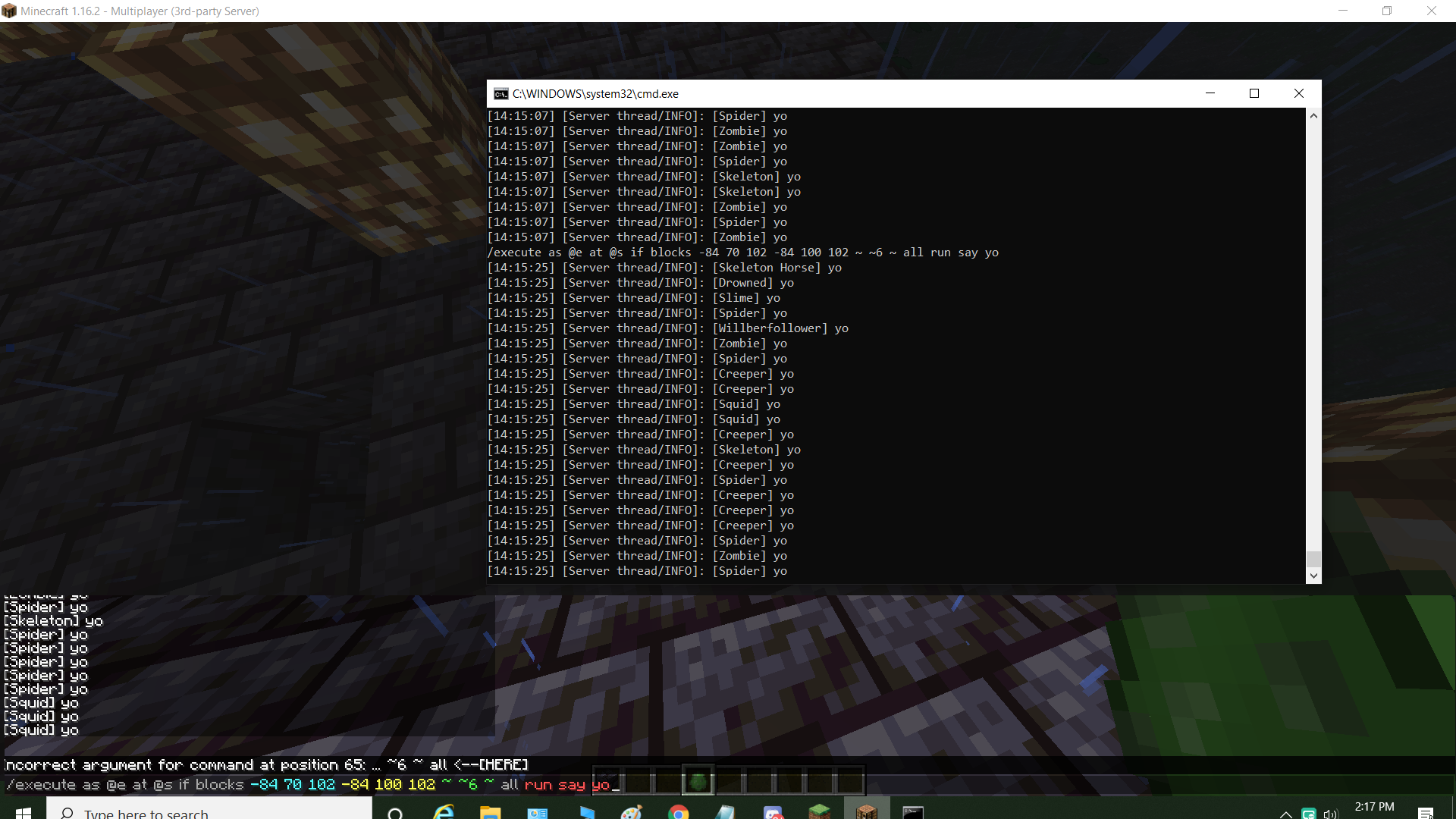
This still isn't fixed. The command "execute if blocks all" doesn't allow you to use "all" after the coordinates it only allows for masked. Doesn't work in command blocks ether. (This does work in single player) However you can still run the command from the server console.
Here is a photo of the command working in the console and not for me while in the server.
Thanks Willber for this information. Please always include the exact version name in which you are experiencing this issue so we can update the "Affects Version/s" field of this report accordingly.
Tested on a dedicated server and this bug is still present in 1.16.5.
Can confirm in 1.17.1
Can confirm in 1.18.1.
Can confirm in 1.18.2
1.19
I experience this in single player now too, in a 1.19.1 world. Same command works fine in 1.18.2.
Confirmed in 1.19.2 single player world
Can confirm in 22w42a (Singleplayer)
I've edited this bug report to reflect the current behaviour: In 23w05a, the command appears to work properly in both single- and multiplayer, however syntax highlighting does not work properly and the command is not recognized as valid (but can be run regardless).
If anyone has issues with actually running the command, please file a new bug report; in our testing this no longer happens in general but it might be possible that it still occurs in some cases. However it would be useful to track this as a separate bug.
(link to the discussion on our Discord server for future reference)
Can confirm in 1.20.2 release candidate 1.
Code analysis:
When the server sends the command syntax tree to the client, it sends all the command nodes in an array. However, the 'all' node of '/execute if blocks' and the 'all' node of '/forceload remove all' are regarded incorrectly as the same node when creating the array. As a result, the client parses the saying command as forceload command.
To fix it, just merge the PR https://github.com/Mojang/brigadier/pull/89
See also, https://github.com/SpongePowered/Sponge/issues/3356
can confirm in 1.20,5 pls fix it XD
Can Confirm, still happening in version: 24w38a!!!

Normally this doesn't really matter and if you NEED the autocomplete you can just take a comparator output into another command block
However it is still annoying
I can confirm in 1.21.3