 Elemend
- Elemend
- elemend
- Europe/Stockholm
- Yes
- No
 MC-122819
![[Mojang] Georgii Gavrichev](../../../data/avatars/users/22428.png)
![[Mojang] Nathan Adams](../../../data/assets/gravatar/dinnerbone.png)
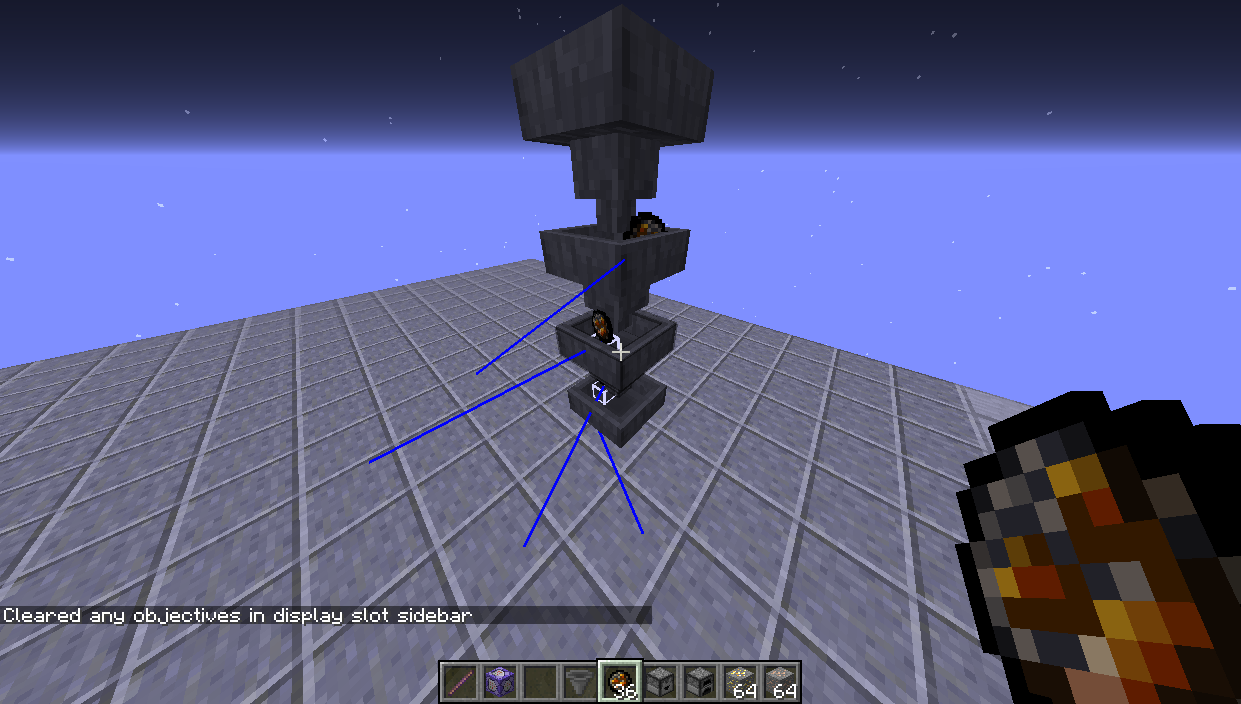


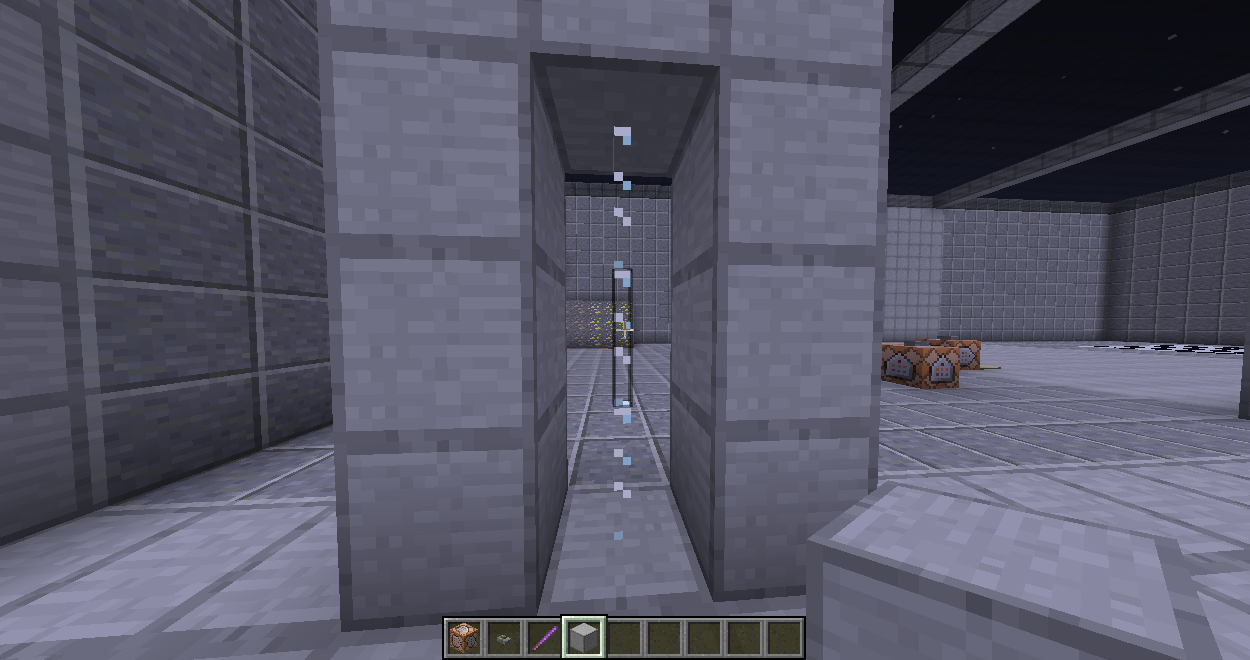
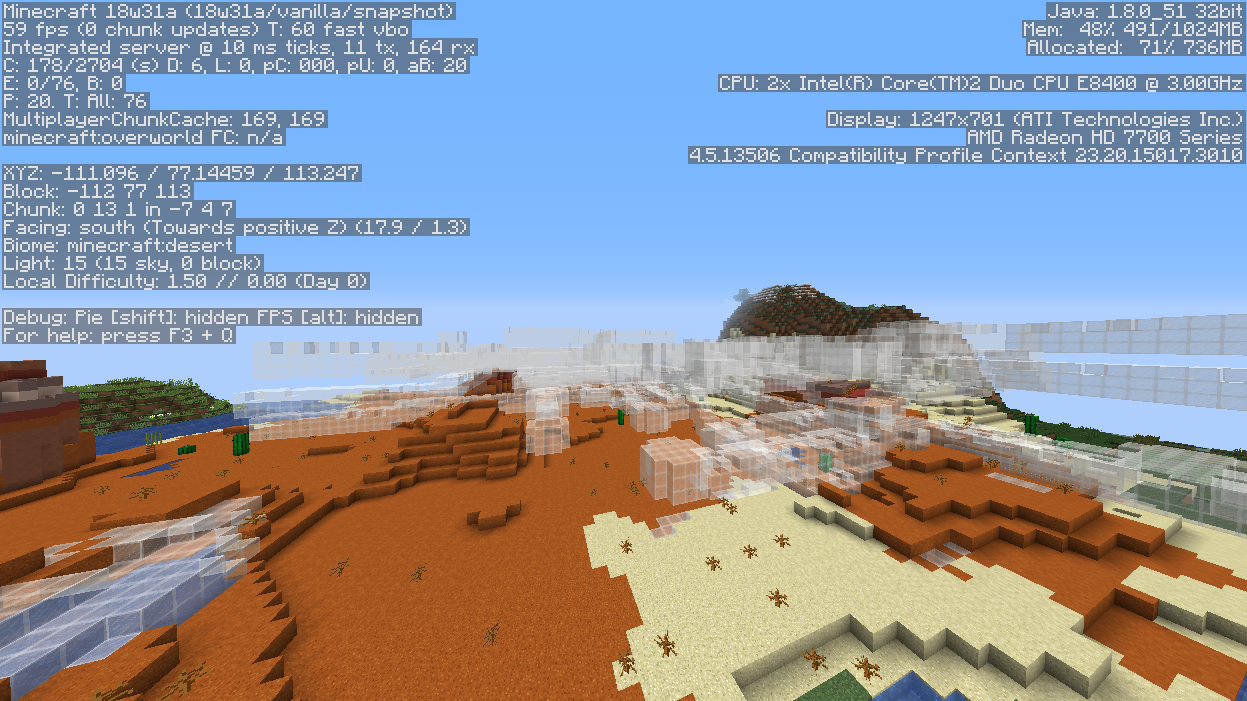

The changes to the hitbixes of a hopper affect items that get thrown onto the hopper from the side. In the Picture I provided you can see the bug in action. When you throw an item in from the top it gets pulled down to the lowest hopper: no problem. When you throw an item in from the side, like I did, they just don't get picked up. When you brek the hoppers from the top down the items get picked up and end up in the lowest one.
2017-12-02_19.50.06.png
In the Changelog for Snapshot 17w49b you can read: "When overriding a tag, you now append instead of replacing"
Well, that's not working unfortunately. I have two Datapacks installed in my world that each have a tick.json with the filepath: data/minecraft/tags/functions/tick.json
If both datapacks are enabled, only one of them is working. I have to disable the working one to have the other working. This indicates that one overwrites the other.In the Changelog for Snapshot 17w49b you can read: "When overriding a tag, you now append instead of replacing"
Well, that's not working unfortunately. I have two Datapacks installed in my world that each have a tick.json with the filepath: data/minecraft/tags/functions/tick.json
If both datapacks are enabled, only one of them is working. I have to disable the working one to have the other working. This indicates that one overwrites the other.I have 2 test functions that should spam "Function" and "Function1" into the chat, but only "Function1" is visible in the chat.
In the Changelog for Snapshot 17w49b you can read: "When overriding a tag, you now append instead of replacing"
Well, that's not working unfortunately. I have two Datapacks installed in my world that each have a tick.json with the filepath: data/minecraft/tags/functions/tick.json
If both datapacks are enabled, only one of them is working. I have to disable the working one to have the other working. This indicates that one overwrites the other.I have 2 test functions that should spam "Function" and "Function1" into the chat, but only "Function1" is visible in the chat.
In the Changelog for Snapshot 17w49b you can read: "When overriding a tag, you now append instead of replacing"
Well, that's not working unfortunately. I have two Datapacks installed in my world that each have a tick.json with the filepath: data/minecraft/tags/functions/tick.json
If both datapacks are enabled, only one of them is working. I have to disable the working one to have the other working. This indicates that one overwrites the other. I don't really want to share what those functions are (yet), so I made test-functions that show the problems as well, albeit more abnoxious:I have 2 test functions that should spam "Function" and "Function1" into the chat, but only "Function1" is visible in the chat.
In the Changelog for Snapshot 17w49b you can read: "When overriding a tag, you now append instead of replacing"
Well, that's not working unfortunately.I have two Datapacks installed in my world that each have a tick.json with the filepath: data/minecraft/tags/functions/tick.json
If both datapacks are enabled, only one of them is working. I have to disable the working one to have the other working. This indicates that one overwrites the other. Idon't really want to share what those functions are (yet), so I madetest-functions that show the problemsas well, albeit more abnoxious:I have 2 test functions that should spam "Function" and "Function1" into the chat, but only "Function1" is visible in the chat.
In the Changelog for Snapshot 17w49b you can read: "When overriding a tag, you now append instead of replacing"
The Bug:
I have two Datapacks installed in my world that each have a tick.json with the filepath: data/minecraft/tags/functions/tick.json
If both datapacks are enabled, only one of them is working. I have to disable the working one to have the other working. This indicates that one overwrites the other. I prepared two test-functions that show the problems (a bit obnoxious):I have 2 test functions that should spam "Function" and "Function1" into the chat, but only "Function1" is visible in the chat.
Well there are quite a lot of reports about names, but only on entities, like armor stands not on blocks like the hopper. Not sure I would've ever found that through a search.
The problem that the dropper drops its contents upon being replaced with a hopper isn't clarified. Is there something I missed about that as well?
For anyone stumbling upon this issue, there's a workaround to check if a slot has any item in them.
That can be checked for every slot before the one that you want to check.execute store success entity @s example if entity @s[nbt={Inventory:[{Slot:0b}]}]
stat"minecraft.used:minecraft.shears"doesn't increase when mining carpetstatistic for using shears doesn't increase when mining carpet
I'm unable to open the game in 18w20a, so it's not possible to take a look to see if this still occurs.
statistic for using shears doesn't increase when mining carpet, cake, tnt, saplings slime_blocks, maybe more blocks affected, too.
statistic for using shears doesn't increase when mining carpet, cake, tnt, saplings, slime_blocks, maybe more blocks affected, too.
statistic for using shears doesn't increase when mining carpet,cake, tnt, saplings, slime_blocks, maybe more blocks affected, too.statistic for using shears doesn't increase when mining carpet, tall grass, saplings, maybe more blocks affected, too.
statistic for using shears doesn't increase when mining carpet, tall grass, saplings, sea grass. tall sea grass, maybe more blocks affected, too.
Add a scoreboard with shears being used as the criteria:
/scoreboard objectives add shear minecraft.used:minecraft.shears
This scoreboard objective doesn't increase when mining carpet with shears.
If you use the criteria "minecraft.used:minecraft.diamond_pickaxe" and use said diamond pickaxe to mine carpet the score for the pickaxe increases, so why wouldn't it with shears?Another Argument on why this is a bug is that the durability decreases in both cases, so the tools are clearly being used!
Add a scoreboard with shears being used as the criteria:
/scoreboard objectives add shear minecraft.used:minecraft.shearsDisplay it in the sidebar:
/scoreboard objectives setdisplay sidebar shearThis scoreboard objective doesn't increase when mining carpet with shears and the other mentioned blocks.
If you use the criteria "minecraft.used:minecraft.diamond_pickaxe" and use said diamond pickaxe to mine carpet the score for the pickaxe increases, so why wouldn't it with shears?Another Argument on why this is a bug is that the durability decreases in both cases, so the tools are clearly being used!
Add a scoreboard with shears being used as the criteria:
/scoreboard objectives add shear minecraft.used:minecraft.shearsDisplay it in the sidebar:
/scoreboard objectives setdisplay sidebar shearThis scoreboard objective doesn't increase when mining carpet with shears and the other mentioned blocks.
If you use the criteria "minecraft.used:minecraft.diamond_pickaxe" and use said diamond pickaxe to mine carpet the score for the pickaxe increases, so why wouldn't it with shears?Another Argument on why this is a bug is that the durability decreases in both cases, so the tools are clearly being used!
I think it might be good to have a list of blocks where it does not work. For the reason that you need to have the block mined with shears to actually collect an item, but where the criteria does not tick up.
- tall_grass
- large_fern
- seagrass
- tall_seagrass
- nether_sprouts
This needs to be reopened because the way the dispenser is powered changes the behaviour

The button I'm pointing at, when clicked, makes the flint and steel not lose durability, the button behind it, on the polished andesite, makes it lose durability.
This happens only with blue ice that has snow layers on top, doesn't matter how many, 1 or 8.
The command should just give a score on the player, which it does, but if snow layers are on top of the blue ice, they get destroyed and don't drop snowballs.execute as @a at @s store result score @s icenearby run clone ~-2 ~-2 ~-2 ~2 ~3 ~2 ~-2 ~-2 ~-2 filtered #ice forceOut of the 4 different Blocks of Ice, only blue ice has that problem. If there are snow layers on frosted ice, they don't get destroyed.
This happens only with blue ice that has snow layers on top, doesn't matter how many, 1 or 8.
The command should just give a score on the player, which it does, but if snow layers are on top of the blue ice, they get destroyed and don't drop snowballs.execute as @a at @s store result score @s icenearby run clone ~-2 ~-2 ~-2 ~2 ~3 ~2 ~-2 ~-2 ~-2 filtered #ice forceOut of the 4 different Blocks of Ice, blue ice and frosted ice have that problem. You can
t set snow layers on top of packed ice or normal ice.
Clone filtered force destroyssnow layersClone filtered force destroys blocks that are dependent on support blocks
This happens only with blue ice that has snow layers on top, doesn't matter how many, 1 or 8.
The command should just give a score on the player, which it does, but if snow layers are on top of the blue ice, they get destroyed and don't drop snowballs.execute as @a at @s store result score @s icenearby run clone ~-2 ~-2 ~-2 ~2 ~3 ~2 ~-2 ~-2 ~-2 filtered #ice forceOut of the 4 different Blocks of Ice, blue ice and frosted ice have that problem. You can
t set snow layers on top of packed ice or normal ice.This happens with blocks that need other blocks that are under or besides them. Such Blocks are cocoa beans, snow layers, grass, flowers and crops.
If a clone command is executed that filters out the support block, the mentioned Blocks pop off. This clone command has been used to check the Bug:
execute as @a at @s store result score @s icenearby run clone ~-2 ~-2 ~-2 ~2 ~3 ~2 ~-2 ~-2 ~-2 filtered #ice forceChange #ice out for whatever supporting Block there is and watch the Block on top pop off, I tested this with grass blocks, farmland and ice. Reproducing the Bug is reliable that it happens everytime.
Out of the 4 different Blocks of Ice, blue ice and frosted ice have that problem. You can
t set snow layers on top of packed ice or normal ice.
This happens with blocks that need other blocks that are under or besides them. Such Blocks are cocoa beans, snow layers, grass, flowers and crops.
If a clone command is executed that filters out the support block, the mentioned Blocks pop off. This clone command has been used to check the Bug:
execute as @a at @s store result score @s icenearby run clone ~-2 ~-2 ~-2 ~2 ~3 ~2 ~-2 ~-2 ~-2 filtered #ice forceChange #ice out for whatever supporting Block there is and watch the Block on top pop off, I tested this with grass blocks, farmland and ice. Reproducing the Bug is reliable that it happens everytime.
Out of the 4 different Blocks of Ice, blue ice and frosted ice have that problem. You can
t set snow layers on top of packed ice or normal ice.This happens with blocks that need other blocks that are under or besides them. Such Blocks are cocoa beans, snow layers, grass, flowers and crops.
If a clone command is executed that filters out the support block, the mentioned Blocks pop off. This clone command has been used to check the Bug:
execute as @a at @s store result score @s icenearby run clone ~-2 ~-2 ~-2 ~2 ~3 ~2 ~-2 ~-2 ~-2 filtered #ice forceChange #ice out for whatever supporting Block there is and watch the Block on top pop off, I tested this with grass blocks, farmland and ice. Reproducing the Bug is reliable that it happens everytime.
Can't reproduce in 18w31a.
Affects 1.13.1-pre2.
Affects 18w32a.
This happens in 18w30b too. Kind of wierd that it prevents further enchanting, too: "/enchant @a minecraft:unbreaking 1" will throw an error message that the tool won't support that enchantment.
Give yourself Shears with 1 Durability remaining:/give @s minecraft:shears{Damage:237} 1Then mine
Leaves, doesn't matter which type. You will never get a Block to drop. Sometimes you get sticks to drop.I also tried grass and cobwebs. Grass doesn't drop, tall grass drops 2 grass. Cobweb does drop 1 String.The last Block you mine before the shears break doesn't drop what it should or what you expect the drop to be. It depends on what Block you mine, not all Blocks which are mineable by shears are affected.
To Reproduce this Issue, give yourself Shears with 1 Durability remaining:
/give @s minecraft:shears{Damage:237} 1Then mine any type of Leaves and they won't drop what they're supposed to: a Leave Block. What's weird is that sometimes you get 2 sticks to drop.
I also tried Low and Tall Grass. Low Grass doesn't drop itself and Tall Grass drops 2 grass as expected.
Cobweb does drop 1 String instead of a cobweb like you would expect.
The last Block you mine before the shears break doesn't drop what it should or what you expect the drop to be. It depends on what Block you mine, not all Blocks which are mineable by shears are affected.
To Reproduce this Issue, give yourself Shears with 1 Durability remaining:
/give @s minecraft:shears{Damage:237} 1Then mine any type of Leaves and they won't drop what they're supposed to: a Leave Block. What's weird is that sometimes you get 2 sticks
to drop.I also tried Low and Tall Grass. Low Grass doesn't drop itself and Tall Grass drops 2 grass as expected.
Cobweb does drop 1 String instead of a cobweb like you would expect.
The last Block you mine before the shears break doesn't drop what it should or what you expect the drop to be. It depends on what Block you mine, not all Blocks which are mineable by shears are affected.
To Reproduce this Issue, give yourself Shears with 1 Durability remaining:
/give @s minecraft:shears{Damage:237} 1Then mine any type of Leaves and they won't drop what they're supposed to: a Leave Block. What's weird is that sometimes you get 2 sticks or a sapling to drop. It's almost as if you mined it with your Hand.
I also tried Low and Tall Grass. Low Grass doesn't drop itself and Tall Grass drops 2 grass as expected.
Cobweb does drop 1 String instead of a cobweb like you would expect.
I wanted to use the /item command to switch the item in the offhand to the players mainhand. I wanted to use an advancement reward with an inventory_changed trigger and thought
the Issue was the execution order, but as it turns out, the/itemcommanditself doesn't work.
- To reproduce the Isse, I have
these two commands in afunction called: "switch_items". I attached a data pack with that one function.item entity @s weapon.mainhand copy entity @s weapon.offhand1item entity @s weapon.offhand replace minecraft:air 1I execute this through chat, with:
function item:switch_items
- What I expect to happen when this function is executed:
- When the player holds an item in the mainhand but none in the offhand, the item to be deleted because it's overridden by the "air" in the offhand.
- When the player holds an item in the offhand but none in the mainhand, the item to be switched to the mainhand. (First the item is copied and then the offhand slot is cleared)
- What actually happens:
- In the first case, nothing at all.
- In the second case the item gets deleted. It vanishes.
I wanted to use the /item command to switch the item in the offhand to the players mainhand. I wanted to use an advancement reward with an inventory_changed trigger and thought at first that the /item command itself doesn't work. As it turns out, the commands will work (if there are no syntax errors, heh), it's just that the item it's supposed to switch is still deleted.
- To reproduce the Isse, I have an advancement called "offhand" which will trigger when there is either a carrot, a stick, a stone or a carrot on a stick in the players offhand and no item in the mainhand. So essentially, get an item in the mainhand and press the button to switch it to your offhand. The function is called: "switch_items". I attached a data pack with the function and the advancement file.
item entity @s weapon.mainhand copy entity @s weapon.offhand item entity @s weapon.offhand replace minecraft:air 1 advancement revoke @s only item:offhandI execute this through chat, with:
function item:switch_items
- What I expect to happen when this function is executed:
- When the player holds an item in the mainhand but none in the offhand, the item to be deleted because it's overridden by the "air" in the offhand.
- When the player holds an item in the offhand but none in the mainhand, the item to be switched to the mainhand. (First the item is copied and then the offhand slot is cleared)
- What actually happens:
- In the first case, nothing at all.
- In the second case the item gets deleted. It vanishes.
I wanted to use the /item command to switch the item in the offhand to the players mainhand. I wanted to use an advancement reward with an inventory_changed trigger and thought at first that the /item command itself doesn't work. As it turns out, the commands will work (if there are no syntax errors, heh), it's just that the item it's supposed to switch is still deleted.
- To reproduce the Isse, I have an advancement called "offhand" which will trigger when there is either a carrot, a stick, a stone or a carrot on a stick in the players offhand and no item in the mainhand. So essentially, get an item in the mainhand and press the button to switch it to your offhand. The function is called: "switch_items". I attached a data pack with the function and the advancement file.
item entity @s weapon.mainhand copy entity @s weapon.offhand item entity @s weapon.offhand replace minecraft:air 1 advancement revoke @s only item:offhandI execute this through chat, with:
function item:switch_items
- What I expect to happen when this function is executed:
- When the player holds an item in the mainhand but none in the offhand, the item to be deleted because it's overridden by the "air" in the offhand.
- When the player holds an item in the offhand but none in the mainhand, the item to be switched to the mainhand. (First the item is copied and then the offhand slot is cleared)
- What actually happens:
- In the first case, nothing at all.
- In the second case the item gets deleted. It vanishes.
I wanted to use the /item command to switch the item in the offhand to the players mainhand. I wanted to use an advancement reward with an inventory_changed trigger and thought at first that the /item command itself doesn't work. As it turns out, the commands will work (if there are no syntax errors, heh), it's just that the item it's supposed to switch is still deleted.
- To reproduce the Isse, I have an advancement called "offhand" which will trigger when there is either a carrot, a stick, a stone or a carrot on a stick in the players offhand and no item in the mainhand. So essentially, get an item in the mainhand and press the button to switch it to your offhand. The function is called: "switch_items". I attached a data pack with the function and the advancement file.
item entity @s weapon.mainhand copy entity @s weapon.offhand item entity @s weapon.offhand replace minecraft:air 1 advancement revoke @s only item:offhand
As soon as any of those 4 items are in the offhand they disappear when you're in creative. When you're in survival, the item becomes a ghost item. you can recover it by clicking on free slots in your inventory.
The /item command doesn't copy from offhand to mainhandAdvancement reward function creates ghost item

In 17w49a you're able to type: 'minecraft.killed:minecraft.ender_dragon' and the objective gets created successfully. So I suggest to mark this issue as fixed.
I did copy the wool.json over into a testpack, filepath is 'data/minecraft/tags/blocks/wool.json'
The json file looks like this:
{ "values": [ "minecraft:light_blue_wool", "minecraft:orange_wool", "minecraft:light_gray_wool", "minecraft:black_wool", "minecraft:gray_wool", "minecraft:magenta_wool", "minecraft:lime_wool", "minecraft:cyan_wool", "minecraft:red_wool", "minecraft:green_wool", "minecraft:white_wool", "minecraft:pink_wool", "minecraft:purple_wool", "minecraft:blue_wool", "minecraft:brown_wool", "minecraft:yellow_wool", "minecraft:bricks", "minecraft:stone" ] }Thanks for the Formatting Skylinerw, didn't know how to do that
I made a 3x3 floor out of white wool and while standing on top I typed a filtered clone in the chat:
It found 9 blocks, then I added some bricks and stone, still 9 Blocks, so it works like one would expect.
The same works out of a different pack with data/testing/tags/blocks/wool.json with #testing:wool instead. And that confused my massively because for the tick.json to call the function it has to be in the path: data/minecraft/tags/functions/tick.json but the block tags can be under any namespace inside the data folder?
Oh, I didn't properly understand the question. This is all so new and confusing to me. I repeated the test from my earlier comment and deleted the wool out of the file. That time, it didn't find any wool, so I can confirm the bug for other tag types as well.
Confirmed and not just with dummy scoreboards, I used these two objectives:
minecraft.broken:minecraft.gold_ore
minecraft.custom:minecraft.sneak_time
Resetting the one not displayed in the sidebar makes the one in the sidebar disappear. It only reappears if the displayed objective is changed.
It's fixed, thank you Dinnerbone


It's now picking up entities that are in the hopper-cavity, when items land on the rim, they don't get picked up. I'd say that's a wonderful solution/fix, well done!

Still Present in 17w50a. Not to sound rude, but 1.13 is the "technically better update", so I don't know if this is planned already, but maybe take another look at this bug?
Affects 17w50a, also as mod Torabi mentioned that it gets fixed in the future, one can almost say that time is now, the technically better update is already happening.
Because armor stands are affected by gravity they're immediatly falling to the ground. This is not a bug.
But it's also harder to accidentally wipe all entities from the entire world. So this might be "working as intented".
I tried your Command as written and it did drop frames to 0 for about 5 seconds.
I can confirm, and I didn't even use the replace function, just a normal fill command, oh wait the bug shows even normal glass panes!

Affects 18w01a.
I'm not entirely sure if it's relevant, but using negative Values for dx,dy and dz also doesn't fail to build:
run tag @e[type=armor_stand,dx=-2,dy=0,dz=-2] add lala
Or did
MC-45134change and it works now? If the parser does get updated in the future, this should be counted as an error too. I mean it doesn't even show up in the launcher_log.txt, whereas the execute subsommand "if entity" here:execute as @s at @s if entity @e[type=area_effect_cloud,tag=blu] run something...
does give an error that there needs to be only entitiy, so it's necessary to add "limit=1"
Was it mentioned anywhere in the changelogs of any snapshots that dx,dy,dz do work with negative values? And apparently I can't recreate that error either, so nevermind that.
This Issue might need to be reopened, not totally sure. It could be I'm just being dumb, but can somebody can have a look in 18w07b if tags overwrite from two different Datapacks? That would be super, thanks.
Doesn't occur in 18w07c. Instead, tab completion of fake player names doesn't work at all.
Occurs in 18w07c. Might be noteworthy that adding small numbers onto the relative x and y Coordinates circumventes this issue:
/execute align xyz run summon armor_stand ~0.1 ~ ~0.1
{Marker:1b}- armor stand stays
{Marker:1b}/execute align xyz run summon armor_stand ~ ~ ~0.1
- armor stands falls through
{Marker:1b}/execute align xyz run summon armor_stand ~0.1 ~ ~
- armor stands falls through
Occurs in 18w07c.
Welp, there goes my datapack down the drain. This wouldn't be an issue if they had implemented the modifyitem command, but no they scrapped it.
Ooccurs in 18w15a
Happens in 18w15a.
Happens in 18w20c too.
Happens in 18w20c too.
Happens in 18w20c too.
Seems mostly fixed in 18w20c, just that with F3+B the eye level indicator / the blue line always faces south.
Seems to me that it's partially fixed in 18w22c: Sitting in a Minecart and bobbing up and down in water doesn't make the sky turn dark anymore. Standing on soul sand and snow layer 8 does turn the sky dark, still.
This does happen in 1.13 prerelease 1. It would be so useful to have, too. You could then spare a masked clone command.
Does happen in 18w30b.
Still happens in 18w30b
This still occurs in Version 18w30b.
This occurs in Version 18w30b.
Affects 18w30b.
Happens in 18w30b.
Can't reproduce in 18w30b, singleplayer. The XP-Orbs just sit directly on top of the deathpoint, not scattered around over several blocks. Can't test in Multiplayer, unfortunately.
These tags remain unchanged in 18w30b.
Happens in 18w30b. Wouldn't mind it being "Won't fix", as no functionality would be lost if it remained in the game.
Happens in 18w30b still.
18w30b seems to be affected. I had two Datapacks enabled in the world, then went to the title screen and I could only delete one.
Is this related to or duplicates
MC-131077?18w31a is affected as well.
Still happens in 18w31a.
It's in 18w31a too.
Affects 18w31a too.
Can confirm for 18w31a.
I'm not able to recreate the issue in 18w31a. I built what was shown in the picture. I used stone blocks instead of glass. I was sneaking and swimming up in the 1 Block gap with no Damage taken. This might actually be fixed?
Affects 18w31a.
Affects 18w31a.
This still happens in 18w31a.
Happens in 18w31a, same seed and coordinates.
Affects 18w31a, see also
MC-125138.Affects 18w31a.
Affects 18w31a still.
The Steps to reproduce don't seem to work in 18w31a. The Zombie certainly does damage. Even when the player stands against the wall, the zombie is able to hit, just not as fast as in an open area. A subject to interpretation if this Issue can be closed.
In 18w31a they will walk over magma blocks and also through fire to chase the player, tested in 18w31a. Fixed, maybe?
Affects 18w31a.
Affects 18w31a. Better steps to reproduce: Sit in a Minecart, press F3+B, then F5 and teleport the minecart up: "/tp @e[type=minecraft:minecart] ~ ~20 ~"
The Player Hitbox changes when flying or swimming, so this Issue should be attended too.
In 18w31a: I typed the shown command with pigs and chicken, which don't seem to have exactly the same offset, but for endermen the offset is the same as in the picture shown.
Best to keep this Updated, even if it's marked as Postponed, as it affects 18w31a too.
In 18w31a Shulker Boxes aren't affected anymore, other renamed Containers still are.
Can't reproduce in 18w31a. This Issue can be marked as solved.
In 18w31a, the ender eyes entity id is still "Eye of Ender".
Affects 18w31a.
Affects 18w31a.
Affects 18w32a.
Affects 18w32a. Coincidentally, specifying a Value of 1 doesn't work either.
Affects 18w32a.
Affects 18w33a.
No longer Happens in 1.13.1-pre1.
I tried to recreate, but the Movement of Items and XP Orbs are directed towards the players hip/torso. This Issue is fixed in 1.13.1-pre1.
Doesn't happen for me in Release 1.13 either.
Not fixed in 1.13 Release and as such 1.13.1-pre1 as well. The mobs sometimes walk over these Blocks to get to the player but then seem to remember that the blocks are nontraversable for them. The right behaviour happens more accidental.
Yes actually! In 1.13 it's the same behaviour. Fixed.
Affects 1.13 and 1.13.1-pre1.
Affects 1.13-pre1. Specifying a Value of 1 only works if the gamerule doWeatherCycle is set to true.
Affects 1.13-pre1, but Honestly, I wouldn't mind it at all if this would be resolved as won't fix, or WAI.
Affects 1.13.1-pre2.
Confirmed for 1.13.1-pre2.
Affects 1.13.1-pre2.
Affects 1.13.1-pre2.
Affects 1.13.1-pre2.
Affects 1.13.1-pre2.
Affects 1.13.1-pre2.
Affects 1.13.1-pre2.
Affects 1.13.1-pre2.
Affects 1.13.1-pre2.
Affects 1.13-pre2.
Affects 1.13-pre2.
Affects 1.13.1-pre2.
Affects 1.13.1-pre2.
I can't recreate the Bug in 1.13.1-pre2 at all. All 4 Situations don't darken the sky at all.
Affects 1.13.1-pre2.
Can't reproduce in 1.13.1-pre2.
Can't reproduce in 1.13.1-pre2.
Affects 1.13.1-pre2.
Affects 1.13.1-pre2.
Affects 1.13.1-pre2.
Affects 1.13.1-pre2.
Happens in 1.13.1 still.
In 19w14a the invalid tag will lead to an error message. It won't show up as red text though.
This Issue still occurs in release 1.14.
Happens in 1.14.1
Confirmed for 1.14.1
Affects 1.14.1
Happens in 1.14.1
Happens in 1.14.1 too.
Also in 1.14.1
I can not reproduce this with any of the mobs in Version 1.14.1
Affects 1.14.1
Affects 1.14.1 as well.
This Issue Occurs in 1.14.2-Pre-Release 3.
Happens in 1.14.2 - Pre-Release 3
Happens in 1.14.2 - Pre-Release 3
Happens in 1.14.2-Pre-release 3
This Occurs in 1.14.2-Pre-Release 3 as well.
Happens in 1.14.2-Pre-Release 3
Happens in 1.14.2-Pre-Release 3 (Be sure to have /gamerule doWeatherCycle true)
Happens in 1.14.2-Pre-release 3
Happens in 1.14.2-Pre-release 3
Happens in 1.14.2-Pre-release 3
Happens in 1.14.2-Pre-Release 3
Affects 1.14.2-Pre-Release 3
Hey, so I'm pretty sure I'm experiencing this Bug with crafting in a datapack. It's happening with chuckchuks tables and chairs datapack, but I also have an example datapack here, where you can craft two sticks diagonal over each other to get a knowledge book. This triggers an advancement in which you get a function reward, and in that you get the knowledge book cleared and are given a wooden sword. That works no problem, and the item shows up, but if the hotbar of the player is full, the sword gets given as an invisible item and only shows up by clicking into the seemingly first empty slot. test_146043.zip
This happens in 1.14.2 and the latest 1.14.3-prerelease 1, but I'm 100% sure it's happening in every version that released after this Bugreport last got updated.
might be related to MC-135492
This is still an Issue in 1.14.4 and the 1.15-Snapshots.
This seems forgotten, as it wasn't updated in a long time and might be resolved as "invalid" or "won't fix".
Whatever, I hope we can get a way to store the id of a block somewhere. Right now in the game you would use hardcoding to relate scoreboard value to block (hardcoding) or use the loot command to store the drop of a block somewhere. If you're using "/loot" in your datapack it can potentially be unreliable because of block loot tables from other datapacks.
If the content of this report was in the game you could pair this with the upcoming storage (in 1.15-snaphots). Then you could have the id stored directly without hardcoding anything and with no potential conflicts between datapacks.
Can this be closed as "works as intended" ?
The reason for this is that "align xyz" exists. It floors the executing position so it won't find the armor stand named "positive" if you do this:
A potential fix to this bug would mean that the execution position is floored as a built in feature. I would advise against it, it would be detrimental actually. No functionality is lost if this would be resolved as WAI.
Happens in 19w42a
This issue seems to be duplicated by
MC-156197If it is,
MC-156197can be closed, since this Issue here got fixed.(In my defense though, this ticket is missing any keywords. How was I supposed to find it?)
This Issue is a duplicate.
The Problems described are fixed via
MC-151962, please close, thanks.Can confirm for 19w46b.
It's important that the hitbox of the boat has to extend over the edge of the block. If the boat is just at the edge but not over it, the falling block drops on the torch as an item.
Maybe this is related to
MC-146043?Oh, I made a mistake. The 1 at the end of the command is read as an item modifier. This makes this command fail, of course.
If the 1 is removed it works as it should. So nevermind, this issue isn't one and can be closed.There is an Issue still here, however. I mentioned the commands being executed as an advancement reward. This changes things. There is a bug here, need to rewrite that report
and this is in some way a duplicate of MC-187281
This Issue can be closed, thank you.
I experience the same Issue using the same advancement trigger and a reward in which the item gets switched from offhand to mainhand with the new /item command.
item_bug.zip