 George Gates
- rydian
- rydian
- America/Havana
- Yes
- No
3 issues
Key
Summary
Status
Reporter
Assignee
Created
 MC-11037
 Low
Low1 - 200






Added Attachments:
Added Affects Versions: 15w47a
Added Affects Versions: 18w20c
Added Attachments:
Added Attachments:
Added Attachments:
Added Attachments:
Added Attachments:
Added Attachments:
Added Attachments:
Deleted Comment:
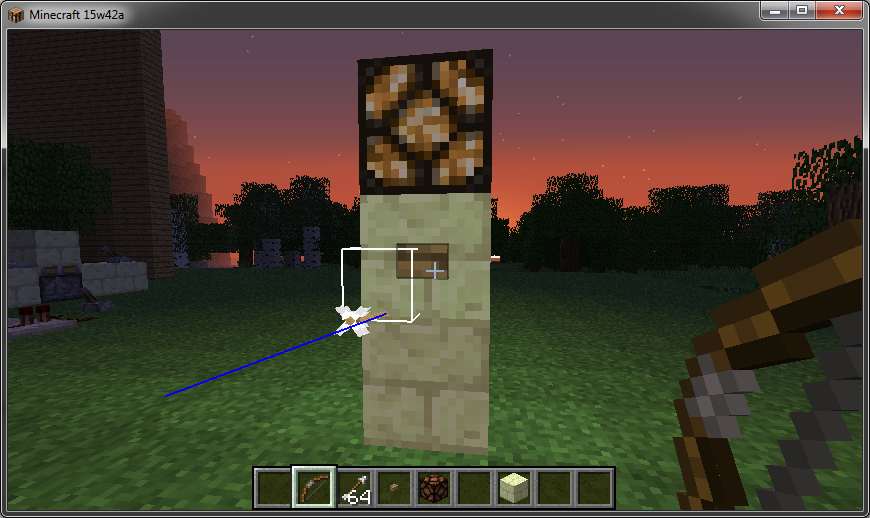
In-game display showing the problem.
Added Attachments:
Deleted Comment:
Still happening in 1.9-pre2.
Reopened and gave the ticket to George Gates.

George Gates: Since you are the reporter of this ticket, you can update the affected versions by yourself.
Still exists in 13w03a.
Glad I'm not the only person that's noticed this problem, it was an issue with chicken farms on an SMP server I ran a while back too.
Still exists in 13w04a.
Can't mix whether the wire and hooks are supported by blocks or air. If the hooks have no blocks then the wire will work with no blocks under it, but if the hooks have blocks then the wire needs blocks.
But yeah being able to mix and match would be nice.
Second the above, the dispenser "fires", but nothing comes out so it's not using the bonemeal.
I make use of BUD switches using pistons in my builds, but even so I'd still like a BUD block as replacement for getting the piston bugs fixed because it'd make things easier, less messy, and give more possibilities.
Your video card driver crashed. Minecraft is not capable of causing this problem itself (as it runs underneath it, it's a bug in your installed driver. Update it. If there's no update available then you'll have to wait for a better Windows 8-compatible driver for it.
I can make this happen repeatedly with command block output by moving away so the chunk unloads. After heading back in, I need to cause a block or redstone update to the affected comparator to make it start working again.
Video: http://www.youtube.com/watch?v=T4D2AR-b-tI
Given the custom font, you're modded. Even if you change to a vanilla pack, you still have the mods installed that would support HD packs, your game is still changed.
Greg, how did you "update" windows? If you did a full install of 8 with anything you previously had being erased, then the old drivers would have been erased too.
Joshua, go to the website of the company that made your video card to get the latest drivers.
Unable to reproduce it here.
No walls, 99FPS: http://s13.postimage.org/pwqaary6f/2013_01_28_17_01_08.png
5x5x5 Cube, 99FPS: http://s8.postimage.org/s8a10p20l/2013_01_28_17_01_19.png
Have you tried doing this on a superflat world to see if the drop is noticeable there? There's a couple potential reasons for this (texture changes, the sheer number of polygons rendered at once), but being able to reproduce it will let the devs figure out what's up.
When it comes to powering with redstone, pistons are the inconsistent ones. Doors, redstone lamps, etc. do not get powered the same way. Pistons getting power diagonally and needing an update to extent/retract is an obvious bug.
HOWEVER, block update detection is very useful for a wide variety of situations.
http://www.youtube.com/watch?v=XTUr3akixVk
EDIT: Prepended the protocol on the link.
5x5x5 = 125 blocks.
10x10x5 = 500 blocks, and that's the point where my GPU's fan started spinning up, though still not bogged.
10x10x7 = 700 blocks, and that's when I was getting a bit of visual lag when placing (though not double-blocking yet).
10x10x10 = 1,000 blocks, and when placing those last 100 I finally started double-blocking...
Though the framerate when not changing blocks was unaffected.
http://s8.postimage.org/h34kjqp0l/2013_01_29_06_35_01.png
So this is a computer/rendering performance issue, you'll likely see the same thing with other models that have lots of visible surfaces even when grouped (like fences). Unlike other blocks (standard square ones) that mold and hide eachother when grouped (only the outside polygons existing for rendering), transparent blocks have surfaces that still require rendering even when "covered" by other transparent blocks.
My specs, for comparison...
CPU: Intel Core 2 Quad Q8400
GPU: Radeon HD 5770
RAM: 4GB
OS: Windows 7 Home Premium x64
Java: 1.7.0_11 (7 u11)
@Tavis: The framerate FRAPS records at is variable. 60, 50, and 30 are built-in options, with a custom option as well.
No fix, Radeon HD 5770.
And Thomas, what if a block only has water on one side of it and not on the other side? Should it only show water on one half, and if so, which half? What if it's something like the brewing station or fence that has obviously holes and/or missing areas, if there's no water on the other side should the water pretend that the block isn't there and flow past it? If so, what about designs where people use floating signs and such to hold water in place?
etc.
And in real-life you need to drink regularly and take bathroom breaks. Videogames often break from reality to allow for game mechanics, and holding water back with transparent objects (like signs) is a game mechanic used in tons of builds.
That depends on your definition of "intention".
A - An idea (formed before/during development) of how the game world should be.
B - How the game was actually programmed due to space/memory/engine/computational limitations.
This is the latter, since the engine is working as it was originally designed to.
The case is B because water was programmed as a block, on purpose. In most cases like dirt and stone blocks, water not existing in the same block as them (due to both being blocks) was taken into consideration at the time water was added. In 0.0.12a Classic, water not existing in the same spot as other blocks was just fine visually.
Fences are also blocks, but did not come into play until well after water. By the time of 1.0.17 Alpha, water's properties had been in play for a while. Fences and other such non-full blocks look strange with it, but it worked as intended. Water's properties WERE thought out when it comes to some things like redstone, buttons, and torches (where they are destroyed or removed upon contact), but that's generally non-solid items (they don't have a collision box that bars entities from moving across them), while fences and other "solid" blocks are meant to be a barrier.
Water works as it was programmed and intended to, so this is not a bug with the game code.
Now whether this is best with the way the game is now and what sort of ways this could be improved, I don't know.
I don't really understand your second part, mind re-wording it?
Ronald, this doesn't just affect pistons facing up or towards the block (if diagonal). It also affects pistons facing away and down, where the arm/head doesn't make contact with the powered block.
Still exists in 13w06a.
Alec, there is no virus. It's a false positive.
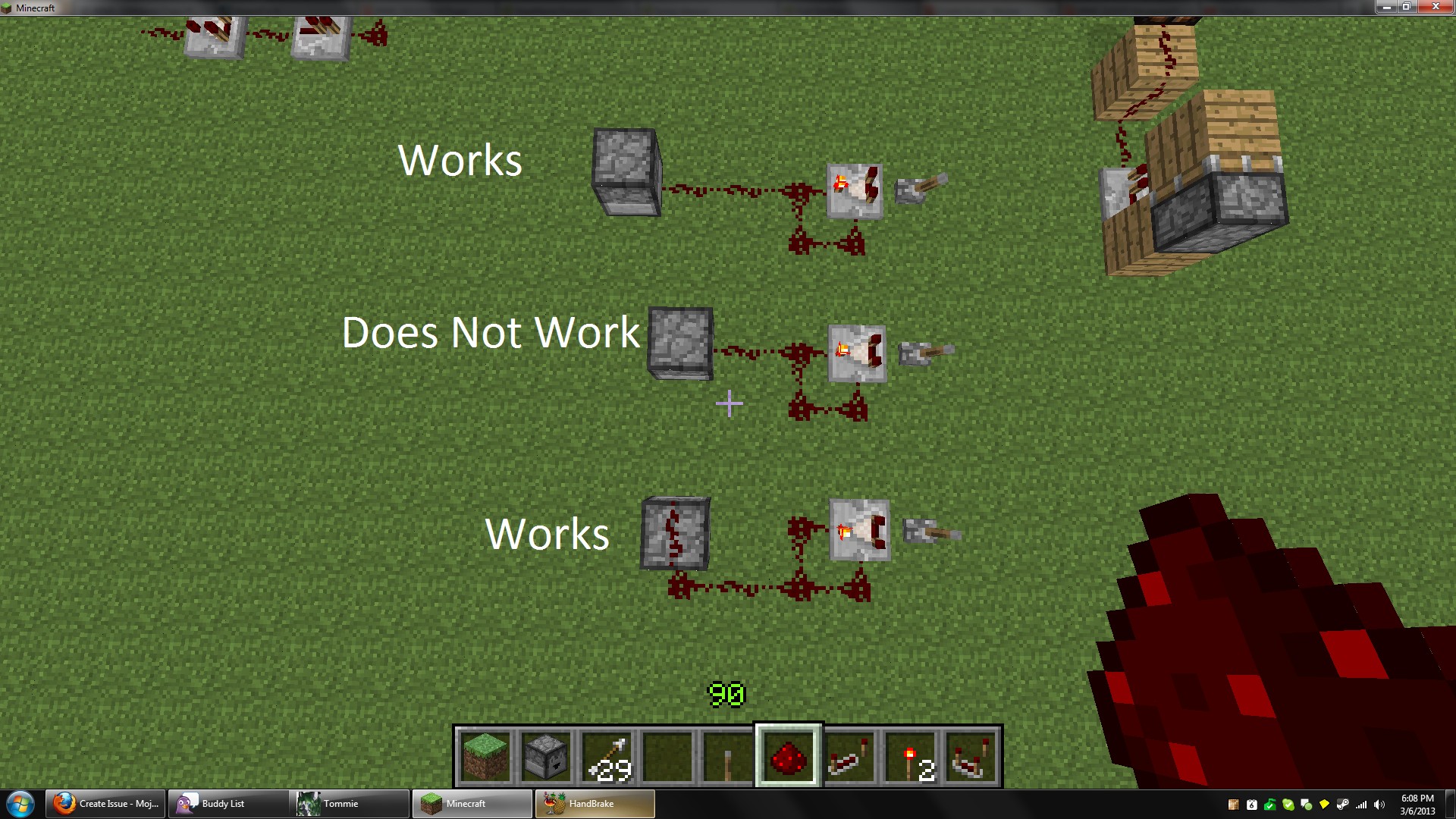
I was able to semi-confirm this on 13w07a, in that if a comparator is being fed a one-tick rapid pulse, it will not allow it through until it gets updated. Some designs update the comparator and so allow the signal through, while others do not and the comparator needs a block/redstone update to start letting the signal out.
Ones that worked had the comparator near other equipment that would update at the time, non-working designs (ones that needed an update) tended to have the comparator a few blocks away from the equipment sending the signal.
Here's an interesting 1:1 pixel display in the snapshot.
http://www.youtube.com/watch?v=9SG4SxUu0sU
As far as vertical pixel displays go, we'd need a way to feed toggleable power into a block that doesn't rely on a supporting block. This means no dust, repeaters, or comparators (since they need a supporting block, but we'd also need the power to only affect the block being touched (or proxy it with a solid block).
Creepers themselves aren't a bug. The change of the model from the pig was, but then he skinned it and gave it an AI (explosiveness, etc.) on purpose.
Still exists in 13w07a.
You could try renaming level.dat_old to level.dat (overwriting the existing one)... but it looks like you messed up your world with mcedit or with a standard crash.
I've never heard of dinnerbone working with MCEdit.
He makes updates to the game itself, then other people will use mcedit (or other tools) to make those updates show up quicker (for lack of better wording).
There's been gravel in the nether for many versions now.
Trapped chests are the only chests that send a signal through a block (the one below them).
The comparator is meant to check the chest, but if it's not touching the chest it can't check it.
Well the point of a critical hit is that your high downward velocity adds to the power of your strike.
In water, you're too hampered and moving too slow to get that extra concussive force.
Mobs aren't one block high when in a minecart...
Try putting a creeper or something in a minecart and then sent it through a one-block high space (the only block of "air" being the rails). It'll take suffocation damage because it's head will be in the blocks.
They mine instantly (well in two game ticks to be technical?) with a piston.
The minecart furnaces aren't for cooking, they're for powering trains, sort of.
... because stairs are transparent.
And "hard" isn't supposed to be easy, which is why mobs were made stronger in the snapshots.
Confirmed in 13w07a.
Both I and the pig had speed II (via a splash potion) and while the pig ran around fast when hit and I ran around fast normally, riding the pig with a carrot-on-a-stick was normal movement speed.
Sort of like how a lever attached to that cobblestone block would send the signal through it, but a lever attached to a different block (and facing the cobblestone) wouldn't.
There's "strong" and "weak" power when it comes to redstone and blocks. The wiki has all the info.
The BUD functionality is useful, so removing it entirely would break a lot of things.
Steven, that's because relatively early in the snapshots, the texture pack format (and the way minecraft uses them) changed which caused this issue. A lot of the fixes given here are from people who don't know this and aren't using a Radeon card on the snapshots. There's likely to be no home-brewed fix (outside of modifying the .jar), this is considered a minecraft bug and needs to be fixed in the game.
The visual issue can be caused by AA/AF settings in the video card driver on any recent Minecraft version (at least 1.0 onwards). If you have AA/AF settings in your video card driver on anything but "nothing" when it relates to Java, then the issue will show up, snapshot or not, for Radeon cards.
The bug being discussed here, however, is that the issue happens for a lot more people, regardless of their video driver settings, in the snapshots.
William, quasi-connectivity being linked to pistons is a problem. It's limiting.
Pistons are useful, and if they worked the same no matter their orientation and took power CORRECTLY, they'd be even more useful.
BUD update behavior is useful, and if it could be used outside of a piston it'd be even more useful.
Still exists in 13w09b.
EDIT: I meant b.
Confirmed to still happen in 13w09b.
I first found out about it by falling through while walking on top. XD
EDIT: I meant b.
Same as the recent posts, "Minimum" lighting is still way laggier than before, gotta' have smooth lighting off to get acceptable performance.
Windows 7 Home Premium 64-bit
Core 2 Quad Q8400
Radeon HD 5770
4GB RAM
Did some testing, here's my findings: The debug screen's FPS counter cannot be trusted for certain kinds of lag, it'll still show high framerates because it appears to measure the generated frames in total, even when they're being duplicated and/or skipped. The same goes for FRAPS, it also records the total number of frames and so won't show frame duplication.
(The below is my first round of testing.)
(First testing round ends here.)
So FRAPS reports the same as the game, which means the game is still putting out ~60FPS. So why the hell are we experiencing visual lag with smooth lighting on? To get to the bottom of the discrepancy I recorded a little gameplay and then looked through the recording frame-by-frame. There is definitely frame duplication which causes visual lag, but all the duplicated frames are counted as having been generated, so the numerical framerate doesn't drop when it should.
Here's a sliver of a recording I made with smooth lighting on in 13w09b, 30 frames.
It's at the default minecraft resolution and encoded in IYUV so there'd be no frame blending (thus the file size).
http://www.mediafire.com/?4u3y4emy63vzb11
Counting the first frame as #1...
Frames 1 and 2 are the same.
Frames 6, 7, and 8 are the same.
Frames 10, 11, and 12 are the same.
Frames 16, 17, and 18 are the same.
Frames 21, 22, and 23 are the same.
I also made an animated GIF (for people without frame-precise video software).
http://s7.postimage.org/5qzyzn3s9/animation.gif
Joshua, try it. You can't use chests that are blocked from opening.
The underground is dark, and if you allow sunlight in it, that small area gets less dark.
Works for me.
Server rules are up to the people who run the server.
If it's really a problem on the server and the server owners didn't want anybody to kill each other, they'd turn PvP off.
Works for me. Threw it right up, got hit and damaged by both types.
Make a new world and try it there to make sure it's not some world/rule setting.
Are you wearing any armor? You need to be naked for invisibility to make you fully invisible (the wiki says this).
I think escape as Cancel is better, isn't that how it is for everything else?
Escape never confirmed changes that aren't already saved.
Right-click places where you hover.
Might want to clean your mouse?
Well isn't amplifier 4 technically level 5? As amplifier 0 is level 1, the amp being an optional argument.
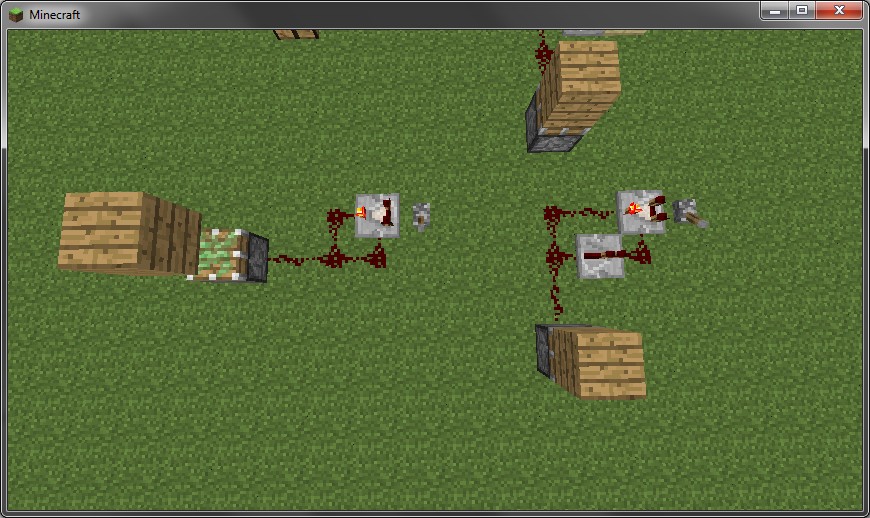
This is a shot of a test device, a very simple redstone clock using a comparator in subtract mode feeding itself.
This second screenshot shows the piston responding when I right-click the second comparator, though it usually takes a few clicks to get it to happen. It pulses really quickly so this is the best shot I got, but as you can see it did allow the signal through in 13w10a.
Yup, there's still frame doubling in 13w10a.
Still happening in 13w10a.
Didn't know that signs didn't have a buffer.
I knew changes in the settings and other GUI-based stuff can't cancel on close, but that's because those changes are saved when they happen.
It's due to the texture changes.
AA will cause this problem on older versions, but recent versions cause it with no AA, so disabling the setting does not get rid of it on the snapshots.
Still happens in 13w10a.
Attaching a screenshot to show I'm not just typoing like crazy!
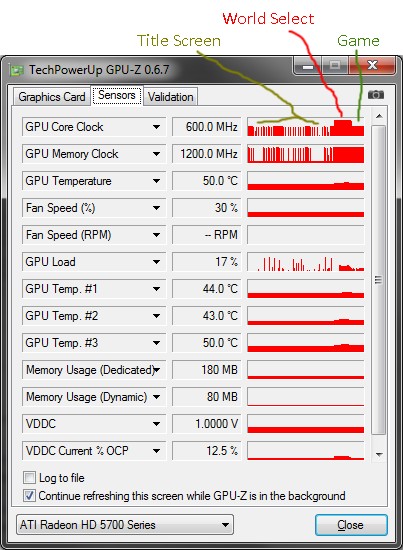
Checking my clocks with GPU-Z I've got the same sort of results, the title screen alternates between 157mhz and 600mhz, in-game is 600mhz, but for the world list it needs to clock up to 850mhz. GPU usage fluctuates as well, but the fact that our GPUs need to raise their clock speed just to show the screen shows it's not right.
It works fine for me.
1 - Are you in single-player or multi-player?
1b - If you're in multiplayer, do /plugins and see what it says. If it tells you anything other than "unknown command", then the server you're playing on is modded, not vanilla.
3 - What does the number in the bottom-left of the title screen say?
When villagers "level up" they'll add a trade to themselves, and if they choose a trade that already exists, they can overwrite it with the new one.
But if 1.5 comes out and has a bug fixed, then that bug would show 1.5 as containing the bug when it doesn't. That's why it's important to only mark the exact version numbers you have personally tested it on.
Also single blocks of water/lava are generated in the overworld as well for lava and water flows in caves and such... just the nether does only lava, and a lot more frequently since it's a giant cave system (opposed to the overworld only being partially caves).
Does it happen in a new world?
Yeah Ville, that's talking about having the snow pile up during weather, but that causes too many chunk updates since it doesn't stop at one layer.
Also I did another quick test, 13w10b still duplicates frames when smooth lighting is on.
So in other words you're going to stop using snapshots?
Because the point of snapshots is to be able to help test new features and find bugs to fix, which is why they're optional, and in fact you need to install them manually or with a third-party tool.
Jonathan, they have not. Don't jump the gun.
Here's a quick overview screenshot.
I put a gmail filter on anything from here, so it shows up in a second category so I can still keep track of things without my inbox being flooded.
Yes, because it's completely impossible to downgrade your Minecraft version in order to play on servers using older software.
We all know that it's a painful, 4-hour-long process, and nobody's ever made tools to do it for you.
Wait...
Still happens in the 1.5 Pre-release.
Your crash report isn't from a "fresh snapshot", it's from a TMI-modded game.
Just wanted to note, it's confirmed for 1.5.
I was talking about the players...
Doors will change orientation if placed on the side of a block, so they know what to rotate against.
That's an old version of Java, uninstall it and update to the latest Java 7.
That's the ender crystal constantly trying to relight the fire that's supposed to go with it, because it's supposed to be generated on a block where it never rains, and isn't available in vanilla...
And success!
http://s9.postimage.org/gxh0hnmnh/holycrap.png
Full-size image so the differences could be clearly-shown, gotta' view at 100% to see the issues in the original.
Core 2 Quad Q8400, Radeon HD 5770.
Mojang was also unable to reproduce the line issue easily, so they're probably mostly using GeForce GPUs opposed to the past few Radeon HD lines.
No, the x-ray issue happens when the camera is inside a block at all. It doesn't happen for sand, gravel, or a few other blocks because Notch originally coded special cases for those, so if your head was in one of those blocks the entire view would be blocked off (otherwise you could see through them too). Said checks/cases (if that's how it's still done) aren't in there for other blocks though.
@Deadlock989: No Optifine, and you're sure that your CCC install isn't applying AA/AF, right?
John Macknight, the thread Aaron posted and the Optifine 1.5 preview both return me to smooth framerates in 1.5.
Take a new screenshot and post a new crash log after the screenshot is taken.
Optifine is a mod. You're playing with a modded game.
The guy who makes Optifine doesn't want it to be in Vanilla, according to Dinnerbone.
On the server, type /plugins and press enter. If it tells you anything other than the "Unknown command" line in red text, then the server is modded and that's likely what's causing the issue.
Crash report?
Crash reports show technical details about your installation too, you can force a report by holding F3+C for ten seconds while in-game. When you let go, a crash will be generated.
I agree with Jonathan that many people who say this issue still happens either aren't in a fixed version or still have AA/AF settings, which would cause it on 1.4.x and earlier too.
However I disagree that the texture stretch is a kludge, since it's what Minecraft used to do as well, right? And it just was not implemented when the texture format was changed because it has a new author (Dinnerbone) who did not know about the fix that had to be implemented by the old author (Notch, who no longer works on Minecraft).
This bug has existed for many, many versions, it's not new to 1.5.
If your redstone contraptions broke, it's most likely due to this change...
https://mojang.atlassian.net/browse/MC-846
Or this new bug...
https://mojang.atlassian.net/browse/MC-11189
EDIT: Auto-parsing FTW, thanks.
Radeon HD 5770 here, released in October 2009, OpenGL 4.2 support (according to Wikipedia, GLview, and Minecraft's snooper data).
When windowed at the default resolution I can easily pull 95FPS on a flat world, except for this issue where any sort of lighting calculation causes frame duplication (as per my report and recordings earlier in the comment list).
Dinnerbone's the one that said it.
https://twitter.com/Dinnerbone/status/299222205911400448
Looks like you're right. My initial tests using comparators as fast clocks (attached screenshot "othertests") had the pistons placed slightly differently.
Yeah, they do that now. It's part of the changes to make mobs more difficult.
That's how slimes used to spawn before they were made to spawn in swamps. XD
EDIT: As in, the old behavior wasn't removed when the new one was added on purpose, to make slimes easier to find.
If a chest is blocked, the game considers it unopenable which means unusable to machines as well as players. Hoppers won't put items into chests, comparators won't read the chest contents, etc.
Yeah, Bukkit is NOT vanilla, a Bukkit server is a modded server even if you don't have any plugins installed (as it's already been modified to take plugins in the first place and insert the required API).
Recreate the issue in 100% vanilla, attach a crash report, etc.
If you do it in Bukkit and the bug happens, and people do it in Vanilla and the bug doesn't... what's the obvious conclusion? It's a bukkit bug, or likely a bug with one of the plugins.
1.5.1pre, smooth lighting on min, staring at a jungle with some stairs in view, settles in at ~120FPS when chunks are done loading, like it would before the lighting changes.
1.5.1pre, smooth lighting on max, staring at a jungle with some stairs in view, settles at ~110FPS when chunks are done loading.
Frame-by-frame recording shows no frame duplication due to lighting updates when blocks change (unlike my earlier tests when the issue came about).
I'd call this a success.
Minecraft is a usermode program and cannot, itself, cause BSoDs under Windows 7. If you are experiencing a BSoD, it is either a hardware or driver issue with your machine.
Hm, I just tested with it off, and my superflat redstone test world, which normally shows this issue while first loading, instead seems to be loading everything in the proper order.
This was at least in 1.2.5.
Well, people also use it to find other people's bases to take stuff or otherwise grief. It doesn't matter how well you hide your entrance if somebody can see any underground openings, 'ya know?
But the whole chunks-loading-out-of-order bug also allows people to see through the ground into caves, so multiple things need to be changed to make hiding underground actually work in SMP.
The default button is one of the F# keys. I'm pretty sure you're going to find plenty of software out there that uses the F# keys for lots of things.
If pressing an F# key in game makes your computer do something you don't want, the issue is with the keyboard or your computer, not the game.
IIRC somebody said it's a LWJGL bug.
Yeah, this is a float/double rounding issue.
A "desert" is specifically described as a place with little rainfall. So it makes sense to not have pools of water.
A "mesa", on the other hand, is like "plateau" in that it's a description of land shapes, not weather patterns.
In fact most of the recognizable geography of your average "mesa" is from weathering and erosion.
Still happening in 13w37b.
I wouldn't say that a corrupt world file caused by your computer losing power as it was writing/buffering a save is a Minecraft bug... yes the game is not reading the world file correctly, but that's because the world file is messed up. You can try fixing the screwed-up chunk issue by deleting the affected chunks (not just clearing the blocks) in mcedit or something, that should at least allow you to rebuild.
Sorry, for some reason I didn't see this notice until now.
In 1.7.2 the title screen, server list, options, and language selection screens all seem to be capped at 30 FPS, so please mark this as fixed.
Java's had about 22 updates since your version, might want to update just in case it's one of the many bugs.
Still an issue in 1.7.4.
Still in 1.7.4.
Sounds like your laptop's touchpad is dirty or malfunctioning.
If you already loaded up your world, saw the loss, then exited, the data is gone/overwritten.
That's intended.
Doesn't the resource pack need to be an HTTP URL to the pack itself?
Something like this.
resource-pack=http://111.222.333.444/server/Resource_Pack.zip
Instead of just a relative thing?
In the launcher you can edit your profile and choose version 1.7.5 and resume playing on the servers that didn't update.
But yeah Mojang does not run those servers, other customers do and if they don't want to update it's their choice.
Confirmed in 1.8.1-pre1.
Confirmed in 1.8.1-pre1.
Tested in 1.8.1-pre1, and I was not able to recreate it.
Piston arms facing west (according to the 1.8 debug menu's block info) have a differently-shaped hitbox than the other arms, but none of them can be walked through anymore from what I tried.
It's not the inside of a block, though. It's an overlay, and it's incorrectly-mirrored.
Was unable to see this happening in 1.8.1-pre1 when lagging the server and client via rapidly-summoning groups of zombies.
https://gfycat.com/CarefulCloseDog
So is it only when the server is lagging but the client is running at full speed?
Good idea, TNT is a great testing block since it has text on the texture in vanilla, allowing you to easily see when it's mirrored or not.
Confirmed that the overlay, which is there on purpose, is mistakenly flipped backwards in 1.8.1-pre2.
Confirmed in 1.8.1-pre2.
http://gfycat.com/FrightenedZealousDove
Could somebody provide an updated seed and set of coordinates for this issue occurring via worldgen strongholds, if they still see it happening? The ones in the description no longer match due to world gen changes since the original post's version.
Confirmed in 1.8.1-pre2.
Confirmed in 1.8.1-pre2.
Confirmed in 1.8.1-pre2.
Still doable in 1.8.1-pre2 via dropping the minecarts from above, they'll stack and when stacked they'll push themselves until blocked by an obstacle.
Arrow hitbox misalignment in 1.8.1-pre2.
Uploaded two screenshots showing the discrepancy.
Confirmed in 1.8.1-pre2.
http://gfycat.com/TatteredDeliciousDegu
Still happening in 1.8.1-pre2.
http://gfycat.com/SomberFrighteningHake
Confirmed for multiple directions in 1.8.1-pre2.
Confirmed in 1.8.1-pre2.
http://gfycat.com/ObeseIllustriousAlbino
This seems to have been FIXED some time during or before 1.8.1-pre2.
http://gfycat.com/FittingSecondhandAntbear
Confirmed in 1.8.1-pre2.
https://gfycat.com/PiercingCreativeHummingbird
Confirmed regression in 1.8.1-pre2.
https://www.youtube.com/watch?v=yI-je89pv0E
This is only a client-side visual, the block doesn't actually exist. Try putting a torch on it to see.
Cannot confirm.
http://gfycat.com/IdealInconsequentialAfricanwildcat
If you're playing mutltiplayer, it might be a modded server.
Confirmed in 1.8.1-pre2.
http://gfycat.com/VariableMassiveEyas
I believe I've confirmed this in 1.8.1-pre2, actually.
Gave myself an iron pickaxe with a damage value of 250 (one hit left), enchanted it with Looting III. Used it on a diamond ore block, it broke, and I only got one diamond. I repeated this multiple times, and not once did I get more than one diamond on the final hit of a pick's life, whereas Fortune III should have a 60% chance of getting at least two diamonds from a diamond ore block normally.
Here's a clip of me doing it five times in a row and failing to get more than one diamond.
http://gfycat.com/SleepyRedFowl
So it definitely looks like Fortune enchants are not being applied to the final usage of pickaxes. Perhaps other tools too.
Confirmed in 1.8.1-pre5.
Confirmed in 1.8.1-pre5.
Still an issue in 1.8.1-pre5.
(Also I'm not sure if normal users /can/ upgrade the version list themselves on somebody else's submitted bug report.)
Still a concern in 1.8.1-pre5.
Still happening in 1.8.1-pre5.
I was able to connect to play.polygoncraft.net (the listed address on their site) just fine.
In the Multiplayer menu, click the "Add Server" button and type in play.polygoncraft.net in the Server Address box.
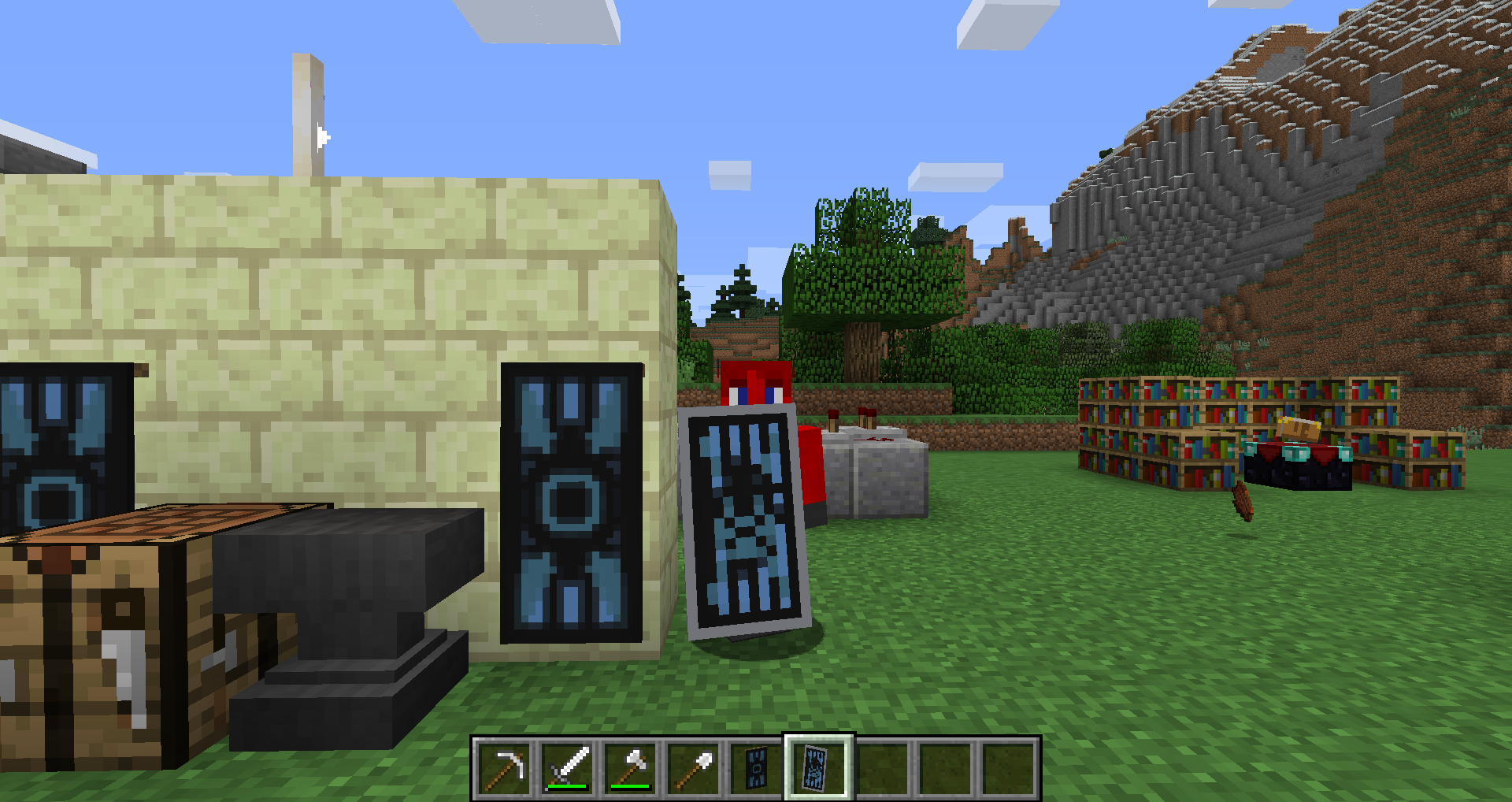
I've added two screenshots showing the problem, one with the crafting display and the second the in-game display.
I'm pretty sure this is not intended. The first is was expected, the second is a total mess. With anything beyond a basic design it's not "more pixelated", it's a straight-up loss of the image.
Still happening in 15w41b.
Set the world into peaceful and see if it still happens. Seems that mob spawning is out of control and if allowed to spawn they'll cause insane amounts of tick lag.
Tried it and it worked even with normal Levitation I, through a roof two blocks thick.
Still happening in 15w42a.
Can no longer reproduce it in 15w42a, not sure when it was fixed.
Still happening in 15w42a.
Still happening in 15w42a.
Okay so it's still happening all the way in 15w42a, and here's a gfy of the setup and results.
http://gfycat.com/FrayedShadowyAustralianfurseal
Still happening in 15w42a.
Still happening in 15w42a.
Still happening in 15w42a.
Still happening in 15w42a, the arrow hitbox is misaligned.
Uninstall all old versions of Java, install a fresh one, then open a command prompt window and type "java -version" with no quotes, what does it say?
Still happening in 15w44b.
Still happening in 15w44b.
Still happening in 15w44b.
Still happening in 15w44b.
Still happening in 15w45a.
Still happening in 15w45a.
Still happening in 15w45a. Did the same thing as in the images, 8 diamond blocks and the extra diamonds got erased.
Can't reproduce anymore in 15w45a, was probably fixed earlier.
Still happening in 15w45a.
Still happening in 15w45a.
Still happening in 15w45a.
Make sure that mob griefing has not been disabled in that world, it will prevent pickup regardless of other settings.
Also not all mobs can pick up items, they have to have a flag which is set upon spawning. It may be that mobs from eggs don't get the chance for the flag to be applied now?
Will see if I can't reproduce.
Alright so I've tested in both 15w36a and 1.8.8 and... I think I'm doing something wrong.
/gamerule mobGriefing true
{CanPickUpLoot:1}/summon Zombie ~ ~1 ~
I throw an iron chestpiece at it, and it won't pick it up in either game version on normal or hard difficulty.
EDIT: Looks like the comment parser is putting things
{in these}on a newline.
What texture pack, from where?
It may not be intended since you didn't actually damage them.
(I wonder if a fixed 0.5 damage amount for swept enemies would be alright balance-wise.)
Still happening in 15w46a, and a falling anvil that locks into the spot a torch is in will do the same thing.
FVBico, what are the commands and settings you're using to get mobs to pick things up, so we can try to reproduce it since it apparently works for you?
Well, you assume that it's simply low performance and didn't test it? Will you instead test it (so that your comment is actually relevant) and, if it works, tell us the exact steps you took after generating a new world to make a zombie pick up something like a chestpiece in both 1.8.8 and 15w46a?
For the 15w46a world, I used NBTExplorer to manually set a zombie's CanPickUpLoot bool to 1 (and then used MCEdit to view the entity data to ensure that the tag was changed in the save file), and then the zombie was able to pick up the chestpiece once I loaded into that world again.
However I am still unable to, in-game (via commands and such), generate a zombie in-game that will pick up loot. Is the summon command I'm using simply incorrect or something?
Well, do you know what the command should be, before I open a new (more specific) ticket or reply to an old one needlessly just in case I'm making a typo in the command?
FVbico, I know that, I also stated that in my own comment, and as I also stated it worked when I manually set the NBT data with a third-party tool.
Cube, thank you, didn't know I needed b to mark a boolean now, that works and clears everything up!
Still happening in 15w47a.
Drank an invisibility potion, went into survival, punch one zombie in a group and others started going after me.
Still happening in 15w47a.
Still happening in 15w47a.
Still happening in 15w47a.
Still there in 15w47a.
Still happening in 15w47a.
Still happening in 15w47a.
"instead of just fixing that in 15w47b"
An update is a new release, a new release gets a new version string.
Unless you meant at the same time as the removal, in which case it simply being overlooked is likely. Remember that snapshots are not professional releases, are not meant for serious gameplay, and have rapid changes.
Still happening in 1.9-pre2, still erasing items/blocks.
Still happening in 1.9-pre2.
Still happening in 1.9-pre2.
Still happening in 1.9-pre2.
Still happening in 1.10.2 and 16w42a.
Still happening in 18w20c.