 MC-134573
The game freezes while doing a world backup
Hi. Whenever I optimize a large world Minecraft will freeze for me while doing the necessary backup.
Steps to Reproduce:
- Click on Optimize World (1.12 world)
- Click 'Backup and Load'
- See how Minecraft will freeze after a while.
OR:
- Click on Edit World
- Click 'Make Backup'
- See how Minecraft will freeze after a while.
For the test purpose I used the Białowieża Forest map showcased on Minecraft.net some time ago. This world is about 18GB large (~8GB bigger than our average server worlds). It will however finish doing the backup after a while and then start to run the chunk upgrade process which runs smoothly again.
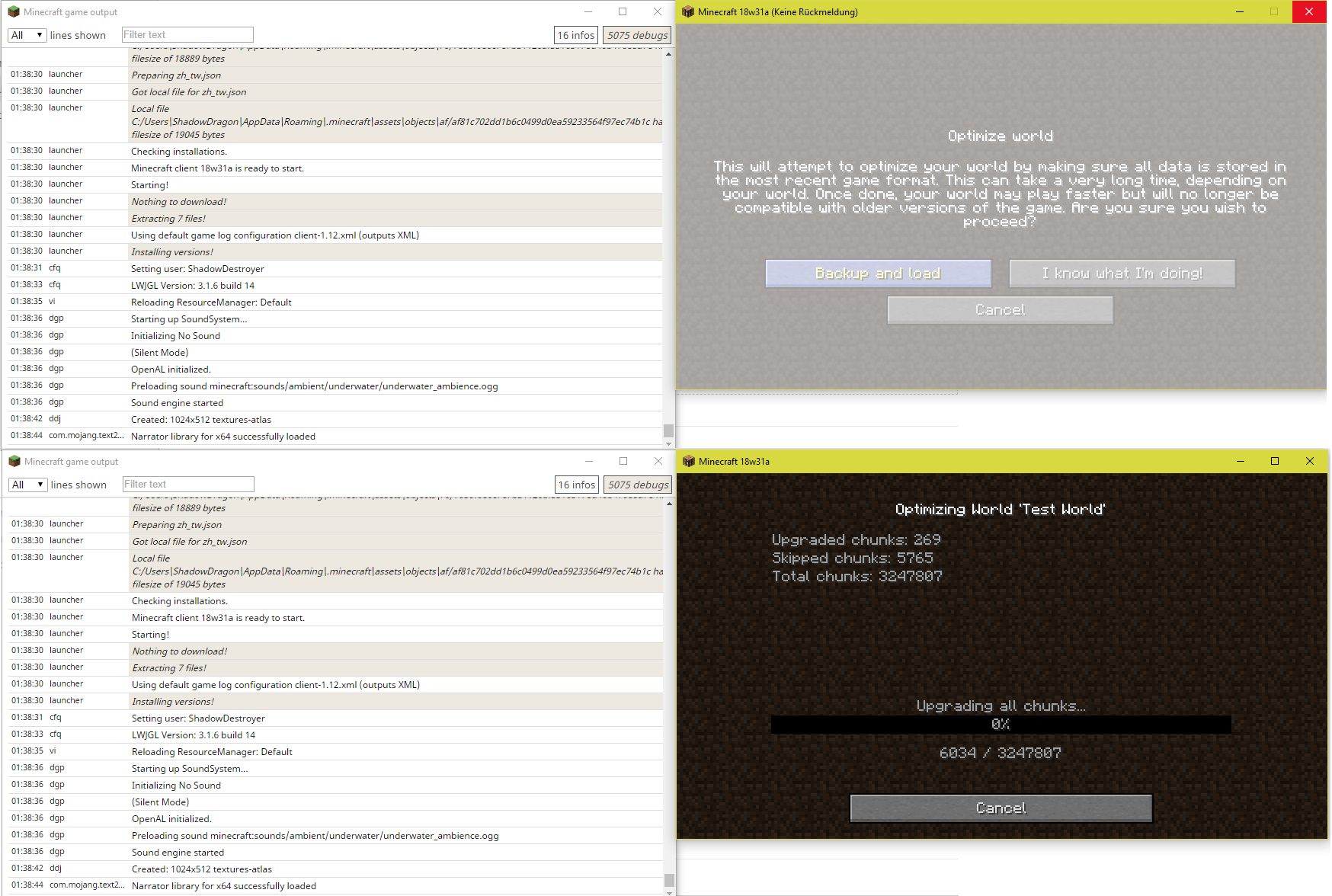
I've also uploaded a picture showcasing the problem. Yeah, my CPU is at 99%, but Minecraft had two full threads and about 10% of my CPU for this task so this shouldn't be a problem (while the OS drive and the drive Minecraft is installed on had also little work to do). The problem here seems to be (just guessing) that the backup process is being done in the same thread as the render thread instead of a worker thread.
Linked Issues


![[Mod] Avoma](../../../data/avatars/users/86198.png)
- Unresolved
 ShadowDragon
- 19
- 13
- Confirmed
 Normal
- Platform
- Save Data UI
- backup backup-screen lag world world-conversion
1.13 - 25w03a
1.13 18w30b 18w31a 1.13.1-pre1 1.13.1 1.13.2-pre1 1.13.2-pre2 1.13.2 18w43a 18w43b 19w11b 19w12b 19w13b 19w14a 19w14b 1.14-pre1 1.14-pre2 1.14-pre3 1.14-pre4 1.14-pre5 1.14 1.14.1-pre1 1.14.1 1.14.2-pre1 1.14.2-pre2 1.14.2-pre3 1.14.2-pre4 1.14.2 1.14.3-pre2 1.14.3-pre3 1.14.3-pre4 1.14.3 1.14.4-pre1 1.14.4-pre2 1.14.4-pre3 1.14.4-pre4 1.14.4-pre5 1.14.4-pre6 1.14.4 19w39a 1.15.2 20w11a 20w15a 20w19a 20w22a 1.16.2 20w49a 1.16.5 21w06a 21w08b 1.18.1 1.19 1.19.2 1.19.3 1.19.4-pre4 1.19.4 1.20.1-rc1 1.20.1 1.21.1 24w36a 1.21.4 25w03a
Created Issue:
Minecraft freezes while doing a world backup
Hi.
Whenever I optimize a large world Minecraft will freeze for me while doing the necessary backup.
Steps to reproduce:
- Click on Optimize World (1.12 world)
- Click 'Backup and Load'
- See how Minecraft will freeze after a while.
For the test purpose I used the Białowieża Forest map showcased on Minecraft.net some time ago. This world is about 18GB large (~8GB bigger than our average server worlds). It will however finish doing the backup after a while and then start to run the chunk upgrade process which runs smoothly again.
I've also uploaded a picture showcasing the problem. Yeah, my CPU is at 99%, but Minecraft had two full threads and about 10% of my CPU for this task so this shouldn't be a problem (while the OS drive and the drive Minecraft is installed on had also little work to do).
The problem here seems to be (just guessing) that the backup process is beeing done in the same thread as the render thread instead of a worker thread.
Environment
Java 8 Update 51 (the local installation from the Minecraft launcher)
Windows 10 Pro 1709
i7 6800k @3.8GHz
AMD RX 480
16GB DDR4-2400 RAM
Attachments1
Java 8 Update 51 (the local installation from the Minecraft launcher)
Windows 10 Pro 1709
i7 6800k @3.8GHz
AMD RX 480
16GB DDR4-2400 RAMJava 8 Update 51 (the local installation from the Minecraft launcher)
Windows 10 Pro 1709
i7 6800k @3.8GHz
AMD RX 480
32GB DDR4-2400 RAM
Hi.
Whenever I optimize a large world Minecraft will freeze for me while doing the necessary backup.
Steps to reproduce:
- Click on Optimize World (1.12 world)
- Click 'Backup and Load'
- See how Minecraft will freeze after a while.
OR:
- Click on Edit World (1.12 world)
- Click 'Make Backup'
- See how Minecraft will freeze after a while.
For the test purpose I used the Białowieża Forest map showcased on Minecraft.net some time ago. This world is about 18GB large (~8GB bigger than our average server worlds). It will however finish doing the backup after a while and then start to run the chunk upgrade process which runs smoothly again.
I've also uploaded a picture showcasing the problem. Yeah, my CPU is at 99%, but Minecraft had two full threads and about 10% of my CPU for this task so this shouldn't be a problem (while the OS drive and the drive Minecraft is installed on had also little work to do).
The problem here seems to be (just guessing) that the backup process is beeing done in the same thread as the render thread instead of a worker thread.
![[Mod] Ezekiel (ezfe)](../../../data/assets/gravatar/ezekielelin.jpeg)
![[Bot] Arisa](../../../data/assets/gravatar/mustek2.png)

![[Mojang] Nathan Adams](../../../data/assets/gravatar/dinnerbone.png)
Hi.
Whenever I optimize a large world Minecraft will freeze for me while doing the necessary backup.
Steps to reproduce:
- Click on Optimize World (1.12 world)
- Click 'Backup and Load'
- See how Minecraft will freeze after a while.
OR:
- Click on Edit World
(1.12 world)- Click 'Make Backup'
- See how Minecraft will freeze after a while.
For the test purpose I used the Białowieża Forest map showcased on Minecraft.net some time ago. This world is about 18GB large (~8GB bigger than our average server worlds). It will however finish doing the backup after a while and then start to run the chunk upgrade process which runs smoothly again.
I've also uploaded a picture showcasing the problem. Yeah, my CPU is at 99%, but Minecraft had two full threads and about 10% of my CPU for this task so this shouldn't be a problem (while the OS drive and the drive Minecraft is installed on had also little work to do).
The problem here seems to be (just guessing) that the backup process is beeing done in the same thread as the render thread instead of a worker thread.
Hi.
Whenever I optimize a large world Minecraft will freeze for me while doing the necessary backup.
Steps to reproduce:
- Click on Optimize World (1.12 world)
- Click 'Backup and Load'
- See how Minecraft will freeze after a while.
OR:
- Click on Edit World
- Click 'Make Backup'
- See how Minecraft will freeze after a while.
For the test purpose I used the Białowieża Forest map showcased on Minecraft.net some time ago. This world is about 18GB large (~8GB bigger than our average server worlds). It will however finish doing the backup after a while and then start to run the chunk upgrade process which runs smoothly again.
I've also uploaded a picture showcasing the problem. Yeah, my CPU is at 99%, but Minecraft had two full threads and about 10% of my CPU for this task so this shouldn't be a problem (while the OS drive and the drive Minecraft is installed on had also little work to do).
The problem here seems to be (just guessing) that the backup process is beeing done in the same thread as the render thread instead of a worker thread.
Hi.
Whenever I optimize a large world Minecraft will freeze for me while doing the necessary backup.
Steps to reproduce:
- Click on Optimize World (1.12 world)
- Click 'Backup and Load'
- See how Minecraft will freeze after a while.
OR:
- Click on Edit World
- Click 'Make Backup'
- See how Minecraft will freeze after a while.
For the test purpose I used the Białowieża Forest map showcased on Minecraft.net some time ago. This world is about 18GB large (~8GB bigger than our average server worlds). It will however finish doing the backup after a while and then start to run the chunk upgrade process which runs smoothly again.
I've also uploaded a picture showcasing the problem. Yeah, my CPU is at 99%, but Minecraft had two full threads and about 10% of my CPU for this task so this shouldn't be a problem (while the OS drive and the drive Minecraft is installed on had also little work to do).
The problem here seems to be (just guessing) that the backup process is beeing done in the same thread as the render thread instead of a worker thread.
![[Helper] Johnibur](../../../data/avatars/users/28381.png)
![[Mod] LateLag](../../../data/avatars/users/92884.png)
is duplicated by
![[Bot] Arisa](../../../data/avatars/users/43007.png)
![[Mod] j_p_smith](../../../data/avatars/users/92851.png)
![[Mod] Michael Wobst](../../../data/avatars/users/37868.png)
![[Mod] SPGoding](../../../data/avatars/users/44622.png)
is duplicated by
![[Mojang] MimmiB](../../../data/avatars/users/18949.svg) Normal
NormalHi.
Whenever I optimize a large world Minecraft will freeze for me while doing the necessary backup.
Steps to reproduce:
- Click on Optimize World (1.12 world)
- Click 'Backup and Load'
- See how Minecraft will freeze after a while.
OR:
- Click on Edit World
- Click 'Make Backup'
- See how Minecraft will freeze after a while.
For the test purpose I used the Białowieża Forest map showcased on Minecraft.net some time ago. This world is about 18GB large (~8GB bigger than our average server worlds). It will however finish doing the backup after a while and then start to run the chunk upgrade process which runs smoothly again.
I've also uploaded a picture showcasing the problem. Yeah, my CPU is at 99%, but Minecraft had two full threads and about 10% of my CPU for this task so this shouldn't be a problem (while the OS drive and the drive Minecraft is installed on had also little work to do).
The problem here seems to be (
just guessing) that the backup process is beeing done in the same thread as the render thread instead of a worker thread.Hi. Whenever I optimize a large world Minecraft will freeze for me while doing the necessary backup.
Steps to Reproduce:
- Click on Optimize World (1.12 world)
- Click 'Backup and Load'
- See how Minecraft will freeze after a while.
OR:
- Click on Edit World
- Click 'Make Backup'
- See how Minecraft will freeze after a while.
For the test purpose I used the Białowieża Forest map showcased on Minecraft.net some time ago. This world is about 18GB large (~8GB bigger than our average server worlds). It will however finish doing the backup after a while and then start to run the chunk upgrade process which runs smoothly again.
I've also uploaded a picture showcasing the problem. Yeah, my CPU is at 99%, but Minecraft had two full threads and about 10% of my CPU for this task so this shouldn't be a problem (while the OS drive and the drive Minecraft is installed on had also little work to do). The problem here seems to be (just guessing) that the backup process is being done in the same thread as the render thread instead of a worker thread.
Java 8 Update 51 (the local installation from the Minecraft launcher)
Windows 10 Pro 1709
i7 6800k @3.8GHz
AMD RX 480
32GB DDR4-2400 RAM
Minecraftfreezes while doing a world backupThe game freezes while doing a world backup
![[Mojang] slicedlime](../../../data/assets/gravatar/slicedlime.jpeg)
![[Mod] Jiingy](../../../data/avatars/users/91802.png)
![[Mod] ManosSef](../../../data/avatars/users/61702.png)
is duplicated by
After further investigation I determined the problem: Backup on a large world is slow and the actual bug is: Minecraft visually locks up while performing backup. This is MC-134573
Duplicate of MC-134573
Duplicate of MC-134573.
This seems a lot similar to MC-134573. With that being said would this ticket happen to describe your issue?


Would MC-134573 happen to describe your issue?

Thank you for your report!
We're tracking this issue in MC-134573, so this ticket is being resolved and linked as a duplicate.
If you would like to add a vote and any extra information to the main ticket it would be appreciated.
If you haven't already, you might like to make use of the search feature to see if the issue has already been mentioned.
Quick Links:
📓 Bug Tracker Guidelines – 💬 Community Support – 📧 Mojang Support (Technical Issues) – 📧 Microsoft Support (Account Issues)
📓 Project Summary – ✍️ Feedback and Suggestions – 📖 Game Wiki
We do not have enough information to find the cause of this issue.
After having this issue, please attach the full launcher log file found in .minecraft/launcher_log.txt here.
Ok, I just added the launcher log to the issue (after it appeared again. After the backup was done and thus the world upgrade happens I clicked cancel as the world upgrade itself isn't affected).
Afterwards I tested it again with the same world and it happened again (look at screenshot-1 for details). For this test I also decided to have the log output window open to better see what the log put's out when it occurs and afterwards.
Also note that whether this issue occurs depends on the world size. Smaller worlds aren't affected, thought I haven't figured out the smallest necessary world size for the issue too occur, thus I'm always going with the largest map I've got as I know that it will definitly happen on this map size.
I've also found out, the issue also applies to the normal backup functionality of Minecraft (see the updated description of the issue) and worlds as small as 460MB on my SSD also cause the issue to occur, so no need for a multiply gigabyte world to force this issue to occur (at least on my system).
This happens for me as well. It is because the game is not running the backup on a second thread, so it is freezing while it is copying the files.
I could also reproduce this on Minecraft 1.13.2-pre1.
Please do not mark unreleased versions as affected.
You don't have access to them yet.
I could reproduce the problem on Minecraft 1.13.2-pre2, even thought this Bot thinks the version hasn't been released yet. My Minecraft Launcher tells me it has been released.
It's still a problem on Minecraft 1.14.3 Pre-Release 3.
Minecraft 1.14.4 Pre-Release 2 is still affected (I can't edit the affected versions on mobile).
It's still a problem in 1.15.2.
In addition to freezing, while frozen Minecraft won't allow me to switch to other programs because the graphics is frozen displaying minecraft. It unfreezes the display when the backup completes. It would be VERY helpful if I could see progress on the backup.
Can confirm in 21w05b.
Can confirm in 21w06a.
Can confirm in 1.16.5 and 21w08b.
Affects 1.18
Affects 1.18.1
This should be fixed by adding a % screen like when you load a world, and also of course using a worker thread instead of the render one
Can confirm in 1.19.
Can confirm in 1.19.2.
I've removed the environment field of this ticket since this problem here doesn't appear to be environmentally exclusive.
Can confirm in 1.19.4-pre4. As Alan said, the game becomes completely unresponsive and if you are fullscreened you can't tab out to other programs, which is quite frustrating.
I can confirm the issue for 1.19.4
Something i noticed is the game unfreezes and finishes the backup in windowed mode, however it forces me to force close the program on fullscreen.
Affects 1.20.1 Release Candidate 1.