Player is assigned a new UUID in singleplayer
In the latest snapshot (22w17a) players are assigned a new UUID in singleplayer worlds. All things relating to the UUID are lost in this snapshot, including but not limited to Skins, Statistics, and Advancements
This can be confirmed by creating a world in 22w16a/22w16b, and then loading the same world in 22w17a. Checking the stats folder in the world folder will display two UUIDs despite it being the same player.
Linked Issues
is duplicated by13
 MC-250959Advancements reset after updating world from 22w16 to 22w17DuplicateMC-250972After upgrading my hardcore world from 22w16b to 22w17a - the advancements got resetDuplicateMC-250978All advancements are lost when updating a worldDuplicateMC-250988Cannot un-sit pets. Tried it on two accounts on two computers. Tried restarting the game, nothing.DuplicateMC-251019Cured villagers do not retain their discounts when upgrading to 22w17aDuplicateMC-251028old cats can't be interacted and will always sit when upgrading worldDuplicateMC-251049character reset to unknown/new when updating worldDuplicateMC-251071Advancement reset DuplicateMC-251138My LAN inventory is gone!DuplicateMC-251204Advancments not carrying to 22w17a from 22w16bDuplicateMC-251248 achievements and statsDuplicateMC-251255All advancements lost and skin reverted after loading latest snapshotDuplicateMC-251268Cats not being able to stand upDuplicate



 Very Important
Created Issue:
Player assigned a new UUID
In the latest snapshot (22w17a) players are assigned a new UUID. All things relating to the UUID are lost in this snapshot, including but not limited to Skins, Statistics, Advancements, and Multiplayer Inventories.
This can be confirmed by creating a world in 22w16a/22w16b, and then loading the same world in 22w17a. Checking the stats folder in the world folder will display two UUIDs despite it being the same player.
Environment
Windows 10, Java 17, Java Launcher
Attachments1
![[Mod] ampolive](../../../data/avatars/users/18949.svg)
Windows 10, Java 17, Java Launcher
Player assigned a new UUID
Players are assigned a new UUID
Players areassigned a new UUIDPlayer is assigned a new UUID
Player is assigned a new UUID in singleplayer
In the latest snapshot (22w17a) players are assigned a new UUID. All things relating to the UUID are lost in this snapshot, including but not limited to Skins, Statistics, Advancements, and
MultiplayerInventories.This can be confirmed by creating a world in 22w16a/22w16b, and then loading the same world in 22w17a. Checking the stats folder in the world folder will display two UUIDs despite it being the same player.
In the latest snapshot (22w17a) players are assigned a new UUID. All things relating to the UUID are lost in this snapshot, including but not limited to Skins, Statistics, Advancements
, and Inventories.This can be confirmed by creating a world in 22w16a/22w16b, and then loading the same world in 22w17a. Checking the stats folder in the world folder will display two UUIDs despite it being the same player.
In the latest snapshot (22w17a) players are assigned a new UUID in singleplayer worlds. All things relating to the UUID are lost in this snapshot, including but not limited to Skins, Statistics, and Advancements
This can be confirmed by creating a world in 22w16a/22w16b, and then loading the same world in 22w17a. Checking the stats folder in the world folder will display two UUIDs despite it being the same player.
![[Mod] violine1101](../../../data/avatars/users/92858.png)
relates to
![[Mod] tryashtar](../../../data/avatars/users/41963.png)
is duplicated by
relates to
![[Bot] Arisa](../../../data/avatars/users/43007.png)
relates to
![[Mojang] Gegy](../../../data/avatars/users/10122.svg) [Mojang] Gegy
[Mojang] Gegyis duplicated by
![[Mod] Michael Wobst](../../../data/avatars/users/37868.png)
is duplicated by
![[Mojang] slicedlime](../../../data/assets/gravatar/slicedlime.jpeg)
![[Mod] Asteraoth](../../../data/avatars/users/92886.png)
is duplicated by
is duplicated by
is duplicated by
is duplicated by

MC-250954 describes the root cause of this. Should this ticket be merged into it?
At the very least it should be marked as related to MC-250954.

Duplicates MC-250954
Thank you for your report!
We're tracking this issue in MC-250954, so this ticket is being resolved and linked as a duplicate.
If you would like to add a vote and any extra information to the main ticket it would be appreciated.
If you haven't already, you might like to make use of the search feature to see if the issue has already been mentioned.
Quick Links:
📓 Bug Tracker Guidelines – 💬 Community Support – 📧 Mojang Support
📓 Project Summary – ✍️ Feedback and Suggestions – 📖 Game Wiki
![[Mod] ManosSef](../../../data/avatars/users/61702.png)
Duplicate of MC-250954.
Thank you for your report!
We're tracking this issue in MC-250954, so this ticket is being resolved and linked as a duplicate.
If you would like to add a vote and any extra information to the main ticket it would be appreciated.
If you haven't already, you might like to make use of the search feature to see if the issue has already been mentioned.
Quick Links:
📓 Bug Tracker Guidelines – 💬 Community Support – 📧 Mojang Support
📓 Project Summary – ✍️ Feedback and Suggestions – 📖 Game Wiki
– I am a bot. This action was performed automatically! The ticket was resolved by one of our moderators, and I left this message to give more information to you.
Thank you for your report!
We're tracking this issue in MC-250954, so this ticket is being resolved and linked as a duplicate.
If you would like to add a vote and any extra information to the main ticket it would be appreciated.
If you haven't already, you might like to make use of the search feature to see if the issue has already been mentioned.
Quick Links:
📓 Bug Tracker Guidelines – 💬 Community Support – 📧 Mojang Support
📓 Project Summary – ✍️ Feedback and Suggestions – 📖 Game Wiki
– I am a bot. This action was performed automatically! The ticket was resolved by one of our moderators, and I left this message to give more information to you.
This is a dupe of MC-250954 since the player uuid was changed tamed animals no longer respond to you
![[Mod] Avoma](../../../data/avatars/users/86198.png)
Thank you for your report!
We're tracking this issue in MC-250954 and MC-250937, so this ticket is being resolved and linked as a duplicate.
If you would like to add a vote and any extra information to the main ticket it would be appreciated.
If you haven't already, you might like to make use of the search feature to see if the issue has already been mentioned.
Quick Links:
📓 Bug Tracker Guidelines – 💬 Community Support – 📧 Mojang Support
📓 Project Summary – ✍️ Feedback and Suggestions – 📖 Game Wiki
Since discounts are tied to players via UUID, most likely caused by MC-250954 – resolving as duplicate.
Thank you for your report!
We're tracking this issue in MC-250954, so this ticket is being resolved and linked as a duplicate.
If you would like to add a vote and any extra information to the main ticket it would be appreciated.
If you haven't already, you might like to make use of the search feature to see if the issue has already been mentioned.
Quick Links:
📓 Bug Tracker Guidelines – 💬 Community Support – 📧 Mojang Support
📓 Project Summary – ✍️ Feedback and Suggestions – 📖 Game Wiki

This is because players in singleplayer in 22w17a are assigned a new UUID, therefore making this a duplicate of MC-250954.
Thank you for your report!
We're tracking this issue in MC-250954, so this ticket is being resolved and linked as a duplicate.
That ticket has already been resolved as Fixed. Please check the Fix Version/s field in that ticket to see in which version this behavior was or will be fixed.
If you haven't already, you might like to make use of the search feature to see if the issue has already been mentioned.
Quick Links:
📓 Bug Tracker Guidelines – 💬 Community Support – 📧 Mojang Support
📓 Project Summary – ✍️ Feedback and Suggestions – 📖 Game Wiki
– I am a bot. This action was performed automatically! The ticket was resolved by one of our moderators, and I left this message to give more information to you.
Duplicate of MC-250954 which has been fixed for a future version of Minecraft.
Thank you for your report!
We're tracking this issue in MC-250954, so this ticket is being resolved and linked as a duplicate.
That ticket has already been resolved as Fixed. Please check the Fix Version/s field in that ticket to see in which version this behavior was or will be fixed.
If you haven't already, you might like to make use of the search feature to see if the issue has already been mentioned.
Quick Links:
📓 Bug Tracker Guidelines – 💬 Community Support – 📧 Mojang Support
📓 Project Summary – ✍️ Feedback and Suggestions – 📖 Game Wiki
– I am a bot. This action was performed automatically! The ticket was resolved by one of our moderators, and I left this message to give more information to you.

Thank you for your report!
We're tracking these issues in MC-250937 and MC-250954 so this ticket is being resolved and linked as a duplicate.
That ticket has already been resolved as Fixed. Please check the Fix Version/s field in that ticket to see in which version this behavior was or will be fixed.
If you haven't already, you might like to make use of the search feature to see if the issue has already been mentioned.
Quick Links:
📓 Bug Tracker Guidelines – 💬 Community Support – 📧 Mojang Support
📓 Project Summary – ✍️ Feedback and Suggestions – 📖 Game Wiki

Duplicate of MC-250954, your UUID is different, so the cats don't see you as their owner.
Thank you for your report!
We're tracking this issue in MC-250954, so this ticket is being resolved and linked as a duplicate.
That ticket has already been resolved as Fixed. Please check the Fix Version/s field in that ticket to see in which version this behavior was or will be fixed.
If you haven't already, you might like to make use of the search feature to see if the issue has already been mentioned.
Quick Links:
📓 Bug Tracker Guidelines – 💬 Community Support – 📧 Mojang Support
📓 Project Summary – ✍️ Feedback and Suggestions – 📖 Game Wiki
It looks like the issue you're experiencing is just a symtom of MC-250954. It has now been fixed, so you won't experience any more resets.
Thank you for your report!
We're tracking this issue in MC-250954, so this ticket is being resolved and linked as a duplicate.
That ticket has already been resolved as Fixed. Please check the Fix Version/s field in that ticket to see in which version this behavior was or will be fixed.
If you haven't already, you might like to make use of the search feature to see if the issue has already been mentioned.
Quick Links:
📓 Bug Tracker Guidelines – 💬 Community Support – 📧 Mojang Support
📓 Project Summary – ✍️ Feedback and Suggestions – 📖 Game Wiki
– I am a bot. This action was performed automatically! The ticket was resolved by one of our moderators, and I left this message to give more information to you.
See MC-250954.
Looking at the JSON files in the stats folder, I can confirm that a new file was created and my statistics were reset. I can also see a new file was created in the advancements folder, resetting the advancements for my character.
I didn't know skins and multiplayer inventories were linked to your UUID. In singleplayer, I kept my inventory items, so I'd think this would be the same in multiplayer. Aren't the items in players inventory saved in their NBT data?
I could be entirely wrong, but the world's inventory is used in single player. Everyone who uses a world download will have the same inventory, even if they had previously joined the world as a player on a server.
One thing I just learned is that your ID is linked to your account when it is created. So that means that it is the same on every world, regardless on if it's singeplayer or multiplayer. This must be a huge issue then.
I wonder if this bug was caused by the new multiplayer secure chat signing added in this snapshot.
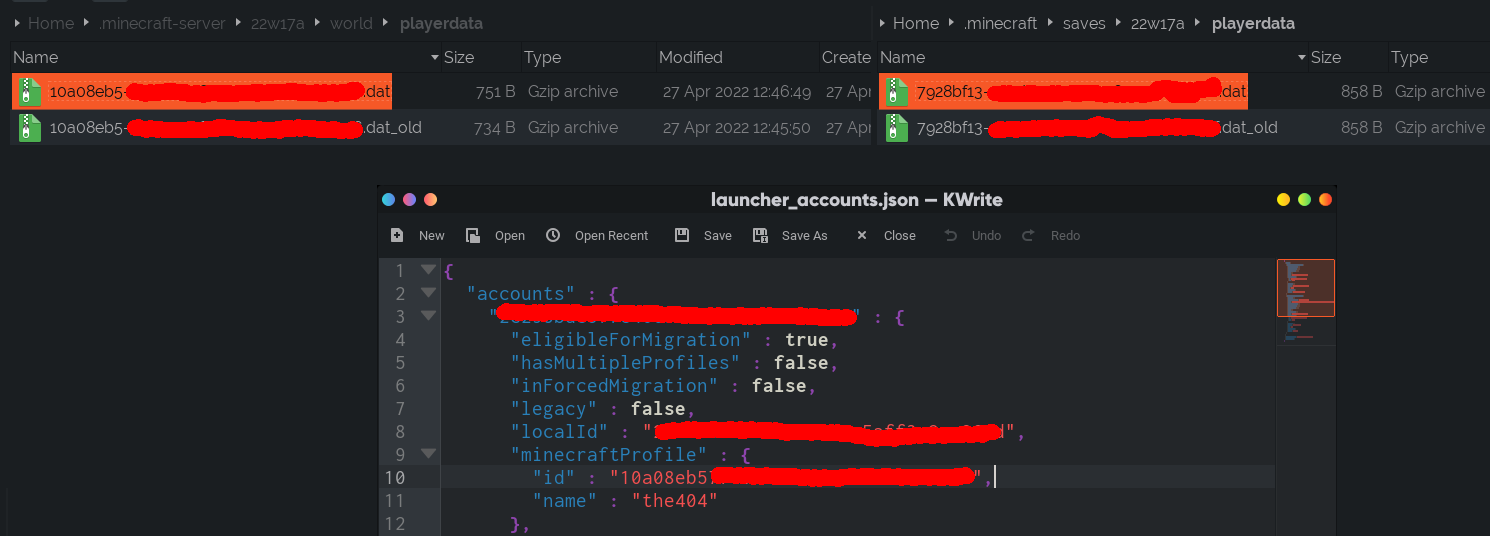
I believe you can see what your ID is supposed to be in launcher_accounts.json
It is located in the .minecraft folder.
You can see in the screenshots below that the ID is not what it is supposed to be. You can see the correct ID for me in 22w16b, and then the incorrect one above it in 22w17a.


I crossed out most of the ID incase this is private information that shouldn't be shared.
Can reproduce this and it seems to be one of the biggest problems since then all player data gets completely swapped to a first-time player save including blank copies of ender chest containers.
@Mesa3D, I just tested and my inventory items and ender chest items were still present in 22w17a after updating a test world from 22w16b. I believe all inventory and enderchest items are saved in the players NBT data. I don't have a multiplayer server to test on however, so I'm not sure if this is still the case on servers.
I've tested this snapshot with a server, and it seems like the bug is only present in singleplayer.
Compare the UUIDs of my playerdata in multiplayer (left), and singleplayer (right), and the correct UUID shown below from launcher_accounts.json
Hey! So I just created a minecraft server using the server jar from 22w16b. I joined it and gave myself operator to give my self a few items. I then put some of the items in an ender chest and kept some in my inventory. I left the server and closed it. I then downloaded the 22w17a server jar and ran that server jar using the with the same world. I joined it and I still had my custom skin, items in my inventory, and items in my ender chest, statistics, and advancements.
So! This bug only happens in singleplayer.
@the404, looks like you beat me. I didn't refresh this page so I didn't see your comment when I made my post.
(for future reference, your UUID isn't private information, you can see other players' UUIDs when hovering over their name in chat, and there are websites where you can look up a player's UUID by their username).
Jumping in:
THIS is a feature. It is suppose to replace the UUID's with new ones.
This might reset progress, but it is a feature.
TeamArvv Do you have a source?
TeamArvv If it's true, the bug is in the update from the old UUIDs to the new ones
This is likely related to the following changes from the patch notes:
There is nothing in the patch notes that suggests that the UUID change or its consequences are a feature or in any way intended.
Also if it was intended it would be affecting multiplayer-only, not singleplayer-only.
@Tokes Luckily the issue has already been labelled as resolved. We'll just have to see how it was handled in 22w18a, for if it was intentional or a complete accident