Command block, structure block and jigsaw block UI backgrounds can no longer be retextured
The bug
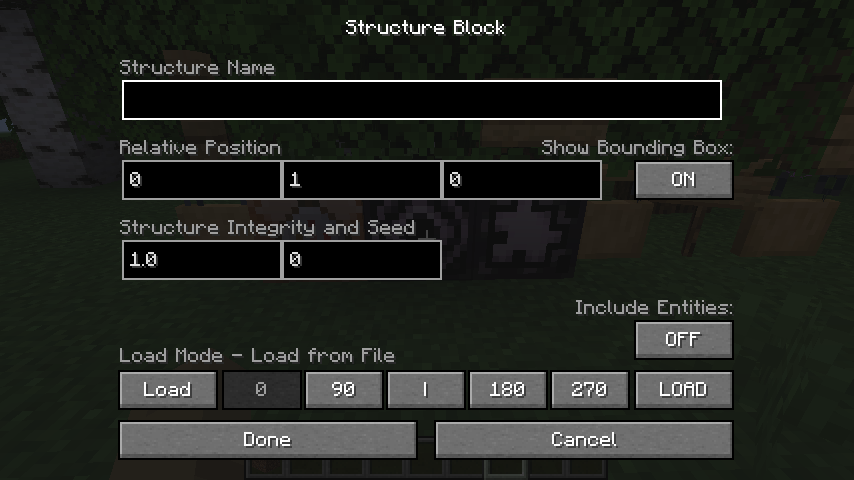
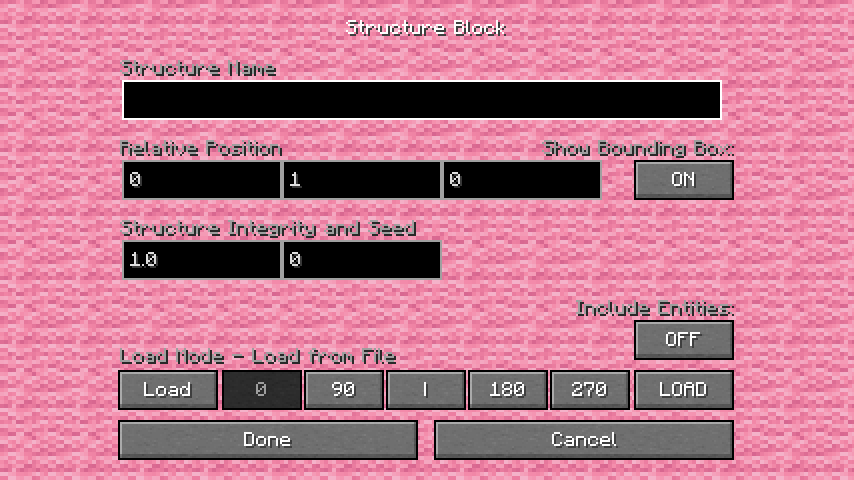
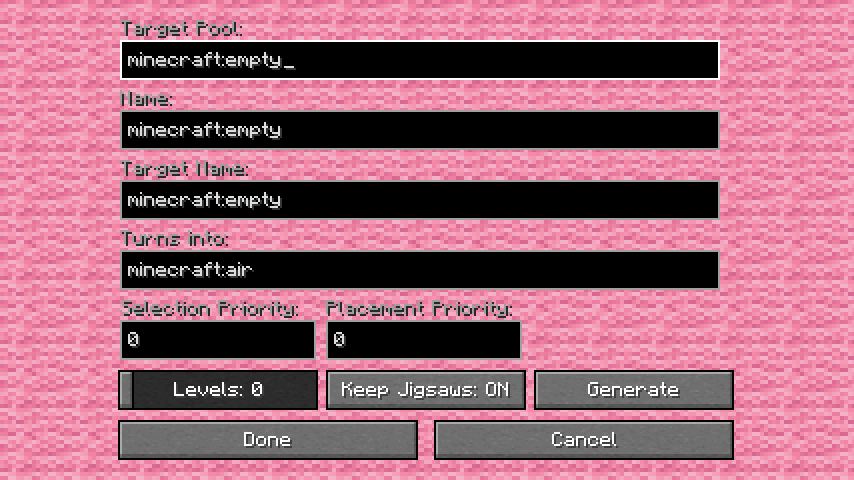
It is no longer possible to change the texture used in the background while configuring command blocks, structure blocks or jigsaw blocks.
Previously, these copied the texture used in game menus (MC-268956), which was incorrect as block interaction screens are not menus. However, the fix for this appears to have taken away the ability to give these screen customizable backgrounds altogether.
How to reproduce
A resource pack is attached to this issue which retextures the UI background in 24w09a/24w10a versus the latest version.
Expected results
Changing the texture of the command/structure/jigsaw block background would still be possible like it was previously.
Actual results
It is now completely impossible.
How to fix
A new texture file should be introduced for the command/structure/jigsaw block background, which is distinct from the "menu background" file.
Linked Issues
relates to19
 MC-264571Both standing and wall sign GUI backgrounds cannot be retextured independantly from the blockConfirmedMC-270255Item slot disabled effect cannot be retexturedCommunity ConsensusMC-270258Durability bar cannot be retexturedCommunity ConsensusMC-270260Bundle fullness bar cannot be retexturedCommunity ConsensusMC-270690World optimization progress bar does not appear to be retexturableConfirmedMC-270766Recipe book uncraftability redness does not appear to be retexturable
 LowMC-277504Anvil experience cost text background cannot be retexturedCommunity ConsensusMC-277877Advancement connectors cannot be retexturedCommunity ConsensusMC-278412Stars cannot be retexturedCommunity ConsensusMC-278413Chat background cannot be retexturedCommunity ConsensusMC-278414Subtitle background cannot be retexturedCommunity ConsensusMC-278415"Everywhere" text background cannot be retexturedCommunity ConsensusMC-270254Item slot highlight effect cannot be retexturedFixedMC-270256Incompatible resource pack redness cannot be retexturedConfirmedMC-270257Box displayed around selected world cannot be retexturedCommunity ConsensusMC-273060Advancements dark overlay cannot be retexturedCommunity ConsensusMC-276664Tutorial progress bar cannot be retexturedCommunity ConsensusMC-269364Sign editing screen can no longer be retexturedInvalidMC-276442Item highlight square in bundle cannot be retexturedInvalid




Created Issue:
Command block, structure block and jigsaw block UI backgrounds can no longer be retextured
Closely related to
MC-269364.The bug
It is no longer possible to change the texture used in the background while configuring command blocks, structure blocks or jigsaw blocks.
Previously, these copied the texture used in game menus (
MC-268956), which was incorrect as block interaction screens are not menus. However, the fix for this appears to have taken away the ability to give these screen customizable backgrounds altogether.How to reproduce
A resource pack is attached to this issue which retextures the UI background in 24w09a/24w10a versus the latest version.
Expected results
Changing the texture of the command/structure/jigsaw block background would still be possible like it was previously.
Actual results
It is now completely impossible.
How to fix
A new texture file should be introduced for the command/structure/jigsaw block background, which is distinct from the "menu background" file.
Attachments7
![[Mod] Avoma](../../../data/avatars/users/86198.png)
relates to
![[Mod] turbo](../../../data/avatars/users/92867.png)
![[Mojang] Triage Team](../../../data/avatars/users/89842.png)
![[Mod] Greymagic27](../../../data/avatars/users/92875.png)
relates to
relates to
![[Mod] Michael Wobst](../../../data/avatars/users/37868.png)
relates to
relates to
relates to
relates to
relates to
Closely related to
MC-269364.The bug
It is no longer possible to change the texture used in the background while configuring command blocks, structure blocks or jigsaw blocks.
Previously, these copied the texture used in game menus (
MC-268956), which was incorrect as block interaction screens are not menus. However, the fix for this appears to have taken away the ability to give these screen customizable backgrounds altogether.How to reproduce
A resource pack is attached to this issue which retextures the UI background in 24w09a/24w10a versus the latest version.
Expected results
Changing the texture of the command/structure/jigsaw block background would still be possible like it was previously.
Actual results
It is now completely impossible.
How to fix
A new texture file should be introduced for the command/structure/jigsaw block background, which is distinct from the "menu background" file.
relates to
![[Mod] Jarl-Penguin](../../../data/avatars/users/92849.png)
relates to
![[Mod] Jiingy](../../../data/avatars/users/91802.png)
Relates to: MC-268805 MC-268927 MC-269079 MC-269364 MC-269365 MC-269437 MC-269438 MC-269443 MC-269447 MC-269938 MC-269939 MC-270254 MC-270255 MC-270256 MC-270257 MC-270258 MC-270260 MC-270324
The bug
The background displayed when clicking on a statistic does not appear to have a changeable texture.
Given its appearance, it looks like it'd use the text_field textures, but that is not the case.
How to fix
Introduce a texture file to handle selected list elements like these.
Relates to: MC-268805 MC-268927 MC-269079 MC-269364 MC-269365 MC-269437 MC-269438 MC-269443 MC-269447 MC-269938 MC-269939 MC-270254 MC-270255 MC-270256 MC-270257 MC-270258 MC-270260 MC-270324 MC-270766 MC-273060 MC-275778 MC-276442
The bug
The scroll bar used when there are too many chat messages to display on screen appears to be a hardcoded graphic. It does not appear to be tied to a texture file as one would expect.
This is inconsistent with scroll bars in menu screens, which have been retexturable since 23w32a, and scroll bars in inventory screens, which have been retexturable since their introduction.
There appear to be at least two versions of the scroll bar: a blue version used most of the time, and a red version indicating unread messages.
How to fix
Introduce actual texture files for the scroll bar (ideally separate textures for the normal and unread versions).
Relates to: MC-268805 MC-268927 MC-269079 MC-269364 MC-269365 MC-269437 MC-269438 MC-269443 MC-269447 MC-269938 MC-269939 MC-270254 MC-270255 MC-270256 MC-270257 MC-270258 MC-270260 MC-270324 MC-270766 MC-273060 MC-275778 MC-276442 MC-276635 MC-276664 MC-277504
The bug
A vertical line is rendered when the cursor position in text has characters following it. This line cannot be retextured at all.
How to fix
Introduce a texture file for the cursor and have it use that.
Relates to: MC-268805 MC-268927 MC-269079 MC-269364 MC-269365 MC-269437 MC-269438 MC-269443 MC-269447 MC-269938 MC-269939 MC-270254 MC-270255 MC-270256 MC-270257 MC-270258 MC-270260 MC-270324 MC-270766 MC-273060 MC-275778 MC-276442 MC-276635 MC-276664 MC-277504 MC-277696
The bug
A white rectangle is displayed to the left of system messages in chat. This rectangle does not appear to be retexturable.
How to fix
Introduce a texture file for this.
Further notes
I don't play multiplayer so I can't test any other types of indicator, if they still exist.
Relates to: MC-268805 MC-268927 MC-269079 MC-269364 MC-269365 MC-269437 MC-269438 MC-269443 MC-269447 MC-269938 MC-269939 MC-270254 MC-270255 MC-270256 MC-270257 MC-270258 MC-270260 MC-270324 MC-270766 MC-273060 MC-275778 MC-276442 MC-276635 MC-276664 MC-277504 MC-277696 MC-277705
The bug
When text is selected, a rectangle shape is overlaid on top of it. This rectangle cannot be retextured.
How to fix
Introduce a dedicated texture for selecting text.
Relates to: MC-268805 MC-268927 MC-269079 MC-269364 MC-269365 MC-269437 MC-269438 MC-269443 MC-269447 MC-269938 MC-269939 MC-270254 MC-270255 MC-270256 MC-270257 MC-270258 MC-270260 MC-270324 MC-270766 MC-273060 MC-275778 MC-276442 MC-276635 MC-276664 MC-277504 MC-277696 MC-277705 MC-277706 MC-277877
The bug
The underline displayed under text does not appear to be tied to a texture, unlike almost all other aspects of fonts.
Example underlined text
/tellraw @p {"text": "\u0020", "underlined": true}
Expected results
Underlines would have a texture file or some other configuration method such that the way it looks can be customized in resource packs.
Actual results
They do not.
Relates to: MC-268805 MC-268927 MC-269079 MC-269364 MC-269365 MC-269437 MC-269438 MC-269443 MC-269447 MC-269938 MC-269939 MC-270254 MC-270255 MC-270256 MC-270257 MC-270258 MC-270260 MC-270324 MC-270766 MC-273060 MC-275778 MC-276442 MC-276635 MC-276664 MC-277504 MC-277696 MC-277705 MC-277706 MC-277877 MC-278170
The bug
Like underlines but unlike all other aspects of text, there does not appear to exist a texture file for the strikethrough displayed over text.
Example strikethrough text
/tellraw @p {"text": "\u0020", "strikethrough": true}
Expected results
The strikethrough would have a texture file or some other configuration method allowing resource packs to change how it looks.
Actual results
It does not.
Relates to: MC-268805 MC-268927 MC-269079 MC-269364 MC-269365 MC-269437 MC-269438 MC-269443 MC-269447 MC-269938 MC-269939 MC-270254 MC-270255 MC-270256 MC-270257 MC-270258 MC-270260 MC-270324 MC-270766 MC-273060 MC-275778 MC-276442 MC-276635 MC-276664 MC-277504 MC-277696 MC-277705 MC-277706 MC-277877 MC-278170 MC-278171 MC-278412 MC-278413 MC-278414 MC-278415
The bug
When looking at a named mob, a named item in an item frame, or another player, their name is displayed above their head with a gray rectangle behind it for contrast. Unlike most UI elements, this gray background cannot be retextured.
How to fix
Introduce an image file to handle rendering this.
Relates to: MC-268805 MC-268927 MC-269079 MC-269364 MC-269365 MC-269437 MC-269438 MC-269443 MC-269447 MC-269938 MC-269939 MC-270254 MC-270255 MC-270256 MC-270257 MC-270258 MC-270260 MC-270324 MC-270766 MC-273060 MC-275778 MC-276442 MC-276635 MC-276664 MC-277504 MC-277696 MC-277705 MC-277706 MC-277877 MC-278170 MC-278171 MC-278412 MC-278413 MC-278414 MC-278415 MC-278507
The bug
When a named banner is used to mark a position on a map, a gray rectangle will appear behind the text. This gray rectangle does not appear to be retexturable.
How to fix
Introduce an image file to handle rendering this.
Relates to all of these tickets:
MC-268805 MC-268927 MC-269079 MC-269364 MC-269365 MC-269437 MC-269438 MC-269443 MC-269447 MC-269938 MC-269939 MC-270254 MC-270255 MC-270256 MC-270257 MC-270258 MC-270260 MC-270324 MC-270766 MC-273060 MC-275778 MC-276442 MC-276635 MC-276664 MC-277504 MC-277696 MC-277705 MC-277706 MC-277877 MC-278170 MC-278171 MC-278412 MC-278413 MC-278414 MC-278415 MC-278507 MC-278508
Can the hardcoded-graphics label be added?
Thank you for your report!
After consideration, the issue is being closed as Invalid.
You have posted a feature request or a suggestion. This site is for bug reports only.
For suggestions, please visit The official Minecraft feedback site or visit the Minecraft Feedback Discord server.
Quick Links:
📓 Bug Tracker Guidelines – 💬 Community Support – 📧 Mojang Support (Technical Issues) – 📧 Microsoft Support (Account Issues)
📓 Project Summary – ✍️ Feedback and Suggestions – 📖 Game Wiki