Light gray stained glass pane barely visible
The bug
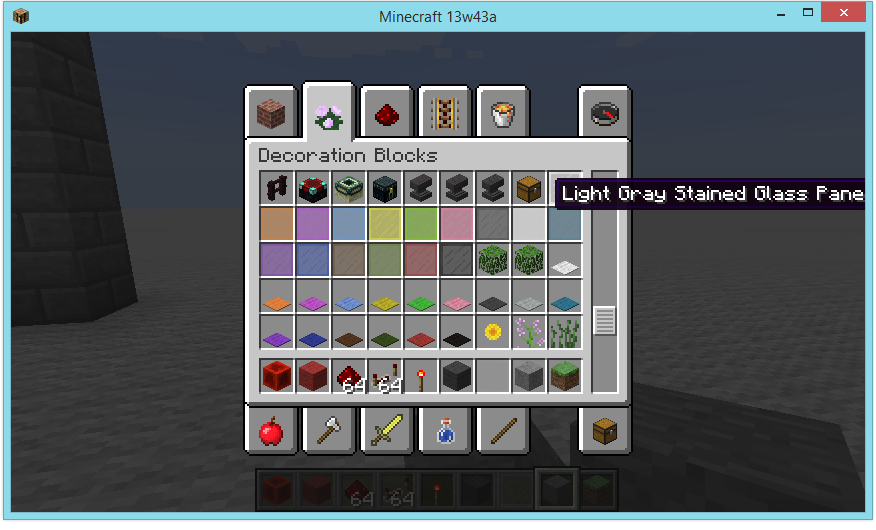
When opening the decoration tab in creative, all stained glass panes are visible except the light gray version. I expected to see the light gray version, but it didn't show up.
How to reproduce
- Open the block menu (be in creative)
- Open the decoration section
- Scroll down to the chest, under the chest is the light gray version
Linked Issues
is duplicated by25
 MC-36580Light gray stained glass panes do not appear in inventory slotDuplicateMC-37619Stained Glass Texture GlitchDuplicateMC-41702Light Grey Stained Glass Panes are invisible in the inventoryDuplicateMC-50375Light gray glass pane invisible in inventoryDuplicateMC-52453Light Gray Stained Glass Pane Is Hard To See In Creative Mode InventoryDuplicateMC-53594Light gray stained glass panes are nearly invisible.DuplicateMC-57802Light Gray Stained Glass Pane are slightly invisible DuplicateMC-62657Light Gray Stained Glass not shown up in creative mode inventoryDuplicateMC-69243Not showing item in invitoryDuplicateMC-76812Light Grey Panes of glass appear invisible in the InventoryDuplicateMC-92799Texture missing...DuplicateMC-121862Invisible light gray stained glass paneDuplicateMC-129441The texture for the light grey stained glass pane is the same as the gui background.DuplicateMC-147238Light Gray stained glass panes appears invisible in the inventory DuplicateMC-165125Light grey glass pane invisible in inventoryDuplicateMC-183658can not see light gray stained glass panes in creative inventory DuplicateMC-193620Inside of the inventory, light grey stained glass panes do not appear.DuplicateMC-199851Light Gray Glass Panes appear invisible in inventory GUIDuplicateMC-206999Light Gray Stained Glass Pane doesnt have an icon in the inventory unless selected manuallyDuplicateMC-215685Light gray stained glass panes doesn’t render in inventoryDuplicateMC-220502There is no texture for Light Grey Stained Glass Pane in the inventory.DuplicateMC-227704Missing icon for stained light grey glass paneDuplicateMC-241859Light Gray Glass Pane not VisibleDuplicateMC-252131Light grey glass panes are missing texture in player inventoryDuplicateMC-265902Light gray stained glass pane - Too translucent textureDuplicate
Attachments1

Created Issue:
light gray stained glass pane not visible
when opening the decoration tab in creative, all stained glass panes are visible except the light gray version.
of course i expected to see the light gray version, but it didnt show up.
Steps to Reproduce:
1. open the block menu (be in creative)
2. open the decoration section
3. scroll down to the chest, under the chest is the light gray versionEnvironment
windows 8.1, java version is up-to-date
Attachments1

is duplicated by

is duplicated by
light gray stained glass panenotvisiblelight gray stained glass pane barely visible
![[Mojang] Nathan Adams](../../../data/assets/gravatar/dinnerbone.png)

is duplicated by

is duplicated by
is duplicated by
![[Mod] Torabi](../../../data/assets/gravatar/torabi.png)
is duplicated by
is duplicated by

is duplicated by
is duplicated by
![[Mod] Michael Wobst](../../../data/avatars/users/37868.png)
when opening the decoration tab in creative, all stained glass panes are visible except the light gray version.of course i expected to see the light gray version, but it didnt show up.
Steps to Reproduce:
1. open the block menu (be in creative)
2. open the decoration section
3. scroll down to the chest, under the chest is the light gray versionThe bug
When opening the decoration tab in creative, all stained glass panes are visible except the light gray version. I expected to see the light gray version, but it didn't show up.
How to reproduce
- Open the block menu (be in creative)
- Open the decoration section
- Scroll down to the chest, under the chest is the light gray version
windows 8.1, java version is up-to-date
light gray stained glass pane barely visibleLight gray stained glass pane barely visible
is duplicated by
is duplicated by
![[Mod] Asteraoth](../../../data/avatars/users/92886.png)
is duplicated by
![[Mod] tryashtar](../../../data/avatars/users/41963.png)
is duplicated by
is duplicated by
is duplicated by
is duplicated by
![[Mod] Chandler](../../../data/assets/gravatar/triwonder81.png)
is duplicated by
is duplicated by
is duplicated by
relates to
is duplicated by
relates to
is duplicated by
is duplicated by
Duplicate of Works As Intended
MC-36498
If you have not, please use the search function in the future, to see if your bug has already been submitted. If you could not find the original report, please comment with the keywords you searched for.
Indeed. Duplicate of MC-36498.
WAI. MC-36498

Duplicates MC-36498, which is sadly marked as "Works as Intended"
![[Mod] violine1101](../../../data/avatars/users/92858.png)
Also, why is there no light gray stained glass pane?
There is, it's just practically invisible because the GUI background is the same color. See also MC-36498.
Duplicate of MC-36498, which works as intended. They do appear, but they are barely visible.
![[Bot] Arisa](../../../data/avatars/users/43007.png)
Thank you for your report!
We're tracking this issue as MC-36498, so this ticket is being resolved and linked as a duplicate.
That ticket has already been resolved as working as intended, which means this is not considered a bug and won't be fixed. Please do not leave a comment on the linked ticket.
If you haven't already, you might like to make use of the search feature to see if the issue has already been mentioned.
Quick Links:
📓 Issue Guidelines – 💬 Community Support – 📧 Mojang Support – ✍️ Feedback and Suggestions – 📖 Game Wiki
– I am a bot. This action was performed automatically! Please report any issues in Discord or Reddit
Duplicate of MC-36498
Thank you for your report!
We're tracking this issue in MC-36498, so this ticket is being resolved and linked as a duplicate.
That ticket has already been resolved as working as intended, which means this is not considered a bug and won't be fixed. Please do not leave a comment on the linked ticket.
If you haven't already, you might like to make use of the search feature to see if the issue has already been mentioned.
Quick Links:
📓 Bug Tracker Guidelines – 💬 Community Support – 📧 Mojang Support
📓 Project Summary – ✍️ Feedback and Suggestions – 📖 Game Wiki
Thank you for your report!
We're tracking this issue in MC-36498, so this ticket is being resolved and linked as a duplicate.
That ticket has already been resolved as working as intended, which means this is not considered a bug and won't be fixed. Please do not leave a comment on the linked ticket.
If you haven't already, you might like to make use of the search feature to see if the issue has already been mentioned.
Quick Links:
📓 Bug Tracker Guidelines – 💬 Community Support – 📧 Mojang Support
📓 Project Summary – ✍️ Feedback and Suggestions – 📖 Game Wiki
– I am a bot. This action was performed automatically! Please report any issues on Discord or Reddit
![[Mod] Avoma](../../../data/avatars/users/86198.png)
Duplicate of MC-36498, which was later resolved as "Works As Intended".
Thank you for your report!
We're tracking this issue in MC-36498, so this ticket is being resolved and linked as a duplicate.
That ticket has already been resolved as working as intended, which means this is not considered a bug and won't be fixed. Please do not leave a comment on the linked ticket.
If you haven't already, you might like to make use of the search feature to see if the issue has already been mentioned.
Quick Links:
📓 Bug Tracker Guidelines – 💬 Community Support – 📧 Mojang Support
📓 Project Summary – ✍️ Feedback and Suggestions – 📖 Game Wiki
– I am a bot. This action was performed automatically! If you think it was incorrect, please notify us on Discord or Reddit
Dupe of MC-36498
The bug
Glass pane items are rendered as 2D items. As a result of this, their appearence does not accurately reflect how they are when placed, as several parts of the item appear to be 3D cubes whereas their placed form applies this texture as a 2D cuboid face. While this could be said of many items such as grass, I consider glass panes to be a more significant issue since they appear as a cuboid both in item form and when placed, exaggerating this discrepancy beyond reasonable expectations.
How to reproduce
- Hold a glass pane
- Notice how the streaks appear to be made of 3D cubes
- Place a glass pane
- Notice how the streaks are 2D as expected
Expected results
The item form would not be extruded in this manner, and there would therefore be no such cubic streaks.
Actual results
As the glass pane item is handled as 2D, these streaks do end up becoming cubic.
How to fix
Attached to this ticket is a resource pack which fixes this issue completely by creating a new, dedicated 3D model for glass pane items. Alongside eliminating this issue, it also brings feature parity between Java Edition and Bedrock Edition due to the latter displaying panes like this already, brings internal parity between glass panes and similar blocks such as fences and walls, and also fixes MC-36498.
Mojang have my full permission to (and are strongly encouraged to) use the assets included in the resource pack to fix these issues.
Thank you for your report!
We're tracking this issue in MC-36498, so this ticket is being resolved and linked as a duplicate.
That ticket has already been resolved as working as intended, which means this is not considered a bug and won't be fixed. Please do not leave a comment on the linked ticket.
If you haven't already, you might like to make use of the search feature to see if the issue has already been mentioned.
Quick Links:
📓 Bug Tracker Guidelines – 💬 Community Support – 📧 Mojang Support
📓 Project Summary – ✍️ Feedback and Suggestions – 📖 Game Wiki
– I am a bot. This action was performed automatically! The ticket was resolved by one of our moderators, and I left this message to give more information to you.
![[Mod] Jiingy](../../../data/avatars/users/91802.png)
This duplicates MC-36498
Thank you for your report!
We're tracking this issue in MC-36498, so this ticket is being resolved and linked as a duplicate.
If you would like to add a vote and any extra information to the main ticket it would be appreciated.
If you haven't already, you might like to make use of the search feature to see if the issue has already been mentioned.
Quick Links:
📓 Bug Tracker Guidelines – 💬 Community Support – 📧 Mojang Support
📓 Project Summary – ✍️ Feedback and Suggestions – 📖 Game Wiki
– I am a bot. This action was performed automatically! The ticket was resolved by one of our moderators, and I left this message to give more information to you.
"Barely" visible.
It's light grey. It just so happens that your inventory is light grey. Sorry, WAI.
This is working as intended but it doesn't look nice.
As it is, the only thing visible is the quantity number.
It would be better if there was a special case for low/no contrast icons like the light grey glass pane. Or to use the original glass pane icon with the dye colour indicated by an inset square.
Absolutely no way to tell apart an empty slot from one which contains a light grey glass pane… I would not call that "resolved"
Change inventory cell background color so it wouldn't match with any item color or darken the background color if it lies below the item that is being showed. And yup - it's not "barely" it is completely invisible. And I can't consider that "as intended" there're a lot of options to make it work properly. Fix it please!
Matthew Tanner Lawley: This is a warning, please refrain from making such statements on the bug tracker in the future.
Bedrock Edition has these as 3D models, so if Mojang ever changes their mind and decides to fix this, that would probably be the easiest way to do it.
why can't glass panes use 3D models like Bedrock Edition? This way there would be a shadow on the light gray stained glass pane and people can see it.