Redstone not powering horizontally adjacent blocks
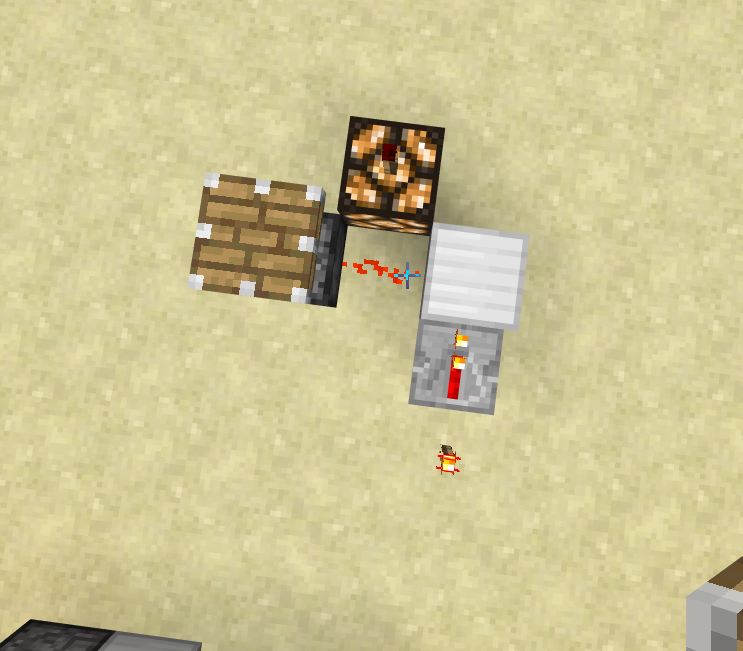
I was trying to build an XOR gate in MCPE, but I came across an issue in which redstone, when powered by a strongly powered adjacent block would not power horizontally adjacent blocks. One configuration in which this happens is attached below.
I could not reproduce this bug in the PC (Java) edition of Minecraft, and I have also attached pictures of it functioning correctly there.
Update by [Mojang] Adrian Östergård
This bug has been reported to our internal bug tracker for further testing and a fix. It is scheduled to be fixed in one of the future updates (no specific date can be provided).
Please avoid duplicate comments. Post only NEW information regarding this bug.
Linked Issues
is duplicated by6
relates to8
 MCPE-16892Redstone powers the wrong blocks when redirected by pistonsConfirmedMCPE-16831Redstone comparators do not test for valid power sources properlyFixedMCPE-30658No output from blockFixedMCPE-11353Redstone dot doesn't power blocks on the horizontal planeFixedMCPE-14668Redstone repeaters facing into a redstone dust dont redirect the dust serverside, only graphicallyFixedMCPE-15850Observers redirect Redstone Dust (but not visually)FixedMCPE-16170Observers powering redstone dust below do not power components adjacent to the dustFixedMCPE-21898Redstone torch is on although it should be offIncomplete
Attachments13



![[Mojang] Mega_Spud (Jay Wells)](../../../data/avatars/users/92696.png)
- Fixed
 Kabir Oberai
- 19
- 12
- Confirmed
- 35239
- Tablet - iOS - iPad Air 2
- iOS 9
- redstone redstone_wire strong-power
0.13.0 - 1.2.10.2
0.13.0 0.14.0 0.14.2 0.14.3 0.15.0 0.15.1 Beta 1 0.15.1 0.15.2 0.15.4 0.15.6 0.15.7 0.15.90.2 0.15.90.7 0.15.10 0.15.90.8 0.16.0 0.16.1 0.17.0.1 0.16.2 1.0.0.0 1.0.0.1 1.0.0 1.0.2 1.0.3 1.0.4.0 1.0.4.1 1.0.4.11 1.0.5.13 1.0.6.0 1.0.5.54 1.1.0.0 1.0.7.0 1.1.0.8 1.1.0.9 1.1.0.55 1.1.1.0 1.1.2.50 1.1.3.1 1.1.5.0 1.2.0.31 1.2.1.1 1.2.3.6 1.2.5.12 1.2.5.15 1.2.6.55 1.2.7.2 1.2.8.0 1.2.9.1 1.2.10.2- 1.2.6.2 1.2.10.1 1.2.13.54
Created Issue:
Redstone not turning Redstone Torch off
I was trying to build an XOR gate in MCPE, but I came across an issue in which a redstone torch would not turn off when powered. I have only found one configuration in which this happens, attached below.
I could not reproduce this bug in the PC (Java) edition of Minecraft, and I have also attached pictures of it functioning correctly there.
Attachments4
Redstone not turningRedstone TorchoffRedstone Torch not turning off
I was trying to build an XOR gate in MCPE, but I came across an issue in which a redstone torch would not turn off when powered. I have only found one configuration in which this happens, attached below.
I could not reproduce this bug in the PC (Java) edition of Minecraft, and I have also attached pictures of it functioning correctly there.
Note that this is probably the same problem as
MCPE-11818.
I was trying to build an XOR gate in MCPE, but I came across an issue in which a redstone torch would not turn off when powered. I have only found one configuration in which this happens, attached below.
I could not reproduce this bug in the PC (Java) edition of Minecraft, and I have also attached pictures of it functioning correctly there.
Note that this is probably the same problem as
MCPE-11818.
RedstoneTorch not turning offRedstone not powering horizontally adjacent blocks
I was trying to build an XOR gate in MCPE, but I came across an issue in which
aredstonetorch would not turn off when powered. I have only found one configuration in which this happens,attached below.I could not reproduce this bug in the PC (Java) edition of Minecraft, and I have also attached pictures of it functioning correctly there.
I was trying to build an XOR gate in MCPE, but I came across an issue in which redstone, when powered by a strongly powered adjacent block would not power horizontally adjacent blocks. One configuration in which this happens is attached below.
I could not reproduce this bug in the PC (Java) edition of Minecraft, and I have also attached pictures of it functioning correctly there.

is duplicated by
is duplicated by

relates to
relates to
relates to

relates to
relates to
![[Mojang] Adrian Östergård](../../../data/assets/gravatar/nighter.jpeg)
I was trying to build an XOR gate in MCPE, but I came across an issue in which redstone, when powered by a strongly powered adjacent block would not power horizontally adjacent blocks. One configuration in which this happens is attached below.
I could not reproduce this bug in the PC (Java) edition of Minecraft, and I have also attached pictures of it functioning correctly there.
Update by [Mojang] Adrian Östergård
This bug has been reported to our internal bug tracker for further testing and a fix. It is scheduled to be fixed in one of the future updates (no specific date can be provided).
Please avoid duplicate comments. Post only NEW information regarding this bug.

relates to
relates to
is duplicated by
![[MCPE Mod] Celesian](../../../data/avatars/users/81635.png)
![[Mod] bemoty](../../../data/avatars/users/50554.png)
![[MCPE Mod] Dr.Awesome4333](../../../data/assets/gravatar/drawesome4333.png)
is duplicated by
is duplicated by
is duplicated by
Not fixed in 1.2.6 release. Even the use cases in the earlier attachments do not work. Minecraft 12_6_2017 12_50_08 PMTrim.mp4

relates to
is duplicated by
is duplicated by
 2018-04-06.png
This is similar to, if not the same as, MCPE-11871. In your screenshot, the redstone wire placed behind the first NOT gate looks powered by a strongly-powered block below it. When a line of dust (not a dot) is powered that way, it fails to power any horizontally adjacent blocks (the white wool with the first torch attached in your case) except for another dust placed next to it. I guess you can work around the glitch by removing the leftmost dust to turn the dust above the torch into a dot.
Confirmed on 0.13.0 / iOS. At first I thought this was just another example of MCPE-11871 but soon realized I was wrong. In this setup, torches behave as if they had 1-tick delay for turning off but no delay for turning on. That is,
- Torches on the blue side are turned on. On the red side they are turned off. Due to the solid blocks above them powering the wire, the blocks on the ground are weakly powered at this point.
- 1 tick later, two torches on the blue side turn off. As soon as the wire gets unpowered, torches on the red side turn on and thus the wire gets powered again in the same tick.
- 1 tick later, torches on the red side turn off, and then blue side torches turn on instantaneously.
However, this is contrary to (Correction: In my comment to MCPE-11869, which shows that torches have no redstone delay for turning off (despite a visual delay being observable)MCPE-11869 I proved that torches have 1 tick delay for turning off). The reason for torches on sides being alternately turned on and off is unexplainable as well, because if my hypothesis above were correct, all of the 4 torches might stay turned on. This may have something to do with the 2nd bug reported in MCPE-11855 but I'm not really sure.
PEa, PEc1, and PEc2 are duplicates of MCPE-11871.
PEb is a duplicate of MCPE-11353.

They're all the result of the same glitch, so MCPE-11871 thus duplicates MCPE-11353.
This issue still affects 0.13.1, but strangely, I can confirm that MCPE-11871 is now fixed. These two issues turned out to be different.
But wait, the screenshots IMG_1718.PNG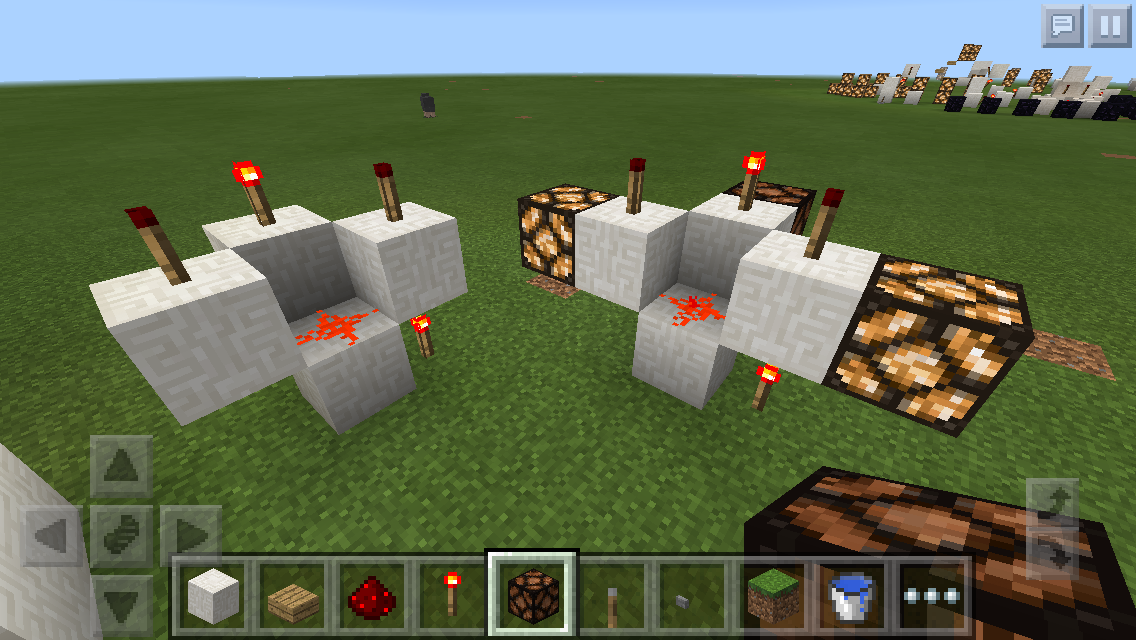 and IMG_1720.PNG
 provide something new to
 MCPE-11353. Given the fact that apparently duplicating MCPE-11871 turned out to be a different bug, I think it's safer to mark this Related to, not Duplicate of MCPE-11353.
Sort of the MCPE-equivalent of MC-107795, which was fixed in 16w41a.
See this video for a demonstration/explanation:
https://youtu.be/tLeW3lhMn_0
Observers redirect redstone (like a repeater/comparator/adjacent dust), which makes no sense. In a future update redstone dust will automatically connect to adjacent components with inputs, but this doesn't apply in this instance, because the Observer only takes input from one side, and as you can see in the picture and video, it's redirecting no matter which side is adjacent to the dust. To make it even more confusing, the redirection doesn't appear visually, so the redstone dust still looks like it is in the shape it would be otherwise. A proper fix would be to make the Observer only redirect redstone on its output side. This is how it works in the Java edition.
I think this bug may be related to MCPE-11871 and MCPE-16170.
This is very similar to, but not exactly the same as, MCPE-11871.
But there is a subtle difference between this and MCPE-11871, because in the observer case it's the observer that acts as a power source while in MCPE-11871 those opaque blocks aren't themselves power sources but they are merely strongly-powered. So I don't want to close this one as a duplicate.
I think this bug may be related to MCPE-11871 due to their similarities.
Tavish, your last two screenshots, Screenshot_2016-09-16-21-17-14.png and Screenshot_2016-09-16-21-17-40.png, are showing a similar but different bug namely MCPE-11871.
When you hook up 2 redstone components and power one directly with redstone dust, and the other with a repeater set to a 1-tick delay, Both will be activated at the same time, as if the repeater has no delay. This leads to non-deterministic outcomes, wherein the component that will be powered first is pretty much random. See video and pictures for example:
Note that at the time of recording, I thought the bug was with pistons, and didn't realize it also applied to redstone lamps and other blocks, too. I now believe this bug is either caused by repeaters/comparators, by redstone dust, or by just incorrect redstone timings in general. I've also noticed that repeaters, comparators, redstone torches, and redstone dust are powered with the correct timing delay when repeaters are powering them, either directly or with redstone dust in-between, but the affected components listed below will still be powered as though there were no dust between them and the repeater (meaning that you can power a line with dust -> repeater -> 2nd dust -> redstone lamp, and the redstone lamp will come on at the same time as the 1st dust and repeater, and actually 1 redstone tick before the 2nd dust that's supposed to be powering it! This bug almost certainly has something to do with the way that redstone components are powered in MCPE ignoring certain factors (this bug is another example: MCPE-11871).
List of blocks this bug affects:
- pistons
- sticky pistons
- dispensers
- droppers
- redstone lamps
- observers (placing redstone dust on the input of one and a repeater on the other and activating both simultaneously will cause both observers to be activated at the same time)
- note blocks
List of blocks this bug doesn't seem to affect:
- repeaters (the proper delay will be applied to repeaters being powered by other repeaters or redstone dust coming from other repeaters)
- comparators (same as with repeaters)
- redstone torches (by sending the dust/repeaters into blocks to invert the torches)
- redstone dust (but components hooked up like repeater -> dust -> piston will actually be powered 1 redstone tick before the dust and in the same tick as the repeater is powered)
This bug does not occur on the Java edition, as repeaters set to a 1-tick delay always add a 1 redstone tick delay no matter what they're hooked up to. I'm not sure how long this bug has been in the game, but it has been there since at least 0.15.3. This bug causes various redstone contraptions to act as if they were being affected by MCPE-16371, since there's no distinction between a repeater powering something and redstone dust powering something in many cases, causing several things to be powered at the same time, which results in random/unpredictable behavior.
When the Observer block is oriented vertically (down to up or up to down both) the redstone dust at the output side is not transmitting to a repeater behind a block. (all other orientations work properly)
related with MCPE-16170 and MCPE-11871
There is some screenshot which will help:
- on the one call correct.PNG I break a block on the right side and all work well.
- on the other one I break a block above the Observer and the repeater don't get the pulse trough the block (unlike the first case).
WAIT!! I WAS WRONG!
https://bugs.mojang.com/secure/attachment/105392/2015-11-22_13.56.56.png
I built this in MCPE, but what I forgot was that this test would be affected by MCPE-11871. Because of this, the test was INVALID. By moving the dispenser one block to the right and by adding another redstone dust between the dispenser and the torch, I found that the dispenser would never fire. This means that MCPE does NOT have 0 ticks! I think this issue can be closed, unless someone can find a legitimate proof of the existence of micropulses in MCPE.
While this may appear to be something new, it is actually a known old bug which hasn't been fixed yet: MCPE-11871
Thank you for your report!
However, this issue is a Duplicate of MCPE-11871.
If you have additional information, please add it to that report.
Please search before reporting, as it's likely that one exists already.
Quick Links:
📓 Issue Guidelines – 💬 Community Support – 📧 Customer Support – 📖 Game Wiki
Thank you for your report!
However, this issue has been closed as a Duplicate of MCPE-11871.
It has been linked to this report. If you have additional information, please add it to that report.
If you have not, please search before reporting, as it's likely that one exists already.
Quick Links:
📓 Issue Guidelines – 💬 Community Support – 📧 Feedback – 📖 Game Wiki
Thank you for your report!
However, this issue is a duplicate of MCPE-11871. It has been fixed in the 1.2.6.2 beta version, and the fix is expected to be included in the next general release of Minecraft. (No date has yet been set.)
Please remember to search to see if your issue has been reported previously. (Having similar problems on one report can really help us understand and resolve the problem sooner.) If you find a similar issue, you can upvote it and add your version, or if it's already closed as Fixed you can add a comment to request reopening it.
I think is is partially covered by MCPE-11871 (which has been fixed in the 1.2.10.1 beta). However, the bottom left example in your screenshot still seems to be an issue, so we can track that one here if it hasn't been covered elsewhere.
Thank you for your report!
However, this issue has been closed as a Duplicate of MCPE-11871
It has been linked to this report. If you have additional information, please add it to that report.
Please search before reporting, as it's likely that one exists already.
Quick Links:
📓 Issue Guidelines – 💬 Community Support – 📧 Customer Support – 📖 Game Wiki
Thank you for your report!
However, this issue has been closed as a Duplicate of MCPE-11871
It has been linked to this report. If you have additional information, please add it to that report.
Please search before reporting, as it's likely that one exists already.
Quick Links:
📓 Issue Guidelines – 💬 Community Support – 📧 Customer Support – 📖 Game Wiki
It's not just about torches. When a line of redstone dust is powered by a strongly-powered adjacent block, it fails to power a horizontally adjacent block while it powers a block below it or another dust placed next to it (See redstone-failing-to-power-a-lamp.png ).
).
The glitch does not occur when the dust in question is a dot, not a line(Correction: the same thing will happen when a dot is powered sideways but not from below). So this is very similar toMCPE-11353but apparently not the same.It turned out that the line needs not to be powered sideways to cause the glitch. The same oddity happens when it's powered by a block below it. See .
.
MCPE-11887and another-pattern-of-redstone-glitch.pngConfirmed while making a NOT NOT (see
MCPE-11887)@PHO I have updated my bug report with regard to your comments.
Fixed in 0.13.1. Thanks.
The glitch came back to 0.14.0 alpha. Please reopen this.
@PHO do I have to reopen it? Or can only a moderator do so
@Kabir Oberai only moderators, unfortunately
Moderators, please reopen this. The glitch came back to 0.14.0 alpha, and it's mislabeled as "Duplicate" too.
This is not a duplicate and has been confirmed by the community, however the confirmation status in unconfirmed.
Kyle Bartush, it's been reopened already.
Confirmed on 0.15.0 on Windows 10.
I was able to reproduce every situation in the pictures except the one in another-pattern-of-redstone-glitch.png. Powering from strong power below seems to be fixed, but horizontal strong power is still buggy.
Affects 0.15.1. (Tested on Windows 10.)
Affects 0.15.4. (Tested on Windows 10.)
Also confirmed in 0.15.4 on Samsung Galaxy S5
Is Mojang aware of this at all? There hasn't been an assignee on this issue at all since this issue was created.
@Kyle Bartush We no longer assign tickets to people in this tracker.
Just found this glitch on my iPhone running mcpe 0.15.6. One interesting note is that pistons are not affected by this glitch, probably due to the change that makes redstone now automatically connect to pistons.
Confirmed for 0.15.7. (Tested on Windows 10.)
Confirmed for 0.15.90.2. Using an Acer B1-750 tablet. (Intel HD Graphics for BayTrail, Android KitKat 4.4.4)
Affects 0.16.0 Beta Build 4 (AKA 0.15.90.7).
I wonder if this bug has the same root cause as
MCPE-11353. Perhaps that bug was never completely fixed, and this is what is left of it?Also, affects 0.15.10. (Tested on Windows 10.)
Affects 0.15.90.8 (0.16.0 beta build 5).
This bug has been reported to our internal bug tracker for further testing and a fix. It is scheduled to be fixed in one of the future updates (no specific date can be provided).
Some of the example are working correctly in 1.0.0, but there is one remaining instance which does not behave in the same was as Java redstone:
This one also shows a bug in 1.0.2. The left-hand block can not by powered by activating the lever on top of the center block. But it can be powered by the lever on the side.
Still present in 1.0.3... I can't believe this bug is still present after all this time
Affect version 1.2.0.2 (Win 10).
Some, but NOT all of the cases of this bug have been fixed as of 1.2.5 build 2.
Fixed in 1.2.6.2, as far as I can tell! If anyone finds a case of this bug that is still occurring, please post it here and I'll reopen the ticket.
Not fixed in 1.2.6 release. Even the use cases in the original attachments don't work. Video attached. Minecraft 12_6_2017 12_50_08 PMTrim.mp4
Seems to be at least partially broken again in the final 1.2.6 release.
As the 'Minecraft 12_6_2017 4_15_38 PM.png' image shows, this is fixed for certain orientations, but not all.
https://gyazo.com/418e45b94834496e3bd57674bba8fab1
Repeaters don't power pistons that are positioned like this. When replacing the repeaters with redstone, the piston DOES get powered.
Thomas, that behavior is intentional. The redstone wire powers the block below it and any non-wire blocks adjacent to that block, such as the piston, whereas the repeater only powers the block on its output side and any blocks adjacent to that block, if there is one. Because the repeater is just pointing into air, it powers nothing, and so the piston is not powered.
In Java Edition, a quirky behavior called quasi-connectivity (or QC - caused by mistakes in the redstone & piston code) causes pistons, droppers, and dispensers to be powered in instances where they logically should not, such as in this case with the repeater.
Ah I see. Thanks for informing me. I'm not the best at redstone. I'm also still used to the Java edition
This makes my previous comment invalid.
Confirmed to be fully fixed using my previous test cases.
The error demonstrated in the "Lever-Off.png" and "Lever-On.png" attachments still exists. Tested in Windows 10 1.2.10.2.
Odd... Perhaps the fix was reverted from the beta? That exact test case was fixed in it (the beta).
MaladjustedPlatypus, the 1.2.10.2 release seems to have been based off a different development branch than the 1.2.10.1 beta build, so some of the fixes/changes in that beta will likely show up again in 1.2.11. Until then, I'll reopen this issue.
Not quite. This redstone lamp shouldn't be powered.
That would be a separate bug, redstone powering blocks it should not be powering.
That issue might be related to or another case of MCPE-16892