Mobs Won't Pathfind Over Short Blocks (Slabs, Soul Sand, Enchanters)
Mobs in general will not walk over short blocks(ones that are shorter than a full blocks, like slabs). This is a pretty easy thing to spot in survival, as lower slabs are used everywhere, so you will typically see mobs stuck on them, not walking over them, or jumping in circles on them.
This does not apply to all blocks that do not have a full hitbox, just a few.
Ones i have tested are: Lower slabs, Enchantment tables, Soul Sand, Brewing stands
This should also affect farmland and path blocks, but those have incorrect(full sized) hitboxes, so are fine in this case.
Keep in mind, mobs not walking over these blocks, is only an issue if the block has nothing below it.
How to reproduce.
1. Go 30 blocks off the ground, and make a 1 wide by 10 long row of lower slabs.
2. spawn a zombie on one end, and a villager a couple blocks away.
3. You will see that neither the zombie, nor the villager will walk away from one another.
4. Start placing full blocks under the lower slabs, and they will start to move again. This can be repeated will all blocks listed above.
Expected result:
Mobs would walk over and pathfind across these blocks with little to no issue.
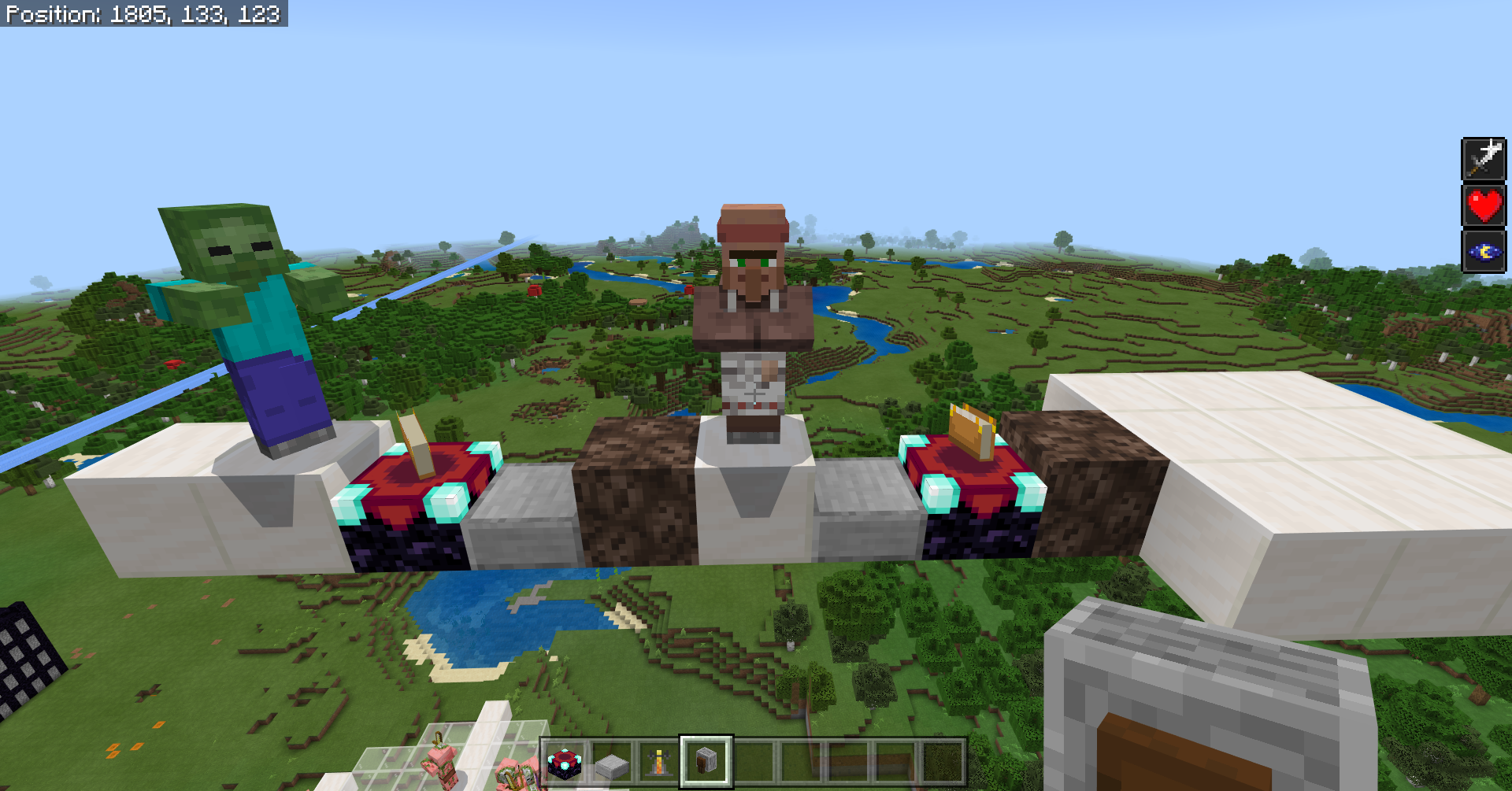
Below you can see one of my set ups for testing this. Placing solid blocks below any of the short ones, allow the mobs to move.
Full demonstration, and explanation of this bug here:
https://youtu.be/qR5M5v0XDM0?t=172
Linked Issues
is duplicated by21
 MCPE-48122Mobs can't find a path on half slabsDuplicateMCPE-51318path findingDuplicateMCPE-53729ALL mobs can't path on half-slabs, and just spin in circles! (Xbox One&Windows 10)DuplicateMCPE-55421Mobs Continuously Jump When On Non-Full BlocksDuplicateMCPE-57128Mobs Can't Pathfind Over Floating Slabs Or BedsDuplicateMCPE-59955Soulsand prevents zombie pigmen from pathfindingDuplicateMCPE-64535Mob path finding DuplicateMCPE-65068When friendly creatures (cows, sheep, pigs) stand on boxes of boxes, they act as if they are anchoredDuplicateMCPE-66496Villagers won't pathfind on bottom half slab platformsDuplicateMCPE-67219Mobs Spin In A Circle/Stand Still When They Are On Soul SandDuplicateMCPE-68444Passive/Neutral Mob AI breaks upon navigating on top of a chestDuplicateMCPE-71806Mobs walking in circles on soul sand DuplicateMCPE-76640Villagers get stuck on chestsDuplicateMCPE-77043Mobs spin on soul sandDuplicateMCPE-77621Mobs Can't Pathfind Onto Soul SandDuplicateMCPE-79857Mobs get stuck spinning in circles on slabs on a .5 y cordDuplicateMCPE-81188Mobs do not path find over half slabsDuplicateMCPE-86791Villagers not Pathfinding to BedsDuplicateMCPE-94949Normally aggressive mobs towards Villagers will not pathfind to them if either are on a half slab DuplicateMCPE-96299Mobs don't move or attack when they're on top of an End portal frameDuplicateMCPE-101871Villager pathfinding breaks when large numbers of lower half slabs are usedDuplicate
relates to6
MCPE-45256Mobs Get Stuck In Their Pathing and constantly try and jump over slabsFixedMCPE-45560AI pathfinding gets stuck in various placesFixedMCPE-98568Blocks that are shorter than full blocks limits how fast a mob can runFixedMCPE-100622Mobs can't pathfind over most short blocksFixedMCPE-37005Mobs can't navigate inside of waterlogged blocksFixedMCPE-99698Mobs no longer see buttons as full blocks and thus won't walk off edges.FixedAttachments1

Created Issue:
Mobs Won't Pathfind Over Short Blocks (Slabs, Soul Sand, Enchanters)
Mobs in general will not walk over short blocks(ones that are shorter than a full blocks, like slabs). This is a pretty easy thing to spot in survival, as lower slabs are used everywhere, so you will typically see mobs stuck on them, not walking over them, or jumping in circles on them.
This does not apply to all blocks that do not have a full hitbox, just a few.
Ones i have tested:
Lower slabs
Enchantment tables
Soul Sand
Brewing standsThis should also affect farmland and path blocks, but those have incorrect(full sized) hitboxes, so are fine in this case.
Keep in mind, mobs not walking over these blocks, is only an issue if the block has nothing below it.
How to reproduce.
1. Go 30 blocks off the ground, and make a 1 wide by 10 long row of lower slabs.
2. spawn a zombie on one end, and a villager a couple blocks away.
3. You will see that neither the zombie, nor the villager will walk away from one another.
4. Start placing full blocks under the lower slabs, and they will start to move again. This can be repeated will all blocks listed above.Expected result:
Mobs would walk over and pathfind across these blocks with little to no issue.Below you can see one of my set ups for testing this. Placing solid blocks below any of the short ones, allow the mobs to move.
Attachments1
Mobs in general will not walk over short blocks(ones that are shorter than a full blocks, like slabs). This is a pretty easy thing to spot in survival, as lower slabs are used everywhere, so you will typically see mobs stuck on them, not walking over them, or jumping in circles on them.
This does not apply to all blocks that do not have a full hitbox, just a few.
Ones i have tested:
Lower slabs
Enchantment tables
Soul Sand
Brewing standsThis should also affect farmland and path blocks, but those have incorrect(full sized) hitboxes, so are fine in this case.
Keep in mind, mobs not walking over these blocks, is only an issue if the block has nothing below it.
How to reproduce.
1. Go 30 blocks off the ground, and make a 1 wide by 10 long row of lower slabs.
2. spawn a zombie on one end, and a villager a couple blocks away.
3. You will see that neither the zombie, nor the villager will walk away from one another.
4. Start placing full blocks under the lower slabs, and they will start to move again. This can be repeated will all blocks listed above.Expected result:
Mobs would walk over and pathfind across these blocks with little to no issue.Below you can see one of my set ups for testing this. Placing solid blocks below any of the short ones, allow the mobs to move.
Mobs in general will not walk over short blocks(ones that are shorter than a full blocks, like slabs). This is a pretty easy thing to spot in survival, as lower slabs are used everywhere, so you will typically see mobs stuck on them, not walking over them, or jumping in circles on them.
This does not apply to all blocks that do not have a full hitbox, just a few.
Ones i have tested are: Lower slabs, Enchantment tables, Soul Sand, Brewing standsThis should also affect farmland and path blocks, but those have incorrect(full sized) hitboxes, so are fine in this case.
Keep in mind, mobs not walking over these blocks, is only an issue if the block has nothing below it.
How to reproduce.
1. Go 30 blocks off the ground, and make a 1 wide by 10 long row of lower slabs.
2. spawn a zombie on one end, and a villager a couple blocks away.
3. You will see that neither the zombie, nor the villager will walk away from one another.
4. Start placing full blocks under the lower slabs, and they will start to move again. This can be repeated will all blocks listed above.Expected result:
Mobs would walk over and pathfind across these blocks with little to no issue.Below you can see one of my set ups for testing this. Placing solid blocks below any of the short ones, allow the mobs to move.
Full demonstration, and explanation of this bug here:
https://youtu.be/qR5M5v0XDM0?t=172
![[Mojang] Mega_Spud (Jay Wells)](../../../data/avatars/users/92696.png)
relates to
![[MCPE Mod] Celesian](../../../data/avatars/users/81635.png)
![[MCPE Mod] Auldrick](../../../data/avatars/users/10122.svg)
is duplicated by
is duplicated by
![[Mod] OcelotOnesie](../../../data/avatars/users/43220.png)
is duplicated by
is duplicated by
is duplicated by
relates to
is duplicated by

Endermen seem to have difficulty teleporting on soul sand blocks in the Soul Sand Valley as well.
is duplicated by
![[Mod] GoldenHelmet](../../../data/avatars/users/18951.svg)
Affects 1.16.0.51 Beta. This bug needs to be raised to a higher priority level due to the long lifespan of this bug, and due to the amount of problems this bug causes.
is duplicated by
is duplicated by
is duplicated by
Affects 1.16.0.59
is duplicated by
![[Bot] Arisa](../../../data/avatars/users/43007.png)

is duplicated by
is duplicated by
is duplicated by
is duplicated by
is duplicated by
relates to
is duplicated by
is duplicated by
relates to
relates to
@silentwisperer I recently made a report for them slowing down on slabs. (
MCPE-98568) Does that describe the issue your having?
relates to
is duplicated by
relates to
relates to
Thank you for your report!
We're already tracking this issue at MCPE-47075, so I will resolve and link this ticket as a duplicate.
If you would like to add a vote and any extra information to the main ticket it would be appreciated.
If you haven't already, you might like to make use of the search feature to see if the issue has already been mentioned.
Quick Links:
📓 Issue Guidelines – 💬 Community Support – 📧 Customer Support – 📖 Game Wiki
Thank you for your report!
However, this issue has been closed as Cannot Reproduce.
We were unable to reproduce the problem you are describing in the latest version, though some instances of this issue might be the same as MCPE-47075.
Quick Links:
📓 Issue Guidelines – 💬 Mojang Support – 📧 Suggestions – 📖 Minecraft Wiki
Thank you for your report!
We're already tracking this issue at MCPE-47075, so I will resolve and link this ticket as a duplicate.
If you would like to add a vote and any extra information to the main ticket it would be appreciated.
If you haven't already, you might like to make use of the search feature to see if the issue has already been mentioned.
Quick Links:
📓 Issue Guidelines – 💬 Community Support – 📧 Customer Support – 📖 Game Wiki
Bees also get stuck on a variety of other blocks as well, including: Walls, fences, glass panes, iron bars, end rods, and bamboo.
So they pretty much have the same pathfinding issues as all other mobs, with the added bonus of hovering mid air, being able to get stuck in even more locations.
Possibly related issues could include:
bamboo pathfinding issues: MCPE-46805
Short blocks messing with pathfinding: MCPE-47075
Thank you for your report!
We're actually already tracking this issue at MCPE-47075, so I resolved and linked this ticket as a duplicate.
If you would like to add a vote and any extra information to the main ticket it would be appreciated.
If you haven't already, you might like to make use of the search feature to see if the issue has already been mentioned.
Quick Links:
📓 Issue Guidelines – 💬 Community Support – 📧 Customer Support – 📖 Game Wiki
Thank you for your report!
We're actually already tracking this issue under MCPE-47075 so I've requested this report be resolved and linked as a duplicate.
If you would like to add a vote and any extra information to the main ticket it would be appreciated.
If you haven't already, you might like to make use of the search feature to see if the issue has already been mentioned.
Quick Links:
📓 Issue Guidelines – 💬 Community Support – 📧 Customer Support – 📖 Game Wiki
Thank you for your report!
We're actually already tracking this issue at MCPE-47075, so I resolved and linked this ticket as a duplicate.
If you would like to add a vote and any extra information to the main ticket it would be appreciated.
If you haven't already, you might like to make use of the search feature to see if the issue has already been mentioned.
Quick Links:
📓 Issue Guidelines – 💬 Community Support – 📧 Customer Support – 📖 Game Wiki
Mobs get stuck on chests too.
I think it is important to keep two issues separate, which unfortunately are conflated in this report:
- Villager AI failing to pathfind around walls. This can manifest like a combination of
MCPE-49607and MCPE-50441, or it can manifest as MCPE-42912, or probably in other ways too. - Mobs getting stuck on non-full blocks. This is similar to
MCPE-47075but occurs when there is a solid block underneath the problem block. On this issue this report overlapsMCPE-11727, which was closed just for lack of updates rather than because it was fully fixed.
Thank you for your report!
We're actually already tracking this issue at MCPE-47075, so I resolved and linked this ticket as a duplicate.
If you would like to add a vote and any extra information to the main ticket it would be appreciated.
If you haven't already, you might like to make use of the search feature to see if the issue has already been mentioned.
Quick Links:
📓 Issue Guidelines – 💬 Community Support – 📧 Customer Support – 📖 Game Wiki
Thank you for your report!
We're actually already tracking this issue at MCPE-47075, so I resolved and linked this ticket as a duplicate.
If you would like to add a vote and any extra information to the main ticket it would be appreciated.
If you haven't already, you might like to make use of the search feature to see if the issue has already been mentioned.
Quick Links:
📓 Issue Guidelines – 💬 Community Support – 📧 Customer Support – 📖 Game Wiki
Thank you for your report!
We're actually already tracking this issue at MCPE-47075, so I resolved and linked this ticket as a duplicate.
If you would like to add a vote and any extra information to the main ticket it would be appreciated.
If you haven't already, you might like to make use of the search feature to see if the issue has already been mentioned.
Quick Links:
📓 Issue Guidelines – 💬 Community Support – 📧 Customer Support – 📖 Game Wiki
Thank you for your report!
We're actually already tracking this issue at MCPE-47075, so I will resolve and link this ticket as a duplicate.
If you would like to add a vote and any extra information to the main ticket it would be appreciated.
If you haven't already, you might like to make use of the search feature to see if the issue has already been mentioned.
Quick Links:
📓 Issue Guidelines – 💬 Community Support – 📧 Customer Support – 📖 Game Wiki
Thank you for your report!
We're actually already tracking this issue at MCPE-47075, so I will resolve and link this ticket as a duplicate.
If you would like to add a vote and any extra information to the main ticket it would be appreciated.
If you haven't already, you might like to make use of the search feature to see if the issue has already been mentioned.
Quick Links:
📓 Issue Guidelines – 💬 Community Support – 📧 Customer Support – 📖 Game Wiki

Bedrock edition also has this bug MCPE-47075
Thank you for your report!
We're actually already tracking this issue at MCPE-47075, so I will resolve and link this ticket as a duplicate.
If you would like to add a vote and any extra information to the main ticket it would be appreciated.
If you haven't already, you might like to make use of the search feature to see if the issue has already been mentioned.
Quick Links:
📓 Issue Guidelines – 💬 Community Support – 📧 Customer Support – ✍️ Feedback and Suggestions – 📖 Game Wiki
We're tracking this issue as MCPE-47075, so this ticket is being resolved and linked as a duplicate.
If you would like to add a vote and any extra information to the main ticket it would be appreciated.
If you aren't already, please don't forget to use the search feature, the less time volunteers spend linking duplicates the more time we have to update new reports.
Voting on an existing report has a greater impact on getting the bugs most important to you fixed!
Quick Links:
📓 Issue Guidelines – 💬 Community Support – 📧 Customer Support – ✍️ Feedback and Suggestions – 📖 Game Wiki

Thank you for your report!
We're tracking this issue in MCPE-47075, so this ticket is being resolved and linked as a duplicate.
If you would like to add a vote and any extra information to the main ticket it would be appreciated.
If you haven't already, you might like to make use of the search feature to see if the issue has already been mentioned.
Quick Links:
📓 Issue Guidelines – 💬 Community Support – 📧 Customer Support – ✍️ Feedback and Suggestions – 📖 Game Wiki
Duplicate of MCPE-47075
Thank you for your report!
We're actually already tracking this issue at MCPE-47075, so I will resolve and link this ticket as a duplicate.
If you would like to add a vote and any extra information to the main ticket it would be appreciated.
If you haven't already, you might like to make use of the search feature to see if the issue has already been mentioned.
Quick Links:
📓 Issue Guidelines – 💬 Community Support – 📧 Customer Support – ✍️ Feedback and Suggestions – 📖 Game Wiki
Thank you for your report!
We're tracking this issue in MCPE-47075, so this ticket is being resolved and linked as a duplicate.
If you would like to add a vote and any extra information to the main ticket it would be appreciated.
If you haven't already, you might like to make use of the search feature to see if the issue has already been mentioned.
Quick Links:
📓 Issue Guidelines – 💬 Community Support – 📧 Customer Support – ✍️ Feedback and Suggestions – 📖 Game Wiki
Thank you for your report!
We're actually already tracking this issue at MCPE-47075, so I will resolve and link this ticket as a duplicate.
If you would like to add a vote and any extra information to the main ticket it would be appreciated.
Quick Links:
📓 Issue Guidelines – 💬 Community Support – 📧 Customer Support – ✍️ Feedback and Suggestions – 📖 Game Wiki
Thank you for your report!
We're actually already tracking this issue at MCPE-47075, so I will resolve and link this ticket as a duplicate.
If you would like to add a vote and any extra information to the main ticket it would be appreciated.
If you haven't already, you might like to make use of the search feature to see if the issue has already been mentioned.
Quick Links:
📓 Issue Guidelines – 💬 Community Support – 📧 Customer Support – ✍️ Feedback and Suggestions – 📖 Game Wiki
The Bug
If any mob is on a non full block, the speed of that entity will be limited compared to them walking on full blocks. This could've been implemented as a way to fix MCPE-47075.
How to reproduce
- Build a floor made out slabs (Easiest to test, but more blocks can be used.)
- Summon any mob
- Allow it to chase you
→ The mob is heavily limited in how fast it can run
This bug is the result of the fix for MCPE-47075.
Removed 1.16.20 from affected versions because in that version mobs appear to move at normal speed on lower slabs when they move forward. In 1.16.20, due to MCPE-47075, mobs either don't move at all on lower slabs, or they frequently turn in circles instead of pathing in a straight line.
Although I am not in the beta program, I wonder if the slowness reported in this ticket is a result of mobs having the same difficulty pathing forward as before the fix, but simply no longer turning in circles on partial blocks. A video of the reported behavior would be helpful in evaluating this report.
This clones/relates to MCPE-47075.
If they are still stopping completely I think we can just leave MCPE-47075 open. Can you attach a video?
This issue was reportedly fixed in 1.16.100.52 Beta (as a side effect of the fix for MCPE-47075). We will leave this ticket open until the fix is migrated into the regular release. No date can be given for that release.
This issue was reportedly fixed in 1.16.100.52 Beta (as a side effect of the fix for MCPE-47075). We will leave this ticket open until the fix is migrated into the regular release. No date can be given for that release.
There is precedence for what Reed suggests in the comment just above, in the fix for MCPE-81316. That issue was fixed by changing the effect of collisionless blocks on a boat when placed on top of the ice the boat travels on, without changing the effect of those blocks on a boat when they are placed on the side of the ice that a boat travels on. So now blocks like buttons and torches are handled differently when in the same block as a boat than they are when in the block below. Doing the same for buttons and pathfinding could fix the issue reported here while preserving the fixes to MCPE-47075 and MCPE-44575.
See Precedence for differential handling of collisionless blocks attached to tops and sides of full blocks.mp4 for what I mean.
Mobs in general will not walk over short blocks (ones that are shorter than a full block, like daylight sensors). This issue has been fixed for some common blocks (like lower slabs) but not for most other blocks. This is best seen when there is only air below the short block.
Currently affected short blocks: Grind stones, beds, lecterns, stone cutters, chest, daylight sensors, end portal frame, ender chests, bells, unlit campfires, chains, conduits, and end rods.
And probably other short blocks that i forgot about
How to reproduce.
1. Go 30 blocks off the ground, and make a 1 wide by 10 long row of blocks
2. Spawn a zombie on one end, and a villager on the other end
3. Between the mobs place a couple of the above mentioned blocks in the floor
4. Neither mob will walk over the above mentioned blocks
5. Sometimes mobs can pathfind over the blocks, however, its not really.. reliable? they will often jump around, stagger, stop, or fall off the block. Best seen with the grind stone.
Expected result:
Mobs would walk over and pathfind across these blocks with little to no issue.
Full demonstration, and explanation of this bug coming soon
Not a duplicate of MCPE-47075, that report was only for slabs/soul sand/brewing stands/enchantment tables. This is a related post for all other short blocks
Thank you for your report!
We're tracking this issue in MCPE-47075, so this ticket is being resolved and linked as a duplicate.
That ticket has been reported as fixed in the next version, you can check the Fix Version/s field in that ticket to learn more.
If you haven't already, you might like to make use of the search feature to see if the issue has already been mentioned.
Quick Links:
📓 Issue Guidelines – 💬 Community Support – 📧 Mojang Support – ✍️ Feedback and Suggestions – 📖 Game Wiki
Perhaps related to the fix for MCPE-58244 or MCPE-47075?

Observed behavior:
Villagers cannot pathfind across/through/over waterlogged blocks.
Expected behavior:
Villagers should pathfind across/through/over waterlogged blocks, just like zombies or other mobs can.
Reproduction instructions:
- Create a room, 8x8 for example, with 2 high solid block walls
- Split the room down the middle one block deep
- Fill the one block gap with lower slabs
- Place a bed on one side of the room
- Spawn a villager on the other
- Set the time to midnight
- See the village pathfind over the lower slabs to the bed.
- Kill the villager and set the time to noon
- Waterlog the slabbed gap
- Place a bed on one side of the room
- Spawn a villager on the other
- Set the time to midnight
- See the villager wander around their side of the room for a while until the storm cloud particles appear over the villager and bed.
- Rinse and repeat this whole procedure for upper slabs, lower trap doors, upper trap doors, and any other block that can be waterlogged.
Alternate reproduction instructions:
- Create a room, 8x8 for example, with 2 high solid block walls and a roof (so zombies don't burn)
- Split the room down the middle one block deep
- Fill the one block gap with lower slabs
- Make an exit on one side of the room
- On the non exit side of the room, spawn a villager and a zombie
- Watch the villager pathfind over the lower slabs to the room exit
- Kill the villager and zombie
- Waterlog the slabbed gap
- On the non exit side of the room, spawn a villager and a zombie
- Watch the villager be unable to escape the zombie (note: the zombie may hit the villager over the gap. If that happens, ignore that test and repeat)
- Kill the villager and zombie
- Spawn a village on the non exit side of the room and a zombie on the other.
- Watch the zombie pathfind over the waterlogged gap and get the villager.
- Rinse and repeat the whole procedure for upper slabs, lower trap doors, upper trap doors, and any other block that can be waterlogged.
I realize there are other villager pathfinding bugs in the tracker but non of the tickets marked with the current available "affected version" tags describe this behavior in particular. This seems like this issue is related to the resolution of MCPE-47075 as that issue closely resembles this one.
Are they only failing to path around beds? Are you sure this behavior is new in 1.16.230.50 beta? An earlier report for 1.16.0 at MCPE-86791 sounds very similar, but that report was resolved as a duplicate of MCPE-47075 for pathfinding over non-full blocks in general. The latter was supposed to be fixed in 1.16.100, but it's possible the fix did not have any impact on bed blocks at all.
Can confirm to affect 1.12.0.9 Beta. Seems as though they cannot correctly path-find over any block that does not have a (1X1m) collision box (With a few exceptions like top of slabs, thanks to Silent for clearing that up).
I can verify this affects 1.11.0 at least, and in my case this happened in survival with an enderman freaking out on soul sand.
I have had this happen. I had used "bottom" slabs as a 2nd floor and wondered why my villagers were not moving, changed for top slabs and they were fine
Affected in 1.14.0.6
Affects 1.16.0.53.
Affects 1.16.0.55.
Java edition also has this issue MC-157645
Affects 1.16.0.63
happens with bees under slabs, you have to break the slab above to let it go or it will stay there forever.
In 1.16 the collision box of soul sand was changed to make it a full block, so it is no longer affected by this bug.
Fixed in 1.16.100.52!!! Finally!
This issue has been fixed in the 1.16.100.52 Beta. The ticket will remain open for tracking until the fix reaches the release version in a future update. No specific date for that can be given.
Actually, there is still an issue. Mob speed is limited mean a wither skeleton or spider or a fast running mob becomes painfully slow. Do I make a new report?
Yes, please, since this ticket has already been resolved from the developers' point of view. Thank you.
@[MCPE Mod] Auldrick →
MCPE-98568.Actually guys, this is NOT fixed. The code alteration has had a knock-on effect on other community beloved features, namely, signs and buttons and broke them.
Previously mobs would see signs and buttons as full blocks and would walk over them even if there was nothing below them and now they will not. Please either revert this fix or correct these new issues before this issue gets into the wild as the backlash will undoubtedly be bigger than some of the recent ones as pretty much every mob farm in bedrock relies on one or the other feature (except, perhaps, guardian farms)
Many thanks
a noob
noob1884: This issue is fixed in 1.16.100.52. The knock-on effect is a new issue that needs its own report, even if it might possibly have been caused by this fix (which is something we wouldn't know; the developers will have to figure out if that's the case).
This bug still affects grind stones, beds, lecterns, stone cutters, chest, daylight sensors, end portal frame, ender chests, bells, unlit campfires. chains, conduits, and end rods. So, every short block not listed in the report 😅 reopen, or new report?
Since the developers have already finished their work order, their ticket for this will be closed. I'm not sure it can be opened again. and in any case it wouldn't be standard procedure for either them or us, so we'd really appreciate it if you could make a new report. Thank you for asking!
Fair enough, will make a new one. Likely just a copy/paste of this report with updated information about whats currently in the game
New report. demo of the other issues coming soon
MCPE-100622