Light-emitting blocks appear too bright in inventory
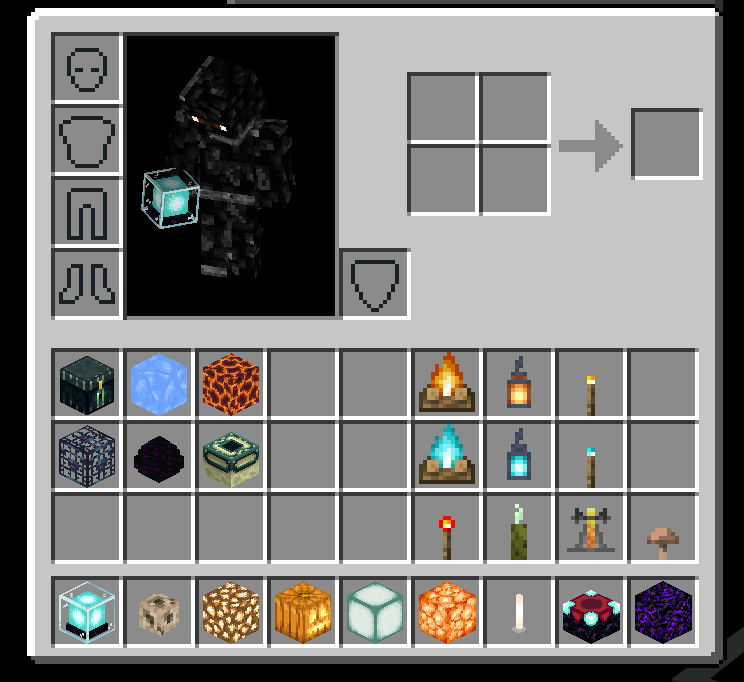
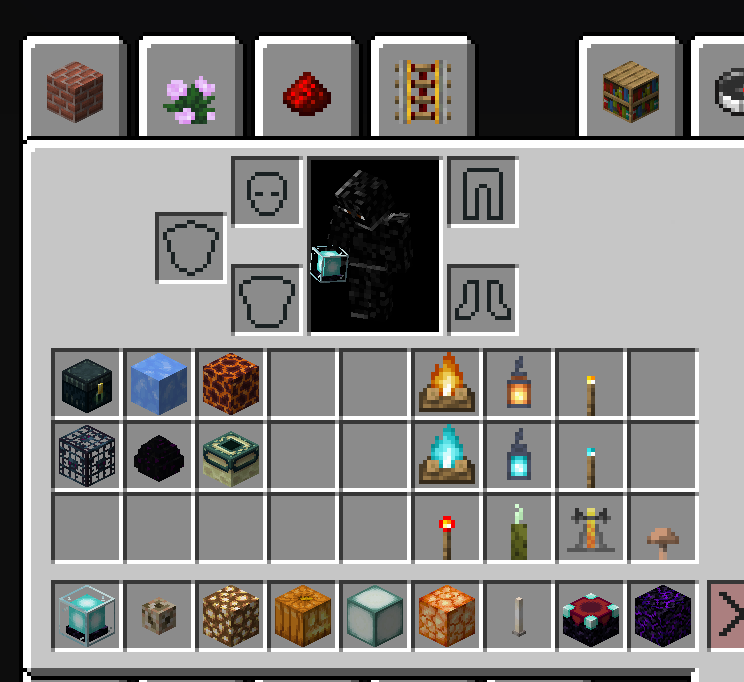
The icons for light-emitting blocks such as beacons, glowstone, jack-o-lanterns, etc. appear too bright in GUIs.
Linked Issues
is duplicated by4
relates to5
 MCPE-31392No ambient occlusion on light-emitting blocks (smooth lighting does not work)ConfirmedMCPE-41229Some blocks are missing their shadingConfirmedMCPE-18224End Rod Item Icon Incorrectly RenderedCannot ReproduceMCPE-24535Banners - Item Models Are Too BrightFixedMCPE-34878Blue ice emits lightWorks As Intended




- Works As Intended
 Numeritos
 AMAN4700
- 23
- 11
- Confirmed
- 59868
- Multiple
- GUI beacon enchanting_table end_rod glowstone item-shading jack_o_lantern redstone_torch sea_lantern torch
0.9.0 Build 1 - 1.16.221 Hotfix
0.9.0 Build 1 1.17.0.54 Beta 1.17.0.52 Beta 1.16.230.56 Beta 1.16.230.54 Beta 1.16.230.52 Beta 1.16.220 1.16.220.52 Beta 1.16.220.50 Beta 1.16.210.60 Beta 1.16.210.50 Beta 1.16.200.57 Beta 1.16.200.55 Beta 1.16.200.52 Beta 1.16.100.54 Beta 1.16.100.50 Beta 1.16.20.54 Beta 1.16.20.50 Beta 1.16.0.68 Beta 1.16.0.67 Beta 1.16.0.66 Beta 1.16.0.60 Beta 1.15.0.51 Beta 1.14.0.2 Beta 1.4.1 (Nintendo Switch) 1.4.4.0 0.16.0 1.0.3 1.0.4.0 1.0.4.1 1.0.5.54 1.1.0.0 1.2.3.6 1.2.6.2 1.2.14.3 1.2.13.60 1.2.16.3 1.5.0.0 1.4.3.0 1.6.0.1 1.4.2.0 1.6.0.5 1.5.0.14 1.8.0 1.9.0 1.10.0 1.11.0 1.11.4 1.12.0 1.13.0 1.14.0 1.14.60 Hotfix 1.16.0 1.16.1 1.16.40 Hotfix 1.16.100 1.16.201 Hotfix 1.16.210 1.16.221 Hotfix
Created Issue:
Jack O' Lanterns and Glowstone are too bright
In the Creative Inventory, These two are to bright

is duplicated by

![[Bot] Arisa](../../../data/assets/gravatar/mustek2.png)
Jack O' Lanterns and Glowstone are too brightLight-emitting blocks appear too bright in creative menu
Light-emitting blocks appear too bright increative menuLight-emitting blocks appear too bright in inventory
In the Creative Inventory, These two are to brightThe icons for light-emitting blocks such as beacons, glowstone, jack-o-lanterns, etc. appear bright in the inventory.
The icons for light-emitting blocks such as beacons, glowstone, jack-o-lanterns, etc. appear bright in the inventory and creative menu.
The icons for light-emitting blocks such as beacons, glowstone, jack-o-lanterns, etc. appear bright in
the inventory and creative menu.The icons for light-emitting blocks such as beacons, glowstone, jack-o-lanterns, etc. appear too bright in GUIs.
![[MCPE Mod] Dr.Awesome4333](../../../data/assets/gravatar/drawesome4333.png)
![[Mojang] Adrian Östergård](../../../data/assets/gravatar/nighter.jpeg)
is duplicated by
![[Mojang] Mega_Spud (Jay Wells)](../../../data/avatars/users/92696.png)
relates to
is duplicated by
relates to
![[MCPE Helper] Aspergerian](../../../data/avatars/users/64928.png)
![[Mod] tryashtar](../../../data/avatars/users/41963.png)
relates to
relates to

![[Mod] OcelotOnesie](../../../data/avatars/users/43220.png)

![[Mod] GoldenHelmet](../../../data/avatars/users/18951.svg)
is duplicated by
![[Bot] Arisa](../../../data/avatars/users/43007.png)
![[Mod] Jarl-Penguin](../../../data/avatars/users/92849.png)
is duplicated by
relates to
Resolving as a duplicate of MCPE-7311.
Magma block is much brighter in hand than when placed in the world.
Edit: that may be related to MCPE-7311.
Thank you for your report!
We're actually already tracking this issue at MCPE-7311, so I will resolve and link this ticket as a duplicate.
If you would like to add a vote and any extra information to the main ticket it would be appreciated.
If you haven't already, you might like to make use of the search feature to see if the issue has already been mentioned.
Quick Links:
📓 Bug Tracker Guidelines – 💬 Community Support – 📧 Mojang Support
📓 Project Summary – ✍️ Feedback and Suggestions – 📖 Game Wiki
Thank you for your report!
We're tracking this issue in MCPE-7311 and MCPE-41229, so this ticket is being resolved and linked as a duplicate.
MCPE-7311 has already been resolved as working as intended, which means this is not considered a bug and won't be fixed. Please do not leave a comment on that ticket.
If you would like to add a vote and any extra information to MCPE-41229 it would be appreciated.
If you haven't already, you might like to make use of the search feature to see if the issue has already been mentioned.
Quick Links:
📓 Bug Tracker Guidelines – 💬 Community Support – 📧 Mojang Support (Technical Issues) – 📧 Microsoft Support (Account Issues)
📓 Project Summary – ✍️ Feedback and Suggestions – 📖 Game Wiki
MCPE-7311 is completely incorrect, MCPE-41229 is incomplete, and all versions except Bedrock Edition, such as Java Edition and some that have stopped updating. A glowing block placed on the ground, which has ambient light, as do all glowing block items. Bedrock Edition is a special case in that it does not deal with glowing blocks. This is a related issue like MCPE-31392, the light block also has lighting treatment in the latest version of Java, this can be cheap, it includes the trial update block, think about it a little, the light produced by the block is lower than the ambient light, the correct thing to do is to let it have light treatment, The report also brings up some irregular blocks, it has lighting, but the left and right are reversed
We're closing all issues only related to 0.6, 0.7 or snapshots of any version.
If you think that this issues applies to MCPE 0.9.5 or later, please comment here!
Does this still affect 1.0.3
Confirmed to affect 1.0.3 & 1.0.4.0.
Can confirm as well.
Not just in the inventory but also in the world itself – see MCPE-31392. Might as well keep these two separate though.
This bug is four years old, how hasn't it been fixed?
Affects 1.16.0.67, also I would like to request ownership to mantain this report updated
Added images from MCBE 1.16.100 & MCJE 20w48a.
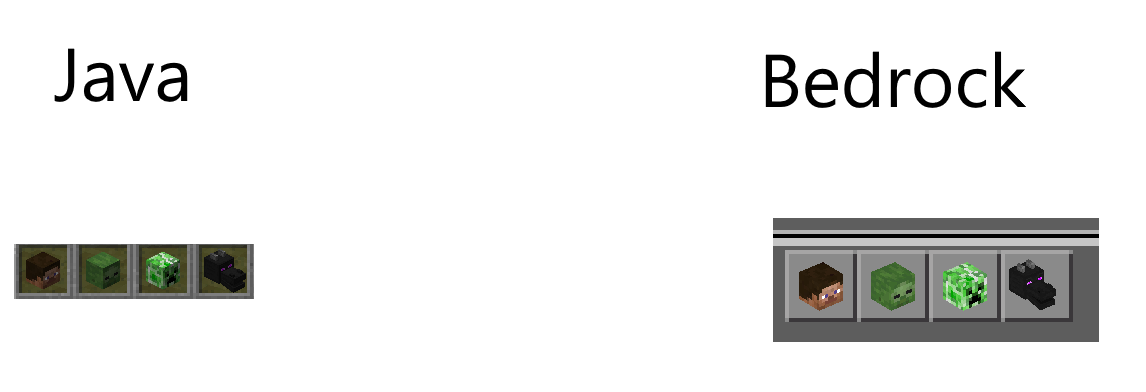
that bug affects Mob Heads / Skulls as well
affects the latest beta ( 1.17.0.54 )
Thank you for your report!
However, this issue has been closed as Working as Intended.
If you need help or have a suggestion you might like to follow a link below.
Quick Links:
📓 Issue Guidelines – 💬 Mojang Support – 📧 Suggestions – 📖 Minecraft Wiki
This is not working as expected and should be reopened.
Every face of any block should be like
in the UI
It doesn't matter if you don't do that with a block that emits level 15 light, why do you want a block that only emits a faint light, light is not so strong make it have no dark side?
Java Edition takes this into account by making the glowing blocks in the UI not glow, so that they have a dark side. It also makes the glowing blocks placed on the ground have a dark side.
This keeps the game screen uniform.
Put it on the ground
Even if you make a glowing block with more than level 10 light have no dark side, and a glowing block with less than level 10 light has a dark side, it will still be ugly.
For example, beacon emits light is level 15. But there were still shadows under its feet, creating a strange picture of itself fully lit, and shadows near it.
You must press Java Edition so that all blocks have shadows, and the glowing blocks do not glow in the UI
If you place a particularly bright block on the ground, and you make it have no dark side, it will cause itself to glow very strongly, but the block next to it will still have a shadow
A block that doesn't have that much light (light level 7), you see how it looks in the UI
. It doesn't look like it's on the ground, it looks like there's a level 15 light
In the UI, glowing blocks have no dark side, and non-glowing blocks have dark sides. Such a treatment is wrong
In the UI, glowing blocks do not emit light, and all blocks have a dark side. This is the right thing to do
When placed on the ground, no matter how bright the glowing block is, it must have a dark side (the side facing away from the sun is a little darker) so that it can be unified with the picture