 Kevin Reid
- kpreid
- kpreid
- America/Los_Angeles
- Yes
- No
 MC-665
![[Mojang] Grum (Erik Broes)](../../../data/assets/gravatar/grum.png)
 MCL-98
![[Mojang] Matthew Gatland](../../../data/avatars/users/43046.png)
 Normal
![[Mod] markderickson](../../../data/avatars/users/18946.svg)


Right-clicking on a stack of items generally splits it in half;
this is not true forthe input slot of a Brewing Stand.Right-clicking on a stack of items generally splits it in half; but on the input slot of a Brewing Stand, it picks up the entire stack.
Right-clicking on a stack of items generally splits it in half; but on the input slot of a Brewing Stand, it picks up the entire stack.
Also, if I have some of an item in the stand and some in my inventory, shift-clicking the stack in my inventory does not add it to the stack in the stand, which seems like it could be related (and is unlike the behavior in e.g. a furnace's fuel slot).
Bows can be used to attack through thin surfaces such as doors and fences sometimes. Steps to reproduce:
- Attract a zombie or spider to a closed door. (These mobs will press right up against the door rather than just standing on the adjacent block.)
- Fire a charged arrow at the door. (Back out of right-click range or turn aside at first so that you don't open the door instead.)
- The monster will be hit.
Bows can be used to attack through thin surfaces such as doors and fences sometimes. Steps to reproduce:
- Attract a zombie or spider to a closed door. (These mobs will press right up against the door rather than just standing on the adjacent block.)
- Fire a charged arrow at the door. (Back out of right-click range or turn aside at first so that you don't open the door instead.)
- The arrow may hit the mob. (It can depend on how the exact distance and power; it is more reliable with doors than fences.)
I would expect the arrow to always hit the door, as melee attacks do.
Bows can be used to attack through thin surfaces such as doors and fences sometimes. Steps to reproduce:
- Attract a zombie
orspider to a closed door. (These mobs will press right up against the door rather than just standing on the adjacent block.)- Fire a charged arrow at the door. (Back out of right-click range or turn aside at first so that you don't open the door instead.)
- The arrow may hit the mob. (It can depend on how the exact distance and power; it is more reliable with doors than fences.)
I would expect the arrow to always hit the door, as melee attacks do.
Bows can be used to attack through thin surfaces such as doors and fences sometimes. Steps to reproduce:
- Attract a zombie, spider, or angry zombie pigman to a closed door. (These mobs will press right up against the door rather than just standing on the adjacent block.)
- Fire a charged arrow at the door. (Back out of right-click range or turn aside at first so that you don't open the door instead.)
- The arrow may hit the mob. (It can depend on how the exact distance and power; it is more reliable with doors than fences.)
I would expect the arrow to always hit the door, as melee attacks do.
Steps to reproduce:
- Start a single-player creative world.
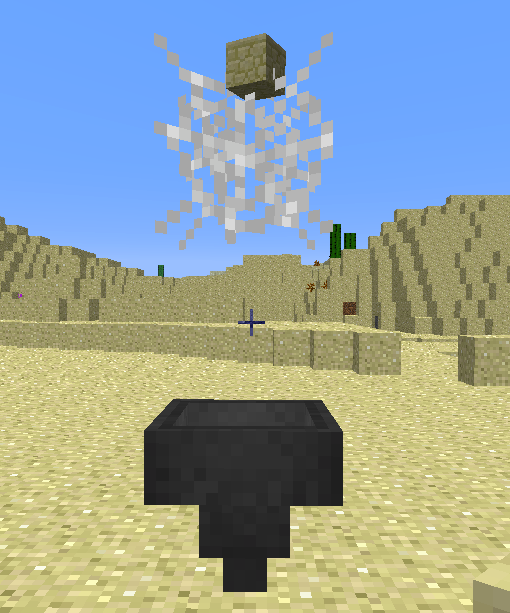
- Place a cobweb above a funnel with 1 block gap.
- Drop an item into the cobweb.
- The item will vanish into the funnel's inventory without ever falling out of the cobweb.
This appears to be a case of the hopper claiming any item in the space 1 block above itself, rather than waiting for the item to actually touch the hopper.
Items dropping in at normal falling rates seem to drop in reasonably — I suspect that in that case, the problem is masked either by a time delay or by server/client desync (which seems to be a problem for items lately; I keep seeing them jumping around, ever since the update which changed items-popping-out-of-blocks behavior).
As commenter
The input/ingredient/reagent slot of a Brewing Stand behaves unlike all other slots, in the following two ways. It has done so since the introduction of Brewing Stands, as far as I have noticed:
- Right-clicking on a stack of items generally splits it in half; but on the input slot of a Brewing Stand, it picks up the entire stack instead.
- If I have some of an item in the stand and some in my inventory, shift-clicking the stack in my inventory does not add it to the stack in the stand.
Neither of these behaviors occur
swith other specialized input slots, such as a furnace's fuel slot.
Let me start out by saying that I understand the intention that tripwire must be entirely floating or entirely grounded. I'm not calling that a bug. However, I believe a specific aspect of the implementation is unduly inconsistent. This has been mentioned before in discussion of
MC-13077(dupe) andMC-570(WAI), but not clearly explicated as different from the obvious intended behavior.I am seeing inconsistent behavior when there is a block under a Tripwire Hook, but not the tripwire itself. Specifically:
- If there is a block underneath a tripwire hook facing north or east (south or west end of a tripwire line), then the hook will be inactive, just like if the tripwire line itself is partially on the ground and partially suspended. That's fine.
- However, if there is a block underneath a tripwire hook facing south or west (north or east end of a tripwire line), then
*the tripwire will function normally, and in addition the tripwire and hooks will **spontaneously toggle between the “connected” and “disconnected” states, with accompanying sound effects.*For consistency, a block underneath a south or west tripwire hook should also prevent the tripwire line from functioning.
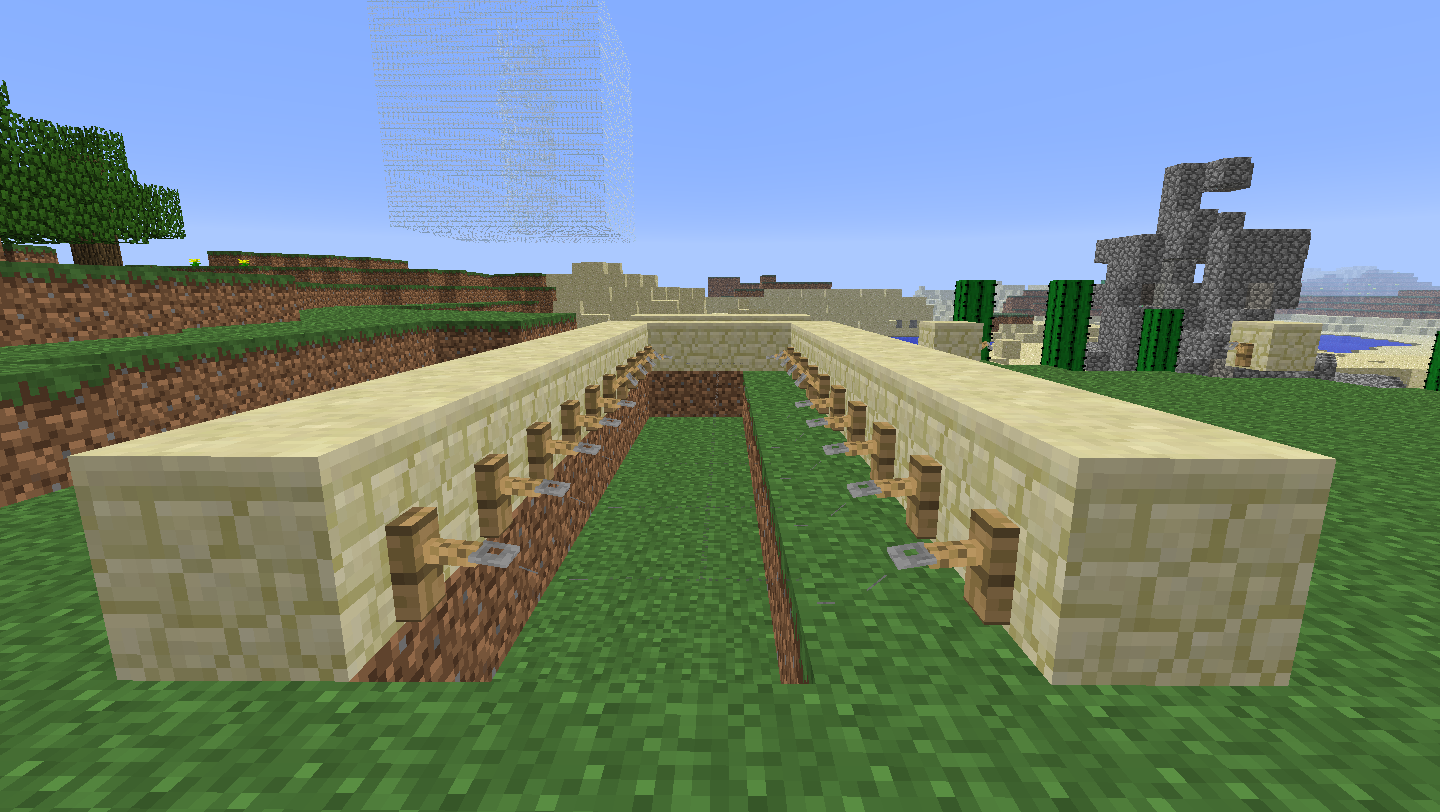
The attached image shows a test rig. The displayed tripwires will spontaneously connect/disconnect a few times a minute — see how some of the hooks are in the disconnected state.
Let me start out by saying that I understand the intention that tripwire must be entirely floating or entirely grounded. I'm not calling that a bug. However, I believe a specific aspect of the implementation is unduly inconsistent. This has been mentioned before in discussion of
MC-13077(dupe) andMC-570(WAI), but not clearly explicated as different from the obvious intended behavior.I am seeing inconsistent behavior when there is a block under a Tripwire Hook, but not the tripwire itself. Specifically:
- If there is a block underneath a tripwire hook facing north or east (south or west end of a tripwire line), then the hook will be inactive, just like if the tripwire line itself is partially on the ground and partially suspended. That's fine.
- However, if there is a block underneath a tripwire hook facing south or west (north or east end of a tripwire line), then the tripwire will function normally, and in addition the tripwire and hooks will spontaneously toggle between the “connected” and “disconnected” states, with accompanying sound effects.
For consistency, a block underneath a south or west tripwire hook should also prevent the tripwire line from functioning.
The attached image shows a test rig. The displayed tripwires will spontaneously connect/disconnect a few times a minute — see how some of the hooks are in the disconnected state.
Let me start out by saying that I understand the intention that tripwire must be entirely floating or entirely grounded. I'm not calling that a bug. However, I believe a specific aspect of the implementation is unduly inconsistent. This has been mentioned before in discussion of
MC-13077(dupe) andMC-570(WAI), but not clearly explicated as different from the obvious intended behavior.I am seeing inconsistent behavior when there is a block under a Tripwire Hook, but not the tripwire itself. Specifically:
- If there is a block underneath a tripwire hook facing north or east (south or west end of a tripwire line), then the hook will be inactive, just like if the tripwire line itself is partially on the ground and partially suspended. That's fine.
- However, if there is a block underneath a tripwire hook facing south or west (north or east end of a tripwire line), then the tripwire will function normally, and in addition the tripwire and hooks will spontaneously toggle between the “connected” and “disconnected” states, with accompanying sound effects.
For consistency, a block underneath a south or west tripwire hook should also preventthetripwire line from functioning.
The attached image shows a test rig. The displayed tripwires will spontaneously connect/disconnect a few times a minute — see how some of the hooks are in the disconnected state.Let me start out by saying that I understand the intention that tripwire must be entirely floating or entirely grounded. I'm not calling that a bug. However, I believe a specific aspect of the implementation is unduly inconsistent. This has been mentioned before in discussion of
MC-13077(dupe) andMC-570(WAI), but not clearly explicated as different from the obvious intended behavior.I am seeing inconsistent behavior when there is a block under a Tripwire Hook, but not the tripwire itself. Specifically, if the tripwire itself is floating:
- If there is a block underneath a tripwire hook facing north or east (south or west end of a tripwire line), then the hook will be inactive, just like if the tripwire line itself is partially on the ground and partially suspended. That's fine.
- However, if there is a block underneath a tripwire hook facing south or west (north or east end of a tripwire line), then the tripwire will function normally, and in addition the tripwire and hooks will spontaneously toggle between the “connected” and “disconnected” states, with accompanying sound effects.
The above also holds in reverse: a grounded tripwire works even if the south or west-facing hook has no block under it.
For consistency, a block underneath a south or west-facing tripwire hook should also prevent the tripwire line from functioning.
The attached image shows a test rig. The displayed tripwires will spontaneously connect/disconnect a few times a minute — see how some of the hooks are in the disconnected state.
Restriction onfloatingtripwire behaves inconsistently.Floating/grounded restriction on tripwire behaves inconsistently.
Display configuration: Mac, single display, 1440 × 900, dock visible on bottom. Steps to reproduce:
- In the launcher profile settings, specify a resolution
slightlyvertically larger than the maximumpermittedwindow size.- Launch Minecraft.
- Observe that the GUI may be cut off slightly at the top.
- Take a screenshot in-game.
- Observe that the
re is a black bar at the top of the screenshot.This is useless and otherwise impossible behavior — the resolution setting is otherwise equivalent to resizing the window, but resizing the window will not create this clipped-at-the-top behavior. I think it would make sense for Minecraft to, after setting its window size, check what window size has been actually achieved and adjust its notion of resolution to fit that.
My goal is to have Minecraft in a maximum-size window. It is not trivial to work around this problem simply by specifying the “correct” size, because on
MacOSXthe maximum vertical window size varies depending on the scale of the Dock, which (for a full Dock) varies depending on the number of items in it.I note incidentally that any one of the following changes would solve my particular problem, but I believe that what I have described above is most relevant because it is the most bug-like rather than additional-feature-like.
- Fix this bug: adjust rendering to match the actual window size.
- Add a launcher option to maximize the window on launch, rather than taking a specific numeric size.
Fix fullscreen so that Cmd-Tab application switching works (I imagine this would need major changes in LWJGL, so I assume it's not an option.)Display configuration: Mac, single display, 1440 × 900, dock visible on bottom. Steps to reproduce:
- In the launcher profile settings, specify a resolution vertically larger than the maximum window size that fits on the screen.
- Launch Minecraft.
- Observe that the window fits on the screen, but the content (both GUI and 3D viewport) is sized according to the launcher settings and therefore cut off at the top.
This is useless and otherwise impossible behavior — the resolution setting is otherwise equivalent to resizing the window, but resizing the window will not create this clipped-at-the-top behavior. I think it would make sense for Minecraft to, after setting its window size, check what window size has been actually achieved and adjust its notion of resolution to fit that.
My goal is (rather, was at the time I reported this bug) to have Minecraft in a maximum-size window. It is not trivial to work around this problem simply by specifying the “correct” size, because on macOS the maximum vertical window size varies depending on the scale of the Dock, which (for a full Dock) varies depending on the number of items in it.
I note incidentally that any one of the following changes would solve my particular problem, but I believe that what I have described above is most relevant thing to report because it is the most bug-like rather than additional-feature-like.
- Fix this bug: adjust rendering to match the actual window size.
- Add a launcher option to maximize the window on launch, rather than taking a specific numeric size.
- Have the game's fullscreen option use modern macOS fullscreen mode (as can be done using the green window button but has to be clicked every time you start the game) rather than the old style one which also interferes with switching to other applications.
Stand in one-block-highwater, look down, and right-click with a lily pad. The lily pad will be placed intersecting the player, which is not possible with normal solid blocks.Be on the surface of water, look down, and right-click with a lily pad. The lily pad will be placed intersecting the player, which is not possible with normal solid blocks.
It is easiest to test this by standing in one-block-high water, but it works no matter the depth. Both Survival and Creative mode.
Also, if you stand on the edge of water (half on a solid block, half on water) and place a lily pad, then move out towards the lily pad, you will get the jumpy "stuck in midair" effect. Presumably this is due to client/server disagreement on whether you're on top of or falling through the lily pad.
![[Mod] Michael Wobst](../../../data/avatars/users/37868.png)
Thank you for your feedback, Kevin Reid. As the reporter of this bug, you can update the description and affected version(s) yourself, so please try updating this ticket from time to time.
I've been experiencing this bug for a long time, and I just had it happen in 1.4.2 when I entered my base via Nether portal. (In case it turns out to matter, my wolves are on floors which have empty space below them, i.e. 1 block high.)
Confirmed. I also notice that in creative mode the sound seems to be played twice (with a random delay just enough to hear sometimes).
Hi, this is not a duplicate. Unlike the linked bug, I can split other stacks normally, and this bug has been present since brewing stands were introduced.
Torabi, yep — chests used to be rendered as normal blocks. This changed in β1.8 (Adventure Update) which gave them an opening-lid animation and made them slightly smaller than full blocks.
I confirm in 1.4.4 prerelease. (Not the original reporter so I can't set the version.)
I also find this to be annoying. I vaguely recall that there was an older version in which you couldn't feed animals extra wheat, but not exactly which version.
This is specific to arrows. Clarifying the description a bit. (There is a case where you can melee-hit mobs through diagonal corners, which is not what I'm reporting here.)
Since my report
MC-667was closed as a duplicate of this, I am repeating it here since it is not about blocks placed on blocks, and so might not be actually the same bug:Stand in one-block-high water, look down, and right-click with a lily pad. The lily pad will be placed intersecting the player.
I had it recently in 1.4.4. Haven't noticed it in 1.4.5 but I haven't played enough to say.
Well. I confirm that in a new test world in 1.4.5, vines grew over glass blocks from above. Guess there must have been something else that removed that vine, and I just assumed this was the problem from that I couldn't place new vines. Sorry for the trouble!
Testing in 13w01b, cacti with blocks next to where they grow break off just like they used to (that is, this bug is fixed). I also note that cactus breaking whether "automatic" or by player-placed blocks now causes particles and sound effect whereas it used to be silent.
@Kumasasa: How is that a bug, as opposed to how cacti have always worked (with more effects, but the same block behavior)? Note the original bug was about cacti actually surviving next to blocks.
This may not be a bug per se, but it is moderately inconsistent behavior — for example, I built a system like this but without intending to sort, merely three stacked chests — and the top and bottom chests got 50% split whereas the middle chest got nothing.
I think it would be worth improving the behavior so that it is less obviously "the effects of the precedence of a set of imperative rules".
For example, what if, when a hopper grabs an item from a hopper above, it doesn't grab the item if it is possible for the hopper above to place an item? Thus hoppers below hoppers never starve the hoppers above, and this sorting system would work as intended.
This is especially annoying as it is quite visible on any hopper placed at eye level.
That is quite plausible, but the range doesn't need to be this big. Here's a couple other rules which could get the desired results without this quirk, and I am guessing would not be especially difficult to implement:
Sure. I could retitle this bug “Tile entities should be capable of displaying the breaking animation”, but I think it's better to describe the end result, not the implementation.
I've noticed this myself. To clarify: this occurs when you are in range of a Monster Spawner and then go out of range, so that the flames and spinning should stop.
This isn't a bug. In 13w03a, texture packs have been moved to the Options menu, and you can switch them in-game!
I confirm this bug is still present in 13w04a. It looks like a desync problem, where the server thinks the boat is floating up but the client doesn't and no updates occur.
Confirmed for 13w04a. It appears that the interior of the hopper is drawn using the light level from the block to the east (+x) — if I box in a hopper and put an upper-slab above it (to block the ambient light but let me see) and a torch to the east, the interior of the hopper appears brightly lit.
Now I can't reproduce it either, having restarted. Sorry for the noise!
(Confirming for 13w04a.)
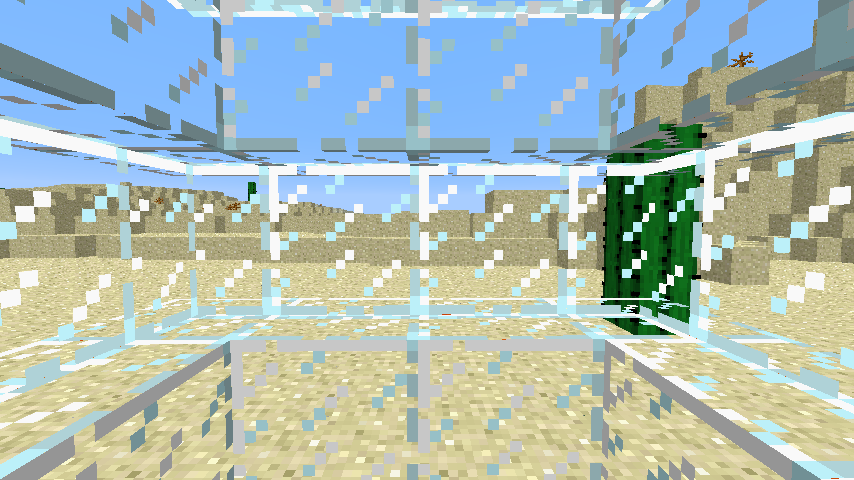
It looks to me like the bug isn't related to darkness (block/sky lighting) but rather that the mild directional lighting which is applied to all normal blocks, making different faces different shades even if they're all equally sunlit, is not applied to glass panes — in the screenshot I'm attaching, see how the sides of the glass blocks are three different slightly-darker-than-white shades and the glass panes are not.
Could not reproduce in 13w04a creative or survival — as soon as I've placed a beacon, I can right-click it and get the GUI regardless of whether the beam is active or a pyramid is underneath.
Not sure this counts as a bug (after all, you're not throwing fireballs, it's limited to your usual reach, so it's not like it should obviously make the ghast/dispenser fireball noise), but if it is — perhaps the sound could be the old 'fwump' sound the Flint and Steel used to make.
This bug also occurs when a torch is placed immediately above or below the block.
Got to disagree with you there. Build a pillar, place a TNT or dispenser against the side, and place a redstone torch on the pillar directly above. In 1.4.7, this will activate the TNT or dispenser; in 13w04a it will not (— if I correctly recall my previous testing).
I think Nils Drescher's idea is good. It makes things work like they look they should.
I agree that the behavior in the above video is similar to what I experienced when I made this report.
Well, it's likely that they both are the same type of problem: pixels being rendered with a wrongly transparent texture due to the polygon being at the edge of a texture-atlas tile. The hopper glitch is just extremely visible due to the alignment of the hopper edge and the player's viewpoint.
But, if you ask me, we should leave it to the developers to figure out whether these are the same bug, and stick to reporting the distinct visible problems, and this is a distinct apparent problem: it is a much larger gap than the gap between blocks (the 'dots' are the outward sign of a smaller-than-one-pixel gap, in a sense), and so may well have its own separate cause.
So, I just installed 13w11a and reopened my test build and I was able to look down and hit the cart. I tried exiting and reopening the world, and I could still hit the cart. Then there was spontaneously some kind of wobble of my viewpoint and I couldn't. Strange.
Confirming that this happens in 1.5.1 as well.
I'm not disagreeing with Dinnerbone. Dinnerbone is saying that tripwires don't function when at a mixed height. I observe that, in all other cases but this one, that non-functioning is specifically shown in-game by putting the hooks in a “disconnected” state (drawn with a raised-up bent hook). This bug report is a case where the disconnected state does not happen, whereas in all other cases it does:
There are two possible interpretations of Dinnerbone's remark: that tripwires are inconsistent/glitchy if mixed and that tripwires would be inconsistent/glitchy if allowed to be mixed. The fact that mixed wires ordinarily show a disconnected state indicates the latter is the appropriate interpretation, and so this case where the hooks do not become consistently disconnected is a bug.
@Kumasasa This is not about closing the launcher. All three of the problems I describe will occur even if it auto-closes.
@Grum Starting multiple Minecrafts is a bug, not a feature: the expected behavior on Mac OS X is that opening the same icon twice brings the app to the front, not opens a second copy. A user who wants multiple copies can simply duplicate the application file to give it a second identity-for-launching-purposes.
Interesting point that you have uses for creating a separate JVM. I have an idea about how it might still be possible to solve this problem — let me get back to you after an experiment.
Just noticed this bug for the first time in 13w16a, so I confirm it occurs there. It occurs whenever I sleep in a bed which is in a room with a two-block-high ceiling (which seems a natural thing for a player to do on their first day when they've made a quick little hole-in-a-hill shelter).
Sorry, I said I'd get back to this but I didn't get around to writing an actual test app. Anyway, a lot of programs that self-update will internally quit and relaunch themselves, and I was thinking you could do something like that here:
Replace the launcher bundle's regular executable (JavaApplicationStub) with a small program (it can be a shell script, even), which I will call the “bootstrap program”, to allow the following behavior.
Thus, it looks to the system like the single Minecraft app quits and relaunches itself, and there will only be one dock icon and everything will work Properly™ and be awesome.
Note — I'm pretty sure this will work (I've played with running GUI processes directly, and Java GUI programs in .app bundles, quite a bit) but I haven't tried this particular scheme. If it turns out that this doesn't work, then I suggest looking at applications with self-updating functionality, as they have to do basically the same thing (minus the switch-to-a-different-code-path part).
Confirmed in 1.5.2 and 13w18c. Found it myself while I was checking on the 1.5.2 fix for arrows sticking in midair.
I suspect this is not a duplicate of
MC-119.MC-119, if I remember correctly (I haven't seen it lately), mobs sometimes/eventually appear to be in solid ground, and if they walk around they do it smoothly, just with an offset from where they should be.Tested in 1.6.2 single-player, found new behavior: the player's view now *does not turn at all* in response to turns of the minecart.
This could be considered reasonable (self-consistent) behavior, but seeing as Mojang didn't say they fixed this bug in 1.6.2, I'm inclined to consider it an additional bug, instead.
Tested in 1.6.2 with chickens. If I throw eggs into a 1-block-deep pool of water, they hatch and swim normally. On the other hand, if there are any areas without water (e.g. due to signs or the end of a water stream), the baby chickens will happily land on those dry blocks, then walk into the water like it isn't there (actually, gliding around strangely quickly) and eventually drown. This is consistent with what I observed in previous versions, but perhaps not exactly matching the description of this bug.
Confirmed in 1.6.2.
Confirmed in 1.6.2. Removed meta-discussion from description.
I'm not big on following ”the Minecraft community”, but I think that the community was kind of expecting this to be fixed back when Mojang announced the Redstone Update — which was specifically described, if I recall correctly (I didn't find any text of the original announcement), as potentially breaking existing redstone machines.
(I've personally had at least two otherwise-straightforward mechanisms broken by this bug, when I tried to use pistons to transfer a signal vertically in a constrained space. Why should up-and-down work differently from sideways?)
OK. I specifically set the resolution to 200 pixels too high and took these two screenshots; one using the Minecraft screenshot function, and one of the window using the OS screenshot function.
Note, by the way, that the crosshair and the view projection are not centered; that is, the camera is positioned for the full specified height rather than what's actually visible. In the GUI this can mean buttons are inaccessible off-screen.
(By the way, I just thought of another way this can be a real problem — if someone who uses a laptop + big monitor and has set the resolution for that, but then launches Minecraft without the external monitor available.)
@Kumasa: Because as I noted in point 3, I can't switch applications while in fullscreen mode.
(I also didn't know it was saved since I hardly ever use it. If the fullscreen state is saved, why not save window size as well? That would mean I wouldn't care about this problem. But that's not a bug per se.)
Interesting! I had myself convinced that it was only a bug with water, because I would have thought that it would be noticed if it was all blocks, and water has the particular behavior of dimming light quicker than empty air or transparent blocks.
I hope that if this is closed as a duplicate then the other bug is updated to list all kinds of blocks that trigger it.
Confirmed described behavior for 1.6.4.
Yes, this is still an issue in the current release, Minecraft 1.7.4. I did not notice the request for update before.
Confirmed in 14w03b.
However, the misbehavior has changed slightly: right-clicking on a stack in the stand will appear to split the stack and pick up half, and allow you to place it in your inventory, but on exiting and returning to the brewing stand GUI you will see the entire stack moved instead. Looks like client/server desync and the server implementing the buggy behavior.
In 1.7.4 (current release), the behavior is as described in the original report.
Stairs placeable intersecting the player confirmed for 14w04b. Note that you must be standing on the lower half of a stair block for this to happen as originally described.
Lily pads placeable intersecting the player confirmed for 14w04b, no special conditions. I stand by my previous claim that
MC-667should be considered a different bug than this, as lily pad placement is unlike regular block placement and the code causing the bug is most likely different.Confirmed in 14w04b: behavior appears to be identical to previous versions.
Confirmed for 14w04b.
Retested, shows the same behavior as in my original report on 14w05b.
Agreeing, 14w18b shows no gap.
Confirmed for 14w21b.
Confirmed for 14w30c
Confirmed for 14w30c.
Still in 14w30c.
Dear mods, do old bugs (as opposed to ones that were, say, introduced in the current snapshot series) really need this frequent of reconfirmation? I think it's much more likely to cause a false closure if the reporter(s) aren't persistent.
The described behavior still occurs in 14w30c.
Confirmed described behavior for 14w30c.
Dear mods, do old bugs (as opposed to ones that were, say, introduced in the current snapshot series) really need this frequent of reconfirmation? I think it's much more likely to cause a false closure if the reporter(s) aren't persistent, and IMO reporters shouldn't be obligated to install snapshot versions.
Confirmed for 14w30c.
Hm, I see the point that there's a lot of noise. I wish you would at least request updates for the most recent release version, not snapshots (unless it was a bug introduced in a snapshot). A reporter shouldn't need to install pre-release versions just to usefully report a long-standing bug.
Confirmed for 1.8.1-pre3. I had a skeleton shoot a zombie and the zombie then did not attack either me or the skeleton.
Confirmed for 1.8.1-pre3. However, the effects have changed slightly.
In 1.8.1-pre3, specifying a too-large size still causes the window contents to be cut off at the top. I don't get a black bar in screenshots.
The screenshots produced are now complete instead of having black bars, but the in-game display is still cut off at the top.
Note that my previous remark that an alternative to getting this right would be “Fix fullscreen so that Cmd-Tab application switching works” is even more relevant today: Mac OS X (er i mean macOS) now has an even better fullscreen system, which actually can be used with Minecraft by clicking the green title bar button, but this is not remembered when the game is quit like the built-in fullscreen option. Ideally the two would be the same — both switch-allowing and remembered across restarts.
(I no longer play Minecraft much at all these days so someone else will have to check.)