 Muhammet Kurt
- PluginerTR
- pluginertr
- Europe/Stockholm
- Yes
- No
 MC-123864
 Normal
![[Mojang] Bartosz Bok](../../../data/avatars/users/10122.svg)
![[Mojang] Nathan Adams](../../../data/assets/gravatar/dinnerbone.png)
 MCPE-35764





Minecraft crash on clicking the recipe book tabs
Crash the Minecraft on clicking the
blocks/tabs of the recipe book:16:59:59 bnv Reported exception thrown! f: Rendering screen at cao.a(SourceFile:1023) at bnv.b(SourceFile:822) at bnv.a(SourceFile:382) at net.minecraft.client.main.Main.main(SourceFile:140) Caused by: java.lang.ArithmeticException: / by zero at btn$a.c(SourceFile:112) at btn.a(SourceFile:72) at btp.a(SourceFile:298) at bso.a(SourceFile:81) at cao.a(SourceFile:997) ... 3 more
Minecraft crash on clicking the recipe book tabs too many times
Crash the Minecraft on clicking the tabs of the recipe book too many times:
16:59:59	bnv	Reported exception thrown!
f: Rendering screen
	at cao.a(SourceFile:1023)
	at bnv.b(SourceFile:822)
	at bnv.a(SourceFile:382)
	at net.minecraft.client.main.Main.main(SourceFile:140)
Caused by: java.lang.ArithmeticException: / by zero
	at btn$a.c(SourceFile:112)
	at btn.a(SourceFile:72)
	at btp.a(SourceFile:298)
	at bso.a(SourceFile:81)
	at cao.a(SourceFile:997)
	... 3 more
This is same error
ashttps://bugs.mojang.com/browse/MC-73207 , but occasionally.This is same error of https://bugs.mojang.com/browse/MC-73207 , but occasionally.
This is same error of https://bugs.mojang.com/browse/MC-73207 , but occasionally.
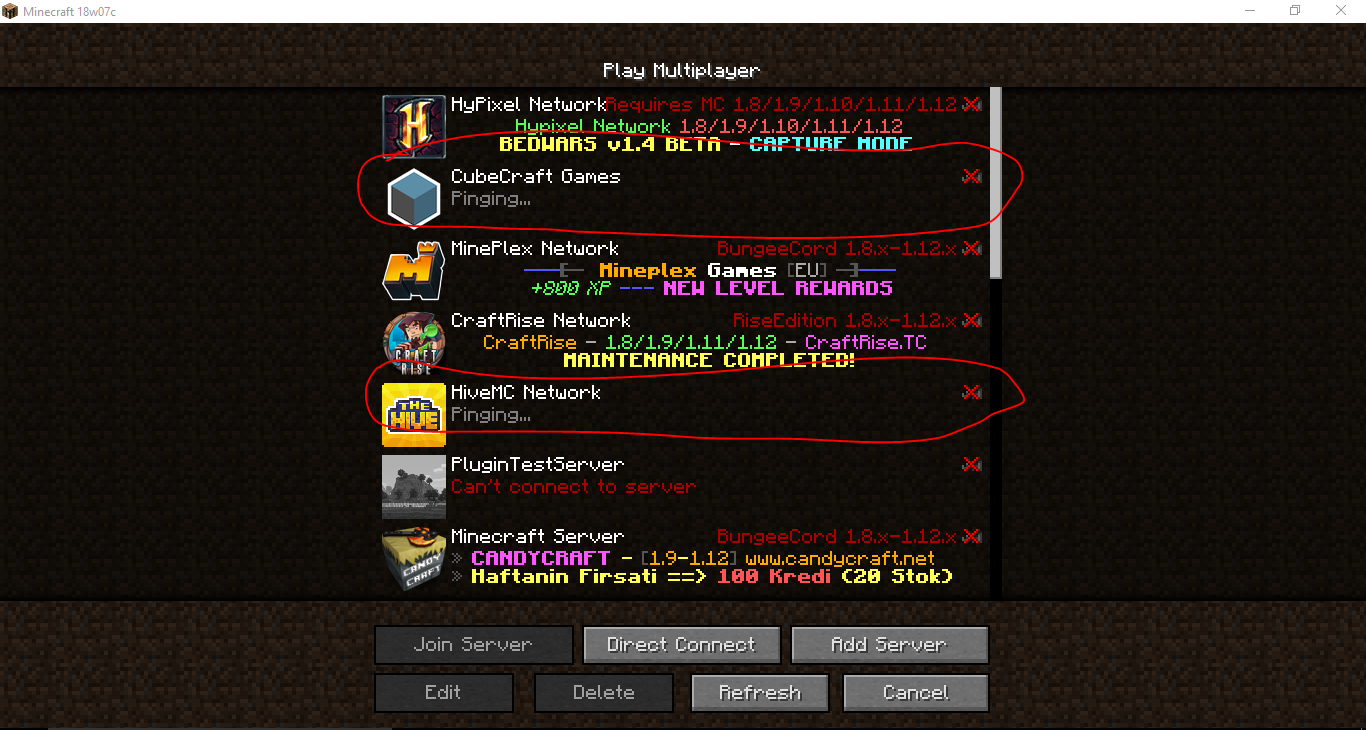
In snapshot 18w02a this is fixed but the a few servers dislay 'Pinging' and 'Can't connect to server' for occasionally.
This is same error of https://bugs.mojang.com/browse/MC-73207 , but occasionally.
In snapshot 18w02a this is fixed butthea few servers dislay 'Pinging' and 'Can't connect to server' for occasionally.
A few Minecraft servers dislays can't connect to server
This is same error of https://bugs.mojang.com/browse/MC-73207 , but occasionally.
In snapshot 18w02a this is fixed but a few servers dislay 'Pinging' and 'Can't connect to server' for occasionally. (Is not fixed %100))
This is same error of https://bugs.mojang.com/browse/MC-73207 , but occasionally.
In snapshot 18w02a this is fixed but a few servers dislay 'Pinging' and 'Can't connect to server' for occasionally. (Is not fixed %100))
This is same error of https://bugs.mojang.com/browse/MC-73207 , but occasionally.
In snapshot 18w02a this is fixed but a few servers dislay 'Pinging' and 'Can't connect to server' for occasionally.(Is not fixed %100)This is same error of https://bugs.mojang.com/browse/MC-73207 , but occasionally.
In snapshot 18w02a this is fixed but a few servers dislay 'Pinging' and 'Can't connect to server' for occasionally.
So in snapshot 18w02a is not fixed %100
A few Minecraft servers dislays can't connect to server on startup
This is same error of https://bugs.mojang.com/browse/MC-73207 , but occasionally.
In snapshot 18w02a this is fixed but a few servers dislay 'Pinging' and 'Can't connect to server' for occasionally.
So in snapshot 18w02a is not fixed %100
This is same error ofhttps://bugs.mojang.com/browse/MC-73207 , but occasionally.
In snapshot 18w02a this is fixed but a few servers dislay 'Pinging' and 'Can't connect to server' for occasionally.
So in snapshot 18w02a is not fixed %100Cannot reproduce.
This is same error of https://bugs.mojang.com/browse/MC-73207 , but occasionally.
In snapshot 18w02a this is fixed but a few servers dislay 'Pinging' and 'Can't connect to server' for occasionally.
So in snapshot 18w02a is not fixed %100
Cannot reproduce.
This is same error of https://bugs.mojang.com/browse/MC-73207 , but occasionally.
In snapshot 18w02a this is fixed but a few servers dislay 'Pinging' and 'Can't connect to server' for occasionally.
So in snapshot 18w02a is not fixed %100A few Minecraft servers dislays can't connect to server on startup.
This is same error of https://bugs.mojang.com/browse/MC-73207 , but occasionally.
In snapshot 18w02a this is fixed but a few servers dislay 'Pinging' and 'Can't connect to server' for occasionally.
So in snapshot 18w02a is not fixed %100
The bug
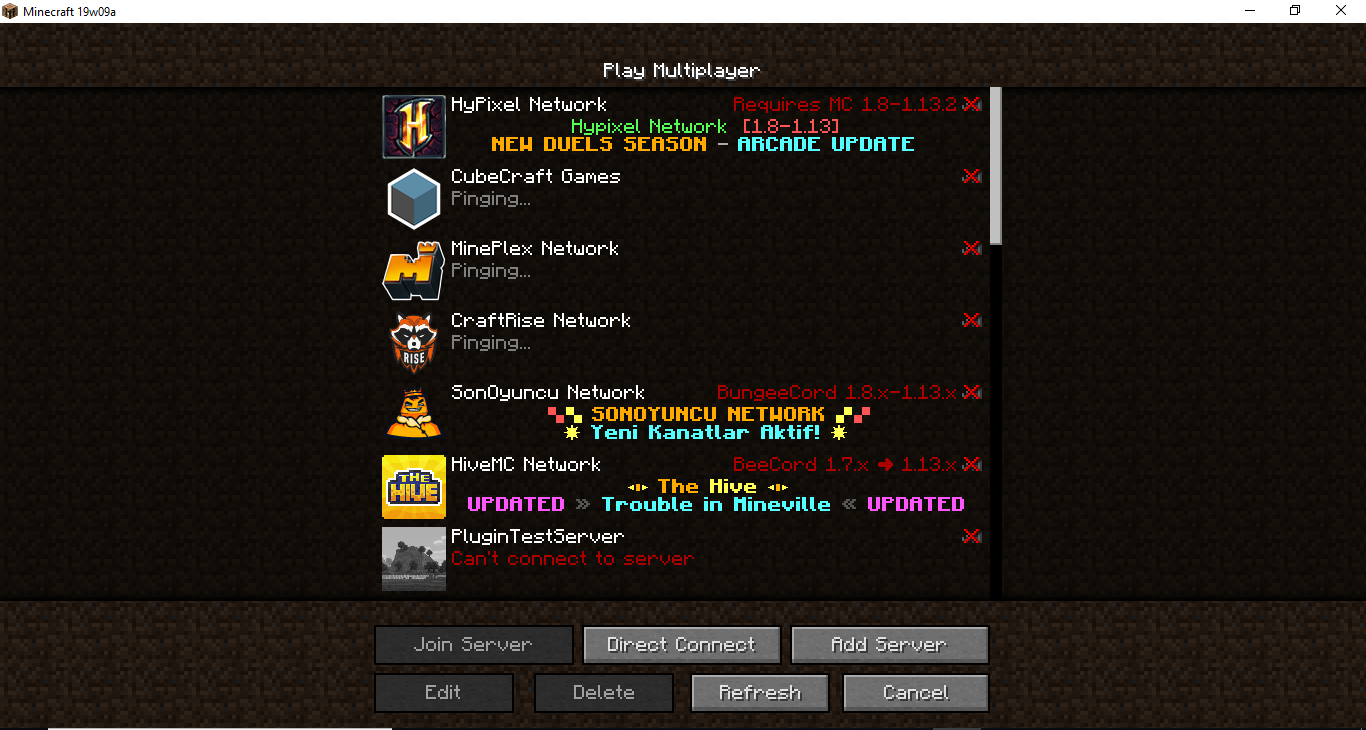
A few Minecraft servers display "Pinging..." followed by "Can't connect to server", occasionally. This appears to happen only when opening the multiplayer/server list for the first time after the minecraft client startup.
The same problem occasionally occurs when the server list is refreshed.
A few Minecraft servers display "Pinging..." followed by "Can't connect to server" on startup or when refresh
A few Minecraft servers display "Pinging..." followed by "Can't connect to server" on startup or when refreshed the multiplayer servers
The bug
A few Minecraft servers display "Pinging..." followed by "Can't connect to server", occasionally. This appears to happen
onlywhen opening the multiplayer/server list for the first time after the minecraft client startup.The same problem occasionally occurs when the server list is refreshed.
Afew Minecraft servers display "Pinging..." followed by "Can't connect to server"on startup or when refreshed themultiplayer serversSometimes a few Minecraft servers display "Pinging..." followed by "Can't connect to server" in multiplayer server list
The /locate command is will lag the Vanilla server and/or is will drop the FPS to 0-1-2 for 2-3+ seconds.
Lags for 2-3 seconds afterusing the /locate command or when generating explorer mapsExtreme lag when using the /locate command or when generating explorer maps
The /locate commandis will lag theVanilla server and/or is will drop the FPS to 0-1-2 for 2-3+ seconds.When using the /locate command or when generating explorer maps will lag the game and the vanilla server as extreme.
FPS will drop to 0-1-2.
When using the /
locate command orwhen generating explorer mapswill lagthe game andthevanilla server as extreme.FPS will drop to 0-1-2.
When using the / Locate command or creating explorer maps, the game and vanilla server are overdue.
FPS will drop to 0-1-2.
When using the /
Locate command or creating explorer maps, the game and vanilla server are overdue.FPS will drop to 0-1-2.
When using the /locate command or creating explorer maps, the game and vanilla server are overdue.
FPS will drop to 0-1-2.
When using the /locate command or creating explorer maps, the game and vanilla server
are overdue.FPS will drop to 0-1-2.
When using the /locate command or creating explorer maps, the game and vanilla server will extreme lag.
FPS will drop to 0-1-2.
When using the /locate command or
creating explorer maps, the game and vanilla server will extreme lag.FPS will drop to 0-1-2.
When using the /locate command or generating explorer maps, the game and vanilla server will extreme lag.
FPS will drop to 0-1-2.
When using the /locate command or generating explorer maps, the game and vanilla server will extreme lag.
FPS will drop to 0-1-2.
We have 3 bugs in /locate command;
1) When using the /locate command or generating explorer maps, the game and vanilla server will extreme lag. FPS will drop to 0-1-2.
2)
We have 3 bugs in /locate command;
1) When using the /locate command or generating explorer maps, the game and vanilla server will extreme lag. FPS will drop to 0-1-2.
2)
We have 3 bugs in /locate command;
1) When using the /locate command or generating explorer maps, the game and vanilla server will extreme lag. FPS will drop to 0-1-2.
2) Typing /locate <locate> command returns
We have 3 bugs in /locate command;
1) When using the /locate command or generating explorer maps, the game and vanilla server will extreme lag. FPS will drop to 0-1-2.
2) Typing /locate <locate> command returns
We have 3 bugs in /locate command;
1) When using the /locate command or generating explorer maps, the game and vanilla server will extreme lag. FPS will drop to 0-1-2.
2) When Typing /locate <locate> command returns "Could not find that structure nearby" error message.
We have 3 bugs in /locate command;
1) When using the /locate command or generating explorer maps, the game and vanilla server will extreme lag. FPS will drop to 0-1-2.
2) When Typing /locate <locate> command returns "Could not find that structure nearby" error message.
3) When using /locate <locate> command the error or success (coordinate) the message will come to us late
We have 3 bugs in /locate command;
1) When using the /locate command or generating explorer maps, the game and vanilla server will extreme lag. FPS will drop to 0-1-2.
2) When Typing /locate <locate> command returns "Could not find that structure nearby" error message.
3) When using /locate <locate> command the error or success (coordinate) the message will come to us late.
Extremelag when using the /locate command or when generating explorer mapsTPS lag when using the /locate command or when generating explorer maps
We have 3 bugs in /locate command;
1) When using the /locate command or generating explorer maps, the game and vanilla server will extreme lag. FPS will drop to 0-1-2.
2) When Typing /locate <locate> command returns "Could not find that structure nearby" error message.
3) When using /locate <locate> command the error or success (coordinate) the message will come to us late.The server will cause lag when we try to locate any of the structures away.
FPS drops to 0 when playing withno-reasonFPS drops to 0 when playing with 32 chunks
FPS drops to 0 when playing with
no-reason.FPS drops to 0 when playing with 32 chunks.
FPS drop
sto 0 whenplaying with 32chunks.The FPS is drop to 0 when loading the chunks.
FPS dropsto 0 whenplaying with 32chunksThe FPS is drop to 0 when loading the chunks.
1) Set the command suggestion option to false from the chat settings
2) Quit game and restart
3) Re-join to world and/or vanille Server.
4) The command suggestion option will be set to true for automatically.
1) Set the command suggestion option to false from the chat settings
2) Quit game and restart
3) Re-join to world and/or vanill
eServer.4) The command suggestion option will be set to true for automatically.
1) Set the command suggestion option to false from the chat settings
2) Quit game and restart
3) Re-join to world and/or vanilla Server.
4) The command suggestion option will be set to true for automatically.
1) Set the command suggestion option to
falsefrom the chat settings2) Quit game and restart
3) Re-join to world and/or vanilla Server.
4) The command suggestion option will be set to
truefor automatically.1) Set the command suggestion option to off from the chat settings
2) Quit game and restart
3) Re-join to world and/or vanilla Server.
4) The command suggestion option will be set to on for automatically.
1.13 Pre-release3: When trying to join pre2 vanilla servers on pre3, the protocol messages is broken.
1.13 Pre-release2: Works as intended, if I try to join pre1 vanilla servers on pre2 I will get this error message:
1.13 Pre-release3: When trying to join pre2 vanilla servers on pre3, the protocol messages is broken.
1.13 Pre-release2: Works as intended, if I try to join pre1 vanilla servers on pre2 I will get this error message:
1.13 Pre-release2: Works as intended, if I try to join pre1 vanilla servers on pre2 I will get this error message: Outdated server! Im stll on {0)
1.13 Pre-release3: The protocol messages is broken when trying to join pre2 (older) vanilla version servers on pre3.
When trying to join pre2 vanillaserversonpre3, the protocol messages is brokenThe protocol messages is broken when trying to join pre2 (older) vanilla version servers on pre3.
The protocol messages is broken when trying to join pre2 (older) vanilla version servers on pre3.
The new "Encrypting..." and "Joining world.." messages isn't translated.
This is the one of the annoying issue since 1.13.
When you start the game and click "Multiplayer", you'll see that the servers are loading a little late.
In early Minecraft versions, like 1.7.2, this issue does not reproduce.
With the release of Minecraft 1.8, we can see the issue
MC-73207that was fixed in 1.13.But for now we have other two new related issues:
this +MC-125762.This is the one of the annoying issue since 1.13.
When you start the game and click "Multiplayer", you'll see that the servers are loading a little late.
In early Minecraft versions, like 1.7.2, this issue does not reproduce.
With the release of Minecraft 1.8, we can see the issue
MC-73207that was fixed in 1.13.But for now we have other two new related issues:
MC-154073+ MC-125762.
Hopefully it will fixed soon.
This is the one of the annoying issue since 1.13.
When you start the game and click "Multiplayer", you'll see that the servers are loading a little late.
In early Minecraft versions, like 1.7.2, this issue does not reproduce.
With the release of Minecraft 1.8, we can see the issue
MC-73207that was fixed in 1.13.But for now we have other two new related issues:
MC-154073+ MC-125762.
Hopefully it will fixed soon.

Muhammet Kurt, yes thanks. There are enough duplicates and even a world download so that the devs should easily track that down.
Muhammet Kurt, MC-126244 is about lag when using locate and was fixed in -pre3, this ticket is about locate not working at all in -pre4
Sorry, didn't see that MC-126244 is 3 issues in one ticket
@Muhammet Kurt : This issue was already resolved as "Invalid". No need to update it! 
This is not a bug, is the feature of Mojang/Microsoft for christmas. Is will return to normal chest after the christmas.
Error of my Minecraft of 'Minecraft game output' : (On pingin the servers)
Minecraft Version: SnapShot: 18w01a
OMG! Finally this is fixed on SnapShot 18w02a.
On start Minecraft and click on the multiplayer, all servers is dislay online (if server is online).
Thanks for fix this bug in 18w02a SnapShot!
Isn't fixed yet. I tested in 18w02a snapshot. :/
I think this error came with Launcher version 2.0.805/6.
This is happening on startup of the game and occasionally.
> Try to add 5-6 server lists on your multiplayer menu and restart your game.
> Click to multiplayer
> if all servers is dislay online (if server is online) try again.
Try it a few times.
Otherwise this error it is from me.
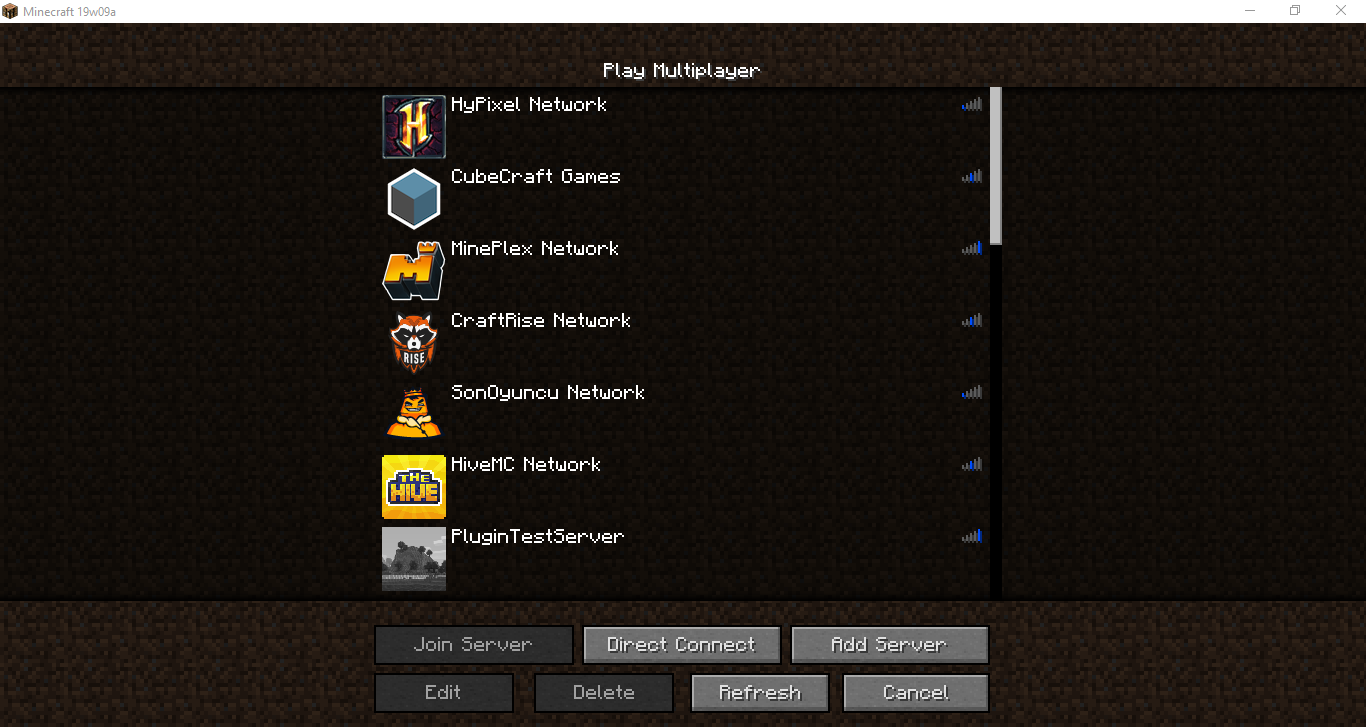
I tested and this issue is fixed in snapshot 18w09a.
The same problem occasionally occurs when refresh the server list.
I tested this in the 18w10d Vanilla server and a few locates is will lag the server for 7-8 seconds.
@Kumasasa The FPS is drop to 0 when loading the chunks.
This is invalid, sorry. Close this issue.
Okay, I guess this issue is duplicate of MC-123584 or
MC-123263.@Kumasasa done.
Duplicate of
MC-130088, I guess.@Kumasasa I was playing regularly and suddenly the game crashed.This problem happened 4 times in today snapshot.
@Kumasasa I created a new world in 18w21a and I started playing in creative. After 1-2 minutes the game is crashed.
But this is already fixed in 18w02a?
@Kumasasa My game isn't crashing in 18w22a snapshot when playing or flying in creative mode, hopefully this is fixed in today snapshot. But I am not sure.
@Marcono1234 can you update the affects version / can you test if this is fixed in 18w22a? Because there are;
in changelog.
This is the duplicate of
MC-130088?I changed the title and the description. Because this problem is happen when refreshed the multiplayer server lists, too.
I can't play Minecraft 1.13 snapshots/pre-releases because the game is very laggy. Hopefully will be fixed before the 1.13 release.
@TwinShards can you update the affects version? But I think this isn't fixed yet.
I listed the 1.13 FPS issues;
In-game FPS issues: MC-123584 -
MC-123263-MC-124170-MC-126518Other FPS issues:
MC-126244Fixes:
MC-125442-MC-130779This is duplicate of
MC-126244because this bug is included in it.This is fixed in 1.13-pre2 version:
MC-129374I confirm. My game is crashed and I attached the crash log.
@Rikard Herlitz, yes my game is now more faster.
1.13-pre1: 10-15 FPS
1.13-pre2: 20-35 FPS
But is need to test this bug if it is fixed.
@McModknower I guess no, this issue it's about the /locate command.
Can confirm. I can't play 1.13 due to this huge lag issue.
Can confirm. The dolphins don't help us find treasures.
@Play Dash Number f800f8 000000, in 1.12.2 this bug is exist but it's relates to
MC-73207and it's fixed in 1.13 snapshots.MC-125258is now reopened, also this issue is now duplicate ofMC-125258.There are new 2 not translatable messages in 1.13-pre3: "Encrypting..." and "Joining world..". Issue
MC-131824Nagy Richárd can you confirm if this is fixed in newer snapshots/pre-releases ?
Can confirm. Coral reefs and sea pickles is hard to find in Java Edition.
@[Mod] Michael Wobst, I checked and this issue cannot reproduce on 1.13-pre3. It's fixed!
Can any mod, test and confirm this bug please? Thanks.
Try to re-install your Launcher.
My results in 1.13-pre4;
1) "Could not find that structure nearby" is not fixed.
2) Vanilla lag is not fixed.
3) FPS drop I think is fixed.
Affects 1.13-pre4, I get this error when tryed to create a new world in 1.13-pre4:
https://hastebin.com/qexohexuke.md
Duplicate of
MC-126244.Maybe this is duplicate of
MC-124170or MC-123584.Can confirm. I can't create a new world in 1.13-pre4.
This is fixed in 1.13-pre5.
@[Mojang] Adrian Östergård, yes but anyway. It is fixed in 1.13-pre6.
Unfortunately, it is not fixed yet.
Hello, ProfMobius (Thomas Guimbretiere)! Today I tryed the /locate command with pre7 and finally we have the better experience!
The /locate command is run better on 1.13-pre7, but the Vanilla lag (when typing /locate <locate> command the Vanilla server will lag) is not fixed yet.
Here's my results on 1.13-pre7:
@Fabian Röling Yes.
Can confirm this is fixed in pre9.
Can confirm.
@[Mojang] Mega_Spud (Jay Wells) okey, but I update the issue with: the block sounds and animations, and eating sounds is NOT working on Massive Featured Servers (Mineplex, LifeBoat, CubeCraft Games and InPvP), yesterday I tested this bug on Xbox One and this bug is found too on Xbox One.
So, this is bug of Minecraft I guess?
When I tried to click "Multiplayer" the server lists they will load very very slow. @[Mojang] Nathan Adams sorry but you need to fix this bug because lots of peoples are playing on multiplayer servers.
19w09a results:
There are no longer FPS drop or "Could not find that structure nearby" error. But when try to locate some structure the vanilla server will cause lag.
The only problem is the TPS lag. I can't get any FPS drop errors now.
Still in 1.14.3 Pre-Release 2.
Still in 1.14.3 Pre-Release 3