/locate command returns offset or incorrect mineshaft locations
The bug
The /locate command sometimes returns wrong or offset coordinates for mineshafts.
Steps to reproduce
- Create a Default world with the following seed
-2310970283287424513
- Switch to Spectator mode to be able to look for mineshafts more easily
- Use the /locate command to find a mineshaft
/locate Mineshaft
→ It should print "Located Mineshaft at -472 (y?) 1032"
- Use the /tp command to get to the returned position
/tp -472 35 1032
- Search for the mineshaft
→ There is no mineshaft nearby
Linked Issues
relates to5
 MC-138887/locate does not always locate the nearest structure
 NormalMC-100170Eye of Ender (and /locate Stronghold) not centered on stronghold portal anymoreWorks As IntendedMC-131462Coordinate math error causes structure not to generate and possibly other issuesFixedMC-108011/locate and custom worldsInvalidMC-109311Woodland mansion failed to generateFixed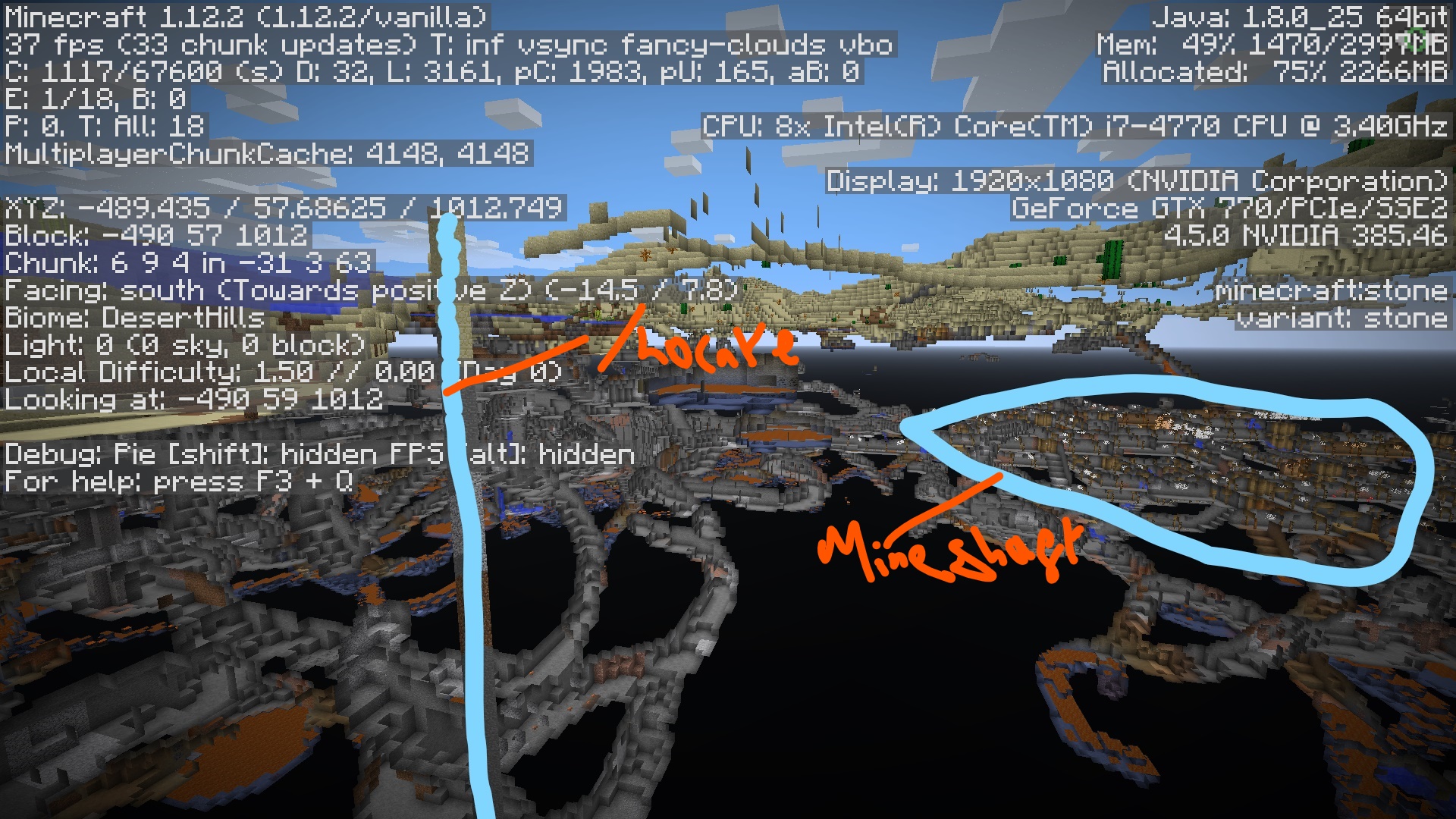


Created Issue:
Locate command gives wrong location
When using the /locate command it sends you to the wrong place.
*What I expected to happen was...:*
It would given me the correct coordinates.*What actually happened was...:*
It gave me wrong coordinates*Steps to Reproduce:* (If looking for Mineshaft)
1. Type in command bar "/locate Mineshaft"
2. It gives you coordinates, now do "/tp [coordinates] when it says y? use 99 (as 99 is usually land or just above land)
3. *WRONG PLACE!* after digging down as it clearly wasn't upwards it lead me to a place with fire and water all over #NoMineshaft*SCREENSHOTS*
1. After digging down from land
2. After moving around in the hole I dug found fire and water. (NOTE: I placed torches because of near 0 light.)Environment
Windows 10 Version 1607 (build 14393.321)
Java 8 update 102
Attachments2
2016-10-16_13.12.35.png

![[Bot] Arisa](../../../data/assets/gravatar/mustek2.png)
![[Mod] Les3awe](../../../data/avatars/users/79847.png)
When using the /locate command it sends you to the wrong place.
*What I expected to happen was...:*
It would given me the correct coordinates.*What actually happened was...:*
It gave me wrong coordinates*Steps to Reproduce:* (If looking for Mineshaft)
1. Type in command bar "/locate Mineshaft"
2. It gives you coordinates, now do "/tp [coordinates] when it says y? use 99 (as 99 is usually land or just above land)
3. *WRONG PLACE!* after digging down as it clearly wasn't upwards it lead me to a place with fire and water all over #NoMineshaft*SCREENSHOTS*
1. After digging down from land
2. After moving around in the hole I dug found fire and water. (NOTE: I placed torches because of near 0 light.)
3. Photos courtesy of [Mod] Les3awe
4. Photos courtesy of [Mod] Les3awe
5. Stronghold?
When using the /locate command it sends you to the wrong place.
*What I expected to happen was...:*
It would given me the correct coordinates.*What actually happened was...:*
It gave me wrong coordinates*Steps to Reproduce:* (If looking for Mineshaft)
1. Type in command bar "/locate Mineshaft"
2. It gives you coordinates, now do "/tp [coordinates] when it says y? use 99 (as 99 is usually land or just above land)
3. *WRONG PLACE!* after digging down as it clearly wasn't upwards it lead me to a place with fire and water all over #NoMineshaft*SCREENSHOTS*
1. After digging down from land
2. After moving around in the hole I dug found fire and water. (NOTE: I placed torches because of near 0 light.)
3.Photos courtesy of[Mod] Les3awe
4. Photos courtesy of [Mod] Les3awe
5.Stronghold?When using the /locate command it sends you to the wrong place.
*What I expected to happen was...:*
It would given me the correct coordinates.*What actually happened was...:*
It gave me wrong coordinates*Steps to Reproduce:* (If looking for Mineshaft)
1. Type in command bar "/locate Mineshaft"
2. It gives you coordinates, now do "/tp [coordinates] when it says y? use 99 (as 99 is usually land or just above land)
3. *WRONG PLACE!* after digging down as it clearly wasn't upwards it lead me to a place with fire and water all over #NoMineshaft*SCREENSHOTS*
1. After digging down from land
2. After moving around in the hole I dug found fire and water. (NOTE: I placed torches because of near 0 light.)
3. Stronghold?
4. Photos courtesy of [Mod] Les3awe
5. Photos courtesy of [Mod] Les3awe
When using the /locate command it sends you to the wrong place.
*What I expected to happen was...:*
It would given me the correct coordinates.*What actually happened was...:*
It gave me wrong coordinates*Steps to Reproduce:* (If looking for Mineshaft)
1. Type in command bar "/locate Mineshaft"
2. It gives you coordinates, now do "/tp [coordinates] when it says y? use 99 (as 99 is usually land or just above land)
3. *WRONG PLACE!* after digging down as it clearly wasn't upwards it lead me to a place with fire and water all over #NoMineshaft*SCREENSHOTS*
1. After digging down from land
2. After moving around in the hole I dug found fire and water. (NOTE: I placed torches because of near 0 light.)
3. Stronghold?
4. Photos courtesy of [Mod] Les3awe
5. Photos courtesy of [Mod] Les3aweWhen using the /locate command it sends you to the wrong place.
*What I expected to happen was...:*
It would given me the correct coordinates.*What actually happened was...:*
It gave me wrong coordinates*Steps to Reproduce:* (If looking for Mineshaft)
1. Type in command bar "/locate Mineshaft"
2. It gives you coordinates, now do "/tp [coordinates] when it says y? use 99 (as 99 is usually land or just above land)
3. *WRONG PLACE!* after digging down as it clearly wasn't upwards it lead me to a place with fire and water all over #NoMineshaft*SCREENSHOTS*
1. After digging down from land
2. After moving around in the hole I dug found fire and water. (NOTE: I placed torches because of near 0 light.)
3. Stronghold?
4. Temple?
5. Photos courtesy of [Mod] Les3awe
6. Photos courtesy of [Mod] Les3awe
When using the /locate command it sends you to the wrong place.
*What I expected to happen was...:*
It would given me the correct coordinates.*What actually happened was...:*
It gave me wrong coordinates*Steps to Reproduce:* (If looking for Mineshaft)
1. Type in command bar "/locate Mineshaft"
2. It gives you coordinates, now do "/tp [coordinates] when it says y? use 99 (as 99 is usually land or just above land)
3. *WRONG PLACE!* after digging down as it clearly wasn't upwards it lead me to a place with fire and water all over #NoMineshaft*SCREENSHOTS*
1. After digging down from land
2. After moving around in the hole I dug found fire and water. (NOTE: I placed torches because of near 0 light.)
3. Stronghold?
4. Temple?
5.Photos courtesy of[Mod] Les3awe
6. Photos courtesy of [Mod] Les3aweWhen using the /locate command it sends you to the wrong place.
*What I expected to happen was...:*
It would given me the correct coordinates.*What actually happened was...:*
It gave me wrong coordinates*Steps to Reproduce:* (If looking for Mineshaft)
1. Type in command bar "/locate Mineshaft"
2. It gives you coordinates, now do "/tp [coordinates] when it says y? use 99 (as 99 is usually land or just above land)
3. *WRONG PLACE!* after digging down as it clearly wasn't upwards it lead me to a place with fire and water all over #NoMineshaft*SCREENSHOTS*
1. After digging down from land
2. After moving around in the hole I dug found fire and water. (NOTE: I placed torches because of near 0 light.)
3. Stronghold?
4. Temple?
5. Stronghold? failure 2
6. Temple working
5. Photos courtesy of [Mod] Les3awe
6. Photos courtesy of [Mod] Les3awe
Locate command giveswronglocationLocate command gives the location to offset too far
![[Mod] Neko](../../../data/avatars/users/92901.png)
relates to

When using the /locate command it sends you to the wrong place.
*What I expected to happen was...:*
It would given me the correct coordinates.*What actually happened was...:*
It gave me wrong coordinates*Steps to Reproduce:* (If looking for Mineshaft)
1. Type in command bar "/locate Mineshaft"
2. It gives you coordinates, now do "/tp [coordinates] when it says y? use 99 (as 99 is usually land or just above land)
3. *WRONG PLACE!* after digging down as it clearly wasn't upwards it lead me to a place with fire and water all over #NoMineshaft*SCREENSHOTS*
1. After digging down from land
2. After moving around in the hole I dug found fire and water. (NOTE: I placed torches because of near 0 light.)
3. Stronghold?
4. Temple?
5. Stronghold? failure 2
6. Temple working
5. Photos courtesy of [Mod] Les3awe
6. Photos courtesy of [Mod] Les3awe
When using the /locate command it sends you to the wrong place.
*What I expected to happen was...:*
It would given me the correct coordinates.*What actually happened was...:*
It gave me wrong coordinates*Steps to Reproduce:* (If looking for Mineshaft)
1. Type in command bar "/locate Mineshaft"
2. It gives you coordinates, now do "/tp [coordinates] when it says y? use 99 (as 99 is usually land or just above land)
3. *WRONG PLACE!* after digging down as it clearly wasn't upwards it lead me to a place with fire and water all over #NoMineshaft*SCREENSHOTS*
1. After digging down from land
2. After moving around in the hole I dug found fire and water. (NOTE: I placed torches because of near 0 light.)
3. Stronghold?
4. Temple?
5. Stronghold? failure 2
6. Temple working
5.Photos courtesy of[Mod] Les3aweWhen using the /locate command it sends you to the wrong place.
*What I expected to happen was...:*
It would given me the correct coordinates.*What actually happened was...:*
It gave me wrong coordinates*Steps to Reproduce:* (If looking for Mineshaft)
1. Type in command bar "/locate Mineshaft"
2. It gives you coordinates, now do "/tp [coordinates] when it says y? use 99 (as 99 is usually land or just above land)
3. *WRONG PLACE!* after digging down as it clearly wasn't upwards it lead me to a place with fire and water all over #NoMineshaft*SCREENSHOTS*
1. After digging down from land
2. After moving around in the hole I dug found fire and water. (NOTE: I placed torches because of near 0 light.)
3. Stronghold?
4. Temple?
5. Stronghold? failure 2
6. Temple working
7. 16w42a Mineshaft
8-10. Photos courtesy of [Mod] Les3awe
When using the /locate command it sends you to the wrong place.
*What I expected to happen was...:*
It would given me the correct coordinates.*What actually happened was...:*
It gave me wrong coordinates*Steps to Reproduce:* (If looking for Mineshaft)
1. Type in command bar "/locate Mineshaft"
2. It gives you coordinates, now do "/tp [coordinates] when it says y? use 99 (as 99 is usually land or just above land)
3. *WRONG PLACE!* after digging down as it clearly wasn't upwards it lead me to a place with fire and water all over #NoMineshaft*SCREENSHOTS*
1. After digging down from land
2. After moving around in the hole I dug found fire and water. (NOTE: I placed torches because of near 0 light.)
3. Stronghold?
4. Temple?
5. Stronghold? failure 2
6. Temple working
7. 16w42a Mineshaft
8-10.Photos courtesy of[Mod] Les3aweWhen using the /locate command it sends you to the wrong place.
*What I expected to happen was...:*
It would given me the correct coordinates.*What actually happened was...:*
It gave me wrong coordinates*Steps to Reproduce:* (If looking for Mineshaft)
1. Type in command bar "/locate Mineshaft"
2. It gives you coordinates, now do "/tp [coordinates] when it says y? use 99 (as 99 is usually land or just above land)
3. *WRONG PLACE!* after digging down as it clearly wasn't upwards it lead me to a place with fire and water all over #NoMineshaft*SCREENSHOTS*
1. After digging down from land
2. After moving around in the hole I dug found fire and water. (NOTE: I placed torches because of near 0 light.)
3. Stronghold?
4. Temple?
5. Stronghold? failure 2
6. Temple working
7-9. Photos courtesy of [Mod] Les3awe
10. 16w42a Mineshaft

relates to
Windows 10 Version 1607 (build 14393.321)
Java 8 update 102Windows 10 Version 1607 (build 14393.321)
Java 8 update 112
[Mojang] Grum (Erik Broes) You assigned [Mojang] Jeb (Jens Bergensten) to
MC-108011. Do you think he is applicable here aswell?OR
[Mojang] Jeb (Jens Bergensten) Could you please assign yourself or someone else like [Mojang] Grum (Erik Broes)
Windows 10 Version 1607 (build 14393.3
21)
Java 8 update 112Windows 10 Version 1607 (build 14393.351)
Java 8 update 112
![[Mod] violine1101](../../../data/avatars/users/92858.png)
16w44a worldsOn 16w44a worlds, some have 1 or 2 broken and some are now fixed.
When using the /locate command it sends you to the wrong place.
*What I expected to happen was...:*
It would given me the correct coordinates.*What actually happened was...:*
It gave me wrong coordinates*Steps to Reproduce:* (If looking for Mineshaft)
1. Type in command bar "/locate Mineshaft"
2. It gives you coordinates, now do "/tp [coordinates] when it says y? use 99 (as 99 is usually land or just above land)
3. *WRONG PLACE!* after digging down as it clearly wasn't upwards it lead me to a place with fire and water all over #NoMineshaft*SCREENSHOTS*
1. After digging down from land
2. After moving around in the hole I dug found fire and water. (NOTE: I placed torches because of near 0 light.)
3. Stronghold?
4. Temple?
5. Stronghold? failure 2
6. Temple working
7-9. Photos courtesy of [Mod] Les3awe
10. 16w42a Mineshaft
16w44a worldsOn 16w44a worlds, some have 1 or 2 broken and some are now fixed.
When using the /locate command it sends you to the wrong place.
*What I expected to happen was...:*
It would given me the correct coordinates.*What actually happened was...:*
It gave me wrong coordinates*Steps to Reproduce:* (If looking for Mineshaft)
1. Type in command bar "/locate Mineshaft"
2. It gives you coordinates, now do "/tp [coordinates] when it says y? use 99 (as 99 is usually land or just above land)
3. *WRONG PLACE!* after digging down as it clearly wasn't upwards it lead me to a place with fire and water all over #NoMineshaft*SCREENSHOTS*
1. After digging down from land
2. After moving around in the hole I dug found fire and water. (NOTE: I placed torches because of near 0 light.)
3. Stronghold?
4. Temple?
5. Stronghold? failure 2
6. Temple working
7-9. Photos courtesy of [Mod] Les3awe
10. 16w42a Mineshaft
16w44a worldsOn 16w44a worlds, some have 1 or 2 broken and some are now fixed.
When using the /locate command it sends you to the wrong place.
*What I expected to happen was...:*
It would given me the correct coordinates.*What actually happened was...:*
It gave me wrong coordinates*Steps to Reproduce:* (If looking for Mineshaft)
1. Type in command bar "/locate Mineshaft"
2. It gives you coordinates, now do "/tp [coordinates] when it says y? use 99 (as 99 is usually land or just above land)
3. *WRONG PLACE!* after digging down as it clearly wasn't upwards it lead me to a place with fire and water all over #NoMineshaft*SCREENSHOTS*
1. After digging down from land
2. After moving around in the hole I dug found fire and water. (NOTE: I placed torches because of near 0 light.)
3. Stronghold?
4. Temple?
5. Stronghold? failure 2
6. Temple working
7-9. Photos courtesy of [Mod] Les3awe
10. 16w42a Mineshaft16w44a worldsOn 16w44a worlds, some have 1 or 2 broken and some are now fixed.
16w43a and lower 1.11 development versionsOn 16w43a and lower 1.11 development versions, some have 1 or 2 broken at least.
When using the /locate command it sends you to the wrong place.
*What I expected to happen was...:*
It would given me the correct coordinates.*What actually happened was...:*
It gave me wrong coordinates*Steps to Reproduce:* (If looking for Mineshaft)
1. Type in command bar "/locate Mineshaft"
2. It gives you coordinates, now do "/tp [coordinates] when it says y? use 99 (as 99 is usually land or just above land)
3. *WRONG PLACE!* after digging down as it clearly wasn't upwards it lead me to a place with fire and water all over #NoMineshaft*SCREENSHOTS*
1. After digging down from land
2. After moving around in the hole I dug found fire and water. (NOTE: I placed torches because of near 0 light.)
3. Stronghold?
4. Temple?
5. Stronghold? failure 2
6. Temple working
7-9. Photos courtesy of [Mod] Les3awe
10. 16w42a Mineshaft
16w44a worldsOn 16w44a worlds, some have 1 or 2 broken and some are now fixed.
1.11-pre1,16w43a and lower 1.11 development versionsOn 1.11-pre1,16w43a and lower 1.11 development versions, some have 1 or 2 broken at least.
When using the /locate command it sends you to the wrong place.
*What I expected to happen was...:*
It would given me the correct coordinates.*What actually happened was...:*
It gave me wrong coordinates*Steps to Reproduce:* (If looking for Mineshaft)
1. Type in command bar "/locate Mineshaft"
2. It gives you coordinates, now do "/tp [coordinates] when it says y? use 99 (as 99 is usually land or just above land)
3. *WRONG PLACE!* after digging down as it clearly wasn't upwards it lead me to a place with fire and water all over #NoMineshaft*SCREENSHOTS*
1. After digging down from land
2. After moving around in the hole I dug found fire and water. (NOTE: I placed torches because of near 0 light.)
3. Stronghold?
4. Temple?
5. Stronghold? failure 2
6. Temple working
7-9. Photos courtesy of [Mod] Les3awe
10. 16w42a Mineshaft
16w44a worldsOn 16w44a worlds, some have 1 or 2 broken and some are now fixed.
1.11-pre1,16w43a and lower 1.11 development versionsOn
1.11-pre1,16w43a and lower 1.11 development versions, some have 1 or 2 broken at least.When using the /locate command it sends you to the wrong place.
*What I expected to happen was...:*
It would given me the correct coordinates.*What actually happened was...:*
It gave me wrong coordinates*Steps to Reproduce:* (If looking for Mineshaft)
1. Type in command bar "/locate Mineshaft"
2. It gives you coordinates, now do "/tp [coordinates] when it says y? use 99 (as 99 is usually land or just above land)
3. *WRONG PLACE!* after digging down as it clearly wasn't upwards it lead me to a place with fire and water all over #NoMineshaft*SCREENSHOTS*
1. After digging down from land
2. After moving around in the hole I dug found fire and water. (NOTE: I placed torches because of near 0 light.)
3. Stronghold?
4. Temple?
5. Stronghold? failure 2
6. Temple working
7-9. Photos courtesy of [Mod] Les3awe
10. 16w42a Mineshaft1.11-pre1,16w44a worldsOn 1.11-pre1,16w44a worlds, some have 1 or 2 broken and some are now fixed.
16w43a and lower 1.11 development versionsOn 16w43a and lower 1.11 development versions, some have 1 or 2 broken at least.
When using the /locate command it sends you to the wrong place.
*What I expected to happen was...:*
It would given me the correct coordinates.*What actually happened was...:*
It gave me wrong coordinates*Steps to Reproduce:* (If looking for Mineshaft)
1. Type in command bar "/locate Mineshaft"
2. It gives you coordinates, now do "/tp [coordinates] when it says y? use 99 (as 99 is usually land or just above land)
3. *WRONG PLACE!* after digging down as it clearly wasn't upwards it lead me to a place with fire and water all over #NoMineshaft*SCREENSHOTS*
1. After digging down from land
2. After moving around in the hole I dug found fire and water. (NOTE: I placed torches because of near 0 light.)
3. Stronghold?
4. Temple?
5. Stronghold? failure 2
6. Temple working
7-9. Photos courtesy of [Mod] Les3awe
10. 16w42a Mineshaft
Windows 10 Version 1607 (build 14393.
351)
Java 8 update 112Windows 10 Version 1607 (build 14393.447)
Java 8 update 112
1.11-pre1,16w44a worldsOn 1.11-pre1,16w44a worlds, some have 1 or 2 broken and some are now fixed.
1.11,16w43a and lower 1.11 development versionsOn 1.11,16w43a and lower 1.11 development versions, some have 1 or 2 broken at least.
When using the /locate command it sends you to the wrong place.
*What I expected to happen was...:*
It would given me the correct coordinates.*What actually happened was...:*
It gave me wrong coordinates*Steps to Reproduce:* (If looking for Mineshaft)
1. Type in command bar "/locate Mineshaft"
2. It gives you coordinates, now do "/tp [coordinates] when it says y? use 99 (as 99 is usually land or just above land)
3. *WRONG PLACE!* after digging down as it clearly wasn't upwards it lead me to a place with fire and water all over #NoMineshaft*SCREENSHOTS*
1. After digging down from land
2. After moving around in the hole I dug found fire and water. (NOTE: I placed torches because of near 0 light.)
3. Stronghold?
4. Temple?
5. Stronghold? failure 2
6. Temple working
7-9. Photos courtesy of [Mod] Les3awe
10. 16w42a Mineshaft
1.11-pre1,16w44a worldsOn 1.11-pre1,16w44a worlds, some have 1 or 2 broken and some are now fixed.
1.11,16w43a and lower 1.11 development versionsOn
1.11,16w43a and lower 1.11 development versions, some have 1 or 2 broken at least.When using the /locate command it sends you to the wrong place.
*What I expected to happen was...:*
It would given me the correct coordinates.*What actually happened was...:*
It gave me wrong coordinates*Steps to Reproduce:* (If looking for Mineshaft)
1. Type in command bar "/locate Mineshaft"
2. It gives you coordinates, now do "/tp [coordinates] when it says y? use 99 (as 99 is usually land or just above land)
3. *WRONG PLACE!* after digging down as it clearly wasn't upwards it lead me to a place with fire and water all over #NoMineshaft*SCREENSHOTS*
1. After digging down from land
2. After moving around in the hole I dug found fire and water. (NOTE: I placed torches because of near 0 light.)
3. Stronghold?
4. Temple?
5. Stronghold? failure 2
6. Temple working
7-9. Photos courtesy of [Mod] Les3awe
10. 16w42a Mineshaft1.11,1.11-pre1,16w44a worldsOn 1.11,1.11-pre1,16w44a worlds, some have 1 or 2 broken and some are now fixed.
16w43a and lower 1.11 development versionsOn 16w43a and lower 1.11 development versions, some have 1 or 2 broken at least.
When using the /locate command it sends you to the wrong place.
*What I expected to happen was...:*
It would given me the correct coordinates.*What actually happened was...:*
It gave me wrong coordinates*Steps to Reproduce:* (If looking for Mineshaft)
1. Type in command bar "/locate Mineshaft"
2. It gives you coordinates, now do "/tp [coordinates] when it says y? use 99 (as 99 is usually land or just above land)
3. *WRONG PLACE!* after digging down as it clearly wasn't upwards it lead me to a place with fire and water all over #NoMineshaft*SCREENSHOTS*
1. After digging down from land
2. After moving around in the hole I dug found fire and water. (NOTE: I placed torches because of near 0 light.)
3. Stronghold?
4. Temple?
5. Stronghold? failure 2
6. Temple working
7-9. Photos courtesy of [Mod] Les3awe
10. 16w42a Mineshaft
Windows 10 Version 1607 (build 14393.447)
Java 8 update 112
1.11,1.11-pre1,16w44a worldsOn 1.11,1.11-pre1,16w44a worlds, some have 1 or 2 broken and some are now fixed.
16w43a and lower 1.11 development versionsOn 16w43a and lower 1.11 development versions, some have 1 or 2 broken at least.
When using the /locate command it sends you to the wrong place.
*What I expected to happen was...:*
It would given me the correct coordinates.*What actually happened was...:*
It gave me wrong coordinates*Steps to Reproduce:* (If looking for Mineshaft)
1. Type in command bar "/locate Mineshaft"
2. It gives you coordinates, now do "/tp [coordinates] when it says y? use 99 (as 99 is usually land or just above land)
3. *WRONG PLACE!* after digging down as it clearly wasn't upwards it lead me to a place with fire and water all over #NoMineshaft*SCREENSHOTS*
1. After digging down from land
2. After moving around in the hole I dug found fire and water. (NOTE: I placed torches because of near 0 light.)
3. Stronghold?
4. Temple?
5. Stronghold? failure 2
6. Temple working
7-9. Photos courtesy of [Mod] Les3awe
10. 16w42a Mineshaft
Locate command gives the Mineshafts location to offset too far
relates to


When using the /locate command it sends you to the wrong place.
*What I expected to happen was...:
*It would given me the correct coordinates.*What actually happened was...:*
It gave me wrong coordinates*Steps to Reproduce:* (If looking for Mineshaft)
1. Type in command bar "/locate Mineshaft"
2. It gives you coordinates, now do "/tp [coordinates] when it says y? use 99 (as 99 is usually land or just above land)
3. *WRONG PLACE!* after digging down as it clearly wasn't upwards it lead me to a place with fire and water all over #NoMineshaft*SCREENSHOTS*
1. After digging down from land
2. After moving around in the hole I dug found fire and water. (NOTE: I placed torches because of near 0 light.)
3. Stronghold?
4. Temple?
5. Stronghold? failure 2
6. Temple working
7-9. Photos courtesy of [Mod] Les3awe
10. 16w42a MineshaftThe bug
The /locate command sometimes returns wrong or offset coordinates for mineshafts.
Steps to reproduce
- Create a Default world with the following seed
-2310970283287424513- Switch to Spectator mode to be able to look for mineshafts more easily
- Use the /locate command to find a mineshaft
/locate Mineshaft→ It should print "Located Mineshaft at -472 (y?) 1032"
- Use the /tp command to get to the returned position
/tp -472 35 1032- Search for the mineshaft
→ There is no mineshaft nearby*SCREENSHOTS*
1. After digging down from land
2. After moving around in the hole I dug found fire and water. (NOTE: I placed torches because of near 0 light.)
3. Stronghold?
4. Temple?
5. Stronghold? failure 2
6. Temple working
7-9. Photos courtesy of [Mod] Les3awe
10. 16w42a Mineshaft
Locate commandgives the Mineshaftslocationto offset too farlocate command returns offset or incorrect mineshaft locations
The bug
The /locate command sometimes returns wrong or offset coordinates for mineshafts.
Steps to reproduce
- Create a Default world with the following seed
-2310970283287424513- Switch to Spectator mode to be able to look for mineshafts more easily
- Use the /locate command to find a mineshaft
/locate Mineshaft→ It should print "Located Mineshaft at -472 (y?) 1032"
- Use the /tp command to get to the returned position
/tp -472 35 1032- Search for the mineshaft
→ There is no mineshaft nearby*SCREENSHOTS*
1. After digging down from land
2. After moving around in the hole I dug found fire and water. (NOTE: I placed torches because of near 0 light.)
3. Stronghold?
4. Temple?
5. Stronghold? failure 2
6. Temple working
7-9. Photos courtesy of [Mod] Les3awe
10. 16w42a MineshaftFor other structures: slightly offset.
For mineshaft: offset more serious.
The bug
The /locate command sometimes returns wrong or offset coordinates for mineshafts.
Steps to reproduce
- Create a Default world with the following seed
-2310970283287424513- Switch to Spectator mode to be able to look for mineshafts more easily
- Use the /locate command to find a mineshaft
/locate Mineshaft→ It should print "Located Mineshaft at -472 (y?) 1032"
- Use the /tp command to get to the returned position
/tp -472 35 1032- Search for the mineshaft
→ There is no mineshaft nearby*SCREENSHOTS*
1. After digging down from land
2. After moving around in the hole I dug found fire and water. (NOTE: I placed torches because of near 0 light.)
3. Stronghold?
4. Temple?
5. Stronghold? failure 2
6. Temple working
7-9. Photos courtesy of [Mod] Les3awe
10. 16w42a MineshaftFor other structures: slightly offset.
For mineshaft: offset more serious.
![[Mod] Michael Wobst](../../../data/avatars/users/37868.png)
/locate command returns offset or incorrect mineshaft locations
Affects Shipwrecks massively
Tested on Aquatic Quest Map - Bedrock Edition (likely applicable to Java)
It says "none found in dimension"
Yet there is a shipwreck on the Aquatic Quest Map
relates to
relates to
relates to
![[Mojang] Nathan Adams](../../../data/assets/gravatar/dinnerbone.png)
relates to
Relates to MC-108801 which confirms all structures sometimes don't generate.
In 16w44a,
Causes error for Strongholds in Screenshot 1
Nonexistent structure being supposedly located in Screenshot 2
Digs to Fire/water cave (which also occurs in MC-108801) in Screenshot 3
@Marcono1234 Having problems finding errors with other structures except Mineshafts (the other structures had problems a while ago in 1.11 dev cycle). So I will upload a file called LocateRecord.txt (this is for a record of /locate MC-108801 errors) please edit this file by downloading and reuploading it.
This file should be made by typing this:
@Structurename:
FROM username
Seed: seed
Location when using /locate command: [x] [y] [z]
Location the /locate command gave me: [x] 99 [z]
It hasn't fixed /locate
Is this an older world or was it created in this snapshot?
Created in 16w41a
I also created a different one in 16w40a and tested that one. Similar problem.
Just created another new world in 16w41a. Tried looking for mineshaft using /locate Mineshaft. I end up in the Ocean with nothing on the ocean floor suggesting a Mineshaft
*Any news? And can somebody confirm this bug*
Marcono1234 SunCat Can you please confirm?
Please attach world seed.Can confirm.
You can get some parts of the command to work on some worlds while others don't , there is at least 1 or 2 broken on each 16w40a or 16w41a world. On this new world I can get Temple to work as it takes me to a witch's hut which is as intended. But Stronghold doesn't work.
It seems to offset too far.
Relates to
MC-100170Still broken.
This issue relates to
MC-108011I updated my Java to the latest version
Affects Version(s) 16w39a 16w39b 16w39c
But is slightly better on some worlds
CDES4, these versions are outdated and can't be added to the list
So, you don't need to check them =)
I know just informing that it has been broken since the start of the /locate command
This is CDES4 , but I have been locked out. Even resetting password doesn't work.
I can confirm 16w43a but now you don't get the cave as shown in Screenshot 1.
You dig to the Void.
Can somebody change the reporter to CDES5. As I have no access to my account as CDES4. And do the changes here. https://bugs.mojang.com/browse/MC-108801?focusedCommentId=338195&page=com.atlassian.jira.plugin.system.issuetabpanels:comment-tabpanel#comment-338195
@FVbico Great!
@FVbico Thanks Again!!!!!!!!!!!!!!!
Relates to
MC-109311Any update on a fix?
CDES5 Please stop asking for fixes/assingees, it is only annoying.
YAY!!!!!!!!!!!!!!!!!!!!!!!!!!!!!!!!!!!!!
Can somebody confirm fix>?
Change needed:
Fixed Version 16w44a
I can confirm that this bug still seems to happen for mineshafts in 16w44a. There wasn't even any mineshaft nearby.
Abandoned Mineshafts are usually underground, try digging down?
Why do you think SunCat didn't? She's not a helper for doing nothing.
Dude, I know mineshafts are underground.
Seed: 6190859537362398884
Location when using /locate command: -250 75 50
Location the /locate command gave me: -520 (y?) 280
Switch to spectator mode and dive into the ground. There's no mineshaft there.
1. It's [Mod] violine1101 not SunCat user-f2760
2. Just checking!!!!!
I always confuse those two!
Can confirm:
Seed: 6190859537362398884
Location when using /locate command: -250 75 50
Location the /locate command gave me: -520 (y?) 280
Is true adding in panel to suggest problems.
In 16w44a:
Fortresses no longer spawn?
Can anyone confirm?
Nether fortress?
[Mod] Les3awe
Yes
Sorry!! My bad!
Broken on 1.11-pre1 again now.
Working seed:
Seed: -4192783173190542638
Broke seed:
Seed: -7830978626407556439
Affects 1.11
Text repair
Can confirm for Mineshafts, but is this a problem with other structures as well? If not please update the summary and description accordingly. Other structures were offset by maybe a maximum of 10 blocks, but I would not count that as bug.
And could you please clean up the description a little bit as well. It would be better if you provided for each bugged structure type one seed and tp coordinates to reproduce instead of screenshots.
Doing checks for all structures problems now.
@Marcono1234 Having problems finding errors with other structures except Mineshafts (the other structures had problems a while ago in 1.11 dev cycle). So I will upload a file called LocateRecord.txt (this is for a record of /locate
MC-108801errors) please edit this file by downloading and reuploading it.This file should be made by typing this:
@Structurename:
FROM username
Seed: seed
Location when using /locate command: [x] [y] [z]
Location the /locate command gave me: [x] 99 [z]
For the moment a fix should be for Mineshafts as they can be easily found to have a problem.
Just adding adding 1.11.2
P.S (Mods!) Future Version - 1.11.2+ when it should be Future Version - 1.11.3+
I've got this too. It gave me co-ordinates very far away, passing several known mines, and when I got to the given co-ordinates, there was no mine in that location. I use a map program, so I can see mines in the area I've mapped, and there are plenty closer than this location, and none here.
For this world, I used "Hypothetical" as the seed, "locate Mineshaft" produced the co-ordinates "-648 (y?) 2056". I am at those co-ordinates, and there is no Mineshaft here. From the location I started at, the nearest Mineshaft is at approximately -67 81.
81.
Can confirm 17w06a
Can confirm 17w15a.
Fixed 1.12.2
Did you check a random seed, or the seed in the description? If you did a random one, please check the one in the description.
Found Mineshaft in the seed in the description but not at /locate (Image)
Some seeds have it correct (For example. 7737370236485453144)
UPDATE
All worlds have a Mineshaft spawn near where /locate says but /locate doesn't give the right coordinates. Better than pre-1.12.
This is highly reproducible in 1.12.2
In over ten attempts in 3 different worlds, the mineshaft is never at the location indicated by locate. Drilling to bedrock finds no trace of the mineshaft, nor does destroying 15x15x15 blocks down to bedrock (eg no wooden planks wreckage).
In these same worlds using chunkbase mineshaft-finder tool correctly located mineshafts in 5/5 attempts, immediately just by drilling a 1x1 vertical shaft at the coordinates given by mineshaft-finder.
There is an odd anomaly which may be a clue. The (false) coordinates returned by /locate have a repeating pattern if you run /locate in different parts of the world. For example, /locate might return -1016, Y, 250 one time, then 250, Y, -1016 the next time then -250, Y, 1016, then 1016, Y, 878, then -878, Y, 433.
To me that looks like some kind of memory or variable handling glitch, an off by one array index, an extra pop/push, something like that?
Less reproducible in 1.13[than 1.12]
But still not 100%
Using seed in the description and coor given by /locate.
Once teleported there I die (in creative mode) due to being out of the world.
latest.log.txt
Relates to
MC-131462Linked to wrong one @Kumasasa
Can somebody fix the incorrect linkThanks
Cannot reproduce in 20w07a. All seeds in the description and comments work correctly.
The more general version of this bug would be MC-138887, which is still reproducible as of 2 days ago. The same bug exists in Bedrock, documented at
MCPE-45526, in which /locate fails to locate the nearest stronghold or monument.