 MC-129909
Players in spectator mode continue to consume foods and liquids shortly after switching game modes
The Bug:
Players in spectator mode continue to consume foods and liquids shortly after switching game modes.
Steps to Reproduce:
- Obtain some food, for example, some bread.
- Begin eating the bread and as you're doing this, quickly switch into spectator mode by pressing "F3 + N".
- Take note as to whether or not players in spectator mode continue to consume foods and liquids shortly after switching game modes.
Observed Behavior:
Players in spectator mode continue to consume foods and liquids shortly after switching game modes.
Expected Behavior:
Players in spectator mode would not continue to consume foods and liquids shortly after switching game modes.
Here's a code analysis along with a fix regarding this issue.
Code Analysis:
Code analysis by [Mod] Avoma can be found below.
The following is based on a decompiled version of Minecraft 1.19.2 using MCP-Reborn.
public class ServerPlayer extends Player {
   ...
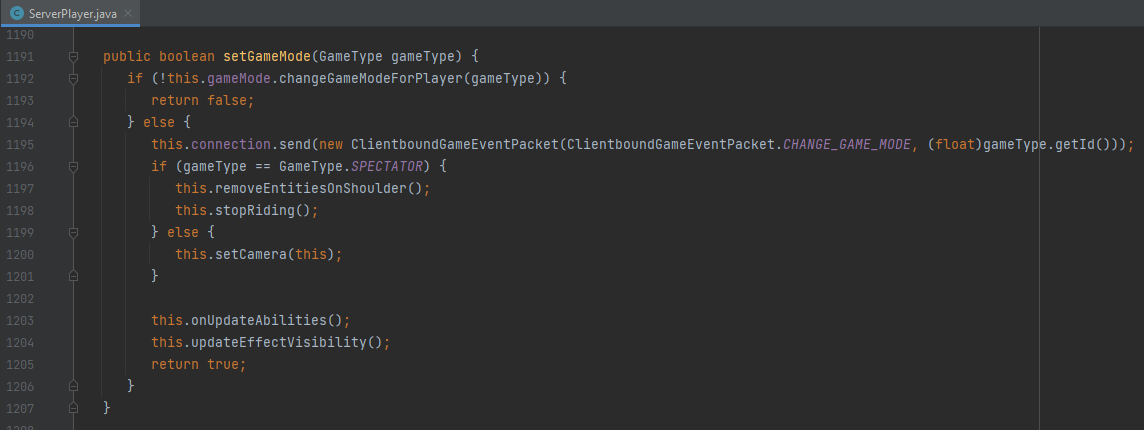
   public boolean setGameMode(GameType gameType) {
      if (!this.gameMode.changeGameModeForPlayer(gameType)) {
         return false;
      } else {
         this.connection.send(new ClientboundGameEventPacket(ClientboundGameEventPacket.CHANGE_GAME_MODE, (float)gameType.getId()));
         if (gameType == GameType.SPECTATOR) {
            this.removeEntitiesOnShoulder();
            this.stopRiding();
         } else {
            this.setCamera(this);
         }

         this.onUpdateAbilities();
         this.updateEffectVisibility();
         return true;
      }
   }
   ...
If we look at the above class, we can see that only two methods are called when a player switches into spectator mode. These methods are removeEntitiesOnShoulder() and stopRiding(). This basically means that when a player changes into spectator mode, any entities that are riding on their shoulders will be dismounted, along with the player themselves being dismounted if they are riding any entity. As a result of only these two methods being called, the player can continue to use items even after switching into spectator mode.
Fix:
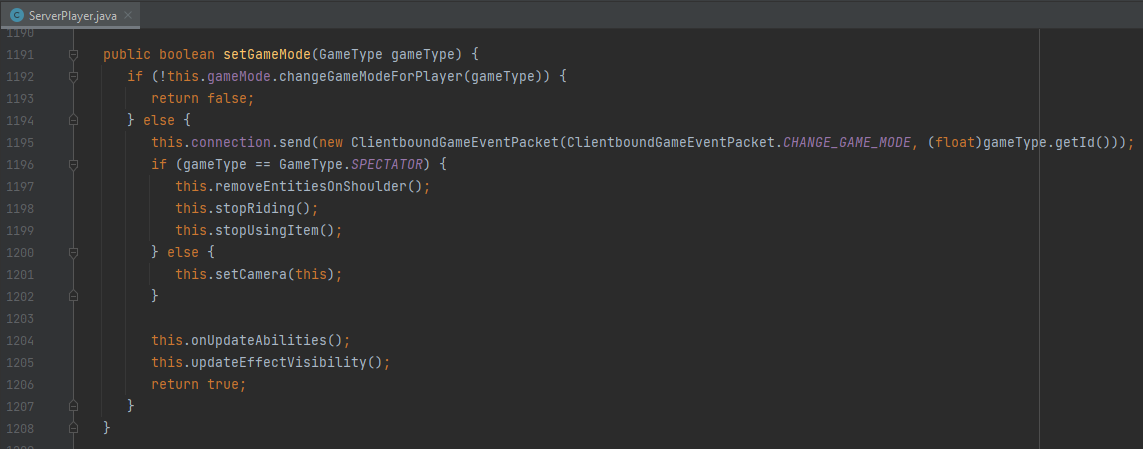
Simply calling the stopUsingItem() method where appropriate within this piece of code will stop players from using items upon switching into spectator mode, thus resolving this problem. The following line code can be used to fix this issue.
this.stopUsingItem();
Linked Issues
 Normal
- Unresolved
![[Mod] Avoma](../../../data/avatars/users/86198.png) [Mod] Avoma
[Mod] Avoma TadeLn
- 16
- 6
- Confirmed
 Low
Low- Platform
- Player
- Spectator
- drinking eating game-mode-switch spectator
1.12.2 - 1.21.4
1.12.2 18w20c 1.13.1 1.13.2 18w43c 19w12b 19w13b 19w14a 19w14b 1.14.3 1.15-pre4 1.16.2 20w46a 21w03a 1.16.5 21w05b 21w06a 21w08b 21w11a 21w14a 1.17.1 1.18-pre4 1.18 1.18.1 22w03a 22w05a 22w06a 22w07a 1.18.2 22w17a 22w18a 1.19-pre1 1.19 1.19.2 22w43a 1.19.3 1.19.4 1.20 1.20.1 23w32a 1.20.4 23w51b 24w03b 1.20.6 1.21 1.21.3 1.21.4
Created Issue:
Spectators can drink potions
Sorry for weak English...
What I expected to happen was...:
Spectators can't drink potions.What actually happened was...:
Spectators can drink potions, and they work like survival potions (after drinking you got an empty bottle)
Steps to Reproduce:
1. Change game mode to creative mode.
2. Take a drinkable potion from inventory.
3. Drink potion.
4. While drinking, press F3 + N to change game mode to spectator mode.
5. After drinking, press F3 + N again and there is an empty bottle in your hand.Environment
- Windows 10
- Java 1.8.0_25 64-bit
- Intel Core i7-4770K
- Intel HD Graphics 4600
![[Mod] Les3awe](../../../data/avatars/users/79847.png)
![[Mod] Michael Wobst](../../../data/avatars/users/37868.png)
Sorry for weak English...
What I expected to happen was...:
Spectators can't drink potions.What actually happened was...:
Spectators can drink potions, and they work like survival potions (after drinking you got an empty bottle)
Steps to Reproduce:
1. Change game mode to creative mode.
2. Take a drinkable potion from inventory.
3. Drink potion.
4. While drinking, press F3 + N to change game mode to spectator mode.
5. After drinking, press F3 + N again and there is an empty bottle in your hand.The bug
Spectators can drink potions, and they work like survival potions (after drinking you got an empty bottle).
How to reproduce
- Change game mode to creative mode
- Take a drinkable potion from inventory
- Drink potion
- While drinking, press F3 + N to change game mode to spectator mode
- After drinking, press F3 + N again and there is an empty bottle in your hand
- Windows 10
- Java 1.8.0_25 64-bit
- Intel Core i7-4770K
- Intel HD Graphics 4600
![[Mod] Asteraoth](../../../data/avatars/users/92886.png)
![[Mojang] Nathan Adams](../../../data/assets/gravatar/dinnerbone.png)
![[Mod] tryashtar](../../../data/avatars/users/41963.png)
Spectators can drink potions/eat food

relates to
![[Mod] Chandler](../../../data/assets/gravatar/triwonder81.png)
![[Mod] SPGoding](../../../data/avatars/users/44622.png)
![[Mojang] Adrian Östergård](../../../data/assets/gravatar/nighter.jpeg)
![[Mod] LateLag](../../../data/avatars/users/92884.png)
relates to
![[Mod] markderickson](../../../data/avatars/users/18946.svg)
The bug
Spectators can drink potions, and they work like survival potions (after drinking you got an empty bottle).How to reproduce
- Change game mode to creative mode
- Take a drinkable potion from inventory
- Drink potion
- While drinking, press F3 + N to change game mode to spectator mode
- After drinking, press F3 + N again and there is an empty bottle in your hand
The Bug:
Players in spectator mode continue to consume foods and liquids shortly after switching game modes.
Steps to Reproduce:
- Obtain some food, for example, some bread.
- Begin eating the bread and as your doing this, quickly switch into spectator mode by pressing F3 + N.
- Take note as to whether or not you continue to consume foods and liquids shortly after switching game modes.
Observed Behavior:
Players in spectator mode continue to consume foods and liquids shortly after switching game modes.
Expected Behavior:
Players in spectator mode would not continue to consume foods and liquids shortly after switching game modes.
Spectators can drink potions/eat foodPlayers in spectator mode continue to consume foods and liquids shortly after switching game modes
The Bug:
Players in spectator mode continue to consume foods and liquids shortly after switching game modes.
Steps to Reproduce:
- Obtain some food, for example, some bread.
- Begin eating the bread and as your doing this, quickly switch into spectator mode by pressing F3 + N.
- Take note as to whether or not
youcontinue to consume foods and liquids shortly after switching game modes.Observed Behavior:
Players in spectator mode continue to consume foods and liquids shortly after switching game modes.
Expected Behavior:
Players in spectator mode would not continue to consume foods and liquids shortly after switching game modes.
The Bug:
Players in spectator mode continue to consume foods and liquids shortly after switching game modes.
Steps to Reproduce:
- Obtain some food, for example, some bread.
- Begin eating the bread and as your doing this, quickly switch into spectator mode by pressing F3 + N.
- Take note as to whether or not players in spectator mode continue to consume foods and liquids shortly after switching game modes.
Observed Behavior:
Players in spectator mode continue to consume foods and liquids shortly after switching game modes.
Expected Behavior:
Players in spectator mode would not continue to consume foods and liquids shortly after switching game modes.
The Bug:
Players in spectator mode continue to consume foods and liquids shortly after switching game modes.
Steps to Reproduce:
- Obtain some food, for example, some bread.
- Begin eating the bread and as your doing this, quickly switch into spectator mode by pressing "F3 + N".
- Take note as to whether or not players in spectator mode continue to consume foods and liquids shortly after switching game modes.
Observed Behavior:
Players in spectator mode continue to consume foods and liquids shortly after switching game modes.
Expected Behavior:
Players in spectator mode would not continue to consume foods and liquids shortly after switching game modes.
Code Analysis:
Code analysis by [Mod] Avoma can be found below.
The following is based on a decompiled version of Minecraft 1.18.1 using MCP-Reborn.
net.minecraft.server.level.ServerPlayer.javapublic class ServerPlayer extends Player { ... public boolean setGameMode(GameType $gt) { if (!this.gameMode.changeGameModeForPlayer($gt)) { return false; } else { this.connection.send(new ClientboundGameEventPacket(ClientboundGameEventPacket.CHANGE_GAME_MODE, (float)$gt.getId())); if ($gt == GameType.SPECTATOR) { this.removeEntitiesOnShoulder(); this.stopRiding(); } else { this.setCamera(this); } this.onUpdateAbilities(); this.updateEffectVisibility(); return true; } } ...If we look at the above class, we can see that only two methods are called when a player switches into spectator mode. These methods are removeEntitiesOnShoulder() and stopRiding(). This basically means that when a player changes into spectator mode, any entities that are riding on their shoulders will be dismounted. The same goes for whether the player themselves is riding an entity. As a result of only these two methods being called, the player can continue to consume items despite switching into spectator mode.
Potential Fix:
Simply adding a line of code that calls the stopUsingItem() method would prevent players from continuing to consume items after switching into spectator mode. The following line of code could be used in order to fix this:
this.stopUsingItem();
![[Mod] ampolive](../../../data/avatars/users/18949.svg)
The Bug:
Players in spectator mode continue to consume foods and liquids shortly after switching game modes.
Steps to Reproduce:
- Obtain some food, for example, some bread.
- Begin eating the bread and as you
rdoing this, quickly switch into spectator mode by pressing "F3 + N".- Take note as to whether or not players in spectator mode continue to consume foods and liquids shortly after switching game modes.
Observed Behavior:
Players in spectator mode continue to consume foods and liquids shortly after switching game modes.
Expected Behavior:
Players in spectator mode would not continue to consume foods and liquids shortly after switching game modes.
Code Analysis:
Code analysis by [Mod] Avoma can be found below.
The following is based on a decompiled version of Minecraft 1.1
8.1using MCP-Reborn.net.minecraft.server.level.ServerPlayer.javapublic class ServerPlayer extends Player { ... public boolean setGameMode(GameType$gt) { if (!this.gameMode.changeGameModeForPlayer($gt)) { return false; } else { this.connection.send(new ClientboundGameEventPacket(ClientboundGameEventPacket.CHANGE_GAME_MODE, (float)$gt.getId())); if ($gt== GameType.SPECTATOR) { this.removeEntitiesOnShoulder(); this.stopRiding(); } else { this.setCamera(this); } this.onUpdateAbilities(); this.updateEffectVisibility(); return true; } } ...If we look at the above class, we can see that only two methods are called when a player switches into spectator mode. These methods are
removeEntitiesOnShoulder()andstopRiding(). This basically means that when a player changes into spectator mode, any entities that are riding on their shoulders will be dismounted. The same goes for whether the player themselves isriding an entity. As a result of only these two methods being called, the player can continue toconsume itemsdespite switching into spectator mode.
PotentialFix:Simply
adding a line of code that callsthestopUsingItem()method would prevent players from continuing to consumeitemsafterswitching into spectator mode. The following lineofcode couldbe usedin orderto fix this:this.stopUsingItem();The Bug:
Players in spectator mode continue to consume foods and liquids shortly after switching game modes.
Steps to Reproduce:
- Obtain some food, for example, some bread.
- Begin eating the bread and as you're doing this, quickly switch into spectator mode by pressing "F3 + N".
- Take note as to whether or not players in spectator mode continue to consume foods and liquids shortly after switching game modes.
Observed Behavior:
Players in spectator mode continue to consume foods and liquids shortly after switching game modes.
Expected Behavior:
Players in spectator mode would not continue to consume foods and liquids shortly after switching game modes.
Here's a code analysis along with a fix regarding this issue.
Code Analysis:
Code analysis by [Mod] Avoma can be found below.
The following is based on a decompiled version of Minecraft 1.19.2 using MCP-Reborn.
net.minecraft.server.level.ServerPlayer.javapublic class ServerPlayer extends Player { ... public boolean setGameMode(GameType gameType) { if (!this.gameMode.changeGameModeForPlayer(gameType)) { return false; } else { this.connection.send(new ClientboundGameEventPacket(ClientboundGameEventPacket.CHANGE_GAME_MODE, (float)gameType.getId())); if (gameType == GameType.SPECTATOR) { this.removeEntitiesOnShoulder(); this.stopRiding(); } else { this.setCamera(this); } this.onUpdateAbilities(); this.updateEffectVisibility(); return true; } } ...If we look at the above class, we can see that only two methods are called when a player switches into spectator mode. These methods are removeEntitiesOnShoulder() and stopRiding(). This basically means that when a player changes into spectator mode, any entities that are riding on their shoulders will be dismounted, along with the player themselves being dismounted if they are riding any entity. As a result of only these two methods being called, the player can continue to use items even after switching into spectator mode.
Fix:
Simply calling the stopUsingItem() method where appropriate within this piece of code will stop players from using items upon switching into spectator mode, thus resolving this problem. The following line code can be used to fix this issue.
this.stopUsingItem();
The Bug:
Players in spectator mode continue to consume foods and liquids shortly after switching game modes.
Steps to Reproduce:
- Obtain some food, for example, some bread.
- Begin eating the bread and as you're doing this, quickly switch into spectator mode by pressing "F3 + N".
- Take note as to whether or not players in spectator mode continue to consume foods and liquids shortly after switching game modes.
Observed Behavior:
Players in spectator mode continue to consume foods and liquids shortly after switching game modes.
Expected Behavior:
Players in spectator mode would not continue to consume foods and liquids shortly after switching game modes.
Here's a code analysis along with a fix regarding this issue.
Code Analysis:
Code analysis by [Mod] Avoma can be found below.
The following is based on a decompiled version of Minecraft 1.19.2 using MCP-Reborn.
net.minecraft.server.level.ServerPlayer.javapublic class ServerPlayer extends Player { ... public boolean setGameMode(GameType gameType) { if (!this.gameMode.changeGameModeForPlayer(gameType)) { return false; } else { this.connection.send(new ClientboundGameEventPacket(ClientboundGameEventPacket.CHANGE_GAME_MODE, (float)gameType.getId())); if (gameType == GameType.SPECTATOR) { this.removeEntitiesOnShoulder(); this.stopRiding(); } else { this.setCamera(this); } this.onUpdateAbilities(); this.updateEffectVisibility(); return true; } } ...If we look at the above class, we can see that only two methods are called when a player switches into spectator mode. These methods are removeEntitiesOnShoulder() and stopRiding(). This basically means that when a player changes into spectator mode, any entities that are riding on their shoulders will be dismounted, along with the player themselves being dismounted if they are riding any entity. As a result of only these two methods being called, the player can continue to use items even after switching into spectator mode.
Fix:
Simply calling the stopUsingItem() method where appropriate within this piece of code will stop players from using items upon switching into spectator mode, thus resolving this problem. The following line code can be used to fix this issue.
this.stopUsingItem();
![[Mojang] slicedlime](../../../data/assets/gravatar/slicedlime.jpeg)
![[Mod] turbo](../../../data/avatars/users/92867.png)
is duplicated by
![[Bot] Arisa](../../../data/avatars/users/43007.png)
![[Mod] Jarl-Penguin](../../../data/avatars/users/92849.png)

Thank you for your report!
We're tracking this issue in MC-129909, so this ticket is being resolved and linked as a duplicate.
If you would like to add a vote and any extra information to the main ticket it would be appreciated.
If you haven't already, you might like to make use of the search feature to see if the issue has already been mentioned.
Quick Links:
📓 Bug Tracker Guidelines – 💬 Community Support – 📧 Mojang Support (Technical Issues) – 📧 Microsoft Support (Account Issues)
📓 Project Summary – ✍️ Feedback and Suggestions – 📖 Game Wiki
– I am a bot. This action was performed automatically! The ticket was resolved by one of our moderators, and I left this message to give more information to you.
This affects 1.13.1.
Can confirm in 21w03a.
Can confirm in 21w05b.
Can confirm in 21w06a.
Can confirm in 1.16.5 and 21w08b.
Can confirm in 21w11a.
Can confirm in 21w14a.
Can confirm in 1.17.1.
I'd like to request ownership of this ticket since the current reporter has been inactive since October of 2020.
Following on from my code analysis, I've double-checked my proposed fix and I can confidently confirm that it's fully functioning and works as expected, so I've attached two screenshots to this report, one of which shows the current code and the other that shows the fixed code. I feel this information may be quite insightful hence my reasoning for providing it.
MC-129909 - Current Code.png

MC-129909 - Fixed Code.png