 insomniac_lemon
- insomniac_lemon
- insomniac_lemon
- America/New_York
- Yes
- No
![[Mojang] Grum (Erik Broes)](../../../data/assets/gravatar/grum.png)
 MC-85991
 Low
Low
![[Mod] Asteraoth](../../../data/avatars/users/92886.png)























Sometime in Minecraft development after 1.2.5, several textures were broken, and because the are small features, they went un-noticed. This is most likely related to Wither-related additions (similar to how paintings broke, and shortly after a wither painting is added).
The textures that affected are:
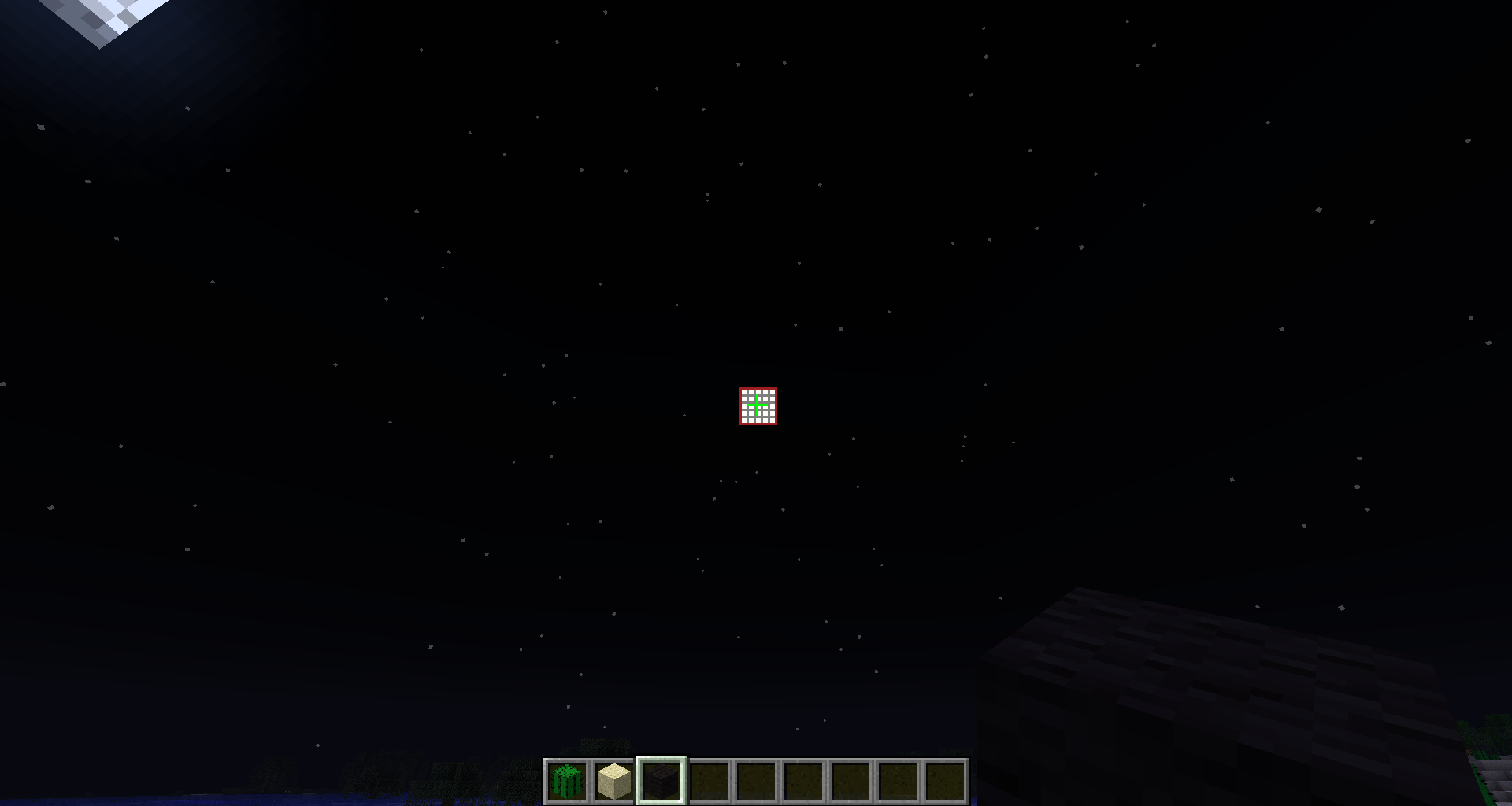
Transition icons (in /gui/icons.png). Health/hunger icons that should display when health/hunger is gained or lost no longer display after 1.2.5. I noticed that this was broken only because Wither hearts were added to the GUI, and I went to test them.
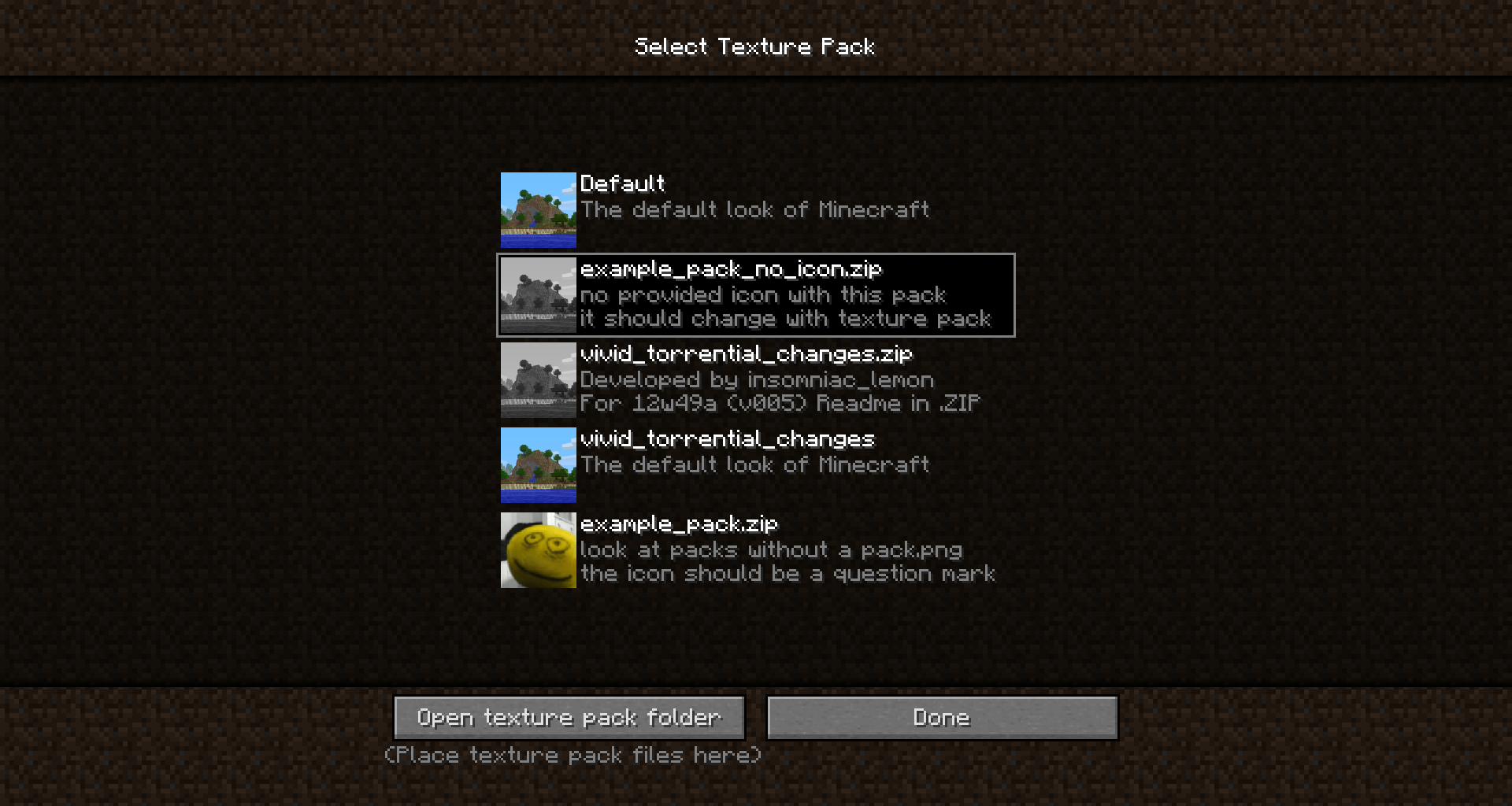
texture pack no pack.png icon (/gui/unknown_pack.png). This file does not load anymore. Instead, the game uses the default pack.png.
Not that these changes occur in vanilla, and any texture pack, but work how they used to if the .JAR is replaced with a .JAR feom 1.2.5.
What I expected to happen was:
Features that worked in previous versions of Minecraft that were not noted of changes in change logs not to be changed.
What actually happened was:
Small features were broken after 1.2.5, but because they were small, nobody noticed.Steps to Reproduce:
1.
Acquire or create a texture pack that has a /pack.png and /gui/unknown_pack.png that are easily distinguishable from default2. Acquire or create a texture pack that has no pack.png
(in 1.4.5 or 12w49a)
3. Start Minecraft, navigate to the texture packs menu, change the selected texture pack to the one with a pack.png and unknown_pack.png
4. Take note of what the icon for the pack is for the pack that does not have an icon while you have the current texture pack selected
5. Start a new survival world
6. Find a way to cause a large amount of damage to the player. Fall damage is the best for this.
7. Repeat steps 1-6 in a 1.2.5 version of Minecraft.
Attached is a picture of the transition icons that should display but no longer do.
Sometime in Minecraft development after 1.2.5, several textures were broken, and because the are small features, they went un-noticed. This is most likely related to Wither-related additions (similar to how paintings broke, and shortly after a wither painting is added).
The textures that affected are:
Transition icons (in /gui/icons.png). Health/hunger icons that should display when health/hunger is gained or lost no longer display after 1.2.5. I noticed that this was broken only because Wither hearts were added to the GUI, and I went to test them.
texture pack no pack.png icon (/gui/unknown_pack.png). This file does not load anymore. Instead, the game uses the default pack.png.
Not that these changes occur in vanilla, and any texture pack, but work how they used to if the .JAR is replaced with a .JAR feom 1.2.5.
What I expected to happen was:
Features that worked in previous versions of Minecraft that were not noted of changes in change logs not to be changed.
What actually happened was:
Small features were broken after 1.2.5, but because they were small, nobody noticed.Steps to Reproduce:
1. Download example_pack.zip (attached) and click it to make it the selected texture pack
2. Acquire or create a texture pack that has no pack.png
(in 1.4.5 or 12w49a)
3. Start Minecraft, navigate to the texture packs menu, change the selected texture pack to the one with a pack.png and unknown_pack.png
4. Take note of what the icon for the pack is for the pack that does not have an icon while you have the current texture pack selected
5. Start a new survival world
6. Find a way to cause a large amount of damage to the player. Fall damage is the best for this.
7. Repeat steps 1-6 in a 1.2.5 version of Minecraft.
Attached is a picture of the transition icons that should display but no longer do, and an example pack that has pack icons that can be used for testing step 1.
Sometime in Minecraft development after 1.2.5, several textures were broken, and because the are small features, they went un-noticed. This is most likely related to Wither-related additions (similar to how paintings broke, and shortly after a wither painting is added).
The textures that affected are:
Transition icons (in /gui/icons.png). Health/hunger icons that should display when health/hunger is gained or lost no longer display after 1.2.5. I noticed that this was broken only because Wither hearts were added to the GUI, and I went to test them.
texture pack no pack.png icon (/gui/unknown_pack.png). This file does not load anymore. Instead, the game uses the default pack.png.
Not that these changes occur in vanilla, and any texture pack, but work how they used to if the .JAR is replaced with a .JAR feom 1.2.5.
What I expected to happen was:
Features that worked in previous versions of Minecraft that were not noted of changes in change logs not to be changed.
What actually happened was:
Small features were broken after 1.2.5, but because they were small, nobody noticed.Steps to Reproduce:
1. Download example_pack.zip (attached)
and click it to make it the selected texture pack2.
Acquire or create a texture pack that has no pack.png(in 1.4.5 or 12w49a)
3. Start Minecraft, navigate to the texture packs menu, change the selected texture pack to
the one with a pack.png and unknown_pack.png4. Take note of what the icon for the pack is for
the pack that does not have an icon while you have the current texture packselected5. Start a new survival world
6. Find a way to cause a large amount of damage to the player. Fall damage is the best for this.
7. Repeat steps 1-6 in a 1.2.5 version of Minecraft.
Attached is a picture of the transition icons that should display but no longer do
, and an example pack that has pack icons that can be used for testing step 1.Sometime in Minecraft development after 1.2.5, several textures were broken, and because the are small features, they went un-noticed. This is most likely related to Wither-related additions (similar to how paintings broke, and shortly after a wither painting is added).
The textures that affected are:
Transition icons (in /gui/icons.png). Health/hunger icons that should display when health/hunger is gained or lost no longer display after 1.2.5. I noticed that this was broken only because Wither hearts were added to the GUI, and I went to test them.
texture pack no pack.png icon (/gui/unknown_pack.png). This file does not load anymore. Instead, the game uses the default pack.png.
Not that these changes occur in vanilla, and any texture pack, but work how they used to if the .JAR is replaced with a .JAR feom 1.2.5.
What I expected to happen was:
Features that worked in previous versions of Minecraft that were not noted of changes in change logs not to be changed.
What actually happened was:
Small features were broken after 1.2.5, but because they were small, nobody noticed.Steps to Reproduce:
1. Download example_pack.zip (attached)
2. Download example_pack_no_icon.zip (attached)
(in 1.4.5 or 12w49a)
3. Start Minecraft, navigate to the texture packs menu, change the selected texture pack to example_pack.zip
4. Take note of what the icon for the pack is for example_pack_no_icon.zip while you have eample_pack.zip as the selected pack
5. Start a new survival world
6. Find a way to cause a large amount of damage to the player. Fall damage is the best for this.
7. Repeat steps 1-6 in a 1.2.5 version of Minecraft.
Also attached is a picture of the transition icons that should display but no longer do (they are in the red rectangles).
Sometime in Minecraft development after 1.2.5, several textures were broken, and because the are small features, they went un-noticed. This is most likely related to Wither-related additions (similar to how paintings broke, and shortly after a wither painting is added).
The textures that affected are:
Transition icons (in /gui/icons.png). Health/hunger icons that should display when health/hunger is gained or lost no longer display after 1.2.5. I noticed that this was broken only because Wither hearts were added to the GUI, and I went to test them.
texture pack no pack.png icon (/gui/unknown_pack.png). This file does not load anymore. Instead, the game uses the default pack.png.
Not that these changes occur in vanilla, and any texture pack, but work how they used to if the .JAR is replaced with a .JAR f
eom 1.2.5.What I expected to happen was:
Features that worked in previous versions of Minecraft that were not noted of changes in change logs not to be changed.
What actually happened was
:
Small features were broken after 1.2.5, but because they were small, nobody noticed.Steps to Reproduce:
1. Download example_pack.zip (attached)
2. Download example_pack_no_icon.zip (attached)
(in 1.4.5 or 12w49a)
3. Start Minecraft, navigate to the texture packs menu, change the selected texture pack to example_pack.zip
4. Take note of what the icon for the pack is for example_pack_no_icon.zip while you have eample_pack.zip as the selected pack
5. Start a new survival world
6. Find a way to cause a large amount of damage to the player. Fall damage is the best for this.
7. Repeat steps 1-6 in a 1.2.5 version of Minecraft.
Also attached is a picture of the transition icons that should display but no longer do (they are in the red rectangles).
Sometime in Minecraft development after 1.2.5, several textures were broken, and because the are small features, they went un-noticed. This is most likely related to Wither-related additions (similar to how paintings broke, and shortly after a wither painting is added).
The textures that affected are:
Transition icons (in /gui/icons.png). Health/hunger icons that should display when health/hunger is gained or lost no longer display after 1.2.5. I noticed that this was broken only because Wither hearts were added to the GUI, and I went to test them.
texture pack no pack.png icon (/gui/unknown_pack.png). This file does not load anymore. Instead, the game uses the default pack.png.
Not that these changes occur in vanilla, and any texture pack, but work how they used to if the .JAR is replaced with a .JAR from 1.2.5.
What I expected to happen was:
Features that worked in previous versions of Minecraft that were not noted of changes in change logs not to be changed.
What actually happened was:
Small features were broken after 1.2.5, but because they were small, nobody noticed.Steps to Reproduce:
1. Download example_pack.zip (attached)
2. Download example_pack_no_icon.zip (attached)
(in 1.4.5 or 12w49a)
3. Start Minecraft, navigate to the texture packs menu, change the selected texture pack to example_pack.zip
4. Take note of what the icon for the pack is for example_pack_no_icon.zip while you have eample_pack.zip as the selected pack
5. Start a new survival world
6. Find a way to cause a large amount of damage to the player. Fall damage is the best for this.
7. Repeat steps 1-6 in a 1.2.5 version of Minecraft.
Also attached is a picture of the transition icons that should display but no longer do (they are in the red rectangles).
Sometime in Minecraft development after 1.2.5, several textures were broken, and because the are small features, they went un-noticed. This is most likely related to Wither-related additions (similar to how paintings broke, and shortly after a wither painting is added).
The textures that affected are:
Transition icons (in /gui/icons.png). Health/hunger icons that should display when health/hunger is gained or lost no longer display after 1.2.5. I noticed that this was broken only because Wither hearts were added to the GUI, and I went to test them.
texture pack no pack.png icon (/gui/unknown_pack.png). This file does not load anymore. Instead, the game uses the default pack.png.
Not that these changes occur in vanilla
,and any texture pack, but work how they used to if the .JAR is replaced with a .JAR from 1.2.5.What I expected to happen was:
Features that worked in previous versions of Minecraft that were not noted of changes in change logs not to be changed.
What actually happened was:
Small features were broken after 1.2.5, but because they were small, nobody noticed.Steps to Reproduce:
1. Download example_pack.zip (attached)
2. Download example_pack_no_icon.zip (attached)
(in 1.4.5 or 12w49a)
3. Start Minecraft, navigate to the texture packs menu, change the selected texture pack to example_pack.zip
4. Take note of what the icon for the pack is for example_pack_no_icon.zip while you have eample_pack.zip as the selected pack
5. Start a new survival world
6. Find a way to cause a large amount of damage to the player. Fall damage is the best for this.
7. Repeat steps 1-6 in a 1.2.5 version of Minecraft.
Also attached is a picture of the transition icons that should display but no longer do (they are in the red rectangles).
Sometime in Minecraft development after 1.2.5, several textures were broken, and because the are small features, they went un-noticed. This is most likely related to Wither-related additions (similar to how paintings broke, and shortly after a wither painting is added).
The textures that affected are:
Transition icons (in /gui/icons.png). Health/hunger icons that should display when health/hunger is gained or lost no longer display after 1.2.5. I noticed that this was broken only because Wither hearts were added to the GUI, and I went to test them.
texture pack no pack.png icon (/gui/unknown_pack.png). This file does not load anymore. Instead, the game uses the default pack.png.
Note that these changes occur in vanilla and any texture pack, but work how they used to if the .JAR is replaced with a .JAR from 1.2.5.
What I expected to happen was:
Features that worked in previous versions of Minecraft that were not noted of changes in change logs not to be changed.
What actually happened was:
Small features were broken after 1.2.5, but because they were small, nobody noticed.Steps to Reproduce:
1. Download example_pack.zip (attached)
2. Download example_pack_no_icon.zip (attached)
(in 1.4.5 or 12w49a)
3. Start Minecraft, navigate to the texture packs menu, change the selected texture pack to example_pack.zip
4. Take note of what the icon for the pack is for example_pack_no_icon.zip while you have eample_pack.zip as the selected pack
5. Start a new survival world
6. Find a way to cause a large amount of damage to the player. Fall damage is the best for this.
7. Repeat steps 1-6 in a 1.2.5 version of Minecraft.
Also attached is a picture of the transition icons that should display but no longer do (they are in the red rectangles).
Sometime in Minecraft development after 1.2.5, several textures were broken, and because the are small features, they went un-noticed. This is most likely related to Wither-related additions (similar to how paintings broke, and shortly after a wither painting is added).
The textures that affected are:
Transition icons (in /gui/icons.png). Health/hunger icons that should display when health/hunger is gained or lost no longer display after 1.2.5. I noticed that this was broken only because Wither hearts were added to the GUI, and I went to test them.
texture pack no pack.png icon (/gui/unknown_pack.png). This file does not load anymore. Instead, the game uses the default pack.png.
Note that these changes occur in vanilla and any texture pack, but work how they used to if the .JAR is replaced with a .JAR from 1.2.5.
What I expected to happen was:
Features that worked in previous versions of Minecraft that were not noted of changes in change logs not to be changed.
What actually happened was:
Small features were broken after 1.2.5, but because they were small, nobody noticed.Steps to Reproduce:
1. Download example_pack.zip (attached)
2. Download example_pack_no_icon.zip (attached)
(in 1.4.5 or 12w49a)
3. Start Minecraft, navigate to the texture packs menu, change the selected texture pack to example_pack.zip
4. Take note of what the icon for the pack is for example_pack_no_icon.zip while you have eample_pack.zip as the selected pack
5. Start a new survival world
6. Find a way to cause a large amount of damage to the player. Fall damage is the best for this.
7. Repeat steps 1-6 in a 1.2.5 version of Minecraft.
Also attached is a picture of the transition icons that should display but no longer do (they are in the red rectangles).
Sometime in Minecraft development after 1.2.5, several textures were broken, and because the are small features, they went un-noticed. This is most likely related to Wither-related additions (similar to how paintings broke, and shortly after a wither painting is added).
The textures that affected are:
Transition icons (in /gui/icons.png). Health/hunger icons that should display when health/hunger is gained or lost no longer display after 1.2.5. I noticed that this was broken only because Wither hearts were added to the GUI, and I went to test them.
texture pack no pack.png icon (/gui/unknown_pack.png). This file does not load anymore. Instead, the game uses the default pack.png.
Note that these changes occur in vanilla and any texture pack, but work how they used to if the .JAR is replaced with a .JAR from 1.2.5.
What I expected to happen was:
Features that worked in previous versions of Minecraft that were not noted of changes in change logs not to be changed.
What actually happened was:
Small features were broken after 1.2.5, but because they were small, nobody noticed.Steps to Reproduce:
1. Download example_pack.zip (attached)
2. Download example_pack_no_icon.zip (attached)
(in 1.4.5 or 12w49a)
3. Start Minecraft, navigate to the texture packs menu, change the selected texture pack to example_pack.zip
4. Take note of what the icon for the pack is for example_pack_no_icon.zip while you have eample_pack.zip as the selected pack
5. Start a new survival world
6. Find a way to cause a large amount of damage to the player. Fall damage is the best for this.
7. Repeat steps 1-6 in a 1.2.5 version of Minecraft.
Also attached is a picture of the transition icons that should display but no longer do (they are in the red rectangles).
Example unknown_pack.png that may be used for testing.
All/bug not specific to OS or Java version (tested on
bothWindows 7, Windows XP, and Linux)
unknown_pack.png
Sometime in Minecraft development after 1.2.5, several textures were broken, and because the are small features, they went un-noticed. This is most likely related to Wither-related additions (similar to how paintings broke, and shortly after a wither painting is added).
The textures that affected are:
Transition icons (in /gui/icons.png). Health/hunger icons that should display when health/hunger is gained or lost no longer display after 1.2.5.
I noticed that this was broken only because Wither hearts were added to the GUI, and I went to test them.texture pack no pack.png icon (/gui/unknown_pack.png). This file does not load anymore. Instead, the game uses the default pack.png.
Note that these changes occur in vanilla and any texture pack, but work how they used to if the .JAR is replaced with a .JAR from 1.2.5.
What I expected to happen was:
Features that worked in previous versions of Minecraft that were not noted of changes in change logs not to be changed.
What actually happened was:
Small features were broken after 1.2.5, but because they were small, nobody noticed.Steps to Reproduce:
1. Download example_pack.zip (attached)
2. Download example_pack_no_icon.zip (attached)
(in 1.4.5 or 12w49a)
3. Start Minecraft, navigate to the texture packs menu, change the selected texture pack to example_pack.zip
4. Take note of what the icon for the pack is for example_pack_no_icon.zip while you have eample_pack.zip as the selected pack
5. Start a new survival world
6. Find a way to cause a large amount of damage to the player. Fall damage is the best for this.
7. Repeat steps 1-6 in a 1.2.5 version of Minecraft.
Also attached is a picture of the transition icons that should display but no longer do (they are in the red rectangles).
Sometime in Minecraft development after 1.2.5, several textures were broken, and because the are small features, they went un-noticed. This is most likely related to Wither-related additions (similar to how paintings broke, and shortly after a wither painting is added).
The textures that affected are:
Transition icons (in /gui/icons.png). Health/hunger icons that should display when health/hunger is gained or lost no longer display after 1.2.5. I noticed that this was broken only because Wither hearts were added to the GUI, and I went to test them.
texture pack no pack.png icon (/gui/unknown_pack.png). This file does not load anymore. Instead, the game uses the default pack.png.
Note that these changes occur in vanilla and any texture pack, but work how they used to if the .JAR is replaced with a .JAR from 1.2.5.
What I expected to happen was:
Features that worked in previous versions of Minecraft that were not noted of changes in change logs not to be changed.
What actually happened was:
Small features were broken after 1.2.5, but because they were small, nobody noticed.Steps to Reproduce:
1. Download example_pack.zip (attached)
2. Download example_pack_no_icon.zip (attached)
(in 1.4.5 or 12w49a)
3. Start Minecraft, navigate to the texture packs menu, change the selected texture pack to example_pack.zip
4. Take note of what the icon for the pack is for example_pack_no_icon.zip while you have eample_pack.zip as the selected pack
5. Start a new survival world
6. Find a way to cause a large amount of damage to the player. Fall damage is the best for this.
7. Repeat steps 1-6 in a 1.2.5 version of Minecraft.
Also attached is a picture of the transition icons that should display but no longer do (they are in the red rectangles).
Sometime in Minecraft development after 1.2.5, several textures were broken, and because the are small features, they went un-noticed. This is most likely related to Wither-related additions (similar to how paintings broke, and shortly after a wither painting is added).
The textures that affected are:
Transition icons (in /gui/icons.png). Health/hunger icons that should display when health/hunger is gained or lost no longer display after 1.2.5. I noticed that this was broken only because Wither hearts were added to the GUI, and I went to test them
.texture pack no pack.png icon (/gui/unknown_pack.png). This file does not load anymore. Instead, the game uses the default pack.png.
Note that these changes occur in vanilla and any texture pack, but work how they used to if the .JAR is replaced with a .JAR from 1.2.5.
What I expected to happen was:
Features that worked in previous versions of Minecraft that were not noted of changes in change logs not to be changed.
What actually happened was:
Small features were broken after 1.2.5, but because they were small, nobody noticed.Steps to Reproduce:
1. Download example_pack.zip (attached)
2. Download example_pack_no_icon.zip (attached)
(in 1.4.5 or 12w49a)
3. Start Minecraft, navigate to the texture packs menu, change the selected texture pack to example_pack.zip
4. Take note of what the icon for the pack is for example_pack_no_icon.zip while you have eample_pack.zip as the selected pack
5. Start a new survival world
6. Find a way to cause a large amount of damage to the player. Fall damage is the best for this.
7. Repeat steps 1-6 in a 1.2.5 version of Minecraft.
Also attached is a picture of the transition icons that should display but no longer do (they are in the red rectangles).
Sometime in Minecraft development after 1.2.5, several textures were broken, and because the are small features, they went un-noticed. This is most likely related to Wither-related additions (similar to how paintings broke, and shortly after a wither painting is added).
The textures that affected are:
Transition icons (in /gui/icons.png). Health/hunger icons that should display when health/hunger is gained or lost no longer display after 1.2.5. I noticed that this was broken only because Wither hearts were added to the GUI, and I went to test them, and I wanted to see how the transition icon looked, but it never appeared
texture pack no pack.png icon (/gui/unknown_pack.png). This file does not load anymore. Instead, the game uses the default pack.png.
Note that these changes occur in vanilla and any texture pack, but work how they used to if the .JAR is replaced with a .JAR from 1.2.5.
What I expected to happen was:
Features that worked in previous versions of Minecraft that were not noted of changes in change logs not to be changed.
What actually happened was:
Small features were broken after 1.2.5, but because they were small, nobody noticed.Steps to Reproduce:
1. Download example_pack.zip (attached)
2. Download example_pack_no_icon.zip (attached)
(in 1.4.5 or 12w49a)
3. Start Minecraft, navigate to the texture packs menu, change the selected texture pack to example_pack.zip
4. Take note of what the icon for the pack is for example_pack_no_icon.zip while you have eample_pack.zip as the selected pack
5. Start a new survival world
6. Find a way to cause a large amount of damage to the player. Fall damage is the best for this.
7. Repeat steps 1-6 in a 1.2.5 version of Minecraft.
Also attached is a picture of the transition icons that should display but no longer do (they are in the red rectangles).
Sometime in Minecraft development after 1.2.5, several textures were broken, and because the are small features, they went un-noticed. This is most likely related to Wither-related additions (similar to how paintings broke, and shortly after a wither painting is added).
The textures that affected are:
Transition icons (in /gui/icons.png). Health/hunger icons that should display when health/hunger is gained or lost no longer display after 1.2.5. I noticed that this was broken only because Wither hearts were added to the GUI, and I went to test them, and I wanted to see how the transition icon looked, but it never appeared
texture pack no pack.png icon (/gui/unknown_pack.png). This file does not load anymore. Instead, the game uses the default pack.png.
Note that these changes occur in vanilla and any texture pack, but work how they used to if the .JAR is replaced with a .JAR from 1.2.5.
What I expected to happen was:
Features that worked in previous versions of Minecraft that were not noted of changes in change logs not to be changed.
What actually happened was:
Small features were broken after 1.2.5, but because they were small, nobody noticed.Steps to Reproduce:
1. Download example_pack.zip (attached)
2. Download example_pack_no_icon.zip (attached)
(in 1.4.5 or 12w
49a)3. Start Minecraft, navigate to the texture packs menu, change the selected texture pack to example_pack.zip
4. Take note of what the icon for the pack is for example_pack_no_icon.zip while you have eample_pack.zip as the selected pack
5. Start a new survival world
6. Find a way to cause a large amount of damage to the player. Fall damage is the best for this.
7. Repeat steps 1-6 in a 1.2.5 version of Minecraft.
Also attached is a picture of the transition icons that should display but no longer do (they are in the red rectangles).
Sometime in Minecraft development after 1.2.5, several textures were broken, and because the are small features, they went un-noticed. This is most likely related to Wither-related additions (similar to how paintings broke, and shortly after a wither painting is added).
The textures that affected are:
Transition icons (in /gui/icons.png). Health/hunger icons that should display when health/hunger is gained or lost no longer display after 1.2.5. I noticed that this was broken only because Wither hearts were added to the GUI, and I went to test them, and I wanted to see how the transition icon looked, but it never appeared
texture pack no pack.png icon (/gui/unknown_pack.png). This file does not load anymore. Instead, the game uses the default pack.png.
Note that these changes occur in vanilla and any texture pack, but work how they used to if the .JAR is replaced with a .JAR from 1.2.5.
What I expected to happen was:
Features that worked in previous versions of Minecraft that were not noted of changes in change logs not to be changed.
What actually happened was:
Small features were broken after 1.2.5, but because they were small, nobody noticed.Steps to Reproduce:
1. Download example_pack.zip (attached)
2. Download example_pack_no_icon.zip (attached)
(in 1.4.5 or 12w50a)
3. Start Minecraft, navigate to the texture packs menu, change the selected texture pack to example_pack.zip
4. Take note of what the icon for the pack is for example_pack_no_icon.zip while you have eample_pack.zip as the selected pack
5. Start a new survival world
6. Find a way to cause a large amount of damage to the player. Fall damage is the best for this.
7. Repeat steps 1-6 in a 1.2.5 version of Minecraft.
Also attached is a picture of the transition icons that should display but no longer do (they are in the red rectangles).
Sometime in Minecraft development after 1.2.5, several textures were broken, and because the are small features, they went un-noticed. This is most likely related to Wither-related additions (similar to how paintings broke, and shortly after a wither painting is added).
The textures that affected are:
Transition icons (in /gui/icons.png). Health/hunger icons that should display when health/hunger is gained or lost no longer display after 1.2.5. I noticed that this was broken only because Wither hearts were added to the GUI, and I went to test them, and I wanted to see how the transition icon looked, but it never appeared
texture pack no pack.png icon (/gui/unknown_pack.png). This file does not load anymore. Instead, the game uses the default pack.png.
Note that these changes occur in vanilla and any texture pack, but work how they used to if the .JAR is replaced with a .JAR from 1.2.5.
What I expected to happen was:
Features that worked in previous versions of Minecraft that were not noted of changes in change logs not to be changed.
What actually happened was:
Small features were broken after 1.2.5, but because they were small, nobody noticed.Steps to Reproduce:
1. Download example_pack.zip (attached)
2. Download example_pack_no_icon.zip (attached)
(in 1.4.5 or 12w50a)
3. Start Minecraft, navigate to the texture packs menu, change the selected texture pack to example_pack.zip
4. Take note of what the icon for the pack is for example_pack_no_icon.zip while you have eample_pack.zip as the selected pack
5. Start a new survival world
6. Find a way to cause a large amount of damage to the player, and watch the health bar. Fall damage is the best for this.
7. Repeat steps 1-6 in a 1.2.5 version of Minecraft.
Also attached is a picture of the transition icons that should display but no longer do (they are in the red rectangles).
The texture for the reticule (crosshairs, pointer, aimy clicky thingy), with the default icons takes up 16x16 pixels (see fig.1.png attached).
The default reticule texture is not centered in this space, snd cannot be because it is 1px wide (see fig.2.png attached).
If you use a screen overlay to see how the reticule compares to it (I used a 1024x1024 pumpkinblur.png with a 2px line in the very middle) you will see that the area that displays for the reticule is very far from the center of the screen, and the default texture is still barely not centered (see fig.3.png attached).
If you pause the game with the correct size GUI, the reticule will be slightly to the right, which is how I noticed the issue in the first place because it has been bothering me (see fig.4.png attached).
I recommend making the 16x16 texture area for the reticule centered on the screen, and also changing the default texture of it to be centered on that,which will will require using a image that has an even resolution "bounding box". This is important as most texturers probably don't know that the default reticule is not centered in the space that it can be in (something like fig.5.png).
Mojang is free to use the texture from fig.5.png if they fix this issue, it is also downloadable as a pack attached as reticule_centered_in_16x16.zip.
What I expected to happen was...:
The reticule to be centered on its texture space, and for its texture space to be centered on the screen.What actually happened was...:
Neither the texture's space or the texture itself is centered.Steps to Reproduce:
1. Download reticule_test.zip
2. Make it the used texture pack in Minecraft
3. Load any world where you already have a pumpkin (or a creative world)
4. Put a pumpkin on your head
5. (optional) Pause the game (this depends on the GUI size)
The texture for the reticule (crosshairs, pointer, aimy clicky thingy), with the default icons takes up 16x16 pixels (see fig.1.png attached).
The default reticule texture is not centered in this space,
snd cannot be because it is 1px wide (see fig.2.png attached).If you use a screen overlay to see how the reticule compares to it (I used a 1024x1024 pumpkinblur.png with a 2px line in the very middle) you will see that the area that displays for the reticule is very far from the center of the screen, and the default texture is still barely not centered (see fig.3.png attached).
If you pause the game with the correct size GUI, the reticule will be slightly to the right, which is how I noticed the issue in the first place because it has been bothering me (see fig.4.png attached).
I recommend making the 16x16 texture area for the reticule centered on the screen, and also changing the default texture of it to be centered on that,which will will require using a image that has an even resolution "bounding box". This is important as most texturers probably don't know that the default reticule is not centered in the space that it can be in (something like fig.5.png).
Mojang is free to use the texture from fig.5.png if they fix this issue, it is also downloadable as a pack attached as reticule_centered_in_16x16.zip.
What I expected to happen was...:
The reticule to be centered on its texture space, and for its texture space to be centered on the screen.What actually happened was...:
Neither the texture's space or the texture itself is centered.Steps to Reproduce:
1. Download reticule_test.zip
2. Make it the used texture pack in Minecraft
3. Load any world where you already have a pumpkin(or a creative world)
4. Put a pumpkin on your head5. (optional) Pause the game(this depends on the GUI size)The texture for the reticule (crosshairs, pointer, aimy clicky thingy), with the default icons takes up 16x16 pixels (see fig.1.png attached).
The default reticule texture is not centered in this space, and cannot be because it is 1px wide (see fig.2.png attached).
If you use a screen overlay to see how the reticule compares to it (I used a 1024x1024 pumpkinblur.png with a 2px line in the very middle) you will see that the area that displays for the reticule is very far from the center of the screen, and the default texture is still barely not centered (see fig.3.png attached).
If you pause the game with the correct size GUI, the reticule will be slightly to the right, which is how I noticed the issue in the first place because it has been bothering me (see fig.4.png attached).
I recommend making the 16x16 texture area for the reticule centered on the screen, and also changing the default texture of it to be centered on that,which will will require using a image that has an even resolution "bounding box". This is important as most texturers probably don't know that the default reticule is not centered in the space that it can be in (something like fig.5.png).
Mojang is free to use the texture from fig.5.png if they fix this issue, it is also downloadable as a pack attached as reticule_centered_in_16x16.zip.
What I expected to happen was...:
The reticule to be centered on its texture space, and for its texture space to be centered on the screen.What actually happened was...:
Neither the texture's space or the texture itself is centered.Steps to Reproduce:
1. Download reticule_test.zip
2. Make it the used texture pack in Minecraft
3. Load any world where you already have a pumpkin (or a creative world)
4. Put a pumpkin on your head
5. (optional) Pause the game (this depends on the GUI size)
The texture for the reticule (crosshairs, pointer, aimy clicky thingy), with the default icons takes up 16x16 pixels (see fig.1.png attached).
The default reticule texture is not centered in this space, and cannot be because it is 1px wide (see fig.2.png attached).
If you use a screen overlay to see how the reticule compares to it (I used a 1024x1024 pumpkinblur.png with a 2px line in the very middle) you will see that the area that displays for the reticule is very far from the center of the screen, and the default texture is still barely not centered (see fig.3.png attached).
If you pause the game with the correct size GUI, the reticule will be slightly to the right, which is how I noticed the issue in the first place because it has been bothering me (see fig.4.png attached).
I recommend making the 16x16 texture area for the reticule centered on the screen, and also changing the default texture of it to be centered on that,which will will require using a image that has an even resolution "bounding box". This is important as most texturers probably don't know that the default reticule is not centered in the space that it can be in (something like fig.5.png).
Mojang is free to use the texture from fig.5.png if they fix this issue, it is also downloadable as a pack attached as reticule_centered_in_16x16.zip.
What I expected to happen was...:
The reticule to be centered on its texture space, and for its texture space to be centered on the screen.What actually happened was...:
Neither the texture's space or the texture itself is centered.Steps to Reproduce:
1. Download reticule_test.zip
2. Make it the used texture pack in Minecraft
3. Load any world where you already have a pumpkin (or a creative world)
4. Put a pumpkin on your head
5. (optional) Pause the game (this depends on the GUI size)
The texture for the reticule (crosshairs, pointer, aimy clicky thingy), with the default icons takes up 16x16 pixels (see fig.1.png attached).
The default reticule texture is not centered in this space, and cannot be because it is 1px wide (see fig.2.png attached).
If you use a screen overlay to see how the reticule compares to it (I used a 1024x1024 pumpkinblur.png with a 2px line in the very middle) you will see that the area that displays for the reticule is very far from the center of the screen, and the default texture is still barely not centered (see fig.3.png attached).
If you pause the game with the correct size GUI, the reticule will be slightly to the right, which is how I noticed the issue in the first place because it has been bothering me (see fig.4.png attached).
I recommend making the 16x16 texture area for the reticule centered on the screen, and also changing the default texture of it to be centered on that,which will will require using a image that has an even resolution "bounding box". This is important as most texturers probably don't know that the default reticule is not centered in the space that it can be in (something like fig.5.png).
Mojang is free to use the texture from fig.5.png if they fix this issue, it is also downloadable as a pack attached as reticule_centered_in_16x16.zip.
What I expected to happen was...:
The reticule to be centered on its texture space, and for its texture space to be centered on the screen.What actually happened was...:
Neither the texture's space nor the texture itself is centered.Steps to Reproduce:
1. Download reticule_test.zip
2. Make it the used texture pack in Minecraft
3. Load any world where you already have a pumpkin (or a creative world)
4. Put a pumpkin on your head
5. (optional) Pause the game (this depends on the GUI size)
The texture for the retic
ule (crosshairs, pointer, aimy clicky thingy), with the default icons takes up 16x16 pixels (see fig.1.png attached).The default reticule texture is not centered in this space, and cannot be because it is 1px wide (see fig.2.png attached).
If you use a screen overlay to see how the reticule compares to it
(I useda1024x1024 pumpkinblur.png with a 2px line in the very middle)you will see that the area that displays for the reticule is very far from the center of the screen, and the default texture is still barely not centered (see fig.3.png attached).If you pause the game with the correct size GUI, the reticule will be slightly to the right, which is how I noticed the issue in the first place because it has been bothering me (see fig.4.png attached).
I recommend making the 16x16 texture area for the retic
ule centered on the screen, and also changing the default texture of it to be centered on that,which will will require using a image that has an even resolution "bounding box". This is important as most texturers probably don't know that the default reticule is not centered in the space that it can be in (something like fig.5.png).Mojang is free to use the texture from fig.5.png if they fix this issue, it is also downloadable as a pack attached as reticule_centered_in_16x16.zip.
What I expected to happen was...:
The reticule to be centered on its texture space, and for its texture space to be centered on the screen.What actually happened was...:
Neither the texture's space nor the texture itself is centered.Steps to Reproduce:
1. Download reticule_test.zip
2. Make it the used texture pack in Minecraft
3. Load any world where you already have a pumpkin (or a creative world)
4. Put a pumpkin on your head
5. (optional) Pause the game (this depends on the GUI size)The texture for the reticle (reticule, crosshairs, pointer, aimy clicky thingy), with the default icons takes up 16x16 pixels (see fig.1.png attached).
The default reticle texture is not centered in this space, and
cannot beis not guaranteed to be centered (see edit explanation near bottom) because it is 1px wide (see fig.2.png attached).If you use a screen overlay to see how the reticule compares to it (I used a 1024x1024 pumpkinblur.png with a 2px line in the very middle) you will see that the area that displays for the reticule is very far from the center of the screen, and the default texture is still barely not centered (see fig.3.png attached).
If you pause the game with the correct size GUI, the reticule will be slightly to the right, which is how I noticed the issue in the first place because it has been bothering me (see fig.4.png attached).
I recommend making the 16x16 texture area for the reticle centered on the screen, and also changing the default texture of it to be centered on that,which will will require using a image that has an even resolution "bounding box". This is important as most texturers probably don't know that the default reticule is not centered in the space that it can be in (something like fig.5.png).
Mojang is free to use the texture from fig.5.png if they fix this issue, it is also downloadable as a pack attached as reticule_centered_in_16x16.zip.
What I expected to happen was...:
The reticule to be centered on its texture space, and for its texture space to be centered on the screen.What actually happened was...:
Neither the texture's space nor the texture itself is centered.Steps to Reproduce:
1. Download reticule_test.zip
2. Make it the used texture pack in Minecraft
3. Load any world where you already have a pumpkin (or a creative world)
4. Put a pumpkin on your head
5. (optional) Pause the game (this depends on the GUI size)NOTE: If the GUI scale is large enough (and the reticle is low enough of a resolution!) an even texture is not actually necessary for a centered texture. For instance, with the default resolution and 1920x1080 and 'auto' scaled GUI, 1 pixel of the reticle is actually represented by 4 pixels (2 wide and 2 tall)... however a 1px reticle could not be centered with 'small' scaled GUI since the pixels are 1:1. It would also be a problem with larger GUIs and HD resource packs (especially with lower screen resolutions) since the pixel densities would be too close (or past close!) to allow for an odd resolution to be properly centered.
Reticule not centered on the screen in any way.
The texture for the reticle (reticule, crosshairs, pointer, aimy clicky thingy), with the default icons takes up 16x16 pixels (see fig.1.png attached).
The default reticle texture is not centered in this space, and
cannot beis not guaranteed to be centered (see edit explanation near bottom) because it is 1px wide (see fig.2.png attached).If you use a screen overlay to see how the reticule compares to it (I used a 1024x1024 pumpkinblur.png with a 2px line in the very middle) you will see that the area that displays for the reticule is very far from the center of the screen, and the default texture is still barely not centered (see fig.3.png attached).
If you pause the game with the correct size GUI, the reticule will be slightly to the right, which is how I noticed the issue in the first place because it has been bothering me (see fig.4.png attached).
I recommend making the 16x16 texture area for the reticle centered on the screen, and also changing the default texture of it to be centered on that,which will will require using a image that has an even resolution "bounding box". This is important as most texturers probably don't know that the default reticule is not centered in the space that it can be in (something like fig.5.png).
Mojang is free to use the texture from fig.5.png if they fix this issue, it is also downloadable as a pack attached as reticule_centered_in_16x16.zip.
What I expected to happen was...:
The reticule to be centered on its texture space, and for its texture space to be centered on the screen.What actually happened was...:
Neither the texture's space nor the texture itself is centered.Steps to Reproduce:
1. Download reticule_test.zip
2. Make it the used texture pack in Minecraft
3. Load any world where you already have a pumpkin (or a creative world)
4. Put a pumpkin on your head
5. (optional) Pause the game (this depends on the GUI size)NOTE: If the GUI scale is large enough (and the reticle is low enough of a resolution!) an even texture is not actually necessary for a centered texture. For instance, with the default resolution and 1920x1080 and 'auto' scaled GUI, 1 pixel of the reticle is actually represented by 4 pixels (2 wide and 2 tall)... however a 1px reticle could not be centered with 'small' scaled GUI since the pixels are 1:1. It would also be a problem with larger GUIs and HD resource packs (especially with lower screen resolutions) since the pixel densities would be too close (or past close!) to allow for an odd resolution to be properly centered.
If default still wants to use an odd texture, the reticle should be given a dedicated texture instead of residing on an atlas. This would allow for the reticle to be mapped to the true center, have an independent resolution, and it would allow another thing in resource packs to be easily used as an 'add on' rather than needing the entire HUD of a pack (or manually editing it to get the combo you want).
One of the advantages stated about the new texture pack format is that "It will also allow us to mix and match block artwork resolutions" however, it does NO
tproperly detect non-standard resolutions of blocks (see attached). In the attached sreenshots below, the texture sizes on the blocks that are not mapped properly are 15x and 17x. Instead of properly detecting these resolutions and mapping them properly, the game maps them to the next larger standard (power with a base of 2. 2^4, 2^5, 2^6 ect.) 15x is mapped to 16x, and 17x is mapped to 32x.Why would anyone want non-standard resolution items? Well, mainly so you and actually have 1 px in the middle instead of jacking the resolution up so high that the middle looks small! 15x will allow you to have objects that actually come to a point in the middle, instead of looking dull or not being centered in the texture space. And lastly, people do it BECAUSE THEY CAN. There is no technical reason why textures should need to be these standard sizes anymore, so we SHOULD be able to use odd resolutions as they have their purpose just as even resolutions do.
Also attached is my stitched terrain file. It has 19 textures that are 15x (I was excited that they would work, and let down as always), and it has put yellow pixels that become transparent in-game. Also notice it is not square, but doubled due to the amount of textures, and also most of that is unused. It would save space if all of the 15x textures were put into a 240x240 image, stitched_terrain_15.png instead, that way they could also map correctly.
One of the advantages stated about the new texture pack format is that "It will also allow us to mix and match block artwork resolutions" however, it does NOT properly detect non-standard resolutions of blocks (see attached). In the attached sreenshots below, the texture sizes on the blocks that are not mapped properly are 15x and 17x. Instead of properly detecting these resolutions and mapping them properly, the game maps them to the next larger standard (power with a base of 2. 2^4, 2^5, 2^6 ect.) 15x is mapped to 16x, and 17x is mapped to 32x.
Why would anyone want non-standard resolution items? Well, mainly so you and actually have 1 px in the middle instead of jacking the resolution up so high that the middle looks small! 15x will allow you to have objects that actually come to a point in the middle, instead of looking dull or not being centered in the texture space. And lastly, people do it BECAUSE THEY CAN. There is no technical reason why textures should need to be these standard sizes anymore, so we SHOULD be able to use odd resolutions as they have their purpose just as even resolutions do. (Here is the original idea and explanation behind using odd resolutions alongside even ones)
Also attached is my stitched terrain file. It has 19 textures that are 15x (I was excited that they would work, and let down as always), and it has put yellow pixels that become transparent in-game. Also notice it is not square, but doubled due to the amount of textures, and also most of that is unused. It would save space if all of the 15x textures were put into a 240x240 image, stitched_terrain_15.png instead, that way they could also map correctly.
One of the advantages stated about the new texture pack format is that "It will also allow us to mix and match block artwork resolutions" however, it does NOT properly detect non-standard resolutions of blocks (see attached). In the attached sreenshots below, the texture sizes on the blocks that are not mapped properly are 15x and 17x. Instead of properly detecting these resolutions and mapping them properly, the game maps them to the next larger standard (power with a base of 2. 2^4, 2^5, 2^6 ect.) 15x is mapped to 16x, and 17x is mapped to 32x.
Why would anyone want non-standard resolution items? Well, mainly so you and actually have 1 px in the middle instead of jacking the resolution up so high that the middle looks small! 15x will allow you to have objects that actually come to a point in the middle, instead of looking dull or not being centered in the texture space. And lastly, people do it BECAUSE THEY CAN. There is no technical reason why textures should need to be these standard sizes anymore, so we SHOULD be able to use odd resolutions as they have their purpose just as even resolutions do. (Here is the original idea and explanation behind using odd resolutions alongside even ones)
Also attached is my stitched terrain file. It has 1
9textures that are 15x (I was excited that they would work, and let down as always), and it has put yellow pixels that become transparent in-game. Also notice it is not square, but doubled due to the amount of textures, and also most of that is unused. It would save space if all of the 15x textures were put into a 240x240 image, stitched_terrain_15.png instead, that way they could also map correctly.One of the advantages stated about the new texture pack format is that "It will also allow us to mix and match block artwork resolutions" however, it does NOT properly detect non-standard resolutions of blocks (see attached). In the attached sreenshots below, the texture sizes on the blocks that are not mapped properly are 15x and 17x. Instead of properly detecting these resolutions and mapping them properly, the game maps them to the next larger standard (power with a base of 2. 2^4, 2^5, 2^6 ect.) 15x is mapped to 16x, and 17x is mapped to 32x.
Why would anyone want non-standard resolution items? Well, mainly so you and actually have 1 px in the middle instead of jacking the resolution up so high that the middle looks small! 15x will allow you to have objects that actually come to a point in the middle, instead of looking dull or not being centered in the texture space. And lastly, people do it BECAUSE THEY CAN. There is no technical reason why textures should need to be these standard sizes anymore, so we SHOULD be able to use odd resolutions as they have their purpose just as even resolutions do. (Here is the original idea and explanation behind using odd resolutions alongside even ones)
Also attached is my stitched terrain file. It has 21 textures that are 15x (I was excited that they would work, and let down as always), and it has put yellow pixels that become transparent in-game. Also notice it is not square, but doubled due to the amount of textures, and also most of that is unused. It would save space if all of the 15x textures were put into a 240x240 image, stitched_terrain_15.png instead, that way they could also map correctly.
One of the advantages stated about the new texture pack format is that "It will also allow us to mix and match block artwork resolutions" however, it does NOT properly detect non-standard resolutions of blocks (see attached). In the attached sreenshots below, the texture sizes on the blocks that are not mapped properly are 15x and 17x. Instead of properly detecting these resolutions and mapping them properly, the game maps them to the next larger standard (power with a base of 2. 2^4, 2^5, 2^6 ect.) 15x is mapped to 16x, and 17x is mapped to 32x.
Why would anyone want non-standard resolution items? Well, mainly so you and actually have 1 px in the middle instead of jacking the resolution up so high that the middle looks small! 15x will allow you to have objects that actually come to a point in the middle, instead of looking dull or not being centered in the texture space. And lastly, people do it BECAUSE THEY CAN. There is no technical reason why textures should need to be these standard sizes anymore, so we SHOULD be able to use odd resolutions as they have their purpose just as even resolutions do. (Here is the original idea and explanation behind using odd resolutions alongside even ones)
Also attached is my stitched terrain file. It has 21 textures that are 15x (I was excited that they would work, and let down as always), and it has put yellow pixels that become transparent in-game. Also notice it is not square, but doubled due to the amount of textures, and also most of that is unused. It would save space if all of the 15x textures were put into a 240x240 image, stitched_terrain_15.png instead, that way they could also map correctly. Or, it could even stay on the current stitched images, but just be mapped correctly.
One of the advantages stated about the new texture pack format is that "It will also allow us to mix and match block artwork resolutions" however, it does NOT properly detect non-standard resolutions of blocks (see attached). In the attached sreenshots below, the texture sizes on the blocks that are not mapped properly are 15x and 17x. Instead of properly detecting these resolutions and mapping them properly, the game maps them to the next larger standard (power with a base of 2. 2^4, 2^5, 2^6 ect.) 15x is mapped to 16x, and 17x is mapped to 32x.
Why would anyone want non-standard resolution items? Well, mainly so you and actually have 1 px in the middle instead of jacking the resolution up so high that the middle looks small! 15x will allow you to have objects that actually come to a point in the middle, instead of looking dull or not being centered in the texture space. And lastly, people do it BECAUSE THEY CAN. There is no technical reason why textures should need to be these standard sizes anymore, so we SHOULD be able to use odd resolutions as they have their purpose just as even resolutions do. (Here is the original idea and explanation behind using odd resolutions alongside even ones)
Also attached is my stitched terrain file. It has 21 textures that are 15x (I was excited that they would work, and let down as always), and it has put yellow pixels that become transparent in-game. Also notice it is not square, but doubled due to the amount of textures, and also most of that is unused. It would save space if all of the
15xtextures were put into a240x240image, stitched_terrain_15.png instead, that way they could also map correctly. Or, it could even stay on the current stitched images, but just be mapped correctly.One of the advantages stated about the new texture pack format is that "It will also allow us to mix and match block artwork resolutions" however, it does NOT properly detect non-standard resolutions of blocks (see attached). In the attached sreenshots below, the texture sizes on the blocks that are not mapped properly are 15x and 17x. Instead of properly detecting these resolutions and mapping them properly, the game maps them to the next larger standard (power with a base of 2. 2^4, 2^5, 2^6 ect.) 15x is mapped to 16x, and 17x is mapped to 32x.
Why would anyone want non-standard resolution items? Well, mainly so you and actually have 1 px in the middle instead of jacking the resolution up so high that the middle looks small! 15x will allow you to have objects that actually come to a point in the middle, instead of looking dull or not being centered in the texture space. And lastly, people do it BECAUSE THEY CAN. There is no technical reason why textures should need to be these standard sizes anymore, so we SHOULD be able to use odd resolutions as they have their purpose just as even resolutions do. (Here is the original idea and explanation behind using odd resolutions alongside even ones)
Also attached is my stitched terrain file. It has 21 textures that are 15x (I was excited that they would work, and let down as always), and it has put yellow pixels that become transparent in-game. Also notice it is not square, but doubled due to the amount of textures, and also most of that is unused. It would save space if all of the non-standard resolution textures were put into a different sized image, stitched_terrain_npot.png instead, that way they could also map correctly. Or, it could even stay on the current stitched images, but just be mapped correctly.
2^n sized textures are not required on newer hardware, basically any hardware that supports OpenGL 2.0 or higher.
One of the advantages stated about the new texture pack format is that "It will also allow us to mix and match block artwork resolutions" however, it does NOT properly detect non-standard resolutions of blocks (see attached). In the attached sreenshots below, the texture sizes on the blocks that are not mapped properly are 15x and 17x. Instead of properly detecting these resolutions and mapping them properly, the game maps them to the next larger standard (power with a base of 2. 2^4, 2^5, 2^6 ect.) 15x is mapped to 16x, and 17x is mapped to 32x.
Why would anyone want non-standard resolution items? Well, mainly so you and actually have 1 px in the middle instead of jacking the resolution up so high that the middle looks small! 15x will allow you to have objects that actually come to a point in the middle, instead of looking dull or not being centered in the texture space. And lastly, people do it BECAUSE THEY CAN. There is no technical reason why textures should need to be these standard sizes anymore, so we SHOULD be able to use odd resolutions as they have their purpose just as even resolutions do. (Here is the original idea and explanation behind using odd resolutions alongside even ones)
Also attached is my stitched terrain file. It has 21 textures that are 15x (I was excited that they would work, and let down as always), and it has put yellow pixels that become transparent in-game. Also notice it is not square, but doubled due to the amount of textures, and also most of that is unused. It would save space if all of the non-standard resolution textures were put into a different sized image, stitched_terrain_npot.png instead, that way they could also map correctly. Or, it could even stay on the current stitched images, but just be mapped correctly.
2^n sized textures are not required on newer hardware, basically any hardware that supports OpenGL 2.0 or higher.
EDIT: I have become aware that this issue does not just affect non-standard resolution textures, but also smaller standard resolutions, such as 8x, 4x, 2x, and 1x, which are mapped to 16x if you try them.
Non-standard resolutions (and small standard resolutions) not detected properly
I'm playing in 13w09c in a village and this bug is killing all of my animals. It does not seem to happen to villagers, and rarely happens to sheep, but frequently kills cows and chickens.
What happens? They walk into the corners of buildings and take suffocation damage. This isn't caused by being pushed into blocks by other animals, or by growing up near blocks, the mobs actually walk straight into the blocks (pretty much just corners). They are free-roaming animals, too, not inside a small enclosure.
OS: Linux (ver 3.5.0-34-generic, arch amd64)
Java: 1.6.0_27 (by Sun Microsystems Inc.)
Launcher: 0.9.5 (Dev) (bootstrap 3)
Minecraft: 13w25c (updated Thu Jun 20 11:23:37 EDT 2013)
The chicken's shadow shows many small circles across any blocks it is standing on.
This can still happen with the proper mcmeta file. Often when starting up minecraft or loading resource packs, the it will display wrong, and then reloading with f3+t will fix it.
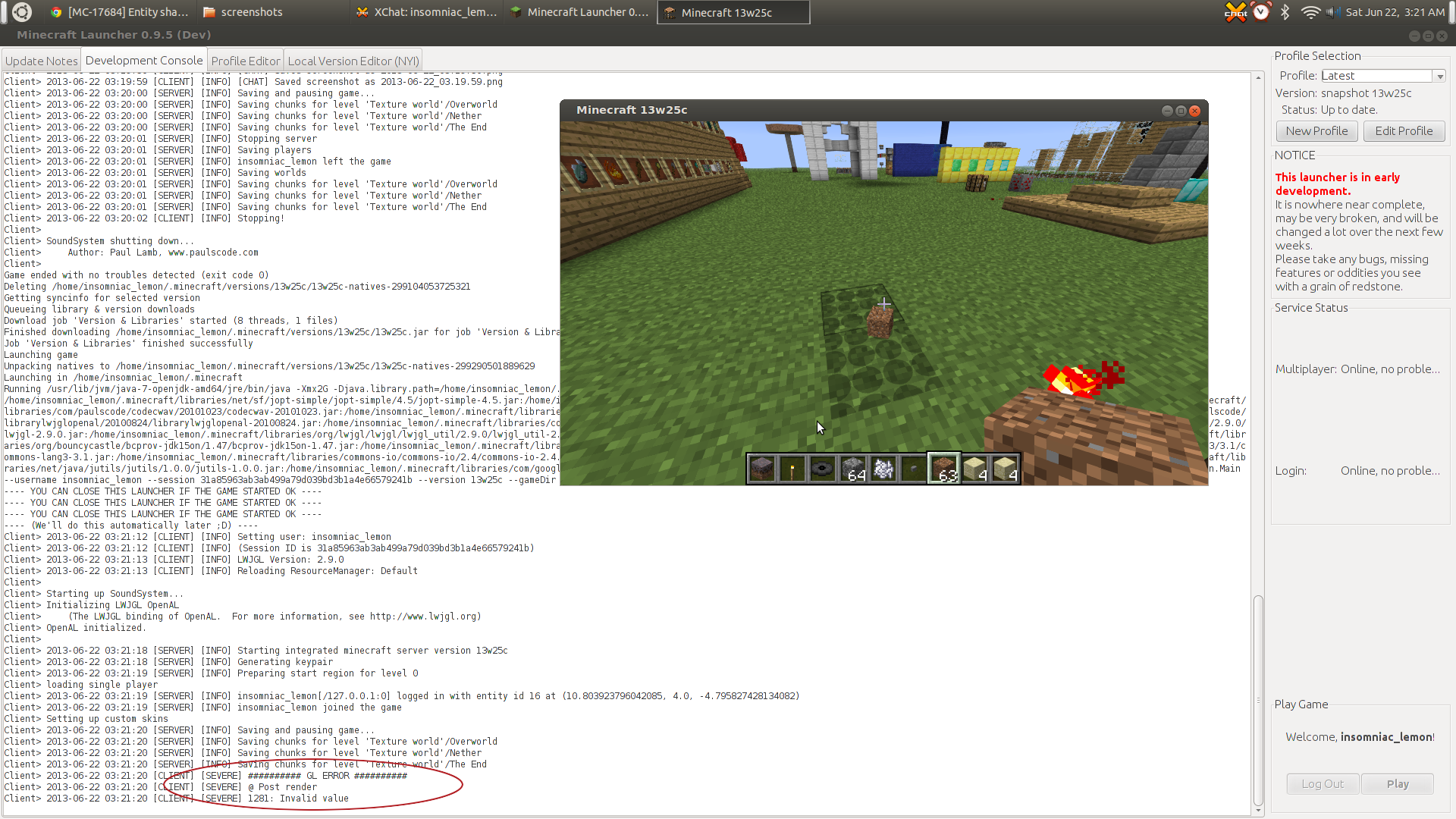
It is caused by a GL error.
Also, this same error sometimes will occur on its own when the shadow error will occur. It will either happen a bit after picking up a few items, or even rarely completely freak out and not stop having the error (as shown in the picture with the most errors).
The chicken's shadow shows many small circles across any blocks it is standing on.
This can still happen with the proper mcmeta file. Often when starting up minecraft or loading resource packs, the it will display wrong, and then reloading with f3+t will fix it.
It is caused by a GL error.
Also, this same error sometimes will occur on its own when the shadow error will occur. It will either happen a bit after picking up a few items, or even rarely completely freak out and not stop having the error (as shown in the picture with the most errors). When this happens, it can take multiple refreshes of the resource system to stop for some reason.
Steps to reproduce:
Use default resource packLoadthe test world "error_happens"Stand in some distance in front of the item frame wall with the compass in FOV- ## GL ERROR ## : @ Post render 1281: Invalid value will throw in the dev console
- Throw some item on the ground
Minecraft / OpenGL / LWJGL gets messed up after that, the shadow effect will affect other worlds too until Minecraft gets restarted.
The chicken's shadow shows many small circles across any blocks it is standing on.
This can still happen with the proper mcmeta file. Often when starting up minecraft or loading resource packs, the it will display wrong, and then reloading with f3+t will fix it.
It is caused by a GL error.
Also, this same error sometimes will occur on its own when the shadow error will occur. It will either happen a bit after picking up a few items, or even rarely completely freak out and not stop having the error (as shown in the picture with the most errors). When this happens, it can take multiple refreshes ofthe resource systemto stop for some reason.Steps to reproduce:
- Load the test world "error_happens"
- Stand in some distance in front of the item frame wall with the compass in FOV
- Throw some item on the ground
Minecraft / OpenGL / LWJGL gets messed up after that (GL ERROR) messing up entity shadows. the shadow effect will affect other worlds too until Minecraft gets restarted, or until the resource pack system is reloaded (f3+t).
Steps to reproduce:
- Use default resource pack
- Load the test world "error_happens"
- Stand at 10 / 4 / 4 (in front of the item frame wall) and look east (compass in FOV)
- ## GL ERROR ## : @ Post render 1281: Invalid value will throw in the dev console
- Throw some item on the ground
Affects AMD Catalyst 13.12:
OpenGL: AMD Radeon HD 6700 Series GL version 4.3.12618 Compatibility Profile Context 13.251.0.0, ATI Technologies Inc.
Minecraft / OpenGL / LWJGL gets messed up after that, the shadow effect will affect other worlds too until Minecraft gets restarted.
The
chicken's shadow shows many small circles across any blocks it is standing on.This can still happen with the proper mcmeta file. Often when starting up minecraft or loading resource packs, the it will display wrong, and then reloading with f3+t will fix it.
It is caused by a GL error.
Also, this same error sometimes will occur on its own when the shadow error will occur. It will either happen a bit after picking up a few items, or even rarely completely freak out and not stop having the error (as shown in the picture with the most errors). When this happens, it can take multiple refreshes of the resource system to stop for some reason.
The shadow can break and repeat under specific conditions, not related to the resource pack (or .mcmeta files).
Steps to reproduce:
- Use default resource pack
- Load the test world "error_happens"
- Stand at 10 / 4 / 4 (in front of the item frame wall) and look east (compass in FOV)
- ## GL ERROR ## : @ Post render 1281: Invalid value will throw in the dev console
- Throw some item on the ground
Affects AMD Catalyst 13.12:
OpenGL: AMD Radeon HD 6700 Series GL version 4.3.12618 Compatibility Profile Context 13.251.0.0, ATI Technologies Inc.
Also affects nVidia GTS 450, NVIDIA Driver Version: 319.32, NV-CONTROL Version 1.29, GL version 4.3.0.
Minecraft / OpenGL / LWJGL gets messed up after that, the shadow effect will affect other worlds too until Minecraft gets restarted, or until resource system is reloaded (such as f3+t or changing resource packs).
The issue seems to be related to the location of the item frame with the compass in it, and where you throw an item. It can be reproduce in a new world:
-make a new creative mode/superflat world
-do the command /tp @p 0 5 0
-middle click grass, place one
-get an item frame and compass from creative inventory
-place item frame then compass
-while looking at it, throw something on the ground near it

Stained glass has backface culling removed, and partial transparency support. However, normal glass has neither of these, and for no good reason.
Removing backface culling for glass just makes sense. You can SEE through the glass, so you KNOW when the back faces aren't showing. Having backface culling on glass is quite ugly, and makes it hard to tell where the other side of a glass wall is.
Partial transparency is also a nice feature. You could say "normal glass doesn't need it" because there is stained glass, however this isn't true because even normal glass has a small amount of color, based on how it was formed (such as density) and from which angle it is being viewed from.
Partial transparency can also be used to simulate glare, scratches, smudges, dirt, imperfections, cracks, etc.
Glass should just use the same template as stained glass does, but also allow lower transparencies
ifstained glasshas trouble with those.Stained glass has backface culling removed, and partial transparency support. However, normal glass has neither of these, and for no good reason.
Removing backface culling for glass just makes sense. You can SEE through the glass, so you KNOW when the back faces aren't showing. Having backface culling on glass is quite ugly, and makes it hard to tell where the other side of a glass wall is.
Partial transparency is also a nice feature. You could say "normal glass doesn't need it" because there is stained glass, however this isn't true because even normal glass has a small amount of color, based on how it was formed (such as density) and from which angle it is being viewed from.
Partial transparency can also be used to simulate glare, scratches, smudges, dirt, imperfections, cracks, etc.
Glass should just use the same template as stained glass does, but also allow lower transparencies than stained glass (there is a bug currently .
Stained glass has backface culling removed, and partial transparency support. However, normal glass has neither of these, and for no good reason.
Removing backface culling for glass just makes sense. You can SEE through the glass, so you KNOW when the back faces aren't showing. Having backface culling on glass is quite ugly, and makes it hard to tell where the other side of a glass wall is.
Partial transparency is also a nice feature. You could say "normal glass doesn't need it" because there is stained glass, however this isn't true because even normal glass has a small amount of color, based on how it was formed (such as density) and from which angle it is being viewed from.
Partial transparency can also be used to simulate glare, scratches, smudges, dirt, imperfections, cracks, etc.
Glass should just use the same template as stained glass does, but also allow lower transparencies than stained glass (there is a bug currently .
Stained glass has backface culling removed, and partial transparency support. However, normal glass has neither of these, and for no good reason.
Removing backface culling for glass just makes sense. You can SEE through the glass, so you KNOW when the back faces aren't showing. Having backface culling on glass is quite ugly, and makes it hard to tell where the other side of a glass wall is.
Partial transparency is also a nice feature. You could say "normal glass doesn't need it" because there is stained glass, however this isn't true because even normal glass has a small amount of color, based on how it was formed (such as density) and from which angle it is being viewed from.
Partial transparency can also be used to simulate glare, scratches, smudges, dirt, imperfections, cracks, etc.
Glass should just use the same template as stained glass does, but also allow lower transparencies than stained glass (there is a bug currently, see
MC-31658, where opacity lower than 50% is cut-off. this is an issue because the opacity of the texture is always added to the other faces, so without <50%, you can't get that low of an opacity).
Stained glass has backface culling removed, and partial transparency support. However, normal glass has neither of these, and for no good reason.
Removing backface culling for glass just makes sense. You can SEE through the glass, so you KNOW when the back faces aren't showing. Having backface culling on glass is quite ugly, and makes it hard to tell where the other side of a glass wall is.
Partial transparency is also a nice feature. You could say "normal glass doesn't need it" because there is stained glass, however this isn't true because even normal glass has a small amount of color, based on how it was formed (such as density) and from which angle it is being viewed from.
Partial transparency can also be used to simulate glare, scratches, smudges, dirt, imperfections, cracks, etc.
Glass should just use the same template as stained glass does, but also allow lower transparencies than stained glass (there is a bug currently, see
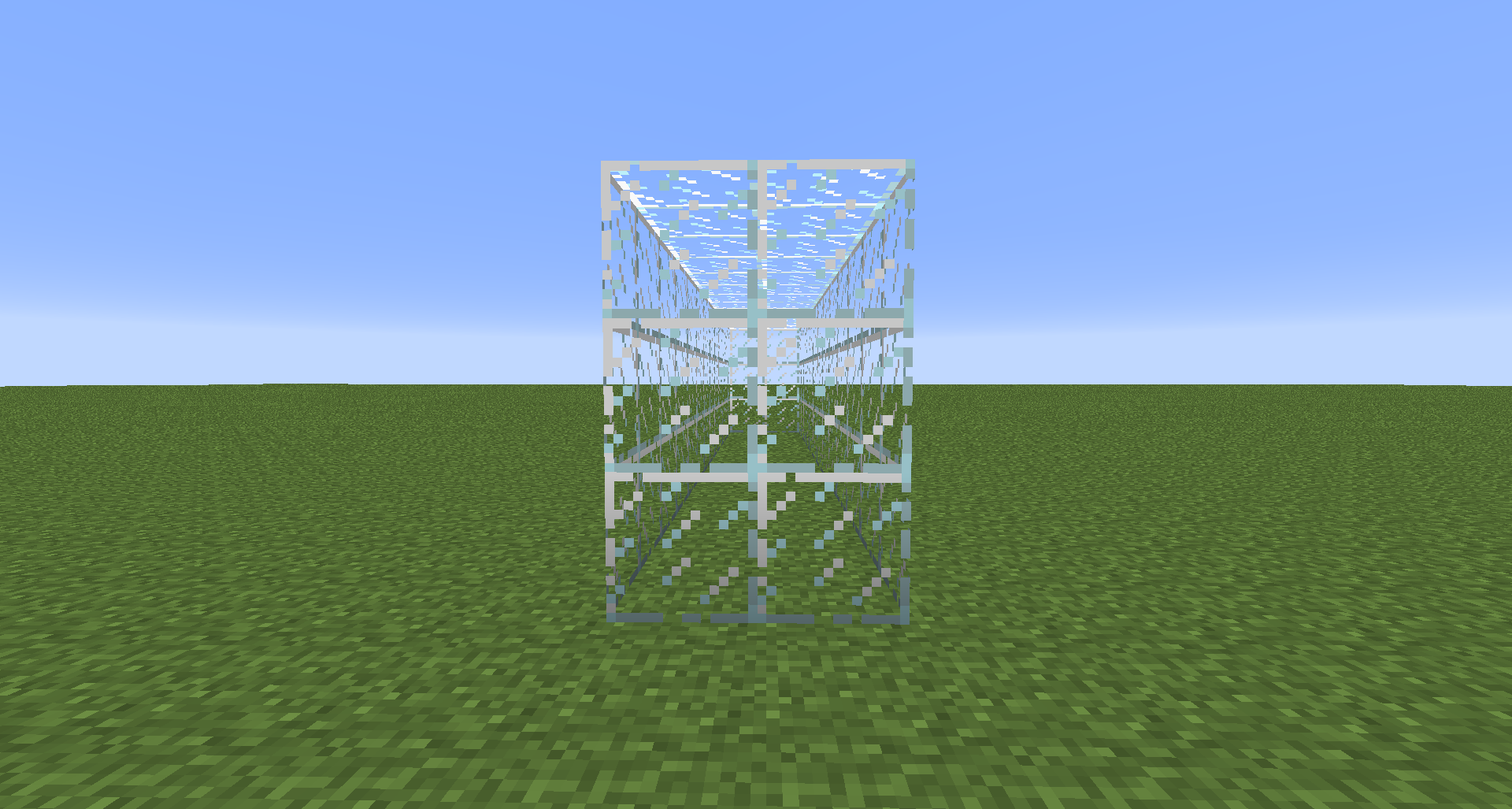
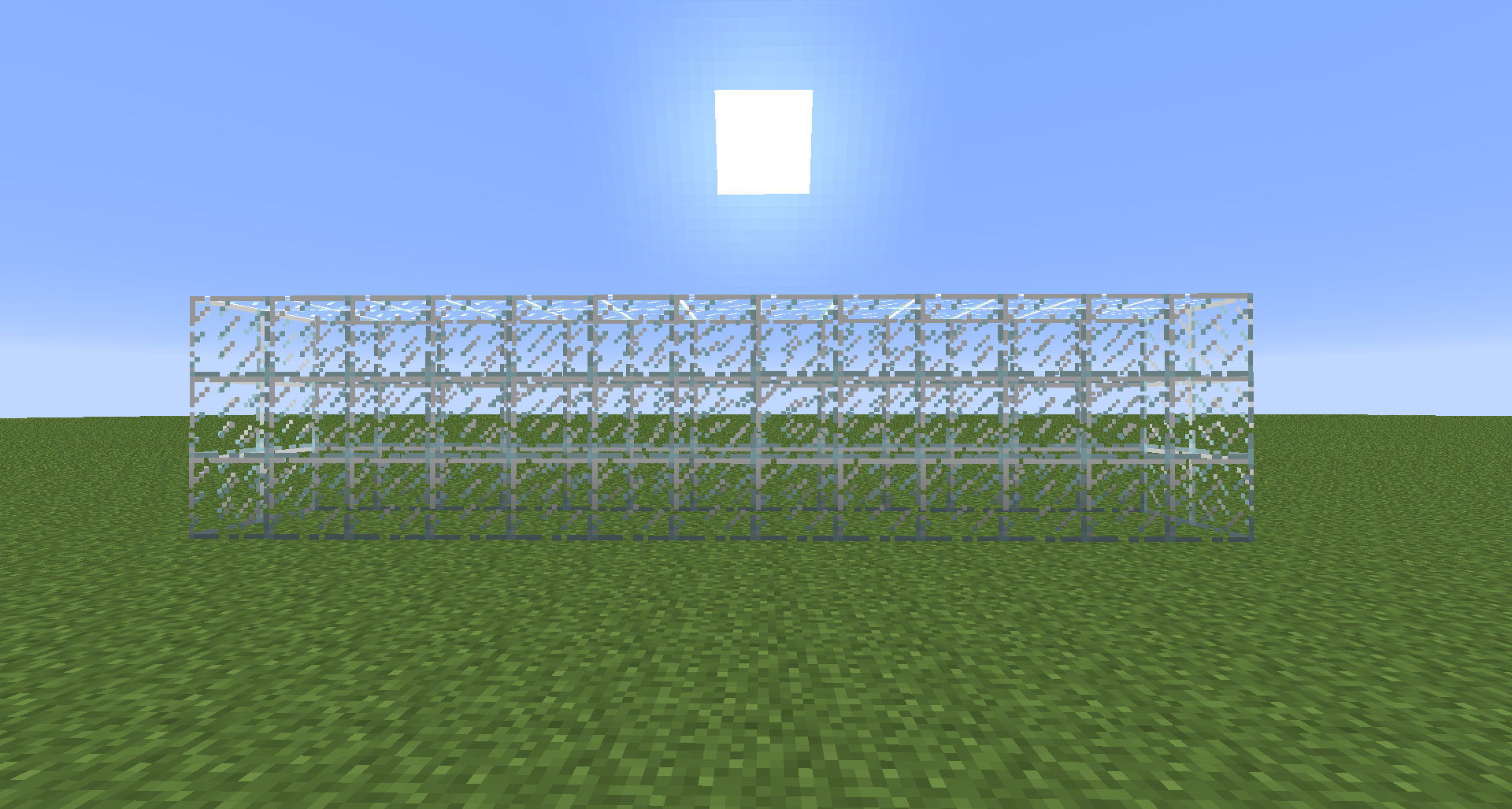
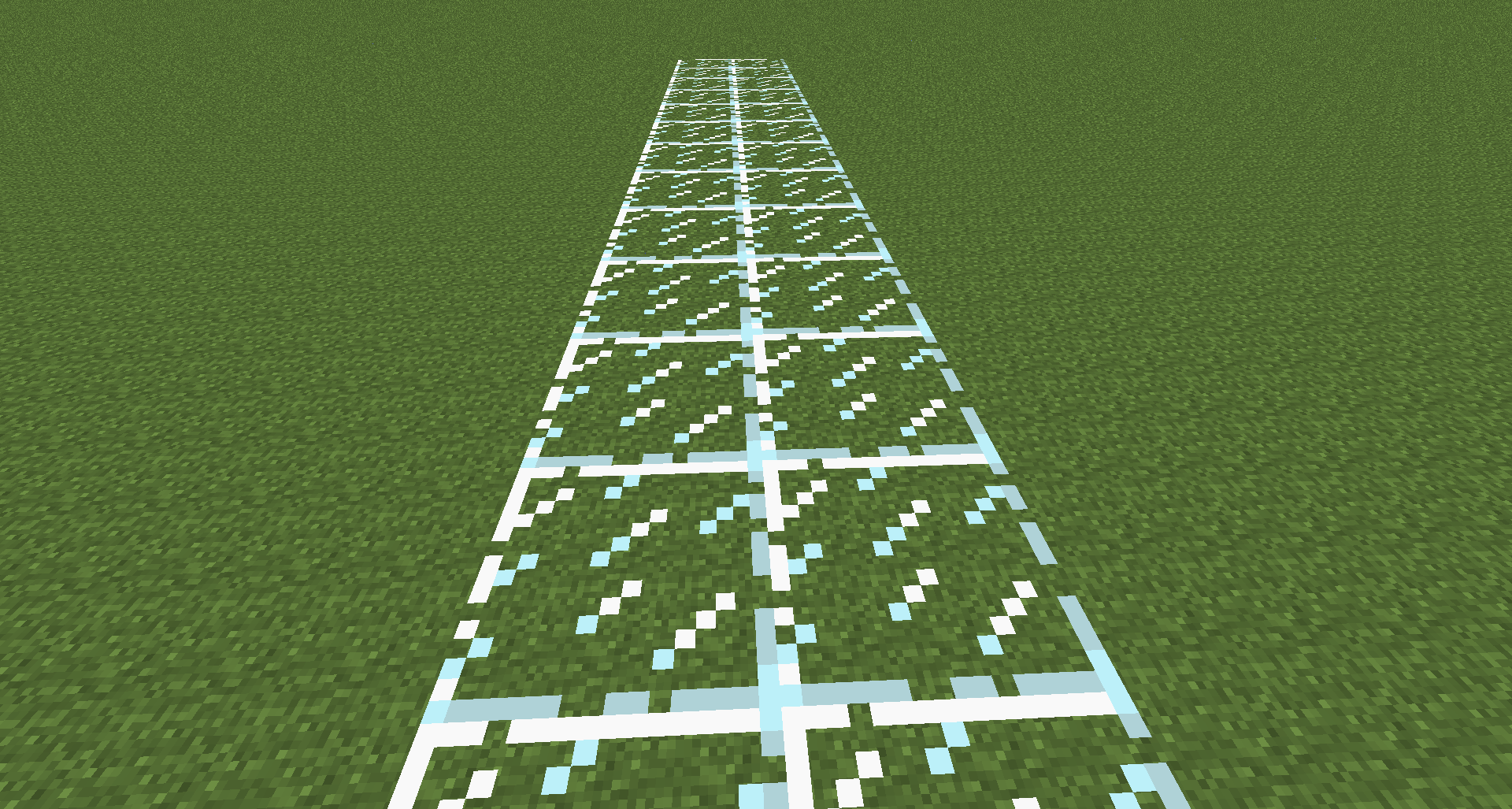
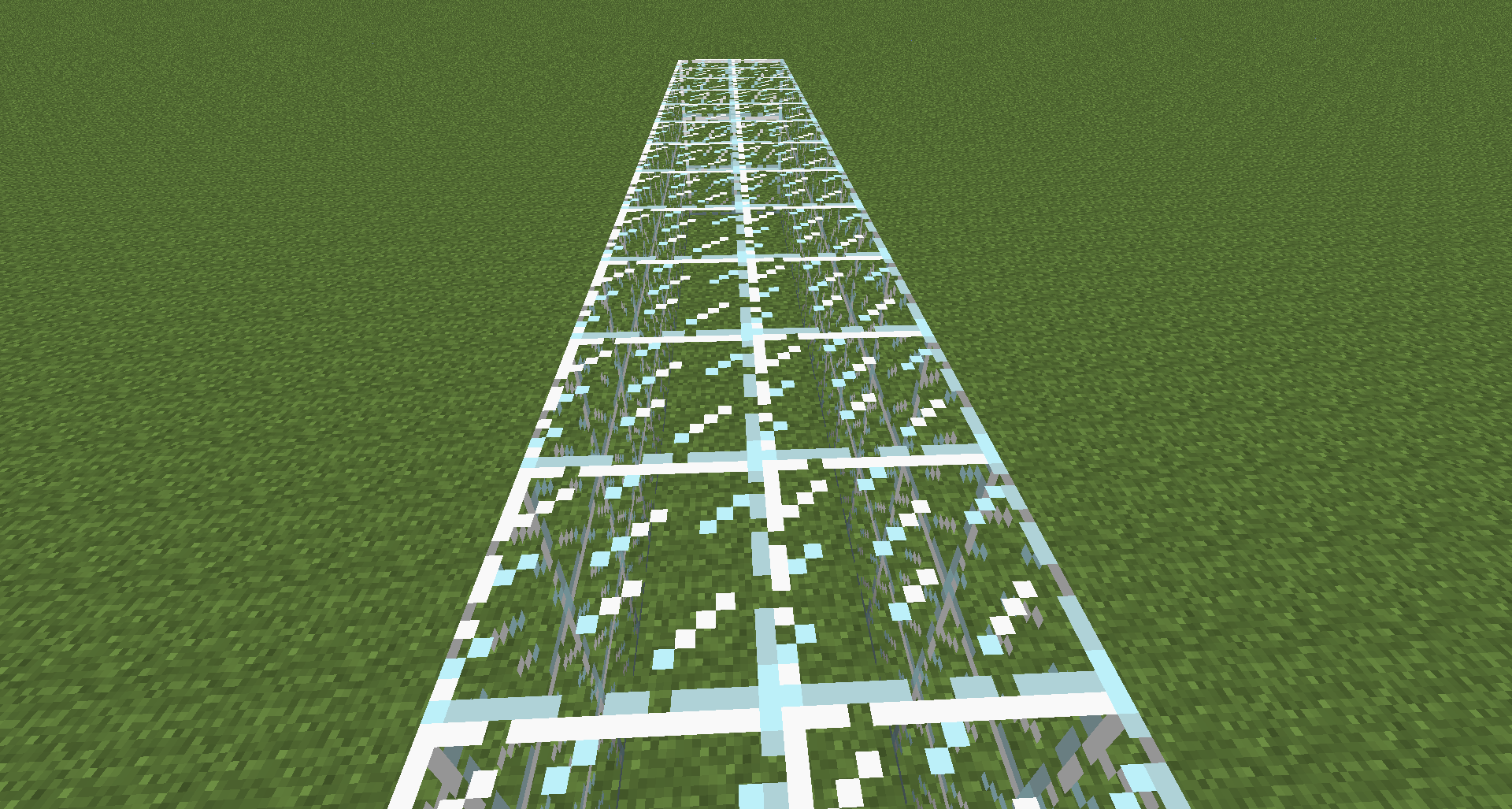
MC-31658, where opacity lower than 50% is cut-off. this is an issue because the opacity of the texture is always added to the other faces, so without <50%, you can't get that low of an opacity).EDIT: I have now attached an image comparing regular and stained glass, in a configuration where backface culling causes a visibility (or depth) issue that the stained glass does not have.
Stained glass has backface culling removed, and partial transparency support. However, normal glass has neither of these, and for no good reason.
Removing backface culling for glass just makes sense. You can SEE through the glass, so you KNOW when the back faces aren't showing. Having backface culling on glass is quite ugly, and makes it hard to tell where the other side of a glass wall is.
Partial transparency is also a nice feature. You could say "normal glass doesn't need it" because there is stained glass, however this isn't true because even normal glass has a small amount of color, based on how it was formed (such as density) and from which angle it is being viewed from.
Partial transparency can also be used to simulate glare, scratches, smudges, dirt, imperfections, cracks, etc.
Glass should just use the same template as stained glass does, but also allow lower transparencies than stained glass (there is a bug currently, see
MC-31658, where opacity lower than 50% is cut-off. this is an issue because the opacity of the texture is always added to the other faces, so without <50%, you can't get that low of an opacity).EDIT: I have now attached an image comparing regular and stained glass, in a configuration where backface culling causes a visibility (or depth) issue that the stained glass does not have.
EDIT2: Possible solution that allows for artist's choice of backface culling or not in their packs:
The .mcmeta file:
{
{ "backfaces": true }
"texture":}
The only problem with this is that derivative textures, like the beacon glass, would either take the attribute from standard glass or not be changed at all.
another possible solution is the creation of a new mcmeta file, maybe "rules.mcmeta":
{
{ "glass":false, "stained_glass":true, "beacon":true, "torch":true, "redstone_torch":true, "cactus":true }
"backfaces":}
That would have less issues with derivative textures, and might also allow for entities (like the ender crystal) to have backface culling removed as well. The reason things like torches and cacti are on that list is because their faces can be larger than the rectangular prism they create before they intersect, meaning that you can see where the face should be but isn't because it is culled. This is very noticable when looking at the top of the default redstone torch (while fairly close) and walking around it.
Stained glass has backface culling removed, and partial transparency support. However, normal glass has neither of these, and for no good reason.
Removing backface culling for glass just makes sense. You can SEE through the glass, so you KNOW when the back faces aren't showing. Having backface culling on glass is quite ugly, and makes it hard to tell where the other side of a glass wall is.
Partial transparency is also a nice feature. You could say "normal glass doesn't need it" because there is stained glass, however this isn't true because even normal glass has a small amount of color, based on how it was formed (such as density) and from which angle it is being viewed from.
Partial transparency can also be used to simulate glare, scratches, smudges, dirt, imperfections, cracks, etc.
Glass should just use the same template as stained glass does, but also allow lower transparencies than stained glass (there is a bug currently, see
MC-31658, where opacity lower than 50% is cut-off. this is an issue because the opacity of the texture is always added to the other faces, so without <50%, you can't get that low of an opacity).EDIT: I have now attached an image comparing regular and stained glass, in a configuration where backface culling causes a visibility (or depth) issue that the stained glass does not have.
EDIT2: Possible solution that allows for artist's choice of backface culling or not in their packs:
The .mcmeta file:
{
{ "backfaces": true }
"texture":}
The only problem with this is that derivative textures, like the beacon glass, would either take the attribute from standard glass or not be changed at all.
another possible solution is the creation of a new mcmeta file, maybe "rules.mcmeta":
{
{ "glass":false, "stained_glass":true, "beacon":true, "torch":true, "redstone_torch":true, "cactus":true }
"backfaces":}
That would have less issues with derivative textures, and might also allow for entities (like the ender crystal) to have backface culling removed as well. The reason things like torches and cacti are on that list is because their faces can be larger than the rectangular prism they create before they intersect, meaning that you can see where the face should be but isn't because it is culled. This is very noticeable when looking at the top of the default redstone torch (while fairly close) and walking around it.
Stained glass has backface culling removed, and partial transparency support. However, normal glass has neither of these, and for no good reason.
Removing backface culling for glass just makes sense. You can SEE through the glass, so you KNOW when the back faces aren't showing. Having backface culling on glass is quite ugly, and makes it hard to tell where the other side of a glass wall is.
Partial transparency is also a nice feature. You could say "normal glass doesn't need it" because there is stained glass, however this isn't true because even normal glass has a small amount of color, based on how it was formed (such as density) and from which angle it is being viewed from.
Partial transparency can also be used to simulate glare, scratches, smudges, dirt, imperfections, cracks, etc.
Glass should just use the same template as stained glass does, but also allow lower transparencies than stained glass (there is a bug currently, see
MC-31658, where opacity lower than 50% is cut-off. this is an issue because the opacity of the texture is always added to the other faces, so without <50%, you can't get that low of an opacity).EDIT: I have now attached an image comparing regular and stained glass, in a configuration where backface culling causes a visibility (or depth) issue that the stained glass does not have.
EDIT2: Possible solution that allows for artist's choice of backface culling or not in their packs:
The .mcmeta file:
{
{ "backfaces": true }
"texture":}
The only problem with this is that derivative textures, like the beacon glass, would either take the attribute from standard glass or not be changed at all.
another possible solution is the creation of a new mcmeta file, maybe "rules.mcmeta":
{
{ "glass":false, "stained_glass":true, "beacon":true, "torch":true, "redstone_torch":true, "cactus":true }
"backfaces":}
That would have less issues with derivative textures, and might also allow for entities (like the ender crystal) to have backface culling removed as well. The reason things like torches and cacti are on that list is because their faces can be larger than the rectangular prism they create before they intersect, meaning that you can see where the face should be but isn't because it is culled. This is very noticeable when looking at the top of the default redstone torch (while fairly close) and walking around it.
Stained glass has backface culling removed, and partial transparency support. However, normal glass has neither of these, and for no good reason.
Removing backface culling for glass just makes sense. You can SEE through the glass, so you KNOW when the back faces aren't showing. Having backface culling on glass is quite ugly, and makes it hard to tell where the other side of a glass wall is.
Partial transparency is also a nice feature. You could say "normal glass doesn't need it" because there is stained glass, however this isn't true because even normal glass has a small amount of color, based on how it was formed (such as density) and from which angle it is being viewed from.
Partial transparency can also be used to simulate glare, scratches, smudges, dirt, imperfections, cracks, etc.
Glass should just use the same template as stained glass does, but also allow lower transparencies than stained glass (there is a bug currently, see
MC-31658, where opacity lower than 50% is cut-off. this is an issue because the opacity of the texture is always added to the other faces, so without <50%, you can't get that low of an opacity).EDIT: I have now attached an image comparing regular and stained glass, in a configuration where backface culling causes a visibility (or depth) issue that the stained glass does not have.
EDIT2:Possible solution that allows for artist's choice of backface culling or not in their packs:The .mcmeta file:
{
{ "backfaces": true }
"texture":}
The only problem with this is that derivative textures, like the beacon glass, would either take the attribute from standard glass or not be changed at all.
another possible solution is the creation of a new mcmeta file, maybe "rules.mcmeta":
{
{ "glass":false, "stained_glass":true, "beacon":true, "torch":true, "redstone_torch":true, "cactus":true }
"backfaces":}
That would have less issues with derivative textures, and might also allow for entities (like the ender crystal) to have backface culling removed as well. The reason things like torches and cacti are on that list is because their faces can be larger than the rectangular prism they create before they intersect, meaning that you can see where the face should be but isn't because it is culled. This is very noticeable when looking at the top of the default redstone torch (while fairly close) and walking around it.
Stained glass has backface culling removed, and partial transparency support. However, normal glass has neither of these, and for no good reason.
Removing backface culling for glass just makes sense. You can SEE through the glass, so you KNOW when the back faces aren't showing. Having backface culling on glass is quite ugly, and makes it hard to tell where the other side of a glass wall is.
Partial transparency is also a nice feature. You could say "normal glass doesn't need it" because there is stained glass, however this isn't true because even normal glass has a small amount of color, based on how it was formed (such as density) and from which angle it is being viewed from.
Partial transparency can also be used to simulate glare, scratches, smudges, dirt, imperfections, cracks, etc.
Glass should just use the same template as stained glass does, but also allow lower transparencies than stained glass (there is a bug currently, see
MC-31658, where opacity lower than 50% is cut-off. this is an issue because the opacity of the texture is always added to the other faces, so without <50%, you can't get that low of an opacity).13w42a edit: Due to
MC-34649, Dinnerbone added backface culling to EVERYTHING and this Dinnerbombed water completely. Now being underwater looks like you're in a waterworld.Possible solution that allows for artist's choice of backface culling or not in their packs:
The .mcmeta file:
{
{ "backfaces": true }
"texture":}
The only problem with this is that derivative textures, like the beacon glass, would either take the attribute from standard glass or not be changed at all.
another possible solution is the creation of a new mcmeta file, maybe "rules.mcmeta":
{
{ "glass":false, "stained_glass":true, "beacon":true, "torch":true, "redstone_torch":true, "cactus":true }
"backfaces":}
That would have less issues with derivative textures, and might also allow for entities (like the ender crystal) to have backface culling removed as well. The reason things like torches and cacti are on that list is because their faces can be larger than the rectangular prism they create before they intersect, meaning that you can see where the face should be but isn't because it is culled. This is very noticeable when looking at the top of the default redstone torch (while fairly close) and walking around it.
Stained glass has backface culling removed, and partial transparency support. However, normal glass has neither of these, and for no good reason.
Removing backface culling for glass just makes sense. You can SEE through the glass, so you KNOW when the back faces aren't showing. Having backface culling on glass is quite ugly, and makes it hard to tell where the other side of a glass wall is.
Partial transparency is also a nice feature. You could say "normal glass doesn't need it" because there is stained glass, however this isn't true because even normal glass has a small amount of color, based on how it was formed (such as density) and from which angle it is being viewed from.Partial transparency
canalsobe used to simulate glare, scratches, smudges, dirt, imperfections, cracks, etc.Glass should just use the same template as stained glass does, but also allow lower transparencies than stained glass (there is a bug currently, see
MC-31658, where opacity lower than 50% is cut-off. this is an issue because the opacity of the texture is always added to the other faces, so without <50%, you can't get that low of an opacity).13w42a edit: Due to
MC-34649, Dinnerbone added backface culling to EVERYTHING and this Dinnerbombed water completely. Now being underwater looks like you're in a waterworld.Possible solution that allows for artist's choice of backface culling or not in their packs:
The .mcmeta file:
{
{ "backfaces": true }
"texture":}
The only problem with this is that derivative textures, like the beacon glass, would either take the attribute from standard glass or not be changed at all.
another possible solution is the creation of a new mcmeta file, maybe "rules.mcmeta":
{
{ "glass":false, "stained_glass":true, "beacon":true, "torch":true, "redstone_torch":true, "cactus":true }
"backfaces":}
That would have less issues with derivative textures, and might also allow for entities (like the ender crystal) to have backface culling removed as well. The reason things like torches and cacti are on that list is because their faces can be larger than the rectangular prism they create before they intersect, meaning that you can see where the face should be but isn't because it is culled. This is very noticeable when looking at the top of the default redstone torch (while fairly close) and walking around it.
When stained glass was introduced, it did not have backface culling, and ice and portals also had backface culling removed. However, later this was "fixed" because of
MC-34649, the result being to add backface culling to EVERY block, including water.Some of this issue is user preference, but the side that doesn't like backface culling on blocks like glass and ice not only is an aesthetic one, but also one of a visibility issue that cannot be fixed, unlike many of the issues that people who like backface culling find with the absence of it.
Backface culling will make large glass surfaces hard to see exactly where glass is when viewed from 1 direction (see 1a-3a). With backface culling enabled,
Partial transparency is also a nice feature. You could say "normal glass doesn't need it" because there is stained glass, however this isn't true because even normal glass has a small amount of color, based on how it was formed (such as density) and from which angle it is being viewed from.
Partial transparency can also be used to simulate glare, scratches, smudges, dirt, imperfections, cracks, etc.
13w42a edit: Due to
MC-34649, Dinnerbone added backface culling to EVERYTHING and this Dinnerbombed water completely. Now being underwater looks like you're in a waterworld.Possible solution that allows for artist's choice of backface culling or not in their packs:
The .mcmeta file:
{
{ "backfaces": true }
"texture":}
The only problem with this is that derivative textures, like the beacon glass, would either take the attribute from standard glass or not be changed at all.
another possible solution is the creation of a new mcmeta file, maybe "rules.mcmeta":
{
{ "glass":false, "stained_glass":true, "beacon":true, "torch":true, "redstone_torch":true, "cactus":true }
"backfaces":}
That would have less issues with derivative textures, and might also allow for entities (like the ender crystal) to have backface culling removed as well. The reason things like torches and cacti are on that list is because their faces can be larger than the rectangular prism they create before they intersect, meaning that you can see where the face should be but isn't because it is culled. This is very noticeable when looking at the top of the default redstone torch (while fairly close) and walking around it.
When stained glass was introduced, it did not have backface culling, and ice and portals also had backface culling removed. However, later this was "fixed" because of
MC-34649, the result being to add backface culling to EVERY block, including water.Some of this issue is user preference, but the side that doesn't like backface culling on blocks like glass and ice not only is an aesthetic one, but also one of a visibility issue that cannot be fixed, unlike many of the issues that people who like backface culling find with the absence of it.
Backface culling will make large glass surfaces hard to see exactly where glass is when viewed from 1 direction (see 1a-3a). With backface culling enabled,
Partial transparency is also a nice feature. You could say "normal glass doesn't need it" because there is stained glass, however this isn't true because even normal glass has a small amount of color, based on how it was formed (such as density) and from which angle it is being viewed from.
Partial transparency can also be used to simulate glare, scratches, smudges, dirt, imperfections, cracks, etc.
13w42a edit: Due toMC-34649, Dinnerbone added backface culling to EVERYTHING and this Dinnerbombed water completely. Now being underwater looks like you're in a waterworld.Possible solution that allows for artist's choice of backface culling or not in their packs:
The .mcmeta file:
{
{ "backfaces": true }
"texture":}
The only problem with this is that derivative textures, like the beacon glass, would either take the attribute from standard glass or not be changed at all.
another possible solution is the creation of a new mcmeta file, maybe "rules.mcmeta":
{
{ "glass":false, "stained_glass":true, "beacon":true, "torch":true, "redstone_torch":true, "cactus":true }
"backfaces":}
That would have less issues with derivative textures, and might also allow for entities (like the ender crystal) to have backface culling removed as well. The reason things like torches and cacti are on that list is because their faces can be larger than the rectangular prism they create before they intersect, meaning that you can see where the face should be but isn't because it is culled. This is very noticeable when looking at the top of the default redstone torch (while fairly close) and walking around it.
When stained glass was introduced, it did not have backface culling, and ice and portals also had backface culling removed. However, later this was "fixed" because of
MC-34649, the result being to add backface culling to EVERY block, including water. Water is now harder to see where it is, along with not being able to see the surface of the water, making it look like you're in a waterworld.Some of this issue is user preference, but the side that doesn't like backface culling on blocks like glass and ice not only is an aesthetic one, but also one of a visibility issue that cannot be fixed, unlike many of the issues that people who like backface culling find with the absence of it.
Backface culling will make large glass surfaces hard to see exactly where glass is when viewed from 1 direction (see 1a-3a and compare with 1b-3b). With backface culling enabled, you can only see 1 or 2 dimensions of a shape (depending on your viewing angle) and even then, this can be deceiving (compare 4a to 4b)
Partial transparency is also a nice feature. You could say "normal glass doesn't need it" because there is stained glass, however this isn't true because even normal glass has a small amount of color, based on how it was formed (such as density) and from which angle it is being viewed from. Partial transparency can also be used to simulate glare, scratches, smudges, dirt, imperfections, cracks, etc. It can allow artists to add detail that is not as much in the way as opaque pixels, and this is a way to make glass that has backfaces enabled more pleasant.
When stained glass was originally added, it also had a transparency issue that would not allow for you to use textures with below 50% opacity properly. The faces of the blocks blended together as well, so it was more opaque than the texture itself. Some would say backface culling fixed this, however there is no issue now, because now we could lower the opacity of the texture to compensate for this. It could be fixed in Minecraft by inversely blending the partially transparent textures before mapping them, that way when they blend on one object, the blending is the proper opacity.
Z-fighting is also not a reason to backface cull. Z-fighting a large problem in Minecraft and it needs to be approached at the source. Whether it is fixed through block logic, OpenGL functions, raytracing, or just changing how certain textures are placed/used, it needs to be dealt with.
Possible solution that allows for artist's choice of backface culling or not in their packs:
The .mcmeta file:
{
{ "backfaces": true }
"texture":}
The only problem with this is that derivative textures, like the beacon glass, would either take the attribute from standard glass or not be changed at all.
another possible solution is the creation of a new mcmeta file, maybe "rules.mcmeta":
{
{ "glass":false, "stained_glass":true, "beacon":true, "torch":true, "redstone_torch":true, "cactus":true }
"backfaces":}
That would have less issues with derivative textures, and might also allow for entities (like the ender crystal) to have backface culling removed as well. The reason things like torches and cacti are on that list is because their faces can be larger than the rectangular prism they create before they intersect, meaning that you can see where the face should be but isn't because it is culled. This is very noticeable when looking at the top of the default redstone torch (while fairly close) and walking around it.
When stained glass was introduced, it did not have backface culling, and ice and portals also had backface culling removed. However, later this was "fixed" because of
MC-34649, the result being to add backface culling to EVERY block, including water. Water is now harder to see where it is, along with not being able to see the surface of the water, making it look like you're in a waterworld.Some of this issue is user preference, but the side that doesn't like backface culling on blocks like glass and ice not only is an aesthetic one, but also one of a visibility issue that cannot be fixed, unlike many of the issues that people who like backface culling find with the absence of it.
Backface culling will make large glass surfaces hard to see exactly where glass is when viewed from 1 direction (see 1a-3a and compare with 1b-3b). With backface culling enabled, you can only see 1 or 2 dimensions of a shape (depending on your viewing angle) and even then, this can be deceiving (compare 4a to 4b)
Partial transparency is also a nice feature. You could say "normal glass doesn't need it" because there is stained glass, however this isn't true because even normal glass has a small amount of color, based on how it was formed (such as density) and from which angle it is being viewed from. Partial transparency can also be used to simulate glare, scratches, smudges, dirt, imperfections, cracks, etc. It can allow artists to add detail that is not as much in the way as opaque pixels, and this is a way to make glass that has backfaces enabled more pleasant.
When stained glass was originally added, it also had a transparency issue that would not allow for you to use textures with below 50% opacity properly. The faces of the blocks blended together as well, so it was more opaque than the texture itself. Some would say backface culling fixed this, however there is no issue now, because now we could lower the opacity of the texture to compensate for this. It could be fixed in Minecraft by inversely blending the partially transparent textures before mapping them, that way when they blend on one object, the blending is the proper opacity.
Z-fighting is also not a reason to backface cull. Z-fighting a large problem in Minecraft and it needs to be approached at the source. Whether it is fixed through block logic, OpenGL functions, raytracing, or just changing how certain textures are placed/used, it needs to be dealt with.
Possible solution that allows for artist's choice of backface culling or not in their packs:The .mcmeta file:
{
{ "backfaces": true }
"texture":}
The only problem with this is that derivative textures, like the beacon glass, would either take the attribute from standard glass or not be changed at all.
another possible solution is the creation of a new
mcmetafile, maybe "rules.mcmeta":{
{ "glass":false, "stained_glass":true, "beacon":true, "torch":true, "redstone_torch":true, "cactus":true }
"backfaces":}
That would have less issues with derivative textures, and might also allow for entities (like the ender crystal) to have backface culling removed as well. The reason things like torches and cacti are on that list is because their faces can be larger than the rectangular prism they create before they intersect, meaning that you can see where the face should be but isn't because it is culled. This is very noticeable when looking at the top of the default redstone torch (while fairly close) and walking around it.
When stained glass was introduced, it did not have backface culling, and ice and portals also had backface culling removed. However, later this was "fixed" because of
MC-34649, the result being to add backface culling to EVERY block, including water. Water is now harder to see where it is, along with not being able to see the surface of the water, making it look like you're in a waterworld.Some of this issue is user preference, but the side that doesn't like backface culling on blocks like glass and ice not only is an aesthetic one, but also one of a visibility issue that cannot be fixed, unlike many of the issues that people who like backface culling find with the absence of it.
Backface culling will make large glass surfaces hard to see exactly where glass is when viewed from 1 direction (see 1a-3a and compare with 1b-3b). With backface culling enabled, you can only see 1 or 2 dimensions of a shape (depending on your viewing angle) and even then, this can be deceiving (compare 4a to 4b)
Partial transparency is also a nice feature. You could say "normal glass doesn't need it" because there is stained glass, however this isn't true because even normal glass has a small amount of color, based on how it was formed (such as density) and from which angle it is being viewed from. Partial transparency can also be used to simulate glare, scratches, smudges, dirt, imperfections, cracks, etc. It can allow artists to add detail that is not as much in the way as opaque pixels, and this is a way to make glass that has backfaces enabled more pleasant.
When stained glass was originally added, it also had a transparency issue that would not allow for you to use textures with below 50% opacity properly. The faces of the blocks blended together as well, so it was more opaque than the texture itself. Some would say backface culling fixed this, however there is no issue now, because now we could lower the opacity of the texture to compensate for this. It could be fixed in Minecraft by inversely blending the partially transparent textures before mapping them, that way when they blend on one object, the blending is the proper opacity.
Z-fighting is also not a reason to backface cull. Z-fighting a large problem in Minecraft and it needs to be approached at the source. Whether it is fixed through block logic, OpenGL functions, raytracing, or just changing how certain textures are placed/used, it needs to be dealt with.
Backface culling is meant to not render faces that you don't see. That is how it should be used. If you can potentially see the face, then backface culling should not be applied, otherwise the result is ugly and weird, as the texture clearly differs based on your position relative to the object. It is true that having backfaces makes it a bit harder to see through in smaller blocks, but this can be remedied with cleaner textures, especially if partial transparency can be used. On large structures having backfaces is not much of a clarity issue, but without it you may need to walk around the structure to see where it stands.
Possible solution that allows for artist's choice of backface culling or not in their packs:
The .mcmeta file:
{
"texture":Unknown macro: { "backfaces"}}
The only problem with this is that derivative textures, like the beacon glass, would either take the attribute from standard glass or not be changed at all.
another possible solution is the creation of a new .json file, maybe "backfaces.json":
{
"backfaces":Unknown macro: { "glass"}}
That would have less issues with derivative textures, and might also allow for entities (like the ender crystal) to have backface culling removed as well. The reason things like torches and cacti are on that list is because their faces can be larger than the rectangular prism they create before they intersect, meaning that you can see where the face should be but isn't because it is culled. This is very noticeable when looking at the top of the default redstone torch (while fairly close) and walking around it.
Regular glass should be on-par with stained glassBackface culling should not be used improperly
When stained glass was introduced, it did not have backface culling, and ice and portals also had backface culling removed. However, later this was "fixed" because of
MC-34649, the result being to add backface culling to EVERY block, including water. Water is now harder to see where it is, along with not being able to see the surface of the water, making it look like you're in a waterworld.Some of this issue is user preference, but the side that doesn't like backface culling on blocks like glass and ice not only is an aesthetic one, but also one of a visibility issue that cannot be fixed, unlike many of the issues that people who like backface culling find with the absence of it.
Backface culling will make large glass surfaces hard to see exactly where glass is when viewed from 1 direction (see 1a-3a and compare with 1b-3b). With backface culling enabled, you can only see 1 or 2 dimensions of a shape (depending on your viewing angle) and even then, this can be deceiving (compare 4a to 4b)
Partial transparency is also a nice feature. You could say "normal glass doesn't need it" because there is stained glass, however this isn't true because even normal glass has a small amount of color, based on how it was formed (such as density) and from which angle it is being viewed from. Partial transparency can also be used to simulate glare, scratches, smudges, dirt, imperfections, cracks, etc. It can allow artists to add detail that is not as much in the way as opaque pixels, and this is a way to make glass that has backfaces enabled more pleasant.
When stained glass was originally added, it also had a transparency issue that would not allow for you to use textures with below 50% opacity properly. The faces of the blocks blended together as well, so it was more opaque than the texture itself. Some would say backface culling fixed this, however there is no issue now, because now we could lower the opacity of the texture to compensate for this. It could be fixed in Minecraft by inversely blending the partially transparent textures before mapping them, that way when they blend on one object, the blending is the proper opacity.
Z-fighting is also not a reason to backface cull. Z-fighting a large problem in Minecraft and it needs to be approached at the source. Whether it is fixed through block logic, OpenGL functions, raytracing, or just changing how certain textures are placed/used, it needs to be dealt with.
Backface culling is meant to not render faces that you don't see. That is how it should be used. If you can potentially see the face, then backface culling should not be applied, otherwise the result is ugly and weird, as the texture clearly differs based on your position relative to the object. It is true that having backfaces makes it a bit harder to see throughin smallerblocks, but this can be remedied with cleaner textures, especially if partial transparency can be used. On large structures having backfaces is not much of a clarity issue, but without it you may need to walk around the structure to see where it stands.Possible solution that allows for artist's choice of backface culling or not in their packs:
The .mcmeta file:
{
"texture":Unknown macro: { "backfaces"}}
The only problem with this is that derivative textures, like the beacon glass, would either take the attribute from standard glass or not be changed at all.
another possible solution is the creation of a new .json file, maybe "backfaces.json":
{
"backfaces":Unknown macro: { "glass"}}
That would have less issues with derivative textures, and might also allow for entities (like the ender crystal) to have backface culling removed as well. The reason things like torches and cacti are on that list is because their faces can be larger than the rectangular prism they create before they intersect, meaning that you can see where the face should be but isn't because it is culled. This is very noticeable when looking at the top of the default redstone torch (while fairly close) and walking around it.
When stained glass was introduced, it did not have backface culling, and ice and portals also had backface culling removed. However, later this was "fixed" because of
MC-34649, the result being to add backface culling to EVERY block, including water. Water is now harder to see where it is, along with not being able to see the surface of the water, making it look like you're in a waterworld.Some of this issue is user preference, but the side that doesn't like backface culling on blocks like glass and ice not only is an aesthetic one, but also one of a visibility issue that cannot be fixed, unlike many of the issues that people who like backface culling find with the absence of it.
Backface culling will make large glass surfaces hard to see exactly where glass is when viewed from 1 direction (see 1a-3a and compare with 1b-3b). With backface culling enabled, you can only see 1 or 2 dimensions of a shape (depending on your viewing angle) and even then, this can be deceiving (compare 4a to 4b)
Partial transparency is also a nice feature. You could say "normal glass doesn't need it" because there is stained glass, however this isn't true because even normal glass has a small amount of color, based on how it was formed (such as density) and from which angle it is being viewed from. Partial transparency can also be used to simulate glare, scratches, smudges, dirt, imperfections, cracks, etc. It can allow artists to add detail that is not as much in the way as opaque pixels, and this is a way to make glass that has backfaces enabled more pleasant.
When stained glass was originally added, it also had a transparency issue that would not allow for you to use textures with below 50% opacity properly. The faces of the blocks blended together as well, so it was more opaque than the texture itself. Some would say backface culling fixed this, however there is no issue now, because now we could lower the opacity of the texture to compensate for this. It could be fixed in Minecraft by inversely blending the partially transparent textures before mapping them, that way when they blend on one object, the blending is the proper opacity.
Z-fighting is also not a reason to backface cull. Z-fighting a large problem in Minecraft and it needs to be approached at the source. Whether it is fixed through block logic, OpenGL functions, raytracing, or just changing how certain textures are placed/used, it needs to be dealt with.
Some people like water with backface culling because it makes flowing water on the side of most blocks invisible, but this can be fixed instead by making water sides invisible when touching solid blocks. Additionally I'm sure that this could also include glass, or even have waterfalls differ from inner water blocks in bodies of water.
Backface culling is meant to not render faces that you don't see. That is how it should be used. If you can potentially see the face, then backface culling should not be applied, otherwise the result is ugly and weird, as the texture clearly differs based on your position relative to the object. It is true that having backfaces makes it a bit harder to see through in smaller blocks, but this can be remedied with cleaner textures, especially if partial transparency can be used. On large structures having backfaces is not much of a clarity issue, but without it you may need to walk around the structure to see where it stands.
Possible solution that allows for artist's choice of backface culling or not in their packs:
The .mcmeta file:
{ "texture": { "backfaces": true } }The only problem with this is that derivative textures, like the beacon glass, would either take the attribute from standard glass or not be changed at all.
another possible solution is the creation of a new .json file, maybe "backfaces.json":
{ "backfaces": { "glass":false, "stained_glass":true, "beacon":true, "torch":true, "redstone_torch":true, "cactus":true } }That would have less issues with derivative textures, and might also allow for entities (like the ender crystal) to have backface culling removed as well. The reason things like torches and cacti are on that list is because their faces can be larger than the rectangular prism they create before they intersect, meaning that you can see where the face should be but isn't because it is culled. This is very noticeable when looking at the top of the default redstone torch (while fairly close) and walking around it.
When stained glass was introduced, it did not have backface culling, and ice and portals also had backface culling removed. However, later this was "fixed" because of
MC-34649, the result being to add backface culling to EVERY block, including water. Water is now harder to see where it is, along with not being able to see the surface of the water, making it look like you're in a waterworld.Some of this issue is user preference, but the side that doesn't like backface culling on blocks like glass and ice not only is an aesthetic one, but also one of a visibility issue that cannot be fixed, unlike many of the issues that people who like backface culling find with the absence of it.
Backface culling will make large glass surfaces hard to see exactly where glass is when viewed from 1 direction (see 1a-3a and compare with 1b-3b). With backface culling enabled, you can only see 1 or 2 dimensions of a shape (depending on your viewing angle) and even then, this can be deceiving (compare 4a to 4b)
Partial transparency is also a nice feature. You could say "normal glass doesn't need it" because there is stained glass, however this isn't true because even normal glass has a small amount of color, based on how it was formed (such as density) and from which angle it is being viewed from. Partial transparency can also be used to simulate glare, scratches, smudges, dirt, imperfections, cracks, etc. It can allow artists to add detail that is not as much in the way as opaque pixels, and this is a way to make glass that has backfaces enabled more pleasant. What I'm saying is: normal glass needs partial transparency support. Why not allow it if there are no issues with it now and stained glass/ice have it, wasn't the issue they fixed the only reason glass didn't support it in the first place?
When stained glass was originally added, it also had a transparency issue that would not allow for you to use textures with below 50% opacity properly. The faces of the blocks blended together as well, so it was more opaque than the texture itself. Some would say backface culling fixed this, however there is no issue now, because now we could lower the opacity of the texture to compensate for this. It could be fixed in Minecraft by inversely blending the partially transparent textures before mapping them, that way when they blend on one object, the blending is the proper opacity.
Z-fighting is also not a reason to backface cull. Z-fighting a large problem in Minecraft and it needs to be approached at the source. Whether it is fixed through block logic, OpenGL functions, raytracing, or just changing how certain textures are placed/used, it needs to be dealt with.
Some people like water with backface culling because it makes flowing water on the side of most blocks invisible, but this can be fixed instead by making water sides invisible when touching solid blocks. Additionally I'm sure that this could also include glass, or even have waterfalls differ from inner water blocks in bodies of water.
Backface culling is meant to not render faces that you don't see. That is how it should be used. If you can potentially see the face, then backface culling should not be applied, otherwise the result is ugly and weird, as the texture clearly differs based on your position relative to the object. It is true that having backfaces makes it a bit harder to see through in smaller blocks, but this can be remedied with cleaner textures, especially if partial transparency can be used. On large structures having backfaces is not much of a clarity issue, but without it you may need to walk around the structure to see where it stands.
Possible solution that allows for artist's choice of backface culling or not in their packs:
The .mcmeta file:
{ "texture": { "backfaces": true } }The only problem with this is that derivative textures, like the beacon glass, would either take the attribute from standard glass or not be changed at all.
another possible solution is the creation of a new .json file, maybe "backfaces.json":
{ "backfaces": { "glass":false, "stained_glass":true, "beacon":true, "torch":true, "redstone_torch":true, "cactus":true } }That would have less issues with derivative textures, and might also allow for entities (like the ender crystal) to have backface culling removed as well. The reason things like torches and cacti are on that list is because their faces can be larger than the rectangular prism they create before they intersect, meaning that you can see where the face should be but isn't because it is culled. This is very noticeable when looking at the top of the default redstone torch (while fairly close) and walking around it.
When stained glass was introduced, it did not have backface culling, and ice and portals also had backface culling removed. However, later this was "fixed" because of
MC-34649, the result being to add backface culling to EVERY block, including water. Water is now harder to see where it is, along with not being able to see the surface of the water, making it look like you're in a waterworld.Some of this issue is user preference, but the side that doesn't like backface culling on blocks like glass and ice not only is an aesthetic one, but also one of a visibility issue that cannot be fixed, unlike many of the issues that people who like backface culling find with the absence of it.
Backface culling will make large glass surfaces hard to see exactly where glass is when viewed from 1 direction (see 1a-3a and compare with 1b-3b). With backface culling enabled, you can only see 1 or 2 dimensions of a shape (depending on your viewing angle) and even then, this can be deceiving (compare 4a to 4b)
Partial transparency is also a nice feature. You could say "normal glass doesn't need it" because there is stained glass, however this isn't true because even normal glass has a small amount of color, based on how it was formed (such as density) and from which angle it is being viewed from. Partial transparency can also be used to simulate glare, scratches, smudges, dirt, imperfections, cracks, etc. It can allow artists to add detail that is not as much in the way as opaque pixels, and this is a way to make glass that has backfaces enabled more pleasant. What I'm saying is: normal glass needs partial transparency support. Why not allow it if there are no issues with it now and stained glass/ice have it, wasn't the issue they fixed the only reason glass didn't support it in the first place?
When stained glass was originally added, it also had a transparency issue that would not allow for you to use textures with below 50% opacity properly. The faces of the blocks blended together as well, so it was more opaque than the texture itself. Some would say backface culling fixed this, however there is no issue now, because now we could lower the opacity of the texture to compensate for this. It could be fixed in Minecraft by inversely blending the partially transparent textures before mapping them, that way when they blend on one object, the blending is the proper opacity.
Z-fighting is also not a reason to backface cull. Z-fighting a large problem in Minecraft and it needs to be approached at the source. Whether it is fixed through block logic, OpenGL functions, raytracing, or just changing how certain textures are placed/used, it needs to be dealt with.
Some people like water with backface culling because it makes flowing water on the side of most blocks invisible, but this can be fixed instead by making water sides invisible when touching solid blocks. Additionally I'm sure that this could also include glass, or even have waterfalls differ from inner water blocks in bodies of water.
Backface culling is meant to not render faces that you don't see. That is how it should be used. If you can potentially see the face, then backface culling should not be applied, otherwise the result is ugly and weird, as the texture clearly differs based on your position relative to the object. It is true that having backfaces makes it a bit harder to see through in smaller blocks, but this can be remedied with cleaner textures, especially if partial transparency can be used. On large structures having backfaces is not much of a clarity issue, but without it you may need to walk around the structure to see where it stands.
Possible solution that allows for artist's choice of backface culling or not in their packs:
The .mcmeta file:
{ "texture": { "backfaces": true } }The only problem with this is that derivative textures, like the beacon glass, would either take the attribute from standard glass or not be changed at all.
another possible solution is the creation of a new .json file, maybe "backfaces.json":
{ "backfaces": { "glass":false, "stained_glass":true, "beacon":true, "torch":true, "redstone_torch":true, "cactus":true } }That would have less issues with derivative textures, and might also allow for entities (like the ender crystal) to have backface culling removed as well. The reason things like torches and cacti are on that list is because their faces can be larger than the rectangular prism they create before they intersect, meaning that you can see where the face should be but isn't because it is culled. This is very noticeable when looking at the top of the default redstone torch (while fairly close) and walking around it.
When stained glass was introduced, it did not have backface culling, and ice and portals also had backface culling removed. However, later this was "fixed" because of
MC-34649, the result being to add backface culling to EVERY block, including water. Water is now harder to see where it is, along with not being able to see the surface of the water, making it look like you're in a waterworld.Some of this issue is user preference, but the side that doesn't like backface culling on blocks like glass and ice not only is an aesthetic one, but also one of a visibility issue that cannot be fixed, unlike many of the issues that people who like backface culling find with the absence of it.
Backface culling will make large glass surfaces hard to see exactly where glass is when viewed from 1 direction (see 1a-3a and compare with 1b-3b). With backface culling enabled, you can only see 1 or 2 dimensions of a shape (depending on your viewing angle) and even then, this can be deceiving (compare 4a to 4b)
Partial transparency is also a nice feature. You could say "normal glass doesn't need it" because there is stained glass, however this isn't true because even normal glass has a small amount of color, based on how it was formed (such as density) and from which angle it is being viewed from. Partial transparency can also be used to simulate glare, scratches, smudges, dirt, imperfections, cracks, etc. It can allow artists to add detail that is not as much in the way as opaque pixels, and this is a way to make glass that has backfaces enabled more pleasant. What I'm saying is: normal glass needs partial transparency support. Why not allow it if there are no issues with it now and stained glass/ice have it, wasn't the issue they fixed the only reason glass didn't support it in the first place?
When stained glass was originally added, it also had a transparency issue that would not allow for you to use textures with below 50% opacity properly. The faces of the blocks blended together as well, so it was more opaque than the texture itself. Some would say backface culling fixed this, however there is no issue now, because now we could lower the opacity of the texture to compensate for this. It could be fixed in Minecraft by inversely blending the partially transparent textures before mapping them, that way when they blend on one object, the blending is the proper opacity.
Z-fighting is also not a reason to backface cull. Z-fighting a large problem in Minecraft and it needs to be approached at the source. Whether it is fixed through block logic, OpenGL functions, raytracing, or just changing how certain textures are placed/used, it needs to be dealt with.
Some people like water with backface culling because it makes flowing water on the side of most blocks invisible, but this can be fixed instead by making water sides invisible when touching solid blocks. Additionally I'm sure that this could also include glass, or even have waterfalls differ from inner water blocks in bodies of water.
Backface culling is meant to not render faces that you don't see. That is how it should be used. If you can potentially see the face, then backface culling should not be applied, otherwise the result is ugly and weird, as the texture clearly differs based on your position relative to the object. It is true that having backfaces makes it a bit harder to see through in smaller blocks, but this can be remedied with cleaner textures, especially if partial transparency can be used. On large structures having backfaces is not much of a clarity issue, but without it you may need to walk around the structure to see where it stands.
Possible solution that allows for artist's choice of backface culling or not in their packs:
The .mcmeta file:
{ "texture": { "backfaces": true } }The only problem with this is that derivative textures, like the beacon glass, would either take the attribute from standard glass or not be changed at all.
another possible solution is the creation of a new .json file, maybe "backfaces.json":
{ "backfaces": { "glass":false, "stained_glass":true, "beacon":true, "torch":true, "redstone_torch":true, "cactus":true } }That would have less issues with derivative textures, and might also allow for entities (like the ender crystal) to have backface culling removed as well. The reason things like torches and cacti are on that list is because their faces can be larger than the rectangular prism they create before they intersect, meaning that you can see where the face should be but isn't because it is culled. This is very noticeable when looking at the top of the default redstone torch (while fairly close) and walking around it.
When stained glass was introduced, it did not have backface culling, and ice and portals also had backface culling removed. However, later this was "fixed" because of
MC-34649, the result being to add backface culling to EVERY block, including water. Water is now harder to see where it is, along with not being able to see the surface of the water, making it look like you're in a waterworld.Some of this issue is user preference, but the side that doesn't like backface culling on blocks like glass and ice not only is an aesthetic one, but also one of a visibility issue that cannot be fixed, unlike many of the issues that people who like backface culling find with the absence of it.
Backface culling will make large glass surfaces hard to see exactly where glass is when viewed from 1 direction (see 1a-3a and compare with 1b-3b). With backface culling enabled, you can only see 1 or 2 dimensions of a shape (depending on your viewing angle) and even then, this can be deceiving (compare 4a to 4b)
Partial transparency is also a nice feature. You could say "normal glass doesn't need it" because there is stained glass, however this isn't true because even normal glass has a small amount of color, based on how it was formed (such as density) and from which angle it is being viewed from. Partial transparency can also be used to simulate glare, scratches, smudges, dirt, imperfections, cracks, etc. It can allow artists to add detail that is not as much in the way as opaque pixels, and this is a way to make glass that has backfaces enabled more pleasant. What I'm saying is: normal glass
needspartial transparency support. Why not allow it if there are no issues with it now and stained glass/ice have it, wasn't the issue they fixed the only reason glass didn't support it in the first place?When stained glass was originally added, it also had a transparency issue that would not allow for you to use textures with below 50% opacity properly. The faces of the blocks blended together as well, so it was more opaque than the texture itself. Some would say backface culling fixed this, however there is no issue now, because now we could lower the opacity of the texture to compensate for this. It could be fixed in Minecraft by inversely blending the partially transparent textures before mapping them, that way when they blend on one object, the blending is the proper opacity.
Z-fighting is also not a reason to backface cull. Z-fighting a large problem in Minecraft and it needs to be approached at the source. Whether it is fixed through block logic, OpenGL functions, raytracing, or just changing how certain textures are placed/used, it needs to be dealt with.
Some people like water with backface culling because it makes flowing water on the side of most blocks invisible, but this can be fixed instead by making water sides invisible when touching solid blocks. Additionally I'm sure that this could also include glass, or even have waterfalls differ from inner water blocks in bodies of water.
Backface culling is meant to not render faces that you don't see. That is how it should be used. If you can potentially see the face, then backface culling should not be applied, otherwise the result is ugly and weird, as the texture clearly differs based on your position relative to the object. It is true that having backfaces makes it a bit harder to see through in smaller blocks, but this can be remedied with cleaner textures, especially if partial transparency can be used. On large structures having backfaces is not much of a clarity issue, but without it you may need to walk around the structure to see where it stands.
Possible solution that allows for artist's choice of backface culling or not in their packs:
The .mcmeta file:
{ "texture": { "backfaces": true } }The only problem with this is that derivative textures, like the beacon glass, would either take the attribute from standard glass or not be changed at all.
another possible solution is the creation of a new .json file, maybe "backfaces.json":
{ "backfaces": { "glass":false, "stained_glass":true, "beacon":true, "torch":true, "redstone_torch":true, "cactus":true } }That would have less issues with derivative textures, and might also allow for entities (like the ender crystal) to have backface culling removed as well. The reason things like torches and cacti are on that list is because their faces can be larger than the rectangular prism they create before they intersect, meaning that you can see where the face should be but isn't because it is culled. This is very noticeable when looking at the top of the default redstone torch (while fairly close) and walking around it.
When stained glass was introduced, it did not have backface culling, and ice and portals also had backface culling removed. However, later this was "fixed" because of
MC-34649, the result being to add backface culling to EVERY block, including water. Water is now harder to see where it is, along with not being able to see the surface of the water, making it look like you're in a waterworld.Some of this issue is user preference, but the side that doesn't like backface culling on blocks like glass and ice not only is an aesthetic one, but also one of a visibility issue that cannot be fixed, unlike many of the issues that people who like backface culling find with the absence of it.
Backface culling will make large glass surfaces hard to see exactly where glass is when viewed from 1 direction (see 1a-3a and compare with 1b-3b). With backface culling enabled, you can only see 1 or 2 dimensions of a shape (depending on your viewing angle) and even then, this can be deceiving (compare 4a to 4b)
Partial transparency is also a nice feature. You could say "normal glass doesn't need it" because there is stained glass, however this isn't true because even normal glass has a small amount of color, based on how it was formed (such as density) and from which angle it is being viewed from. Partial transparency can also be used to simulate glare, scratches, smudges, dirt, imperfections, cracks, etc. It can allow artists to add detail that is not as much in the way as opaque pixels, and this is a way to make glass that has backfaces enabled more pleasant. What I'm saying is: normal glass should have partial transparency support. Why not allow it if there are no issues with it now and stained glass/ice have it, wasn't the issue they fixed the only reason glass didn't support it in the first place?
When stained glass was originally added, it also had a transparency issue that would not allow for you to use textures with below 50% opacity properly. The faces of the blocks blended together as well, so it was more opaque than the texture itself. Some would say backface culling fixed this, however there is no issue now, because now we could lower the opacity of the texture to compensate for this. It could be fixed in Minecraft by inversely blending the partially transparent textures before mapping them, that way when they blend on one object, the blending is the proper opacity.
Z-fighting is also not a reason to backface cull. Z-fighting a large problem in Minecraft and it needs to be approached at the source. Whether it is fixed through block logic, OpenGL functions, raytracing, or just changing how certain textures are placed/used, it needs to be dealt with.
Some people like water with backface culling because it makes flowing water on the side of most blocks invisible, but this can be fixed instead by making water sides invisible when touching solid blocks. Additionally I'm sure that this could also include glass, or even have waterfalls differ from inner water blocks in bodies of water.
Backface culling is meant to not render faces that you don't see. That is how it should be used. If you can potentially see the face, then backface culling should not be applied, otherwise the result is ugly and weird, as the texture clearly differs based on your position relative to the object. It is true that having backfaces makes it a bit harder to see through in smaller blocks, but this can be remedied with cleaner textures, especially if partial transparency can be used. On large structures having backfaces is not much of a clarity issue, but without it you may need to walk around the structure to see where it stands.
Possible solution that allows for artist's choice of backface culling or not in their packs:
The .mcmeta file:
{ "texture": { "backfaces": true } }The only problem with this is that derivative textures, like the beacon glass, would either take the attribute from standard glass or not be changed at all.
another possible solution is the creation of a new .json file, maybe "backfaces.json":
{ "backfaces": { "glass":false, "stained_glass":true, "beacon":true, "torch":true, "redstone_torch":true, "cactus":true } }That would have less issues with derivative textures, and might also allow for entities (like the ender crystal) to have backface culling removed as well. The reason things like torches and cacti are on that list is because their faces can be larger than the rectangular prism they create before they intersect, meaning that you can see where the face should be but isn't because it is culled. This is very noticeable when looking at the top of the default redstone torch (while fairly close) and walking around it.
By default, most sounds have a random amount of pitch change to make them seem more natural/varied, like different sounds. With very long sounds, this is very annoying because it slows them down incredibly to the point where it is not understandable.
With the new sounds.json file, I thought I'd try to remove pitch changing:
sounds.json{ "zombie_infect_nopitchchange": {"sounds": ["mob/zombie/infect"]}, "mob.zombie.infect": {"category": "hostile","sounds": [{"type": "event","pitch":1.0,"name": "zombie_infect_nopitchchange"}]} }This worked, however, pitch shifting still occurs. I expected there to be a set pitch because a "pitch" parameter was set.
How it can be fixed: add more parameters related to pitch:
"min_pitch":0.5
"max_pitch":2.0Setting "pitch" without setting the min and max will assume the same number for all 3, resulting in the same pitch every time. If min and max are set, "pitch" will act as the average, with more of a change to be affected by a larger distance (for instance, with the min/max params above, using a pitch of 1.0 will usually result in a pitch of 1.0 or slightly higher).
Additionaly, this should also trickle down into /playsound as arguments as well.
By default, most sounds have a random amount of pitch change to make them seem more natural/varied, like different sounds. With very long sounds, this is very annoying because it slows them down incredibly to the point where it is not understandable.
With the new sounds.json file, I thought I'd try to remove pitch changing:
sounds.json{ "zombie_infect_nopitchchange": {"sounds":["mob/zombie/infect"]},"mob.zombie.infect":{"category":"hostile","sounds":[{"type":"event","pitch":1.0,"name": "zombie_infect_nopitchchange"}]} }This worked, however, pitch shifting still occurs. I expected there to be a set pitch because a "pitch" parameter was set.
How it can be fixed: add more parameters related to pitch:
"min_pitch":0.5
"max_pitch":2.0Setting "pitch" without setting the min and max will assume the same number for all 3, resulting in the same pitch every time. If min and max are set, "pitch" will act as the average, with more of a change to be affected by a larger distance (for instance, with the min/max params above, using a pitch of 1.0 will usually result in a pitch of 1.0 or slightly higher).
Additionaly, this should also trickle down into /playsound as arguments as well.
By default, most sounds have a random amount of pitch change to make them seem more natural/varied, like different sounds. With very long sounds, this is very annoying because it slows them down incredibly to the point where it is not understandable.
With the new sounds.json file, I thought I'd try to remove pitch changing:
sounds.json{ "zombie_infect_nopitchchange": {"replace":true,"sounds": ["mob/zombie/infect"]}, "zombie_unfect_nopitchchange": {"replace":true,"sounds": ["mob/zombie/unfect"]}, "mob.zombie.infect": {"replace":true,"category": "hostile","sounds": [{"type": "event","pitch":1.0,"name": "zombie_infect_nopitchchange"}]}, "mob.zombie.unfect": {"replace":true,"category": "hostile","sounds": [{"type": "event","pitch":1.0,"name": "zombie_unfect_nopitchchange"}]}, }This worked, however, pitch shifting still occurs (most notably with the "unfect" sound which slows down incredibly) . I expected there to be a set pitch because a "pitch" parameter was set. A pitch of 1.0 still allows for pitch changing, which (as stated for unfect) seems to be much more of an issue for longer sounds (unless unfect is just slowed down more often?).
How it can be fixed: add more parameters related to pitch:
"min_pitch":0.5
"max_pitch":2.0Setting "pitch" without setting the min and max will assume the same number for all 3, resulting in the same pitch every time. If min and max are set, "pitch" will act as the average, with more of a change to be affected by a larger distance (for instance, with the min/max params above, using a pitch of 1.0 will usually result in a pitch of 1.0 or slightly higher).
Additionaly, this should also trickle down into /playsound as arguments as well.
By default, most sounds have a random amount of pitch change to make them seem more natural/varied, like different sounds. With very long sounds, this is very annoying because it slows them down incredibly to the point where it is not understandable.
With the new sounds.json file, I thought I'd try to remove pitch changing:
sounds.json{ "zombie_infect_nopitchchange": {"replace":true,"sounds": ["mob/zombie/infect"]}, "zombie_unfect_nopitchchange": {"replace":true,"sounds": ["mob/zombie/unfect"]}, "mob.zombie.infect": {"replace":true,"category": "hostile","sounds": [{"type": "event","pitch":1.0,"name": "zombie_infect_nopitchchange"}]}, "mob.zombie.unfect": {"replace":true,"category": "hostile","sounds": [{"type": "event","pitch":1.0,"name": "zombie_unfect_nopitchchange"}]},}This worked, however, pitch shifting still occurs (most notably with the "unfect" sound which slows down incredibly) . I expected there to be a set pitch because a "pitch" parameter was set. A pitch of 1.0 still allows for pitch changing, which (as stated for unfect) seems to be much more of an issue for longer sounds (unless unfect is just slowed down more often?).
How it can be fixed: add more parameters related to pitch:
"min_pitch":0.5
"max_pitch":2.0Setting "pitch" without setting the min and max will assume the same number for all 3, resulting in the same pitch every time. If min and max are set, "pitch" will act as the average, with more of a change to be affected by a larger distance (for instance, with the min/max params above, using a pitch of 1.0 will usually result in a pitch of 1.0 or slightly higher).
Additionaly, this should also trickle down into /playsound as arguments as well.
By default, most sounds have a random amount of pitch change to make them seem more natural/varied, like different sounds. With very long sounds, this is very annoying because it slows them down incredibly to the point where it is not understandable.
With the new sounds.json file, I thought I'd try to remove pitch changing:
sounds.json{ "zombie_infect_nopitchchange": {"replace":true,"sounds": ["mob/zombie/infect"]}, "zombie_unfect_nopitchchange": {"replace":true,"sounds": ["mob/zombie/unfect"]}, "mob.zombie.infect": {"replace":true,"category": "hostile","sounds": [{"type": "event","pitch":1.0,"name": "zombie_infect_nopitchchange"}]}, "mob.zombie.unfect": {"replace":true,"category": "hostile","sounds": [{"type": "event","pitch":1.0,"name": "zombie_unfect_nopitchchange"}]} }This worked, however, pitch shifting still occurs (most notably with the "unfect" sound which slows down incredibly) . I expected there to be a set pitch because a "pitch" parameter was set. A pitch of 1.0 still allows for pitch changing, which (as stated for unfect) seems to be much more of an issue for longer sounds (unless unfect is just slowed down more often?).
How it can be fixed: add more parameters related to pitch:
"min_pitch":0.5
"max_pitch":2.0Setting "pitch" without setting the min and max will assume the same number for all 3, resulting in the same pitch every time. If min and max are set, "pitch" will act as the average, with more of a change to be affected by a larger distance (for instance, with the min/max params above, using a pitch of 1.0 will usually result in a pitch of 1.0 or slightly higher).
Additionally, this should also trickle down into /playsound as arguments as well.
EDIT: sounds.json for 15w43c demonstrating the issue.
{ "enttiy.zombie.infect": {"replace":true,"category": "hostile","sounds": [{"type": "event","pitch":1.0,"name": "block.piston.contract"}]}, "entity.zombie.unfect": {"replace":true,"category": "hostile","sounds": [{"type": "event","pitch":1.0,"name": "entity.enderdragon.death"}]}, "entity.zombie.cure": {"replace":true,"category": "hostile","sounds": [{"type": "event","pitch":1.0,"name": "entity.enderdragon.death"}]} }If you try to cure a bunch of villager zombies, the long ender dragon sound becomes incredibly long showing that it is changing the speed of the sound.
I can confirm that this happens as well, from my own testing.
When I was testing sounds.json for another issue, I decided to use the wood stepping event in a new sounds.json with just a new single sound in it. However, instead of just playing this sound, it played the sound and original sounds randomly. This leads me to believe that if you make a sound event in sounds.json it does not override existing vanilla events, but adds to, combines, or exists alongside of.
Koala_eiO, it's also the same thing I described, and you can edit this issue to have his info in it (or "mine" if you prefer). We all just want this stuff fixed, it's not like IP or anything.
You did point out the issue first and better than others, but even if it wasn't 100% spot-on, it still pointed at the general direction of the issue, good enough where I found out what is was on my own testing
So yeah, feel free to use the info from my comment for the description or examples.

I use coordinates from images in GIMP to create models, in a front-facing perspective, with X being width and Z being depth. I was able to convert my ladder file from the older format, and the only issue is that Z was inverted.
So I get to converting my torches. These for some reason are rotated 90 degrees, and editing the block file to change the rotation doesn't work. Even setting them to not rotate has no effect:
{ "__comment": "Fair warning, this format is highly likely to change even more in the future!", "variants": { "standing": { "model": "torch" }, "wall_n": { "model": "torch"}, "wall_s": { "model": "torch_wall"}, "wall_e": { "model": "torch_wall"}, "wall_w": { "model": "torch_wall"} } }However, the file seems to be parsed, because if I set one of the rotation values to 45, the game will crash. So, short of redoing the model, I can't fix the rotation.
EDIT: A hotfix for this is to rename the torch_wall.json file something else, and then make a new torch_wall.json with this code:
{ "__comment": "Fair warning, this format is highly likely to change even more in the future!", "inheritFrom": "torch_wall2", "rotationOrigin": [ 8, 8, 8 ], "rotation": [ 0, -90, 0] }The torch model file wouldn't allow me to use a different mesh file, but this way works.
torch model rotated by 90 degrees,block file will not accept changesvariants (in block files) will not accept any changes
I use coordinates from images in GIMP to create models, in a front-facing perspective, with X being width and Z being depth. I was able to convert my ladder file from the older format, and the only issueisthat Z was inverted.So I get to converting my torches. These for some reason are rotated 90 degrees, and editing the block file to change the rotation doesn't work. Even setting them to not rotate has no effect:
{ "__comment": "Fair warning, this format is highly likely to change even more in the future!", "variants": { "standing": { "model": "torch" }, "wall_n": { "model": "torch"}, "wall_s": { "model": "torch_wall"}, "wall_e": { "model": "torch_wall"}, "wall_w": { "model": "torch_wall"} } }However, the file seems to be parsed, because if I set one of the rotation values to 45, the game will crash. So, short of redoing the model, I can't fix the rotation.
EDIT:A hotfix for this is to rename the torch_wall.json file something else, and then make a new torch_wall.json with this code:{ "__comment": "Fair warning, this format is highly likely to change even more in the future!", "inheritFrom": "torch_wall2", "rotationOrigin": [ 8, 8, 8 ], "rotation": [ 0, -90, 0] }The torch model file wouldn't allow me to use a different mesh file, but this way works.
EDIT: It appears that variants (or block files entirely) are not loaded properly to accept changes by resource packs. This includes changing rotation values or specifying different models, the game will still use the default values. However, these files DO seem to load, and cause the game to crash upon initialization if there are values it doesn't like.
Example:
I use coordinates from images in GIMP to create models, in a front-facing perspective, with X being width and Z being depth. I was able to convert my ladder file from the older format, and the only issue is that Z was inverted.
So I get to converting my torches. These for some reason are rotated 90 degrees, and editing the block file to change the rotation doesn't work. Even setting them to not rotate has no effect:
{ "__comment": "Fair warning, this format is highly likely to change even more in the future!", "variants": { "standing": { "model": "torch" }, "wall_n": { "model": "torch"}, "wall_s": { "model": "torch_wall"}, "wall_e": { "model": "torch_wall"}, "wall_w": { "model": "torch_wall"} } }However, the file seems to be parsed, because if I set one of the rotation values to 45, the game will crash. So, short of redoing the model, I can't fix the rotation.
A hotfix for this is to rename the torch_wall.json file something else, and then make a new torch_wall.json with this code:
{ "__comment": "Fair warning, this format is highly likely to change even more in the future!", "inheritFrom": "torch_wall2", "rotationOrigin": [ 8, 8, 8 ], "rotation": [ 0, -90, 0] }The torch model file wouldn't allow me to use a different mesh file, but this way works.
When attempting to rotate boxes in mesh files by values that should be accepted (like 90), it will not work.
Rotating it on the y axis by 90 will result in switching to the default resource pack with this error:
com.google.gson.JsonParseException: Invalid y rotation angle, expected one of [0, 22.5, -22.5, 45, -45] and got 90.0This happens with any axis, and also can result in crashing Minecraft. Having no rotation (0 degrees) for every axis can also cause a crash (when it should just ignore the rotation request).
EDIT: This happened to me while trying to rotate a box inside in the lever mesh file.
Rotation of 90 degrees does work when inheriting meshes.
Can't rotate90degrees in mesh filesCan't rotate by +/- 90/67.5 degrees in mesh files
When attempting to rotate boxes in mesh files by values that should be accepted (like 90 or 67.5), it will not work.
Rotating it on the y axis by 90 will result in switching to the default resource pack with this error:
com.google.gson.JsonParseException: Invalid y rotation angle, expected one of [0, 22.5, -22.5, 45, -45] and got 90.0This happens with any axis, and also can result in crashing Minecraft. Having no rotation (0 degrees) for every axis can also cause a crash (when it should just ignore the rotation request).
EDIT: This happened to me while trying to rotate a box inside in the lever mesh file.
Rotation of 90 degrees does work when inheriting meshes.
What: With 3D models and interblock culling enabled, certain configurations of iron bars cause tops/bottoms of of above/below iron bars (in different configurations) to have an exposed face culled (which looks wrong).
Why it matters: By having issues such as this, it makes attempting to optimize models less appealing, a little bit more frustrating, and at the very least might make pack makers remove interblock culling from iron bars to prevent this issue, causing more of a performance drain than needed.
Note: Iron bars is one of the few "transparent" blocks that can cause interblock culling on itself. In reeds_not_culling.png you can see a 3D sugarcane model (with top/bottom interblock culling enabled) not culling the top/bottom of sugarcane when touching other sugarcane.
Simple fix: Make it so certain models of iron bars/panes (n, ne, nse) do not cull faces of other iron bars.
Advanced fix: Add new model property "cullSelf". If true, will attempt to cull touching faces, but only if that face has interblock culling turned on and is the same model and same rotation as itself. cullSelf
would allow ALL transparent blocks to have interblock culling, but because of the restriction, only if the geometry should line up perfectly.What: With 3D models and interblock culling enabled, certain configurations of iron bars cause tops/bottoms of of above/below iron bars (in different configurations) to have an exposed face culled (which looks wrong).
Why it matters: By having issues such as this, it makes attempting to optimize models less appealing, a little bit more frustrating, and at the very least might make pack makers remove interblock culling from iron bars to prevent this issue, causing more of a performance drain than needed.
Note: Iron bars is one of the few "transparent" blocks that can cause interblock culling on itself. In reeds_not_culling.png you can see a 3D sugarcane model (with top/bottom interblock culling enabled) not culling the top/bottom of sugarcane when touching other sugarcane.
Simple fix: Make it so certain models of iron bars/panes (n, ne, nse) do not cull faces of other iron bars.
Advanced fix: Add new model property "cullSelf". If true, will attempt to cull touching faces, but only if that face has interblock culling turned on and is the same model and same rotation as itself. cullSelf could allow ALL transparent blocks to have interblock culling, but because of the restriction, only if the geometry should line up perfectly.
![[Mod] Ezekiel (ezfe)](../../../data/assets/gravatar/ezekielelin.jpeg)
insomniac_lemon, pain before gain. If change is never made, the reason being to satisfy all the users, then progress cannot be made.
If Mojang listens to all requests, they'll never get anything done. It's that simple.

insomniac_lemon: Please redo the screenshot with default resource pack and with 14w21b.
![[Mod] Torabi](../../../data/assets/gravatar/torabi.png)
While this is visually very similar to MC-16587, and might be a regression, the interaction with the new model system and the culling tags makes it worth a new ticket.
I find it particularly interesting that sugarcane doesn't cull against itself, when it wouldn't cause any problem if it did, because it doesn't have these different rotations and variants that could cause this issue.
Although this is a bug, it's not a very high-priority one. Disabling interblock culling is an appropriate workaround, and how it's done with the default assets. Although this isn't as efficient as it could be, efficiency isn't a priority this early in the update cycle. They're still hammering out the rough details on the model format, and will focus on efficiency once they're closer to the stable 1.8 release.
insomniac_lemon, while it's understandable that you're upset with how this ticket was handled, you should be aware that your hostility towards Mojang and the moderation team that they have selected does not engender much sympathy or respect. If you really want these issues to be resolved, then try to keep your reports and comments about the issue themselves, rather than yourself, Mojang, or the moderation team. You are obviously a detail-oriented person, and quite capable of making high-quality reports. But your attitude makes people want to ignore you, rather than help you.
Please consider that people report an average of almost 100 issues per day to the tracker, a large portion of which are garbage (invalid, duplicate, etc.) Mojang cannot handle this themselves, and the moderation team is hard-pressed to keep up. Mistakes happen.
@eluMC: Ask insomniac_lemon.
![[Mojang] Panda](../../../data/avatars/users/41658.png)
It still happens in 1.8.1-pre3
Easy way to reproduce it:
/fill ~ ~ ~ ~1 ~ ~1 minecraft:chest
I would expect that won't fix be fixed as insomniac_lemon said. Of course that's up Mojang.
One reason this is contentious is that daylight sensors aren't a simple on/off thing. They provide multiple gradations, so you can't only tell that there's light at all but also that it's roughly midday or whatever. The same goes for encased sensors at night. To replace this functionality you'd have to build an actual clock, and one that synchronizes with a daylight sensor at that to compensate for the chunk being unloaded. But the game doesn't owe this frankly crazy behavior to you. It also breaks some use cases like coverage detection as insomniac_lemon indicated.
I'm the one who originally documented the power levels on the wiki with any kind of precision, BTW. The wiki is just informal documentation by players, of variable quality. Definitely not a specification. I was also the one that calculated the exact distribution of the old broken dispensers (although I rounded them because they were fractions like 4569647174543/19203609600000, assuming a perfect RNG), before the distribution was made uniform across stacks. The distribution was heavily skewed towards the first items, rarely dispensing the last ones. Should they also have kept that just because it was documented?
Changed reporter to insomniac_lemon
Yes, this could easily be solved by moving the chest lid part of the model up 1 pixel (1/16th of a block). As someone who makes textures, I can't make the chest be properly shaded, because if I do the Z-fighting will occur. The chest intersecting itself is illogical, and an eyesore that if fixed will make chests immensely better.
Sorry... I just made this a few hours ago, didn't expect anyone to follow it so quickly, and I was still ironing it out. I would make an edit, and then realize there was a spelling mistake, and then I decided the instructions were tedious and that I should just provide example packs instead of telling readers to make or find it themselves.
So, I'm done with editing pretty much, it is presentable.
You need to use a texture pack folder. It's just like zipped only contained in a folder (not a .ZIP archive) and needs a pack.png and pack.txt for Minecraft to actually find it.
Then, you can modify and save the files while the game is running (even if you're in a world). After you make the changes press f3+t in game and the textures will reload from the folder, and you will see the changes occur right before your eyes!
If anything, this seems more like an oversight than an intentional decision to me. This was done back in beta by Notch (I think it was Notch), and he probably didn't think the self-intersection would cause any issues down the road, or maybe he didn't even realize it was intersecting. The simplest measure is to move the chest lid up 1/16th of a block. If you resized the lid, it would either change the size of the pixels, or require a different texture for it, and also the top of the bottom part of the lid would still be covered, which is part of the annoyance of this bug. Moving the lid up 1 px (1/16th of a block) would not require any texture changes, would stop Z-fighting from ever occurring, and would allow texturers to use proper shading on their chest textures.
/gamemode 2 @a is the correct command, and I tried that and it worked perfectly fine for me.
I think the problem here is how the Ghast aims. If you stand completely still, and the Ghast is flying at a significantly higher elevation, it will never hit you, as it aims too high. If it is flying at a lower elevation, it will aim too low. It does this even in 1st person. This is a real pain if you plan on trying to hit the projectile back at the Ghast, but it is not possible.
If the Ghast is swimming in lava and shoots at you, it may hit a thin ledge and destroy it. Well, I guess it does add to the challenge, even if it does not seem correct. Maybe in easy it should shoot straight, and for harder difficulties, have more offset (but randomized) to it similar to how dispensers shoot (with the most offset obviously being in hard)
I can confirm this happens. This is an error with Dinnerbone's unstitcher, which presumable will be included with Minecraft one day to automatically unstitch older packs.
The problem with the unstitcher is in a text file that has the potato and baked potato switched.
This is NOT an error caused by HD textures. It is a blending error with the glowing eyes file (for example, enderman_eyes.png), if you un-index the file (even if you re-index it), you need to give it a black background or else the mob will turn white.
It's not an error with default, it's cause by the texture and can be fixed manually!
It was possible to do it in the old texture pack format , so no, it's not impossible. I'm sure Mojang could easily make them work if they worked on the resolution mapping code. Also a quick search reveals it is possible, but will not allow MIP mapping. So needing 2^n textures is something that applies more to older hardware.
Just because something is defferent, does NOT mean it is a user error. If someone accidentally cropped an image, that would be a user error. Intentionally doing so is a choice, not an error. Non-standard != incorrect. And no, it was not limited to "high end video cards" just newer cards/computers as most newer systems support it. I have an nVidia GTS 450 (not really a high end card from 2010) and it supports it. (you can check in Minecraft with Snooper, ;ook for ARB_texture_non_power_of_two) EDIT:had to modify it to stop it from being seen as a link...
For older hardware, yes, they could do what you're saying, if that would work. Once again, I don't think that this is a restriction/basic requirement anymore (for newer hardware). From here it says "it is generally a good idea to keep using power-of-two textures unless you specifically need NPOTs. Mip-mapping with such textures can have slightly unintended consequences, compared to the power-of-two case." and also "All newer hardware can handle NPOTs of any kind perfectly."
But anyways, I have tried 15x textures on a netbook from 2008 that doesn't support non 2^n resolution textures (old netbook with no dedicated graphics chip, not surprising at all), and it didn't crash, but instead would not load the terrain.png, instead loading the terrain from the last selected texture pack. If they would do something like you said (once again, if it would work), that'd be great. However, even if they did something that was only supported on newer hardware that did not make any attempt, that would be better than nothing (Minecraft generally doesn't perform that well on older/cheaper hardware anyways).
Like I said in my first comment, take the eyes overlay file (the one that "glows" in the dark) and make the background (everything you have transparent now) black. How the blending works, black will show up as invisible. Default textures don't do it because how it is indexed is very odd, and might have the "background color" of the image (a property of the image, not the image itself) set to black. If you un-index the default eyes files from default, and try to use them, this problem will happen. Making the background black fixes it.
iamdarkyoshi, no, that won't work. That will make it 30x and thus would map to 32x, still leaving a gap (the same size gap as well). That's using assets irresponsibly, you shouldn't use a larger resolution than you need, that's just unnecessary. This is just something that needs to be fixed, there is no work-around.
You cannot scale it up in any way to compensate, you cannot re-create an odd texture with an even number of pixels, as if you try it will re-interpolate it giving odd/skewed results. The whole reason of using odd resolutions it to use patterns that don't work in standard sizes, most notably something that has 1 pixel in the middle, 3 sections, ect. which you cannot do in even or standard sizes, and like I said, there is no way for the artist to make it work. It's purely up to Mojang.
Added some more info. This is not just an issue of non-standard resolutions not working right, but also small standard resolutions (like 8x, 4x, ect.) which actually has quite a few packs in the community (especially 8x) for people on poor hardware. This is a terrible issue that needs to be fixed.
This is most likely intended. The zombie pigmen already exist in the nether, but when a pig gets struck by lighning, where would it get the sword? It can't, so it doesn't. I'm pretty sure if you throw gold swords on the ground, then they can pick them up and use them like they usually do.
Related to MC-7098.
Elias, Anon Ymus, yes, that is a way to solve it, but it is not a replacement for a fix as it defeats the point of using lower resolutions, as now you will not gain any performance boosting (even however slight) that makes people use 8x and 4x, especially on poor hardware.
This happens even with default. This issue might be related to the fact that custom fonts now load from texture packs, or that /gui/pack.png now also loads as well (it was last working in 1.2.5).
Also, I'd like to add that the FIRST time you switch packs after starting the game, the font starts loading from the items sheet. After switching packs again, it fixes itself. http://i.imgur.com/ZlsDkhe.jpg
Sorry, Tails, didn't see that you said that or added screenshots. Although, I have something else to add.
This issue can also be caused and solved by reloading textures (f3+t).
But, reloading can also cause another issue: http://i.imgur.com/vkLs1pd.jpg
Like the text issue, it seems to only happen once (although it's quite random to get it to happen).
After reloading textures again, the issue is fixed. I suppose it is related to the font issue.
The screenshots I originally took were cropped to those resolutions (I've uploaded an example texture which you can open in a new tab and see that it is 4x4).
I also unstitched this texture pack and there was still an issue.
All of the textures definitely are the exact size specified, no transparency in them. The the transparency seen is the atlas stitcher places the textures inside of a box sized at the smallest standard-resolution it can fit in, and then the game reads that box as well instead of the original texture size.
All I know on that is I tested out odd resolutions in the old pack format, and it worked on my current computer, and didn't work on my older computer (it would not load the terrain file). This is also consistent with what Minecraft reported to me through snooper-ARB_texture_non_power_of_two was true in the new computer and false in the old computer.
Anyways, you should try to get small resolution textures and non-standard resolution textures working. Disable MIP mapping for them if you have to. Quite a few people use small resolutions, and non-standard resolutions will open up new designs for artists that aren't possible in standard resolutions, and without the devotion it required in the old pack format.
Thank you very much for getting this fixed! Now my broken textures work! http://i.imgur.com/kZ71Pj4.png
This issue is fixed in 13w09c. Grum has resolved my issue above that was related (and mentioned this).
I'm playing in 13w09c in a village and this bug (or one like it) is killing all of my animals. It does not seem to happen to villagers, and rarely happens to sheep, but frequently kills cows and chickens.
What happens? They walk into the corners of buildings and take suffocation damage. This isn't caused by being pushed into blocks by other animals, or by growing up near blocks, the mobs actually walk straight into the blocks. I've seen it happen quite a few times, and they just walk into corner blocks.
Tails, no, the issue with pack.png has been resolved in 1.5 (shortly after the snapshot that fixed item-font errors). However,
MC-2930is still not fixed.Wow.... didn't think somebody would report this, let alone yesterday! Saves me the trouble, though.
I am a texture pack creator, and just got the idea to use an image compression tool, I found one for Ubuntu called "trimage" (Trim-age, like mixing trim and image. It uses optipng, advpng, and pngcrush), it cuts the size of my texture pack in half!
However, much like you, I noticed that images that were grayscaled displayed in Minecraft too bright and with transparency displayed as black. However, in GIMP, Chrome, EOG (Eye Of GNOME, the GNOME image viewer), and Nautilus thumbnails all display these images properly.
It would be nice to see this bug fixed, as it's an annoyance to actually find out which images are grayscaled (for some reason trimage seems to keep some of them indexed....) and then you gain a slightly larger file size (for me it added 1 KiB) which probably in larger texture packs (both in data and resolution) would add up much more than my texture pack.
Mojang should also fix this to encourage .PNG optimization a little more (or really, just not accidentally discourage it....)
...Once again, no. The lid should be moved UP 1 pixel, not made wider. People WOULD noticed a wider lid as that would break texture packs as it would require a wider texture, not only that, them model would still be intersecting itself. Moving the lid up 1 pixel would not require a changed texture, and there wouldn't be anymore intersection.
Sure it can, but that changes the pixel density. If you only make it wider (as Dirk Sohler suggests) and keep the same texture the pixel density will no longer be the same, meaning the texture will be stretched. And like I said, the model still intersects itself AND Z-fighting on the front and back will still be present.
Moving the lid up fixes all problems very simply, as probably only 1 translation value for the lid would need to be changed. Bam, no more Z-fighting, no intersection, no need for texture change, no pixel density change on the lid, and the bottom of the lid meets the top of the base (and as the same width/length) as most chests do.
Please re-open.
This can still happen with the proper mcmeta file. Often when starting up minecraft or loading resource packs, the it will display wrong, and then reloading with f3+t will fix it.
It is caused by a GL error.
It even happens with default.
Uploading screenshots of it.
Shadow error occuring with default, with developer console visible.
EDIT: Uploaded gl_error.png and after_reloading.png
Ok, crash report uploaded. Also, deleting 3rd picture as that wasn't uploaded by me. EDIT: I take that back, it won't let me because you are considered the owner. Someone else uploaded mcissue1.png.
Do you really think that is the cause of the issue? (even still, wouldn't Mojang want to support more drivers than freshly released?)
I am on the latest version considered "stable" by Ubuntu developers. Even Steam only wants 310.14 (which is still called "experimental beta" within the packages).
I've had nVidia drivers on windows (hit-and-miss), so I really don't feel like installing something that has only had minimal testing by nVidia that could potentially wreck my system and have to reinstall everything (I've made my own script, but still).
If Steam games are happy with my drivers, Minecraft definitely should be, too. I would at-most upgrade to 310.14 if I really needed to, at least it probably has some testing by members of the community.
Ok, removed Java 7 (Minecraft doesn't seem to want to use it anyways) now just using Java 6. Error still occurs, re-triggered and re-uploaded crash report.
Ok, so this apparently seems to be an issue with the world, some rare edge case. It used to happen in my world, but now it doesn't. I found a backup version of the world, and the error still happens, even in the 1.6 pre-release.
I have uploaded a .ZIP of both worlds so you can hopefully find out what is causing the issue.
I have also uploaded a screenshot of where the error usually occurs, and as you can tell it has quite a few different things, that in combination, could cause the error.
Same exact issue here too (on Ubuntu, though). I'm in the same boat as you with not liking the texture, but it also does not display properly, the middle of the workbench is transparent (like someone erased a line out of it).
I'd like to see this fixed so I don't have to look at the buggy workbench icon.
EDIT: The launcher shouldn't use the grassblock as an icon, though. It should use a chest or something (because you can have multiple .JARs sort of like managing an inventory), and the workbench is already the "icon" for MCAPI at least here on Mojira.
Yep. As are most issues, because 90% of open bugs (99% of smaller, less noticeable bugs) are still present if they are not noted as fixed by Mojang. Heck, transition hearts still don't work and unknown pack icons were broken AGAIN (despite them adding more things with transition hearts, and fixing unknown pack icons once before). I have made an issue about the reticle texture not being centered and I don't think anybody on this site has even seen it (of course it will probably never get fixed...).
Why ask if an issue still occurs and then close it "works as intended"?
If someone at Mojang has said something about it, fine, but Dinnerbone's readme file in .minecraft/assets where the icon folder is says "If you wish to modify assets/resources in any way, use Resource Packs.". ANY way, and the icons are in the assets folder. That seems to me like it is intended that you are, like currently EVERY other file in the assets folder, able change them with a resource pack. If this is not intended, then they should move the game icons into a separate location (like inside the the launcher jar/exe or minecraft jars' root) that will not suggest it is a possibility to replace.
Yes, still not fixed, even though they added new GUI icons that included new transition icons. Also, pack.png is once again broken.
unknown_pack.png has stopped working again... :|
If I heavily update this issue to be solely about unknown_pack.png not being loaded (as well as make it more current), can this issue be re-opened?
I can confirm this in 1.6.2. I think this issue is related to how arrows will land and then move because they realize they are supposed to be somewhere else. I think this because sometimes it looks like you have hit a fire charge, and then after flying in a deflected direction for a short amount of time, reverts back to its original trajectory (which is almost always just the nearby explosion).
Yes that's exactly what it is. And default's color maps are no-where near utilizing the new features with biome coloring, no template was released.
Some artists have already figured out how it works, but that's beside the point, default should always utilize how things are mapped and implemented, not only as a show of good-will towards artists, but also as a show of competency, and that there is actually a REASON it was added that way.
images added
Also, IMO recoloring sugarcane is ugly and just silly >:|
I just realized what this is. The rendering of partial transparency in Minecraft has changed, it's taking the stuff that's mostly transparent and bumping it down to 0% opaque, and taking the stuff that's mostly opaque and setting it to like 90% opaque or something. I think at least, due to my nether portal looking more opaque than it should. I'll have to test with ice.
Gah, and boy was I right. It seems that anything <50% opaque is being truncated to 0. This is really bad. I hope this was just some issue caused by different libraries (hopefully fixable) and not an intentional limitation.
Actually, as usual (lately it's been happening) I was going to report this myself, but upon searching you had already created the ticket.
If you'll notice, this is caused by the enchanted items you have, it's a rendering issue. Really odd, possibly related to the glitch where enchanted armor will make empty armor slots a different color.
You should update this issue to reflect this.
Looks fine to me with default and my own resource pack. Care to take screenshots without moving significantly? This isn't just because of the cursor being inverted over certain colors, is it?
Causing a chunk update near the items seems to fix the issue. Not sure if it comes back, though.
Ok, as of 13w38c:
My hotbar and water are fixed.
Rain is still invisible.Ice however, is a strange one. It seemingly toggles on its own between broken and fixed. Everything affects this state, such as moving, shooting a bow, breaking blocks (but not placing them?). Going far away enough seems to fix it, and so does having active redstone nearby (although it can still break temporarily in this state. This happens regardless of MIP mapping, Anisotropic filtering, and shaders (as it was before).
I uploaded a resource pack above with the ice in it you can use to test it.
I'll make one of those for rain and add it to that .ZIP, too, seeing as that's still broken.EDIT: Ok, I think rain is fixed now. I think in 13w38a I broke it when I used an image optimizer on it (after un-indexing it to see if that is what was causing it). I did a gradient test like ice and it turned out good, and then I switched back and it was fixed. I replaced the image with a good one, but for some reason a texture reload didn't fix it right away.
Now there's just the ice transparency issue left.
Isn't this an issue with any commands using coordinates? I've tried making TP command blocks, but it always was a block off somehow. I think this is a rounding error because it's rounding up, and not truncating or rounding to the nearest integer.
Can you take more "expected" images during night? Are you proposing that at night the colors aren't washed out? Because the daytime image looks ugly.
It would be cool if the particles were blended in a way that you could see them better on a dark background, or better yet, actually had a "luminosity" factor that made them display differently in high and low light level environments. Not just day/night, but if you used one in a cave, it would create a flash of light (just a rendering thing though).
Ok, now I'm having the issue with still water again. It seemed to be working fine until I opened up a different map, and now it's broken on all maps. It's similar to my comment on ice above, but doesn't get fixed in as many scenarios (seems to be only really block destruction).
I'll update the resource pack with my still water texture.
Yes, even in all of the snapshots, as the chest model has still not been changed. All they have to do is move the lid up 1/16th of a block so there is no intersection and the issue is fixed.
I don't suppose this is also for water being pitch-black even when you're only at the bottom of a river, and not say.... an abyss?
If not, if there is an issue for this could someone direct me to it. Even if it's not the same issue, it could be related, they are both fog and they cropped up at the same time.
99% sure this is intended. Haven't you ever seen a tree with a bent trunk?
NOT a bug, this is a nice feature (no backface culling). The only issue here is that glass doesn't have the same feature.
Not a bug. This is a feature, or more of an absence of backface culling.
I think normal glass should be like this, too.
Duplicate of: https://mojang.atlassian.net/browse/MC-31658
Duplicate: https://mojang.atlassian.net/browse/MC-31658
Before 13w41a it would have been. However, stained glass is now in the game, with now backface culling and nearly perfect partial transparency.
It's inconsistent now, because stained glass has no backface culling, while normal glass still does. Regular glass should also have partial transparency support because now it's possible, and it will allow for more artistic normal glass. More beautiful (artist-defined) regular glass AND (user-defined) stained glass.
I know it SOUNDS like a suggestion, but it's not just that. The stained glass added is MUCH more aesthetically pleasing because of new features that were not backported to regular glass. This should not be the case-stained glass and regular glass should be able to be equal as far as aesthetics, the ONLY differences should really be color, which is user-preference. The only other difference that there should be is allowing normal glass to be less opaque, which is again, up to preference (and the texture pack), but should be allowable for more subtle details (as said above) than stained glass.
No. That's not Z-fighting, it's flickering in and out because the opacity is lower than a threshold, causing the game to sometimes display it and other times truncate it.
This seems to be caused by incorrect normals. The glass pane doesn't do backface culling, but iron bars does. However, with iron bars, some of the faces seem to be facing the same way, causing them to both be visible from one direction, and both be invisible from the other direction.
Kyle, you should edit the description and title to reflect 13w41a. With stained glass, this is a bigger issue than before.
Stained glass doesn't have backface culling, which is a good thing on its own, but combined with this bug is bad. It's bad because you can't have opacity lower than 50%, which is made worse that without backface culling, stained glass blends with the other faces, which means it's ALWAYS being blended between 2 faces, so it ends up being much more opaque than the texture itself. Because of this bug, you cannot have a lower opacity texture to compensate for that.
(on a side note, to fix the blending issue, the texture could possibly be halved in opacity before being mapped)
The last part of the issue is a duplicate of
MC-31658(the first part is works-as-intended). Glass is displayed with fully transparency instead of partial transparency because it is below 50%, which is reasonable.Note that as I said in the comments of that issue, it is a big deal because due to removing backface culling (which can be a GOOD feature on its own, and certainly helps with perception of where the glass is), the texture is actually blended with itself (as you are always looking through 2 faces), meaning it is more opaque than the texture itself, severely limiting how transparent a stained glass texture can be.
Could support for this be touched up a little?
With the snapshot implementation of MIP and anisotropic filtering, odd-resolution textures are sometimes messed up instead of ignored.
A small issue that seems to have been fixed (odd-resolution textures not scaling properly due to MIP) seems to persist if MIP is turned on only after anisotropic filtering. Starting the game with both on or turning on anisotropic filtering last will prevent the issue.
Having anisotropic filtering on causes odd-resolution textures to not display correctly in their extruded state (hand, ground, item frame). They seem to not scale the texture correctly, but it also looks like the faces that make up the model aren't being scaled correctly, or they are offset for some reason.
Lastly, a very minor issue that has always existed after this issue was closed: items (with odd-resolution textures) in the inventory are re-interpolated just slightly. This is noticeable mostly on diagonal lines, because it decides to skew some of the pixels. considering the sprites are usually displayed much larger than their native resolution, is this really necessary? Can't the sprite be instead located as close to the center as possible, and then stretch the entire sprite horizontally by one native-screen pixel so the width is even?
@Dinnerbone according to people on the forums, this issue seems to be related to particles. If particles are near the player, there is no issue with rendering transparency. However, if there are no particles nearby, the threshold for transparency is changed. This makes sense with my original testing I described, as when there was activated redstone (redstone smoke), landing (new landing "particle ring"), and breaking blocks all create particles. It fixes near water because of the particles that spawn in deep water.
@Dinnerbone: is being in shallow water looking like an abyss and black horizons in superflat worlds related to this bug?
I would very much enjoy if many of the "function keys" could be remapped. Specifically I would like the "reload textures" shortcut (f3+t) to just be t instead, as I use the function quite often
No issues for me with Ubuntu 12.04 64bit, nVidia GTS 450 w/ 319-updates driver.
I personally feel that this is part of a fundamental inconsistency with the resource system. Most blocks use a rendered display of their world form, including slabs, stairs, fences, trapdoors, fence gates, pressure plates, buttons, enchanting table, beacon, etc.
Yet why do we even have to make separate items icons for things like mob heads, hoppers, cakes, flower pots, doors, repeaters/comparators, brewing stands, or even boats/minecarts? A few of these things are fairly basic, why can't they use their world mappings instead of requiring a new resource and item ID? With cake, if you spawn it by blockID instead of itemID it displays just fine.
With 16x any item icon you can make to represent the block is going to be simplified or sub-par at best, and HD packs just screenshot it and cut the image out!
@zombie hunter:
As a note, I did not report this issue, and I would not make one for fear of it just being immediately closed for being a "feature request".
But yeah, that's exactly my point. It looks better, more true, it's easier on pack makers (because we don't have to try and make a representation of something we've already textured), and it lowers the need for resources and itemIDs.
I'd feel much better hijacking this issue than making a new one (that would probably be marked as a dupe of this one), especially since what I'm saying is the same as this issue but much more thought out.
So we're doing away with hard-coded IDs right? Well how about this:
-The item rendering becomes more advanced. Any object that can be rendered in the world could be rendered in the inventory and will be rendered in the inventory by default.
-When hardcoded IDs are removed, as are the current arbitrary ID instances of world blocks having icons (except ingredients like cacao beans and sugarcane)
-Implement a way easily to make an item icon for any block, which will create a new item and assign it an itemID. The system should not care whether it is a block or item, it should know that the item places the block upon right click, so essentially be the same (like I said earlier how you can spawn the cake block in the inventory, or the item).
This would not only solve the issue for needing to make icons, but also give artists the ability to make new icons. Why you ask? Well, the enchantment table doesn't have a book in the inventory, and double tall grass and double fern use the top texture in the inventory. What if you designed them fairly similar to the single block versions? Well, it's very confusing. Also, the sunflower's face is upside-down in the world, but shows how it should as the inventory icon..... (EDIT: That's just me, though, I'm sure other artists may have other things they would like to make custom icons for.)
Does this sound reasonable and precise enough, mods? Can this hijack this issue, it's along the same lines, but currently I don't think this issue is going to lead to any development changes or even planning.
Dinnerbone, why?
This issue says that these blocks doesn't have backface culling, as if it is a bug. Sure, it could've been, but this issue did not state any reasons why old functionality should be returned.
In the related issue (34751) I covered the OTHER side of the issue, that is this new change for stained glass should be for regular glass as well. Not only did I explain WHY I feel this way, I also explained a way that you could make it based on a resource pack so it could be pack-specific instead of a hard-coded game value.
This issue has 2 sides. Some people like backface culling, and some people hate it. I personally hate it, because it reduces visibility of where glass is, especially on large square structures, especially when the glass is enclosed, causing only 1 side to be visible.
No, just no.
Backface culling does not belong on everything. It is meant as something to not render things you aren't going to see anyways and that's how it should be used.
This issue was fixed by Dinnerbone just making everything use backface culling. This has completely broken water. You can no longer see exactly where water is travelling, and going underwater looks like you're in a waterworld because you can no longer see the backside of the water tops.
I have clearly argued my case against backface culling, whereas most arguing for it are just saying "we don't like it". It's a case of visibility: with it, it's easier to see through, but harder to determine where the block actually is. Without it, you can see where exactly the block is, but it's harder to see through with messier textures. With small surfaces, using backface culling is better, but using large surfaces, not using backface culling is better.
Please, reconsider this change and visit
MC-34751. It has an in-depth description on why, and also how to reduce the visibility issue. It also describes how it can be changed by resource packs. The fix for this issue so far is a cookie-cutter fix and creates more issues than it fixes.Backface culling was not the only way to fix that. All they had to do is process the texture used per-face to be the result of an inverse blending operation. Then, when you look through 2 faces, it is the original alpha value the texture was supposed to be.
Someone made a converter to do this texture-side: http://www.reddit.com/r/Minecraft/comments/1o5991/minecraft_snapshot_13w41a/ccow741
And now that
MC-31658seems to be fixed, we could have used this fix and it would have worked.Yes, I am aware. However, I wasn't saying "no matter what you do, make it consistent", but "stained glass is good, and this is how glass should be".
Instead, in 13w42a, it is more like a regression, and I'm assuming backface culling was added to EVERYTHING. As noted above, along with stained glass, water now has backface culling as well, which makes it impossible to tell where the top of the water actually is if you're in it.
Jesper, enabling backface culling did not "fix" the issue of z-fighting, only got rid of the symptom. Z-fighting is still present in chests (you just don't see it), mob parts too close (like ocelot legs inside their body), mob overlays, and more things when at a distance (like the inside of hoppers when way above them). Z-fighting could be actually solved a few ways (depending on which issue it was), either by ray-tracing, block logic (this block is closer, therefore the back face should be displayed in front of the front face of the other block), or by changing how pieces are placed (for the chest lid and mob-stuff).
I'm not sure how this issue will ever be fixed if it is, but backface culling is not fixing the problem. This is also a performance issue that probably hurts people with lower/older hardware more, and the issue needs to be targeted directly.
EDIT: also, the images you linked to are both the same
Even if they don't add them to the menu, they could add them into options.txt. They could make it so a key combo is the first (LWJGL) key code + the other key codes
So by default it could be something like
key_key.reloadTextures:61+20
This would allow users to change controls to be from 1 or even multiple key presses when there is no easy way to do this with the GUI. (which would be great as I'm sure I'm not the only one who accidentally takes a screenshot when I'm trying to turn on/off the GUI or debug menu, or try to reload textures....)
This is because of a name change breaking all compatibility with existing packs. They changes the "sound" folder to "sounds" to be more "consistent" (although there are a bunch of more things they could make plural that would make sense being so....).
Can confirm. Stained glass appears correctly in all but survival inventory. In creative-survival inventory, picking stained glass up with the mouse fixes it, but in true survival inventory it does not.
Oddly enough in 13w42b I'm noticing this during midday. Some villagers act normal, yet some run around like baby villagers, and run in and out of houses. Switching to peaceful does not fix it, so they don't seem to be fleeing? Also, not raining or even getting dark.
This probably won't ever be fixed unless they transfer Jonkagstrom back to MC to finish what they originally hired him to do. House choosing/assigning needs to be done, and house detection needs to be done even more. Plus villagers need to be able to be better at defending themselves seeing as they are currently defenseless and even a couple of iron golems are not smart/fast enough to protect villagers.
Villages need to generate fully lit (inside and out) and doored (with doors facing the right way), too.
Looks like a pale gray to me, especially compared to the iron in the screenshot, or better yet, my own mouse.
I'm not exactly sure why you guys reopened this issue..... Dinnerbone marked it as fixed for "future version 1.8"..... look at the history.
But the fix version was stated to be 1.8 and 1.8 isn't out yet! If it was stated as fixed for 1.7.2, I would agree, but it wasn't stated fixed for it.
Well gee, isn't this completely and utterly game-breaking?
How did they not catch this before releasing a major stable version? ._.
Louis, what I mean is, it seems like whoever fixed it (seems like Grum) would have realized that they were changing how ALL blocks were rendered, and checked if they weren't sure.
It's funny because in
MC-190we can clearly see in the screenshots it being fixed, and offering a solution, and Grum says "The solution is actually wrong, but I've fixed the issue nevertheless" and now here we are again......This reminds me of
MC-34649where the issue was about someone not liking stained glass not having backface culling, and then everything in the game was given backface culling..... water is still brokenDupe of
MC-37106.Yep. After it was fixed, these were more rare, but as more snapshots came out they started getting more frequent.
Incomplete. If you mean in a jukebox, why would it play over? Right click on it and play the record again if you want to hear it. Otherwise, play the record from a command block using /playsound since this is now possible in 1.7. Then, find some way to loop it with redstone.....
Dupe of
MC-37106....Thanks guys. I knew I had to update it now that the decision has been made in the opposite direction. I get that some people like it, but backface culling really should not be used like this.
Water comparison redone. Now it has the texture issue in dirt..... heh, can't take a screenshot without another bug in it.....
Duplicate of
MC-31681. Is fixed by changing render distance to 16 chunks.The "sound" folder was changed to "sounds". The name needs to be exactly that for the folder to be used.
Try it a few times, the first shader (I think) is just fxaa which is not very noticeable. If not, provide more information (hardware, drivers?) or even a log or crash log, otherwise incomplete.
Intended. If you made a super huge portal and the same spawned on the other side, you could potentially use it to duplicate obsidian. If you break the frame in the nether, kill yourself, and then try to go back, it would make another huge portal.
Not only that, the nether is mostly enclosed, so if a huge portal spawned, it would most likely have to cut into the landscape in order to spawn.
Arg, can't believe this small issue still isn't fixed.
I think the issue is not with the libraries that render textures, but the libraries that process textures in order to stitch them! I think that this library is reading grayscale .PNGs wrong, and then writing them to the atlas wrong as a result. If the that library cannot be changed, possibly there could be a check for grayscale textures before that library, and if so, convert the mode to RGB before attempting to read it?
I know this getting fixed would solve me a great deal of needed precautions and potential issues.... such as not needing to refrain from using an image optimizer on images that are all gray, or needing to re-edit them to switch from grayscale to indexed.
That's just because of condensation.
Also because the particles appearing are just tied to speed. If you go fast enough they appear, even if you aren't in water.
Can confirm what Norbert has said about cauldron water in 1.7.2. Screenshot attached.
Can confirm!
However, for me it is caused by damaged tools.
(possibly related to the enchantment-GUI-bug issues)
Matthew Sladen, because Jonkagstrom was moved to the scrolls project shortly after he was hired and did and bit of basic AI work. So yeah, he's not working on Minecraft AI anymore even though that's why he was hired in the first place.
David Truog, the truth is that many of these big issues go unnoticed. The "quick fixes" are usually the ones without assignees. Usually, if a big enough bug is confirmed by a Mojang-ster and they plan to spend time on it to fix it, they assign themselves. Some bugs are fixed without an assignee because their fix was already planned (not because of the ticket) or it was fixed accidentally and just stopped happening (related to another fix or even libraries, such as LWJGL bugs).
"no point" "most logical"......
No. The point is listening to the song.... ONCE. Want to listen to it again? Go to it with an empty hand and right click on it twice.
You want to listen to the same song hundreds of times in one sitting, repeating forever until you take it out? Really? Do you know what closure is, something ends and you're glad, not because it stopped, but because you experienced all of it, to the finish? That would really bother me if I popped a record in and had to make sure to take it out before it started again.
If you really want to listen to it forever like that, copy/listen from the .OGG file in your .minecraft/assets folder. Open it with VLC and set to repeat. Or, look up a 10 hour youtube video of it.
But no, what you want is not what everybody wants, and it certainly isn't "the most logical", it's just what you want. It's like saying "beef is better than pork, that's just logical".
If they made it repeat, they should add a dedicated jukebox GUI. Just making it how it is now, but repeat endlessly would not be the right thing to do.
I don't get the whole "one room" comment.... for one, I usually don't make "huge" bases, in fact, if I put a jukebox in the center, it'd probably be audible in most of it. Why would you want to leave and then come back and start listening to a song in a random part? Most of the songs aren't uniform loops, and do in fact have recognizable sections.... with what you're saying you could start hearing it even at the end of the song.... I would be bothered if I wanted to listen to a record once and it started playing again before I could take it out, so I'd really be bothered if I missed most of the song and started listening at the end.... that just ruins the whole experience and most of the reason for listening.
Dinnerbone, and why is that? glass originally wasn't transparent because the rendering system could not properly blend the transparency, as ice/water/portals would make each other invisible, but it was left in as "an edge case" that wasn't a big issue like it would be if glass supported partial transparency.
But now that issue is fixed entirely, so why not allow normal glass to have this feature that it should have? What if we want to use partial transparency to make normal glass look better, say, like those ugly streaks in default, without just making a boring 1px frame like most people do?
What's the point in limiting it like that? There's no technical reason against it now, and people can choose between glass or stained glass. Normal glass should be able to use it. Stained glass is decorative and more "fancy", and normal glass should be more plain and allow for greater visibility. As it is now, normal glass is boring in comparison, but we could give normal glass a lower opacity fill and some actual subtle decoration and detail (dust, dirt, and scratches maybe?) and I don't see why we don't have the option.
This bug might be somehow related to the order these settings were turned on. If MIP and Anisotropic Filtering are turned on at the same time (on at start, or changed in 1 save of options) this error will occur.
However, if you turn on MIP (all the way up) first, save the settings, and then turn Anisotropic filtering (all the way up) and save the settings again, the issue is not present.
(additionally, any instance of anisotropic filtering will give non-standard resolution objects odd mappings in the hand, offsetting different the texture mappings)
When I first created the issue it was relevant as a feature parity between glass and stained glass.
When it was updated to increase the usage of backface culling (and without discretion, leading to the water surface), I decided to re-write the issue on why shooting backface culling at everything is not a good solution, and why resource pack makers might not want it.
As stated, it's not just about aesthetics, but also adding backface culling creates depth-perception issues, and even a-per-pack option would be nice.
So that's why I consider it a "bug", on top of the fact that it was created during the same time as the other issue that was on the other side of the issue, that was for backface culling and led to it being added to most things that didn't have it (and that was considered a "bug", without any explanation of why it was or why a change should be made).
It'd be nice even to consider it, considering this actually has a decent amount of votes, compared to the other issue that was implemented right away.
The fix for this partially broke the fix for
MC-190.Fences in 13w47c now have the old rendering issue where the north/east sides render incorrectly on the outermost pieces. On the west/south sides they render fine.
Please re-open.
This (what Kahr said) is one of the visibility issues caused by improper use of backface culling I was trying to point out with
MC-34751.If the water is in a square, only 1-2 (3 with the top) sides will be facing you, so you only see those, and it could continue on in that direction for an unseen amount, or just be 1-block thick. There is no way to tell without walking around the object to tell. Additionally, with water when you're inside NO FACE is facing you, so all faces are culled (except the top now), and thus it's still a waterworld in some conditions (like being in a water pillar).
Mog didn't seem to get that ("one can clearly see the point at which the stained glass meets the ground, and the fact that the stained glass texture and the block texture on which it rests will be the same size is a perfectly acceptable visual cue." wat?)......
If it's still a "I don't need to know where it is as long as I can see through it a little better" issue, inter-block (if it's touching a block, the texture does not show) culling should be applied to full transparent blocks as well, so flowing water never shows on glass/ice (or any solid-block, either). Issues like these can be solved other ways than backface culling.
Not fixed for 13w47e. Anisotropic Filtering still offsets textures of items in hand that have non-standard resolutions. Filtering should be disabled for these anyways, but the issue still exists in 13w47e.
Probably because of how the redstone lamp is powered. Powering it directly may result in it powering blocks, if possible try powering a block touching the lamp instead of the lamp itself.
Mog, please see my comment about a different way to deal with this.
To sum it up, I basically said that with IDs in the future becoming non-hardcoded, arbitrary values, that the inventory system should have the power to render ANY block in its world form, and even double-tall blocks and entities.
Then, create a system where any block/item can have a linked item to it that functions as it would. This could be used, for instance, to give blocks like double tall grass their own icon instead of using the top half of the terrain texture (which may look identical to regular tall-grass).
The entire system would be determined by resource packs, but server-side would see the "items" as their true block/item form. Default would use this system, and resource packs could undo these to not need to make certain icons, instead having them use their full form instead.
It's an issue because many pack makers consider it a nuisance to make these textures, and many opt for just using part of the full block texture in a really flat way. HD pack makers just take a screenshot of the blocks and use that (as seen in zombie hunter's screenshot), however, this does not have the functionality of being 3D when dropped on the ground.
It happens with my resource pack (found here) with any flowers, cobweb, sunflower item, doubletallgrass item, glass panes (but not stained glass panes, possibly because the stained ones have a "middle". Note that other odd-resolution textures are now fine, such as apples, carrots, nether stars, flint, and cauldron.
My guess is that since the affected items are using textures from the block textures, they are using the textures after anisotropic filtering, which causes odd results when they are extruded (especially anything odd-resolution). Non-standard resolution textures shouldn't use traditional Anisotropic Filtering (or MIP for that matter) in the first place.
Hope that helps, Stevie Wonder.
In the other bug: "On some occasions it stays white without changing back."
Zombie hunter, I meant that they get the form somehow and make it look as if it were 3D. I just said "screenshot" because I've seen packs that actually have done it that way (I think I saw a tut on how they did it once), where they actually screenshot it and edit transparency in (but they don't do it at a perfect angle like you did).
For default, I'd assume it would stay as an icon. If you break the link, hopefully it would use the model of the saddle itself.... probably ending up much like what you made. Hopefully, this would even work for things such as armor and mobs (for spawn-eggs).
This would basically require the inventory system to know what each inventory item "creates", so it would look up the model and texture for that thing and display it. Of course, for anything you don't want this to happen, you'd create an icon for it instead.
I'm trying to say that the backface culling issue is not just for water, it's a general visibility issue. I understand that you won't just turn backface culling off everywhere by default, that wasn't my intention.
I just feel a little insulted that you say my issue was "so well written" and then you close it with a comment that makes it seem like you didn't read or understand the issue. I have no idea what you were trying to say to dismiss it, but it had nothing to deal with what my problems with it are.
I know I probably didn't explain the visibility issue very well, but I attached screenshots with and without backface culling that should clearly demonstrate the issue. The reason I commented here is because it's the exact same issue here: you need to walk around the water in order to tell where it really is (and then you need to remember). You can't clearly see where the water is at from 1 direction like you could for every Minecraft version before this change.
Backface culling is just ugly and weird to me. I was trying to point out that uses like this should not be implemented, because they cause problems like this. There was no problem with water before. Water is not supposed to be very visible through (and again, the texture can be changed if that is what the user desires), and I've never heard anyone complain that is wasn't. That's why I'm surprised that you didn't just revert water to how it was before.....
Yes, if not a bug, an oversight or poor decision.
If it was intentional, it shouldn't be. Yes, people can use it for other things besides its original use, but some of us make a dedicated Mojang logo. I for one remade the beta-style logo (the one based on Notch's old Mojang Specifications business card design) in a clean-sleek pixel-art splash screen. It's still a mojang logo, it's 256x256 (instead of 512x512), only 1 KB (versus default 30 KB), uses space more efficiently, and it true-raster (not like the new logo that looks like it is originally vector).
So yeah, I don't see why this would be intentional, and I also don't see why this behaivor would have changed like this accidentally.
Grum:
Not sure if you're joking, but you should be.
The "new logo" isn't even a new logo. It's A redone logo and text, done (most likely) with a vector editor. And you know what? Mojang devs sure use "it doesn't fit with the Minecraft style" often, and then they do stuff like this.... completely flat, digital, sharp-edged and vector.... this redone logo doesn't fit with Minecraft's style. You could say "we do more than Minecraft", and that's fine and dandy on your website, but we're talking about the version IN the game.
We've been able to change it for most of the life of the game (after texture packs were first created at least), and the point is for us to change things with packs, you shouldn't be taking functionality from it. No, it doesn't matter if it's a joke, this is a bug tracker (srs bsnss) and it's not even april 1st.
Oh. Well, could you please explain what these reasons are (possibly through twitter if it's easy enough to) what these reasons are? The only thing I can think of is that resource packs won't be loaded quick enough on startup. I can't see why this would be, especially with small (<1MiB) packs, you would intentionally prevent/not make the logo from being loaded by a resource pack.
Me personally, it wouldn't bother me so much if the logo weren't so text-focused and wide, I really liked the beta-style (based on Notch's old Mojang Specifications business card design) logo, where the Mojang logo was big, and the text was under it (and it was all in the middle with a little padding).
Even if you needed to store it somewhere temporarily (for instance, in the assets folder that gets overwritten each time packs are loaded) so it was loaded from on startup there instead of packs directly, I feel like there'd be a trick around it.
I've seen it a few times in my days where they do have game-specific logos (or they re-do by each game). However, it's the same "logo" only redone..... they own the rights to the design of the logo (in basic shape, no matter how it looks otherwise) and they have the rights to the game art as well, so it's no issue. Mojang is using the same actual logo shape, and the same company name, so theoretically they could use any logo in-game if they wanted because it's their content, and they definitely aren't forced to use the same image they use as a banner on their website.
Minecraft is different than most games too, because most games don't have official resource pack support. Such as your example Skyrim, does not have official "texture pack" support, but plugin and content library loading. I might see them doing something like that, but then again, I could see them not doing anything about it as well. It's community content, and as long as it was not trying to claim endorsement or ownership, they probably wouldn't care. A bigger issue would be providing default Skyrim assets. I highly doubt they would send a DMCA over a redone logo....
And anyways, Mojang can "turn a blind eye" to community content using their IP in certain ways. If this was the reason, they'd also have to not allow resource packs to modify the title menu banner, and the creeper. The menu would still say "Minecraft" and the creeper face is one of Mojang's trademarks, and most packs keep the shape to keep the creeper's likeness. Possibly the paintings would be an issue if not for Mojang, but for Kristoffer Zetterstrand. Not to mention music (for C418) which they just allowed modifying (and recently allowed changing music disc names in the .lang).
So no, I don't think IP really would be an issue here, as most packs modify (or completely redo) it in some way, and it is fair use. Community content is not something they need to defend against (in a "use it or lose it sense"), the counterfeit t-shirts Jeb found on his vacation are more of an issue there.
And Mojang kinda did "intend" for us to be able to change it, and that's why it's an asset that has always been changeable. If they really didn't intend for it to be changed, they could have pulled it straight down from their server. As stated above, there are plenty of other IP that we can currently change that Mojang could change their minds on.... but they are fairly used, community changes, and Mojang really has no obligation to start "hawking" it.
In fact, the terms of use (and related documents) do not say you can't. The major rules so far (essentially) are "don't redistribute the game", "don't pass around our assets" and "don't claim association with our name or product". So custom logos would be fine. Distributing the default logo, making a pack called "Mojang's pack", or putting your name above the logo and then "commissioned by" would be things not allowed.
A major issue related to this is that the launcher announces what it has finished but not what it's trying to do. (EDIT: at least with the resources)
Also, I'm not sure why they added this new "asset management system", specifically putting up-to-date assets in the "legacy" folder, and I don't get why all of the files also stay in the objects folder. It's now taking up 266 MB for both folders..... I might understand if this management system moved assets around as-needed, or even sym-linked the files so all of the different versions used the same set of assets (unless they have a different resolution or setup), but currently it is duplicating instead of de-duplicating. The ~/indexes/legacy.json files contains all of the hashes and file paths, so I don't think keeping them in the objects folder is necessary, as this file can allow you to do both operations, so move the files (or copy and delete the source file) instead of copying them.
Also, I'm sure this is going to confuse new pack makers with the /legacy/ folder, as they will try to use this in their pack structure somehow, despite the fact that isn't how it loads.
When daylight sensors were first added, I tested it in creative, and oddly they would not emit a signal at night, but they would in a completely enclosed space. For instance, if I dug a hole large enough for TNT and the daylight sensor, it would ignite upon covering the hole.
It seems this issue still persists (more edge-case than I thought). CAN CONFIRM in 13w48b with fully enclosed (all light levels reading 0) daylight sensor and /time set 1500. It increases in power with the moonrise...... makes it almost like a night sensor. Might be an intended feature, however, breaks the sensors' primary function, as an enclosed sensor will power at night when it should not, making it impossible to make exposed-room (during the day) traps/devices.
If it is intended, I can't help but feel there is a smarter way of making a "moonlight detector" than changing the behavior when there is no sky light. Such as stacking 2 daylight detectors creating a "24-hour clock" (well, powered day and night) that powered both during day and night, which then someone could use a regular daylight sensor to subtract from the double-tall signal to create a night-only sensor.
Would probably be best if the daylight sensor were basically turned into a slab. Then a double-tall daylight sensor slab would be the thing I talked about the previous paragraph. I'm sure builders would like it to be able to blend in with slabs and also be placed flush with floors, too.
@Zombie hunter: as my comment say above, it seems to affect any item that uses the same texture in the world as it does in the inventory, suggesting that Anisotropic Filtering is being applied before icons are used.
Updated attached packs to new resource pack format.
Confirmed.
A much simpler test for this is to have a non-bottom-funneling hopper with items in it above a hopper filled with 1 of the same item in every slot. It will not pull items into it, however if you increase any stack to 64, or create an empty slot, it will fill as it should. An exception there is if you remove the first item in the bottom hopper, it will move 1 item and then stop.
Something to note here is this issue does not exist if the above hopper is funneling into the lower one, only when the bottom hopper is stealing them from the upper hopper. In my described example, I use only 2 hoppers, so it isn't a timing issue.
Confirmed in Linux (Ubuntu 12.04 LTS). Specific log error:
Was fine in 13w48b, even after the new "asset management system" change. In fact, it fixed a long-standing issue I had where the "workbench" icon had a random section of it erased (looking fine in the file itself) when displayed on the window button on the panel.
The icon even still works fine in 13w48b if I switch to it, so it's not an asset issue.
Duplicate of
MC-41525.Same issue as
MC-41525. However, this one is more accurate, this is the same results I posted in the comments section of the other issue.@Victor Tran, as Galaxy_2Alex said, should be fixed for 1.7.3 pre and I can confirm that is for me.
As for how I got it working, I just installed Java and downloaded the launcher (in other words, I didn't do anything special....). Minecraft works on any OS that supports Java, the rest is up to hardware and drivers (which, I have decent/good hardware, and using proprietary drivers). If you're having issues, ask on MCF, or search here on Jira to see if an issue you're having has already been reported.
Koala_eiO, this bug isn't about the torch, they just added that in as info (I read this part wrong, the first time, too), it's about it acting as a night sensor.
The wiki is user-maintained, so it cannot be used to find out if something is intended or not. Even if this was intended, it ruins exposed-cavern detection (which, is more general-use) in favor of a particularly edge-case use.
Might be an intended feature, however, breaks the sensors' primary function, as an enclosed sensor will power at night when it should not, making it impossible to make exposed-room (during the day) traps/devices, as they will erroneously activate at night.
If this is intended, I can't help but feel there is a smarter way of making a "moonlight detector" than changing the behavior when there is no sky light. Such as stacking 2 daylight detectors creating a "24-hour clock" (well, powered day and night) that powered both during day and night, which then someone could use a regular daylight sensor to subtract from the double-tall signal to create a night-only sensor. Both the Daylight and 24-hour clock would require skylight to function.
Would probably be best if the daylight sensor were basically turned into a slab. Then a double-tall daylight sensor slab would be the thing I talked about the previous paragraph. I'm sure builders would like it to be able to blend in with slabs and also be placed flush with floors, too.
Still happens in 1.7.4 (uploaded screenshot of it happening) with attached world (error_happens.zip). I hadn't answered because I personally don't have the issue anymore, although it seems it still exists.
I'm not sure what causes it, but I've uploaded 2 versions of the same world, one where it happens, and one where it doesn't. It should allow someone to find out what the cause is.
Wow, thanks, that is indeed the cause of the GL error which messes up shadows!
I was able to not only fix it in the world that it was happening in with the compass (as well as re-create it), I was able to cause the issue in a newer version of the world in which was no longer affected by the bug!
What I'm not sure of though, is exactly how to reproduce it other than the compass. As I said I was able to reproduce it in a newer version of the world (with different blocks and items in the item frames), but it didn't happen immediately. I tried it a few times, and it was working fine. After a while, I tried it again in another position, and may have stumbled across the true cause....
It only happens near the center of the Z axis! I was able to 100% reproduce this by making a new superflat world, /tp @p 0 5 0, and then making a compass in an item frame!
Is this possibly related to another axis/early chunk bug?
Also, Kumasasa if I may ask, what is your hardware/OS setup?
Still broken up to 1.7.4.
Anthony, yes in fact, it's generally in human nature (or pre-conditioned into modern society) to evenly distribute among options. For instance, in a bus or waiting room, people will often choose the seat furthest away from others. For instance, someone sits in the front, someone sits in the back, someone sits in the middle. It'd be odd to sit right next to a complete stranger when there aren't any other taken seats.
Can confirm. A direct drop of and item can almost guarantee farmland is destroyed, compared to jumping on it which has a much smaller chance.
The best solution to this would be either:
use the color from the very bottom of any connected plant (tall grass, ferns, sugarcane)
or
use the the color blended between the existing connected plant, either as a whole or per section. This could mean that a blue bottom and a red top could make a purple plant, or a plant that was a gradient which was blue at the bottom, red at the top, with purple at the middle.
Probably invalid or wontfix. Chests aren't able to be placed 3 in a row, due to how double-chest detection works. If you want this functionality, do a chest (or double chest) next to a (double)trapped chest. This allows for them to be placed next to each other because trapped chests don't connect to regular chests.
This isn't WAI! This is functionality that existed in many previous versions and is now suddenly broken with no mention in the logs. It's clearly an accidental breakage cause by adding something else.
This is a dupe of
MC-45470. It seems that the movement code for items dropped on the ground has been broken. In fast mode they are supposed to face the camera, and in fancy mode they are supposed to rotate. They aren't doing either, yet in 14w03b (and ever since 3D items were added before 14w04a) they do.Blocks still rotate, but items do not (in fancy mode), so it's not just a fast issue. Blocks rotating but items not doesn't make any sense.
....anymore, items in fancy mode should rotate, and in fast mode should rotate to face your view.
However, the shadow never did rotate, likely because shadows in default are circular, not gaining any benefit from rotation, they would likely not add it. The shadow being square is due to the resource pack you're using.
So this isn't really a dupe, but a separate issue and feature request.
Duplicate of
MC-46485.Can confirm. Tall grass and double tall grass have an incorrect pixel density. The pixels appear wider than they should be.
Yeah, because it seems they forgot to add the "extra faces" like tall grass has.
It'd be cool if an option to disable backface culling per-face was added to the model format (creating a double-sided texture), as well as a "uv flipping" option, so when an non-culled backface was viewed from behind, the texture was horizontally flipped. This would allow image planes to be used without doubling them.
Yeah, that raises another issue, the format should be more dynamic, like so we would only need to make 1 file for the model, the one where +Z is depth (currently the "model3.json" for models on the south-facing face, placed when looking north), we make the model and have a parmeter set like "autoOrient" so if a block rotated, it just did this automatically without inherited model files.
That'd most likely turn things with 4 rotations into 1 model file, and something like vines to be significantly less, too, as it would only need models for each of the non-rotated states of each combination and then those would automatically propagate how they should. This would, however not be default and resource pack makers could still do it the current way, but I think that 99% of resource pack makers will never make rotation-differing models. What use do I have to make a ladder facing east different than a ladder facing west? That's a niche idea in itself and I could only really see something like that utilized for puzzle maps.
fienxjox:
I'm not part of Reddit, nor would I consider joining for this. What I've said here are technical suggestions that most users on Reddit would likely downvote because "this doesn't affect me!", and anything related to resource packs seems to almost automatically get 20% downvotes. So something even more technical that most resource pack artists don't know about and have not used? Yeah, I don't see that going anywhere.
I'm not suggesting new mobs or blocks, just new options to an existing feature that would lessen stuff like this and make them easier to deal with. The only reason I'm discussing it here is because it actually relates to the issue. Much like if there is an AI issue one might suggest on how it could be fix or the issue lessened.
In 14w07a this can be fixed already using a resource pack. If you give ladders a 3D texture, then you can place them on barriers and they look quite fantastic: http://i.imgur.com/VnB83aN.png
Now Redstone/repeaters and things like that just need to support edited models, and then this won't be an issue, either.
EDIT: "Should" is the wrong word to use here. It should be "the bottom textures of stairs have a rotated texture, that does not line up with their normal block counterpart's texture. This is also not how it was in previous versions"
Or something to that effect.
Also, Hasn't this been reported already? I seem to recall hearing about it.
EDIT: Yeah, duplicate of
MC-47811.zombie hunter: If you want the model to fix this problem, all you have to do is put the default model files in your pack and copy the plane element (putting a comma after the first one) and changing the "facing" value of that to the opposite direction. I suppose I could make a resource pack that does this just to fix this issue (and more of them as the list of models we get expands).
However, if you want it just to use it, I don't want to allow other artists to use that quite yet. Maybe in the future. However, tutorial I made about making block models so hopefully it helps people make their own models.
PTR_91: It's also a different issue because ladders only are an issue if spawned in air or placed on a barrier, while vines grow downwards into air, and already appear like this naturally in swamps and jungles. Vines also had visible backs in the previous versions.
Mojang doesn't consider this a problem, though, as Barriers are given only through commands, likely why it's WAI. Placing redstone or ladders on barriers is a bit like an "unsupported action" that they don't intend to allow you to do (without these issues at least).
Fixed in version 14w10b (10a?) with the addition of "twoSided" parameter for faces!
Duplicate of
MC-50263.Duplicate of
MC-50263.Awesome!
Hey, do you guys think you could try to make the models more "unified" in how they use coordinates?
For instance, the door uses X for depth (instead of Z) while ladders/vines uses Z for depth (as I would).
I personally prefer X as width and Z as depth, as I use GIMP to plan out the coordinates to make a model. This also lines up perfectly with UV data, aside from being vertically flipped, it will be nearly the same coordinates for making the model as mapping it (for X and Y at least).
With Z as depth it's sort of like working in a "front" perspective, which I find to feel more natural to think about when it comes to a 3D space, especially those times when you think "I want it to look like this texture, only have depth!".
Something else to note here is that the ladder mesh file is for the east model, while the door mesh file is for the east model. I think the north model should be used as the default "facing" mesh for directional blocks. This seems to be the non-unified thing in the files. For instance: log side and levers use north, bed/vines/cocoa use south, stems use west, doors use east.
Also, "pressure_plate_down" should be "pressure_plate_pressed" because it's a state, not a direction ("down" sounds too much like up/down). Because there is no other direction variant, "pressure_plate_up" should just be "pressure_plate".
Fixed, 14w10c.
Joey, yes, book (for enchantment tables) are also flipped, and have been since they were created. Why? I'unno. It's quite an annoyance, but once you make your own design, the flipping is obvious, so you just flip it and never open the file again.
A big issue here is that even if you fix it, now you're causing the EXACT same issue again, as ALL packs with rain textures would be upside-down. (then of course, they'd also be upside-down in all previous versions of Minecraft when packs flip it to accommodate for the new versions.)
I just wish it hadn't have been made upside-down in the first place.
Related to
MC-50263.Yes, but then you also have to change the UV coordinates. The system shouldn't have any problem rotating by 90 degrees if it can rotate by 45.
Just because there's a workaround, doesn't mean WAI. The workaround takes more time to do, it should be possible to quickly rotate something by acceptable degrees.
I don't get why you would close this as WAI. Not being part of the dev team, I can see any issue being marked as WAI by a moderator if it is an obvious feature or restriction or something already stated WAI by a developer.
However, this issue is neither. Had I said "can't rotate by 63 degrees" or something arbitrary like that (or something like "sheep change color when you name them jeb_!"), it would be WAI (because they limited rotation to multiples of 45). This issue deals with a specific technical problem that (to my knowledge) has not been talked about by the developers. If this is the case, how can you mark it as WAI? Do they INTEND to cause crashing?
If this problem didn't exist, making certain models will become much easier (any time you want 1 element to be the same but facing a different NESW direction). There is no valid reason this shouldn't work, and the fact that there is a work-around doesn't lessen that. If a box can be rotated by 45 degrees or 22.5 degrees, why couldn't it handle 90, 180, or 270? My guess is that it wasn't added as a value the parser will accept, so it just crashes.
If this was at all related to an obvious or explicitly stated decision by the developers, I would understand, however, it doesn't appear that it is. Could you at least give this a chance and see if a member of Mojang says this is a bug or WAI?
The bad thing about the new block models is that UVs automatically rotate with blocks. While most of the time this is desired, sometimes it creates this issue.
You can fix this in the model files by duplicating the models (that usually would be a rotated "variant" version) for every direction and then just changing the UV rotation. However, as someone who just spent hours making sure all of the textures of tops/bottoms of iron bars line up in every configuration, this is a pain.
This is where an "alternateRotation" property would come in handy. For the bottoms of these sort of blocks, which are square, you could add "alternateRotation": 0 ...and the texture would never rotate. For rectangles (like tops/bottoms of iron bars) you could add "alternateRotation": 90 ...and the texture would only be able to be its current rotation (when possible without being incorrect) or rotated by 90 degrees. This would cause the top/bottom textures of N/S to line up and the top/bottom textures of E/W to line up without making more models that you need to rotate the UVs.
Because there can't be more than 1 way to do something? If something should work, but doesn't, it's a bug, even if you can do it a different way. The "rotation" property exists, and it should be able to rotate by 90 degrees. It can even crash if you try. This isn't a feature request (I'm not asking for a new property, or arbitrary rotation), but reporting the crashing issue, which shouldn't even be happening. I highly doubt that one of the developers made it intentionally crash if you try to rotate by 90 degrees.
Saying that there's a current way to do something invalidates another way not working is like saying "you can do X, but if you do X like Y, it crashes" and then responding "so you can do X? Not a bug, just don't do it like Y".
WAI. This happens because the cube is inverted, so technically the faces culled ARE the back faces, because the "front" faces are actually reversed.
To fix this, instead of
Do
Duplicate of
MC-47811.Yeah, I know. It's a bit of an annoyance that different models use different non-rotated directions.
A bit of a typo in my last post, ladders use north as well, so that's ladders, logs sides, and levers. (Alliteration?)
I'm glad that you're going to look into it, even if it seems to me like waiting until the end is going to make it more work than it is now.
Something else I'd like to note, is that south is probably a better default facing method than north. It's exactly the same as north, only the depth starts at 0 rather than 16, which I find easier to work with. For instance with the door top/botttom, in the south model as default, the from/to Z value is 0 to 3. With north as default it's 13 to 16. Which is more self-explanatory/natural if you know you want the door to have a depth of 3 pixels (1/16th of a block)?
Also, thanks again for allowing me to do this: http://i.imgur.com/13Ox6Da.png
Just a check here, are you actually doing
?
Because that would be incorrect.
"false" is a boolean value not a string, and thus does not need to be in quotations, and should be written as:
So, I'm assuming invalid as that's your issue. I tried "cull":false in 14w11b and it worked just fine for me with glass. Also, I don't think leaves would be possible if this didn't work, unless that was hard-coded to be turned off.
Still need to be marked as Fixed for 14w10c.
Darker faces doesn't always equate to culled faces. I believe that's still ambient occlusion or just lighting in general making things darker than they likely should. Mog tried to fix it, and in some cases he did, but it's not completely fixed.
For instance, in 14w11b, iron bars seem to be fixed completely with smooth lighting, but doors seem to be a little not as dark, but the top still is darker than it should be if a block is above.
I've attached a new screenshot showing the issue a bit better.
I think it makes more sense as 9px, because then it's a 7px halve with a 2px center, and when it turns into a "corner" piece, a halve is added, but the corner itself is not needed to be added.
It definitely makes sense with a 1px border for the texture (and 2px center line), because the outside has a border, but the middle doesn't get split.
This can be easily fixed by changing the new model to rotate the texture 90 degrees so you don't need to change the texture, in fact an MCF member made a fix here: http://www.minecraftforum.net/topic/1650340-latest-changes/page__st__140#entry30840023
So why would they break compatibility on every single resource pack out there with redstone, when all they had to do was rotate the texture in the mesh file instead of rotating the actual texture?
Seems to have been improved for the "unfect" sound in 14w17a, but is still an issue.
Attempting to override a creeper's fuse noise with
results in a sound that is ALWAYS incredibly slowed down, suggesting that the pitch for this sound is hardcoded to be slowed down.
I have also noticed this, with higher FOV values, things in your "peripheral vision" stretch.
Lowering for FOV isn't a catch-all solution, because it really does limit what you can see, as if you're looking through binoculars rather than "seeing through the player's eyes". Most other games don't have this issue (games at 90 FOV and even Quake don't seem to look like they're stretched out), so I'd say that Minecraft likely only changes one dimension of FOV, keeping the other one at the same value.
Chances are, this is a teeny issue that was made back when notch was the only one working on the game (also note, the reticule is also not centered on the screen, likely also an old issue, I have a bug report for that) and nobody seemed to notice. Maybe you could take a look and see what's going on with the FOV, Grum?
I've noticed (17a/18a) that my custom trapdoor model has a darkened face (different element on each, but the same place) for the east/west open placements if there is a block to the north. These are the ONLY variants it occurs for, and culling is not enabled anywhere. It's like it's rotating the block, but forgot to change the shading values just on that element.
Possibly related/interesting: looking in spectator mode, the non-Y-rotated version has all covered faces blacked out accordingly, while the others only black out a few faces.
So, because of
MC-46765animals spawned in leaves suffocate. Why is that, can chickens somehow exploit this to grief? Can sheep use it to find ores? Can pigs use it to gain an advantage in SMP?Come on, something to manage player balance should only affect players. Mobs don't spawn normally as it is, so having a big chunk of them die in leaves because of an X-ray issue is a big problem and frankly stupid.
McDodge34, this breaking was either an intentional decision or thoughtless oversight (or a mixture of both?), there is NOTHING in the new model system preventing them from fixing this, all they would have to do is use the texture as before and rotate the UV mapping for the needed usages in the model files instead of using a rotated image.
As it's just a rotation issue in the model files, you can fix it in there instead, which also does not screw up 1.7 compatibility like rotating the texture itself would. Alternatively, you can use this (either pack-stacking or adding it manually):
http://www.minecraftforum.net/topic/1650340-latest-changes/page__st__160#entry30959159
To fix it via the model files. You can also just make 3D redstone wire models and circumvent the issue entirely. But telling people to just "rotate the texture" is bad advice considering 1.7.9 is stable right now, so you'd end up breaking redstone for most of your users to fix redstone in a version that's not likely to become stable any time soon (and even less sooner will people actually start USING said stable version). The fix is a small (albeit technical one) that allows for compatibility in BOTH versions, so I'm not sure why people wouldn't choose this option.
EDIT: Also, your fix is wrong. You're telling them to copy the default files into their pack, which is unnecessary because to have the game use default files all you need is to have missing assets. Deleting those files in the chosen resource pack would have the same effect.
Torabi, this isn't a problem in the code, nor would Mojang had to "bend over backwards" to prevent/fix it. It's a simple line of adding "rotation":90 to the model files, which would have been a 1-time thing that would have stopped all this 75+ bug reports and compatibility madness.
So code-complication and consistency isn't an issue here, won't make things easier either. It was just a dunderhead decision where somebody decided to "cut corners", or didn't take the time to think of what their actions would cause.
Meanwhile it can be fixed without changing the texture just by fixing the model files to be how they should be. There's a link in the comments above where someone has done this to put in your "pack-stack" to allow all resource packs to have this fix without breaking 1.7 compatibility.
Required compatibility changes are one thing, unneeded or hasty changes that break things for little-to-no-reason are another. For instance, the 1.6-1.7 changes was justified, and the resource pack format has clear and awesome benefits, ones that artists who make them can actually SEE. (however, the 1.5-1.6 format was short lived meaning somebody should've thought about it a bit more before releasing it and then deciding there was more to be done).
As for what you said: This is a one-time thing. They should never need to change the model files in a way that would break compatibility. Updating the new model files to new specification can easily be done on a per-file basis, so carrying over a rotation value should be easy should it change. So, there should NEVER be any issue as you're saying, it should be set-it-and-forget-it.
As for creating a resource pack? It's not confusing for resource pack artists. Most resource pack creators aren't going to be messing with the model files at all. The ones that do need to know how to do it anyways, and it's fairly complicated, so chances are that anyone attempting would either know how it works or have a guide. So really? This causes more confusion because this new rotation affects more resource pack makers/users who use redstone at all compared to this imaginary user you've thought up who specifically knows nothing about the modelling format yet wants to change the redstone model for some reason.
Likely, they had a different starting orientation. You could make a 2D restone that didn't require the file rotated just by making the "parent" model EW instead of NS.
EDIT: The reason this is even an issue isn't because this is a compatibility issue, but because it's in a snapshot that is likely far from a release, so a standard "fix" as many are recommending (just by rotating the file) breaks 1.7 (which most users are on) compatibility. This change comes out of nowhere, and leaves "no good solution" for those who don't know enough about the model format that it can be fixed that way instead of through the texture. So really it ends up looking like "we broke this because you don't matter" considering most users don't know why they rotated the texture, and the ones that do know why know they didn't need to rotate it.
Again, this is a very edge-case argument you're using. Someone who wants to make their own redstone model should know how the model format works in the first place, including rotation. So they look at the file, and see that the texture use is rotated, bam, done. If they don't know, they'll have to search or ask, and if they can't find out why this simple thing is I might wonder how they're making a resource pack at all, or using a computer for that matter.
The problem here is that the only "clean fix" is to fix it with model files, which most resource pack creators know nothing about, so they either will have to break it for 1.7 or leave it broken until 1.8 is officially released, or release a different version with the fix which most users won't bother to even download.
And it won't only affect older packs, it will affect about 90% of packs, considering most packs don't add snapshot support, even current ones, and then the ones that do likely doesn't even use the custom model feature, so the fix will also be a break for 1.7 (as said above) or a wha? considering most users won't know of a separate fix.
No, it's not easier or harder either way. It's different, and it doesn't need to be. It complicates things, and no, it's not the "cleanest way to go forwards" because all it's doing is adding is entropy to the resource pack as a whole considering 1.7+ is seen as a "stable" format where packs should work for. There are also in-file comments where if it's that much of an issue they could put "__comment": "rotation for backwards compatibility", and now it's A-ok.
Ezekiel, but there is no real gain here. If they had just rotated how the old texture was used, it would not have been that much work (less than 2 minutes when they were making the redstone model files) and after that it really wouldn't matter to Mojang.
I'm not saying they should stop changing things, but changes that ruin compatibility and seem unnecessary are quite annoying, like when they changed allitems.png (which was the old creative menu) to inventory tabs, despite that not making sense, when all they needed to do was change the name (which they have now).
Some compatibility issues are fine, like the enchantment table slots, because at least they are a different functionality (only slightly different from the old one), and seem justified because they can't be avoided without Mojang "jumping out of the way" to do it.
However, this is just for initial ease for creation of some of the model files, which is not justified.
Torabi, considering this is not a model format compatibility issue, but a texture issue, and that it is a 1.7(stable)-->1.8(snapshot) change, most users WILL be affected until 1.8 has been stable for a significant amount of time. I think 75+ dupe reports is proof of that, and just think of how many more there will be when 1.8 hits stable..... it'll likely be another
MC-37106fiasco.Sure, "in the grand scheme of things" this isn't important, but there's nothing "in the grand scheme of things" that really justifies it, either.
You're right, but that's a double edged sword, considering most resource pack makers probably don't use snapshots, either, meaning most packs won't be fixed until 1.8 has been out for a while.
"When 1.8 is released, existing resource packs will not work ...at all"
What? Where did you hear that? That's completely wrong. 1.7 and 1.8 use the same pack format. A pack made for 1.7.2 will work in 1.8. That's the problem here, because the texture file is used by both versions, and 1.8 isn't stable yet.
Yes, "Mojang don't need NO MAN!". But unjustified changes make them look bad, specifically when people ask why an issue occurs. If someone has 25+ packs they used in 1.5 and they don't work anymore, at least newer packs are better because of it. Breaking something "because it made it a little easier to make the files" is not a good reason, especially considering it's a one-time thing.
You're right, I'm the only one "making a fuss" about it, because I actually USE the modelling format and know WHY they did what they did, and realize the impact that it will have. However, I think you don't get my intentions here, specifically the "adapt" comment, considering as I have stated previously, I've already fixed the issue at hand with my own custom redstone model that uses the texture how it's placed in 1.7. So I've already "adapted" in a clean way, but the problem is that I've made a tutorial on the subject of model files, so other pack makers will likely be content screwing up compatibility when it's possible to make small modifications to the redstone model files (or make them in a certain way) to preserve compatibility. Many likely won't even know that there is an alternative to rotating the texture!
The reason I'm commenting is because of the mods here having such a lax "carry on, it doesn't matter" attitude. Yes, I get it, you don't want a fuss. But it's perfectly clear from mods' arguments here that you don't know what you're talking about on the issue. I don't blame you for wanting to "defend" Mojang, but this is a fairly technical subject that I don't think anyone should try to argue on if they aren't familiar with it.
So what's my whole point? This is a bigger issue than you mods are making it out to be, for little reason. Think about all of the entropy involved here:
This is worse than
MC-37106, as there is more entropy. For that, old version = bug, update to fix. For this, a mismatch of MC and pack version results in the "bug". I wouldn't be surprised is this issue is dup'ed 3 fold of 37106 is. And all because of taking a shortcut to save less than a lunch-break's worth of time. If someone is worried about that much time, they're either working themselves to death or are preparing for a Swedish holiday.It's not just that I can't see the benefit, but that is literally the first time I'm hearing anything about these "plans". You're also not part of Mojang (that I know of) so I can't just take your word for it that "Mog told you they have plans". Also, what does "plans" even mean? Mog also announced changes to the pack format that he made sound like they were going to be in the next snapshot at the time, and a month later these changes still aren't implemented. How do I know "plans" wasn't just Mog and Grum briefly discussing the idea? How do I know you haven't misunderstood what Mog was saying for the changes in the model format which will require all models in resource packs to be redone?
I still feel that actually developing a resource pack, specifically models, is very important to this conversation. Without knowledge of it and making a decision on it is a bit like what the US congress does. Also, you're recycling your arguments now, most of which I've already addressed.
Mostly: What is so confusing about a rotation? Look at the model file, look at the image file, if you have actually used the modelling format you should be able to see what's going on. The ability to add a comment
goes a long way. And Mojang, why would this cause them trouble, and how would they forget? When they update the file, just carry on that rotation and remember that is required for the "line" textures.
There are also other outliers that Mojang or users could potentially screw up on:
I already know you're going to say it: "but those have nothing to do with compatibility!"
Yeah, but a few rotations aren't any more confusing than those. As for Mojang, couldn't someone make a converter to update major syntax changes instead of doing them by hand? Then there'd be little room for mistake because all of the properties would be carried over automatically.
Overall, the model format is a technical and confusing thing, but rotation should not be too big of a hurdle for anyone using or developing it, and if it is I truly believe that something is wrong.
As for "making sense to you", why are things like rain, snow, and then enchanting book upside-down? That doesn't make sense at all. Seriously, how is having random textures flipped for no reason less confusing than rotating a texture and having a comment about it?
"I've attempted to pass that information on for your benefit"
"It's better to break compatibility now, when they're making large changes to the format that break compatibility anyway"
Since when are you a messenger? If what you say about resource pack changes is true, than my argument is truly moot. But why wouldn't someone from Mojang come out and say it then? Hey a simple "we're thinking of changing the resource pack format again so this won't be an issue" might help.
A bigger question is: If they're really doing this, why not wait until they've made this change, and then make as many splits from legacy as possible? Seriously, make changes when they are needed and make sense. When you make a huge shift in hierarchy, that is the time to break as much stuff as possible. Not beforehand when you're "thinking about it". If it's going to be broken anyways, break it as much as possible before you create more entropy via adoption.
If that's what they're doing they shouldn't tiptoe around and make random breaks, even in snapshots. Doing so seems out of place, careless, and un-thoughtful because there is no reasoning seen behind it. Doing it all at once would also have the added benefit for resource pack makers to need to do testing to see what's broken, or better yet a changelog of what has changed so it can all be fixed in a clean version, rather than a "random snapshot surprise" that's not even mentioned in the regular changelog. (seriously, that's not an "open" change and is what causes harboring of negative feelings)
Ezekiel, my point wasn't about "drastic changes" at all, but HOW the changes are released. Torabi was saying that this isn't and issue because Mog told him that they are "planning on changing entire format", and I was saying that if this is true, they should make all changes with the version that this new format is implemented AND have a changelog for WHAT changes happened. That was what my comment was mostly about, because Mojang still isn't doing "proper" changelogs (at least they even HAVE them now unlike for a while there). I mean they don't need to list every little thing they do, but when it comes to changing things that things built for your game (in an intentional way) a heads up would be nice.
So the implementation of changes and the entropy involved (rather than the changes themselves) are my concern. By all means I'd like to see changes about how many of the resources are used, such as rain/snow/enchanting book being upside-down, GUI stuff still using atlases (specifically the arrows for the resource packs and server lists only use 1/4th of their atlas, and the Minecraft logo is split very annoyingly), and less derived textures (like the options slider being taken from the buttons). However when it comes to these sort of changes, doing them all in 1 update and telling the community the changes is the absolute best.
Mustek, you marked this issue as a dupe of a fixed issue, when this issue is NOT fixed.
That issue is about culling improperly happening by default, mine is about culling itself erroneously culling different block states of models (custom included, so the entire system, not just default behavior), which has no option to change the behavior. Yes-you could say this is the same issue, but the bottom line is that it is NOT fixed, but culling was just removed from the default iron bars/glass panes rather than fixing the fundamentals of how culling works.
Also note: I DID search for this issue (specifically I believe I searched "iron bars culling") but the other issues don't have a proper description that would net it in a search (the best some of them do is "graphical bug/glitch" which is too broad of a term and not technical).
Considering this ticket is more technical and complete (better description, talks about model files, better images, suggested solutions) I think this ticket should be re-opened and the other issues should be in the "is duplicated by" list for this ticket.
Ok Kumasasa, I've uploaded a screenshot with 14w21b.
However, the part of the issue about the default resource pack:
Culling is a feature of the model format, which does not work properly on iron bars or glass panes because if culling is applied it applies when different block states are next to each other even though they don't line up. The issue is still there, default just no longer enables culling for those blocks so you can't see it.
Saying this isn't an issue or is fixed is like saying that because vanilla doesn't use 3D mushroom models
MC-50769is invalid. This isn't fixing an issue, it's not using it.Edit: Just bolding what you said while ignoring me? Ok, I see I can't reason with people who either aren't reading anything on the page or don't care. I'd be better off sending my bug reports to the recycle bin rather than here, considering how you guys are so one-sided on everything dedicated to resolving as much as possible. I've only ever had 2 issues fixed (
MC-7098andMC-50396), which both luckily were fixed by Grum before he mods here could get their grubby little paws on it with the "it's like that because Mojang intends it to be that way, I know we think alike" attitude. Seriously, of all of my issues, THOSE TWO were fixed by Grum, who initially detested the idea and could have likely said "No, we do not intend to allow NPOT textures because they add complication and POT texture are not only perfect implementation side, but also fit in with Minecraft's programming culture roots".Thanks for showing me how bad a bug tracker can get when when it's ran by non-project members (and I say this as a moderator myself, but then again I wasn't given a paper sheriff's star by a multi-million dollar company).
Sorry I wasted your time by trying to help improve the game, not only vanilla, but how Mojang enables the community to build upon it, the same community that is the reason Minecraft is a popular as it is today, because people aren't bored with the game, as they can change packs, use maps servers and mods.
But no, you're right, I guess issues only exist if they happen in the game with completely vanilla settings. Please make sure the screenshot is taken with the default pack, in single player, using survival mode, default world type, and with default settings (render distance, difficulty, volume levels, controls). It's also not an issue if it's something small that a normal user wouldn't notice, especially if it requires actual inspection/testing (so in other words, anything that's not a blatant bug).
I guess I should go, because clearly this bug tracker is only for those who don't know anything about the issue they're reporting and provide as little amount of details as possible.
Both the OP and my comments clearly describe that this is an issue with the models system.
In the OP (right at the start): With 3D models and interblock culling enabled
In my first response: mine is about culling itself erroneously culling different block states of models (custom included, so the entire system, not just default behavior) .....
but culling was just removed from the default iron bars/glass panes rather than fixing the fundamentals of how culling works.
I'm not sure how to get more clear than that, so it seemed to me that you or Mustek didn't read the description but just assumed it was exactly the same issue with the same scope.
Your response ticked me off because not only did it seem like you didn't read the issue or the comments, but after I added a 21b screenshot and further explanation of why I was using my pack in my Second response:
Culling is a feature of the model format, which does not work properly on iron bars or glass panes because if culling is applied it applies when different block states are next to each other even though they don't line up. The issue is still there, default just no longer enables culling for those blocks so you can't see it.
You edited your statement to be bolded. To me at the time it seemed intentional as to undermine the issue, and maybe that wasn't the case. But hey, I write my issues further than "duh huh, iron bars are borken!!!1!" I'd appreciate it if the mods would read it first before marking it as "duplicate" to a fixed issue that in the back-end isn't really fixed. And if the mods here don't understand it or have the time to read it they should leave the issue alone.
a)I think I did a perfectly fine job of stating this was a model issue
b)this is apparent with any iron bars model with the top/bottom textures with cull:true set on those faces placed with different variants/rotations on top of each other, including default which just switched culling off on those faces.
Don't act like you can't guess where I'm coming from on this. It's clear the issue wasn't read, and you should be able to see why you going and bolding your comment right after I've already explained myself multiple times, paired with my disgruntled view of the bug tracker, would make me go off on a rant.
Most technical issues, ones not likely to be reported by normal users (especially if small or not prevalent with vanilla resources) don't get any attention if they're lucky. Things like this (the bug is now a duplicate even though it is not fixed, paired with mods deciding for Mojang that something is WAI) add a minefield for technical issues to traverse, to further cement their death before they can even get to an ignored state. So really the bug tracker seems to boil down to 90% of its value fixing major bugs that can be found with minimal testing, with occasional major issues for specific cases that take a while to notice, but are annoying or even feature breaking. So really it comes down to the bug tracker is mostly for things 50+ people are going to dupe. Why should I be happy about that, specifically when something like this happens?
EDIT: And looking through the issues that this is supposedly a dupe of, this issue is clearly different.
MC-16587andMC-19461are specifically a torch somehow causing the top face to be improperly culled (which could be related to this issue, but why would a torch cause it?),MC-28145andMC-18229actually aren't this issue either (I thought it was at first, but just realized it's different), because the block is needed to cause culling on 1 legitimate face, which causes adjacent faces to be culled.So those issues are caused by miscalculation somehow that results in too much to be culled. This issue is caused by blocks with different variants and rotations causing culling for other variants and rotations when they should not.
Mustek, this is actually a dupe of
MC-53384.I've added a resource pack with culling added to the tops/bottoms of iron bars so the issue can be seen.
Thanks for the issue change, Torabi.
Yes, interblock culling can just be removed, but as I say in the description, that's a bit of an annoyance because when trying to optimize your models you have to compromise so many things on the way. Right now culling seems only useful on the tops/bottoms of fixed blocks which has exceptions still(as you said, is odd that something like sugarcane wouldn't utilize it) so I feel like even the people inclined to use it won't find it of much use, and other users may feel like it's a waste of time to optimize models.
Sure, they don't need to make an "optimal" solution to this issue that gives choice within the model format how it works right now, but the least that could be done is to make it so blocks touching the same kind of block will only cause culling of the same variant and rotation as it.
You're right, it's not going to gain me respect, but that's not what I'm looking for here, anyways. I do plenty of other things elsewhere to gain respect. My rant was BECAUSE I was being ignored. I posted it here because it happened here, and I feel like this kind of stuff happens too often here, because the mods are so subject in how they run things. An issue shouldn't change status if the moderator doesn't understand the issue, and mods shouldn't make a WAI decision for Mojang particularly on things that Mojang hasn't responded to and the mod doesn't understand. I get it, you're people, but not every issue needs to be closed ASAP.
Also, maybe if the number of issues coming in is an issue for organization, this Jira needs to utilize more organizational tools, or if possible, have them added if they aren't built in. Stuff like filtering by confirmation status, filtering by affects version AND other affects versions (rather than OR, because statistically speaking, older bugs that have more "affects version" items are less likely to be open dupes, and typical dupes are unlikely to have a long affects version list), and sorting by number of votes (or filtering to only issues to greater than an inputted number of votes?). Those sort of search features would reduce the issue of "garbage" issues very much, specifically the ability to limit searches to only issues with 1 vote or more would filter out most of them.
If you're talking about search tools it certainly doesn't seem like it. I don't see any way to sort by confirmation status or sort/filter by votes. Searching by affects version AND affects another version I can see possible using advanced search, like:
typed by hand. Unless Mods and Mojang have access to better search options in basic mode for some reason?
Steve Verberne: That issue already exists,
MC-55794, but a mod marked it a duplicate of the wrong issue. I commented by it still hasn't been marked as a dupe of this one.Seems fixed on my end as well (14w27b, Linux, Nvidia driver version 337.25).
@Kumasasa: No, as I've said here before, you DON'T need to put the default resources in a pack, just DELETE the files from the pack and it instead will load the default resources. This will also fix the pack for whatever version you use, rather than for the version you're taken the files from.
Please don't perpetuate more-complicated and WRONG solutions.
EDIT: And just to see how it needs to be only requires LOOKING at the default resources, not overwriting them into the pack. In that case, they could look at the default files and rotate them if this is the problem.
@Kumasasa: I'm sorry if you feel I'm not in the place to say such a thing (to the point where you resort to passive aggressive comments), but it's a basic function of the resource pack system that missing files are happily loaded from default assets instead. The only needed files are the pack.mcmeta file and whatever you want changed. So you should never suggest putting default assets in a resource pack, because it's not needed. Many people don't seem to understand that you don't need to distribute every single vanilla asset that you don't edit along with your pack, so it's not something you should encourage by giving bad advice.
@ea: If it's only in your resource pack, it's likely a problem with the resource pack. Please check to make sure you don't have any older model files or blockstate files in your pack that might cause this. If you do, simply delete them from your pack, you don't need them. If not, please upload your pack somewhere (mediafire, dropbox, or google drive) and paste the link here so we can take a look at the files.
Confirmed for 14w31a.
Confirmed for 14w31a.
Not fixed for 14w31a. Z-fighting still occurs, and more importantly the bottom and lid still intersect each other, meaning the texture will always overlap. This won't really be fixed until the model is changed (as I've previously said, by moving the lid up 1/16th of a block) or until chests are changeable using the vanilla model format which means we can make this change ourselves.
Yes, not fixed. The daylight detector can still receive power when there is no skylight, which should never happen.
I can see why it was done that way, because you are still receiving damage, this allows you to easily see how much damage you have received just before stopping the damage. For instance, if you are underwater with 9 hearts, if you start drowning you can clearly see you started with 9 and lost 3.
However, "saturation" hearts are the only heath that do not have these transition icons, and food points have the textures but they never worked in the first place.
How is this "intended"?
When a mineshaft generates over a ravine or in the air in a cave, what happens? It generates oak planks as a floor. Knowing that, how is it not intended in one structure, and intended in another? No floor = looks bad. Pretty sure floating doors (which need a block to even exist) that pop off with a chunk update nearby, is not intended.
Strongholds just need the same sort of code as mineshafts have to insert a missing floor in if other features are created after strongholds. Since the terrain generator should still know where the stronghold should be, it could go back after it generates a cave/ravine and fill the floor back in. Perhaps the generator should have a new way of marking certain blocks "essential" so instead of deleting them, they will be either replaced with a different block or left alone? (if this is not how mineshafts do it already)
Aside from the fact that they persist after the game is closed, not a bug. It allows resource pack creators to see the game's texture atlas(es), which allows them to see how the textures have been stitched. It also gives a good overview of all the block/item textures exist, allowing you to see a large amount in one place.
I believe more atlas files are generated if too much of the 1st one is used (in the case of more textures, or HD textures), and "different dimension" scaled images is likely a result of MIP mapping, so again, NOT a bug.
Even though this could be solved with a simple model change, I doubt they'd be willing to do it (seeing as they haven't done so in the past near 2 years), the most current solution is to give the chests non-hardcoded models (in other words, in the new model format). While other entities dabble in the new model format (item frame, particles can use models from their item, ignited TNT, mushrooms on mooshroms even though inverted, etc.) this raises a few things that need to be sorted:
1) Textures. Currently any textures called through model files are added to the blocks/items texture atlas. Most of the entity files have padding in them that they don't need. They either need to be excluded from being added to the blocks/item atlas, or be added to an entity atlas, possibly after being sliced based on used UVs.
2) Joints. For a comprehensive system, there should not only be a way to define a joint of an element, but also the name. This can be used elsewhere to define what type of joint it is, and how it is used. In this case, the joint type would be "hinge" (can only rotate on 1 axis).
3) Action. In a separate container (on the same level as "elements" and "display") should be how you control skeleton mappings and how joints are used, such as animations. For mobs, this is where you would define the arms/legs/head etc. and walk/hit animations. For the chests, all you would need to do is define the open animation, which would just be defining that the joint is a horizontal hinge, and should rotate 90 degrees (to point up) within a certain amount of (defined) ticks.
If this were done, as previously said, users/artists could fix this issue just by increasing the Y values of a single element.
Still an issue in 1.8.3.
A simpler way to put it is that pitch values are still hardcoded. Composed of:
Simply put, these hardcoded pitch/speed changes need to be removed and ported to the vanilla sound system. Example, at pitch 1.0 the creeper fuse should sound exactly like the TNT fuse, and the sound should immediately stop right when it explodes.
If default wants it at a lower pitch/speed then that should be defined in sounds.json to do so. Max and min values would solve hardcoded pitch change, even if at worst, you had to specify min and max of 1.0 to fully disable pitch change.