Flint and steel and fire charges can place fire at invalid positions
The bug
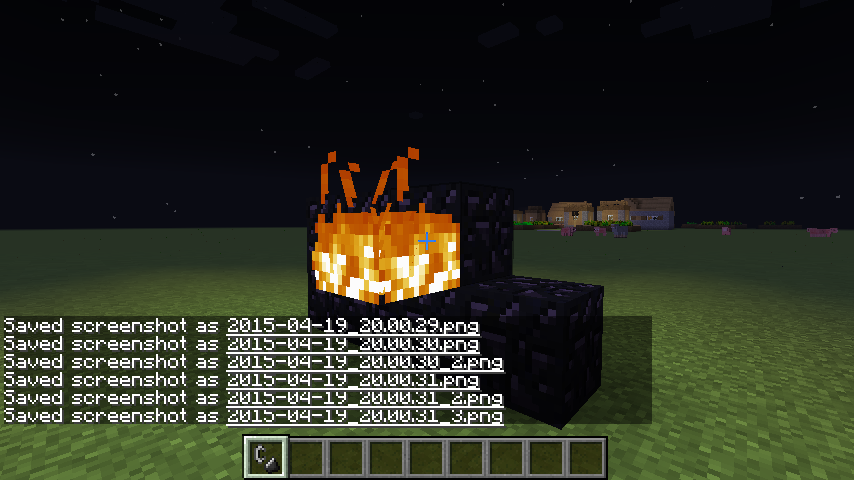
Flint and steel places fire at invalid positions, for example on the side of non-inflammable blocks like stone which causes the fire block to disappear the next time it is updated.
How to reproduce
- Right click with a flint and steel on a side of block that can't normally catch on fire (Stone for example).
- The fire block will appear for a tick.
Note: The fire does not set any entities at the position on fire.
Code analysis
The following is based on decompiled version of Minecraft 1.8 using MCP. All method and class names are the names used in the decompiled version.
The reason for this is that the fire block is actually created. However, the public void onBlockAdded(World worldIn, BlockPos pos, IBlockState state) method of the net.minecraft.block.BlockFire class is called right after it was placed and removes the block as it is at an invalid position.
This could / should be fixed by having the public boolean onItemUse(ItemStack stack, EntityPlayer playerIn, World worldIn, BlockPos pos, EnumFacing side, float hitX, float hitY, float hitZ) method of the net.minecraft.item.ItemFlintAndSteel class only place a fire block is the position is valid. Other items like the bucket might be affected as well, however currently you can place water and lava on every block so it causes no problems.
/**
 * Called when a Block is right-clicked with this Item
 *
 * @param pos The block being right-clicked
 * @param side The side being right-clicked
 */
public boolean onItemUse(ItemStack stack, EntityPlayer playerIn, World worldIn, BlockPos pos, EnumFacing side, float hitX, float hitY, float hitZ)
{
    pos = pos.offset(side);

    if (!playerIn.func_175151_a(pos, side, stack))
    {
        return false;
    }
    else
    {
        // Changed this
        //if (worldIn.getBlockState(pos).getBlock().getMaterial() == Material.air)
        if (worldIn.getBlockState(pos).getBlock().getMaterial() == Material.air && Blocks.fire.canPlaceBlockAt(worldIn, pos))
        {
            worldIn.playSoundEffect((double)pos.getX() + 0.5D, (double)pos.getY() + 0.5D, (double)pos.getZ() + 0.5D, "fire.ignite", 1.0F, itemRand.nextFloat() * 0.4F + 0.8F);
            worldIn.setBlockState(pos, Blocks.fire.getDefaultState());
        }

        stack.damageItem(1, playerIn);
        return true;
    }
}
Notes
- A similar fix would be needed for the fire_charge item and also for the net.minecraft.init.Bootstrap.registerDispenserBehaviors for these items.
- This fix does not include the use of these items at invalid locations to activate a Nether portal, which could then be moved from net.minecraft.block.BlockFire.onBlockAdded(World, BlockPos, IBlockState) to the respective methods when using an item to create a fire block.
Linked Issues
is duplicated by10
 MC-8202invinsible 1 tick farmland fireDuplicateMC-9695lighter works on wallDuplicateMC-13338Flint and steel lighting bugDuplicateMC-14820Using Flint&Steel in an unusable place causes it to still "light up" the areaDuplicateMC-30477Client fire flashesDuplicateMC-43018Sand Lighting GlitchDuplicateMC-60633Create single-frame flying fire using flint and steelDuplicateMC-68914Flint And Steel Cant Light The Side Of Blocks.DuplicateMC-1370Using Flint and Steel on non-ignitable blocks should be blockedDuplicateMC-1658If you burn one side of the block, for a moment there is lightDuplicate
relates to7
MC-57939Wrong Orientation for fire created on nonflammable block's sideFixedMC-105591Flint and Steel loses durability and fire charge is used up even if no fire was placedFixedMC-122651Flint and steel no longer creates fire on side of block / cause block updateInvalidMC-124649Nether portals can no longer be activated from the sideFixedMC-4438Items dropped on unburnable blocks turn invisible when trying to ignite the blockFixedMC-8232Dispensers and Flint & SteelCannot ReproduceMC-31346When you light a cobblestone wall, it turns into a corner piece for a secondFixedAttachments1
- Fixed
 FireHunterX
 Maria Lemón
- 17
- 18
- Confirmed
- fire flint_and_steel use-item
1.4.6 - 18w02a
1.4.6 1.4.7 13w02a 13w04a 1.5 13w11a 1.5.2 1.6.2 1.6.4 13w36b 13w37b 1.7.4 14w11b 14w27b 14w28a 1.8-pre2 1.8 1.8.1 1.8.2-pre1 1.8.4 1.8.7 1.8.9 16w05b 1.9-pre1 1.9 1.9.1-pre3 1.9.1 1.9.2 16w15b 1.10.2 16w32a 16w32b 16w33a 16w36a 16w38a 16w39b 16w39c 16w40a 16w41a 16w42a 16w43a 1.11-pre1 1.11 16w50a 1.11.1 1.11.2 17w06a 17w13b 17w15a 17w16b 17w17b 17w18b 1.12-pre2 1.12-pre6 1.12.1 1.12.2 17w45b 17w46a 17w47a 17w47b 17w48a 18w02a- 17w48a 18w05a
Created Issue:
Fire animation shows briefly when you aren't on fire
This can't be done in creative!
Here's how to reproduce because I can't really explain it that well.
1. Stand against a wall made from a material that will not catch fire if ignited on the side (Stone is a good example.)
2. Right click with a flint and steel.
3. The fire animation will play very quickly even though no fire was created.Environment
Java 7
OS X
This can't be done in creative!
Here's how to reproduce because I can't really explain it that well.
1. Stand against a wall made from a material that will not catch fire if ignited on the side (Stone is a good example.)
2. Right click with a flint and steel.
3. The fire animation will play very quickly even though no fire was created.Doesn't do any damage but is still a bug nonetheless.
Fire animation shows briefly when you aren't on fireFlint and Steel+Blocks that can't be set on fire+You standing against it
Flint and Steel+Blocks that can't be set on fire+You standing against it
This can't be done in creative!
Here's how to reproduce because I can't really explain it that well.
1. Stand against a wall made from a material that will not catch fire if ignited on the side (Stone is a good example.)
2. Right click with a flint and steel.
3. The fire animation will play very quickly as if you were on fire even though no fire was created.Doesn't do any damage but is still a bug nonetheless.

is duplicated by
is duplicated by

is duplicated by
relates to
is duplicated by

is duplicated by
is duplicated by
relates to
is duplicated by
![[Mod] Torabi](../../../data/assets/gravatar/torabi.png)
is duplicated by
relates to

Confirmed for 14w28a also with dispensers:
MC-8232
relates to
![[Mod] Ezekiel (ezfe)](../../../data/assets/gravatar/ezekielelin.jpeg)
Moderator NoteThis also applies to general fire showing up on the side of a block for a tick, not just the fire animation on your player screen
This can't be done in creative!
Here's how to reproduce because I can't really explain it that well.
1. Stand against a wall made from a material that will not catch fire if ignited on the side (Stone is a good example.)
2. Right click with a flint and steel.
3. The fire animation will play very quickly as if you were on fire even though no fire was created.Doesn't do any damage but is still a bug nonetheless.
is duplicated by
Moderator NoteThis also applies to general fire showing up on the side of a block for a tick, not just the fire animation on your player screen
This can't be done in creative!
Here's how to reproduce because I can't really explain it that well.
1. Stand against a wall made from a material that will not catch fire if ignited on the side (Stone is a good example.)
2. Right click with a flint and steel.
3. The fire animation will play very quickly as if you were on fire even though no fire was created.Doesn't do any damage but is still a bug nonetheless.


Moderator NoteThis also applies to general fire showing up on the side of a block for a tick, not just the fire animation on your player screen
This can't be done in creative!
Here's how to reproduce because I can't really explain it that well.
1. Stand against a wall made from a material that will not catch fire if ignited on the side (Stone is a good example.)
2. Right click with a flint and steel.
3. The fire animation will play very quickly as if you were on fire even though no fire was created.Doesn't do any damage but is still a bug nonetheless.
Moderator NoteThis also applies to general fire showing up on the side of a block for a tick, not just the fire animation on your player screen
How to reproduce:
- Right click with a flint and steel on a side of block that can't normally catch on fire (Stone for example).
- The fire block will appear for a tick.
- If you are close enough to it, the fire animation will play very quickly as if you were on fire, but it won't damage you.
Old description:
This can't be done in creative!
Here's how to reproduce because I can't really explain it that well.
1. Stand against a wall made from a material that will not catch fire if ignited on the side (Stone is a good example.)
2. Right click with a flint and steel.
3. The fire animation will play very quickly as if you were on fire even though no fire was created.Doesn't do any damage but is still a bug nonetheless.
Moderator NoteThis also applies to general fire showing up on the side of a block for a tick, not just the fire animation on your player screen
How to reproduce:
- Right click with a flint and steel on a side of block that can't normally catch on fire (Stone for example).
- The fire block will appear for a tick.
- If you are close enough to it, the fire animation will play very quickly as if you were on fire, but it won't damage you.
Old description:
This can't be done in creative!
Here's how to reproduce because I can't really explain it that well.
1. Stand against a wall made from a material that will not catch fire if ignited on the side (Stone is a good example.)
2. Right click with a flint and steel.
3. The fire animation will play very quickly as if you were on fire even though no fire was created.Doesn't do any damage but is still a bug nonetheless.
How to reproduce:
- Right click with a flint and steel on a side of block that can't normally catch on fire (Stone for example).
- The fire block will appear for a tick.
- If you are close enough to it, the fire animation will play very quickly as if you were on fire, but it won't damage you.
Old description:
This can't be done in creative!
Here's how to reproduce because I can't really explain it that well.
1. Stand against a wall made from a material that will not catch fire if ignited on the side (Stone is a good example.)
2. Right click with a flint and steel.
3. The fire animation will play very quickly as if you were on fire even though no fire was created.Doesn't do any damage but is still a bug nonetheless.
How to reproduce:
- Right click with a flint and steel on a side of block that can't normally catch on fire (Stone for example).
- The fire block will appear for a tick.
- If you are close enough to it, the fire animation will play very quickly as if you were on fire, but it won't damage you.
Old description:
This can't be done in creative!
Here's how to reproduce because I can't really explain it that well.
1. Stand against a wall made from a material that will not catch fire if ignited on the side (Stone is a good example.)
2. Right click with a flint and steel.
3. The fire animation will play very quickly as if you were on fire even though no fire was created.Doesn't do any damage but is still a bug nonetheless.
How to reproduce:
- Right click with a flint and steel on a side of block that can't normally catch on fire (Stone for example).
- The fire block will appear for a tick.
- If you are in survival and close enough to it, the fire animation will play very quickly as if you were on fire, but it won't damage you.
Old description:
This can't be done in creative!
Here's how to reproduce because I can't really explain it that well.
1. Stand against a wall made from a material that will not catch fire if ignited on the side (Stone is a good example.)
2. Right click with a flint and steel.
3. The fire animation will play very quickly as if you were on fire even though no fire was created.Doesn't do any damage but is still a bug nonetheless.
![[Mod] Michael Wobst](../../../data/avatars/users/37868.png)
How to reproduce:
- Right click with a flint and steel on a side of block that can't normally catch on fire (Stone for example).
- The fire block will appear for a tick.
- If you are in survival and close enough to it, the fire animation will play very quickly as if you were on fire, but it won't damage you.
Old description:
This can't be done in creative!
Here's how to reproduce because I can't really explain it that well.
1. Stand against a wall made from a material that will not catch fire if ignited on the side (Stone is a good example.)
2. Right click with a flint and steel.
3. The fire animation will play very quickly as if you were on fire even though no fire was created.Doesn't do any damage but is still a bug nonetheless.
How to reproduce:
- Right click with a flint and steel on a side of block that can't normally catch on fire (Stone for example).
- The fire block will appear for a tick.
- If you are in survival and close enough to it, the fire animation will play very quickly as if you were on fire, but it won't damage you.
Code analysis by Marcono1234 can be found in this comment.
Old description:
This can't be done in creative!
Here's how to reproduce because I can't really explain it that well.
1. Stand against a wall made from a material that will not catch fire if ignited on the side (Stone is a good example.)
2. Right click with a flint and steel.
3. The fire animation will play very quickly as if you were on fire even though no fire was created.Doesn't do any damage but is still a bug nonetheless.
Java 7
OS X
Flint andSteel+Blocks that can't be set on fireFlint and steel can place fire at invalid positions
How to reproduce:
- Right click with a flint and steel on a side of block that can't normally catch on fire (Stone for example).
- The fire block will appear for a tick.
- If you are in survival and close enough to it, the fire animation will play very quickly as if you were on fire, but it won't damage you.
Code analysis by Marcono1234 can be found in this comment.
Old description:
This can't be done in creative!
Here's how to reproduce because I can't really explain it that well.
1. Stand against a wall made from a material that will not catch fire if ignited on the side (Stone is a good example.)
2. Right click with a flint and steel.
3. The fire animation will play very quickly as if you were on fire even though no fire was created.Doesn't do any damage but is still a bug nonetheless.
The bug
Flint and steel places fire at invalid positions, for example on the side of non-inflammable blocks like stone which causes the fire block to disappear the next time it is updated.
How to reproduce
- Right click with a flint and steel on a side of block that can't normally catch on fire (Stone for example).
- The fire block will appear for a tick.
Note: The fire does not set any entities at the position on fire.
Code analysis
The following is based on decompiled version of Minecraft 1.8 using MCP. All method and class names are the names used in the decompiled version.
The reason for this is that the fire block is actually created. However, the public void onBlockAdded(World worldIn, BlockPos pos, IBlockState state) method of the net.minecraft.block.BlockFire class is called right after it was placed and removes the block as it is at an invalid position.
This could / should be fixed by having the public boolean onItemUse(ItemStack stack, EntityPlayer playerIn, World worldIn, BlockPos pos, EnumFacing side, float hitX, float hitY, float hitZ) method of the net.minecraft.item.ItemFlintAndSteel class only place a fire block is the position is valid. Other items like the bucket might be affected as well, however currently you can place water and lava on every block so it causes no problems./** * Called when a Block is right-clicked with this Item * * @param pos The block being right-clicked * @param side The side being right-clicked */ public boolean onItemUse(ItemStack stack, EntityPlayer playerIn, World worldIn, BlockPos pos, EnumFacing side, float hitX, float hitY, float hitZ) { pos = pos.offset(side); if (!playerIn.func_175151_a(pos, side, stack)) { return false; } else { // Changed this //if (worldIn.getBlockState(pos).getBlock().getMaterial() == Material.air) if (worldIn.getBlockState(pos).getBlock().getMaterial() == Material.air && Blocks.fire.canPlaceBlockAt(worldIn, pos)) { worldIn.playSoundEffect((double)pos.getX() + 0.5D, (double)pos.getY() + 0.5D, (double)pos.getZ() + 0.5D, "fire.ignite", 1.0F, itemRand.nextFloat() * 0.4F + 0.8F); worldIn.setBlockState(pos, Blocks.fire.getDefaultState()); } stack.damageItem(1, playerIn); return true; } }Notes
- A similar fix would be needed for the fire_charge item and also for the net.minecraft.init.Bootstrap.registerDispenserBehaviors for these items.
- This fix does not include the use of these items at invalid locations to activate a Nether portal, which could then be moved from net.minecraft.block.BlockFire.onBlockAdded(World, BlockPos, IBlockState) to the respective methods when using an item to create a fire block.
![[Mod] tryashtar](../../../data/avatars/users/41963.png)
![[Mod] Neko](../../../data/avatars/users/92901.png) Maria Lemón
Maria Lemón![[Mod] violine1101](../../../data/avatars/users/92858.png)
relates to
Flint and steel and fire charges can place fire at invalid positions
relates to
relates to
This ticket has been marked as a duplicate of MC-4923, in favor of the better description/information provided.
Duplicate of MC-4923, please use the search function to see if your bug has already been submitted. Currently over 55% of tickets are being closed as duplicate.
Apologies. Also just found a related bug report (which I guess I duplicated).
How is this different from MC-4923?
Very old bug. Duplicate of MC-4923.
Confirmed for 14w28a
But Torabi is somehow correct, it seems like the dispenser is also creating a "wrong" fire which gets removed instantly (you can test this by placing a BUD there)
So this is also a part of MC-4923 and also the bug it is really describing is that you can't put Netherrack at the sides on fire
Duplicate of MC-4923 – If you have not, please use the search function in the future, to see if your bug has already been submitted.
What you are talking about is probably MC-4923. This one here happens also when no fire is placed at all.
![[Helper] Michał](../../../data/avatars/users/43368.png)
This bug is caused by fixing MC-4923.
Previously players used flint and steel to activate buds and observers without placing blocks. Since 17w48a this feature was removed. I know it looks like intended behaviour technically, but I think removing worldwide used feature, even when basing on bug, was not intended.
The difference between removing this feature and fence-starter of item elevator is that there is no other method to manually activate observers than flint and steel, when item elevators can be easily redesigned.
In this case I have to ask mods to not close this report and leave it for devs to check it out. This is not the first time when bugfix removed/broke feature. There are examples of rollbacking bugfix or readding feature as exception.

This seems to be reporting the opposite of MC-4923 (fire can be placed, but disappears), which got fixed (no more fire placed) (meaning that it cannot create fire there is intended).
I don't think this is a bug. I'm pretty sure that flash of fire is how a nether portal knows it needs to be lit.
You can set the top of a non-flammable block on fire, not the side. Fire will appear if you right-click the top of the block, but it won't if you click on the side.
I'm talking about when you right click the side.
Is this still a concern in the latest Minecraft version 14w08a? If so, please update the affected versions in order to best aid Mojang ensuring bugs are still valid in the latest releases/pre-releases.
Confirmed for 14w27b.
Confirmed for 14w28a
Also somehow with dispensers:
MC-8232Confirmed for 1.8-pre2.
Still in 1.8.
Still in 1.8.1. Strangely, this does not occur with fire charges.
Confirmed for 1.8.2-pre1.
Still in 16w05b
Also, this can be done in creative.
Confirmed for 1.9-pre1
Please link to this comment in the description of the report.
The following is based on decompiled version of Minecraft 1.8 using MCP. All method and class names are the names used in the decompiled version.
The reason for this is that the fire block is actually created. However, the public void onBlockAdded(World worldIn, BlockPos pos, IBlockState state) method of the net.minecraft.block.BlockFire class is called right after it was placed and removes the block as it is at an invalid position.
This could / should be fixed by having the public boolean onItemUse(ItemStack stack, EntityPlayer playerIn, World worldIn, BlockPos pos, EnumFacing side, float hitX, float hitY, float hitZ) method of the net.minecraft.item.ItemFlintAndSteel class only place a fire block is the position is valid. Other items like the bucket might be affected as well, however currently you can place water and lava on every block so it causes no problems.
Notes:
Confirmed for 1.9
Still in 1.9.1-pre3
Still in 1.9.2
Still in 16w15b
1. Is this the same bug as when clicking on the top of a non-flammable block?
2. Is the usage of one durability point when doing that also a bug?
3. Would fixing this bug prevent people from causing block updates with flint and steel e.g. on slime block machines?
I might create a report for that.It is nowMC-105591Confirmed for 16w42a
Alexander, it was already marked as affected
Sorry I was only looking at the comments not the versions.
Up to now flint and steel was used to update observers manually, but since that fix it won't work. I think that fixing 1-tick fire as bug destroys feature of manual activating observers by flint and steel without placing block. This is used by many youtubers and players. Should I report a new bug with future version affected?
No don't make reports for versions that aren't even released yet, and don't bother after the snapshot is released either. The fix will be the intended behavior, so if you report it, it will be resolved as works as intended really fast.
at least provide an intended alternative for this widely used behaviour without any downsides.
so to summ this up: dont make reports about old versions, dont make reports about not released versions and the version thats full release right now counts to old version already bc mojang is already in the snapshot development. I would realy like to know when its appropiate to make any bugreports at all from you FVBico!
@Jack That's incorrect, reports for the latest release are always accepted (currently 1.12.2)
so 1.12.2 is still worked on? we both know nothing is going to change in 1.12.2 nor is there gonna be a 1.12.3 especially not since snapshots are beeing worked on i just think its realy funny how 1 moderator on this bugtacker usually makes completly false statements , tells ppl to not even bother making reports etc. if we shouldnt report bugs in snapshots why are snapshots beeing made? whats the point of this bugtracker ?
Please re-read user-f2760's comment, he never said that reports for the current release aren't accepted; he just said that reports for future snapshots and releases aren't accepted before those versions are released, and that the new behaviour is very highly likely most definitely probably certainly intended and won't change.
Also, no off-topic comments anymore here, please.
@FVbico I will report that tho. This maybe was a bug based feature, but used worldwide and accepted as a feature that was removed since 17w48a. I can only ask mods to not closing it and leaving it for devs to look at our-gamers problem.
New report:
MC-122651Not fixed for fire charges, they have the same problem.
As of 18w02a it no longer creates a fire block (it seems), but still triggers observers and BUD pistons.